18. Writing SGBD-independent code
We saw earlier that in some cases it was possible to easily migrate Python code written for SGBD and MySQL to code written for SGBD and PostgreSQL. In this chapter, we show how to systematize this approach. The proposed architecture is as follows:
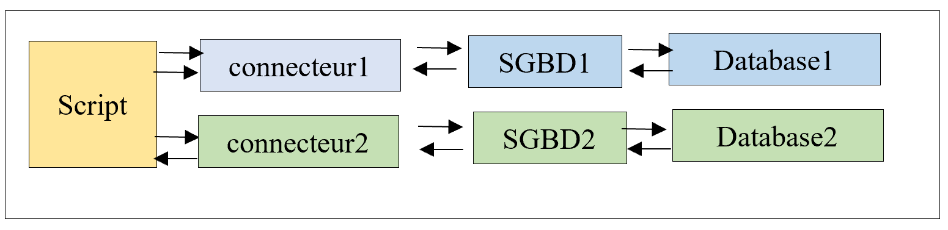
We want the choice of connector—and thus of SGBD—to be made via configuration and not require rewriting the script. Note that this is only possible in cases where the script does not use SGBD-specific extensions.
The script directory structure will be as follows:
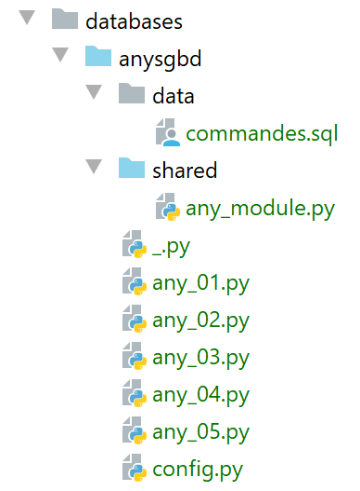
The [any_xx] scripts are based on the scripts already examined for SGBD, MySQL, and PostgreSQL. We will not go over all of them. We will focus on the [any_04] script, which is the most complex. Note that this script executes the SQL commands from the following [data/commandes.sql] file:
# delete [personnes] table
drop table if exists personnes
# create people table
create table personnes (id int primary key, prenom varchar(30) not null, nom varchar(30) not null, age integer not null, unique (nom,prenom))
# integration of two people
insert into personnes(id, prenom, nom, age) values(1, 'Paul','Langevin',48)
insert into personnes(id, prenom, nom, age) values (2, 'Sylvie','Lefur',70)
# table display
select prenom, nom, age from personnes
# deliberate error
xx
# integration of three people
insert into personnes(id, prenom, nom, age) values (3, 'Pierre','Nicazou',35)
insert into personnes(id, prenom, nom, age) values (4, 'Geraldine','Colou',26)
insert into personnes(id, prenom, nom, age) values (5, 'Paulette','Girond',56)
# table display
select prenom, nom, age from personnes
# list of persons in alphabetical order of surnames and, for equal surnames, in alphabetical order of first names
select nom,prenom from personnes order by nom asc, prenom desc
# list of people with an age in the range [20,40] in descending order of age
# then for equal ages in alphabetical order of surnames and for equal surnames in alphabetical order of first names
select nom,prenom,age from personnes where age between 20 and 40 order by age desc, nom asc, prenom asc
# insertion of mrs Bruneau
insert into personnes(id, prenom, nom, age) values(6, 'Josette','Bruneau',46)
# update your age
update personnes set age=47 where nom='Bruneau'
# list of people named Bruneau
select nom,prenom,age from personnes where nom='Bruneau'
# deletion of Mme Bruneau
delete from personnes where nom='Bruneau'
# list of people named Bruneau
select nom,prenom,age from personnes where nom='Bruneau'
We have modified line 2 so that the command behaves the same way for SGBD, MySQL, and PostgreSQL if the table [personnes] does not exist.
The [any_04] script is configured by the following [config.py] script:
def configure():
    import os

    # absolute path of this script's folder
    script_dir = os.path.dirname(os.path.abspath(__file__))

    # syspath folder configuration
    absolute_dependencies = [
        # local files
        f"{script_dir}/shared",
    ]

    # syspath mounting
    from myutils import set_syspath
    set_syspath(absolute_dependencies)

    # application configuration
    config = {
        # managed sgbd
        "sgbds": {
            "mysql": {
                # sgbd connector
                "sgbd_connector": "mysql.connector",
                # name of the module containing sgbd management functions
                "sgbd_fonctions": "any_module",
                # login credentials
                "user": "admpersonnes",
                "password": "nobody",
                "host": "localhost",
                "database": "dbpersonnes"
            },
            "postgresql": {
                # sgbd connector
                "sgbd_connector": "psycopg2",
                # name of the module containing sgbd management functions
                "sgbd_fonctions": "any_module",
                # login credentials
                "user": "admpersonnes",
                "password": "nobody",
                "host": "localhost",
                "database": "dbpersonnes"
            }
        },
        # command file SQL
        "commands_filename": f"{script_dir}/data/commandes.sql"
    }
    # application syspath
    from myutils import set_syspath
    set_syspath(absolute_dependencies)

    # we return the config
    return config
The new feature is in lines 18–43:
- line 20: [sgbds] is a dictionary with two keys: [mysql] on line 21 and [postgresql] on line 32;
- the value associated with these keys is a dictionary containing the elements needed to connect to a SGBD:
- lines 21–32: the elements of a connection to SGBD MySQL;
- line 23: the Python connector to use;
- line 25: the module containing shared functions;
- lines 26–30: the connection credentials;
- lines 32–41: the same elements for a connection to SGBD PostgreSQL;
The [any_04] script that executes the SQL [data/commandes.sql] batch file is as follows:
# configure the application
import config

config = config.configure()

# syspath is configured - imports can be made
import importlib
import sys

# check call syntax
# argv[0] sgbd_name true / false
# 3 parameters are required
args = sys.argv
erreur = len(args) != 3
if not erreur:
    # we retrieve the two parameters of interest
    sgbd_name = args[1].lower()
    with_transaction = args[2].lower()
    # check both parameters
    erreur = (with_transaction != "true" and with_transaction != "false") \
             or sgbd_name not in config["sgbds"].keys()
# mistake?
if erreur:
    print(f"syntaxe : {args[0]} (1) sgbd_name (2) true / false")
    sys.exit()

# sgbd_name configuration
sgbd_config = config["sgbds"][sgbd_name]
# sgbd_name connector
sgbd_connector = importlib.import_module(sgbd_config["sgbd_connector"])
# function library
lib = importlib.import_module(sgbd_config["sgbd_fonctions"])


# calculation of text to be displayed
with_transaction = with_transaction == "true"
if with_transaction:
    texte = "avec transaction"
else:
    texte = "sans transaction"

# display
commands_filename=config['commands_filename']
print("--------------------------------------------------------------------")
print(f"Exécution du fichier SQL {commands_filename} {texte}")
print("--------------------------------------------------------------------")

# execution of SQL orders in the file
connexion = None
try:
    # connection
    connexion = sgbd_connector.connect(
        host=sgbd_config['host'],
        user=sgbd_config['user'],
        password=sgbd_config['password'],
        database=sgbd_config['database'])
    # execution of SQL command file
    erreurs = lib.execute_file_of_commands(sgbd_connector, connexion, commands_filename, suivi=True, arrêt=False,
                                           with_transaction=with_transaction)
except (sgbd_connector.InterfaceError, sgbd_connector.DatabaseError) as erreur:
    print(f"L'erreur suivante s'est produite : {erreur}")
finally:
    # closing the connection
    if connexion:
        connexion.close()

# display number of errors
print("--------------------------------------------------------------------")
print(f"Exécution terminée")
print("--------------------------------------------------------------------")
print(f"Il y a eu {len(erreurs)} erreur(s)")
# error display
for erreur in erreurs:
    print(erreur)
Comments
- lines 1-4: retrieve the [config] configuration for the application;
- lines 10-21: the script is called with two parameters [sgbd_name with_transaction]:
- [sgbd_name]: the name of the SGBD to use;
- [with_transaction]: True if you want to execute the SQL command file within a transaction, False otherwise;
- lines 10–25: parameters are retrieved and verified;
- line 28: configuration of the selected SGBD;
- line 30: the connector for the selected SGBD is imported. To do this, the [importlib] library (line 7) is used, which allows importing a module whose name is stored in a variable. The result of the [importlib.import_module] operation is a module. Thus, after line 30, everything proceeds as if the executed instruction had been:
This allows us to write line 52 [sgbd_connector.connect], where we use the function [connect] from the module [sgbd_connector]. It is important to remember here that [sgbd_connector] is either [mysql.connector] or [psycopg2]. Both of these modules have the function [connect]. Similarly, on line 60, you can write [sgbd_connector.InterfaceError, sgbd_connector.DatabaseError].
- Line 32: the module containing the functions used by the script is imported;
- Line 58: We execute the [execute_file_of_commands] function from the module containing the functions used by the script. Compared to previous versions, this function’s signature has one additional parameter, the first one. We pass the Python connector [sgbd_connector] to the function, which it must use;
- Apart from these points, the [any_04] script remains unchanged from previous versions;
The function library [any_module] is as follows:
# ---------------------------------------------------------------------------------

def afficher_infos(curseur):
    …


# ---------------------------------------------------------------------------------
def execute_list_of_commands(sgbd_connector, connexion, sql_commands: list,
                             suivi: bool = False, arrêt: bool = True, with_transaction: bool = True):
    …

    # initializations
    curseur = None
    connexion.autocommit = not with_transaction
    erreurs = []
    try:
        # a cursor is requested
        curseur = connexion.cursor()
        # execution of sql_commands SQL contained in sql_commands
        # they are executed one by one
        for command in sql_commands:
            # eliminates blanks at the beginning and end of the current command
            command = command.strip()
            # is there an empty command or a comment? If so, move on to the next command
            if command == '' or command[0] == "#":
                continue
            # execute current command
            error = None
            try:
                curseur.execute(command)
            except (sgbd_connector.InterfaceError, sgbd_connector.DatabaseError) as erreur:
                error = erreur
            # was there a mistake?
            …


# ---------------------------------------------------------------------------------
def execute_file_of_commands(sgbd_connector, connexion, sql_filename: str,
                             suivi: bool = False, arrêt: bool = True, with_transaction: bool = True):
    …

    # use of the SQL file
    try:
        # open file for reading
        file = open(sql_filename, "r")
        # operation
        return execute_list_of_commands(sgbd_connector, connexion, file.readlines(), suivi, arrêt, with_transaction)
    except BaseException as erreur:
        # an error table is returned
        return [f"Le fichier {sql_filename} n'a pu être être exploité : {erreur}"]
    finally:
        pass
The [sgbd_connector] parameter was used on line 31 to specify the type of intercepted exceptions.
Running the [any_04] script with the [mysql false] parameters yields the following results:
C:\Data\st-2020\dev\python\cours-2020\python3-flask-2020\venv\Scripts\python.exe C:/Data/st-2020/dev/python/cours-2020/python3-flask-2020/databases/anysgbd/any_04.py mysql false
--------------------------------------------------------------------
Exécution du fichier SQL C:\Data\st-2020\dev\python\cours-2020\python3-flask-2020\databases\anysgbd/data/commandes.sql sans transaction
--------------------------------------------------------------------
[drop table if exists personnes] : Exécution réussie
nombre de lignes modifiées : 0
[create table personnes (id int primary key, prenom varchar(30) not null, nom varchar(30) not null, age integer not null, unique (nom,prenom))] : Exécution réussie
nombre de lignes modifiées : 0
[insert into personnes(id, prenom, nom, age) values(1, 'Paul','Langevin',48)] : Exécution réussie
nombre de lignes modifiées : 1
[insert into personnes(id, prenom, nom, age) values (2, 'Sylvie','Lefur',70)] : Exécution réussie
nombre de lignes modifiées : 1
[select prenom, nom, age from personnes] : Exécution réussie
prenom, nom, age,
*****************
('Paul', 'Langevin', 48)
('Sylvie', 'Lefur', 70)
*****************
xx : Erreur (1064 (42000): You have an error in your SQL syntax; check the manual that corresponds to your MySQL server version for the right syntax to use near 'xx' at line 1)
[insert into personnes(id, prenom, nom, age) values (3, 'Pierre','Nicazou',35)] : Exécution réussie
nombre de lignes modifiées : 1
[insert into personnes(id, prenom, nom, age) values (4, 'Geraldine','Colou',26)] : Exécution réussie
nombre de lignes modifiées : 1
[insert into personnes(id, prenom, nom, age) values (5, 'Paulette','Girond',56)] : Exécution réussie
nombre de lignes modifiées : 1
[select prenom, nom, age from personnes] : Exécution réussie
prenom, nom, age,
*****************
('Paul', 'Langevin', 48)
('Sylvie', 'Lefur', 70)
('Pierre', 'Nicazou', 35)
('Geraldine', 'Colou', 26)
('Paulette', 'Girond', 56)
*****************
[select nom,prenom from personnes order by nom asc, prenom desc] : Exécution réussie
nom, prenom,
************
('Colou', 'Geraldine')
('Girond', 'Paulette')
('Langevin', 'Paul')
('Lefur', 'Sylvie')
('Nicazou', 'Pierre')
************
[select nom,prenom,age from personnes where age between 20 and 40 order by age desc, nom asc, prenom asc] : Exécution réussie
nom, prenom, age,
*****************
('Nicazou', 'Pierre', 35)
('Colou', 'Geraldine', 26)
*****************
[insert into personnes(id, prenom, nom, age) values(6, 'Josette','Bruneau',46)] : Exécution réussie
nombre de lignes modifiées : 1
[update personnes set age=47 where nom='Bruneau'] : Exécution réussie
nombre de lignes modifiées : 1
[select nom,prenom,age from personnes where nom='Bruneau'] : Exécution réussie
nom, prenom, age,
*****************
('Bruneau', 'Josette', 47)
*****************
[delete from personnes where nom='Bruneau'] : Exécution réussie
nombre de lignes modifiées : 1
[select nom,prenom,age from personnes where nom='Bruneau'] : Exécution réussie
nom, prenom, age,
*****************
*****************
--------------------------------------------------------------------
Exécution terminée
--------------------------------------------------------------------
Il y a eu 1 erreur(s)
xx : Erreur (1064 (42000): You have an error in your SQL syntax; check the manual that corresponds to your MySQL server version for the right syntax to use near 'xx' at line 1)

Process finished with exit code 0