10. Practical Exercise: version 2
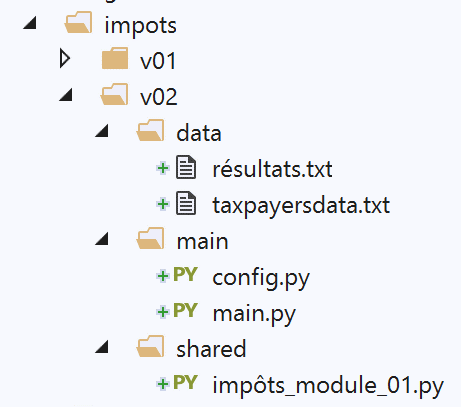
This new version introduces the following [config.py] file:
def configure():
    import os

    # absolute path of this script's folder
    script_dir = os.path.dirname(os.path.abspath(__file__))

    # root from which certain relative paths are measured
    root_dir = "C:/Data/st-2020/dev/python/cours-2020/python3-flask-2020/impots"

    # application dependencies
    absolute_dependencies = [
        f"{root_dir}/v01/shared",
    ]

    # application configuration
    config = {
        # absolute path of the taxpayer file
        "taxpayersFilename": f"{script_dir}/../data/taxpayersdata.txt",
        # absolute path of the results file
        "resultsFilename": f"{script_dir}/../data/résultats.txt"
    }

    # update syspath
    from myutils import set_syspath
    set_syspath(absolute_dependencies)

    # we return the config
    return config
Comments
- line 5: we retrieve the absolute path of the folder containing the script being executed, in this case the script [config.py]. We thus obtain the absolute path of the folder [main]. This is also the folder containing the main script [main.py];
- Line 8: When a referenced file does not belong to the application folder, we will not use [script_dir] to locate it, but rather [root_dir]. This line must be changed as soon as the application moves to a different location in the file system;
- Lines 11–13: We list the absolute paths of all the folders that must be present in the Python directory Path for the application to function. Line 12 references the [shared] folder from version 1 in the application exercise;
- Lines 16–21: define the application configuration in a [config] dictionary. Here, we enter the absolute paths of the text files handled by the application. To do this, we use [script_dir], which, as a reminder, refers here to the [main] folder;
- Lines 24–25: We specify the Python version Path required by the application;
The main script [main.py] is as follows:
# configure the application
import config

config = config.configure()

# syspath is configured - imports can be made
from impôts_module_01 import calcul_impôt, record_results, get_taxpayers_data

# taxpayer file
taxpayers_filename = config['taxpayersFilename']
# results file
results_filename = config['resultsFilename']

# code
try:

    # reading taxpayer data
    taxpayers = get_taxpayers_data(taxpayers_filename)
    # results list
    results = []
    # taxpayers' taxes are calculated
    for taxpayer in taxpayers:
        # tax calculation returns a dictionary of keys
        # ['marié', 'enfants', 'salaire', 'impôt', 'surcôte', 'décôte', 'réduction', 'taux']
        result = calcul_impôt(taxpayer['marié'], taxpayer['enfants'], taxpayer['salaire'])
        # the dictionary is added to the list of results
        results.append(result)
    # we record the results
    record_results(results_filename, results)
except BaseException as erreur:
    # there may be various errors: no file, incorrect file content
    # display the error and exit the application
    print(f"L'erreur suivante s'est produite : {erreur}]\n")
finally:
    print("Travail terminé...")
Comments
- lines 1-4: the application is configured;
- line 7: we know that after configuration, the Python Path is correct and contains, in particular, the folder [shared], which contains the script [impôts_module_01]. From this script, we import the functions we need;
- lines 9–12: the names of the files used are found in the configuration. These are absolute paths;
- lines 14–35: the code from version 1 is included;
version 1 did not work in a Python console. In the same console, version 2 produces the following results:
No errors are encountered now.