18. Writing DBMS-Independent Code
We saw earlier that in some cases it was possible to easily migrate Python code written for the MySQL DBMS to code written for the PostgreSQL DBMS. In this chapter, we show how to systematize this approach. The proposed architecture is as follows:
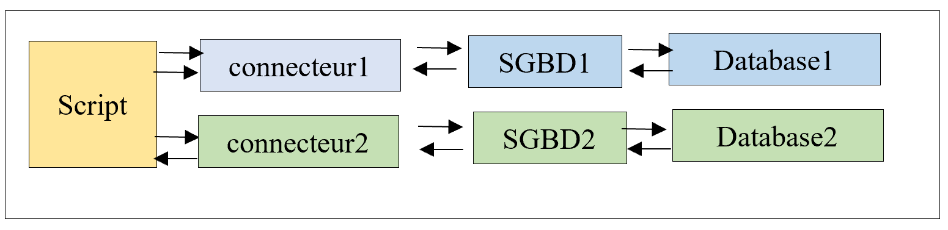
We want the choice of connector—and therefore of the DBMS—to be made via configuration and not require rewriting the script. Note that this is only possible in cases where the script does not use proprietary DBMS extensions.
The script directory structure will be as follows:
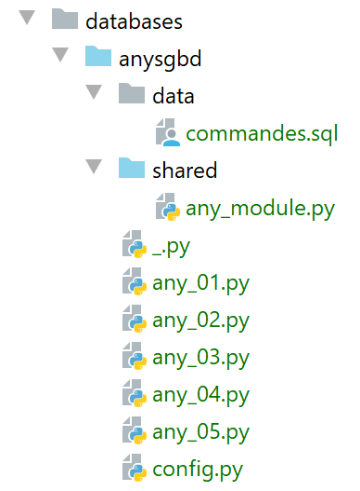
The [any_xx] scripts are based on the scripts already covered for the MySQL and PostgreSQL DBMSs. We will not go over all of them. We will focus on the [any_04] script, which is the most complex. Note that this script executes the SQL commands from the following [data/commandes.sql] file:
# suppression de la table [personnes]
drop table if exists personnes
# création de la table personnes
create table personnes (id int primary key, prenom varchar(30) not null, nom varchar(30) not null, age integer not null, unique (nom,prenom))
# insertion de deux personnes
insert into personnes(id, prenom, nom, age) values(1, 'Paul','Langevin',48)
insert into personnes(id, prenom, nom, age) values (2, 'Sylvie','Lefur',70)
# affichage de la table
select prenom, nom, age from personnes
# erreur volontaire
xx
# insertion de trois personnes
insert into personnes(id, prenom, nom, age) values (3, 'Pierre','Nicazou',35)
insert into personnes(id, prenom, nom, age) values (4, 'Geraldine','Colou',26)
insert into personnes(id, prenom, nom, age) values (5, 'Paulette','Girond',56)
# affichage de la table
select prenom, nom, age from personnes
# liste des personnes par ordre alphabétique des noms et à nom égal par ordre alphabétique des prénoms
select nom,prenom from personnes order by nom asc, prenom desc
# liste des personnes ayant un âge dans l'intervalle [20,40] par ordre décroissant de l'âge
# puis à âge égal par ordre alphabétique des noms et à nom égal par ordre alphabétique des prénoms
select nom,prenom,age from personnes where age between 20 and 40 order by age desc, nom asc, prenom asc
# insertion de mme Bruneau
insert into personnes(id, prenom, nom, age) values(6, 'Josette','Bruneau',46)
# mise à jour de son âge
update personnes set age=47 where nom='Bruneau'
# liste des personnes ayant Bruneau pour nom
select nom,prenom,age from personnes where nom='Bruneau'
# suppression de Mme Bruneau
delete from personnes where nom='Bruneau'
# liste des personnes ayant Bruneau pour nom
select nom,prenom,age from personnes where nom='Bruneau'
We modified line 2 so that the command behaves the same way for both MySQL and PostgreSQL DBMSs if the [people] table does not exist.
The [any_04] script is configured by the following [config.py] script:
The new changes are in lines 18–43:
- line 20: [sgbds] is a dictionary with two keys: [mysql] on line 21 and [postgresql] on line 32;
- the value associated with these keys is a dictionary containing the elements needed to connect to a DBMS:
- lines 21–32: the elements for connecting to the MySQL DBMS;
- line 23: the Python connector to use;
- line 25: the module containing shared functions;
- lines 26–30: the connection credentials;
- lines 32–41: the same elements for a connection to the PostgreSQL DBMS;
The script [any_04] that executes the SQL command file [data/commandes.sql] is as follows:
Comments
- lines 1-4: retrieve the application configuration [config];
- lines 10-21: the script is called with two parameters [db_name with_transaction]:
- [db_name]: the name of the database management system to use;
- [with_transaction]: True if you want to execute the SQL script within a transaction, False otherwise;
- lines 10–25: the parameters are retrieved and verified;
- line 28: configuration of the selected DBMS;
- line 30: the connector for the selected DBMS is imported. To do this, the [importlib] library (line 7) is used, which allows importing a module whose name is stored in a variable. The result of the [importlib.import_module] operation is a module. Thus, after line 30, everything proceeds as if the executed statement had been:
This allows us to write [sgbd_connector.connect] on line 52, where we use the [connect] function of the [sgbd_connector] module. It is important to remember here that [sgbd_connector] is either [mysql.connector] or [psycopg2]. Both of these modules have the [connect] function. Similarly, on line 60, we can write [sgbd_connector.InterfaceError, sgbd_connector.DatabaseError].
- Line 32: We import the module containing the functions used by the script;
- Line 58: The [execute_file_of_commands] function from the module containing the functions used by the script is called. Compared to previous versions, this function’s signature has one additional parameter—the first one. We pass the Python connector [sgbd_connector] to the function for it to use;
- Apart from these points, the [any_04] script remains unchanged from previous versions;
The [any_module] function library is as follows:
The [sgbd_connector] parameter was used on line 31 to specify the type of intercepted exceptions.
Running the [any_04] script with the parameters [mysql false] yields the following results:
C:\Data\st-2020\dev\python\cours-2020\python3-flask-2020\venv\Scripts\python.exe C:/Data/st-2020/dev/python/cours-2020/python3-flask-2020/databases/anysgbd/any_04.py mysql false
--------------------------------------------------------------------
Exécution du fichier SQL C:\Data\st-2020\dev\python\cours-2020\python3-flask-2020\databases\anysgbd/data/commandes.sql sans transaction
--------------------------------------------------------------------
[drop table if exists personnes] : Exécution réussie
nombre de lignes modifiées : 0
[create table personnes (id int primary key, prenom varchar(30) not null, nom varchar(30) not null, age integer not null, unique (nom,prenom))] : Exécution réussie
nombre de lignes modifiées : 0
[insert into personnes(id, prenom, nom, age) values(1, 'Paul','Langevin',48)] : Exécution réussie
nombre de lignes modifiées : 1
[insert into personnes(id, prenom, nom, age) values (2, 'Sylvie','Lefur',70)] : Exécution réussie
nombre de lignes modifiées : 1
[select prenom, nom, age from personnes] : Exécution réussie
prenom, nom, age,
*****************
('Paul', 'Langevin', 48)
('Sylvie', 'Lefur', 70)
*****************
xx : Erreur (1064 (42000): You have an error in your SQL syntax; check the manual that corresponds to your MySQL server version for the right syntax to use near 'xx' at line 1)
[insert into personnes(id, prenom, nom, age) values (3, 'Pierre','Nicazou',35)] : Exécution réussie
nombre de lignes modifiées : 1
[insert into personnes(id, prenom, nom, age) values (4, 'Geraldine','Colou',26)] : Exécution réussie
nombre de lignes modifiées : 1
[insert into personnes(id, prenom, nom, age) values (5, 'Paulette','Girond',56)] : Exécution réussie
nombre de lignes modifiées : 1
[select prenom, nom, age from personnes] : Exécution réussie
prenom, nom, age,
*****************
('Paul', 'Langevin', 48)
('Sylvie', 'Lefur', 70)
('Pierre', 'Nicazou', 35)
('Geraldine', 'Colou', 26)
('Paulette', 'Girond', 56)
*****************
[select nom,prenom from personnes order by nom asc, prenom desc] : Exécution réussie
nom, prenom,
************
('Colou', 'Geraldine')
('Girond', 'Paulette')
('Langevin', 'Paul')
('Lefur', 'Sylvie')
('Nicazou', 'Pierre')
************
[select nom,prenom,age from personnes where age between 20 and 40 order by age desc, nom asc, prenom asc] : Exécution réussie
nom, prenom, age,
*****************
('Nicazou', 'Pierre', 35)
('Colou', 'Geraldine', 26)
*****************
[insert into personnes(id, prenom, nom, age) values(6, 'Josette','Bruneau',46)] : Exécution réussie
nombre de lignes modifiées : 1
[update personnes set age=47 where nom='Bruneau'] : Exécution réussie
nombre de lignes modifiées : 1
[select nom,prenom,age from personnes where nom='Bruneau'] : Exécution réussie
nom, prenom, age,
*****************
('Bruneau', 'Josette', 47)
*****************
[delete from personnes where nom='Bruneau'] : Exécution réussie
nombre de lignes modifiées : 1
[select nom,prenom,age from personnes where nom='Bruneau'] : Exécution réussie
nom, prenom, age,
*****************
*****************
--------------------------------------------------------------------
Exécution terminée
--------------------------------------------------------------------
Il y a eu 1 erreur(s)
xx : Erreur (1064 (42000): You have an error in your SQL syntax; check the manual that corresponds to your MySQL server version for the right syntax to use near 'xx' at line 1)

Process finished with exit code 0