4. Strings
4.1. Script [str_01]: string notation
The [str_01] script is as follows:
# character strings
# three possible notations
chaine1 = "un"
chaine2 = 'deux'
chaine3 = """hélène va au
 marché acheter des légumes"""
# display
print(f"chaine1=[{chaine1}], chaine2=[{chaine2}], chaine3=[{chaine3}]")
Comments
- line 3: a string delimited by double quotes ";
- line 4: a string delimited by single quotes ';
- line 5: a string delimited by triple quotes """. In this case, the string can span multiple lines;
The results are as follows:
C:\Data\st-2020\dev\python\cours-2020\python3-flask-2020\venv\Scripts\python.exe C:/Data/st-2020/dev/python/cours-2020/python3-flask-2020/strings/str_01.py
chaine1=[un], chaine2=[deux], chaine3=[hélène va au
 marché acheter des légumes]

Process finished with exit code 0
4.2. Script [str_02]: Methods of the <str> Class
The script [str_02] presents some of the methods of the <str> class, which is the string class:
# string functions
# lowercase string
print(f"'ABCD'.lower()={'ABCD'.lower()}")
# string in uppercase
print(f"'abcd'.upper()={'abcd'.upper()}")
# character n° 2
print(f"'cheval[2]={'cheval'[2]}")
# substring with characters 5 and 6
print(f"'caractères accentués'[5:7]={'caractères accentués'[5:7]}")
# substring from character 4 inclusive
print(f"'caractères accentués'[4:]={'caractères accentués'[4:]}")
# substring up to but not including character 6
print(f"'caractères accentués'[:5]={'caractères accentués'[:5]}")
# chain length
print(f"len('123')={len('123')}")
# elimination of blanks preceding and following the chain
print(f"'  abcd '.strip()=[{'  abcd '.strip()}]")
# elimination of whites following the chain
print(f"'  abcd '.rstrip()=[{'  abcd '.rstrip()}]")
# elimination of blanks preceding the chain
print(f"'  abcd '.lstrip()=[{'  abcd '.lstrip()}]")
# the term "white" in fact covers different characteristics
str = '  \r\nabcd \t\f'
print(f"str.strip()=[{str.strip()}]")
# replacing one substring with another
print(f"'abcd'.replace('a','x')={'abcd'.replace('a', 'x')}")
print(f"'abcd'.replace('ab','xy')={'abcd'.replace('ab', 'xy')}")
# search for substring: returns position or -1 if substring not found
print(f"'abcd'.find('bc')={'abcd'.find('bc')}")
print(f"'abcd'.find('bc')={'abcd'.find('Bc')}")
# start of a chain
print(f"'abcd'.startswith('ab')={'abcd'.startswith('ab')}")
print(f"'abcd'.startswith('x')={'abcd'.startswith('x')}")
# end of a chain
print(f"'abcd'.endswith('cd')={'abcd'.endswith('cd')}")
print(f"'abcd'.endswith('x')={'abcd'.endswith('x')}")
# switch from a channel list to a channel
print(f"'[X]'.join(['abcd', '123', 'èéà'])={'[X]'.join(['abcd', '123', 'èéà'])}")
print(f"''.join(['abcd', '123', 'èéà'])={''.join(['abcd', '123', 'èéà'])}")
# switch from a channel to a list of channels
print(f"'abcd 123 cdXY'.split('cd')={'abcd 123 cdXY'.split('cd')}")
# retrieve words from a string
print(f"'abcd 123 cdXY'.split(None)={'abcd 123 cdXY'.split(None)}")
The comments, combined with the results, are sufficient for understanding the script. The results are as follows:
C:\Data\st-2020\dev\python\cours-2020\python3-flask-2020\venv\Scripts\python.exe C:/Data/st-2020/dev/python/cours-2020/python3-flask-2020/strings/str_02.py
'ABCD'.lower()=abcd
'abcd'.upper()=ABCD
'cheval[2]=e
'accented characters'[5:7]=tè
'accented characters'[4:]=accented characters
'accented characters'[:5]=carac
len('123')=3
'  abcd '.strip()=[abcd]
'  abcd '.rstrip()=[  abcd]
'  abcd '.lstrip()=[abcd ]
str.strip()=[abcd]
'abcd'.replace('a','x')=xbcd
'abcd'.replace('ab','xy')=xycd
'abcd'.find('bc')=1
'abcd'.find('bc')=-1
'abcd'.startswith('ab')=True
'abcd'.startswith('x')=False
'abcd'.endswith('cd')=True
'abcd'.endswith('x')=False
'[X]'.join(['abcd', '123', 'èéà'])=abcd[X]123[X]èéà
''.join(['abcd', '123', 'èéà'])=abcd123èéà
'abcd 123 cdXY'.split('cd')=['ab', ' 123 ', 'XY']
'abcd 123 cdXY'.split(None)=['abcd', '123', 'cdXY']

Process finished with exit code 0
4.3. Script [str_03]: string encoding (1)
The script [str_03] introduces concepts related to string encoding:
# character coding

# str-type string
str = "hélène va au marché acheter des légumes"
print(f"str=[{str}, type={type(str)}]")
# utf-8 encoding
print("--- utf-8")
bytes1 = str.encode('utf-8')
print(f"bytes1={bytes1}, type={type(bytes1)}")
bytes2 = bytes(str, 'utf-8')
print(f"bytes2={bytes2}, type={type(bytes2)}")
# iso-8859-1 encoding
print("--- iso-8859-1")
bytes1 = str.encode('iso-8859-1')
print(f"bytes1={bytes1}, type={type(bytes1)}")
bytes2 = bytes(str, 'iso-8859-1')
print(f"bytes2={bytes2}, type={type(bytes2)}")
# encoding latin1=iso-8859-1
print("--- latin1")
bytes1 = str.encode('latin1')
print(f"bytes1={bytes1}, type={type(bytes1)}")
bytes2 = bytes(str, 'latin1')
print(f"bytes2={bytes2}, type={type(bytes2)}")
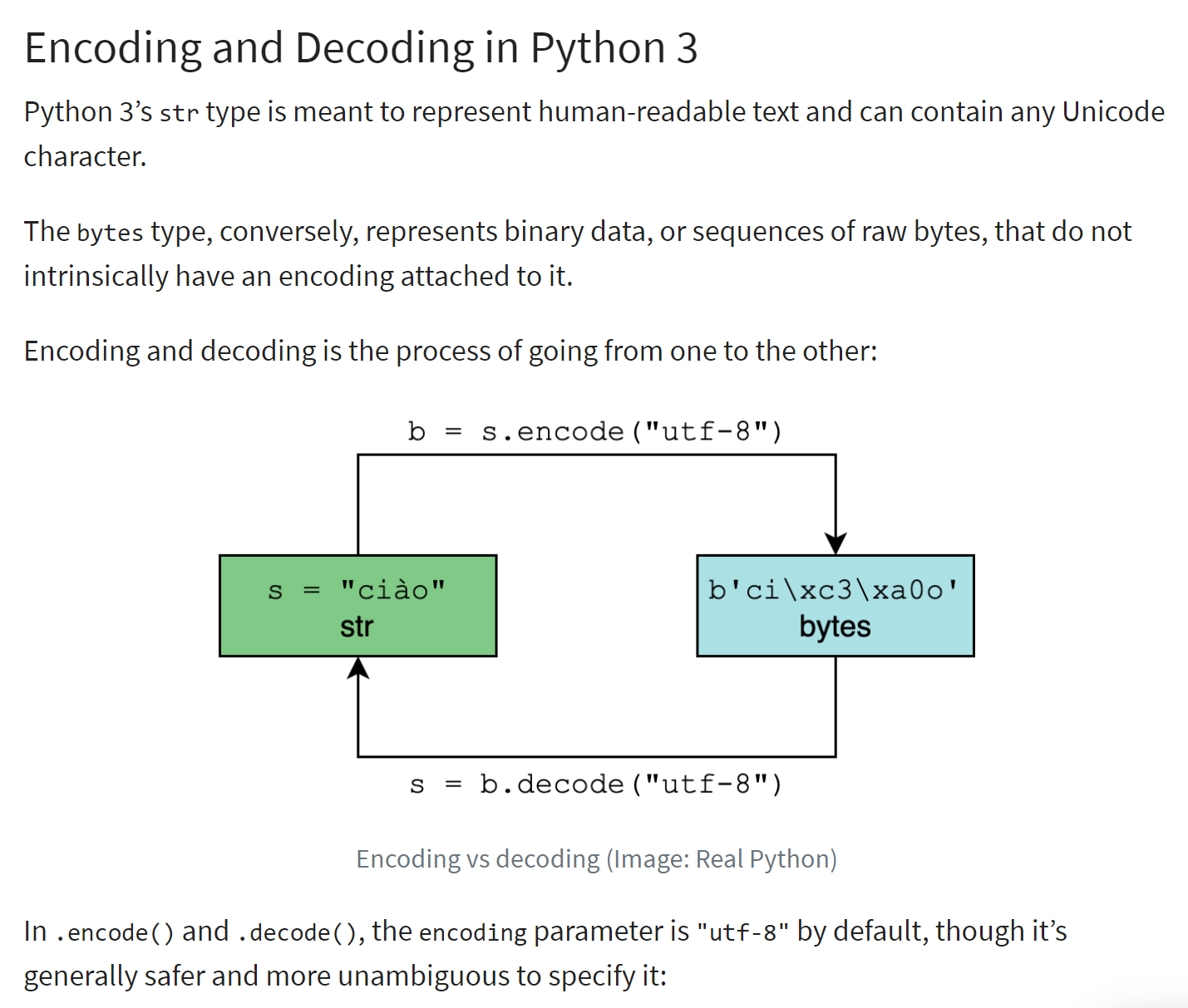
Encoding a string of type <str> produces a binary string where each character in the string is represented by one or more bytes. There are different types of encoding. The script above shows the two most common ones in the West: "utf-8" and "iso-8859-1," also known as "latin1."
The principle of encoding/decoding is illustrated below (ref. |https://realpython.com/python-encodings-guide/ |):
Comments
- Lines 4-5: the initial character string to be encoded. Instances of type <str> are Unicode strings |https://docs.python.org/3/howto/unicode.html|, |https://realpython.com/python-encodings-guide/ |;
- lines 6–11: two ways to encode a string in UTF68:
- line 8: str.encode('utf-8) ;
- line 10: bytes(str, 'utf-8');
- lines 12-17: we do the same thing with the 'iso-8859-1' encoding;
- lines 18-23: 'latin1' is another name for the 'iso-8859-1' encoding;
The results are as follows:
C:\Data\st-2020\dev\python\cours-2020\python3-flask-2020\venv\Scripts\python.exe C:/Data/st-2020/dev/python/cours-2020/python3-flask-2020/strings/str_03.py
str=[hélène va au marché acheter des légumes, type=<class 'str'>
--- utf-8
bytes1=b'h\xc3\xa9l\xc3\xa8ne va au march\xc3\xa9 acheter des l\xc3\xa9gumes', type=<class 'bytes'>
bytes2=b'h\xc3\xa9l\xc3\xa8ne va au march\xc3\xa9 acheter des l\xc3\xa9gumes', type=<class 'bytes'>
--- iso-8859-1
bytes1=b'h\xe9l\xe8ne va au march\xe9 acheter des l\xe9gumes', type=<class 'bytes'>
bytes2=b'h\xe9l\xe8ne va au march\xe9 acheter des l\xe9gumes', type=<class 'bytes'>
--- latin1
bytes1=b'h\xe9l\xe8ne va au march\xe9 acheter des l\xe9gumes', type=<class 'bytes'>
bytes2=b'h\xe9l\xe8ne va au march\xe9 acheter des l\xe9gumes', type=<class 'bytes'>

Process finished with exit code 0
Comments
- line 4: we see that the accented characters have been encoded using two bytes:
- é: [\xc3\xa9], which is the binary sequence 11000011 10101001;
- è: [\xc3\xa8], which is the binary sequence 11000011 10101000;
- lines 7: with ISO-8859-1 encoding, these two accented characters are encoded differently:
- é: [\xe9], which is the binary sequence 11101001;
- è: [\xe8], which is the binary sequence 11101000;
4.4. Script [str_04]: encoding of character strings (2)
The script [str_04] presents two other types of encoding: 'base64' and 'quoted-printable'. These two encodings do not encode Unicode character strings but rather binary objects. For example, when you attach a Word document to an email, it will undergo one of these two encodings depending on the email client used. This will be the case for most attached files.
The script is as follows:
# encoding / decoding
import codecs

# chain
print("---- chaîne unicode")
str1 = "hélène va au marché acheter des légumes"
print(f"str1=[{str1}], type(str1)={type(str1)}")

# utf-8 encoding
print("---- chaîne unicode -> binaire utf-8")
bytes1 = bytes(str1, "utf-8")
print(f"bytes1=[{bytes1}], type(bytes1)={type(bytes1)}")

# utf-8 decoding
print("---- binaire utf-8 -> chaîne unicode")
str2 = bytes1.decode("utf-8")
print(f"str2=[{str2}], type(str2)={type(str2)}")
print(f"str2==str1={str2 == str1}")

# iso-8859-1 encoding
print("---- chaîne unicode -> binaire iso-8859-1")
bytes2 = bytes(str1, "iso-8859-1")
print(f"bytes2=[{bytes2}], type(bytes2)={type(bytes2)}")

# iso-8859-1 decoding
print("---- binaire iso-8859-1 -> chaîne unicode")
str3 = bytes2.decode("iso-8859-1")
print(f"str3=[{str3}], type(str3)={type(str3)}")
print(f"str3==str1={str3 == str1}")

# decoding error - bytes1 is in utf-8 - decode it in iso-8859-1
print("--- binaire utf-8 (décodage iso-8859-1) --> chaîne unicode")
str4 = bytes1.decode("iso-8859-1")
print(f"str4=[{str4}], type(str4)={type(str4)}")

# utf-8 encoding of a Unicode string
print("---- chaîne unicode -> binaire utf-8")
bytes3 = codecs.encode(str1, "utf-8")
print(f"bytes3=[{bytes3}], type(bytes3)={type(bytes3)}")

# encoding a UTF-8 binary string in base64
print("---- binaire utf-8 -> binaire base64")
bytes4 = codecs.encode(bytes1, "base64")
print(f"bytes4=[{bytes4}], type(bytes4)={type(bytes4)}")

# return to original unicode string
print("---- binaire base64 -> binaire utf-8 -> chaîne unicode")
str6 = codecs.decode(bytes4, "base64").decode("utf-8")
print(f"str6=[{str6}], type(str6)={type(str6)}")

# quoted-printable encoding of a binary string
print("---- binaire utf-8 -> binaire quoted-printable")
str7 = codecs.encode(bytes1, "quoted-printable")
print(f"str7=[{str7}], type(str7)={type(str7)}")

# return to original unicode string
print("---- binaire quoted-printable -> binaire utf-8 -> chaîne unicode")
str8 = codecs.decode(str7, "quoted-printable").decode("utf-8")
print(f"str8=[{str8}], type(str8)={type(str8)}")
Comments
- line 2: the [codecs] module supports 'base64' and 'quoted-printable' encoding. It can handle many others as well;
- Lines 4–7: the Unicode string that will undergo various encodings;
- lines 9–12: UTF-8 encoding. This produces a binary string;
- lines 14–18: UTF-8 decoding to return to the original Unicode string;
- lines 20–29: we repeat the same process with the 'iso-8859-1' encoding;
- lines 31–34: a decoding error is shown:
- line 33: bytes1 is a binary string encoded in 'utf-8'. We decode it into 'iso-8859-1';
- lines 36–39: another way to encode a character string in UTF-8 using the [codecs] module;
- lines 41–44: a 'utf-8' binary string is encoded in 'base64';
- lines 46–49: show how to convert from the 'base64' binary string to the original Unicode string;
- lines 51–59: this process is repeated using 'quoted-printable' encoding instead of 'base64';
The results are as follows:
C:\Data\st-2020\dev\python\cours-2020\python3-flask-2020\venv\Scripts\python.exe C:/Data/st-2020/dev/python/cours-2020/python3-flask-2020/strings/str_04.py
---- unicode string
str1=[hélène va au marché acheter des légumes], type(str1)=<class 'str'>
---- unicode string -> utf-8 binary
bytes1=[b'h\xc3\xa9l\xc3\xa8ne va au march\xc3\xa9 acheter des l\xc3\xa9gumes'], type(bytes1)=<class 'bytes'>
---- binary utf-8 -> unicode string
str2=[hélène va au marché acheter des légumes], type(str2)=<class 'str'>
str2==str1=True
---- unicode string -> binary iso-8859-1
bytes2=[b'h\xe9l\xe8ne va au march\xe9 acheter des l\xe9gumes'], type(bytes2)=<class 'bytes'>
---- binary iso-8859-1 -> unicode string
str3=[hélène va au marché acheter des légumes], type(str3)=<class 'str'>
str3==str1=True
--- utf-8 binary (iso-8859-1 decoding) --> unicode string
str4=[hélène va au marché acheter des légumes], type(str4)=<class 'str'>
---- unicode string -> utf-8 binary
bytes3=[b'h\xc3\xa9l\xc3\xa8ne va au march\xc3\xa9 acheter des l\xc3\xa9gumes'], type(bytes3)=<class 'bytes'>
---- binary utf-8 -> binary base64
bytes4=[b'aMOpbMOobmUgdmEgYXUgbWFyY2jDqSBhY2hldGVyIGRlcyBsw6lndW1lcw==\n'], type(bytes4)=<class 'bytes'>
---- base64 binary -> utf-8 binary -> unicode string
str6=[hélène va au marché acheter des légumes], type(str6)=<class 'str'>
---- binary utf-8 -> binary quoted-printable
str7=[b'h=C3=A9l=C3=A8ne=20va=20au=20march=C3=A9=20acheter=20des=20l=C3=A9gumes'], type(str7)=<class 'bytes'>
---- quoted-printable binary -> utf-8 binary -> unicode string
str8=[hélène va au marché acheter des légumes], type(str8)=<class 'str'>

Process finished with exit code 0
- lines 14-15: a UTF-8 binary is decoded into a Unicode string using the wrong decoder 'iso-8859-1'. As a result, some generated Unicode characters are incorrect, in this case the accented characters;
- lines 18-19: 'base64' encoding uses 64 characters (ASCII, encoded on 7 bits) to encode any binary data. As we can see, this increases the size of the string's binary representation;
- lines 22-23: 'quoted-printable' encoding also uses the characters ASCII (encoded on 7 bits) to encode any binary data;
It should be noted that when receiving a binary file—from the internet, for example—that represents text, one must know the encodings it has undergone in order to recover the text.