23. Practice Exercise: version 6
23.1. Introduction
We now return to our tax calculation application. We will build various web applications around it.
In version 5 of our application exercise, the tax administration data was stored in a database. This version 5 consisted of two separate applications that shared common layers:
- an application that calculated taxes in |batch| mode for taxpayers stored in a text file;
- an application that calculated taxes in |interactive| mode for taxpayers whose information was entered via the keyboard;
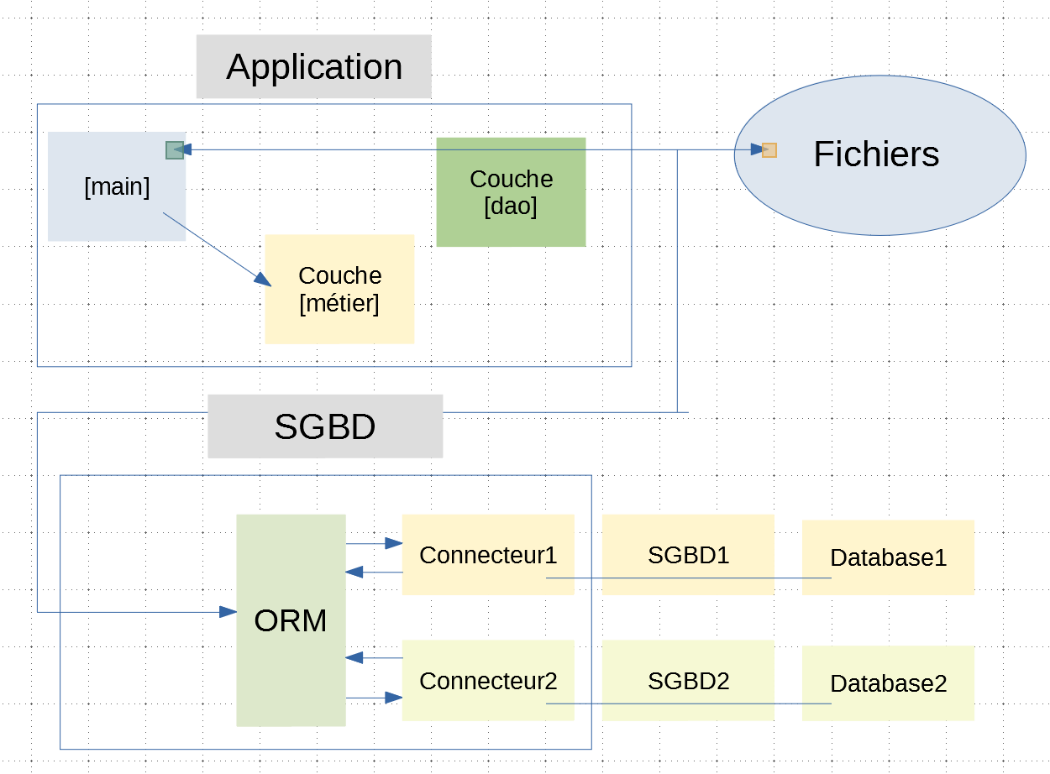
The version 5 for the batch tax calculation application had the following architecture:
Ultimately, the web version of this application will have the following architecture:
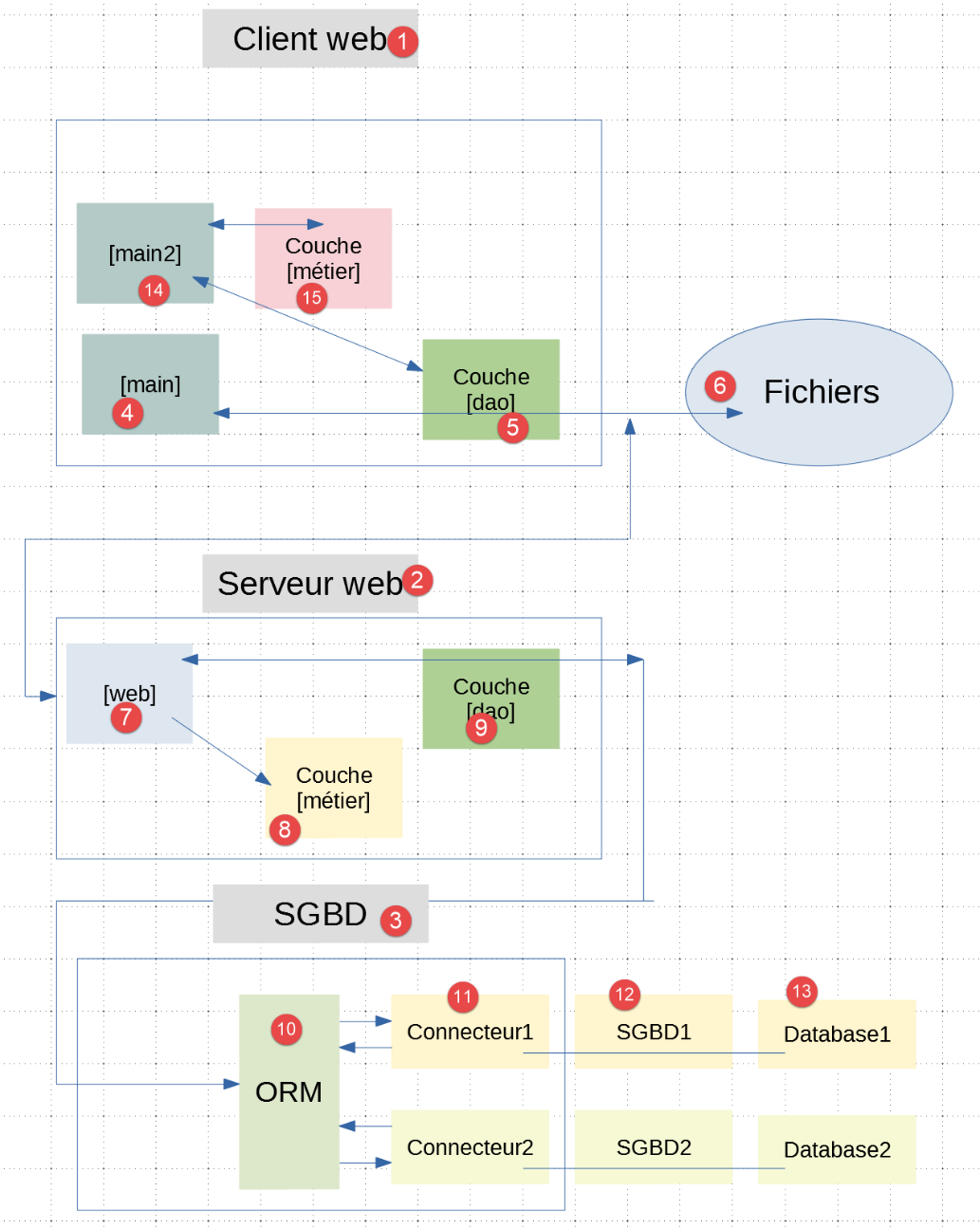
- the [1] web client communicates with the [2] web server, which in turn communicates with the SGBD and [3];
- the [2] web server retains the [métier], [8], and [dao], [9] layers from the original application;
- the initial application retains its main script [4] and its layers [métier] and [15]. The layers [métier], [8], and [15] are identical;
- client/server communication requires two additional layers:
- the [web] and [7] layers, which implement the web application;
- the [dao] [5] layer, which is a client of the [7] web application;
In the final version, batch tax calculation can be performed in two ways:
- the business logic for tax calculation is performed by the server layer [métier]. The script [main] will use this method;
- The business logic for tax calculation is performed by the client-side layer [métier]. The script [main2] will use this method;
From now on, we will develop several client/server applications of the type described above, each illustrating one or more new web development technologies.
23.2. The tax calculation web server
23.2.1. Version 1
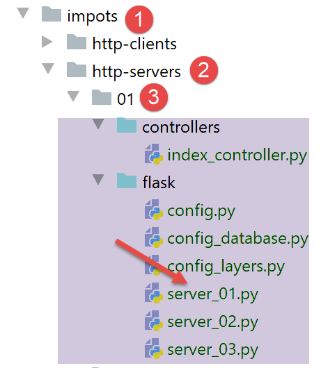
The script [server_01] is the following web application:

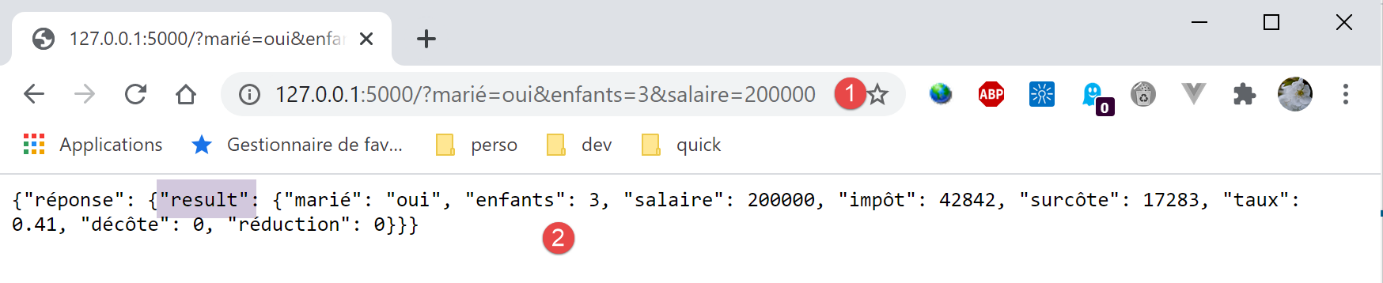
- In [1], we use a configured URL to which we pass three values:
- [marié] (yes/no) to indicate whether the taxpayer is married;
- [enfants]: the taxpayer’s number of children;
- [salaire]: the taxpayer’s annual salary;
- In response to [2], the web server returns a string jSON that provides the amount of tax due along with its various components;
The application architecture is as follows:
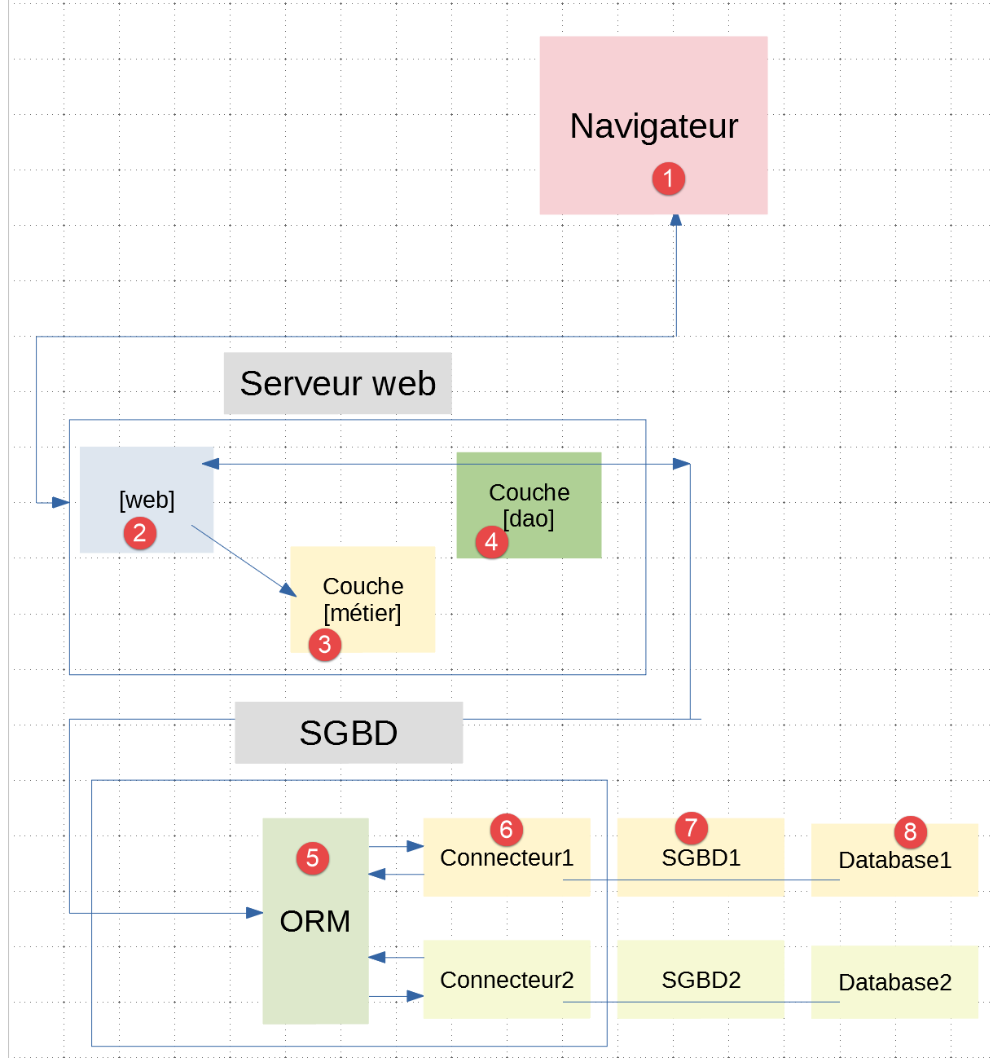
- The browser [1] queries the server [2]. The script [server_01] implements the server’s [web] and [2] layers;
- The layers [3-8] are the same ones already used in |version 5| of the tax calculation application. We are reusing them as-is;
- the layer [métier] [3] is defined |here|;
- the layer [dao] [4] is defined |here|;
The [server_01] web application is configured using three scripts:
- [config], which configures the entire application;
- [config_database], which configures database access. We will work with SGBD, MySQL, and PostgreSQL;
- [config_layers], which configures the application layers;
The [config] script is as follows:
def configure(config: dict) -> dict:
    import os

    # step 1 ------
    # folder of this file
    script_dir = os.path.dirname(os.path.abspath(__file__))
    # root path
    root_dir = "C:/Data/st-2020/dev/python/cours-2020/python3-flask-2020"
    # absolute dependencies
    absolute_dependencies = [
        # project files
        # BaseEntity, MyException
        f"{root_dir}/classes/02/entities",
        # InterfaceImpôtsDao, InterfaceImpôtsMétier, InterfaceImpôtsUi
        f"{root_dir}/impots/v04/interfaces",
        # AbstractImpôtsdao, ImpôtsConsole, ImpôtsMétier
        f"{root_dir}/impots/v04/services",
        # ImpotsDaoWithAdminDataInDatabase
        f"{root_dir}/impots/v05/services",
        # AdminData, ImpôtsError, TaxPayer
        f"{root_dir}/impots/v04/entities",
        # Constants, slices
        f"{root_dir}/impots/v05/entities",
        # IndexController
        f"{script_dir}/../controllers",
        # scripts [config_database, config_layers]
        script_dir,
    ]
    # set the syspath
    from myutils import set_syspath
    set_syspath(absolute_dependencies)

    # step 2 ------
    # application configuration
    # list of users authorized to use the application
    config['users'] = [
        {
            "login": "admin",
            "password": "admin"
        }
    ]

    # step 3 ------
    # database configuration
    import config_database
    config["database"] = config_database.configure(config)

    # step 4 ------
    # instantiation of application layers
    import config_layers
    config['layers'] = config_layers.configure(config)

    # we return the configuration
    return config
- The [configure] function receives a [config] dictionary as a parameter (line 1) and returns it as the result (line 54) after enriching its content. It could have been pointed out long ago that it was unnecessary to return the result [config]. Indeed, [config] is a dictionary reference that the calling code shares with the called code. The calling code therefore already has this reference (line 1), and there is no need to return it again (line 54). Thus, write:
config=[module].configure(config) (1)
is redundant. It is sufficient to write:
[module].configure(config) (2)
Nevertheless, I kept the (1) style of writing because I thought it might better illustrate that the called code was modifying the dictionary [config].
- Line 1: The dictionary [config] received by the function [configure] has a key ‘sgbd’ whose value is taken from the list [‘mysql’, ‘pgres’]. [mysql] means that the database being used is managed by MySQL, whereas ‘pgres’ means that the database being used is managed by PostgreSQL;
- lines 4–27: we list all the folders containing elements necessary for the web application. They will be part of the application’s Python module Path (lines 30–31);
- lines 33–40: only certain users will be allowed to access the application. Here we have a list with a single user;
- lines 43–46: the [config_database] script builds the configuration for the database being used;
- line 46: the configuration built by the [config_database] script is a dictionary that is stored in the general configuration associated with the ‘database’ key;
- lines 48–51: the script [config_layers] instantiates the web application layers. It returns a dictionary that is stored in the general configuration associated with the ‘layers’ key;
The script [config_database] is the one already used in |version 5|. It is reproduced here for reference:
def configure(config: dict) -> dict:
    # sqlalchemy configuration
    from sqlalchemy import create_engine, Table, Column, Integer, MetaData, Float
    from sqlalchemy.orm import mapper, sessionmaker

    # connection chains to the databases used
    connection_strings = {
        'mysql': "mysql+mysqlconnector://admimpots:mdpimpots@localhost/dbimpots-2019",
        'pgres': "postgresql+psycopg2://admimpots:mdpimpots@localhost/dbimpots-2019"
    }
    # connection chain to the database used
    engine = create_engine(connection_strings[config['sgbd']])

    # metadata
    metadata = MetaData()

    # the constants table
    constantes_table = Table("tbconstantes", metadata,
                             Column('id', Integer, primary_key=True),
                             Column('plafond_qf_demi_part', Float, nullable=False),
                             Column('plafond_revenus_celibataire_pour_reduction', Float, nullable=False),
                             Column('plafond_revenus_couple_pour_reduction', Float, nullable=False),
                             Column('valeur_reduc_demi_part', Float, nullable=False),
                             Column('plafond_decote_celibataire', Float, nullable=False),
                             Column('plafond_decote_couple', Float, nullable=False),
                             Column('plafond_impot_celibataire_pour_decote', Float, nullable=False),
                             Column('plafond_impot_couple_pour_decote', Float, nullable=False),
                             Column('abattement_dixpourcent_max', Float, nullable=False),
                             Column('abattement_dixpourcent_min', Float, nullable=False)
                             )

    # tax bracket table
    tranches_table = Table("tbtranches", metadata,
                           Column('id', Integer, primary_key=True),
                           Column('limite', Float, nullable=False),
                           Column('coeffr', Float, nullable=False),
                           Column('coeffn', Float, nullable=False)
                           )
    # mappings
    from Tranche import Tranche
    mapper(Tranche, tranches_table)

    from Constantes import Constantes
    mapper(Constantes, constantes_table)

    # the factory session
    session_factory = sessionmaker()
    session_factory.configure(bind=engine)

    # a session
    session = session_factory()

    # certain information is recorded and rendered in a dictionary
    return {"engine": engine, "metadata": metadata, "tranches_table": tranches_table,
            "constantes_table": constantes_table, "session": session}
The [config_layers] script configures the web server layers. We reuse a |script| we’ve seen before:
def configure(config: dict) -> dict:
    # instantiation of application layers

    # dao
    from ImpotsDaoWithAdminDataInDatabase import ImpotsDaoWithAdminDataInDatabase
    dao = ImpotsDaoWithAdminDataInDatabase(config)

    # business
    from ImpôtsMétier import ImpôtsMétier
    métier = ImpôtsMétier()

    # put layer instances in a dictionary and return them to the calling code
    return {
        "dao": dao,
        "métier": métier
    }
- Line 6: The [dao] layer is implemented with a database;
- [ImpotsDaoWithAdminDataInDatabase] was defined |here|;
- [ImpôtsMétier] has been defined |here|;
The main script [server_01] is as follows:
# a mysql or pgres parameter is expected
import sys
syntaxe = f"{sys.argv[0]} mysql / pgres"
erreur = len(sys.argv) != 2
if not erreur:
    sgbd = sys.argv[1].lower()
    erreur = sgbd != "mysql" and sgbd != "pgres"
if erreur:
    print(f"syntaxe : {syntaxe}")
    sys.exit()

# configure the application
import config
config = config.configure({'sgbd': sgbd})

# dependencies
from ImpôtsError import ImpôtsError
from TaxPayer import TaxPayer
import re
from flask import request
from myutils import json_response
from flask import Flask
from flask_api import status

# data recovery from tax authorities
try:
    # admindata will be read-only application data
    admindata = config["layers"]["dao"].get_admindata()
except ImpôtsError as erreur:
    print(f"L'erreur suivante s'est produite : {erreur}")
    sys.exit(1)

# flask application
app = Flask(__name__)


# Home URL : /?married=xx&children=yy&salary=zz
@app.route('/', methods=['GET'])
def index():
    # initially no errors
    erreurs = []
    # the query must have three parameters in the URL
    if len(request.args) != 3:
        erreurs.append("Méthode GET requise avec les seuls paramètres [marié, enfants, salaire]")

    # retrieve marital status in URL
    marié = request.args.get('marié')
    if marié is None:
        erreurs.append("paramètre [marié] manquant")
    else:
        marié = marié.strip().lower()
        erreur = marié != "oui" and marié != "non"
        if erreur:
            erreurs.append(f"paramétre marié [{marié}] invalide")

    # retrieve the number of children in the URL
    enfants = request.args.get('enfants')
    if enfants is None:
        erreurs.append("paramètre [enfants] manquant")
    else:
        enfants = enfants.strip()
        match = re.match(r"^\d+", enfants)
        if not match:
            erreurs.append(f"paramétre enfants [{enfants}] invalide")
        else:
            enfants = int(enfants)

    # the salary is retrieved from the URL
    salaire = request.args.get('salaire')
    if salaire is None:
        erreurs.append("paramètre [salaire] manquant")
    else:
        salaire = salaire.strip()
        match = re.match(r"^\d+", salaire)
        if not match:
            erreurs.append(f"paramétre salaire [{salaire}] invalide")
        else:
            salaire = int(salaire)

    # invalid parameters in the URL?
    for key in request.args.keys():
        if key not in ['marié', 'enfants', 'salaire']:
            erreurs.append(f"paramètre [{key}] invalide")

    # mistakes?
    if erreurs:
        # an error response is sent to the client
        résultats = {"réponse": {"erreurs": erreurs}}
        return json_response(résultats, status.HTTP_400_BAD_REQUEST)

    # no mistakes, we can work
    # tAX CALCULATION
    taxpayer = TaxPayer().fromdict({'marié': marié, 'enfants': enfants, 'salaire': salaire})
    config["layers"]["métier"].calculate_tax(taxpayer, admindata)
    # we send the response to the customer
    return json_response({"réponse": {"result": taxpayer.asdict()}}, status.HTTP_200_OK)


# hand only
if __name__ == '__main__':
    # start the Flask server
    app.config.update(ENV="development", DEBUG=True)
    app.run()
- lines 1-10: retrieve the parameter indicating which SGBD to use;
- lines 12-14: with this information, we can configure the application. In particular, the Python Path is built;
- lines 16–23: using the new Python Path, we import the elements we need;
- lines 25-31: we retrieve the data from the tax authority that allows us to calculate the tax;
- lines 33–34: instantiation of the Flask application;
- line 38: the Flask application only serves the URL [/]. It expects a URL configured as follows [/ ?marié=xx&enfants=yy&salaire=zz] with:
- xx: yes / no;
- yy: number of children;
- zz: annual salary;
- lines 40–89: we verify the validity of the URL parameters;
- line 41: error messages are accumulated in the [erreurs] list;
- line 43: you may recall that the parameters of the configured URL are found in [request.args] (see |here|):
- The [request] object is the Flask object imported on line 20;
- the [request.args] object behaves like a dictionary;
- lines 43–44: we verify that there are exactly three parameters (no fewer, no more);
- lines 46–49: we check that the parameter [marié] is present in URL;
- lines 50-54: if it is present, we check that its lowercase value, stripped of leading and trailing whitespace, is yes or no;
- lines 56–59: check that the parameter [enfants] is in URL;
- lines 60–66: if present, verify that its value is a positive integer;
- Line 66: Keep in mind that the parameters of URL and their values are character strings. The value of the parameter [enfants] is converted to ‘int’;
- lines 68–78: For the [salaire] parameter, the same tests are performed as for the [enfants] parameter;
- lines 81–83: we verify that there are no parameters other than [‘marié, ‘enfants’, ‘salaire’] in URL;
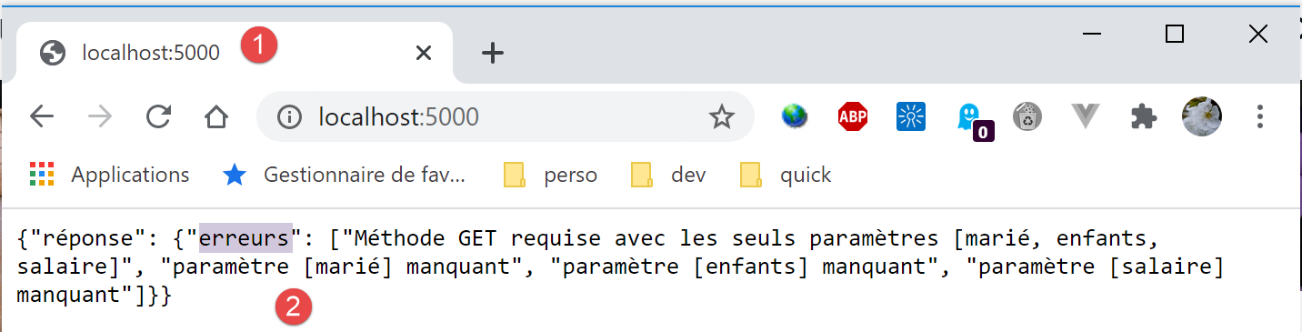
- lines 85–89: if, after all these checks, the [erreurs] list is not empty, then we send this error list to the client in the form of a jSON string and the [400 Bad Request] status code;
Since we will often need to send a jSON string in response to the client later on, the few lines required for this have been factored into the [myutils.py] module that we have already used:
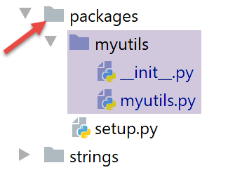
The [myutils.py] script becomes the following:
# imports
import json
import os
import sys

from flask import make_response


def set_syspath(absolute_dependencies: list):
    # absolute_dependencies: a list of absolute folder names

    ….


# response generation HTTP jSON
def json_response(réponse: dict, status_code: int) -> tuple:
    # response body HTTP
    response = make_response(json.dumps(réponse, ensure_ascii=False))
    # response body HTTP is jSON
    response.headers['Content-Type'] = 'application/json; charset=utf-8'
    # we send the HTTP response
    return response, status_code
- Line 16: The [json_response] function expects two parameters:
- [réponse]: the dictionary containing the string jSON to be sent to the web client;
- [status_code]: the status code HTTP of the response;
- line 18: set the response body to jSON;
- line 20: the header HTTP is added, informing the web client that it will receive jSON;
- line 22: the response HTTP is sent to the calling code. It is up to the calling code to send it to the web client;
The [__init__.py] file changes as follows:
from .myutils import set_syspath, json_response
The new version from [myutils] is installed among the machine-scope modules using the [pip install .] command in a PyCharm terminal:
(venv) C:\Data\st-2020\dev\python\cours-2020\python3-flask-2020\packages>pip install .
Processing c:\data\st-2020\dev\python\cours-2020\python3-flask-2020\packages
Using legacy setup.py install for myutils, since package 'wheel' is not installed.
Installing collected packages: myutils
  Attempting uninstall: myutils
    Found existing installation: myutils 0.1
    Uninstalling myutils-0.1:
      Successfully uninstalled myutils-0.1
    Running setup.py install for myutils ... done
Successfully installed myutils-0.1
- Line 1: You must be in the [packages] folder to enter this command;
The code for the [server_01] script continues as follows:
…
    # mistakes?
    if erreurs:
        # an error response is sent to the client
        résultats = {"réponse": {"erreurs": erreurs}}
        return json_response(résultats, status.HTTP_400_BAD_REQUEST)

    # no mistakes, we can work
    # tAX CALCULATION
    taxpayer = TaxPayer().fromdict({'id': 0, 'marié': marié, 'enfants': enfants, 'salaire': salaire})
    config["layers"]["métier"].calculate_tax(taxpayer, admindata)
    # we send the response to the client
    return json_response({"réponse": {"result": taxpayer.asdict()}}, status.HTTP_200_OK)
- line 10: at this point, the parameters expected in URL are present and correct;
- line 10: we create the [TaxPayer] object that models the taxpayer;
- line 11: we ask the [métier] layer to calculate the tax. Note that the elements calculated by the [métier] layer are inserted into the [taxpayer] object passed as a parameter;
- line 13: the response is sent to the web client in the form of a jSON string. This is the jSON string from a dictionary. Associated with the key [result], the dictionary of the object [taxpayer] is placed there. We could not store the [taxpayer] object itself because it is not serializable into jSON;
We create two execution configurations, one for MySQL, the other for PostgreSQL:
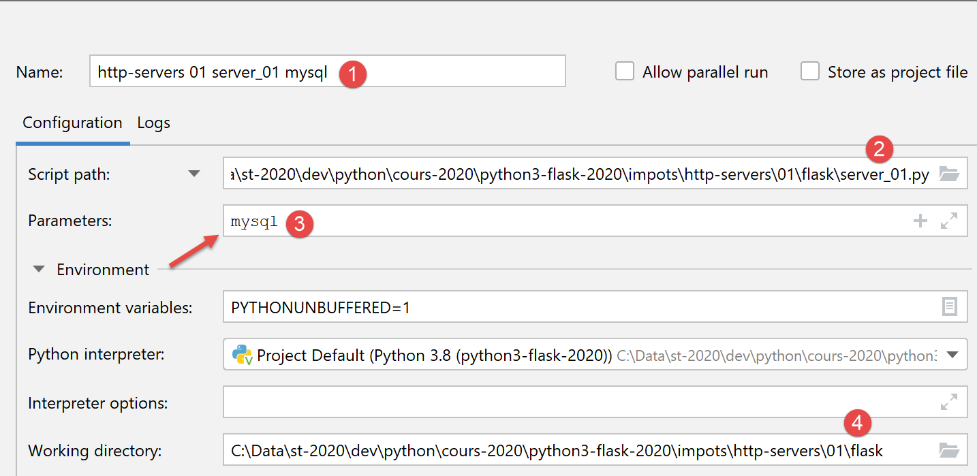
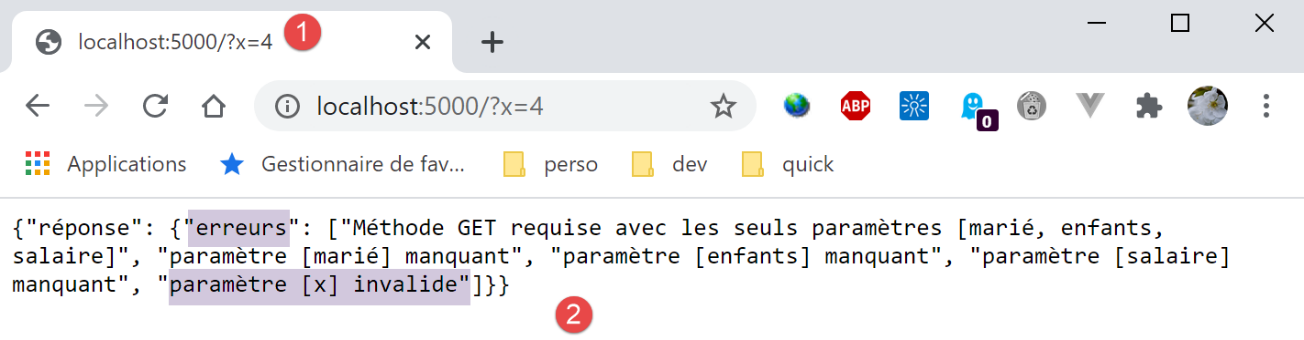
Here are some examples of execution (you have launched the [server_01] application and the SGBD used, then you request the URL http://localhost:5000/ in a browser):
Here is an example of execution in the Postman console:
GET /?mari%C3%A9=xx&enfants=yy&salaire=zz HTTP/1.1
User-Agent: PostmanRuntime/7.26.1
Accept: */*
Cache-Control: no-cache
Postman-Token: e4c5df8c-4bd6-4250-b789-b7b164db4eff
Host: localhost:5000
Accept-Encoding: gzip, deflate, br
Connection: keep-alive

HTTP/1.0 400 BAD REQUEST
Content-Type: application/json; charset=utf-8
Content-Length: 134
Server: Werkzeug/1.0.1 Python/3.8.1
Date: Fri, 17 Jul 2020 06:15:44 GMT

{"réponse": {"erreurs": ["paramètre marié [xx] invalide", "paramètre enfants [yy] invalide", "paramètre salaire [zz] invalide"]}}
- line 1: an invalid URL is requested;
- line 10: the server responds with status 400 BAD REQUEST;
23.2.2. Version 2
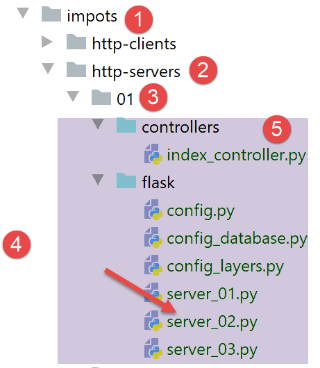
The server's version 2 isolates the processing of URL in the [index_controller] [5] module:
# import dependencies
import re

from flask_api import status
from werkzeug.local import LocalProxy


# URL set: /?married=xx&children=yy&salary=zz
def execute(request: LocalProxy, config: dict) -> tuple:
    # dependencies
    from TaxPayer import TaxPayer

    # initially no errors
    erreurs = []
    # the query must have three parameters
    if len(request.args) != 3:
        erreurs.append("Méthode GET requise avec les seuls paramètres [marié, enfants, salaire]")

    # we retrieve the marital status of the URL
    marié = request.args.get('marié')
    if marié is None:
        erreurs.append("paramètre [marié] manquant")
    else:
        marié = marié.strip().lower()
        erreur = marié != "oui" and marié != "non"
        if erreur:
            erreurs.append(f"paramétre marié [{marié}] invalide")

    # we retrieve the number of children in URL
    enfants = request.args.get('enfants')
    if enfants is None:
        erreurs.append("paramètre [enfants] manquant")
    else:
        enfants = enfants.strip()
        match = re.match(r"^\d+", enfants)
        if not match:
            erreurs.append(f"paramétre enfants {enfants} invalide")
        else:
            enfants = int(enfants)

    # we recover the URL salary
    salaire = request.args.get('salaire')
    if salaire is None:
        erreurs.append("paramètre [salaire] manquant")
    else:
        salaire = salaire.strip()
        match = re.match(r"^\d+", salaire)
        if not match:
            erreurs.append(f"paramétre salaire {salaire} invalide")
        else:
            salaire = int(salaire)

    # other parameters in the URL?
    for key in request.args.keys():
        if not key in ['marié', 'enfants', 'salaire']:
            erreurs.append(f"paramètre [{key}] invalide")

    # mistakes?
    if erreurs:
        # an error response is sent to the client
        résultats = {"réponse": {"erreurs": erreurs}}
        return résultats, status.HTTP_400_BAD_REQUEST

    # no mistakes, we can work
    # tAX CALCULATION
    taxpayer = TaxPayer().fromdict({'marié': marié, 'enfants': enfants, 'salaire': salaire})
    config["layers"]["métier"].calculate_tax(taxpayer, config["admindata"])
    # we send the response to the client
    return {"réponse": {"result": taxpayer.asdict()}}, status.HTTP_200_OK
- line 9: the [execute] function receives two parameters:
- [request]: the client’s HTTP request;
- [config]: the application configuration dictionary;
The [server_02] script is as follows:
# a mysql or pgres parameter is expected
import sys
syntaxe = f"{sys.argv[0]} mysql / pgres"
erreur = len(sys.argv) != 2
if not erreur:
    sgbd = sys.argv[1].lower()
    erreur = sgbd != "mysql" and sgbd != "pgres"
if erreur:
    print(f"syntaxe : {syntaxe}")
    sys.exit()

# configure the application
import config
config = config.configure({'sgbd': sgbd})

# dependencies
from ImpôtsError import ImpôtsError
from flask import request
from myutils import json_response
from flask import Flask
import index_controller

# data recovery from tax authorities
try:
    # admindata will be read-only application data
    config['admindata'] = config["layers"]["dao"].get_admindata()
except ImpôtsError as erreur:
    print(f"L'erreur suivante s'est produite : {erreur}")
    sys.exit(1)

# flask application
app = Flask(__name__)


# Home URL : /?married=xx&child=yy&salary=zz
@app.route('/', methods=['GET'])
def index():
    # execute the query
    résultat, statusCode = index_controller.execute(request, config)
    # we send the answer
    return json_response(résultat, statusCode)


# hand only
if __name__ == '__main__':
    # start the server
    app.config.update(ENV="development", DEBUG=True)
    app.run()
- lines 36–41: handling the / route;
- line 39: use of the [IndexController.execute] function;
We will now use this technique: each route will be handled by its own module.
The execution results are the same as for version 1.
23.2.3. Version 3
version 3 introduces the concept of authentication.
The [server_03] script becomes the following:
# a mysql or pgres parameter is expected
import sys
syntaxe = f"{sys.argv[0]} mysql / pgres"
erreur = len(sys.argv) != 2
if not erreur:
    sgbd = sys.argv[1].lower()
    erreur = sgbd != "mysql" and sgbd != "pgres"
if erreur:
    print(f"syntaxe : {syntaxe}")
    sys.exit()

# configure the application
import config
config = config.configure({'sgbd': sgbd})

# dependencies
from ImpôtsError import ImpôtsError
from flask import request
from myutils import json_response
from flask import Flask
from flask_httpauth import HTTPBasicAuth
import index_controller

# data recovery from tax authorities
try:
    # config[‘admindata’] will be read-only application scope data
    config["admindata"] = config["layers"]["dao"].get_admindata()
except ImpôtsError as erreur:
    print(f"L'erreur suivante s'est produite : {erreur}")
    sys.exit(1)

# authentication manager
auth = HTTPBasicAuth()


# authentication method
@auth.verify_password
def verify_credentials(login: str, password: str) -> bool:
    # user list
    users = config['users']
    # browse this list
    for user in users:
        if user['login'] == login and user['password'] == password:
            return True
    # we didn't find
    return False


# flask application
app = Flask(__name__)


# Home URL : /?married=xx&child=yy&salary=zz
@app.route('/', methods=['GET'])
@auth.login_required
def index():
    # execute the query
    résultat, statusCode = index_controller.execute(request, config)
    # we send the answer
    return json_response(résultat, statusCode)


# hand only
if __name__ == '__main__':
    # start the server
    app.config.update(ENV="development", DEBUG=True)
    app.run()
- line 21: import an authentication handler. There are various types of authentication for a web server. The one we are using here is called [HTTP Basic]. Each type of authentication follows a specific client/server dialogue;
- line 33: we create an instance of the authentication handler;
- line 37: the annotation [@auth.verify_password] marks the function to be executed when the authentication handler wants to verify the username and password sent by the client according to the [HTTP Basic] protocol;
- line 55: the annotation [@auth.login_required] marks a route for which the web client must be authenticated. If the web client has not yet sent its credentials, the web server will automatically request them using the HTTP basic protocol;
The [flask_httpauth] module must be installed:
(venv) C:\Data\st-2020\dev\python\cours-2020\python3-flask-2020\impots\http-servers\01\flask>pip install flask_httpauth
Collecting flask_httpauth
  Downloading Flask_HTTPAuth-4.1.0-py2.py3-none-any.whl (5.8 kB)
Requirement already satisfied: Flask in c:\data\st-2020\dev\python\cours-2020\python3-flask-2020\venv\lib\site-packages (from flask_httpauth) (1.1.2)
Requirement already satisfied: itsdangerous>=0.24 in c:\data\st-2020\dev\python\cours-2020\python3-flask-2020\venv\lib\site-packages (from Flask->flask_httpauth) (1.1.0)
Requirement already satisfied: click>=5.1 in c:\data\st-2020\dev\python\cours-2020\python3-flask-2020\venv\lib\site-packages (from Flask->flask_httpauth) (7.1.2)
Requirement already satisfied: Jinja2>=2.10.1 in c:\data\st-2020\dev\python\cours-2020\python3-flask-2020\venv\lib\site-packages (from Flask->flask_httpauth) (2.11.2)
Requirement already satisfied: Werkzeug>=0.15 in c:\data\st-2020\dev\python\cours-2020\python3-flask-2020\venv\lib\site-packages (from Flask->flask_httpauth) (1.0.1)
Requirement already satisfied: MarkupSafe>=0.23 in c:\data\st-2020\dev\python\cours-2020\python3-flask-2020\venv\lib\site-packages (from Jinja2>=2.10.1->Flask->flask_httpauth) (1.1.1
)
Installing collected packages: flask-httpauth
Successfully installed flask-httpauth-4.1.0
Let’s see what happens in the Postman console. You:
- create a run configuration;
- launch the web application;
- launch the SGBD of your choice;
- request the URL and [/] with Postman;
The client/server dialogue in the Postman console is as follows:
- Line 10: The server responds that we are not authorized to access URL [/];
- Line 13: It tells us which authentication protocol to use, in this case the Basic Authentication protocol;
It is possible to configure Postman to send the user credentials according to the Basic Authentication protocol:
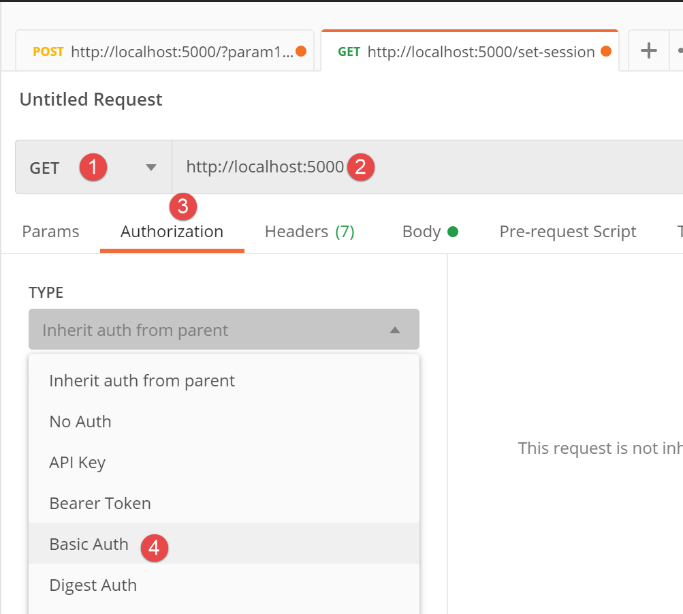
- in [6-7], we enter the credentials from the [config] script:
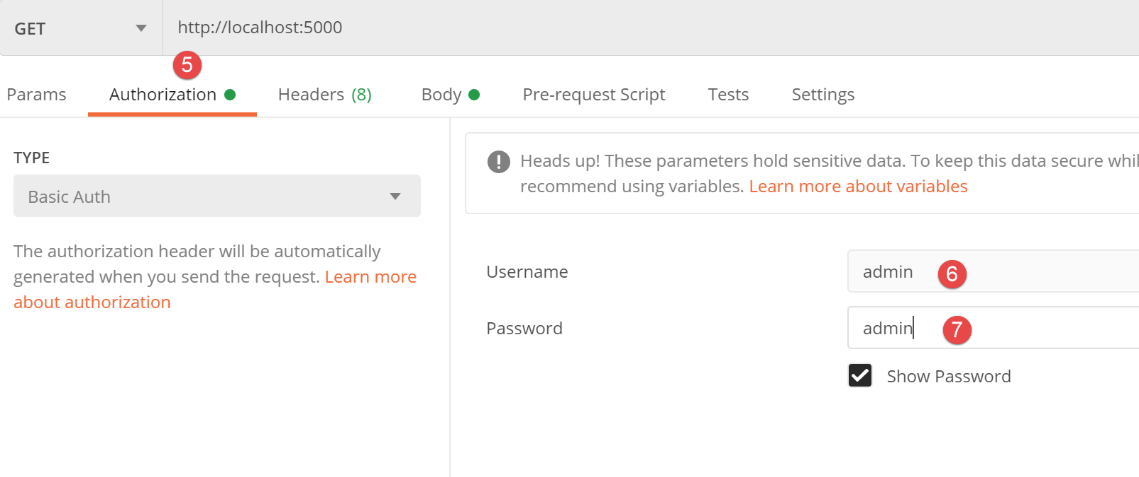
    config['users'] = [
        {
            "login": "admin",
            "password": "admin"
        }
    ]
The client/server dialogue in the Postman console becomes the following:
GET / HTTP/1.1
Authorization: Basic YWRtaW46YWRtaW4=
User-Agent: PostmanRuntime/7.26.1
Accept: */*
Cache-Control: no-cache
Postman-Token: 5ce20822-e87c-4eef-a2f4-b9eaec38d881
Host: localhost:5000
Accept-Encoding: gzip, deflate, br
Connection: keep-alive

HTTP/1.0 400 BAD REQUEST
Content-Type: application/json; charset=utf-8
Content-Length: 203
Server: Werkzeug/1.0.1 Python/3.8.1
Date: Fri, 17 Jul 2020 07:20:01 GMT

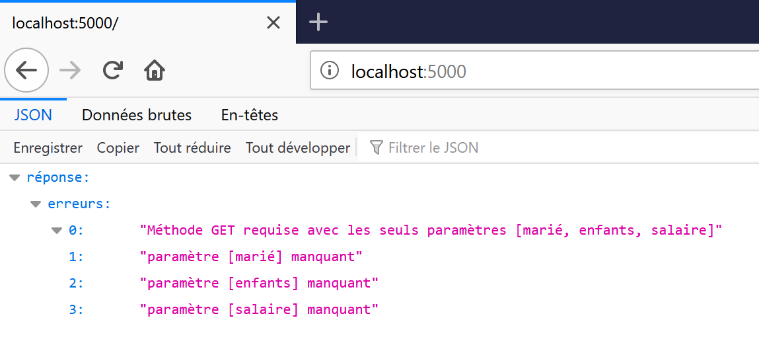
{"réponse": {"erreurs": ["Méthode GET requise avec les seuls paramètres [marié, enfants, salaire]", "paramètre [marié] manquant", "paramètre [enfants] manquant", "paramètre [salaire] manquant"]}}
- line 2: the Postman client sends the user credentials [admin / admin] in encrypted form;
- line 17: the server responds correctly. It reports errors because the parameters [marié, enfants, salaire] (line 1) were not sent, but it does not report an authentication error;
Now let’s request URL using a browser (Firefox below):
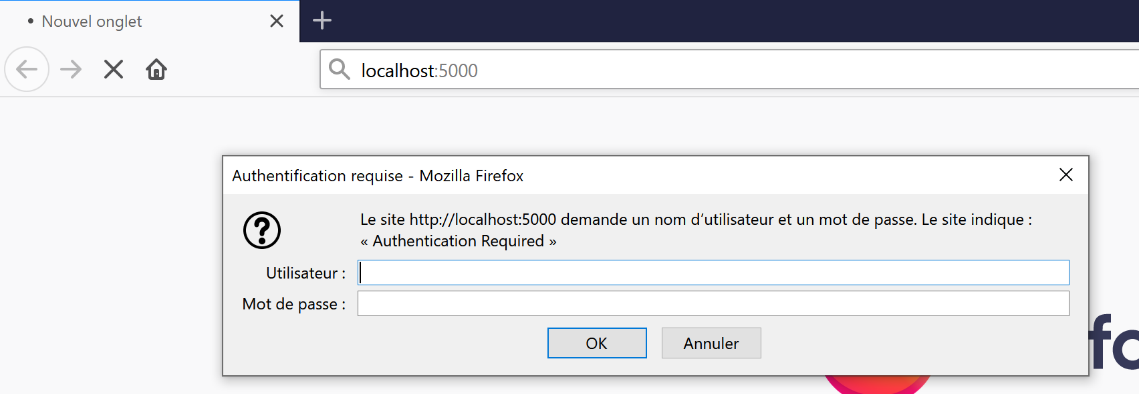
- As with Postman, Firefox received the HTTP response from the server with the HTTP headers:
Firefox, like other browsers, does not stop the dialog when it receives these headers. It prompts the user for the credentials requested by the server. Simply enter admin / admin above to receive the server’s response:
23.3. The web client of the tax calculation server
23.3.1. Introduction
In the previous section, the web client for the tax calculation server was a browser. In this section, the web client will be a console script. The architecture becomes as follows:
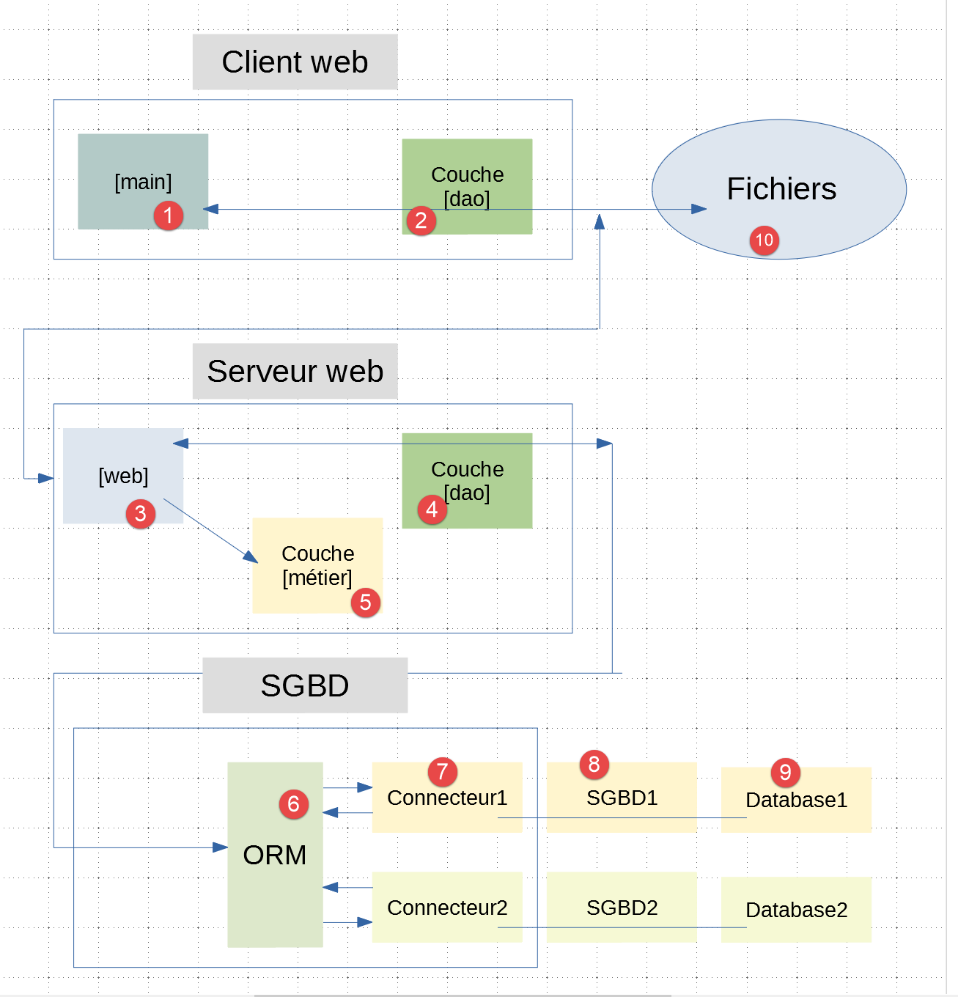
- the web client consists of the layers [1-2];
- the web server consists of the layers [3-9]. This was described in the previous section;
We therefore need to write the [1-2] layers.
The [dao] [2] layer must be able to communicate with the [3] web server. We now know the HTTP protocol, and we could write, using the [pycurl] module we’ve already studied as an example, a script that communicates with the [3] web server. However, there are modules specialized in HTTP client/server dialogues. We will use one of them, the [requests] module:
(venv) C:\Data\st-2020\dev\python\cours-2020\python3-flask-2020\impots\http-servers\01\flask>pip install requests
Collecting requests
  Downloading requests-2.24.0-py2.py3-none-any.whl (61 kB)
     || 61 kB 137 kB/s
Collecting idna<3,>=2.5
  Downloading idna-2.10-py2.py3-none-any.whl (58 kB)
     || 58 kB 692 kB/s
Collecting chardet<4,>=3.0.2
  Downloading chardet-3.0.4-py2.py3-none-any.whl (133 kB)
     || 133 kB 1.3 MB/s
Collecting urllib3!=1.25.0,!=1.25.1,<1.26,>=1.21.1
  Downloading urllib3-1.25.9-py2.py3-none-any.whl (126 kB)
     || 126 kB 1.1 MB/s
Collecting certifi>=2017.4.17
  Downloading certifi-2020.6.20-py2.py3-none-any.whl (156 kB)
     || 156 kB 1.1 MB/s
Installing collected packages: idna, chardet, urllib3, certifi, requests
Successfully installed certifi-2020.6.20 chardet-3.0.4 idna-2.10 requests-2.24.0 urllib3-1.25.9
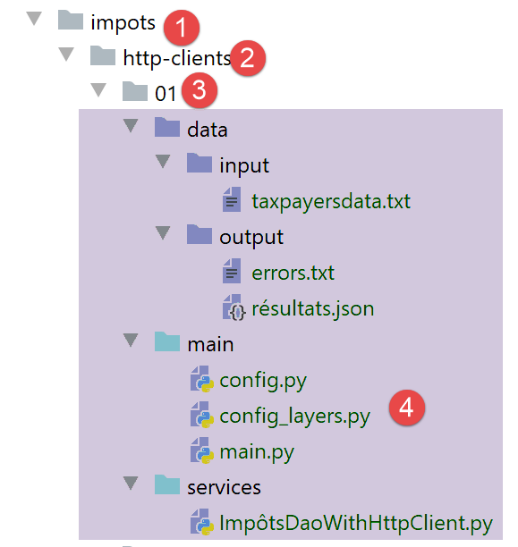
The directory structure of the web client scripts is as follows:
The script will implement the batch-mode tax calculation application described starting at |version 1|. The latest version for this application is |version 5|. Here is a reminder of how it works:
- the taxpayers for whom the tax is to be calculated are listed in the text file [taxpayersdata.txt]:
- The results are saved in two files:
- The text file [errors.txt] contains the errors detected in the taxpayer file:
Analyse du fichier C:\Data\st-2020\dev\python\cours-2020\python3-flask-2020\impots\http-clients\01\main/../data/input/taxpayersdata.txt

Ligne 15, not enough values to unpack (expected 4, got 2)
Ligne 17, MyException[1, L'identifiant d'une entité <class 'TaxPayer.TaxPayer'> doit être un entier >=0]
- (continued)
- The file jSON [résultats.json] compiles the tax calculation results for the various taxpayers:
[
  {
    "id": 0,
    "marié": "oui",
    "enfants": 2,
    "salaire": 55555,
    "impôt": 2814,
    "surcôte": 0,
    "taux": 0.14,
    "décôte": 0,
    "réduction": 0
  },
  {
    "id": 1,
    "marié": "oui",
    "enfants": 2,
    "salaire": 50000,
    "impôt": 1384,
    "surcôte": 0,
    "taux": 0.14,
    "décôte": 384,
    "réduction": 347
  },
  …
]
23.3.2. Web Client Configuration
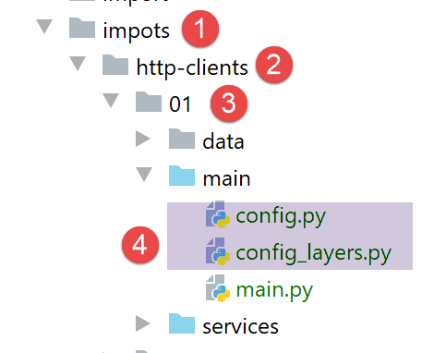
Configuration is performed using two scripts:
- [config], which handles all configuration outside the architecture layers;
- [config_layers], which configures the architecture layers;
The script [config] is as follows:
def configure(config: dict) -> dict:
    import os

    # step 1 ------

    # folder of this file
    script_dir = os.path.dirname(os.path.abspath(__file__))

    # root path
    root_dir = "C:/Data/st-2020/dev/python/cours-2020/python3-flask-2020"

    # absolute dependencies
    absolute_dependencies = [
        # project files
        # BaseEntity, MyException
        f"{root_dir}/classes/02/entities",
        # InterfaceImpôtsDao, InterfaceImpôtsMétier, InterfaceImpôtsUi
        f"{root_dir}/impots/v04/interfaces",
        # AbstractImpôtsdao, ImpôtsConsole, ImpôtsMétier
        f"{root_dir}/impots/v04/services",
        # ImpotsDaoWithAdminDataInDatabase
        f"{root_dir}/impots/v05/services",
        # AdminData, ImpôtsError, TaxPayer
        f"{root_dir}/impots/v04/entities",
        # Constants, slices
        f"{root_dir}/impots/v05/entities",
        # ImpôtsDaoWithHttpClient
        f"{script_dir}/../services",
        # configuration scripts
        script_dir,
    ]

    # set the syspath
    from myutils import set_syspath
    set_syspath(absolute_dependencies)

    # step 2 ------
    # application configuration with constants
    config.update({
        "taxpayersFilename": f"{script_dir}/../data/input/taxpayersdata.txt",
        "resultsFilename": f"{script_dir}/../data/output/résultats.json",
        "errorsFilename": f"{script_dir}/../data/output/errors.txt",
        "server": {
            "urlServer": "http://127.0.0.1:5000/",
            "authBasic": True,
            "user": {
                "login": "admin",
                "password": "admin"
            }
        }
    }
    )

    # step 3 ------
    # layer instantiation
    import config_layers
    config['layers'] = config_layers.configure(config)

    # we return the configuration
    return config
- line 1: the [configure] function takes as a parameter the dictionary to be filled with configuration information. This dictionary may already be pre-filled or empty. Here, it will be empty;
- lines 40–42: the absolute paths of the three text files managed by the [dao] layer;
- lines 43–50: associated with the key [server], the information that the [dao] layer needs to know about the web server with which it must communicate:
- line 44: the URL of the web service;
- line 45: the [authBasic] key is set to True if access to the URL requires Basic authentication;
- lines 46–49: the credentials of the user who will authenticate if authentication is required;
- lines 56–57: the layers are instantiated—in this case, the single layer [dao]—and the layer references are placed in [config] associated with the key [layers];
The [config_layers] script is as follows:
def configure(config: dict) -> dict:
    # instantiation of applicatuon layers

    # layer dao
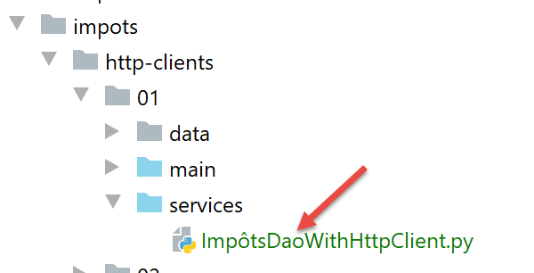
    from ImpôtsDaoWithHttpClient import ImpôtsDaoWithHttpClient
    dao = ImpôtsDaoWithHttpClient(config)

    # make the layer configuration
    return {
        "dao": dao
    }
- line 1: the [configure] function receives the dictionary that configures the application;
- lines 4–6: the [dao] layer is instantiated. On line 6, we pass it the application configuration, where it will find the information it needs;
- lines 8–11: a dictionary is returned containing the reference to the [dao] layer;
23.3.3. The main script [main]
The main script [main] is a variant of the one in |version 5|:
# configure the application
import config
config = config.configure({})

# dependencies
from ImpôtsError import ImpôtsError

# code
try:
    # retrieve the [dao] layer
    dao = config["layers"]["dao"]
    # reading taxpayer data
    taxpayers = dao.get_taxpayers_data()["taxpayers"]
    # taxpayers?
    if not taxpayers:
        raise ImpôtsError(f"Pas de contribuables valides dans le fichier {config['taxpayersFilename']}")
    # tax calculation
    for taxpayer in taxpayers:
        # taxpayer is both an input and output parameter
        # taxpayer will be modified
        dao.calculate_tax(taxpayer)
    # writing results to a text file
    dao.write_taxpayers_results(taxpayers)
except ImpôtsError  as erreur:
    # error display
    print(f"L'erreur suivante s'est produite : {erreur}")
finally:
    # completed
    print("Travail terminé...")
- lines 2-3: the application is configured;
- line 13: the [dao] layer provides the list of taxpayers for whom tax must be calculated;
- line 21: the [dao] layer calculates the tax for each of them;
- line 23: the results are saved to a file named jSON;
23.3.4. Implementation of layer [dao]
Let’s revisit the client/server architecture used:
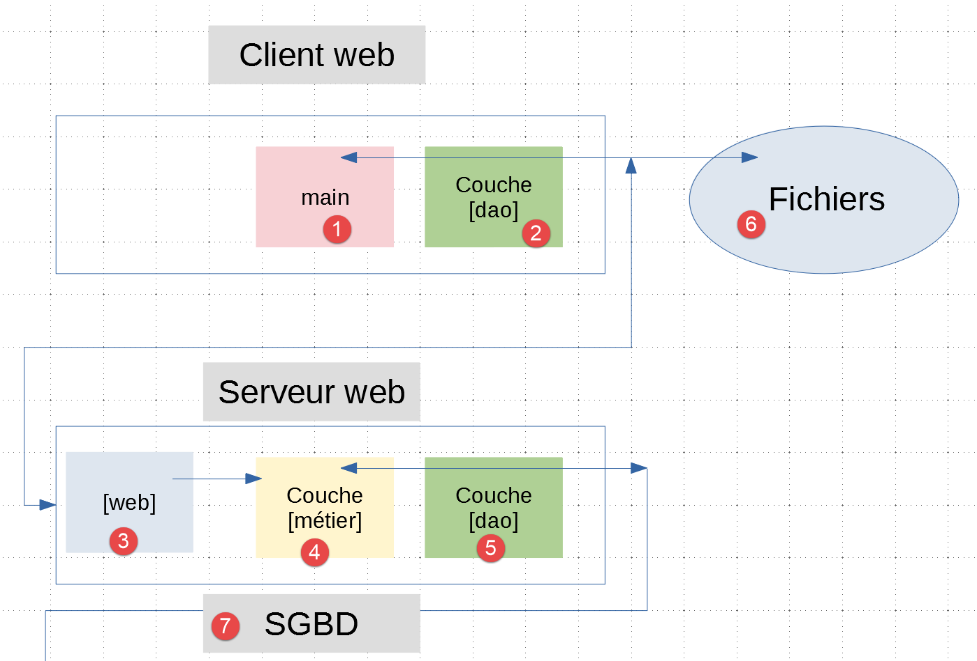
- in [2, 6], we see that the [dao] layer has two roles:
- it accesses the file system both to read taxpayer data and to write the results of tax calculations. We already have a class |AbstractImpôtsDao| that can do this. It has been in use since |version 4|;
- it communicates with the web server [3];
In |version 5|, the main script [main] [1] communicated directly with the layer [métier] [4]. We would prefer not to change this script. To achieve this, we will ensure that the [dao] [2] layer implements the interface of the [métier] [4] layer. Thus, the main script [main] will appear to communicate directly with the layer [métier] [4] and will be able to completely ignore the fact that it is located on another machine.
A definition of the class implementing the [dao] [2] layer could be as follows:
class ImpôtsDaoWithHttpClient(AbstractImpôtsDao, InterfaceImpôtsMétier):
- the [ImpôtsDaoWithHttpClient] class:
- inherits from the [AbstractImpôtsDao] class, which allows it to handle communication with the [6] file system;
- implements the [InterfaceImpôtsMétier] interface so as not to have to change the main script [main] of |version 5|;
The complete code for the [ImpôtsDaoWithHttpClient] class is as follows:
# imports
import requests
from flask_api import status

from AbstractImpôtsDao import AbstractImpôtsDao
from AdminData import AdminData
from ImpôtsError import ImpôtsError
from InterfaceImpôtsMétier import InterfaceImpôtsMétier
from TaxPayer import TaxPayer


class ImpôtsDaoWithHttpClient(AbstractImpôtsDao, InterfaceImpôtsMétier):

    # manufacturer
    def __init__(self, config: dict):
        # parent initialization
        AbstractImpôtsDao.__init__(self, config)
        # parameter memory
        self.__config_server = config["server"]

    # unused method of [AbstractImpôtsDao]
    def get_admindata(self) -> AdminData:
        pass

    # tAX CALCULATION
    def calculate_tax(self: object, taxpayer: TaxPayer, admindata: AdminData = None):
        # we let the exceptions rise
        # get parameters
        params = {"marié": taxpayer.marié, "enfants": taxpayer.enfants, "salaire": taxpayer.salaire}
        # connection with Auth Basic authentication?
        if self.__config_server['authBasic']:
            response = requests.get(
                # URL of the queried server
                self.__config_server['urlServer'],
                # URL parameters
                params=params,
                # basic authentication
                auth=(
                    self.__config_server["user"]["login"],
                    self.__config_server["user"]["password"]))
        else:
            # connection without Auth Basic authentication
            response = requests.get(self.__config_server['urlServer'], params=params)
        # check
        print(response.text)
        # response status code HTTP
        status_code = response.status_code
        # we put the response jSON in a dictionary
        résultat = response.json()
        # error if status code other than 200 OK
        if status_code != status.HTTP_200_OK:
            # we know that the errors were associated with the [erreurs] key in the response
            raise ImpôtsError(87, résultat['réponse']['erreurs'])
        # we know that the result has been associated with the [result] key in the response
        # modify the input parameter with this result
        taxpayer.fromdict(résultat["réponse"]["result"])
- lines 21–23: the class [AbstractImpôtsDao] (line 12) has an abstract method [get_admindata]. We are required to implement it even if we do not use it (admindata is managed by the server, not by the client);
- line 26: the method [calculate_tax] belongs to the interface [InterfaceImpôtsMétier] (line 12). We must implement it;
- line 15: the constructor receives the application configuration dictionary as its only parameter;
- lines 16–17: the parent class [AbstractImpôtsDao] is initialized by passing it, here as well, the application configuration. It will find there the names of the three text files it needs to manage;
- lines 18–19: information regarding the tax calculation web server is stored locally in the class;
- line 26: the [calculate_tax] method receives an object of type |Taxpayer| as a parameter. To match the signature of the [InterfaceImpôtsMétier.calculate_tax] method, it also receives a [admindata] parameter, which is supposed to encapsulate the tax administration data. On the client side, we do not have this data. This parameter will always remain at [None]. This contortion suggests that the [ImpôtsMétier] class was initially written incorrectly:
- the signature of [calculate_tax] should have simply been:
def calculate_tax(self, taxpayer: TaxPayer)
and the parameter [admindata : AdminData] should have been passed to the class constructor;
- Line 27: The code for the [calculate_tax] method has not been encapsulated in a try/catch/finally block. This means that any exceptions will not be handled and will be propagated to the calling code, in this case the [main] script. This script does catch all exceptions propagated from the [dao] layer;
- line 28: the tax calculation is performed on the server side. We will therefore need to communicate with it. This is done using the [requests] module imported on line 2;
- lines 31–43: to send a GET request to the web server, we use the [requests.get] method:
- lines 33–34: the first parameter of the method is the URL to contact;
- lines 35–40: the other two parameters are named parameters whose order does not matter;
- lines 35–36: the value of the named parameter [params] must be a dictionary containing the information to be included in the URL in the form [/url ?param1=valeur1¶m2=valeur2&…];
- line 29: the dictionary containing the three parameters [marié, enfants, salaire] that the web server expects. We do not need to worry about the encoding (called urlencoded) that these parameters must undergo. [requests] handles this;
- lines 37–40: the parameter named [auth] is a two-element tuple (login, password). It represents the credentials for Basic authentication;
- lines 44–45: these two lines are for educational purposes only (they will be commented out once debugging is complete):
- [response] represents the server’s response HTTP;
- [response.text] represents the text of the document encapsulated in this response. During the debugging phase, it is useful to verify what the server has sent us;
- Line 47: [response.status_code] is the status code HTTP from the received response. Our server sends only three of them:
- 200 OK
- 400 BAD REQUEST
- 500 INTERNAL SERVER ERROR
- Line 49: Our server always sends jSON even in the event of an error. The [response.json()] function creates a dictionary from the received jSON string. Recall the two possible forms for the jSON string:
{"réponse": {"erreurs": ["Méthode GET requise avec les seuls paramètres [marié, enfants, salaire]", "paramètre [marié] manquant", "paramètre [enfants] manquant", "paramètre [salaire] manquant"]}}
{"réponse": {"result": {"id": 0, "marié": "oui", "enfants": 3, "salaire": 200000, "impôt": 42842, "surcôte": 17283, "taux": 0.41, "décôte": 0, "réduction": 0}}}
- lines 51-53: if the status code is not 200, then an exception is thrown with the error messages encapsulated in the response;
- line 56: retrieve the dictionary generated by the tax calculation and use it to update the input parameter [taxpayer];
23.3.5. Execution
To run the client:
- start the [server_03] server with the SGBD of your choice;
- Run the client’s [main] script;
The results will be found in the [data/output] folder. They are the same as for version 5.
23.4. [dao] Layer Tests
Let’s return to the client/server application architecture:
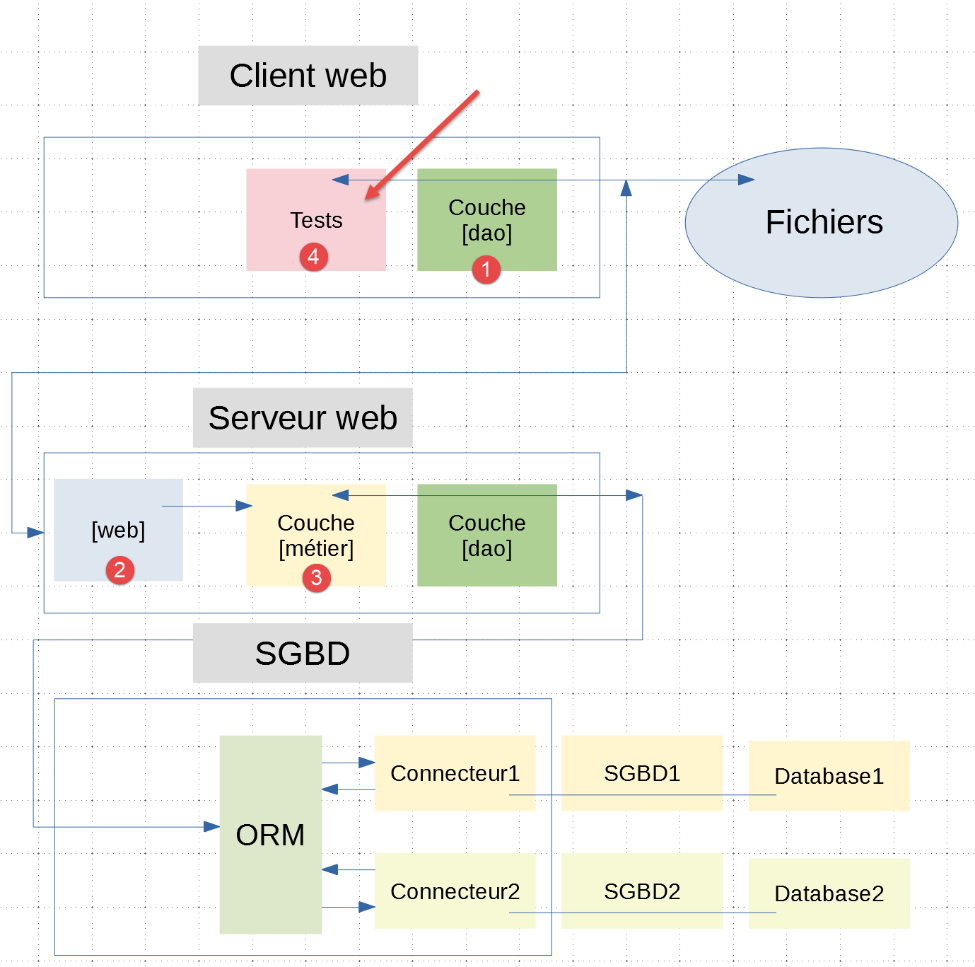
- in the client code, we ensured that the [dao] and [1] layers provide the same interface as the [métier] and [3] layers. We will therefore use the test class |TestDaoMétier|, which we have already studied, to test the [métier] [3] layer;
The test class will be executed in the following environment:
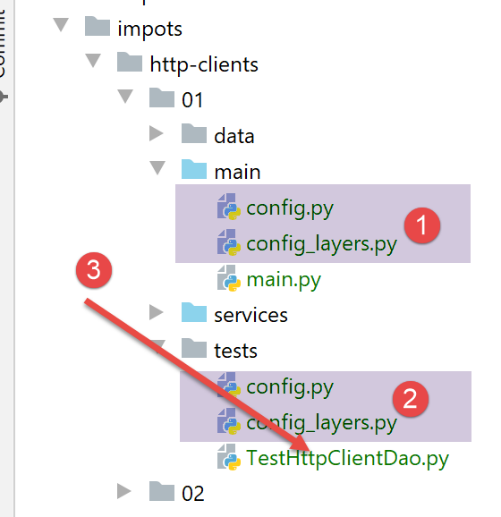
- The configuration [2] is identical to the configuration [1] that we just examined;
The test class [TestHttpClientDao] is as follows:
import unittest


class TestHttpClientDao(unittest.TestCase):

    def test_1(self) -> None:
        from TaxPayer import TaxPayer

        # { 'married': 'yes', 'children': 2, 'salary': 55555,
        # tax': 2814, 'surcôte': 0, 'décôte': 0, 'réduction': 0, 'taux': 0.14}
        taxpayer = TaxPayer().fromdict({"marié": "oui", "enfants": 2, "salaire": 55555})
        dao.calculate_tax(taxpayer)
        # check
        self.assertAlmostEqual(taxpayer.impôt, 2815, delta=1)
        self.assertEqual(taxpayer.décôte, 0)
        self.assertEqual(taxpayer.réduction, 0)
        self.assertAlmostEqual(taxpayer.taux, 0.14, delta=0.01)
        self.assertEqual(taxpayer.surcôte, 0)

    …

    def test_11(self) -> None:
        from TaxPayer import TaxPayer

        # { 'married': 'yes', 'children': 3, 'salary': 200000,
        # tax': 42842, 'surcôte': 17283, 'décôte': 0, 'réduction': 0, 'taux': 0.41}
        taxpayer = TaxPayer().fromdict({'marié': 'oui', 'enfants': 3, 'salaire': 200000})
        dao.calculate_tax(taxpayer)
        # checks
        self.assertAlmostEqual(taxpayer.impôt, 42842, 1)
        self.assertEqual(taxpayer.décôte, 0)
        self.assertEqual(taxpayer.réduction, 0)
        self.assertAlmostEqual(taxpayer.taux, 0.41, delta=0.01)
        self.assertAlmostEqual(taxpayer.surcôte, 17283, delta=1)


if __name__ == '__main__':

    # configure the application
    import config
    config = config.configure({})

    # layer dao
    dao = config['layers']['dao']

    # test methods are executed
    print("tests en cours...")
    unittest.main()
This class is similar to the one already studied in version 4 of the application.
- lines 40-41: configure the test environment;
- line 44: retrieve a reference to the [dao] layer;
- lines 47-48: we run the tests;
To run the tests, create a |run configuration|:
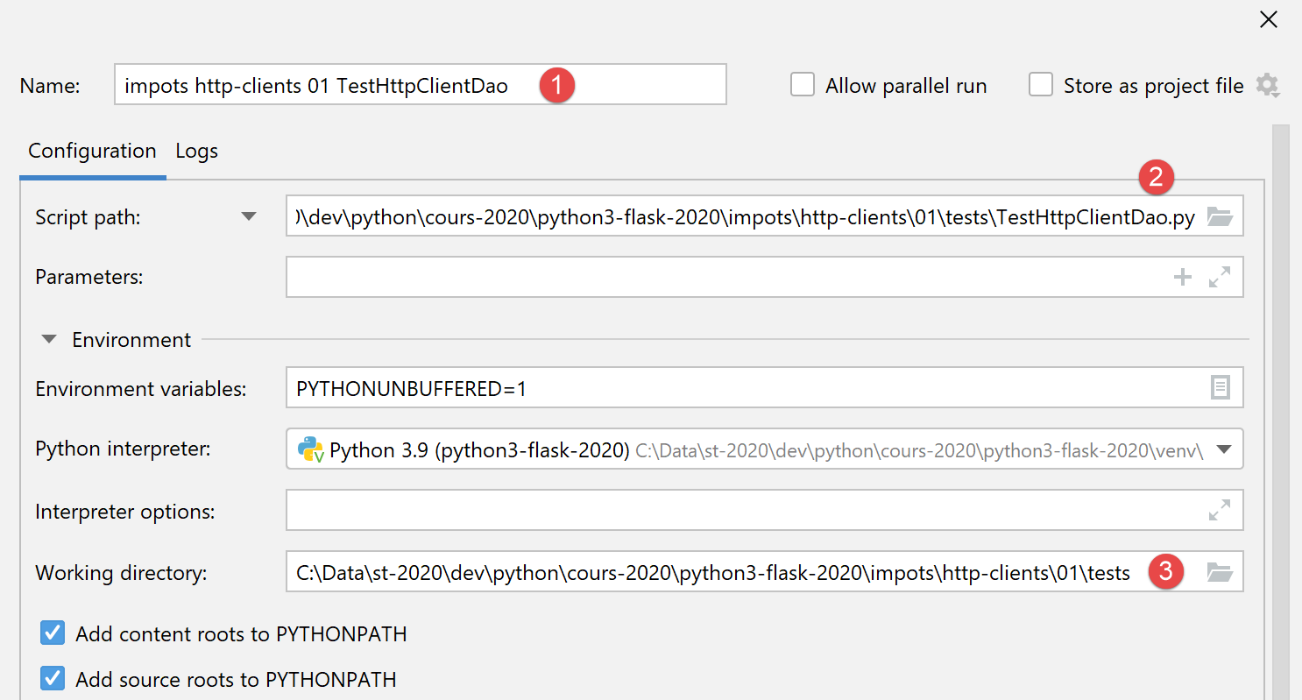
- We create a run configuration for a console script, not for a UnitTest test;
When this configuration is executed, the following results are obtained:
All 11 tests passed.