17. Using the PostgreSQL DBMS
The PostgreSQL DBMS is freely available. It is an alternative to the "community" version of MySQL.
We are using it here to demonstrate that it is fairly simple to migrate Python/MySQL scripts to Python/PostgreSQL scripts.
With the MySQL DBMS, the architecture of our scripts was as follows:

With the PostgreSQL DBMS, it will be as follows:

17.1. Installing the PostgreSQL DBMS
PostgreSQL DBMS distributions are available at the URL [https://www.postgresql.org/download/] (May 2019). We demonstrate the installation of the 64-bit Windows version:
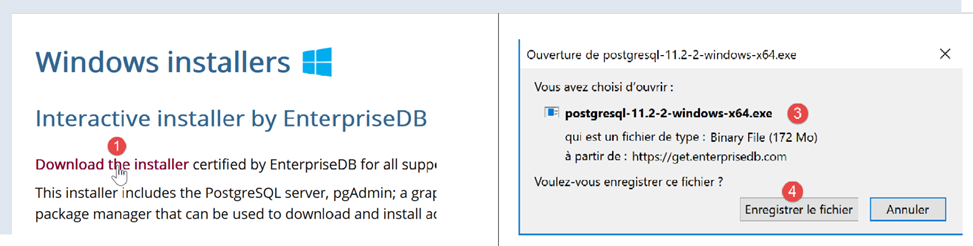

- In [1-4], download the DBMS installer;
Run the downloaded installer:
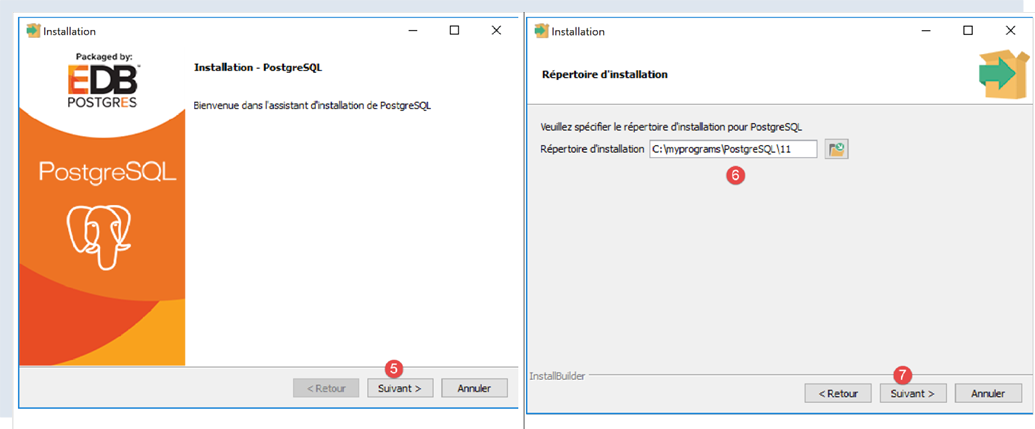
- In [6], specify an installation directory;
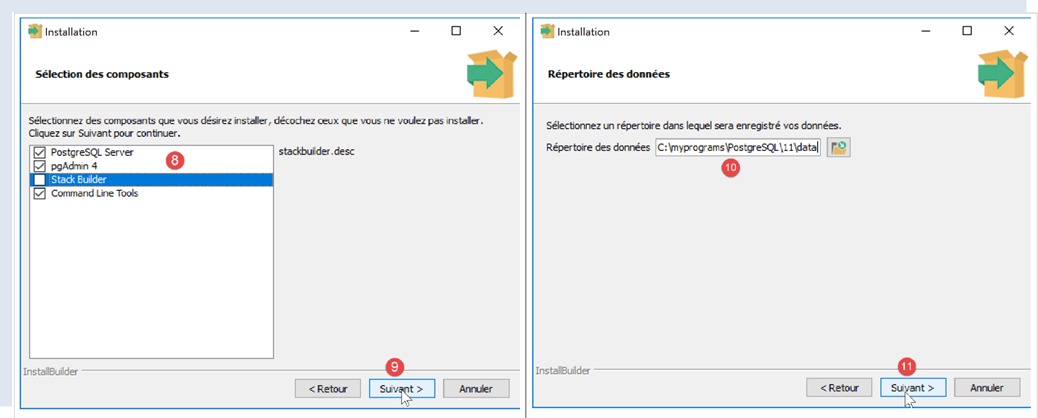
- In [8], the [Stack Builder] option is not needed for what we are doing here;
- in [10], leave the default value;
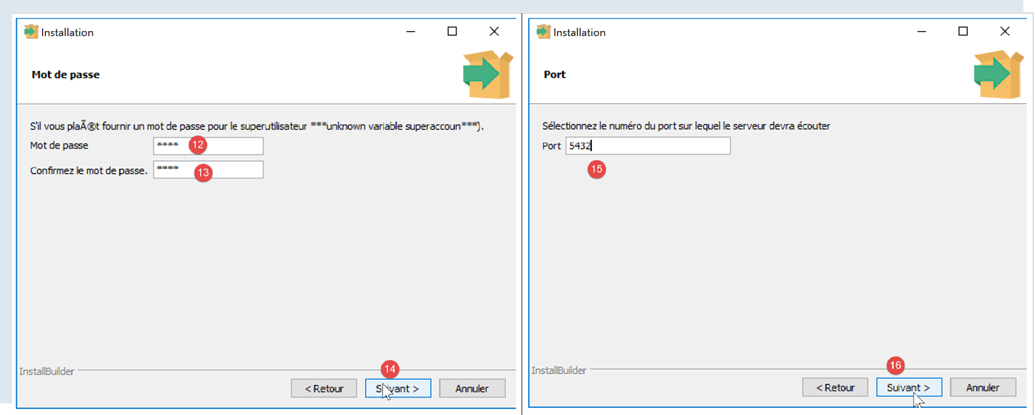
- In [12-13], we entered the password [root] here. This will be the password for the DBMS administrator, who is named [postgres]. PostgreSQL also refers to this as the superuser;
- In [15], leave the default value: this is the DBMS listening port;
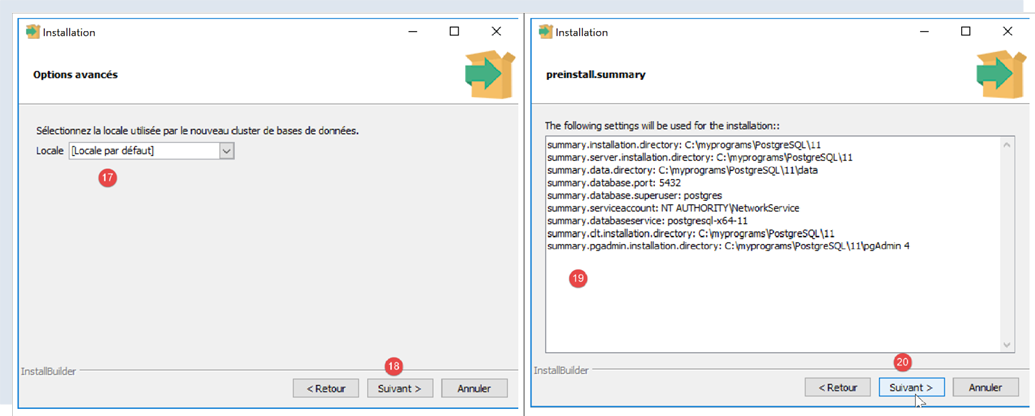
- in [17], leave the default value;
- In [19], the summary of the installation configuration;
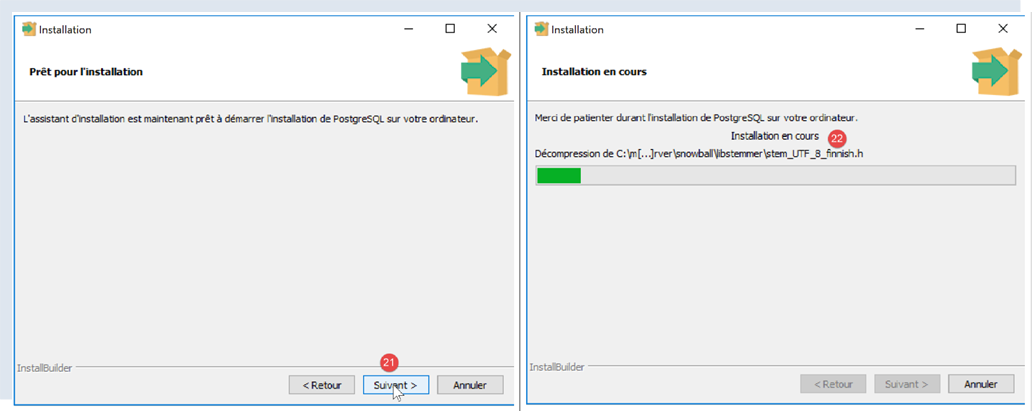
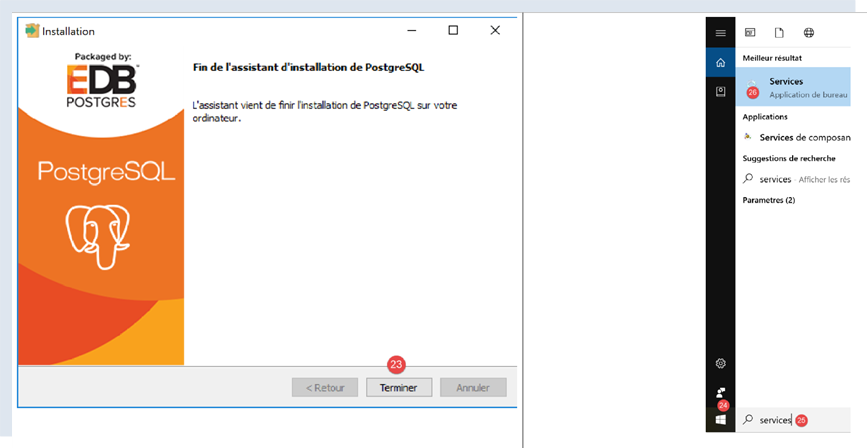
On Windows, the PostgreSQL DBMS is installed as a Windows service that starts automatically. Most of the time, this is not desirable. We will modify this configuration. Type [services] in the Windows search bar [24-26]:
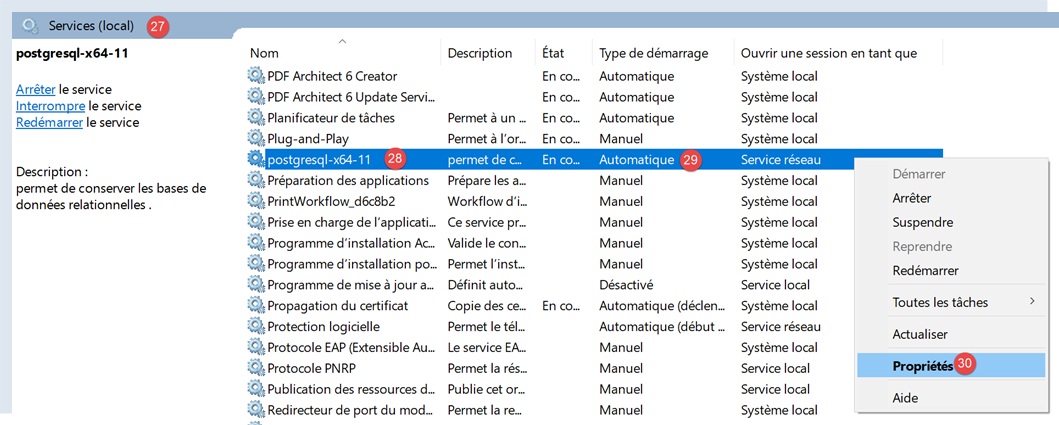
- in [29], you can see that the PostgreSQL DBMS service is set to automatic mode. Change this by accessing the service properties [30]:
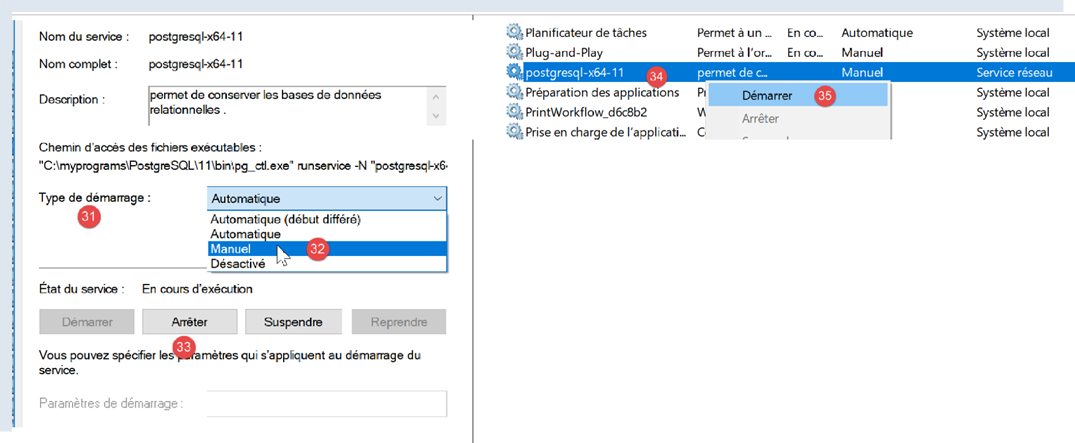
- In [31-32], set the startup type to Manual;
- in [33], stop the service;
When you want to start the DBMS manually, return to the [services] application, right-click on the [postgresql] service (34), and start it (35).
17.2. Administering PostgreSQL with the [pgAdmin] tool
Start the Windows service for the PostgreSQL DBMS (see previous paragraph). Then, in the same way you launched the [Services] tool, launch the [pgAdmin] tool, which allows you to administer the PostgreSQL DBMS [1-3]:
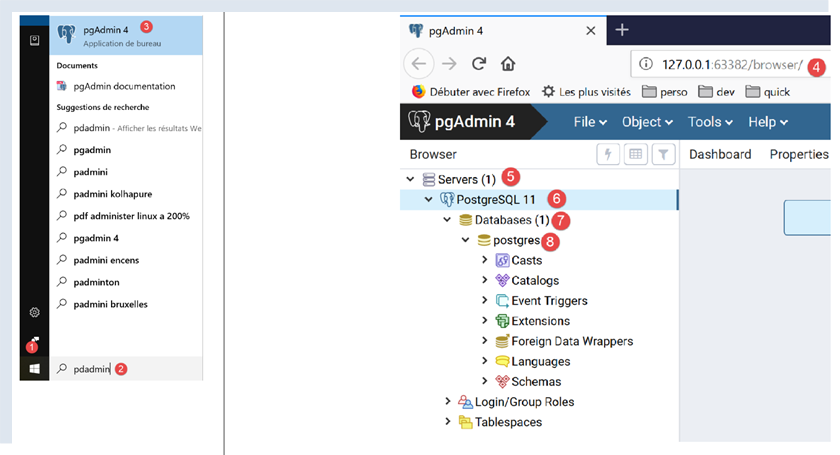
You may be prompted for the superuser password at some point. The superuser is named [postgres]. You set this password during the DBMS installation. In this document, we assigned the password [root] to the superuser during installation.
- In [4], [pgAdmin] is a web application;
- in [5], the list of PostgreSQL servers detected by [pgAdmin], here 1;
- in [6], the PostgreSQL server we started;
- in [7], the DBMS databases, here 1;
- in [8], the [postgresql] database is managed by the superuser [postgres];
First, let’s create a user [admpersonnes] with the password [nobody]:
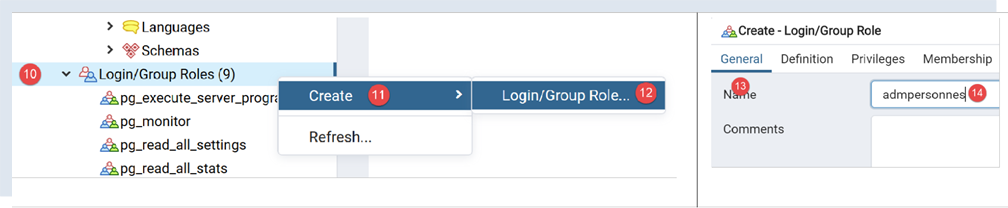
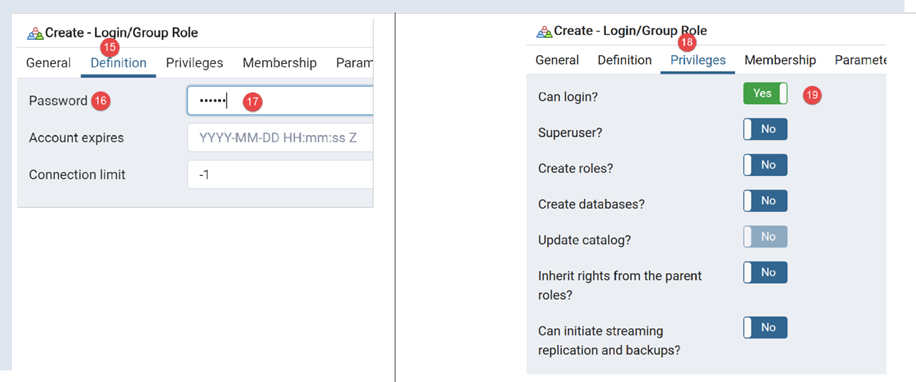
- in [17], we entered [nobody];
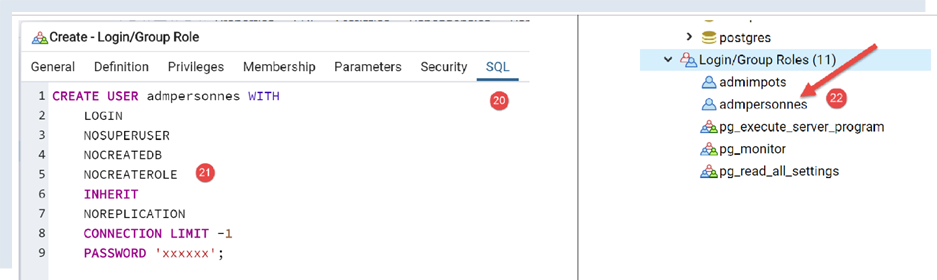
- in [21], the SQL code that the [pgAdmin] tool will send to the PostgreSQL DBMS. This is a way to learn PostgreSQL’s proprietary SQL language;
- In [22], after confirming with the [Save] wizard, the user [admpersonnes] has been created;
Now we create the [dbpersonnes] database:
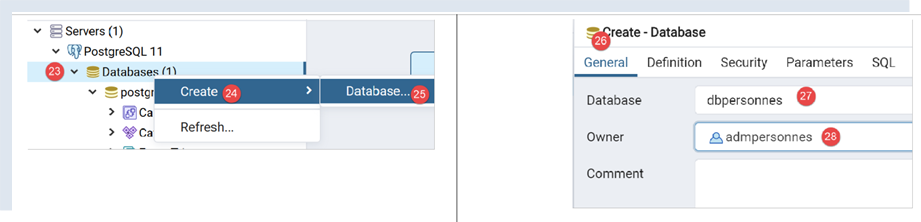
Right-click on [23], then [24-25] to create a new database. In the [26] tab, define the database name [27] and its owner [admpersonnes] [28].
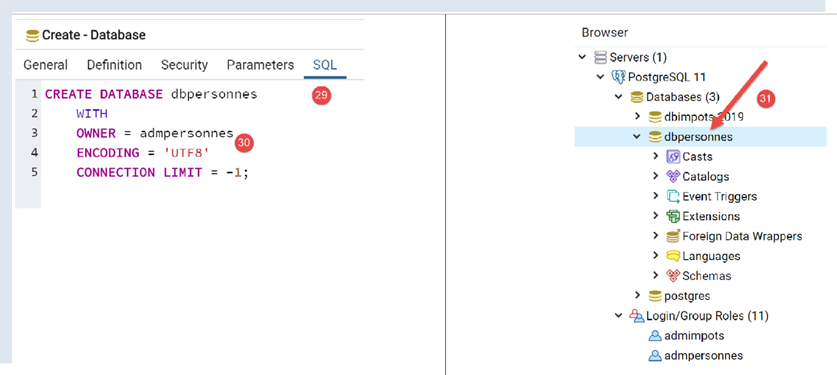
- In [30], the SQL code for creating the database;
- In [31], after confirming with the [Save] wizard, the database [dbpersonnes] is created;
We will use the [dbpersonnes] database with Python scripts.
17.3. Installing the Python Connector for the PostgreSQL DBMS
The diagram above shows a connector linking Python scripts to the PostgreSQL DBMS. There are several available. We will install the [psycopg2] connector. This is done in a Python terminal (regardless of the directory in which the terminal is open). The connector is installed using the command [pip install psycopg2]:
(venv) C:\Data\st-2020\dev\python\cours-2020\python3-flask-2020\troiscouches\v01\tests>pip install psycopg2
Collecting psycopg2
  Downloading psycopg2-2.8.5-cp38-cp38-win_amd64.whl (1.1 MB)
     || 1.1 MB 3.2 MB/s
Installing collected packages: psycopg2
Successfully installed psycopg2-2.8.5
17.4. Porting MySQL scripts to PostgreSQL scripts
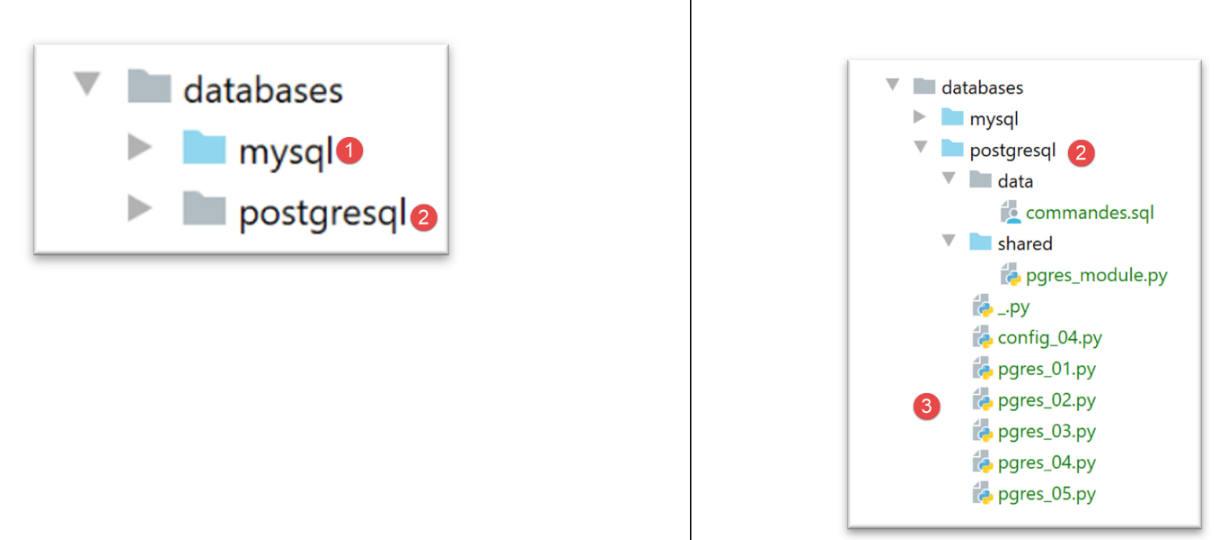
- The folder [1] containing the MySQL scripts is duplicated (Ctrl-C / Ctrl-V), then the file names are changed to match their contents;
17.4.1. [pgres_module]
This module is a copy of the [mysql_module] module (see section |script [mysql-04]: executing an SQL command file|). Change the imports:
Instead of:
we write:
The signature of the [display_info] function was:
def afficher_infos(curseur: MySQLCursor):
It becomes:
def afficher_infos(curseur: cursor)
The signature of the [execute_list_of_commands] function was:
def execute_list_of_commands(connexion: MySQLConnection, sql_commands: list,
                             suivi: bool = False, arrêt: bool = True, with_transaction: bool = True)
It becomes:
def execute_list_of_commands(connexion: connection, sql_commands: list,
                             suivi: bool = False, arrêt: bool = True, with_transaction: bool = True):
Otherwise, nothing else changes.
17.4.2. script [pgres_01]
The [pgres_01] script is a copy of the [mysql_01] script (see section |script [mysql-01]: connecting to a MySQL database - 1|). The following changes are made:
Instead of:
We write:
The rest remains unchanged. The results are the same as with MySQL.
17.4.3. script [pgres_02]
The [pgres_02] script is a copy of the [mysql_02] script (see section |script [mysql-02]: connecting to a MySQL database - 2|). Make the following changes:
Instead of:
we write:
The results are not the same as those of the [mysql_02] script:
The [pgres_02] script is as follows:
Although lines 36–41 should have displayed an error message indicating that the connection to the DBMS failed, nothing is displayed. In fact, upon further investigation, we see that the code does indeed enter the [except] block in lines 35–37, but the [error] variable is set to [None]. This occurs with version 2.8.4 of the [psycopg2] connector.
We can work around this problem by writing a generic but less precise message:
The results are as follows:
C:\Data\st-2020\dev\python\cours-2020\python3-flask-2020\venv\Scripts\python.exe C:/Data/st-2020/dev/python/cours-2020/python3-flask-2020/databases/postgresql/pgres_02.py
Connexion réussie à la base database=dbpersonnes, host=localhost sous l'identité user=admpersonnes, passwd=nobody
Déconnexion réussie

Erreur de connexion à la base [dbpersonnes] par l'utilisateur [xx/yy]

Process finished with exit code 0
17.4.4. script [pgres_03]
The script [pgres_03] is a copy of the script [mysql_03] (see section |script [mysql-03]: creating a MySQL table|). The following changes are made to it:
Instead of:
from mysql.connector import DatabaseError, InterfaceError, connect
from mysql.connector.connection import MySQLConnection
we write:
from psycopg2 import DatabaseError, InterfaceError, connect
from psycopg2.extensions import connection
Additionally, the signature of the [execute_sql] function, which was:
def execute_sql(connexion: MySQLConnection, update: str):
becomes:
def execute_sql(connexion: connection, update: str):
The rest remains unchanged. The result is as follows:
C:\Data\st-2020\dev\python\cours-2020\python3-flask-2020\venv\Scripts\python.exe C:/Data/st-2020/dev/python/cours-2020/python3-flask-2020/databases/postgresql/pgres_03.py
create table personnes (id int PRIMARY KEY, prenom varchar(30) NOT NULL, nom varchar(30) NOT NULL, age integer NOT NULL, unique(nom,prenom))  : requête réussie

Process finished with exit code 0
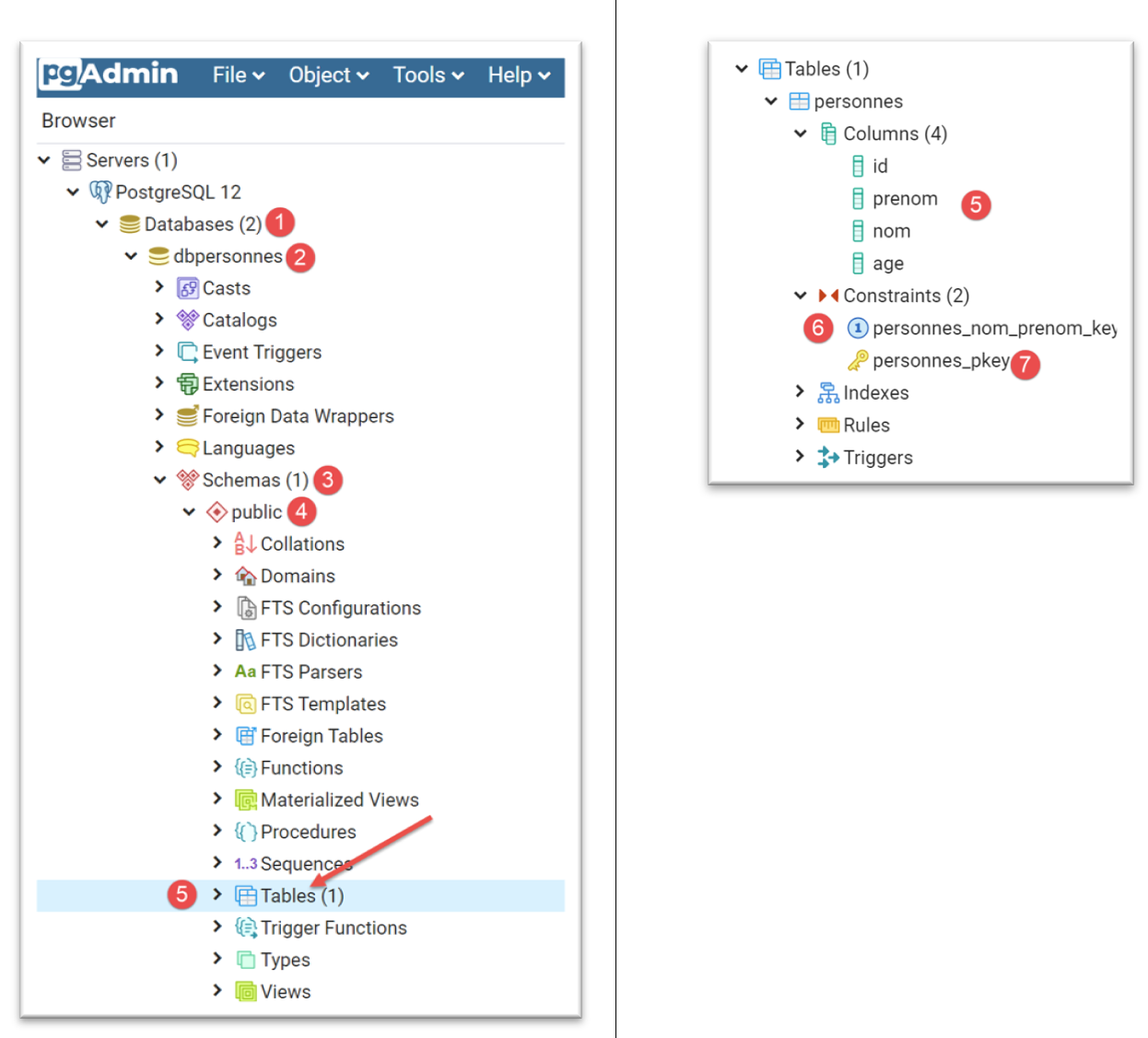
You can verify the existence of the [people] table using the [pgAdmin] administration tool:
17.4.5. script [pgres_04]
The [pgres_04] script is a copy of the [mysql_04] script (see section |script [mysql-04]: executing an SQL command file|). It uses the [pgres_module] module:
The rest remains unchanged.
We create a configuration [pgres pgres-04 without_transaction] as was done in the section |script [mysql-04]: executing an SQL command file|. We also create a configuration [pgres pgres-04 with_transaction].
Executing the [pgres pgres-04 without_transaction] configuration yields the following results:
C:\Data\st-2020\dev\python\cours-2020\python3-flask-2020\venv\Scripts\python.exe C:/Data/st-2020/dev/python/cours-2020/python3-flask-2020/databases/postgresql/pgres_04.py false
--------------------------------------------------------------------
Exécution du fichier SQL C:\Data\st-2020\dev\python\cours-2020\python3-flask-2020\databases\postgresql/data/commandes.sql sans transaction
--------------------------------------------------------------------
[drop table if exists personnes] : Exécution réussie
nombre de lignes modifiées : -1
[create table personnes (id int primary key, prenom varchar(30) not null, nom varchar(30) not null, age integer not null, unique (nom,prenom))] : Exécution réussie
nombre de lignes modifiées : -1
[insert into personnes(id, prenom, nom, age) values(1, 'Paul','Langevin',48)] : Exécution réussie
nombre de lignes modifiées : 1
[insert into personnes(id, prenom, nom, age) values (2, 'Sylvie','Lefur',70)] : Exécution réussie
nombre de lignes modifiées : 1
[select prenom, nom, age from personnes] : Exécution réussie
prenom, nom, age,
*****************
('Paul', 'Langevin', 48)
('Sylvie', 'Lefur', 70)
*****************
xx : Erreur (ERREUR:  erreur de syntaxe sur ou près de « xx »
LINE 1: xx
        ^
)
[insert into personnes(id, prenom, nom, age) values (3, 'Pierre','Nicazou',35)] : Exécution réussie
nombre de lignes modifiées : 1
[insert into personnes(id, prenom, nom, age) values (4, 'Geraldine','Colou',26)] : Exécution réussie
nombre de lignes modifiées : 1
[insert into personnes(id, prenom, nom, age) values (5, 'Paulette','Girond',56)] : Exécution réussie
nombre de lignes modifiées : 1
[select prenom, nom, age from personnes] : Exécution réussie
prenom, nom, age,
*****************
('Paul', 'Langevin', 48)
('Sylvie', 'Lefur', 70)
('Pierre', 'Nicazou', 35)
('Geraldine', 'Colou', 26)
('Paulette', 'Girond', 56)
*****************
[select nom,prenom from personnes order by nom asc, prenom desc] : Exécution réussie
nom, prenom,
************
('Colou', 'Geraldine')
('Girond', 'Paulette')
('Langevin', 'Paul')
('Lefur', 'Sylvie')
('Nicazou', 'Pierre')
************
[select nom,prenom,age from personnes where age between 20 and 40 order by age desc, nom asc, prenom asc] : Exécution réussie
nom, prenom, age,
*****************
('Nicazou', 'Pierre', 35)
('Colou', 'Geraldine', 26)
*****************
[insert into personnes(id, prenom, nom, age) values(6, 'Josette','Bruneau',46)] : Exécution réussie
nombre de lignes modifiées : 1
[update personnes set age=47 where nom='Bruneau'] : Exécution réussie
nombre de lignes modifiées : 1
[select nom,prenom,age from personnes where nom='Bruneau'] : Exécution réussie
nom, prenom, age,
*****************
('Bruneau', 'Josette', 47)
*****************
[delete from personnes where nom='Bruneau'] : Exécution réussie
nombre de lignes modifiées : 1
[select nom,prenom,age from personnes where nom='Bruneau'] : Exécution réussie
nom, prenom, age,
*****************
*****************
--------------------------------------------------------------------
Exécution terminée
--------------------------------------------------------------------
Il y a eu 1 erreur(s)
xx : Erreur (ERREUR:  erreur de syntaxe sur ou près de « xx »
LINE 1: xx
        ^
)

Process finished with exit code 0
- Line 5: We had to modify the command to drop the [people] table. Unlike the MySQL connector, the PostgreSQL connector throws an exception if the table to be dropped does not exist. The [drop table] command has a variant, [drop table if exists], which does not throw an exception if the table does not exist. We used it here. This is an example where two DBMSs do not behave the same way in similar situations;
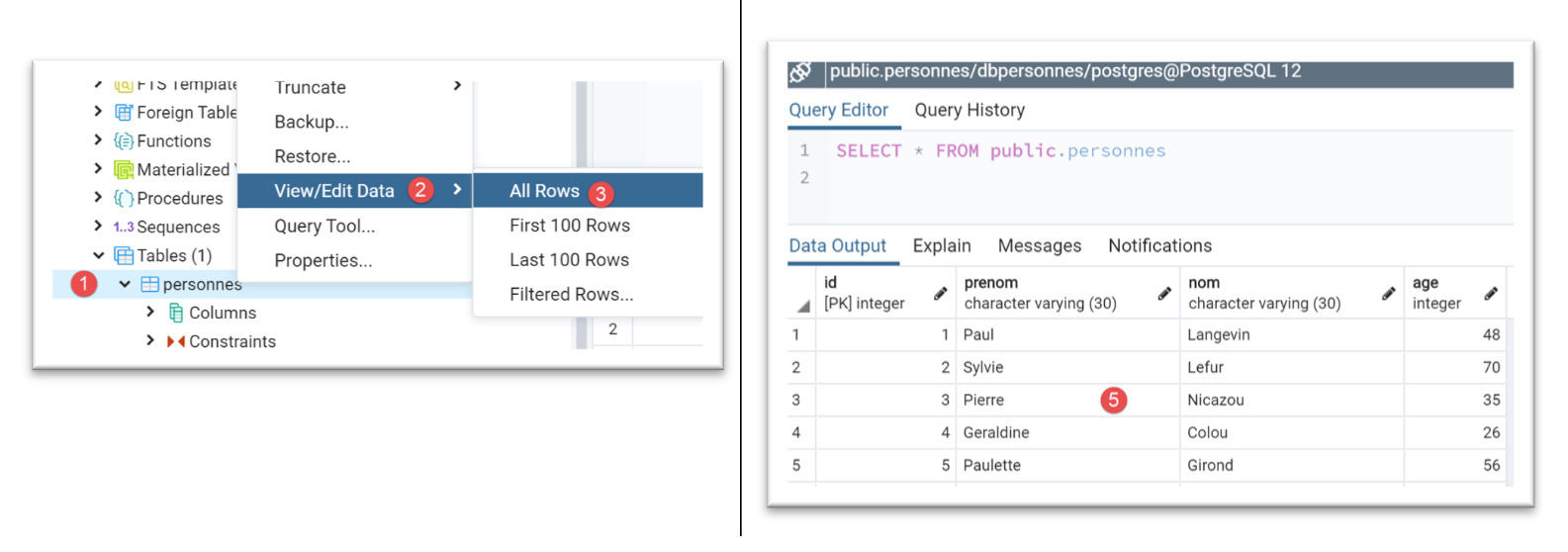
The [people] table in the [pgAdmin] tool is as follows:
Running the configuration [pgres pgres_04 with_transaction] yields the following results:
C:\Data\st-2020\dev\python\cours-2020\python3-flask-2020\venv\Scripts\python.exe C:/Data/st-2020/dev/python/cours-2020/python3-flask-2020/databases/postgresql/pgres_04.py true
--------------------------------------------------------------------
Exécution du fichier SQL C:\Data\st-2020\dev\python\cours-2020\python3-flask-2020\databases\postgresql/data/commandes.sql avec transaction
--------------------------------------------------------------------
[drop table if exists personnes] : Exécution réussie
nombre de lignes modifiées : -1
[create table personnes (id int primary key, prenom varchar(30) not null, nom varchar(30) not null, age integer not null, unique (nom,prenom))] : Exécution réussie
nombre de lignes modifiées : -1
[insert into personnes(id, prenom, nom, age) values(1, 'Paul','Langevin',48)] : Exécution réussie
nombre de lignes modifiées : 1
[insert into personnes(id, prenom, nom, age) values (2, 'Sylvie','Lefur',70)] : Exécution réussie
nombre de lignes modifiées : 1
[select prenom, nom, age from personnes] : Exécution réussie
prenom, nom, age,
*****************
('Paul', 'Langevin', 48)
('Sylvie', 'Lefur', 70)
*****************
xx : Erreur (ERREUR:  erreur de syntaxe sur ou près de « xx »
LINE 1: xx
        ^
)
--------------------------------------------------------------------
Exécution terminée
--------------------------------------------------------------------
Il y a eu 1 erreur(s)
xx : Erreur (ERREUR:  erreur de syntaxe sur ou près de « xx »
LINE 1: xx
        ^
)

Process finished with exit code 0
The [people] table in the [pgAdmin] tool is as follows:
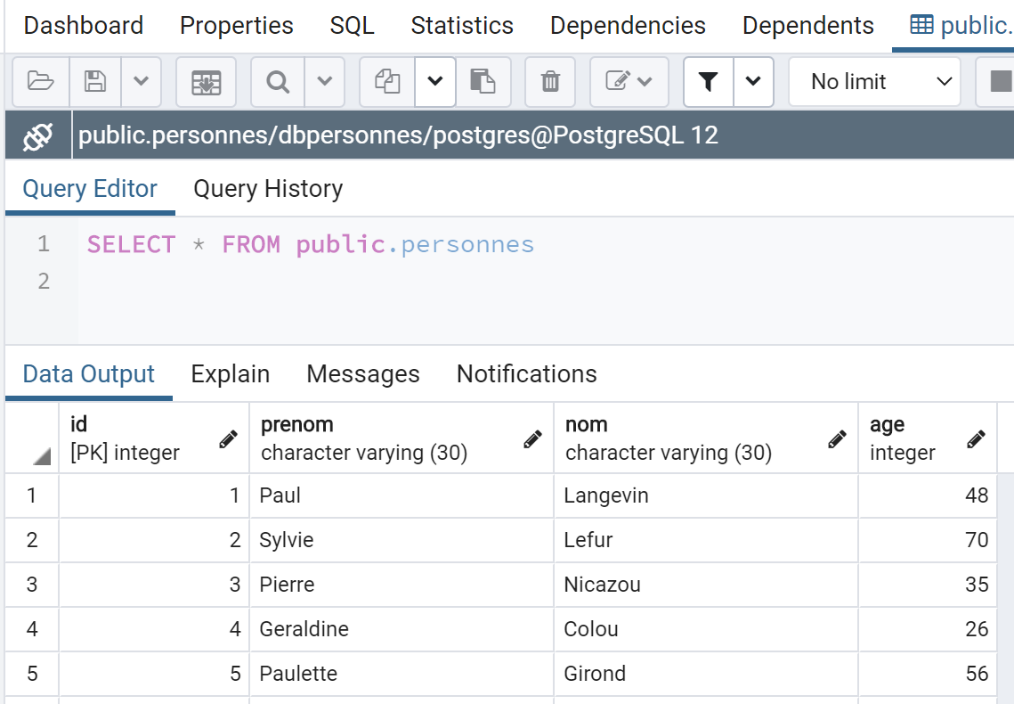
Here, the result differs from that obtained with MySQL. If we run the scripts under the same conditions—i.e., after running the script without a transaction—we get the following results:
- With MySQL, the [people] table is empty;
- with PostgreSQL, the [people] table is not empty;
The difference lies in the different ways these two DBMSs roll back the transaction:
- MySQL does not roll back the [drop table] and [create table] commands. We end up with an empty [people] table;
- PostgreSQL rolls back the [drop table] and [create table] commands. The table is restored to the state it was in before the script was executed with a transaction;
17.4.6. script [pgres_05]
The script [pgres_05] is a copy of the script [mysql_05] (see section |script [mysql-05]: using parameterized queries|). The script is modified as follows:
Instead of:
we write:
The rest remains unchanged.
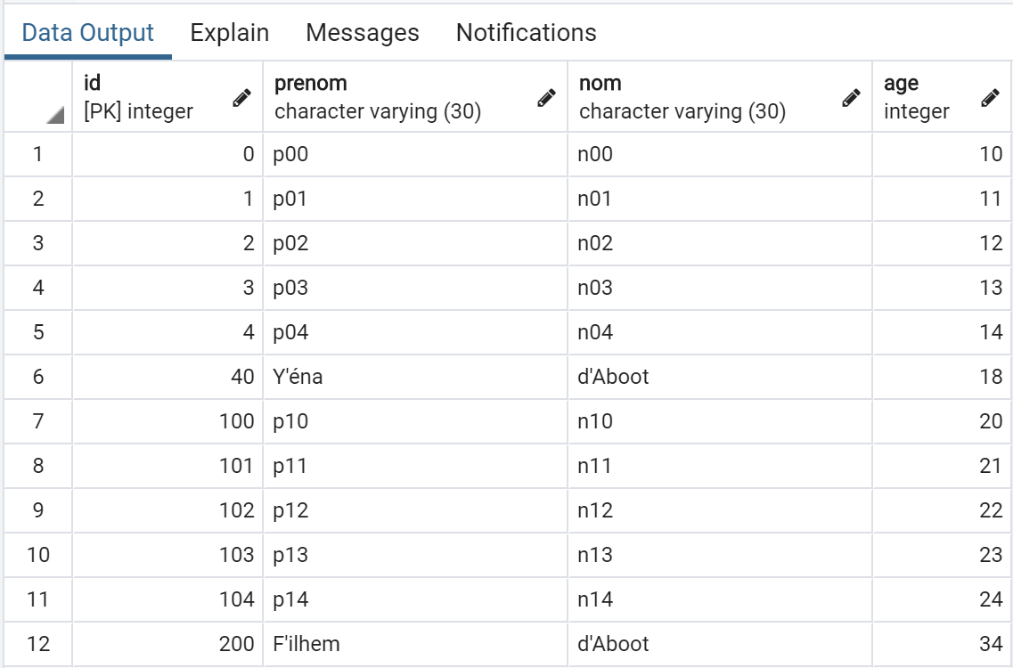
The results obtained in [pgAdmin] are as follows:
17.5. Conclusion
Porting the MySQL scripts to PostgreSQL scripts was relatively easy. This is an exception. The two DBMSs do not support the same naming conventions for SQL objects (databases, tables, columns, constraints, data types, etc.), and have incompatible SQL extensions… To ensure a simple port, one must adhere to the SQL standard in both cases without attempting to use the DBMS’s proprietary extensions. This comes at the expense of performance.