12. Classes and Objects
A class is the template from which objects are created. An object is said to be an instance of a class.
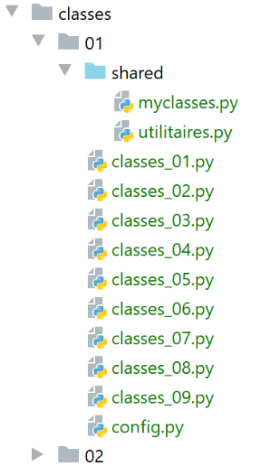
Note: The [shared] file has been placed in the [Sources Root] directory of the project.
12.1. script [classes_01]: an Object class
The script [classes_01] demonstrates an obsolete use of classes:
# a class
class Objet(object):
    """une classe Objet vide"""


# any variable of type [Objet] can have attributes by construction
obj1 = Objet()
obj1.attr1 = "un"
obj1.attr2 = 100
# displays the
print(f"objet1=[{obj1}, {type(obj1)},{id(obj1)},{obj1.attr1},{obj1.attr2}]")
# modify object
obj1.attr2 += 100
# displays the
print(f"objet1=[{obj1.attr1},{obj1.attr2}]")
# assign reference obj1 to obj2
obj2 = obj1
# modifies the object pointed to by obj2
obj2.attr2 = 0
# displays both objects - obj1 now points to a modified object
print(f"objet1=[{obj1.attr1},{obj1.attr2}]")
print(f"objet2=[{obj2.attr1},{obj2.attr2}]")
# obj1 and obj2 point to the same object
print(f"objet1=[{obj1}, {id(obj1)},{obj1.attr1},{obj1.attr2}]")
print(f"objet2=[{obj2}, {id(obj2)},{obj2.attr1},{obj2.attr2}]")
print(obj1 == obj2)
# instance type obj1
print(f"type(obj1)={type(obj1)}")
print(f"isinstance(obj1,Objet)={isinstance(obj1, Objet)}, isinstance(obj1,object)={isinstance(obj1, object)}")
# any type is an object in Python
print(f"type(4)={type(4)}")
print(f"isinstance(4, int)={isinstance(4, int)}, isinstance(4, object)={isinstance(4, object)}")
Notes:
- lines 2-3: an empty class [Objet];
- line 2: the class can be declared in three forms:
- class Object;
- class Object();
- class Object(object);
- line 3: another form of comment. This one, preceded by three "", can span multiple lines;
- line 7: instantiation of the Object class. The result is an address, as shown in lines 24–26;
- lines 8–9: direct initialization of two attributes of the object;
- line 17: copying references. The variables obj1 and obj2 are two pointers (references) to the same object;
- line 19: the object pointed to by [obj2] is modified. Since [obj1] and [obj2] point to the same object, the displays of the [obj1, obj2] objects in lines 21 and 22 will show that the object pointed to by [obj1] has changed;
- Lines 24–26: These lines are intended to show that the variables [obj1] and [obj2] are equal. The output of line 26 will demonstrate this. In this comparison, the addresses [obj1] and [obj2] are equal;
- each Python object is identified by a unique number obtained using the expression [id(objet)]. Lines 24 and 25 will show that the numbers of the objects pointed to by [obj1] and [obj2] are identical, thereby showing that these two references point to the same object;
- Lines 27–29: The function [isinstance(expr,Type)] returns the Boolean value True if the expression [expr] is of type [Type]. Here, we will see that [obj1] is of type [Objet], which seems natural, but also of type [object]. The class [object] is the parent class of all Python classes. By the nature of class inheritance, a child class F has all the properties of its parent class P, and the function [isinstance(instance de F, P)] returns True;
- lines 30–32: show that type [int] is also a type [object]. All Python types derive from the class [object];
Results
C:\Data\st-2020\dev\python\cours-2020\python3-flask-2020\venv\Scripts\python.exe C:/Data/st-2020/dev/python/cours-2020/python3-flask-2020/classes/01/classes_01.py
objet1=[<__main__.Objet object at 0x0000025C3F469BB0>, <class '__main__.Objet'>,2595221838768,un,100]
objet1=[un,200]
objet1=[un,0]
objet2=[un,0]
objet1=[<__main__.Objet object at 0x0000025C3F469BB0>, 2595221838768,un,0]
objet2=[<__main__.Objet object at 0x0000025C3F469BB0>, 2595221838768,un,0]
True
type(obj1)=<class '__main__.Objet'>
isinstance(obj1,Objet)=True, isinstance(obj1,object)=True
type(4)=<class 'int'>
isinstance(4, int)=True, isinstance(4, object)=True

Process finished with exit code 0
12.2. Script [classes_02]: a Person class
The script [classes_02] demonstrates that a class’s attributes are public: they are directly accessible from outside the class. This is another example of a deprecated use of classes. We include it nonetheless because this type of code is sometimes encountered (Python allows it), and one must be able to understand it.
# person class
class Personne:
    # class attributes
    # undeclared - can be created dynamically

    # method
    def identité(self: object) -> str:
        # a priori, uses non-existent attributes
        return f"[{self.prénom},{self.nom},{self.âge}]"


# ---------------------------------- main
# attributes are public and can be created dynamically
# class instantiation
p = Personne()
# direct initialization of class attributes
p.prénom = "Paul"
p.nom = "de la Hûche"
p.âge = 48
# call a method of the
print(f"personne={p.identité()}")
# instance type p
print(f"type(p)={type(p)}")
print(f"isinstance(Personne)={isinstance(p, Personne)}, isinstance(object)={isinstance(p, object)}")
Notes:
- lines 2–9: a class with a method;
- line 7: every method of a class must have the self object, which refers to the current object, as its first parameter. The [identité] method returns a string;
- line 15: instantiation of a [Personne] object;
- lines 16–19: show that the object’s attributes can be created dynamically (they do not exist in the class definition);
- line 9: the class attributes are denoted by the notation [self.attribut];
- lines 23–24 show that the object [p] is an instance of both the class [Personne] and the class [object];
Results
C:\Data\st-2020\dev\python\cours-2020\python3-flask-2020\venv\Scripts\python.exe C:/Data/st-2020/dev/python/cours-2020/python3-flask-2020/classes/01/classes_02.py
personne=[Paul,de la Hûche,48]
type(p)=<class '__main__.Personne'>
isinstance(Personne)=True, isinstance(object)=True

Process finished with exit code 0
12.3. Script [classes_03]: the Person class with a constructor
The script [classes_03] demonstrates the standard use of a class:
# person class
class Personne:
    # constructeur - initialise trois attributs
    def __init__(self: object, prénom: str, nom: str, âge: int):
        # first name: person's first name
        # name: person's name
        # age: age of the person

        self.prénom = prénom
        self.nom = nom
        self.âge = âge

    # renders class attributes in string form
    def identité(self: object) -> str:
        return f"[{self.prénom},{self.nom},{self.âge}]"


# ---------------------------------- main
# a Person object
p = Personne("Paul", "de la Hûche", 48)
# method call
print(f"personne={p.identité()}")
Notes:
- line 4: the class constructor is called __init__. As with other methods, its first parameter is self;
- line 20: a Person object is created using the class constructor;
- lines 13–15: the method [identité] returns a string representing the object’s content;
- line 22: displays the person’s identity;
Results
C:\Data\st-2020\dev\python\cours-2020\python3-flask-2020\venv\Scripts\python.exe C:/Data/st-2020/dev/python/cours-2020/python3-flask-2020/classes/01/classes_03.py
personne=[Paul,de la Hûche,48]

Process finished with exit code 0
12.4. Script [classes_04]: static methods
In the [modules] folder, we define the following [Utils] class (utils.py):
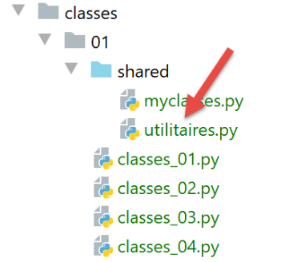
class Utils:
    # static method
    @staticmethod
    def is_string_ok(string: str) -> bool:
        # is string a string?
        erreur = not isinstance(string, str)
        if not erreur:
            # is the chain empty?
            erreur = string.strip() == ''
        # result
        return not erreur
Notes
- Line 3: The annotation [@staticmethod] indicates that the annotated method is a class method and not an instance method. This is evident from the fact that the first parameter of the annotated method is not the keyword [self]. Thus, the static method does not have access to the object's attributes. Instead of writing:
we write
Because we wrote [Utils.is_string_ok] above, the method [is_string_ok] is called a class method (the Utils class here). For this, the method [Utils.is_string_ok] must be annotated with the keyword [@staticmethod].
The static method [Utils.is_string_ok] is used here to verify that a piece of data is a non-empty string.
The script [classes_04] uses the class [Utils] as follows:
# configure the application
import config

config = config.configure()

# syspath is configured - imports can be made
from utilitaires import Utils

print(Utils.is_string_ok("  "))
print(Utils.is_string_ok(47))
print(Utils.is_string_ok(" q "))
- Lines 1-4: We use a configuration script;
The configuration script [config.py] is as follows:
def configure():
    import os

    # configuration file folder
    script_dir = os.path.dirname(os.path.abspath(__file__))

    # absolute paths of folders to put in the syspath
    absolute_dependencies = [
        f"{script_dir}/shared",
        "C:/Data/st-2020/dev/python/cours-2020/python3-flask-2020/venv/lib/site-packages",
        "C:/myprograms/Python38/lib",
        "C:/myprograms/Python38/DLLs"
    ]

    # update syspath
    from myutils import set_syspath
    set_syspath(absolute_dependencies)

    # returns the config
    return {}
- Line 9: The [shared] folder will be placed in the Python Path directory;
The result of the execution is as follows:
12.5. Script [classes_05]: attribute validity checks
The [classes_05] script introduces new concepts:
- definition of a proprietary exception type;
- definition of the [_str_] method, which is the default identity method for classes;
- definition of properties;
# configure the application
import config

config = config.configure()

# syspath is configured - imports can be made
from utilitaires import Utils


# a proprietary exception class derived from [BaseException]
class MyException(BaseException):
    # do nothing: empty classroom
    pass


# person class
class Personne:
    # manufacturer
    def __init__(self: object, prénom: str = "x", nom: str = "y", âge: int = 0):
        # first name: person's first name
        # name: person's name
        # age: age of the person

        # parameter storage
        # initializations will be made via setters
        self.prénom = prénom
        self.nom = nom
        self.âge = âge

    # method toString of class
    def __str__(self: object) -> str:
        return f"[{self.__prénom},{self.__nom},{self.__âge}]"

    # getters
    @property
    def prénom(self) -> str:
        return self.__prénom

    @property
    def nom(self) -> str:
        return self.__nom

    @property
    def âge(self) -> int:
        return self.__âge

    # setters
    @prénom.setter
    def prénom(self, prénom: str):
        # first name must be non-empty
        if Utils.is_string_ok(prénom):
            self.__prénom = prénom.strip()
        else:
            raise MyException("Le prénom doit être une chaîne de caractères non vide")

    @nom.setter
    def nom(self, nom: str):
        # first name must be non-empty
        if Utils.is_string_ok(nom):
            self.__nom = nom.strip()
        else:
            raise MyException("Le nom doit être une chaîne de caractères non vide")

    @âge.setter
    def âge(self, âge: int):
        # age must be an integer >=0
        erreur = False
        if isinstance(âge, int):
            if âge >= 0:
                self.__âge = âge
            else:
                erreur = True
        else:
            erreur = True
        # mistake?
        if erreur:
            raise MyException("L'âge doit être un entier >=0")


# ---------------------------------- main
# a Person object
try:
    # instantiation Person class
    p = Personne("Paul", "de la Hûche", 48)
    # object display p
    print(f"personne={p}")
except MyException as erreur:
    # error display
    print(erreur)

# another object Nobody
try:
    # instantiation Person class
    p = Personne("xx", "yy", "zz")
    # object display p
    print(f"personne={p}")
except MyException as erreur:
    # error display
    print(erreur)

# another person without parameters this time
try:
    # instantiation Person class
    p = Personne()
    # object display p
    print(f"personne={p}")
except MyException as erreur:
    # error msg display
    print(erreur)

# you cannot access the __attr private attributes of the
p.__prénom = "Gaëlle"
print(f"p.prénom={p.prénom}")
print(f"p.__prénom={p.__prénom}")
p.prénom = "Sébastien"
print(f"p.prénom={p.prénom}")
print(f"p.__prénom={p.__prénom}")
Notes:
- lines 10–13: a class MyException derived from the class BaseException (we’ll cover this point a bit later). It adds no functionality to the latter. It is there solely to have a custom exception;
- line 19: the constructor has default values for its parameters. Thus, the operation p=Person() is equivalent to p=Person("x", "y", 0);
- lines 34–45: the class properties. These are methods annotated with the keyword [@property]. They are used to return the values of the attributes;
- lines 47–77: the class’s setters. These are methods annotated with the keyword [@attributsetter]. They are used to set the values of the attributes;
- lines 48–54: the setter for the [prénom] attribute. This method will be called every time a value is assigned to the [prénom] attribute:
Line 2 will trigger the call to [p.prénom(valeur)]. The advantage of using a setter to assign a value to an attribute is that, since the setter is a function, we can verify the validity of the value assigned to the attribute;
- line 51: we verify that the value assigned to the attribute [prénom] is a non-empty string. To do this, we use the static method [Utils.isStringOk] seen previously;
- line 52: the value assigned to the attribute [prénom] is stripped of its leading and trailing whitespace and assigned to the attribute [self.__prénom]. Therefore, the [prénom] attribute is not used here. We could not have done otherwise, or we would have had an infinite recursive call. We could have used any attribute name. The fact that we used the attribute [__prénom] with two underscores at the beginning of the identifier has a special meaning: attributes preceded by two underscores are private to the class. This means they are not visible from outside the class. Therefore, we cannot write:
In fact, we’ll soon see that you can write it, but it doesn’t change the first name. It does something else;
- lines 53–54: if the value assigned to first_name is incorrect, an exception is thrown. This way, the calling code will know that its call is incorrect;
- lines 35–37: the [prénom] property. It will be called every time [p.prénom] is written in an expression. The [p.prénom()] method will then be called. Line 37: We return the value of the [__prénom] attribute, since we saw that the setter for the [prénom] attribute assigned its value to the private attribute [__prénom];
- Lines 56–62: The setter for the [nom] attribute is constructed in a manner analogous to that of the [prénom] attribute. The same applies to the setter for the [âge] attribute in lines 64–77;
- although the properties [prénom, nom, valeur] are not the actual attributes—which are in fact [__prénom, __nom, __âge]—we will continue to refer to them as class attributes, since they are used as such;
- lines 19–28: the class constructor implicitly uses the setters for the [prénom, nom, âge] attributes. In fact, by writing [self.prénom = prénom] on line 26, the [prénom(self, prénom)] method is implicitly called. The validity of the [prénom] parameter will then be checked. The same applies to the other two [nom, âge] attributes;
- with this model, incorrect values cannot be assigned to the [prénom, nom, âge] attributes of the class;
- lines 30–32: the function __str__ replaces the method previously called identity. The name [__str__] (with two underscores before and after) is not insignificant. We will see this later;
- lines 83–86: instantiation of a person, followed by display of their identity;
- line 84: instantiation;
- line 86: display. The operation requests that the person p be displayed as a string. The Python interpreter then automatically calls the p.__str__() method if it exists. This method plays the same role as the toString() method in Java or in .NET languages;
- lines 87–89: Handle any MyException-type exception. Then display the error;
- lines 91–99: same as above for a second person instantiated with incorrect parameters;
- lines 102–109: same as above for a third person instantiated with default parameters: no parameters are passed. The default values of these parameters in the constructor are then used here;
- Lines 112–117: We stated that the attribute [__prénom] is private and therefore normally not accessible from outside the class. We want to verify this;
- lines 112–114: we assign a value to the attribute [__prénom], then check the values of the attributes [__prénom] and [prénom], which should normally be the same;
- lines 115–117: we repeat the operation, this time initializing the attribute [prénom];
Results
C:\Data\st-2020\dev\python\cours-2020\python3-flask-2020\venv\Scripts\python.exe C:/Data/st-2020/dev/python/cours-2020/python3-flask-2020/classes/01/classes_05.py
personne=[Paul,de la Hûche,48]
L'âge doit être un entier >=0
personne=[x,y,0]
p.prénom=x
p.__prénom=Gaëlle
p.prénom=Sébastien
p.__prénom=Gaëlle

Process finished with exit code 0
Notes
- lines 5-6: we see that the assignment [p.__prénom = "Gaëlle"] did not change the value of the attribute [prénom], line 5;
- lines 7-8: we see that the assignment [p.prénom = "Sébastien"] did not change the value of the attribute [__prénom], line 8;
What can we infer from this? That the operation [p.__prénom = "Gaëlle"] likely created a public attribute [__prénom] for the class, but that this attribute is different from the private attribute [__prénom] manipulated within it;
12.6. Script [classes_06]: Adding an object initialization method
The script [classes_06] adds a method to the class [Personne]:
# configure the application
import config

config = config.configure()

# syspath is configured - imports can be made
from utilitaires import Utils


# a proprietary exception class derived from [BaseException]
class MyException(BaseException):
    # do nothing: empty classroom
    pass


# person class
class Personne:
    # manufacturer
    def __init__(self: object, prénom: str = "x", nom: str = "y", âge: int = 0):
        # first name: person's first name
        # name: person's name
        # age: age of the person

        # parameter storage
        # initializations will be made via setters
        self.prénom = prénom
        self.nom = nom
        self.âge = âge

    # other initialization method
    def init_with_personne(self: object, p: object):
        # initialise l'objet courant avec une personne p
        self.__init__(p.prénom, p.nom, p.âge)

    # method toString of class
    def __str__(self: object) -> str:
        return f"[{self.__prénom},{self.__nom},{self.__âge}]"

    # getters
    …

    # setters
    …


# ---------------------------------- main
# a Person object
try:
    # instantiation Person class
    p = Personne("Paul", "de la Hûche", 48)
    # object display p
    print(f"personne={p}")
except MyException as erreur:
    # error msg display
    print(erreur)

# another object Nobody
try:
    # instantiation Person class
    p = Personne("xx", "yy", "zz")
    # object display p
    print(f"p={p}")
except MyException as erreur:
    # error msg display
    print(erreur)

# another person without parameters this time
try:
    # instantiation Person class
    p = Personne()
    # object display p
    print(f"p={p}")
except MyException as erreur:
    # error msg display
    print(erreur)

# another Person obtained by recopying
try:
    # instantiation Person class
    p2 = Personne()
    p2.init_with_personne(p)
    # object display p2
    print(f"p2={p2}")
except MyException as erreur:
    # error msg display
    print(erreur)
Notes:
- The difference from the previous script is in lines 30–33. We have added the method initWithPersonne. This method calls the constructor __init__. Unlike in typed languages, it is not possible to have methods with the same name that are distinguished by the nature of their parameters or their return values. Therefore, it is not possible to have multiple constructors that would create the object from different parameters, in this case an object of type Person;
Results
C:\Data\st-2020\dev\python\cours-2020\python3-flask-2020\venv\Scripts\python.exe C:/Data/st-2020/dev/python/cours-2020/python3-flask-2020/classes/01/classes_06.py
personne=[Paul,de la Hûche,48]
L'âge doit être un entier >=0
p=[x,y,0]
p2=[x,y,0]

Process finished with exit code 0
12.7. Script [classes_07]: a list of Person objects
We are now placing the classes [MyException] and [Personne] in a module so that we can use them without having to copy their code:
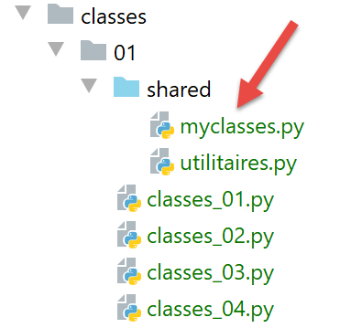
Both classes will be in the [myclasses.py] module above.
The [classes_07] script demonstrates how to generate a list of objects:
# configure the application
import config

config = config.configure()

# syspath is configured - imports can be made
from myclasses import Personne

# ---------------------------------- main
# create a list of person objects
groupe = [Personne("Paul", "Langevin", 48), Personne("Sylvie", "Lefur", 70)]
# identity of these persons
for i in range(len(groupe)):
    print(f"groupe[{i}]={groupe[i]}")
Notes:
- Line 7: Import the class [Personne];
- Line 11: a list of objects of type [Personne];
- lines 13–14: we iterate through this list to display each of its elements;
- line 14: the function [print] will display the string representing the object [groupe[i]]. By default, the method [__str__] of these will be called;
Results
C:\Users\serge\.virtualenvs\cours-python-v02\Scripts\python.exe C:/Data/st-2020/dev/python/cours-2020/v-02/classes/01/classes_07.py
groupe[0]=[Paul,Langevin,48]
groupe[1]=[Sylvie,Lefur,70]

Process finished with exit code 0
12.8. Script [classes_08]: creation of a class derived from the Person class
In the [myclasses] module, we define the following [Enseignant] class:
# class Teacher
class Enseignant(Personne):
    # manufacturer
    def __init__(self, prénom: str = "x", nom: str = "x", âge: int = 0, discipline: str = "x"):
        # first name: person's first name
        # name: person's name
        # age: age of the person
        # discipline: discipline taught

        # parent initialization
        Personne.__init__(self, prénom, nom, âge)
        # other initializations
        self.discipline = discipline

    # toString
    def __str__(self) -> str:
        return f"enseignant[{super().__str__()},{self.discipline}]"

    # properties
    @property
    def discipline(self) -> str:
        return self.__discipline

    @discipline.setter
    def discipline(self, discipline: str):
        # the discipline must be a non-empty string
        if Utils.is_string_ok(discipline):
            self.__discipline = discipline
        else:
            raise MyException("La discipline doit être une chaîne de caractères non vide")
- line 2: declares the Teacher class as a subclass of the Person class. A subclass has all the properties (attributes and methods) of its parent class plus its own;
- line 13: the [Enseignant] class defines a new attribute [discipline];
- line 11: the constructor of the derived class Teacher must call the constructor of the parent class Person, passing it the parameters it expects;
- line 17: the function [super()] returns the parent class. Here, we call the function [__str__] of the parent class;
- lines 19–30: the getter and setter for the new attribute [discipline] are defined;
The [classes_08] script uses the [Enseignant] class as follows:
# configure the application
import config

config = config.configure()

# syspath is configured - imports can be made
from myclasses import Personne, Enseignant

# ---------------------------------- main
# creation of an array of Personne and derived objects
groupe = [Enseignant("Paul", "Langevin", 48, "anglais"), Personne("Sylvie", "Lefur", 70)]
# identity of these persons
for i in range(len(groupe)):
    print(f"groupe[{i}]={groupe[i]}")
Notes:
- Line 7: Imports the classes [Personne] and [Enseignant] defined in the file [myclasses.py];
- Lines 11–14: We define a group of people and then display their identities;
Results
C:\Data\st-2020\dev\python\cours-2020\python3-flask-2020\venv\Scripts\python.exe C:/Data/st-2020/dev/python/cours-2020/python3-flask-2020/classes/01/classes_08.py
groupe[0]=enseignant[[Paul,Langevin,48],anglais]
groupe[1]=[Sylvie,Lefur,70]

Process finished with exit code 0
12.9. Script [classes_09]: second class derived from the Person class
The script [classes_09] introduces the class [Etudiant] derived from the class [Personne]. This is defined as follows in the module [myclasses]:
# student class
class Etudiant(Personne):
    # manufacturer
    def __init__(self: object, prénom: str = "x", nom: str = "y", âge: int = 0, formation: str = "x"):
        Personne.__init__(self, prénom, nom, âge)
        self.formation = formation

    # toString
    def __str__(self: object) -> str:
        return f"étudiant[{super().__str__()},{self.formation}]"

    # properties
    @property
    def formation(self) -> str:
        return self.__formation

    @formation.setter
    def formation(self, formation: str):
        # the formation must be a non-empty chain
        if Utils.is_string_ok(formation):
            self.__formation = formation
        else:
            raise MyException("La formation doit être une chaîne de caractères non vide")
The [classes_09] script uses the [Etudiant] class as follows:
# configure the application
import config

config = config.configure()

# syspath is configured - imports can be made
from myclasses import Personne, Enseignant, Etudiant

# ---------------------------------- main
# creation of an array of Personne and derived objects
groupe = [Enseignant("Paul", "Langevin", 48, "anglais"), Personne("Sylvie", "Lefur", 70),
          Etudiant("Steve", "Boer", 22, "iup2 qualité")]
# identity of these persons
for personne in groupe:
    # person display
    print(personne)
Notes:
- This script is similar to the previous one.
Results
C:\Data\st-2020\dev\python\cours-2020\python3-flask-2020\venv\Scripts\python.exe C:/Data/st-2020/dev/python/cours-2020/python3-flask-2020/classes/01/classes_09.py
enseignant[[Paul,Langevin,48],anglais]
[Sylvie,Lefur,70]
étudiant[[Steve,Boer,22],iup2 qualité]

Process finished with exit code 0
12.10. Script [classes_10]: the property [__dict__]
The [classes_10] script introduces the [__dict__] property, which we will use frequently later on:
# configure the application
import config

config = config.configure()

# syspath is configured - imports can be made
from myclasses import Etudiant

# ---------------------------------- main
# student creation
étudiant=Etudiant("Steve", "Boer", 22, "iup2 qualité")
# property dictionary
print(étudiant.__dict__)
Comments
- lines 1-4: the application is configured;
- line 7: the [Etudiant] class is imported;
- line 11: instantiation of a student;
- line 13: use of the predefined method [__dict__] (2 underscores before and after the identifier);
The results are as follows:
- line 2, we obtain a dictionary whose keys are the object’s properties prefixed by the name of the class to which they belong. We will use this dictionary to create a bridge between the object and the dictionary;