1. Foreword
The PDF for this document is available |HERE|.
The examples in this document are available |HERE|.
This document provides a list of Python scripts in various fields:
- the fundamentals of the language;
- database management MySQL and PostgreSQL;
- network programming TCP/ IP (protocols HTTP, POP3, IMAP, SMTP);
- Web programming MVC with the FLASK framework;
- three-tier architectures and interface-based programming;
This is not a comprehensive Python course but a collection of examples intended for developers who have already used a scripting language such as Perl, PHP, VBScript, or developers accustomed to typed languages such as Java or C# who are interested in exploring an object-oriented scripting language. This document is not well-suited for readers with little or no programming experience.
Nor is this document a collection of "best practices." Experienced developers may find that some of the code could be written more efficiently. The sole purpose of this document is to provide examples for anyone wishing to learn Python 3 and the Flask framework. Readers can then deepen their understanding using other resources.
The scripts are commented, and the results of their execution are shown. Additional explanations are sometimes provided. This document requires active reading: to understand a script, you must read its code, its comments, and its execution results.
The examples in this document are available |HERE|:
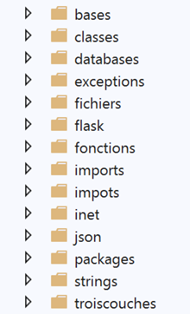
This document is an update to an earlier document published in June 2011 |https://tahe.developpez.com/tutoriels-cours/python/|. The 2011 document was built using the Python 2.7 interpreter. Since then, Python 3.x versions have been released. As of February 2020, the current version is version 3.8. The 3.x versions have introduced a break in cross-version compatibility: code that runs under Python 2.7 may not work under Python 3.x. This is particularly true for console output. In 2.7, you can write [print "toto"], whereas in 3.x you must write [print("toto")]: parentheses are required. This simple change means that most of the code provided with the 2011 document is unusable directly with Python 3.x. It must be modified.
This new document does more than just update the 2011 code so that it runs with Python 3.8:
- the sections on TCP-IP programming and database usage have undergone significant changes;
- the section on web programming, which was previously just an introduction, is now a complete course using the FLASK framework;
To build this course, I took an unconventional approach: I ported the PHP [Introduction to the PHP7 language through examples (2019)] course. I therefore did not follow the traditional structures of Python or Flask courses. Above all, I wanted to know how I could do in Python 3 what I had done in PHP 7. The result is that I was able to recreate, in Python 3 / Flask, all the examples from the PHP 7 course.
This document may contain errors or omissions. Readers can use the discussion thread |forum| to report them.
The contents of the document are as follows:
Chapter | Code Directory | Content |
Course Overview | ||
Setting Up a Work Environment | ||
[bases] | The basics of the Python language – language structures – data types – functions – console output – format strings – type conversion – lists – dictionaries – regular expressions | |
[strings] | String notation – methods of the <str> class – encoding/decoding strings in UTF-8 | |
[exceptions] | Exception handling | |
[fonctions] | Variable Scope – Parameter Passing – Using Modules – Python Path – Named Parameters – Recursive Functions | |
[fichiers] | Reading/writing a text file – handling UTF-8 encoded files – handling files jSON | |
[impots/v01] | Version 1 of the application exercise: an income tax calculation. The application is available in 18 versions – version 1 implements a procedural solution | |
[imports] | Managing application dependencies by importing modules – a dependency management method is presented – it is used throughout the document – Python dependency management Path | |
[impots/v02] | The version 2 of the application builds on version 1 by gathering all configuration constants into a configuration file that also manages Python Path | |
[impots/v03] | The application’s version 3 builds on version 2 by using functions encapsulated in a module—dependency management is handled via configuration – introduction of the jSON file to read the data needed to calculate the tax and write the calculation results | |
[classes/01] | Classes – inheritance – methods and properties – getters / setters – constructor – [__dict__] property | |
[classes/02] | Overview of the [BaseEntity] and [MyException] classes used in the rest of the document – [BaseEntity] facilitates object/dictionary conversions | |
[troiscouches] | Layered architecture and interface-based programming. This chapter presents the programming methods used in the rest of the document | |
[impots/v04] | Version 4 of the application – this version implements a solution with a layered architecture, interface-based programming, and the use of classes derived from [BaseEntity] and [MyException] | |
[databases/mysql] | Installing SGBD MySQL – connecting to a database – creating a table – executing commands SQL SELECT, UPDATE, DELETE, INSERT – transaction – parameterized queries SQL | |
[databases/postgresql] | Installation of SGBD PostgreSQL – connecting to a database – creating a table – executing commands SQL SELECT, UPDATE, DELETE, INSERT – transaction – parameterized queries SQL | |
[databases/anysgbd] | Writing code independent of SGBD | |
[databases/sqlalchemy] | The ORM (Object Relational Mapper) SqlAlchemy – a ORM allows for unified work with different SGBD - mapping classes / tables SQL – operations on table image classes SQL | |
[impots/v05] | Version 5 of the tax calculation application – Using the layered architecture of version 04 andORM SqlAlchemy to work with the SGBD MySQL and PostgreSQL | |
[inet] | Internet Programming – TCP / IP Protocol (Transfer Control Protocol / Internet Protocol) – HTTP Protocols (HyperText Transfer Protocol) – SMTP (Simple Mail Transfer Protocol) – POP (Post Office Protocol) – IMAP (Internet Message Access Protocol) | |
[flask] | Web services with the Flask web framework – displaying a page HTML – web service jSON – requests GET and POST – managing a web session | |
[impots/http-servers/01] [impots/http-clients/01] | Version 6 of the application exercise - Creating a web service jSON for tax calculation with a multi-tier architecture - Writing a web client for this server with a multi-tier architecture – client/server programming – using the [requests] module | |
[impots/http-servers/02] [impots/http-clients/02] | Version 7 of the application exercise – version 6 is improved: the client and server are multithreaded – utilities [Logger] to log client/server exchanges – [SendMail] to send an email to the application administrator | |
[impots/http-servers/03] [impots/http-clients/03] | Version 8 of the application exercise – version 7 is enhanced by the use of a web session | |
[xml] | Management of XML (eXtended Markup Language) with the [xmltodict] module | |
[impots/http-servers/04] [impots/http-clients/04] | Version 9 of the application exercise – version 8 is modified to include client/server exchanges in XML; | |
[impots/http-servers/05] [impots/http-clients/05] | Version 10 of the application exercise – instead of processing N taxpayers via N GET requests, a single query POST is used with the N taxpayers in the body of POST | |
[impots/http-servers/06] [impots/http-clients/06] | Version 11 of the application exercise – the application’s client/server architecture is modified: the [métier] layer moves from the server to the client | |
[impots/http-servers/07] | Version 12 of the application exercise – this version implements a MVC server (Model – View – Controller) that delivers, at the client’s request, either jSON, XML, or HTML. This chapter implements versions jSON and XML of the server | |
[impots/http-clients/07] | Implementation of clients, jSON, and XML of the MVC server from version 12 | |
[impots/http-servers/07] | Implementation of the HTML server from the version 12 – using the CSS Bootstrap framework – | |
[impots/http-servers/08] | Version 13 of the application exercise - Refactoring the code from version 12 – session management with the [flask_session] module and a Redis server – using encrypted passwords | |
[impots/http-servers/09] [impots/http-clients/09] | Version 14 of the application exercise – implementation of URL with a token CSRF (Cross-Site Request Forgery) | |
[impots/http-servers/10] | Version 15 of the application exercise – refactoring the code from version 14 to handle two types of actions: ASV (Action Show View), which are used only to display a view without modifying the server’s state, ADS (Do Something Action) which perform an action that changes the server’s state – these actions all end with a redirect to a ASV action – this allows for proper handling of client browser page refreshes | |
[impots/http-servers/11] | Version 16 of the application – management of URL with prefix | |
[impots/http-servers/12] | Version 17 of the application – porting version 16 to an Apache / Windows server | |
[impots/http-servers/13] | Version 18 of the application – fixes a bug in version 17 |
The final version of the application exercise is a client/server tax calculation application with the following architecture:
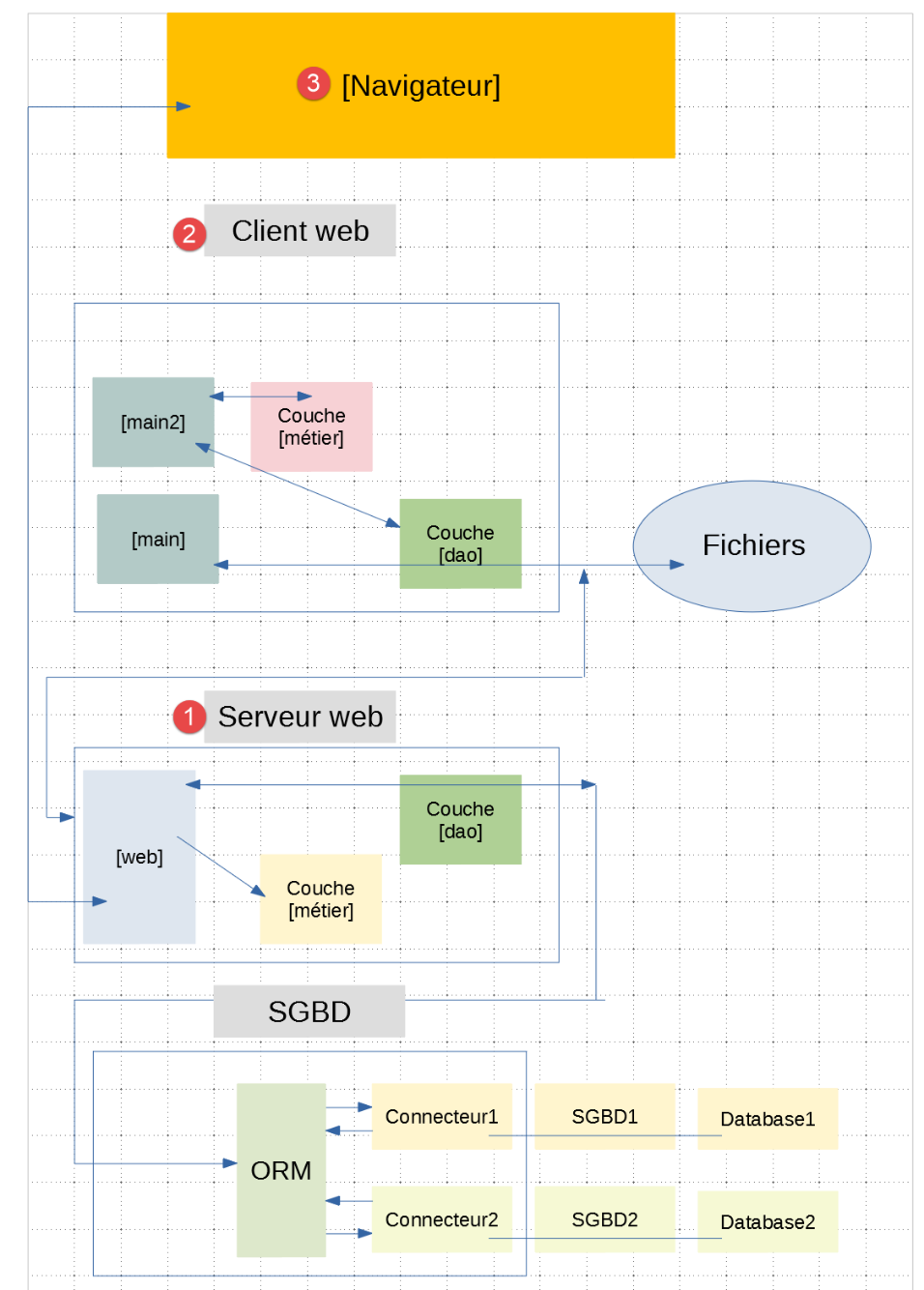
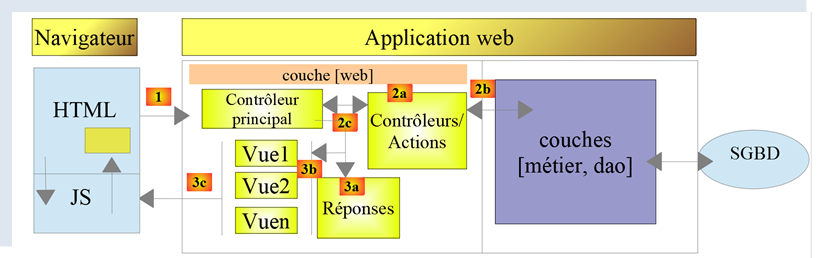
The [web] layer above is implemented with a MVC architecture:
The document’s content is dense. Readers who make it to the end will gain a solid understanding of MVC web programming in Python/Flask and, beyond that, a solid understanding of MVC web programming in other languages.
Readers who prefer to see code, test it, and modify it rather than read a lecture can proceed as follows:
-
Set up a development environment:
- a Python interpreter;
- the IDE PyCharm Community;
- Laragon (Apache server, SGBD MySQL, Redis server);
- SGBD PostgreSQL;
- the HTTP Postman client;
- the hMailServer mail server;
-
Explore the example code |https://tahe.developpez.com/tutoriels-cours/python-flask-2020/documents/python-flask-2020.rar|:
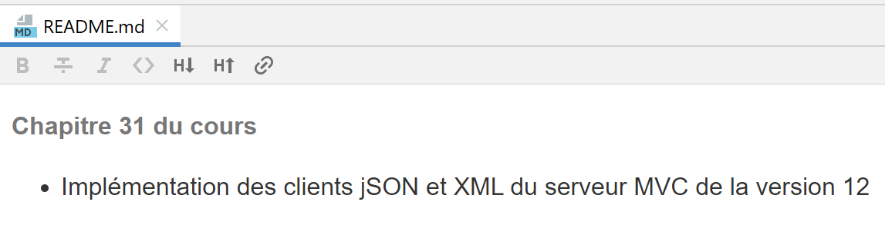
- In each folder, there is a file named [README.md] that links the folder to a chapter of the course and summarizes its content:
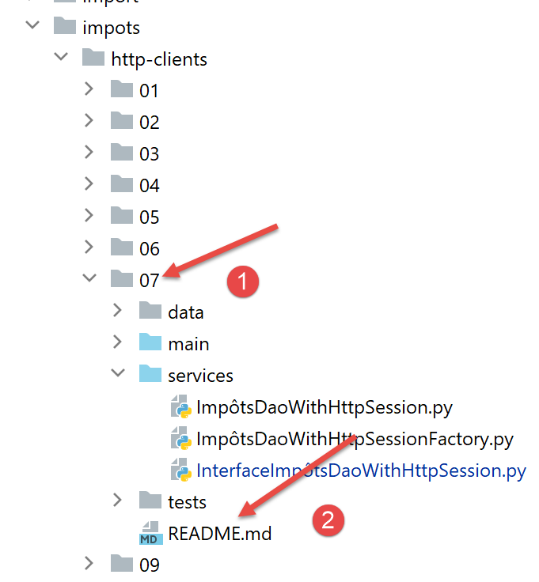
The file [README.md] looks like this:
It is unlikely that the reader will read the entire course:
- a beginner reader might read chapters 1 through 15 and stop there. They can then spend time coding their own Python scripts before returning to this course;
- a reader with a basic understanding of Python who wants to learn about databases and the ORM (Object Relational Mapper) [sqlalchemy] may be satisfied with chapters 16 through 20;
- Readers wishing to learn web programming (HTTP, SMTP, POP3, IMAP) can read Chapter 21. This chapter is quite complex and covers advanced scripts. It can be read on two levels:
- to learn about Internet protocols;
- to obtain scripts that utilize these protocols;
- readers with a basic understanding of Python who want to learn web programming using the Flask framework should read Chapter 22;
- readers wishing to delve deeper into web programming with the Flask framework can study Chapters 23 through 38. There, we build increasingly complex client/server applications as well as a HTML/Python application following the MVC development model (Model–View – Controller). This application is developed in Chapter 32. You may stop there. The following chapters introduce non-fundamental changes;
Serge Tahé, September 2020