14. Layered Architecture and Interface-Based Programming
14.1. Introduction
We propose to write an application that displays the grades of middle school students. This application can have a multi-layer architecture:

- the [ui] layer (User Interface) is the layer that interacts with the application’s user;
- the [métier] layer implements the application’s business logic, such as calculating a salary or an invoice. This layer uses data from the user via the [présentation] layer and from the SGBD layer via the [dao] layer;
- the [dao] layer (Data Access Objects) manages access to data from the SGBD (Database Management System).
This is the architecture that was used in the |Python 2 course|. A variant can also be introduced:
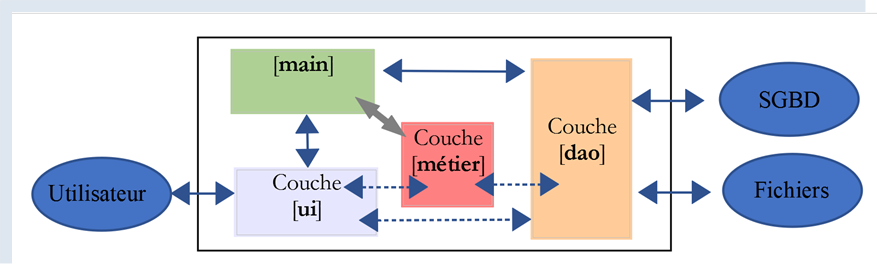
The differences from the previous layered structure are as follows:
- a main script called [main] (as mentioned above) organizes the instantiation of the layers;
- the [ui, métier, dao] layers no longer necessarily communicate with each other. If they need to, the [main] script provides them with the references of the layers they need;
The code is organized here into functional units with a coordinator:
- the orchestrator is the main script [main];
- The layers [ui], [dao], and [métier] are the functional areas;
This structure could be called an orchestral organization.
14.2. Example 1
We will illustrate the layered architecture with a simple console application:
- there will be no database;
- the [dao] layer will manage the Student, Class, Subject, and Grade entities to handle student grades;
- the [métier] layer will calculate metrics based on a specific student’s grades;
- The [ui] layer will be a console application that displays student results;
The PyCharm project for the application is as follows:
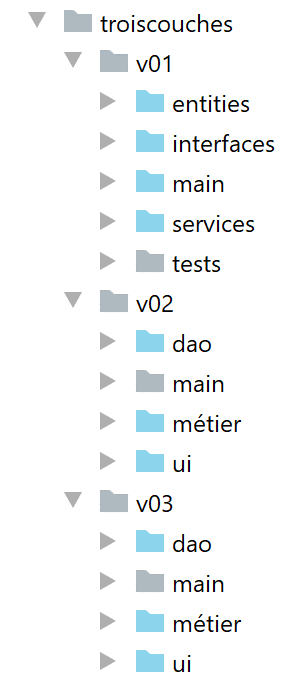 |
Note: The folders in blue are part of [Sources Root] within the PyCharm project.
14.2.1. Application Entities
We will refer to classes whose sole purpose is to encapsulate data as entities. Dictionaries could be used for this purpose. The advantage of using a class is that it allows us to validate the data stored in the object and provides a method that returns the object’s identity as a string.
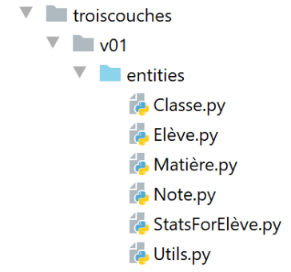 |
14.2.1.1. The entity [Classe]
The entity [Classe] (Classe.py) represents a middle school class:
# imports
from BaseEntity import BaseEntity
from MyException import MyException
from Utils import Utils


class Classe(BaseEntity):
    # attributes excluded from class state
    excluded_keys = []

    # class properties
    @staticmethod
    def get_allowed_keys() -> list:
        # id: class identifier
        # name: class name
        return BaseEntity.get_allowed_keys() + ["nom"]

    # getter
    @property
    def nom(self: object) -> str:
        return self.__nom

    #  setters
    @nom.setter
    def nom(self: object, nom: str):
        # name must be a non-empty string
        if Utils.is_string_ok(nom):
            self.__nom = nom
        else:
            raise MyException(11, f"Le nom de la classe {self.id} doit être une chaîne de caractères non vide")
Notes
- line 7: the entity [Classe] derives from the entity [BaseEntity] discussed in the section |The class BaseEntity|;
- Lines 11–16: A class is defined by an ID (id) and a name (line 16). The property [id] is provided by the class [BaseEntity] and the name by the class [Classe];
- lines 18–30: getter/setter for the [nom] attribute;
14.2.1.2. The entity [Matière]
The class [Matière] (matière.py) is as follows:
# imports
from BaseEntity import BaseEntity
from MyException import MyException
from Utils import Utils


class Matière(BaseEntity):
    # attributes excluded from class state
    excluded_keys = []

    # class properties
    @staticmethod
    def get_allowed_keys() -> list:
        # id: material identifier
        # name: material name
        # coefficient: subject coefficient
        return BaseEntity.get_allowed_keys() + ["nom", "coefficient"]

    # getter
    @property
    def nom(self: object) -> str:
        return self.__nom

    @property
    def coefficient(self: object) -> float:
        return self.__coefficient

    #  setters
    @nom.setter
    def nom(self: object, nom: str):
        # name must be a non-empty string
        if Utils.is_string_ok(nom):
            self.__nom = nom
        else:
            raise MyException(21, f"Le nom de la matière {self.id} doit être une chaîne de caractères non vide")

    @coefficient.setter
    def coefficient(self, coefficient: float):
        # the coefficient must be a real number >=0
        erreur = False
        if isinstance(coefficient, (int, float)):
            if coefficient >= 0:
                self.__coefficient = coefficient
            else:
                erreur = True
        else:
            erreur = True
        # mistake?
        if erreur:
            raise MyException(22, f"Le coefficient de la matière {self.nom} doit être un réel >=0")
Notes
- line 7: the class [Classe] derives from the class [BaseEntity];
- lines 11–17: a subject is defined by its ID [id], its name [nom], and its weight [coefficient];
- lines 19–50: getters/setters for the class attributes;
14.2.1.3. The entity [Elève]
The class [Elève] (élève.py) is as follows:
# imports
from BaseEntity import BaseEntity
from Classe import Classe
from MyException import MyException

from Utils import Utils


class Elève(BaseEntity):
    # attributes excluded from class state
    excluded_keys = []

    # class properties
    @staticmethod
    def get_allowed_keys() -> list:
        # id: student identifier
        # name: student's name
        # first name: student's first name
        # class: student's class
        return BaseEntity.get_allowed_keys() + ["nom", "prénom", "classe"]

    # getters
    @property
    def nom(self: object) -> str:
        return self.__nom

    @property
    def prénom(self: object) -> str:
        return self.__prénom

    @property
    def classe(self: object) -> Classe:
        return self.__classe

    #  setters
    @nom.setter
    def nom(self: object, nom: str) -> str:
        # name must be a non-empty string
        if Utils.is_string_ok(nom):
            self.__nom = nom
        else:
            raise MyException(41, f"Le nom de l'élève {self.id} doit être une chaîne de caractères non vide")

    @prénom.setter
    def prénom(self: object, prénom: str) -> str:
        # first name must be a non-empty string
        if Utils.is_string_ok(prénom):
            self.__prénom = prénom
        else:
            raise MyException(42, f"Le prénom de l'élève {self.id} doit être une chaîne de caractères non vide")

    @classe.setter
    def classe(self: object, value):
        try:
            # we expect a Class type
            if isinstance(value, Classe):
                self.__classe = value
            # or a type dict
            elif isinstance(value,dict):
                self.__classe=Classe().fromdict(value)
            # or a json type
            elif isinstance(value,str):
                self.__classe = Classe().fromjson(value)
        except BaseException as erreur:
            raise MyException(43, f"L'attribut [{value}] de l'élève {self.id} doit être de type Classe ou dict ou json. Erreur : {erreur}")
Notes
- line 9: the class [Elève] derives from the class [BaseEntity];
- lines 13–20: a student is characterized by their ID [id], their last name [nom], their first name [prénom], and their class [classe]. This last parameter is a reference to an object [Classe];
- lines 22–65: getters/setters for the class attributes;
14.2.1.4. The entity [Note]
The class [Note] (note.py) is as follows:
# imports
from BaseEntity import BaseEntity
from Elève import Elève
from Matière import Matière
from MyException import MyException


class Note(BaseEntity):
    # attributes excluded from class state
    excluded_keys = []

    # class properties
    @staticmethod
    def get_allowed_keys() -> list:
        # id: note identifier
        # value: the note itself
        # student: student (of type Student) concerned by the note
        # subject: subject (of type Subject) concerned by the grade
        # the Note object is therefore a student's grade in a subject
        return BaseEntity.get_allowed_keys() + ["valeur", "élève", "matière"]

    # getters
    @property
    def valeur(self: object) -> float:
        return self.__valeur

    @property
    def élève(self: object) -> Elève:
        return self.__élève

    @property
    def matière(self: object) -> Matière:
        return self.__matière

    # getters
    @valeur.setter
    def valeur(self: object, valeur: float):
        # the score must be a real number between 0 and 20
        if isinstance(valeur, (int, float)) and 0 <= valeur <= 20:
            self.__valeur = valeur
        else:
            raise MyException(31,
                              f"L'attribut {valeur} de la note {self.id} doit être un nombre dans l'intervalle [0,20]")

    @élève.setter
    def élève(self: object, value):
        try:
            # we expect a Student type
            if isinstance(value, Elève):
                self.__élève = value
            # or a type dict
            elif isinstance(value, dict):
                self.__élève = Elève().fromdict(value)
            # or a json type
            elif isinstance(value, str):
                self.__élève = Elève().fromjson(value)
        except BaseException as erreur:
            raise MyException(32,
                              f"L'attribut [{value}] de la note {self.id} doit être de type Elève ou dict ou json. Erreur : {erreur}")

    @matière.setter
    def matière(self: object, value):
        try:
            # we expect a Material type
            if isinstance(value, Matière):
                self.__matière = value
            # or a type dict
            elif isinstance(value, dict):
                self.__matière = Matière().fromdict(value)
            # or a json type
            elif isinstance(value, str):
                self.__matière = Matière().fromjson(value)
        except BaseException as erreur:
            raise MyException(33,
                              f"L'attribut [{value}] de la note {self.id} doit être de type Matière ou dict ou json. Erreur : {erreur}")
Notes
- Line 8: The class [Note] is derived from the class [BaseEntity];
- Lines 12–20: An object [Note] is identified by its ID [id], the grade value [valeur], a reference [élève] to the student who received this grade, and a reference to the subject [matière] for which the grade was given;
- lines 22–75: getters/setters for the class attributes;
14.2.2. Application configuration
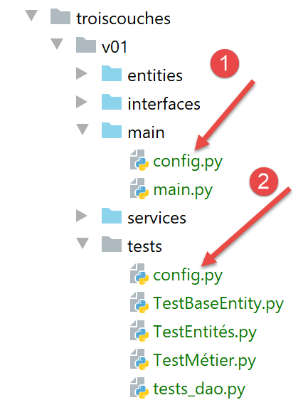 |
The file [config.py] configures the environment for the main script [main] (1) as well as that for the tests (2). All these scripts have a [import config] statement at the beginning of the code. Note that the folder containing the script targeted by the [python script] command is automatically included in the Python environment Path.Therefore, if [config] is in the same folder as the scripts containing the [import config] statement, it will be found. The [1] and [2] files are identical here. This may not be the case.
The [config.sys] file is as follows:
def configure():
    import os

    # absolute path of this script's folder
    script_dir = os.path.dirname(os.path.abspath(__file__))
    # root_dir
    root_dir="C:/Data/st-2020/dev/python/cours-2020/python3-flask-2020/classes"
    # absolute dependencies
    absolute_dependencies=[
        # local folders containing classes and interfaces
        f"{root_dir}/02/entities",
        f"{script_dir}/../entities",
        f"{script_dir}/../interfaces",
        f"{script_dir}/../services",
    ]

    # update syspath
    from myutils import set_syspath
    set_syspath(absolute_dependencies)

    # we return the config
    return {}
- lines 11-14: the directories that must be part of Python Path (sys.path);
- the [f"{root_dir}/02/entities"] folder provides access to the [BaseEntity] and [MyException] classes;
- the [f"{script_dir}/../entities"] folder provides access to the [Elève], [Classe], [Matière], and [Note] classes;
- the folder [f"{script_dir}/../interfaces",] provides access to the application interfaces;
- The [f"{script_dir}/../services"] folder provides access to the classes that implement the interfaces;
14.2.3. Entity Testing
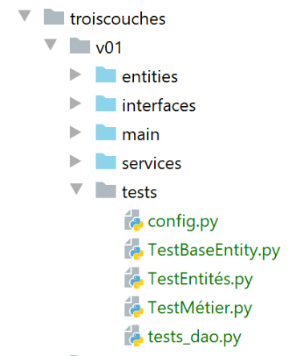 |
Here, we will write tests executed by a tool called [unittest]. PyCharm comes with several testing frameworks. The choice of one of them is made in the configuration of PyCharm:
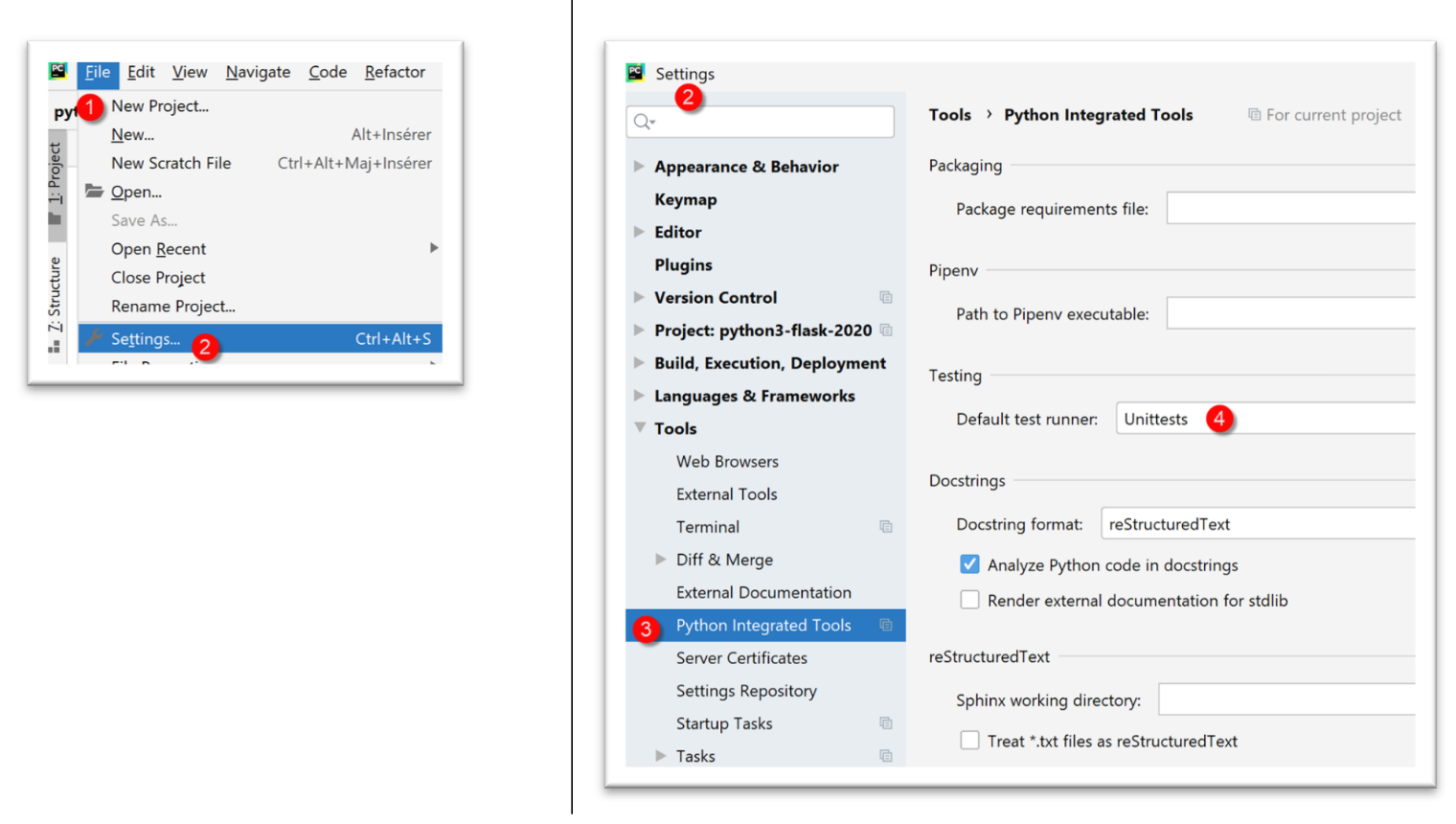
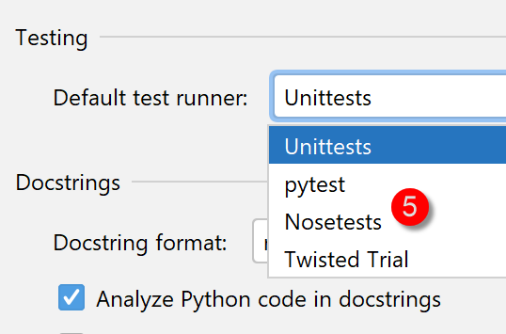
- In [4], several test frameworks are available:
14.2.3.1. The [TestBaseEntity] test class
The [TestBaseEntity] test script will be as follows:
import unittest

# configure the application
import config

config = config.configure()


class TestBaseEntity (unittest.TestCase):

    def test_note1(self):
        # imports
        from Note import Note
        from Elève import Elève
        from Classe import Classe
        from Matière import Matière
        # construction of a note from a jSON string
        note = Note().fromjson(
            '{"id": 8, "valeur": 12, "élève": {"id": 42, "nom": "nom4", "prénom": "prénom4", "classe": {"id": 2, "nom": "classe2"}}, "matière": {"id": 2, "nom": "matière2", "coefficient": 2}}')
        # checks
        self.assertIsInstance(note, Note)
        self.assertIsInstance(note.élève, Elève)
        self.assertIsInstance(note.élève.classe, Classe)
        self.assertIsInstance(note.matière, Matière)


    def test_note2(self):
        # imports
        from Note import Note
        from Elève import Elève
        from Classe import Classe
        from Matière import Matière
        # building a note from a dictionary
        note = Note().fromdict(
            {"id": 8, "valeur": 12, "élève": {"id": 42, "nom": "nom4", "prénom": "prénom4",
                                              "classe": {"id": 2, "nom": "classe2"}},
             "matière": {"id": 2, "nom": "matière2", "coefficient": 2}})
        # checks
        self.assertIsInstance(note, Note)
        self.assertIsInstance(note.élève, Elève)
        self.assertIsInstance(note.élève.classe, Classe)
        self.assertIsInstance(note.matière, Matière)

if __name__ == '__main__':
    unittest.main()
Notes
- line 1: we import the [unittest] module, which will provide the various test methods;
- lines 3–6: we configure the application so that the classes needed for testing can be found;
- line 9: a [unittest] test class must extend the [unittest.TestCase] class;
- lines 11, 27: test functions must have a name starting with [test], otherwise they will not be recognized;
- lines 13–16: we import the classes we need;
- in this test class, we want to verify the behavior of the methods [BaseEntity.fromdict] (line 34) and [BaseEntity.fromjson] (line 18). The class [Note] has properties that are references to other classes. We want to verify that the two previous methods create valid [Note] objects;
- line 18: we create a [Note] object from a jSON object;
- line 21: we verify that the created object is indeed of type [Note]. The method [assertIsInstance] is a method of the class [unittest.TestCase], the parent class of the class [TestBaseEntity];
- line 22: we verify that [note.élève] is indeed of type [Elève];
- line 23: we verify that [note.élève.classe] is indeed of type [Classe];
- line 24: verify that [note.matière] is indeed of type [Matière];
- lines 33–42: do the same with the [BaseEntity.fromdict] method;
There are several ways to run the tests:
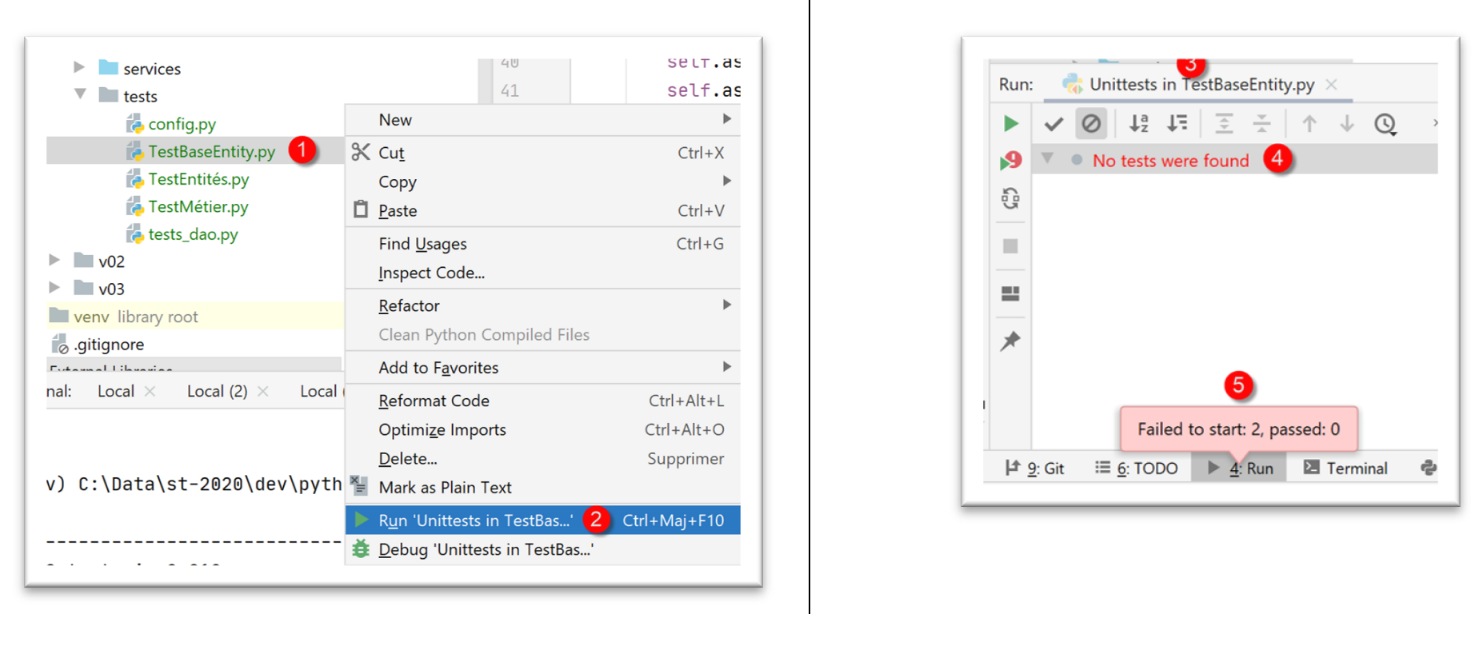 |
- In [1-2], [TestBaseEntity] is executed using the [UnitTest] framework;
- In [3-5], the tests fail. [UnitTests] indicates that it found no tests to run;
The test failure is due to the organization of the code in [TestBaseEntity]:
import unittest

# configure the application
import config

config = config.configure()


class TestBaseEntity(unittest.TestCase):
What causes the [UnitTest] framework to fail is the presence of executable code (lines 3–6) before the test class definition (line 9).
We then reorganize the code as follows:
import unittest


class TestBaseEntity(unittest.TestCase):

    def setUp(self):
        # configure the application
        import config

        config.configure()

    def test_note1(self):
        …

    def test_note2(self):
        …


if __name__ == '__main__':
    unittest.main()
- lines 6–10: we define a function [setUp]. This function has a specific role: it is executed before each test function (test_note1, test_note2);
Once this is done, executing the [TestBaseEntity] class yields the following results:
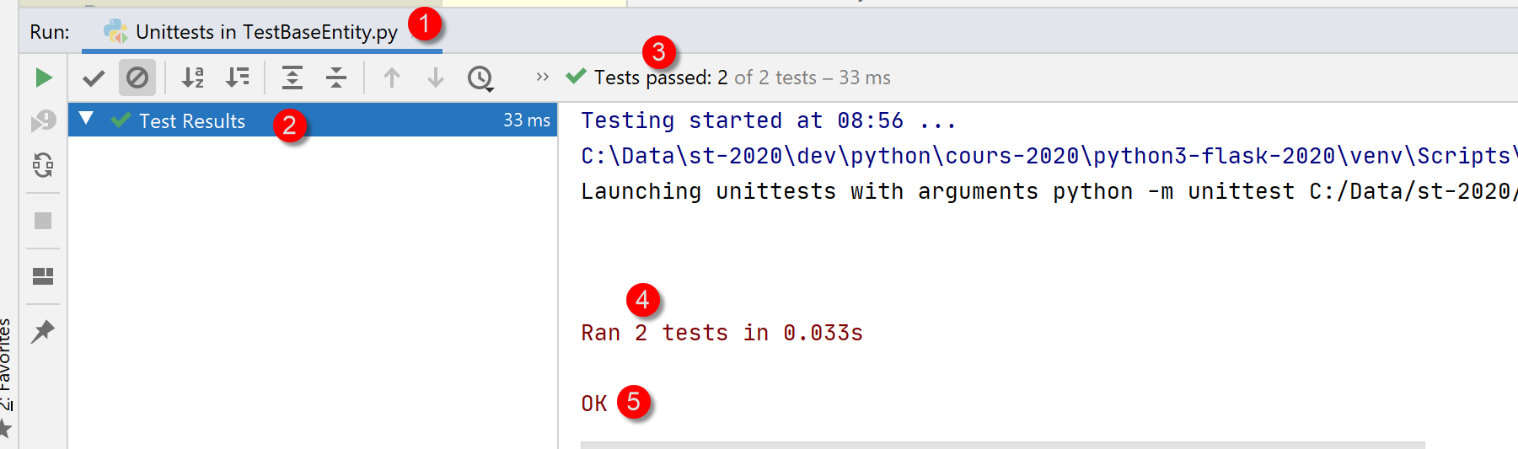 |
This time, both test methods were executed and the tests were successful.
Let’s see what happens when a test fails. Let’s modify the code in [test_note1] as follows:
    def test_note1(self):
        # deliberate error - check that 1==2
        self.assertEqual(1,2)
        # imports
        from Note import Note
…
- line 2: we check that 1==2;
The results of the execution are as follows:
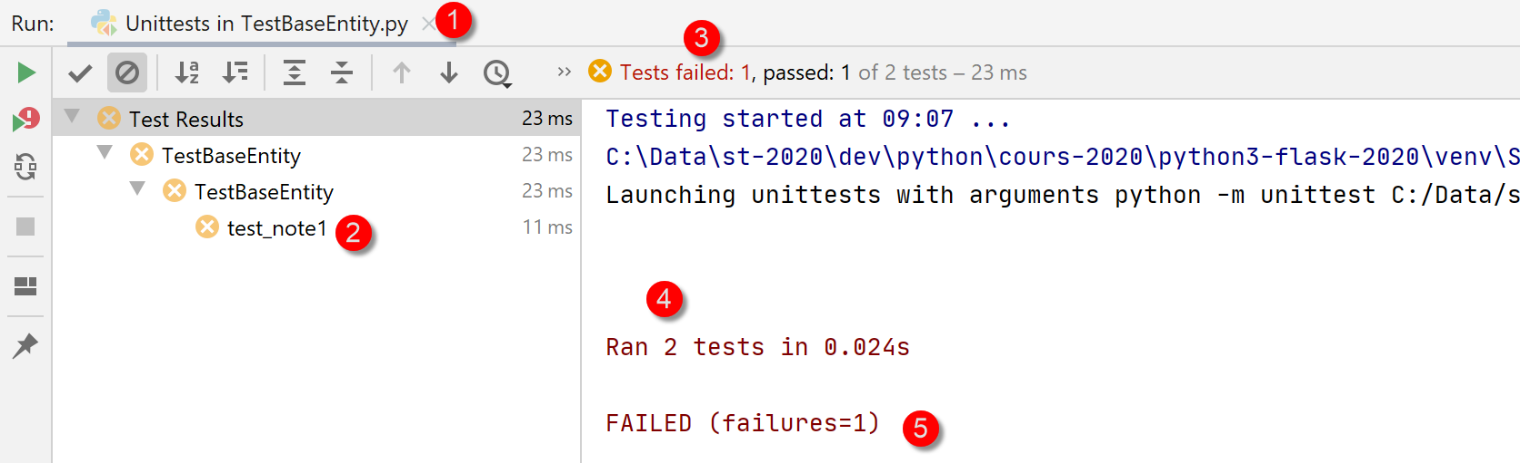 |
You can find out the cause of the error by clicking on the failed test [2]:
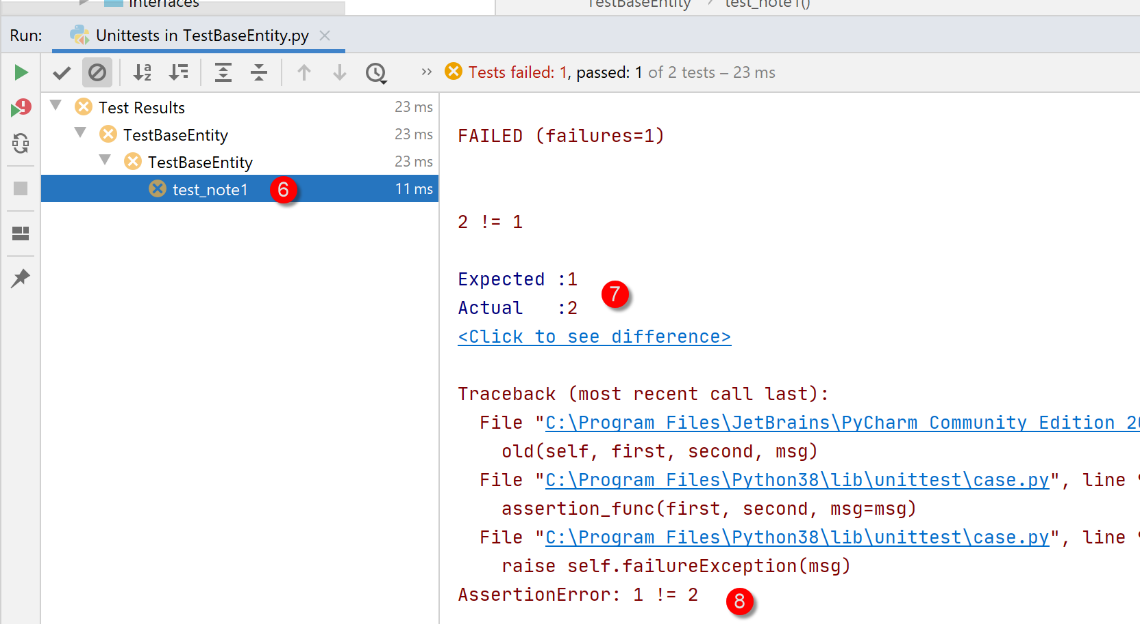 |
- in [7-8], the cause of the error;
Another way to run a test class is to run it in a terminal:
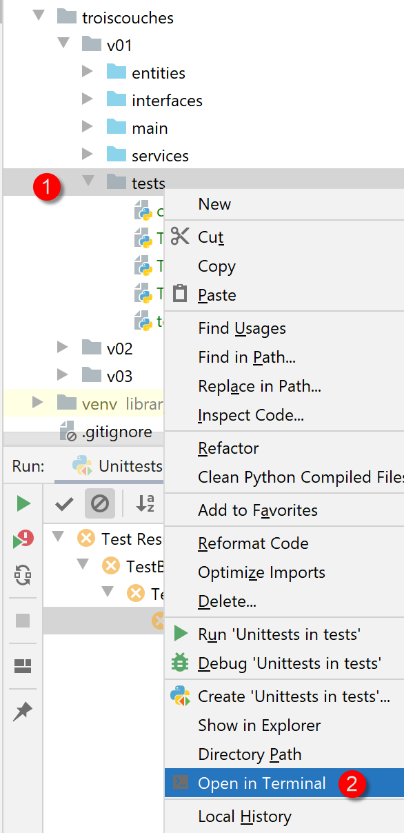 |
(venv) C:\Data\st-2020\dev\python\cours-2020\python3-flask-2020\troiscouches\v01\tests>python -m unittest TestBaseEntity.py
..
----------------------------------------------------------------------
Ran 2 tests in 0.026s

OK
Line 6 indicates that both tests passed (we removed the 1==2 error);
Finally, a third way to run the [TestBaseEntity] test class, still in a terminal, is as follows. We end the test class with the following lines 6-7;
…
        self.assertIsInstance(note.élève.classe, Classe)
        self.assertIsInstance(note.matière, Matière)


if __name__ == '__main__':
    unittest.main()
- line 6: the variable [__name__] is the name given to the script that is running. When the script is the one launched by the command [python script.py], the variable [__name__] is set to [__main__] (two underscores before and after the identifier). Thus, line 7 is executed only when the script [TestBaseEntity] is launched by the command [python TestBaseEntity.py]. The [unittest.main()] statement launches the execution of the script via the [UnitTest] framework. Here is an example:
(venv) C:\Data\st-2020\dev\python\cours-2020\python3-flask-2020\troiscouches\v01\tests>python TestBaseEntity.py
..
----------------------------------------------------------------------
Ran 2 tests in 0.013s

OK
14.2.3.2. The test class [TestEntités]
The test class [TestEntités] is as follows:
import unittest


class TestEntités(unittest.TestCase):
    def setUp(self):
        # configure the application
        import config

        config.configure()

    def test_code1a(self):
        # imports
        from Elève import Elève
        from MyException import MyException
        # error code
        code = None
        try:
            # id invalid
            Elève().fromdict({"id": "x", "nom": "y", "prénom": "z", "classe": "t"})
        except MyException as ex:
            print(f"\ncode erreur={ex.code}, message={ex}")
            code = ex.code
        # check
        self.assertEqual(code, 1)

    def test_code41(self):
        # imports
        from Elève import Elève
        from MyException import MyException
        # error code
        code = None

        try:
            # invalid name
            Elève().fromdict({"id": 1, "nom": "", "prénom": "z", "classe": "t"})
        except MyException as ex:
            print(f"\ncode erreur={ex.code}, message={ex}")
            code = ex.code
        # check
        self.assertEqual(code, 41)

    def test_code42(self):
        # imports
        from Elève import Elève
        from MyException import MyException
        # error code
        code = None
        try:
            # invalid first name
            Elève().fromdict({"id": 1, "nom": "y", "prénom": "", "classe": "t"})
        except MyException as ex:
            print(f"\ncode erreur={ex.code}, message={ex}")
            code = ex.code
        # check
        self.assertEqual(code, 42)

    def test_code43(self):
        # imports
        from Elève import Elève
        from MyException import MyException
        # error code
        code = None
        try:
            # invalid class
            Elève().fromdict({"id": 1, "nom": "y", "prénom": "z", "classe": "t"})
        except MyException as ex:
            print(f"\ncode erreur={ex.code}, message={ex}")
            code = ex.code
        # check
        self.assertEqual(code, 43)

    def test_code1b(self):
        # imports
        from Classe import Classe
        from MyException import MyException
        # error code
        code = None
        try:
            # invalid identifier
            Classe().fromdict({"id": "x", "nom": "y"})
        except MyException as ex:
            print(f"\ncode erreur={ex.code}, message={ex}")
            code = ex.code
        # check
        self.assertEqual(code, 1)

    def test_code11(self):
        # imports
        from Classe import Classe
        from MyException import MyException

        # error code
        code = None
        try:
            # invalid name
            Classe().fromdict({"id": 1, "nom": ""})
        except MyException as ex:
            code = ex.code
        # check
        self.assertEqual(code, 11)

    def test_code1c(self):
        # imports
        from Matière import Matière
        from MyException import MyException

        # error code
        code = None
        try:
            # invalid identifier
            Matière().fromdict({"id": "x", "nom": "y", "coefficient": "t"})
        except MyException as ex:
            print(f"\ncode erreur={ex.code}, message={ex}")
            code = ex.code
        # check
        self.assertEqual(code, 1)

    def test_code21(self):
        # imports
        from Matière import Matière
        from MyException import MyException
        # error code
        code = None
        try:
            # invalid name
            Matière().fromdict({"id": "1", "nom": "", "coefficient": "t"})
        except MyException as ex:
            print(f"\ncode erreur={ex.code}, message={ex}")
            code = ex.code
        # check
        self.assertEqual(code, 21)

    def test_code22(self):
        # imports
        from Matière import Matière
        from MyException import MyException
        # error code
        code = None
        try:
            # invalid coefficient
            Matière().fromdict({"id": 1, "nom": "y", "coefficient": "t"})
        except MyException as ex:
            print(f"\ncode erreur={ex.code}, message={ex}")
            code = ex.code
        # check
        self.assertEqual(code, 22)

    def test_code1d(self):
        # imports
        from Note import Note
        from MyException import MyException
        # error code
        code = None
        try:
            # invalid identifier
            Note().fromdict({"id": "x", "valeur": "x", "élève": "y", "matière": "z"})
        except MyException as ex:
            print(f"\ncode erreur={ex.code}, message={ex}")
            code = ex.code
        # check
        self.assertEqual(code, 1)

    def test_code31(self):
        # imports
        from Note import Note
        from MyException import MyException

        # error code
        code = None
        try:
            # invalid value
            Note().fromdict({"id": 1, "valeur": "x", "élève": "y", "matière": "z"})
        except MyException as ex:
            print(f"\ncode erreur={ex.code}, message={ex}")
            code = ex.code
        # check
        self.assertEqual(code, 31)

    def test_code32(self):
        # imports
        from Note import Note
        from MyException import MyException

        # error code
        code = None
        try:
            # disabled student
            Note().fromdict({"id": 1, "valeur": 10, "élève": "y", "matière": "z"})
        except MyException as ex:
            print(f"\ncode erreur={ex.code}, message={ex}")
            code = ex.code
        # check
        self.assertEqual(code, 32)

    def test_code33(self):
        # imports
        from Elève import Elève
        from Note import Note
        from Classe import Classe
        from MyException import MyException

        # error code
        code = None
        try:
            # invalid material
            classe = Classe().fromdict({"id": 1, "nom": "x"})
            élève = Elève().fromdict({"id": 1, "nom": "a", "prénom": "b", "classe": classe})
            Note().fromdict({"id": 1, "valeur": 10, "élève": élève, "matière": "z"})
        except MyException as ex:
            print(f"\ncode erreur={ex.code}, message={ex}")
            code = ex.code
        # check
        self.assertEqual(code, 33)

    def test_exception(self):
        # imports
        from Elève import Elève
        # the test must launch type [MyException] to succeed
        from MyException import MyException
        with self.assertRaises(MyException):
            # the test
            Elève().fromdict({"id": "x", "nom": "y", "prénom": "z", "classe": "t"})


if __name__ == '__main__':
    unittest.main()
- The purpose of the test script is to test the class setters: to verify that incorrect values cannot be assigned to the attributes of the various entities;
- lines 11–24: we test that an invalid ID cannot be assigned to a student. Because we pass the value 'x' on line 16 as the student’s ID, we expect an exception to occur. We should therefore proceed to lines 20–22;
- line 21: display the error message;
- line 22: retrieve the error code (see section |The MyException entity|);
- line 24: we verify (assert) that the error code is 1. Here, we verify two things:
- that an error actually occurred;
- that the error code is 1;
- this process is repeated with the functions in lines 24–213;
- lines 215–222: we test whether an action throws an exception of a certain type;
- line 220: we indicate that the test is successful if it throws an exception of type [MyException];
Results
The test script is executed:
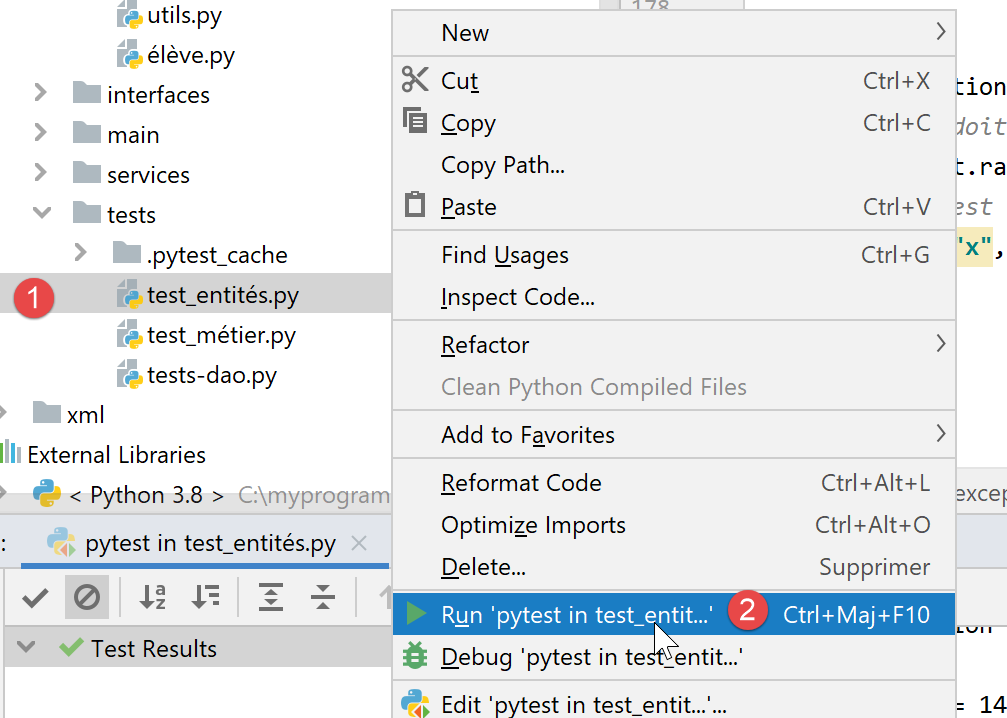 |
The results obtained are as follows:
Testing started at 09:39 ...
C:\Data\st-2020\dev\python\cours-2020\python3-flask-2020\venv\Scripts\python.exe "C:\Program Files\JetBrains\PyCharm Community Edition 2020.1.2\plugins\python-ce\helpers\pycharm\_jb_unittest_runner.py" --path C:/Data/st-2020/dev/python/cours-2020/python3-flask-2020/troiscouches/v01/tests/TestEntités.py
Launching unittests with arguments python -m unittest C:/Data/st-2020/dev/python/cours-2020/python3-flask-2020/troiscouches/v01/tests/TestEntités.py in C:\Data\st-2020\dev\python\cours-2020\python3-flask-2020\troiscouches\v01\tests


code erreur=1, message=MyException[1, L'identifiant d'une entité <class 'Elève.Elève'> doit être un entier >=0]

code erreur=1, message=MyException[1, L'identifiant d'une entité <class 'Classe.Classe'> doit être un entier >=0]

code erreur=1, message=MyException[1, L'identifiant d'une entité <class 'Matière.Matière'> doit être un entier >=0]

code erreur=1, message=MyException[1, L'identifiant d'une entité <class 'Note.Note'> doit être un entier >=0]

code erreur=21, message=MyException[21, Le nom de la matière 1 doit être une chaîne de caractères non vide]

code erreur=22, message=MyException[22, Le coefficient de la matière y doit être un réel >=0]

code erreur=31, message=MyException[31, L'attribut x de la note 1 doit être un nombre dans l'intervalle [0,20]]

code erreur=32, message=MyException[32, L'attribut [y] de la note 1 doit être de type Elève ou dict ou json. Erreur : Expecting value: line 1 column 1 (char 0)]

code erreur=33, message=MyException[33, L'attribut [z] de la note 1 doit être de type Matière ou dict ou json. Erreur : Expecting value: line 1 column 1 (char 0)]

code erreur=41, message=MyException[41, Le nom de l'élève 1 doit être une chaîne de caractères non vide]

code erreur=42, message=MyException[42, Le prénom de l'élève 1 doit être une chaîne de caractères non vide]

code erreur=43, message=MyException[43, L'attribut [t] de l'élève 1 doit être de type Classe ou dict ou json. Erreur : Expecting value: line 1 column 1 (char 0)]


Ran 14 tests in 0.040s

OK

Process finished with exit code 0
Here, all tests passed
14.2.4. The [dao] layer
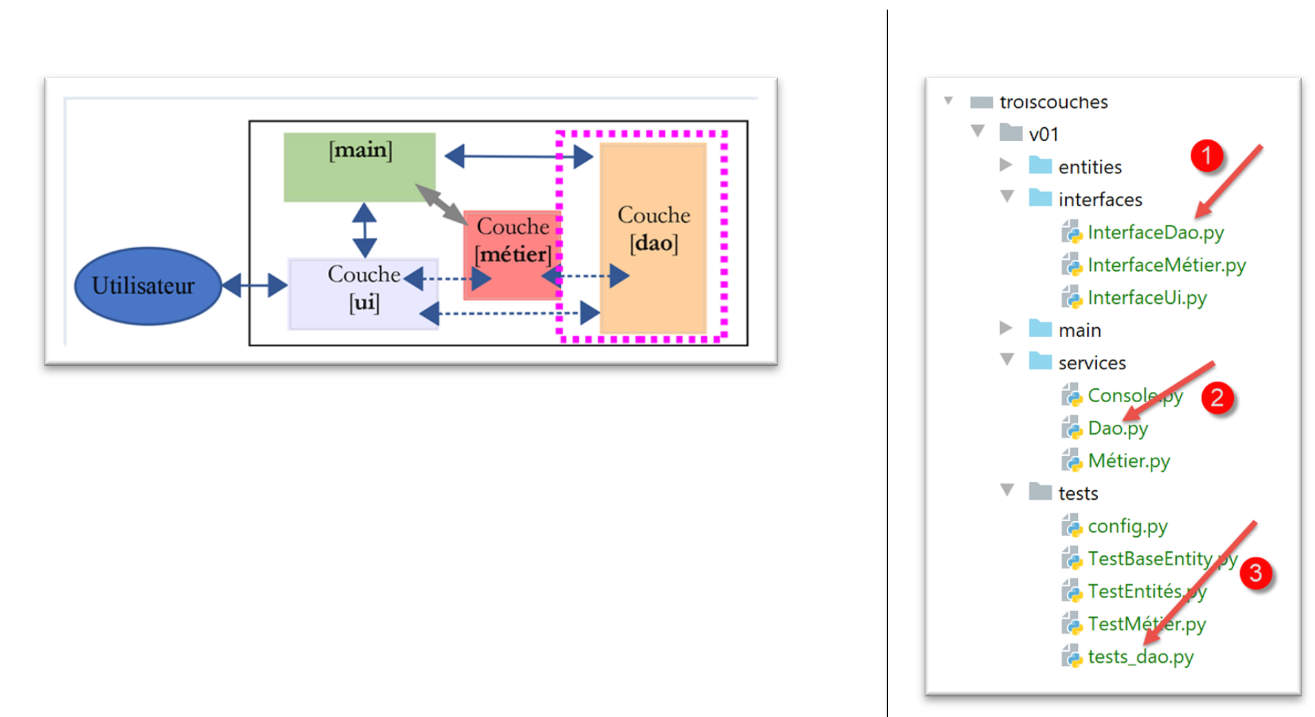
The [dao] layer implements the [InterfaceDao] and [1] interfaces. This is implemented by the [Dao] class (2). The script [tests_dao] (3) tests the methods of the layer [dao].
14.2.4.1. Interface [InterfaceDao]
An interface is a contract between calling code and called code. It is the called code that provides the interface:
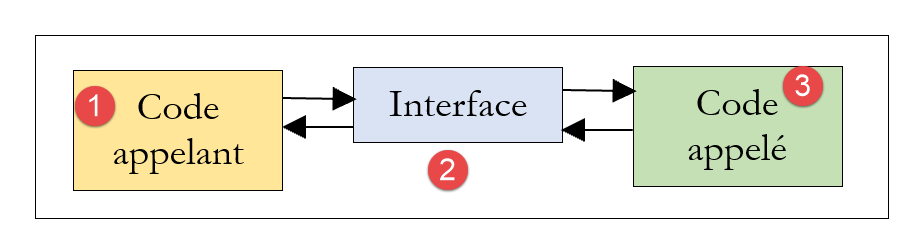 |
- the calling code [1] does not know the implementation of the called code [3]. It only knows how to call it. The [2] interface tells it how. This interface defines a number of methods/functions to be used to interact with the called code. This interface is also known as API (Application Programming Interface);
The [dao] layer will provide the following interface:
- [get_classes] returns the list of middle school classes;
- [get_matières] returns the list of subjects taught at the middle school;
- [get_élèves] returns the list of middle school students;
- [get_notes] returns a list of all students' grades;
- [get_notes_for_élève_by_id] returns the grades for a specific student;
- [get_élève_by_id] returns a student identified by their ID number;
The calling code will use only these methods. It does not need to know how they are implemented. The data can then come from different sources (hard-coded, from a database, from text files, etc.) without affecting the calling code. This is called interface-based programming.
Python 3 has a concept similar to that of an interface: the abstract class. We will use it. We will group the interfaces for this example in the [interfaces] folder.
We define an abstract class [InterfaceDao] (InterfaceDao.py) for the [dao] layer:
# imports
from abc import ABC, abstractmethod

# interface Dao
from Elève import Elève


class InterfaceDao(ABC):
    # class list
    @abstractmethod
    def get_classes(self: object) -> list:
        pass

    # list of students
    @abstractmethod
    def get_élèves(self: object) -> list:
        pass

    # list of materials
    @abstractmethod
    def get_matières(self: object) -> list:
        pass

    # lIST OF NOTES
    @abstractmethod
    def get_notes(self: object) -> list:
        pass

    # list of student grades
    @abstractmethod
    def get_notes_for_élève_by_id(self: object, élève_id: int) -> list:
        pass

    # search for a student by his id
    @abstractmethod
    def get_élève_by_id(self, élève_id: int) -> Elève:
        pass
Notes:
- Line 2: ABC = Abstract Base Class. We import the [abc] module, the ABC class, and the [abstractmethod] decorator used on lines 10, 15, 20, 25, 30, and 35;
- Line 8: The abstract class is named [InterfaceDao] and derives from the class [ABC];
- the methods of the abstract class are decorated with the decorator [@abstractmethod], which makes the decorated method an abstract method: its code is not defined. Nevertheless, code is included there: the statement [pass], which does nothing;
- the abstract class [InterfaceDao] cannot be instantiated. Only classes derived from [InterfaceDao] that have implemented all the methods of [InterfaceDao] can be instantiated. Therefore, if we create two classes, [Dao1] and [Dao2], derived from the class [InterfaceDao], they will both implement the abstract methods of [InterfaceDao]. One could thus say that they implement the interface [InterfaceDao];
- languages that implement both interfaces and abstract classes assign a different role to the interface than to the abstract class. An interface has no attributes and cannot be instantiated. A class can implement an interface by defining all of its methods;
14.2.4.2. Implementation [Dao]
The class [Dao] (dao.py) implements the interface [InterfaceDao] as follows:
# import entities and interfaces
from Classe import Classe
from Elève import Elève
from InterfaceDao import InterfaceDao
from Matière import Matière
from MyException import MyException
from Note import Note


# layer [dao] implements interface InterfaceDao
class Dao(InterfaceDao):
    # manufacturer
    # we build hard lists
    def __init__(self):
        # classes are instantiated
        classe1 = Classe().fromdict({"id": 1, "nom": "classe1"})
        classe2 = Classe().fromdict({"id": 2, "nom": "classe2"})
        self.classes = [classe1, classe2]
        # materials
        matière1 = Matière().fromdict({"id": 1, "nom": "matière1", "coefficient": 1})
        matière2 = Matière().fromdict({"id": 2, "nom": "matière2", "coefficient": 2})
        self.matières = [matière1, matière2]
        # students
        élève11 = Elève().fromdict({"id": 11, "nom": "nom1", "prénom": "prénom1", "classe": classe1})
        élève21 = Elève().fromdict({"id": 21, "nom": "nom2", "prénom": "prénom2", "classe": classe1})
        élève32 = Elève().fromdict({"id": 32, "nom": "nom3", "prénom": "prénom3", "classe": classe2})
        élève42 = Elève().fromdict({"id": 42, "nom": "nom4", "prénom": "prénom4", "classe": classe2})
        self.élèves = [élève11, élève21, élève32, élève42]
        # student grades in various subjects
        note1 = Note().fromdict({"id": 1, "valeur": 10, "élève": élève11, "matière": matière1})
        note2 = Note().fromdict({"id": 2, "valeur": 12, "élève": élève21, "matière": matière1})
        note3 = Note().fromdict({"id": 3, "valeur": 14, "élève": élève32, "matière": matière1})
        note4 = Note().fromdict({"id": 4, "valeur": 16, "élève": élève42, "matière": matière1})
        note5 = Note().fromdict({"id": 5, "valeur": 6, "élève": élève11, "matière": matière2})
        note6 = Note().fromdict({"id": 6, "valeur": 8, "élève": élève21, "matière": matière2})
        note7 = Note().fromdict({"id": 7, "valeur": 10, "élève": élève32, "matière": matière2})
        note8 = Note().fromdict({"id": 8, "valeur": 12, "élève": élève42, "matière": matière2})
        self.notes = [note1, note2, note3, note4, note5, note6, note7, note8]

    # -----------
    # interface IDao
    # -----------
Notes:
- lines 1-7: we import the entities and the [InterfaceDao] interface;
- line 11: the [Dao] class derives from the abstract class [InterfaceDao]. We will say that it implements the [InterfaceDao] interface;
- line 14: the constructor has no parameters. It hard-codes four lists:
- lines 15–18: the list of classes;
- lines 19–22: the list of subjects;
- lines 23–28: the list of students;
- lines 29–38: the list of grades;
- Lines 40–44: Implementation of the methods of the [Interface Dao] interface. Here, we do not define them in order to see the error message generated by Python;
A test program could be as follows [tests-dao.py]:
# configure the application
import config

config = config.configure()

# instantiation layer [dao]
from Dao import Dao

daoImpl = Dao()

# class list
for classe in daoImpl.get_classes():
    print(classe)

# list of materials
for matière in daoImpl.get_matières():
    print(matière)

# class list
for élève in daoImpl.get_élèves():
    print(élève)

# lIST OF NOTES
for note in daoImpl.get_notes():
    print(note)
Note: The script [tests-dao.py] is not a [unittest] test because it does not contain any methods with names starting with [test_].
The comments are self-explanatory. Lines 11–25 use the interface of the [dao] layer. There are no assumptions here about the actual implementation of the layer. On line 9, we instantiate the [dao] layer.
The results of running this script are as follows:
C:\Data\st-2020\dev\python\cours-2020\python3-flask-2020\venv\Scripts\python.exe C:/Data/st-2020/dev/python/cours-2020/python3-flask-2020/troiscouches/v01/tests/tests_dao.py
Traceback (most recent call last):
  File "C:/Data/st-2020/dev/python/cours-2020/python3-flask-2020/troiscouches/v01/tests/tests_dao.py", line 9, in <module>
    daoImpl = Dao()
TypeError: Can't instantiate abstract class Dao with abstract methods get_classes, get_matières, get_notes, get_notes_for_élève_by_id, get_élève_by_id, get_élèves

Process finished with exit code 1
We can see that an error occurs as soon as the [Dao] class is instantiated (line 3 above). The Python 3 interpreter tells us that it cannot instantiate the class because we have not defined the abstract methods [get_classes, get_matières, get_notes, get_notes_for_élève_by_id, get_élève_by_id, get_élèves].
PyCharm also supports the concept of abstract classes and offers to define its methods:
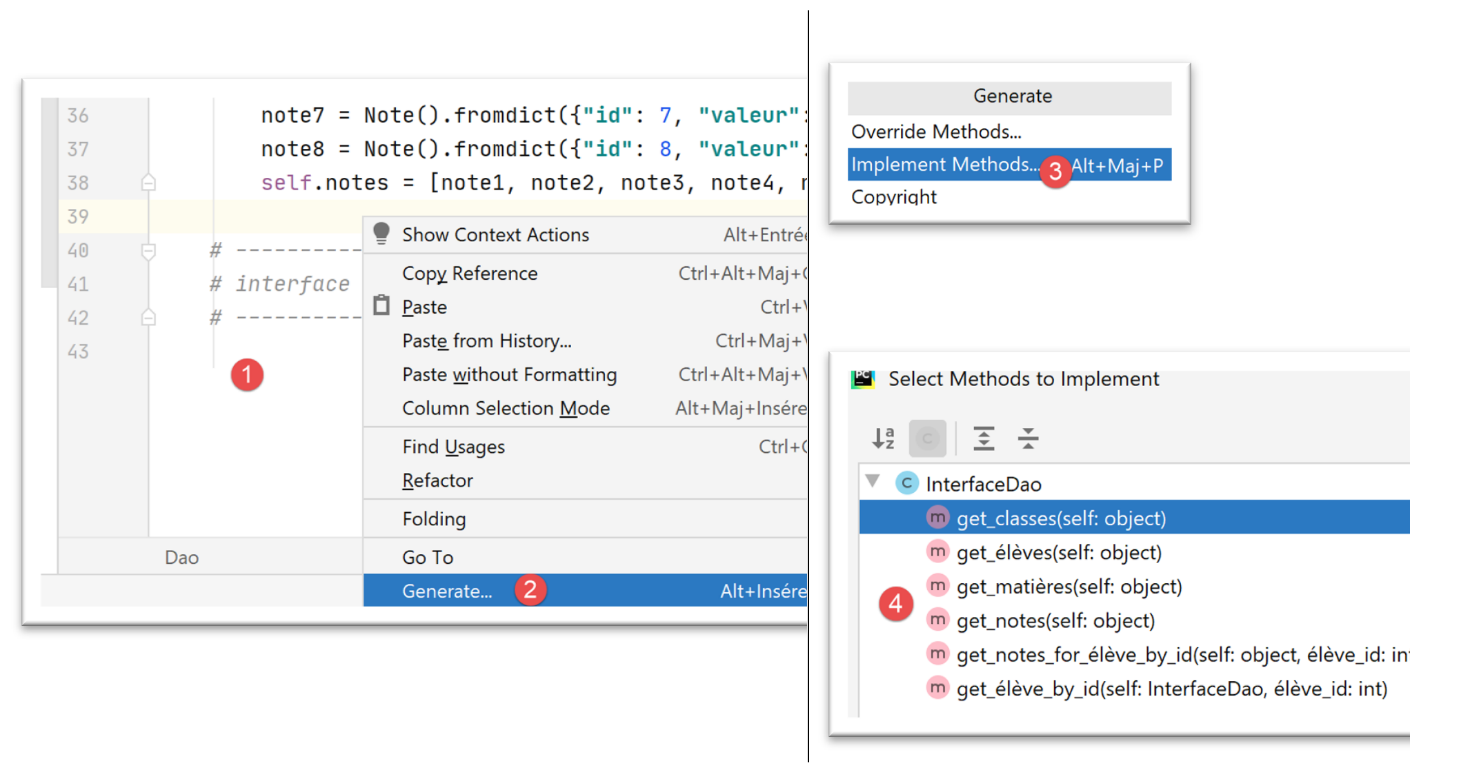 |
- in [1], right-click on the code;
- in [2-3], select [Generate / Implement Methods] to implement the missing methods of the [Dao] class;
- in [4], select the methods to implement—in this case, all of them;
Once this is done, the class [Dao] is supplemented by PyCharm as follows:
    # -----------
    # interface IDao
    # -----------

    def get_classes(self: object) -> list:
        pass

    def get_élèves(self: object) -> list:
        pass

    def get_matières(self: object) -> list:
        pass

    def get_notes(self: object) -> list:
        pass

    def get_notes_for_élève_by_id(self: object, élève_id: int) -> list:
        pass

    def get_élève_by_id(self, élève_id: int) -> Elève:
        pass
We complete the [Dao] class as follows:
    # -----------
    # interface IDao
    # -----------

    # class list
    def get_classes(self) -> list:
        return self.classes

    # list of materials
    def get_matières(self) -> list:
        return self.matières

    # list of students
    def get_élèves(self) -> list:
        return self.élèves

    # lIST OF NOTES
    def get_notes(self) -> list:
        return self.notes

    def get_notes_for_élève_by_id(self, élève_id: int) -> dict:
        # we're looking for the student
        élève = self.get_élève_by_id(élève_id)
        # get your notes back
        notes = list(filter(lambda n: n.élève.id == élève_id, self.get_notes()))
        # we return the result
        return {"élève": élève, "notes": notes}

    def get_élève_by_id(self, élève_id: int) -> Elève:
        # filtering students
        élèves = list(filter(lambda e: e.id == élève_id, self.get_élèves()))
        # found?
        if not élèves:
            raise MyException(10, f"L'élève d'identifiant {élève_id} n'existe pas")
        # result
        return élèves[0]
- Lines 5–19 are straightforward;
- lines 29–36: the method that returns the student whose ID is passed. If the student does not exist, an exception is raised;
- line 31: the [filter] function allows you to filter a list:
- the first parameter is the filter criterion;
- the second parameter is the list to be filtered, in this case the list of students;
- line 31: the list filtering criterion is implemented using a function [f(e :Elève)->bool]. This function is applied to each element of the list to be filtered. If the element satisfies the filtering criterion, it is retained in the filtered list; otherwise, it is excluded. Here, we can either:
- specify the name of the function f and implement it elsewhere. The call to the function [filter] then becomes [filter(f,self.get_élèves()];
- provide the definition of the function f. The call to the function [filter] then becomes [filter(f(e :Elève){…},self.get_élèves()], where [e] represents an element of the filtered list, i.e., a student. This is what has been done here. The definition of the function f here would be [f(e :Elève){return e.id==élève_id)]: a student is selected only if the number [id] is not equal to the one being searched for. Such a function can be replaced by a so-called lambda function: [lambda e: e.id == élève_id]:
- e: represents the parameter of the function f, in this case a student. Any name can be used;
- e.id==élève_id is the filtering criterion: a student [e] is selected only if their ID [id] matches the one being searched for;
- line 31: the function [filter] returns the filtered list as a type that is not the type [list] but that can be converted to the type [list]. This is what we do here with the expression [list(liste filtrée)];
- lines 33–34: if the filtered list is empty, it means the student we are looking for does not exist. We then throw an exception;
- line 36: If we reach this point, it means no exception occurred. We then know that we have retrieved a list with a single element (there are no two students with the same [id] number). We therefore return the first element of the list;
- lines 21–27: the method [get_notes_for_élève_by_id] must return the grades for the student whose ID [id] is passed to it;
- lines 22–23: We start by searching for the student with ID [élève_id] using the [get_élève_by_id] method that we just commented out. An exception may occur if the student being searched for does not exist. Since there is no try/catch block around the statement on line 23, the exception will be propagated to the calling code. This is the desired behavior;
- lines 24–25: once the student is retrieved, we retrieve all their grades. We do this again using a filter:
- the filter is [filter(critère, self_getnotes()]. The list to be filtered is therefore the list of all grades for all students in the middle school;
- the filtering criterion is expressed using a function [lambda]: lambda n: n.student.id == élève_id. The parameter n is an element of the list to be filtered, i.e., a grade. The type [Note] has a property [élève] that represents the student who owns the grade. Therefore, [n.élève.id], which represents that student’s ID, must be equal to the ID of the student being searched for;
Then we run the script [tests-dao.py].
# configure the application
import config

config = config.configure()

# instantiation layer [dao]
from Dao import Dao

daoImpl = Dao()

# class list
for classe in daoImpl.get_classes():
    print(classe)

# list of materials
for matière in daoImpl.get_matières():
    print(matière)

# list of classes
for élève in daoImpl.get_élèves():
    print(élève)

# lIST OF NOTES
for note in daoImpl.get_notes():
    print(note)

# a special student
print(daoImpl.get_élève_by_id(11))

# a list of his notes
dict1 = daoImpl.get_notes_for_élève_by_id(11)
print(f"élève n° 11 = {dict1['élève']}")
for note in dict1["notes"]:
    print(f"note de l'élève n° 11 = {note}")
We then get the following results:
C:\Data\st-2020\dev\python\cours-2020\python3-flask-2020\venv\Scripts\python.exe C:/Data/st-2020/dev/python/cours-2020/python3-flask-2020/troiscouches/v01/tests/tests_dao.py
{"id": 1, "nom": "classe1"}
{"id": 2, "nom": "classe2"}
{"id": 1, "nom": "matière1", "coefficient": 1}
{"id": 2, "nom": "matière2", "coefficient": 2}
{"id": 11, "nom": "nom1", "prénom": "prénom1", "classe": {"id": 1, "nom": "classe1"}}
{"id": 21, "nom": "nom2", "prénom": "prénom2", "classe": {"id": 1, "nom": "classe1"}}
{"id": 32, "nom": "nom3", "prénom": "prénom3", "classe": {"id": 2, "nom": "classe2"}}
{"id": 42, "nom": "nom4", "prénom": "prénom4", "classe": {"id": 2, "nom": "classe2"}}
{"id": 1, "valeur": 10, "élève": {"id": 11, "nom": "nom1", "prénom": "prénom1", "classe": {"id": 1, "nom": "classe1"}}, "matière": {"id": 1, "nom": "matière1", "coefficient": 1}}
{"id": 2, "valeur": 12, "élève": {"id": 21, "nom": "nom2", "prénom": "prénom2", "classe": {"id": 1, "nom": "classe1"}}, "matière": {"id": 1, "nom": "matière1", "coefficient": 1}}
{"id": 3, "valeur": 14, "élève": {"id": 32, "nom": "nom3", "prénom": "prénom3", "classe": {"id": 2, "nom": "classe2"}}, "matière": {"id": 1, "nom": "matière1", "coefficient": 1}}
{"id": 4, "valeur": 16, "élève": {"id": 42, "nom": "nom4", "prénom": "prénom4", "classe": {"id": 2, "nom": "classe2"}}, "matière": {"id": 1, "nom": "matière1", "coefficient": 1}}
{"id": 5, "valeur": 6, "élève": {"id": 11, "nom": "nom1", "prénom": "prénom1", "classe": {"id": 1, "nom": "classe1"}}, "matière": {"id": 2, "nom": "matière2", "coefficient": 2}}
{"id": 6, "valeur": 8, "élève": {"id": 21, "nom": "nom2", "prénom": "prénom2", "classe": {"id": 1, "nom": "classe1"}}, "matière": {"id": 2, "nom": "matière2", "coefficient": 2}}
{"id": 7, "valeur": 10, "élève": {"id": 32, "nom": "nom3", "prénom": "prénom3", "classe": {"id": 2, "nom": "classe2"}}, "matière": {"id": 2, "nom": "matière2", "coefficient": 2}}
{"id": 8, "valeur": 12, "élève": {"id": 42, "nom": "nom4", "prénom": "prénom4", "classe": {"id": 2, "nom": "classe2"}}, "matière": {"id": 2, "nom": "matière2", "coefficient": 2}}
{"id": 11, "nom": "nom1", "prénom": "prénom1", "classe": {"id": 1, "nom": "classe1"}}
élève n° 11 = {"id": 11, "nom": "nom1", "prénom": "prénom1", "classe": {"id": 1, "nom": "classe1"}}
note de l'élève n° 11 = {"id": 1, "valeur": 10, "élève": {"id": 11, "nom": "nom1", "prénom": "prénom1", "classe": {"id": 1, "nom": "classe1"}}, "matière": {"id": 1, "nom": "matière1", "coefficient": 1}}
note de l'élève n° 11 = {"id": 5, "valeur": 6, "élève": {"id": 11, "nom": "nom1", "prénom": "prénom1", "classe": {"id": 1, "nom": "classe1"}}, "matière": {"id": 2, "nom": "matière2", "coefficient": 2}}

Process finished with exit code 0
Note that when displaying a grade (the process is similar for other objects), we also have:
- the student associated with the grade;
- the subject referenced by the grade;
This result is produced by the [BaseEntity.asdict] function (see the "link" section).
14.2.5. The [métier] layer
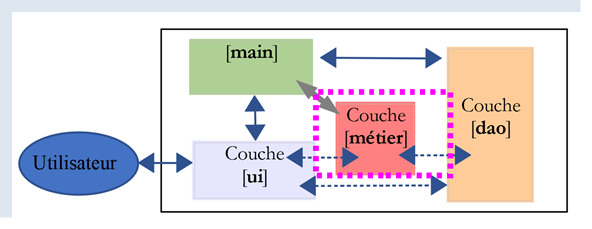 | 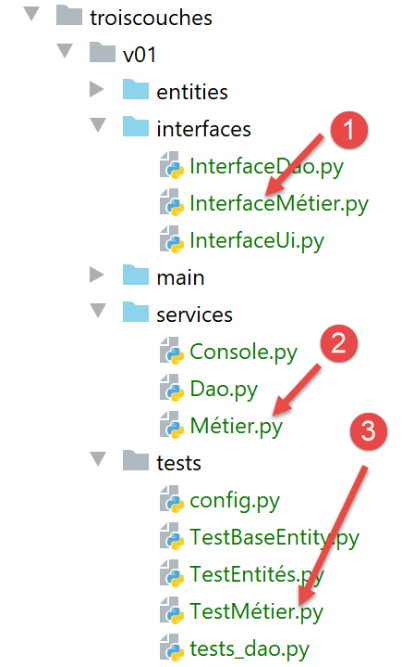 |
- [InterfaceMétier] is the interface of the [métier] layer;
- [Métier] is the implementation class of the [métier] layer;
- [Testmétier] is a test class for the [Métier] class;
14.2.5.1. Interface [InterfaceMétier]
The [métier] layer will implement the following [InterfaceMétier] interface (InterfaceMétier.py):
# imports
from abc import ABC, abstractmethod

from StatsForElève import StatsForElève


# business interface
class InterfaceMétier(ABC):
    # calculating statistics for a student
    @abstractmethod
    def get_stats_for_élève(self, idElève: int) -> StatsForElève:
        pass
- [get_stats_for_élève] returns the grades for student ID idElève along with information about them: weighted average, lowest grade, highest grade. This information is encapsulated in an object of type [StatsForElève];
14.2.5.2. The entity [StatsForElève]
The type [StatsForElève] (StatsForElève.py), which encapsulates a student's statistics (grades, min, max, weighted average), is as follows:
# imports
from BaseEntity import BaseEntity


# individual student statistics


class StatsForElève(BaseEntity):
    # attributes excluded from class state
    excluded_keys = []

    # class properties
    @staticmethod
    def get_allowed_keys() -> list:
        # id: note identifier
        # pupil: the pupil concerned
        # notes: his notes
        # moyennePondérée: average weighted by subject coefficients
        # min: its minimum score
        # max: its maximum rating

        return BaseEntity.get_allowed_keys() + ["élève", "notes", "moyenne_pondérée", "min", "max"]

    # toString
    def __str__(self) -> str:
        # students without grades
        if len(self.notes) == 0:
            return f"Elève={self.élève}, notes=[]"
        # student with grades
        str = ""
        for note in self.notes:
            str += f"{note.valeur} "
        return f"Elève={self.élève}, notes=[{str.strip()}], max={self.max}, min={self.min}, " \
               f"moyenne pondérée={self.moyenne_pondérée:4.2f}"
Notes:
- line 8: the class [StatsForElève] derives from the class [BaseEntity];
- lines 13–22: the class properties;
- an identifier [id] derived from [BaseEntity];
- the student [élève], whose statistics are encapsulated;
- their grades [notes];
- their weighted average [moyenne_pondérée];
- his minimum grade [min];
- his maximum grade [max];
- No getters or setters are defined for these attributes. It is assumed that the [métier] layer creates objects of this type and that it does not create invalid objects;
- lines 23–33: the [__str__] function returns a string containing the object’s properties;
14.2.5.3. The [Métier] implementation
The implementation [Métier] (Metier.py) of the interface [InterfaceMétier] will be as follows:
# imports
from InterfaceDao import InterfaceDao
from InterfaceMétier import InterfaceMétier
from StatsForElève import StatsForElève


class Métier(InterfaceMétier):

    # manufacturer
    def __init__(self, dao: InterfaceDao):
        # the parameter
        self.__dao = dao

    # -----------
    # interface
    # -----------

    # indicators on a particular student's grades
    def get_stats_for_élève(self, id_élève: int) -> StatsForElève:
        # Stats for student no. idEleve
        # id_élève : pupil number

        # retrieve notes with the [dao] layer
        notes_élève = self.__dao.get_notes_for_élève_by_id(id_élève)
        élève = notes_élève["élève"]
        notes = notes_élève["notes"]

        # we stop if there are no notes
        if len(notes) == 0:
            # we return the result
            return StatsForElève().fromdict({"élève": élève, "notes": []})

        # use of student notes
        somme_pondérée = 0
        somme_coeff = 0
        max = -1
        min = 21
        for note in notes:
            # nOTE VALUE
            valeur = note.valeur
            # material coefficient
            coeff = note.matière.coefficient
            # sum of coefficients
            somme_coeff += coeff
            # weighted sum
            somme_pondérée += valeur * coeff
            # search for min
            if valeur < min:
                min = valeur
            # search for the max
            if valeur > max:
                max = valeur
        # calculation of missing indicators
        moyenne_pondérée = float(somme_pondérée) / somme_coeff

        # the result is returned as a [StatsForElève] type
        return StatsForElève(). \
            fromdict({"élève": élève, "notes": notes,
                      "moyenne_pondérée": moyenne_pondérée,
                      "min": min, "max": max})
Notes
- line 7: the class [Métier] derives from the class [InterfaceMétier]. It is customary to say that it implements the interface [InterfaceMétier];
- lines 9–12: the constructor receives as its only parameter a reference to the [dao] layer. On line 10, note that the parameter [dao] has been given the type [InterfaceDao]. We do not expect a specific implementation, but simply one that respects the [InterfaceDao] interface. Here, it does not matter since Python will not take this type into account, but it is good practice to work with interfaces rather than specific implementations. The code is then easier to modify;
- lines 19–60: implementation of the [get_stats_for_élève] method;
- line 19: the method receives a single parameter, the student ID [idElève] for whom we want statistics;
- line 24: the [dao] layer is queried for the student’s grades. This query results in an exception if the student does not exist. This exception is not handled (no try/catch block) and is therefore propagated back to the calling code;
- line 25: we reach this point if no exception occurred. [notes_élève] is then a dictionary with two keys, [élève, note]:
- line 25: we retrieve information about the student (their name, class, etc.);
- line 26: we retrieve their grades;
- lines 28–31: we check if the student has any grades. If they don’t, there are no statistics to calculate;
- line 31: we return a [StatsForElève] object constructed from a dictionary using the [BaseEntity.fromdict] method;
- lines 33–54: the student’s grades are used to calculate the requested statistics. The code comments should be sufficient for understanding;
- lines 56–60: returns a [StatsForElève] object constructed from a dictionary using the [BaseEntity.fromdict] method;
14.2.5.4. Testing the [métier] layer
A [UnitTest] script from the [métier] layer could be as follows (TestMétier.py):
# imports
import unittest


class Testmétier(unittest.TestCase):
    def setUp(self):
        # configure the application
        import config
        config.configure()

    def test_statsForEleve11(self):
        # imports
        from Dao import Dao
        from Métier import Métier
        # student indicators are tested 11
        dao = Dao()
        stats_for_élève = Métier(dao).get_stats_for_élève(11)
        # display
        print(f"\nstats={stats_for_élève}")
        # checks
        self.assertEqual(stats_for_élève.min, 6)
        self.assertEqual(stats_for_élève.max, 10)
        self.assertAlmostEqual(stats_for_élève.moyenne_pondérée, 7.333, delta=1e-3)


if __name__ == '__main__':
    unittest.main()
Notes
- lines 6–9: the [setUp] function is used here to configure the Python Path for the test;
- line 16: the [dao] layer is instantiated;
- line 17: the [métier] layer is instantiated, and its [get_stats_for_élève] method is used to calculate the statistics for student #11;
- line 19: the resulting [StatsForElève] is displayed. Since [StatsForElève] is derived from [BaseEntity], it is the jSON string from [StatsForElève] that is displayed here;
- line 21: the student’s minimum grade is checked;
- line 22: we check their maximum grade;
- line 23: we test that the weighted average is 7.333, accurate to 10⁻³. In general, it is not possible to compare real numbers exactly because, internally, they are usually only represented as approximations;
The test results are as follows:
Testing started at 18:17 ...
C:\Data\st-2020\dev\python\cours-2020\python3-flask-2020\venv\Scripts\python.exe "C:\Program Files\JetBrains\PyCharm Community Edition 2020.1.2\plugins\python-ce\helpers\pycharm\_jb_unittest_runner.py" --path C:/Data/st-2020/dev/python/cours-2020/python3-flask-2020/troiscouches/v01/tests/TestMétier.py
Launching unittests with arguments python -m unittest C:/Data/st-2020/dev/python/cours-2020/python3-flask-2020/troiscouches/v01/tests/TestMétier.py in C:\Data\st-2020\dev\python\cours-2020\python3-flask-2020\troiscouches\v01\tests


Ran 1 test in 0.015s

OK

stats=Elève={"id": 11, "nom": "nom1", "prénom": "prénom1", "classe": {"id": 1, "nom": "classe1"}}, notes=[10 6], max=10, min=6, moyenne pondérée=7.33

Process finished with exit code 0
14.2.6. The [ui] layer
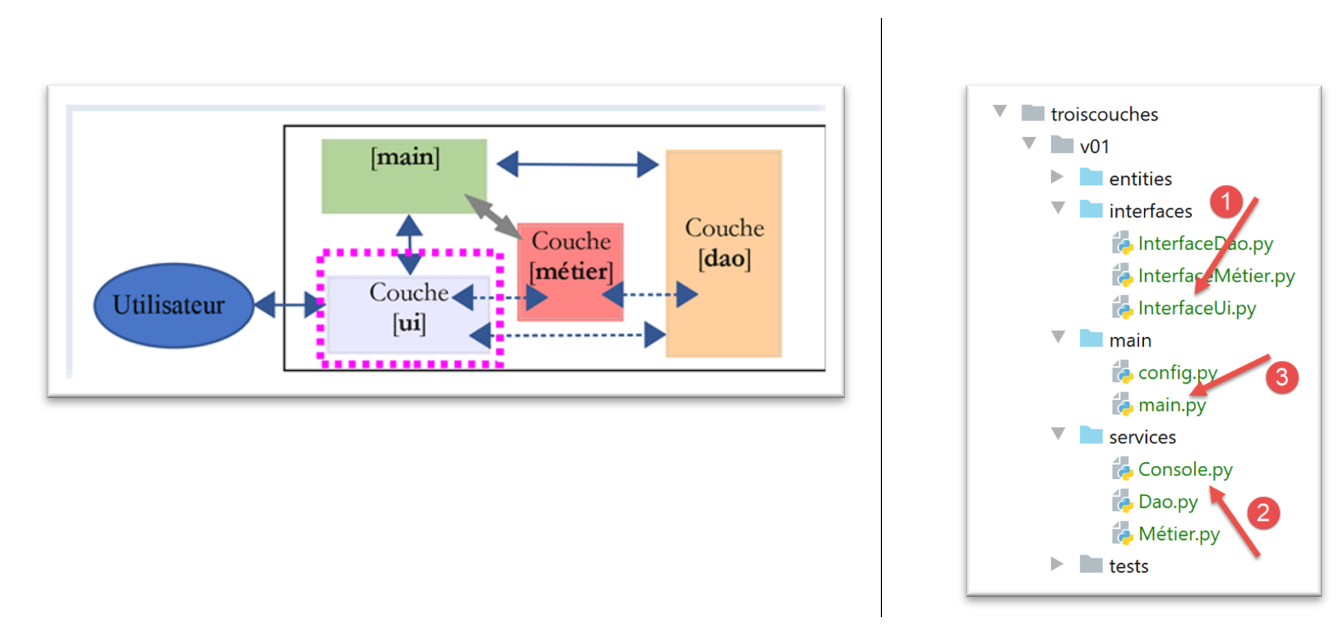
- in [1], the interface of the [ui] layer;
- to [2], the implementation of this interface;
- to [3], the main script of the application;
14.2.6.1. [InterfaceUi] interface
The interface for layer [UI] will be as follows:
# imports
from abc import ABC, abstractmethod


# interface UI
class InterfaceUi(ABC):
    # execute UI layer
    @abstractmethod
    def run(self: object):
        pass
Notes
- lines 9-10: the [UI] layer will have only one method, [run];
14.2.6.2. The [Console] implementation
The [console] layer is implemented by the following [Console.py] script:
# layer imports

from InterfaceDao import InterfaceDao
from InterfaceMétier import InterfaceMétier
from InterfaceUi import InterfaceUi

# other dependencies
from MyException import MyException


class Console(InterfaceUi):
    # manufacturer
    def __init__(self: object, métier: InterfaceMétier):
        # business: the [métier] layer

        # attributes are memorized
        self.métier = métier


        # -----------
        # interface
        # -----------

    def run(self):
        # user dialog
        fini = False
        while not fini:
            # question / answer
            réponse = input("Numéro de l'élève (>=1 et * pour arrêter) : ").strip()
            # finished?
            if réponse == "*":
                break
            # is the input correct?
            ok = False
            try:
                id_élève = int(réponse, 10)
                ok = id_élève >= 1
            except ValueError as erreur:
                pass
            # correct data?
            if not ok:
                print("Saisie incorrecte. Recommencez...")
                continue
            # calculation of statistics for selected student
            try:
                print(self.métier.get_stats_for_élève(id_élève))
            except MyException as erreur:
                print(f"L'erreur suivante s'est produite : {erreur}")
- lines 3-5: import all interfaces;
- line 11: the [Console] class implements the [InterfaceUi] interface;
- lines 12-17: the constructor of the [Console] class receives a reference to the [métier] layer as a parameter. Note that we have assigned the type [InterfaceMétier] to this parameter to emphasize that we are working with interfaces rather than specific implementations;
- line 24: implementation of the [run] method of the interface;
- line 27: a loop that stops when the condition on line 31 is met;
- line 29: input of data typed on the keyboard. The [input] function receives an optional parameter: the message to display on the screen requesting input. This input is always retrieved as a string. The [strip] function removes any leading or trailing whitespace from the string;
- lines 34–39: we verify that the input, a student ID, is valid. It must be an integer >= 1. Recall that the input was entered as a string;
- line 36: we attempt to convert the input to a base-10 integer. The function [int] throws an exception if this is not possible;
- line 37: we reach this point only if no exception occurred. We verify that the retrieved integer is indeed >=1;
- lines 38–39: we handle the exception. If an exception occurred, the variable [ok] from line 34 remains set to [False];
- lines 41–43: if the input was incorrect, an error message is displayed and the loop is restarted (line 43);
- lines 45–48: the statistics for the student whose ID was entered are calculated;
- line 46: the method [get_stats_for_élève] from the layer [métier] is used. This method throws an exception if the student does not exist. This exception is handled in lines 47–48. We know that the layers [dao] and [métier] throw the exception [MyException];
14.3. The main script [main]
The main script [main] is as follows (main.py):
# configure the application
import config

config = config.configure()

# syspath is configured - imports can be made
from Console import Console
from Dao import Dao
from Métier import Métier

# ----------- layer [console]
try:
    # instantiation layer [dao]
    dao = Dao()
    # instantiation layer [métier]
    métier = Métier(dao)
    # instantiation layer [ui]
    console = Console(métier)
    # layer execution [console]
    console.run()
except BaseException as ex:
    # error is displayed
    print(f"L'erreur suivante s'est produite : {ex}")
finally:
    pass
- lines 1-4: configure the application's Python Path;
- lines 6-9: import the required classes and interfaces;
- line 14: instantiate the [dao] layer;
- line 16: instantiate the [métier] layer;
- line 18: instantiation of the [ui] layer;
- line 20: initiate the user dialog;
- lines 13–20: normally, no exceptions are thrown from these lines. Those that are thrown from layers [dao] and [métier] are caught by layer [Console]. Exception handling is a difficult art when you do not fully understand the layers being used (which is not the case here). When in doubt, you can add code to catch any type of exception that might be thrown by the executing code. This is what is done here, lines 21–23. We catch any exception derived from [BaseException], i.e., all exceptions;
- lines 24–25: the [finally] clause does nothing here. It is only there so that lines 21–23 can be commented out. Indeed, in debug mode, it is not advisable to catch exceptions. In this case, the Python interpreter catches them and then reports the line number where the exception occurred. This is essential information. When lines 21–23 are commented out, the presence of lines 24–25 ensures a syntactically correct try/catch block. Without them, Python raises an error;
Here is an example of execution:
C:\Data\st-2020\dev\python\cours-2020\python3-flask-2020\venv\Scripts\python.exe C:/Data/st-2020/dev/python/cours-2020/python3-flask-2020/troiscouches/v01/main/main.py
Numéro de l'élève (>=1 et * pour arrêter) : 11
Elève={"id": 11, "nom": "nom1", "prénom": "prénom1", "classe": {"id": 1, "nom": "classe1"}}, notes=[10 6], max=10, min=6, moyenne pondérée=7.33
Numéro de l'élève (>=1 et * pour arrêter) : 1
L'erreur suivante s'est produite : MyException[10, L'élève d'identifiant 1 n'existe pas]
Numéro de l'élève (>=1 et * pour arrêter) : *

Process finished with exit code 0
14.4. Example 2
This new example of layered architectures aims to demonstrate the benefits of interface-based programming. This approach facilitates application maintenance and testing. We will again use a three-tier architecture:
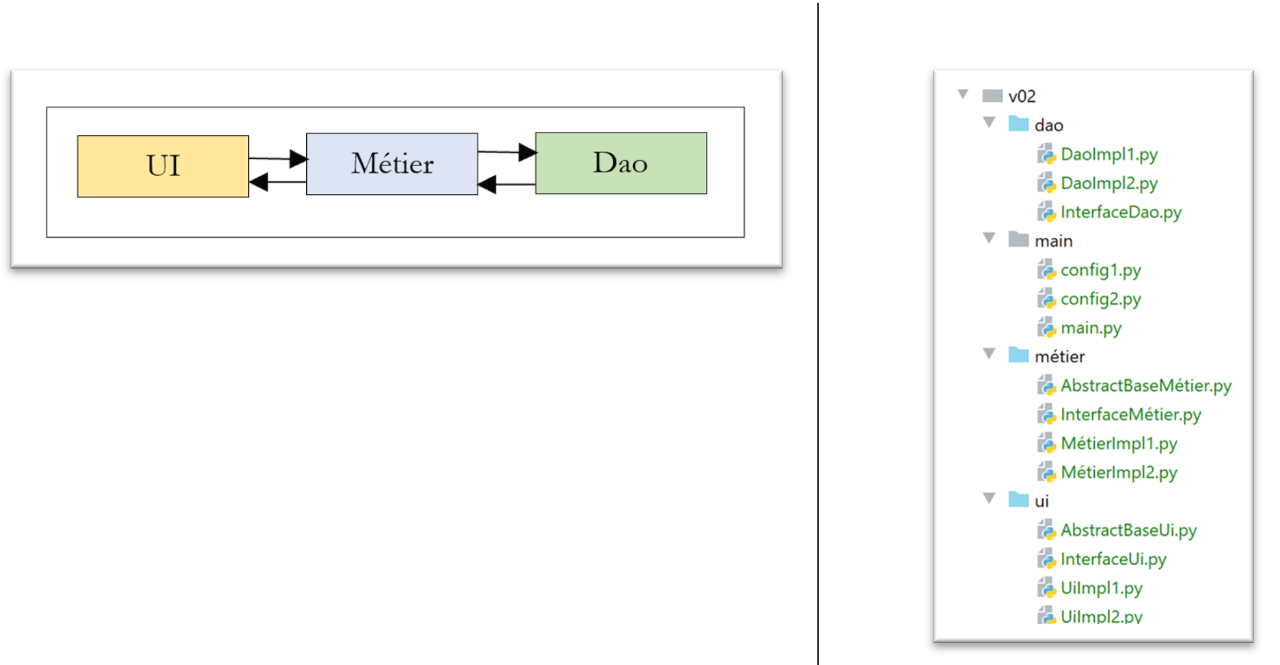
Each layer will be implemented in two different ways. We want to show that the implementation of a layer can be easily changed with minimal impact on the others.
14.4.1. The [dao] layer
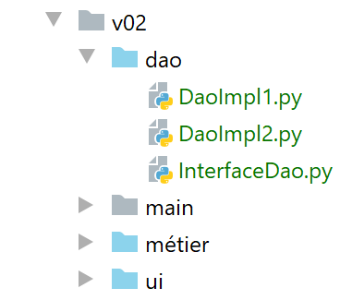
The [InterfaceDao] interface is as follows:
# imports
from abc import ABC, abstractmethod


# interface Dao
class InterfaceDao(ABC):
    # a single method
    @abstractmethod
    def do_something_in_dao_layer(self, x: int, y: int) -> int:
        pass
- lines 8–10: the method [do_something_in_dao_layer] is the only method of the interface;
The [DaoImpl1] class implements the [InterfaceDao] interface as follows:
from InterfaceDao import InterfaceDao


class DaoImpl1(InterfaceDao):
    # implementation InterfaceDao
    def do_something_in_dao_layer(self: InterfaceDao, x: int, y: int) -> int:
        return x + y
The class [DaoImpl2] implements the interface [InterfaceDao] as follows:
from InterfaceDao import InterfaceDao


class DaoImpl2(InterfaceDao):
    # implementation InterfaceDao
    def do_something_in_dao_layer(self: InterfaceDao, x: int, y: int) -> int:
        return x - y
14.4.2. The [métier] layer
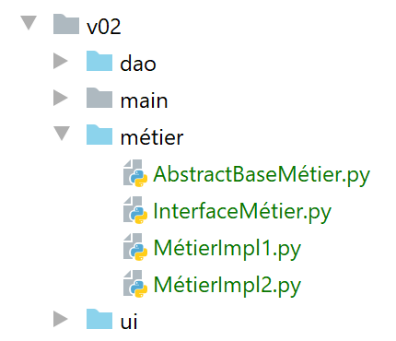
The [InterfaceMétier] interface is as follows:
# imports
from abc import ABC, abstractmethod


# business interface
class InterfaceMétier(ABC):
    # a single method
    @abstractmethod
    def do_something_in_métier_layer(self, x: int, y: int) -> int:
        pass
- lines 8–10: the method [do_something_in_métier_layer] is the only method of the interface;
The [AbstractBaseMétier] class implements the [InterfaceMétier] interface as follows:
# imports
from abc import ABC, abstractmethod

from InterfaceDao import InterfaceDao
from InterfaceMétier import InterfaceMétier


class AbstractBaseMétier(InterfaceMétier, ABC):
    # properties
    # __dao is a reference to layer [dao]
    @property
    def dao(self) -> InterfaceDao:
        return self.__dao

    @dao.setter
    def dao(self, dao: InterfaceDao):
        self.__dao = dao

    # implementation of [InterfaceMétier] interface
    @abstractmethod
    def do_something_in_métier_layer(self, x: int, y: int) -> int:
        pass
- line 8: the class [AbstractBaseMétier] inherits from two classes:
- [InterfaceMétier]: The class [AbstractBaseMétier] implements this interface on lines 19–22. In fact, we can see that it has not implemented the [do_something_in_métier_layer] method, which it has declared as abstract (line 20). It will be up to the derived classes to implement the method;
- [ABC] to access the annotations [@abstractmethod];
- the order matters: if we reverse it here, Python raises a runtime error;
This is the first time we use multiple inheritance (inheriting from multiple classes). The [AbstractBaseMétier] class inherits properties from both the [InterfaceMétier] and [ABC] classes.
- Lines 9–17: We define the [dao] property, which will be a reference to the [dao] layer;
An interface is intended to be implemented. When different implementations share properties, it is useful to place these in a parent class to avoid duplication. This is the case here with the [dao] property. The parent class is generally always abstract because it does not implement all the methods of the interface.
The [MétierImpl1] class implements the [InterfaceMétier] interface as follows:
from AbstractBaseMétier import AbstractBaseMétier


class MétierImpl1(AbstractBaseMétier):
    # implementation of [InterfaceMétier] interface
    def do_something_in_métier_layer(self:AbstractBaseMétier, x: int, y: int) -> int:
        x += 1
        y += 1
        return self.dao.do_something_in_dao_layer(x, y)
- line 4: the class [MétierImpl1] derives from the class [AbstractbaseMétier]. It therefore inherits the property [dao] from this class;
- lines 6–9: implementation of the [InterfaceMétier] interface, which the parent class [AbstractbaseMétier] did not implement;
- line 9: the layer [dao] is used;
The class [MétierImpl2] implements the interface [InterfaceMétier] in a similar manner:
from AbstractBaseMétier import AbstractBaseMétier


class MétierImpl2(AbstractBaseMétier):
    # implementation of [InterfaceMétier] interface
    def do_something_in_métier_layer(self:AbstractBaseMétier, x: int, y: int) -> int:
        x -= 1
        y -= 1
        return self.dao.do_something_in_dao_layer(x, y)
14.4.3. The [ui] layer
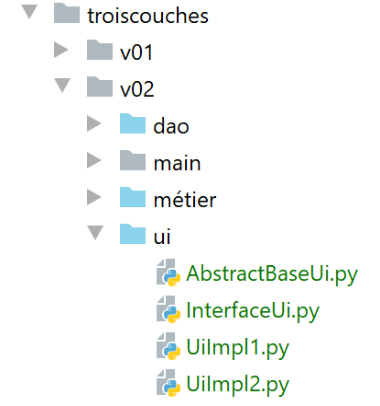
The [InterfaceUi] interface is as follows:
# imports
from abc import ABC, abstractmethod


# interface Ui
class InterfaceUi(ABC):
    # a single method
    @abstractmethod
    def do_something_in_ui_layer(self, x: int, y: int) -> int:
        pass
- lines 8–10: the interface’s single method;
The class [AbstractBaseUi] implements the interface [InterfaceUi] as follows:
# imports
from abc import ABC, abstractmethod

from InterfaceMétier import InterfaceMétier
from InterfaceUi import InterfaceUi


class AbstractBaseUi(InterfaceUi, ABC):
    # properties
    # métier is a reference to the [métier] layer
    @property
    def métier(self) -> InterfaceMétier:
        return self.__métier

    @métier.setter
    def métier(self, métier: InterfaceMétier):
        self.__métier = métier

    # implementation of [InterfaceUI] interface
    @abstractmethod
    def do_something_in_ui_layer(self: InterfaceUi, x: int, y: int) -> int:
        pass
- The class [AbstractBaseUi] is an abstract class (line 20). It must be derived from to implement the interface [InterfaceUi];
- lines 9–17: the [AbstractBaseUi] class has a reference to the [métier] layer;
The implementation class [UiImpl1] is as follows:
from AbstractBaseUi import AbstractBaseUi


class UiImpl1(AbstractBaseUi):
    # implementation of [InterfaceUi] interface
    def do_something_in_ui_layer(self: AbstractBaseUi, x: int, y: int) -> int:
        x += 1
        y += 1
        return self.métier.do_something_in_métier_layer(x, y)
- line 4: the class [UiImpl1] derives from the class [AbstractBaseUi] and therefore inherits its property [métier]. This is used on line 9;
The implementation class [UiImpl2] is similar:
from AbstractBaseUi import AbstractBaseUi


class UiImpl2(AbstractBaseUi):
    # implementation of [InterfaceUi] interface
    def do_something_in_ui_layer(self: AbstractBaseUi, x: int, y: int) -> int:
        x -= 1
        y -= 1
        return self.métier.do_something_in_métier_layer(x, y)
- Line 4: The class [UiImpl2] derives from the class [AbstractBaseUi] and therefore inherits its property [métier]. This property is used on line 9;
14.4.4. The configuration files
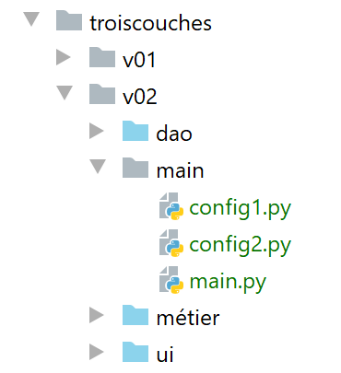
- The [config1, config2] files configure the application in two different ways;
- The [main] file is the application’s main script;
The [config1] file is as follows:
def configure():
    # step 1 ------
    # absolute path of this script's folder
    import os
    script_dir = os.path.dirname(os.path.abspath(__file__))
    # dependencies
    absolute_dependencies = [
        # local Python folders Path
        f"{script_dir}/../dao",
        f"{script_dir}/../ui",
        f"{script_dir}/../métier",
    ]

    # configure the syspath
    from myutils import set_syspath
    set_syspath(absolute_dependencies)

    # step 2 ------
    # application layer configuration
    from DaoImpl1 import DaoImpl1
    from MétierImpl1 import MétierImpl1
    from UiImpl1 import UiImpl1
    # layer instantiation
    # dao
    dao = DaoImpl1()
    # business
    métier = MétierImpl1()
    métier.dao = dao
    # ui
    ui = UiImpl1()
    ui.métier = métier

    # put layer instances in config
    # only the ui layer is required here
    config = {"ui": ui}

    # we return the config
    return config
- lines 2–16: configuration of the application’s Python Path;
- lines 18-31: instantiation of the [dao, métier, ui] layers. To implement their interfaces, we choose the first built implementation each time;
- lines 33–35: we place the layer references in the configuration. Here, the main script only needs the [ui] layer;
The file [config2] is similar and implements each interface using the second available implementation:
def configure():
    # step 1 ---
    # absolute path of this script's folder
    import os
    script_dir = os.path.dirname(os.path.abspath(__file__))
    # dependencies
    absolute_dependencies = [
        # local Python folders Path
        f"{script_dir}/../dao",
        f"{script_dir}/../ui",
        f"{script_dir}/../métier",
    ]

    # configure the syspath
    from myutils import set_syspath

    set_syspath(absolute_dependencies)

    # step 2 ------
    # application layer configuration
    from DaoImpl2 import DaoImpl2
    from MétierImpl2 import MétierImpl2
    from UiImpl2 import UiImpl2
    # layer instantiation
    # dao
    dao = DaoImpl2()
    # business
    métier = MétierImpl2()
    métier.dao = dao
    # ui
    ui = UiImpl2()
    ui.métier = métier

    # put layer instances in config
    # only the ui layer is required here
    config = {"ui": ui}

    # we return the config
    return config
14.4.5. The main script [main]
The main script is as follows:
# imports
import importlib
import sys

# hand ---------

# you need two arguments
nb_args = len(sys.argv)
if nb_args != 2 or (sys.argv[1] != "config1" and sys.argv[1] != "config2"):
    print(f"Syntaxe : {sys.argv[0]} config1 ou config2")
    sys.exit()

# application configuration
module = importlib.import_module(sys.argv[1])
config = module.configure()

# execute [ui] layer
print(config["ui"].do_something_in_ui_layer(10, 20))
This script takes one parameter:
- [config1] to use configuration #1;
- [config2] to use configuration #2;
Python stores the parameters in a list [sys.argv]:
- sys.argv[0] is the name of the script, here [main]. This parameter is always present;
-
sys.argv[1] is the first parameter passed to the script, sys.argv[2] the second, …
-
line 8: we retrieve the number of parameters;
- lines 9–11: we verify that there is indeed a parameter and that its value is either [config1] or [config2]. If this is not the case, an error message is displayed (line 10) and the program exits (line 11);
Once the desired configuration is known, we need to execute that configuration. For example, if configuration 1 was chosen, we need to execute the code:
The problem here is that the configuration to be used is stored in a variable, the variable [len[liste1]]. To import a module whose name is stored in a variable, we must use the package [importlib] (line 2).
- line 14: we import the module whose name is in [sys.argv[1];
- line 15: once this is done, we execute the [configure] function of this module. We retrieve a [config] dictionary, which is the application configuration;
- line 18: we know that a reference to the [ui] layer is contained in config[‘ui’]. We use it to call the [do_something_in_ui_layer] method. We know that this method will call a method in the [métier] layer, which in turn will call a method in the [dao] layer;
For example, the function [do_something_in_ui_layer] is as follows:
class UiImpl1(AbstractBaseUi):
    # implementation of [InterfaceUi] interface
    def do_something_in_ui_layer(self: AbstractBaseUi, x: int, y: int) -> int:
        x += 1
        y += 1
        return self.métier.do_something_in_métier_layer(x, y)
- Line 6 above uses the [métier] property of the [UiImpl1] class, line 1. However, in the [config1] configuration, the following was written:
# business
    métier = MétierImpl1()
    métier.dao = dao
    # ui
    ui = UiImpl1()
    ui.métier = métier
- Line 6: The property [métier] of [UIImpl1] is a reference to the class [MétierImpl1] (line 2). Thus, it is the [do_something_in_ui_layer] method of the [MétierImpl1] class that will be executed;
In the [MétierUiImpl1] class, it is written:
class MétierImpl1(AbstractBaseMétier):
    # implementation of [InterfaceMétier] interface
    def do_something_in_métier_layer(self: AbstractBaseMétier, x: int, y: int) -> int:
        x += 1
        y += 1
        return self.dao.do_something_in_dao_layer(x, y)
- line 6, the method called by the [ui] layer in turn calls a method of the [dao] property of the [MétierImpl1] class;
However, in the [config1] configuration, the following was written:
# dao
    dao = DaoImpl1()
    # business
    métier = MétierImpl1()
    métier.dao = dao
- line 5: the property [MétierImpl1.dao] is of type [DaoImpl1] (line 2);
What we want to show here is that the [main] script does not need to concern itself with the [métier] and [dao] layers. It only needs to concern itself with the [ui] layer, as the links between this layer and the others have been established through configuration.

To pass the parameter [config1] or [config2] to the script [main], proceed as follows:
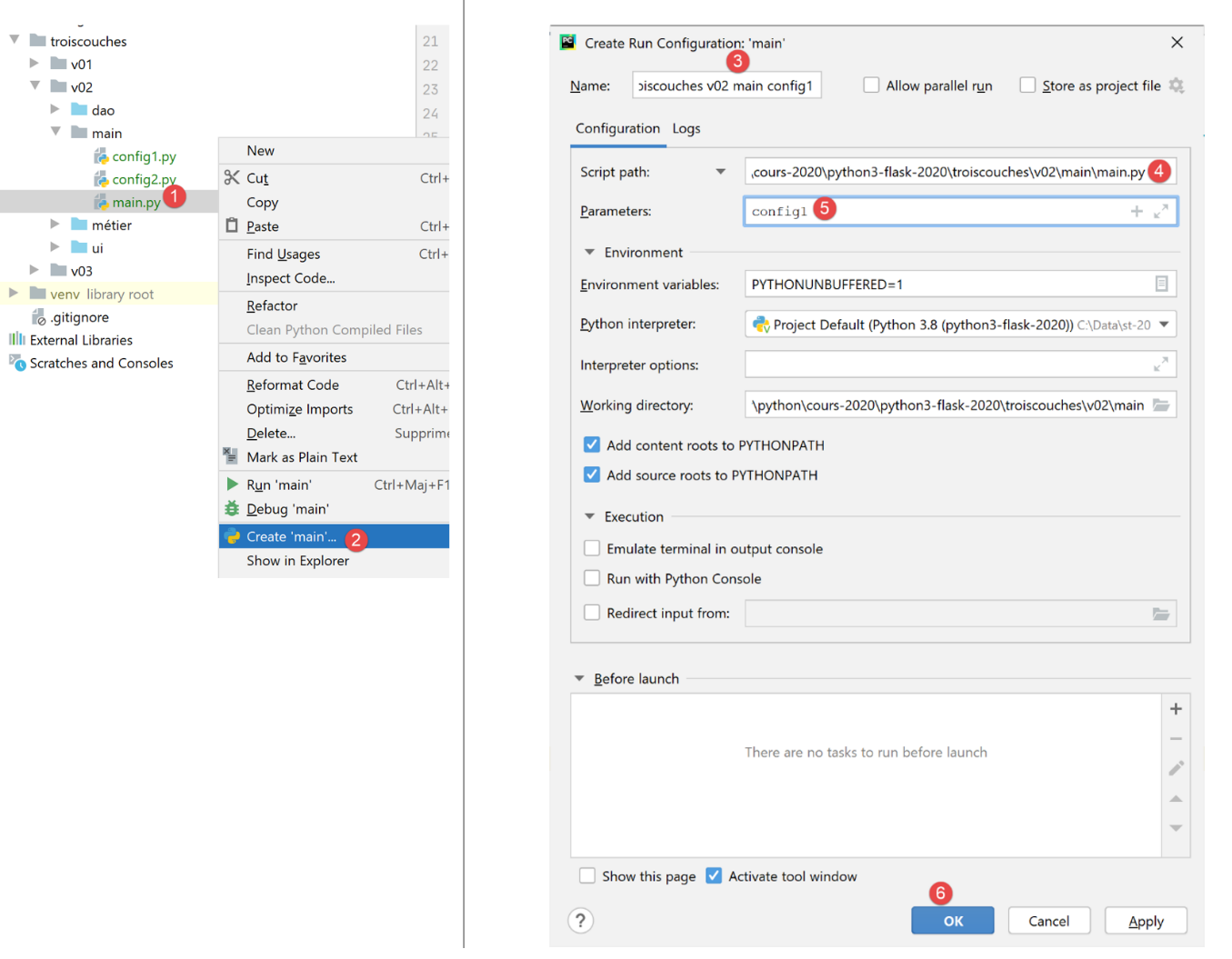
- In [1-2], create what is called an execution configuration;
- In [3], name this configuration so you can find it later;
- In [4], select the script to be executed. If you followed the procedure in [1-2], the correct script has already been selected;
- In [5], enter the parameters to be passed to the script here. Enter the string [config1] here to instruct the script to use configuration #1;
- In [6], we validate the execution configuration;
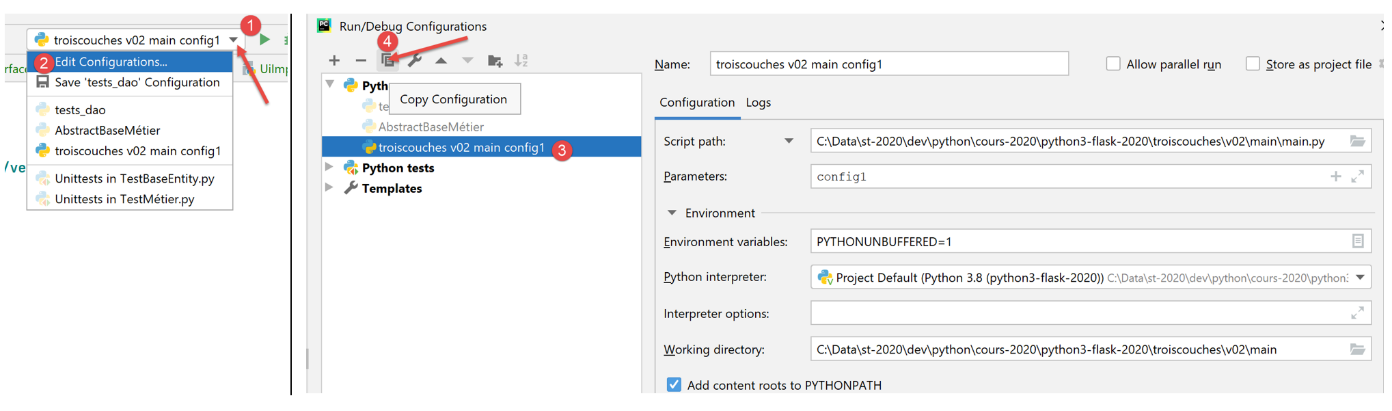
- In [1-2], we request to view the existing execution contexts;
- in [3], we select the existing execution context and duplicate it as [4];
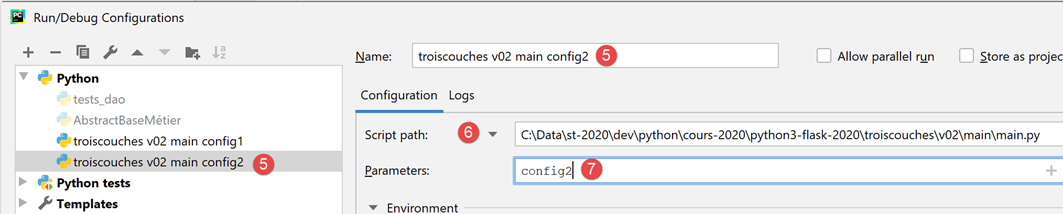
- In [5], the name given to the new configuration. This will be the one that executes the script [main] [6] by passing it the parameter [config2] [7];
The execution configurations are available in the top-right corner of the PyCharm window:
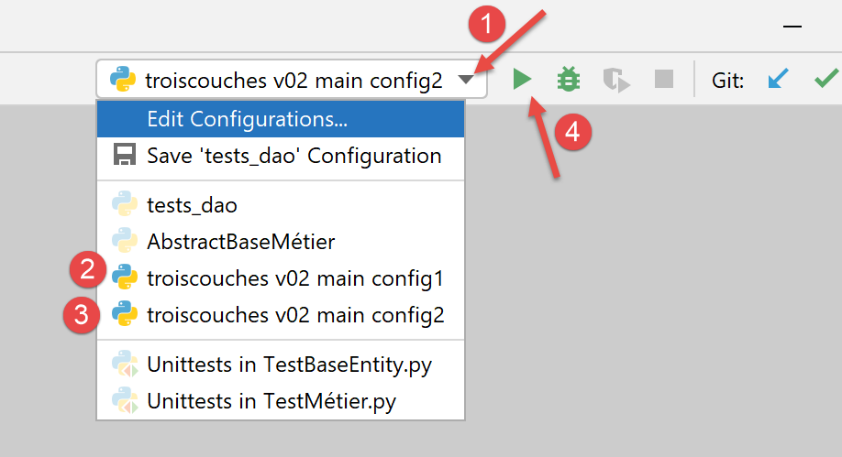
Simply select [2] or [3], then click [4] to run the script [main] witheither [config1] or [config2].
With [config1], running [main] yields the following results:
C:\Data\st-2020\dev\python\cours-2020\python3-flask-2020\venv\Scripts\python.exe C:/Data/st-2020/dev/python/cours-2020/python3-flask-2020/troiscouches/v02/main/main.py config1
34

Process finished with exit code 0
With [config2], running [main] yields the following results:
C:\Data\st-2020\dev\python\cours-2020\python3-flask-2020\venv\Scripts\python.exe C:/Data/st-2020/dev/python/cours-2020/python3-flask-2020/troiscouches/v02/main/main.py config2
-10

Process finished with exit code 0
The reader is invited to verify these results.