19. Using the SQLAlchemy ORM
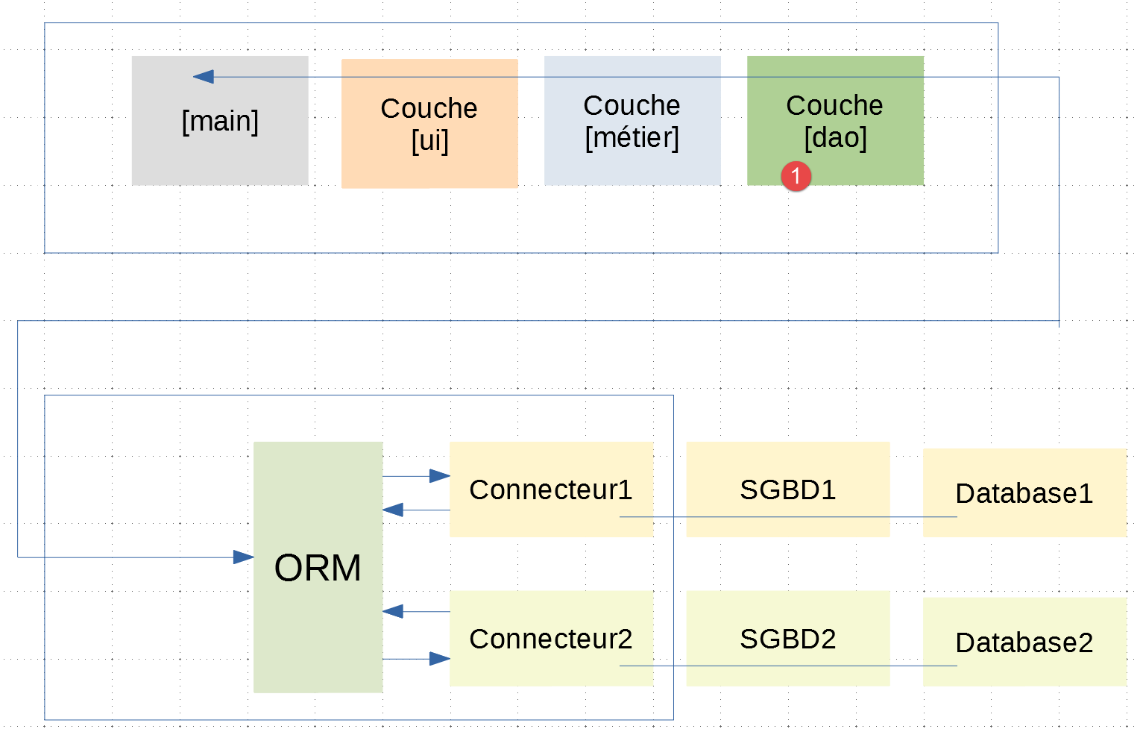
The previous chapter showed that in some cases, we can write code independent of the DBMS used with the following architecture:
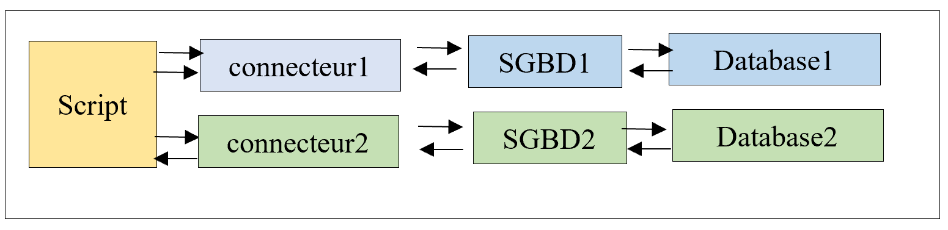
In this chapter, we will use the ORM (Object Relational Mapper) [SQLAlchemy] to access DBMSs uniformly, regardless of the DBMS used. An ORM enables two things:
- it allows a script to interact with the DBMS without issuing SQL commands;
- it hides the specifics of each DBMS from the script;
The architecture becomes as follows:
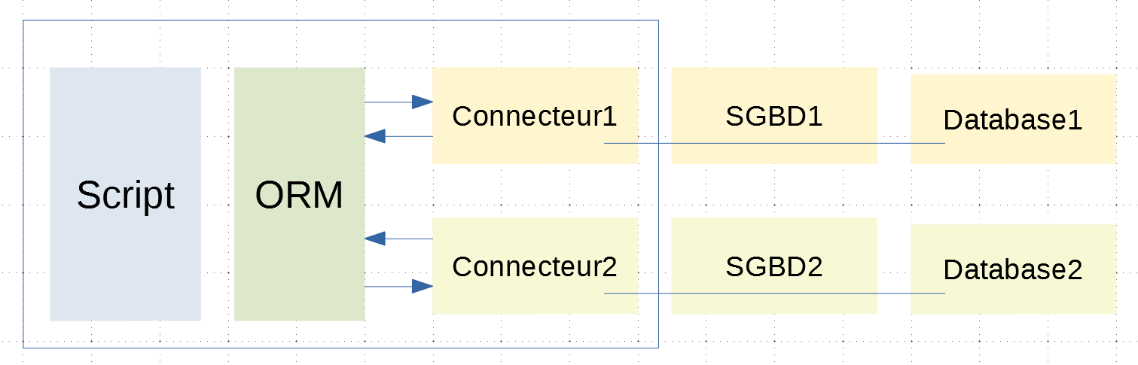
The script is now separated from the connectors by the ORM. It communicates with the ORM using classes and methods. It does not execute SQL code. The ORM does this using the connectors to which it is connected. It hides the specifics of these connectors from the script. Therefore, the script’s code is unaffected by a change in connector (and thus in DBMS);
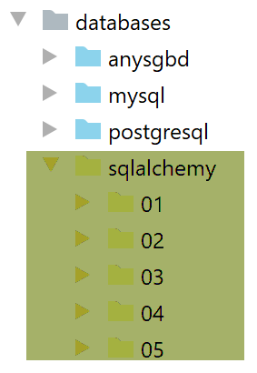
The directory structure of the scripts under consideration will be as follows:
19.1. Installing the ORM [SQLAlchemy]
The ORM [SQLAlchemy] comes as a Python package that must be installed in a Python terminal:
(venv) C:\Data\st-2020\dev\python\cours-2020\python3-flask-2020\databases\sqlalchemy>pip install sqlalchemy
Collecting sqlalchemy
  Downloading SQLAlchemy-1.3.18-cp38-cp38-win_amd64.whl (1.2 MB)
     || 1.2 MB 3.3 MB/s
Installing collected packages: sqlalchemy
Successfully installed sqlalchemy-1.3.18
19.2. Scripts 01: The Basics
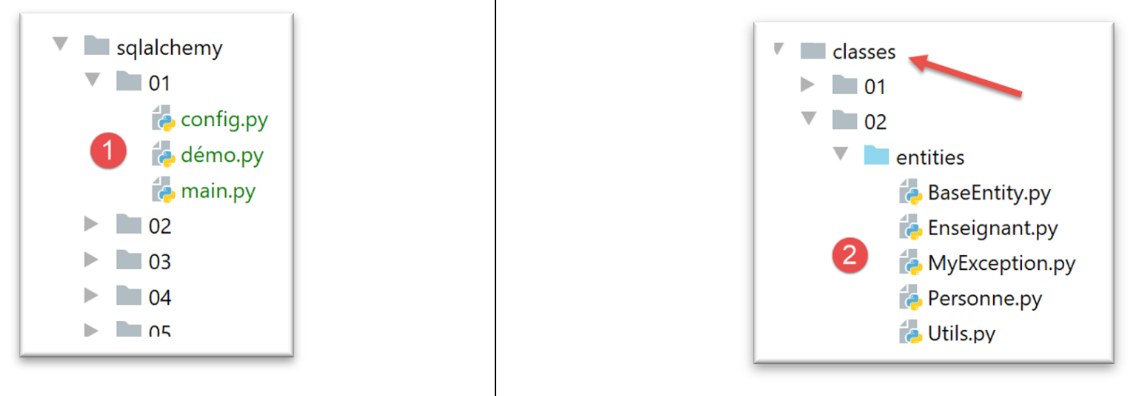
- in [1], the scripts that will be studied. These scripts will use the classes from [2]: BaseEntity, MyException, Person, Utils;
19.2.1. Configuration
The [config] file configures the application as follows:
Comments
- line 8: add the folder containing the classes [BaseEntity, MyException, Person, Utils] to the Python Path;
- lines 12-13: we set the application’s Python Path;
- lines 16-17: you may recall that the |BaseEntity| class has a class attribute named [excluded_keys]. This attribute is a list in which we place the class properties that we do not want to appear in the class dictionary (asdict function). Here we exclude the [_sa_instance_state] property from the state of the [Person] class. We’ll see why shortly;
19.2.2. [demo] script
The [demo] script shows an initial use of the [sqlalchemy] ORM:
Comments
- lines 1-4: we configure the application;
- lines 6-10: we import the modules needed for the script;
- line 13: [MetaData] is a class in [sqlalchemy];
- lines 15-22: [Table] is a class in [sqlalchemy]. It is used to describe a database table. Here, we will describe the [people] table in the MySQL database [dbpeople] covered in the |MySQL| chapter;
- line 16: the first parameter [people] is the name of the table being described;
- line 16: the second parameter [metadata] is the [MetaData] instance created on line 13;
- lines 17–22: each of the following parameters describes a column of the table using syntax specific to [SQLAlchemy] but similar to SQL syntax;
- each column is described using an instance of the [Column] class from [sqlalchemy];
- the first parameter is the column name;
- the second parameter is its type;
- the following parameters are named parameters:
- Line 17: [primary_key=True] to indicate that the [id] column is the primary key of the [people] table;
- line 18: [nullable=False] to indicate that a column must have a value when a row is inserted into the table;
- line 21: finally, the [UniqueConstraint] class allows you to define a uniqueness constraint. Here, we specify that the columns (last_name, first_name) must be unique within the table. The property named [name] allows you to give this constraint a name. Here, there are two cases to consider:
- we are describing an existing table. In that case, we must look up the constraint’s name in the table’s properties (phpMyAdmin or pgAdmin);
- we are describing a table that we are about to create. In that case, we enter the name we want;
- lines 23–25: we create a person [person1] and display its dictionary [__dict__]. Here we will have:
personne1={'_BaseEntity__id': 67, '_Personne__prénom': 'x', '_Personne__nom': 'y', '_Personne__âge': 10}
- lines 27–33: we perform a mapping, i.e., we create a correspondence between the class [Person] and the table [people]. This is essentially a mapping [class properties table columns]. The [mapper] function takes three parameters here:
- line 28: the first parameter is the name of the class for which the mapping is being performed;
- line 28: the second parameter is the table to which it will be associated. This is the [Table] object created on line 16;
- line 28: the third parameter here is a parameter named [properties]. It is a dictionary in which the keys are the properties of the mapped class and the values are the columns of the mapped table. To refer to column X of the [personnes_table] table, we write [personnes_table.c.X];
- lines 35–36: we display the person [person1] again once the mapping is complete. We see that it has not changed:
personne1={'_BaseEntity__id': 67, '_Personne__prénom': 'x', '_Personne__nom': 'y', '_Personne__âge': 10}
- lines 37-39: we create a new person [person2] and display it. We then see the following output:
personne2={'_sa_instance_state': <sqlalchemy.orm.state.InstanceState object at 0x00000259A6747FA0>, 'id': 68, 'prénom': 'x1', 'nom': 'y1', 'âge': 11}
We can see that the dictionary [__dict__] has been significantly modified:
- (continued)
- a new property [_sa_instance_state] appears. We can see that it is an ORM [sqlalchemy] object;
- the other properties have had their prefixes removed, which previously indicated which class they belonged to;
We can therefore conclude that the mapping operation in lines 27–33 has modified the [Person] class.
When we want to display the state of a [Person] object, we generally do not want the [_sa_instance_state] property. It is there solely for [SQLAlchemy]’s internal workings and is generally of no interest to us. That is why we wrote in the [config] script:
19.2.3. The [main] script
The [main] script will manipulate the [people] table in the MySQL database [dbpeople] by interfacing with [sqlalchemy]. To understand what follows, we need to recall the architecture used here:
If [Database1] is the [dbpersonnes] database, we can see that the connection between the script and this database involves two components:
- the Python connector to the MySQL DBMS;
- the MySQL DBMS;
The [main] script will communicate with the ORM, which will then communicate with the Python connector. The ORM communicates with this connector using the tools described in the |MySQL| and |PostgreSQL| sections, notably by issuing SQL commands. The [main] script will not use SQL commands. It will rely on the ORM’s API (Application Programming Interface), which consists of classes and interfaces.
The [main] script is as follows:
Comments
- lines 1–4: the application is configured;
- lines 7–9: we import a whole series of classes and interfaces from the [sqlalchemy] library;
- Line 11: The [Person] class is imported;
- Line 14: the database connection string. It specifies:
- the DBMS used (mysql);
- the Python connector used (mysql.connector without the .);
- the user logging in (admpersonnes);
- their password (nobody);
- the machine on which the DBMS is located (localhost = the machine on which the script is running);
- the database name (dbpersonnes);
With this information, [sqlalchemy] can connect to the database. Note that the Python connector used must already be installed. [sqlalchemy] does not install it.
- lines 19–26: description of the [people] table;
- lines 28–34: mapping between the [Person] class and the [people] table;
- lines 36–38: most [sqlalchemy] operations are performed within a session. The concept of a [sqlalchemy] session is similar to that of an SQL transaction. Sessions are created from the [Session] class returned by the [sessionmaker] function on line 37;
- line 38: the [Session] class is associated with the [dbpeople] database via the connection string on line 14;
- line 43: a session is created. As mentioned, a session can be likened to a transaction;
- lines 45–46: the [Session.execute] method allows an SQL statement to be executed. This is not common practice, since we mentioned that the ORM allows one to avoid using SQL;
- lines 48–49: the [metadata.create_all] method creates all tables using the [MetaData] instance from line 17. We have only one: the [people] table defined in lines 20–26. [SQLAlchemy] will use the information from these lines to create the table. Here we see a key benefit of the ORM: it hides the specifics of the DBMS. Indeed, the SQL [create] statement can vary significantly from one DBMS to another due to the data types assigned to the columns. There has been no standardization of data types in SQL. Thus, the [create] statement varies from one DBMS to another. Here, thanks to [SQLAlchemy]:
- we describe the table we want in a single, consistent way;
- [SQLAlchemy] manages to generate the appropriate [create] statement for the DBMS it is working with;
- line 52: we add a [Person] object to the session. This does not automatically add it to the database. In fact, an ORM follows its own rules to synchronize with the database. It will always seek to optimize the number of queries it makes. Let’s take an example. The script adds (add) two people (person1, person2) to the session and then makes a query: it wants to see all the people in the table. [SQLAlchemy] can proceed as follows:
- adding [person1] can be done in memory. There is no need to put it in the database for now;
- the same applies to [person2];
- Next comes the [select] query. We must then retrieve all rows from the [people] table. [SQLAlchemy] will then insert [person1, person2] into the database and execute the query;
[SQLAlchemy] will thus perform optimizations that are transparent to the developer.
- Line 56: To execute a [select] query (I want to see…), we use the [Session.query] method. The parameter for the [query] method is the class mapped to the table being queried. This method returns a [Query] object. The [Query.all] method retrieves all [Person] objects from the session. It returns all rows from the [people] table, each in the form of a [Person] object. To do this, [SQLAlchemy] uses the mapping established between the [Person] class and the [people] table. The result of line 56 is a list of [Person] objects;
- lines 58–61: we display the elements of the [people] list. Because the [Person] class derives from the [BaseEntity] class, the [Person.__str__] method used here implicitly in line 61 is actually the [BaseEntity.__str__] method, which returns the JSON string of the calling object. This string is the JSON string of the [Person.asdict] dictionary (see |BaseEntity|). We mentioned that after mapping, we would find the [_sa_instance_state] property in each [Person] object. However, the value of this property is not of type [BaseEntity]. It must therefore be excluded from the [Person] class dictionary; otherwise, the display will crash. This is what was done in the [config] script;
- lines 63–65: we add two more people who have the same first and last names. However, there is a uniqueness constraint on the union of these two columns. An error should therefore occur. This is what we are trying to verify;
- lines 67–68: we request the list of all people in the database again;
- lines 70–73: and we display them;
- lines 75-76: the session is committed. As the name implies, the underlying transaction will be committed;
- we will see during execution that lines 67–76 will not be executed due to the exception raised by line 65. We will then proceed to lines 78–84 to handle the exception;
- Line 78: The [InterfaceError] exception occurs if [SQLAlchemy] cannot connect to the [dbpersonnes] database. The [IntegrityError] exception occurs on line 65;
- line 80: the error is displayed;
- lines 82–84: if the session exists, we roll it back. This amounts to rolling back the underlying transaction;
- lines 85–88: in all cases, whether an error occurs or not, the session is closed to free up resources;
The results of the execution are as follows:
C:\Data\st-2020\dev\python\cours-2020\python3-flask-2020\venv\Scripts\python.exe C:/Data/st-2020/dev/python/cours-2020/python3-flask-2020/databases/sqlalchemy/01/main.py
Liste des personnes ---------
{"nom": "y", "prénom": "x", "id": 67, "âge": 10}
L'erreur suivante s'est produite : (raised as a result of Query-invoked autoflush; consider using a session.no_autoflush block if this flush is occurring prematurely)
(mysql.connector.errors.IntegrityError) 1062 (23000): Duplicate entry 'y1-x1' for key 'uix_1'
[SQL: INSERT INTO personnes (id, prenom, nom, age) VALUES (%(id)s, %(prenom)s, %(nom)s, %(age)s)]
[parameters: ({'id': 68, 'prenom': 'x1', 'nom': 'y1', 'age': 10}, {'id': 69, 'prenom': 'x1', 'nom': 'y1', 'age': 10})]
(Background on this error at: http://sqlalche.me/e/13/gkpj)
rollback...
Process finished with exit code 0
- lines 2-3: the list of people after the first insertion;
- line 5: the [IntegrityError] exception that occurred when two people with the same first and last names were added;
- lines 6-7: note the SQL statement that failed. It is a parameterized INSERT statement: [SQLAlchemy] inserted both people with a single INSERT. Here we can see that it attempted to optimize the SQL statements issued;
Now let’s use phpMyAdmin to view the contents of the [people] table:
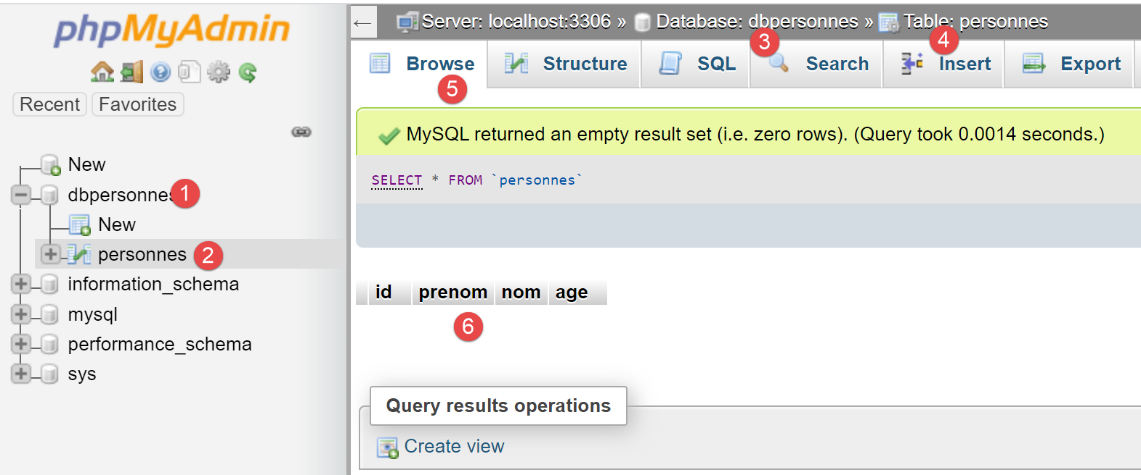
We can see in [6] that the table is empty. Not even the first person that the script added to the session is there. This is because the session was part of a transaction, and that transaction was rolled back in the [except] clause of the [main] script.
Let's now make the following change in [main]:
After adding a person on line 2, we uncomment line 3. The [session.commit] operation will commit the underlying transaction, and a new transaction will begin. After execution, the contents of the [people] table are as follows:
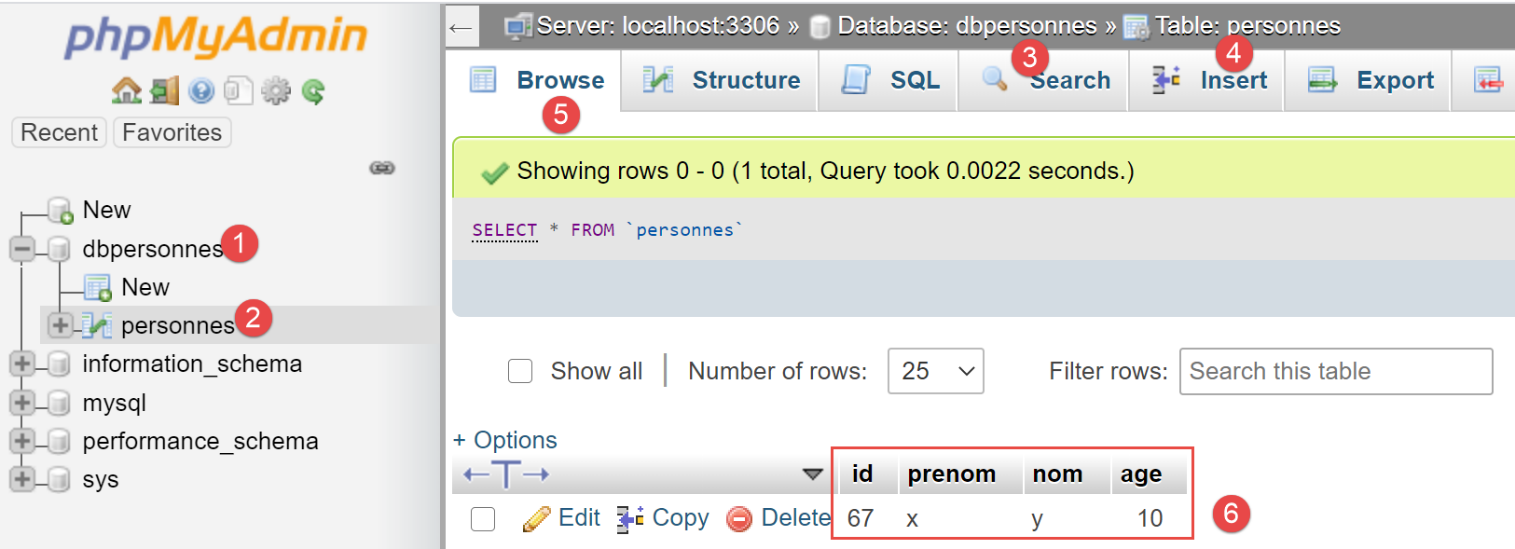
We can see in [6] that the first insertion was retained. This is because it was performed within transaction 1, and the subsequent error occurred within transaction 2.
19.3. Scripts 02: [sqlalchemy] mappings
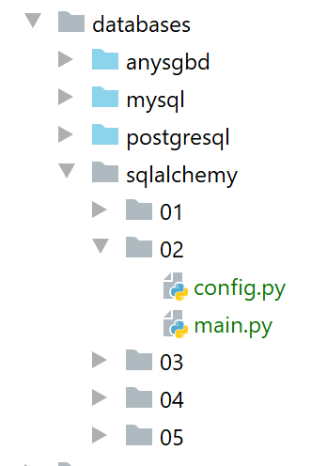
Scripts 02 are a variation of Scripts 01. We try to configure as much as possible in [config.py]. We now configure the application’s [sqlalchemy] environment there:
Comments
- lines 2–12: Python Path configuration;
- lines 14–45: configuring the [sqlalchemy] environment;
- lines 47–52: the [sqlalchemy] environment is added to the configuration dictionary;
- lines 54–56: configuring the [Person] class;
With this configuration, the [main] script becomes the following:
The results of the execution are as follows:
C:\Data\st-2020\dev\python\cours-2020\python3-flask-2020\venv\Scripts\python.exe C:/Data/st-2020/dev/python/cours-2020/python3-flask-2020/databases/sqlalchemy/02/main.py
Liste des personnes-----------
{"âge": 10, "nom": "y", "prénom": "x", "id": 1}
{"âge": 7, "nom": "y1", "prénom": "x1", "id": 2}
L'erreur suivante s'est produite : (raised as a result of Query-invoked autoflush; consider using a session.no_autoflush block if this flush is occurring prematurely)
(mysql.connector.errors.IntegrityError) 1062 (23000): Duplicate entry 'y2-x2' for key 'uix_1'
[SQL: INSERT INTO personnes (prenom, nom, age) VALUES (%(prenom)s, %(nom)s, %(age)s)]
[parameters: {'prenom': 'x2', 'nom': 'y2', 'age': 10}]
(Background on this error at: http://sqlalche.me/e/13/gkpj)
rollback...
Travail terminé...
Process finished with exit code 0
In phpMyAdmin, the [people] table now looks like this:
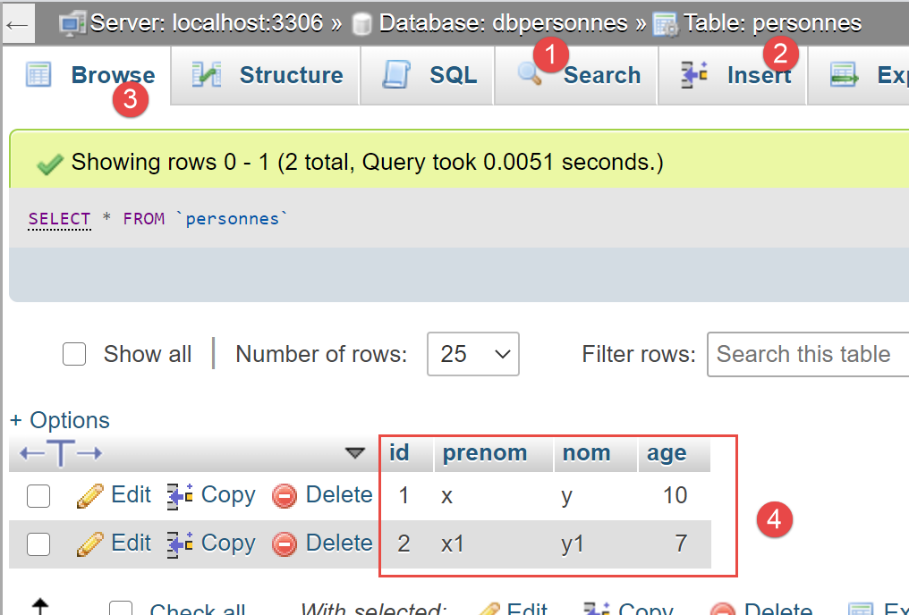
Now, let's look at the [people] table generated by [SQLAlchemy]:
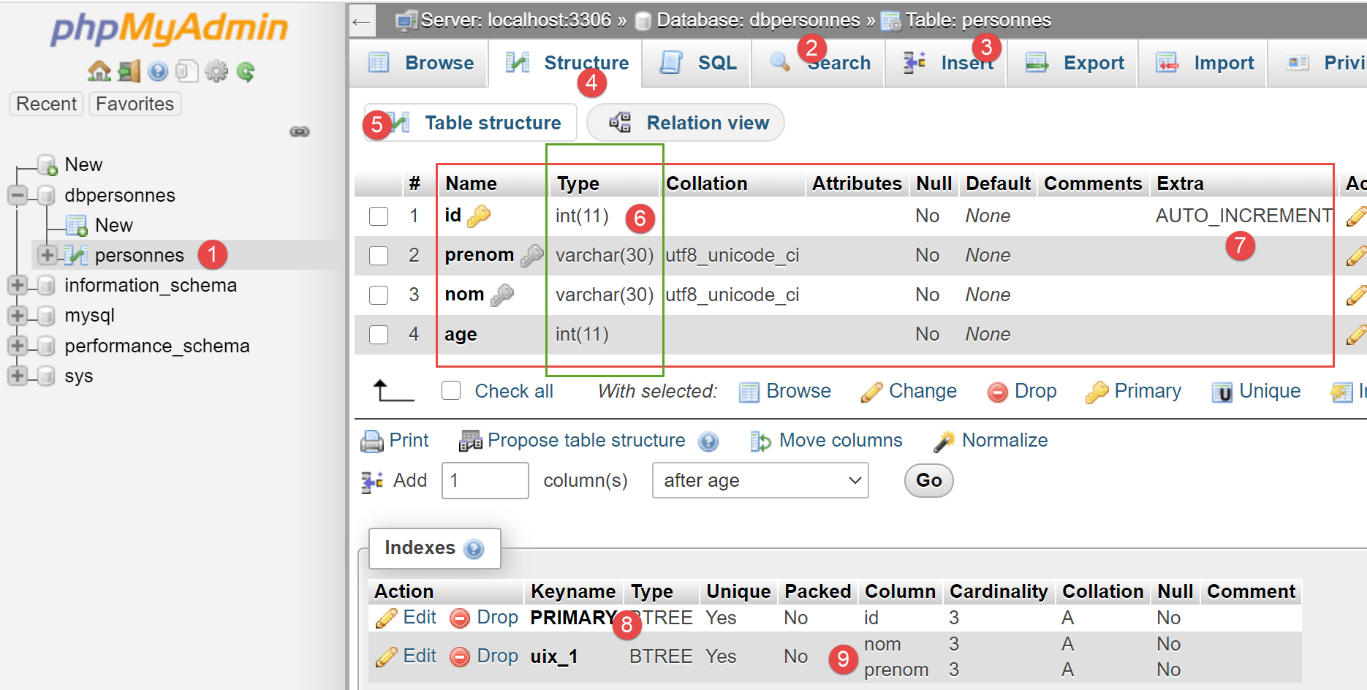
- In [6], the types used for the different columns;
- in [7], we see that the [id] column has the [AUTO_INCREMENT] attribute. This means that when inserting a row into the table, if that row has no value for the [id] column, MySQL will generate it incrementally: 1, 2, 3, … This property saves us from having to worry about the primary key value when inserting into the table: we let MySQL generate it;
- in [8], we see that the [id] column is the primary key;
- In [9], we see the uniqueness constraint on the [last_name, first_name] fields;
19.4. Scripts 03: manipulating session entities [sqlalchemy]
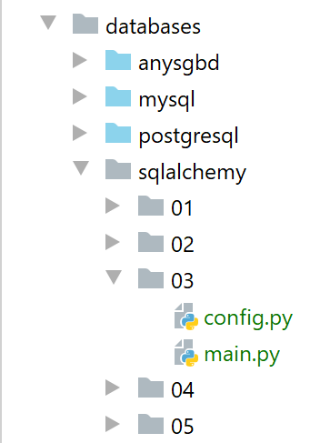
The configuration file [config] is the same as in the previous example. In the [main] script, we perform standard operations [INSERT, UPDATE, DELETE, SELECT] on the [people] table using [SQLAlchemy] methods:
Comments
- lines 20–25: the [display_people] function displays the items in a list of people;
- lines 12–18: the [display_people] function displays the contents of the [people] table;
- Lines 34–36: We drop the [people] table. Unlike in previous versions, we don’t use an SQL query but an [SQLAlchemy] method:
- config["people_table"] is the [Table] object describing the [people] table;
- config["engine"] is the connection string to the [dbpersonnes] database;
- the parameter named [checkfirst=True] ensures that the operation is performed only if the [people] table exists;
- lines 38–39: the [people] table is recreated;
- lines 41–44: three people are added to the session. Note that they are not necessarily inserted immediately into the [people] table. This depends on [SQLAlchemy]’s performance-oriented strategy;
- lines 46–47: the contents of the [people] table are displayed. If the three people had not yet been inserted, they are now inserted because of this request;
- Lines 49-50: An example of using the [order_by] method, which allows query results to be displayed in a specific order. The syntax [order_by(criterion1, criterion2)] displays the results first according to criterion [criterion1], and when rows have the same value for [criterion1], they are then sorted according to criterion [criterion2]. Multiple criteria can be specified in this way;
- lines 55–59: introduce the concept of filtering using the [filter] method. The notation [filter(criterion1, criterion2)] performs a logical AND operation between the criteria used;
- lines 64–67: a new user is logged in;
- lines 70–71: another example of a filtered query. The function [func.lower(param)] converts [param] to lowercase. There are other available functions denoted as [func.xx]. In the expression on line 71:
- [session.query.filter] returns a list of [Person] objects;
- [session.query.filter.first] returns the first element of this list;
- line 77: an element is removed from the session;
- line 86: the session is validated;
The results of the execution are as follows:
- lines 4-6: the session content;
- lines 8-10: the session content in descending order of names;
- lines 12–13: the session content for people whose age is in the range [20, 40];
- line 15: the person named “bruneau”;
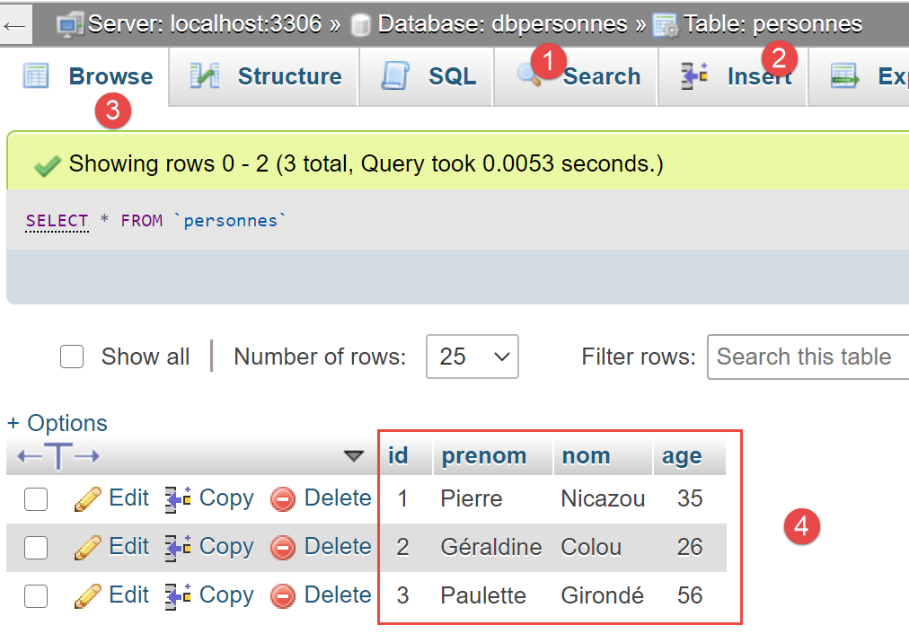
In phpMyAdmin, the contents of the [people] table at the end of execution are as follows:
19.5. Scripts 04: Using a [PostgreSQL] database
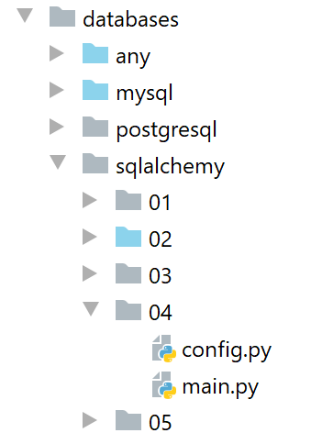
Folder [04] is a copy of folder [03]. We change only one thing: the connection string in the [config] file:
# lien vers une base de données PostgreSQL
engine = create_engine("postgresql+psycopg2://admpersonnes:nobody@localhost/dbpersonnes")
This connection string now refers to the [dbpersonnes] database in a [PostgreSQL] DBMS. Note the use of the [psycopg2] connector. This must be installed.
Running the [main] script produces the following results:
Using the [pgAdmin] tool (see the |pgAdmin| section), the [people] table is in the following state:
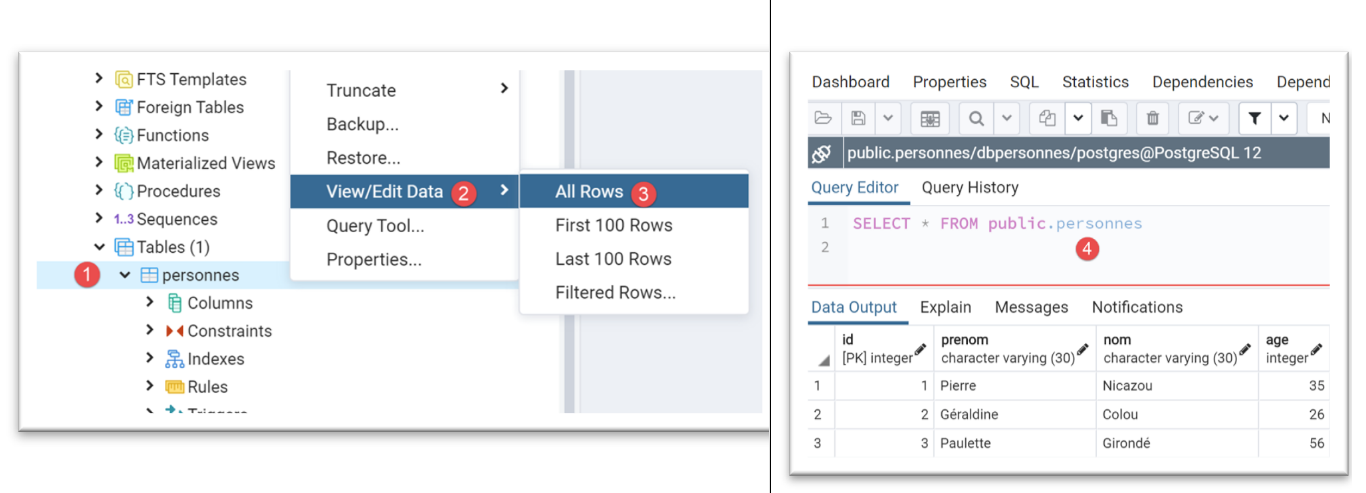
The [people] table was generated with the following SQL code:
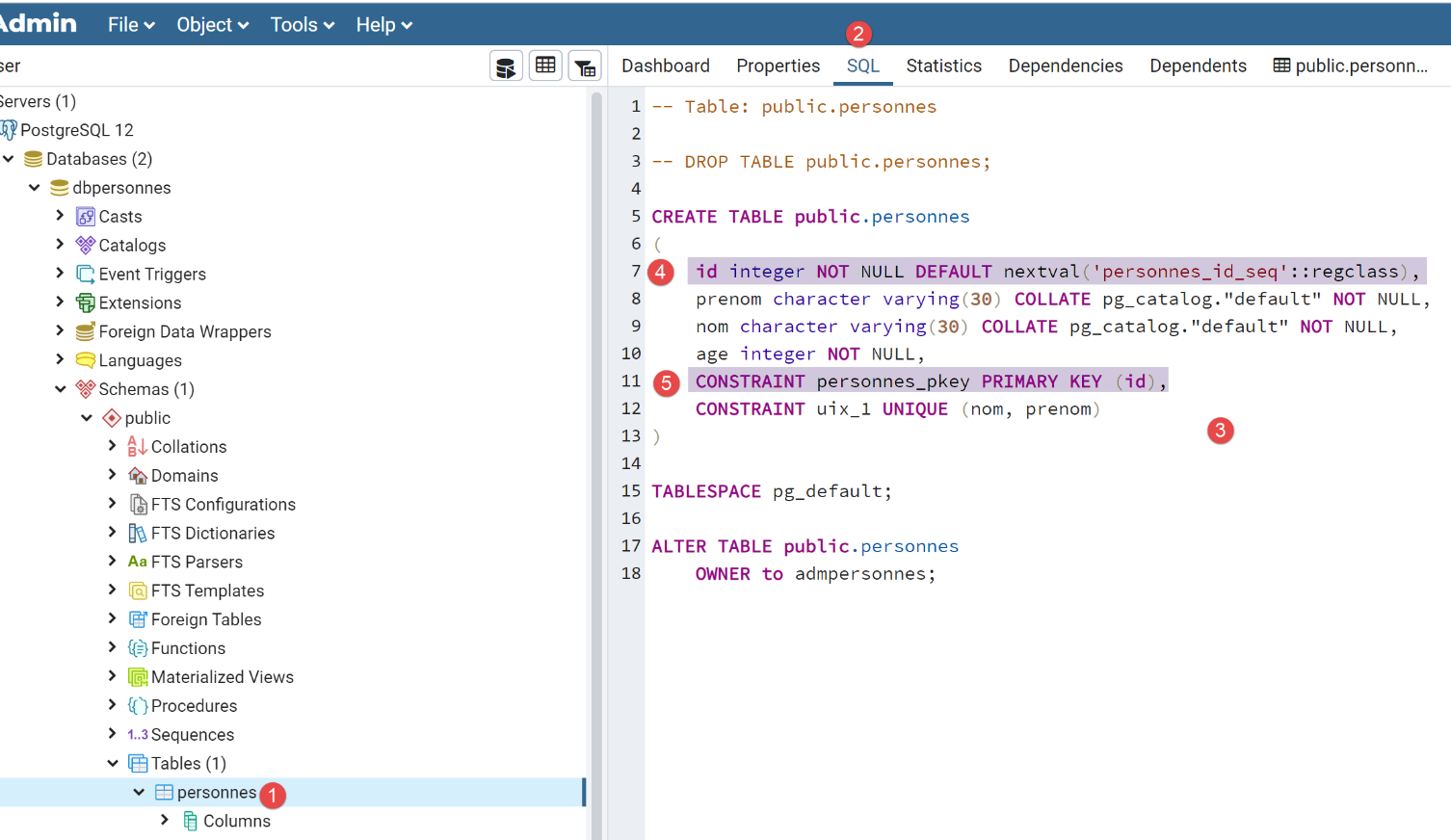
- In [4-5], we see that the [id] column is the primary key. We also see that it has a default value [DEFAULT keyword], which means that if a row is inserted without a primary key, the DBMS will generate one. This is a common practice: we let the DBMS generate the primary keys;
This version 05 of the [sqlalchemy] scripts clearly demonstrates how easy it is to switch from one DBMS to another: all that was needed was to change the connection string in a configuration script. Nothing else changed. If we compare the column types [id, last_name, first_name, age] above with those in the MySQL table from example |02|, we see that they are different. [sqlalchemy] adapts them to the DBMS being used. This ability to adapt to a new DBMS is reason enough to adopt [sqlalchemy] or another ORM.
19.6. Scripts 05: Complete Example
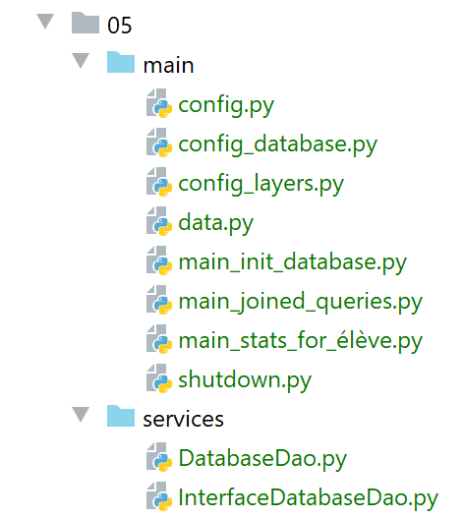
The example we’re looking at is a reworking of the one covered in section |troiscouches-v01|. That example featured a three-tier architecture [UI, business logic, DAO] that manipulated entities [Class, Student, Subject, Grade]. The entities were hard-coded in a [DAO] layer. We are now putting them into a database. We will use two DBMSs: MySQL and PostgreSQL.
19.6.1. The application architecture
The application architecture will be as follows:
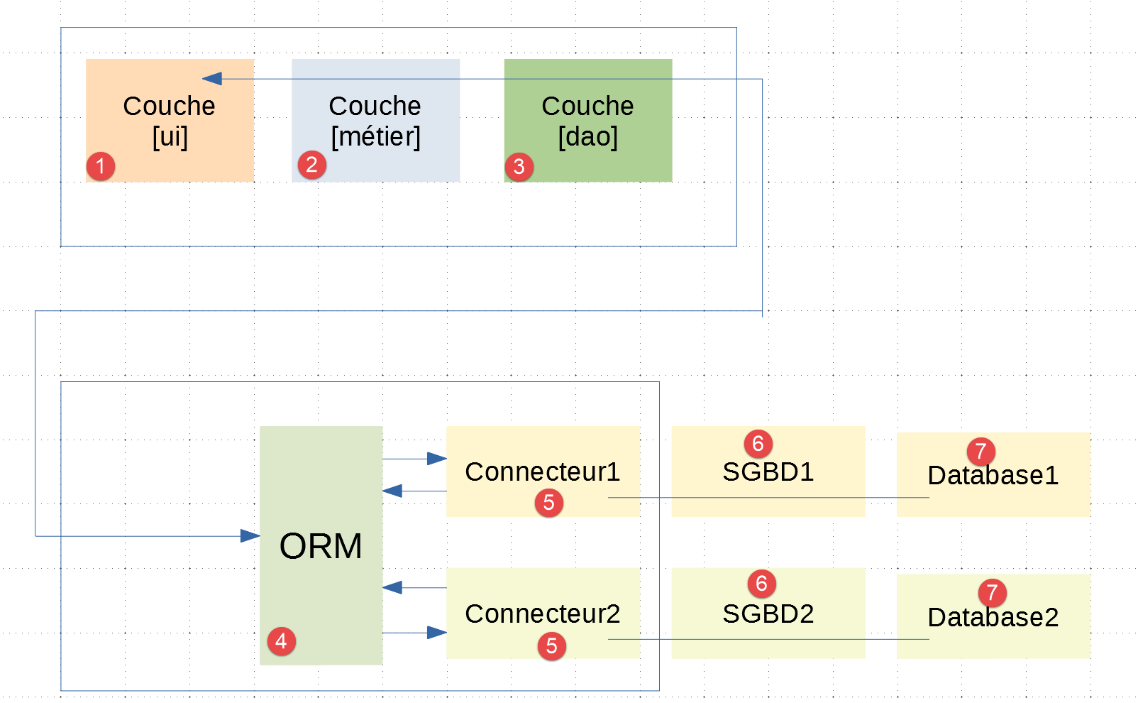
- In [1-3], we find the layers [UI, Business, DAO] already present in the example |troiscouches-v01|. The [DAO] layer now communicates with the [ORM] layer;
- layers [1-5] are implemented using Python code;
19.6.2. The databases
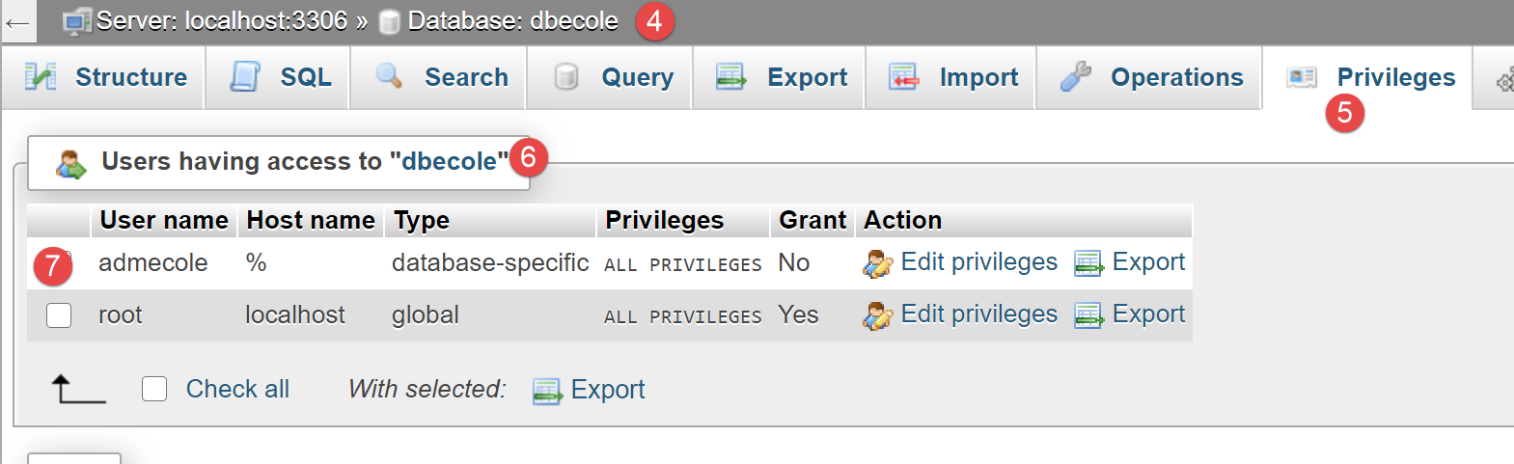
We are creating a MySQL database named [dbecole] owned by the user [admecole] with the password [mdpecole]. To do this, we follow the procedure described in the section |Creating a Database|:
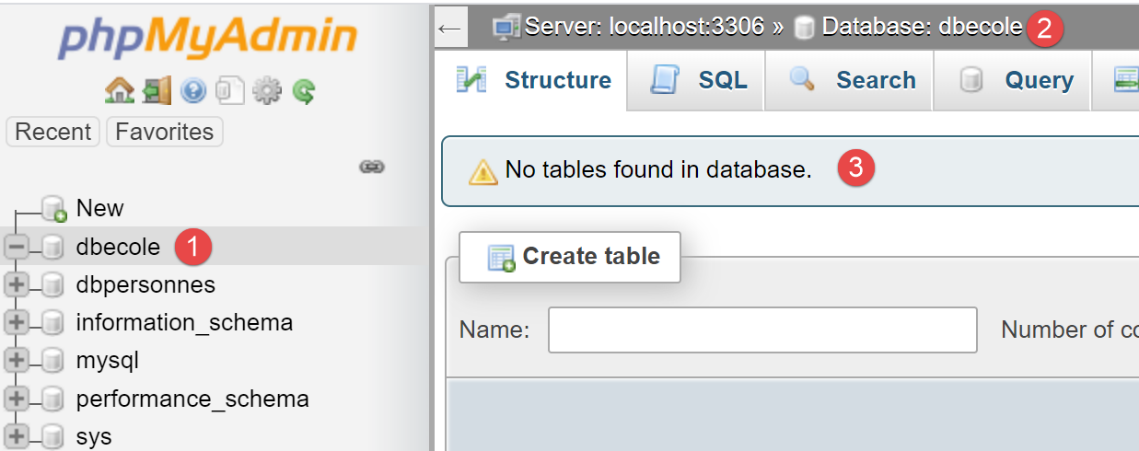
- in [1], the database [dbecole] has no tables [3];
- in [7], the user [admecole] has full privileges on this database;
We do the same with the PostgreSQL DBMS. We create a database named [dbecole] owned by the user [admecole] with the password [mdpecole]. To do this, we follow the procedure described in the section |creating a database|:
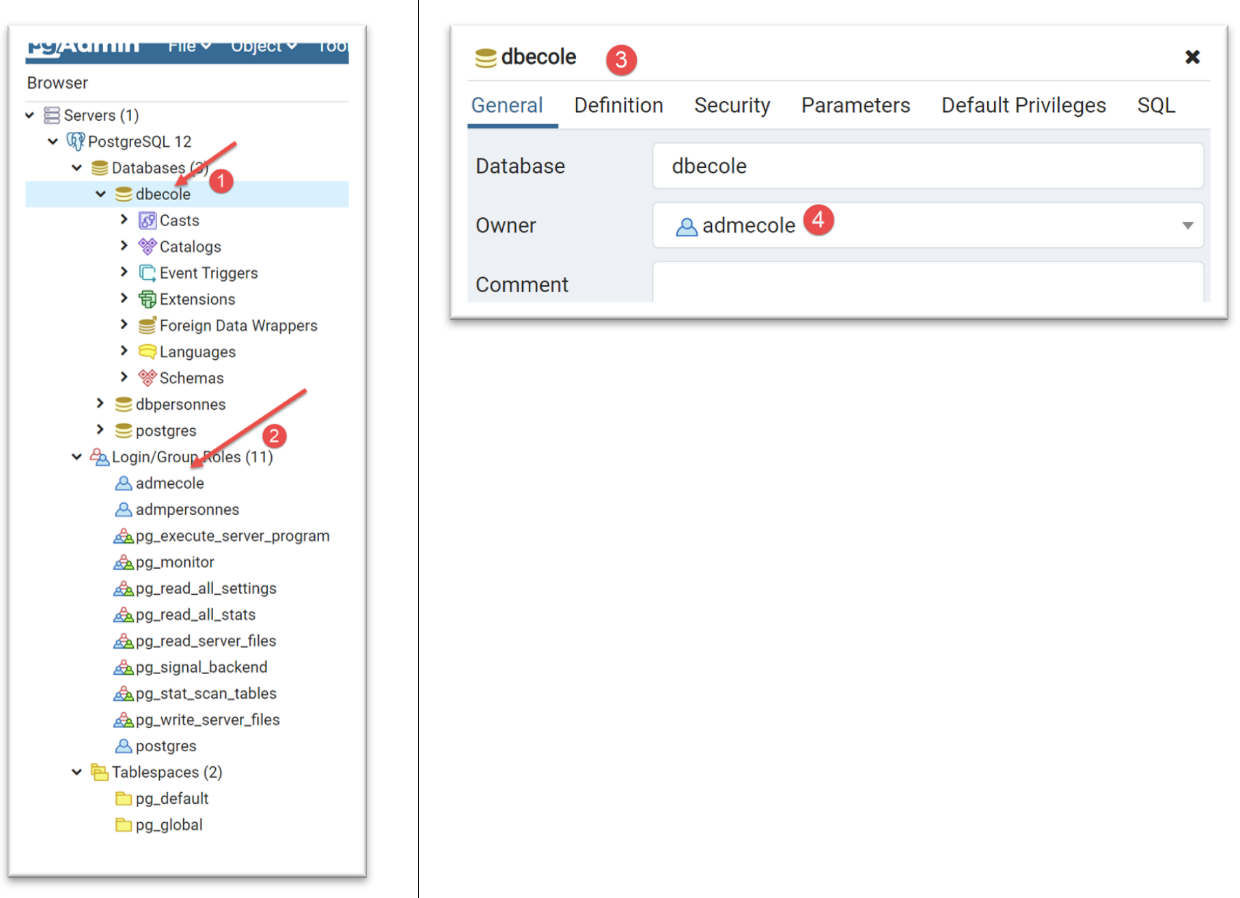
- in [1], the database [dbecole];
- in [2], the user [admecole];
- in [3-4], the database [dbecole] is owned by the user [admecole];
19.6.3. Entities handled by the application
In the |troiscouches v01| application, the entities handled were as follows (see |entities|). These are the entities that will be stored in the previous databases. We will not duplicate these entities in the new application. We will retrieve them from where they are already defined.
The [Class] class:
The [Student] class:
The [Subject] class:
The [Grade] class:
19.6.4. Configuration
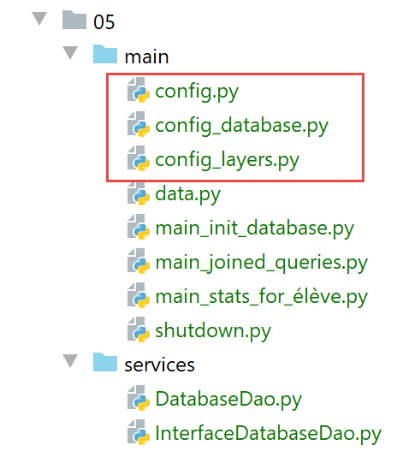
The configuration has been split across several files:
- general configuration in [config.py]: it sets the application's Python Path and instantiates the architecture layers;
- [SQLAlchemy] configuration in [config_database]: it handles the Class/Table mappings;
- The application layers are configured in [config_layers];
The [config] file is as follows:
- lines 4–27: building the application’s Python Path;
- lines 29–32: [SQLAlchemy] configuration;
- lines 34–37: configuration of the application layers;
The [config_database] file is as follows:
1 2 3 4 5 6 7 8 9 10 11 12 13 14 15 16 17 18 19 20 21 22 23 24 25 26 27 28 29 30 31 32 33 34 35 36 37 38 39 40 41 42 43 44 45 46 47 48 49 50 51 52 53 54 55 56 57 58 59 60 61 62 63 64 65 66 67 68 69 70 71 72 73 74 75 76 77 78 79 80 81 82 83 84 85 86 87 88 89 90 91 92 93 94 95 96 97 98 99 100 101 102 103 104 105 106 107 108 109 | |
Comments
- lines 1-4: the [configure] function receives a dictionary as a parameter. Only the [db] key is used. It is set to [mysql] if the database is a MySQL database, [pgres] if the database is a PostgreSQL database;
- lines 6-9: imports of elements from [sqlalchemy]. The [config_database] script performs the mappings between the tables in the [dbecole] database and the entities [Classes, Student, Subject, Grade]. In the table, the entity data is encapsulated in a row. In the Python code, they are encapsulated in an object. Hence the name ORM (Object Relational Mapper): the ORM establishes a mapping (a link) between the rows of a relational database and objects. In this application, we have four entities [Class, Student, Subject, Grade] that will be linked to four tables [classes, students, subjects, grades]. Note that table names may contain accented characters;
- lines 11–17: the connection string to the database being used. This depends on the config['db'].
- lines 24–28: the application entities that will be mapped [SQLAlchemy]. When these lines are executed, the Python Path will already have been established by the [config] script;
- lines 30–40: the mapping between the [Class] entity and the [classes] table;
- lines 30–35: the [classes] table is defined using the [Table] class from [sqlalchemy]. We specify that this table has two columns:
- the [id] column, which is the primary key and represents the class number, line 33;
- the [name] column, which contains the class name, line 34;
- lines 31–32: note that the syntax x=y=z is valid in Python: the value of z is assigned to y, then the value of y to x;
- lines 37–40: the mappings between the columns of the [classes] table and the properties of the [Class] entity are listed;
- lines 42–57: the mapping between the [Student] entity and the [students] table;
- lines 51–57: the [students] table is defined using the [Table] class from [SQLAlchemy]. We specify that this table has four columns:
- the [id] column, which is the primary key and represents the student’s ID, line 45;
- the [name] column, which contains the student’s last name, line 46;
- the [first_name] column, which contains the student’s first name, line 47. Note that a column name can contain accented characters;
- row 49, the [class_id] column, which will contain the ID of the class to which the student belongs. This is called a foreign key. [students.class_id] is a foreign key (ForeignKey) on the [classes.id] column. This means that the value of [students.class_id] must exist in the [classes.id] column;
- Lines 51–57: We list the mappings between the columns of the [students] table and the properties of the [Student] entity:
- Lines 53–55 are easy to understand;
- line 56 is more difficult: it defines the value of the [Student.class] property as being calculated by the foreign key relationship that links the [students] and [classes] tables. The parameters of the [relationship] function are as follows:
- [Class]: this is the name of the entity with which the [Student] entity has a foreign key relationship. This must be reflected in the [students] table by the presence of a foreign key referencing the [classes] table. We know this exists;
- [backref="students"]: the name of a property that will be added to the [Class] entity. [Class.students] will be the list of all students in the class. This property must not already exist. If it already exists, simply choose a different name here for [backref]. The developer does not need to manage this property. [SQLAlchemy] will handle it. The developer simply needs to know that it exists, added by [SQLAlchemy], and that they can use it in their code;
- [lazy='select']: this means that the ORM should not attempt to immediately assign a value to the [Student.class] property. It should only retrieve its value when the code explicitly requests it. Thus:
- if the code requests a list of all students, they will be returned but their [class] property will not be calculated;
- a little later, the code focuses on a specific student [e] and references their class [e.class]. This reference will then force [SQLAlchemy] to make a database query to retrieve the student’s class, all transparently to the developer;
- setting [lazy='select'] is also intended to avoid unnecessary database queries;
- Line 56: When the ORM retrieves a row from the [students] table, it retrieves the fields [id, last_name, first_name, class_id]. From there, it must construct a Student object (id, last_name, first_name, class). For the properties [id, last_name, first_name], this poses no difficulty. For the [class] property, it’s more complicated. Its value is an object reference of type [Class]. However, the ORM only has one piece of information: [students.class_id]. Since [students.class_id] is a foreign key on the [classes.id] column, we instruct it here to use this relationship to retrieve the row with id=[students.class_id] from the [classes] table (it must exist) and to create the [Class] object expected by the [Student.class] property from that row;
- lines 59–71: the mapping between the [Subject] entity and the [subjects] table;
- lines 59–65: definition of the [SQLAlchemy] table named [subjects];
- lines 66–71: we list the mappings between the columns of the [subjects] table and the properties of the [Subject] entity. There are no difficulties here;
- lines 73–90: the mapping between the [Note] entity and the [notes] table;
- lines 73-82: definition of the [sqlalchemy] table named [notes]. It has two foreign keys:
- line 79, the [notes.student_id] column takes its values from the [students.id] column. This foreign key reflects the fact that a note belongs to a specific student;
- line 81: the [notes.subject_id] column takes its values from the [subjects.id] column. This foreign key represents the fact that a grade is a grade in a specific subject;
- Lines 84–90: the mapping between the [Note] entity and the [notes] table:
- line 88: the property [Note.student] must have a value of an instance of type [Student]. The ORM has only the [notes.student_id] column in the [notes] table row, which references the [students.id] column. Here, we specify to use this foreign key relationship to retrieve the [Student] instance for which we have the grade. Furthermore, [relationship(Student, backref="grades", …)] will create the new property [Student.grades], which will be the list of the student’s grades. This property must not already exist in the [Student] class;
- Line 89: The property [Grade.subject] must have a value of an instance of type [Subject]. The ORM has only the [notes.subject_id] column in the [grades] table row, which references the [subjects.id] column. Here, we are specifying to use this foreign key relationship to retrieve the [Subject] instance for which we have the grade. Additionally, [relationship(Subject, backref="grades", …)] will create the new property [Subject.grades], which will be the list of grades for the subject. This property must not already exist in the [Subject] class;
- Lines 92–96: For each entity derived from [BaseEntity], we define the list of properties to exclude from the entity’s property dictionary (BaseEntity.asdict). We have seen that [sqlalchemy] adds the [_sa_instance_state] property to all mapped entities. We do not want this in the property dictionary. Furthermore, we saw that the previous mappings added new properties to the entities:
- [Student.grades]: all of the student’s grades;
- [Class.students]: all students in the class;
- [Subject.grades]: all grades for the subject;
Generally, we don’t want these properties added to the entity’s state. Indeed, calculating their value incurs an SQL cost, and this value is often unnecessary. So if we retrieve the student named ‘X’:
- (continued)
- the ORM will return an entity [Student(id, last_name, first_name, class, grades)]. Because of [lazy='select'], the properties [class, grades] linked to foreign keys in the database will not have been calculated;
- now, if I display the JSON string for this student, we know it will be the JSON string from the entity’s [asdict] dictionary. If the [class] and [grades] properties are included, [SQLAlchemy] will be forced to execute SQL queries to calculate their values. This is costly. If we can avoid these queries, that’s preferable;
- here, we have excluded all properties linked to a foreign key;
- lines 98–100: instantiation and configuration of a [Session factory] (factory = production factory). The [Session] object is used to create [SQLAlchemy] sessions backed by transactions;
- lines 102–103: creation of a [SQLAlchemy] session;
- line 106: certain elements of the [SQLAlchemy] configuration are placed in the application’s global configuration dictionary;
- line 109: this dictionary is returned;
The [config_layers] file configures the application layers:
- Line 1: The [configure] function receives the dictionary containing the application's global configuration;
- lines 2–12: the application layers are instantiated;
- lines 15–17: the layer references are added to the global configuration;
- line 20: the new configuration is returned;
19.6.5. The [dao] layer - 1
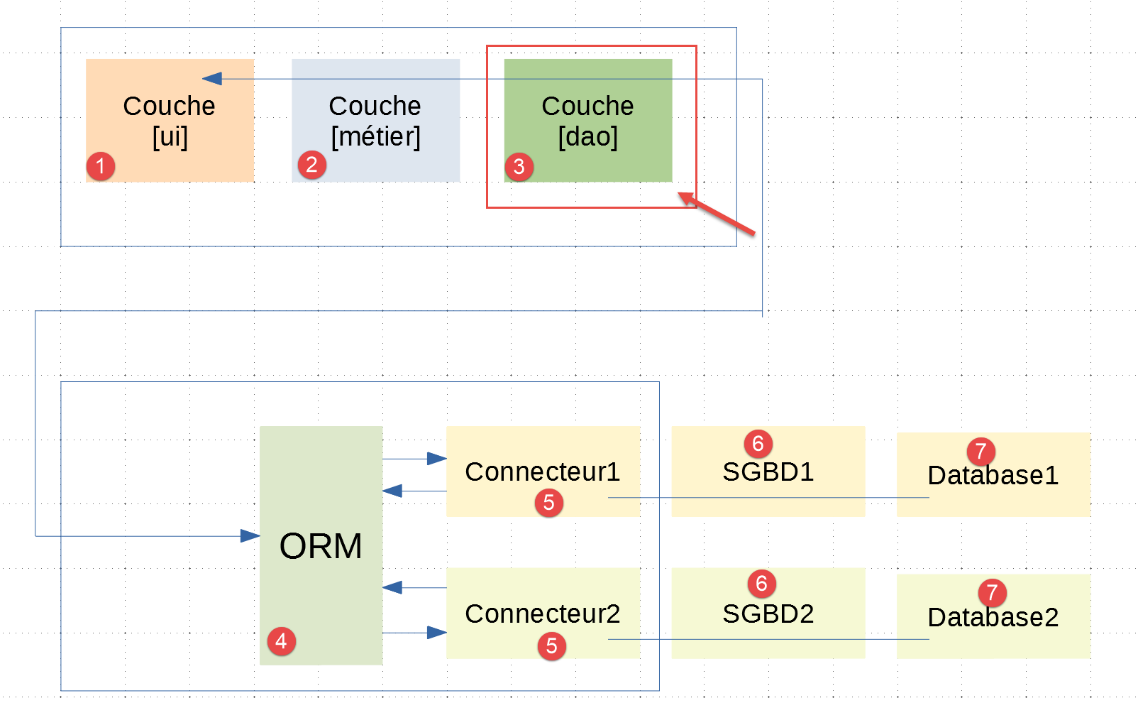
It is important to understand here that the [dao] layer [3] communicates with the [sqlalchemy] ORM [4] configured as described in the previous paragraph. Of the three layers [ui, business, dao] of the |troiscouches v01| application, only the [dao] layer needs to be rewritten. The [ui, business] layers are retained.
The implementation of the [dao] layer has been placed in the [services] folder:
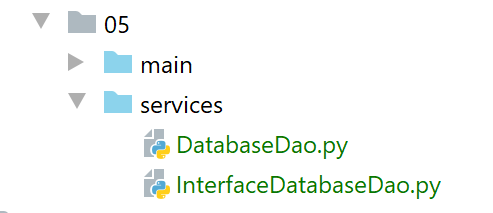
[InterfaceDatabaseDao] is the interface for the [DAO] layer:
- line 6: the [InterfaceDatabaseDao] interface derives both from the [ABC] class to be an abstract class and from the [InterfaceDao] interface of the |troiscouches v01| project;
- lines 8–11: we add the [init_database] method to the methods inherited from [InterfaceDao]. Its role will be to initialize the database with the data from the [data] dictionary passed to it as a parameter on line 10;
Recall that the [InterfaceDao] interface was as follows:
The implementation of the [DAO] layer is as follows:
- line 11: the [DatabaseDao] class implements the [InterfaceDatabaseDao] interface;
- lines 13–16: the class constructor. It takes the application configuration dictionary as a parameter;
- line 15: the [sqlalchemy] configuration is stored;
- line 16: the [sqlalchemy] session through which the database will be manipulated is stored;
- line 18: the [init_database] method initializes the database with the [data] dictionary;
The [data] dictionary is implemented by the following [data.py] script:
- line 34: the dictionary that will be passed to the [init_database] method. This dictionary consists of the following keys (line 32):
- [students]: the list of students;
- [classes]: the list of classes;
- [subjects]: the list of subjects;
- [grades]: the list of grades for all students in all subjects;
Let’s return to the [init_database] method:
- lines 3–6: retrieve information from the database configuration;
- lines 9-14: we saw that the [sqlalchemy] configuration had mapped four entities to four tables [students, subjects, classes, grades]. We start by deleting these tables if they exist;
- lines 16-17: we recreate the four tables we just deleted;
- lines 22–25: we add all classes to the session;
- lines 27–30: we add all subjects to the session;
- lines 32–35: we add all students to the session;
- lines 37–40: we add all grades to the session;
- To make these additions, we followed a specific order. We started with entities that have no relationships with other entities and ended with those that do. Thus, when we add the students to the session, the classes they reference are already in the session;
- line 43: the [sqlalchemy] session is committed. After this operation, we can be sure that all data in the session has been synchronized with the database. In short, the data has been inserted into the tables. This was made possible by the mappings defined in the [sqlalchemy] configuration. [sqlalchemy] knows how each entity should be stored in the tables. [sqlalchemy] also generated any foreign keys that the tables may have;
- lines 44–49: if a problem is encountered, the [sqlalchemy] session is rolled back, and on line 49, an exception is raised;
19.6.6. Database Initialization
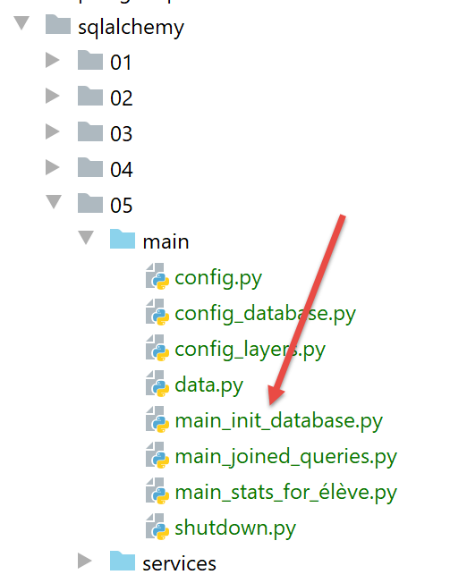
The [main_init_database] script initializes the database with the contents of the [data.py] script. Its code is as follows:
- lines 1-11: the script expects a parameter [mysql] or [pgres] depending on whether you want to initialize a MySQL or PostgreSQL database;
- lines 13-15: the application is configured for the DBMS passed as a parameter;
- lines 20-22: the data to be inserted into the database is retrieved;
- line 25: the [dao] layer has already been instantiated and is accessible in the application configuration;
- line 30: the database is initialized;
- lines 34–37: regardless of whether an error occurred, the application’s resources are released using the [shutdown] module;
The [shutdown.py] module is as follows:
The [shutdown.execute] function closes the [sqlalchemy] session used to initialize the database.
We create an initial execution configuration (see |execution configuration|) to run [main_init_database] with the MySQL database management system:
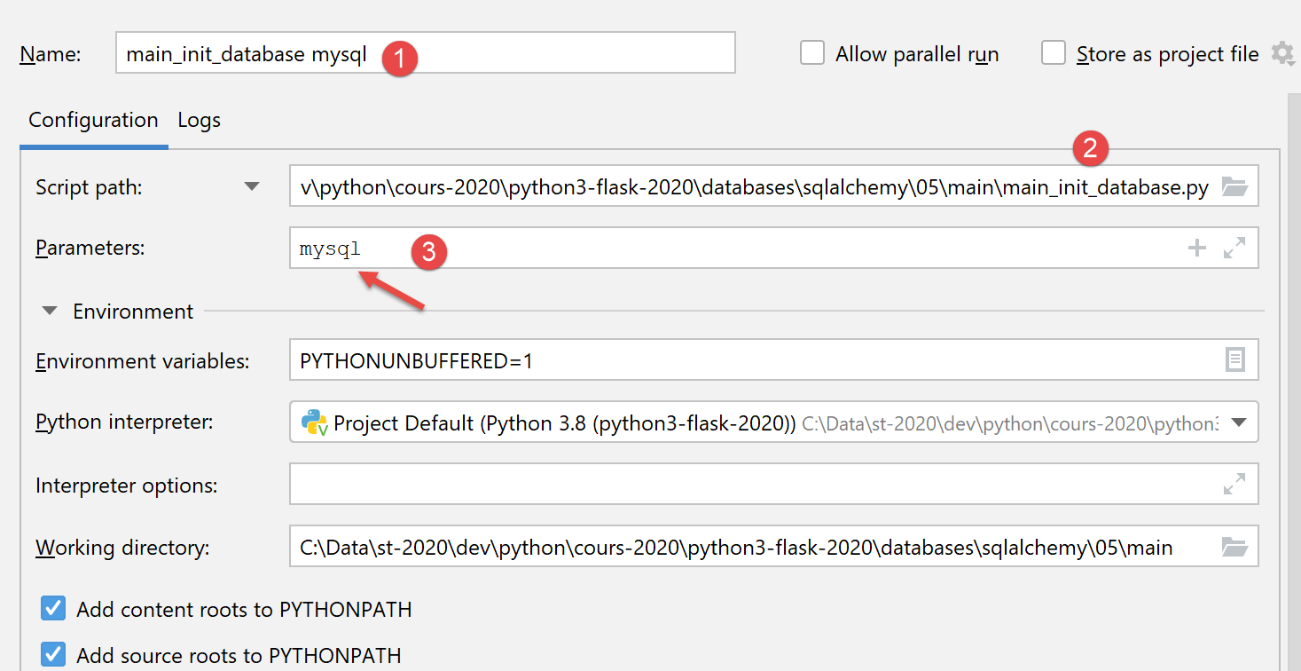
The results of running this configuration are as follows in phpMyAdmin:
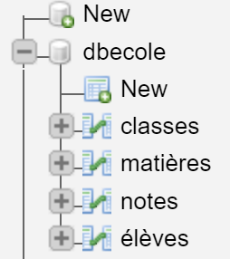
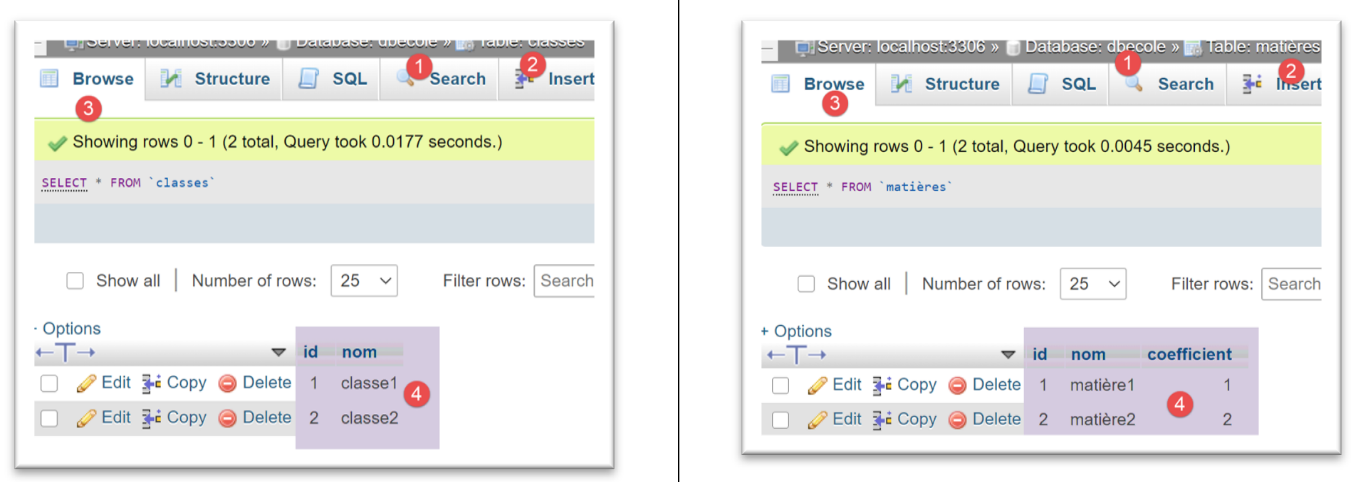
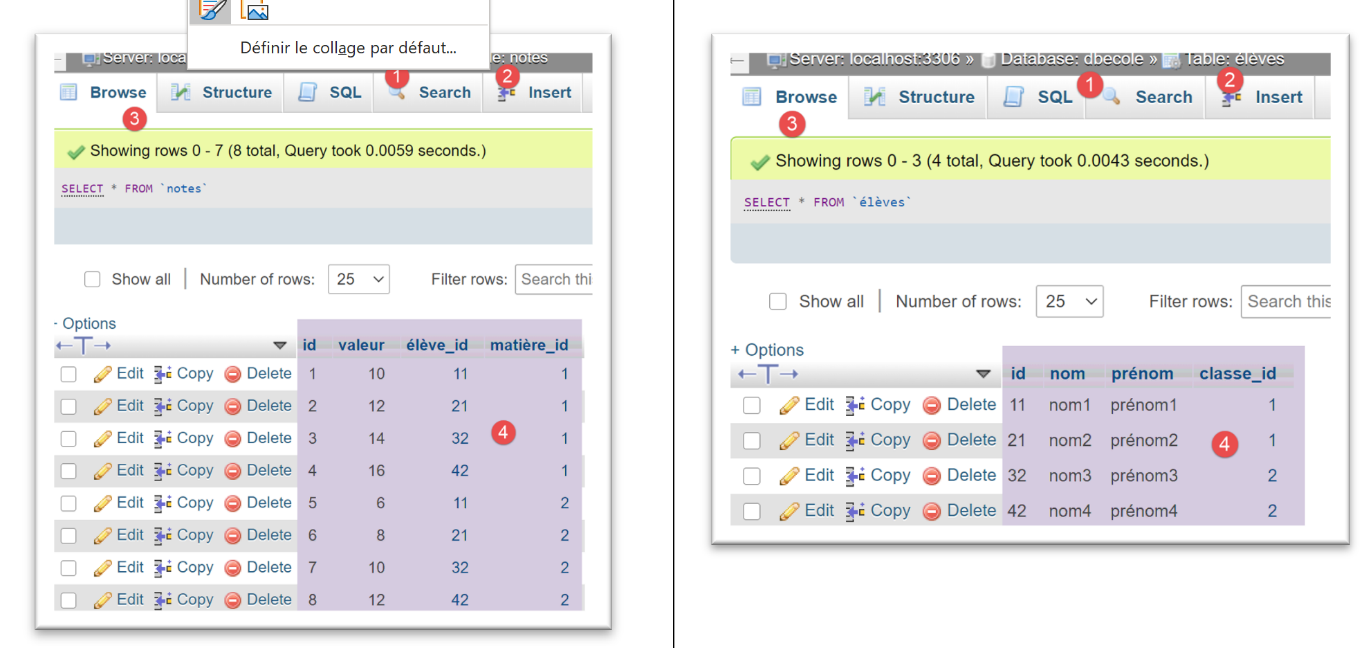
For the [PostgreSQL] DBMS, we use the following execution configuration:
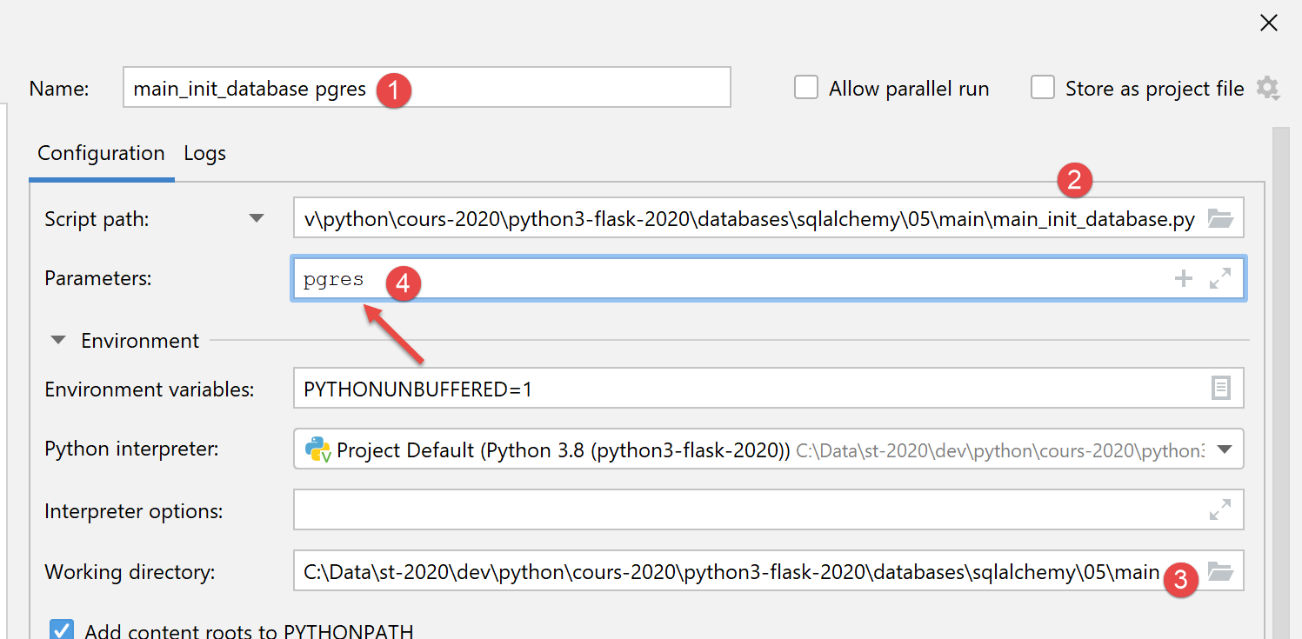
Upon execution, the results in [pgAdmin] are as follows:
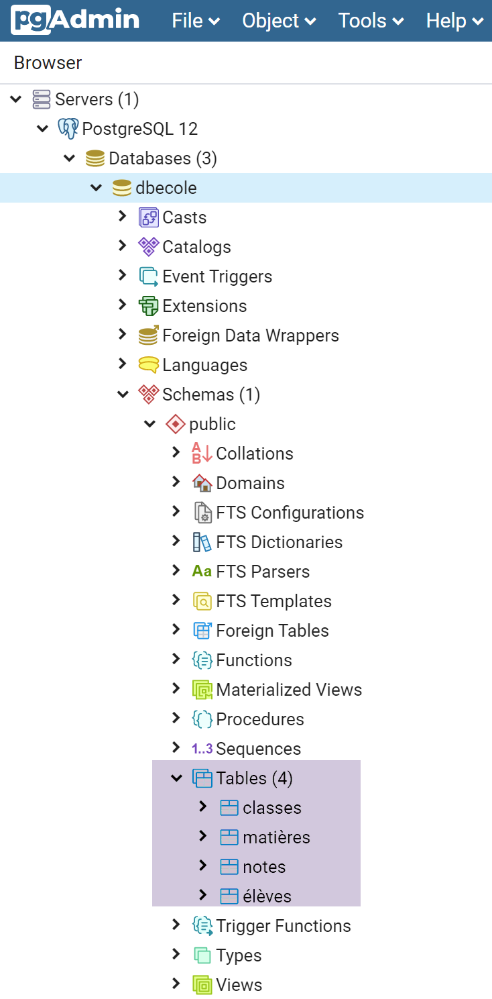
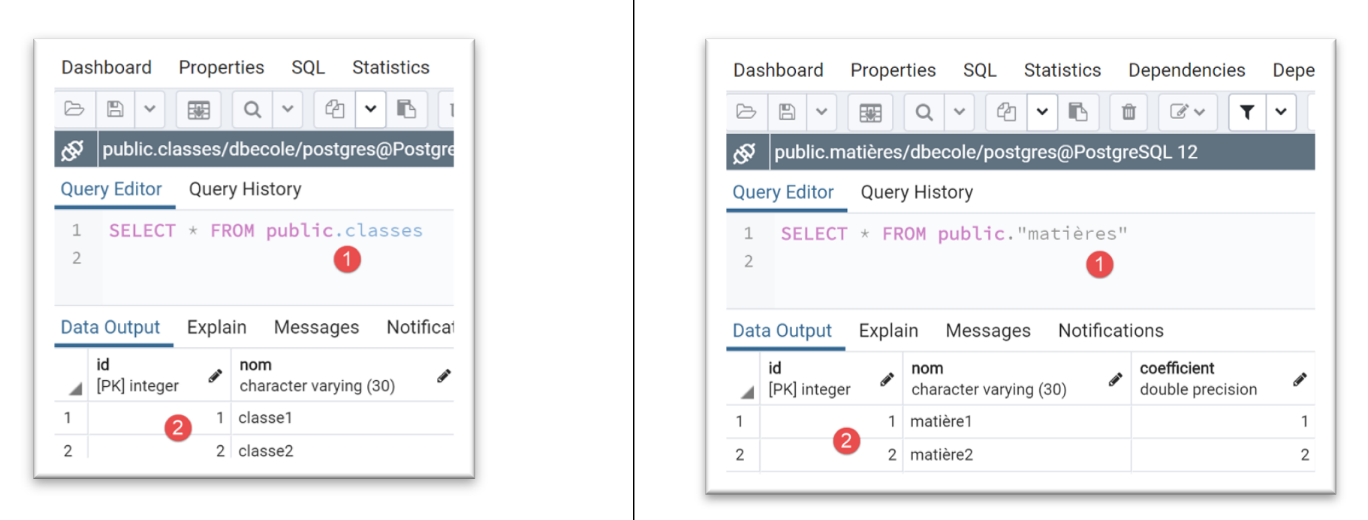
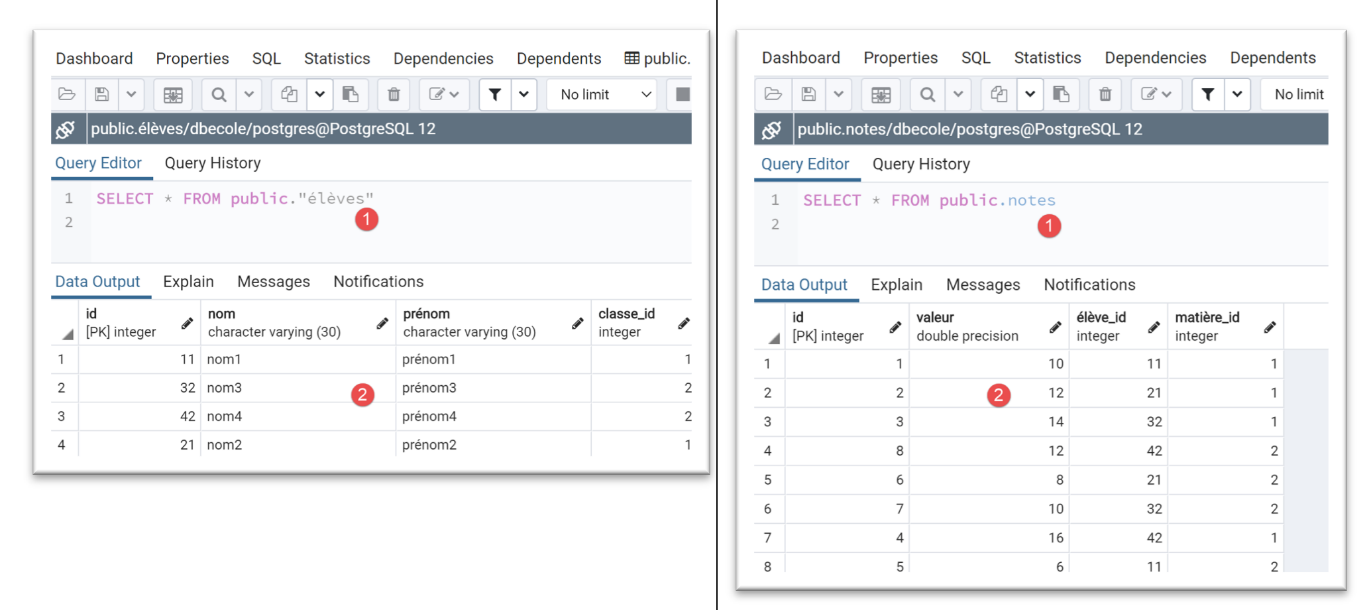
Note how easily we were able to switch DBMS.
19.6.7. The [dao] layer – 2
We return to the [DatabaseDao] class, which implements the [DAO] layer. So far, we have only shown the implementation of the [init_database] method. We will now show the implementation of the other methods:
1 2 3 4 5 6 7 8 9 10 11 12 13 14 15 16 17 18 19 20 21 22 23 24 25 26 27 28 29 30 31 32 33 34 35 36 37 38 39 40 41 42 43 44 45 46 47 48 49 50 51 52 53 54 55 56 57 58 59 60 61 62 63 64 65 66 67 68 69 70 71 72 73 74 75 76 77 78 79 80 81 82 83 84 85 86 87 88 89 90 91 92 93 94 95 96 97 98 99 100 101 102 103 104 105 106 107 108 109 | |
- lines 21–24: the [get_classes] method must return the list of classes at the school. On line 20, we use a query we’ve seen before;
- lines 26–39: three other similar methods to retrieve the lists of students, subjects, and grades;
- lines 51–59: the [get_student_by_id] method must return a student identified by their ID. It raises an exception if the student does not exist;
- line 54: we use a filtered query. We get an empty list or a list with one element;
- line 57: if the retrieved list is not empty, return the first element of the list;
- otherwise, line 59, an exception is thrown;
- lines 41–49: the method [get_notes_for_student_by_id] must return the grades of a student identified by their ID:
- line 45: we use the [get_student_by_id] method to retrieve the Student entity for the student;
- line 47: we use the [Student.grades] property created by the mapping between the [Grade] entity and the [grades] table (see the |SQLAlchemy configuration| section), which represents the student’s grades;
- line 49: we return a dictionary;
- Lines 61–109: a series of similar methods that allow us to:
- find a student by name, lines 61–69;
- find a class, lines 71–89;
- retrieve a subject, lines 91–109;
19.6.8. The [main_joined_queries] script
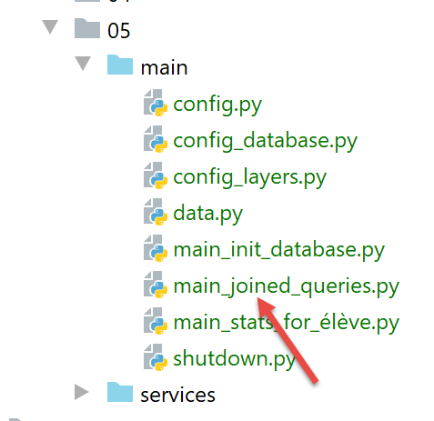
The [main_joined_queries] script is so named because it aims to highlight the queries implicitly made by [sqlalchemy] to retrieve information from multiple tables. These queries, hidden from the programmer, are made whenever a property of an entity has been associated with the [relationship] function in the entity’s mapping. For example:
    # mapping
    mapper(Note, tables['notes'], properties={
        'id': notes_table.c.id,
        'valeur': notes_table.c.valeur,
        'élève': relationship(Elève, backref="notes", lazy="select"),
        'matière': relationship(Matière, backref="notes", lazy="select")
    })
Above is the mapping between the [Note] entity and the [notes] table:
- Line 5: When the [student] property of a [Grade] entity is requested for the first time, it will be retrieved from the [students] table via an SQL query. Until this property is requested, it remains undefined (lazy load). Once it has been retrieved, its value remains in the ORM’s memory. When it is referenced a second time, the ORM will immediately return its value without issuing a new SQL query. All of this is transparent to the developer;
- the same applies to the inverse property [Student.grades] (backref), line 5;
- the same applies to the property [Grade.subject] and its inverse property [Subject.grades] (backref), line 6;
The [main_joined_queries] script is as follows:
The comments are sufficient to understand the code.
We create an execution configuration for MySQL:
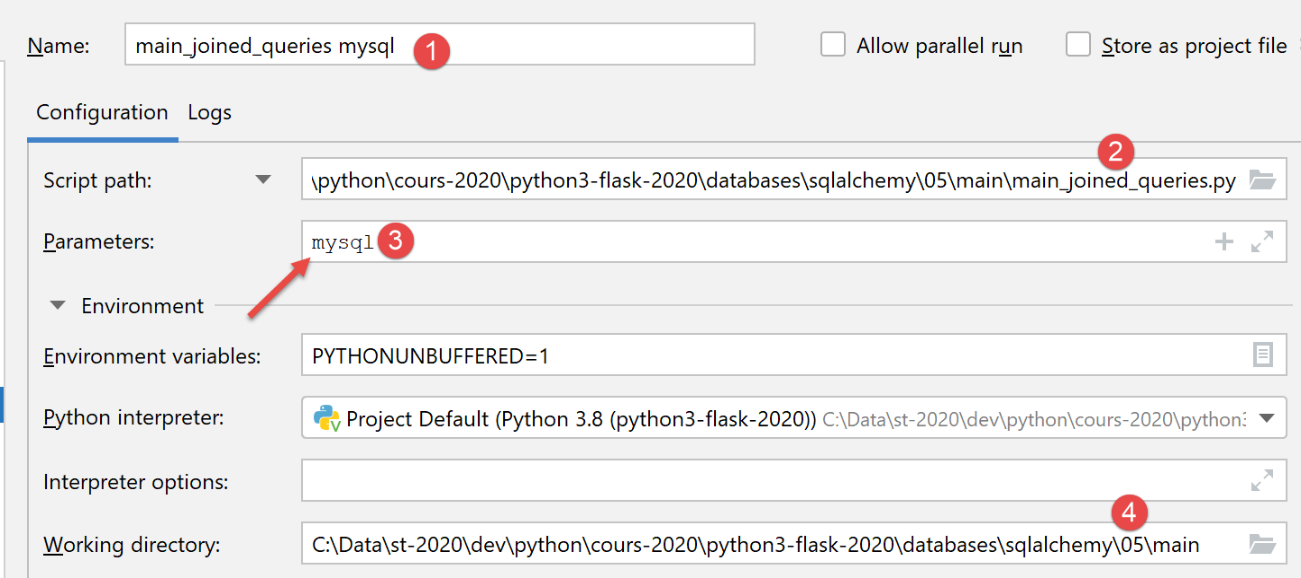
The execution results are as follows:
To understand these results, remember that certain properties were excluded from the entity dictionary (see |configuration|):
    # configuration des entités [BaseEntity]
    Elève.excluded_keys = ['_sa_instance_state', 'notes', 'classe']
    Classe.excluded_keys = ['_sa_instance_state', 'élèves']
    Matière.excluded_keys = ['_sa_instance_state', 'notes']
    Note.excluded_keys = ['_sa_instance_state', 'matière', 'élève']
So, when we write [print(f"student={student}")] on line 26 of the code, line 1 above tells us that the properties ['_sa_instance_state', 'grades', 'class'] will not be displayed. This is what we see on line 3 of the results. All other properties are displayed. Thus, still on line 3, we discover a new property [class_id] that did not initially exist in the [Student] entity. This property corresponds directly to the [class_id] column in the [students] table. Thus, [SQLAlchemy] has added the following properties to the [Student] entity: [class_id, _sa_instance_state, grades]. It is important to be aware of this, particularly because these properties must not already exist in the mapped entity.
The properties excluded from the entity dictionary are important. For example, if we do not exclude the [grades, student] properties from the [Student] entity, then the operation [print(f"student={student}")] will display them and will therefore, as just explained, trigger implicit SQL queries (lazy loading) to retrieve the values of these properties. If, as in this case, a list of students is being displayed, implicit SQL operations are performed for each student. This can be both unnecessary and certainly costly in terms of execution time.
To run the script with a PostgreSQL database, create the following execution configuration:
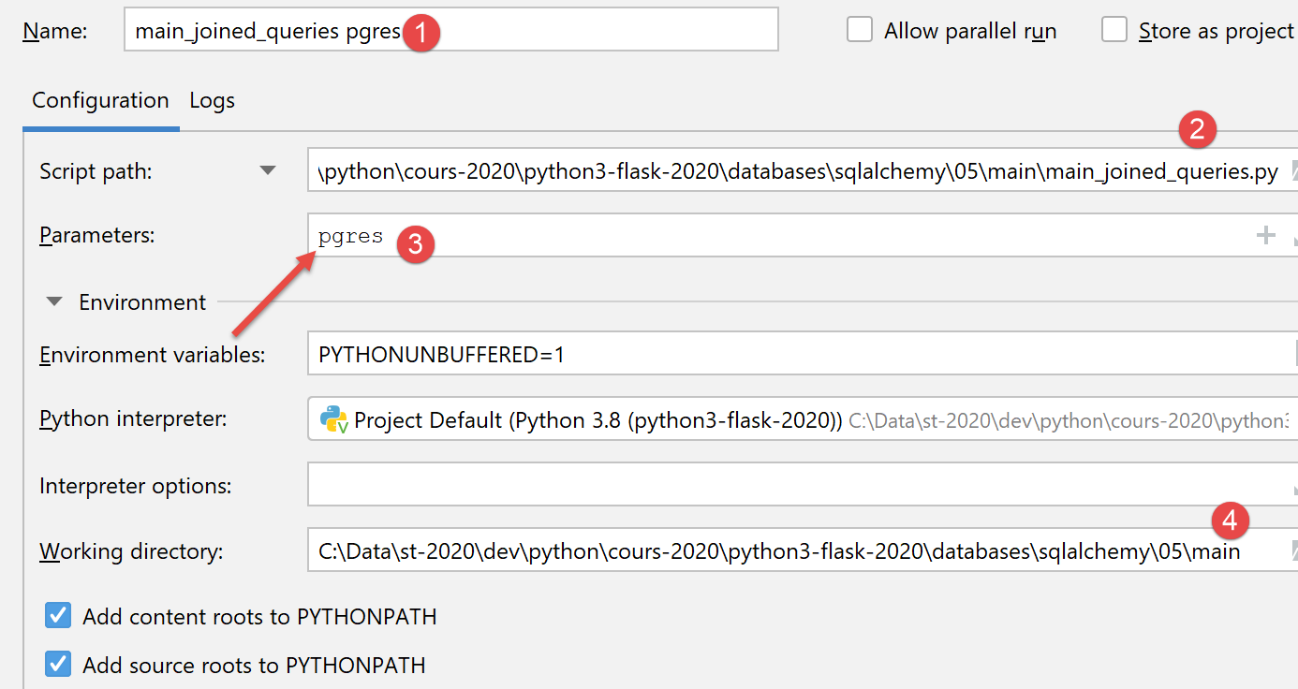
The execution yields the same results as with MySQL.
19.6.9. The [main_stats_for_student] script
The [main_stats_for_student] script is the one already used in the |troiscouches v01| application. It was previously named [main]. It is a console application that retrieves certain metrics regarding a student’s grades: [weighted average, min, max, list]. It fits into the following architecture:
In this layered architecture, only the [dao] layer has been changed between the |troiscouches v01| application and this one. Since the new [dao] layer adheres to the [InterfaceDao] interface of the old [dao] layer, the [ui, business] layers do not need to be changed. We can therefore continue to use those defined in the |troiscouches v01| application.
The [main_stats_for_élève] script implements the [main] layer of the diagram above as follows:
- line 20: retrieve a reference to the [ui] layer from the application configuration;
- line 24: we initiate the user dialog using the [ui] layer’s single method;
An execution configuration for PostgreSQL would look like this:
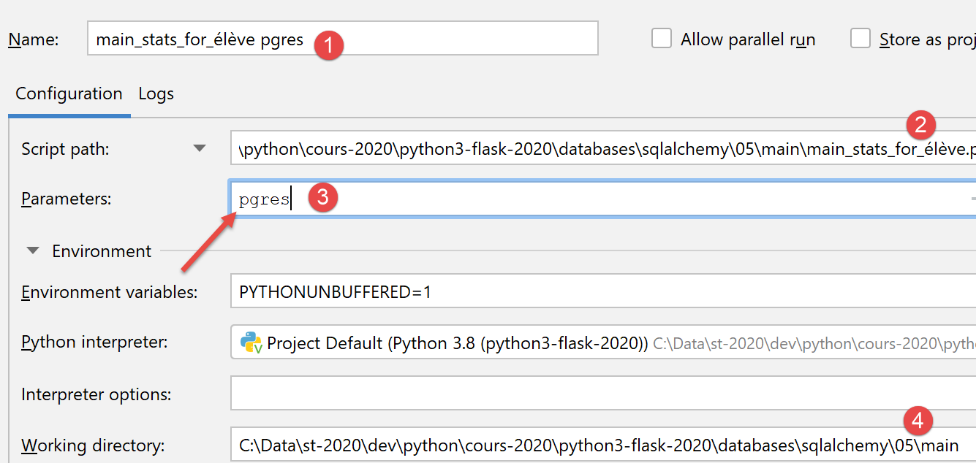
Here is an example of execution with this configuration:
C:\Data\st-2020\dev\python\cours-2020\python3-flask-2020\venv\Scripts\python.exe C:/Data/st-2020/dev/python/cours-2020/python3-flask-2020/databases/sqlalchemy/05/main/main_stats_for_élève.py pgres
Numéro de l'élève (>=1 et * pour arrêter) : 11
Elève={"prénom": "prénom1", "id": 11, "classe_id": 1, "nom": "nom1"}, notes=[10.0 6.0], max=10.0, min=6.0, moyenne pondérée=7.33
Numéro de l'élève (>=1 et * pour arrêter) : 1
L'erreur suivante s'est produite : MyException[11, L'élève d'identifiant 1 n'existe pas]
Numéro de l'élève (>=1 et * pour arrêter) : *

Process finished with exit code 0