16. Using SGBD MySQL
16.1. Installing SGBD and MySQL
To use the SGBD MySQL, we will install the Laragon software.
16.1.1. Installing Laragon
Laragon is a package that combines several software components:
- an Apache web server. We will use it to write web scripts in Python;
- SGBD MySQL;
- the PHP scripting language, which we will not use;
- a Redis server that implements a cache for web applications. We will not use it;
Laragon can be downloaded (February 2020) at the following address:
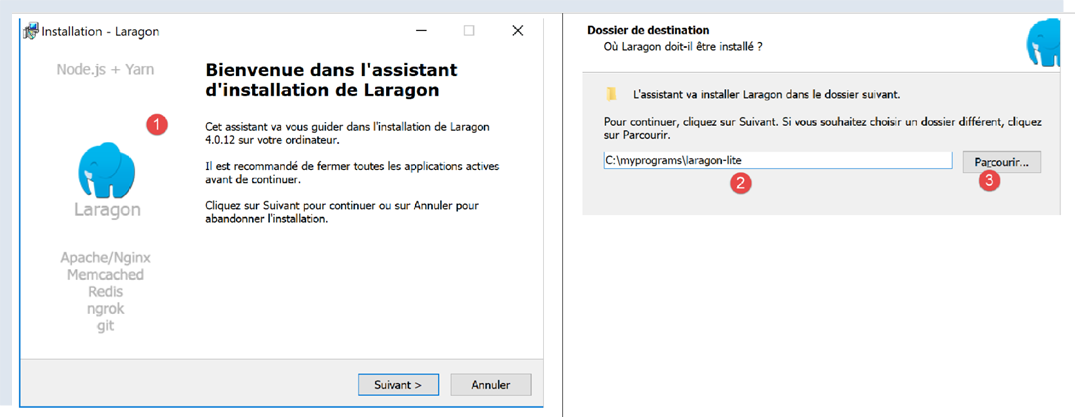
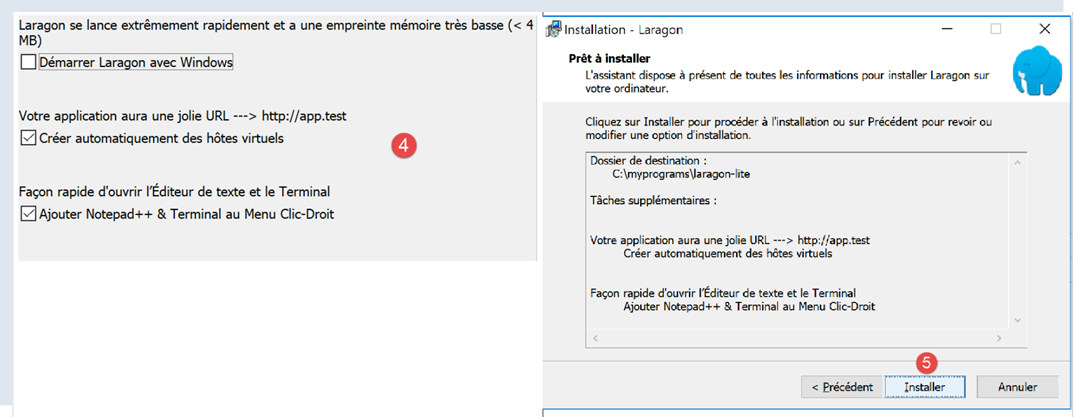
- the [1-5] installation creates the following directory structure:
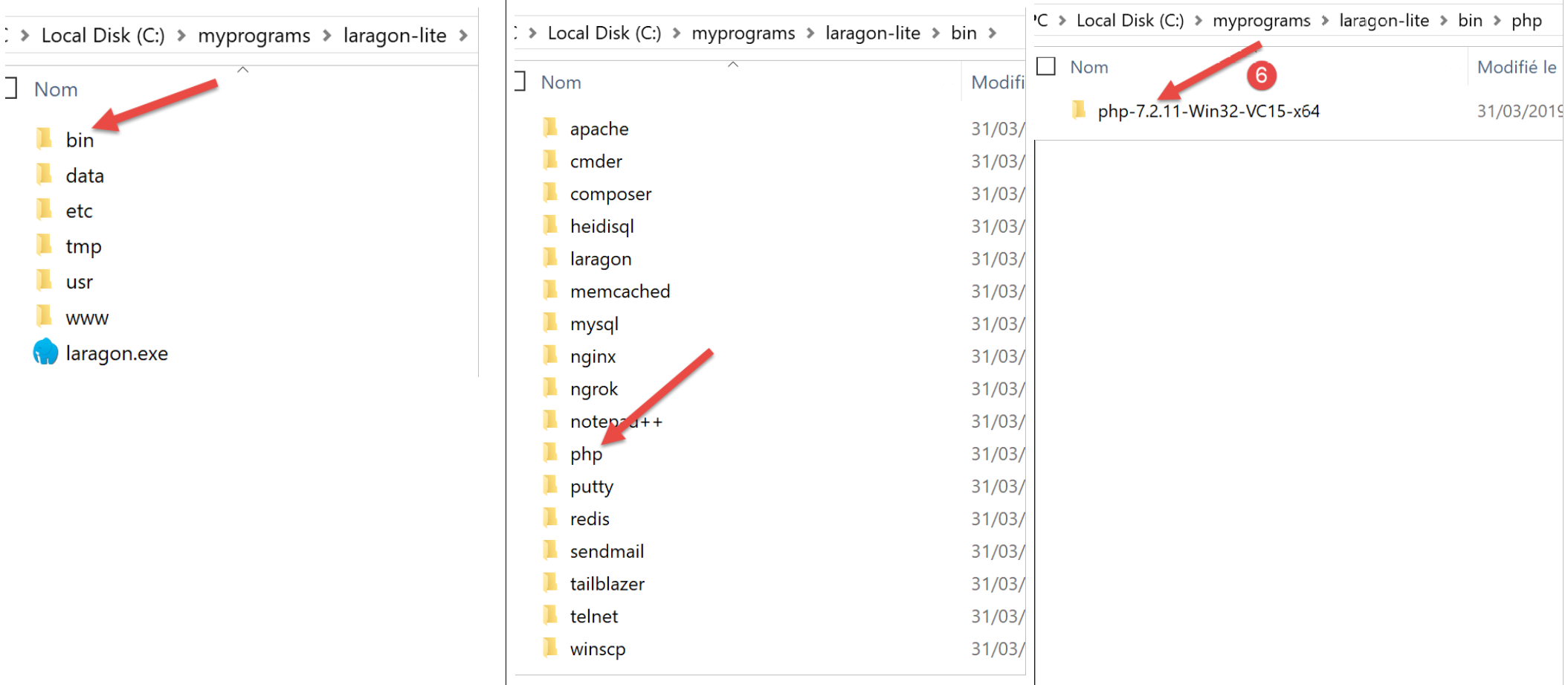
- in [6], the installation folder for PHP (not used in this document);
Launching [Laragon] displays the following window:
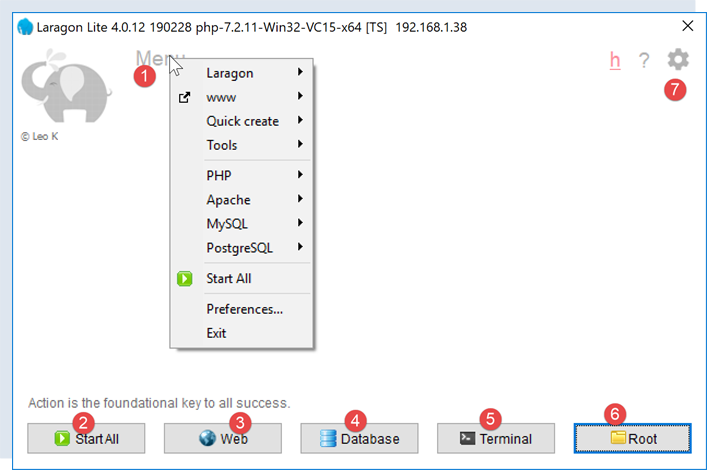
- [1]: the Laragon main menu;
- [2]: the [Start All] button starts the Apache web server and the SGBD MySQL;
- [3]: the [WEB] button displays the [http://localhost] web page;
- [4]: the [Database] button allows you to manage the SGBD MySQL using the [phpMyAdmin] tool. You must install this tool first;
- [5]: The [Terminal] button opens a command prompt;
- [6]: The [Root] button opens Windows Explorer to the [<laragon>/www] folder, which is the root of the [http://localhost] website. This is where you should place the static web applications managed by Laragon’s Apache server;
16.1.2. Creating a Database
We will now show you how to create a database and a user named MySQL using the Laragon tool.
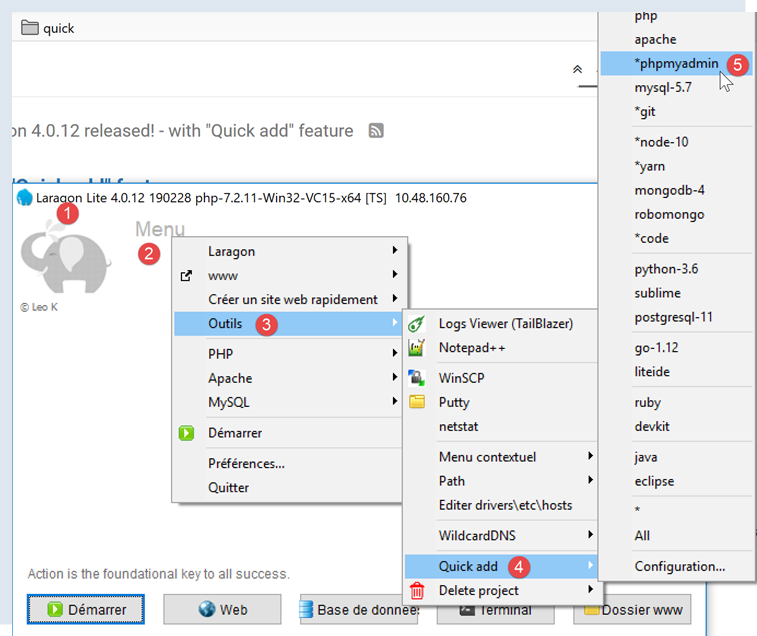
- Once launched, Laragon [1] can be managed from a menu [2];
- In [3-5], install the [phpMyAdmin] administration tool for MySQL if it has not already been installed;

- in [6], the Apache web server is started, along with SGBD and MySQL;
- in [7], the Apache server is launched;
- in [8], SGBD and MySQL are launched;
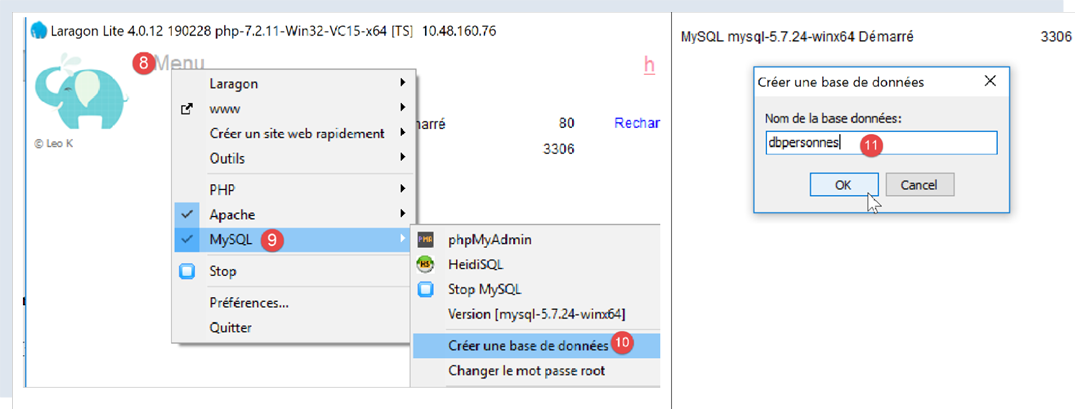
- in [8-10], we create a database named [dbpersonnes] [11]. We are going to build a database of people;
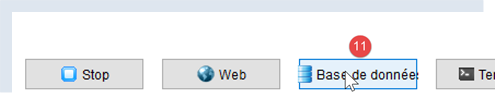
- in [11], we will manage the database we just created;
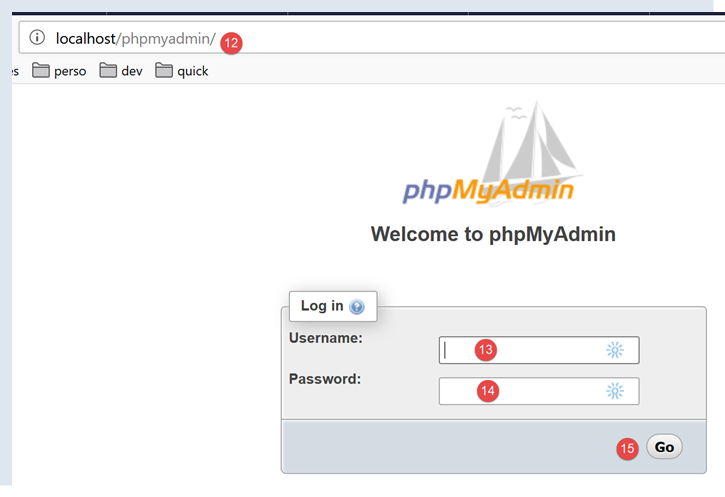
- The [Bases de données] process sends a web request to URL, [http://localhost/phpmyadmin], and [12]. The Laragon Apache web server responds. URL [http://localhost/phpmyadmin] is the URL of the [phpMyAdmin] utility that we previously installed [5]. This utility allows you to manage MySQL databases;
- by default, the database administrator’s login credentials are: root [13] with no password [14];
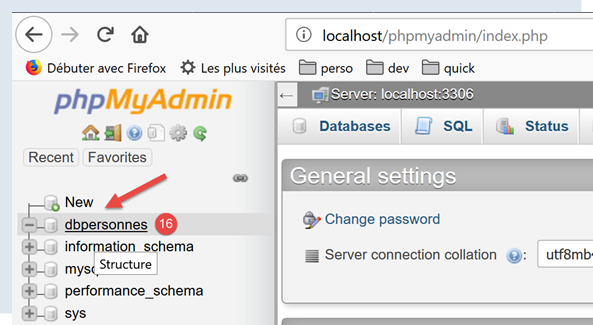
- in [16], the database we created earlier;
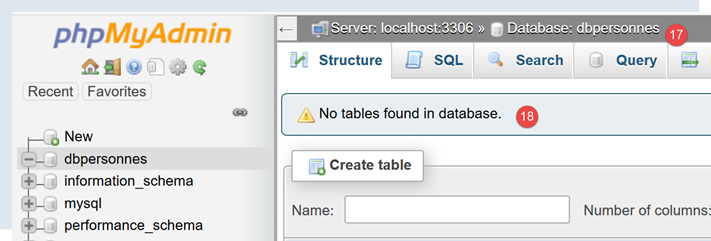
- For now, we have a database named [dbpersonnes] [17], which is empty [18];
We create a user [admpersonnes] with the password [nobody], who will have full permissions on the database [dbpersonnes]:
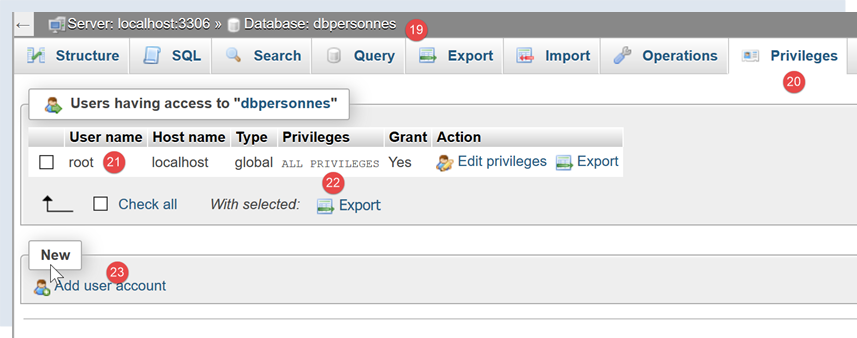
- In [19], we are positioned on the database [dbpersonnes];
- In [20], select the [Privileges] tab;
- In [21-22], we see that the user [root] has full access to the database [dbpersonnes];
- In [23], create a new user;
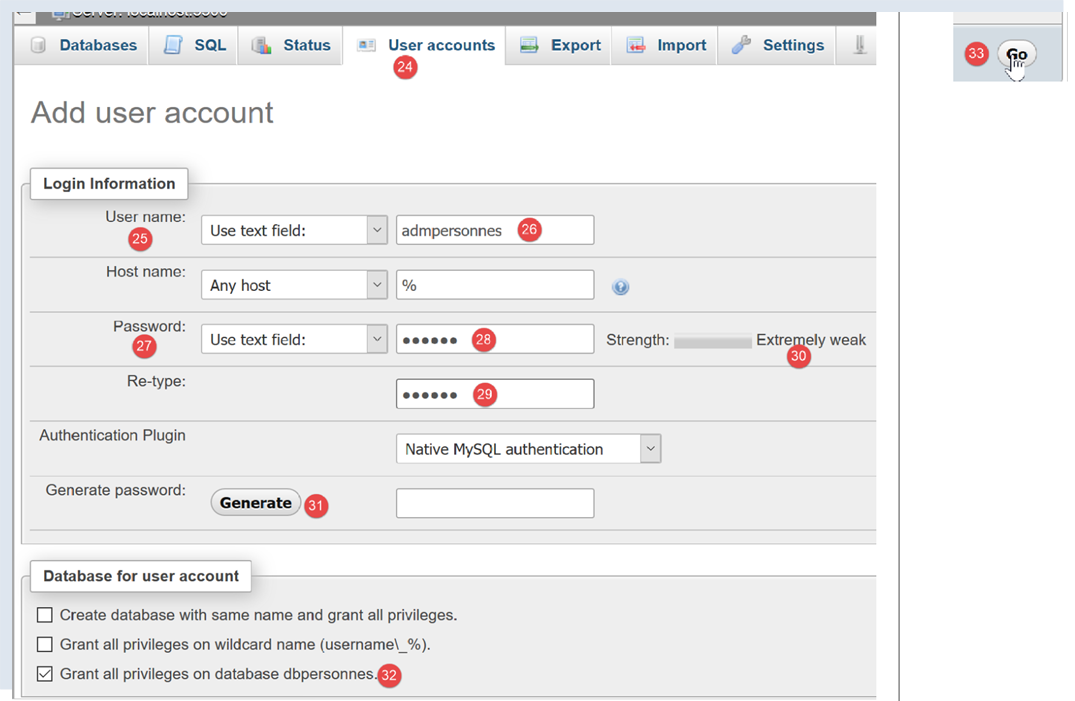
- in [25-26], the user will have the ID [admdbpersonnes];
- in [27-29], their password will be [nobody];
- In [30], phpMyAdmin indicates that the password is very weak (easy to crack). In production, it is preferable to generate a strong password using [31];
- in [32], we specify that the user [admdbpersonnes] must have full access to the database [dbpersonnes];
- In [33], the information provided is validated;

- In [35], phpMyAdmin indicates that the user has been created;
- In [36], the command SQL that was issued on the database;
- In [37], user [admpersonnes] has full access to the database [dbpersonnes];
Now we have:
- a database MySQL [dbpersonnes];
- a user [admpersonnes/nobody] who has full access to this database;
16.2. Installation of the [mysql-connector-python] package
We will write Python scripts to utilize the database created earlier with the following architecture:

A connector is used to isolate the Python code from the SGBD being used. There are connectors for different SGBD instances, and they all follow the same interface. Also, when we replace the SGBD MySQL with the SGBD PostgreSQL, the architecture becomes as follows:

Because all SGBD connectors adhere to the same interface, the Python script normally does not need to be modified. In practice, most SGBD devices have a proprietary SQL:
- they comply with the SQL standard (Structured Query Language);
- but extend it, as it is insufficient, with proprietary language extensions;
Therefore, it is common that when changing a SGBD, modifications to the SQL must be made in the scripts.
By default, Python does not offer the ability to manage a MySQL database. To do so, you must download a package. Several are available. Here, we will use the [mysql-connector-python] package, which is the official connector from Oracle, the company that owns MySQL.
The package will be installed in a Pycharm [Terminal] window:
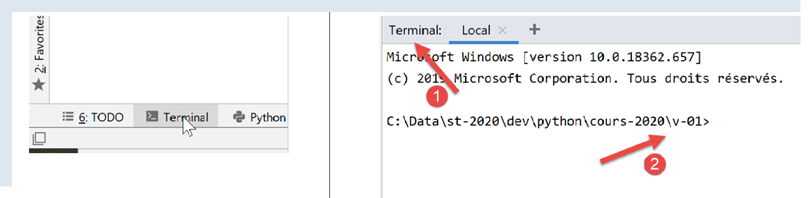
- the [2] folder is irrelevant for what follows;
In the terminal, type the command [pip search MySQL]:
- [pip] (Package Installer for Python) is the tool for installing Python packages. The [pip] tool connects to the repository containing the Python packages;
- [search MySQL]: retrieves the list of packages containing the term [MySQL] (case-insensitive) in their names;
The results of the command are as follows:
mysql (0.0.2)                                                   - Virtual package for MySQL-python
jx-mysql (3.49.20042)                                           - jx-mysql - JSON Expressions for MySQL
weibo-mysql (0.1)                                               - insert mysql
bits-mysql (1.0.3)                                              - BITS MySQL
MySQL-python (1.2.5)                                            - Python interface to MySQL
deployfish-mysql (0.2.13)                                       - Deployfish MySQL plugin
mtstat-mysql (0.7.3.3)                                          - MySQL Plugins for mtstat
bottle-mysql (0.3.1)                                            - MySQL integration for Bottle.
WintxDriver-MySQL (2.0.0-1)                                     - MySQL support for Wintx
py-mysql (1.0)                                                  - Operating Mysql for Python.
mysql-utilities (1.4.3)                                         - MySQL Utilities 1.4.3 (part of MySQL Workbench Distribution 6.0.0)
….                                        - Tool to move slices of data from one MySQL store to another
mysql-tracer (2.0.2)                                            - A MySQL client to run queries, write execution reports and export results
mysql-utils (0.0.2)                                             - A simple MySQL library including a set of utility APIs for Python database programming
mysql-connector-repackaged (0.3.1)                              - MySQL driver written in Python
dffml-source-mysql (0.0.5)                                      - DFFML Source for MySQL Protocol
mysql-connector-python (8.0.19)                                 - MySQL driver written in Python
  INSTALLED: 8.0.19 (latest)
prometheus-mysql-exporter (0.2.0)                               - MySQL query Prometheus exporter
backwork-backup-mysql (0.3.0)                                   - Backwork plug-in for MySQL backups.
django-mysql-manager (0.1.4)                                    - django-mysql-manager is a Django based management interface for MySQL users and databases.
….                                              - mysql operate

C:\Data\st-2020\dev\python\cours-2020\v-01>
All modules whose name or description contains the keyword MySQL have been listed. The one we will use (Feb 2020) is [mysql-connector-python], line 17. To install it, type the command [pip install -U mysql-connector-python] in the terminal:
C:\Data\st-2020\dev\python\cours-2020\v-01>pip install -U mysql-connector-python
Collecting mysql-connector-python
  Using cached mysql_connector_python-8.0.19-py2.py3-none-any.whl (355 kB)
Requirement already satisfied, skipping upgrade: protobuf==3.6.1 in c:\myprograms\python38\lib\site-packages (from mysql-connector-python) (3.6.1)
Requirement already satisfied, skipping upgrade: dnspython==1.16.0 in c:\myprograms\python38\lib\site-packages (from mysql-connector-python) (1.16.0)
Requirement already satisfied, skipping upgrade: six>=1.9 in c:\users\serge\appdata\roaming\python\python38\site-packages (from protobuf==3.6.1->mysql-connector-python) (1.14.0)
Requirement already satisfied, skipping upgrade: setuptools in c:\myprograms\python38\lib\site-packages (from protobuf==3.6.1->mysql-connector-python) (41.2.0)
Installing collected packages: mysql-connector-python
Successfully installed mysql-connector-python-8.0.19
- Line 1: option [install -U] (U=upgrade) requests the most recent version from the various packages associated with the [mysql-connector-python] package;
To find out which packages are installed in our machine’s Python environment, we type the command [pip list]:
C:\Data\st-2020\dev\python\cours-2020\v-01>pip list
Package                Version
---------------------- ----------
asgiref                3.2.3
astroid                2.3.3
atomicwrites           1.3.0
attrs                  19.3.0
certifi                2019.11.28
…
MarkupSafe             1.1.1
mccabe                 0.6.1
more-itertools         8.1.0
mysql-connector-python 8.0.19
mysqlclient            1.4.6
packaging              20.0
pip                    20.0.1
pipenv                 2018.11.26
…
- line 13: we do indeed have the [mysql-connector-python] package;
To learn how to use the [mysql-connector-python] package to manage a MySQL database, visit the package’s website |https://dev.mysql.com/doc/connector-python/en/|. The following section presents a series of examples.
16.3. [mysql_01] script: connecting to a MySQL database - 1
The script [mysql_01] presents the first step in using a database. It will allow us to verify that we are able to connect to the previously created database [dbpersonnes].
# import module mysql.connector
from mysql.connector import connect, DatabaseError, InterfaceError

# connection to a base MySql [dbpersonnes]
# user identity is (admpersonnes,nobody)
USER = "admpersonnes"
PWD = "nobody"
HOST = "localhost"
DATABASE = "dbpersonnes"

# here we go
connexion = None
try:
    print("Connexion au SGBD MySQL en cours...")
    # connection
    connexion = connect(host=HOST, user=USER, password=PWD, database=DATABASE)
    # follow-up
    print(
        f"Connexion MySQL réussie à la base database={DATABASE}, host={HOST} sous l'identité user={USER}, passwd={PWD}")
except (InterfaceError, DatabaseError) as erreur:
    # error is displayed
    print(f"L'erreur suivante s'est produite : {erreur}")
finally:
    # close the connection if it has been opened
    if connexion:
        connexion.close()
Notes
- line 2: import certain functions and classes from the [mysql.connector] module;
- lines 6-7: the credentials of the user who will log in;
- line 8: the machine hosting the database. The MySQL connector allows you to work with a remote database;
- line 9: the name of the database to which we want to connect;
- lines 11-26: the script will connect (line 16) the user [admpersonnes / nobody] to the database [dbpersonnes];
- lines 20–26: the connection may fail. Therefore, it is handled within a try/except/finally block;
- line 16: the connect method of the [mysq.connector] module accepts various named parameters:
- user: user who owns the [admpersonnes] connection;
- password: the user’s password;
- host: the machine for SGBD MySQL [localhost];
- database: the database to connect to. Optional.
- line 20: if an exception is thrown, it is of type [DatabaseError] or [InterfaceError];
- lines 23–26: in the [finally] clause, the connection is closed;
Results
16.4. script [mysql_02]: connecting to a database MySQL - 2
In this new script, the database connection is encapsulated in a function:
# import module mysql.connector
from mysql.connector import DatabaseError, InterfaceError, connect


# ---------------------------------------------------------------------------------
def connexion(host: str, database: str, login: str, pwd: str):
    # connects then disconnects (login,pwd) the [database] database from the [host] server
    # throws DatabaseError exception if problem occurs
    connexion = None
    try:
        # connection
        connexion = connect(host=host, user=login, password=pwd, database=database)
        print(
            f"Connexion réussie à la base database={database}, host={host} sous l'identité user={login}, passwd={pwd}")
    finally:
        # close the connection if it has been opened
        if connexion:
            connexion.close()
            print("Déconnexion réussie\n")


# ---------------------------------------------- main
# login credentials
USER = "admpersonnes"
PASSWD = "nobody"
HOST = "localhost"
DATABASE = "dbpersonnes"

# existing user login
try:
    connexion(host=HOST, login=USER, pwd=PASSWD, database=DATABASE)
except (InterfaceError, DatabaseError) as erreur:
    # error is displayed
    print(erreur)

# non-existent user login
try:
    connexion(host=HOST, login="xx", pwd="xx", database=DATABASE)
except (InterfaceError, DatabaseError) as erreur:
    # error is displayed
    print(erreur)
Notes:
- lines 6-19: a function [connexion] that attempts to connect and then disconnect a user from the database [dbpersonnes]. Displays the result;
- lines 29–41: main program – calls the connection method twice and displays any exceptions;
Results
16.5. script [mysql_03]: creating a table MySQL
Now that we know how to establish a connection with a SGBD MySQL, we can begin issuing SQL commands over this connection. To do this, we will connect to the created database [dbpersonnes] and use the connection to create a table in the database.
# imports
import sys

from mysql.connector import DatabaseError, InterfaceError, connect
from mysql.connector.connection import MySQLConnection


# ---------------------------------------------------------------------------------
def execute_sql(connexion: MySQLConnection, update: str):
    # executes an update request on the
    curseur = None
    try:
        # a cursor is requested
        curseur = connexion.cursor()
        # executes the update request on the
        curseur.execute(update)
    finally:
        # close cursor if obtained
        if curseur:
            curseur.close()


# ---------------------------------------------- main
# login credentials
# user identity
ID = "admpersonnes"
PWD = "nobody"
# the sgbd host machine
HOST = "localhost"
# base identity
DATABASE = "dbpersonnes"

# we go step by step
try:
    # connection
    connexion = connect(host=HOST, user=ID, password=PWD, database=DATABASE)
    # mode AUTOCOMMIT
    connexion.autocommit = True
except (InterfaceError, DatabaseError) as erreur:
    # error is displayed
    print(f"L'erreur suivante s'est produite : {erreur}")
    # we leave
    sys.exit()

# delete the people table if it exists
# if it doesn't exist, an error will occur - we ignore it
requête = "drop table personnes"
try:
    execute_sql(connexion, requête)
except (InterfaceError, DatabaseError):
    pass

# create people table
requête = "create table personnes (id int PRIMARY KEY, prenom varchar(30) NOT NULL, nom varchar(30) NOT NULL, age integer NOT NULL, " \
          "unique(nom,prenom)) "
try:
    # request execution
    execute_sql(connexion, requête)
    # display
    print(f"{requête} : requête réussie")
except (InterfaceError, DatabaseError) as erreur:
    # error is displayed
    print(f"L'erreur suivante s'est produite : {erreur}")
finally:
    # we disconnect
    connexion.close()
Notes:
- Line 9: The execute_sql function executes a SQL query on an open connection;
- Line 14: Operations SQL on the connection are performed through a special object called a cursor;
- Line 14: Obtaining a cursor;
- line 16: executing the query SQL;
- lines 17–20: whether an error occurs or not, the cursor is closed. This frees the resources associated with it. If an exception occurs, it is not handled here. It will be propagated to the calling code;
- lines 33–43: creation of a connection to the database;
- line 38: the mode AUTOCOMMIT=True for a connection means that each query execution runs within an automatic transaction. The default mode is AUTOCOMMIT=False, where the developer is responsible for managing transactions. A transaction is a mechanism that encompasses the execution of multiple queries 1 through n. Either all of them succeed, or none of them succeed. Thus, if queries 1 through i succeed but query i+1 fails, then queries 1 through i will be "rolled back" so that the database returns to the state it was in before query 1 was executed;
- here, there are two queries SQL (lines 49, 58). Each will be executed within a transaction. The fact that the second one fails has no impact on the first;
- lines 45–51: the command SQL [drop table personnes] is executed. It deletes the table named [personnes]. If the table does not exist, an error may be reported. This error is ignored (line 51);
- lines 53–55: the command to create the table [personnes]. A table can be viewed as a set of rows and columns. The creation command specifies the column names:
- [id]: an integer identifier. It will be unique for each person. This will be the primary key (PRIMARY KEY). This means that in the table, this column does not have the same value twice and can be used to identify a person;
- [nom]: a string of up to 30 characters;
- [prenom]: a string of up to 30 characters;
- [age]: an integer;
- The attribute [NOT NULL] for each of these columns means that in a row of the table, none of the three columns can be empty;
- the parameter [unique(nom,prenom)] is called a constraint. Here, the constraint on the rows is that the (last name, first name) tuple in the row must be unique in the table. This means that an individual whose last name and first name are known can be uniquely identified in the table;
- lines 56–60: execution of the SQL command;
- lines 61–63: handling any exceptions;
- lines 64–66: disconnect from the database;
Results
Verification with [phpMyAdmin]:
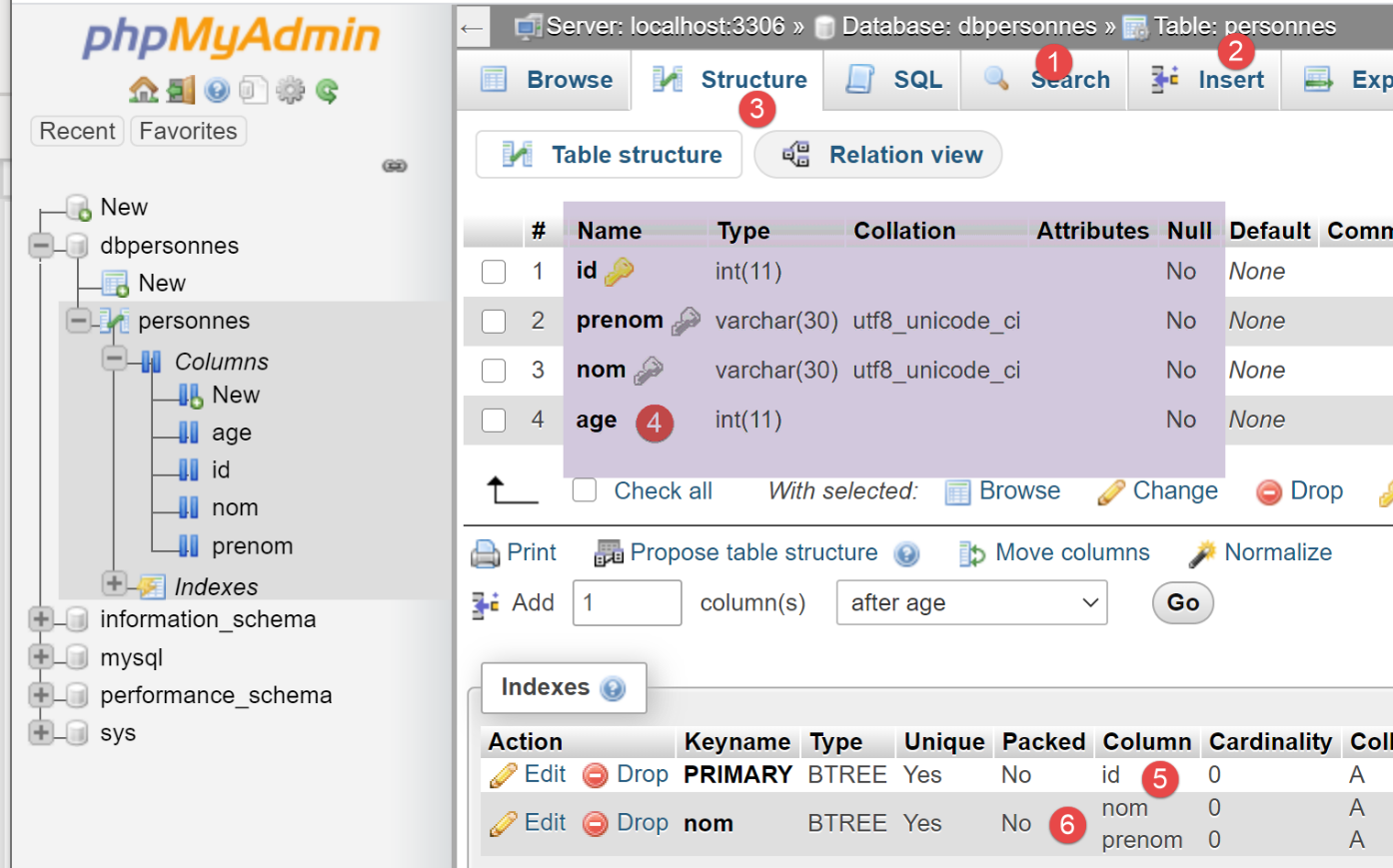
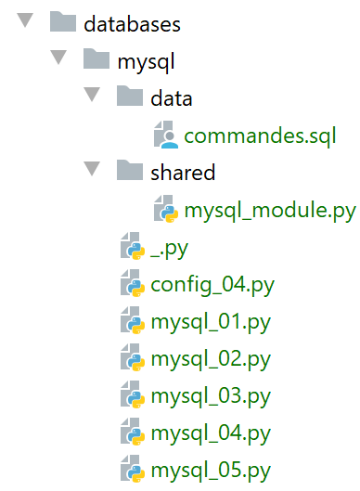
- the database [dbpersonnes] [1] has a table [personnes] [2] with the structure [3-4], the primary key [5] and the uniqueness constraint [6];
16.6. script [mysql_04]: executing a command file SQL
After previously creating the table [personnes], we now populate it and then process it using commands SQL.
We want to execute the SQL commands from a text file:
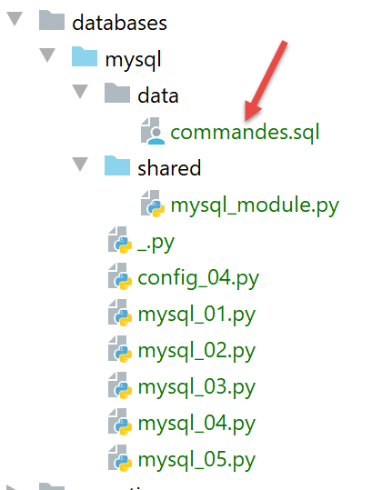
The contents of the [commandes.sql] file are as follows:
# delete [personnes] table
drop table personnes
# create people table
create table personnes (prenom varchar(30) not null, nom varchar(30) not null, age integer not null, primary key (nom,prenom))
# integration of two people
insert into personnes(prenom, nom, age) values('Paul','Langevin',48)
insert into personnes(prenom, nom, age) values ('Sylvie','Lefur',70)
# table display
select prenom, nom, age from personnes
# deliberate error
xx
# integration of three people
insert into personnes(prenom, nom, age) values ('Pierre','Nicazou',35)
insert into personnes(prenom, nom, age) values ('Geraldine','Colou',26)
insert into personnes(prenom, nom, age) values ('Paulette','Girond',56)
# table display
select prenom, nom, age from personnes
# list of persons in alphabetical order of surnames and, for equal surnames, in alphabetical order of first names
select nom,prenom from personnes order by nom asc, prenom desc
# list of people with an age in the range [20,40] in descending order of age
# then for equal ages in alphabetical order of surnames and for equal surnames in alphabetical order of first names
select nom,prenom,age from personnes where age between 20 and 40 order by age desc, nom asc, prenom asc
# insertion of mrs Bruneau
insert into personnes(prenom, nom, age) values('Josette','Bruneau',46)
# update your age
update personnes set age=47 where nom='Bruneau'
# list of people named Bruneau
select nom,prenom,age from personnes where nom='Bruneau'
# deletion of Mme Bruneau
delete from personnes where nom='Bruneau'
# list of people named Bruneau
select nom,prenom,age from personnes where nom='Bruneau'
First, we define functions that we place in a module so that we can reuse them:
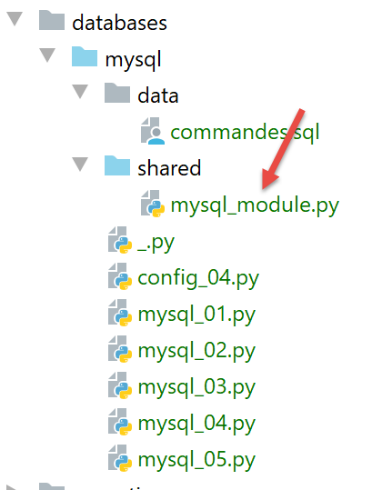
The script [mysql_module] is as follows:
# imports
from mysql.connector import DatabaseError, InterfaceError
from mysql.connector.connection import MySQLConnection
from mysql.connector.cursor import MySQLCursor


# ---------------------------------------------------------------------------------
def afficher_infos(curseur: MySQLCursor):
    # displays the result of a command sql
    …


# ---------------------------------------------------------------------------------
def execute_list_of_commands(connexion: MySQLConnection, sql_commands: list,
                             suivi: bool = False, arrêt: bool = True, with_transaction: bool = True):
    # uses the [connexion] open connection
    # executes the SQL commands contained in the [sql_commands] list on this connection
    # this is a file of SQL commands to be executed one per line
    # if followed=True then each execution of a SQL order is displayed, indicating success or failure
    # if stop=True, the function stops on the 1st error encountered, otherwise it executes all sql commands
    # si with_transaction=True alors toute erreur annule l'ensemble des ordres SQL exécutés auparavant
    # si with_transaction=False alors une erreur n'a aucun impact sur les ordres SQL exécutés auparavant
    # the function returns a [erreur1, erreur2, ...] list

    ….


# ---------------------------------------------------------------------------------
def execute_file_of_commands(connexion: MySQLConnection, sql_filename: str,
                             suivi: bool = False, arrêt: bool = True, with_transaction: bool = True):
    # uses the [connexion] open connection
    # executes the SQL commands contained in the sql_filename text file on this connection
    # this is a file of SQL commands to be executed one per line
    # if followed=True then each execution of a SQL order is displayed, indicating success or failure
    # if stop=True, the function stops on the 1st error encountered, otherwise it executes all sql commands
    # si with_transaction=True alors toute erreur annule l'ensemble des ordres SQL exécutés auparavant
    # si with_transaction=False alors une erreur n'a aucun impact sur les ordres SQL exécutés auparavant
    # the function returns a [erreur1, erreur2, ...] list

    # use of the SQL file
    try:
        # open file for reading
        file = open(sql_filename, "r")
        # operation
        return execute_list_of_commands(connexion, file.readlines(), suivi, arrêt, with_transaction)
    except BaseException as erreur:
        # an error table is returned
        return [f"Le fichier {sql_filename} n'a pu être être exploité : {erreur}"]
Notes:
- line 29: the [execute_file_of_commands] function executes the SQL commands contained in the text file named [sql_filename]:
- see the comments on lines 31–38 for the meaning of the parameters;
- lines 40–48: the text file [sql_filename] is processed;
- line 43: opens the file;
- line 34: execution of the function [execute_list_of_commands], which executes the commands SQL passed to it in a list. This list consists here of the list of all lines in the text file [file.readlines()] (line 45);
The function [execute_list_of_commands] is as follows:
# ---------------------------------------------------------------------------------
def execute_list_of_commands(connexion: MySQLConnection, sql_commands: list,
                             suivi: bool = False, arrêt: bool = True, with_transaction: bool = True):
    # uses the [connexion] open connection
    # executes the SQL commands contained in the [sql_commands] list on this connection
    # this is a file of SQL commands to be executed one per line
    # if followed=True then each execution of a SQL order is displayed, indicating success or failure
    # if stop=True, the function stops on the 1st error encountered, otherwise it executes all sql commands
    # si with_transaction=True alors toute erreur annule l'ensemble des ordres SQL exécutés auparavant
    # si with_transaction=False alors une erreur n'a aucun impact sur les ordres SQL exécutés auparavant
    # the function returns a [erreur1, erreur2, ...] list

    # initializations
    curseur = None
    connexion.autocommit = not with_transaction
    erreurs = []
    try:
        # a cursor is requested
        curseur = connexion.cursor()
        # execution of sql_commands SQL contained in sql_commands
        # they are executed one by one
        for command in sql_commands:
            # eliminates blanks at the beginning and end of the current command
            command = command.strip()
            # is there an empty command or a comment? If so, move on to the next command
            if command == '' or command[0] == "#":
                continue
            # execute current command
            error = None
            try:
                curseur.execute(command)
            except (InterfaceError, DatabaseError) as erreur:
                error = erreur
            # was there a mistake?
            if error:
                # one more mistake
                msg = f"{command} : Erreur ({error})"
                erreurs.append(msg)
                # screen tracking or not?
                if suivi:
                    print(msg)
                # shall we stop?
                if with_transaction or arrêt:
                    # return the error list
                    return erreurs
            else:
                # no error
                if suivi:
                    print(f"[{command}] : Exécution réussie")
                # displays the result of command
                afficher_infos(curseur)
        # return the error table
        return erreurs
    finally:
        # closing the cursor
        if curseur:
            curseur.close()
        # validate / cancel the transaction if it exists
        if with_transaction:
            if erreurs:
                # cancellation
                connexion.rollback()
            else:
                # validation
                connexion.commit()
Notes
- Line 2: The [execute_list_of_commands] function executes the SQL commands contained in the [sql_commands] list:
- See the comments on lines 4–11 for the meaning of the parameters;
- line 2: the connection received is an open connection to a database;
- line 15: if you want all commands in the list [sql_commands] to be executed within a transaction, you must work in AUTOCOMMIT=False mode. Otherwise, you will work in AUTOCOMMIT=True mode, and then each command in the [sqlCommands] list will execute within an automatic transaction, and there will be no global transaction;
- line 19: a cursor is requested to execute the various SQL commands;
- lines 22–51: the commands are executed one by one;
- lines 26–27: blank lines and comments are accepted in the list of SQL commands. In this case, the command is simply ignored;
- lines 30–33: execute the current query;
- lines 35-45: handle the case of a possible execution error for the current query;
- lines 37-38: the error is added to the error table;
- lines 40-41: if logging has been requested, the error message is displayed;
- lines 43-45: if the calling code requested a stop after the first error or requested the use of a transaction, then the program must stop. The error array is returned;
- lines 46-51: case where there was no execution error for the current query;
- lines 48-49: if tracking was requested, the executed query is displayed with the label 'successful';
- lines 50-51: the result of the executed query is displayed. We will return to the function [afficher_infos] a little later;
- lines 54-65: the [finally] clause is executed in all cases, whether an exception occurred or not;
- lines 56-57: close the cursor. This frees the resources allocated to it;
- lines 59–65: Handle the case where the calling code requested that the SQL commands be executed within a transaction;
- line 60: we check if the list [erreurs] is empty, which means no exception occurred. In this case, the transaction is committed (line 65); otherwise, it is rolled back (line 62);
The function [afficher_infos] displays the result of a query:
# ---------------------------------------------------------------------------------
def afficher_infos(curseur: MySQLCursor):
    print(type(curseur))
    # displays the result of a command sql
    # was it a select?
    if curseur.description:
        # the cursor has a description - so it has executed a select
        # description[i] is the description of column no. i of the select
        # descriptionQZXW2HTMLBW2ldZQXQZXW2HTMLBWzBdZQX is the name of column no. i in the select
        # displays field names
        titre = ""
        for i in range(len(curseur.description)):
            titre += curseur.description[i][0] + ", "
        # displays the list of fields without the trailing comma
        print(titre[0:len(titre) - 1])
        # dividing line
        print("*" * (len(titre) - 1))
        # current select line
        ligne = curseur.fetchone()
        while ligne:
            # we display it
            print(ligne)
            # next line of the select
            ligne = curseur.fetchone()
        # dividing line
        print("*" * (len(titre) - 1))
    else:
        # the cursor has no [description] field - it has therefore executed a SQL command
        # updating (insert, delete, update)
        print(f"nombre de lignes modifiées : {curseur.rowcount}")
Notes
- Line 1: The function parameter is the cursor that has just executed a SQL command. Depending on whether this command is a SELECT or an update command INSERT, UPDATE, DELETE, the cursor’s contents are not the same;
- Line 6: If the cursor has the field [description], then it has executed a SELECT, and [description] describes the fields requested in the SELECT:
- description[i] describes field #i requested by SELECT. It is a list;
- description[i][0] is the name of field no. i;
- lines 11–17: the names of the fields requested by SELECT are displayed;
- lines 18-24: the result of SELECT is processed;
- lines 20, 24: the result of a SELECT is processed sequentially. This result is a set of rows. The current row is obtained by [curseur.fetchone()] (line 19). A tuple is then obtained;
- lines 27–30: if the cursor does not have the field [description], then it has executed an update command INSERT, UPDATE, DELETE. We can then determine how many rows in the table were modified by the execution of this command;
- line 30: [curseur.rowcount] is that number;
The main script [mysql-04] uses the module [mysql_module] that we just described:
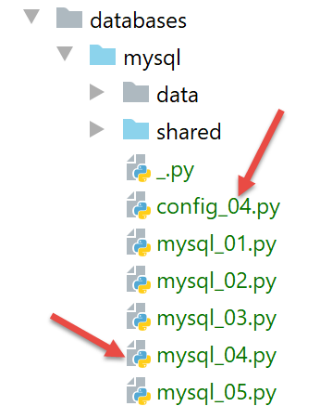
The file [config_04] configures the execution context of the script [mysql_04]:
def configure():
    import os

    # absolute path of the configuration file folder
    script_dir = os.path.dirname(os.path.abspath(__file__))
    # syspath folder configuration
    absolute_dependencies = [
        # local files
        f"{script_dir}/shared",
    ]

    # syspath mounting
    from myutils import set_syspath
    set_syspath(absolute_dependencies)

    # we return the config
    return {
        # order file SQL
        "commands_filename": f"{script_dir}/data/commandes.sql",
        # database connection identifiers
        "host": "localhost",
        "database": "dbpersonnes",
        "user": "admpersonnes",
        "password": "nobody"
    }
The [mysql_04] script is as follows:
# retrieve application configuration
import config_04

config = config_04.configure()

# syspath is configured - imports can be made
import sys
from mysql_module import execute_file_of_commands
from mysql.connector import connect, DatabaseError, InterfaceError

# ---------------------------------------------- main
# check call syntax
# argv[0] true / false
args = sys.argv
erreur = len(args) != 2
if not erreur:
    with_transaction = args[1].lower()
    erreur = with_transaction != "true" and with_transaction != "false"
# mistake?
if erreur:
    print(f"syntaxe : {args[0]} true / false")
    sys.exit()

# text calculation
with_transaction = with_transaction == "true"
if with_transaction:
    texte = "avec transaction"
else:
    texte = "sans transaction"

# screen logs
print("--------------------------------------------------------------------")
print(f"Exécution du fichier SQL {config['commands_filename']} {texte}")
print("--------------------------------------------------------------------")

# execution of SQL orders in the file
connexion = None
try:
    # connection to comics
    connexion = connect(host=config['host'], user=config['user'], password=config['password'],
                        database=config['database'])
    # execution of SQL command file
    erreurs = execute_file_of_commands(connexion, config["commands_filename"], suivi=True, arrêt=False,
                                       with_transaction=with_transaction)
except (InterfaceError, DatabaseError) as erreur:
    # error display
    print(f"L'erreur fatale suivante s'est produite : {erreur}")
    # we stop
    sys.exit()
finally:
    # close the connection if it has been opened
    if connexion:
        connexion.close()

# display number of errors
print("--------------------------------------------------------------------")
print(f"Exécution terminée")
print("--------------------------------------------------------------------")
print(f"Il y a eu {len(erreurs)} erreur(s)")
# error display
for erreur in erreurs:
    print(erreur)
Notes
- lines 1-4: script configuration;
- line 8: import of the [mysql_module] module described above:
- Lines 12–22: The [mysql-04] script expects a parameter that must have one of the values [true / false]. This parameter specifies whether the SQL command file should be executed within a transaction (true) or not (false);
- line 14: the parameters passed by the user to the script are found in the list [sys.argv];
- line 15: two parameters are required, for example [mysql-04 true]. The script name counts as a parameter;
- lines 17–18: if there are indeed two parameters, the second must be a string with the value 'true' or 'false';
- lines 24–29: calculation of text displayed on line 33;
- lines 39–44: execute the commands in the [./data/commandes.sql] file;
- lines 45-49: if an error occurs during connection (line 40) or is not handled by the [execute_file_of_commands] script, the error is displayed and the process is terminated;
- lines 55-62: if execution is successful, display the number of errors encountered while executing the commands in SQL;
Execution #1
First, we perform an execution without a transaction. To do this, we will create an execution configuration as described in the section |Configuring an Execution Context|:
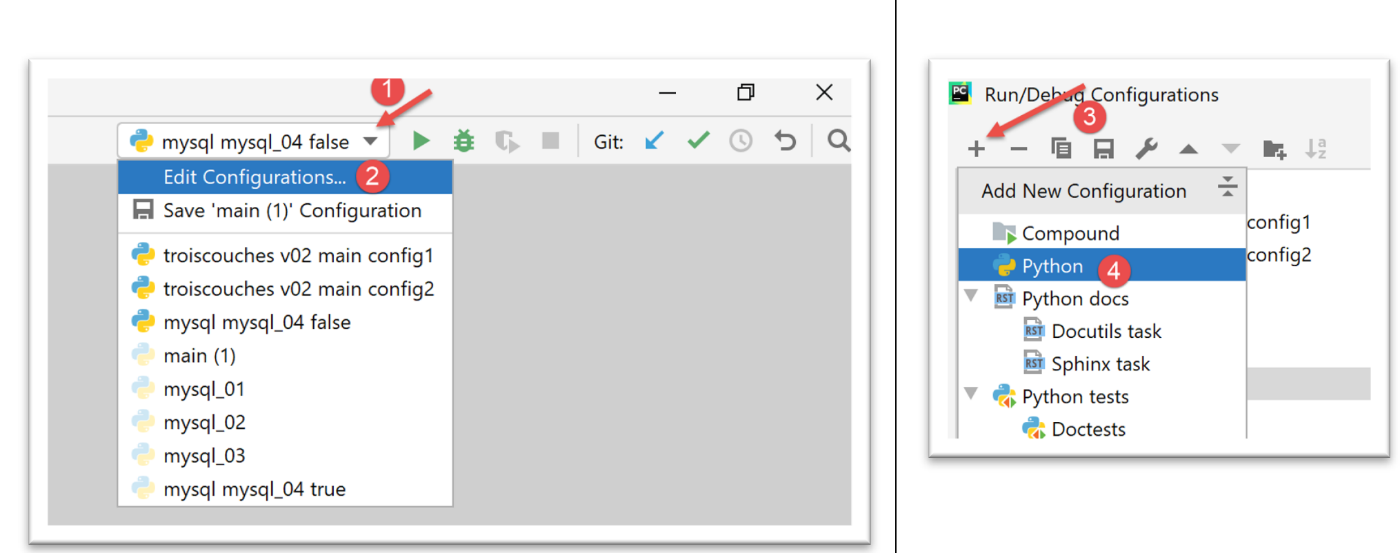
- In [1-4], we create a Python execution configuration;
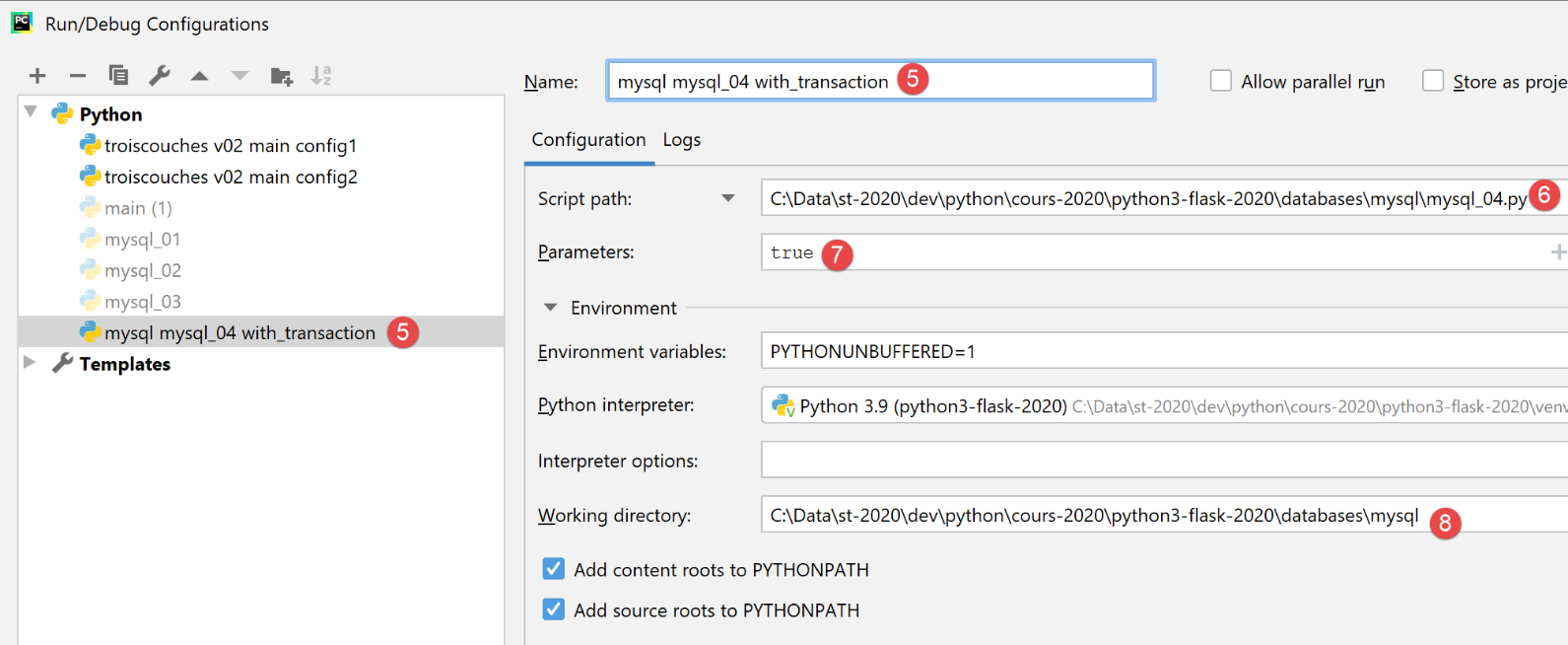
- [5]: name of the execution configuration;
- [6]: path to the script to be executed;
- [7]: script parameters;
- [8]: execution directory;
This configuration therefore corresponds to running the file SQL with a transaction. Use the [Apply] button to validate the configuration.
We create the [mysql mysql-04 without_transaction] execution configuration in the same way:
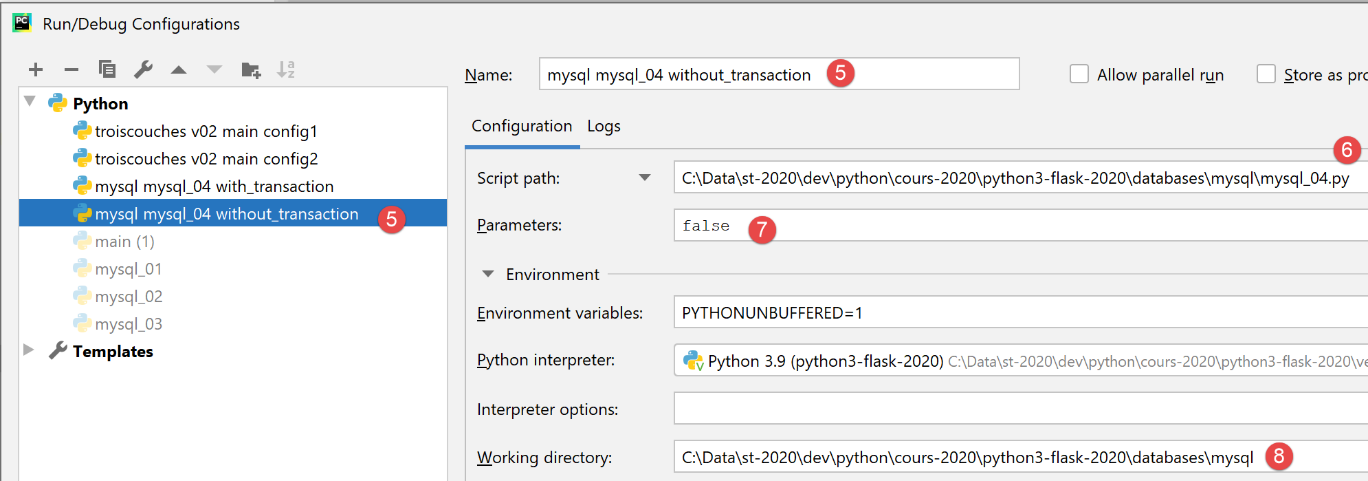
This configuration therefore corresponds to an execution of the SQL file without a transaction. Use the [Apply] button to validate the configuration.
First, we run version without a transaction:

The results are as follows:
C:\Data\st-2020\dev\python\cours-2020\python3-flask-2020\venv\Scripts\python.exe C:/Data/st-2020/dev/python/cours-2020/python3-flask-2020/databases/mysql/mysql_04.py false
--------------------------------------------------------------------
Exécution du fichier SQL C:\Data\st-2020\dev\python\cours-2020\python3-flask-2020\databases\mysql/data/commandes.sql sans transaction
--------------------------------------------------------------------
[drop table personnes] : Exécution réussie
nombre de lignes modifiées : 0
[create table personnes (id int primary key, prenom varchar(30) not null, nom varchar(30) not null, age integer not null, unique (nom,prenom))] : Exécution réussie
nombre de lignes modifiées : 0
[insert into personnes(id, prenom, nom, age) values(1, 'Paul','Langevin',48)] : Exécution réussie
nombre de lignes modifiées : 1
[insert into personnes(id, prenom, nom, age) values (2, 'Sylvie','Lefur',70)] : Exécution réussie
nombre de lignes modifiées : 1
[select prenom, nom, age from personnes] : Exécution réussie
prenom, nom, age,
*****************
('Paul', 'Langevin', 48)
('Sylvie', 'Lefur', 70)
*****************
xx : Erreur (1064 (42000): You have an error in your SQL syntax; check the manual that corresponds to your MySQL server version for the right syntax to use near 'xx' at line 1)
[insert into personnes(id, prenom, nom, age) values (3, 'Pierre','Nicazou',35)] : Exécution réussie
nombre de lignes modifiées : 1
[insert into personnes(id, prenom, nom, age) values (4, 'Geraldine','Colou',26)] : Exécution réussie
nombre de lignes modifiées : 1
[insert into personnes(id, prenom, nom, age) values (5, 'Paulette','Girond',56)] : Exécution réussie
nombre de lignes modifiées : 1
[select prenom, nom, age from personnes] : Exécution réussie
prenom, nom, age,
*****************
('Paul', 'Langevin', 48)
('Sylvie', 'Lefur', 70)
('Pierre', 'Nicazou', 35)
('Geraldine', 'Colou', 26)
('Paulette', 'Girond', 56)
*****************
[select nom,prenom from personnes order by nom asc, prenom desc] : Exécution réussie
nom, prenom,
************
('Colou', 'Geraldine')
('Girond', 'Paulette')
('Langevin', 'Paul')
('Lefur', 'Sylvie')
('Nicazou', 'Pierre')
************
[select nom,prenom,age from personnes where age between 20 and 40 order by age desc, nom asc, prenom asc] : Exécution réussie
nom, prenom, age,
*****************
('Nicazou', 'Pierre', 35)
('Colou', 'Geraldine', 26)
*****************
[insert into personnes(id, prenom, nom, age) values(6, 'Josette','Bruneau',46)] : Exécution réussie
nombre de lignes modifiées : 1
[update personnes set age=47 where nom='Bruneau'] : Exécution réussie
nombre de lignes modifiées : 1
[select nom,prenom,age from personnes where nom='Bruneau'] : Exécution réussie
nom, prenom, age,
*****************
('Bruneau', 'Josette', 47)
*****************
[delete from personnes where nom='Bruneau'] : Exécution réussie
nombre de lignes modifiées : 1
[select nom,prenom,age from personnes where nom='Bruneau'] : Exécution réussie
nom, prenom, age,
*****************
*****************
--------------------------------------------------------------------
Exécution terminée
--------------------------------------------------------------------
Il y a eu 1 erreur(s)
xx : Erreur (1064 (42000): You have an error in your SQL syntax; check the manual that corresponds to your MySQL server version for the right syntax to use near 'xx' at line 1)

Process finished with exit code 0
Notes:
- Line 19: We can see that after the error, the execution of the SQL commands continued, because the execution was performed without a transaction and with the [arrêt=False] parameter. All SQL commands were therefore executed. We should therefore have a [personnes] table reflecting this execution;
Verification with phpMyAdmin:
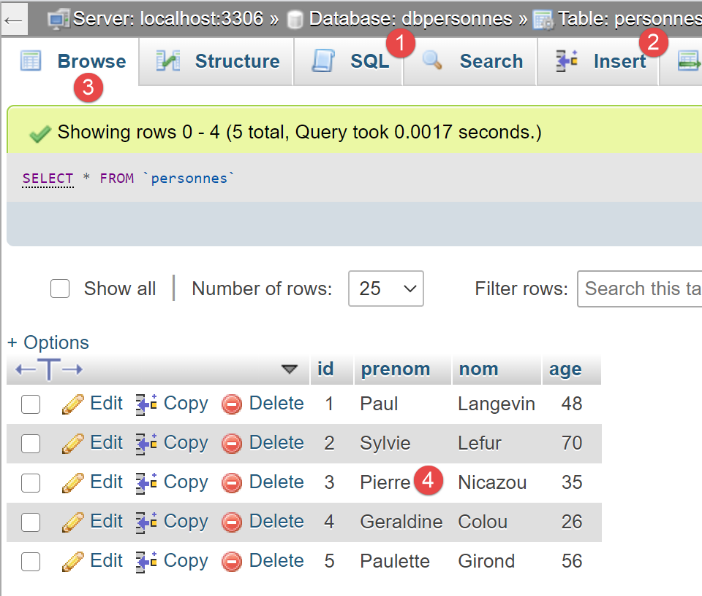
Execution #2
We are now running configuration [mysql mysql-04 with_transaction]. The results are as follows:
C:\Data\st-2020\dev\python\cours-2020\python3-flask-2020\venv\Scripts\python.exe C:/Data/st-2020/dev/python/cours-2020/python3-flask-2020/databases/mysql/mysql_04.py true
--------------------------------------------------------------------
Exécution du fichier SQL C:\Data\st-2020\dev\python\cours-2020\python3-flask-2020\databases\mysql/data/commandes.sql avec transaction
--------------------------------------------------------------------
[drop table personnes] : Exécution réussie
nombre de lignes modifiées : 0
[create table personnes (id int primary key, prenom varchar(30) not null, nom varchar(30) not null, age integer not null, unique (nom,prenom))] : Exécution réussie
nombre de lignes modifiées : 0
[insert into personnes(id, prenom, nom, age) values(1, 'Paul','Langevin',48)] : Exécution réussie
nombre de lignes modifiées : 1
[insert into personnes(id, prenom, nom, age) values (2, 'Sylvie','Lefur',70)] : Exécution réussie
nombre de lignes modifiées : 1
[select prenom, nom, age from personnes] : Exécution réussie
prenom, nom, age,
*****************
('Paul', 'Langevin', 48)
('Sylvie', 'Lefur', 70)
*****************
xx : Erreur (1064 (42000): You have an error in your SQL syntax; check the manual that corresponds to your MySQL server version for the right syntax to use near 'xx' at line 1)
--------------------------------------------------------------------
Exécution terminée
--------------------------------------------------------------------
Il y a eu 1 erreur(s)
xx : Erreur (1064 (42000): You have an error in your SQL syntax; check the manual that corresponds to your MySQL server version for the right syntax to use near 'xx' at line 1)

Process finished with exit code 0
Notes:
- Line 19: We can see that after the error, no further SQL commands are executed. This is because the execution took place within a transaction, and upon encountering the first error, we rolled back the transaction and stopped the execution of the SQL commands. This means that the results of the commands in lines 9, 11, and 13 have been rolled back. We should therefore have an empty [personnes] table;
Checks with phpMyAdmin:
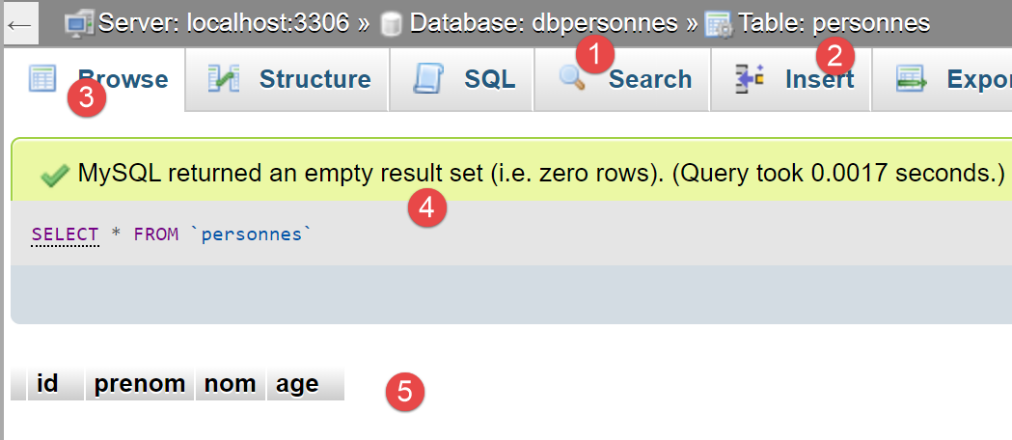
- in [5], we see that the tables [personnes] and [2] are empty;
16.7. script [mysql_05]: use of parameterized queries
The script [mysql_05] introduces the concept of parameterized queries:
# imports
from mysql.connector import connect, DatabaseError, InterfaceError

# user identity
ID = "admpersonnes"
PWD = "nobody"
# the sgbd host machine
HOST = "localhost"
# base identity
BASE = "dbpersonnes"

# list of people (last name, first name, age)
personnes = []
for i in range(5):
    personnes.append((i, f"n0{i}", f"p0{i}", i + 10))
personnes.append((40, "d'Aboot", "Y'éna", 18))
# other list of persons
autresPersonnes = []
for i in range(5):
    autresPersonnes.append((i + 100, f"n1{i}", f"p1{i}", i + 20))
autresPersonnes.append((200, "d'Aboot", "F'ilhem", 34))

# access to SGBD
connexion = None
try:
    # connection
    connexion = connect(host=HOST, user=ID, password=PWD, database=BASE)
    # cursor
    curseur = connexion.cursor()
    # delete existing registrations
    curseur.execute("delete from personnes")
    # person-by-person insertions with a prepared query
    for personne in personnes:
        curseur.execute("insert into personnes(id,nom,prenom,age) values(%s,%s,%s,%s)", personne)
    # bulk insertion of a list of people
    curseur.executemany("insert into personnes(id,nom,prenom,age) values(%s, %s,%s,%s)", autresPersonnes)
    # transaction validation
    connexion.commit()
except (DatabaseError, InterfaceError) as erreur:
    # error display
    print(f"L'erreur suivante s'est produite : {erreur}")
    # cancel transaction
    if connexion:
        connexion.rollback()
finally:
    # locking connection
    if connexion:
        connexion.close()
Notes
- lines 12–21: create two lists of people to include in the database [dbpersonnes];
- line 27: connect to the database;
- line 31: delete the contents of the [personnes] table;
- Lines 33–34: Insert people using a parameterized query. Line 34: the first parameter is the SQL command to be executed. This command is incomplete. It contains [%s] parameters that will be replaced one by one and in order by the values from the list in the second parameter;
- Line 36: Insertion of individuals, this time with a single instruction, [curseur.executemany]. The second parameter of [executemany] is therefore a list of lists;
The benefits of parameterized queries lie in two points:
- they execute faster than "hard-coded" queries that must be parsed on every execution. The parameterized query [executemany] is parsed only once. It is then executed n times without being parsed again;
- the parameters injected into the parameterized query are checked. If they contain reserved characters, such as the apostrophe, for example, these are 'escaped' so that they do not interfere with the execution of the command SQL. To verify this, we included first and last names with apostrophes in the list (lines 16 and 21);
The results obtained in phpMyAdmin are as follows:
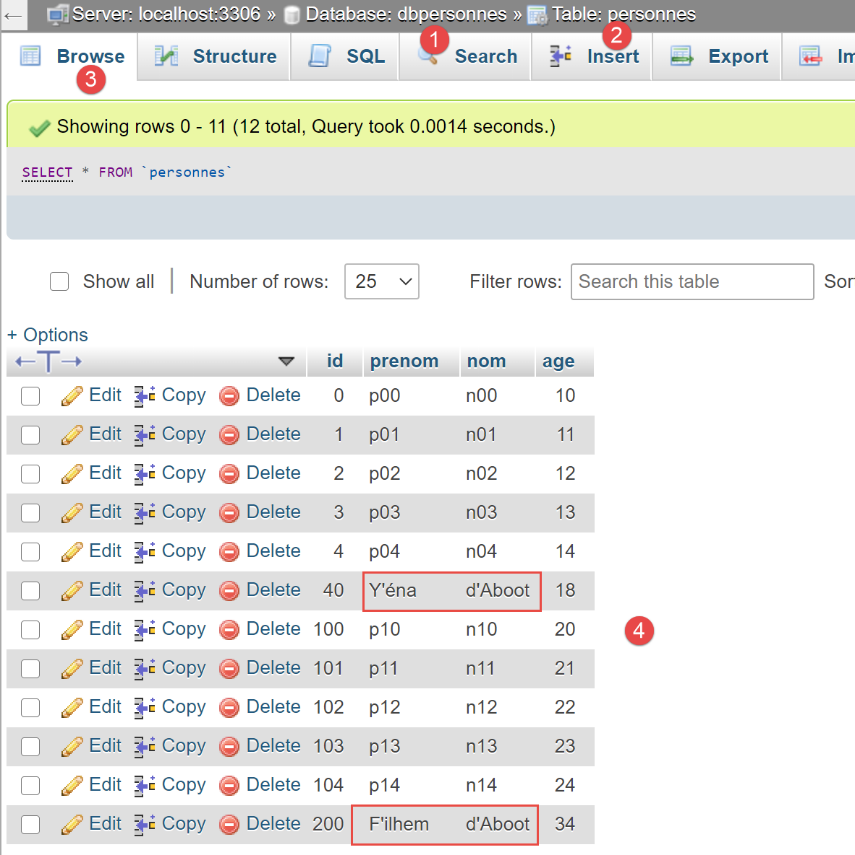
- Note that the strings containing an apostrophe—a reserved character in SQL—were correctly inserted. The parameterized query "protected" them. Without a parameterized query, we would have had to do this work ourselves;