19. Using ORM and SQLALCHEMY
The previous chapter showed that in some cases, it is possible to write code independent of the SGBD used with the following architecture:
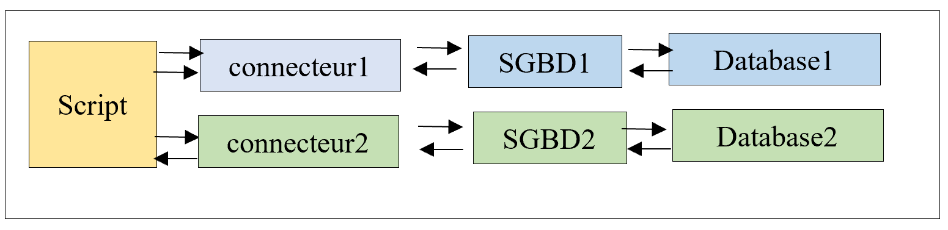
In this chapter, we will use the ORM (Object Relational Mapper) [sqlalchemy] to access the SGBD uniformly regardless of the SGBD used. A ORM enables two things:
- it allows a script to communicate with the SGBD without issuing SQL commands;
- it hides the specific characteristics of each SGBD from the script;
The architecture becomes as follows:
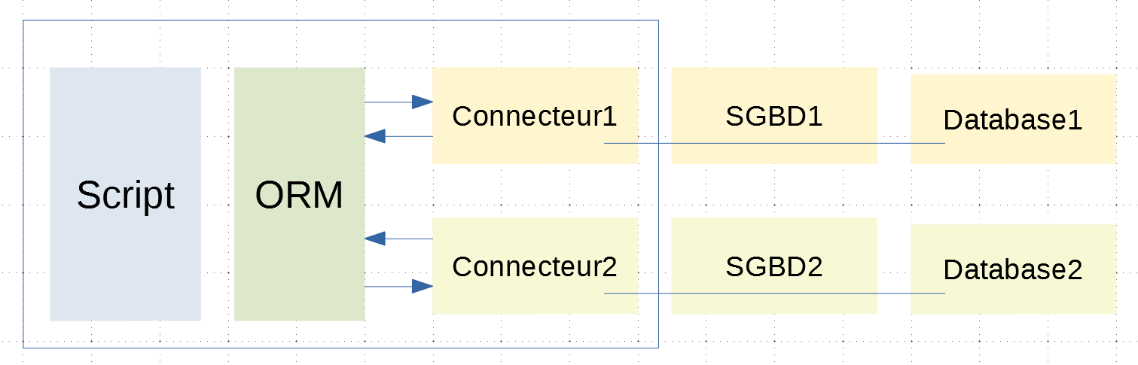
The script is now separated from the connectors by the ORM. It communicates with the ORM using classes and methods. It does not execute SQL code. It is the ORM that does this with the connectors to which it is linked. It hides the specifics of these connectors from the script. Therefore, the script code is unaffected by a change in connector (and thus in the SGBD);
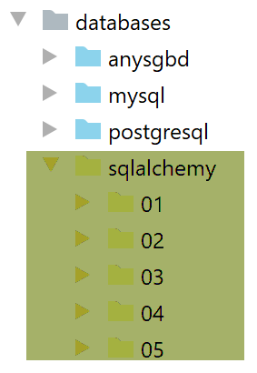
The directory structure of the scripts under consideration will be as follows:
19.1. Installation of ORM [sqlalchemy]
The ORM [sqlalchemy] comes in the form of a Python package that must be installed in a Python terminal:
(venv) C:\Data\st-2020\dev\python\cours-2020\python3-flask-2020\databases\sqlalchemy>pip install sqlalchemy
Collecting sqlalchemy
  Downloading SQLAlchemy-1.3.18-cp38-cp38-win_amd64.whl (1.2 MB)
     || 1.2 MB 3.3 MB/s
Installing collected packages: sqlalchemy
Successfully installed sqlalchemy-1.3.18
19.2. Scripts 01: the basics
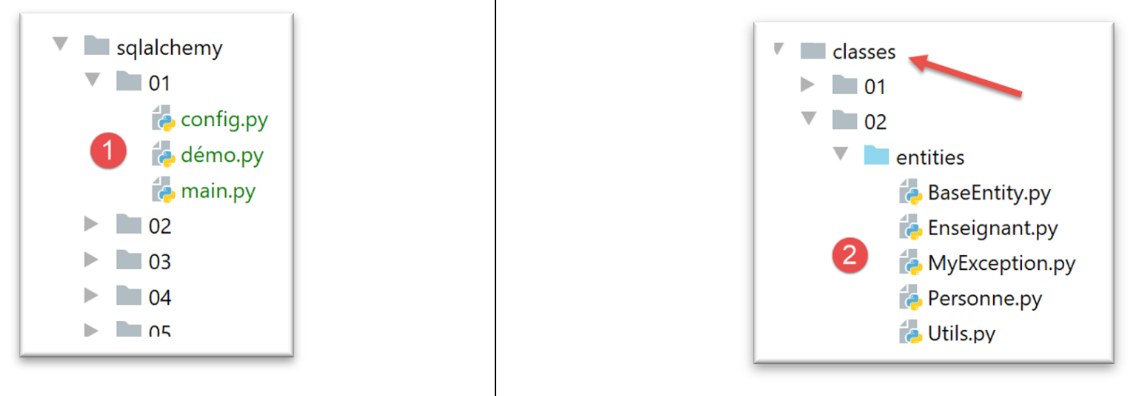
- in [1], the scripts that will be studied. These scripts will use the classes from [2]: BaseEntity, MyException, Person, Utils;
19.2.1. Configuration
The file [config] configures the application as follows:
def configure():
    # root_dir
    # absolute path configuration relative path reference
    root_dir = "C:/Data/st-2020/dev/python/cours-2020/python3-flask-2020"
    # absolute paths of dependencies
    absolute_dependencies = [
        # BaseEntity, MyException, Person, Utilities
        f"{root_dir}/classes/02/entities",
    ]

    # set the syspath
    from myutils import set_syspath
    set_syspath(absolute_dependencies)

    # class configuration
    from Personne import Personne
    Personne.excluded_keys = ['_sa_instance_state']

    # we return the config
    return {}
Comments
- line 8: we add the folder containing the Path classes to the Python [BaseEntity, MyException, Personne, Utils];
- lines 12-13: set the application’s Python Path;
- lines 16-17: you may recall that the class |BaseEntity| has a class attribute named [excluded_keys]. This attribute is a list in which we place the class properties that we do not want to appear in the class’s dictionary (asdict function). Here we exclude the property [_sa_instance_state] from the state of the class [Personne]. We will soon see why;
19.2.2. Script [démo]
The script [démo] demonstrates an initial use of ORM and [sqlalchemy]:
# retrieve application configuration
import config

config = config.configure()

# imports
from sqlalchemy import Table, Column, Integer, String, MetaData, UniqueConstraint
from sqlalchemy.orm import mapper

from Personne import Personne

# metadata
metadata = MetaData()

# the table
personnes_table = Table("personnes", metadata,
                        Column('id', Integer, primary_key=True),
                        Column('prenom', String(30), nullable=False),
                        Column("nom", String(30), nullable=False),
                        Column("age", Integer, nullable=False),
                        UniqueConstraint('nom', 'prenom', name='uix_1')
                        )
# the Person class before mapping
personne1 = Personne().fromdict({"id": 67, "prénom": "x", "nom": "y", "âge": 10})
print(f"personne1={personne1.__dict__}")

# mapping
mapper(Personne, personnes_table, properties={
    'id': personnes_table.c.id,
    'prénom': personnes_table.c.prenom,
    'nom': personnes_table.c.nom,
    'âge': personnes_table.c.age
})

# person1 has not been modified
print(f"personne1={personne1.__dict__}")
# the Person class has been modified - it has been "enriched"
personne2 = Personne().fromdict({"id": 68, "prénom": "x1", "nom": "y1", "âge": 11})
print(f"personne2={personne2.__dict__}")
Comments
- lines 1-4: we configure the application;
- lines 6-10: we import the modules needed for the script;
- Line 13: [MetaData] is a class of [sqlalchemy];
- Lines 15–22: [Table] is a class of [sqlalchemy]. It is used to describe a database table. Here, we will describe the table [personnes] from the database MySQL [dbpersonnes] discussed in the chapter |MySQL|;
- line 16: the first parameter [personnes] is the name of the table being described;
- line 16: the second parameter [metadata] is the instance [MetaData] created on line 13;
- lines 17–22: each of the following parameters describes a column of the table using a syntax specific to [sqlalchemy] but similar to the SQL syntax;
- each column is described using an instance of the [Column] class from [sqlalchemy];
- the first parameter is the column name;
- the second parameter is its type;
- the following parameters are named parameters:
- line 17: [primary_key=True] to indicate that the column [id] is the primary key of the table [personnes];
- line 18: [nullable=False] to indicate that a column must have a value when a row is inserted into the table;
- line 21: finally, the class [UniqueConstraint] is used to define a uniqueness constraint. Here, we specify that the columns (last_name, first_name) must be unique within the table. The property named [name] is used to assign a name to this constraint. Here, we must distinguish between two cases:
- we are describing an existing table. In that case, we must look up the constraint name in the table’s properties (phpMyAdmin or pgAdmin);
- you are describing a table that you are going to create. In that case, you enter the name you want;
- Lines 23–25: We create a person [personne1] and display its dictionary [__dict__]. Here we will have:
personne1={'_BaseEntity__id': 67, '_Personne__prénom': 'x', '_Personne__nom': 'y', '_Personne__âge': 10}
- Lines 27–33: We perform a mapping, i.e., we create a correspondence between the class [Personne] and the table [personnes]. This is essentially a [propriétés de la classe colonnes de la table] correspondence. The function [mapper] accepts three parameters here:
- line 28: the first parameter is the name of the class for which the mapping is being performed;
- line 28: the second parameter is the table to which it will be associated. This is the [Table] object created on line 16;
- line 28: the third parameter here is a parameter named [properties]. It is a dictionary in which the keys are the properties of the mapped class and the values are the columns of the mapped table. To refer to column X of the table [personnes_table], we write [personnes_table.c.X];
- lines 35-36: we display the person [personne1] again once the mapping is complete. We see that it has not changed:
personne1={'_BaseEntity__id': 67, '_Personne__prénom': 'x', '_Personne__nom': 'y', '_Personne__âge': 10}
- lines 37-39: we create a new person [personne2] and display it. We then see the following output:
personne2={'_sa_instance_state': <sqlalchemy.orm.state.InstanceState object at 0x00000259A6747FA0>, 'id': 68, 'prénom': 'x1', 'nom': 'y1', 'âge': 11}
We can see that the dictionary [__dict__] has been significantly modified:
- (continued)
- a new property [_sa_instance_state] appears. We can see that it is an object of the ORM [sqlalchemy] class;
- the other properties have had their prefixes removed, which previously indicated which class they belonged to;
We can therefore conclude that the mapping operation in lines 27–33 modified the class [Personne].
When you want to display the status of an object [Personne], you generally won’t need the property [_sa_instance_state]. It is only there for the internal workings of [sqlalchemy] and is generally of no interest to us. That is why we wrote the following in the [config] script:
    # class configuration
    from Personne import Personne
    Personne.excluded_keys = ['_sa_instance_state']
19.2.3. The [main] script
The [main] script will manipulate the [personnes] table in the MySQL and [dbpersonnes] databases by interfacing with [sqlalchemy]. To understand what follows, you need to recall the architecture used here:
If [Database1] is the database [dbpersonnes], we can see that the connection between the script and this database goes through two entities:
- the Python connector to SGBD MySQL;
- the SGBD MySQL;
The [main] script will communicate with the ORM, which will then communicate with the Python connector. The ORM communicates with this connector using the tools described in the sections |MySQL| and |PostgreSQL|, notably by issuing SQL commands. The [main] script will not use SQL commands. It will rely on the API (Application Programming Interface) of the ORM, consisting of classes and interfaces.
The [main] script is as follows:
# configure the application
import config

config = config.configure()

# imports
from sqlalchemy import create_engine, Table, Column, Integer, String, MetaData, UniqueConstraint
from sqlalchemy.exc import IntegrityError, InterfaceError
from sqlalchemy.orm import mapper, sessionmaker

from Personne import Personne

# database connection string MySQL
engine = create_engine("mysql+mysqlconnector://admpersonnes:nobody@localhost/dbpersonnes")

# metadata
metadata = MetaData()

# the table
personnes_table = Table("personnes", metadata,
                        Column('id', Integer, primary_key=True),
                        Column('prenom', String(30), nullable=False),
                        Column("nom", String(30), nullable=False),
                        Column("age", Integer, nullable=False),
                        UniqueConstraint('nom', 'prenom', name='uix_1')
                        )

# mapping
mapper(Personne, personnes_table, properties={
    'id': personnes_table.c.id,
    'prénom': personnes_table.c.prenom,
    'nom': personnes_table.c.nom,
    'âge': personnes_table.c.age
})

# the factory session
Session = sessionmaker()
Session.configure(bind=engine)

session = None
try:
    # a session
    session = Session()

    # delete [personnes] table
    session.execute("drop table if exists personnes")

    # table recreation from mapping
    metadata.create_all(engine)

    # insertion
    session.add(Personne().fromdict({"id": 67, "prénom": "x", "nom": "y", "âge": 10}))
    # session.commit()

    # a request
    personnes = session.query(Personne).all()

    # display
    print("Liste des personnes ---------")
    for personne in personnes:
        print(personne)

    # two other insertions, the second of which fails due to uniqueness (first name, last name)
    session.add(Personne().fromdict({"id": 68, "prénom": "x1", "nom": "y1", "âge": 10}))
    session.add(Personne().fromdict({"id": 69, "prénom": "x1", "nom": "y1", "âge": 10}))

    # a request
    personnes = session.query(Personne).all()

    # display
    print("Liste des personnes ---------")
    for personne in personnes:
        print(personne)

    # session validation
    session.commit()

except (InterfaceError, IntegrityError) as erreur:
    # display
    print(f"L'erreur suivante s'est produite : {erreur}")
    # cancellation of last session
    if session:
        print("rollback...")
        session.rollback()
finally:
    # release session resources
    if session:
        session.close()
Comments
- lines 1–4: the application is configured;
- lines 7-9: a series of classes and interfaces from the [sqlalchemy] library are imported;
- line 11: the [Personne] class is imported;
- line 14: the database connection string. It specifies:
- the SGBD used (mysql);
- the Python connector used (mysql.connector without the .);
- the user logging in (admpersonnes);
- their password (nobody);
- the machine on which SGBD is located (localhost = the machine on which the script is running);
- the database name (dbpersonnes);
With this information, [sqlalchemy] can connect to the database. Note that the Python connector used must already be installed. [sqlalchemy] does not do this.
- lines 19–26: description of the [personnes] table;
- lines 28–34: mapping between the [Personne] class and the [personnes] table;
- lines 36–38: most [sqlalchemy] operations are performed within a session. The concept of a [sqlalchemy] session is similar to that of a SQL transaction. Sessions are created from the [Session] class returned by the [sessionmaker] function in line 37;
- line 38: the class [Session] is associated with the database [dbpersonnes] via the connection string on line 14;
- line 43: a session is created. As mentioned, a session can be likened to a transaction;
- lines 45–46: the [Session.execute] method allows an order SQL to be executed. This is not a common practice, since we mentioned that ORM allows you to avoid using the SQL language;
- Lines 48–49: The [metadata.create_all] method creates all tables using the [MetaData] instance from line 17. We have only one: the table [personnes] defined in lines 20–26. [sqlalchemy] will use the information from these lines to create the table. Here we see a key benefit of ORM: it hides the specifics of the SGBD. Indeed, the order of SQL and [create] can vary significantly from one SGBD to another due to the data types assigned to the columns. There has been no standardization of data types. Thus, the order varies from one instance to another. Here, thanks to this approach:
- we uniquely describe the table we want;
- [sqlalchemy] manages to generate the [create] that matches the SGBD it has in front of it;
- Line 52: An object [Personne] is added to the session. This does not automatically add it to the database. In fact, a ORM follows its own rules to synchronize with the database. It will always seek to optimize the number of queries it makes. Let’s take an example. The script adds two people (person1, person2) to the session and then makes a query: it wants to see all the people in the table. [sqlalchemy] can proceed as follows:
- the addition of [personne1] can be done in memory. There is no need to put it in the database for now;
- the same applies to [personne2];
- Next comes the query of type [select]. All rows from the table [personnes] must then be retrieved. [sqlalchemy] will then insert [personne1, personne2] into the database and execute the query;
[sqlalchemy] will thus perform optimizations that are transparent to the developer.
- Line 56: To make a query of type [select] (I want to see…), we use the method [Session.query]. The parameter of the [query] method is the class mapped to the queried table. This method returns a [Query] type. The [Query.all] method retrieves all [Personne] objects from the session. It is provided with all rows from the [personnes] table, each in the form of a [Personne] object. To do this, [sqlalchemy] uses the mapping established between the [Personne] class and the [personnes] table. The result of line 56 is a list of [Personne] objects;
- lines 58–61: the elements of the [personnes] list are displayed. Because the [Personne] class derives from the [BaseEntity] class, the method [Personne.__str__] used here implicitly in line 61 is actually the method [BaseEntity.__str__], which returns the string jSON of the calling object. This string is the string jSON from the dictionary [Personne.asdict] (see |BaseEntity|). We said that after mapping, we would find the property [_sa_instance_state] in each [Personne] object. However, the value of this property is not of type [BaseEntity]. It must therefore be excluded from the dictionary of the [Personne] class; otherwise, the display will "crash." This is what was done in the [config] script;
- lines 63–65: we add two more people who have the same first and last names. However, there is a uniqueness constraint on the union of these two columns. An error should therefore occur. This is what we are trying to verify;
- lines 67–68: we request the list of all people in the database again;
- lines 70-73: and we display them;
- lines 75-76: the session is committed. As the name implies, the underlying transaction will be committed;
- we will see during execution that lines 67–76 will not be executed due to the exception thrown by line 65. We will then proceed to lines 78–84 to handle the exception;
- Line 78: The exception [InterfaceError] occurs if [sqlalchemy] fails to connect to the database [dbpersonnes]. The exception [IntegrityError] occurs on line 65;
- line 80: the error is displayed;
- lines 82–84: if the session exists, it is rolled back. This amounts to rolling back the underlying transaction;
- lines 85–88: in all cases, whether an error occurs or not, the session is closed to free up resources;
The execution results are as follows:
C:\Data\st-2020\dev\python\cours-2020\python3-flask-2020\venv\Scripts\python.exe C:/Data/st-2020/dev/python/cours-2020/python3-flask-2020/databases/sqlalchemy/01/main.py
Liste des personnes ---------
{"nom": "y", "prénom": "x", "id": 67, "âge": 10}
L'erreur suivante s'est produite : (raised as a result of Query-invoked autoflush; consider using a session.no_autoflush block if this flush is occurring prematurely)
(mysql.connector.errors.IntegrityError) 1062 (23000): Duplicate entry 'y1-x1' for key 'uix_1'
[SQL: INSERT INTO personnes (id, prenom, nom, age) VALUES (%(id)s, %(prenom)s, %(nom)s, %(age)s)]
[parameters: ({'id': 68, 'prenom': 'x1', 'nom': 'y1', 'age': 10}, {'id': 69, 'prenom': 'x1', 'nom': 'y1', 'age': 10})]
(Background on this error at: http://sqlalche.me/e/13/gkpj)
rollback...

Process finished with exit code 0
- lines 2-3: the list of people after the first insertion;
- line 5: the [IntegrityError] exception that occurred when two people with the same first and last names were added;
- lines 6-7: note the SQL command that failed. This is a configured INSERT command: [sqlalchemy] inserted the two people using a single INSERT. Here we can see that it attempted to optimize the issued SQL orders;
Now let’s look, using phpMyAdmin, at the contents of the [personnes] table:
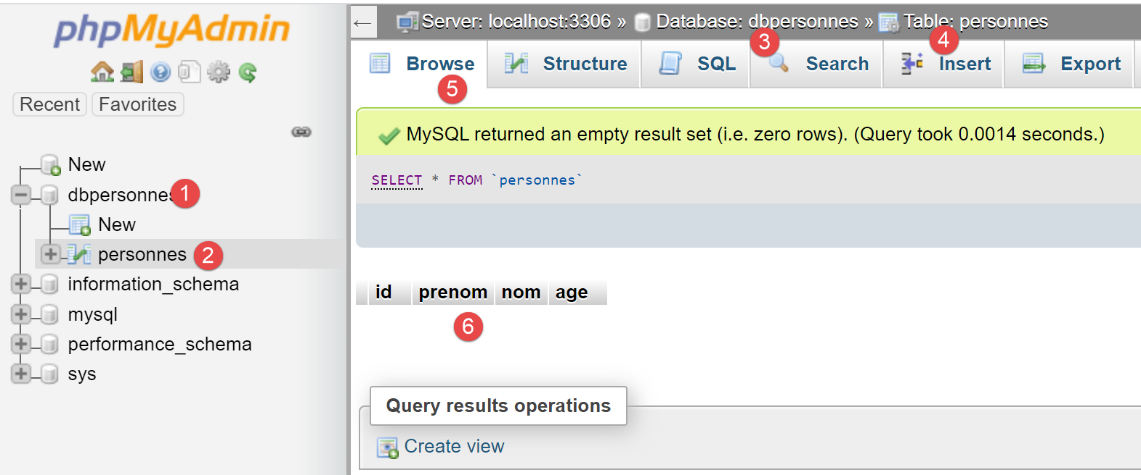
We can see in [6] that the table is empty. There isn’t even the first person that the script had added to the session. This is because the session was taking place within a transaction, and that transaction was rolled back in the [except] clause of the [main] script.
Let’s now make the following change in [main]:
    # insertion
    session.add(Personne().fromdict({"id": 67, "prénom": "x", "nom": "y", "âge": 10}))
    # session.commit()
After adding a person on line 2, we uncomment line 3. The [session.commit] operation will commit the underlying transaction, and a new transaction will begin. After execution, the contents of the [personnes] table are as follows:
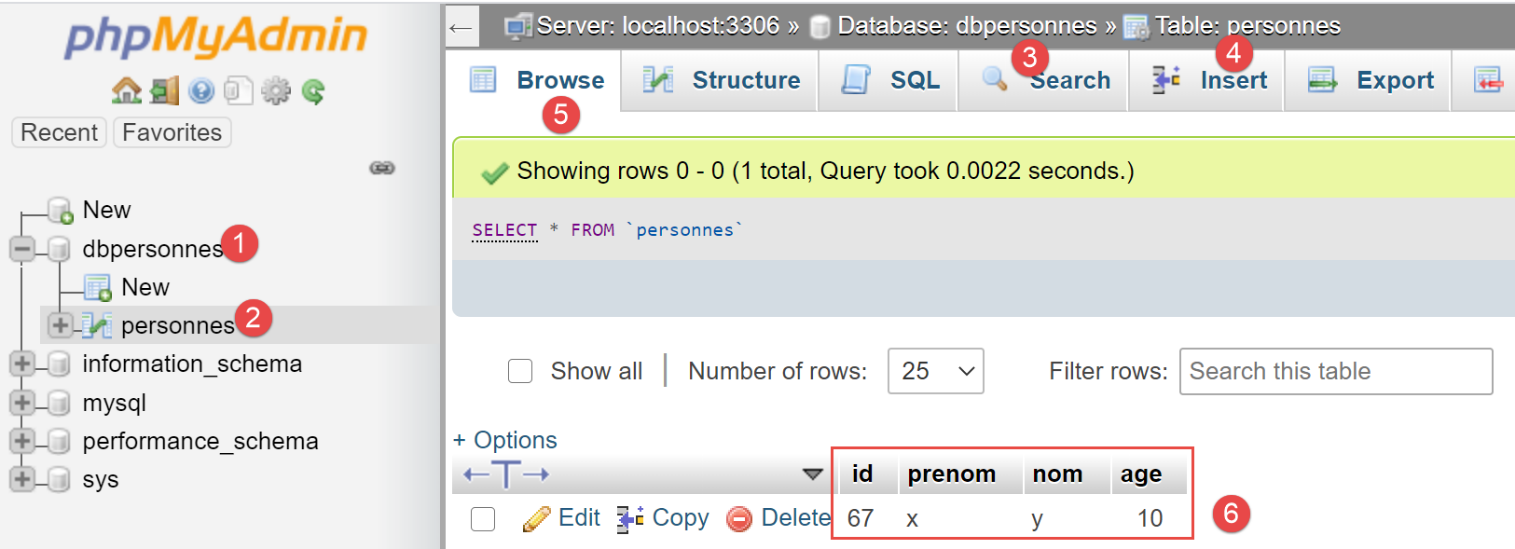
We can see in [6] that the first insertion was retained. This is because it was made within transaction 1 and the subsequent error occurred within transaction 2.
19.3. Scripts 02: the mappings of [sqlalchemy]
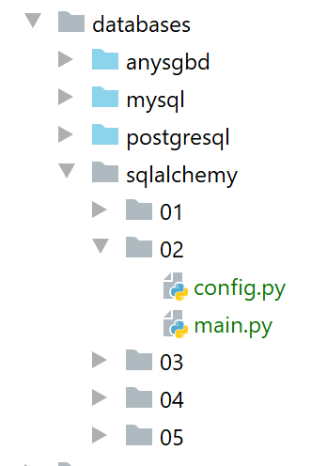
Scripts 02 are a variant of scripts 01. We try to configure as much as possible in [config.py]. We now configure the application’s [sqlalchemy] environment there:
def configure():
    # absolute path configuration relative path reference
    root_dir = "C:/Data/st-2020/dev/python/cours-2020/python3-flask-2020"
    # absolute paths of dependencies
    absolute_dependencies = [
        # BaseEntity, MyException, Person, Utilities
        f"{root_dir}/classes/02/entities",
    ]

    # set the syspath
    from myutils import set_syspath
    set_syspath(absolute_dependencies)

    # imports
    from sqlalchemy import create_engine, Table, Column, Integer, String, MetaData, UniqueConstraint
    from sqlalchemy.orm import mapper, sessionmaker

    # link to a database MySQL
    engine = create_engine("mysql+mysqlconnector://admpersonnes:nobody@localhost/dbpersonnes")

    # metadata
    metadata = MetaData()

    # the table
    personnes_table = Table("personnes", metadata,
                            Column('id', Integer, primary_key=True),
                            Column('prenom', String(30), nullable=False),
                            Column("nom", String(30), nullable=False),
                            Column("age", Integer, nullable=False),
                            UniqueConstraint('nom', 'prenom', name='uix_1')
                            )

    # mapping
    from Personne import Personne

    mapper(Personne, personnes_table, properties={
        'id': personnes_table.c.id,
        'prénom': personnes_table.c.prenom,
        'nom': personnes_table.c.nom,
        'âge': personnes_table.c.age
    })

    # the factory session
    Session = sessionmaker()
    Session.configure(bind=engine)

    # we put this information in the config
    config = {}
    config["Session"] = Session
    config["metadata"] = metadata
    config["engine"] = engine
    config["personnes_table"] = personnes_table

    # class configuration
    from Personne import Personne
    Personne.excluded_keys = ['_sa_instance_state']

    # we return the config
    return config
Comments
- lines 2-12: configuration of Python Path;
- lines 14-45: configuring the [sqlalchemy] environment;
- lines 47-52: the [sqlalchemy] environment is added to the configuration dictionary;
- lines 54–56: configuring the [Personne] class;
With this configuration, the [main] script becomes the following:
# configure the application
import config

config = config.configure()

# syspath is configured - imports are made
from sqlalchemy.exc import IntegrityError, DatabaseError, InterfaceError
from sqlalchemy.orm.exc import FlushError

from Personne import Personne

session = None
try:
    # a session
    session = config["Session"]()

    # delete [personnes] table
    session.execute("drop table if exists personnes")

    # table recreation from mapping
    config["metadata"].create_all(config["engine"])

    # two inserts
    session.add(Personne().fromdict({"prénom": "x", "nom": "y", "âge": 10}))
    personne = Personne().fromdict({"prénom": "x1", "nom": "y1", "âge": 7})
    session.add(personne)

    # validation of the two inserts
    session.commit()

    # a request
    personnes = session.query(Personne).all()

    # display
    print("Liste des personnes-----------")
    for personne in personnes:
        print(personne)

    # two other insertions, the second of which fails
    session.add(Personne().fromdict({"prénom": "x2", "nom": "y2", "âge": 10}))
    session.add(Personne().fromdict({"prénom": "x2", "nom": "y2", "âge": 10}))

    # a request
    personnes = session.query(Personne).all()

    # display
    print("Liste des personnes-----------")
    for personne in personnes:
        print(personne)

    # session validation
    session.commit()

except (FlushError, DatabaseError, InterfaceError, IntegrityError) as erreur:
    # display
    print(f"L'erreur suivante s'est produite : {erreur}")
    # cancellation of last session
    if session:
        print("rollback...")
        session.rollback()
finally:
    # display
    print("Travail terminé...")
    # release session resources
    if session:
        session.close()
The results of the execution are as follows:
C:\Data\st-2020\dev\python\cours-2020\python3-flask-2020\venv\Scripts\python.exe C:/Data/st-2020/dev/python/cours-2020/python3-flask-2020/databases/sqlalchemy/02/main.py
Liste des personnes-----------
{"âge": 10, "nom": "y", "prénom": "x", "id": 1}
{"âge": 7, "nom": "y1", "prénom": "x1", "id": 2}
L'erreur suivante s'est produite : (raised as a result of Query-invoked autoflush; consider using a session.no_autoflush block if this flush is occurring prematurely)
(mysql.connector.errors.IntegrityError) 1062 (23000): Duplicate entry 'y2-x2' for key 'uix_1'
[SQL: INSERT INTO personnes (prenom, nom, age) VALUES (%(prenom)s, %(nom)s, %(age)s)]
[parameters: {'prenom': 'x2', 'nom': 'y2', 'age': 10}]
(Background on this error at: http://sqlalche.me/e/13/gkpj)
rollback...
Travail terminé...

Process finished with exit code 0
In phpMyAdmin, the table [personnes] has become the following:
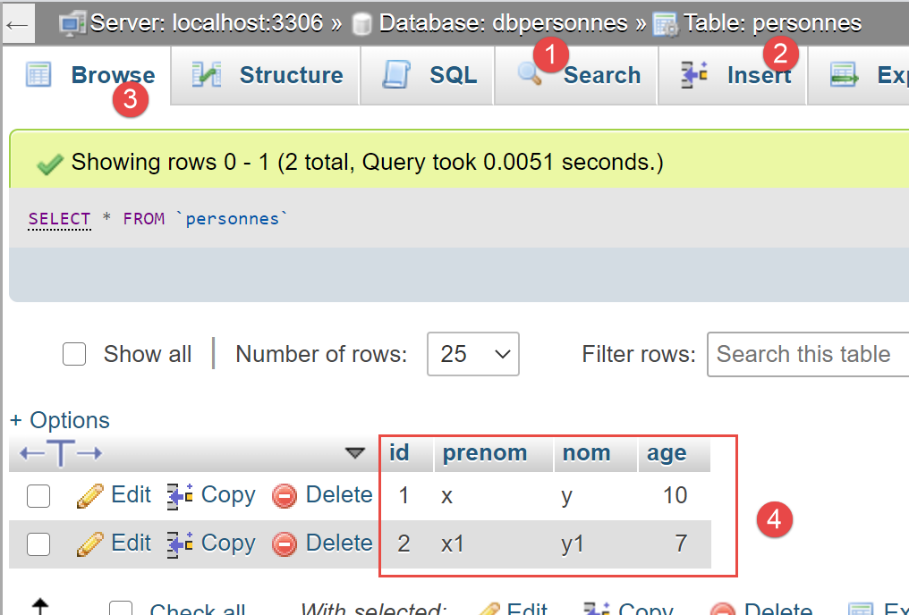
Now, let’s look at the table [personnes] generated by [sqlalchemy]:
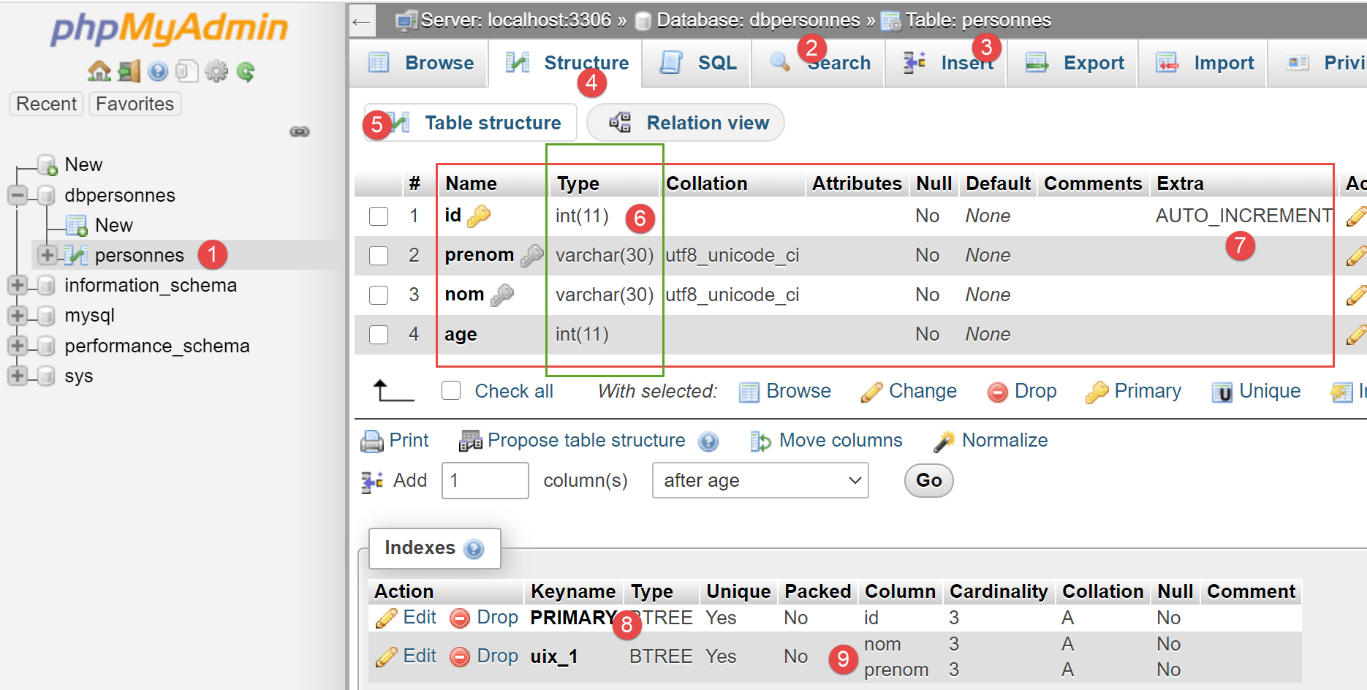
- In [6], the types used for the various columns;
- in [7], we see that the column [id] has the attribute [AUTO_INCREMENT]. This means that when inserting a row into the table, if that row has no value for the [id] column, it will be generated by MySQL incrementally: 1, 2, 3, … This property saves us from having to worry about the primary key value when inserting into the table: we let MySQL generate it;
- In [8], we see that the column [id] is the primary key;
- in [9], we see the uniqueness constraint on the fields [nom, prenom];
19.4. Scripts 03: Manipulating session entities in [sqlalchemy]
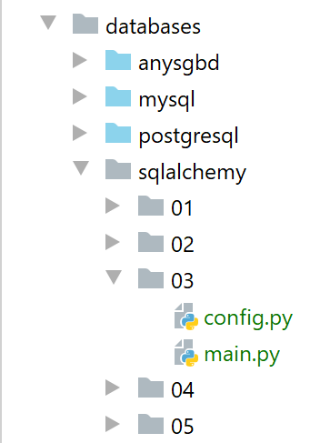
The configuration file [config] is the same as in the previous example. In the [main] script, we perform the standard operations from [INSERT, UPDATE, DELETE, SELECT] on the [personnes] table using the methods from [sqlalchemy]:
# configure the application
import config

config = config.configure()

# imports
from sqlalchemy import func
from sqlalchemy.exc import IntegrityError, DatabaseError, InterfaceError
from sqlalchemy.orm.session import Session
from Personne import Personne

# displays the contents of table [personnes]
def affiche_table(session: Session):
    print("----------------")
    # a request
    personnes = session.query(Personne).all()
    # display
    affiche_personnes(personnes)

# displays a list of people
def affiche_personnes(personnes: list):
    print("----------------")
    # display
    for personne in personnes:
        print(personne)


# main ---------------------------
session = None
try:
    # a session
    session = config["Session"]()

    # delete [personnes] table
    # checkfirst=True: first checks that the table exists
    config["personnes_table"].drop(config["engine"], checkfirst=True)

    # table recreation from mapping
    config["metadata"].create_all(config["engine"])

    # inserts
    session.add(Personne().fromdict({"prénom": "Pierre", "nom": "Nicazou", "âge": 35}))
    session.add(Personne().fromdict({"prénom": "Géraldine", "nom": "Colou", "âge": 26}))
    session.add(Personne().fromdict({"prénom": "Paulette", "nom": "Girondé", "âge": 56}))

    # displays the session content
    affiche_table(session)

    # list of persons in alphabetical order of surnames and, for equal surnames, in alphabetical order of first names
    personnes = session.query(Personne).order_by(Personne.nom.desc(), Personne.prénom.desc())

    # display
    affiche_personnes(personnes)

    # list of people with an age in the range [20,40] in descending order of age
    # then for equal ages in alphabetical order of surnames and for equal surnames in alphabetical order of first names
    personnes = session.query(Personne). \
        filter(Personne.âge >= 20, Personne.âge <= 40). \
        order_by(Personne.âge.desc(), Personne.nom.asc(), Personne.prénom.asc())

    # display
    affiche_personnes(personnes)

    # insertion of mrs Bruneau
    bruneau = Personne().fromdict({"prénom": "Josette", "nom": "Bruneau", "âge": 46})
    session.add(bruneau)
    # change of age
    bruneau.âge = 47

    # list of people named Bruneau
    personne = session.query(Personne).filter(func.lower(Personne.nom) == "bruneau").first()

    # display
    affiche_personnes([personne])

    # deletion of Mme Bruneau
    session.delete(personne)

    # list of people named Bruneau
    personnes = session.query(Personne).filter(func.lower(Personne.nom) == "bruneau")

    # display
    affiche_personnes(personnes)

    # session validation
    session.commit()

except (DatabaseError, InterfaceError, IntegrityError) as erreur:
    # display
    print(f"L'erreur suivante s'est produite : {erreur}")
    # cancellation of last session
    if session:
        session.rollback()

finally:
    # display
    print("Travail terminé...")
    # release session resources
    if session:
        session.close()
Comments
- lines 20–25: the [affiche_personnes] function displays the items in a list of people;
- lines 12–18: the [affiche_table] function displays the contents of the [personnes] table;
- lines 34–36: the table [personnes] is deleted. Unlike previous versions, we do not use a SQL command but a method from [sqlalchemy]:
- config["personnes_table"] is the object [Table] describing the table [personnes];
- config["engine"] is the connection string to the database [dbpersonnes];
- the parameter named [checkfirst=True] specifies that the operation should only be performed if the table [personnes] exists;
- lines 38–39: the table [personnes] is recreated;
- lines 41–44: three people are added to the session. Note that they are not necessarily inserted immediately into the table [personnes]. This depends on the performance-oriented strategy of [sqlalchemy];
- lines 46–47: the contents of the [personnes] table are displayed. If the three people had not yet been inserted, they are now inserted as a result of this request;
- lines 49-50: an example of using the [order_by] method, which allows the results of a query to be presented in a specific order. The syntax [order_by(critère1, critère2)] displays the results first according to the criterion [critère1], and when rows have the same value for [critère1], they are then sorted according to the criterion [critère2]. You can specify multiple criteria as follows:
- lines 55–59: introduce the concept of filtering using the [filter] method. The notation [filter(critère1, critère2)] creates a logical AND (ET) between the criteria used;
- lines 64–67: a new user is logged in;
- Lines 70–71: another example of a filtered query. The function [func.lower(param)] converts [param] to lowercase. There are also other functions available, such as [func.xx]. In the expression on line 71:
- [session.query.filter] returns a list of [Personne] objects;
- [session.query.filter.first] returns the first element of this list;
- line 77: an element is removed from the session;
- line 86: the session is validated;
The results of the execution are as follows:
- lines 4-6: the session content;
- lines 8-10: the session content in descending order of names;
- lines 12-13: the session content for people whose age is in the range [20, 40];
- line 15: the person named “bruneau”;
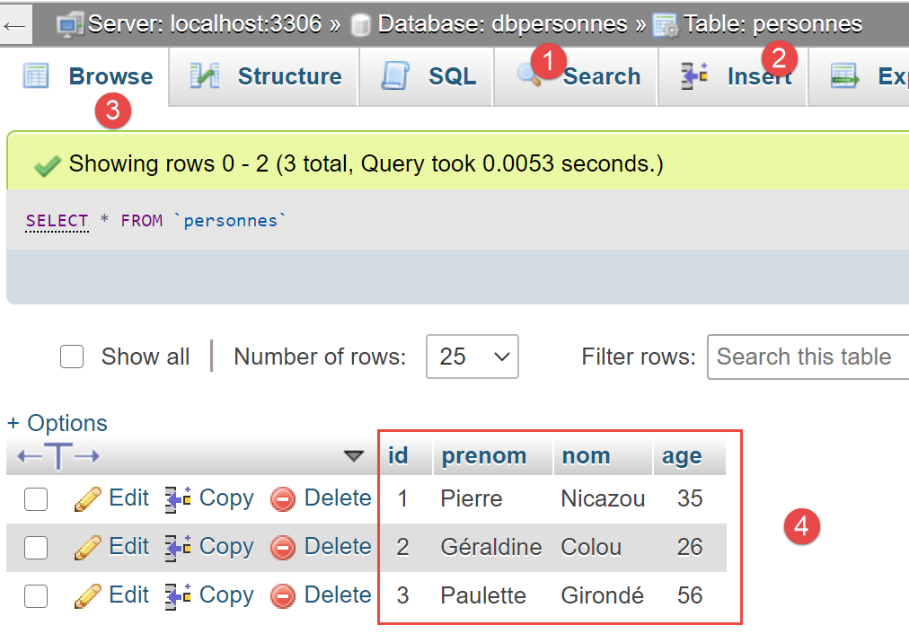
In phpMyAdmin, the contents of table [personnes] at the end of execution are as follows:
19.5. Scripts 04: Using a database named [PostgreSQL]
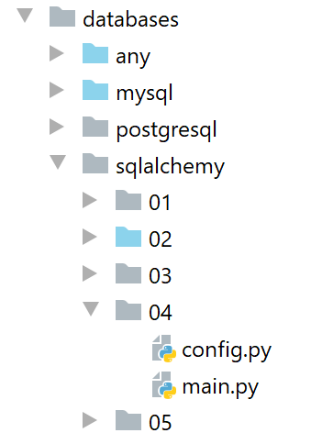
The [04] folder is a copy of the [03] folder. We change only one thing: the connection string in the [config] file:
    # link to a database PostgreSQL
    engine = create_engine("postgresql+psycopg2://admpersonnes:nobody@localhost/dbpersonnes")
This connection string now refers to the [dbpersonnes] database of a SGBD [PostgreSQL]. Note the use of the [psycopg2] connector. This must be installed.
Running the [main] script yields the following results:
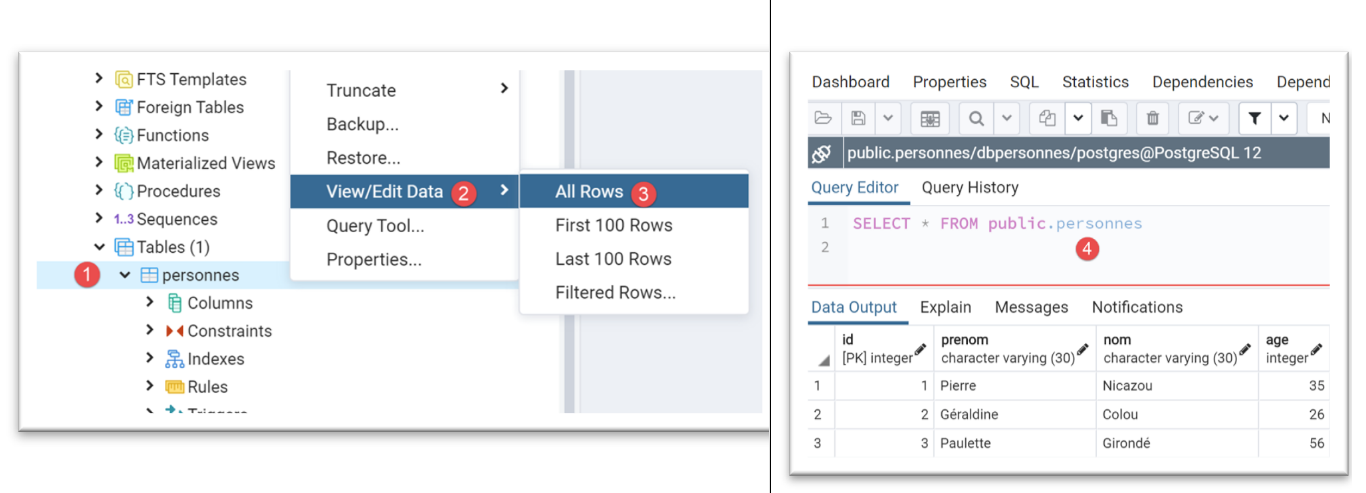
Using the [pgAdmin] tool (see section |pgAdmin|), the [personnes] table is in the following state:
The table [personnes] was generated with the following code SQL:
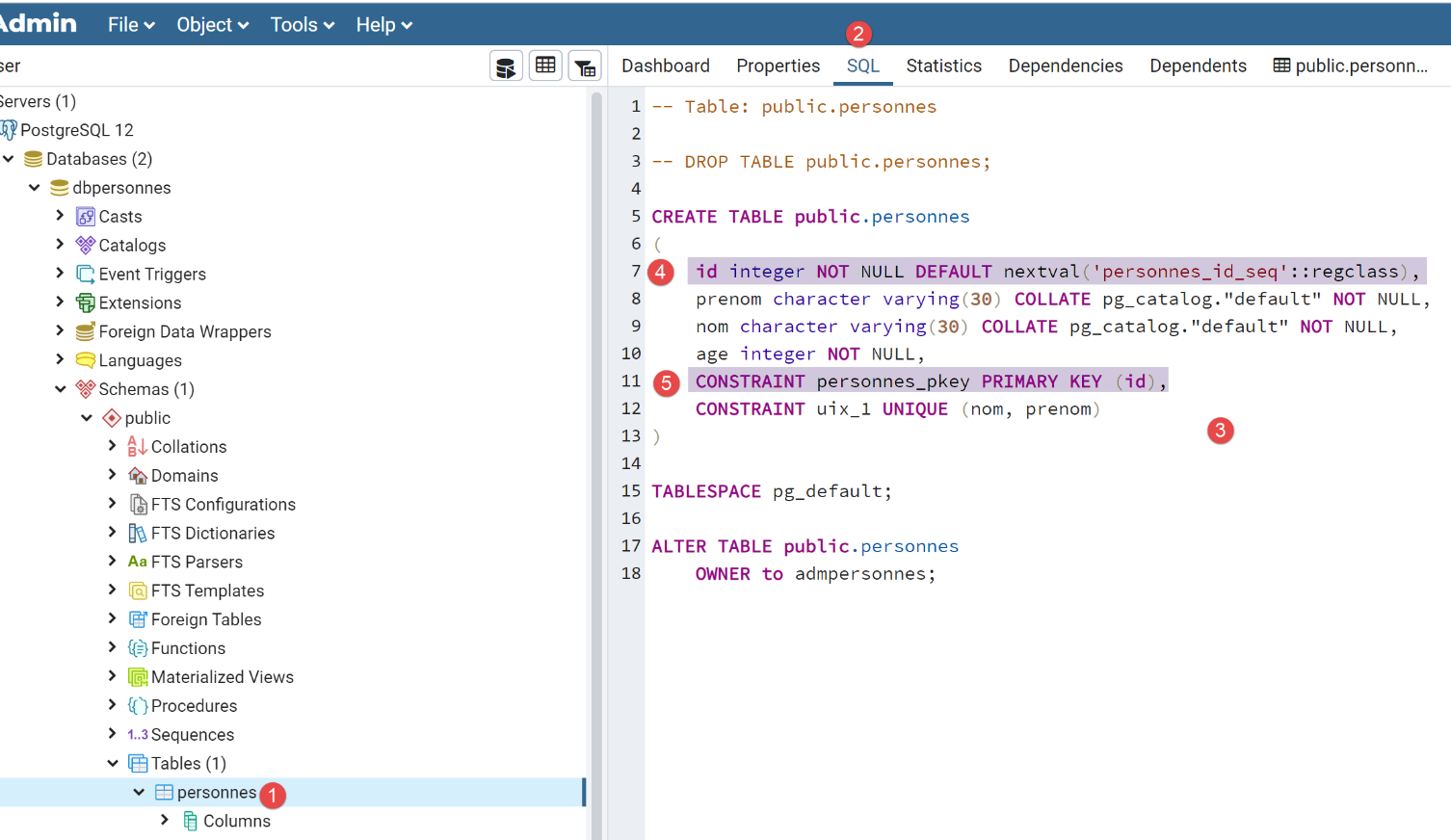
- In [4-5], we can see that the column [id] is the primary key. We can also see that it has a default value of [mot clé DEFAULT], which means that if a row is inserted without a primary key, one will be generated by SGBD. This is a common practice: we let SGBD generate the primary keys;
This version 05 from the [sqlalchemy] scripts clearly demonstrates how easy it is to switch from one SGBD to another: all that was needed was to change the connection string in a configuration script. Nothing else has changed. If we compare the column types in [id, nom, prenom, age] above with those in the MySQL table from example |02|, we see that they are different. [sqlalchemy] adapts them to the SGBD being used. This ability to adapt to a new SGBD is reason enough to adopt [sqlalchemy] or another ORM.
19.6. Scripts 05: Complete Example
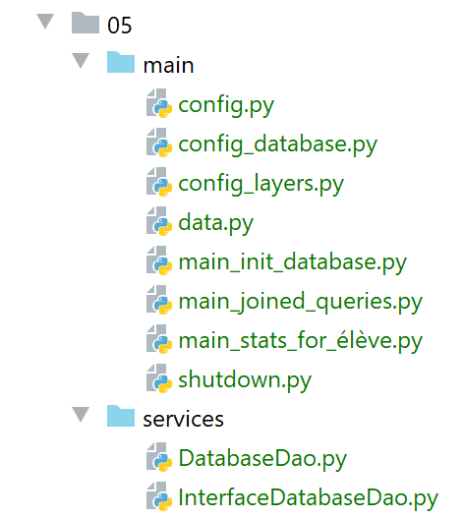
The example examined here is a continuation of the one discussed in the |troiscouches-v01| section. That example presented a three-layer [ui, métier, dao] architecture that manipulated [Classe, Elève, Matière, Note] entities. The entities were hard-coded in a [dao] layer. We are now placing them in a database. We will use two SGBD: MySQL and PostgreSQL.
19.6.1. Application Architecture
The application architecture will be as follows:
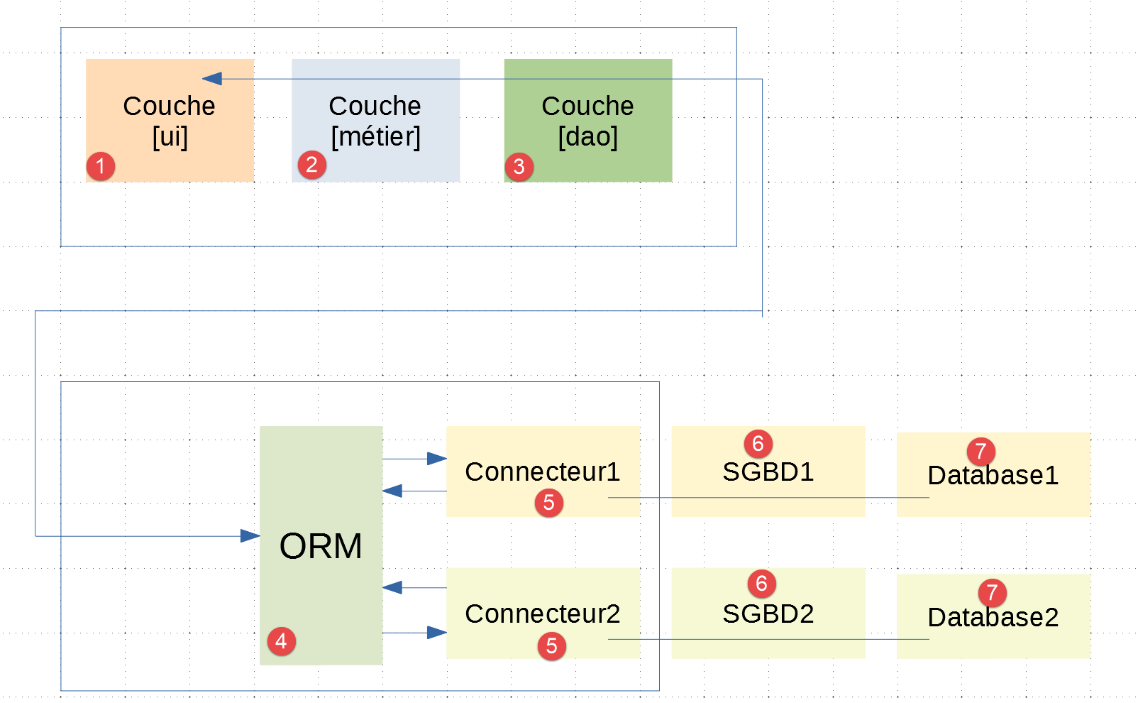
- In [1-3], we find the [ui, métier, dao] layers already present in the |troiscouches-v01| example. The [dao] layer now communicates with the [ORM] layer;
- the [1-5] layers are implemented using Python code;
19.6.2. The Databases
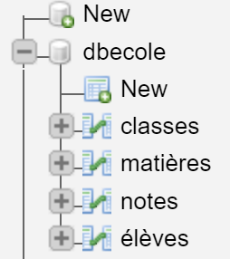
We are creating a database named MySQL owned by the user [admecole] with the password [mdpecole]. To do this, we follow the procedure described in the section |Creating a Database|:
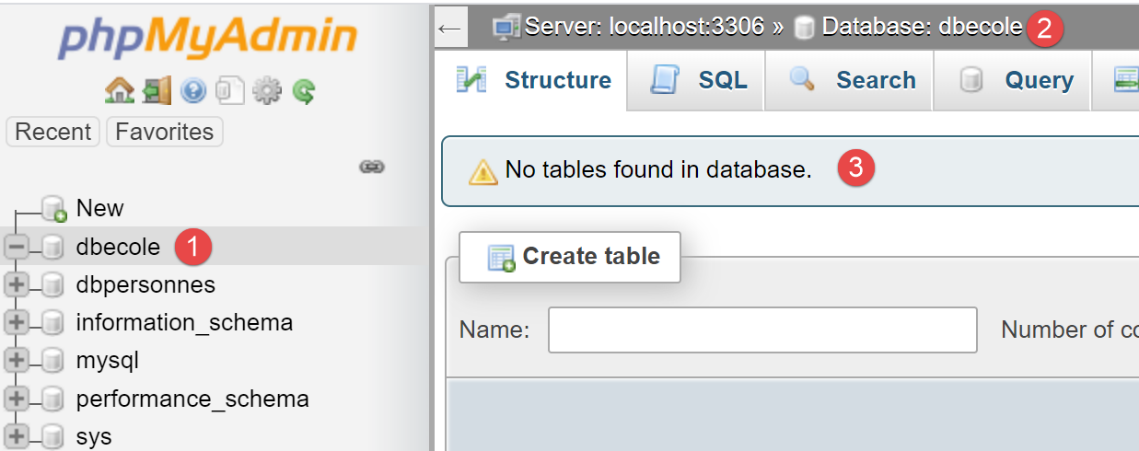
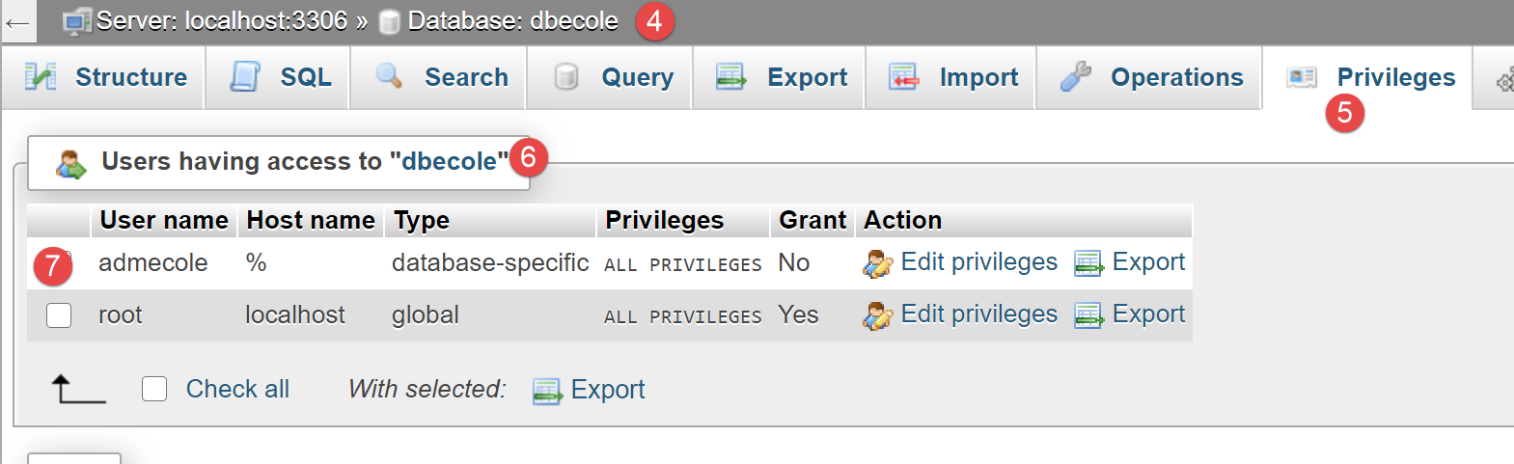
- in [1], the database [dbecole] without tables [3];
- in [7], the user [admecole] has full privileges on this database;
We do the same with SGBD and PostgreSQL. We create a database named [dbecole] owned by user [admecole] with password [mdpecole]. To do this, we follow the procedure described in the section |creating a database|:
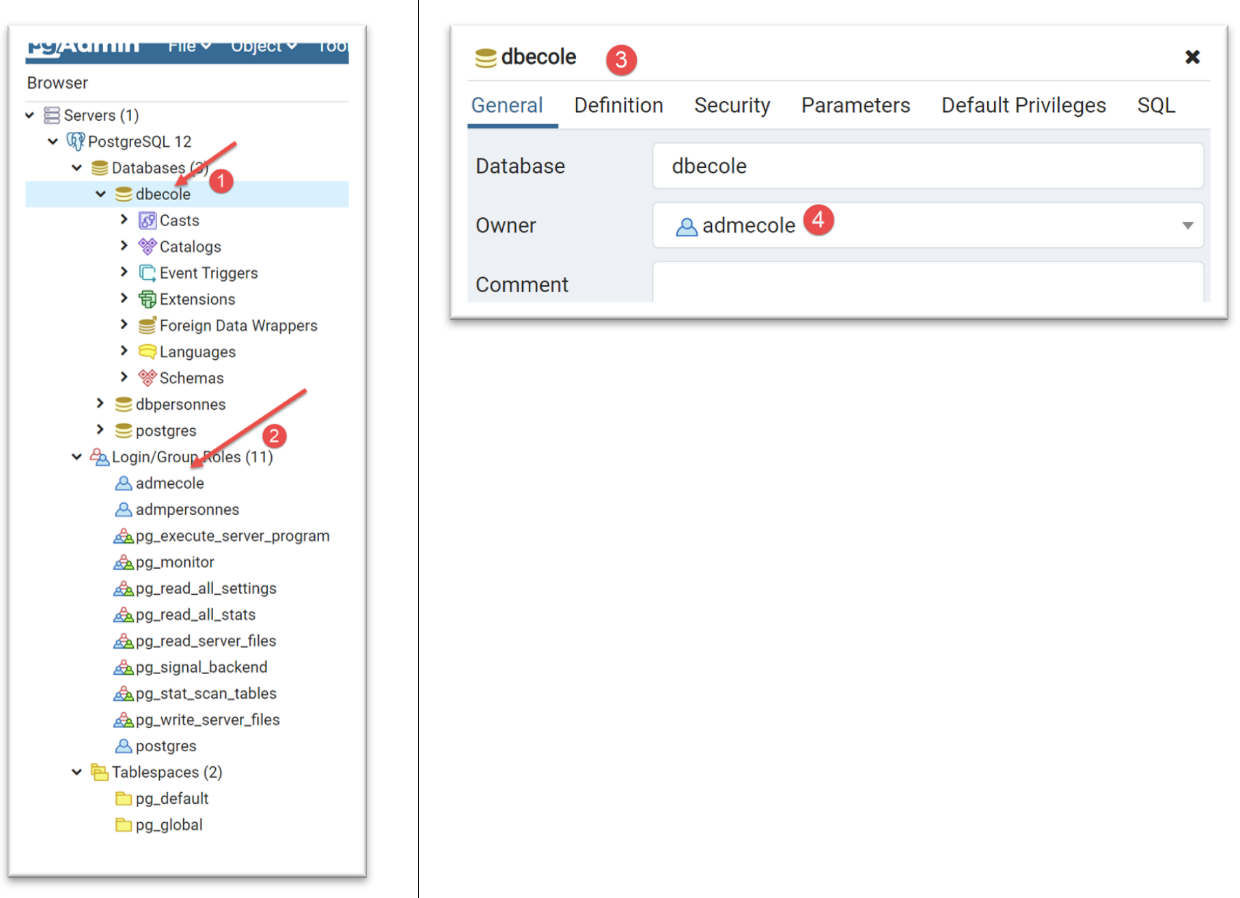
- in [1], the database [dbecole];
- in [2], the user [admecole];
- in [3-4], the database [dbecole] is owned by user [admecole];
19.6.3. Entities handled by the application
In the |troiscouches v01| application, the entities handled were as follows (see |entities|). These are the entities that will be stored in the previous databases. We will not duplicate these entities in the new application. We will retrieve them from where they are already defined.
The [Classe] class:
# imports
from BaseEntity import BaseEntity
from MyException import MyException
from Utils import Utils


class Classe(BaseEntity):
    # attributes excluded from class state
    excluded_keys = []

    # class properties
    @staticmethod
    def get_allowed_keys() -> list:
        # id: class identifier
        # name: class name
        return BaseEntity.get_allowed_keys() + ["nom"]

    # getter
    @property
    def nom(self: object) -> str:
        return self.__nom

    #  setters
    @nom.setter
    def nom(self: object, nom: str):
        # name must be a non-empty string
        if Utils.is_string_ok(nom):
            self.__nom = nom
        else:
            raise MyException(11, f"Le nom de la classe {self.id} doit être une chaîne de caractères non vide")
The [Elève] class:
# imports
from BaseEntity import BaseEntity
from Classe import Classe
from MyException import MyException

from Utils import Utils


class Elève(BaseEntity):
    # attributes excluded from class state
    excluded_keys = []

    # class properties
    @staticmethod
    def get_allowed_keys() -> list:
        # id: student identifier
        # name: student's name
        # first name: student's first name
        # class: student's class
        return BaseEntity.get_allowed_keys() + ["nom", "prénom", "classe"]

    # getters
    @property
    def nom(self: object) -> str:
        return self.__nom

    @property
    def prénom(self: object) -> str:
        return self.__prénom

    @property
    def classe(self: object) -> Classe:
        return self.__classe

    #  setters
    @nom.setter
    def nom(self: object, nom: str) -> str:
        # name must be a non-empty string
        if Utils.is_string_ok(nom):
            self.__nom = nom
        else:
            raise MyException(41, f"Le nom de l'élève {self.id} doit être une chaîne de caractères non vide")

    @prénom.setter
    def prénom(self: object, prénom: str) -> str:
        # first name must be a non-empty string
        if Utils.is_string_ok(prénom):
            self.__prénom = prénom
        else:
            raise MyException(42, f"Le prénom de l'élève {self.id} doit être une chaîne de caractères non vide")

    @classe.setter
    def classe(self: object, value):
        try:
            # we expect a Class type
            if isinstance(value, Classe):
                self.__classe = value
            # or a type dict
            elif isinstance(value,dict):
                self.__classe=Classe().fromdict(value)
            # or a json type
            elif isinstance(value,str):
                self.__classe = Classe().fromjson(value)
        except BaseException as erreur:
            raise MyException(43, f"L'attribut [{value}] de l'élève {self.id} doit être de type Classe ou dict ou json. Erreur : {erreur}")
The [Matière] class:
# imports
from BaseEntity import BaseEntity
from MyException import MyException
from Utils import Utils


class Matière(BaseEntity):
    # attributes excluded from class state
    excluded_keys = []

    # class properties
    @staticmethod
    def get_allowed_keys() -> list:
        # id: material identifier
        # name: material name
        # coefficient: subject coefficient
        return BaseEntity.get_allowed_keys() + ["nom", "coefficient"]

    # getter
    @property
    def nom(self: object) -> str:
        return self.__nom

    @property
    def coefficient(self: object) -> float:
        return self.__coefficient

    #  setters
    @nom.setter
    def nom(self: object, nom: str):
        # name must be a non-empty string
        if Utils.is_string_ok(nom):
            self.__nom = nom
        else:
            raise MyException(21, f"Le nom de la matière {self.id} doit être une chaîne de caractères non vide")

    @coefficient.setter
    def coefficient(self, coefficient: float):
        # the coefficient must be a real number >=0
        erreur = False
        if isinstance(coefficient, (int, float)):
            if coefficient >= 0:
                self.__coefficient = coefficient
            else:
                erreur = True
        else:
            erreur = True
        # mistake?
        if erreur:
            raise MyException(22, f"Le coefficient de la matière {self.nom} doit être un réel >=0")
The [Note] class:
# imports
from BaseEntity import BaseEntity
from Elève import Elève
from Matière import Matière
from MyException import MyException


class Note(BaseEntity):
    # attributes excluded from class state
    excluded_keys = []

    # class properties
    @staticmethod
    def get_allowed_keys() -> list:
        # id: note identifier
        # value: the note itself
        # student: student (of type Student) concerned by the note
        # subject: subject (of type Subject) concerned by the grade
        # the Note object is therefore a student's grade in a subject
        return BaseEntity.get_allowed_keys() + ["valeur", "élève", "matière"]

    # getters
    @property
    def valeur(self: object) -> float:
        return self.__valeur

    @property
    def élève(self: object) -> Elève:
        return self.__élève

    @property
    def matière(self: object) -> Matière:
        return self.__matière

    # getters
    @valeur.setter
    def valeur(self: object, valeur: float):
        # the score must be a real number between 0 and 20
        if isinstance(valeur, (int, float)) and 0 <= valeur <= 20:
            self.__valeur = valeur
        else:
            raise MyException(31,
                f"L'attribut {valeur} de la note {self.id} doit être un nombre dans l'intervalle [0,20]")

    @élève.setter
    def élève(self: object, value):
        try:
            # we expect a Student type
            if isinstance(value, Elève):
                self.__élève = value
            # or a type dict
            elif isinstance(value, dict):
                self.__élève = Elève().fromdict(value)
            # or a json type
            elif isinstance(value, str):
                self.__élève = Elève().fromjson(value)
        except BaseException as erreur:
            raise MyException(32,
                f"L'attribut [{value}] de la note {self.id} doit être de type Elève ou dict ou json. Erreur : {erreur}")

    @matière.setter
    def matière(self: object, value):
        try:
            # we expect a Material type
            if isinstance(value, Matière):
                self.__matière = value
            # or a type dict
            elif isinstance(value, dict):
                self.__matière = Matière().fromdict(value)
            # or a json type
            elif isinstance(value, str):
                self.__matière = Matière().fromjson(value)
        except BaseException as erreur:
            raise MyException(33,
                f"L'attribut [{value}] de la note {self.id} doit être de type Matière ou dict ou json. Erreur : {erreur}")
19.6.4. Configuration
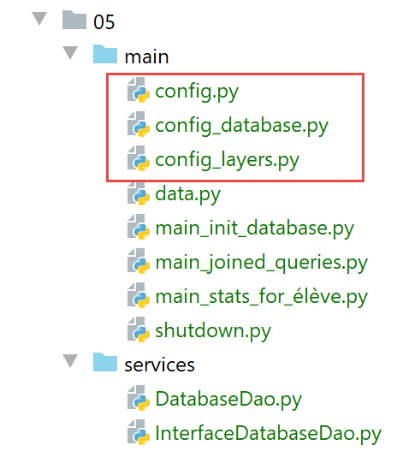
The configuration has been split across several files:
- the general configuration in [config.py]: it sets up the application’s Python Path and instantiates the architecture layers;
- the configuration of [sqlalchemy] in [config_database]: it performs the Class/Table mappings;
- The application layers are configured in [config_layers];
The [config] file is as follows:
def configure(config: dict) -> dict:
    import os

    # step 1 ---
    # set up the application's Python Path
    # absolute path of this script's folder
    script_dir = os.path.dirname(os.path.abspath(__file__))

    # absolute path configuration relative path reference
    root_dir = "C:/Data/st-2020/dev/python/cours-2020/python3-flask-2020"

    # absolute paths of dependencies
    absolute_dependencies = [
        # BaseEntity, MyException
        f"{root_dir}/classes/02/entities",
        # projet troiscouches v01
        f"{root_dir}/troiscouches/v01/interfaces",
        f"{root_dir}/troiscouches/v01/services",
        f"{root_dir}/troiscouches/v01/entities",
        # project files
        script_dir,
        f"{script_dir}/../services",
    ]

    # update syspath
    from myutils import set_syspath
    set_syspath(absolute_dependencies)

    # step 2 ------
    # database configuration
    import config_database
    config = config_database.configure(config)

    # step 3 ------
    # instantiation of application layers
    import config_layers
    config = config_layers.configure(config)

    # we return the config
    return config
- lines 4–27: building the application’s Python Path;
- lines 29–32: [sqlalchemy] configuration;
- lines 34–37: configuring the application layers;
The [config_database] file is as follows:
def configure(config: dict) -> dict:
    # config['sgbd'] is the name of the SGBD used
    # mysql : MySQL
    # pgres : PostgreSQL

    # sqlalchemy configuration
    from sqlalchemy import Table, Column, Integer, MetaData, String, Float, ForeignKey, create_engine

    from sqlalchemy.orm import mapper, relationship, sessionmaker

    # connection chains to the databases used
    engines = {
        'mysql': "mysql+mysqlconnector://admecole:mdpecole@localhost/dbecole",
        'pgres': "postgresql+psycopg2://admecole:mdpecole@localhost/dbecole"
    }
    # connection chain to the database used
    engine = create_engine(engines[config['sgbd']])

    # metadata
    metadata = MetaData()

    # database tables
    tables = {}
    # mapped classes
    from Classe import Classe
    from Elève import Elève
    from Note import Note
    from Matière import Matière

    # the class table
    tables['classes'] = classes_table = \
        Table("classes", metadata,
              Column('id', Integer, primary_key=True),
              Column('nom', String(30), nullable=False),
              )

    mapper(Classe, tables['classes'], properties={
        'id': classes_table.c.id,
        'nom': classes_table.c.nom
    })

    # the student table
    tables['élèves'] = élèves_table = \
        Table("élèves", metadata,
              Column('id', Integer, primary_key=True),
              Column('nom', String(30), nullable=False),
              Column('prénom', String(30), nullable=False),
              # a student belongs to a class
              Column('classe_id', Integer, ForeignKey('classes.id')),
              )
    # mapping
    mapper(Elève, tables['élèves'], properties={
        'id': élèves_table.c.id,
        'nom': élèves_table.c.nom,
        'prénom': élèves_table.c.prénom,
        'classe': relationship(Classe, backref="élèves", lazy="select")
    })

    # table of contents
    tables['matières'] = matières_table = \
        Table("matières", metadata,
              Column('id', Integer, primary_key=True),
              Column('nom', String(30), nullable=False),
              Column('coefficient', Float, nullable=False)
              )
    # mapping
    mapper(Matière, tables['matières'], properties={
        'id': matières_table.c.id,
        'nom': matières_table.c.nom,
        "coefficient": matières_table.c.coefficient
    })

    # notes table
    tables['notes'] = notes_table = \
        Table("notes", metadata,
              Column('id', Integer, primary_key=True),
              Column('valeur', Float, nullable=False),
              # a grade is a student's grade
              Column('élève_id', Integer, ForeignKey('élèves.id')),
              # a grade is a subject grade
              Column('matière_id', Integer, ForeignKey('matières.id')),
              )

    # mapping
    mapper(Note, tables['notes'], properties={
        'id': notes_table.c.id,
        'valeur': notes_table.c.valeur,
        'élève': relationship(Elève, backref="notes", lazy="select"),
        'matière': relationship(Matière, backref="notes", lazy="select")
    })

    # entity configuration [BaseEntity]
    Elève.excluded_keys = ['_sa_instance_state', 'notes', 'classe']
    Classe.excluded_keys = ['_sa_instance_state', 'élèves']
    Matière.excluded_keys = ['_sa_instance_state', 'notes']
    Note.excluded_keys = ['_sa_instance_state', 'matière', 'élève']

    # the factory session
    Session = sessionmaker()
    Session.configure(bind=engine)

    # a session
    session = Session()

    # certain information is stored in the configuration dictionary
    config['database'] = {"engine": engine, "metadata": metadata, "tables": tables, "session": session}

    # we return the config
    return config
Comments
- Lines 1-4: The [configure] function receives a dictionary as a parameter. Only the [sgbd] key is used. It is [mysql] if the database is a MySQL database, and [pgres] if the database is a PostgreSQL database;
- Lines 6–9: imports elements from [sqlalchemy]. The [config_database] script performs mappings between the tables in the [dbecole] database and the [Classes, Elève, Matière, Note] entities. In the table, the entity data is encapsulated in a row. In the Python code, they are encapsulated in an object. Hence the name ORM (Object Relational Mapper): ORM establishes a mapping (a link) between the rows of a relational database and objects. In this application, we have four [Classe, Elève, Matière, Note] entities that will be linked to four [classes, élèves, matières, notes] tables. Note that table names may contain accented characters;
- lines 11–17: the connection string to the database being used. This depends on the config[‘sgbd’] element;
- lines 24–28: the application entities that will be mapped ([sqlalchemy]). When these lines are executed, the Python connection (Path) will already have been established by the script ([config]);
- lines 30-40: the mapping between the [Classe] entity and the [classes] table;
- lines 30–35: the table [classes] is defined with the class [Table] from [sqlalchemy]. We specify that this table has two columns:
- the column [id], which is the primary key and represents the class number, line 33;
- the [nom] column, which contains the class name, line 34;
- lines 31–32: note that the syntax `x=y=z` is valid in Python: the value of `z` is assigned to `y`, then the value of `y` to `x`;
- lines 37–40: we list the mappings between the columns of the [classes] table and the properties of the [Classe] entity;
- lines 42–57: the mapping between the entity [Elève] and the table [élèves];
- lines 51–57: the table [élèves] is defined using the class [Table] from [sqlalchemy]. We specify that this table has four columns:
- the column [id], which is the primary key and represents the student ID, line 45;
- the [nom] column, which contains the student’s last name, row 46;
- the column [prénom], which contains the student’s first name, row 47. Note that a column name may contain accented characters;
- Row 49, column [classe_id], which will contain the class number to which the student belongs. This is called a foreign key. [élèves.classe_id] is a foreign key (ForeignKey) on the column [classes.id]. This means that the value of [élèves.classe_id] must exist in the [classes.id] column;
- Lines 51–57: The mappings between the columns of table [élèves] and the properties of entity [Elève] are listed:
- Lines 53–55 are easy to understand;
- line 56 is more difficult: it defines the value of the [Elève.classe] property as being calculated by the foreign key relationship that links the tables [élèves] and [classes]. The parameters of function [relationship] are as follows:
- [Classe]: This is the name of the entity with which the entity [Elève] has a foreign key relationship. This must be reflected in the [élèves] table by the presence of a foreign key referencing the [classes] table. We know that this exists;
- [backref="élèves"]: the name of a property that will be added to the entity [Classe]. [Classe.élèves] will be the list of all students in the class. This property must not already exist. If it already exists, simply choose a different name here for [backref]. The developer does not need to manage this property. [sqlalchemy] will handle it. The developer simply needs to know that it exists—added by [sqlalchemy]—and that they can use it in their code;
- [lazy=’select’]: this means that ORM should not attempt to immediately assign a value to the property [Elève.classe]. It should only retrieve its value when the code explicitly requests it. Thus:
- if the code requests a list of all students, they will be returned but their [classe] property will not be calculated;
- a little later, the code focuses on a specific student [e] and references their class [e.classe]. This reference will then force [sqlalchemy] to make a database query to retrieve the student’s class, all of which happens transparently to the developer;
- adding [lazy=’select’] is intended to avoid unnecessary database queries;
- Line 56: When ORM retrieves a row from the [élèves] table, it retrieves the [id, nom, prénom, classe_id] information. From there, it must construct a Student object (id, last_name, first_name, class). For the [id, nom, prénom] properties, this poses no difficulty. For the [classe] property, it’s more complicated. Its value is an object reference of type [Classe]. However, ORM only contains information from [élèves.classe_id]. Since [élèves.classe_id] is a foreign key on the [classes.id] column, we instruct it here to use this relationship to retrieve from the table [classes] the row with id=[élèves.classe_id] (which must exist) and to create, from this row, the object [Classe] expected by the property [Elève.classe];
- lines 59–71: the mapping between the entity [Matière] and the table [matières];
- lines 59–65: definition of the table [sqlalchemy] named [matières];
- lines 66–71: the mappings between the columns of table [matières] and the properties of entity [Matière] are listed. There are no difficulties here;
- lines 73–90: the mapping between the entity [Note] and the table [notes];
- lines 73–82: definition of the table [sqlalchemy] named [notes]. It has two foreign keys:
- line 79, the column [notes.élève_id] takes its values from the column [élèves.id]]. This foreign key reflects the fact that a grade belongs to a specific student;
- row 81, the [notes.matière_id] column takes its values from the [matières.id] column. This foreign key represents the fact that a grade is a grade in a specific subject;
- lines 84–90: the mapping between the entity [Note] and the table [notes]:
- line 88: the property [Note.élève] must have a value of an instance of type [Elève]. The ORM has only the [notes.élève_id] column as information in the row of the [notes] table, which references the [élèves.id] column. Here, we are told to use this foreign key relationship to retrieve the instance [Elève] for which we have the grade. Additionally, [relationship(Elève, backref="notes", …)] will create the new property [Elève.notes], which will be the list of the student’s grades. This property must not already exist in the class [Elève];
- Line 89: The property [Note.matière] must have a value of an instance of type [Matière]. The ORM has only the [notes.matière_id] column as information in the row of the [notes] table, which references the [matières.id] column. Here, we use this foreign key relationship to retrieve the instance [Matière] for which we have the grade. Additionally, [relationship(Matière, backref="notes", …)] will create the new property [Matière.notes], which will be the list of grades in the subject. This property must not already exist in the class [Matière];
- Lines 92–96: For each entity derived from [BaseEntity], we define the list of properties to exclude from the entity’s property dictionary (BaseEntity.asdict). We saw that [sqlalchemy] added the property [_sa_instance_state] to all mapped entities. We do not want it in the property dictionary. Furthermore, we saw that the previous mappings had added new properties to the entities:
- [Elève.notes]: all of the student’s grades;
- [Classe.élèves]: all students in the class;
- [Matière.notes]: all grades for the subject;
Generally, we don’t want these properties added to the entity’s state. Indeed, calculating their value incurs a cost SQL, and this value is often unnecessary. So if we retrieve the student named ‘X’:
- (continued)
- ORM will return an entity [Elève(id, nom, prénom, classe, notes)]. Because of [lazy=’select’], the properties [classe, notes] linked to foreign keys in the database will not have been calculated;
- now, if I display the jSON string for this student, we know it will be the jSON string from the [asdict] dictionary of the entity. If the properties [classe] and [notes] are included, [sqlalchemy] will be forced to make SQL queries to calculate their values. This is costly. If we can avoid these queries, that is preferable;
- here, we have excluded all properties linked to a foreign key;
- lines 98–100: instantiation and configuration of a [Session factory] (factory=production factory). The [Session] object is used to create [sqlalchemy] sessions backed by transactions;
- lines 102–103: creation of an SQLAlchemy session;
- line 106: certain elements of the [sqlalchemy] configuration are placed in the global application configuration dictionary;
- line 109: this dictionary is returned;
The [config_layers] file configures the application layers:
def configure(config: dict) -> dict:
    # instantiation layer [dao]
    from DatabaseDao import DatabaseDao
    dao = DatabaseDao(config)

    # instantiation of the [métier] layer
    from Métier import Métier
    métier = Métier(dao)

    # instantiation of the [ui] layer
    from Console import Console
    ui = Console(métier)

    # we put the layers in the config
    config['dao'] = dao
    config['métier'] = métier
    config['ui'] = ui

    # we return the config
    return config
- line 1: the [configure] function receives the dictionary of the application's global configuration;
- lines 2–12: the application layers are instantiated;
- lines 15–17: the layer references are added to the global configuration;
- line 20: return the new configuration;
19.6.5. The [dao] layer - 1
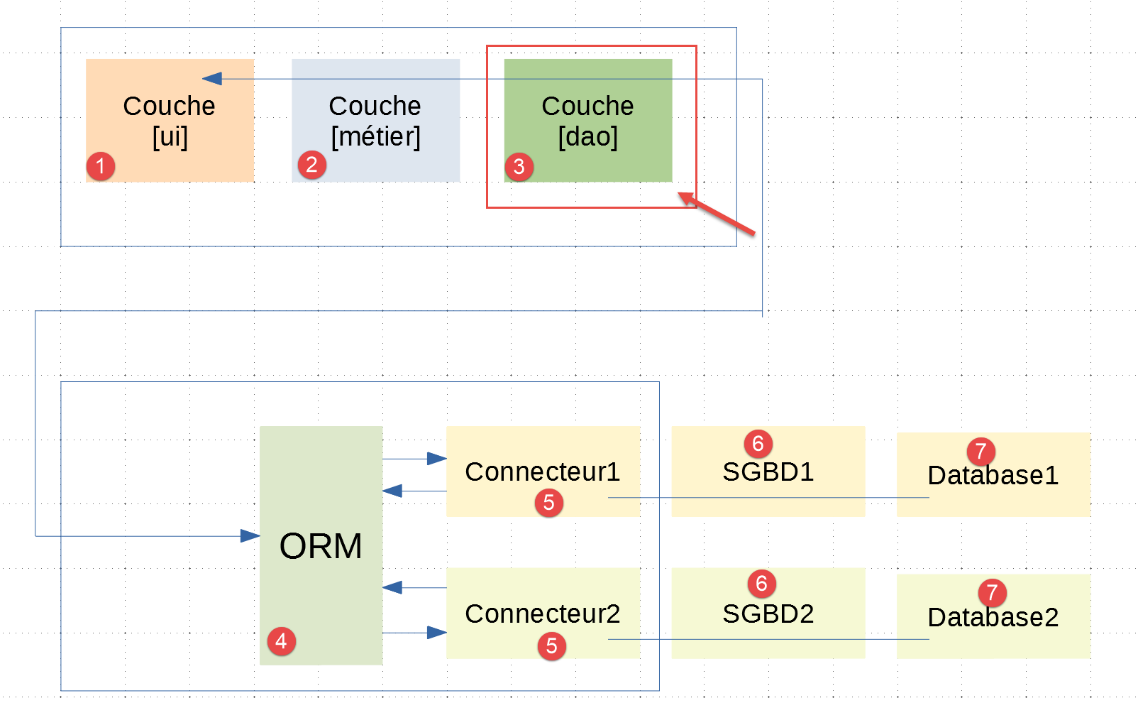
It should be understood here that the layer [dao] [3] communicates with theORM, [sqlalchemy], and [4], configured as described in the previous paragraph. Of the three layers [ui, métier, dao] in the |troiscouches v01| application, only the layer [dao] needs to be rewritten. The layers [ui, métier] are retained.
The implementation of the [dao] layer has been placed in the [services] folder:
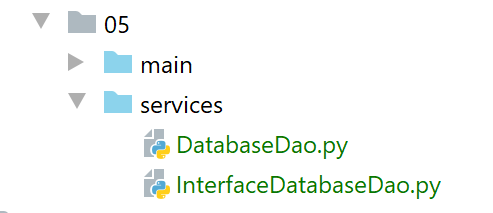
[InterfaceDatabaseDao] is the interface for the [dao] layer:
from abc import ABC, abstractmethod

from InterfaceDao import InterfaceDao


class InterfaceDatabaseDao(InterfaceDao, ABC):

    # database initialization
    @abstractmethod
    def init_database(self, data: dict):
        pass
- line 6: the [InterfaceDatabaseDao] interface derives both from the [ABC] class to be an abstract class and from the [InterfaceDao] interface of the |troiscouches v01| project;
- lines 8–11: the [init_database] method is added to the methods inherited from [InterfaceDao]. Its role will be to initialize the database with the data from the [data] dictionary passed to it as a parameter in line 10;
Recall that the [InterfaceDao] interface was as follows:
# imports
from abc import ABC, abstractmethod

# interface Dao
from Elève import Elève


class InterfaceDao(ABC):
    # class list
    @abstractmethod
    def get_classes(self: object) -> list:
        pass

    # list of students
    @abstractmethod
    def get_élèves(self: object) -> list:
        pass

    # list of materials
    @abstractmethod
    def get_matières(self: object) -> list:
        pass

    # lIST OF NOTES
    @abstractmethod
    def get_notes(self: object) -> list:
        pass

    # list of student grades
    @abstractmethod
    def get_notes_for_élève_by_id(self: object, élève_id: int) -> list:
        pass

    # search for a student by his id
    @abstractmethod
    def get_élève_by_id(self: object, élève_id: int) -> Elève:
        pass
The implementation of the [dao] layer is as follows:
from sqlalchemy.exc import DatabaseError, IntegrityError, InterfaceError

from Classe import Classe
from Elève import Elève
from InterfaceDatabaseDao import InterfaceDatabaseDao
from Matière import Matière
from MyException import MyException
from Note import Note


class DatabaseDao(InterfaceDatabaseDao):

    def __init__(self, config: dict):
        # database = {"engine": engine, "metadata": metadata, "tables": tables, "session": session}
        self.database = config['database']
        self.session = self.database['session']

    def init_database(self, data: dict):
        …
…
- line 11: the [DatabaseDao] class implements the [InterfaceDatabaseDao] interface;
- lines 13–16: the class constructor. It takes the application configuration dictionary as a parameter;
- line 15: the [sqlalchemy] configuration is stored;
- Line 16: We store the session [sqlalchemy], which we will use to manipulate the database;
- Line 18: The method [init_database] initializes the database with the dictionary [data];
The dictionary [data] is implemented by the following script [data.py]:
def configure():
    from Classe import Classe
    from Elève import Elève
    from Matière import Matière
    from Note import Note

    # classes are instantiated
    classe1 = Classe().fromdict({"id": 1, "nom": "classe1"})
    classe2 = Classe().fromdict({"id": 2, "nom": "classe2"})
    classes = [classe1, classe2]
    # materials
    matière1 = Matière().fromdict({"id": 1, "nom": "matière1", "coefficient": 1})
    matière2 = Matière().fromdict({"id": 2, "nom": "matière2", "coefficient": 2})
    matières = [matière1, matière2]
    # students
    élève11 = Elève().fromdict({"id": 11, "nom": "nom1", "prénom": "prénom1", "classe": classe1})
    élève21 = Elève().fromdict({"id": 21, "nom": "nom2", "prénom": "prénom2", "classe": classe1})
    élève32 = Elève().fromdict({"id": 32, "nom": "nom3", "prénom": "prénom3", "classe": classe2})
    élève42 = Elève().fromdict({"id": 42, "nom": "nom4", "prénom": "prénom4", "classe": classe2})
    élèves = [élève11, élève21, élève32, élève42]
    # student grades in various subjects
    note1 = Note().fromdict({"id": 1, "valeur": 10, "élève": élève11, "matière": matière1})
    note2 = Note().fromdict({"id": 2, "valeur": 12, "élève": élève21, "matière": matière1})
    note3 = Note().fromdict({"id": 3, "valeur": 14, "élève": élève32, "matière": matière1})
    note4 = Note().fromdict({"id": 4, "valeur": 16, "élève": élève42, "matière": matière1})
    note5 = Note().fromdict({"id": 5, "valeur": 6, "élève": élève11, "matière": matière2})
    note6 = Note().fromdict({"id": 6, "valeur": 8, "élève": élève21, "matière": matière2})
    note7 = Note().fromdict({"id": 7, "valeur": 10, "élève": élève32, "matière": matière2})
    note8 = Note().fromdict({"id": 8, "valeur": 12, "élève": élève42, "matière": matière2})
    notes = [note1, note2, note3, note4, note5, note6, note7, note8]
    # we group all
    data = {"élèves": élèves, "classes": classes, "matières": matières, "notes": notes}
    # we return the data
    return data
- line 34: the dictionary that will be passed to the [init_database] method. This dictionary consists of the following keys (line 32):
- [élèves]: the list of students;
- [classes]: the list of classes;
- [matières]: the list of subjects;
- [notes]: the list of grades for all students in all subjects;
Let's go back to the [init_database] method:
def init_database(self, data: dict):
        # config from the bd
        database = self.database
        engine = database['engine']
        metadata = database['metadata']
        tables = database['tables']

        try:
            # delete existing tables
            # checkfirst=True: first checks that the table exists
            tables["notes"].drop(engine, checkfirst=True)
            tables["matières"].drop(engine, checkfirst=True)
            tables["élèves"].drop(engine, checkfirst=True)
            tables["classes"].drop(engine, checkfirst=True)

            # recreate tables from mapping
            metadata.create_all(engine)

            # table filling
            session = self.session

            # classes
            classes = data["classes"]
            for classe in classes:
                session.add(classe)

            # materials
            matières = data["matières"]
            for matière in matières:
                session.add(matière)

            # students
            élèves = data["élèves"]
            for élève in élèves:
                session.add(élève)

            # notes
            notes = data["notes"]
            for note in notes:
                session.add(note)

            # commit
            session.commit()
        except (DatabaseError, InterfaceError, IntegrityError) as erreur:
            # session cancellation
            if session:
                session.rollback()
            # up the exception
            raise MyException(23, f"{erreur}")
- lines 3-6: retrieve information from the database configuration;
- lines 9-14: we saw that the [sqlalchemy] configuration mapped four entities to four [élèves, matières, classes, notes] tables. We start by deleting these tables if they exist;
- lines 16–17: we recreate the four tables we just deleted;
- lines 22–25: we add all classes to the session;
- lines 27–30: add all subjects to the session;
- lines 32–35: add all students to the session;
- lines 37–40: we add all grades to the session;
- To make these additions, we followed a specific order. We started with entities that have no relationships with other entities and ended with those that do. Thus, when we add students to the session, the classes they belong to are already in the session;
- line 43: the [sqlalchemy] session is validated. After this operation, we are certain that all data in the session has been synchronized with the database. In other words, it has been added to the tables. This was made possible by the mappings defined in the configuration of [sqlalchemy]. [sqlalchemy] knows how each entity should be stored in the tables. [sqlalchemy] also generated the foreign keys that the tables may contain;
- lines 44–49: if a problem is encountered, the [sqlalchemy] session is canceled, and on line 49, an exception is thrown;
19.6.6. Database Initialization
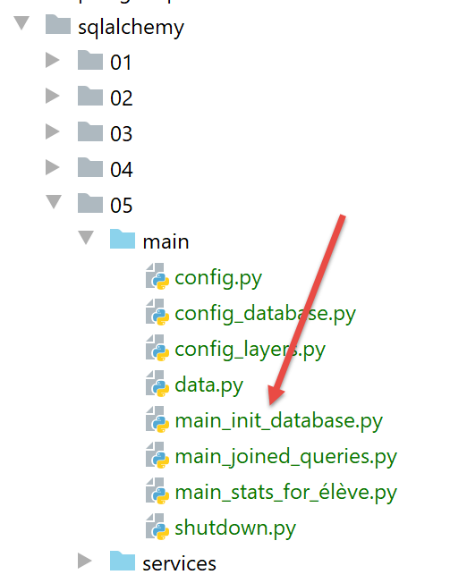
The script [main_init_database] initializes the database with the contents of the script [data.py]. Its code is as follows:
# a mysql or pgres parameter is expected
import sys

syntaxe = f"{sys.argv[0]} mysql / pgres"
erreur = len(sys.argv) != 2
if not erreur:
    sgbd = sys.argv[1].lower()
    erreur = sgbd != "mysql" and sgbd != "pgres"
if erreur:
    print(f"syntaxe : {syntaxe}")
    sys.exit()

# configure the application
import config
config = config.configure({'sgbd': sgbd})

# syspath is configured - imports can be made
from MyException import MyException

# retrieve the data to be stored in the database
import data
data = data.configure()

# retrieve the [dao] layer
dao = config["dao"]

# ----------- hand
try:
    # database table creation and initialization
    dao.init_database(data)
except MyException as ex:
    # error is displayed
    print(f"L'erreur suivante s'est produite : {ex}")
finally:
    # release of resources mobilized by the application
    import shutdown
    shutdown.execute(config)
# end
print("Travail terminé...")
- lines 1-11: the script expects a parameter [mysql] or [pgres] depending on whether you want to initialize a database MySQL or PostgreSQL;
- lines 13-15: the application is configured for the SGBD passed as a parameter;
- lines 20–22: the data to be stored in the database is retrieved;
- line 25: the [dao] layer has already been instantiated and is accessible in the application configuration;
- line 30: the database is initialized;
- lines 34–37: regardless of whether an error occurred, the application resources are released using the [shutdown] module;
The [shutdown.py] module is as follows:
def execute(config: dict):
    # release the resources mobilized by the application
    sqlalchemy_session = config['database']['session']
    if sqlalchemy_session:
        sqlalchemy_session.close()
The [shutdown.execute] function closes the [sqlalchemy] session used to initialize the database.
We create a first execution configuration (see |execution configuration|) to run [main_init_database] with SGBD and MySQL:
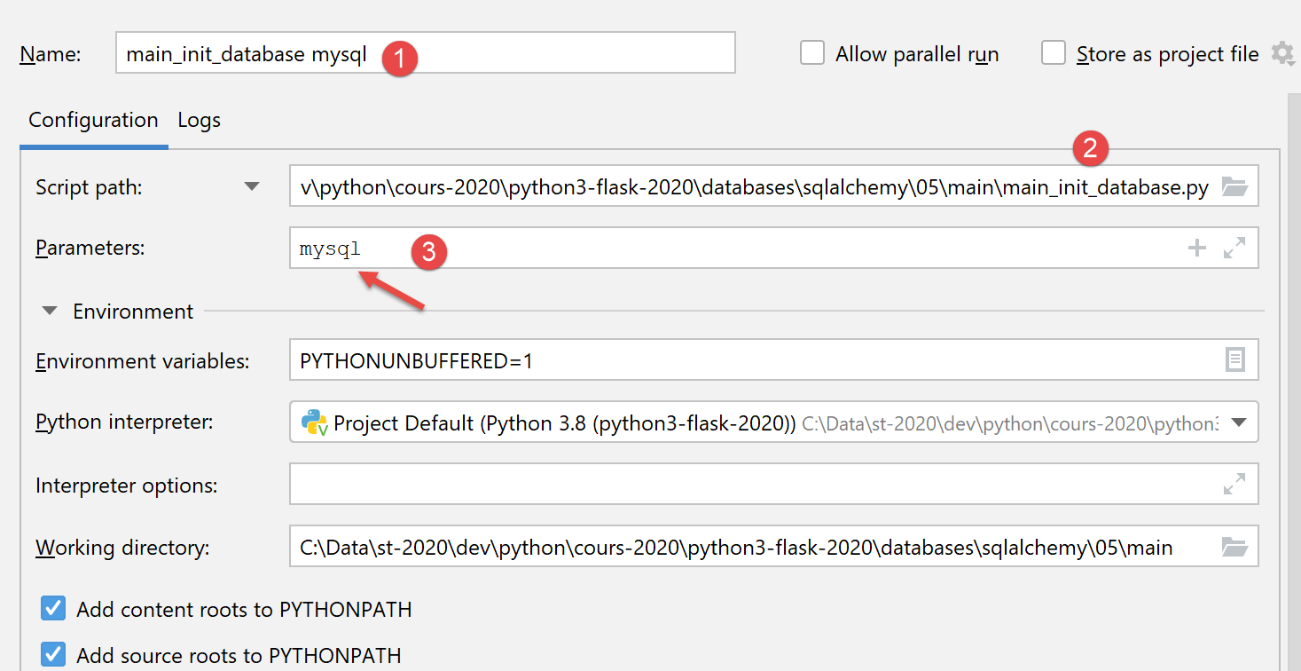
The results of running this configuration are as follows in phpMyAdmin:
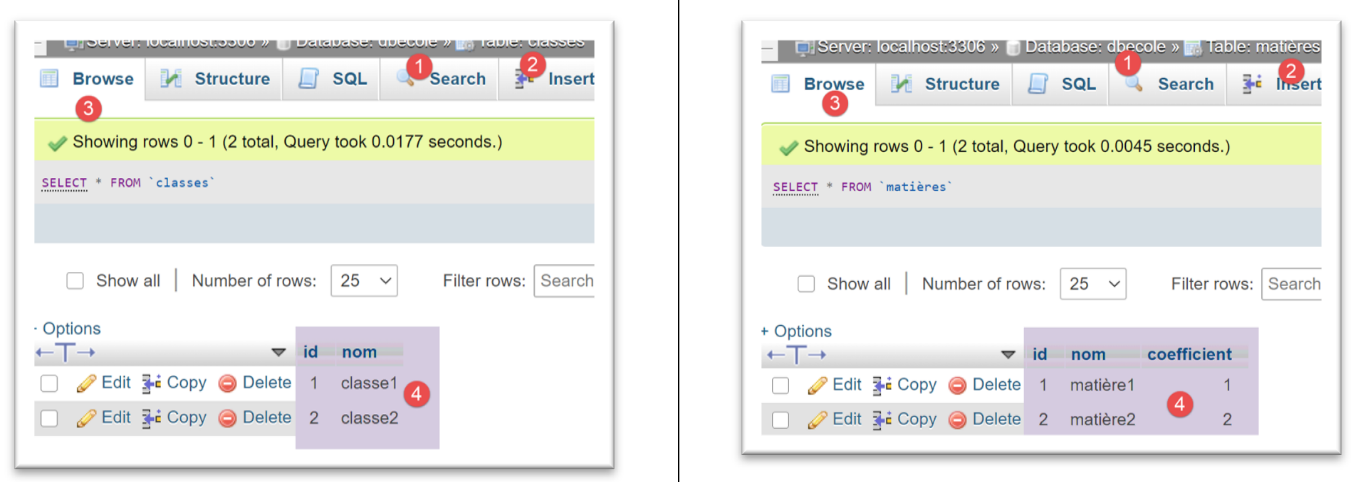
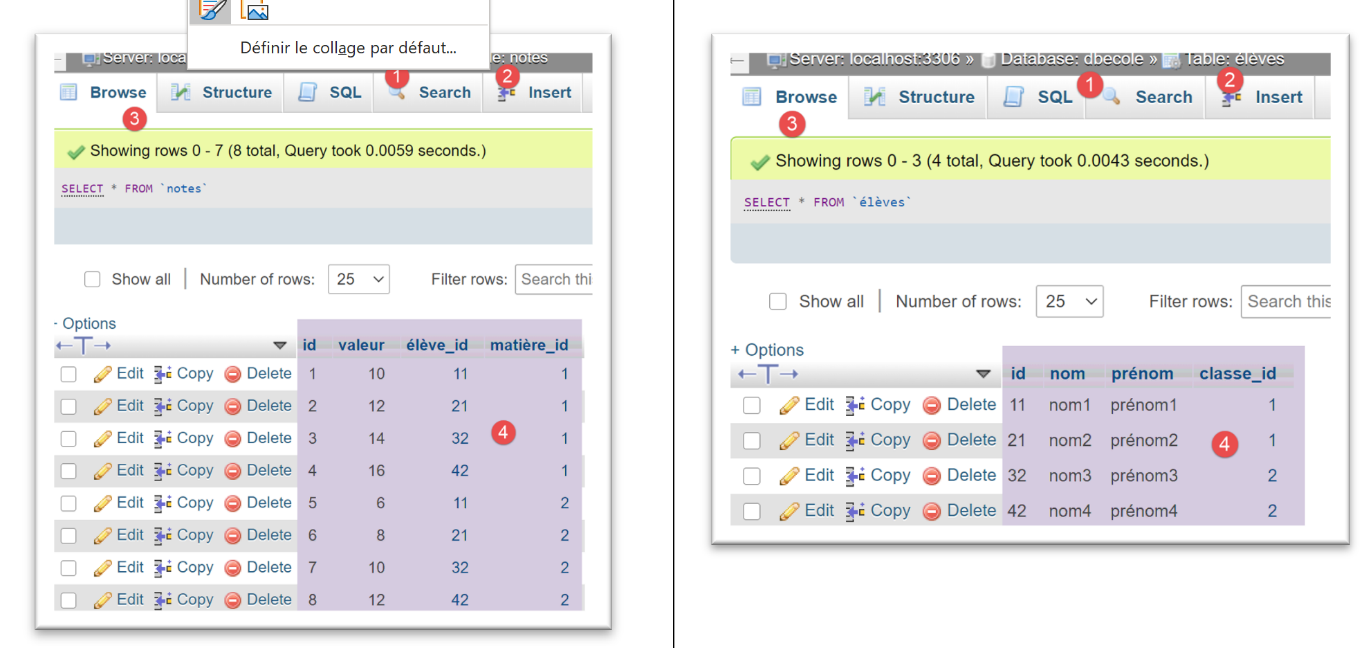
For SGBD and [PostgreSQL], we use the following execution configuration:
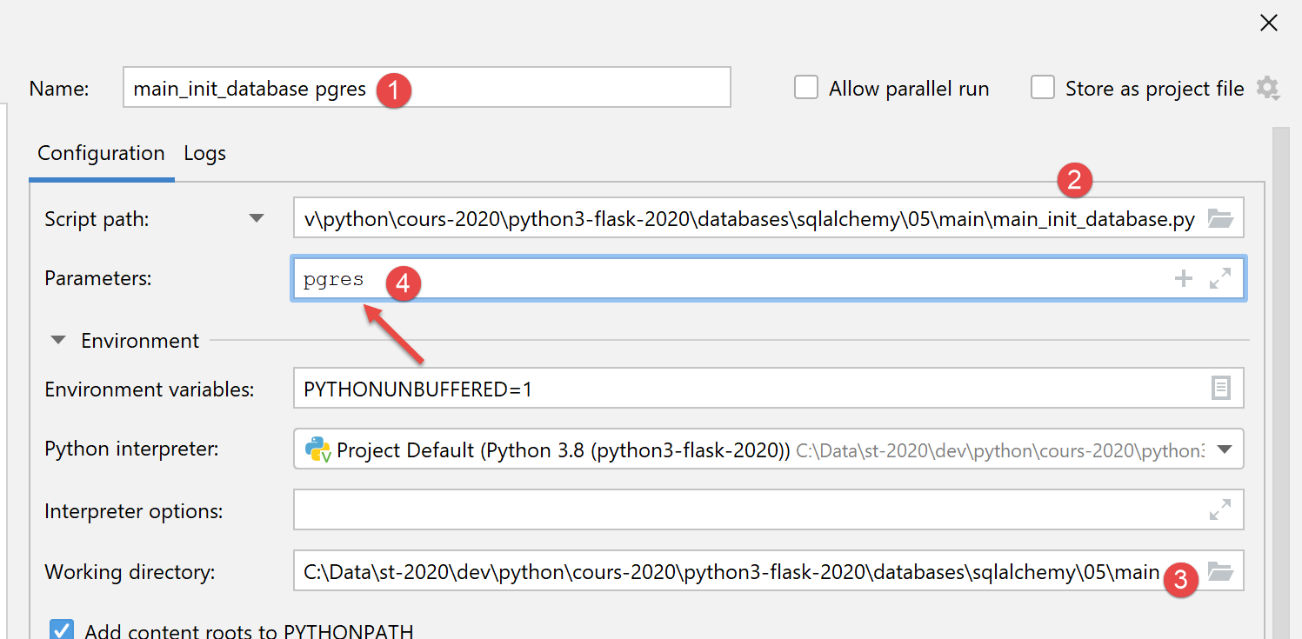
Upon execution, the results in [pgAdmin] are as follows:
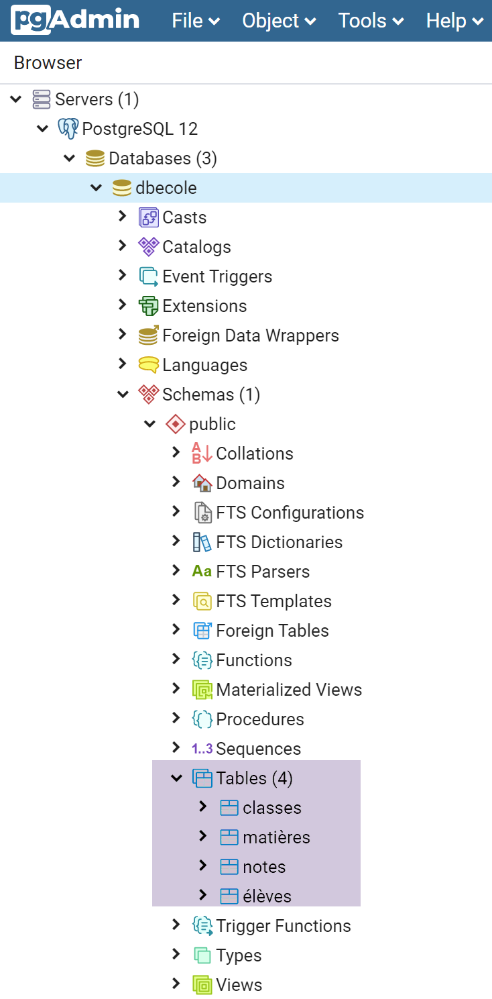
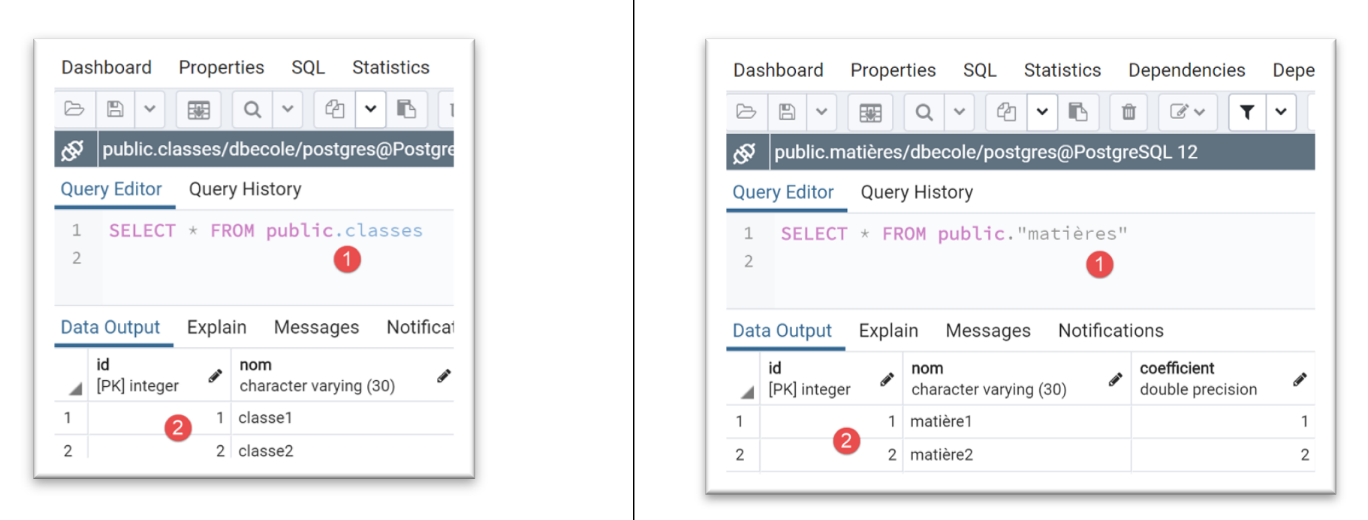
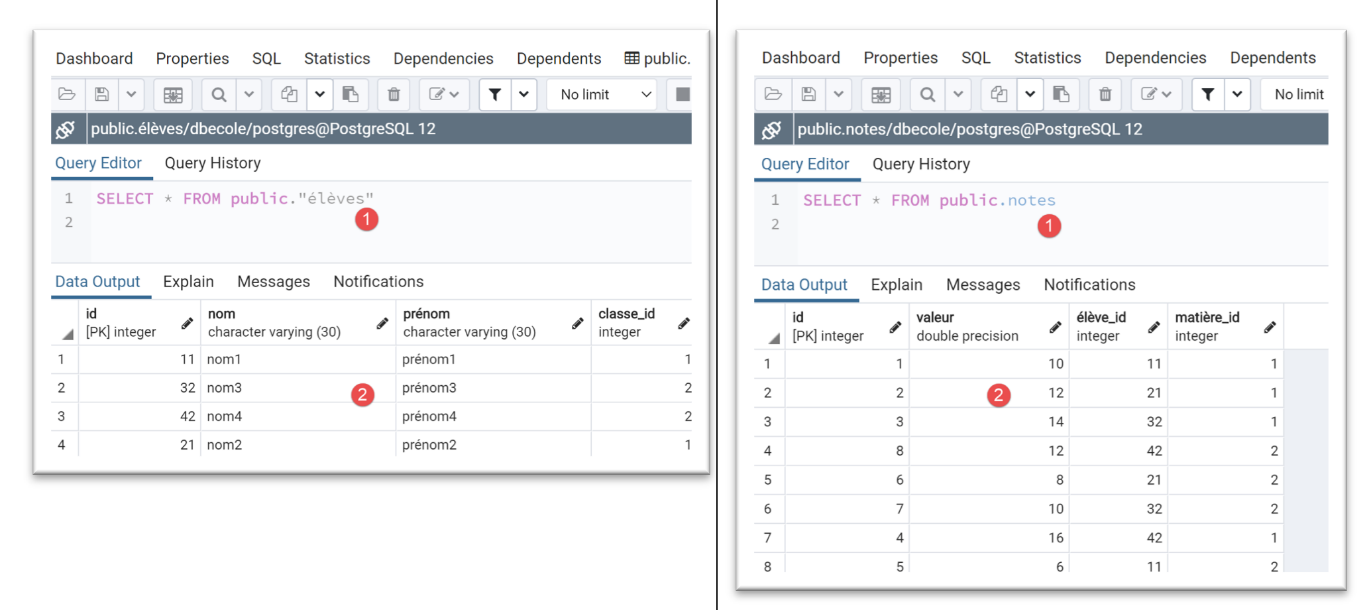
Note how easily we were able to switch to SGBD.
19.6.7. The [dao] layer – 2
We return to the [DatabaseDao] class, which implements the [dao] interface. So far, we have only shown the implementation of the [init_database] method. We will now show the implementation of the other methods:
from sqlalchemy.exc import DatabaseError, IntegrityError, InterfaceError

from Classe import Classe
from Elève import Elève
from InterfaceDatabaseDao import InterfaceDatabaseDao
from Matière import Matière
from MyException import MyException
from Note import Note


class DatabaseDao(InterfaceDatabaseDao):

    def __init__(self, config: dict):
        # database = {"engine": engine, "metadata": metadata, "tables": tables, "session": session}
        self.database = config['database']
        self.session = self.database['session']

    def init_database(self, data: dict):
        …

    # list of all classes
    def get_classes(self: object) -> list:
        # request
        return self.session.query(Classe).all()

    # list of all students
    def get_élèves(self: object) -> list:
        # request
        return self.session.query(Elève).all()

    # list of all materials
    def get_matières(self: object) -> list:
        # request
        return self.session.query(Matière).all()

    # a list of all students' grades
    def get_notes(self: object) -> list:
        # request
        return self.session.query(Note).all()

    # a list of grades for a particular student
    def get_notes_for_élève_by_id(self: object, élève_id: int) -> list:
        # we look for the student - an exception is thrown if he doesn't exist
        # we let it rise
        élève = self.get_élève_by_id(élève_id)
        # lazy loading of notes
        notes = élève.notes
        # a dictionary is returned
        return {"élève": élève, "notes": notes}

    # a student identified by his number
    def get_élève_by_id(self, élève_id: int) -> Elève:
        # we're looking for the student
        élèves = self.session.query(Elève).filter(Elève.id == élève_id).all()
        # have we found?
        if élèves:
            return élèves[0]
        else:
            raise MyException(11, f"L'élève d'identifiant {élève_id} n'existe pas")

    # a student identified by name
    def get_élève_by_name(self, élève_name: str) -> Elève:
        # we're looking for the student
        élèves = self.session.query(Elève).filter(Elève.nom == élève_name).all()
        # have we found?
        if élèves:
            return élèves[0]
        else:
            raise MyException(12, f"L'élève de nom {élève_name} n'existe pas")

    # a class identified by its number
    def get_classe_by_id(self, classe_id: int) -> Classe:
        # we are looking for the
        classes = self.session.query(Classe).filter(Classe.id == classe_id).all()
        # have we found?
        if classes:
            return classes[0]
        else:
            raise MyException(13, f"La classe d'identifiant {classe_id} n'existe pas")

    # a class identified by its name
    def get_classe_by_name(self, classe_name: str) -> Classe:
        # we're looking for the class
        classes = self.session.query(Classe).filter(Classe.nom == classe_name).all()
        # have we found?
        if classes:
            return classes[0]
        else:
            raise MyException(14, f"La classe de nom {classe_name} n'existe pas")

    # a material identified by its number
    def get_matière_by_id(self, matière_id: int) -> Matière:
        # we're looking for material
        matières = self.session.query(Matière).filter(Matière.id == matière_id).all()
        # have we found?
        if matières:
            return matières[0]
        else:
            raise MyException(11, f"La matière d'identifiant {matière_id} n'existe pas")

    # a material identified by its name
    def get_matière_by_name(self, matière_name: str) -> Matière:
        # we're looking for the material
        matières = self.session.query(Matière).filter(Matière.nom == matière_name).all()
        # have we found?
        if matières:
            return matières[0]
        else:
            raise MyException(15, f"La matière de nom {matière_name} n'existe pas")
- lines 21–24: the method [get_classes] must return the list of classes at the school. On line 20, we use a query we’ve seen before;
- lines 26–39: three other similar methods to retrieve the lists of students, subjects, and grades;
- lines 51-59: the method [get_élève_by_id] must return a student identified by their ID number. It throws an exception if the student does not exist;
- line 54: we use a filtered query. We get an empty list or a list with one element;
- line 57: if the retrieved list is not empty, the first element of the list is returned;
- otherwise, line 59, an exception is thrown;
- lines 41–49: the method [get_notes_for_élève_by_id] must return the grades of a student identified by their ID number:
- line 45: the [get_élève_by_id] method is used to retrieve the Student entity for the student;
- line 47: we use the [Elève.notes] property created by the mapping between the [Note] entity and the [notes] table (see the |SQLAlchemy configuration| section), which represents the student’s grades;
- line 49: a dictionary is returned;
- lines 61–109: a series of similar methods that allow you to:
- find a student by name, lines 61–69;
- find a class, lines 71–89;
- retrieve a subject, lines 91–109;
19.6.8. The script [main_joined_queries]
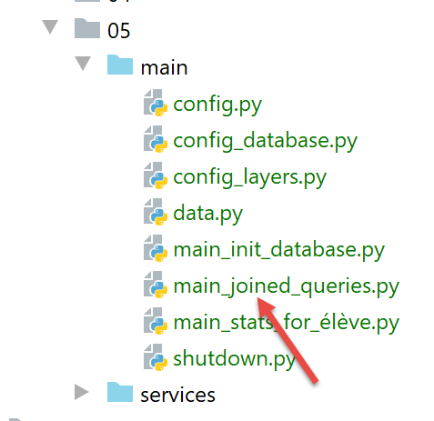
The script [main_joined_queries] is named as such because it aims to highlight the queries implicitly made by [sqlalchemy] to retrieve information from multiple tables. These queries, which are hidden from the programmer, are made every time a property of an entity has been associated with the [relationship] function in the entity’s mapping. For example:
    # mapping
    mapper(Note, tables['notes'], properties={
        'id': notes_table.c.id,
        'value': notes_table.c.valeur,
        'student': relationship(Student, backref="notes", lazy="select"),
        'matter': relationship(Matter, backref="notes", lazy="select")
    })
Above is the mapping between the [Note] entity and the [notes] table:
- Line 5: When the [élève] property of an entity [Note] is requested for the first time, it will be retrieved from the [élèves] table via a SQL query. Until this property is requested, it remains undefined (lazy load). Once it has been retrieved, its value remains in the memory of ORM. When it is referenced a second time, ORM will immediately return its value without issuing a new SQL query. All of this is transparent to the developer;
- the same applies to the inverse property [Elève.notes] (backref), line 5;
- the same applies to the property [Note.matière] and its inverse property [Matière.notes] (backref), line 6;
The script [main_joined_queries] is as follows:
# a mysql or pgres parameter is expected
import sys

syntaxe = f"{sys.argv[0]} mysql / pgres"
erreur = len(sys.argv) != 2
if not erreur:
    sgbd = sys.argv[1].lower()
    erreur = sgbd != "mysql" and sgbd != "pgres"
if erreur:
    print(f"syntaxe : {syntaxe}")
    sys.exit()

# configure the application
import config
config = config.configure({"sgbd": sgbd})

# syspath is configured - imports can be made
from MyException import MyException

# the [dao] layer
dao = config["dao"]
try:
    # pupil by id
    print("élève id=11 -----------")
    élève = dao.get_élève_by_id(11)
    print(f"élève={élève}")
    # student class (lazy loading)
    classe = élève.classe
    print(f"classe de l'élève : {classe}")
    # students in the same class (lazy loading)
    print("élèves dans la même classe :")
    for élève in classe.élèves:
        print(f"élève={élève}")

    # a student by name
    print("élève nom='nom2' -----------")
    print(f"élève={dao.get_élève_by_name('nom2')}")
    # its class (lazy loading)
    print(f"classe de l'élève : {élève.classe}")

    # student notes
    print("notes de l'élève id=11 -----------")
    # first the student
    élève = dao.get_élève_by_id(11)
    # then its notes (lazy loading)
    for note in élève.notes:
        # the note
        print(f"note={note}, "
              # note material (lazy loading)
              f"matière={note.matière}")

    # students in a class
    print("élèves de la classe nom='classe1' -----------")
    # first the class
    classe = dao.get_classe_by_name('classe1')
    # then the students (lazy loading)
    for élève in classe.élèves:
        print(élève)

    # same for [classe2]
    print("élèves de la classe de nom 'classe2' -----------")
    classe = dao.get_classe_by_name('classe2')
    for élève in classe.élèves:
        print(élève)

    # subject grades
    print("matière de nom='matière1' -----------")
    # first the material
    matière = dao.get_matière_by_name('matière1')
    print(f"matière={matière}")
    # then grades in this subject (lazy loading)
    print("Notes dans la matière : ")
    for note in matière.notes:
        print(note)

    # same for matière2
    print("matière de nom='matière2' -----------")
    matière = dao.get_matière_by_name('matière2')
    print(f"matière={matière}")
    print("Notes dans la matière : ")
    for note in matière.notes:
        print(f"note={note}")
except MyException as ex1:
    # error is displayed
    print(f"L'erreur 1 suivante s'est produite : {ex1}")
except BaseException as ex2:
    # error is displayed
    print(f"L'erreur 2 suivante s'est produite : {ex2}")
finally:
    # free up resources
    import shutdown
    shutdown.execute(config)
The comments are sufficient to understand the code.
We create an execution configuration for MySQL:
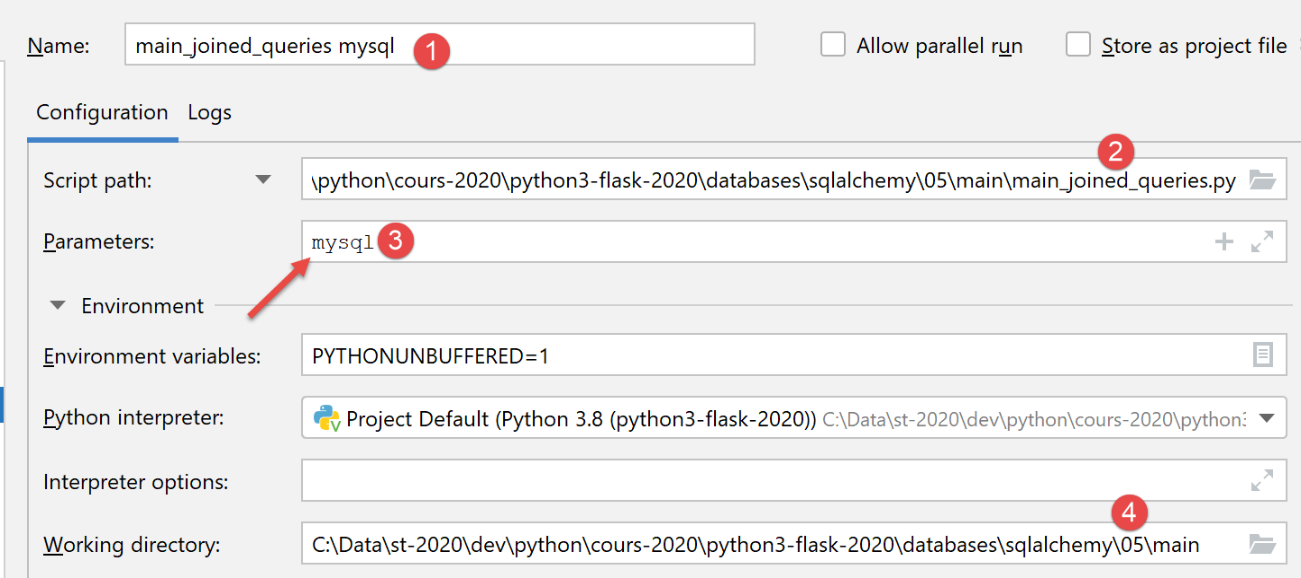
The execution results are as follows:
To understand these results, remember that we excluded certain properties from the entity dictionary (see |configuration|):
    # entity configuration [BaseEntity]
    Elève.excluded_keys = ['_sa_instance_state', 'notes', 'classe']
    Classe.excluded_keys = ['_sa_instance_state', 'élèves']
    Matière.excluded_keys = ['_sa_instance_state', 'notes']
    Note.excluded_keys = ['_sa_instance_state', 'matière', 'élève']
Thus, when we enter [print(f"élève={élève}")] on line 26 of the code, line 1 above tells us that the properties ['_sa_instance_state', 'notes', 'classe'] will not be displayed. This is what we see on line 3 of the results. All other properties are displayed. Thus, still on line 3, we discover a new property [classe_id] that did not initially exist in the entity [Elève]. This property corresponds directly to the [classe_id] column in the [élèves] table. Thus, [sqlalchemy] has added the following properties to the entity [Elève]: [classe_id, _sa_instance_state, notes]. It is important to be aware of this, particularly because these properties must not already exist in the mapped entity.
The properties excluded from the entity dictionary are important. For example, if the properties [notes, élève] are not excluded from the entity [Elève], then the operation [print(f"élève={élève}")] will display them and will therefore, as just explained, trigger implicit SQL queries (lazy loading) to retrieve the values of these properties. If, as in this case, a list of students is being displayed, the implicit SQL operations are performed for each student. This can be both unnecessary and certainly costly in terms of execution time.
To run the script with a PostgreSQL database, create the following execution configuration:
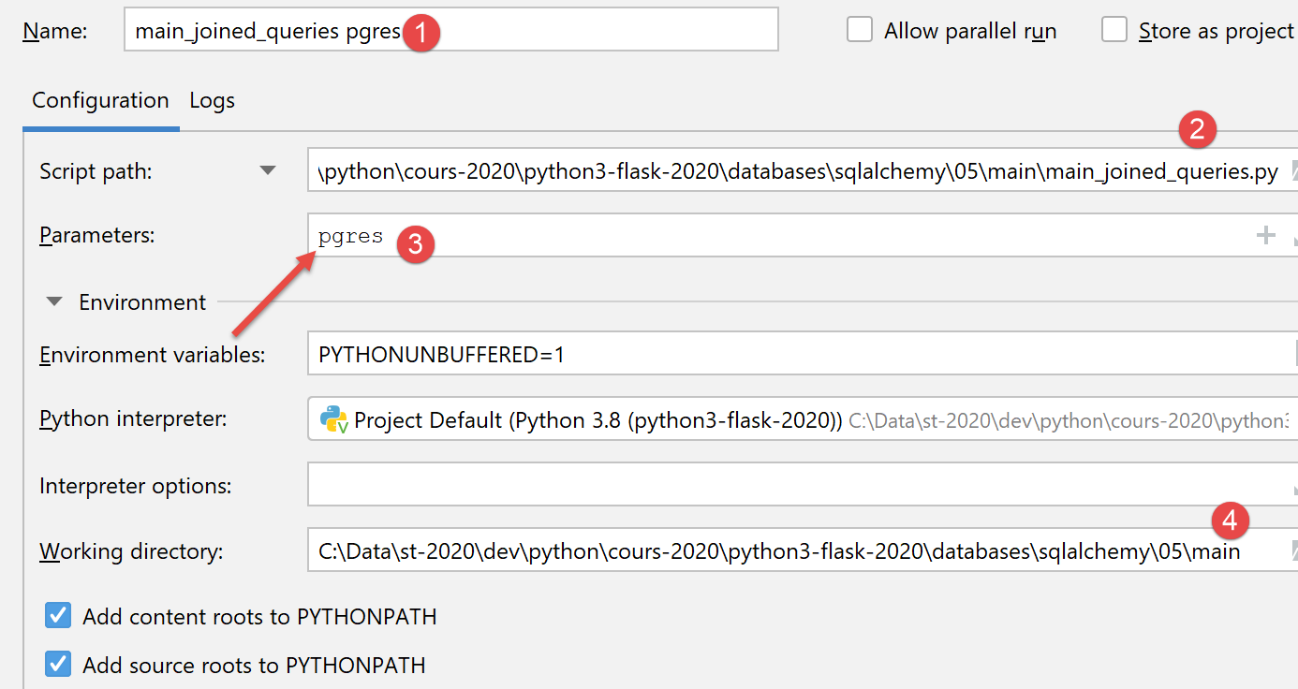
The execution yields the same results as with MySQL.
19.6.9. The [main_stats_for_élève] script
The [main_stats_for_élève] script is the one already used in the |troiscouches v01] application. It was then called [main]. It is a console application that provides certain metrics on a student’s grades: [moyenne pondérée, min, max, liste]. It fits into the following architecture:
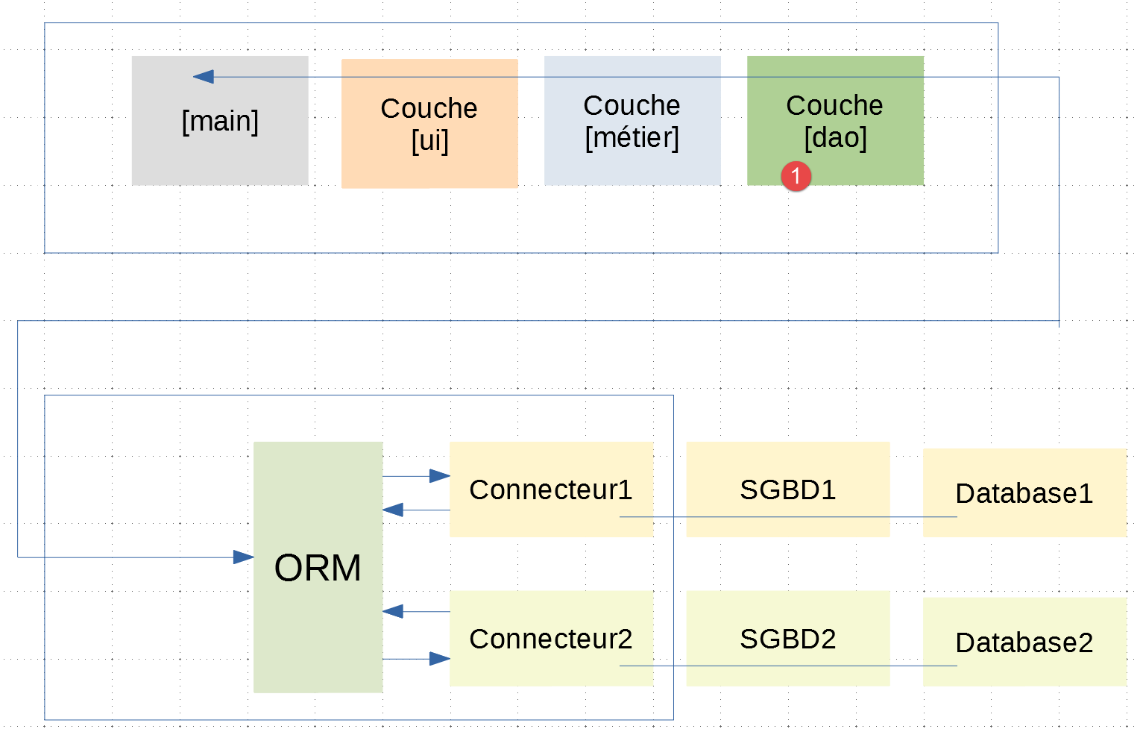
In this layered architecture, only the [dao] layer has been changed between the |troiscouches v01| application and this one. Since the new layer [dao] adheres to the [InterfaceDao] interface of the old layer [dao], the [ui, métier] layers do not need to be changed. We can therefore continue to use those defined in the |troiscouches v01| application.
The [main_stats_for_élève] script implements the [main] layer from the diagram above as follows:
# a mysql or pgres parameter is expected
import sys

syntaxe = f"{sys.argv[0]} mysql / pgres"
erreur = len(sys.argv) != 2
if not erreur:
    sgbd = sys.argv[1].lower()
    erreur = sgbd != "mysql" and sgbd != "pgres"
if erreur:
    print(f"syntaxe : {syntaxe}")
    sys.exit()

# configure the application
import config
config = config.configure({'sgbd': sgbd})

# syspath is configured - imports can be made
from MyException import MyException

# the [ui] layer
ui = config["ui"]
try:
    # layer execution [ui]
    ui.run()
except MyException as ex1:
    # error is displayed
    print(f"L'erreur 1 suivante s'est produite : {ex1}")
except BaseException as ex2:
    # error is displayed
    print(f"L'erreur 2 suivante s'est produite : {ex2}")
finally:
    # free up resources
    import shutdown
    shutdown.execute(config)
- line 20: retrieve a reference to the [ui] layer in the application configuration;
- line 24: we initiate the user dialog using the single method of the [ui] layer;
An execution configuration for PostgreSQL would be as follows:
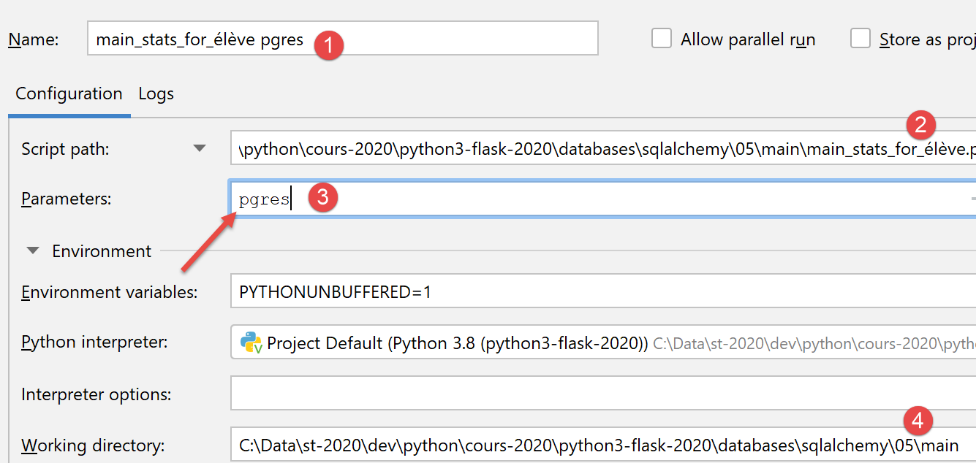
Here is an example of a run with this configuration:
C:\Data\st-2020\dev\python\cours-2020\python3-flask-2020\venv\Scripts\python.exe C:/Data/st-2020/dev/python/cours-2020/python3-flask-2020/databases/sqlalchemy/05/main/main_stats_for_élève.py pgres
Numéro de l'élève (>=1 et * pour arrêter) : 11
Elève={"prénom": "prénom1", "id": 11, "classe_id": 1, "nom": "nom1"}, notes=[10.0 6.0], max=10.0, min=6.0, moyenne pondérée=7.33
Numéro de l'élève (>=1 et * pour arrêter) : 1
L'erreur suivante s'est produite : MyException[11, L'élève d'identifiant 1 n'existe pas]
Numéro de l'élève (>=1 et * pour arrêter) : *

Process finished with exit code 0