3. Python 基础
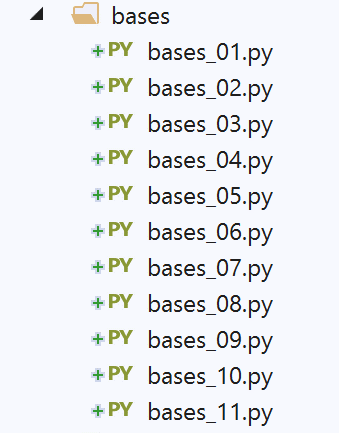
3.1. 脚本 [bases_01]:基本操作
脚本 [bases_01] 介绍了 Python 的基本特性。
注释
- 第 2 行:关键字 def 定义了一个函数;
- 第 2 行:该函数接收参数 [string]。参数类型未指定。Python 仅使用值传递。这取决于数据类型:
- 对于简单类型(数字、布尔值等),该值即数据所封装的值(如 4、True 等);
- 对于复杂类型(列表、类等),该值是数据的地址;
- 第 3–4 行:函数体。向右缩进一个制表符。正是这种缩进,结合 def 语句中的 : 字符,界定了函数体。这适用于所有带有函数体的语句:if、else、while、for、try、except;
- 第 4 行:此处使用的语法是 [print('text1%F1text2%F2…' % data1, data2)]:
- [%Fi](此处为 %s)是显示格式:
- %s(字符串):用于字符串;
- %d(十进制):用于带符号的十进制整数;
- %f(浮点数):实数的十进制格式;
- %e(指数):实数的指数格式;
- …
- [data1, data2…] 是您希望显示其值的表达式:
- [data1] 将使用 F1 格式显示;
- [data2] 将使用 F2 格式显示;
- …
- 第 10 行:Python 在内部管理变量类型。您可以使用 type(variable) 函数确定变量的类型,该函数返回类型为 'type' 的变量。表达式 '%s' % (type(variable)) 是一个字符串,表示该变量的类型;
- 第 25 行:主程序。它通常(但并非必须)位于脚本所有函数定义之后。其内容不缩进;
- 第 28 行:在 Python 中,变量无需声明。Python 区分大小写。变量 `Nom` 与变量 `nom` 是不同的。字符串可以用双引号 " 或单引号 ' 括起来。因此,你可以写成 `'dupont'` 或 `"dupont"`;
- 第 34 行:元组 (1,2,3)(注意圆括号)与列表 [1,2,3](注意方括号)之间存在区别。元组是不可变的,而列表是可变的。在两种情况下,第 i 个元素都表示为 [i];
- 第 40 行:range(n) 表示元组 (0, 1, 2, …, n-1);
- 第 41 行:%d 格式用于有符号整数;
- 第 74 行:len(var) 表示 var 集合(元组、列表、字典等)中的元素个数;
- 第 84 行:[for in …] 结构允许你遍历可迭代对象。列表和元组都是可迭代对象;
- 第 86 行:其他布尔运算符包括 or 和 not;
- 第 93 行:计算列表中大于 0 的数字之和;
屏幕输出如下:
C:\Data\st-2020\dev\python\cours-2020\python3-flask-2020\venv\Scripts\python.exe C:/Data/st-2020/dev/python/cours-2020/python3-flask-2020/bases/bases_01.py
nom=dupont
liste[0]=un
liste[1]=deux
liste[2]=3
liste[3]=4
[chaine1,chaine2,chaine1chaine2]
chaine=chaine1
type[4]=<class 'int'>
type[chaine1]=<class 'str'>
type[['un', 'deux', 3, 4]]=<class 'list'>
type[a changé]=<class 'str'>
res1=14
(res1,res2,res3)=[un,0,100]
liste[0]=un
liste[1]=0
liste[2]=100
liste[0]=8
liste[1]=5
somme=13

Process finished with exit code 0
3.2. 脚本 [bases_02]:格式化字符串
Python 3 引入了一种新的字符串格式化方式:
格式化字符串的语法如下:
其中:
- [expr]:一个表达式;
- [formati]: 表达式 [expri] 的格式。这些格式与 C 语言中的格式相同:
- %d:用于整数;
- %f:实数的十进制表示法;
- %e:实数的指数表示法;
- %s:用于字符串。当未为 [expr] 指定格式时,将使用此格式;
- %nd、%nf、%ns:将 [expri] 显示为 n 个字符:字符串要么被截断,要么用空格补齐;
- 第 7 行:[04d],4 位整数,左侧用零补齐;
- 第 11 行:[8.2f],8 字符的十进制浮点数,小数点后有 2 位;
- 第 12 行:[.3e],指数形式的浮点数,尾数有 3 位小数;
- 第 18 行:[20.10s],字符串的前 10 个字符,用空格补足至 20 个字符;
执行结果如下:
3.3. 脚本 [bases_03]:类型转换
这里我们将重点介绍涉及 str(字符串)、int(整数)、float(浮点数)和 bool(布尔值)类型的数据的类型转换。
许多类型转换都是可行的。有些可能会失败,例如第46–47行中试图将字符串'abc'转换为整数的操作。我们使用try/except代码块处理了该错误。该代码块的一般形式
如下所示:
try:
    actions
except Exception as ex:
    actions
finally:
    actions
如果 try 代码块中的任何操作抛出异常(即发生错误),控制流将立即跳转到 except 子句。如果 try 代码块中的操作未抛出异常,则忽略 except 子句。 except 语句中的 Exception 和 ex 属性是可选的。当存在时,Exception 指定了 except 语句捕获的异常类型,而 ex 包含发生的异常。如果你想在同一个 try 块内处理不同类型的异常,可以使用多个 except 语句。
finally 语句是可选的。如果存在,无论是否发生异常,finally 代码块中的操作都会被执行。
我们稍后将再次讨论异常。
第 49–61 行展示了将 str、int、float 和 NoneType 类型的数据转换为 boolean 的各种尝试。这种转换总是可行的。规则如下:
- bool(int i) 在 i 为 0 时返回 False,在其他所有情况下返回 True;
- 如果 f 为 0.0,则 bool(float f) 返回 False;在其他所有情况下,返回 True;
- 如果字符串 string 长度为 0,则 bool(str string) 返回 False;其他情况下返回 True;
- bool(None) 返回 False。None 是一个特殊值,表示变量存在但没有值。
屏幕输出如下:
请注意,所有数据都是对象,即类实例。这意味着它们可以拥有方法。代码第 63–75 行展示了这一点。我们在此并非试图解释这些方法的功能,而是仅仅展示它们的存在。
3.4. 脚本 [bases_04]:变量作用域
脚本 [bases_04] 展示了 Python 没有块作用域变量的概念:
结果
注释
结果显示了两点:
- 第 4 行:[if] 代码块中的变量 [i] 与第 2 行中使用的变量 i 是同一个;
- 第 6 行:变量 [j] 是 [if] 代码块中初始化的那个;
在某些需要显式声明变量的语言中,块内定义的变量(如第3至5行中的变量)在块外是不可见的。但在Python中并非如此。
3.5. 脚本 [bases_05]:列表 - 1
注:
- 表示法 array[i:j] 表示数组中从第 i 个元素到第 j-1 个元素;
- 表示法 [i:] 表示数组中的第 i 个元素及其后的所有元素;
- 表示法 [:i] 表示数组中从 0 到 i-1 的元素;
- 第 19 行:print (%s) % (list1) 会显示字符串:"[ list1[0], list1[2]…, list1[n-1]]";
- 第 24 行:表达式 print ('f{list1}') 实现相同效果;
结果
C:\Data\st-2020\dev\python\cours-2020\python3-flask-2020\venv\Scripts\python.exe C:/Data/st-2020/dev/python/cours-2020/python3-flask-2020/bases/bases_05.py
list1 a 6 éléments
list1[0]=0
list1[1]=1
list1[2]=2
list1[3]=3
list1[4]=4
list1[5]=5
list1 a 6 éléments
0
10
2
3
4
5
[0, 10, 2, 3, 4, 5, 10, 11]
[0, 10, 2, 3, 4, 5]
[-10, -11, -12, 0, 10, 2, 3, 4, 5]
[-10, -11, -12, 100, 101, 0, 10, 2, 3, 4, 5]
[-10, -11, -12, 101, 0, 10, 2, 3, 4, 5]
Process finished with exit code 0
3.6. 脚本 [bases_06]:列表 - 2
利用某些列表方法,上述代码可以改写为另一种形式(bases_06):
结果与上一版本相同。
3.7. 脚本 [bases_07]:字典
脚本 [bases_07] 演示了如何定义和使用字典,字典有时也被称为关联数组。
注释:
- 第 11 行:字典的硬编码定义;
- 第 15 行:conjoints.items() 返回 conjoints 字典中的 (键, 值) 对列表;
- 第 20 行:conjoints.keys() 返回 conjoints 字典的键;
- 第 25 行:conjoints.values() 返回 conjoints 字典的值;
- 第 3 行:spouses 字典中的 husband 键若存在,则返回 True,否则返回 False;
- 第 36 行:字典的内容可以显示在一行上。
结果
C:\Data\st-2020\dev\python\cours-2020\python3-flask-2020\venv\Scripts\python.exe C:/Data/st-2020/dev/python/cours-2020/python3-flask-2020/bases/bases_07.py
Nombre d'éléments du dictionnaire : 4
conjoints[Pierre]=Gisèle
conjoints[Paul]=Virginie
conjoints[Jacques]=Lucette
conjoints[Jean]=
liste des clés-------------
dict_keys(['Pierre', 'Paul', 'Jacques', 'Jean'])
liste des valeurs------------
dict_values(['Gisèle', 'Virginie', 'Lucette', ''])
La clé [Jacques] existe associée à la valeur [Lucette]
La clé [Lucette] n'existe pas
La clé [Jean] existe associée à la valeur []
Nombre d'éléments du dictionnaire : 3
{'Pierre': 'Gisèle', 'Paul': 'Virginie', 'Jacques': 'Lucette'}
type des clés : <class 'dict_keys'>
type des valeurs : <class 'dict_values'>
clés : <class 'list'>, ['Pierre', 'Paul', 'Jacques']
valeurs : <class 'list'>, ['Gisèle', 'Virginie', 'Lucette']
Process finished with exit code 0
注:
- 请注意,在结果的第 16–17 行中,字典的键和值并不构成列表,而是 'dict_keys' 类型;
- 第 18–19 行:通过简单的类型转换将其转换为 [list] 类型;
3.8. 脚本 [bases_08]:元组
元组与列表类似,但不可变:
结果
C:\Data\st-2020\dev\python\cours-2020\python3-flask-2020\venv\Scripts\python.exe C:/Data/st-2020/dev/python/cours-2020/python3-flask-2020/bases/bases_08.py
tuple1 a 6 elements
tuple1[0]=0
tuple1[1]=1
tuple1[2]=2
tuple1[3]=3
tuple1[4]=4
tuple1[5]=5
tuple1 a 6 elements
0
1
2
3
4
5
tuple1=(0, 1, 2, 3, 4, 5)
Traceback (most recent call last):
File "C:/Data/st-2020/dev/python/cours-2020/python3-flask-2020/bases/bases_08.py", line 19, in <module>
tuple1[0] = 10
TypeError: 'tuple' object does not support item assignment
Process finished with exit code 1
注:
- 输出中的第 17–20 行:表明元组无法被修改。
3.9. 脚本 [bases_09]:多维列表和字典
脚本 [bases_09] 演示了如何定义和使用多维列表或字典:
注释
- 第 7 行:multi[i1] 是一个列表;
- 第 18 行:value 是一个列表;
结果
C:\Data\st-2020\dev\python\cours-2020\python3-flask-2020\venv\Scripts\python.exe C:/Data/st-2020/dev/python/cours-2020/python3-flask-2020/bases/bases_09.py
multi[0][0]=0
multi[0][1]=1
multi[0][2]=2
multi[1][0]=10
multi[1][1]=11
multi[1][2]=12
multi[1][3]=13
multi[2][0]=20
multi[2][1]=21
multi[2][2]=22
multi[2][3]=23
multi[2][4]=24
multi=[[0, 1, 2], [10, 11, 12, 13], [20, 21, 22, 23, 24]]
multi[zéro][0]=0
multi[zéro][1]=1
multi[un][0]=10
multi[un][1]=11
multi[un][2]=12
multi[un][3]=13
multi[deux][0]=20
multi[deux][1]=21
multi[deux][2]=22
multi[deux][3]=23
multi[deux][4]=24
multi={'zéro': [0, 1], 'un': [10, 11, 12, 13], 'deux': [20, 21, 22, 23, 24]}

Process finished with exit code 0
3.10. 脚本 [bases_10]:字符串与列表之间的关联
[bases_10] 脚本演示了如何将字符串中以特定分隔符分隔的元素提取到列表中。
注:
- 第 3 行:string.split(separator) 方法将字符串 string 分割为由 separator 分隔的元素,并将其作为列表返回。因此,表达式 '1:2:3:4'.split(":") 返回列表 ('1','2','3','4');
- 第 11 行:'separator'.join(list) 返回字符串 'list[0]+separator+list[1]+separator+…'。
结果
C:\Data\st-2020\dev\python\cours-2020\python3-flask-2020\venv\Scripts\python.exe C:/Data/st-2020/dev/python/cours-2020/python3-flask-2020/bases/bases_10.py
<class 'list'>
liste a 4 éléments
liste=['1', '2', '3', '4']
chaine2=1:2:3:4
chaine=1:2:3:4:
liste a 5 éléments
liste=['1', '2', '3', '4', '']
chaine=1:2:3:4::
liste a 6 éléments
liste=['1', '2', '3', '4', '', '']

Process finished with exit code 0
3.11. 脚本 [bases_11]:正则表达式
[bases_11] 脚本演示了如何使用正则表达式:
注:
- 请注意第 2 行导入的 [re] 模块。它包含用于处理正则表达式的函数;
- 第 10 行:将字符串与正则表达式(模式)进行比较,如果字符串与模式匹配则返回 True,否则返回 False;
- 第 12 行:match.groups() 是一个元组,其元素是字符串中与正则表达式中括号内的元素匹配的部分。在以下模式中:
- ^.*?(\d+).*?,由于只有一组括号,因此 match.groups() 将是一个单元素元组;
- ^(.*?)(\d+)(.*?)$,由于有三组括号,因此 match.groups() 将是一个包含 3 个元素的元组;
- 第 21 行:字面量正则表达式写为 r"xxx"。正是 r 符号将字符串转换为正则表达式;
正则表达式允许我们验证字符串的格式。例如,我们可以验证表示日期的字符串是否符合 dd/mm/yy 格式。为此,我们使用一个模式并将字符串与该模式进行比较。在此示例中,d、m 和 y 必须是数字。 因此,有效日期格式的模式为 "\d\d/\d\d/\d\d",其中符号 \d 代表一个数字。模式中可使用的符号如下:
字符 | 描述 |
\ | 将后续字符指定为特殊字符或字面量。例如,"n" 对应字符 "n",而 "\n" 对应换行符。字符序列 "\\" 对应 "\",而 "\(" 对应 "("。 |
^ | 匹配字符串的开头。 |
$ | 匹配字符串的结尾。 |
* | 匹配前一个字符零次或多次。因此,“zo*”匹配“z”或“zoo”。 |
+ | 匹配前一个字符一次或多次。因此,“zo+”匹配“zoo”,但不匹配“z”。 |
? | 匹配前一个字符零次或一次。例如,"a?ve?" 匹配 "lever" 中的 "ve"。 |
. | 匹配除换行符以外的任意单个字符。 |
(pattern) | 搜索该模式并存储匹配结果。匹配的子字符串可从 match.groups() 集合中获取。若要查找括号 ( ) 内的字符,请使用 "\(" 或 "\)"。 |
x|y | 匹配 x 或 y 中的任意一个。例如,"z|foot" 匹配 "z" 或 "foot"。" (z|f)oo" 匹配 "zoo" 或 "foo"。 |
{n} | n 是非负整数。匹配该字符出现 n 次。例如,"o{2}" 不匹配 "Bob" 中的 "o",但匹配 "fooooot" 中的前两个 "o"。 |
{n,} | n 是非负整数。匹配该字符至少 n 次。例如,“o{2,}”不匹配“Bob”中的“o”,但匹配“fooooot”中的所有“o”。“o{1,}”等同于“o+”,而“o{0,}”等同于“o*”。 |
{n,m} | m 和 n 均为非负整数。匹配该字符至少 n 次且至多 m 次。例如,“o{1,3}”匹配“foooooot”中的前三个“o”,而“o{0,1}”等同于“o?”。 |
[xyz] | 字符集。匹配所指定字符中的任意一个。例如,"[abc]" 匹配 "plat" 中的 "a"。 |
[^xyz] | 否定字符集。匹配未列出的任何字符。例如,"[^abc]" 匹配 "plat" 中的 "p"。 |
[a-z] | 字符范围。匹配指定范围内的任何字符。例如,[a-z] 匹配 "a" 到 "z" 之间的任何小写字母。 |
[^m-z] | 负字符范围。匹配不在指定范围内的任何字符。例如,"[^m-z]" 匹配不在 "m" 和 "z" 之间的任何字符。 |
\b | 匹配单词边界,即单词与空格之间的位置。例如,"er\b" 匹配 "lever" 中的 "er",但不匹配 "verb" 中的 "er"。 |
\B | 匹配不代表单词的边界。例如,“en*t\B”匹配“bien entendu”中的“ent”。 |
\d | 匹配代表数字的字符。等同于 [0-9]。 |
\D | 匹配不代表数字的字符。等同于 [^0-9]。 |
\f | 匹配换行符。 |
\n | 等同于换行字符。 |
\r | 等同于回车字符。 |
\s | 匹配任何空白字符,包括空格、制表符、分页符等。等同于 "[ \f\n\r\t\v]"。 |
\S | 匹配任何非空白字符。等同于 "[^ \f\n\r\t\v]"。 |
\t | 匹配一个制表符。 |
\v | 匹配垂直制表符。 |
\w | 匹配任何代表单词的字符,包括下划线。等同于 "[A-Za-z0-9_]"。 |
\W | 匹配不代表单词的任何字符。等同于 "[^A-Za-z0-9_]"。 |
\num | 匹配 num,其中 num 是正整数。指代已存储的匹配结果。例如,"(.)\1" 匹配两个连续的相同字符。 |
\n | 匹配 n,其中 n 是八进制转义值。八进制转义值必须由 1、2 或 3 位数字组成。 例如,"\11" 和 "\011" 都匹配一个制表符。"\0011" 等同于 "\001" & "1"。八进制转义值不得超过 256。如果超过,表达式中仅考虑前两位数字。允许在正则表达式中使用 ASCII 码。 |
\xn | 对应于 n,其中 n 是十六进制转义值。十六进制转义值必须由恰好两位数字组成。例如,“\x41”对应于“A”。“\x041”等同于“\x04”和“1”。允许在正则表达式中使用 ASCII 码。 |
模式中的元素可以出现一次或多次。让我们来看一些涉及 \d 符号的示例,该符号代表单个数字:
模式 | 含义 |
\d | 一个数字 |
\d? | 0 或 1 个数字 |
\d* | 0 个或更多数字 |
\d+ | 1 个或多个数字 |
\d{2} | 2个数字 |
\d{3,} | 至少 3 个数字 |
\d{5,7} | 5 到 7 位数字 |
现在,让我们设想一个能够描述字符串预期格式的模型:
目标字符串 | 模式 |
dd/mm/yy格式的日期 | \d{2}/\d{2}/\d{2} |
时长格式为 hh:mm:ss | \d{2}:\d{2}:\d{2} |
一个无符号整数 | \d+ |
一串空格,该序列可能为空 | \s* |
一个无符号整数,其前后可能有空格 | \s*\d+\s* |
一个整数,可能带符号,且前后可能有空格 | \s*[+|-]?\s*\d+\s* |
一个无符号实数,其前后可能带有空格 | \s*\d+(.\d*)?\s* |
一个实数,该数可能带符号,且前后可能有空格 | \s*[+-]?\s*\d+(.\d*)?\s* |
包含单词“just”的字符串 | \bjuste\b |
您可以指定在字符串中的哪个位置搜索该模式:
pattern | 含义 |
^模式 | 模式位于字符串开头 |
pattern$ | 该模式结束字符串 |
^模式$ | 该模式同时作为字符串的起始和结束 |
pattern | 从字符串开头开始,在字符串的任意位置搜索该模式。 |
要查找的模式 | 模式 |
以感叹号结尾的字符串 | !$ |
以句点结尾的字符串 | \.$ |
以 // 序列开头的字符串 | ^// |
由单个单词组成的字符串,其前后可选地带有空格 | ^\s*\w+\s*$ |
由两个单词组成的字符串,前后可选空格 | ^\s*\w+\s*\w+\s*$ |
包含单词 secret 的字符串 | \bsecret\b |
模式的子模式可以被“提取”。因此,我们不仅可以验证一个字符串是否匹配特定模式,还可以从该字符串中提取那些用圆括号括起的、与模式子模式对应的元素。 例如,如果我们要解析一个包含 dd/mm/yy 格式日期的字符串,并希望提取该日期的 dd、mm 和 yy 部分,则应使用模式 (\d\d)/(\d\d)/(\d\d)。
脚本结果
C:\Data\st-2020\dev\python\cours-2020\python3-flask-2020\venv\Scripts\python.exe C:/Data/st-2020/dev/python/cours-2020/python3-flask-2020/bases/bases_11.py

Résultats(xyz1234abcd,^.*?(\d+).*?$)
('1234',)

Résultats(12 34,^.*?(\d+).*?$)
('12',)

Résultats(abcd,^.*?(\d+).*?$)
La chaîne [abcd] ne correspond pas au modèle [^.*?(\d+).*?$]

Résultats(xyz1234abcd,^(.*?)(\d+)(.*?)$)
('xyz', '1234', 'abcd')

Résultats(12 34,^(.*?)(\d+)(.*?)$)
('', '12', ' 34')

Résultats(abcd,^(.*?)(\d+)(.*?)$)
La chaîne [abcd] ne correspond pas au modèle [^(.*?)(\d+)(.*?)$]

Résultats(10/05/97,^\s*(\d\d)\/(\d\d)\/(\d\d)\s*$)
('10', '05', '97')

Résultats( 04/04/01 ,^\s*(\d\d)\/(\d\d)\/(\d\d)\s*$)
('04', '04', '01')

Résultats(5/1/01,^\s*(\d\d)\/(\d\d)\/(\d\d)\s*$)
La chaîne [5/1/01] ne correspond pas au modèle [^\s*(\d\d)\/(\d\d)\/(\d\d)\s*$]

Résultats(187.8,^\s*([+-]?)\s*(\d+\.\d*|\.\d+|\d+)\s*$)
('', '187.8')

Résultats(-0.6,^\s*([+-]?)\s*(\d+\.\d*|\.\d+|\d+)\s*$)
('-', '0.6')

Résultats(4,^\s*([+-]?)\s*(\d+\.\d*|\.\d+|\d+)\s*$)
('', '4')

Résultats(.6,^\s*([+-]?)\s*(\d+\.\d*|\.\d+|\d+)\s*$)
('', '.6')

Résultats(4.,^\s*([+-]?)\s*(\d+\.\d*|\.\d+|\d+)\s*$)
('', '4.')

Résultats( + 4,^\s*([+-]?)\s*(\d+\.\d*|\.\d+|\d+)\s*$)
('+', '4')

Process finished with exit code 0