19. 使用 SQLAlchemy ORM
上一章展示了在某些情况下,我们可以采用以下架构编写与所用 DBMS 无关的代码:
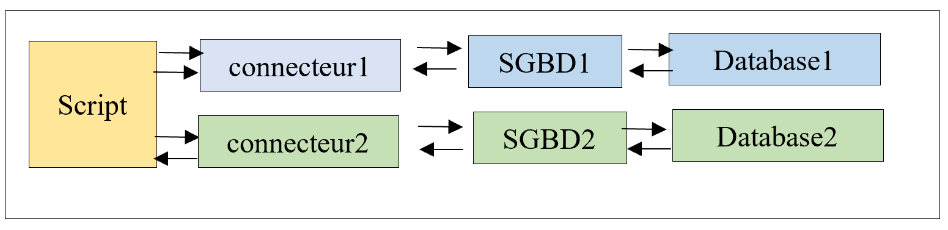
在本章中,我们将使用 ORM(对象关系映射器)[SQLAlchemy] 来统一访问数据库管理系统,无论使用的是哪种数据库管理系统。ORM 能够实现两点:
- 它允许脚本在不执行 SQL 命令的情况下与数据库管理系统交互;
- 它将各数据库管理系统(DBMS)的具体实现细节对脚本进行了封装;
架构如下所示:
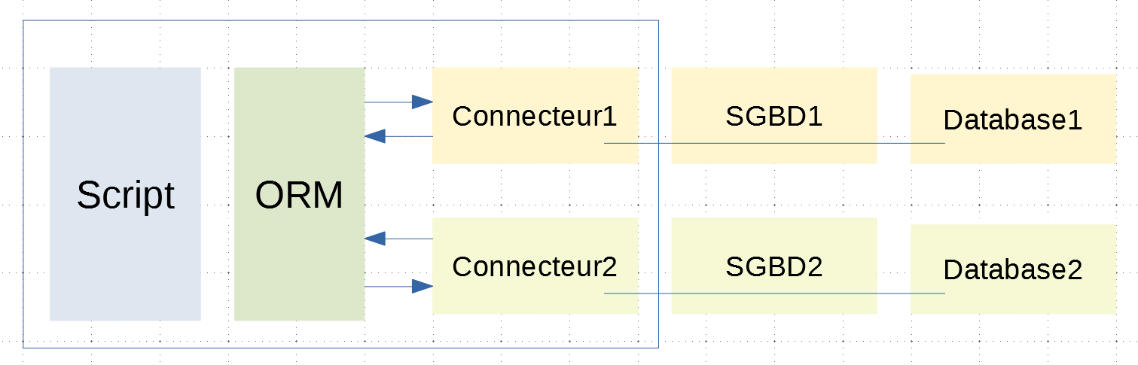
现在,脚本通过 ORM 与连接器分离。它使用类和方法与 ORM 进行通信,而不直接执行 SQL 代码。ORM 通过与其连接的连接器来执行 SQL 代码,并向脚本隐藏这些连接器的具体实现细节。因此,脚本的代码不会受到连接器(以及相应的 DBMS)变更的影响;
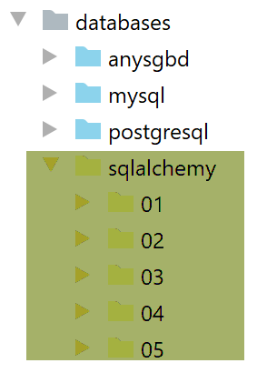
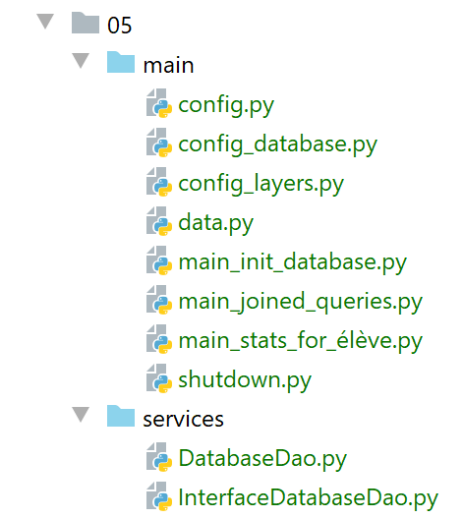
所讨论的脚本的目录结构如下:
19.1. 安装 ORM [SQLAlchemy]
ORM [SQLAlchemy] 是一个 Python 包,必须在 Python 终端中进行安装:
(venv) C:\Data\st-2020\dev\python\cours-2020\python3-flask-2020\databases\sqlalchemy>pip install sqlalchemy
Collecting sqlalchemy
  Downloading SQLAlchemy-1.3.18-cp38-cp38-win_amd64.whl (1.2 MB)
     || 1.2 MB 3.3 MB/s
Installing collected packages: sqlalchemy
Successfully installed sqlalchemy-1.3.18
19.2. 脚本 01:基础知识
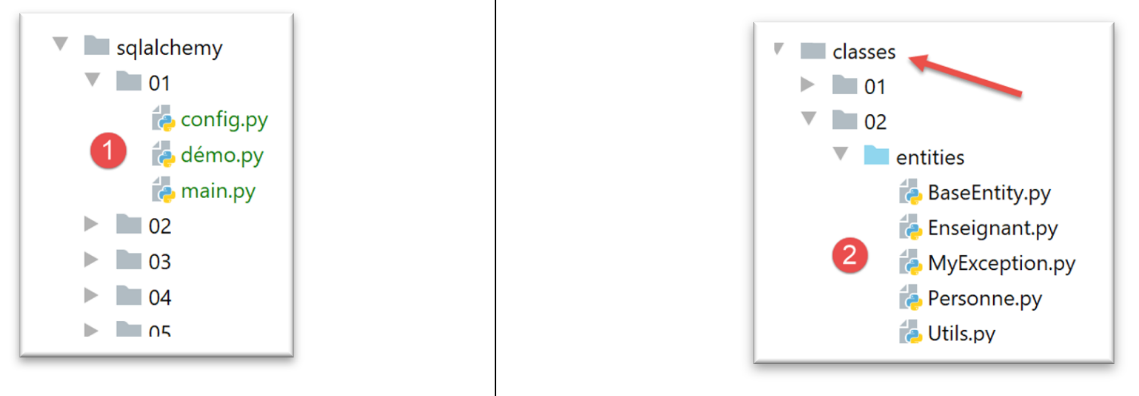
- 在 [1] 中,将要学习的脚本。这些脚本将使用 [2] 中的类:BaseEntity、MyException、Person、Utils;
19.2.1. 配置
[config] 文件对应用程序的配置如下:
| def configure():
# root_dir
# absolute path configuration relative path reference
root_dir = "C:/Data/st-2020/dev/python/cours-2020/python3-flask-2020"
# absolute paths of dependencies
absolute_dependencies = [
# BaseEntity, MyException, Person, Utilities
f"{root_dir}/classes/02/entities",
]
# set the syspath
from myutils import set_syspath
set_syspath(absolute_dependencies)
    #  class configuration
    from Personne import Personne
    Personne.excluded_keys = ['_sa_instance_state']
# return the config
return {}
|
注释
- 第 8 行:将包含 [BaseEntity, MyException, Person, Utils] 类的文件夹添加到 Python 路径中;
- 第 12-13 行:我们设置了应用程序的 Python 路径;
- 第 16-17 行:您可能还记得,|BaseEntity| 类有一个名为 [excluded_keys] 的类属性。该属性是一个列表,我们将其用于存放那些不希望出现在类字典(asdict 函数)中的类属性。在此,我们将 [_sa_instance_state] 属性从 [Person] 类的状态中排除。稍后我们将了解原因;
19.2.2. [demo] 脚本
[demo] 脚本展示了 [sqlalchemy] ORM 的初步用法:
| # retrieve application configuration
import config
config = config.configure()
# imports
from sqlalchemy import Table, Column, Integer, String, MetaData, UniqueConstraint
from sqlalchemy.orm import mapper
from Personne import Personne
# metadata
metadata = MetaData()
# the table
personnes_table = Table("personnes", metadata,
Column('id', Integer, primary_key=True),
Column('prenom', String(30), nullable=False),
Column("nom", String(30), nullable=False),
Column("age", Integer, nullable=False),
UniqueConstraint('nom', 'prenom', name='uix_1')
)
# the Person class before mapping
personne1 = Personne().fromdict({"id": 67, "prénom": "x", "nom": "y", "âge": 10})
print(f"personne1={personne1.__dict__}")
# mapping
mapper(Personne, personnes_table, properties={
'id': personnes_table.c.id,
'prénom': personnes_table.c.prenom,
'nom': personnes_table.c.nom,
'âge': personnes_table.c.age
})
# person1 has not been modified
print(f"personne1={personne1.__dict__}")
# the Person class has been modified - it has been "enriched"
personne2 = Personne().fromdict({"id": 68, "prénom": "x1", "nom": "y1", "âge": 11})
print(f"personne2={personne2.__dict__}")
|
注释
- 第 1-4 行:我们配置应用程序;
- 第 6-10 行:导入脚本所需的模块;
- 第 13 行:[MetaData] 是 [sqlalchemy] 中的一个类;
- 第 15-22 行:[Table] 是 [sqlalchemy] 中的一个类。它用于描述数据库表。在此,我们将描述 |MySQL| 章节中涉及的 MySQL 数据库 [dbpeople] 中的 [people] 表;
- 第 16 行:第一个参数 [people] 是待描述的表名;
- 第 16 行:第二个参数 [metadata] 是第 13 行创建的 [MetaData] 实例;
- 第 17–22 行:接下来的每个参数都使用 [SQLAlchemy] 特有的语法(但与 SQL 语法相似)来描述表中的一列;
- 每个列都使用来自 [sqlalchemy] 的 [Column] 类的实例进行描述;
- 第一个参数是列名;
- 第二个参数是其类型;
- 后续参数均为命名参数:
- 第 17 行:[primary_key=True] 表示 [id] 列是 [people] 表的主键;
- 第 18 行:[nullable=False] 表示向表中插入行时,该列必须有值;
- 第 21 行:最后,[UniqueConstraint] 类允许您定义唯一性约束。在此,我们指定列 (last_name, first_name) 在表内必须唯一。名为 [name] 的属性允许您为该约束命名。这里有两种情况需要考虑:
- 我们正在描述一个现有的表。在这种情况下,我们必须在表的属性中(phpMyAdmin 或 pgAdmin)查找该约束的名称;
- 我们正在描述即将创建的表。这种情况下,我们输入所需的名称;
- 第 23–25 行:我们创建一个 person [person1] 并显示其字典 [__dict__]。这里我们将看到:
personne1={'_BaseEntity__id': 67, '_Personne__prénom': 'x', '_Personne__nom': 'y', '_Personne__âge': 10}
- 第 27–33 行:我们进行映射,即在类 [Person] 与表 [people] 之间建立对应关系。这本质上是一种映射 [类属性 表列]。此处的 [mapper] 函数接受三个参数:
- 第 28 行:第一个参数是要进行映射的类的名称;
- 第 28 行:第二个参数是要关联的表。这是第 16 行创建的 [Table] 对象;
- 第 28 行:这里的第三个参数名为 [properties]。这是一个字典,其键是映射类的属性,值是映射表的列。要引用 [personnes_table] 表的第 X 列,我们写 [personnes_table.c.X];
- 第 35–36 行:映射完成后,我们再次显示人员 [person1]。可以看到它没有发生变化:
personne1={'_BaseEntity__id': 67, '_Personne__prénom': 'x', '_Personne__nom': 'y', '_Personne__âge': 10}
- 第 37–39 行:我们创建一个新的人 [person2] 并显示它。随后我们看到以下输出:
personne2={'_sa_instance_state': <sqlalchemy.orm.state.InstanceState object at 0x00000259A6747FA0>, 'id': 68, 'prénom': 'x1', 'nom': 'y1', 'âge': 11}
我们可以看到字典 [__dict__] 已被显著修改:
- (待续)
- 出现了一个新属性 [_sa_instance_state]。我们可以看到它是一个 ORM [sqlalchemy] 对象;
- 其他属性的前缀已被移除,这些前缀此前用于标识它们所属的类;
因此我们可以得出结论:第 27–33 行中的映射操作修改了 [Person] 类。
当我们想要显示 [Person] 对象的状态时,通常并不需要 [_sa_instance_state] 属性。它仅用于 [SQLAlchemy] 的内部运作,通常与我们无关。这就是为什么我们在 [config] 脚本中写道:
| # class configuration
from Personne import Personne
Personne.excluded_keys = ['_sa_instance_state']
|
19.2.3. [main] 脚本
[main]脚本将通过与[sqlalchemy]交互,对MySQL数据库[dbpeople]中的[people]表进行操作。为了理解下文内容,我们需要回顾一下此处的架构:
如果 [Database1] 是 [dbpersonnes] 数据库,我们可以看到脚本与该数据库之间的连接涉及两个组件:
- 连接 MySQL 数据库管理系统 (DBMS) 的 Python 连接器;
- MySQL 数据库管理系统;
[main] 脚本将与 ORM 进行通信,随后 ORM 再与 Python 连接器进行通信。ORM 通过 |MySQL| 和 |PostgreSQL| 章节中描述的工具与该连接器进行通信,特别是通过执行 SQL 命令。而 [main] 脚本不会使用 SQL 命令,它将依赖于 ORM 的 API(应用程序编程接口),该 API 由类和接口组成。
[main]脚本如下:
| # configure the application
import config
config = config.configure()
# imports
from sqlalchemy import create_engine, Table, Column, Integer, String, MetaData, UniqueConstraint
from sqlalchemy.exc import IntegrityError, InterfaceError
from sqlalchemy.orm import mapper, sessionmaker
from Personne import Personne
# database connection string MySQL
engine = create_engine("mysql+mysqlconnector://admpersonnes:nobody@localhost/dbpersonnes")
# metadata
metadata = MetaData()
# the table
personnes_table = Table("personnes", metadata,
Column('id', Integer, primary_key=True),
Column('prenom', String(30), nullable=False),
Column("nom", String(30), nullable=False),
Column("age", Integer, nullable=False),
UniqueConstraint('nom', 'prenom', name='uix_1')
)
# mapping
mapper(Personne, personnes_table, properties={
'id': personnes_table.c.id,
'prénom': personnes_table.c.prenom,
'nom': personnes_table.c.nom,
'âge': personnes_table.c.age
})
# the factory session
Session = sessionmaker()
Session.configure(bind=engine)
session = None
try:
# a session
session = Session()
# delete [people] table
session.execute("drop table if exists personnes")
# table recreation from mapping
metadata.create_all(engine)
# insertion
session.add(Personne().fromdict({"id": 67, "prénom": "x", "nom": "y", "âge": 10}))
# session.commit()
# a request
personnes = session.query(Personne).all()
# display
print("Liste des personnes ---------")
for personne in personnes:
print(personne)
# two other insertions, the second of which fails due to uniqueness (first name, last name)
session.add(Personne().fromdict({"id": 68, "prénom": "x1", "nom": "y1", "âge": 10}))
session.add(Personne().fromdict({"id": 69, "prénom": "x1", "nom": "y1", "âge": 10}))
# a request
personnes = session.query(Personne).all()
# display
print("Liste des personnes ---------")
for personne in personnes:
print(personne)
# session validation
session.commit()
except (InterfaceError, IntegrityError) as erreur:
# display
print(f"L'erreur suivante s'est produite : {erreur}")
# cancellation of last session
if session:
print("rollback...")
session.rollback()
finally:
# release session resources
if session:
session.close()
|
注释
- 第 1–4 行:配置应用程序;
- 第 7–9 行:我们从 [sqlalchemy] 库中导入了一系列类和接口;
- 第 11 行:导入 [Person] 类;
- 第 14 行:数据库连接字符串。它指定了:
- 使用的数据库管理系统(DBMS)(mysql);
- 使用的 Python 连接器(mysql.connector,不带 .);
- 登录用户(admpersonnes);
- 其密码(nobody);
- DBMS所在的机器(localhost = 脚本运行的机器);
- 数据库名称(dbpersonnes);
有了这些信息,[sqlalchemy] 即可连接到数据库。请注意,所使用的 Python 连接器必须已安装。[sqlalchemy] 不会安装它。
- 第 19–26 行:[people] 表的描述;
- 第 28–34 行:[Person] 类与 [people] 表之间的映射;
- 第 36–38 行:大多数 [sqlalchemy] 操作都在会话中执行。[sqlalchemy] 会话的概念与 SQL 事务的概念相似。会话是通过第 37 行 [sessionmaker] 函数返回的 [Session] 类创建的;
- 第 38 行:[Session] 类通过第 14 行的连接字符串与 [dbpeople] 数据库建立关联;
- 第 43 行:创建了一个会话。如前所述,会话可以比作事务;
- 第 45–46 行:[Session.execute] 方法允许执行 SQL 语句。这并非常见做法,因为我们提到 ORM 允许用户避免使用 SQL;
- 第 48–49 行:[metadata.create_all] 方法使用第 17 行定义的 [MetaData] 实例创建所有表。我们只有一个表:即第 20–26 行定义的 [people] 表。[SQLAlchemy] 将利用这些行中的信息来创建该表。 在此我们看到了 ORM 的一个关键优势:它隐藏了数据库管理系统(DBMS)的具体实现细节。事实上,由于列所分配的数据类型不同,SQL [create] 语句在不同的 DBMS 之间可能存在显著差异。SQL 中的数据类型一直缺乏标准化。因此,[create] 语句在不同的 DBMS 之间各不相同。在此,得益于 [SQLAlchemy]:
- 我们可以以单一且一致的方式描述所需的表;
- [SQLAlchemy] 能够根据当前所用的 DBMS 生成相应的 [create] 语句;
- 第 52 行:我们将一个 [Person] 对象添加到会话中。这不会自动将其添加到数据库中。实际上,ORM 遵循其自身的规则与数据库进行同步。它始终会试图优化其发出的查询次数。 让我们举个例子。脚本将两个人(person1、person2)添加(add)到会话中,然后执行查询:它希望查看表中所有人员。[SQLAlchemy] 可以按以下方式处理:
- 添加 [person1] 可以在内存中完成。目前无需将其写入数据库;
- [person2] 也是如此;
- 接下来是 [select] 查询。此时必须从 [people] 表中检索所有行。[SQLAlchemy] 随后会将 [person1, person2] 插入数据库并执行该查询;
[SQLAlchemy] 因此会进行对开发者透明的优化。
- 第 56 行:要执行 [select] 查询(我想查看……),我们使用 [Session.query] 方法。该方法的参数是映射到待查询表的类。此方法返回一个 [Query] 对象。 [Query.all] 方法从会话中检索所有 [Person] 对象。它返回 [people] 表中的所有行,每行以 [Person] 对象的形式呈现。为此,[SQLAlchemy] 使用了 [Person] 类与 [people] 表之间建立的映射关系。第 56 行的结果是一个 [Person] 对象列表;
- 第 58–61 行:我们显示 [people] 列表中的元素。由于 [Person] 类继承自 [BaseEntity] 类,因此第 61 行中隐式调用的 [Person.__str__] 方法实际上是 [BaseEntity.__str__] 方法,该方法会返回调用对象的 JSON 字符串。 该字符串即 [Person.asdict] 字典的 JSON 字符串(参见 |BaseEntity|)。 我们曾提到,映射完成后,每个 [Person] 对象中都会包含 [_sa_instance_state] 属性。然而,该属性的值并非 [BaseEntity] 类型。因此必须将其从 [Person] 类的字典中排除;否则,显示操作将导致程序崩溃。这正是 [config] 脚本中所做的处理;
- 第 63–65 行:我们新增了两名姓名完全相同的人员。然而,这两个列的联合上存在唯一性约束。因此应会发生错误。这就是我们要验证的内容;
- 第 67–68 行:我们再次请求数据库中所有人员的列表;
- 第 70–73 行:并将其显示出来;
- 第 75–76 行:提交事务。顾名思义,底层事务将被提交;
- 在执行过程中,我们会发现第67–76行不会被执行,因为第65行抛出了异常。随后程序将跳转至第78–84行处理该异常;
- 第 78 行:若 [SQLAlchemy] 无法连接到 [dbpersonnes] 数据库,则会抛出 [InterfaceError] 异常。第 65 行抛出了 [IntegrityError] 异常;
- 第 80 行:显示错误信息;
- 第 82–84 行:如果会话存在,则回滚该会话。这相当于回滚底层的事务;
- 第 85–88 行:无论是否发生错误,都会关闭会话以释放资源;
执行结果如下:
C:\Data\st-2020\dev\python\cours-2020\python3-flask-2020\venv\Scripts\python.exe C:/Data/st-2020/dev/python/cours-2020/python3-flask-2020/databases/sqlalchemy/01/main.py
Liste des personnes ---------
{"nom": "y", "prénom": "x", "id": 67, "âge": 10}
L'erreur suivante s'est produite : (raised as a result of Query-invoked autoflush; consider using a session.no_autoflush block if this flush is occurring prematurely)
(mysql.connector.errors.IntegrityError) 1062 (23000): Duplicate entry 'y1-x1' for key 'uix_1'
[SQL: INSERT INTO personnes (id, prenom, nom, age) VALUES (%(id)s, %(prenom)s, %(nom)s, %(age)s)]
[parameters: ({'id': 68, 'prenom': 'x1', 'nom': 'y1', 'age': 10}, {'id': 69, 'prenom': 'x1', 'nom': 'y1', 'age': 10})]
(Background on this error at: http://sqlalche.me/e/13/gkpj)
rollback...

Process finished with exit code 0
- 第 2-3 行:首次插入后的用户列表;
- 第 5 行:当添加两名姓名完全相同的人员时触发的 [IntegrityError] 异常;
- 第 6-7 行:注意失败的 SQL 语句。这是一个参数化 INSERT 语句:[SQLAlchemy] 使用单个 INSERT 语句插入了这两个人。由此可见,它试图优化生成的 SQL 语句;
现在让我们使用 phpMyAdmin 查看 [people] 表的内容:
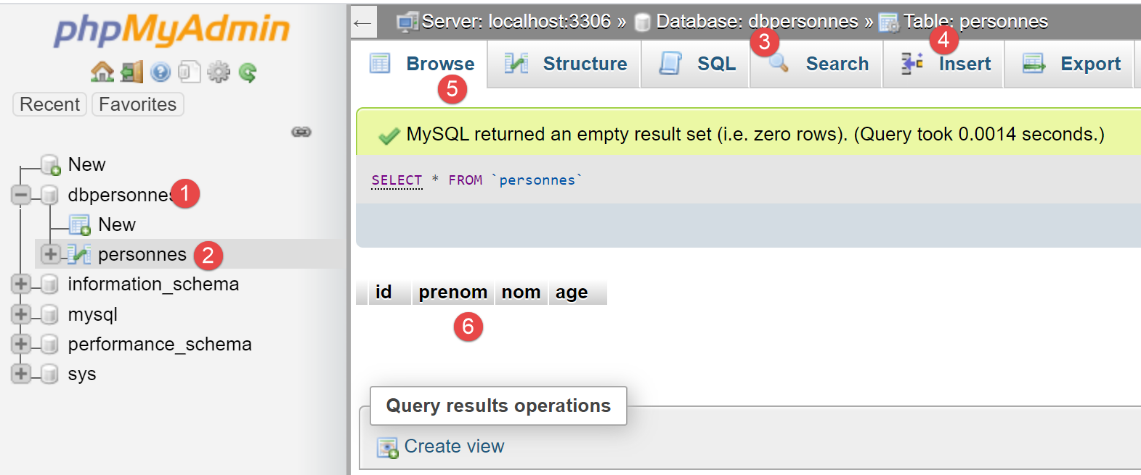
我们可以从[6]中看到,该表是空的。甚至脚本在会话中添加的第一个人也不在其中。这是因为该会话属于一个事务,而该事务在[main]脚本的[except]子句中被回滚了。
现在让我们在 [main] 中进行以下修改:
| # insertion
session.add(Personne().fromdict({"id": 67, "prénom": "x", "nom": "y", "âge": 10}))
# session.commit()
|
在第 2 行添加了一条人员记录后,我们取消了第 3 行的注释。[session.commit] 操作将提交底层事务,并开始一个新的事务。执行后,[people] 表的内容如下:
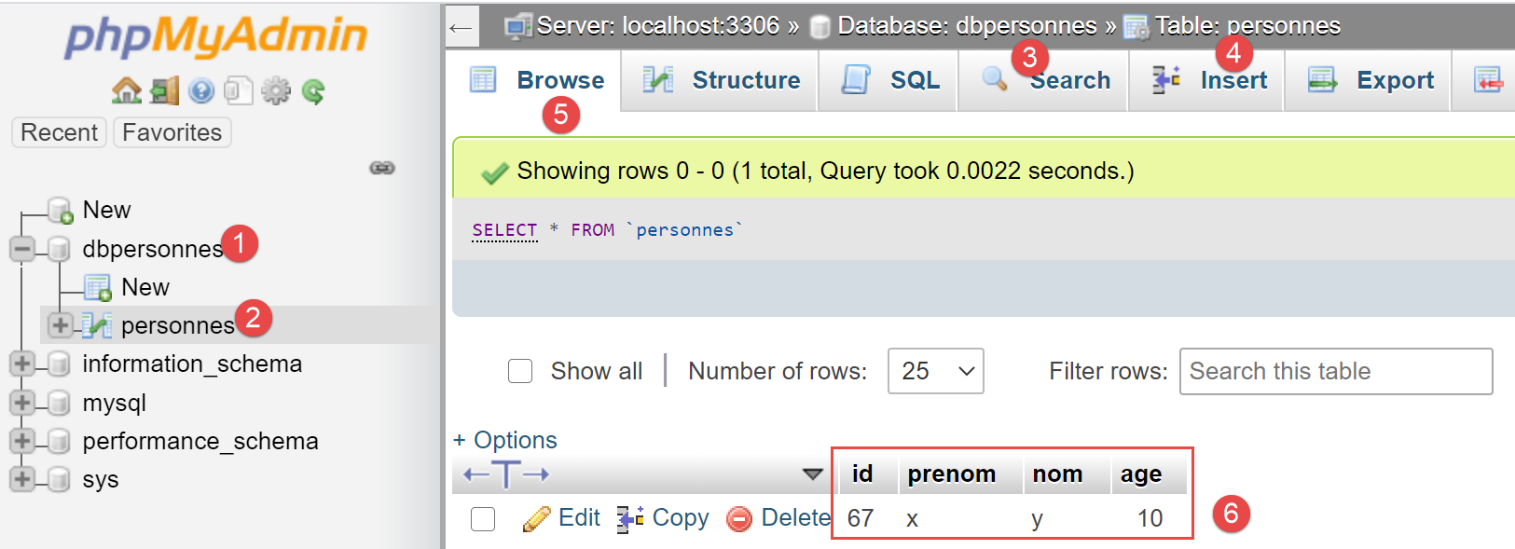
我们可以从[6]中看到,第一次插入操作被保留了下来。这是因为该操作是在事务 1 中执行的,而随后的错误发生在事务 2 中。
19.3. 脚本 02:[sqlalchemy] 映射
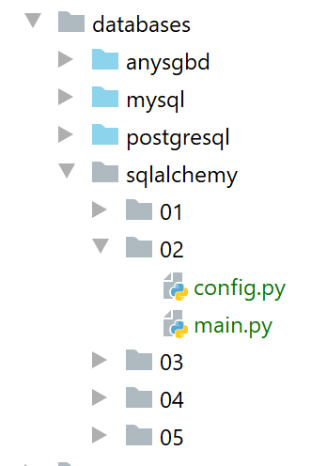
脚本 02 是脚本 01 的变体。我们尝试在 [config.py] 中进行尽可能多的配置。现在,我们在此处配置应用程序的 [sqlalchemy] 环境:
| def configure():
# absolute path configuration relative path reference
root_dir = "C:/Data/st-2020/dev/python/cours-2020/python3-flask-2020"
# absolute paths of dependencies
absolute_dependencies = [
# BaseEntity, MyException, Person, Utilities
f"{root_dir}/classes/02/entities",
]
# set the syspath
from myutils import set_syspath
set_syspath(absolute_dependencies)
# imports
from sqlalchemy import create_engine, Table, Column, Integer, String, MetaData, UniqueConstraint
from sqlalchemy.orm import mapper, sessionmaker
# link to a database MySQL
engine = create_engine("mysql+mysqlconnector://admpersonnes:nobody@localhost/dbpersonnes")
# metadata
metadata = MetaData()
# the table
personnes_table = Table("personnes", metadata,
Column('id', Integer, primary_key=True),
Column('prenom', String(30), nullable=False),
Column("nom", String(30), nullable=False),
Column("age", Integer, nullable=False),
UniqueConstraint('nom', 'prenom', name='uix_1')
)
# mapping
from Personne import Personne
mapper(Personne, personnes_table, properties={
'id': personnes_table.c.id,
'prénom': personnes_table.c.prenom,
'nom': personnes_table.c.nom,
'âge': personnes_table.c.age
})
# the factory session
Session = sessionmaker()
Session.configure(bind=engine)
# we put this information in the config
config = {}
config["Session"] = Session
config["metadata"] = metadata
config["engine"] = engine
config["personnes_table"] = personnes_table
# class configuration
from Personne import Personne
Personne.excluded_keys = ['_sa_instance_state']
# return the config
return config
|
注释
- 第 2–12 行:Python 路径配置;
- 第 14–45 行:配置 [sqlalchemy] 环境;
- 第 47–52 行:将 [sqlalchemy] 环境添加到配置字典中;
- 第 54–56 行:配置 [Person] 类;
完成上述配置后,[main] 脚本内容如下:
| # configure the application
import config
config = config.configure()
# syspath is configured - imports are made
from sqlalchemy.exc import IntegrityError, DatabaseError, InterfaceError
from sqlalchemy.orm.exc import FlushError
from Personne import Personne
session = None
try:
# a session
session = config["Session"]()
# delete [people] table
session.execute("drop table if exists personnes")
# table recreation from mapping
config["metadata"].create_all(config["engine"])
# two inserts
session.add(Personne().fromdict({"prénom": "x", "nom": "y", "âge": 10}))
personne = Personne().fromdict({"prénom": "x1", "nom": "y1", "âge": 7})
session.add(personne)
# validation of the two inserts
session.commit()
# a request
personnes = session.query(Personne).all()
# display
print("Liste des personnes-----------")
for personne in personnes:
print(personne)
# two other insertions, the second of which fails
session.add(Personne().fromdict({"prénom": "x2", "nom": "y2", "âge": 10}))
session.add(Personne().fromdict({"prénom": "x2", "nom": "y2", "âge": 10}))
# a request
personnes = session.query(Personne).all()
# display
print("Liste des personnes-----------")
for personne in personnes:
print(personne)
# session validation
session.commit()
except (FlushError, DatabaseError, InterfaceError, IntegrityError) as erreur:
# display
print(f"L'erreur suivante s'est produite : {erreur}")
# cancellation of last session
if session:
print("rollback...")
session.rollback()
finally:
# display
print("Travail terminé...")
# release session resources
if session:
session.close()
|
执行结果如下:
C:\Data\st-2020\dev\python\cours-2020\python3-flask-2020\venv\Scripts\python.exe C:/Data/st-2020/dev/python/cours-2020/python3-flask-2020/databases/sqlalchemy/02/main.py
Liste des personnes-----------
{"âge": 10, "nom": "y", "prénom": "x", "id": 1}
{"âge": 7, "nom": "y1", "prénom": "x1", "id": 2}
L'erreur suivante s'est produite : (raised as a result of Query-invoked autoflush; consider using a session.no_autoflush block if this flush is occurring prematurely)
(mysql.connector.errors.IntegrityError) 1062 (23000): Duplicate entry 'y2-x2' for key 'uix_1'
[SQL: INSERT INTO personnes (prenom, nom, age) VALUES (%(prenom)s, %(nom)s, %(age)s)]
[parameters: {'prenom': 'x2', 'nom': 'y2', 'age': 10}]
(Background on this error at: http://sqlalche.me/e/13/gkpj)
rollback...
Travail terminé...

Process finished with exit code 0
在 phpMyAdmin 中,[people] 表现在如下所示:
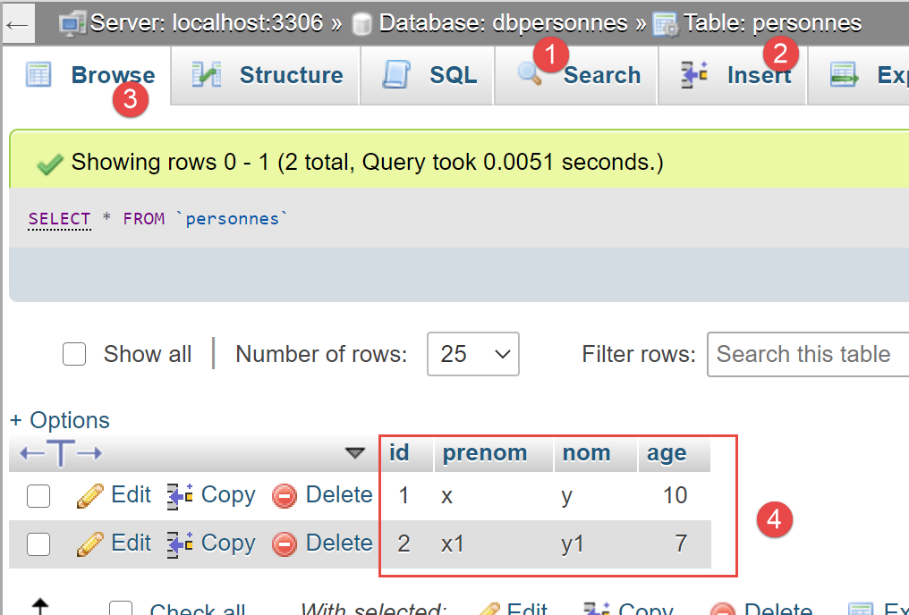
现在,让我们看看由 [SQLAlchemy] 生成的 [people] 表:
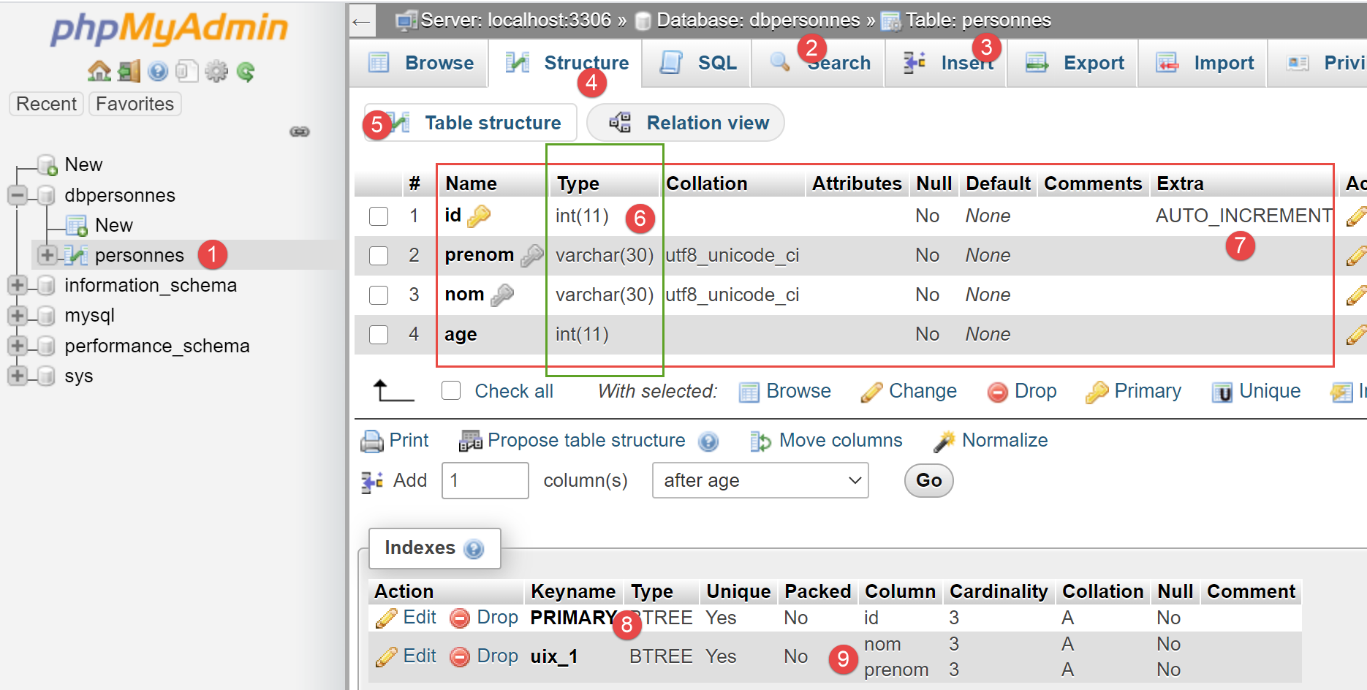
- 在 [6] 中,各列使用的数据类型;
- 在 [7] 中,我们可以看到 [id] 列具有 [AUTO_INCREMENT] 属性。这意味着当向表中插入一行时,如果该行的 [id] 列没有值,MySQL 会按递增顺序自动生成该值:1、2、3、……这一特性使我们在向表中插入数据时无需担心主键值的问题:我们让 MySQL 自动生成它;
- 在 [8] 中,我们可以看到 [id] 列是主键;
- 在 [9] 中,我们可以看到 [last_name, first_name] 字段上的唯一性约束;
19.4. 脚本 03:操作会话实体 [SQLAlchemy]
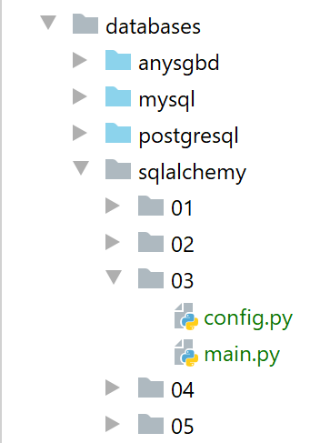
配置文件 [config] 与前一个示例相同。在 [main] 脚本中,我们使用 [SQLAlchemy] 方法对 [people] 表执行标准操作 [INSERT, UPDATE, DELETE, SELECT]:
| # configure the application
import config
config = config.configure()
# imports
from sqlalchemy import func
from sqlalchemy.exc import IntegrityError, DatabaseError, InterfaceError
from sqlalchemy.orm.session import Session
from Personne import Personne
# displays the contents of table [people]
def affiche_table(session: Session):
print("----------------")
# a request
personnes = session.query(Personne).all()
# display
affiche_personnes(personnes)
# displays a list of people
def affiche_personnes(personnes: list):
print("----------------")
# display
for personne in personnes:
print(personne)
# main ---------------------------
session = None
try:
# a session
session = config["Session"]()
# delete [people] table
# checkfirst=True: first checks that the table exists
config["personnes_table"].drop(config["engine"], checkfirst=True)
# table recreation from mapping
config["metadata"].create_all(config["engine"])
# inserts
session.add(Personne().fromdict({"prénom": "Pierre", "nom": "Nicazou", "âge": 35}))
session.add(Personne().fromdict({"prénom": "Géraldine", "nom": "Colou", "âge": 26}))
session.add(Personne().fromdict({"prénom": "Paulette", "nom": "Girondé", "âge": 56}))
# displays the session content
affiche_table(session)
# list of persons in alphabetical order of surnames and, for equal surnames, in alphabetical order of first names
personnes = session.query(Personne).order_by(Personne.nom.desc(), Personne.prénom.desc())
# display
affiche_personnes(personnes)
# list of people with an age in the range [20,40] in descending order of age
# then for equal ages in alphabetical order of surnames and for equal surnames in alphabetical order of first names
personnes = session.query(Personne). \
filter(Personne.âge >= 20, Personne.âge <= 40). \
order_by(Personne.âge.desc(), Personne.nom.asc(), Personne.prénom.asc())
# display
affiche_personnes(personnes)
# insertion of mrs Bruneau
bruneau = Personne().fromdict({"prénom": "Josette", "nom": "Bruneau", "âge": 46})
session.add(bruneau)
# change of age
bruneau.âge = 47
# list of people named Bruneau
personne = session.query(Personne).filter(func.lower(Personne.nom) == "bruneau").first()
# display
affiche_personnes([personne])
# deletion of Mme Bruneau
session.delete(personne)
# list of people named Bruneau
personnes = session.query(Personne).filter(func.lower(Personne.nom) == "bruneau")
# display
affiche_personnes(personnes)
# session validation
session.commit()
except (DatabaseError, InterfaceError, IntegrityError) as erreur:
# display
print(f"L'erreur suivante s'est produite : {erreur}")
# cancellation of last session
if session:
session.rollback()
finally:
# display
print("Travail terminé...")
# release session resources
if session:
session.close()
|
注释
- 第 20–25 行:[display_people] 函数显示人员列表中的项目;
- 第 12–18 行:[display_people] 函数显示 [people] 表中的内容;
- 第 34–36 行:我们删除 [people] 表。与之前的版本不同,我们不再使用 SQL 查询,而是使用 [SQLAlchemy] 方法:
- config["people_table"] 是描述 [people] 表的 [Table] 对象;
- config["engine"] 是连接 [dbpersonnes] 数据库的连接字符串;
- 名为 [checkfirst=True] 的参数确保该操作仅在 [people] 表存在时执行;
- 第 38–39 行:重新创建 [people] 表;
- 第 41–44 行:向会话中添加了三个人。请注意,他们未必会立即插入到 [people] 表中。这取决于 [SQLAlchemy] 的性能优化策略;
- 第 46–47 行:显示 [people] 表的内容。如果这三个人尚未被插入,则会因本次请求而插入;
- 第 49–50 行:使用 [order_by] 方法的示例,该方法允许按特定顺序显示查询结果。语法 [order_by(criterion1, criterion2)] 首先根据条件 [criterion1] 显示结果,当行在 [criterion1] 上的值相同时,再根据条件 [criterion2] 进行排序。 可以通过这种方式指定多个条件;
- 第 55–59 行:介绍使用 [filter] 方法进行筛选的概念。语法 [filter(条件1, 条件2)] 对所用的条件执行逻辑与(AND)运算;
- 第 64–67 行:新用户登录;
- 第 70–71 行:另一个过滤查询的示例。函数 [func.lower(param)] 将 [param] 转换为小写。还有其他可用函数,表示形式为 [func.xx]。在第 71 行的表达式中:
- [session.query.filter] 返回一个 [Person] 对象列表;
- [session.query.filter] 返回该列表的第一个元素;
- 第 77 行:从会话中移除一个元素;
- 第 86 行:对会话进行验证;
执行结果如下:
| C:\Data\st-2020\dev\python\cours-2020\python3-flask-2020\venv\Scripts\python.exe C:/Data/st-2020/dev/python/cours-2020/python3-flask-2020/databases/sqlalchemy/03/main.py
----------------
----------------
{"âge": 35, "nom": "Nicazou", "prénom": "Pierre", "id": 1}
{"âge": 26, "nom": "Colou", "prénom": "Géraldine", "id": 2}
{"âge": 56, "nom": "Girondé", "prénom": "Paulette", "id": 3}
----------------
{"âge": 35, "nom": "Nicazou", "prénom": "Pierre", "id": 1}
{"âge": 56, "nom": "Girondé", "prénom": "Paulette", "id": 3}
{"âge": 26, "nom": "Colou", "prénom": "Géraldine", "id": 2}
----------------
{"âge": 35, "nom": "Nicazou", "prénom": "Pierre", "id": 1}
{"âge": 26, "nom": "Colou", "prénom": "Géraldine", "id": 2}
----------------
{"prénom": "Josette", "nom": "Bruneau", "âge": 47, "id": 4}
----------------
Travail terminé...
Process finished with exit code 0
|
- 第4-6行:会话内容;
- 第 8-10 行:按姓名降序排列的会话内容;
- 第 12–13 行:年龄在 [20, 40] 范围内的用户的会话内容;
- 第15行:名为“bruneau”的人;
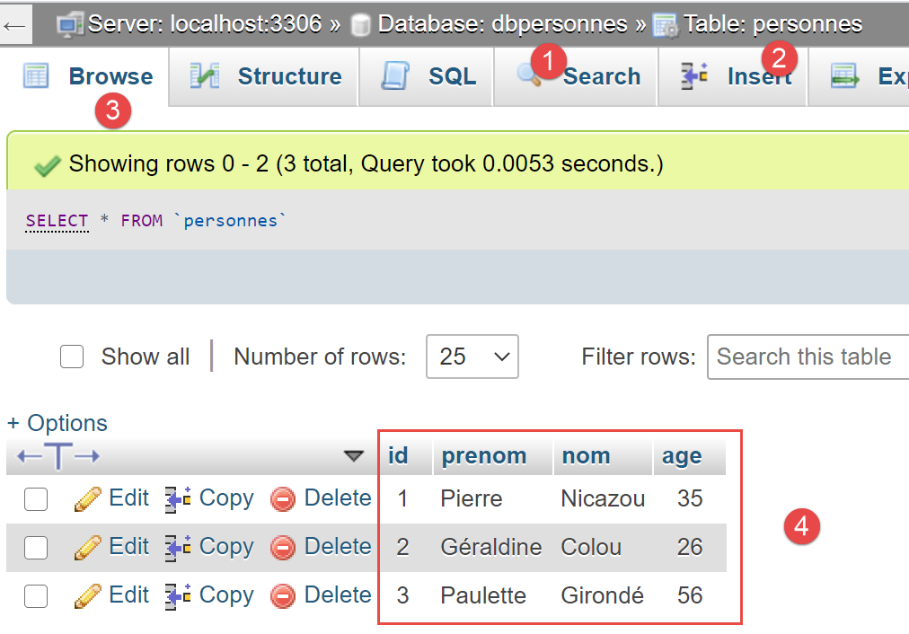
在 phpMyAdmin 中,执行结束时 [people] 表的内容如下:
19.5. 脚本 04:使用 [PostgreSQL] 数据库
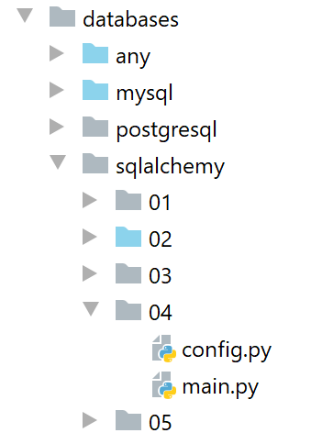
文件夹 [04] 是文件夹 [03] 的副本。我们仅修改了一处:[config] 文件中的连接字符串:
    # lien vers une base de données PostgreSQL
    engine = create_engine("postgresql+psycopg2://admpersonnes:nobody@localhost/dbpersonnes")
此连接字符串现在指向 [PostgreSQL] 数据库管理系统中的 [dbpersonnes] 数据库。请注意使用了 [psycopg2] 连接器。该连接器必须已安装。
运行 [main] 脚本将产生以下结果:
| C:\Data\st-2020\dev\python\cours-2020\python3-flask-2020\venv\Scripts\python.exe C:/Data/st-2020/dev/python/cours-2020/python3-flask-2020/databases/sqlalchemy/04/main.py
----------------
----------------
{"nom": "Nicazou", "prénom": "Pierre", "id": 1, "âge": 35}
{"nom": "Colou", "prénom": "Géraldine", "id": 2, "âge": 26}
{"nom": "Girondé", "prénom": "Paulette", "id": 3, "âge": 56}
----------------
{"nom": "Nicazou", "prénom": "Pierre", "id": 1, "âge": 35}
{"nom": "Girondé", "prénom": "Paulette", "id": 3, "âge": 56}
{"nom": "Colou", "prénom": "Géraldine", "id": 2, "âge": 26}
----------------
{"nom": "Nicazou", "prénom": "Pierre", "id": 1, "âge": 35}
{"nom": "Colou", "prénom": "Géraldine", "id": 2, "âge": 26}
----------------
{"prénom": "Josette", "nom": "Bruneau", "âge": 47, "id": 4}
----------------
Travail terminé...
Process finished with exit code 0
|
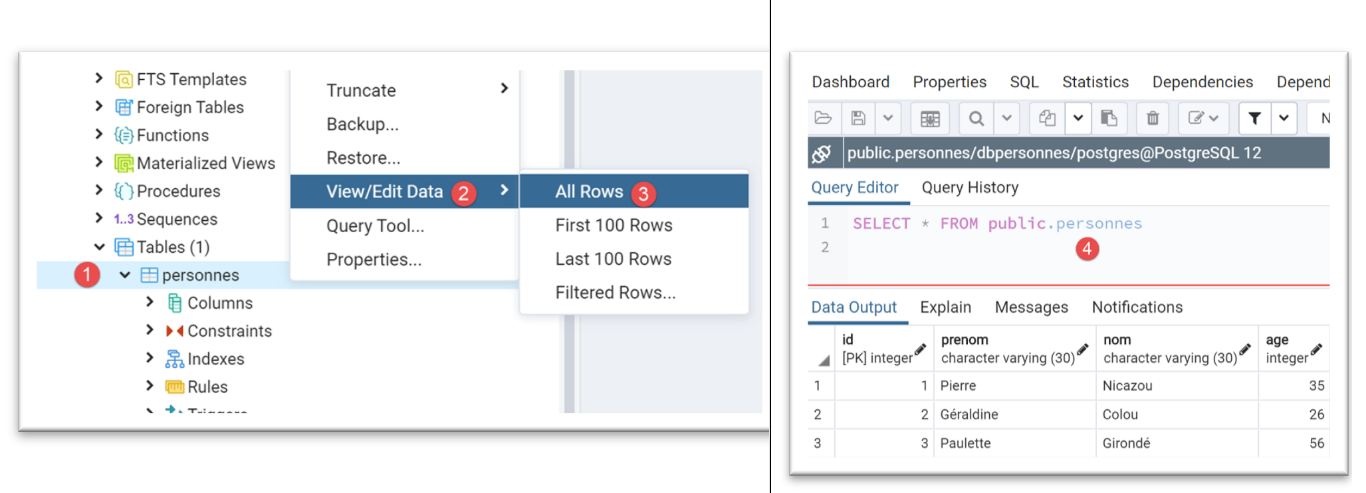
使用 [pgAdmin] 工具(参见 |pgAdmin| 部分),[people] 表的状态如下:
[people] 表是通过以下 SQL 代码生成的:
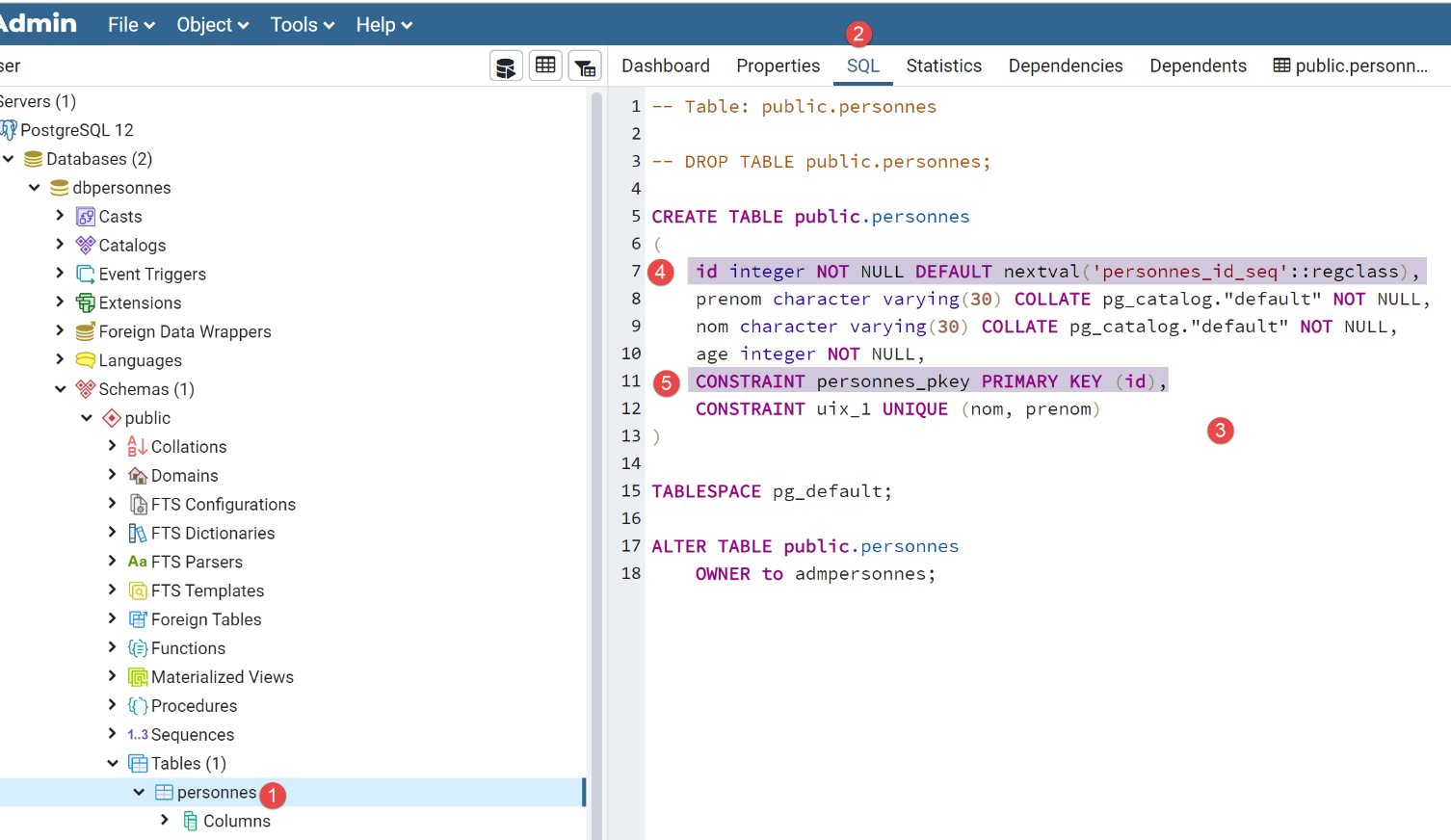
- 在[4-5]中,我们可以看到[id]列是主键。我们还看到它有一个默认值[DEFAULT关键字],这意味着如果插入一行数据时未指定主键,数据库管理系统(DBMS)将自动生成一个。这是常见的做法:我们让数据库管理系统来生成主键;
这版 [sqlalchemy] 脚本(版本 05)清楚地展示了从一种 DBMS 切换到另一种是多么简单:只需在配置脚本中更改连接字符串即可。 除此之外没有任何改变。如果我们将上文中的列类型 [id, last_name, first_name, age] 与示例 |02| 中 MySQL 表的列类型进行比较,会发现它们有所不同。[sqlalchemy] 会根据所使用的 DBMS 自动调整这些类型。这种适应新 DBMS 的能力,本身就是采用 [sqlalchemy] 或其他 ORM 的充分理由。
19.6. 脚本 05:完整示例
我们正在探讨的示例是对第 |troiscouches-v01| 节中示例的重新实现。该示例采用三层架构 [UI、业务逻辑、DAO],用于操作实体 [Class、Student、Subject、Grade]。当时这些实体被硬编码在 [DAO] 层中。现在我们将它们放入数据库中。我们将使用两种数据库管理系统:MySQL 和 PostgreSQL。
19.6.1. 应用程序架构
应用程序架构如下:
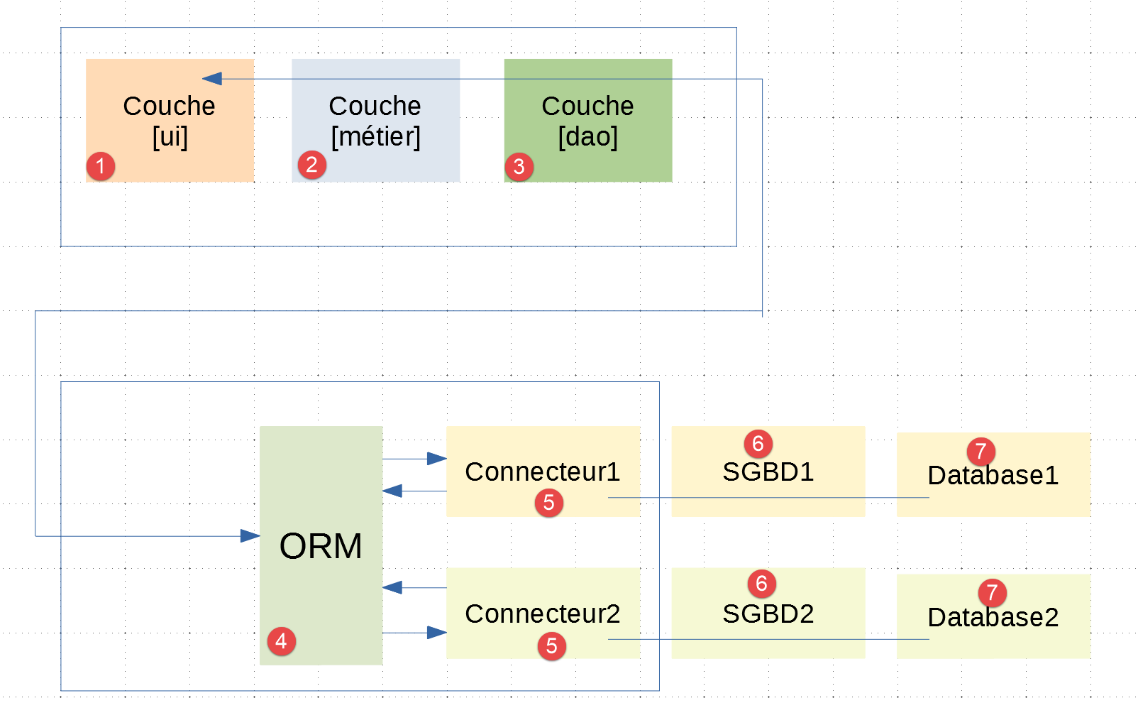
- 在 [1-3] 中,我们可以看到 [UI、业务、DAO] 这三个层与示例 |troiscouches-v01| 中已有的结构一致。现在,[DAO] 层与 [ORM] 层进行通信;
- 层 [1-5] 通过 Python 代码实现;
19.6.2. 数据库
我们将创建一个名为 [dbecole] 的 MySQL 数据库,所有者为 [admecole],密码为 [mdpecole]。为此,我们将遵循 |创建数据库| 章节中描述的步骤:
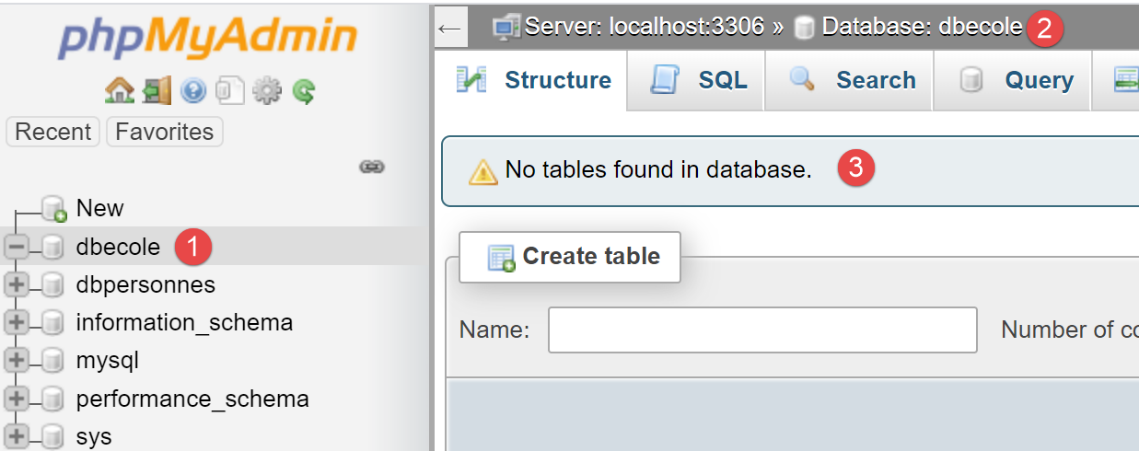
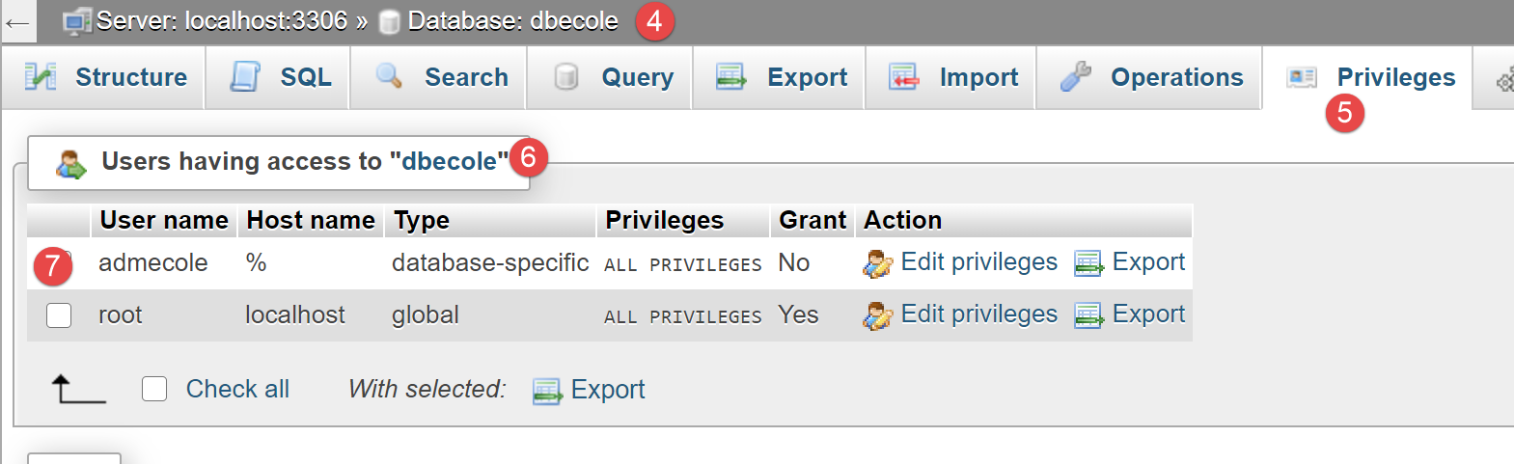
- 在 [1] 中,数据库 [dbecole] 没有表 [3];
- 在 [7] 中,用户 [admecole] 对该数据库拥有完全权限;
我们对 PostgreSQL 数据库管理系统(DBMS)也进行同样的操作。我们创建一个名为 [dbecole] 的数据库,所有者为用户 [admecole],密码为 [mdpecole]。为此,我们遵循 |创建数据库| 一节中描述的步骤:
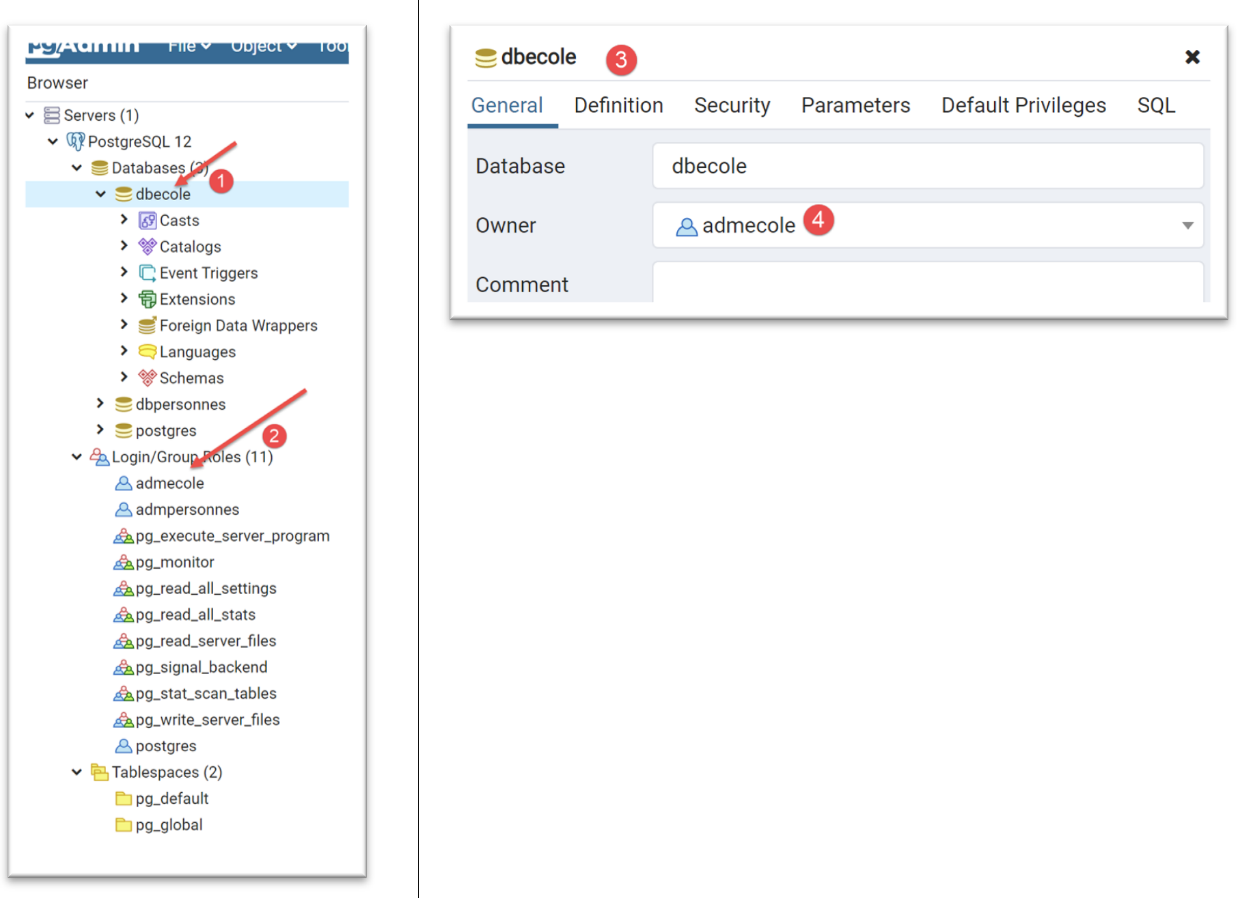
- 在 [1] 中,数据库 [dbecole];
- 在 [2] 中,用户 [admecole];
- 在 [3-4] 中,数据库 [dbecole] 归用户 [admecole] 所有;
19.6.3. 应用程序处理的实体
在 |troiscouches v01| 应用程序中,处理的实体如下(参见 |entities|)。这些实体将存储在上述数据库中。我们不会在新应用程序中重复创建这些实体,而是从它们已定义的位置进行检索。
[Class] 类:
| # imports
from BaseEntity import BaseEntity
from MyException import MyException
from Utils import Utils
class Classe(BaseEntity):
# attributes excluded from class state
excluded_keys = []
# class properties
@staticmethod
def get_allowed_keys() -> list:
# id: class identifier
# name: class name
return BaseEntity.get_allowed_keys() + ["nom"]
# getter
@property
def nom(self: object) -> str:
return self.__nom
# setters
@nom.setter
def nom(self: object, nom: str):
# name must be a non-empty string
if Utils.is_string_ok(nom):
self.__nom = nom
else:
raise MyException(11, f"Le nom de la classe {self.id} doit être une chaîne de caractères non vide")
|
[Student] 类:
| # imports
from BaseEntity import BaseEntity
from Classe import Classe
from MyException import MyException
from Utils import Utils
class Elève(BaseEntity):
# attributes excluded from class state
excluded_keys = []
# class properties
@staticmethod
def get_allowed_keys() -> list:
# id: student identifier
# name: student's name
# first name: student's first name
# class: student's class
return BaseEntity.get_allowed_keys() + ["nom", "prénom", "classe"]
# getters
@property
def nom(self: object) -> str:
return self.__nom
@property
def prénom(self: object) -> str:
return self.__prénom
@property
def classe(self: object) -> Classe:
return self.__classe
# setters
@nom.setter
def nom(self: object, nom: str) -> str:
# name must be a non-empty string
if Utils.is_string_ok(nom):
self.__nom = nom
else:
raise MyException(41, f"Le nom de l'élève {self.id} doit être une chaîne de caractères non vide")
@prénom.setter
def prénom(self: object, prénom: str) -> str:
# first name must be a non-empty string
if Utils.is_string_ok(prénom):
self.__prénom = prénom
else:
raise MyException(42, f"Le prénom de l'élève {self.id} doit être une chaîne de caractères non vide")
@classe.setter
def classe(self: object, value):
try:
# we expect a Class type
if isinstance(value, Classe):
self.__classe = value
# or a type dict
elif isinstance(value,dict):
self.__classe=Classe().fromdict(value)
# or a json type
elif isinstance(value,str):
self.__classe = Classe().fromjson(value)
except BaseException as erreur:
raise MyException(43, f"L'attribut [{value}] de l'élève {self.id} doit être de type Classe ou dict ou json. Erreur : {erreur}")
|
[Subject] 类:
| # imports
from BaseEntity import BaseEntity
from MyException import MyException
from Utils import Utils
class Matière(BaseEntity):
# attributes excluded from class state
excluded_keys = []
# class properties
@staticmethod
def get_allowed_keys() -> list:
# id: material identifier
# name: material name
# coefficient: subject coefficient
return BaseEntity.get_allowed_keys() + ["nom", "coefficient"]
# getter
@property
def nom(self: object) -> str:
return self.__nom
@property
def coefficient(self: object) -> float:
return self.__coefficient
# setters
@nom.setter
def nom(self: object, nom: str):
# name must be a non-empty string
if Utils.is_string_ok(nom):
self.__nom = nom
else:
raise MyException(21, f"Le nom de la matière {self.id} doit être une chaîne de caractères non vide")
@coefficient.setter
def coefficient(self, coefficient: float):
# the coefficient must be a real number >=0
erreur = False
if isinstance(coefficient, (int, float)):
if coefficient >= 0:
self.__coefficient = coefficient
else:
erreur = True
else:
erreur = True
# mistake?
if erreur:
raise MyException(22, f"Le coefficient de la matière {self.nom} doit être un réel >=0")
|
[Grade] 类:
| # imports
from BaseEntity import BaseEntity
from Elève import Elève
from Matière import Matière
from MyException import MyException
class Note(BaseEntity):
# attributes excluded from class state
excluded_keys = []
# class properties
@staticmethod
def get_allowed_keys() -> list:
# id: note identifier
# value: the note itself
# student: student (of type Student) concerned by the note
# subject: subject (of type Subject) concerned by the grade
# the Note object is therefore a student's grade in a subject
return BaseEntity.get_allowed_keys() + ["valeur", "élève", "matière"]
# getters
@property
def valeur(self: object) -> float:
return self.__valeur
@property
def élève(self: object) -> Elève:
return self.__élève
@property
def matière(self: object) -> Matière:
return self.__matière
# getters
@valeur.setter
def valeur(self: object, valeur: float):
# the score must be a real number between 0 and 20
if isinstance(valeur, (int, float)) and 0 <= valeur <= 20:
self.__valeur = valeur
else:
raise MyException(31,
f"L'attribut {valeur} de la note {self.id} doit être un nombre dans l'intervalle [0,20]")
@élève.setter
def élève(self: object, value):
try:
# we expect a Student type
if isinstance(value, Elève):
self.__élève = value
# or a type dict
elif isinstance(value, dict):
self.__élève = Elève().fromdict(value)
# or a json type
elif isinstance(value, str):
self.__élève = Elève().fromjson(value)
except BaseException as erreur:
raise MyException(32,
f"L'attribut [{value}] de la note {self.id} doit être de type Elève ou dict ou json. Erreur : {erreur}")
@matière.setter
def matière(self: object, value):
try:
# we expect a Material type
if isinstance(value, Matière):
self.__matière = value
# or a type dict
elif isinstance(value, dict):
self.__matière = Matière().fromdict(value)
# or a json type
elif isinstance(value, str):
self.__matière = Matière().fromjson(value)
except BaseException as erreur:
raise MyException(33,
f"L'attribut [{value}] de la note {self.id} doit être de type Matière ou dict ou json. Erreur : {erreur}")
|
19.6.4. 配置
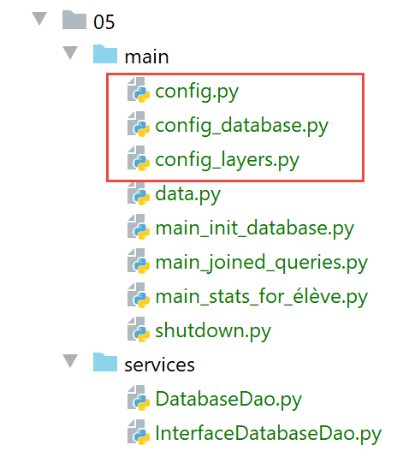
配置已拆分为多个文件:
- [config.py] 中的通用配置:它设置应用程序的 Python 路径并实例化架构层;
- [config_database] 中的 [SQLAlchemy] 配置:负责处理类与表的映射;
- 应用层配置位于 [config_layers] 中;
[config] 文件内容如下:
| def configure(config: dict) -> dict:
import os
# step 1 ---
# establish the application's Python Path
# absolute path of this script's folder
script_dir = os.path.dirname(os.path.abspath(__file__))
# absolute path configuration relative path reference
root_dir = "C:/Data/st-2020/dev/python/cours-2020/python3-flask-2020"
# absolute paths of dependencies
absolute_dependencies = [
# BaseEntity, MyException
f"{root_dir}/classes/02/entities",
# projet troiscouches v01
f"{root_dir}/troiscouches/v01/interfaces",
f"{root_dir}/troiscouches/v01/services",
f"{root_dir}/troiscouches/v01/entities",
# project files
script_dir,
f"{script_dir}/../services",
]
# update syspath
from myutils import set_syspath
set_syspath(absolute_dependencies)
# step 2 ------
# database configuration
import config_database
config = config_database.configure(config)
# step 3 ------
# instantiation of application layers
import config_layers
config = config_layers.configure(config)
# return the config
return config
|
- 第 4–27 行:构建应用程序的 Python 路径;
- 第 29–32 行:[SQLAlchemy] 配置;
- 第 34–37 行:应用程序层的配置;
[config_database] 文件内容如下:
| def configure(config: dict) -> dict:
# config['sgbd'] is the name of the SGBD used
# mysql : MySQL
# pgres : PostgreSQL
# sqlalchemy configuration
from sqlalchemy import Table, Column, Integer, MetaData, String, Float, ForeignKey, create_engine
from sqlalchemy.orm import mapper, relationship, sessionmaker
# connection chains to the databases used
engines = {
'mysql': "mysql+mysqlconnector://admecole:mdpecole@localhost/dbecole",
'pgres': "postgresql+psycopg2://admecole:mdpecole@localhost/dbecole"
}
# connection chain to the database used
engine = create_engine(engines[config['sgbd']])
# metadata
metadata = MetaData()
# database tables
tables = {}
# mapped classes
from Classe import Classe
from Elève import Elève
from Note import Note
from Matière import Matière
# the class table
tables['classes'] = classes_table = \
Table("classes", metadata,
Column('id', Integer, primary_key=True),
Column('nom', String(30), nullable=False),
)
mapper(Classe, tables['classes'], properties={
'id': classes_table.c.id,
'nom': classes_table.c.nom
})
# the student table
tables['élèves'] = élèves_table = \
Table("élèves", metadata,
Column('id', Integer, primary_key=True),
Column('nom', String(30), nullable=False),
Column('prénom', String(30), nullable=False),
# a student belongs to a class
Column('classe_id', Integer, ForeignKey('classes.id')),
)
# mapping
mapper(Elève, tables['élèves'], properties={
'id': élèves_table.c.id,
'nom': élèves_table.c.nom,
'prénom': élèves_table.c.prénom,
'classe': relationship(Classe, backref="élèves", lazy="select")
})
# table of contents
tables['matières'] = matières_table = \
Table("matières", metadata,
Column('id', Integer, primary_key=True),
Column('nom', String(30), nullable=False),
Column('coefficient', Float, nullable=False)
)
# mapping
mapper(Matière, tables['matières'], properties={
'id': matières_table.c.id,
'nom': matières_table.c.nom,
"coefficient": matières_table.c.coefficient
})
# notes table
tables['notes'] = notes_table = \
Table("notes", metadata,
Column('id', Integer, primary_key=True),
Column('valeur', Float, nullable=False),
# a grade is a student's grade
Column('élève_id', Integer, ForeignKey('élèves.id')),
# a grade is a subject grade
Column('matière_id', Integer, ForeignKey('matières.id')),
)
    # mapping
    mapper(Note, tables['notes'], properties={
        'id': notes_table.c.id,
        'valeur': notes_table.c.valeur,
        'élève': relationship(Elève, backref="notes", lazy="select"),
        'matière': relationship(Matière, backref="notes", lazy="select")
    })
# entity configuration [BaseEntity]
Elève.excluded_keys = ['_sa_instance_state', 'notes', 'classe']
Classe.excluded_keys = ['_sa_instance_state', 'élèves']
Matière.excluded_keys = ['_sa_instance_state', 'notes']
Note.excluded_keys = ['_sa_instance_state', 'matière', 'élève']
# the factory session
Session = sessionmaker()
Session.configure(bind=engine)
# a session
session = Session()
# certain information is stored in the configuration dictionary
config['database'] = {"engine": engine, "metadata": metadata, "tables": tables, "session": session}
# return the config
return config
|
注释
- 第 1-4 行:[configure] 函数接收一个字典作为参数。仅使用 [db] 键。如果数据库是 MySQL 数据库,则将其设置为 [mysql];如果是 PostgreSQL 数据库,则设置为 [pgres];
- 第6-9行:导入[sqlalchemy]中的元素。[config_database]脚本负责在[dbecole]数据库中的表与实体[Classes、Student、Subject、Grade]之间建立映射关系。在表中,实体数据被封装在一行中。 而在 Python 代码中,它们被封装在对象中。因此得名 ORM(对象关系映射器):ORM 在关系型数据库的行与对象之间建立映射(关联)。在此应用中,我们有四个实体 [Class, Student, Subject, Grade],它们将与四个表 [classes, students, subjects, grades] 建立关联。请注意,表名可能包含带重音的字符;
- 第 11–17 行:连接所用数据库的连接字符串。这取决于 config['db']。
- 第 24–28 行:将进行映射的应用程序实体 [SQLAlchemy]。执行这些行时,Python 路径已由 [config] 脚本建立;
- 第 30–40 行:[Class] 实体与 [classes] 表之间的映射;
- 第 30–35 行:使用 [sqlalchemy] 中的 [Table] 类定义 [classes] 表。我们指定该表包含两列:
- [id] 列,作为主键并表示课程编号,第 33 行;
- 第 34 行中的 [name] 列,其中包含类名;
- 第 31–32 行:请注意,语法 x=y=z 在 Python 中是有效的:先将 z 的值赋给 y,再将 y 的值赋给 x;
- 第 37–40 行:列出了 [classes] 表的各列与 [Class] 实体的属性之间的映射关系;
- 第 42–57 行:[Student] 实体与 [students] 表之间的映射;
- 第 51–57 行:使用 [SQLAlchemy] 中的 [Table] 类定义 [students] 表。我们指定该表包含四个列:
- [id] 列,作为主键,表示学生的 ID,第 45 行;
- [name] 列,包含学生的姓氏,第 46 行;
- [first_name] 列,包含学生的名字,第 47 行。请注意,列名可以包含带重音的字符;
- 第 49 行,[class_id] 列,将包含学生所属班级的 ID。这被称为外键。[students.class_id] 是针对 [classes.id] 列的外键(ForeignKey)。这意味着 [students.class_id] 的值必须存在于 [classes.id] 列中;
- 第 51–57 行:我们列出了 [students] 表的列与 [Student] 实体的属性之间的映射:
- 第 53–55 行很容易理解;
- 第 56 行稍显复杂:它将 [Student.class] 属性的值定义为通过连接 [students] 和 [classes] 表的外键关系计算得出。[relationship] 函数的参数如下:
- [Class]:这是与 [Student] 实体建立外键关系的实体的名称。这必须通过 [students] 表中存在一个引用 [classes] 表的外键来体现。我们知道该外键确实存在;
- [backref="students"]:将添加到 [Class] 实体上的属性名称。 [Class.students] 将包含该班级中所有学生的列表。该属性绝不能 已存在。如果它已存在,只需在此处为 [backref] 选择一个不同的名称。开发者无需管理此属性。[SQLAlchemy] 会自动处理它。开发者只需知道该属性由 [SQLAlchemy] 添加,并且可以在代码中使用它;
- [lazy='select']: 这意味着 ORM 不应尝试立即为 [Student.class] 属性赋值。它只应在代码显式请求时才检索其值。因此:
- 如果代码请求所有学生的列表,系统会返回这些学生,但不会计算其 [class] 属性;
- 稍后,代码聚焦于特定学生 [e] 并引用其班级 [e.class]。此时该引用将强制 [SQLAlchemy] 执行数据库查询以获取该学生的班级,整个过程对开发者完全透明;
- 设置 [lazy='select'] 的目的也是为了避免不必要的数据库查询;
- 第 56 行:当 ORM 从 [students] 表中检索一行数据时,它会检索 [id, last_name, first_name, class_id] 这些字段。 随后,它必须构建一个 Student 对象(包含 id、last_name、first_name 和 class 属性)。对于 [id, last_name, first_name] 这些属性,这并不困难。但对于 [class] 属性,情况则更为复杂。其值是一个类型为 [Class] 的对象引用。然而,ORM 仅掌握一条信息:[students.class_id]。 由于 [students.class_id] 是 [classes.id] 列的外键,我们在此指示它利用该关系从 [classes] 表中检索 id=[students.class_id] 的行(该行必须存在),并根据该行创建 [Student.class] 属性所期望的 [Class] 对象;
- 第 59–71 行:[Subject] 实体与 [subjects] 表之间的映射;
- 第 59–65 行:定义名为 [subjects] 的 [SQLAlchemy] 表;
- 第 66–71 行:我们列出了 [subjects] 表的列与 [Subject] 实体的属性之间的映射。此处没有难点;
- 第 73–90 行:[Note] 实体与 [notes] 表之间的映射;
- 第 73–82 行:定义名为 [notes] 的 [SQLAlchemy] 表。该表包含两个外键:
- 第 79 行,[notes.student_id] 列的值来自 [students.id] 列。该外键反映了笔记属于特定学生的关系;
- 第 81 行:[notes.subject_id] 列的值来自 [subjects.id] 列。该外键表示成绩属于特定学科的事实;
- 第 84–90 行:[Note] 实体与 [notes] 表之间的映射:
- 第 88 行:属性 [Note.student] 的值必须是 [Student] 类型的实例。ORM 仅拥有 [notes] 表行中的 [notes.student_id] 列,该列引用了 [students.id] 列。在此,我们指定使用此外键关系来检索与该成绩对应的 [Student] 实例。 此外,[relationship(Student, backref="grades", …)] 将创建新属性 [Student.grades],该属性将包含该学生的成绩列表。此属性在 [Student] 类中必须不存在;
- 第 89 行:属性 [Grade.subject] 的值必须是 [Subject] 类型的实例。ORM 仅拥有 [grades] 表行中的 [notes.subject_id] 列,该列引用了 [subjects.id] 列。此处,我们指定使用此外键关系来检索我们拥有其成绩的 [Subject] 实例。 此外,[relationship(Subject, backref="grades", …)] 将创建新属性 [Subject.grades],该属性将包含该学科的所有成绩列表。该属性在 [Subject] 类中必须不存在;
- 第 92–96 行:对于每个从 [BaseEntity] 派生的实体,我们定义了应从该实体的属性字典(BaseEntity.asdict)中排除的属性列表。 我们已经看到,[sqlalchemy] 会向所有映射实体添加 [_sa_instance_state] 属性。我们不希望该属性出现在属性字典中。此外,我们还注意到之前的映射向实体添加了新属性:
- [Student.grades]:该学生的所有成绩;
- [Class.students]:班级中的所有学生;
- [Subject.grades]:该科目的所有成绩;
通常,我们不希望这些属性被添加到实体的状态中。事实上,计算这些值会产生 SQL 开销,而且这些值往往是不必要的。因此,如果我们查询名为“X”的学生:
- (待续)
- ORM 将返回一个实体 [Student(id, last_name, first_name, class, grades)]。由于 [lazy='select'],与数据库外键关联的 [class, grades] 属性尚未被计算;
- 现在,如果我显示该学生的 JSON 字符串,我们知道它将来自实体的 [asdict] 字典。如果包含 [class] 和 [grades] 属性,[SQLAlchemy] 将被迫执行 SQL 查询来计算其值。这会消耗大量资源。如果能避免这些查询,那当然更好;
- 在此,我们已排除所有与外键关联的属性;
- 第 98–100 行:实例化并配置 [Session factory](factory = production factory)。[Session] 对象用于创建由事务支持的 [SQLAlchemy] 会话;
- 第 102–103 行:创建 [SQLAlchemy] 会话;
- 第 106 行:将 [SQLAlchemy] 配置的某些元素放入应用程序的全局配置字典中;
- 第 109 行:返回该字典;
[config_layers] 文件用于配置应用程序层:
| def configure(config: dict) -> dict:
# layer instantiation [dao]
from DatabaseDao import DatabaseDao
dao = DatabaseDao(config)
# instantiation of the [business] layer
from Métier import Métier
métier = Métier(dao)
# instantiation of the [ui] layer
from Console import Console
ui = Console(métier)
# we put the layers in the config
config['dao'] = dao
config['métier'] = métier
config['ui'] = ui
# return the config
return config
|
- 第 1 行:[configure] 函数接收包含应用程序全局配置的字典;
- 第 2–12 行:实例化应用程序层;
- 第 15–17 行:将层引用添加到全局配置中;
- 第 20 行:返回新的配置;
19.6.5. [dao] 层 - 1
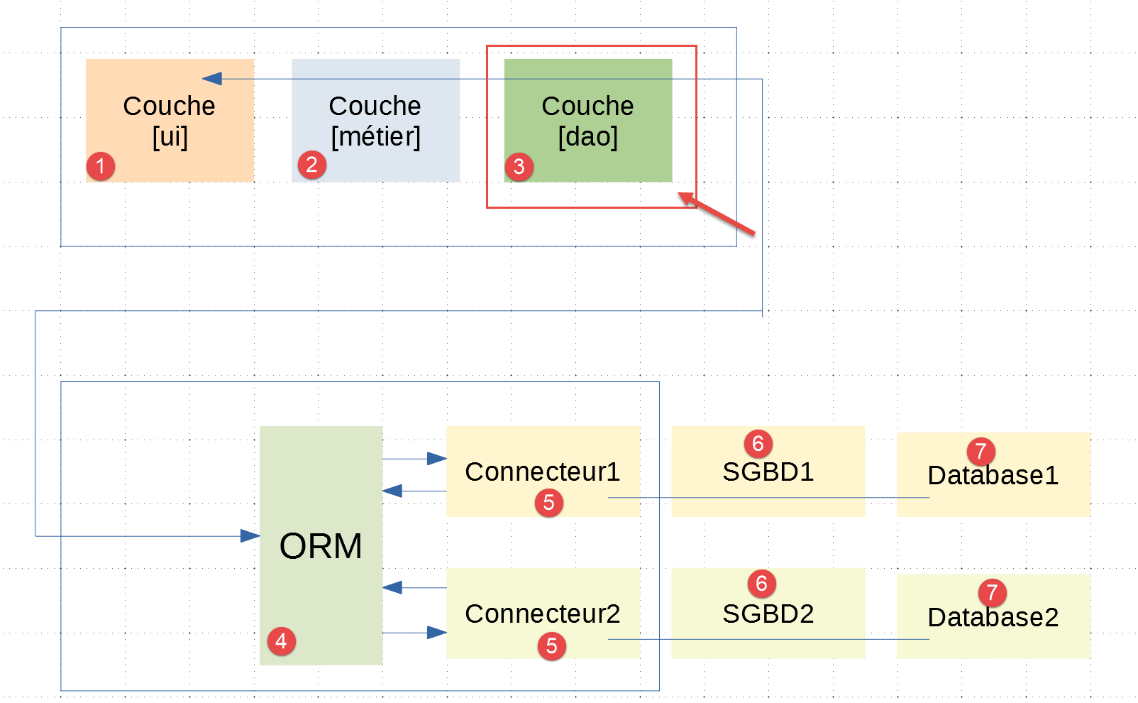
这里需要明确的是,[dao]层[3]与前一段所述配置的[sqlalchemy] ORM[4]进行通信。在|troiscouches v01|应用程序的三个层[ui、business、dao]中,仅需重写[dao]层。[ui、business]层予以保留。
[dao] 层的实现已放置在 [services] 文件夹中:
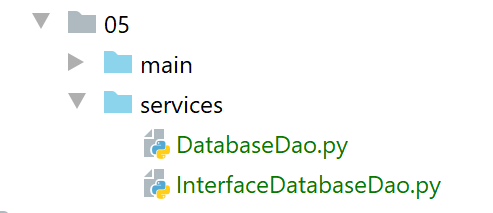
[InterfaceDatabaseDao] 是 [DAO] 层的接口:
| from abc import ABC, abstractmethod
from InterfaceDao import InterfaceDao
class InterfaceDatabaseDao(InterfaceDao, ABC):
# database initialization
@abstractmethod
def init_database(self, data: dict):
pass
|
- 第 6 行:[InterfaceDatabaseDao] 接口同时继承自 [ABC] 类(作为抽象类)以及 |troiscouches v01| 项目的 [InterfaceDao] 接口;
- 第 8–11 行:我们在从 [InterfaceDao] 继承的方法中添加了 [init_database] 方法。其作用是使用第 10 行作为参数传递的 [data] 字典中的数据来初始化数据库;
回顾一下,[InterfaceDao] 接口如下所示:
| # imports
from abc import ABC, abstractmethod
# dao interface
from Elève import Elève
class InterfaceDao(ABC):
# class list
@abstractmethod
def get_classes(self: object) -> list:
pass
# list of students
@abstractmethod
def get_élèves(self: object) -> list:
pass
# list of materials
@abstractmethod
def get_matières(self: object) -> list:
pass
# lIST OF NOTES
@abstractmethod
def get_notes(self: object) -> list:
pass
# list of student grades
@abstractmethod
def get_notes_for_élève_by_id(self: object, élève_id: int) -> list:
pass
# search for a student by id
@abstractmethod
def get_élève_by_id(self: object, élève_id: int) -> Elève:
pass
|
[DAO] 层的实现如下:
| from sqlalchemy.exc import DatabaseError, IntegrityError, InterfaceError
from Classe import Classe
from Elève import Elève
from InterfaceDatabaseDao import InterfaceDatabaseDao
from Matière import Matière
from MyException import MyException
from Note import Note
class DatabaseDao(InterfaceDatabaseDao):
def __init__(self, config: dict):
# database = {"engine": engine, "metadata": metadata, "tables": tables, "session": session}
self.database = config['database']
self.session = self.database['session']
def init_database(self, data: dict):
…
…
|
- 第 11 行:[DatabaseDao] 类实现了 [InterfaceDatabaseDao] 接口;
- 第 13–16 行:类的构造函数。它将应用程序配置字典作为参数;
- 第 15 行:存储 [sqlalchemy] 配置;
- 第 16 行:存储用于操作数据库的 [sqlalchemy] 会话;
- 第 18 行:[init_database] 方法使用 [data] 字典初始化数据库;
[data] 字典由以下 [data.py] 脚本实现:
| def configure():
from Classe import Classe
from Elève import Elève
from Matière import Matière
from Note import Note
# classes are instantiated
classe1 = Classe().fromdict({"id": 1, "nom": "classe1"})
classe2 = Classe().fromdict({"id": 2, "nom": "classe2"})
classes = [classe1, classe2]
# materials
matière1 = Matière().fromdict({"id": 1, "nom": "matière1", "coefficient": 1})
matière2 = Matière().fromdict({"id": 2, "nom": "matière2", "coefficient": 2})
matières = [matière1, matière2]
# students
élève11 = Elève().fromdict({"id": 11, "nom": "nom1", "prénom": "prénom1", "classe": classe1})
élève21 = Elève().fromdict({"id": 21, "nom": "nom2", "prénom": "prénom2", "classe": classe1})
élève32 = Elève().fromdict({"id": 32, "nom": "nom3", "prénom": "prénom3", "classe": classe2})
élève42 = Elève().fromdict({"id": 42, "nom": "nom4", "prénom": "prénom4", "classe": classe2})
élèves = [élève11, élève21, élève32, élève42]
# student grades in various subjects
note1 = Note().fromdict({"id": 1, "valeur": 10, "élève": élève11, "matière": matière1})
note2 = Note().fromdict({"id": 2, "valeur": 12, "élève": élève21, "matière": matière1})
note3 = Note().fromdict({"id": 3, "valeur": 14, "élève": élève32, "matière": matière1})
note4 = Note().fromdict({"id": 4, "valeur": 16, "élève": élève42, "matière": matière1})
note5 = Note().fromdict({"id": 5, "valeur": 6, "élève": élève11, "matière": matière2})
note6 = Note().fromdict({"id": 6, "valeur": 8, "élève": élève21, "matière": matière2})
note7 = Note().fromdict({"id": 7, "valeur": 10, "élève": élève32, "matière": matière2})
note8 = Note().fromdict({"id": 8, "valeur": 12, "élève": élève42, "matière": matière2})
notes = [note1, note2, note3, note4, note5, note6, note7, note8]
# we group all
data = {"élèves": élèves, "classes": classes, "matières": matières, "notes": notes}
# we return the data
return data
|
- 第 34 行:将传递给 [init_database] 方法的字典。该字典包含以下键(第 32 行):
- [students]:学生列表;
- [classes]:班级列表;
- [subjects]:科目列表;
- [grades]:所有学生在所有科目中的成绩列表;
让我们回到 [init_database] 方法:
| def init_database(self, data: dict):
# comic book config
database = self.database
engine = database['engine']
metadata = database['metadata']
tables = database['tables']
try:
# delete existing tables
# checkfirst=True: first checks that the table exists
tables["notes"].drop(engine, checkfirst=True)
tables["matières"].drop(engine, checkfirst=True)
tables["élèves"].drop(engine, checkfirst=True)
tables["classes"].drop(engine, checkfirst=True)
# recreate tables from mapping
metadata.create_all(engine)
# table filling
session = self.session
# classes
classes = data["classes"]
for classe in classes:
session.add(classe)
# materials
matières = data["matières"]
for matière in matières:
session.add(matière)
# students
élèves = data["élèves"]
for élève in élèves:
session.add(élève)
# notes
notes = data["notes"]
for note in notes:
session.add(note)
# commit
session.commit()
except (DatabaseError, InterfaceError, IntegrityError) as erreur:
# session cancellation
if session:
session.rollback()
# up the exception
raise MyException(23, f"{erreur}")
|
- 第 3–6 行:从数据库配置中获取信息;
- 第 9–14 行:我们看到 [sqlalchemy] 配置已将四个实体映射到四个表 [students, subjects, classes, grades]。首先,如果这些表存在,则将其删除;
- 第 16–17 行:重新创建刚才删除的四个表;
- 第 22–25 行:我们将所有班级添加到会话中;
- 第 27–30 行:将所有科目添加到会话中;
- 第 32–35 行:我们将所有学生添加到会话中;
- 第 37–40 行:我们将所有成绩添加到会话中;
- 为了进行这些添加操作,我们遵循了特定的顺序。我们从与其他实体没有关系的实体开始,以具有关系的实体结束。因此,当我们将学生添加到会话中时,他们所关联的班级已经存在于会话中;
- 第 43 行:提交 [sqlalchemy] 会话。 完成此操作后,我们可以确信会话中的所有数据已与数据库同步。简而言之,数据已插入到表中。这得益于 [sqlalchemy] 配置中定义的映射关系。[sqlalchemy] 知道每个实体应如何存储在表中。[sqlalchemy] 还生成了表中可能需要的任何外键;
- 第 44–49 行:若遇到问题,[sqlalchemy] 会话将被回滚,并在第 49 行抛出异常;
19.6.6. 数据库初始化
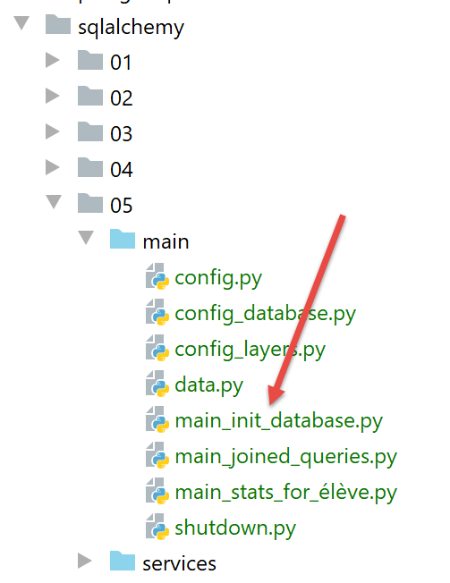
[main_init_database] 脚本使用 [data.py] 脚本中的内容初始化数据库。其代码如下:
| # a mysql or pgres parameter is expected
import sys
syntaxe = f"{sys.argv[0]} mysql / pgres"
erreur = len(sys.argv) != 2
if not erreur:
sgbd = sys.argv[1].lower()
erreur = sgbd != "mysql" and sgbd != "pgres"
if erreur:
print(f"syntaxe : {syntaxe}")
sys.exit()
# configure the application
import config
config = config.configure({'sgbd': sgbd})
# syspath is configured - imports can be made
from MyException import MyException
# retrieve the data to be stored in the database
import data
data = data.configure()
# we recover the [dao] layer
dao = config["dao"]
# ----------- hand
try:
# database table creation and initialization
dao.init_database(data)
except MyException as ex:
# error is displayed
print(f"L'erreur suivante s'est produite : {ex}")
finally:
# release of resources mobilized by the application
import shutdown
shutdown.execute(config)
# end
print("Travail terminé...")
|
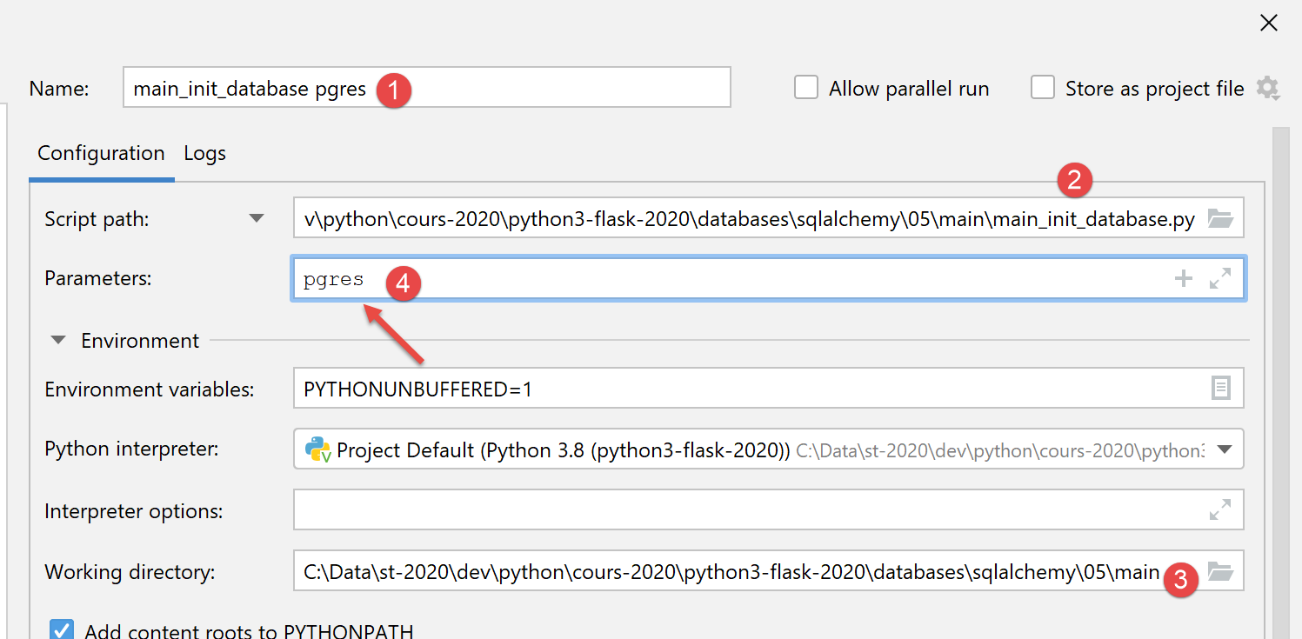
- 第 1-11 行:脚本根据您是要初始化 MySQL 还是 PostgreSQL 数据库,预期接收参数 [mysql] 或 [pgres];
- 第 13-15 行:应用程序根据作为参数传递的 DBMS 进行配置;
- 第 20-22 行:检索待插入数据库的数据;
- 第 25 行:[dao] 层已实例化,可在应用程序配置中访问;
- 第 30 行:初始化数据库;
- 第 34–37 行:无论是否发生错误,均使用 [shutdown] 模块释放应用程序资源;
[shutdown.py] 模块内容如下:
| def execute(config: dict):
# release the resources mobilized by the application
sqlalchemy_session = config['database']['session']
if sqlalchemy_session:
sqlalchemy_session.close()
|
[shutdown.execute] 函数会关闭用于初始化数据库的 [sqlalchemy] 会话。
我们创建一个初始执行配置(参见 |执行配置|),用于在 MySQL 数据库管理系统上运行 [main_init_database]:
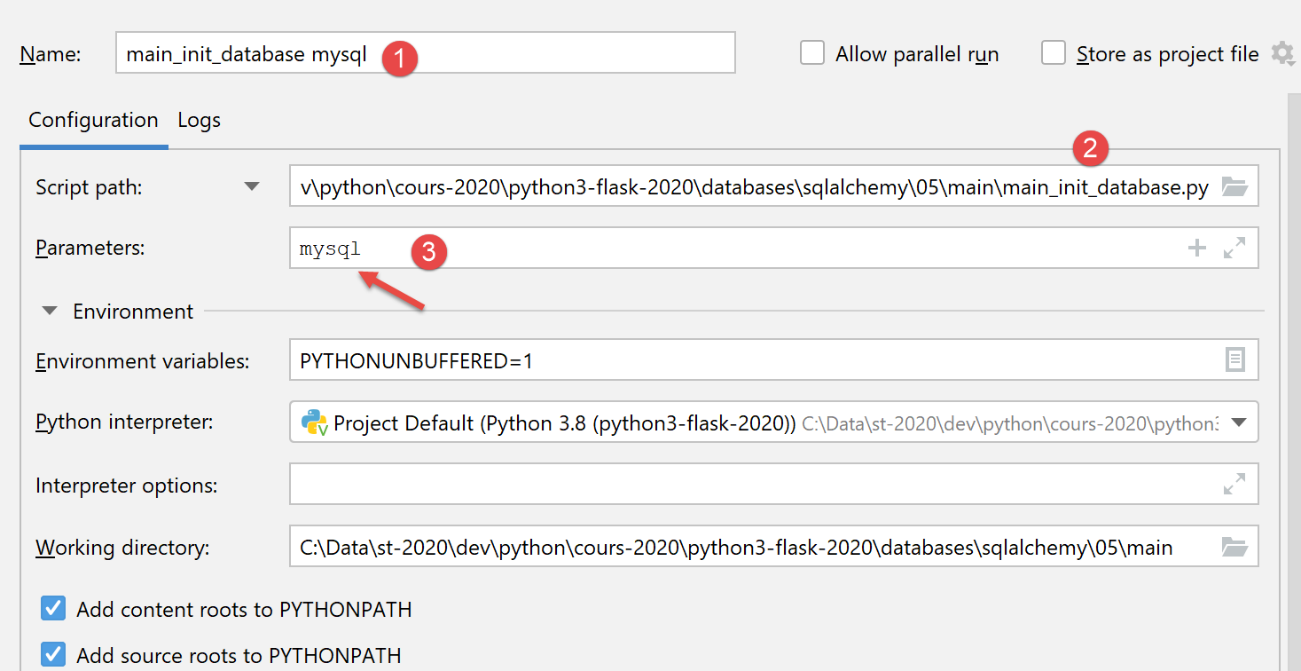
在 phpMyAdmin 中,运行此配置的结果如下:
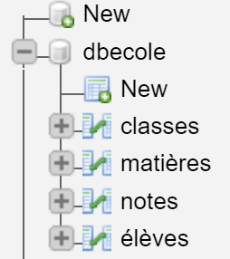
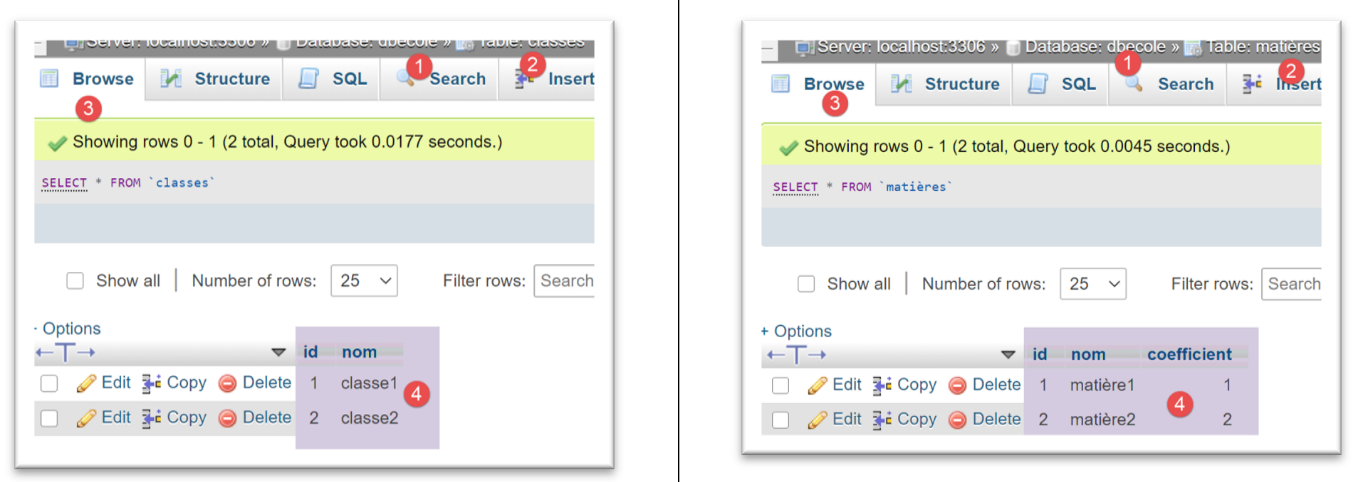
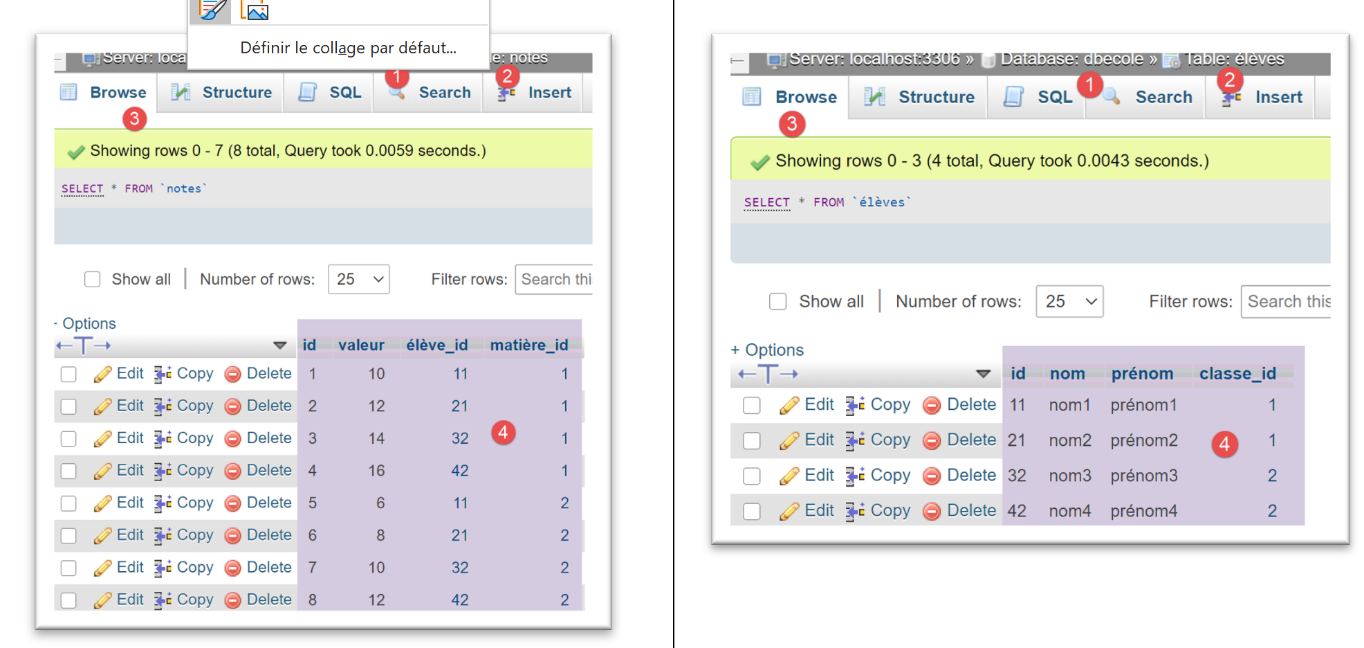
对于 [PostgreSQL] 数据库管理系统,我们使用以下执行配置:
执行后,[pgAdmin] 中的结果如下:
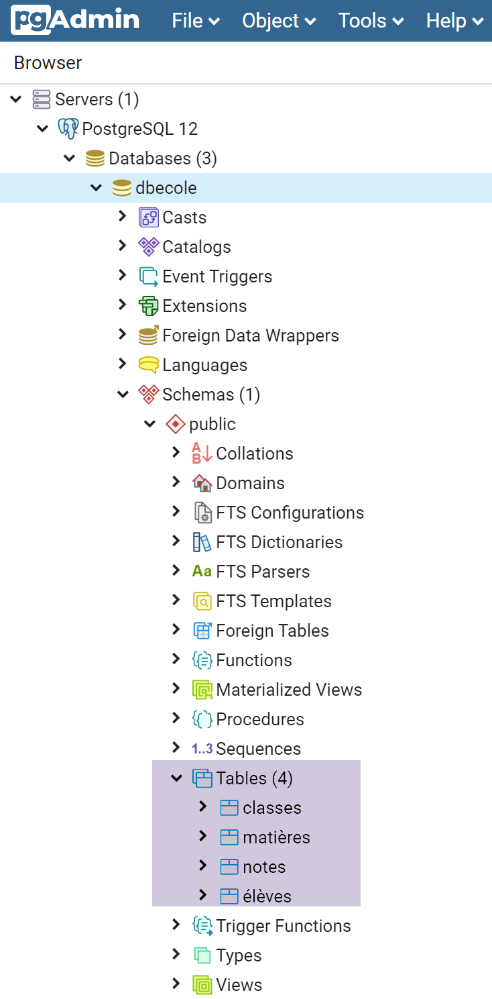
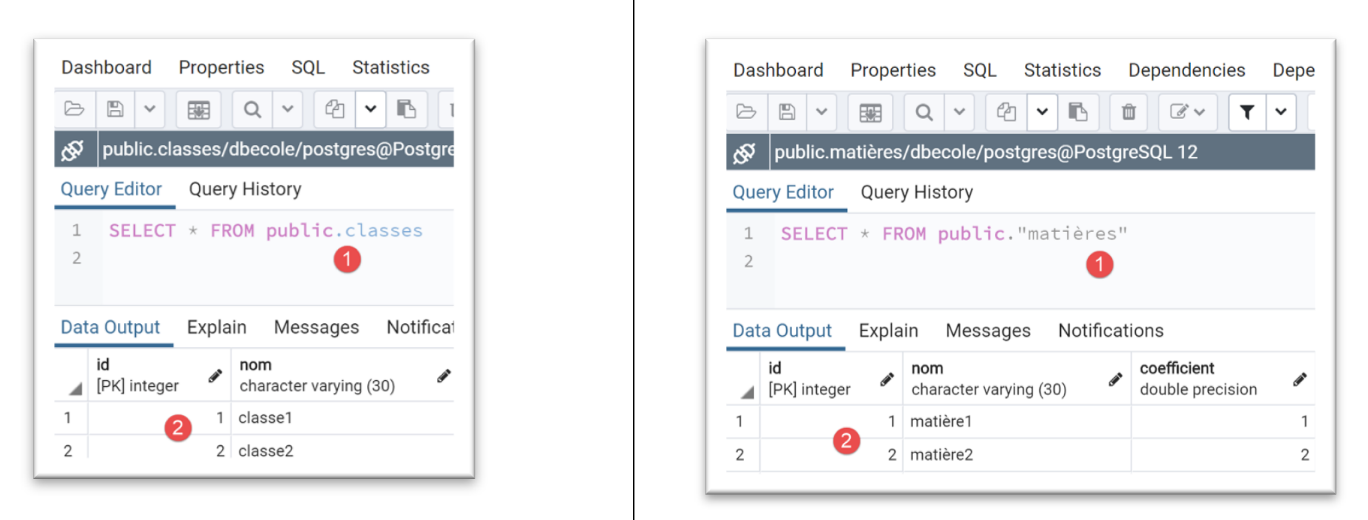
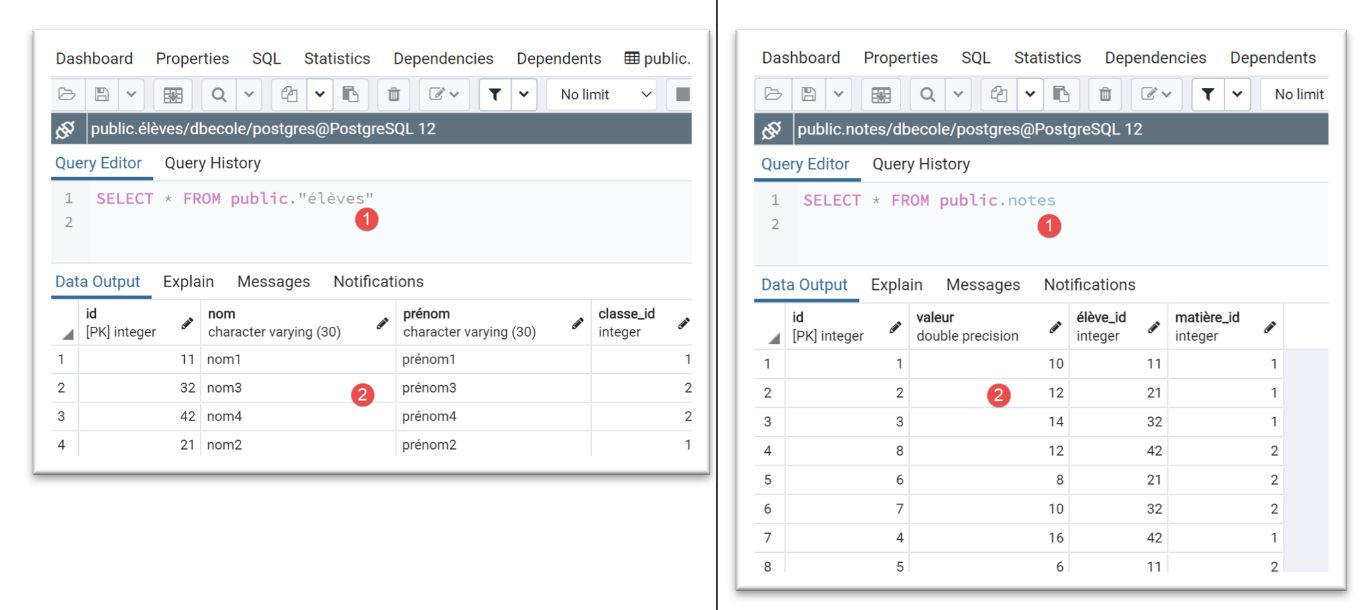
请注意我们切换数据库管理系统是多么轻松。
19.6.7. [dao] 层 – 2
我们回到实现 [DAO] 层的 [DatabaseDao] 类。到目前为止,我们仅展示了 [init_database] 方法的实现。接下来我们将展示其他方法的实现:
| from sqlalchemy.exc import DatabaseError, IntegrityError, InterfaceError
from Classe import Classe
from Elève import Elève
from InterfaceDatabaseDao import InterfaceDatabaseDao
from Matière import Matière
from MyException import MyException
from Note import Note
class DatabaseDao(InterfaceDatabaseDao):
def __init__(self, config: dict):
# database = {"engine": engine, "metadata": metadata, "tables": tables, "session": session}
self.database = config['database']
self.session = self.database['session']
def init_database(self, data: dict):
…
# list of all classes
def get_classes(self: object) -> list:
# request
return self.session.query(Classe).all()
# list of all students
def get_élèves(self: object) -> list:
# request
return self.session.query(Elève).all()
# list of all materials
def get_matières(self: object) -> list:
# request
return self.session.query(Matière).all()
# a list of all students' grades
def get_notes(self: object) -> list:
# request
return self.session.query(Note).all()
# a list of grades for a particular student
def get_notes_for_élève_by_id(self: object, élève_id: int) -> list:
# we look for the student - an exception is thrown if he doesn't exist
# we let it rise
élève = self.get_élève_by_id(élève_id)
# lazy loading of notes
notes = élève.notes
# a dictionary is returned
return {"élève": élève, "notes": notes}
# a student identified by his number
def get_élève_by_id(self, élève_id: int) -> Elève:
# we're looking for the student
élèves = self.session.query(Elève).filter(Elève.id == élève_id).all()
# have we found?
if élèves:
return élèves[0]
else:
raise MyException(11, f"L'élève d'identifiant {élève_id} n'existe pas")
# a student identified by name
def get_élève_by_name(self, élève_name: str) -> Elève:
# we're looking for the student
élèves = self.session.query(Elève).filter(Elève.nom == élève_name).all()
# have we found?
if élèves:
return élèves[0]
else:
raise MyException(12, f"L'élève de nom {élève_name} n'existe pas")
# a class identified by its number
def get_classe_by_id(self, classe_id: int) -> Classe:
# we are looking for the
classes = self.session.query(Classe).filter(Classe.id == classe_id).all()
# have we found?
if classes:
return classes[0]
else:
raise MyException(13, f"La classe d'identifiant {classe_id} n'existe pas")
# a class identified by its name
def get_classe_by_name(self, classe_name: str) -> Classe:
# we're looking for the class
classes = self.session.query(Classe).filter(Classe.nom == classe_name).all()
# have we found?
if classes:
return classes[0]
else:
raise MyException(14, f"La classe de nom {classe_name} n'existe pas")
# a material identified by its number
def get_matière_by_id(self, matière_id: int) -> Matière:
# we're looking for material
matières = self.session.query(Matière).filter(Matière.id == matière_id).all()
# have we found?
if matières:
return matières[0]
else:
raise MyException(11, f"La matière d'identifiant {matière_id} n'existe pas")
# a material identified by its name
def get_matière_by_name(self, matière_name: str) -> Matière:
# we're looking for the material
matières = self.session.query(Matière).filter(Matière.nom == matière_name).all()
# have we found?
if matières:
return matières[0]
else:
raise MyException(15, f"La matière de nom {matière_name} n'existe pas")
|
- 第 21–24 行:[get_classes] 方法必须返回该学校的班级列表。在第 20 行,我们使用了一个之前见过的查询;
- 第 26–39 行:另外三个类似的方法,用于检索学生、科目和成绩的列表;
- 第 51–59 行:[get_student_by_id] 方法必须返回一个通过 ID 标识的学生。如果该学生不存在,则会引发异常;
- 第 54 行:我们使用了一个带过滤条件的查询。查询结果要么是空列表,要么是一个仅含一个元素的列表;
- 第 57 行:如果检索到的列表不为空,则返回列表的第一个元素;
- 否则,第59行将抛出异常;
- 第 41–49 行:[get_notes_for_student_by_id] 方法必须返回由 ID 标识的学生成绩:
- 第 45 行:我们使用 [get_student_by_id] 方法检索该学生的 Student 实体;
- 第 47 行:我们使用由 [Grade] 实体与 [grades] 表之间的映射创建的 [Student.grades] 属性(参见 |SQLAlchemy 配置| 部分),该属性表示学生的成绩;
- 第 49 行:返回一个字典;
- 第 61–109 行:一系列类似的方法,允许我们:
- 按姓名查找学生,第 61–69 行;
- 查找班级,第 71–89 行;
- 检索一门课程,第 91–109 行;
19.6.8. [main_joined_queries] 脚本
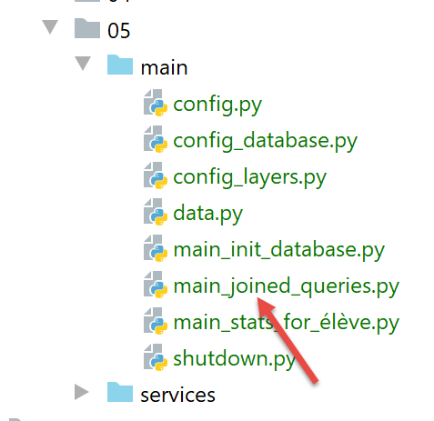
[main_joined_queries] 脚本之所以得名,是因为它旨在突出显示 [sqlalchemy] 为从多个表中检索信息而隐式执行的查询。这些对程序员而言不可见的查询,会在实体的某个属性与其映射中的 [relationship] 函数相关联时执行。例如:
# mapping
mapper(Note, tables['notes'], properties={
'id': notes_table.c.id,
'valeur': notes_table.c.valeur,
'élève': relationship(Elève, backref="notes", lazy="select"),
'matière': relationship(Matière, backref="notes", lazy="select")
})
以上是 [Note] 实体与 [notes] 表之间的映射:
- 第 5 行:当首次请求 [Grade] 实体的 [student] 属性时,系统将通过 SQL 查询从 [students] 表中检索该数据。在该属性被请求之前,其值始终为未定义(延迟加载)。 一旦该属性被检索,其值将保存在 ORM 的内存中。当第二次引用该属性时,ORM 将立即返回其值,而无需发出新的 SQL 查询。所有这些对开发者而言都是透明的;
- 反向属性 [Student.grades](反向引用)的情况亦同,见第 5 行;
- 第 6 行中的属性 [Grade.subject] 及其反向属性 [Subject.grades](反向引用)也是如此;
[main_joined_queries] 脚本如下:
| # a mysql or pgres parameter is expected
import sys
syntaxe = f"{sys.argv[0]} mysql / pgres"
erreur = len(sys.argv) != 2
if not erreur:
sgbd = sys.argv[1].lower()
erreur = sgbd != "mysql" and sgbd != "pgres"
if erreur:
print(f"syntaxe : {syntaxe}")
sys.exit()
# configure the application
import config
config = config.configure({"sgbd": sgbd})
# syspath is configured - imports can be made
from MyException import MyException
# the [dao] layer
dao = config["dao"]
try:
# student by id
print("élève id=11 -----------")
élève = dao.get_élève_by_id(11)
print(f"élève={élève}")
# student class (lazy loading)
classe = élève.classe
print(f"classe de l'élève : {classe}")
# students in the same class (lazy loading)
print("élèves dans la même classe :")
for élève in classe.élèves:
print(f"élève={élève}")
# a student by name
print("élève nom='nom2' -----------")
print(f"élève={dao.get_élève_by_name('nom2')}")
# its class (lazy loading)
print(f"classe de l'élève : {élève.classe}")
# student notes
print("notes de l'élève id=11 -----------")
# first the student
élève = dao.get_élève_by_id(11)
# then its notes (lazy loading)
for note in élève.notes:
# the note
print(f"note={note}, "
# note material (lazy loading)
f"matière={note.matière}")
# students in a class
print("élèves de la classe nom='classe1' -----------")
# first the class
classe = dao.get_classe_by_name('classe1')
# then the students (lazy loading)
for élève in classe.élèves:
print(élève)
# same for [class2]
print("élèves de la classe de nom 'classe2' -----------")
classe = dao.get_classe_by_name('classe2')
for élève in classe.élèves:
print(élève)
# subject grades
print("matière de nom='matière1' -----------")
# first the material
matière = dao.get_matière_by_name('matière1')
print(f"matière={matière}")
# then grades in this subject (lazy loading)
print("Notes dans la matière : ")
for note in matière.notes:
print(note)
# same for matière2
print("matière de nom='matière2' -----------")
matière = dao.get_matière_by_name('matière2')
print(f"matière={matière}")
print("Notes dans la matière : ")
for note in matière.notes:
print(f"note={note}")
except MyException as ex1:
# error is displayed
print(f"L'erreur 1 suivante s'est produite : {ex1}")
except BaseException as ex2:
# error is displayed
print(f"L'erreur 2 suivante s'est produite : {ex2}")
finally:
# free up resources
import shutdown
shutdown.execute(config)
|
这些注释足以理解代码。
我们为 MySQL 创建一个执行配置:
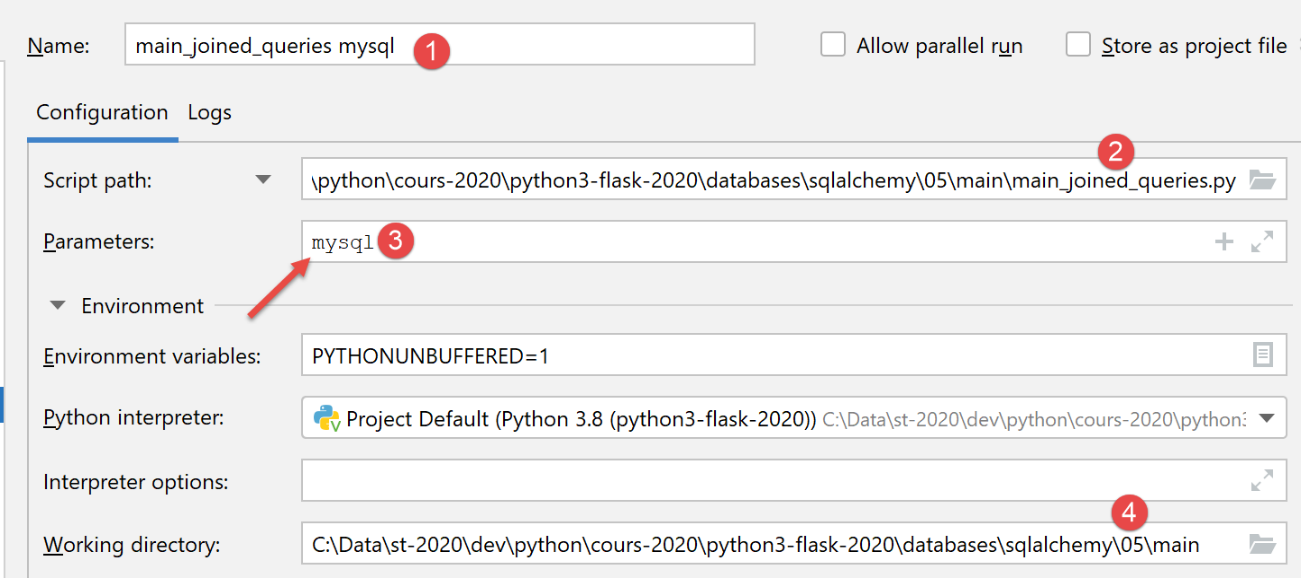
执行结果如下:
| C:\Data\st-2020\dev\python\cours-2020\python3-flask-2020\venv\Scripts\python.exe C:/Data/st-2020/dev/python/cours-2020/python3-flask-2020/databases/sqlalchemy/05/main/main_joined_queries.py mysql
élève id=11 -----------
élève={"classe_id": 1, "nom": "nom1", "prénom": "prénom1", "id": 11}
classe de l'élève : {"nom": "classe1", "id": 1}
élèves dans la même classe :
élève={"classe_id": 1, "nom": "nom1", "prénom": "prénom1", "id": 11}
élève={"classe_id": 1, "nom": "nom2", "prénom": "prénom2", "id": 21}
élève nom='nom2' -----------
élève={"classe_id": 1, "nom": "nom2", "prénom": "prénom2", "id": 21}
classe de l'élève : {"nom": "classe1", "id": 1}
notes de l'élève id=11 -----------
note={"matière_id": 1, "valeur": 10.0, "élève_id": 11, "id": 1}, matière={"coefficient": 1.0, "nom": "matière1", "id": 1}
note={"matière_id": 2, "valeur": 6.0, "élève_id": 11, "id": 5}, matière={"coefficient": 2.0, "nom": "matière2", "id": 2}
élèves de la classe nom='classe1' -----------
{"classe_id": 1, "nom": "nom1", "prénom": "prénom1", "id": 11}
{"classe_id": 1, "nom": "nom2", "prénom": "prénom2", "id": 21}
élèves de la classe de nom 'classe2' -----------
{"classe_id": 2, "nom": "nom3", "prénom": "prénom3", "id": 32}
{"classe_id": 2, "nom": "nom4", "prénom": "prénom4", "id": 42}
matière de nom='matière1' -----------
matière={"coefficient": 1.0, "nom": "matière1", "id": 1}
Notes dans la matière :
{"matière_id": 1, "valeur": 10.0, "élève_id": 11, "id": 1}
{"matière_id": 1, "valeur": 12.0, "élève_id": 21, "id": 2}
{"matière_id": 1, "valeur": 14.0, "élève_id": 32, "id": 3}
{"matière_id": 1, "valeur": 16.0, "élève_id": 42, "id": 4}
matière de nom='matière2' -----------
matière={"coefficient": 2.0, "nom": "matière2", "id": 2}
Notes dans la matière :
note={"matière_id": 2, "valeur": 6.0, "élève_id": 11, "id": 5}
note={"matière_id": 2, "valeur": 8.0, "élève_id": 21, "id": 6}
note={"matière_id": 2, "valeur": 10.0, "élève_id": 32, "id": 7}
note={"matière_id": 2, "valeur": 12.0, "élève_id": 42, "id": 8}
Process finished with exit code 0
|
要理解这些结果,请注意实体字典中已排除某些属性(参见 |配置|):
    # configuration des entités [BaseEntity]
    Elève.excluded_keys = ['_sa_instance_state', 'notes', 'classe']
    Classe.excluded_keys = ['_sa_instance_state', 'élèves']
    Matière.excluded_keys = ['_sa_instance_state', 'notes']
    Note.excluded_keys = ['_sa_instance_state', 'matière', 'élève']
因此,当我们在代码第 26 行编写 [print(f"student={student}")] 时,上面的第 1 行告诉我们属性 ['_sa_instance_state', 'grades', 'class'] 不会被显示。这就是我们在结果第 3 行所看到的。 所有其他属性均被显示。因此,在第 3 行中,我们发现了一个新的 [class_id] 属性,该属性最初并不存在于 [Student] 实体中。该属性直接对应于 [students] 表中的 [class_id] 列。 因此,[SQLAlchemy] 已向 [Student] 实体添加了以下属性:[class_id, _sa_instance_state, grades]。这一点非常重要,特别是因为这些属性在映射实体中绝不能已经存在。
实体字典中排除的属性非常重要。例如,如果我们不将 [grades, student] 属性从 [Student] 实体中排除,那么操作 [print(f"student={student}")] 将会显示这些属性,因此,正如刚才所解释的,这将触发隐式 SQL 查询(延迟加载)来检索这些属性的值。 如果像本例中这样显示学生列表,则针对每位学生都会执行隐式 SQL 操作。这既可能是不必要的,在执行时间上也无疑会造成巨大开销。
要在 PostgreSQL 数据库上运行该脚本,请创建以下执行配置:
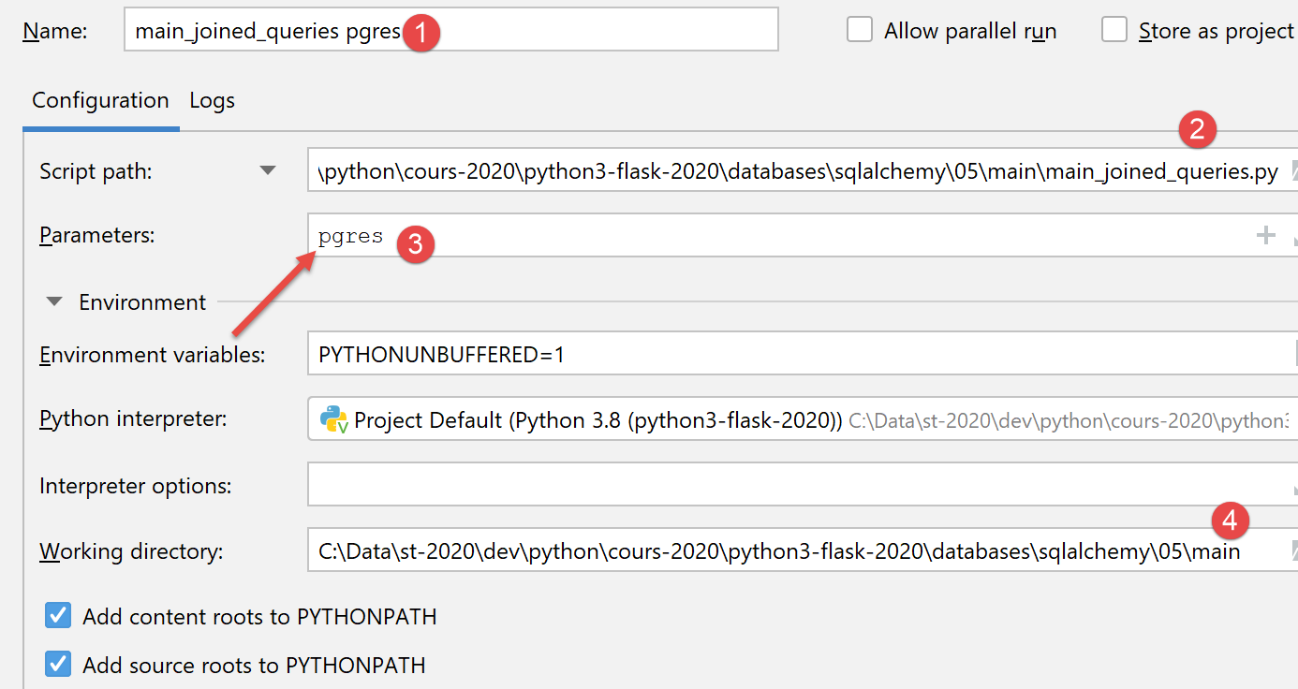
该执行结果与 MySQL 相同。
19.6.9. [main_stats_for_student] 脚本
[main_stats_for_student] 脚本是 |troiscouches v01| 应用程序中已使用的脚本。它之前名为 [main]。这是一个控制台应用程序,用于检索有关学生成绩的特定指标:[加权平均分、最小值、最大值、列表]。它符合以下架构:
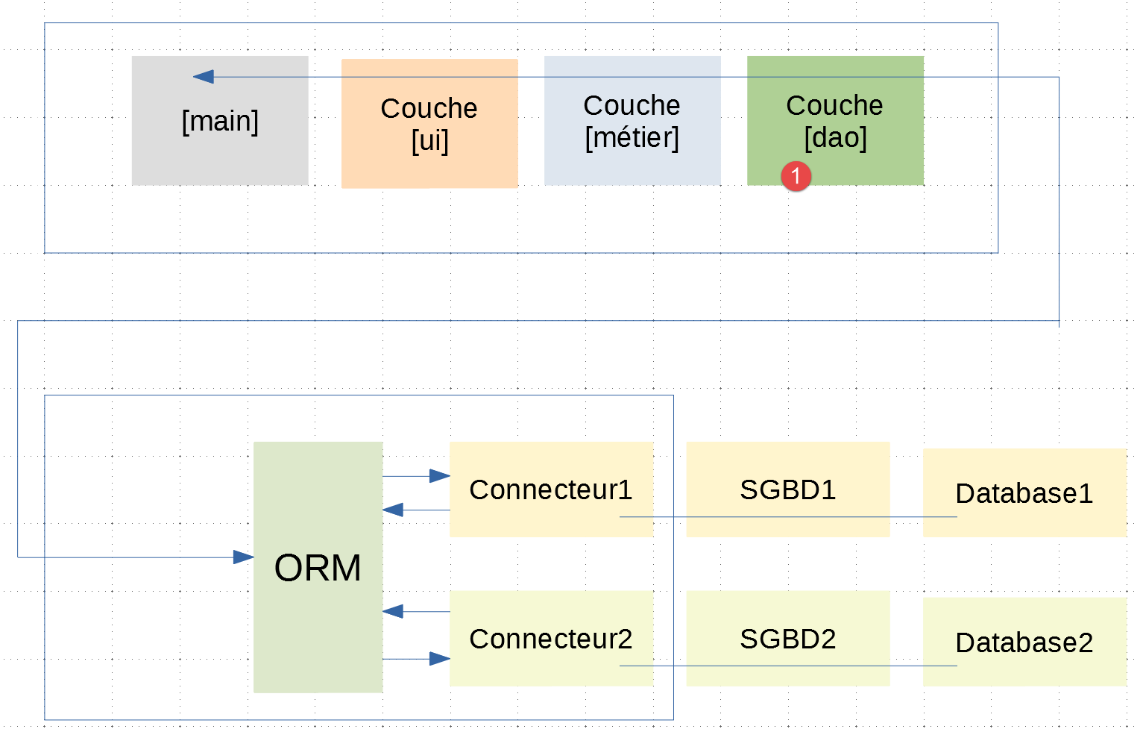
在此分层架构中,|troiscouches v01| 应用程序与本应用程序之间仅 [dao] 层发生了变更。由于新的 [dao] 层遵循了旧 [dao] 层的 [InterfaceDao] 接口,因此 [ui, business] 层无需修改。因此,我们可以继续使用 |troiscouches v01| 应用程序中定义的这些层。
[main_stats_for_élève]脚本实现了上图中[main]层的如下内容:
| # a mysql or pgres parameter is expected
import sys
syntaxe = f"{sys.argv[0]} mysql / pgres"
erreur = len(sys.argv) != 2
if not erreur:
sgbd = sys.argv[1].lower()
erreur = sgbd != "mysql" and sgbd != "pgres"
if erreur:
print(f"syntaxe : {syntaxe}")
sys.exit()
# configure the application
import config
config = config.configure({'sgbd': sgbd})
# syspath is configured - imports can be made
from MyException import MyException
# the [ui] layer
ui = config["ui"]
try:
# execution layer [ui]
ui.run()
except MyException as ex1:
# error is displayed
print(f"L'erreur 1 suivante s'est produite : {ex1}")
except BaseException as ex2:
# error is displayed
print(f"L'erreur 2 suivante s'est produite : {ex2}")
finally:
# free up resources
import shutdown
shutdown.execute(config)
|
- 第 20 行:从应用程序配置中获取 [ui] 层的引用;
- 第 24 行:使用 [ui] 层的 single 方法初始化用户对话框;
PostgreSQL 的执行配置如下所示:
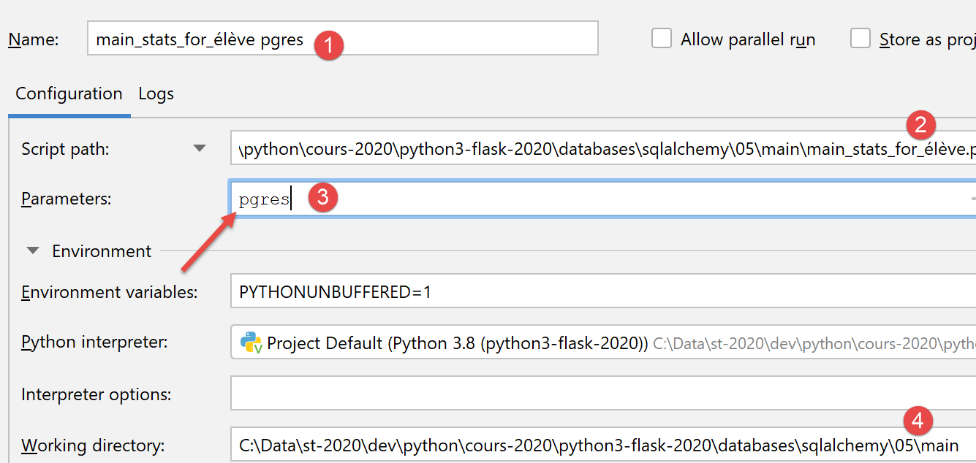
以下是使用此配置的执行示例:
C:\Data\st-2020\dev\python\cours-2020\python3-flask-2020\venv\Scripts\python.exe C:/Data/st-2020/dev/python/cours-2020/python3-flask-2020/databases/sqlalchemy/05/main/main_stats_for_élève.py pgres
Numéro de l'élève (>=1 et * pour arrêter) : 11
Elève={"prénom": "prénom1", "id": 11, "classe_id": 1, "nom": "nom1"}, notes=[10.0 6.0], max=10.0, min=6.0, moyenne pondérée=7.33
Numéro de l'élève (>=1 et * pour arrêter) : 1
L'erreur suivante s'est produite : MyException[11, L'élève d'identifiant 1 n'existe pas]
Numéro de l'élève (>=1 et * pour arrêter) : *

Process finished with exit code 0