10. 实践练习:第 2 版
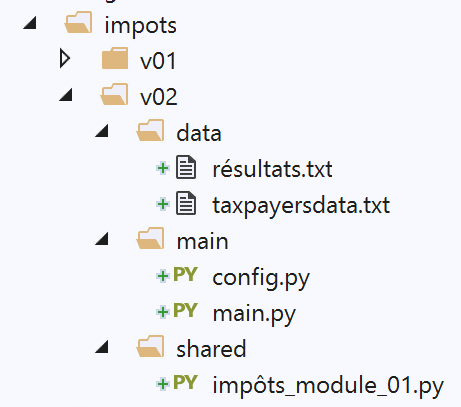
此新版本引入了以下 [config.py] 文件:
| def configure():
import os
# absolute path of this script's folder
script_dir = os.path.dirname(os.path.abspath(__file__))
# root from which certain relative paths are measured
root_dir = "C:/Data/st-2020/dev/python/cours-2020/python3-flask-2020/impots"
# application dependencies
absolute_dependencies = [
f"{root_dir}/v01/shared",
]
# application configuration
config = {
# absolute path of the taxpayer file
"taxpayersFilename": f"{script_dir}/../data/taxpayersdata.txt",
# absolute path of the results file
"resultsFilename": f"{script_dir}/../data/résultats.txt"
}
# update syspath
from myutils import set_syspath
set_syspath(absolute_dependencies)
# return the config
return config
|
注释
- 第 5 行:我们获取包含正在执行的脚本(本例中为 [config.py] 脚本)的文件夹的绝对路径。这将给我们 [main] 文件夹的绝对路径。该文件夹同时也包含主脚本 [main.py];
- 第 8 行:当被引用的文件不属于应用程序文件夹时,我们将使用 [root_dir] 而不是 [script_dir] 来定位它。一旦应用程序在文件系统中移动到其他位置,必须立即修改这一行;
- 第 11–13 行:我们列出了所有必须包含在 Python 路径中才能使应用程序正常运行的文件夹的绝对路径。在第 12 行,我们引用了应用程序练习第 1 版中的 [shared] 文件夹;
- 第 16–21 行:在 [config] 字典中定义应用程序的配置。在此,我们指定了应用程序处理的文本文件的绝对路径。为此,我们使用 [script_dir],需要提醒的是,此处的 [script_dir] 指的是 [main] 文件夹;
- 第 24–25 行:我们设置了应用程序所需的 Python 路径;
主脚本 [main.py] 如下所示:
| # configure the application
import config
config = config.configure()
# syspath is configured - imports can be made
from impôts_module_01 import calcul_impôt, record_results, get_taxpayers_data
# taxpayer file
taxpayers_filename = config['taxpayersFilename']
# results file
results_filename = config['resultsFilename']
# code
try:
# reading taxpayer data
taxpayers = get_taxpayers_data(taxpayers_filename)
# results list
results = []
# taxpayers' taxes are calculated
for taxpayer in taxpayers:
# tax calculation returns a dictionary of keys
# ['married', 'children', 'salary', 'tax', 'surcôte', 'décôte', 'réduction', 'taux']
result = calcul_impôt(taxpayer['marié'], taxpayer['enfants'], taxpayer['salaire'])
# the dictionary is added to the list of results
results.append(result)
# we record the results
record_results(results_filename, results)
except BaseException as erreur:
# there may be various errors: no file, incorrect file content
# display the error and exit the application
print(f"L'erreur suivante s'est produite : {erreur}]\n")
finally:
print("Travail terminé...")
|
注释
- 第 1–4 行:应用程序已配置;
- 第 7 行:我们知道配置完成后,Python 路径是正确的,并且包含了 [shared] 文件夹,该文件夹中包含 [impôts_module_01] 脚本。我们从该脚本中导入所需的函数;
- 第 9–12 行:所用文件的名称可在配置中找到。这些是绝对路径;
- 第 14–35 行:这是版本 1 的代码;
版本 1 在 Python 控制台中无法运行。在同一控制台中,版本 2 产生以下结果:
| (venv) C:\Data\st-2020\dev\python\cours-2020\python3-flask-2020\impots\v02>python main/main.py
Travail terminé...
|
目前未遇到任何错误。