17. 使用 PostgreSQL 数据库管理系统
PostgreSQL 数据库管理系统可免费获取。它是 MySQL “社区版”的替代方案。
我们在此使用它,旨在演示将 Python/MySQL 脚本迁移到 Python/PostgreSQL 脚本是相当简单的。
在使用 MySQL 数据库管理系统时,我们的脚本架构如下:

在 PostgreSQL 数据库管理系统下,架构将如下所示:

17.1. 安装 PostgreSQL 数据库管理系统
PostgreSQL 数据库管理系统发行版可在 [https://www.postgresql.org/download/] 获取(2019 年 5 月)。以下演示 64 位 Windows 版本的安装过程:
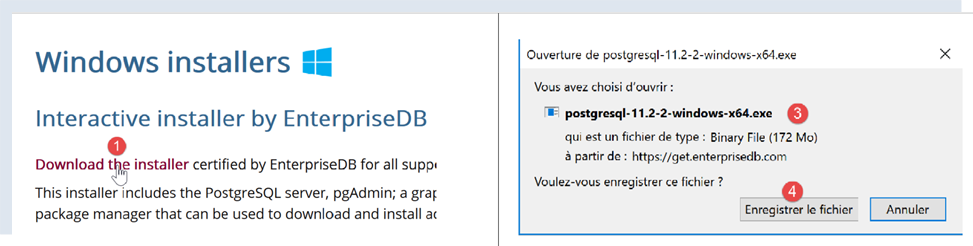

- 在 [1-4] 中,下载 DBMS 安装程序;
运行下载的安装程序:
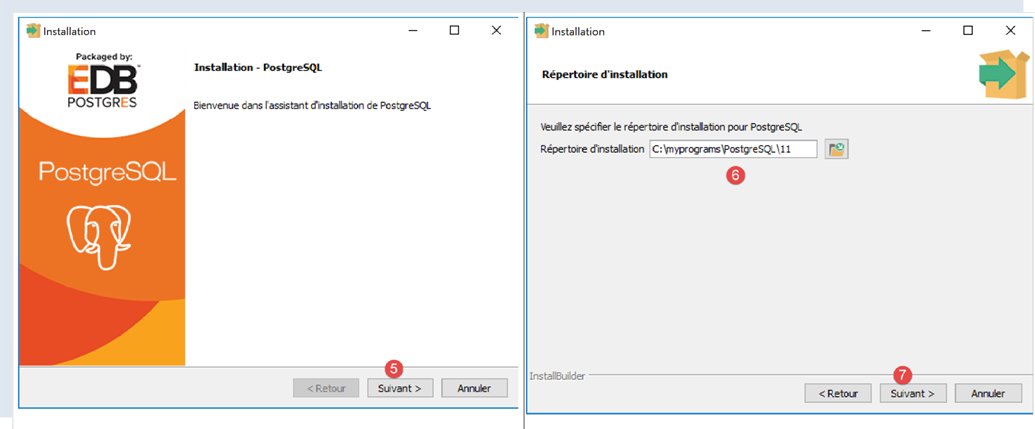
- 在 [6] 处,指定安装目录;
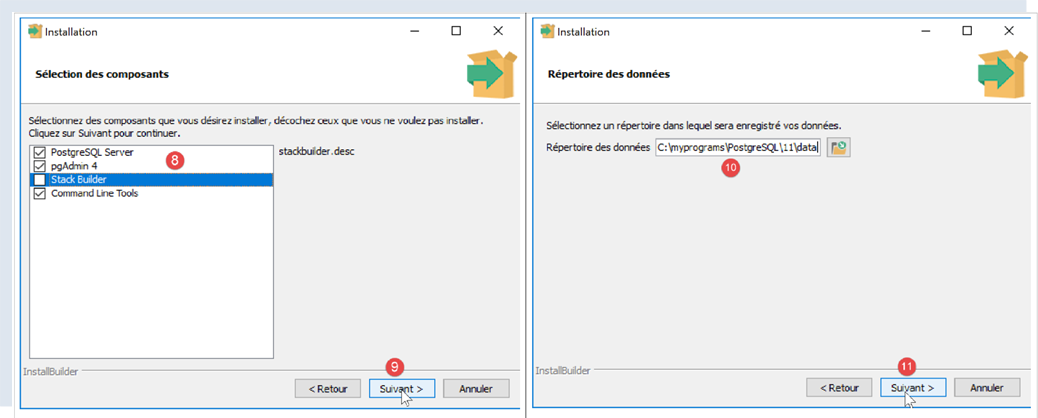
- 在 [8] 中,对于我们当前的操作,无需选择 [Stack Builder] 选项;
- 在 [10] 处,保留默认值;
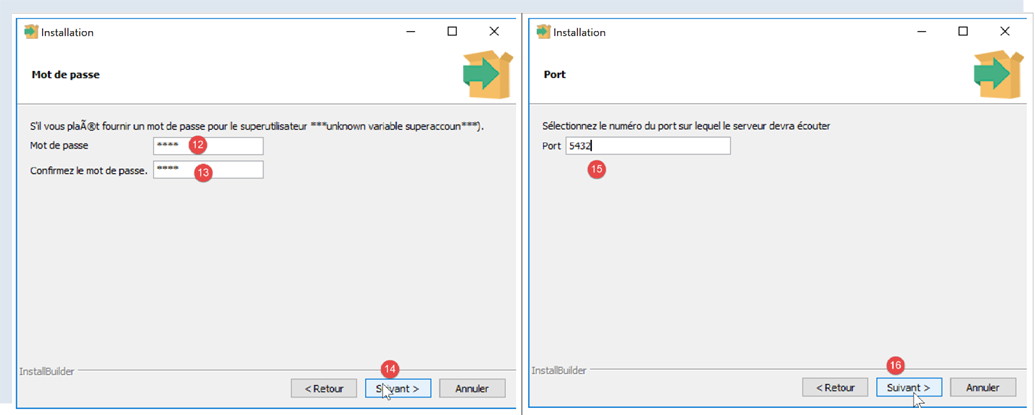
- 在 [12-13] 处,我们在此输入了密码 [root]。这将是 DBMS 管理员(用户名为 [postgres])的密码。PostgreSQL 也将此用户称为超级用户;
- 在 [15] 中,保留默认值:这是 DBMS 的监听端口;
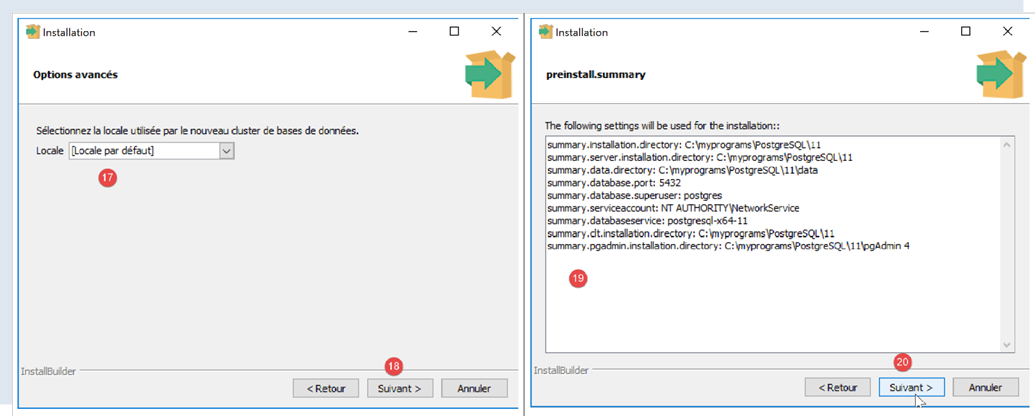
- 在 [17] 中,保留默认值;
- 在 [19] 中,显示安装配置的摘要;
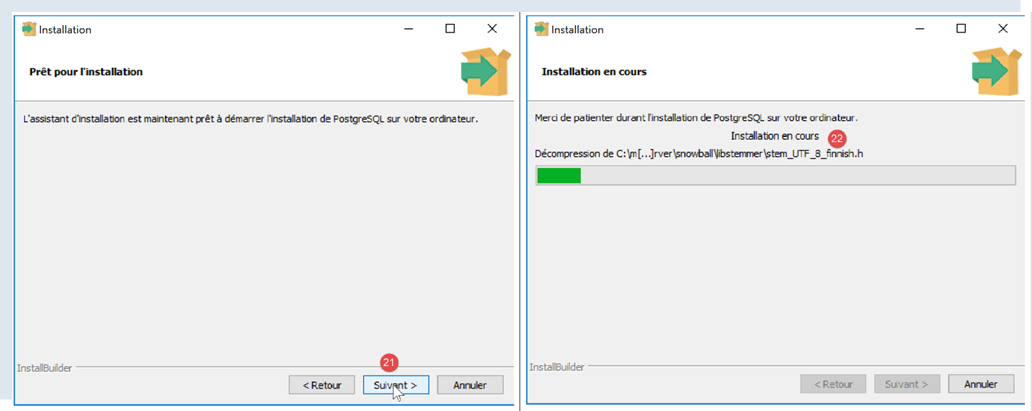
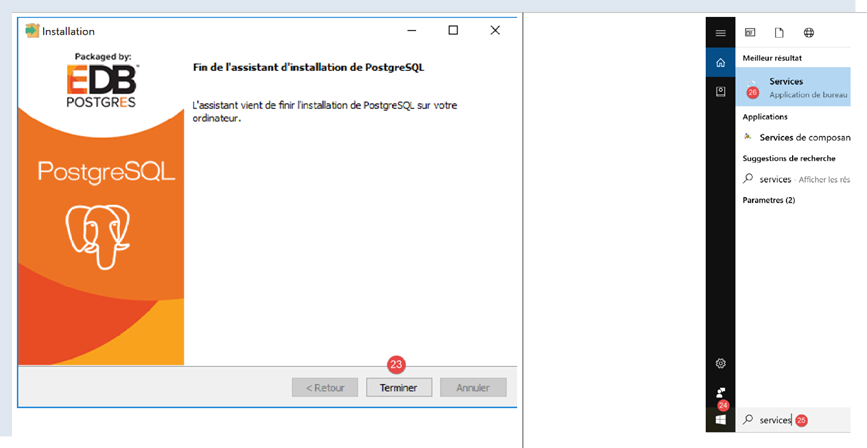
在 Windows 系统中,PostgreSQL 数据库管理系统会作为 Windows 服务安装并自动启动。大多数情况下,这并非理想状态。我们将修改此配置。在 Windows 搜索栏中输入 [services] [24-26]:
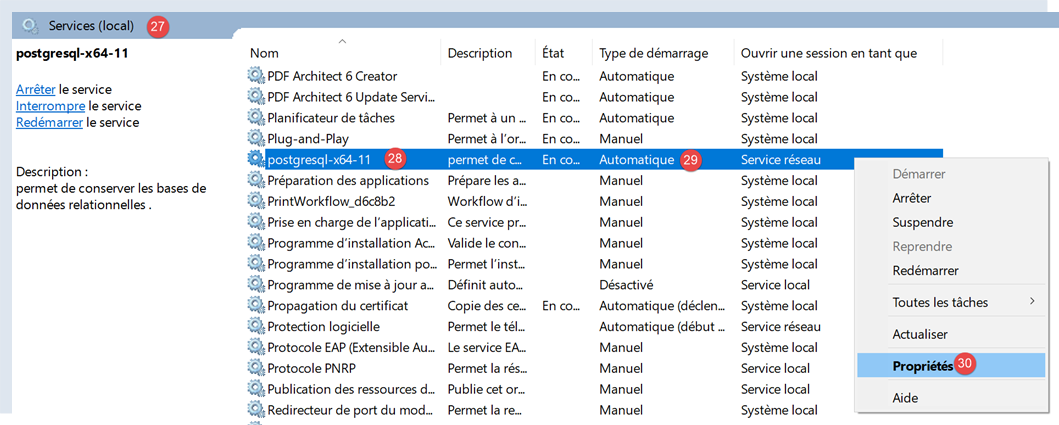
- 在 [29] 中,可以看到 PostgreSQL 数据库管理系统服务被设置为自动模式。通过访问服务属性 [30] 来更改此设置:
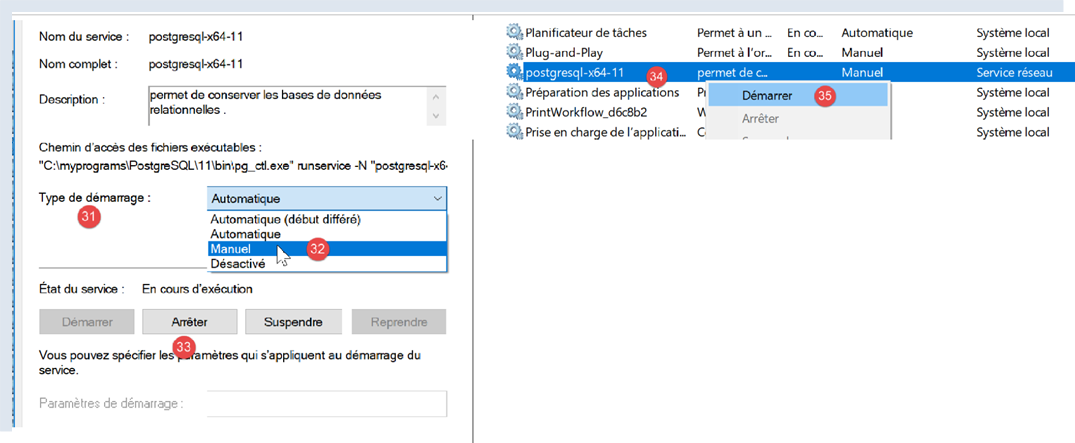
- 在 [31-32] 中,将启动类型设置为“手动”;
- 在 [33] 中,停止该服务;
若需手动启动数据库管理系统(DBMS),请返回 [services] 应用程序,右键单击 [postgresql] 服务(34),然后启动它(35)。
17.2. 使用 [pgAdmin] 工具管理 PostgreSQL
启动 PostgreSQL 数据库管理系统(DBMS)的 Windows 服务(参见上一段)。然后,以与启动 [服务] 工具相同的方式启动 [pgAdmin] 工具,该工具可用于管理 PostgreSQL 数据库管理系统 [1-3]:
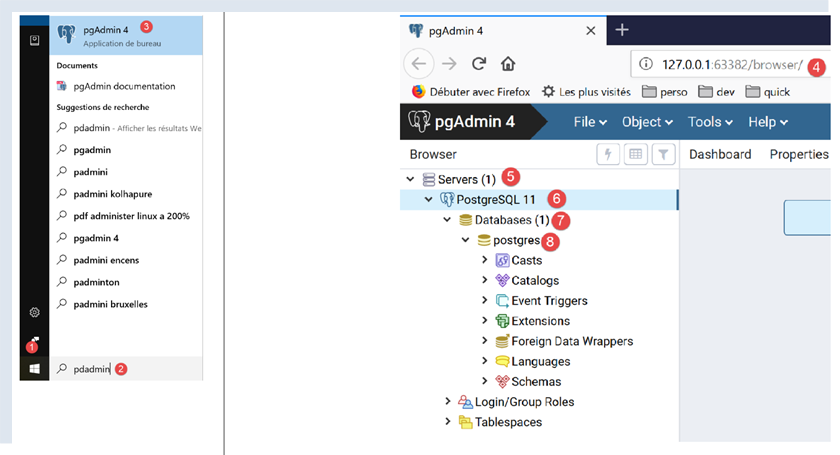
系统可能会在某个时候提示您输入超级用户密码。超级用户名为 [postgres]。您在 DBMS 安装过程中设置了此密码。在本文档中,我们在安装过程中为超级用户设置了密码 [root]。
- 在 [4] 中,[pgAdmin] 是一个 Web 应用程序;
- 在 [5] 中,是 [pgAdmin] 检测到的 PostgreSQL 服务器列表,此处显示 1 台;
- 在 [6] 中,是我们启动的 PostgreSQL 服务器;
- 在 [7] 中,表示 DBMS 数据库,此处为 1;
- 在 [8] 中,[postgresql] 数据库由超级用户 [postgres] 管理;
首先,让我们创建一个用户 [admpersonnes],密码为 [nobody]:
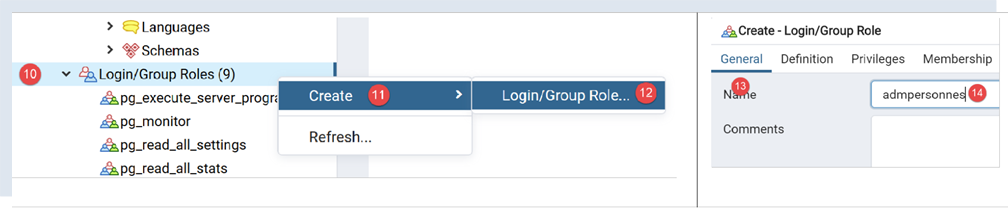
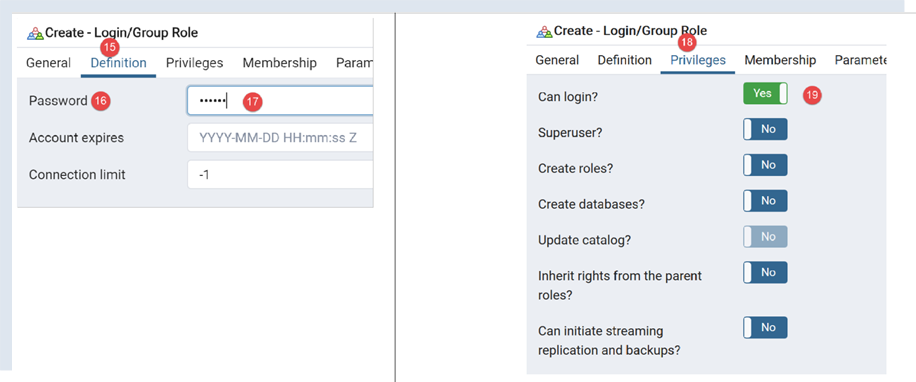
- 在 [17] 中,我们输入了 [nobody];
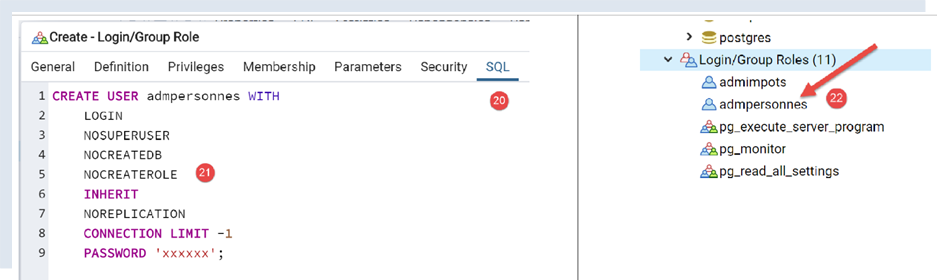
- 在 [21] 中,[pgAdmin] 工具将向 PostgreSQL 数据库管理系统发送的 SQL 代码。这是学习 PostgreSQL 专有 SQL 语言的一种方式;
- 在 [22] 中,通过 [Save] 向导确认后,用户 [admpersonnes] 已创建;
现在我们创建 [dbpersonnes] 数据库:
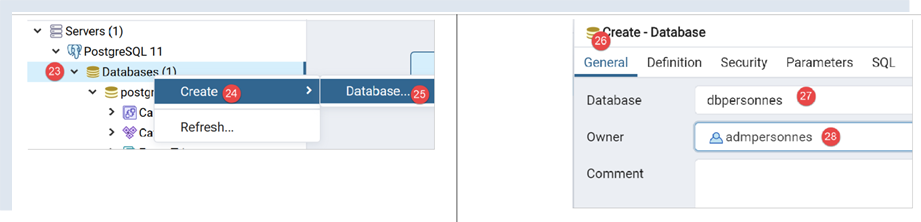
右键单击 [23],然后依次选择 [24-25] 创建新数据库。在 [26] 选项卡中,定义数据库名称 [27] 及其所有者 [admpersonnes] [28]。
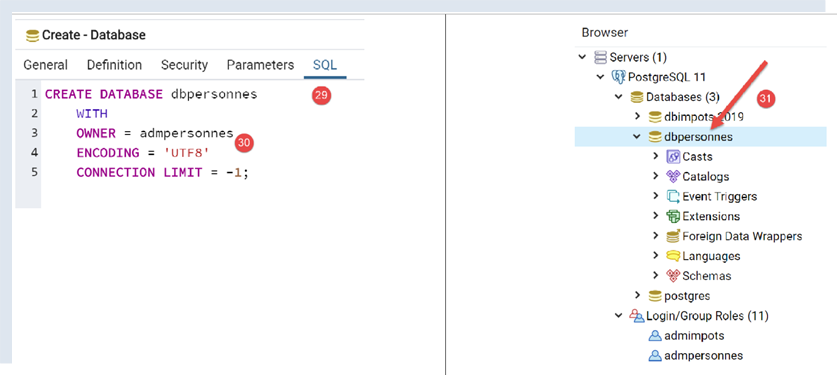
- 在[30]中,显示了创建数据库的SQL代码;
- 在 [31] 中,通过向导点击 [保存] 后,数据库 [dbpersonnes] 即创建完成;
我们将使用 [dbpersonnes] 数据库配合 Python 脚本进行操作。
17.3. 安装 PostgreSQL 数据库管理系统(DBMS)的 Python 连接器
上图展示了一个将 Python 脚本与 PostgreSQL 数据库管理系统连接起来的连接器。目前有多种连接器可供选择。我们将安装 [psycopg2] 连接器。此操作在 Python 终端中进行(无论终端所在的目录为何)。使用命令 [pip install psycopg2] 安装该连接器:
(venv) C:\Data\st-2020\dev\python\cours-2020\python3-flask-2020\troiscouches\v01\tests>pip install psycopg2
Collecting psycopg2
  Downloading psycopg2-2.8.5-cp38-cp38-win_amd64.whl (1.1 MB)
     || 1.1 MB 3.2 MB/s
Installing collected packages: psycopg2
Successfully installed psycopg2-2.8.5
17.4. 将 MySQL 脚本移植为 PostgreSQL 脚本
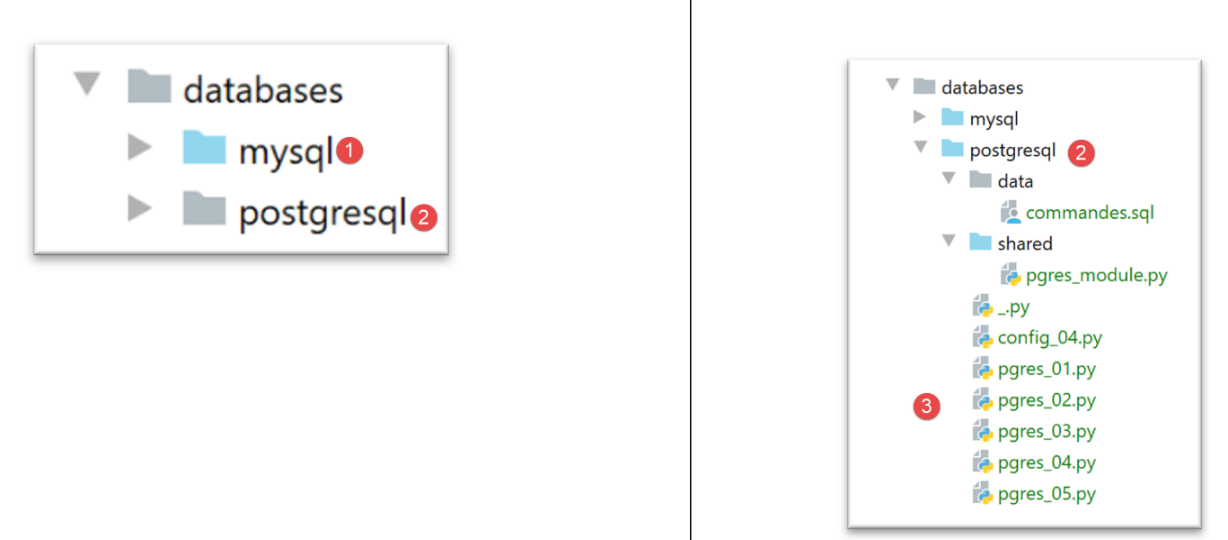
- 复制包含 MySQL 脚本的文件夹 [1](Ctrl-C / Ctrl-V),然后将文件名更改为与内容相匹配;
17.4.1. [pgres_module]
此模块是 [mysql_module] 模块的副本(参见章节 |script [mysql-04]: 执行 SQL 命令文件|)。修改导入语句:
原代码:
我们写:
[display_info] 函数的签名是:
def afficher_infos(curseur: MySQLCursor):
现在变为:
def afficher_infos(curseur: cursor)
[execute_list_of_commands] 函数的签名是:
def execute_list_of_commands(connexion: MySQLConnection, sql_commands: list,
                             suivi: bool = False, arrêt: bool = True, with_transaction: bool = True)
现在变为:
def execute_list_of_commands(connexion: connection, sql_commands: list,
                             suivi: bool = False, arrêt: bool = True, with_transaction: bool = True):
除此之外,其他内容保持不变。
17.4.2. 脚本 [pgres_01]
[pgres_01] 脚本是 [mysql_01] 脚本的副本(参见章节 |script [mysql-01]: 连接到 MySQL 数据库 - 1|)。进行了以下更改:
原内容:
我们编写:
其余部分保持不变。结果与 MySQL 相同。
17.4.3. 脚本 [pgres_02]
[pgres_02] 脚本是 [mysql_02] 脚本的副本(参见章节 |script [mysql-02]: 连接到 MySQL 数据库 - 2|)。请进行以下修改:
将以下内容替换为:
我们写:
结果与 [mysql_02] 脚本的结果不一致:
[pgres_02] 脚本如下:
虽然第 36–41 行本应显示一条错误消息,指出与 DBMS 的连接失败,但实际上并未显示任何内容。事实上,经过进一步调查,我们发现代码确实进入了第 35–37 行的 [except] 代码块,但 [error] 变量被设置为 [None]。这种情况发生在 [psycopg2] 连接器的 2.8.4 版本中。
我们可以通过编写一条通用但不够精确的错误信息来解决此问题:
结果如下:
C:\Data\st-2020\dev\python\cours-2020\python3-flask-2020\venv\Scripts\python.exe C:/Data/st-2020/dev/python/cours-2020/python3-flask-2020/databases/postgresql/pgres_02.py
Connexion réussie à la base database=dbpersonnes, host=localhost sous l'identité user=admpersonnes, passwd=nobody
Déconnexion réussie

Erreur de connexion à la base [dbpersonnes] par l'utilisateur [xx/yy]

Process finished with exit code 0
17.4.4. 脚本 [pgres_03]
脚本 [pgres_03] 是脚本 [mysql_03] 的副本(参见章节 |脚本 [mysql-03]:创建 MySQL 表|)。对其进行了以下修改:
原代码如下:
from mysql.connector import DatabaseError, InterfaceError, connect
from mysql.connector.connection import MySQLConnection
我们写:
from psycopg2 import DatabaseError, InterfaceError, connect
from psycopg2.extensions import connection
此外,[execute_sql] 函数的签名原本是:
def execute_sql(connexion: MySQLConnection, update: str):
变为:
def execute_sql(connexion: connection, update: str):
其余部分保持不变。结果如下:
C:\Data\st-2020\dev\python\cours-2020\python3-flask-2020\venv\Scripts\python.exe C:/Data/st-2020/dev/python/cours-2020/python3-flask-2020/databases/postgresql/pgres_03.py
create table personnes (id int PRIMARY KEY, prenom varchar(30) NOT NULL, nom varchar(30) NOT NULL, age integer NOT NULL, unique(nom,prenom))  : requête réussie

Process finished with exit code 0
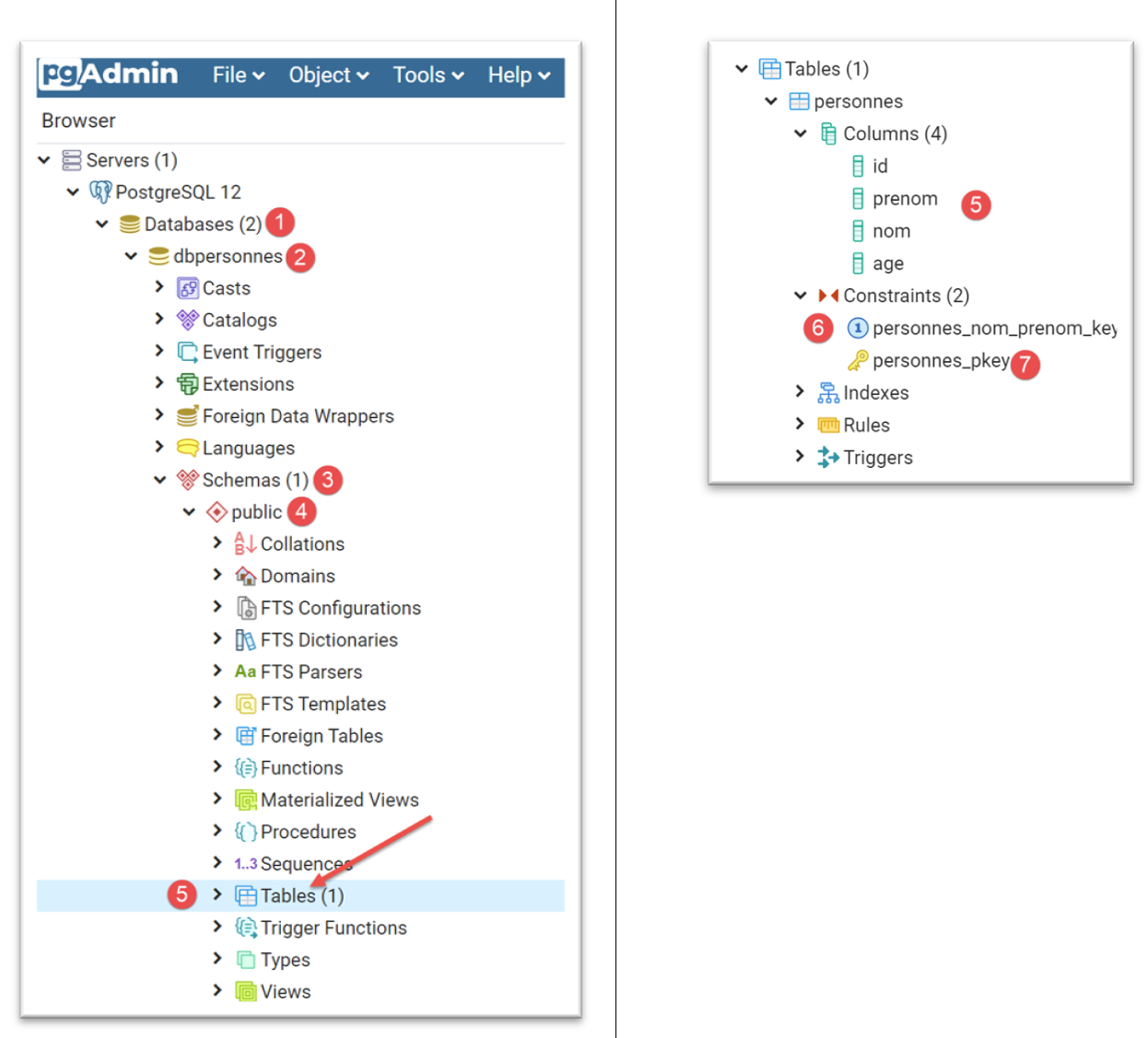
您可以使用 [pgAdmin] 管理工具验证 [people] 表是否存在:
17.4.5. 脚本 [pgres_04]
[pgres_04] 脚本是 [mysql_04] 脚本的副本(参见章节 |script [mysql-04]: 执行 SQL 命令文件|)。它使用 [pgres_module] 模块:
其余部分保持不变。
我们创建一个配置 [pgres pgres-04 without_transaction],方法与章节 |script [mysql-04]: 执行 SQL 命令文件| 中所述相同。我们还创建了一个配置 [pgres pgres-04 with_transaction]。
执行 [pgres pgres-04 without_transaction] 配置将产生以下结果:
C:\Data\st-2020\dev\python\cours-2020\python3-flask-2020\venv\Scripts\python.exe C:/Data/st-2020/dev/python/cours-2020/python3-flask-2020/databases/postgresql/pgres_04.py false
--------------------------------------------------------------------
Exécution du fichier SQL C:\Data\st-2020\dev\python\cours-2020\python3-flask-2020\databases\postgresql/data/commandes.sql sans transaction
--------------------------------------------------------------------
[drop table if exists personnes] : Exécution réussie
nombre de lignes modifiées : -1
[create table personnes (id int primary key, prenom varchar(30) not null, nom varchar(30) not null, age integer not null, unique (nom,prenom))] : Exécution réussie
nombre de lignes modifiées : -1
[insert into personnes(id, prenom, nom, age) values(1, 'Paul','Langevin',48)] : Exécution réussie
nombre de lignes modifiées : 1
[insert into personnes(id, prenom, nom, age) values (2, 'Sylvie','Lefur',70)] : Exécution réussie
nombre de lignes modifiées : 1
[select prenom, nom, age from personnes] : Exécution réussie
prenom, nom, age,
*****************
('Paul', 'Langevin', 48)
('Sylvie', 'Lefur', 70)
*****************
xx : Erreur (ERREUR:  erreur de syntaxe sur ou près de « xx »
LINE 1: xx
        ^
)
[insert into personnes(id, prenom, nom, age) values (3, 'Pierre','Nicazou',35)] : Exécution réussie
nombre de lignes modifiées : 1
[insert into personnes(id, prenom, nom, age) values (4, 'Geraldine','Colou',26)] : Exécution réussie
nombre de lignes modifiées : 1
[insert into personnes(id, prenom, nom, age) values (5, 'Paulette','Girond',56)] : Exécution réussie
nombre de lignes modifiées : 1
[select prenom, nom, age from personnes] : Exécution réussie
prenom, nom, age,
*****************
('Paul', 'Langevin', 48)
('Sylvie', 'Lefur', 70)
('Pierre', 'Nicazou', 35)
('Geraldine', 'Colou', 26)
('Paulette', 'Girond', 56)
*****************
[select nom,prenom from personnes order by nom asc, prenom desc] : Exécution réussie
nom, prenom,
************
('Colou', 'Geraldine')
('Girond', 'Paulette')
('Langevin', 'Paul')
('Lefur', 'Sylvie')
('Nicazou', 'Pierre')
************
[select nom,prenom,age from personnes where age between 20 and 40 order by age desc, nom asc, prenom asc] : Exécution réussie
nom, prenom, age,
*****************
('Nicazou', 'Pierre', 35)
('Colou', 'Geraldine', 26)
*****************
[insert into personnes(id, prenom, nom, age) values(6, 'Josette','Bruneau',46)] : Exécution réussie
nombre de lignes modifiées : 1
[update personnes set age=47 where nom='Bruneau'] : Exécution réussie
nombre de lignes modifiées : 1
[select nom,prenom,age from personnes where nom='Bruneau'] : Exécution réussie
nom, prenom, age,
*****************
('Bruneau', 'Josette', 47)
*****************
[delete from personnes where nom='Bruneau'] : Exécution réussie
nombre de lignes modifiées : 1
[select nom,prenom,age from personnes where nom='Bruneau'] : Exécution réussie
nom, prenom, age,
*****************
*****************
--------------------------------------------------------------------
Exécution terminée
--------------------------------------------------------------------
Il y a eu 1 erreur(s)
xx : Erreur (ERREUR:  erreur de syntaxe sur ou près de « xx »
LINE 1: xx
        ^
)

Process finished with exit code 0
- 第 5 行:我们不得不修改命令以删除 [people] 表。与 MySQL 连接器不同,如果要删除的表不存在,PostgreSQL 连接器会抛出异常。[drop table] 命令有一个变体 [drop table if exists],如果表不存在,它不会抛出异常。我们在此使用了该命令。这是一个两个数据库管理系统在类似情况下行为不一致的示例;
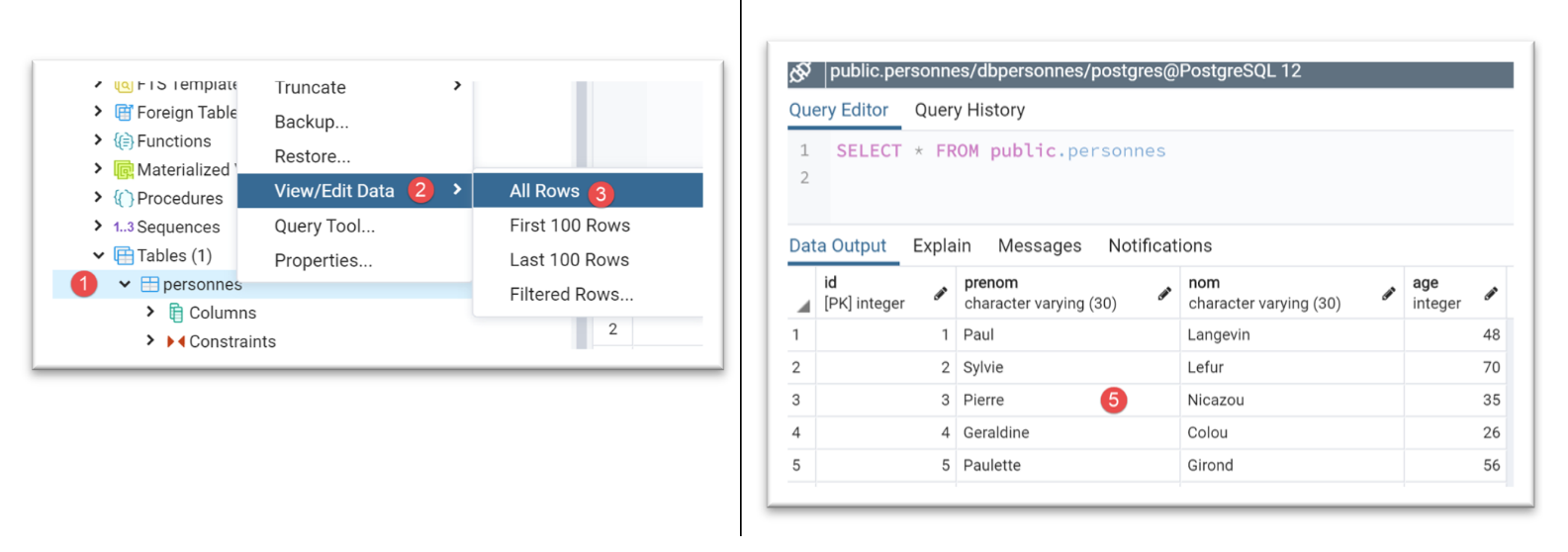
[pgAdmin] 工具中的 [people] 表如下所示:
运行配置 [pgres pgres_04 with_transaction] 会得到以下结果:
C:\Data\st-2020\dev\python\cours-2020\python3-flask-2020\venv\Scripts\python.exe C:/Data/st-2020/dev/python/cours-2020/python3-flask-2020/databases/postgresql/pgres_04.py true
--------------------------------------------------------------------
Exécution du fichier SQL C:\Data\st-2020\dev\python\cours-2020\python3-flask-2020\databases\postgresql/data/commandes.sql avec transaction
--------------------------------------------------------------------
[drop table if exists personnes] : Exécution réussie
nombre de lignes modifiées : -1
[create table personnes (id int primary key, prenom varchar(30) not null, nom varchar(30) not null, age integer not null, unique (nom,prenom))] : Exécution réussie
nombre de lignes modifiées : -1
[insert into personnes(id, prenom, nom, age) values(1, 'Paul','Langevin',48)] : Exécution réussie
nombre de lignes modifiées : 1
[insert into personnes(id, prenom, nom, age) values (2, 'Sylvie','Lefur',70)] : Exécution réussie
nombre de lignes modifiées : 1
[select prenom, nom, age from personnes] : Exécution réussie
prenom, nom, age,
*****************
('Paul', 'Langevin', 48)
('Sylvie', 'Lefur', 70)
*****************
xx : Erreur (ERREUR:  erreur de syntaxe sur ou près de « xx »
LINE 1: xx
        ^
)
--------------------------------------------------------------------
Exécution terminée
--------------------------------------------------------------------
Il y a eu 1 erreur(s)
xx : Erreur (ERREUR:  erreur de syntaxe sur ou près de « xx »
LINE 1: xx
        ^
)

Process finished with exit code 0
[pgAdmin] 工具中的 [people] 表如下:
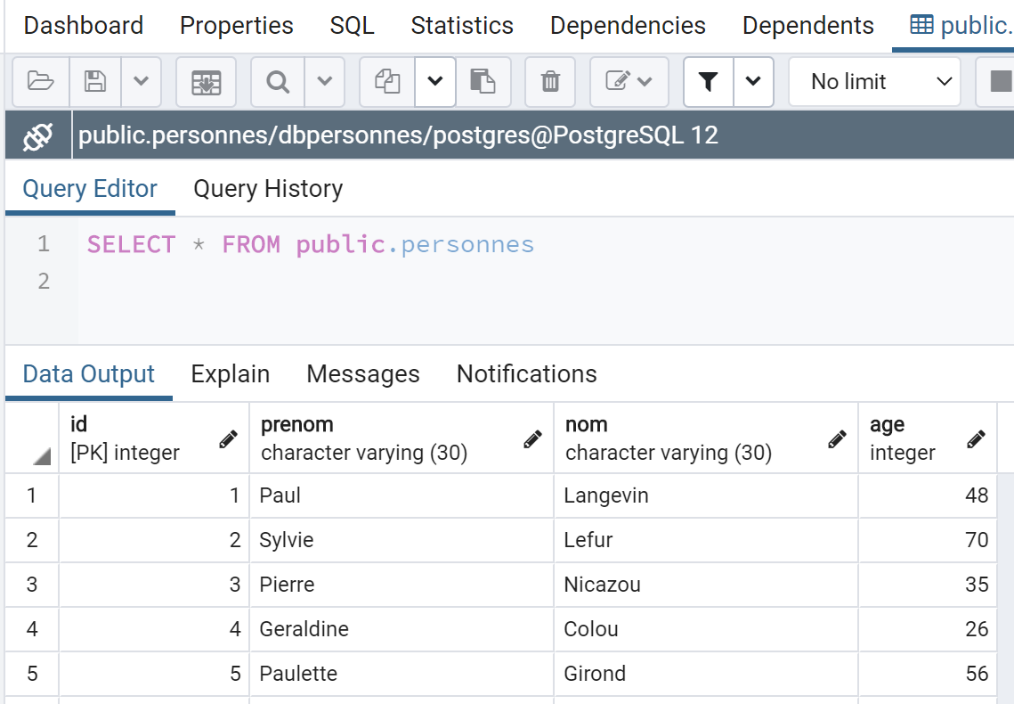
此处的结果与使用 MySQL 时获得的结果不同。如果我们在相同条件下运行脚本——即在不使用事务的情况下运行脚本——则会得到以下结果:
- 在 MySQL 中,[people] 表为空;
- 而在 PostgreSQL 中,[people] 表并非空表;
差异在于这两个数据库管理系统回滚事务的方式不同:
- MySQL 不会回滚 [drop table] 和 [create table] 命令。最终 [people] 表为空;
- PostgreSQL 会回滚 [drop table] 和 [create table] 命令。该表将恢复到脚本通过事务执行之前的状态;
17.4.6. 脚本 [pgres_05]
脚本 [pgres_05] 是脚本 [mysql_05] 的副本(参见章节 |脚本 [mysql-05]:使用参数化查询|)。该脚本的修改如下:
原代码:
我们写:
其余部分保持不变。
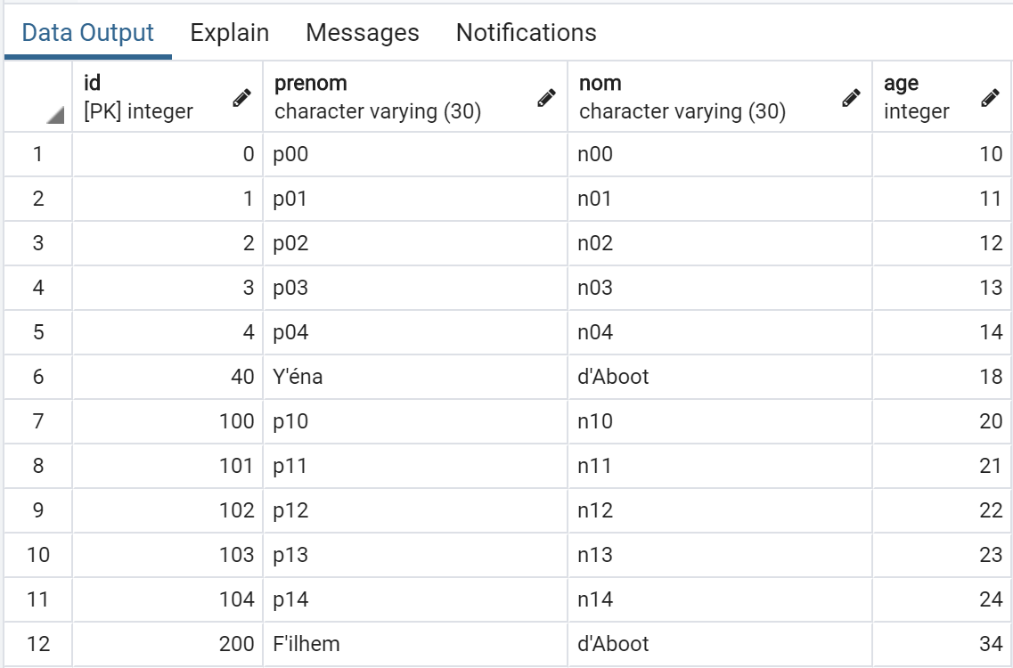
在 [pgAdmin] 中获得的结果如下:
17.5. 结论
将 MySQL 脚本移植到 PostgreSQL 脚本相对容易。但这属于特例。这两个数据库管理系统(DBMS)对 SQL 对象(数据库、表、列、约束、数据类型等)的命名约定不一致,且 SQL 扩展也不兼容……为了确保移植过程简单,必须在两种情况下都遵守 SQL 标准,而不要尝试使用数据库管理系统的专有扩展。但这会以性能为代价。