11. 实践练习:第 3 版
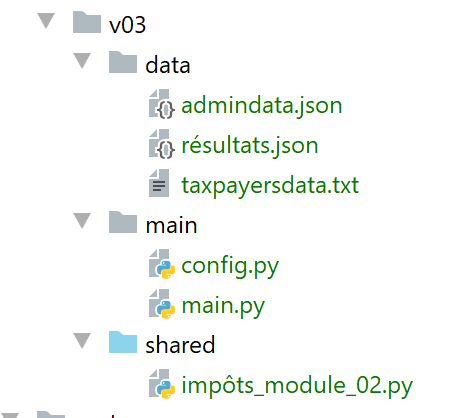
此新版本引入了两项更改:
- 税务机关提供的用于计算税款所需的数据,存储在 JSON 文件 [admindata.json] 中:
{
    "limites": [9964, 27519, 73779, 156244, 0],
    "coeffR": [0, 0.14, 0.3, 0.41, 0.45],
    "coeffN": [0, 1394.96, 5798, 13913.69, 20163.45],
    "PLAFOND_QF_DEMI_PART": 1551,
    "PLAFOND_REVENUS_CELIBATAIRE_POUR_REDUCTION": 21037,
    "PLAFOND_REVENUS_COUPLE_POUR_REDUCTION": 42074,
    "VALEUR_REDUC_DEMI_PART": 3797,
    "PLAFOND_DECOTE_CELIBATAIRE": 1196,
    "PLAFOND_DECOTE_COUPLE": 1970,
    "PLAFOND_IMPOT_COUPLE_POUR_DECOTE": 2627,
    "PLAFOND_IMPOT_CELIBATAIRE_POUR_DECOTE": 1595,
    "ABATTEMENT_DIXPOURCENT_MAX": 12502,
    "ABATTEMENT_DIXPOURCENT_MIN": 437
}
- 税款计算结果也将保存在一个 JSON 文件 [results.json] 中:
[
  {
    "marié": "oui",
    "enfants": 2,
    "salaire": 55555,
    "impôt": 2814,
    "surcôte": 0,
    "décôte": 0,
    "réduction": 0,
    "taux": 0.14
  },
  {
    "marié": "oui",
    "enfants": 2,
    "salaire": 50000,
    "impôt": 1384,
    "surcôte": 0,
    "décôte": 384,
    "réduction": 347,
    "taux": 0.14
  },
  …
  {
    "marié": "oui",
    "enfants": 3,
    "salaire": 200000,
    "impôt": 42842,
    "surcôte": 17283,
    "décôte": 0,
    "réduction": 0,
    "taux": 0.41
  }
]
11.1. 配置脚本 [config.py]
配置脚本如下:
| def configure():
import os
# absolute path of this script's folder
script_dir = os.path.dirname(os.path.abspath(__file__))
# application dependencies
absolute_dependencies = [
f"{script_dir}/../shared",
]
# application configuration
config = {
# absolute path of the taxpayer file
"taxpayersFilename": f"{script_dir}/../data/taxpayersdata.txt",
# absolute path of the results file
"resultsFilename": f"{script_dir}/../data/résultats.json",
# absolute path of tax administration data file
"admindataFilename": f"{script_dir}/../data/admindata.json"
}
# update syspath
from myutils import set_syspath
set_syspath(absolute_dependencies)
# return the config
return config
|
- 第 8 行:将 [shared] 文件夹添加到 Python 路径中。该文件夹包含主脚本使用的 [impôts_module_02] 模块;
11.2. 主脚本 [main.py]
版本 3 的主脚本如下:
| # configure the application
import config
config = config.configure()
# syspath is configured - imports can be made
from impôts_module_02 import calcul_impôt, get_admindata, get_taxpayers_data, record_results_in_json_file
# taxpayer file
taxpayers_filename = config['taxpayersFilename']
# results file
results_filename = config['resultsFilename']
# tax administration data file
admindata_filename = config['admindataFilename']
# code
try:
# reading tax administration data
admindata = get_admindata(admindata_filename)
# reading taxpayer data
taxpayers = get_taxpayers_data(taxpayers_filename)
# results list
results = []
# taxpayers' taxes are calculated
for taxpayer in taxpayers:
# tax calculation returns a dictionary of keys
# ['married', 'children', 'salary', 'tax', 'surcôte', 'décôte', 'réduction', 'taux']
result = calcul_impôt(admindata, taxpayer['marié'], taxpayer['enfants'], taxpayer['salaire'])
# the dictionary is added to the list of results
results.append(result)
# we record the results
record_results_in_json_file(results_filename, results)
except BaseException as erreur:
# there may be various errors: no file, incorrect file content
# display the error and exit the application
print(f"L'erreur suivante s'est produite : {erreur}]\n")
finally:
print("Travail terminé...")
|
注释
- 第 2–4 行:我们配置应用程序,特别是其 Python 路径;
- 第 7 行:我们将所需的函数导入到 [main.py] 中;
- 第 9–14 行:从配置中获取应用程序使用的文件名称;
- 与第1版和第2版相比,第3版的主脚本有三个不同之处:
- 第 21 行:从 JSON 文件 [./data/admindata.json] 中读取税务机关数据;
- 第 32 行:将税费计算结果写入 JSON 文件 [./data/results.json];
- 第 7 行:第 3 版的函数位于模块 [impots.modules.impôts_module_02] 中;
11.3. 模块 [impots.v02.modules.impôts_module_02]
模块 [impots.v02.modules.impôts_module_02] 具有以下结构:
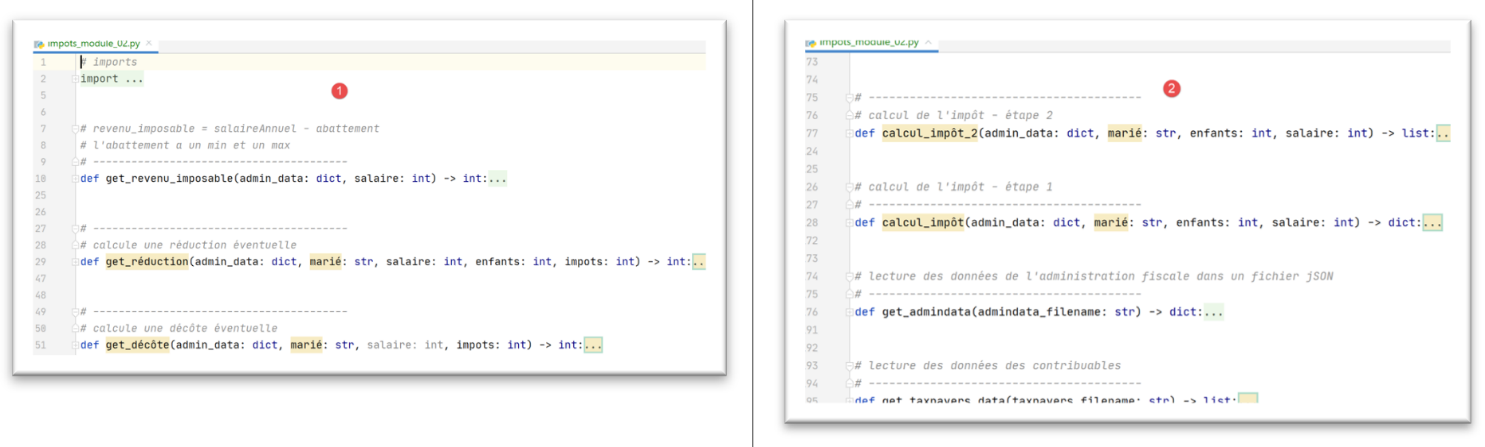
- 该模块包含版本 1 所用模块中已有的函数,但有一处差异。当版本 2 模块复用版本 1 模块中的函数时,会额外传入一个参数:[adminData](第 29、51、77、127 行)。该参数代表来自 JSON 文件 [adminData.json] 的税务数据字典。 在第 1 版模块中,由于这些数据已为相关函数全局定义,因此无需将其传递给函数,这意味着函数本身已知晓该数据;
11.4. 从税务管理机构读取数据
[get_admindata] 函数如下所示:
| # read data from tax authorities in a jSON file
# ----------------------------------------
def get_admindata(admindata_filename: str) -> dict:
# reading tax administration data
# we let any exceptions go up: file missing, jSON content incorrect
file = None
try:
# open file jSON in read mode
file = codecs.open(admindata_filename, "r", "utf8")
# transfer content to a dictionary
admin_data = json.load(file)
# we return the result
return admin_data
finally:
# close the file if it has been opened
if file:
file.close()
|
- 第 9 行:从读取的 JSON 文件中获取图像字典;
11.5. 保存结果
[record_results_in_json_file] 函数如下:
| # writing results to a jSON file
# ----------------------------------------
def record_results_in_json_file(results_filename: str, results: list):
file = None
try:
# opening the results file
file = codecs.open(results_filename, "w", "utf8")
# block writing
json.dump(results, file, ensure_ascii=False)
finally:
# close the file if it has been opened
if file:
file.close()
|
- 第 7 行:创建一个 UTF-8 编码的文件;
- 第 9 行:将 [results] 列表写入 JSON 文件。UTF-8 字符未进行转义(ensure_ascii=False);
11.6. 函数修改
部分函数现在会接收一个额外的 [admin_data] 参数。这会稍微改变它们的语法。以 [calcul_impôt] 函数为例:
| # tax calculation - step 1
# ----------------------------------------
def calcul_impôt(admin_data: dict, marié: str, enfants: int, salaire: int) -> dict:
# married: yes, no
# children: number of children
# salary: annual salary
# limits, coeffr, coeffn: data tables for tax calculation
#
# tax calculation with children
result1 = calcul_impôt_2(admin_data, marié, enfants, salaire)
impot1 = result1["impôt"]
# tax calculation without children
if enfants != 0:
result2 = calcul_impôt_2(admin_data, marié, 0, salaire)
impot2 = result2["impôt"]
# application of the family allowance ceiling
if enfants < 3:
# PLAFOND_QF_DEMI_PART euros for the first 2 children
impot2 = impot2 - enfants * admin_data['plafond_qf_demi_part']
else:
# PLAFOND_QF_DEMI_PART euros for the first 2 children, double for subsequent children
impot2 = impot2 - 2 * admin_data['plafond_qf_demi_part'] - (enfants - 2) * 2 * admin_data[
'plafond_qf_demi_part']
else:
impot2 = impot1
result2 = result1
# we take the highest tax with the rate and surcharge that go with it
if impot1 > impot2:
impot = impot1
taux = result1["taux"]
surcôte = result1["surcôte"]
else:
surcôte = impot2 - impot1 + result2["surcôte"]
impot = impot2
taux = result2["taux"]
# calculation of any discount
décôte = get_décôte(admin_data, marié, salaire, impot)
impot -= décôte
# calculation of any tax reduction
réduction = get_réduction(admin_data, marié, salaire, enfants, impot)
impot -= réduction
# result
return {"marié": marié, "enfants": enfants, "salaire": salaire, "impôt": math.floor(impot), "surcôte": surcôte,
"décôte": décôte, "réduction": réduction, "taux": taux}
|
注释
- 当 [calcul_tax] 调用其他函数时,它会将 [admin_data] 作为第一个参数传递(第 10、14、39、42 行);
- 当 [tax_calculation] 使用税率常量时,现在通过 [admin_data] 字典访问它们(第 19、22 行);
所有接收 [admin_data] 作为参数的函数都进行了此类更改。
11.7. 结果
所得结果即第 8.3 节开头所展示的结果。