12. 类与对象
类是制造对象的模具。对象被称为类的实例。
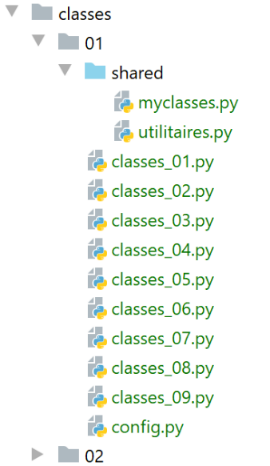
注:文件 [shared] 已放置在项目目录 [Sources Root] 中。
12.1. 脚本 [classes_01]:一个 Objet 类
脚本 [classes_01] 展示了过时的类用法:
# 一个类
class Objet(object):
    """une classe Objet vide"""


# 所有类型为 [Objet] 的变量在构造时均可具有属性
obj1 = Objet()
obj1.attr1 = "un"
obj1.attr2 = 100
# 显示对象
print(f"objet1=[{obj1}, {type(obj1)},{id(obj1)},{obj1.attr1},{obj1.attr2}]")
# 修改对象
obj1.attr2 += 100
# 显示对象
print(f"objet1=[{obj1.attr1},{obj1.attr2}]")
# 将引用 obj1 赋值给 obj2
obj2 = obj1
# 修改由 obj2 指向的对象
obj2.attr2 = 0
# 显示两个对象——obj1 现在指向一个已修改的对象
print(f"objet1=[{obj1.attr1},{obj1.attr2}]")
print(f"objet2=[{obj2.attr1},{obj2.attr2}]")
# obj1 和 obj2 指向同一个对象
print(f"objet1=[{obj1}, {id(obj1)},{obj1.attr1},{obj1.attr2}]")
print(f"objet2=[{obj2}, {id(obj2)},{obj2.attr1},{obj2.attr2}]")
print(obj1 == obj2)
# obj1 实例的类型
print(f"type(obj1)={type(obj1)}")
print(f"isinstance(obj1,Objet)={isinstance(obj1, Objet)}, isinstance(obj1,object)={isinstance(obj1, object)}")
# 在 Python 中,所有类型都是对象
print(f"type(4)={type(4)}")
print(f"isinstance(4, int)={isinstance(4, int)}, isinstance(4, object)={isinstance(4, object)}")
注:
- 第2-3行:一个空的类[Objet];
- 第2行:类可以以三种形式声明:
- class 对象;
- class 对象();
- class 对象(object);
- 第3行:另一种注释形式。以三个“*”开头的注释可以跨多行;
- 第7行:实例化类Objet。结果是一个地址,如第24-26行所示;
- 第8-9行:直接初始化对象的两个属性;
- 第17行:引用复制。变量obj1和obj2是指向同一对象的两个指针(引用);
- 第19行:修改由[obj2]指向的对象。 由于 [obj1] 和 [obj2] 指向同一个对象,第 21 行和第 22 行中对 [obj1, obj2] 对象的显示将表明 [obj1] 所指向的对象已发生变化;
- 第24-26行:这些行旨在展示变量[obj1]与[obj2]的相等性。 第26行的输出将验证这一点。在此比较中,[obj1]和[obj2]这两个地址是相等的;
- 每个 Python 对象都由一个唯一编号标识,该编号可通过表达式 [id(objet)] 获得。 第24行和第25行将显示,[obj1]和[obj2]所指向的对象编号是相同的,从而表明这两个引用指向同一个对象;
- 第27-29行:如果表达式[expr]的类型为[Type],则函数[isinstance(expr,Type)]返回布尔值True。 在此,我们将看到 [obj1] 既是类型 [Objet](这似乎很自然),也是类型 [object]。 类 [object] 是所有 Python 类的父类。根据类继承的特性,子类 F 拥有其父类 P 的所有属性,且函数 [isinstance(instance de F, P)] 返回 True;
- 第30-32行:表明类型[int]本身也是类型[object]。所有Python类型都继承自类[object];
结果
C:\Data\st-2020\dev\python\cours-2020\python3-flask-2020\venv\Scripts\python.exe C:/Data/st-2020/dev/python/cours-2020/python3-flask-2020/classes/01/classes_01.py
objet1=[<__main__.Objet object at 0x0000025C3F469BB0>, <class '__main__.Objet'>,2595221838768,un,100]
objet1=[un,200]
objet1=[un,0]
objet2=[un,0]
objet1=[<__main__.Objet object at 0x0000025C3F469BB0>, 2595221838768,un,0]
objet2=[<__main__.Objet object at 0x0000025C3F469BB0>, 2595221838768,un,0]
True
type(obj1)=<class '__main__.Objet'>
isinstance(obj1,Objet)=True, isinstance(obj1,object)=True
type(4)=<class 'int'>
isinstance(4, int)=True, isinstance(4, object)=True

Process finished with exit code 0
12.2. 脚本 [classes_02]:一个 Personne 类
脚本 [classes_02] 展示了类属性的公开性:它们可直接从类外部访问。这又是一个不建议使用的类用法。尽管如此,我们仍提供此示例,因为有时会遇到此类代码(Python 允许这种写法),因此必须能够理解它。
# Personne 类
class Personne:
    # 类的属性
    # 未声明 - 可以动态创建

    # 方法
    def identité(self: object) -> str:
        # 表面上看,使用了不存在的属性
        return f"[{self.prénom},{self.nom},{self.âge}]"


# ---------------------------------- main
# 属性为 public 且可动态创建
# 类实例化
p = Personne()
# 直接初始化类属性
p.prénom = "Paul"
p.nom = "de la Hûche"
p.âge = 48
# 调用类的方法
print(f"personne={p.identité()}")
# 实例 p 的类型
print(f"type(p)={type(p)}")
print(f"isinstance(Personne)={isinstance(p, Personne)}, isinstance(object)={isinstance(p, object)}")
注:
- 第 2-9 行:包含一个方法的类;
- 第 7 行:类的所有方法的首个参数必须是 self 对象,该对象表示当前对象。方法 [identité] 返回一个字符串;
- 第15行:实例化一个[Personne]对象;
- 第 16-19 行:表明对象的属性可以动态创建(它们在类定义中并不存在);
- 第 9 行:类属性采用 [self.attribut] 这种表示法;
- 第23-24行将表明,对象[p]既是类[Personne]的实例,也是类[object]的实例;
结果
C:\Data\st-2020\dev\python\cours-2020\python3-flask-2020\venv\Scripts\python.exe C:/Data/st-2020/dev/python/cours-2020/python3-flask-2020/classes/01/classes_02.py
personne=[Paul,de la Hûche,48]
type(p)=<class '__main__.Personne'>
isinstance(Personne)=True, isinstance(object)=True

Process finished with exit code 0
12.3. 脚本 [classes_03]:带构造函数的 Personne 类
脚本 [classes_03] 展示了类的一般用法:
# Personne 类
class Personne:
    # 构造函数——初始化三个属性
    def __init__(self: object, prénom: str, nom: str, âge: int):
        # 名字:该人的名字
        # 姓氏:该人的姓氏
        # 年龄:该人的年龄

        self.prénom = prénom
        self.nom = nom
        self.âge = âge

    # 将类的属性转换为字符串
    def identité(self: object) -> str:
        return f"[{self.prénom},{self.nom},{self.âge}]"


# ---------------------------------- main
# 一个 Personne 对象
p = Personne("Paul", "de la Hûche", 48)
# 调用方法
print(f"personne={p.identité()}")
注:
- 第 4 行:类的构造函数名为 __init__。与其他方法一样,其第一个参数是 self;
- 第 20 行:使用类的构造函数创建了一个 Personne 对象;
- 第13-15行:方法[identité]返回一个字符串,该字符串表示对象的内容;
- 第 22 行:显示该人的身份;
结果
C:\Data\st-2020\dev\python\cours-2020\python3-flask-2020\venv\Scripts\python.exe C:/Data/st-2020/dev/python/cours-2020/python3-flask-2020/classes/01/classes_03.py
personne=[Paul,de la Hûche,48]

Process finished with exit code 0
12.4. 脚本 [classes_04]:静态方法
我们在文件夹 [modules] 中定义了以下类 [Utils](utils.py):
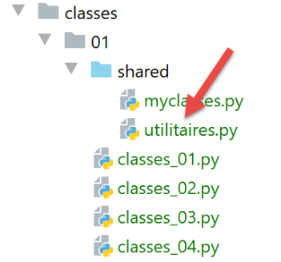
class Utils:
    # 静态方法
    @staticmethod
    def is_string_ok(string: str) -> bool:
        # string 是否为字符串
        erreur = not isinstance(string, str)
        if not erreur:
            # 字符串是否为空?
            erreur = string.strip() == ''
        # 结果
        return not erreur
注释
- 第 3 行:注解 [@staticmethod] 表明被注解的方法是类方法,而非实例方法。这体现在该方法的第一个参数并非关键字 [self]。 因此,静态方法无法访问对象的属性。与其编写:
应改写为
由于上文写的是 [Utils.is_string_ok],因此方法 [is_string_ok] 被称为类方法(此处指 Utils 类)。 为此,方法 [Utils.is_string_ok] 必须使用关键字 [@staticmethod] 进行注解。
静态方法 [Utils.is_string_ok] 用于验证数据是否为非空字符串。
脚本 [classes_04] 以如下方式使用类 [Utils]:
# 配置应用程序
import config

config = config.configure()

# 已配置 syspath - 可以进行导入
from utilitaires import Utils

print(Utils.is_string_ok("  "))
print(Utils.is_string_ok(47))
print(Utils.is_string_ok(" q "))
- 第 1-4 行:使用配置脚本;
配置脚本 [config.py] 如下:
def configure():
    import os

    # 配置文件所在的文件夹
    script_dir = os.path.dirname(os.path.abspath(__file__))

    # 需添加到 syspath 中的文件夹绝对路径
    absolute_dependencies = [
        f"{script_dir}/shared",
        "C:/Data/st-2020/dev/python/cours-2020/python3-flask-2020/venv/lib/site-packages",
        "C:/myprograms/Python38/lib",
        "C:/myprograms/Python38/DLLs"
    ]

    # 更新系统路径
    from myutils import set_syspath
    set_syspath(absolute_dependencies)

    # 返回配置
    return {}
- 第 9 行:将文件夹 [shared] 添加到 Python 路径中;
执行结果如下:
12.5. 脚本 [classes_05]:属性有效性检查
脚本 [classes_05] 引入了新概念:
- 定义专有异常类型;
- 定义方法 [_str_],该方法是类的默认身份方法;
- 定义属性;
# 配置应用程序
import config

config = config.configure()

# syspath 已配置 - 可以进行导入
from utilitaires import Utils


# 一个从 [BaseException] 派生的专有异常类
class MyException(BaseException):
    # 不执行任何操作:空类
    pass


# Personne 类
class Personne:
    # 构造函数
    def __init__(self: object, prénom: str = "x", nom: str = "y", âge: int = 0):
        # 名字:该人的名字
        # 姓氏:该人的姓氏
        # 年龄:该人的年龄

        # 参数存储
        # 初始化将通过 setter 方法进行
        self.prénom = prénom
        self.nom = nom
        self.âge = âge

    # 类的 toString 方法
    def __str__(self: object) -> str:
        return f"[{self.__prénom},{self.__nom},{self.__âge}]"

    # 获取器
    @property
    def prénom(self) -> str:
        return self.__prénom

    @property
    def nom(self) -> str:
        return self.__nom

    @property
    def âge(self) -> int:
        return self.__âge

    # 设置器
    @prénom.setter
    def prénom(self, prénom: str):
        # 名字字段不能为空
        if Utils.is_string_ok(prénom):
            self.__prénom = prénom.strip()
        else:
            raise MyException("Le prénom doit être une chaîne de caractères non vide")

    @nom.setter
    def nom(self, nom: str):
        # 名字不能为空
        if Utils.is_string_ok(nom):
            self.__nom = nom.strip()
        else:
            raise MyException("Le nom doit être une chaîne de caractères non vide")

    @âge.setter
    def âge(self, âge: int):
        # 年龄必须是 >=0 的整数
        erreur = False
        if isinstance(âge, int):
            if âge >= 0:
                self.__âge = âge
            else:
                erreur = True
        else:
            erreur = True
        # 错误?
        if erreur:
            raise MyException("L'âge doit être un entier >=0")


# ---------------------------------- main
# 一个 Personne 对象
try:
    # 实例化 Personne 类
    p = Personne("Paul", "de la Hûche", 48)
    # 显示对象 p
    print(f"personne={p}")
except MyException as erreur:
    # 显示错误
    print(erreur)

# 另一个 Personne 对象
try:
    # Personne 类的实例化
    p = Personne("xx", "yy", "zz")
    # 显示对象 p
    print(f"personne={p}")
except MyException as erreur:
    # 显示错误
    print(erreur)

# 另一个 Person 对象,这次不带参数
try:
    # Personne 类的实例化
    p = Personne()
    # 显示对象 p
    print(f"personne={p}")
except MyException as erreur:
    # 显示错误信息
    print(erreur)

# 无法访问类中的私有属性 __attr
p.__prénom = "Gaëlle"
print(f"p.prénom={p.prénom}")
print(f"p.__prénom={p.__prénom}")
p.prénom = "Sébastien"
print(f"p.prénom={p.prénom}")
print(f"p.__prénom={p.__prénom}")
注:
- 第 10-13 行:一个从类 BaseException 派生的类 MyException(我们稍后会详细讨论这一点)。它并未为后者添加任何功能,其存在仅是为了拥有一个专有异常;
- 第 19 行:构造函数的参数具有默认值。因此,操作 p=Personne() 与 p=Personne("x","y",0) 等效;
- 第34-45行:类的属性。这些是使用关键字[@property]注解的方法。它们用于返回属性的值;
- 第47-77行:类的设置器。这些方法带有[@attributsetter]关键字注解,用于设置属性的值;
- 第 48-54 行:属性 [prénom] 的设置器。每当为属性 [prénom] 赋值时,都会调用此方法:
第 2 行将触发对 [p.prénom(valeur)] 的调用。通过设置器为属性赋值的好处在于,由于设置器本身是一个函数,因此可以验证赋予该属性的值的有效性;
- 第 51 行:验证赋给属性 [prénom] 的值是否为非空字符串。为此,我们使用了之前提到的静态方法 [Utils.isStringOk];
- 第 52 行:将 [prénom] 属性的值去掉字符串首尾的“空格”,并将其赋值给 [self.__prénom] 属性。 因此这里使用的并非 [prénom] 属性。若非如此,将会导致无限递归调用。 其实可以使用任何属性名。但使用以两个下划线开头的 [__prénom] 属性具有特殊含义:以两个下划线开头的属性属于该类的私有属性。这意味着它们在类外部不可见。因此不能这样写:
实际上,我们很快会看到虽然可以这样写,但并不会修改名字。它会执行其他操作;
- 第53-54行:如果分配给名字的值不正确,将抛出异常。这样调用方就会知道其调用是错误的;
- 第 35-37 行:属性 [prénom]。每当在表达式中写入 [p.prénom] 时,该属性都会被调用。此时将调用方法 [p.prénom()]。 第 37 行,我们返回属性 [__prénom] 的值,因为我们已经看到属性 [prénom] 的设置器将其值赋给了私有属性 [__prénom];
- 第56-62行:[nom]属性的设置器与[prénom]属性的设置器构建方式类似。 第64-77行中属性[âge]的设置器也是如此;
- 尽管 [prénom, nom, valeur] 并非真正的属性(实际属性为 [__prénom, __nom, __âge]),但我们将继续将其称为类的属性,因为它们被作为属性使用;
- 第19-28行:类构造函数隐式使用了属性[prénom, nom, âge]的设置器。 实际上,在第26行编写[self.prénom = prénom]时,默认会调用方法[prénom(self, prénom)]。 随后将验证参数 [prénom] 的有效性。另外两个属性 [nom, âge] 也将遵循同样的处理方式;
- 采用此模式,无法为该类的 [prénom, nom, âge] 属性赋予错误值;
- 第30-32行:函数__str__取代了之前名为identité的方法。 名称 [__str__](前后各两个下划线)并非偶然。我们稍后将看到这一点;
- 第83-86行:实例化一个人,然后显示其身份;
- 第 84 行:实例化;
- 第86行:显示。该操作要求将对象p以字符串形式显示出来。 此时,Python 解释器会自动调用 p.__str__() 方法(如果该方法存在)。该方法的作用与 Java 或 .NET 语言中的 toString() 方法相同;
- 第 87-89 行:处理可能出现的 MyException 类型异常。随后显示错误信息;
- 第 91-99 行:针对使用错误参数实例化的第二个对象,处理方式相同;
- 第102-109行:第三个使用默认参数实例化的人员情况同上:未传递任何参数。此时使用的是构造函数中这些参数的默认值;
- 第112-117行:我们已声明属性[__prénom]为私有,因此通常无法从类外部访问。现在需要验证这一点;
- 第112-114行:为属性[__prénom]赋值,然后验证属性[__prénom]和[prénom]的值,这两者通常应保持一致;
- 第 115-117 行:重新执行该操作,此次初始化 [prénom] 属性;
结果
C:\Data\st-2020\dev\python\cours-2020\python3-flask-2020\venv\Scripts\python.exe C:/Data/st-2020/dev/python/cours-2020/python3-flask-2020/classes/01/classes_05.py
personne=[Paul,de la Hûche,48]
L'âge doit être un entier >=0
personne=[x,y,0]
p.prénom=x
p.__prénom=Gaëlle
p.prénom=Sébastien
p.__prénom=Gaëlle

Process finished with exit code 0
注释
- 第 5-6 行:可以看到,[p.__prénom = "Gaëlle"] 的赋值并未改变第 5 行中 [prénom] 属性的值;
- 第7-8行:可以看到赋值操作[p.prénom = "Sébastien"]并未改变属性[__prénom]的值,第8行;
由此可推断出什么?很可能操作 [p.__prénom = "Gaëlle"] 为该类创建了一个公共属性 [__prénom],但该属性与类内部操作的私有属性 [__prénom] 不同;
12.6. 脚本 [classes_06]:添加对象初始化方法
脚本 [classes_06] 为类 [Personne] 添加了一个方法:
# 正在配置应用程序
import config

config = config.configure()

# 已配置 syspath - 可以进行导入
from utilitaires import Utils


# 一个从 [BaseException] 派生的专有异常类
class MyException(BaseException):
    # 不执行任何操作:空类
    pass


# Personne 类
class Personne:
    # 构造函数
    def __init__(self: object, prénom: str = "x", nom: str = "y", âge: int = 0):
        # 名字:该人的名字
        # 姓氏:该人的姓氏
        # 年龄:该人的年龄

        # 参数存储
        # 初始化将通过设置器进行
        self.prénom = prénom
        self.nom = nom
        self.âge = âge

    # 其他初始化方法
    def init_with_personne(self: object, p: object):
        # 使用人员 p 初始化当前对象
        self.__init__(p.prénom, p.nom, p.âge)

    # 类的 toString 方法
    def __str__(self: object) -> str:
        return f"[{self.__prénom},{self.__nom},{self.__âge}]"

    # 获取器
    …

    # 设置器
    …


# ---------------------------------- main
# 一个 Personne 对象
try:
    # 实例化 Personne 类
    p = Personne("Paul", "de la Hûche", 48)
    # 显示 p 对象
    print(f"personne={p}")
except MyException as erreur:
    # 显示错误消息
    print(erreur)

# 另一个 Personne 对象
try:
    # 实例化 Personne 类
    p = Personne("xx", "yy", "zz")
    # 显示对象 p
    print(f"p={p}")
except MyException as erreur:
    # 显示错误信息
    print(erreur)

# 另一个 Person 对象,这次不带参数
try:
    # 实例化 Personne 类
    p = Personne()
    # 显示对象 p
    print(f"p={p}")
except MyException as erreur:
    # 显示错误信息
    print(erreur)

# 通过复制获得的另一个 Personne 对象
try:
    # 实例化 Personne 类
    p2 = Personne()
    p2.init_with_personne(p)
    # 显示对象 p2
    print(f"p2={p2}")
except MyException as erreur:
    # 显示错误信息
    print(erreur)
注:
- 与前一个脚本的区别在于第 30-33 行。我们添加了方法 initWithPersonne。该方法调用了构造函数 __init__。 与类型化语言不同,本语言无法通过参数或返回值的性质来区分同名方法。因此,无法通过不同的参数(此处为 Personne 类型的对象)来创建多个构造函数;
结果
C:\Data\st-2020\dev\python\cours-2020\python3-flask-2020\venv\Scripts\python.exe C:/Data/st-2020/dev/python/cours-2020/python3-flask-2020/classes/01/classes_06.py
personne=[Paul,de la Hûche,48]
L'âge doit être un entier >=0
p=[x,y,0]
p2=[x,y,0]

Process finished with exit code 0
12.7. 脚本 [classes_07]:Personne 对象列表
现在我们将类 [MyException] 和 [Personne] 放入一个模块中,以便在无需复制其代码的情况下使用它们:
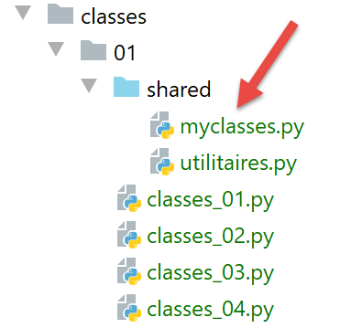
这两个类将位于上方的 [myclasses.py] 模块中。
脚本 [classes_07] 展示了如何生成对象列表:
# 正在配置应用程序
import config

config = config.configure()

# 已配置 syspath - 可以进行导入
from myclasses import Personne

# ---------------------------------- 主程序
# 创建人员对象列表
groupe = [Personne("Paul", "Langevin", 48), Personne("Sylvie", "Lefur", 70)]
# 这些人员的身份
for i in range(len(groupe)):
    print(f"groupe[{i}]={groupe[i]}")
注:
- 第 7 行:导入类 [Personne];
- 第 11 行:一个 [Personne] 类型的对象列表;
- 第 13-14 行:遍历该列表以显示其中的每个元素;
- 第14行:函数[print]将显示表示对象[groupe[i]]的字符串。默认情况下,将调用该对象的[__str__]方法;
结果
C:\Users\serge\.virtualenvs\cours-python-v02\Scripts\python.exe C:/Data/st-2020/dev/python/cours-2020/v-02/classes/01/classes_07.py
groupe[0]=[Paul,Langevin,48]
groupe[1]=[Sylvie,Lefur,70]

Process finished with exit code 0
12.8. 脚本 [classes_08]:创建一个从 Personne 类派生的类
我们在模块 [myclasses] 中定义了以下类 [Enseignant]:
# 教师类
class Enseignant(Personne):
    # 构造函数
    def __init__(self, prénom: str = "x", nom: str = "x", âge: int = 0, discipline: str = "x"):
        # 名字:该人的名字
        # 姓氏:该人的姓氏
        # 年龄:该人的年龄
        # 学科:所教授的学科

        # 家长姓名首字母
        Personne.__init__(self, prénom, nom, âge)
        # 其他缩写
        self.discipline = discipline

    # toString
    def __str__(self) -> str:
        return f"enseignant[{super().__str__()},{self.discipline}]"

    # 属性
    @property
    def discipline(self) -> str:
        return self.__discipline

    @discipline.setter
    def discipline(self, discipline: str):
        # 学科必须为非空字符串
        if Utils.is_string_ok(discipline):
            self.__discipline = discipline
        else:
            raise MyException("La discipline doit être une chaîne de caractères non vide")
- 第 2 行:声明类 Enseignant 为类 Personne 的派生类。派生类不仅拥有父类的所有属性(包括属性与方法),还拥有其特有的属性;
- 第13行:类[Enseignant]定义了一个新属性[discipline];
- 第 11 行:派生类 Enseignant 的构造函数必须调用父类 Personne 的构造函数,并向其传递所需的参数;
- 第 17 行:函数 [super()] 返回父类。此处调用了父类的函数 [__str__];
- 第19-30行:定义新属性[discipline]的getter和setter;
脚本 [classes_08] 以如下方式使用类 [Enseignant]:
# 配置应用程序
import config

config = config.configure()

# syspath 已配置 - 可以进行导入
from myclasses import Personne, Enseignant

# ---------------------------------- main
# 创建 Personne 对象及其派生类的数组
groupe = [Enseignant("Paul", "Langevin", 48, "anglais"), Personne("Sylvie", "Lefur", 70)]
# 这些人员的身份
for i in range(len(groupe)):
    print(f"groupe[{i}]={groupe[i]}")
注:
- 第 7 行:导入在文件 [myclasses.py] 中定义的类 [Personne] 和 [Enseignant];
- 第11-14行:定义一组人员,随后显示其身份信息;
结果
C:\Data\st-2020\dev\python\cours-2020\python3-flask-2020\venv\Scripts\python.exe C:/Data/st-2020/dev/python/cours-2020/python3-flask-2020/classes/01/classes_08.py
groupe[0]=enseignant[[Paul,Langevin,48],anglais]
groupe[1]=[Sylvie,Lefur,70]

Process finished with exit code 0
12.9. 脚本 [classes_09]:从 Personne 类派生的第二个子类
脚本 [classes_09] 引入了从类 [Personne] 派生的类 [Etudiant]。该类在模块 [myclasses] 中定义如下:
# 学生类
class Etudiant(Personne):
    # 构造函数
    def __init__(self: object, prénom: str = "x", nom: str = "y", âge: int = 0, formation: str = "x"):
        Personne.__init__(self, prénom, nom, âge)
        self.formation = formation

    # toString
    def __str__(self: object) -> str:
        return f"étudiant[{super().__str__()},{self.formation}]"

    # 属性
    @property
    def formation(self) -> str:
        return self.__formation

    @formation.setter
    def formation(self, formation: str):
        # 培训必须是一个非空字符串
        if Utils.is_string_ok(formation):
            self.__formation = formation
        else:
            raise MyException("La formation doit être une chaîne de caractères non vide")
脚本 [classes_09] 以如下方式使用类 [Etudiant]:
# 配置应用程序
import config

config = config.configure()

# syspath 已配置 - 可以进行导入
from myclasses import Personne, Enseignant, Etudiant

# ---------------------------------- main
# 创建 Personne 对象及其派生类的数组
groupe = [Enseignant("Paul", "Langevin", 48, "anglais"), Personne("Sylvie", "Lefur", 70),
          Etudiant("Steve", "Boer", 22, "iup2 qualité")]
# 这些人员的身份
for personne in groupe:
    # 显示人员信息
    print(personne)
注:
- 此脚本与前一个类似。
结果
C:\Data\st-2020\dev\python\cours-2020\python3-flask-2020\venv\Scripts\python.exe C:/Data/st-2020/dev/python/cours-2020/python3-flask-2020/classes/01/classes_09.py
enseignant[[Paul,Langevin,48],anglais]
[Sylvie,Lefur,70]
étudiant[[Steve,Boer,22],iup2 qualité]

Process finished with exit code 0
12.10. 脚本 [classes_10]:属性 [__dict__]
脚本 [classes_10] 包含属性 [__dict__],我们后续将经常使用该属性:
# 配置应用程序
import config

config = config.configure()

# 已配置 syspath - 可以进行导入
from myclasses import Etudiant

# ---------------------------------- main
# 创建学生
étudiant=Etudiant("Steve", "Boer", 22, "iup2 qualité")
# 属性字典
print(étudiant.__dict__)
注释
- 第 1-4 行:配置应用程序;
- 第 7 行:导入类 [Etudiant];
- 第 11 行:实例化一名学生;
- 第13行:调用预定义方法[__dict__](标识符前后各两个下划线);
结果如下:
- 第2行,得到一个字典,其键是对象的属性,前缀为其所属类的名称。我们将使用该字典在对象与字典之间建立桥梁;