8. 应用练习 – 版本 1
8.1. 问题
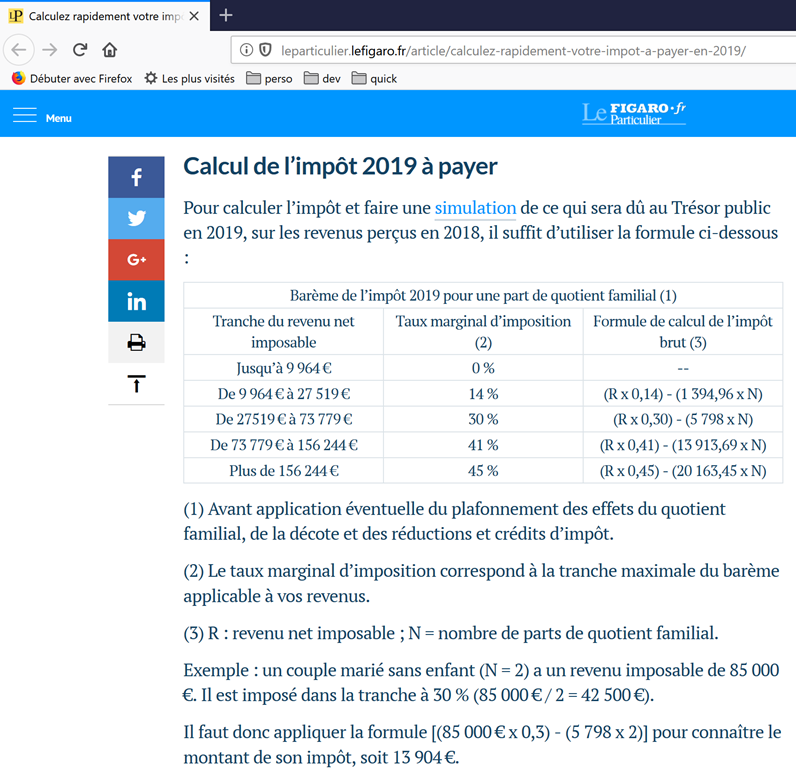
上表用于计算纳税人仅申报工资收入的简化情况下的税额。如注释(1)所示,由此计算出的税额是未考虑以下三项机制的税额:
- 针对高收入群体的家庭商数上限;
- 针对低收入群体的减免和税额减免;
因此,税额计算包括以下步骤 [http://impotsurlerevenu.org/comprendre-le-calcul-de-l-impot/1217-calcul-de-l-impot-2019.php]:
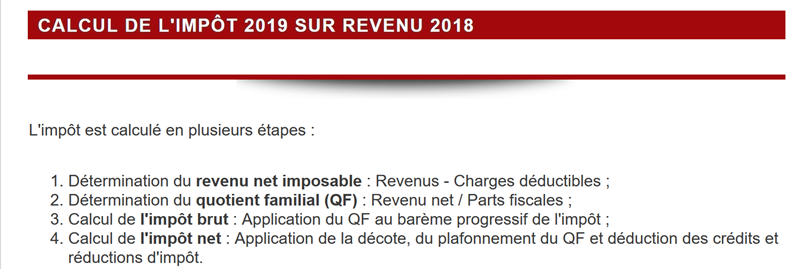
我们拟编写一个程序,用于计算纳税人的税额,具体针对仅需申报工资收入的简化情况:
8.1.1. 毛税额计算
应纳税额可按以下方式计算:
首先计算纳税人的份额数:
- 每位父母计为1份;
- 前两名子女各计1/2份;
- 后续子女每人计1份:
因此份额总数为:
- nbParts=1+nbEnfants*0.5+(子女数-2)*0.5(若雇员未婚);
- 若已婚,则nbParts=2+nbEnfants*0.5+(nbEnfants-2)*0.5;
- 其中 nbEnfants 为其子女数;
- 计算应税收入 R=0.9*S,其中 S 为年薪;
- 计算家庭分摊系数 QF=R/nbParts;
- 根据以下数据(2019年)计算应纳税额 I:
9964 | 0 | 0 |
27519 | 0.14 | 1394.96 |
73779 | 0.3 | 5798 |
156244 | 0.4 | 13913.69 |
0 | 0.45 | 20163.45 |
每行有 3 个字段:champ1、champ2、champ3。 要计算税款 I,需查找满足 QF<=字段1 的第一行,并取该行的数值。例如,对于一名已婚且有两个孩子的员工,年薪 S 为 50000 欧元:
应税收入:R=0.9*S=45000
份额数:nbParts=2+2*0.5=3
家庭分额:QF=45000/3=15000
满足 QF<=field1 的第一行如下:
因此,税额 I 等于 0.14*R – 1394.96*nbParts=[0,14*45000-1394,96*3]=2115。税额向下四舍五入至整欧元。
若从第一行起即满足QF<=field1,则税额为零。
若 QF 满足关系 QF<=field1 从未成立,则使用最后一行中的系数。此处:
由此得出应纳税额 I=0.45*R – 20163.45*nbParts。
8.1.2. 家庭商数上限
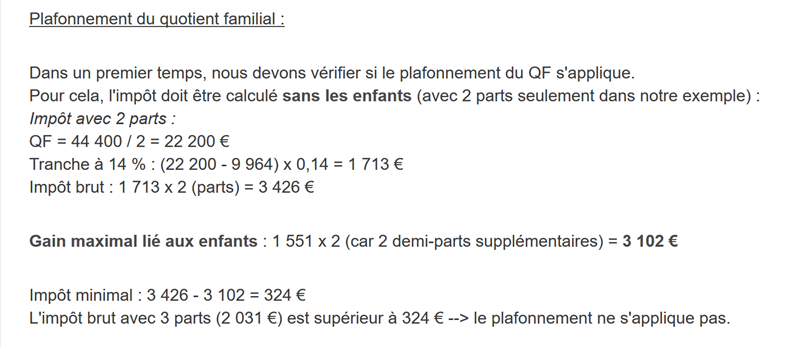
要判断家庭商数上限 QF 是否适用,需重新计算不含子女的应纳税额。仍以已婚、育有两名子女且年薪 S 为 50000 欧元的雇员为例:
应税收入:R=0.9*S=45000
分额数:nbParts=2(不再计入子女)
家庭分额:QF=45000/2=22500
满足 QF<=field1 的第一行如下:
因此,税额 I 等于 0.14*R – 1394.96*nbParts=[0,14*45000-1394,96*2]=3510。
与子女相关的最高收益:1551 * 2 = 3102 欧元
最低税额:3510-3102 = 408 欧元
已计算的含3个税额份额的应纳税额2115欧元高于最低税额408欧元,因此此处不适用家庭税额上限。
一般而言,应纳税额为 (税款1, 税款2) 中的较大值,其中:
- [impôt1]:为包含子女计算的应纳税额;
- [impôt2]:是不计入子女的应纳税额,并减去与子女相关的最高抵扣额(此处为每半份1551欧元);
8.1.3. 减免额的计算
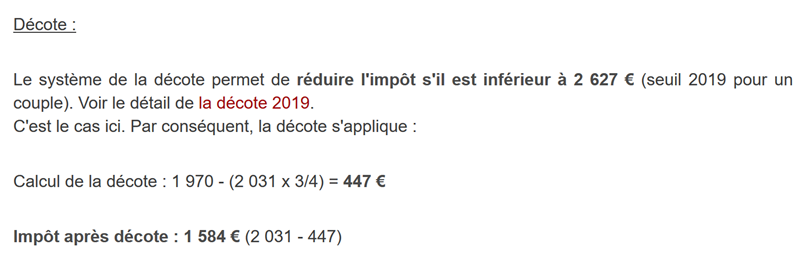
仍以已婚且有两名子女、年薪S为50000欧元的雇员为例:
上一步计算出的应纳税额(2115)低于已婚夫妇的2627欧元(单身人士为1595欧元):因此适用减免。其计算方式如下:
减免额 = 阈值(已婚夫妇=1970/单身=1196)- 0.75 × 应纳税额
折算额=1970-0.75×2115=383.75,四舍五入后为384欧元。
新应纳税额=2115-384=1731欧元
8.1.4. 减税额计算
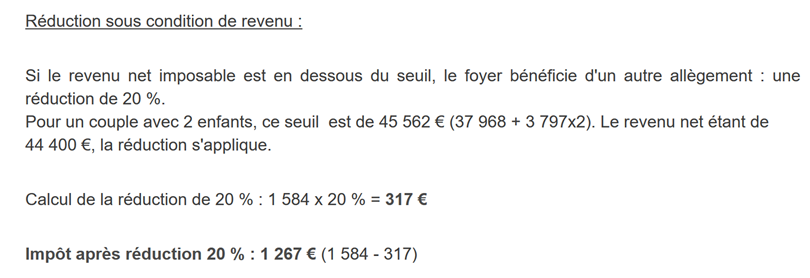
当收入低于一定门槛时,对前文计算出的应纳税额给予20%的减免。2019年的门槛如下:
- 单身:21037欧元;
- 已婚夫妇:42074欧元;(上文示例中使用的37968这一数字似乎有误);
该门槛值需增加以下数值:3797 *(子女带来的半份数)。
仍以那位已婚、育有两名子女且年薪S为50000欧元的雇员为例:
- 其应税收入(45000欧元)低于门槛(42074+2*3797)=49668欧元;
- 因此他有权享受20%的税额减免:1731 * 0.2 = 346.2欧元(四舍五入为347欧元);
- 纳税人的应纳税额为:1731-347=1384欧元;
8.1.5. 净税额计算
我们的计算到此为止:应缴净税额为1384欧元。实际上,纳税人还可以享受其他减免,特别是针对向公益或公共利益组织捐赠的减免。
8.1.6. 高收入人群的情况
前面的例子适用于大多数工薪阶层。然而,高收入群体的税款计算方式有所不同。
8.1.6.1. 年度收入10%减免的上限
在大多数情况下,应税收入按以下公式计算:R=0.9*S,其中S为年薪。这被称为10%的减免。该减免设有上限。2019年:
- 减免额不得超过12502欧元;
- 不得低于437欧元;
以一名未婚且无子女、年薪为200000欧元的雇员为例:
- 10%的减免额为200,000欧元 > 12,502欧元。因此,减免额被调整为12,502欧元;
8.1.6.2. 家庭系数上限
假设出现第 |家庭系数上限| 段所述的家庭上限情况。以一对育有三个子女、年收入为100,000欧元的夫妇为例。重新梳理计算步骤:
- 10%的免税额为10000欧元 < 12502欧元。因此应税收入R为100000-10000=90000欧元;
- 该夫妇拥有nbParts=2+0.5×2+1=4个份额;
- 因此其家庭分额为 QF = R / nbParts = 90000 / 4 = 22500 欧元;
- 其带子女的应纳税额I1为I1=0.14×90000-1394.96×4=7020欧元;
- 其无子女的应纳税额I2:
- QF=90000/2=45000欧元;
- I2=0.3*90000-5798*2=15404欧元;
- 家庭配额上限规则规定,子女带来的增益不得超过(1551×4个半份额)=6204欧元。但此处该数值为I2-I1=15404-7020=8384欧元,因此高于6204欧元;
- 因此,应纳税额重新计算为 I3=I2-6204=15404-6204=9200欧元;
这对夫妇既无免税额也无减免,其最终应纳税额为9200欧元。
8.1.7. 官方数据
税款计算较为复杂。在本文中,我们将通过以下示例进行演示。 结果来自税务部门的模拟器 |https://www3.impots.gouv.fr/simulateur/calcul_impot/2019/simplifie/index.htm|:
纳税人 | 官方结果 | 本文算法计算结果 |
一对夫妇,育有2个孩子,年收入55555欧元 | 税额=2815欧元 税率=14% | 税额=2814欧元 税率=14% |
一对夫妇,育有2个孩子,年收入50000欧元 | 税额=1385欧元 减免额=720欧元 减免=0欧元 税率=14% | 应纳税额=1384欧元 减免额=384欧元 减免额=347欧元 税率=14% |
一对夫妇,育有3个孩子,年收入50000欧元 | 税额=0欧元 减免额=384欧元 减免额=346欧元 税率=14% | 应纳税额=0欧元 折扣=720欧元 减免额=0欧元 税率=14% |
单身,有2个孩子,年收入100000欧元 | 应纳税额=19884欧元 减免额=0欧元 减免额=0欧元 税率=41% | 应纳税额=19884欧元 附加税=4480欧元 减免=0欧元 减免额=0欧元 税率=41% |
单身,育有3名子女,年收入100000欧元 | 应纳税额=16782欧元 减免额=0欧元 减免额=0欧元 税率=41% | 应纳税额=16782欧元 附加税=7176欧元 减免=0欧元 减免额=0欧元 税率=41% |
一对夫妇,育有3个孩子,年收入100000欧元 | 应纳税额=9200欧元 减免额=0欧元 减免额=0欧元 税率=30% | 应纳税额=9200欧元 附加税=2180欧元 减免=0欧元 减免额=0欧元 税率=30% |
一对夫妇,育有5个孩子,年收入100000欧元 | 应纳税额=4230欧元 减免额=0欧元 减免额=0欧元 税率=14% | 应纳税额=4230欧元 减免额=0欧元 减免=0欧元 税率=14% |
单身无子女,年收入100000欧元 | 应纳税额=22986欧元 减免额=0欧元 减免额=0欧元 税率=41% | 应纳税额=22986欧元 附加费=0欧元 减免=0欧元 减免额=0欧元 税率=41% |
一对夫妇,育有2个孩子,年收入30000欧元 | 应纳税额=0欧元 减免额=0欧元 减免额=0欧元 税率=0% | 税款=0欧元 折扣=0欧元 减免=0欧元 税率=0% |
单身无子女,年收入200000欧元 | 应纳税额=64211欧元 减免额=0欧元 减免额=0欧元 税率=45% | 应纳税额=64210欧元 附加税=7498欧元 减免=0欧元 减免额=0欧元 税率=45% |
一对夫妇,育有3个孩子,年收入200000欧元 | 应纳税额=42,843欧元 减免额=0欧元 减免额=0欧元 税率=41% | 应纳税额=42,842欧元 附加税=17283欧元 减免=0欧元 减免额=0欧元 税率=41% |
上文所称的附加税,是指高收入者因以下两种情况而需额外缴纳的税款:
- 年度收入10%免税额的上限;
- 家庭分摊额的上限;
该指标无法验证,因为税务部门的模拟器未提供该数据。
可以看出,该文档中的算法每次计算出的税额均准确无误,但存在1欧元的误差范围。该误差源于四舍五入。所有金额有时四舍五入至更高的一欧元,有时则四舍五入至更低的一欧元。 由于我并不了解官方规则,因此文档中算法的金额进行了如下四舍五入:
- 折扣和减免金额向上取整至整欧元;
- 附加费和最终税额向下取整;
我们将开发多个版本的税款计算应用程序。
8.2. 版本 1
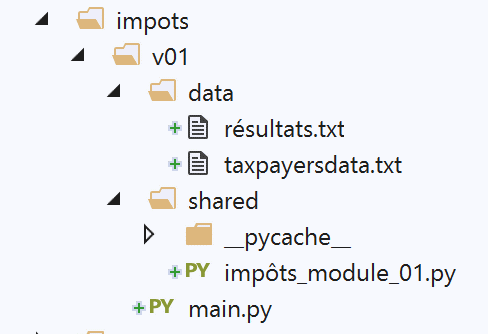
8.2.1. 主脚本
我们首先介绍一个初始程序,其中:
- 计算税款所需的数据以列表和常量的形式硬编码在代码中;
- 纳税人的数据(已婚、子女、工资)存储在第一个文本文件 [taxpayersdata.txt] 中;
- 税款计算结果(已婚、子女、工资、税额)存储在第二个文本文件 [résultats.txt] 中;
脚本 [v-01/main.py] 如下:
# 模块
import sys

from impots.v01.shared.impôts_module_01 import *

# main -----------------------

# 常量
# 纳税人文件
DATA = "./data/taxpayersdata.txt"
# 结果文件
RESULTATS = "./data/résultats.txt"

try:
    # 读取纳税人数据
    tax_payers = get_taxpayers_data(DATA)
    # 结果列表
    results = []
    # 计算纳税人税款
    for tax_payer in tax_payers:
        # 税款计算返回一个键值表
        # ['marié', 'enfants', 'salaire', 'impôt', 'surcôte', 'décôte', 'réduction', 'taux']
        result = calcul_impôt(tax_payer['marié'], tax_payer['enfants'], tax_payer['salaire'])
        # 词典已添加到结果列表中
        results.append(result)
    # 保存结果
    record_results(RESULTATS, results)
except BaseException as erreur:
    # 可能出现各种错误:文件不存在、文件内容不正确
    # 显示错误并退出应用程序
    print(f"l'erreur suivante s'est produite : {erreur}]\n")
    sys.exit()
注释
- 第 4 行:使用模块 [impots.v01.modules.impôts_module_01]。需注意,此路径是从项目根目录 PyCharm 开始计算的;
- 第 10 行:文件 [data/taxpayersdata.txt] 内容如下:
每行代表一个由三个元素组成的元组 [marié / pacsé ou pas, nombre d'enfants, salaire annuel en euros]。
- 第 12 行:用于存放文件 [taxpayersdata.txt] 中每位纳税人税款计算结果的文件。其内容如下:
- 第16行:从[taxpayersdata.txt]中提取纳税人数据。获取一组键值对列表[marié, enfants, salaire],每个键值对代表一名纳税人;
- 第17-25行:计算列表[taxPayers]中纳税人的税额。获取列表[results],其中每个元素再次是一个键值对列表[marié, enfants, salaire, impôt, surcôte, décôte, réduction, taux];
- 第27行:将结果列表[results]以上述形式保存到文件[résultats.txt]中;
- 第28-32行:捕获模块[impots.v01.modules.impôts_module_01]中可能抛出的所有异常;
接下来我们将详细介绍脚本[main]所使用的三个函数:
- [get_taxpayers_data]:用于读取纳税人的数据;
- [calcul_impôt]:用于计算纳税人的税款;
- [record_results]:用于将结果保存到文本文件中;
所有这些功能均位于模块 [impots.modules.impôts_module_01] 中。
8.2.2. 模块 [impots.v01.shared.impôts_module_01]
用于计算税款的必要函数已汇集在模块 [impots.v01.shared.impôts_module_01] 中:
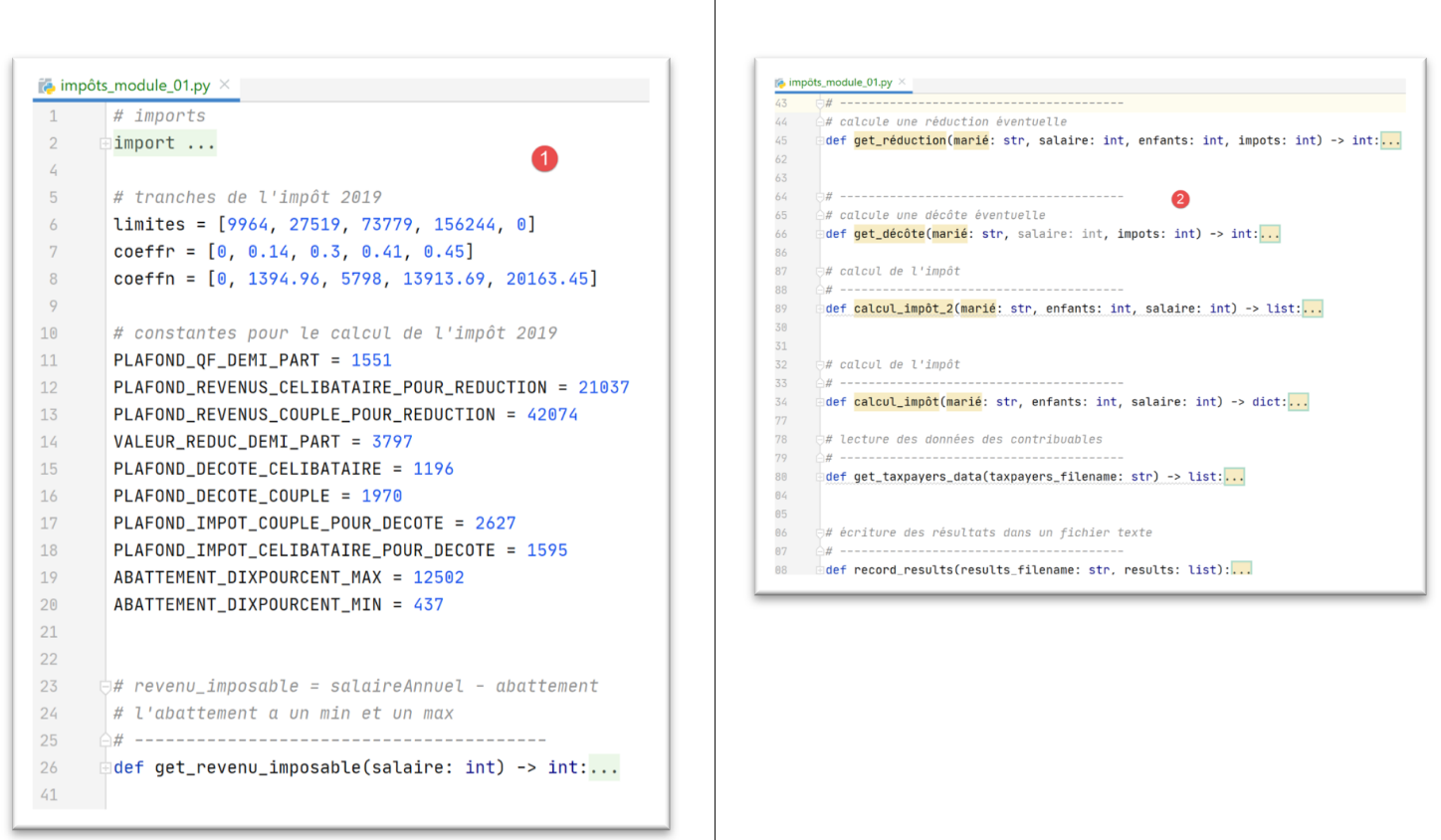
- 在 [1] 中:定义税额计算常量;
- 在 [2] 中:模块函数列表;
8.2.3. 函数 [get_taxpayers_data]
函数 [get_taxpayers_data] 如下:
# 导入
import codecs
…

# 读取纳税人数据
# ----------------------------------------
def get_taxpayers_data(taxpayers_filename: str) -> list:
    # 读取纳税人数据
    file = None
    try:
        # 纳税人列表
        taxpayers = []
        # 打开文件
        file = codecs.open(taxpayers_filename, "r", "utf8")
        # 读取纳税人文件的第一行
        ligne = file.readline().strip()
        # 只要还有待处理的行
        while ligne != '':
            # 提取构成该行的“已婚”、“子女”和“工资”这3个字段
            (marié, enfants, salaire) = ligne.split(",")
            # 将其添加到纳税人列表中
            taxpayers.append({'marié': marié.strip().lower(), 'enfants': int(enfants), 'salaire': int(salaire)})
            # 读取纳税人文件中的新一行
            ligne = file.readline().strip()
        # 输出结果
        return taxpayers
    finally:
        # 若文件已打开,则关闭该文件
        if file:
            file.close()
注
- 第 7 行:[taxpayers_filename] 是待处理文件的名称。该函数返回一个列表;
- 第18-24行:处理文本文件中[marié, enfants, salaire]行的循环;
- 第20行:提取该行的三个元素。此处假设该行语法正确,即确实包含预期的三个元素;
- 第22行:使用键[marié, enfants, salaire]构建一个字典,并将该字典添加到列表[taxPayers]中;
- 第26行:文件处理完成后,返回列表[taxPayers];
- 第10-30行:请注意,第10行的[try]中未添加[catch]子句。[catch]子句并非必需。 第27行,我们添加了一个[finally]语句,用于在任何情况下(无论是否发生错误)关闭文本文件;
- 该 try / finally 结构会放行可能出现的异常(因为没有 catch 语句)。该异常将上报至主脚本 [main],后者将终止执行并显示该异常(参见“主脚本”部分)。该机制已被用于该模块的大多数函数;
8.2.4. 函数 [calcul_impôt]
函数 [calcul_impôt] 如下所示:
# 导入
import codecs
import math

# 2019年所得税税率档次
limites = [9964, 27519, 73779, 156244, 0]
coeffr = [0, 0.14, 0.3, 0.41, 0.45]
coeffn = [0, 1394.96, 5798, 13913.69, 20163.45]

# 2019年税额计算常数
PLAFOND_QF_DEMI_PART = 1551
PLAFOND_REVENUS_CELIBATAIRE_POUR_REDUCTION = 21037
PLAFOND_REVENUS_COUPLE_POUR_REDUCTION = 42074
VALEUR_REDUC_DEMI_PART = 3797
PLAFOND_DECOTE_CELIBATAIRE = 1196
PLAFOND_DECOTE_COUPLE = 1970
PLAFOND_IMPOT_COUPLE_POUR_DECOTE = 2627
PLAFOND_IMPOT_CELIBATAIRE_POUR_DECOTE = 1595
ABATTEMENT_DIXPOURCENT_MAX = 12502
ABATTEMENT_DIXPOURCENT_MIN = 437

…
# 税款计算
# ----------------------------------------
def calcul_impôt(marié: str, enfants: int, salaire: int) -> dict:
    # 已婚:是,否
    # 子女:子女人数
    # 工资:年薪
    # 限额、系数:用于计算税款的数据表
    #
    # 含子女的税款计算
    result1 = calcul_impôt_2(marié, enfants, salaire)
    impot1 = result1["impôt"]
    # 不含子女的税款计算
    if enfants != 0:
        result2 = calcul_impôt_2(marié, 0, salaire)
        impot2 = result2["impôt"]
        # 家庭商数上限的适用
        if enfants < 3:
            # PLAFOND_QF_DEMI_PART 欧元(前两名子女)
            impot2 = impot2 - enfants * PLAFOND_QF_DEMI_PART
        else:
            # PLAFOND_QF_DEMI_PART 欧元(前两名子女),后续子女金额翻倍
            impot2 = impot2 - 2 * PLAFOND_QF_DEMI_PART - (enfants - 2) * 2 * PLAFOND_QF_DEMI_PART
    else:
        impot2 = impot1
        result2 = result1

    # 取税率最高的那项,并适用相应的税率和附加费
    if impot1 > impot2:
        impot = impot1
        taux = result1["taux"]
        surcôte = result1["surcôte"]
    else:
        surcôte = impot2 - impot1 + result2["surcôte"]
        impot = impot2
        taux = result2["taux"]

    # 计算可能的减免额
    décôte = get_décôte(marié, salaire, impot)
    impot -= décôte
    # 计算可能的减税额
    réduction = get_réduction(marié, salaire, enfants, impot)
    impot -= réduction
    # 结果
    return {"marié": marié, "enfants": enfants, "salaire": salaire, "impôt": math.floor(impot), "surcôte": surcôte,
            "décôte": décôte, "réduction": réduction, "taux": taux}
注释
- 第6-8行:税率区间(参见“毛税计算”一节);
- 第11-20行:税额计算的常量;
- 需注意,第5-20行初始化的元素在后续将描述的函数中均为全局变量。因此,只要调用这些元素的函数未声明同名变量,这些元素的值即为已知;
- 第5-20行的数值每年都会变化。此处为2019年的数值;
- 第25行:函数[calcul_impôt]接收三个参数:
- [marié]:是/否,表示纳税人是否已婚或处于民事伴侣关系;
- [enfants]:其子女数量;
- [salaire]:其年薪(单位:欧元);
- 第 31-33 行:考虑子女情况计算税额;
- 第34-47行:这些行用于实施家庭系数上限(参见“家庭系数上限”段落);
- 第49-57行:计算纳税人的税率以及可能的附加税(参见|高收入情况|章节);
- 第59-61行:计算可能的减免额(参见|减免额计算|章节);
- 第62-64行:计算应缴税款的减免额(参见“减税计算”一节);
该算法较为复杂,除注释中所述内容外,我们将不再赘述。该算法实现了|问题|段落中描述的税款计算方式。
8.2.5. 函数 [calcul_impôt_2]
函数 [calcul_impôt] 调用了以下函数 [calcul_impôt_2]:
def calcul_impôt_2(marié: str, enfants: int, salaire: int) -> list:
    # 已婚:是,否
    # 子女:子女人数
    # 工资:年薪
    # 限额、系数:用于计算税款的数据表
    #
    # 份额数
    marié = marié.strip().lower()
    if marié == "oui":
        nb_parts = enfants / 2 + 2
    else:
        nb_parts = enfants / 2 + 1

    # 从第3个子女起,每个子女计1份
    if enfants >= 3:
        # 第3个及以后的每个孩子额外增加半份
        nb_parts += 0.5 * (enfants - 2)

    # 应税收入
    revenu_imposable = get_revenu_imposable(salaire)
    # 附加费
    surcôte = math.floor(revenu_imposable - 0.9 * salaire)
    # 用于四舍五入问题
    if surcôte < 0:
        surcôte = 0

    # 家庭分摊系数
    quotient = revenu_imposable / nb_parts
    # 被放置在限额表的末尾,以终止后续循环
    limites[len(limites) - 1] = quotient
    # 计算税额
    i = 0
    while quotient > limites[i]:
        i += 1
        # 由于将家庭收入商置于限额表末尾,因此前面的循环
    # 不会超出限值数组范围

    # 现在可以计算税额
    impôt = math.floor(revenu_imposable * coeffr[i] - nb_parts * coeffn[i])
    # 结果
    return {"impôt": impôt, "surcôte": surcôte, "taux": coeffr[i]}
该算法已在第 8.1.1 节中进行了描述。
8.2.6. 函数 [get_décôte]
函数 [get_décôte] 实现了税款折扣(如有)的计算(参见“折扣计算”一节):
# 计算可能的折扣
def get_décôte(marié: str, salaire: int, impots: int) -> int:
    # 初始时,折扣为零
    décôte = 0
    # 享受减免的最高税额
    plafond_impôt_pour_décôte = PLAFOND_IMPOT_COUPLE_POUR_DECOTE if marié == "oui" else PLAFOND_IMPOT_CELIBATAIRE_POUR_DECOTE
    if impots < plafond_impôt_pour_décôte:
        # 折扣上限
        plafond_décôte = PLAFOND_DECOTE_COUPLE if marié == "oui" else PLAFOND_DECOTE_CELIBATAIRE
        # 理论折扣
        décôte = plafond_décôte - 0.75 * impots
        # 折减额不得超过税额
        if décôte > impots:
            décôte = impots

        # 无折减 <0
        if décôte < 0:
            décôte = 0

    # 结果
    return math.ceil(décôte)
8.2.7. 函数 [get_réduction]
函数 [get_réduction] 实现了应缴税款减免额的计算(参见“税款减免计算”一节):
# 计算可能的减免
def get_réduction(marié: str, salaire: int, enfants: int, impots: int) -> int:
    # 享受20%减免的收入上限
    plafond_revenu_pour_réduction = PLAFOND_REVENUS_COUPLE_POUR_REDUCTION if marié == "oui" else PLAFOND_REVENUS_CELIBATAIRE_POUR_REDUCTION
    plafond_revenu_pour_réduction += enfants * VALEUR_REDUC_DEMI_PART
    if enfants > 2:
        plafond_revenu_pour_réduction += (enfants - 2) * VALEUR_REDUC_DEMI_PART

    # 应税收入
    revenu_imposable = get_revenu_imposable(salaire)
    # 减免
    réduction = 0
    if revenu_imposable < plafond_revenu_pour_réduction:
        # 20%的减免
        réduction = 0.2 * impots

    # 结果
    return math.ceil(réduction)
8.2.8. 函数 [get_revenu_imposable]
函数 [get_revenu_imposable] 根据年薪计算应税收入:
# revenu_imposable = salaireAnnuel - 免税额
# 免税额有最低和最高限额
# ----------------------------------------
def get_revenu_imposable(salaire: int) -> int:
    # 扣除额为工资的10%
    abattement = 0.1 * salaire
    # 该扣除额不得超过 ABATTEMENT_DIXPOURCENT_MAX
    if abattement > ABATTEMENT_DIXPOURCENT_MAX:
        abattement = ABATTEMENT_DIXPOURCENT_MAX

    # 扣除额不得低于 ABATTEMENT_DIXPOURCENT_MIN
    if abattement < ABATTEMENT_DIXPOURCENT_MIN:
        abattement = ABATTEMENT_DIXPOURCENT_MIN

    # 应税收入
    revenu_imposable = salaire - abattement
    # 结果
    return math.floor(revenu_imposable)
8.2.9. 函数 [record_results]
函数 [record_results] 将税额计算结果保存到文本文件中:
# 将结果写入文本文件
# ----------------------------------------
def record_results(results_filename: str, results: list):
    # results_filename:用于存储结果的文本文件名
    # results:以字典列表形式呈现的结果列表
    # 每个字典都写在一行文本中
    résultats = None
    try:
        # 打开结果文件
        résultats = codecs.open(results_filename, "w", "utf8")
        # 处理纳税人数据
        for result in results:
            # 将结果写入结果文件
            résultats.write(f"{result}\n")
            # 下一位纳税人
    finally:
        # 若文件已打开,则关闭
        if résultats:
            résultats.close()
8.2.10. 结果
如前所述,使用以下纳税人文件 [taxpayersdata.txt]:
脚本 [main.py] 会生成以下文件:
这些结果与“官方数据”一节中的官方数据一致。
现在,让我们在控制台窗口中运行此版本:
(venv) C:\Data\st-2020\dev\python\cours-2020\python3-flask-2020\impots\v01>python main.py
Traceback (most recent call last):
  File "main.py", line 4, in <module>
    from impots.v01.shared.impôts_module_01 import *
ModuleNotFoundError: No module named 'impots'
我们再次遇到了之前出现过的错误:即找不到某个模块,此处是 [impots] 模块。需要提醒的是,这意味着:
- Python 解释器已逐一遍历 Python Path 中的所有目录;
- 但在任何一个文件夹中,都没有找到包含脚本 [impots.py] 的文件夹;
[v02]版本将解决此问题。