4. 字符串
4.1. 脚本 [str_01]:字符串的表示法
脚本 [str_01] 如下:
# 字符串
# 三种可能的表示形式
chaine1 = "un"
chaine2 = 'deux'
chaine3 = """hélène va au
 marché acheter des légumes"""
# 显示
print(f"chaine1=[{chaine1}], chaine2=[{chaine2}], chaine3=[{chaine3}]")
注释
- 第 3 行:由双引号 " 限定的字符串;
- 第 4 行:由单引号 ' 限定的字符串;
- 第 5 行:由三个引号 """ 包围的字符串。在此情况下,该字符串可跨多行;
结果如下:
C:\Data\st-2020\dev\python\cours-2020\python3-flask-2020\venv\Scripts\python.exe C:/Data/st-2020/dev/python/cours-2020/python3-flask-2020/strings/str_01.py
chaine1=[un], chaine2=[deux], chaine3=[hélène va au
 marché acheter des légumes]

Process finished with exit code 0
4.2. 脚本 [str_02]:<str> 类的的方法
脚本 [str_02] 展示了字符串类 <str> 的部分方法:
# 字符串函数
# 小写字符串
print(f"'ABCD'.lower()={'ABCD'.lower()}")
# 大写字符串
print(f"'abcd'.upper()={'abcd'.upper()}")
# 第 2 个字符
print(f"'cheval[2]={'cheval'[2]}")
# 包含第 5 和第 6 个字符的子字符串
print(f"'caractères accentués'[5:7]={'caractères accentués'[5:7]}")
# 从第 4 个字符(含)开始的子字符串
print(f"'caractères accentués'[4:]={'caractères accentués'[4:]}")
# 截至第 6 个字符(不包括该字符)的子字符串
print(f"'caractères accentués'[:5]={'caractères accentués'[:5]}")
# 字符串长度
print(f"len('123')={len('123')}")
# 去除字符串前后的空格
print(f"'  abcd '.strip()=[{'  abcd '.strip()}]")
# 删除字符串后面的空格
print(f"'  abcd '.rstrip()=[{'  abcd '.rstrip()}]")
# 删除字符串前面的空格
print(f"'  abcd '.lstrip()=[{'  abcd '.lstrip()}]")
# “空白”一词实际上涵盖了不同的字符
str = '  \r\nabcd \t\f'
print(f"str.strip()=[{str.strip()}]")
# 用一个子字符串替换另一个
print(f"'abcd'.replace('a','x')={'abcd'.replace('a', 'x')}")
print(f"'abcd'.replace('ab','xy')={'abcd'.replace('ab', 'xy')}")
# 查找子字符串:返回位置,若未找到则返回 -1
print(f"'abcd'.find('bc')={'abcd'.find('bc')}")
print(f"'abcd'.find('bc')={'abcd'.find('Bc')}")
# 字符串开头
print(f"'abcd'.startswith('ab')={'abcd'.startswith('ab')}")
print(f"'abcd'.startswith('x')={'abcd'.startswith('x')}")
# 字符串结尾
print(f"'abcd'.endswith('cd')={'abcd'.endswith('cd')}")
print(f"'abcd'.endswith('x')={'abcd'.endswith('x')}")
# 将字符串列表转换为字符串
print(f"'[X]'.join(['abcd', '123', 'èéà'])={'[X]'.join(['abcd', '123', 'èéà'])}")
print(f"''.join(['abcd', '123', 'èéà'])={''.join(['abcd', '123', 'èéà'])}")
# 从字符串转换为字符串列表
print(f"'abcd 123 cdXY'.split('cd')={'abcd 123 cdXY'.split('cd')}")
# 提取字符串中的单词
print(f"'abcd 123 cdXY'.split(None)={'abcd 123 cdXY'.split(None)}")
结合注释和生成的结果,足以理解该脚本。结果如下:
C:\Data\st-2020\dev\python\cours-2020\python3-flask-2020\venv\Scripts\python.exe C:/Data/st-2020/dev/python/cours-2020/python3-flask-2020/strings/str_02.py
'ABCD'.lower()=abcd
'abcd'.upper()=ABCD
'马[2]=e
'带重音的字符'[5:7]=tè
'带重音的字符'[4:]=带重音的字符
'带重音字符'[:5]=带重音字符
len('123')=3
'  abcd '.strip()=[abcd]
'  abcd '.rstrip()=[  abcd]
'  abcd '.lstrip()=[abcd ]
str.strip()=[abcd]
'abcd'.replace('a','x')=xbcd
'abcd'.replace('ab','xy')=xycd
'abcd'.find('bc')=1
'abcd'.find('bc')=-1
'abcd'.startswith('ab')=True
'abcd'.startswith('x')=False
'abcd'.endswith('cd')=True
'abcd'.endswith('x')=False
'[X]'.join(['abcd', '123', 'èéà'])=abcdQZXW2HTMLBW1hdZQX123QZXW2HTMLBW1hdZQXèéà
''.join(['abcd', '123', 'èéà'])=abcd123èéà
'abcd 123 cdXY'.split('cd')=['ab', ' 123 ', 'XY']
'abcd 123 cdXY'.split(None)=['abcd', '123', 'cdXY']

Process finished with exit code 0
4.3. 脚本 [str_03]:字符串编码(1)
脚本 [str_03] 介绍了字符串编码的相关概念:
# 字符编码

# 字符串类型
str = "hélène va au marché acheter des légumes"
print(f"str=[{str}, type={type(str)}]")
# utf-8编码
print("--- utf-8")
bytes1 = str.encode('utf-8')
print(f"bytes1={bytes1}, type={type(bytes1)}")
bytes2 = bytes(str, 'utf-8')
print(f"bytes2={bytes2}, type={type(bytes2)}")
# iso-8859-1编码
print("--- iso-8859-1")
bytes1 = str.encode('iso-8859-1')
print(f"bytes1={bytes1}, type={type(bytes1)}")
bytes2 = bytes(str, 'iso-8859-1')
print(f"bytes2={bytes2}, type={type(bytes2)}")
# 编码 latin1=iso-8859-1
print("--- latin1")
bytes1 = str.encode('latin1')
print(f"bytes1={bytes1}, type={type(bytes1)}")
bytes2 = bytes(str, 'latin1')
print(f"bytes2={bytes2}, type={type(bytes2)}")
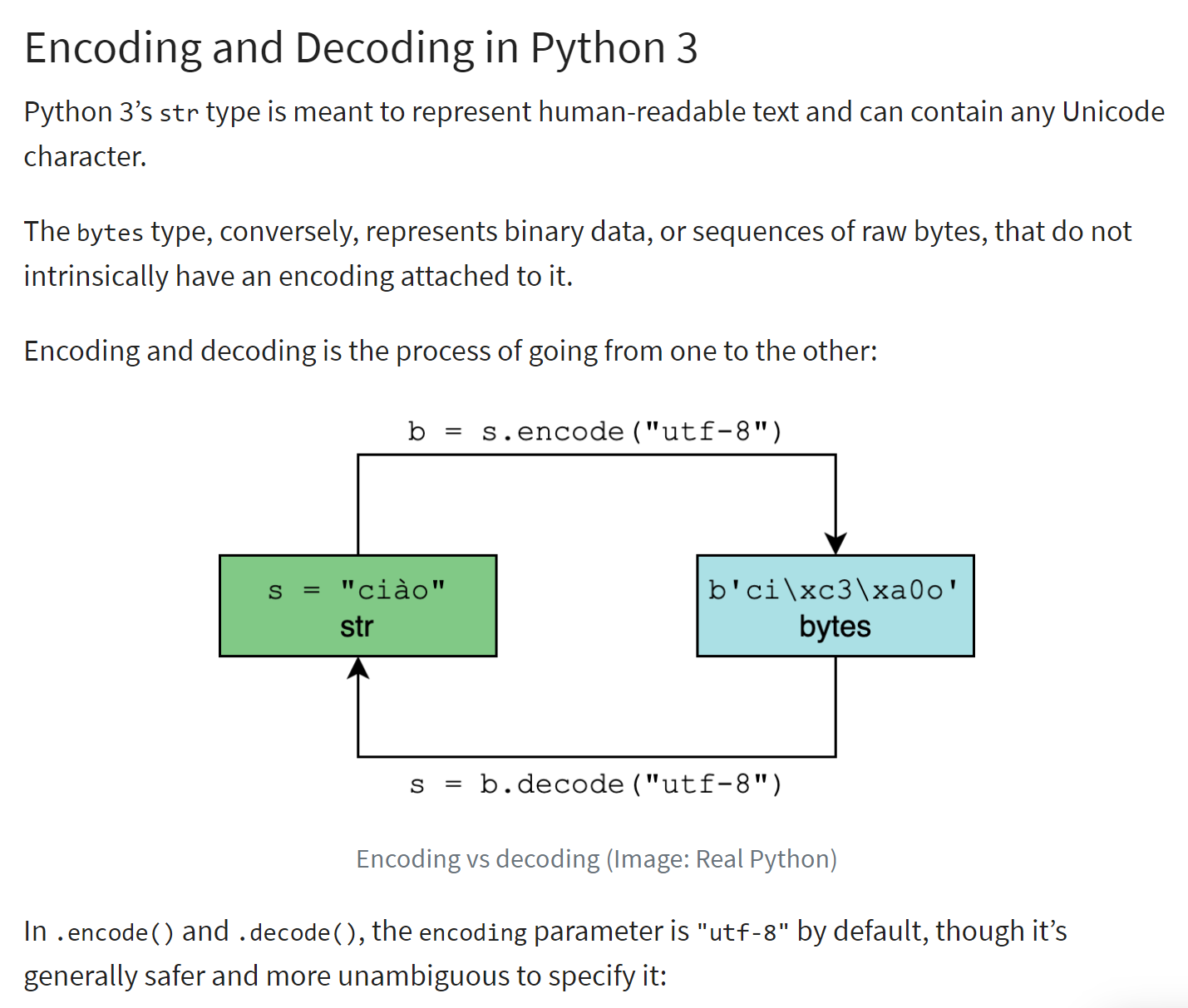
对 <str> 类型的字符串进行编码会生成一个二进制字符串,其中字符串中的每个字符都由一个或多个字节表示。编码类型多种多样。上述脚本介绍了西方最常用的两种编码:“utf-8”和“iso-8859-1”(也称为“latin1”)。
编码/解码的原理如下所示(参考 |https://realpython.com/python-encodings-guide/ |):
注释
- 第4-5行:待编码的初始字符串。 <str>类型的实例是Unicode字符串 |https://docs.python.org/3/howto/unicode.html|, |https://realpython.com/python-encodings-guide/ |;
- 第 6-11 行:将字符串编码为 UTF68 的两种方法:
- 第 8 行:str.encode('utf-8) ;
- 第10行:bytes(str, 'utf-8');
- 第12-17行:使用'iso-8859-1'编码重复上述操作;
- 第 18-23 行:'latin1' 是 'iso-8859-1' 编码的另一个名称;
结果如下:
C:\Data\st-2020\dev\python\cours-2020\python3-flask-2020\venv\Scripts\python.exe C:/Data/st-2020/dev/python/cours-2020/python3-flask-2020/strings/str_03.py
str=[hélène va au marché acheter des légumes, type=<class 'str'>
--- utf-8
bytes1=b'h\xc3\xa9l\xc3\xa8ne va au march\xc3\xa9 acheter des l\xc3\xa9gumes', type=<class 'bytes'>
bytes2=b'h\xc3\xa9l\xc3\xa8ne va au march\xc3\xa9 acheter des l\xc3\xa9gumes', type=<class 'bytes'>
--- iso-8859-1
bytes1=b'h\xe9l\xe8ne va au march\xe9 acheter des l\xe9gumes', type=<class 'bytes'>
bytes2=b'h\xe9l\xe8ne va au march\xe9 acheter des l\xe9gumes', type=<class 'bytes'>
--- latin1
bytes1=b'h\xe9l\xe8ne va au march\xe9 acheter des l\xe9gumes', type=<class 'bytes'>
bytes2=b'h\xe9l\xe8ne va au march\xe9 acheter des l\xe9gumes', type=<class 'bytes'>

Process finished with exit code 0
注释
- 第4行:可以看到带重音的字符被编码为两个字节:
- é:[\xc3\xa9],即二进制序列 11000011 10101001;
- è:[\xc3\xa8],其二进制序列为 11000011 10101000;
- 第7行:采用ISO-8859-1编码时,这两个带重音的字符编码方式不同:
- é:[\xe9],其二进制序列为 11101001;
- è:[\xe8],其二进制序列为 11101000;
4.4. 脚本 [str_04]:字符串编码(2)
脚本 [str_04] 介绍了另外两种编码类型:'base64' 和 'quoted-printable'。这两种编码并非对 Unicode 字符串进行编码,而是对二进制对象进行编码。 例如,当将 Word 文档作为邮件附件发送时,该文档将根据所使用的邮件客户端采用上述两种编码方式之一。大多数附件文件均会经历此过程。
脚本如下:
# 编码/解码
import codecs

# 字符串
print("---- chaîne unicode")
str1 = "hélène va au marché acheter des légumes"
print(f"str1=[{str1}], type(str1)={type(str1)}")

# 编码 utf-8
print("---- chaîne unicode -> binaire utf-8")
bytes1 = bytes(str1, "utf-8")
print(f"bytes1=[{bytes1}], type(bytes1)={type(bytes1)}")

# UTF-8 解码
print("---- binaire utf-8 -> chaîne unicode")
str2 = bytes1.decode("utf-8")
print(f"str2=[{str2}], type(str2)={type(str2)}")
print(f"str2==str1={str2 == str1}")

# iso-8859-1编码
print("---- chaîne unicode -> binaire iso-8859-1")
bytes2 = bytes(str1, "iso-8859-1")
print(f"bytes2=[{bytes2}], type(bytes2)={type(bytes2)}")

# ISO-8859-1 解码
print("---- binaire iso-8859-1 -> chaîne unicode")
str3 = bytes2.decode("iso-8859-1")
print(f"str3=[{str3}], type(str3)={type(str3)}")
print(f"str3==str1={str3 == str1}")

# 解码错误 - bytes1 为 utf-8 - 正在将其解码为 iso-8859-1
print("--- binaire utf-8 (décodage iso-8859-1) --> chaîne unicode")
str4 = bytes1.decode("iso-8859-1")
print(f"str4=[{str4}], type(str4)={type(str4)}")

# Unicode字符串的UTF-8编码
print("---- chaîne unicode -> binaire utf-8")
bytes3 = codecs.encode(str1, "utf-8")
print(f"bytes3=[{bytes3}], type(bytes3)={type(bytes3)}")

# 将二进制字符串 UTF-8 编码为 base64
print("---- binaire utf-8 -> binaire base64")
bytes4 = codecs.encode(bytes1, "base64")
print(f"bytes4=[{bytes4}], type(bytes4)={type(bytes4)}")

# 还原为原始的 Unicode 字符串
print("---- binaire base64 -> binaire utf-8 -> chaîne unicode")
str6 = codecs.decode(bytes4, "base64").decode("utf-8")
print(f"str6=[{str6}], type(str6)={type(str6)}")

# 将二进制字符串编码为 quoted-printable
print("---- binaire utf-8 -> binaire quoted-printable")
str7 = codecs.encode(bytes1, "quoted-printable")
print(f"str7=[{str7}], type(str7)={type(str7)}")

# 还原为原始 Unicode 字符串
print("---- binaire quoted-printable -> binaire utf-8 -> chaîne unicode")
str8 = codecs.decode(str7, "quoted-printable").decode("utf-8")
print(f"str8=[{str8}], type(str8)={type(str8)}")
注释
- 第2行:[codecs]模块支持“base64”和“quoted-printable”编码。它还能处理许多其他编码;
- 第4-7行:将接受各种编码处理的Unicode字符串;
- 第9-12行:UTF-8编码。最终得到二进制数据;
- 第14-18行:进行UTF-8解码,以恢复为原始的Unicode字符串;
- 第20-29行:使用“iso-8859-1”编码重复相同的操作;
- 第31-34行:展示了一个解码错误:
- 第 33 行:bytes1 是一个采用 'utf-8' 编码的二进制字符串。将其解码为 'iso-8859-1';
- 第 36-39 行:使用 [codecs] 模块将字符串编码为 utf-8 的另一种方法;
- 第41-44行:将'utf-8'二进制字符串编码为'base64';
- 第 46-49 行:演示如何将二进制字符串 'base64' 还原为原始的 Unicode 字符串;
- 第 51-59 行:重复上述过程,但将 'base64' 编码替换为 'quoted-printable' 编码;
结果如下:
C:\Data\st-2020\dev\python\cours-2020\python3-flask-2020\venv\Scripts\python.exe C:/Data/st-2020/dev/python/cours-2020/python3-flask-2020/strings/str_04.py
---- chaîne unicode
str1=[hélène va au marché acheter des légumes], type(str1)=<class 'str'>
---- chaîne unicode -> binaire utf-8
bytes1=[b'h\xc3\xa9l\xc3\xa8ne va au march\xc3\xa9 acheter des l\xc3\xa9gumes'], type(bytes1)=<class 'bytes'>
---- binaire utf-8 -> chaîne unicode
str2=[hélène va au marché acheter des légumes], type(str2)=<class 'str'>
str2==str1=True
---- chaîne unicode -> binaire iso-8859-1
bytes2=[b'h\xe9l\xe8ne va au march\xe9 acheter des l\xe9gumes'], type(bytes2)=<class 'bytes'>
---- binaire iso-8859-1 -> chaîne unicode
str3=[hélène va au marché acheter des légumes], type(str3)=<class 'str'>
str3==str1=True
--- binaire utf-8 (décodage iso-8859-1) --> chaîne unicode
str4=[hélène va au marché acheter des légumes], type(str4)=<class 'str'>
---- chaîne unicode -> binaire utf-8
bytes3=[b'h\xc3\xa9l\xc3\xa8ne va au march\xc3\xa9 acheter des l\xc3\xa9gumes'], type(bytes3)=<class 'bytes'>
---- binaire utf-8 -> binaire base64
bytes4=[b'aMOpbMOobmUgdmEgYXUgbWFyY2jDqSBhY2hldGVyIGRlcyBsw6lndW1lcw==\n'], type(bytes4)=<class 'bytes'>
---- binaire base64 -> binaire utf-8 -> chaîne unicode
str6=[hélène va au marché acheter des légumes], type(str6)=<class 'str'>
---- binaire utf-8 -> binaire quoted-printable
str7=[b'h=C3=A9l=C3=A8ne=20va=20au=20march=C3=A9=20acheter=20des=20l=C3=A9gumes'], type(str7)=<class 'bytes'>
---- binaire quoted-printable -> binaire utf-8 -> chaîne unicode
str8=[hélène va au marché acheter des légumes], type(str8)=<class 'str'>

Process finished with exit code 0
- 第14-15行:使用错误的'iso-8859-1'解码器将UTF-8二进制数据解码为Unicode字符串。因此生成的某些Unicode字符不正确,此处为带重音的字符;
- 第18-19行:'base64'编码是使用64个字符(ASCII,7位编码)来编码任意二进制数据。如所见,这增加了字符串二进制部分的大小;
- 第22-23行:'quoted-printable'编码同样使用字符ASCII(7位编码)来编码任意二进制数据;
需要注意的是,当从互联网等渠道接收代表文本的二进制数据时,若要还原原始文本,必须了解该数据所经历的编码过程。