36. 应用练习:第 16 版
36.1. 简介
我们应用程序中的 URL 目前采用 [/action/param1/param2/…] 的格式。 我们希望能够为这些 URL 添加前缀。例如,使用前缀 [/do],我们将得到形式为 [/do/action/param1/param2/…] 的 URL。
36.2. 路由的新配置
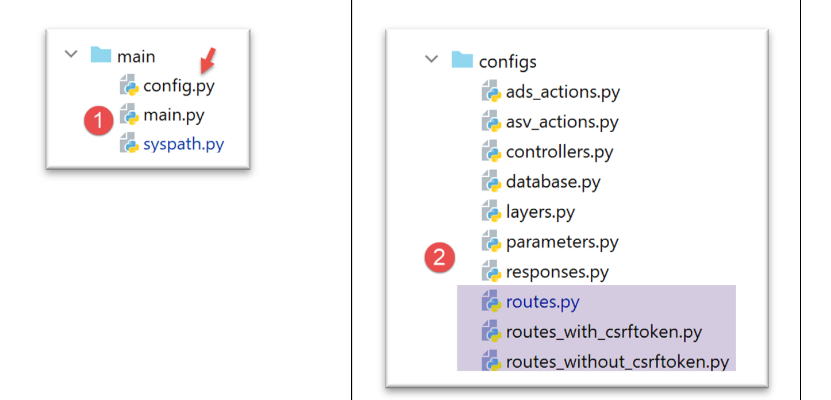
- 更改为 [2] 时,路线计算将发生改变;
- 在 [1] 中,文件 [config] 已修改以反映此变更;
[config]的配置如下:
def configure(config: dict) -> dict:
    # syspath配置
    import syspath
    config['syspath'] = syspath.configure(config)

    # 应用程序配置
    import parameters
    config['parameters'] = parameters.configure(config)

    # 数据库配置
    import database
    config["database"] = database.configure(config)

    # 应用程序层的实例化
    import layers
    config['layers'] = layers.configure(config)

    # MVC 层的配置
    config['mvc'] = {}

    # [web] 层的控制器配置
    import controllers
    config['mvc'].update(controllers.configure(config))

    # ASV 操作(显示视图操作)
    import asv_actions
    config['mvc'].update(asv_actions.configure(config))

    # 操作 ADS(执行操作)
    import ads_actions
    config['mvc'].update(ads_actions.configure(config))

    # 响应配置 HTTP
    import responses
    config['mvc'].update(responses.configure(config))

    # 路由配置
    import routes
    routes.configure(config)

    # 应用配置
    return config
- 第 37-39 行:模块 [routes](第 38 行)负责配置航线(第 39 行);
无令牌的路由文件 CSRF [configs/routes_without_csrftoken] 演变为如下形式:
# 依赖项

from flask import redirect, request, session, url_for
from flask_api import status

# 应用程序配置
config = {}

# 前端控制器
def front_controller() -> tuple:
    # 将请求转发至主控制器
    main_controller = config['mvc']['controllers']['main-controller']
    return main_controller.execute(request, session, config)

# 应用程序根目录
def index() -> tuple:
    # 重定向至 /init-session/html
    return redirect(url_for("init_session", type_response="html"), status.HTTP_302_FOUND)

# init-session
def init_session(type_response: str) -> tuple:
    # 执行与该操作关联的控制器
    return front_controller()

# 用户认证
def authentifier_utilisateur() -> tuple:
    # 执行与该操作关联的控制器
    return front_controller()

# 计算税款
def calculer_impot() -> tuple:
    # 执行与该操作关联的控制器
    return front_controller()

…
该文件已移除了路由。仅保留了与路由相关的函数。
包含标记的航路文件 CSRF [configs/routes_with_csrftoken] 也经历了同样的处理:
# 依赖关系

from flask import redirect, request, session, url_for
from flask_api import status
from flask_wtf.csrf import generate_csrf

# 配置
config = {}

# 前端控制器
def front_controller() -> tuple:
    # 将请求转发给主控制器
    main_controller = config['mvc']['controllers']['main-controller']
    return main_controller.execute(request, session, config)

# 应用程序根目录
def index() -> tuple:
    # 重定向至 /init-session/html
    return redirect(url_for("init_session", type_response="html", csrf_token=generate_csrf()), status.HTTP_302_FOUND)

# init-session
def init_session(type_response: str, csrf_token: str) -> tuple:
    # 执行与该操作关联的控制器
    return front_controller()

# 用户认证
def authentifier_utilisateur(csrf_token: str) -> tuple:
    # 执行与该操作关联的控制器
    return front_controller()

…

# 针对 JSON 和 XML 客户端的 init-session-without-csrftoken
def init_session_without_csrftoken(type_response: str) -> tuple:
    # 重定向至 /init-session/type_response
    return redirect(url_for("init_session", type_response=type_response, csrf_token=generate_csrf()),
                    status.HTTP_302_FOUND)
路线由以下模块计算:[configs/routes]:
from flask import Flask

def configure(config: dict):
    # 路由配置

    # Flask 应用程序
    app = Flask(__name__, template_folder="../flask/templates", static_folder="../flask/static")
    config['app'] = app

    # 导入Web应用程序的路由
    if config['parameters']['with_csrftoken']:
        import routes_with_csrftoken as routes
    else:
        import routes_without_csrftoken as routes

    # 将配置注入路由
    routes.config = config

    # 应用程序的 URL 前缀
    prefix_url = config["parameters"]["prefix_url"]

    # 令牌 CSRF
    with_csrftoken = config["parameters"]['with_csrftoken']
    if with_csrftoken:
        csrftoken_param = f"/<string:csrf_token>"
    else:
        csrftoken_param = ""

    # Flask 应用程序的路由
    # 应用程序根目录
    app.add_url_rule(f'{prefix_url}/', methods=['GET'],
                     view_func=routes.index)

    # 初始化会话
    app.add_url_rule(f'{prefix_url}/init-session/<string:type_response>{csrftoken_param}', methods=['GET'],
                     view_func=routes.init_session)

    # 不使用CSRF令牌的初始化会话
    if with_csrftoken:
        app.add_url_rule(f'{prefix_url}/init-session-without-csrftoken/<string:type_response>',
                         methods=['GET'],
                         view_func=routes.init_session_without_csrftoken)

    # 用户认证
    app.add_url_rule(f'{prefix_url}/authentifier-utilisateur{csrftoken_param}', methods=['POST'],
                     view_func=routes.authentifier_utilisateur)

    # 计算税款
    app.add_url_rule(f'{prefix_url}/calculer-impot{csrftoken_param}', methods=['POST'],
                     view_func=routes.calculer_impot)

    # 批量计算税款
    app.add_url_rule(f'{prefix_url}/calculer-impots{csrftoken_param}', methods=['POST'],
                     view_func=routes.calculer_impots)

    # 列出模拟
    app.add_url_rule(f'{prefix_url}/lister-simulations{csrftoken_param}', methods=['GET'],
                     view_func=routes.lister_simulations)

    # 删除模拟
    app.add_url_rule(f'{prefix_url}/supprimer-simulation/<int:numero>{csrftoken_param}', methods=['GET'],
                     view_func=routes.supprimer_simulation)

    # 结束会话
    app.add_url_rule(f'{prefix_url}/fin-session{csrftoken_param}', methods=['GET'],
                     view_func=routes.fin_session)

    # 显示税款计算
    app.add_url_rule(f'{prefix_url}/afficher-calcul-impot{csrftoken_param}', methods=['GET'],
                     view_func=routes.afficher_calcul_impot)

    # 获取管理员数据
    app.add_url_rule(f'{prefix_url}/get-admindata{csrftoken_param}', methods=['GET'],
                     view_func=routes.get_admindata)

    # 显示-税款计算视图
    app.add_url_rule(f'{prefix_url}/afficher-vue-calcul-impot{csrftoken_param}', methods=['GET'],
                     view_func=routes.afficher_vue_calcul_impot)

    # 显示认证视图
    app.add_url_rule(f'{prefix_url}/afficher-vue-authentification{csrftoken_param}', methods=['GET'],
                     view_func=routes.afficher_vue_authentification)

    # 显示-模拟列表视图
    app.add_url_rule(f'{prefix_url}/afficher-vue-liste-simulations{csrftoken_param}', methods=['GET'],
                     view_func=routes.afficher_vue_liste_simulations)

    # 显示错误列表视图
    app.add_url_rule(f'{prefix_url}/afficher-vue-liste-erreurs{csrftoken_param}', methods=['GET'],
                     view_func=routes.afficher_vue_liste_erreurs)

    # 特殊情况
    if with_csrftoken:
        # 针对 JSON 和 XML 客户端的 init-session-without-csrftoken
        app.add_url_rule(f'{prefix_url}/init-session-without-csrftoken', methods=['GET'],
                         view_func=routes.init_session_without_csrftoken)
- 第6-8行:创建Flask应用程序并将其放入配置中;
- 第10-14行:导入适合当前情况的路由文件。需要注意的是,导入的文件实际上并不包含路由,它只包含与路由相关的函数;
- 第17行:与路由相关的函数需要了解应用程序的配置;
- 第 20 行:记录 URL 的前缀。该前缀可以为空;
- 第22-27行:带有CSRF令牌的路由比没有该令牌的路由多一个参数。为处理这一差异,我们使用变量[csrftoken_param]:
- 若路由中不存在 CSRF 令牌,该变量包含空字符串;
- 若存在 CSRF 标记,则包含字符串 [/<string:csrf_token>];
- 第 29-96 行:应用程序中的每条路由都与第 10-14 行导入的路由文件中的某个函数相关联;
36.3. 新控制器
在上一版本中,所有控制器都是通过以下方式获取当前处理中的操作的:
    def execute(self, request: LocalProxy, session: LocalProxy, config: dict) -> (dict, int):
        # 获取路径元素
        params = request.path.split('/')
        action = params[1]
如果存在前缀(例如 [/do/lister-simulations]),此代码将不再有效。在这种情况下,第 3 行中的操作将变为 [do],因此会产生错误。
我们将该代码转换如下:
    def execute(self, request: LocalProxy, session: LocalProxy, config: dict) -> (dict, int):
        # 获取路径元素
        prefix_url = config["parameters"]["prefix_url"]
        params = request.path[len(prefix_url):].split('/')
        action = params[1]
在所有控制器中均需进行此转换。
36.4. 新模板
在之前的版本中,每个模板类都会按以下方式生成模板:
def get_model_for_view(self, request: Request, session: LocalProxy, config: dict, résultat: dict) -> dict:
        # 将页面数据封装到模板中
        modèle = {}
        # 应用程序状态
        état = résultat["état"]
        # 模板依赖于状态
        …

        # CSRF 令牌
        modèle['csrf_token'] = super().get_csrftoken(config)

        # 视图可执行的操作
        modèle['actions_possibles'] = […]

        # 渲染模板
        return modèle
现在,模板将增加一个额外键,即 URL 的前缀:
def get_model_for_view(self, request: Request, session: LocalProxy, config: dict, résultat: dict) -> dict:
        # 将页面数据封装到模板中
        modèle = {}
        # 应用程序状态
        état = résultat["état"]
        # 模型依赖于状态
        …

        # CSRF 令牌
        modèle['csrf_token'] = super().get_csrftoken(config)

        # 视图可执行的操作
        modèle['actions_possibles'] = […]

        # URL的前缀
        modèle["prefix_url"] = config["parameters"]["prefix_url"]

        # 渲染模板
        return modèle
36.5. 新片段
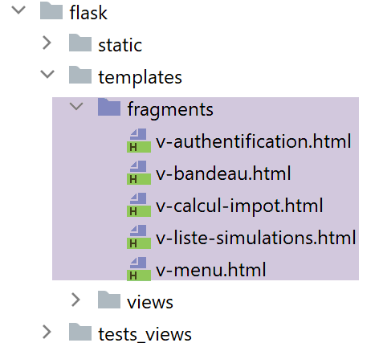
所有包含 URL 的片段均需修改。
片段 [v-authentification]
<!-- 表单 HTML - 使用操作提交其值 [authentifier-utilisateur] -->
<form method="post" action="{{modèle.prefix_url}}/authentifier-utilisateur{{modèle.csrf_token}}">

    <!-- 标题 -->
    <div class="alert alert-primary" role="alert">
        <h4>Veuillez vous authentifier</h4>
    </div>
…

</form>
片段 [v-calcul-impot]
<!-- 已发布的 HTML 表单 -->
<form method="post" action="{{modèle.prefix_url}}/calculer-impot{{modèle.csrf_token}}">
    <!-- 蓝色背景下的12列消息 -->
    …

</form>
片段 [v-liste-simulations]
…

{% if modèle.simulations is defined and modèle.simulations|length!=0 %}
…

<!-- 模拟图表 -->
<table class="table table-sm table-hover table-striped">
    …
    <tr>
        <th scope="row">{{simulation.id}}</th>
        <td>{{simulation.marié}}</td>
        <td>{{simulation.enfants}}</td>
        <td>{{simulation.salaire}}</td>
        <td>{{simulation.impôt}}</td>
        <td>{{simulation.surcôte}}</td>
        <td>{{simulation.décôte}}</td>
        <td>{{simulation.réduction}}</td>
        <td>{{simulation.taux}}</td>
        <td><a href="{{modèle.prefix_url}}/supprimer-simulation/{{simulation.id}}{{modèle.csrf_token}}">Supprimer</a></td>
    </tr>
    {% endfor %}
    </tr>
    </tbody>
</table>
{% endif %}
片段 [v-menu]
<!-- Bootstrap 菜单 -->
<nav class="nav flex-column">
    <!-- 显示链接列表 HTML -->
    {% for optionMenu in modèle.optionsMenu %}
    <a class="nav-link" href="{{modèle.prefix_url}}{{optionMenu.url}}{{modèle.csrf_token}}">{{optionMenu.text}}</a>
    {% endfor %}
</nav>
36.6. 新回复 HTML
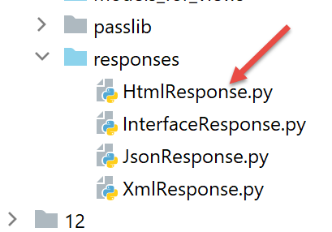
在之前的版本中,响应代码 HTML 以重定向结尾:
class HtmlResponse(InterfaceResponse):

    def build_http_response(self, request: LocalProxy, session: LocalProxy, config: dict, status_code: int,
                            résultat: dict) -> (Response, int):
        # 响应 HTML 取决于控制器返回的状态码
        état = résultat["état"]

        …

        # 现在需要生成重定向 URL,如果需要,别忘了令牌 CSRF
        if config['parameters']['with_csrftoken']:
            csrf_token = f"/{generate_csrf()}"
        else:
            csrf_token = ""

        # 重定向响应
        return redirect(f"{ads['to']}{csrf_token}"), status.HTTP_302_FOUND
该代码现更改为:
def build_http_response(self, request: LocalProxy, session: LocalProxy, config: dict, status_code: int,
                            résultat: dict) -> (Response, int):
        …

        # 现在需要生成重定向的 URL,如果需要,别忘了生成令牌 CSRF
        if config['parameters']['with_csrftoken']:
            csrf_token = f"/{generate_csrf()}"
        else:
            csrf_token = ""

        # 重定向响应
        return redirect(f"{config['parameters']['prefix_url']}{ads['to']}{csrf_token}"), status.HTTP_302_FOUND
36.7. 测试
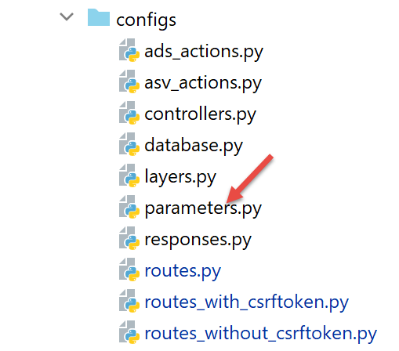
在配置文件中添加以下前缀:[parameters]:
…
        # CSRF令牌
        "with_csrftoken": True,
        # 管理数据库 MySQL (mysql)、PostgreSQL (pgres)
        "databases": ["mysql", "pgres"],
        # 应用程序的 URL 前缀
        # 若不需要前缀,请将字符串设为空;否则,请使用 /préfixe
        "prefix_url": "/do",
…
启动应用程序,然后请求 URL [http://localhost:5000/do],响应如下:
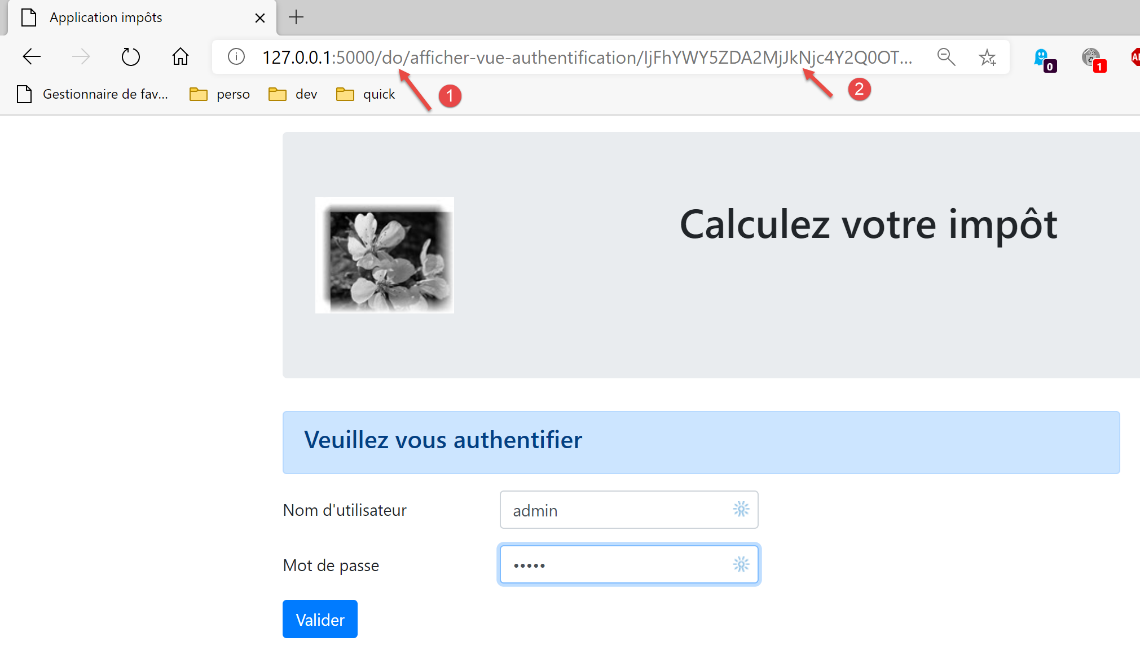
- 在 [1] 中,URL 的前缀;
- 在 [2] 中,令牌为 CSRF;
该应用程序也可通过 [http-clients/09] 的控制台测试进行验证:
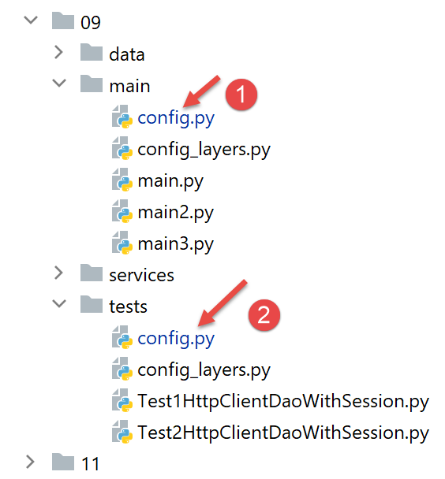
在配置文件 [1] 和 [2] 中,URL 的前缀应包含在服务器的 URL 中:
        "server": {
            # "urlServer": "http://127.0.0.1:5000",
            "urlServer": "http://127.0.0.1:5000/do",
            "user": {
                "login": "admin",
                "password": "admin"
            },
            "url_services": {
                …
            }
- 第 3 行:服务器端的 URL 现已包含 URL 的前缀;
完成此修改后,所有控制台测试均应正常运行。