7. 文本文件
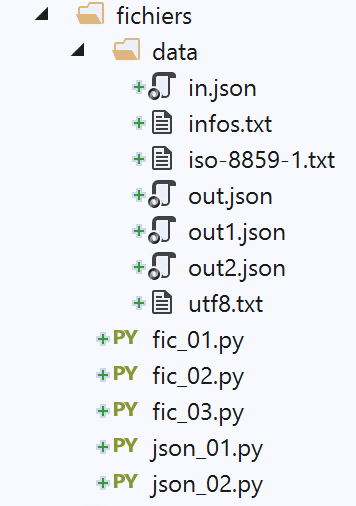
7.1. 脚本 [fic_01]:文本文件的读写
以下脚本展示了一个文本文件处理的示例:
# 导入
import sys


# 创建并顺序读取文本文件
# 该文件由多行组成,每行格式为 login:pwd:uid:gid:infos:dir:shell
# 每行数据以 login => uid:gid:infos:dir:shell 的形式存入字典

# --------------------------------------------------------------------------
def affiche_infos(dico: dict, clé: str):
    # 若字典dico中存在该键,则显示其关联值
    if clé in dico.keys():
        # 显示与该键关联的值
        print(f"{clé} : {dico[clé]}")
    else:
        # 该键不存在于字典 dico 中
        print(f"la clé [{clé}] n'existe pas")


# 主函数 -----------------------------------------------
# 设置文件名
FILE_NAME = "./data/infos.txt"

# 创建并填充文本文件
fic = None
try:
    # 以写入模式打开文件 (w=write)
    fic = open(FILE_NAME, "w")
    # 生成任意内容
    for i in range(1, 101):
        # 一行
        ligne = f"login{i}:pwd{i}:uid{i}:gid{i}:infos{i}:dir{i}:shell{i}"
        # 写入文本文件
        fic.write(f"{ligne}\n")
except IOError as erreur:
    print(f"Erreur d'exploitation du fichier {FILE_NAME} : {erreur}")
    sys.exit()
finally:
    # 如果文件已打开,则关闭文件
    if fic:
        fic.close()

# 以只读模式打开
fic = None
try:
    # 以只读模式打开文件
    fic = open(FILE_NAME, "r")
    # 初始时字典为空
    dico = {}
    # 将每行以 login => uid:gid:infos:dir:shell 的形式存入字典 [dico]
    # 读取第一行,去除行首和行尾的空格
    ligne = fic.readline().strip()
    # 只要该行不为空
    while ligne != '':
        # 将该行放入数组
        infos = ligne.split(":")
        # 提取登录名
        login = infos[0]
        # 忽略密码
        infos[0:2] = []
        # 在字典中创建一条条目
        dico[login] = infos
        # 读取下一行
        ligne = fic.readline().strip()
except IOError as erreur:
    print(f"Erreur d'exploitation du fichier {FILE_NAME} : {erreur}")
    sys.exit()
finally:
    # 若文件已打开,则关闭文件
    if fic:
        fic.close()

# 使用字典
affiche_infos(dico, "login10")
affiche_infos(dico, "X")
注:
- 第 28 行:以写入模式打开文件(w=write)。如果文件已存在,将被覆盖;
- 第 30-34 行:在文本文件中生成 100 行内容;
- 第 34 行:向文本文件写入一行。方法 [write] 不会自动添加换行符。因此,在写入的文本中必须预留换行符;
- 第 35-37 行:处理可能出现的异常;
- 第 37 行:中止脚本执行(但在执行 finally 语句之后);
- 第 38-41 行:无论是否发生错误,若文件处于打开状态,均将其关闭;
- 第 47 行:以读取模式打开文件(r=read);
- 第 49 行:定义一个空字典;
- 第 52 行:方法 [readline] 读取一行文本,包括换行符。 方法 [strip] 会删除字符串首尾的“空格”。这里的“空格”包括空白字符、换行符、分页符、制表符以及其他一些字符。 因此,此处的 [ligne] 不会包含 [\r\n](Windows)或 [\n](Unix)中的换行符;
- 第54行:在未检索到空行之前,持续处理该文件;
- 第 54-64 行:将文本文件导入字典 [dico]。键为字段 [login],值为字段 [uid:gid:infos:dir:shell];
- 第 65-67 行:处理可能出现的异常;
- 第 68-71 行:无论是否发生错误,均关闭文件;
- 第74-75行:使用字典[dico];
文件 [data/infos.txt]:
屏幕输出结果:
C:\Data\st-2020\dev\python\cours-2020\python3-flask-2020\venv\Scripts\python.exe C:/Data/st-2020/dev/python/cours-2020/python3-flask-2020/fichiers/fic_01.py
login10 : ['uid10', 'gid10', 'infos10', 'dir10', 'shell10']
la clé [X] n'existe pas

Process finished with exit code 0
7.2. 脚本 [fic_02]:处理采用 UTF-8 编码的文本文件
在本文后续部分,我们将仅处理采用 UTF-8 编码的文本文件。首先,我们将配置 PyCharm:
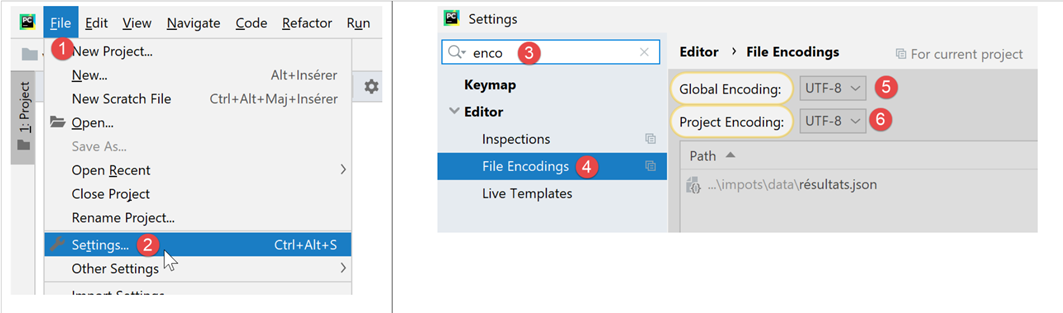
- 在 [5-6] 中:为项目文件选择 UTF-8 编码;
要创建一个采用 UTF-8 编码的文件,可按以下步骤操作(fic-02):
# 导入
import codecs

# 将 UTF-8 数据写入文本文件
# 不处理异常
file=codecs.open("./data/utf8.txt","w","utf8")
file.write("Hélène est partie à Bâle pendant l'été chez sa grand-mère")
file.close()
注释
- 第 2 行:为管理文件编码,导入模块 [codecs];
- 第 6 行:方法 [codecs.open] 的使用方式与经典函数 [open] 相同。 不过,可以指定所需的编码(创建)或现有编码(读取)。打开后,第6行获得的[file]对象可像普通文件一样使用;
- 第7行:文中使用了带重音的字符,这些字符根据所用的字符编码不同,通常会呈现不同的显示效果;
结果
打开生成的文件 [data/utf8.txt](参见第 6 行)后,将得到以下结果:

7.3. 脚本 [fic_03]:管理采用 ISO-8859-1 编码的文本文件
脚本 [fic_03] 与脚本 [fic_02] 功能相同,但会将文本文件编码为 ISO-8859-1。下面展示生成的文件之间的差异:
# 导入
import codecs

# 将 ISO-8859-1 编码写入文本文件
# 未处理异常
file=codecs.open("./data/iso-8859-1.txt","w","iso-8859-1")
file.write("Hélène est partie à Bâle pendant l'été chez sa grand-mère")
file.close()
打开第 6 行生成的 [data/iso-8859-1] 文件,将得到以下结果:

由于我们已将项目配置为处理 UTF-8 格式的文件,因此 PyCharm 尝试将 [iso-8859-1.txt] 文件转换为 UTF-8。 它能够识别出 [1] 文件并非 UTF-8。因此,它建议使用 [2] 以另一种编码重新加载该文件:

- 为 [3-5]:使用 ISO-8859-1 编码重新加载文件;

- 转换为 [6],这是同一文件但采用不同编码显示;
如果返回项目设置:
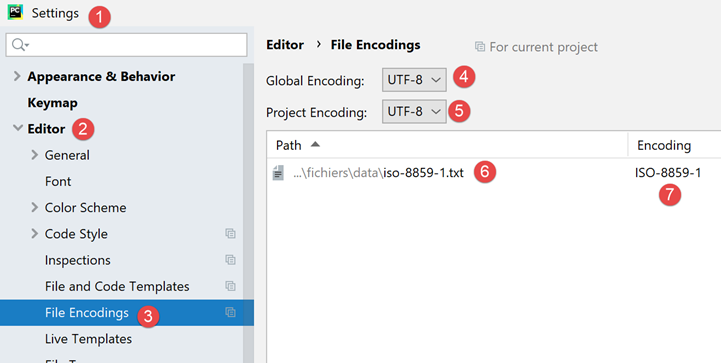
- 可以看到,在 [6-7] 中,Pycharm 记录了文件 [iso-8859-1.txt] 应使用 ISO-8859-1 编码打开。因此,这是对 [5] 规则的一个例外;
7.4. 脚本 [json_01]:管理文件 jSON
JSON 表示 JavaScript 对象表示法。顾名思义,这是 JavaScript 语言中对象的文本表示模式。在此我们将它用于 Python 对象。
由 [data/in.json] 处理的 jSON 文件内容如下:
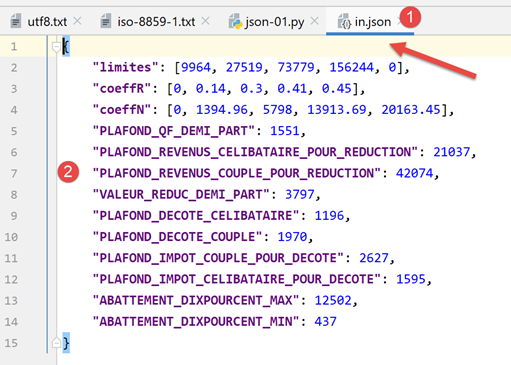
- 在 [2] 中,我们可以看到文件 [in.json] 的文本内容可能表示一个 Python 字典。PyCharm 已对该文本进行了格式化(Ctrl-Alt-L),但即使该文本仅占一行,也不会改变其含义。 只要文本在语法上代表一个 Python 对象,其格式便无关紧要;
脚本 [json-01] 演示了如何利用该文件:
# 导入
import codecs
import json
import sys

# 读写文件 jSON
inFile=None
outFile=None
try:
    # 以只读方式打开文件 jSON
    inFile = codecs.open("./data/in.json", "r", "utf8")
    # 将内容传输到字典中
    data = json.load(inFile)
    # 显示读取的数据
    print(f"data={data}, type(data)={type(data)}")
    limites = data['limites']
    print(f"limites={limites}, type(limites)={type(limites)}")
    print(f"limites[1]={limites[1]}, type(limites[1])={type(limites[1])}")
    # 将词典 [data] 导出为 JSON 文件
    outFile = codecs.open("./data/out.json", "w", "utf8")
    json.dump(data, outFile)
except BaseException as erreur:
    # 显示错误并退出
    print(f"L'erreur suivante s'est produite : {erreur}")
    sys.exit()
finally:
    # 若文件处于打开状态则关闭
    if inFile:
        inFile.close()
    if outFile:
        outFile.close()
注释
- 第 3 行:为了处理 JSON,我们导入 [json] 模块;
- 第 11 行:我们将处理以 UTF-8 编码的 jSON 文件。此处使用 [codecs] 模块打开 [data/in.json] 文件;
- 第13行:[json.load]方法读取jSON文件的内容,并将其存入变量[data]中。该变量的类型在此处为字典;
- 第15-18行:为验证确实获得了Python字典,我们输出其中部分元素;
- 第 20-21 行:执行反向操作:利用 [json.dump] 方法,将字典 [data] 写入名为 UTF-8 的文件中;
- 第22-25行:处理可能出现的异常;
- 第26-31行:无论是否发生错误,都关闭可能已打开的文件;
结果
C:\Data\st-2020\dev\python\cours-2020\python3-flask-2020\venv\Scripts\python.exe C:/Data/st-2020/dev/python/cours-2020/python3-flask-2020/fichiers/json_01.py
data={'limites': [9964, 27519, 73779, 156244, 0], 'coeffR': [0, 0.14, 0.3, 0.41, 0.45], 'coeffN': [0, 1394.96, 5798, 13913.69, 20163.45], 'PLAFOND_QF_DEMI_PART': 1551, 'PLAFOND_REVENUS_CELIBATAIRE_POUR_REDUCTION': 21037, 'PLAFOND_REVENUS_COUPLE_POUR_REDUCTION': 42074, 'VALEUR_REDUC_DEMI_PART': 3797, 'PLAFOND_DECOTE_CELIBATAIRE': 1196, 'PLAFOND_DECOTE_COUPLE': 1970, 'PLAFOND_IMPOT_COUPLE_POUR_DECOTE': 2627, 'PLAFOND_IMPOT_CELIBATAIRE_POUR_DECOTE': 1595, 'ABATTEMENT_DIXPOURCENT_MAX': 12502, 'ABATTEMENT_DIXPOURCENT_MIN': 437}, type(data)=<class 'dict'>
limites=[9964, 27519, 73779, 156244, 0], type(limites)=<class 'list'>
limites[1]=27519, type(limites[1])=<class 'int'>

Process finished with exit code 0
- 第2-4行表明已正确提取了jSON文件中的词典;
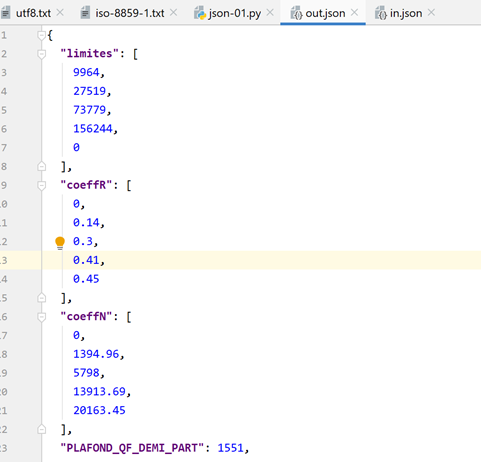
现在,让我们查看文件 [data/out.json] 的内容:

该文件中的文本仅占一行。不过,PyCharm 能够识别 jSON 文件,并且可以通过 Ctrl-Alt-L 对其进行格式化,就像处理 Python 文件及其他文件一样。这样我们便得到了以下内容:
7.5. 脚本 [json_02]:管理以 UTF-8 编码的 jSON 文件
一个编码为 UTF-8 的 jSON 文件可能有两种形式:
# 导入
import codecs
import json
import sys

# 字典
data = {'marié': 'oui', 'impôt': 1340}

# 写入文件 jSON
out_file1 = None
out_file2 = None
try:
    # 将词典 [data] 导出到 json 文件
    out_file1 = codecs.open("./data/out1.json", "w", "utf8")
    json.dump(data, out_file1, ensure_ascii=True)
    # 将词典 [data] 导出到 json 文件
    out_file2 = codecs.open("./data/out2.json", "w", "utf8")
    json.dump(data, out_file2, ensure_ascii=False)
except BaseException as erreur:
    # 显示错误并退出
    print(f"L'erreur suivante s'est produite : {erreur}")
    sys.exit()
finally:
    # 若文件处于打开状态则关闭
    if out_file1:
        out_file1.close()
    if out_file2:
        out_file2.close()
…
- 在此脚本中,将字典文件 [data](第 7 行)写入两个文件 jSON(第 14、17 行);
- 第14、17行:在这两种情况下,都会创建一个名为UTF-8的文本文件;
- 第 15 行:在写入词典时,使用名为 [ensure_ascii=True] 的参数;
- 第18行:在写入词典时,使用名为[ensure_ascii=False]的参数;
以下是生成的两个文件:
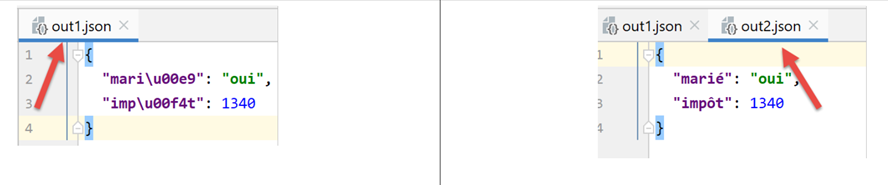
- 在文件 [out1.json] 中,带重音的字符已被替换为一系列代表其代码的字符 UTF-8。有时称其为“转义”。 从技术角度看,在 [out1.json] 的二进制文件中,[marié] 中的字符 é 被 UTF-8 中的 6 个字符的二进制代码 [\u00e9] 依次替换;
- 而在文件 [out2.json] 中,带重音的字符则保持原样。这意味着在 [out2.json] 的二进制文件中,这些字符由其二进制代码 UTF-8 表示 (因此 out1 处仅有一个代码 UTF-8,而非 6 个)。对于 [marié] 中的字符 é,其二进制代码为 4 个字节长的 [00e9];
- 由方法 [json.dump] 的参数 [ensure_ascii] 的值决定所使用的格式;
某些应用程序会对其 jSON 文件使用“转义”后的 UTF-8。此时应使用 [ensure_ascii=True] 值。该值实际上是默认值。 因此,如果不使用 [ensure_ascii] 参数,则将处理经过转义的 jSON 和 UTF-8 文件。
脚本后续内容如下:
# 导入
import codecs
import json
import sys

# 字典
data = {'marié': 'oui', 'impôt': 1340}

…

# 重新读取文件 jSON
in_file1 = None
in_file2 = None
try:
    # 将文件 jSON 1 导入词典
    in_file1 = codecs.open("./data/out1.json", "r", "utf8")
    dico1 = json.load(in_file1)
    # 显示
    print(f"dico1={dico1}")
    # 将文件 jSON 2 导入词典
    in_file2 = codecs.open("./data/out2.json", "r", "utf8")
    dico2 = json.load(in_file2)
    # 显示
    print(f"dico2={dico2}")
except BaseException as erreur:
    # 显示错误并退出
    print(f"L'erreur suivante s'est produite : {erreur}")
    sys.exit()
finally:
    # 若文件处于打开状态则关闭
    if in_file1:
        in_file1.close()
    if in_file2:
        in_file2.close()
注释
- 第 11-34 行:重新读取两个 [out1.json, out2.json] 文件,并分别显示读取后的词典;
结果
令人惊讶的是,我们发现无需向函数 [json.load](第 17、22 行)指定待读取字符串 jSON 的编码类型(是否经过转义)。 在两种情况下,我们都能获取到正确的字典。