18. 编写数据库管理系统无关的代码
我们之前看到,在某些情况下,可以轻松地将为 MySQL 数据库管理系统编写的 Python 代码迁移到为 PostgreSQL 数据库管理系统编写的代码。在本章中,我们将展示如何将这种方法系统化。建议的架构如下:
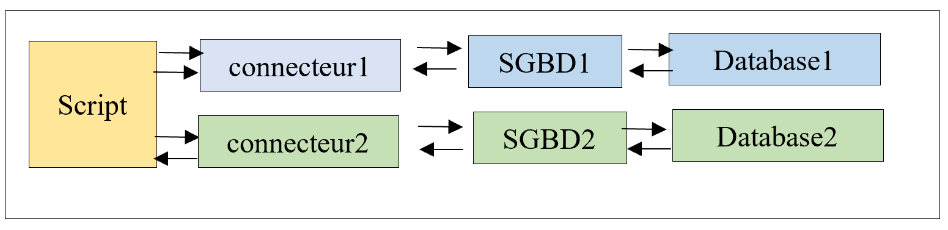
我们希望通过配置来选择连接器(从而选择 DBMS),而无需重写脚本。请注意,这仅在脚本未使用专有 DBMS 扩展的情况下才可行。
脚本的目录结构如下:
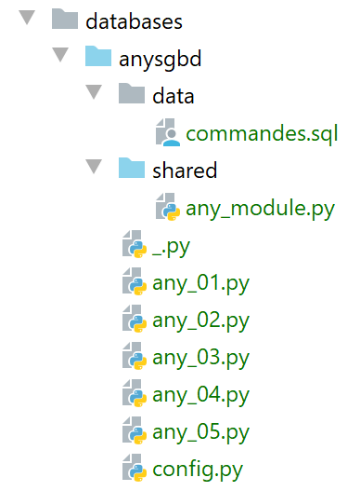
[any_xx] 脚本基于之前针对 MySQL 和 PostgreSQL 数据库管理系统介绍过的脚本。我们不会逐一详述,而是重点讲解其中最复杂的 [any_04] 脚本。请注意,该脚本执行来自 [data/commandes.sql] 文件中的 SQL 命令:
# suppression de la table [personnes]
drop table if exists personnes
# création de la table personnes
create table personnes (id int primary key, prenom varchar(30) not null, nom varchar(30) not null, age integer not null, unique (nom,prenom))
# insertion de deux personnes
insert into personnes(id, prenom, nom, age) values(1, 'Paul','Langevin',48)
insert into personnes(id, prenom, nom, age) values (2, 'Sylvie','Lefur',70)
# affichage de la table
select prenom, nom, age from personnes
# erreur volontaire
xx
# insertion de trois personnes
insert into personnes(id, prenom, nom, age) values (3, 'Pierre','Nicazou',35)
insert into personnes(id, prenom, nom, age) values (4, 'Geraldine','Colou',26)
insert into personnes(id, prenom, nom, age) values (5, 'Paulette','Girond',56)
# affichage de la table
select prenom, nom, age from personnes
# liste des personnes par ordre alphabétique des noms et à nom égal par ordre alphabétique des prénoms
select nom,prenom from personnes order by nom asc, prenom desc
# liste des personnes ayant un âge dans l'intervalle [20,40] par ordre décroissant de l'âge
# puis à âge égal par ordre alphabétique des noms et à nom égal par ordre alphabétique des prénoms
select nom,prenom,age from personnes where age between 20 and 40 order by age desc, nom asc, prenom asc
# insertion de mme Bruneau
insert into personnes(id, prenom, nom, age) values(6, 'Josette','Bruneau',46)
# mise à jour de son âge
update personnes set age=47 where nom='Bruneau'
# liste des personnes ayant Bruneau pour nom
select nom,prenom,age from personnes where nom='Bruneau'
# suppression de Mme Bruneau
delete from personnes where nom='Bruneau'
# liste des personnes ayant Bruneau pour nom
select nom,prenom,age from personnes where nom='Bruneau'
我们修改了第 2 行,以便当 [people] 表不存在时,该命令在 MySQL 和 PostgreSQL 数据库管理系统中表现一致。
[any_04]脚本由以下[config.py]脚本进行配置:
新更改位于第 18–43 行:
- 第 20 行:[sgbds] 是一个包含两个键的字典:第 21 行的 [mysql] 和第 32 行的 [postgresql];
- 与这些键关联的值是一个字典,其中包含连接数据库管理系统(DBMS)所需的元素:
- 第 21–32 行:连接 MySQL 数据库管理系统所需的元素;
- 第 23 行:要使用的 Python 连接器;
- 第 25 行:包含共享函数的模块;
- 第 26–30 行:连接凭据;
- 第 32–41 行:用于连接 PostgreSQL 数据库管理系统(DBMS)的相同参数;
执行 SQL 命令文件 [data/commandes.sql] 的脚本 [any_04] 如下:
注释
- 第 1-4 行:获取应用程序配置 [config];
- 第 10-21 行:脚本通过两个参数 [db_name with_transaction] 调用:
- [db_name]:要使用的数据库管理系统名称;
- [with_transaction]:若需在事务内执行 SQL 脚本则设为 True,否则设为 False;
- 第 10–25 行:获取并验证参数;
- 第 28 行:配置所选的数据库管理系统;
- 第 30 行:导入所选 DBMS 的连接器。为此使用了 [importlib] 库(第 7 行),该库允许导入一个名称存储在变量中的模块。[importlib.import_module] 操作的结果是一个模块。因此,在第 30 行之后,后续流程就如同执行了以下语句一样:
这使得我们可以在第 52 行编写 [sgbd_connector.connect],其中我们使用了 [sgbd_connector] 模块的 [connect] 函数。这里需要记住的是,[sgbd_connector] 可以是 [mysql.connector] 也可以是 [psycopg2]。这两个模块都包含 [connect] 函数。 同样地,在第 60 行,我们可以写 [sgbd_connector.InterfaceError, sgbd_connector.DatabaseError]。
- 第 32 行:我们导入包含脚本所用函数的模块;
- 第 58 行:调用来自包含脚本所用函数的模块中的 [execute_file_of_commands] 函数。与之前的版本相比,该函数的签名多了一个参数——即第一个参数。我们将 Python 连接器 [sgbd_connector] 传递给该函数供其使用;
- 除上述几点外,[any_04]脚本与之前版本保持一致;
[any_module] 函数库如下:
第 31 行使用了 [sgbd_connector] 参数来指定拦截的异常类型。
使用参数 [mysql false] 运行 [any_04] 脚本将产生以下结果:
C:\Data\st-2020\dev\python\cours-2020\python3-flask-2020\venv\Scripts\python.exe C:/Data/st-2020/dev/python/cours-2020/python3-flask-2020/databases/anysgbd/any_04.py mysql false
--------------------------------------------------------------------
Exécution du fichier SQL C:\Data\st-2020\dev\python\cours-2020\python3-flask-2020\databases\anysgbd/data/commandes.sql sans transaction
--------------------------------------------------------------------
[drop table if exists personnes] : Exécution réussie
nombre de lignes modifiées : 0
[create table personnes (id int primary key, prenom varchar(30) not null, nom varchar(30) not null, age integer not null, unique (nom,prenom))] : Exécution réussie
nombre de lignes modifiées : 0
[insert into personnes(id, prenom, nom, age) values(1, 'Paul','Langevin',48)] : Exécution réussie
nombre de lignes modifiées : 1
[insert into personnes(id, prenom, nom, age) values (2, 'Sylvie','Lefur',70)] : Exécution réussie
nombre de lignes modifiées : 1
[select prenom, nom, age from personnes] : Exécution réussie
prenom, nom, age,
*****************
('Paul', 'Langevin', 48)
('Sylvie', 'Lefur', 70)
*****************
xx : Erreur (1064 (42000): You have an error in your SQL syntax; check the manual that corresponds to your MySQL server version for the right syntax to use near 'xx' at line 1)
[insert into personnes(id, prenom, nom, age) values (3, 'Pierre','Nicazou',35)] : Exécution réussie
nombre de lignes modifiées : 1
[insert into personnes(id, prenom, nom, age) values (4, 'Geraldine','Colou',26)] : Exécution réussie
nombre de lignes modifiées : 1
[insert into personnes(id, prenom, nom, age) values (5, 'Paulette','Girond',56)] : Exécution réussie
nombre de lignes modifiées : 1
[select prenom, nom, age from personnes] : Exécution réussie
prenom, nom, age,
*****************
('Paul', 'Langevin', 48)
('Sylvie', 'Lefur', 70)
('Pierre', 'Nicazou', 35)
('Geraldine', 'Colou', 26)
('Paulette', 'Girond', 56)
*****************
[select nom,prenom from personnes order by nom asc, prenom desc] : Exécution réussie
nom, prenom,
************
('Colou', 'Geraldine')
('Girond', 'Paulette')
('Langevin', 'Paul')
('Lefur', 'Sylvie')
('Nicazou', 'Pierre')
************
[select nom,prenom,age from personnes where age between 20 and 40 order by age desc, nom asc, prenom asc] : Exécution réussie
nom, prenom, age,
*****************
('Nicazou', 'Pierre', 35)
('Colou', 'Geraldine', 26)
*****************
[insert into personnes(id, prenom, nom, age) values(6, 'Josette','Bruneau',46)] : Exécution réussie
nombre de lignes modifiées : 1
[update personnes set age=47 where nom='Bruneau'] : Exécution réussie
nombre de lignes modifiées : 1
[select nom,prenom,age from personnes where nom='Bruneau'] : Exécution réussie
nom, prenom, age,
*****************
('Bruneau', 'Josette', 47)
*****************
[delete from personnes where nom='Bruneau'] : Exécution réussie
nombre de lignes modifiées : 1
[select nom,prenom,age from personnes where nom='Bruneau'] : Exécution réussie
nom, prenom, age,
*****************
*****************
--------------------------------------------------------------------
Exécution terminée
--------------------------------------------------------------------
Il y a eu 1 erreur(s)
xx : Erreur (1064 (42000): You have an error in your SQL syntax; check the manual that corresponds to your MySQL server version for the right syntax to use near 'xx' at line 1)

Process finished with exit code 0