14. [TD]: Web exposure of the [business] layer
Keywords: multi-tier architecture, Spring, dependency injection, web service / JSON, client / server.
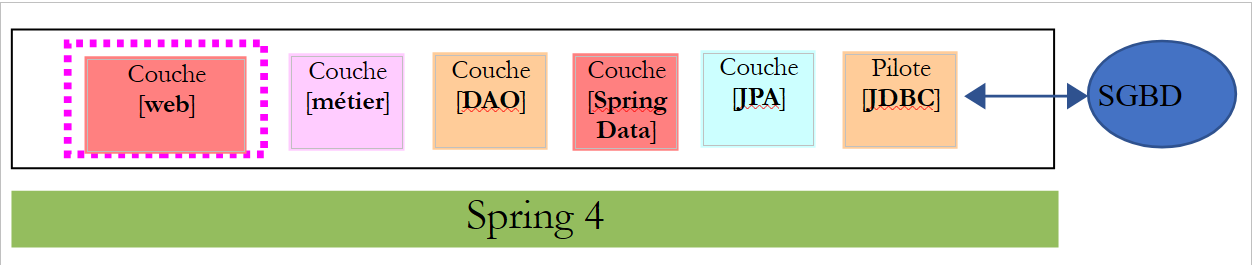
Let’s return to the current architecture of the TD application:
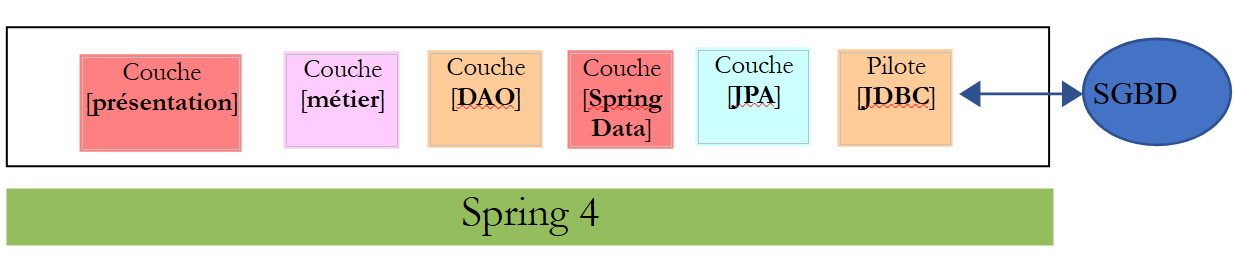 |
We will evolve this architecture into the following:
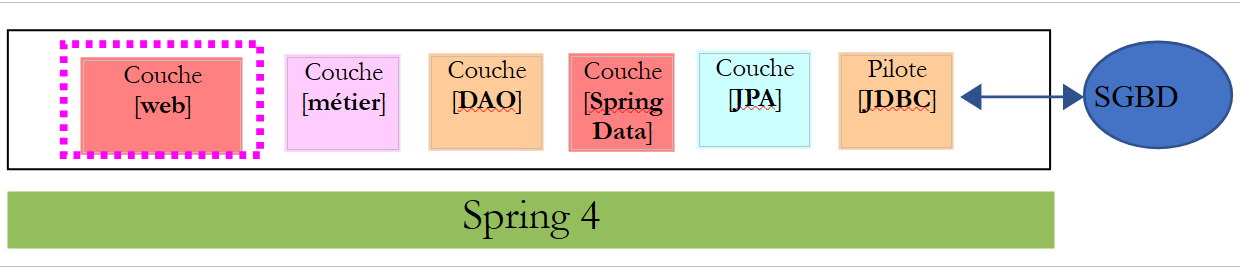 |
in order to expose the [IMetier] interface of the business layer on the web. To do this, we will follow the methodology described in section 13.5.
14.1. Support
 |
The projects for this chapter can be found in the [support / chap-14] folder.
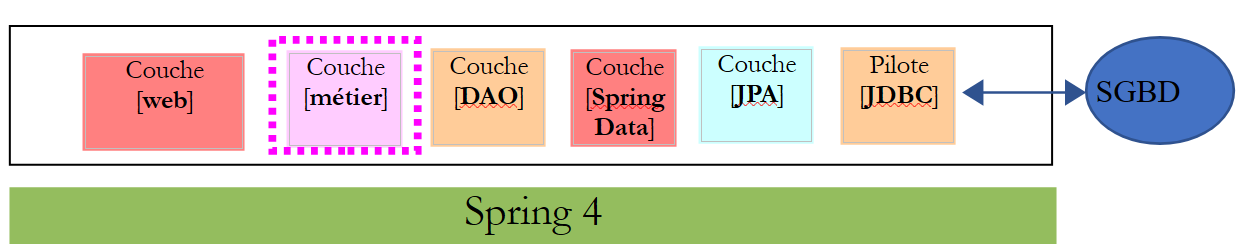
14.2. The Eclipse project for the [business] layer
 |
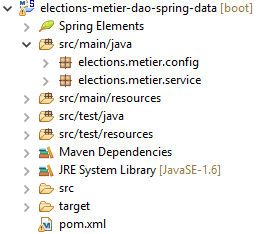 |
14.2.1. Maven Configuration
The [business] layer project is a Maven project configured by the following [pom.xml] file:
<?xml version="1.0" encoding="UTF-8"?>
<project xmlns="http://maven.apache.org/POM/4.0.0"
    xsi:schemaLocation="http://maven.apache.org/POM/4.0.0 http://maven.apache.org/maven-v4_0_0.xsd"
    xmlns:xsi="http://www.w3.org/2001/XMLSchema-instance">
    <modelVersion>4.0.0</modelVersion>
    <groupId>istia.st.elections</groupId>
    <artifactId>elections-metier-dao-spring-data</artifactId>
    <version>0.1.0</version>

    <!-- dependencies -->
    <parent>
        <groupId>org.springframework.boot</groupId>
        <artifactId>spring-boot-starter-parent</artifactId>
        <version>1.2.7.RELEASE</version>
    </parent>
    <dependencies>
        <!-- layer [DAO] -->
        <dependency>
            <groupId>istia.st.elections</groupId>
            <artifactId>elections-dao-spring-data-01</artifactId>
            <version>0.0.1-SNAPSHOT</version>
        </dependency>
        <!-- Spring Boot -->
        <dependency>
            <groupId>org.springframework.boot</groupId>
            <artifactId>spring-boot</artifactId>
            <scope>test</scope>
        </dependency>
        <!-- Spring Boot Test -->
        <dependency>
            <groupId>org.springframework.boot</groupId>
            <artifactId>spring-boot-starter-test</artifactId>
            <scope>test</scope>
        </dependency>
    </dependencies>

    <properties>
        <!-- use UTF-8 for everything -->
        <project.build.sourceEncoding>UTF-8</project.build.sourceEncoding>
        <java.version>1.8</java.version>
    </properties>

    <build>
        <plugins>
            <plugin>
                <groupId>org.apache.maven.plugins</groupId>
                <artifactId>maven-surefire-plugin</artifactId>
                <version>2.18.1</version>
            </plugin>
        </plugins>
    </build>
</project>
- lines 18–22: the dependency on the [DAO] layer built in paragraph 12;
- lines 23–34: the dependencies required for testing;
14.2.2. Spring Configuration
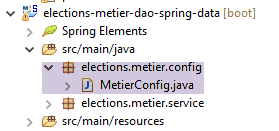 |
The [business] layer project is a Spring project configured by the following [MetierConfig] file:
package elections.metier.config;

import org.springframework.context.annotation.ComponentScan;
import org.springframework.context.annotation.Import;

import elections.dao.config.DaoConfig;

@Import({ DaoConfig.class })
@ComponentScan({ "elections.metier.service" })
public class MetierConfig {
}
- We do not use the [@Configuration] annotation here, which would make the class a Spring configuration class. The presence of the [@Import] and [@ComponentScan] annotations automatically makes it a configuration class;
- Line 8: We import the configuration file from the [DAO] layer. We then have access to all the beans defined by this file;
- Line 9: Other Spring beans are to be found in the [elections.metier.service] folder;
14.2.3. Implementation of the [business] layer
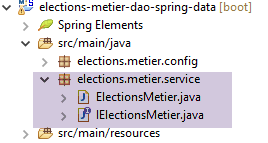 |
The implementation of the [business] layer is the one defined in Section 8.5.
14.2.4. Testing the [business] layer
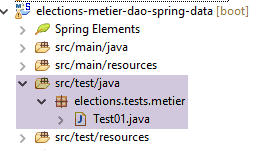 |
The test class is the one described in Section 8.6.
Task: Implement the [business] layer project and pass its unit test. Generate the layer archive in the local Maven repository (Run As / Maven / Install).
14.3. The Eclipse project for the [web] layer
 |
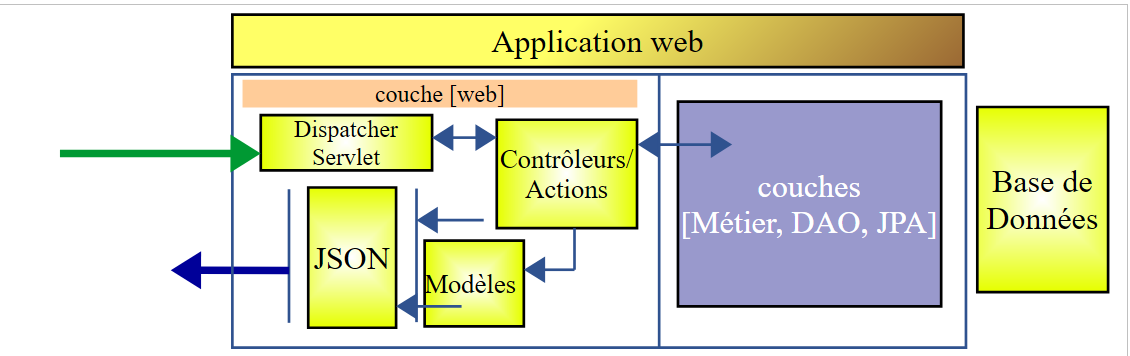
The web layer is a Spring MVC layer:
 |
The Eclipse project has the following structure:
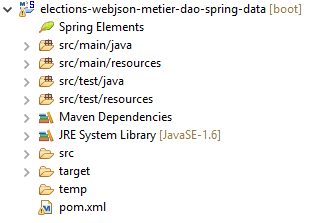 | 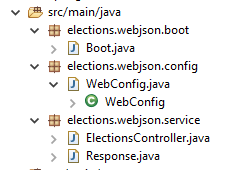 |
- [Boot.java] is the class that launches the web service;
- [WebConfig.java] is the web service configuration class;
- [Response.java] is the response generated by the various URLs of the web service;
- [ElectionsController] is the web service implementation class;
14.4. Maven Configuration
The project is a Maven project configured by the following [pom.xml] file:
<project xmlns="http://maven.apache.org/POM/4.0.0" xmlns:xsi="http://www.w3.org/2001/XMLSchema-instance"
    xsi:schemaLocation="http://maven.apache.org/POM/4.0.0 http://maven.apache.org/xsd/maven-4.0.0.xsd">
    <modelVersion>4.0.0</modelVersion>
    <groupId>istia.st.elections</groupId>
    <artifactId>elections-webjson-metier-dao-spring-data</artifactId>
    <version>0.0.1-SNAPSHOT</version>

    <name>elections-webjson-metier-dao-spring-data</name>
    <description>couche métier exposée comme un service web / jSON</description>

    <parent>
        <groupId>org.springframework.boot</groupId>
        <artifactId>spring-boot-starter-parent</artifactId>
        <version>1.2.7.RELEASE</version>
    </parent>

    <dependencies>
        <!-- business layer -->
        <dependency>
            <groupId>istia.st.elections</groupId>
            <artifactId>elections-metier-dao-spring-data</artifactId>
            <version>0.1.0</version>
        </dependency>
        <!-- layer MVC -->
        <dependency>
            <groupId>org.springframework.boot</groupId>
            <artifactId>spring-boot-starter-web</artifactId>
        </dependency>
    </dependencies>

    <properties>
        <project.build.sourceEncoding>UTF-8</project.build.sourceEncoding>
        <java.version>1.8</java.version>
    </properties>

    <build>
        <plugins>
            <plugin>
                <groupId>org.apache.maven.plugins</groupId>
                <artifactId>maven-surefire-plugin</artifactId>
                <version>2.18.1</version>
            </plugin>
        </plugins>
    </build>

</project>
- lines 19–23: the dependency on the [business] layer archive. This is the one we created in paragraph 14;
- lines 25–28: the dependency for a Spring MVC application;
14.5. Spring Configuration
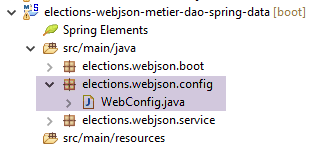 |
The [WebConfig] class configures the web service:
package elections.webjson.config;

import org.springframework.beans.factory.annotation.Autowired;
import org.springframework.beans.factory.config.ConfigurableBeanFactory;
import org.springframework.boot.context.embedded.EmbeddedServletContainerFactory;
import org.springframework.boot.context.embedded.ServletRegistrationBean;
import org.springframework.boot.context.embedded.tomcat.TomcatEmbeddedServletContainerFactory;
import org.springframework.context.ApplicationContext;
import org.springframework.context.annotation.Bean;
import org.springframework.context.annotation.ComponentScan;
import org.springframework.context.annotation.Import;
import org.springframework.context.annotation.Scope;
import org.springframework.web.context.WebApplicationContext;
import org.springframework.web.servlet.DispatcherServlet;
import org.springframework.web.servlet.config.annotation.EnableWebMvc;

import com.fasterxml.jackson.databind.ObjectMapper;

import elections.metier.config.MetierConfig;

@EnableWebMvc
@Import({ MetierConfig.class })
@ComponentScan({ "elections.webjson.service" })
public class WebConfig {
    // -------------------------------- layer configuration [web]
    @Autowired
    private ApplicationContext context;

    @Bean
    public DispatcherServlet dispatcherServlet() {
        DispatcherServlet servlet = new DispatcherServlet((WebApplicationContext) context);
        return servlet;
    }

    @Bean
    public ServletRegistrationBean servletRegistrationBean(DispatcherServlet dispatcherServlet) {
        return new ServletRegistrationBean(dispatcherServlet, "/*");
    }

    @Bean
    public EmbeddedServletContainerFactory embeddedServletContainerFactory() {
        return new TomcatEmbeddedServletContainerFactory("", 8080);
    }
    // mapper jSON
    @Bean
    @Scope(value = ConfigurableBeanFactory.SCOPE_PROTOTYPE)
    public ObjectMapper jsonMapper() {
        return new ObjectMapper();
    }

}
- The meaning of this configuration was explained in Section 13.5.3.1. We will only explain the new features:
- line 22: we import the configuration file from the [business] layer to make use of all its beans;
- line 23: we specify that other beans will be found in the [elections.webjson.server.service] folder;
14.6. The web service launch class
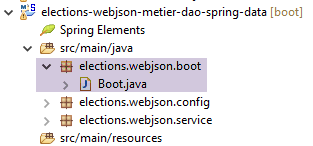 |
The [Boot] class launches the web service as follows:
package elections.webjson.boot;

import org.springframework.boot.SpringApplication;

import elections.webjson.config.WebConfig;

public class Boot {

    public static void main(String[] args) {
        SpringApplication.run(WebConfig.class, args);
    }
}
- Line 10: The static method [SpringApplication.run] will use the configuration file [WebConfig]. Because of the [@EnableAutoConfiguration] annotation, Spring Boot will start the Tomcat server and deploy the web service on it;
14.7. The response from the web service URLs
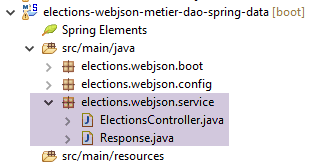 |
All URLs of the web service / JSON send the same type of response:
package elections.webjson.service;

import java.util.List;

public class Response<T> {

    // ----------------- properties
    // operation status
    private int status;
    // any error messages
    private List<String> messages;
    // the body of the reply
    private T body;

    // manufacturers
    public Response() {

    }

    public Response(int status, List<String> messages, T body) {
        this.status = status;
        this.messages = messages;
        this.body = body;
    }

    // getters and setters
...
}
This class was introduced and discussed in Section 13.5.5.3.
14.8. Implementation of the web service / JSON
|
The /jSON web service is implemented by the following [ElectionsController] class:
package elections.webjson.service;

import java.util.ArrayList;
import java.util.List;

import javax.servlet.http.HttpServletRequest;

import org.springframework.beans.factory.annotation.Autowired;
import org.springframework.stereotype.Controller;
import org.springframework.web.bind.annotation.RequestMapping;
import org.springframework.web.bind.annotation.RequestMethod;
import org.springframework.web.bind.annotation.ResponseBody;

import com.fasterxml.jackson.core.JsonProcessingException;
import com.fasterxml.jackson.databind.ObjectMapper;

import elections.dao.entities.ElectionsConfig;
import elections.dao.entities.ElectionsException;
import elections.metier.service.IElectionsMetier;

@Controller
public class ElectionsController {

    // spring dependencies
    @Autowired
    private ObjectMapper jsonMapper;

    @Autowired
    private IElectionsMetier metier;

    @RequestMapping(value = "/getElectionsConfig", method = RequestMethod.GET, produces = "application/json; charset=UTF-8")
    @ResponseBody
    public String getElectionsConfig() throws JsonProcessingException {
        // answer
        Response<ElectionsConfig> response;
        try {
            response = new Response<>(0, null,
                    new ElectionsConfig(metier.getNbSiegesAPourvoir(), metier.getSeuilElectoral()));
        } catch (ElectionsException e1) {
            response = new Response<>(e1.getCode(), e1.getErreurs(), null);
        } catch (RuntimeException e2) {
            response = new Response<>(1000, getErreursForException(e2), null);
        }
        // answer
        return jsonMapper.writeValueAsString(response);
    }

    @RequestMapping(value = "/getListesElectorales", method = RequestMethod.GET, produces = "application/json; charset=UTF-8")
    @ResponseBody
    public String getListesElectorales() throws JsonProcessingException {
        throw new UnsupportedOperationException("Not supported yet");
    }

    @RequestMapping(value = "/setListesElectorales", method = RequestMethod.POST, consumes = "application/json; charset=UTF-8", produces = "application/json; charset=UTF-8")
    @ResponseBody
    public String setListesElectorales(HttpServletRequest request) throws JsonProcessingException {
        throw new UnsupportedOperationException("Not supported yet");
    }

    @RequestMapping(value = "/calculerSieges", method = RequestMethod.POST, consumes = "application/json; charset=UTF-8", produces = "application/json; charset=UTF-8")
    @ResponseBody
    public String calculerSieges(HttpServletRequest request) throws JsonProcessingException {
        throw new UnsupportedOperationException("Not supported yet");
    }

    // private methods -----------------------------
    // list of RuntimeException error messages
    private List<String> getErreursForException(Exception e) {
        // retrieve the list of exception error messages
        Throwable cause = e;
        List<String> erreurs = new ArrayList<>();
        while (cause != null) {
            // the message is retrieved only if it is !=null and not blank
            String message = cause.getMessage();
            if (message != null) {
                message = message.trim();
                if (message.length() != 0) {
                    erreurs.add(message);
                }
            }
            // next cause
            cause = cause.getCause();
        }
        return erreurs;
    }

}
Task: Following the steps in Section 13.5.5, complete the code for the [ElectionsController] class.
Notes:
- There are no JSON filters here because the [CONF] and [LISTES] tables are not linked by a foreign key relationship, which significantly simplifies the web service code;
- Do not forget the various necessary Spring annotations;
- The URLs will be named after the associated methods;
- The [setListeElectorales] method is called with a [POST] operation. The posted value is the array of competing lists (of type ListeElectorale[]) with their attributes [seats, votes, eliminated], which must be saved to the database. This method returns a [Response<Void>] with a [status=0] field if there were no errors, otherwise something else;
- The [calculateSeats] method is called with a [POST] operation. The posted value is the array of competing lists (of type ElectoralList[]) with their attributes [name, votes]. This method returns a [Response<ElectoralList[]>] with, as its body, the electoral lists with their [seats, eliminated] fields initialized;
14.9. Tests
After launching the web service, perform the following tests to ensure the web service is functioning properly using the [Advanced Rest Client] utility:
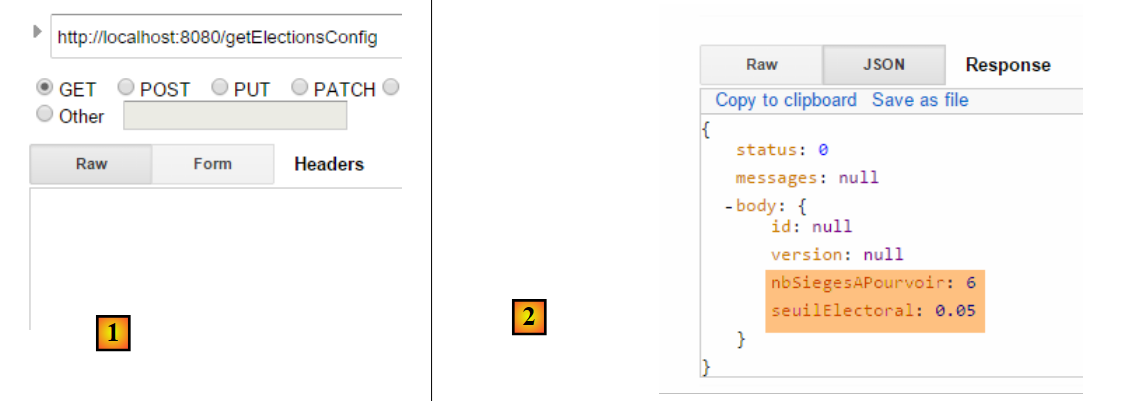 |
The JSON response to the previous request is as follows [1]:
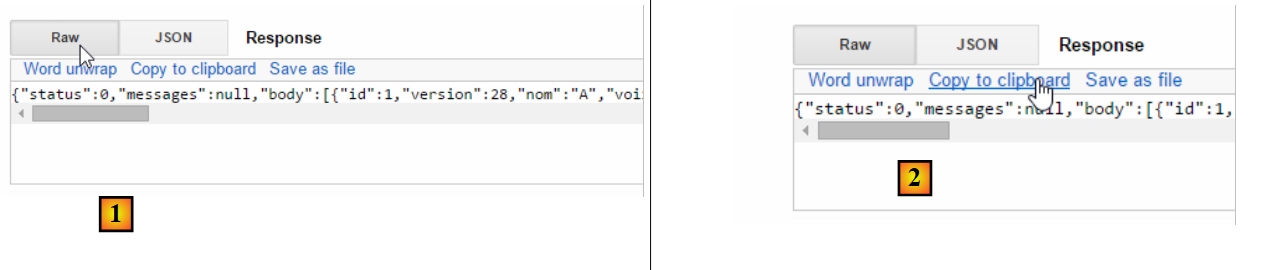 |
1  | 2  |
In [2], copy the response to the clipboard, then paste it into any text editor [3]:
 |
Isolate the value of the [body] field and change, for example, the votes for the lists. Below [4], we set the votes for all lists to 100:
 |
Verify that your JSON string begins with [ and ends with ]. These characters are used to delimit a JSON array. In [5], paste the JSON string above. This will be the value posted to the next URL. To do this, select the HTTP method [POST] [7].
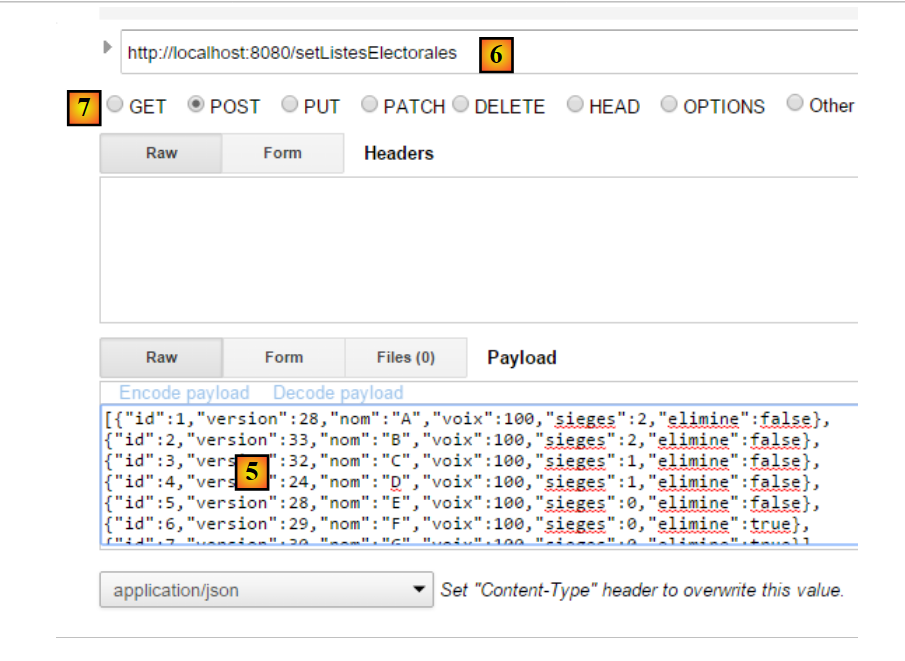 |
- In [6], request the URL [setListesElectorales]. This URL is requested using a POST request. The posted value is the JSON array of the competing lists, whose results must be saved to the database;
The following result is obtained:
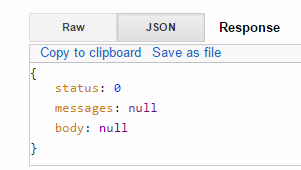 |
The [status=0] field indicates that there were no errors. To verify this, request the competing lists again and check that the changes you made to the lists have been applied:
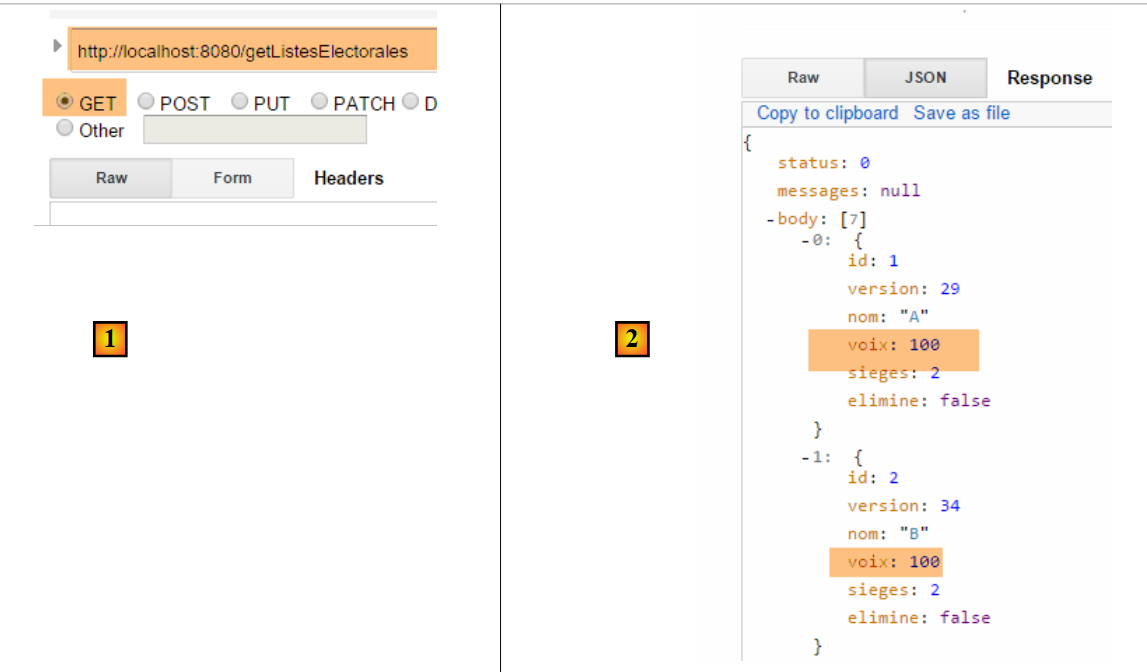 |
We make another [POST] request to calculate the seats won by the lists:
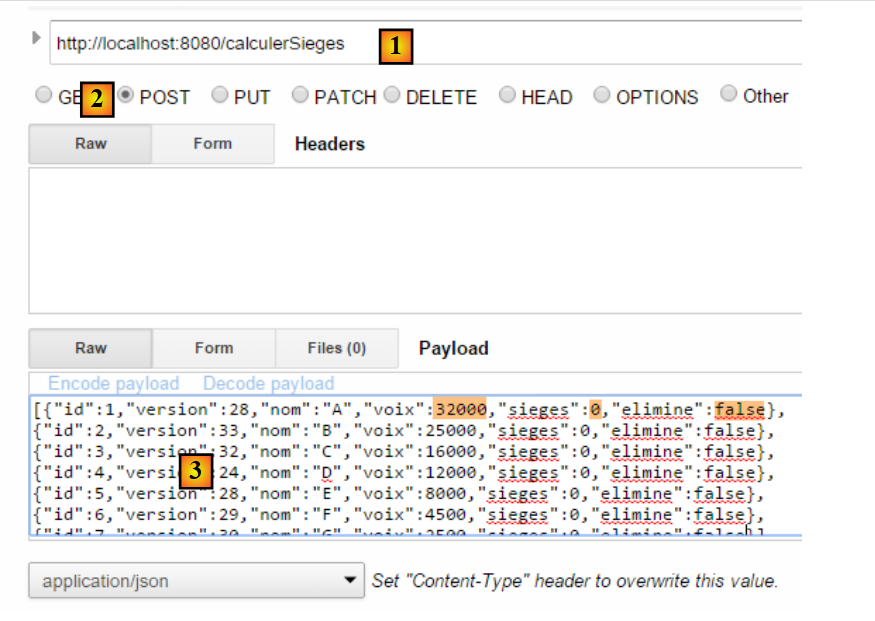 |
- in [1]: the URL for calculating seats;
- in [2]: we send a [POST] request;
- in [3]: the competing lists. We set the [votes] field to the values from the tutorial, all [seats] are set to 0, and all [eliminate] fields are set to false;
The result obtained is as follows:
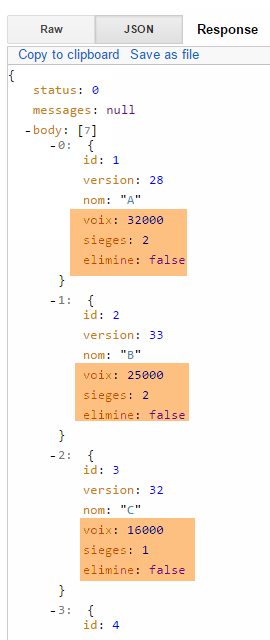 |