1. Introduction
1.1. Background
The PDF for the document can be found |HERE|.
Examples from the document are available |HERE|.
This document serves as both a course and a university TD (Tutorial). It is intended for beginners. It uses the following sources:
References:
We will refer to these sources as [ref1] and [ref2], respectively. The source [ref1] is outdated (2002) but sufficient for this document, where it is used only for its presentation of the Java language syntax and its basic operations. The remaining content necessary for the creation of TD is presented in this document in chapters titled [Cours]. These chapters are taken directly from [ref2] (2015) and have been simplified in some cases.
The objective of this document is to teach the Java language from a professional perspective. For this reason, we rely heavily on the Spring framework [http://spring.io/], which is widely used in JEE (Java Enterprise Edition) development. Logically, this course should be followed by a JEE course. This is the case at the University of Angers. Spring is currently (November 2015) the primary source of job opportunities for young developers with a master’s degree. There are many other technologies besides Spring in the JEE world. Spring has the advantage of being easy to understand and, above all, of providing coding best practices that can be reused outside the Spring ecosystem. This explains why it was chosen here.
This TD has been in use for over 10 years and has evolved with the technologies. It is followed (by IstiA) by TD, JEE, and [Introduction à Java EE]. This latest version, TD, dates from 2012 (it is now 2015) and could use an update. It presents the JEE orthodoxy through the JSF2 web framework (Java Server Faces) and the EJB3 (Enterprise Java Bean). Taken together, these two TD have enabled many students to secure JEE internships in ESN (Digital Services Companies) and get hired there right away.
You won’t find a formal presentation of all aspects of Java in this document. Over the years, the way junior developers approach a problem has changed significantly. Nowadays, they almost always use the Internet to find snippets of code that, when put together, form a program. If we provide them with a course, they use it very little and prefer to go back to the Internet. Although I was initially skeptical of this way of working, I was nevertheless surprised by the results. Weak students were able to produce working programs, whereas without the help of the Internet they probably would not have succeeded. I now rely on this approach.
Snippets of code do not provide an overview of a solution’s architecture, and one of the objectives of this document is to provide that overview. Students complete this TD just as they would a TP, working independently. There are no lectures. There is a schedule that outlines the progress expected of them over the course of the sessions. They may be behind or ahead of this schedule. Their progress is verified through a series of assessments they must submit to the instructor. The instructor is present both to provide explanations when requested and to evaluate their work. Everyone works at their own pace. By the end of the 36 hours allocated to this TD, some will have completed 50% more assessments than others, but everyone—at least that is the goal—will have understood what they have accomplished on their own. This TD can be completed without a teacher’s guidance. That is why it is available on [https://tahe.developpez.com].
This document is not suitable for those looking for an academic course on Java—something that explains Java in a step-by-step, structured manner, where every detail of syntax is explained and justified. Rather, what is proposed here is an experimental approach. It is likely that the student will not understand everything presented in the document, but they will likely be able to put its content to good use, and an understanding of the details will come with experience.
This document is also not a course in algorithms. The TD algorithm is basic and can be solved by any beginner taking their first algorithm courses. The document focuses on the professional Java development environment with its numerous libraries and frameworks, as well as on code architecture. Most of the students I see have weaknesses in algorithms, which are later confirmed by their internship supervisors. So yes, mastery of algorithms is important, but that is not the focus of this tutorial.
Finally, this document (December 2015) does not cover the latest Java features, notably streams and lambda functions. Nevertheless, it uses some elements of the latest JDK, JDK 1.8, and the following code must be compiled using this JDK.
1.2. Contents
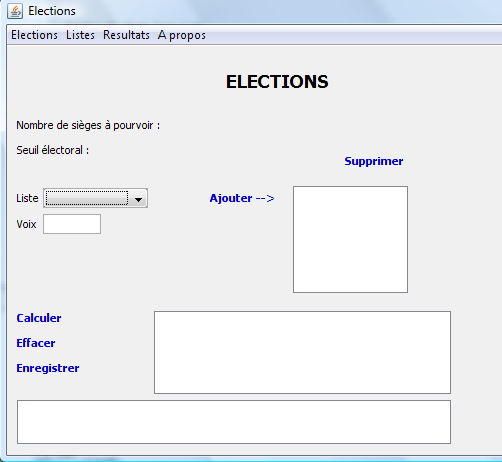
Chapter 2 introduces the topic of TD, a program for calculating election results. The problem is straightforward. Chapter 2 asks you to implement the solution using two very similar languages: C# and Java. The implementation is done without classes. The objective is to introduce Java syntax, its basic statements, and the Eclipse Integrated Development Environment (IDE), which is used to build Java projects.
Chapter 3 asks you to implement the solution from TD in Java using classes. The objective is to introduce the concepts of classes, inheritance, interfaces, and generic classes. The concept of unit testing JUnit is introduced.
Chapter 4 introduces the concepts underlying the following chapters:
- layered architectures;
- programming by interfaces;
- the use of Spring to implement the two previous concepts;
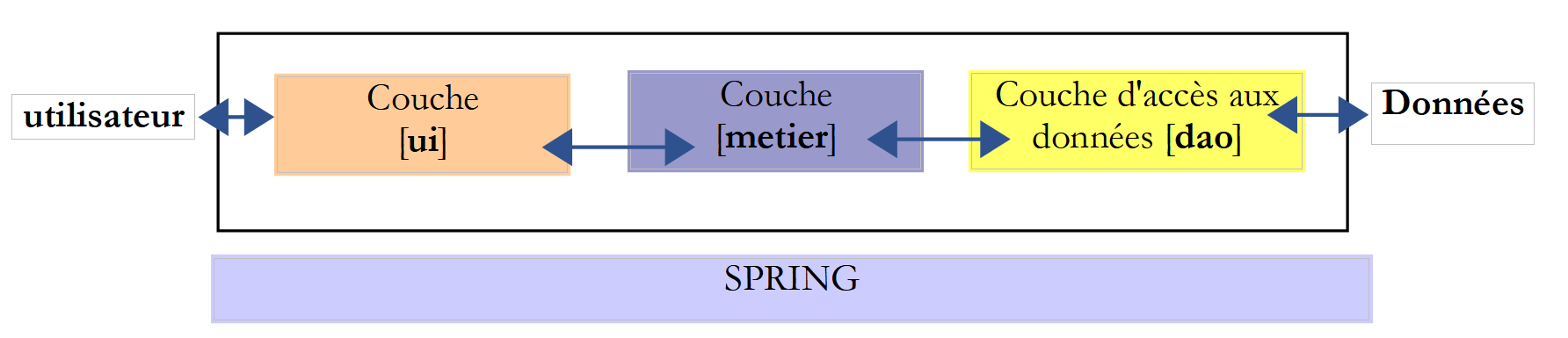
Chapter 5 presents the Spring framework through four projects.
Chapter 6 introduces API, which is a database access interface.
Chapter 7 implements the [DAO] (Data Access Object) of the TD using the API JDBC and Spring.
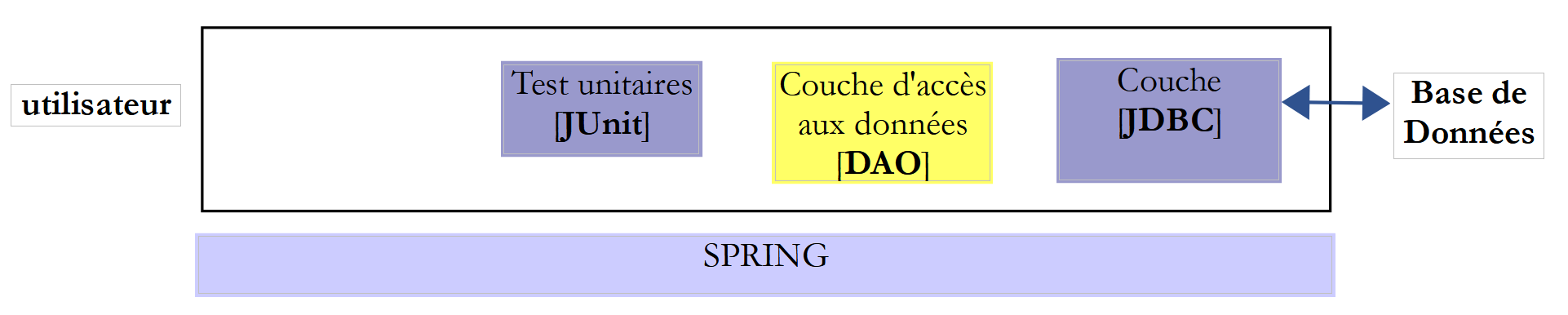
Chapter 8 implements the [métier] layer of TD:
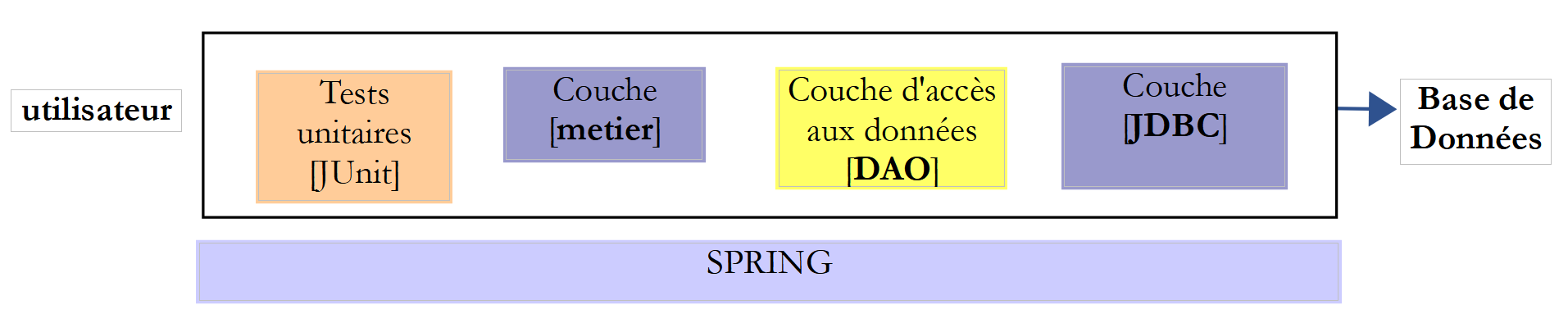
Chapter 9 implements the [ui] layer of TD with a console application:

Chapter 10 implements the [ui] layer of TD with a graphical application using the Swing component library:

Chapter 11 covers database management using the [Spring Data] framework, a branch of the Spring ecosystem. It introduces the JPA specification (Java Persistence API), which allows the [DAO] layer to manipulate objects instead of manipulating SQL (Structured Query Language). The layered architecture evolves as follows:
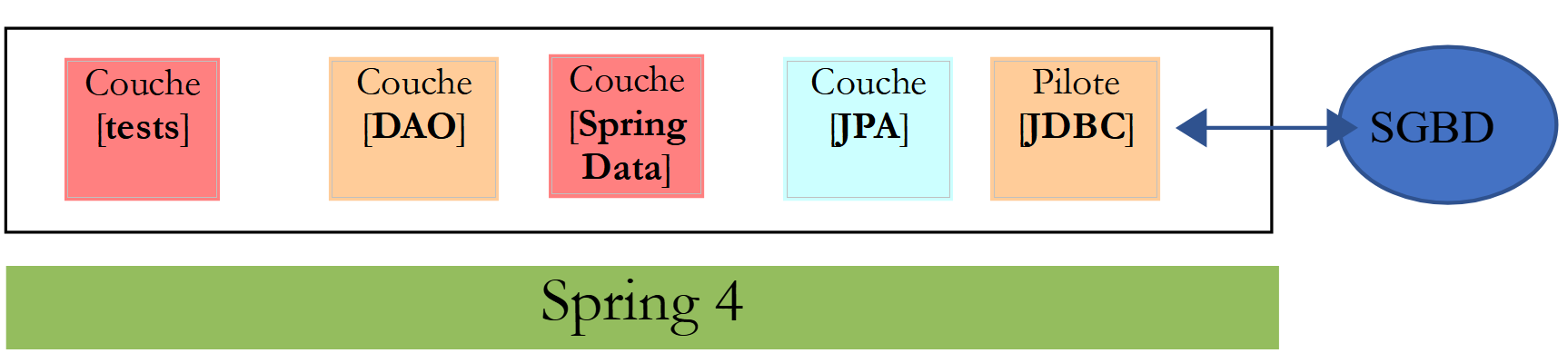
Chapter 12 applies the concepts from Chapter 11 by implementing database access for TD using [Spring Data].
Chapter 13 shows how to expose a database on the web using [Spring MVC], which is another branch of the Spring ecosystem. The architecture evolves into a client/server architecture:
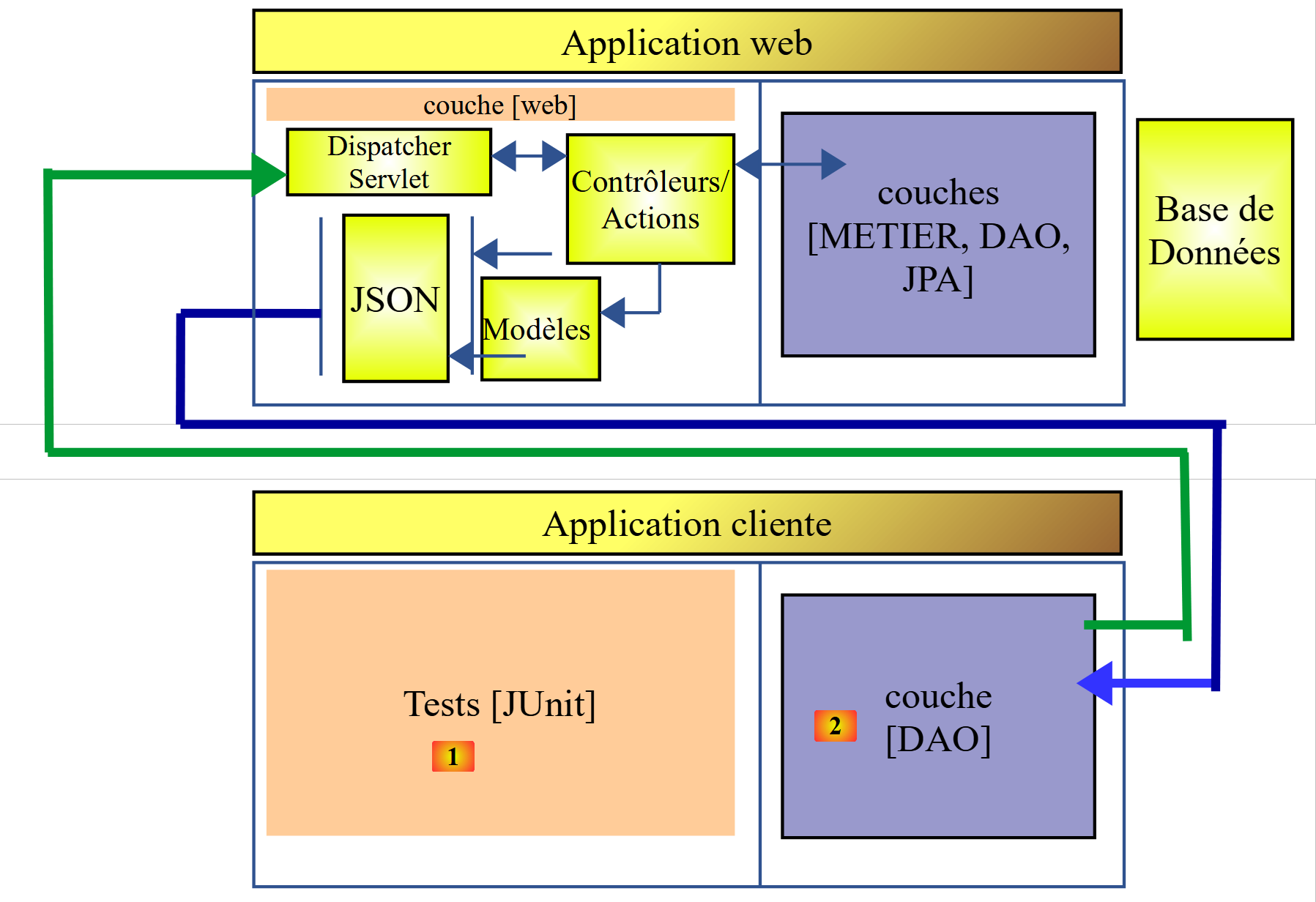
Chapters 14 and 15 transform the TD application into a client/server application:
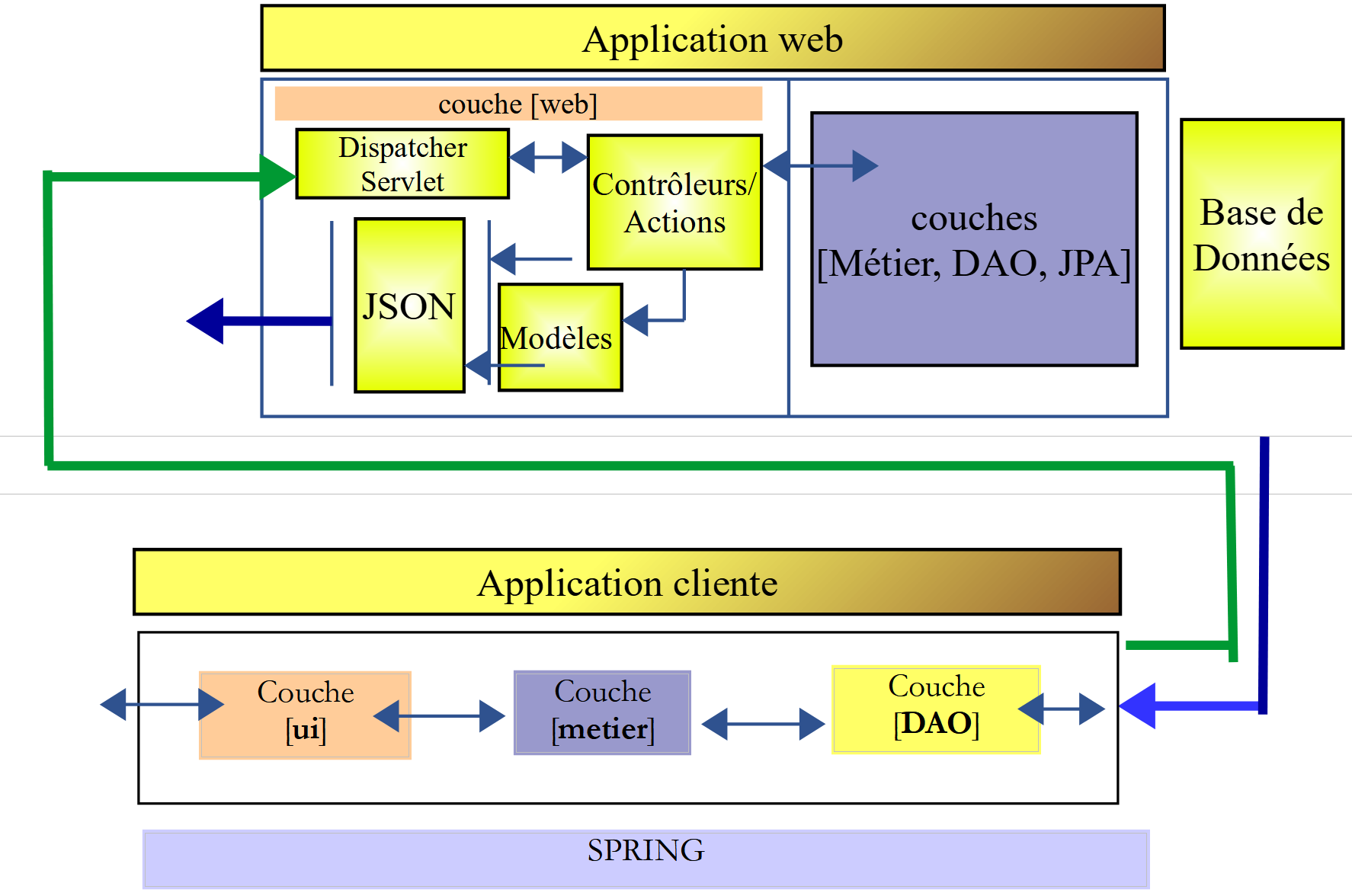
Chapter 16 shows how to secure access to a web application using [Spring Security], another branch of the Spring ecosystem.
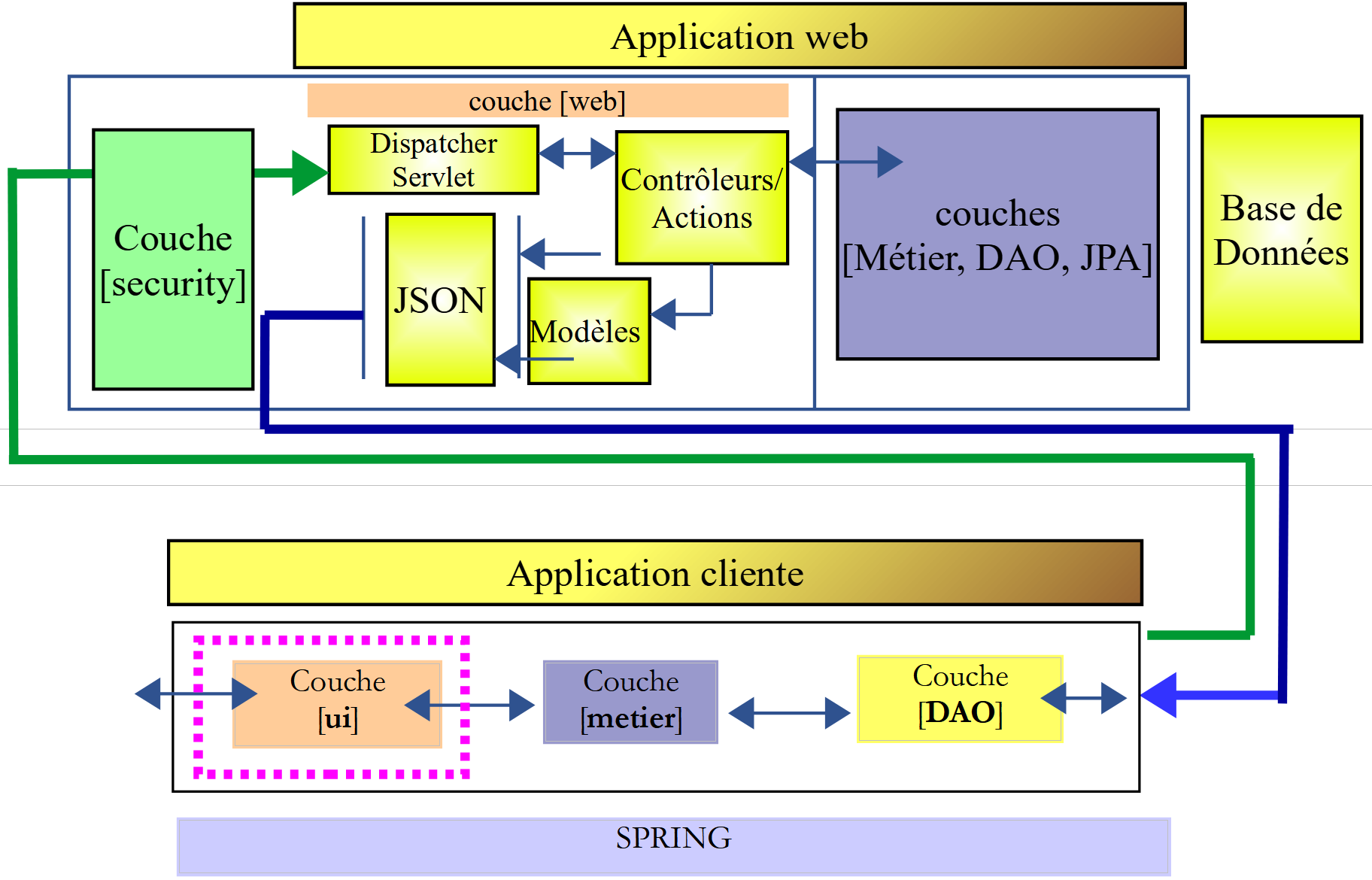
Chapter 17 revisits TD and secures the election web service.
Chapter 18 addresses the issue of cross-domain requests:
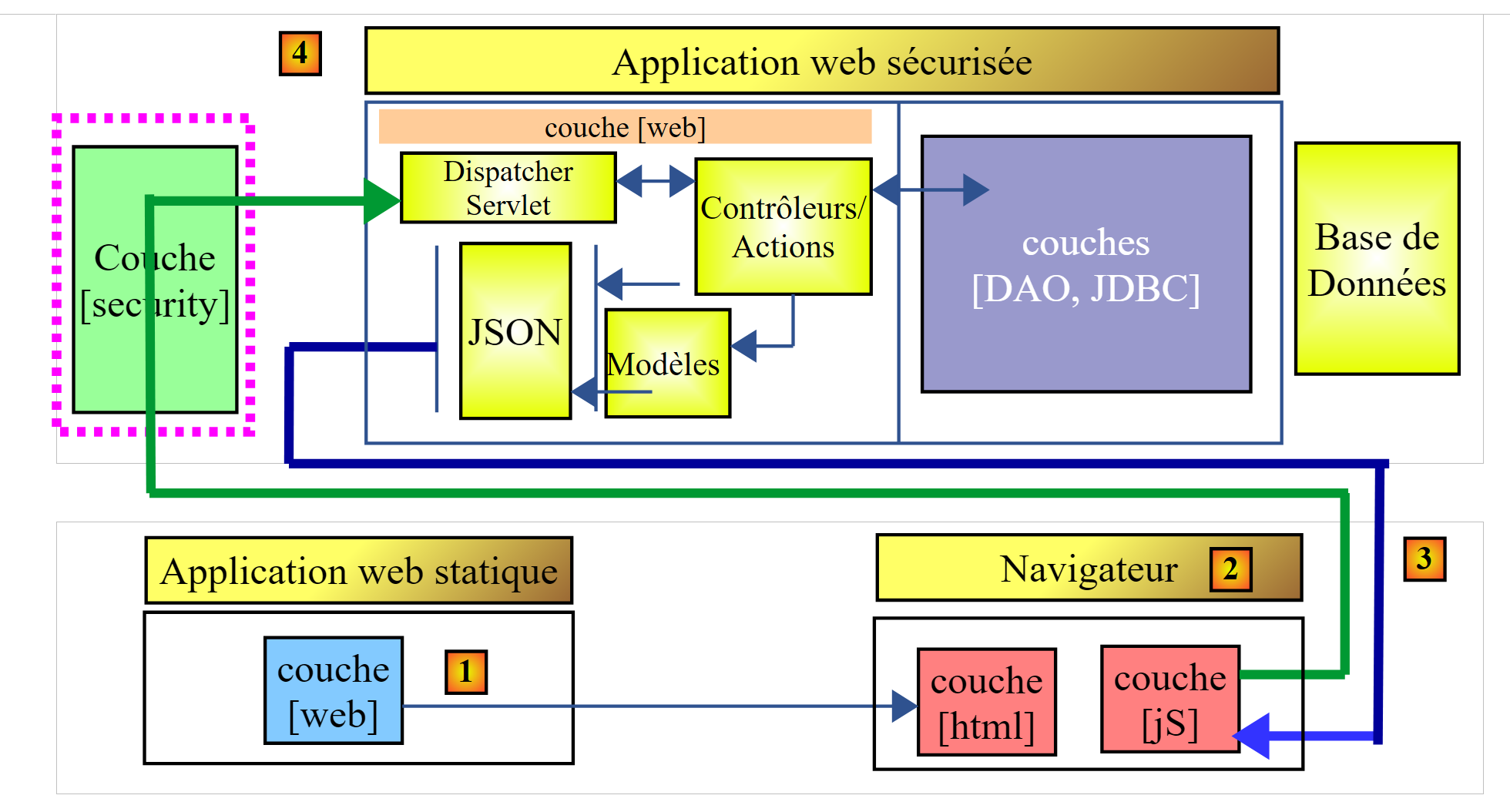 |
- in [1], a web application serves HTML / Javascript pages;
- in [2], the browser executes the Javascript embedded in the HTML pages to query the secure web service [3-4];
Let D1=http://machine1:port1 be the domain of the [1] server and D4=http://machine4:port4 be the domain of the [4] server. If the servers [1] and [4] are not in the same domain [D1!=D4], then requests from [3] to [4] are called cross-domain requests. Due to security restrictions implemented by browsers, setting them up can be problematic. We will examine a solution.
Chapter 19 implements cross-domain requests using the election application.
1.3. Tools Used
The following examples have been tested in the following environment:
- Windows 10 Pro 64-bit machine;
- JDK 1.8 (Section 22.1);
- IDE Spring Tool Suite 3.6.3 (Section 1);
- Netbeans 8.1 (section 22.4);
- Chrome browser (other browsers were not used);
- Chrome extension [Advanced Rest Client] (paragraph 1);
- WampServer, which includes SGBD, MySQL, and the [PhpMyAdmin] tool to manage it (paragraph 22.7);
It is important to use JDK 1.8. Some examples use elements from this JDK. Most examples are Maven projects that can be opened using either the IDE Eclipse [https://www.eclipse.org/], IntellijIDEA Community Edition, [https://www.jetbrains.com/idea/download/], and Netbeans [https://netbeans.org/]. The screenshots below are from the IDE Spring Tool Suite, a variant of Eclipse.
1.4. Support
The Eclipse projects in this document are available on the [https://tahe.developpez.com/tutoriels-cours/intro-java-spring/serge-tahe-introduction-au-langage-java-et-a-l-ecosysteme-spring/] website.
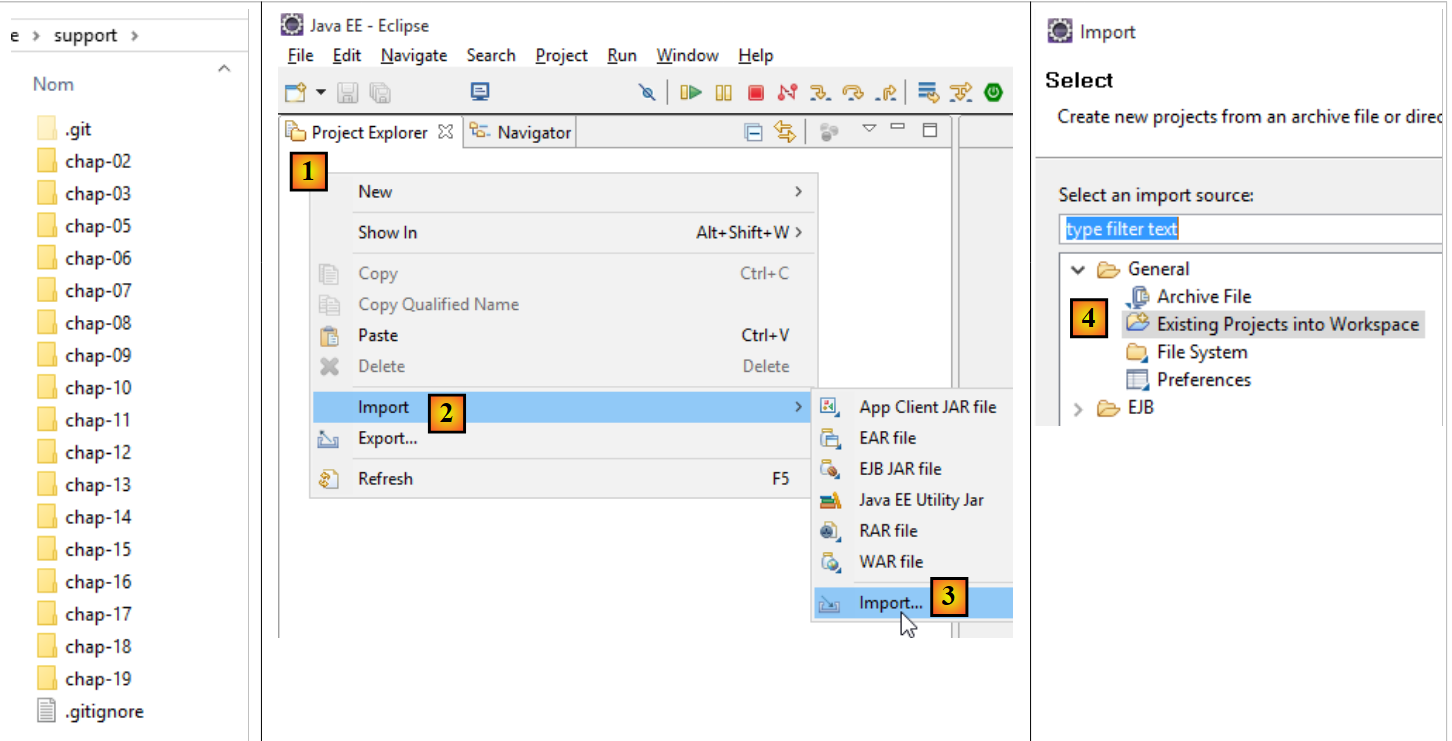 |
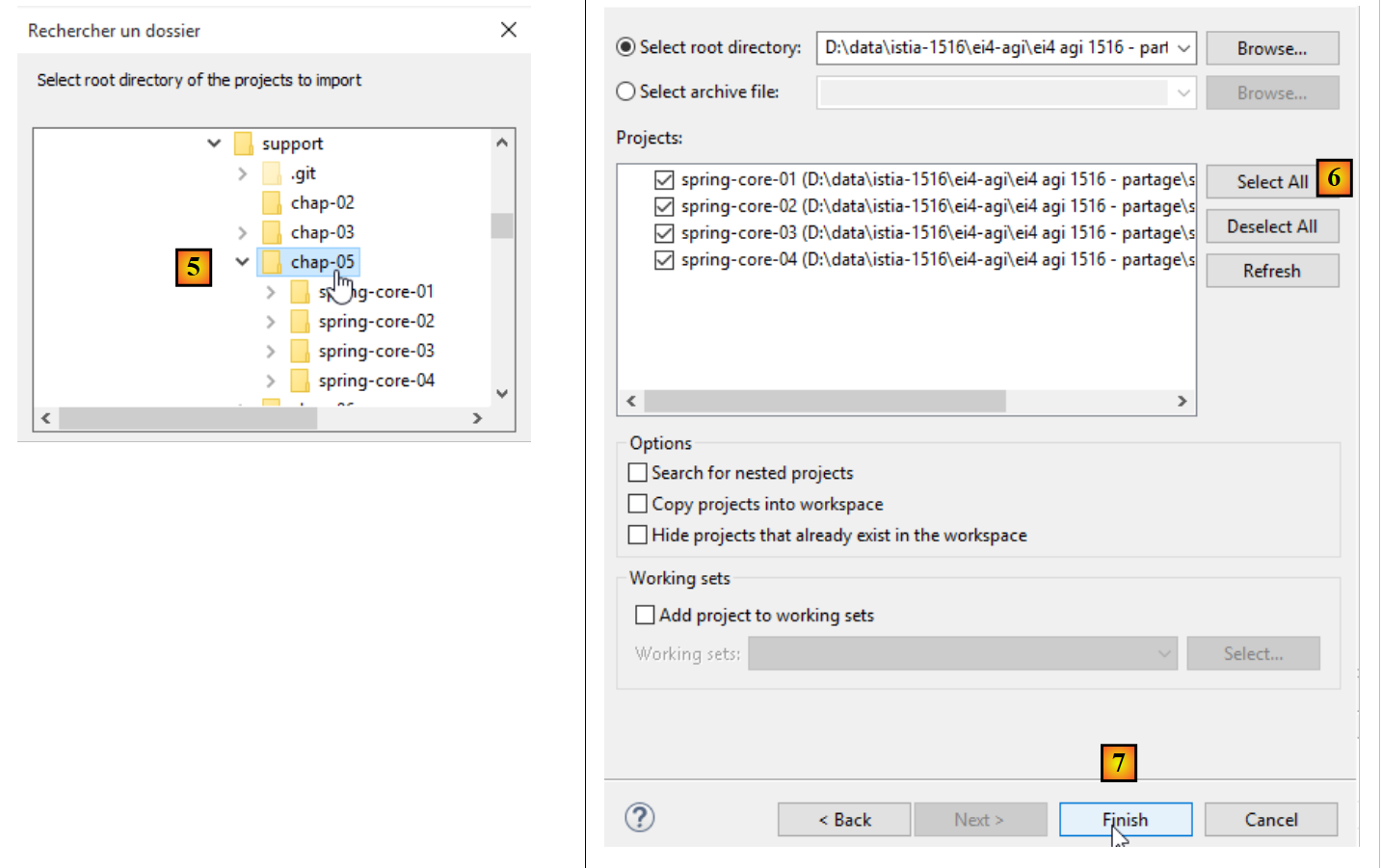
To import the projects for a chapter, proceed with Eclipse as indicated in [1-8]:
 |
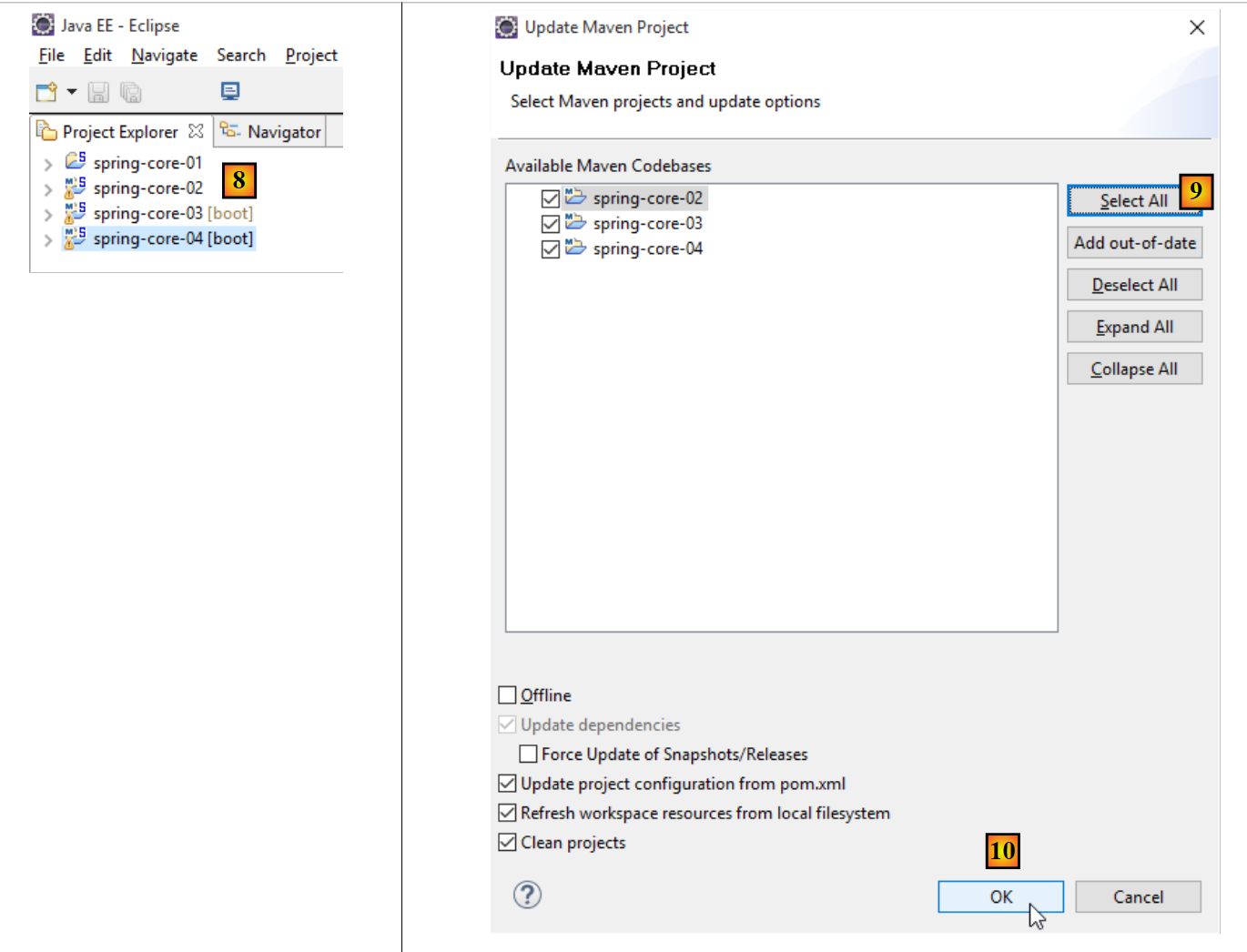
Most of the projects are Maven projects. If errors occur after loading, run [Alt-F5] and follow the procedure in [9-10]. The selected Maven projects will be rebuilt.
 |