9. [TD]: Implementation of the [ui] layer with a console program
Keywords: multi-layer architecture, Spring, dependency injection.
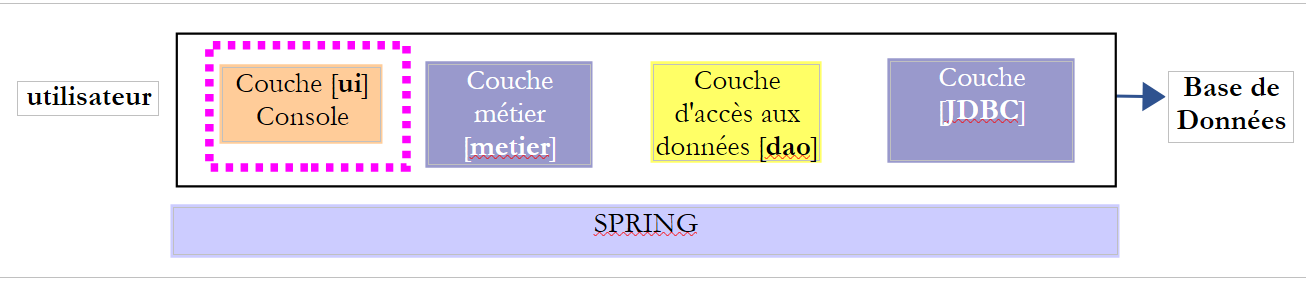 |
9.1. Support
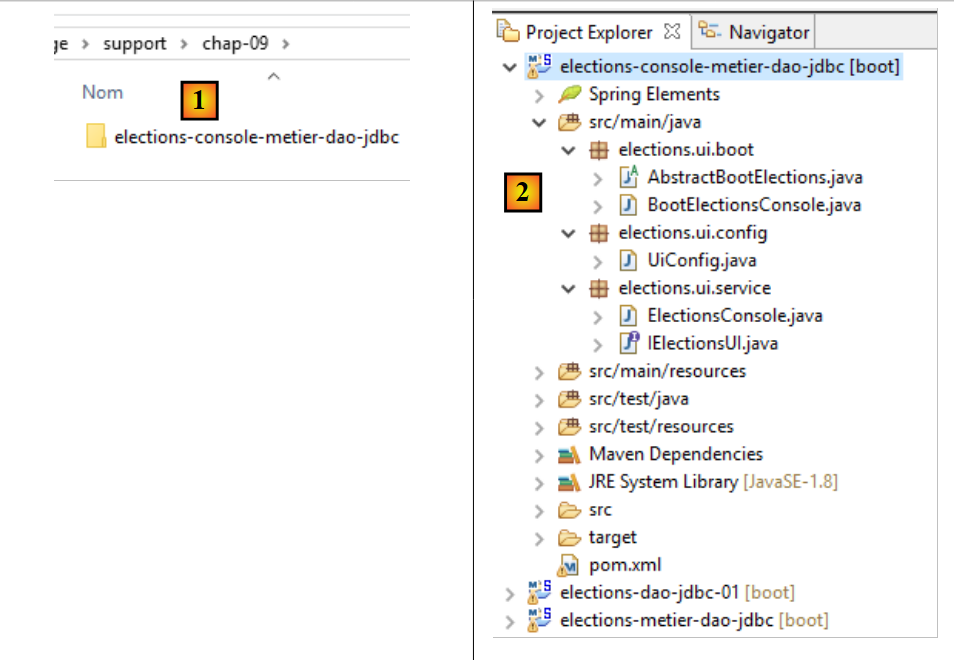 |
In [1], the [support / chap-09] folder contains the Eclipse project for the [UI] layer of the console application.
9.2. Maven Configuration
The Eclipse project [elections-ui-metier-dao-jdbc] is configured by the following Maven [pom.xml] file:
<project xmlns="http://maven.apache.org/POM/4.0.0" xmlns:xsi="http://www.w3.org/2001/XMLSchema-instance"
    xsi:schemaLocation="http://maven.apache.org/POM/4.0.0 http://maven.apache.org/xsd/maven-4.0.0.xsd">
    <modelVersion>4.0.0</modelVersion>
    <groupId>istia.st.elections</groupId>
    <artifactId>elections-ui-metier-dao-jdbc</artifactId>
    <version>0.0.1-SNAPSHOT</version>
    <name>elections-ui-metier-dao-jdbc</name>

    <parent>
        <groupId>org.springframework.boot</groupId>
        <artifactId>spring-boot-starter-parent</artifactId>
        <version>1.2.7.RELEASE</version>
    </parent>

    <properties>
        <project.build.sourceEncoding>UTF-8</project.build.sourceEncoding>
        <java.version>1.8</java.version>
    </properties>

    <dependencies>
        <!-- business -->
        <dependency>
            <groupId>istia.st.elections</groupId>
            <artifactId>elections-metier-dao-jdbc</artifactId>
            <version>0.0.1-SNAPSHOT</version>
        </dependency>
        <!-- Spring Boot -->
        <dependency>
            <groupId>org.springframework.boot</groupId>
            <artifactId>spring-boot</artifactId>
            <scope>test</scope>
        </dependency>
        <!-- Spring Boot Test -->
        <dependency>
            <groupId>org.springframework.boot</groupId>
            <artifactId>spring-boot-starter-test</artifactId>
            <scope>test</scope>
        </dependency>
    </dependencies>

    <!-- plugins -->
    <build>
        <plugins>
            <plugin>
                <artifactId>maven-assembly-plugin</artifactId>
                <configuration>
                    <archive>
                        <manifest>
                            <mainClass>config.AppConfig</mainClass>
                        </manifest>
                    </archive>
                    <descriptorRefs>
                        <descriptorRef>jar-with-dependencies</descriptorRef>
                    </descriptorRefs>
                </configuration>
            </plugin>
            <!-- to install the project artifact in the local Maven repository -->
            <plugin>
                <groupId>org.apache.maven.plugins</groupId>
                <artifactId>maven-surefire-plugin</artifactId>
                <version>2.18.1</version>
            </plugin>
        </plugins>
    </build>
</project>
- lines 22–26: we import the [business] layer archive and, by extension, the [DAO] layer archive;
9.3. Spring Configuration
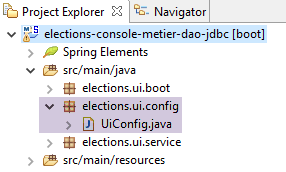 |
The [UiConfig] class configures the Spring application:
package elections.ui.config;

import org.springframework.context.annotation.ComponentScan;
import org.springframework.context.annotation.Import;

import elections.metier.config.MetierConfig;

@Import(MetierConfig.class)
@ComponentScan(basePackages = { "elections.ui.service" })
public class UiConfig {
}
- Line 8: We import the beans defined in the [business] layer. This layer already imported the beans defined in the [DAO] layer. We therefore have access here to the beans from all three layers;
- line 9: the [elections.ui.service] package contains other beans;
9.4. The [UI] layer interface
 |
To understand what the Java interface of the [UI] layer might look like, we need to know who will use this interface. It is not the user from the diagram above, but the program that will launch the application as a whole.
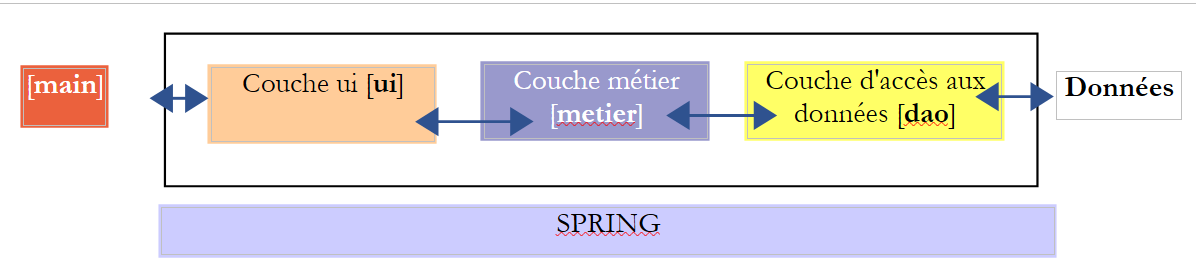 |
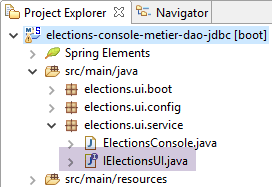
The [IElectionsUI] interface is presented to the main program [main], which will launch the application. What can [main] ask of the [UI] layer? It can ask it to initiate interactions with the user who will enter the missing election data. We will adopt the following minimal interface:
package istia.st.elections.ui;

public interface IElectionsUI {
    /**
     * lance le dialogue avec l'utilisateur
     */
    public void run();
}
- Line 7: The interface has only one method: run. By calling this method, we instruct the [ui] layer to begin interacting with the user.
9.5. The application's entry point
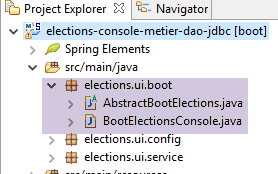 |
The application's startup class is a Java class with a static [main] method. This method must create instances of the [ui, business, demo] layers and instruct the [ui] layer to begin interacting with the user. This class could be the following [AbstractBootElections] class:
package elections.ui.boot;

import org.springframework.context.annotation.AnnotationConfigApplicationContext;

import elections.dao.entities.ElectionsException;
import elections.ui.config.UiConfig;
import elections.ui.service.IElectionsUI;

public abstract class AbstractBootElections {

    // spring context retrieval
    protected AnnotationConfigApplicationContext ctx;

    public void run() {
        // instantiation layer [ui]
        IElectionsUI electionsUI = null;
        try {
            // spring context retrieval
            ctx = new AnnotationConfigApplicationContext(UiConfig.class);
            // ui] layer recovery
            electionsUI = getUI();
        } catch (RuntimeException ex) {
            // we report the error
            afficheExceptions("Les erreurs suivantes se sont produites :", ex);
            // stop the application
            System.exit(1);
        }
        // execution layer [ui]
        try {
            electionsUI.run();
        } catch (ElectionsException ex2) {
            // we report the error
            afficheExceptions("Les erreurs suivantes se sont produites :", ex2);
            // stop the application
            System.exit(3);
        } catch (RuntimeException ex1) {
            // we report the error
            afficheExceptions("Les erreurs suivantes se sont produites :", ex1);
            // stop the application
            System.exit(2);
        }
    }

    protected abstract IElectionsUI getUI();

    private void afficheExceptions(String message, ElectionsException ex) {
        // the message
        System.out.println(String.format("%s -------------", message));
        System.out.println(String.format("Code erreur : %d", ex.getCode()));
        // errors are displayed
        for (String erreur : ex.getErreurs()) {
            System.out.println(String.format("-- %s", erreur));
        }

    }

    public void afficheExceptions(String message, Exception ex) {
        // the message
        System.out.println(String.format("%s -------------", message));
        // display the exception stack
        Throwable cause = ex;
        while (cause != null) {
            System.out.println(String.format("-- %s", cause.getMessage()));
            cause = cause.getCause();
        }
    }
}
- Line 19: The Spring context is instantiated: all beans defined in the various configuration files will be created;
- line 21: we retrieve a reference to the bean that implements the [IElectionsUI] interface. We will implement the [IElectionsUI] interface using two beans:
- [ElectionsConsole] for a console application;
- [ElectionsSwing] for a Swing application;
The [getUI] method is abstract (line 44). In fact, the [AbstractBootElections] class will be the parent of two classes:
- [BootElectionsConsole], which will provide the [ElectionsConsole] bean to its parent class;
- [BootElectionsSwing], which will provide the [ElectionsSwing] bean to its parent class;
- line 30: the [run] method of the interface is executed;
Exceptions are handled in various places:
- lines 22–27: an exception may occur during the instantiation of the Spring context;
- lines 31–41: an exception may occur during the execution of the [UI] layer. There are two types of exceptions:
- the [ElectionsException] class thrown by the [DAO] layer;
- the [RuntimeException] class for other exceptions that may occur during execution;
The [BootElectionsConsole] class is the class that launches the console implementation. Its code is as follows:
package elections.ui.boot;

import elections.ui.service.IElectionsUI;

public class BootElectionsConsole extends AbstractBootElections{
    public static void main(String[] arguments) {
        new BootElectionsConsole().run();
    }

    @Override
    protected IElectionsUI getUI() {
        return ctx.getBean("electionsConsole",IElectionsUI.class);
    }
}
- Line 5: The [BootElectionsConsole] class extends the [AbstractBootElections] class. It must therefore implement the [getUI] method that its parent class had declared as abstract;
- lines 10–13: implementation of the [getUI] method;
- line 12: the bean named [electionsConsole] is made to implement the [IElectionsUI] interface. [ctx] is the Spring context defined in the parent class by the declaration:
    // spring context retrieval
    protected AnnotationConfigApplicationContext ctx;
Because the field has the [protected] attribute, it is visible in child classes.
The bean on line 12 will be declared as follows:
@Component
public class ElectionsConsole implements IElectionsUI {
The default name of this bean is the class name with its first letter lowercase. You can override this default name by explicitly writing:
The [BootElectionsSwing] class that would launch the Swing implementation could be as follows:
package elections.ui.boot;

import elections.ui.service.IElectionsUI;

public class BootElectionsSwing extends AbstractBootElections {
    public static void main(String[] arguments) {
        new BootElectionsSwing().run();
    }

    @Override
    protected IElectionsUI getUI() {
        return ctx.getBean("electionsSwing", IElectionsUI.class);
    }
}
This design pattern, in which behavior common to classes is factored into a parent class, and child classes are left to implement their specific details, is called the Strategy design pattern. This design pattern imposes a common behavior on all child classes.
9.6. The implementation class [ElectionsConsole]
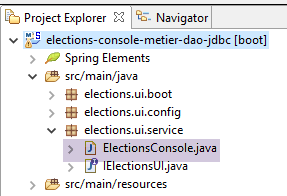 |
Our first implementation class for the [ui] layer will be a class that uses the console to communicate with the user. Here is an example of a dialog displayed on the Eclipse console:
Il y a 7 listes en compétition. Veuillez indiquer le nombre de voix de chacune d'elles :
Nombre de voix de la liste [A] : 2500
Nombre de voix de la liste [B] : 4500
Nombre de voix de la liste [C] : x
Nombre de voix incorrect. Veuillez recommencer
Nombre de voix de la liste [C] : 8000
Nombre de voix de la liste [D] : 12000
Nombre de voix de la liste [E] : 16000
Nombre de voix de la liste [F] : 25000
Nombre de voix de la liste [G] : 32000

Résultats de l'élection

[G,32000,2,false]
[F,25000,2,false]
[E,16000,1,false]
[D,12000,1,false]
[C,8000,0,false]
[B,4500,0,true]
[A,2500,0,true]
The [ElectionsConsole] class could have the following skeleton:
package elections.ui.service;

import java.util.Comparator;
import java.util.Scanner;

import org.springframework.beans.factory.annotation.Autowired;
import org.springframework.stereotype.Component;

import elections.dao.entities.ListeElectorale;
import elections.metier.service.IElectionsMetier;

@Component
public class ElectionsConsole implements IElectionsUI {

    @Autowired
    private IElectionsMetier electionsMetier;

    @Override
    public void run() {
        // data entry
        try (Scanner clavier = new Scanner(System.in)) {
            // lists in competition are requested from the [metier] layer

            // we enter the votes

        }
        // we calculate the number of seats

        // we record the results

        // lists sorted in descending order of votes

        // we display them
    }

    // electoral list comparison class
    class CompareListesElectorales implements Comparator<ListeElectorale> {

        // comparison of two candidate lists by number of votes
        @Override
        public int compare(ListeElectorale listeElectorale1, ListeElectorale listeElectorale2) {
            // we compare the votes of these two lists
            int nbVoix1 = listeElectorale1.getVoix();
            int nbVoix2 = listeElectorale2.getVoix();
            if (nbVoix1 < nbVoix2) {
                return +1;
            } else {
                if (nbVoix1 > nbVoix2)
                    return -1;
                else
                    return 0;
            }
        }
    }

}
- line 12: the [ElectionsConsole] class is a Spring component;
- line 13: the class implements the [IElectionsUI] interface
- lines 15–16: Spring injects a reference into the [business] layer;
- lines 18–34: the [run] method of the [IelectionsUI] interface;
The try block in lines 21–28 is called try-with-resources, and its syntax is as follows:
The resource in line 1 must implement the [java.lang.AutoCloseable] interface. The resource is opened on line 1 and automatically closed after line 3, regardless of whether an exception occurs in the code executed between the two lines. This syntax ensures that an open resource will be closed, no matter what happens.
Task: Write the code for the [run] method. Use the comments as a guide.