11. [Course]: Managing Relational Databases with Spring Data
Keywords: multi-layer architecture, Spring, dependency injection, JPA (Java Persistence API), Spring Data.
We will implement the [DAO] layer of the assignment using [Spring Data], a component of the Spring ecosystem. [Spring Data] relies on a JPA (Java Persistence API) layer that allows the [DAO] layer to manipulat ly objects rather than SQL statements. Ultimately, the [DAO] layer is unaware that it is interacting with a database. It only knows the interface of the [Spring Data] layer.
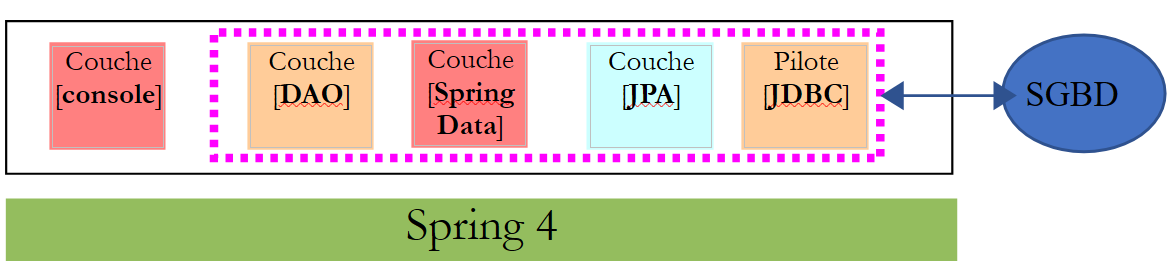 |
We will first explore [Spring Data] through two examples.
11.1. Support
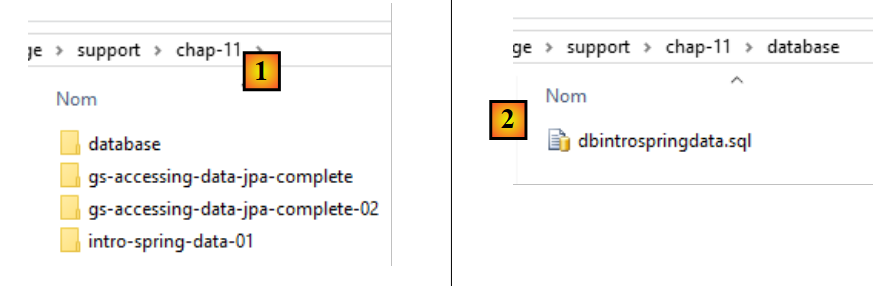 |
- In [1], the [support / chap-11] folder contains three Eclipse projects;
- in [2], the SQL script for creating the sample database for this chapter;
11.2. Example 1
The Spring website offers numerous tutorials to get started with Spring [http://spring.io/guides]. We will use one of them to introduce Spring Data. To do this, we will use Spring Tool Suite (STS).
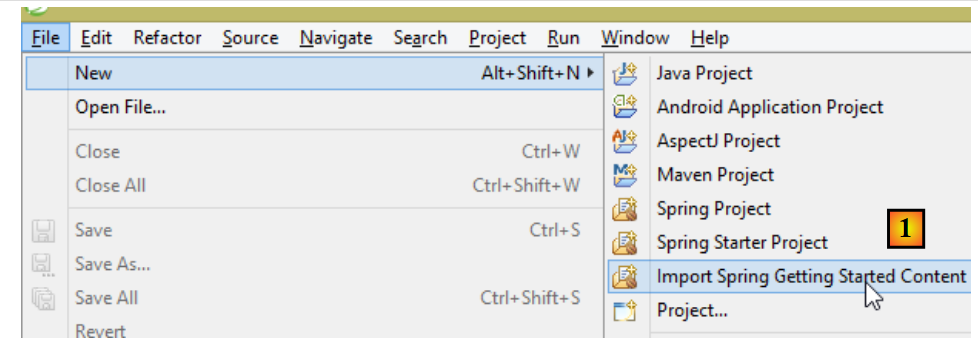 |
- In [1], we import one of the tutorials from [spring.io/guides];
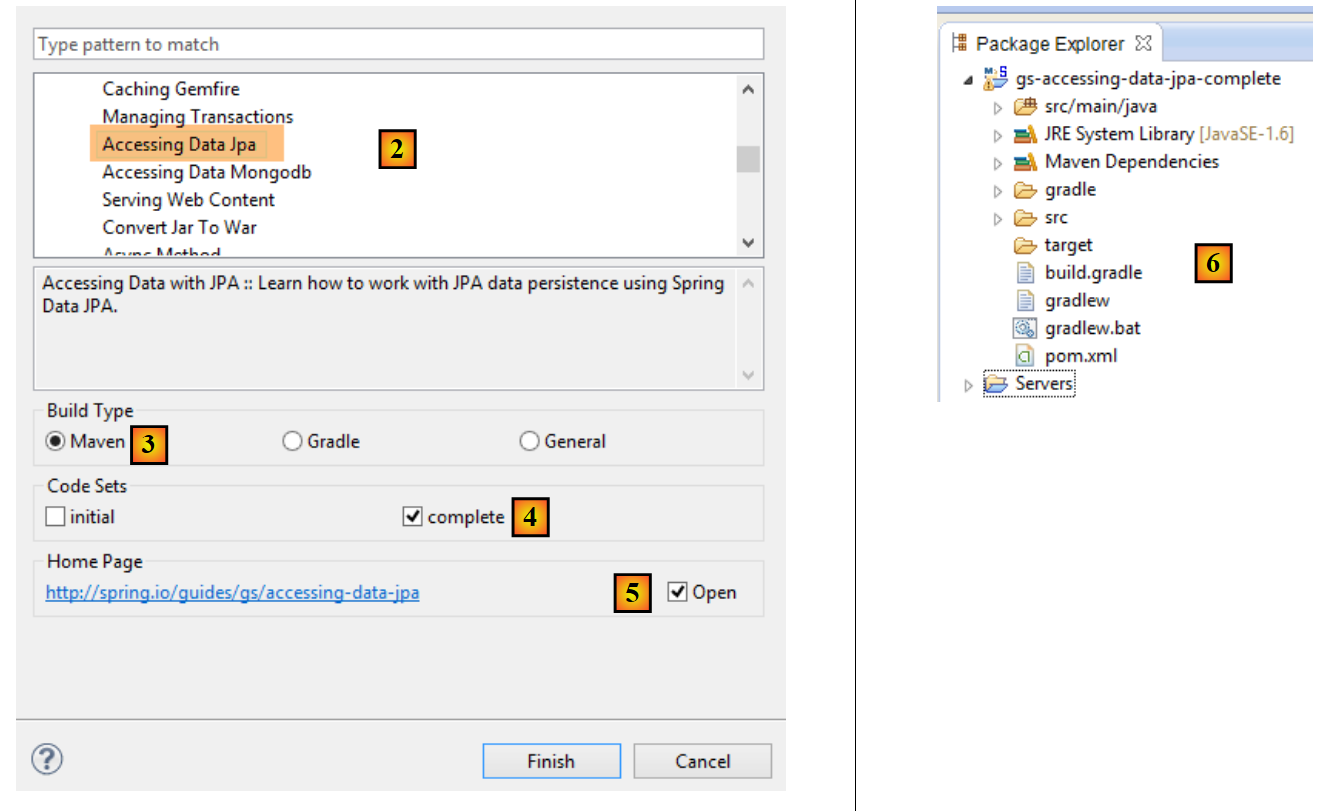 |
- In [2], we select the [Accessing Data Jpa] tutorial, which demonstrates how to access a database using Spring Data;
- In [3], we select a project configured by Maven;
- in [4], the tutorial is available in two forms: [initial], which is an empty version that you fill in by following the tutorial, or [complete], which is the final version of the tutorial. We choose the latter;
- In [5], you can choose to view the tutorial in a browser;
- In [6], the final project.
11.2.1. The project’s Maven configuration
The project’s Maven dependencies are configured in the [pom.xml] file:
    <groupId>org.springframework</groupId>
    <artifactId>gs-accessing-data-jpa</artifactId>
    <version>0.1.0</version>

    <parent>
        <groupId>org.springframework.boot</groupId>
        <artifactId>spring-boot-starter-parent</artifactId>
        <version>1.1.10.RELEASE</version>
    </parent>

    <dependencies>
        <dependency>
            <groupId>org.springframework.boot</groupId>
            <artifactId>spring-boot-starter-data-jpa</artifactId>
        </dependency>
        <dependency>
            <groupId>com.h2database</groupId>
            <artifactId>h2</artifactId>
        </dependency>
    </dependencies>

    <properties>
        <!-- use UTF-8 for everything -->
        <project.build.sourceEncoding>UTF-8</project.build.sourceEncoding>
        <project.reporting.outputEncoding>UTF-8</project.reporting.outputEncoding>
        <start-class>hello.Application</start-class>
</properties>
- lines 5–9: define a parent Maven project. This project defines most of the project’s dependencies. They may be sufficient, in which case no additional dependencies are added, or they may not be, in which case the missing dependencies are added;
- lines 12–15: define a dependency on [spring-boot-starter-data-jpa]. This artifact contains the Spring Data classes;
- Lines 16–19: define a dependency on the H2 DBMS, which allows you to create and manage in-memory databases.
Let’s look at the classes provided by these dependencies:
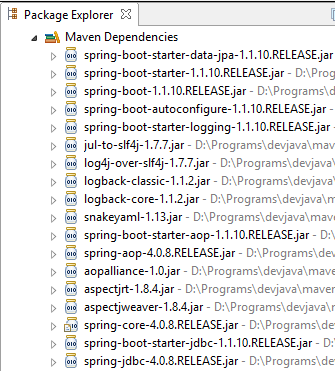 | 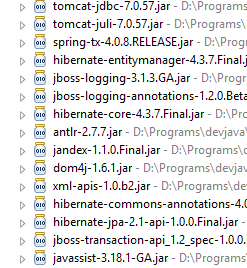 | 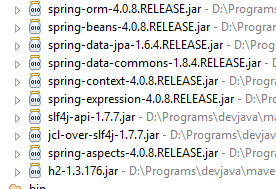 |
There are many of them:
- some belong to the Spring ecosystem (those starting with spring);
- others belong to the Hibernate ecosystem (hibernate, jboss), whose JPA implementation we are using here;
- others are testing libraries (junit, hamcrest);
- others are logging libraries (log4j, logback, slf4j);
We will keep them all. For a production application, only the necessary ones should be kept.
On line 26 of the [pom.xml] file, we find the line:
<start-class>hello.Application</start-class>
This line is linked to the following lines:
<build>
        <plugins>
            <plugin>
                <artifactId>maven-compiler-plugin</artifactId>
            </plugin>
            <plugin>
                <groupId>org.springframework.boot</groupId>
                <artifactId>spring-boot-maven-plugin</artifactId>
            </plugin>
        </plugins>
    </build>
Lines 6–9: The [spring-boot-maven-plugin] allows you to generate the application’s executable JAR. Line 26 of the [pom.xml] file then specifies the executable class of this JAR.
11.2.2. The [JPA] layer
Database access is handled through a [JPA] layer, the Java Persistence API:
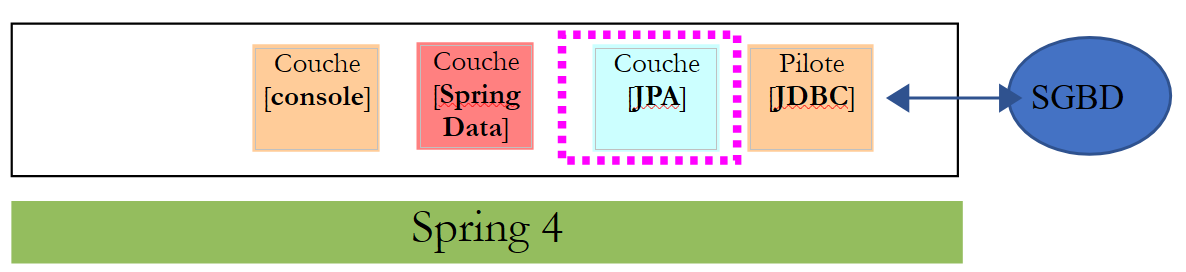 |
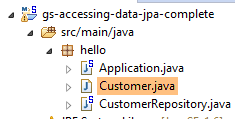 |
The application is basic and manages [Customer] entities. The [Customer] class is part of the [JPA] layer and is as follows:
package hello;

import javax.persistence.Entity;
import javax.persistence.GeneratedValue;
import javax.persistence.GenerationType;
import javax.persistence.Id;

@Entity
public class Customer {

    @Id
    @GeneratedValue(strategy = GenerationType.AUTO)
    private long id;
    private String firstName;
    private String lastName;

    protected Customer() {
    }

    public Customer(String firstName, String lastName) {
        this.firstName = firstName;
        this.lastName = lastName;
    }

    @Override
    public String toString() {
        return String.format("Customer[id=%d, firstName='%s', lastName='%s']", id, firstName, lastName);
    }

}
A customer has an ID [id], a first name [firstName], and a last name [lastName]. Each [Customer] instance represents a row in a database table.
- line 8: JPA annotation that ensures the persistence of [Customer] instances (Create, Read, Update, Delete) will be managed by a JPA implementation. Based on the Maven dependencies, we can see that the JPA/Hibernate implementation is being used;
- Lines 11–12: JPA annotations that associate the [id] field with the primary key of the [Customer] table. Line 12 indicates that the JPA implementation will use the primary key generation method specific to the DBMS being used, in this case H2;
There are no other JPA annotations. Default values will therefore be used:
- the [Customer] table will be named after the class, i.e., [Customer];
- the columns of this table will be named after the class fields: [id, firstName, lastName], noting that case is not taken into account in table column names;
Note that the JPA implementation used is never named.
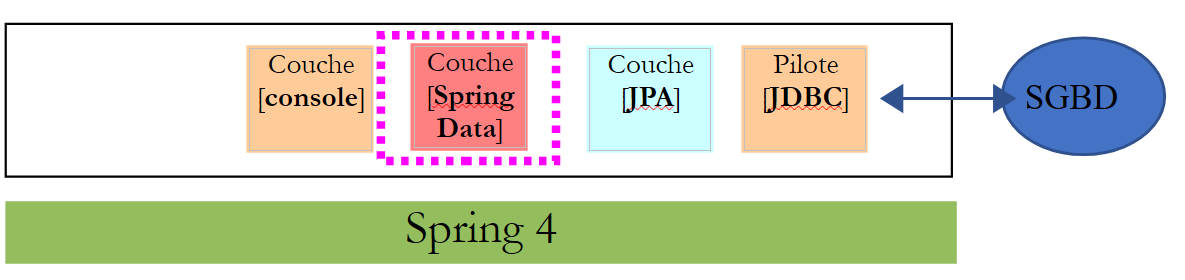
11.2.3. The [Spring Data] layer
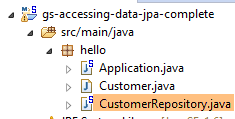
The [CustomerRepository] class implements the access layer for the [Customer] table. Its code is as follows:
 |
 |
package hello;

import java.util.List;

import org.springframework.data.repository.CrudRepository;

public interface CustomerRepository extends CrudRepository<Customer, Long> {

    List<Customer> findByLastName(String lastName);
}
This is therefore an interface and not a class (line 7). It extends the [CrudRepository] interface, a Spring Data interface (line 5). This interface is parameterized by two types: the first is the type of the managed elements, here the [Customer] type; the second is the type of the primary key of the managed elements, here a [Long] type. The [CrudRepository] interface is as follows:
package org.springframework.data.repository;

import java.io.Serializable;

@NoRepositoryBean
public interface CrudRepository<T, ID extends Serializable> extends Repository<T, ID> {

    <S extends T> S save(S entity);

    <S extends T> Iterable<S> save(Iterable<S> entities);

    T findOne(ID id);

    boolean exists(ID id);

    Iterable<T> findAll();

    Iterable<T> findAll(Iterable<ID> ids);

    long count();

    void delete(ID id);

    void delete(T entity);

    void delete(Iterable<? extends T> entities);

    void deleteAll();
}
This interface defines the CRUD (Create – Read – Update – Delete) operations that can be performed on a JPA T type:
- line 8: the save method allows a T entity to be persisted in the database. It persists the entity using the primary key assigned to it by the DBMS. It also allows a T entity identified by its primary key id to be updated. The choice between these two actions depends on the value of the primary key id: if it is null, the persistence operation occurs; otherwise, the update operation occurs;
- line 10: same as above, but for a list of entities;
- line 12: the findOne method retrieves an entity T identified by its primary key id;
- line 22: the delete method allows you to delete an entity T identified by its primary key id;
- lines 24–28: variations of the [delete] method;
- line 16: the [findAll] method retrieves all persisted T entities;
- line 18: same as above, but limited to entities for which a list of identifiers has been provided;
Let’s return to the [CustomerRepository] interface:
package hello;

import java.util.List;

import org.springframework.data.repository.CrudRepository;

public interface CustomerRepository extends CrudRepository<Customer, Long> {

    List<Customer> findByLastName(String lastName);
}
- Line 9 allows you to retrieve a [Customer] by its [lastName];
And that’s it for the [DAO] layer. There is no implementation class for the previous interface. It is generated at runtime by [Spring Data]. The methods of the [CrudRepository] interface are automatically implemented. For the methods added to the [CustomerRepository] interface, it depends. Let’s go back to the definition of [Customer]:
private long id;
private String firstName;
private String lastName;
The method on line 9 is automatically implemented by [Spring Data] because it references the [lastName] field (line 3) of [Customer]. When it encounters a [findBySomething] method in the interface to be implemented, Spring Data implements it using the following JPQL (Java Persistence Query Language) query:
Therefore, the type T must have a field named [something]. Thus, the method
will be implemented with code similar to the following:
return [em].createQuery("select c from Customer c where c.lastName=:value").setParameter("value",lastName).getResultList()
where [em] refers to the JPA persistence context. This is only possible if the [Customer] class has a field named [lastName], which is the case.
In conclusion, in simple cases, Spring Data allows us to implement the [DAO] layer with a simple interface.
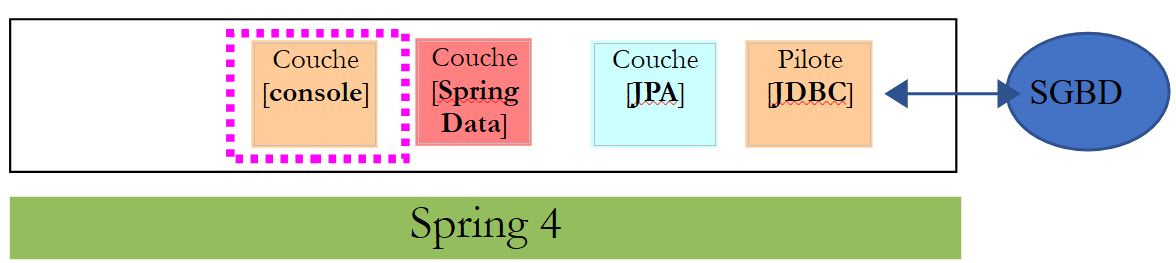
11.2.4. The [console] layer
 |
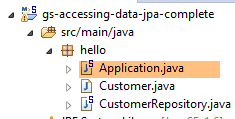 |
The [Application] class is as follows:
package hello;

import org.springframework.beans.factory.annotation.Autowired;
import org.springframework.boot.CommandLineRunner;
import org.springframework.boot.SpringApplication;
import org.springframework.boot.autoconfigure.SpringBootApplication;

@SpringBootApplication
public class Application implements CommandLineRunner {

    @Autowired
    CustomerRepository repository;

    public static void main(String[] args) {
        SpringApplication.run(Application.class);
    }

    @Override
    public void run(String... strings) throws Exception {
        // save a couple of customers
        repository.save(new Customer("Jack", "Bauer"));
        repository.save(new Customer("Chloe", "O'Brian"));
        repository.save(new Customer("Kim", "Bauer"));
        repository.save(new Customer("David", "Palmer"));
        repository.save(new Customer("Michelle", "Dessler"));

        // fetch all customers
        System.out.println("Customers found with findAll():");
        System.out.println("-------------------------------");
        for (Customer customer : repository.findAll()) {
            System.out.println(customer);
        }
        System.out.println();

        // fetch an individual customer by ID
        Customer customer = repository.findOne(1L);
        System.out.println("Customer found with findOne(1L):");
        System.out.println("--------------------------------");
        System.out.println(customer);
        System.out.println();

        // fetch customers by last name
        System.out.println("Customer found with findByLastName('Bauer'):");
        System.out.println("--------------------------------------------");
        for (Customer bauer : repository.findByLastName("Bauer")) {
            System.out.println(bauer);
        }
    }

}
- line 9: the class implements the [CommandLineRunner] interface, which is a [Spring Boot] interface (line 4). This interface has only one method, the one on line 19;
- line 8: @SpringBootApplication is an annotation that groups several [Spring Boot] annotations:
- @Configuration: indicates that the class is a configuration class;
- @EnableAutoConfiguration: instructs [Spring Boot] to automatically create a number of beans based on various properties, particularly the contents of the project’s classpath. Because the Hibernate libraries are in the Classpath, the [entityManagerFactory] bean will be implemented using Hibernate. Because the H2 DBMS library is in the Classpath, the [dataSource] bean will be implemented using H2. In the [dataSource] bean, we must also define the username and password. Here, Spring Boot will use the default H2 administrator, which has no password. Because the [spring-tx] library is in the Classpath, Spring’s transaction manager will be used;
- @EnableWebMvc: if the [spring-mvc] library is in the Classpath. In this case, auto-configuration is performed for the web application;
- @ComponentScan: which tells Spring where to look for other beans, configurations, and services. Here, they are searched for by default in the package containing the annotated class, i.e., the [hello] package. Thus, the [Customer] and [CustomerRepository] classes will be found. Because the first has the [@Entity] annotation, it will be cataloged as an entity to be managed by Hibernate. Because the second extends the [CrudRepository] interface, it will be registered as a Spring bean;
- lines 11–12: the [CustomerRepository] bean is injected into the main class’s code;
- line 15: the static [run] method of the [SpringApplication] class from the Spring Boot project is executed. Its parameter is the class that has a [Configuration] or [EnableAutoConfiguration] annotation. Everything explained previously will then take place. The result is a Spring application context, i.e., a set of beans managed by Spring;
The following operations simply use the methods of the bean implementing the [CustomerRepository] interface. The console output is as follows:
- Lines 1-8: the Spring Boot project logo;
- line 9: the [hello.Application] class is executed;
- line 10: [AnnotationConfigApplicationContext] is a class implementing Spring's [ApplicationContext] interface. It is a bean container;
- line 11: the [entityManagerFactory] bean is implemented using the [LocalContainerEntityManagerFactory] class, a Spring class;
- line 12: [Hibernate] appears. This is the JPA implementation that has been chosen;
- line 19: a Hibernate dialect is the SQL variant to be used with the DBMS. Here, the [H2Dialect] dialect indicates that Hibernate will work with the H2 DBMS;
- lines 21–22: the database is created. The [CUSTOMER] table is created. This means that Hibernate has been configured to generate tables from JPA definitions, in this case the JPA definition of the [Customer] class;
- lines 26–30: result of the [findAll] method of the interface;
- line 34: result of the [findOne] method of the interface;
- lines 38–39: results of the [findByLastName] method;
- lines 41 and following: logs from the Spring context closure.
11.2.5. Manual configuration of the Spring Data project
We duplicate the previous project into the [gs-accessing-data-jpa-02] project:
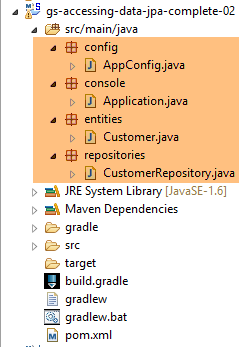 |
In this new project, we will not rely on the automatic configuration provided by Spring Boot. We will configure it manually. This can be useful if the default configurations do not suit our needs.
First, we will specify the necessary dependencies in the [pom.xml] file:
<?xml version="1.0" encoding="UTF-8"?>
<project xmlns="http://maven.apache.org/POM/4.0.0" xsi:schemaLocation="http://maven.apache.org/POM/4.0.0 http://maven.apache.org/maven-v4_0_0.xsd"
    xmlns:xsi="http://www.w3.org/2001/XMLSchema-instance">
    <modelVersion>4.0.0</modelVersion>

    <groupId>org.springframework</groupId>
    <artifactId>gs-accessing-data-jpa-02</artifactId>
    <version>0.1.0</version>

    <parent>
        <groupId>org.springframework.boot</groupId>
        <artifactId>spring-boot-starter-parent</artifactId>
        <version>1.2.7.RELEASE</version>
    </parent>

    <dependencies>
        <!-- Spring Data -->
        <dependency>
            <groupId>org.springframework.data</groupId>
            <artifactId>spring-data-jpa</artifactId>
        </dependency>
        <!-- Hibernate -->
        <dependency>
            <groupId>org.hibernate</groupId>
            <artifactId>hibernate-entitymanager</artifactId>
        </dependency>
        <!-- H2 Database -->
        <dependency>
            <groupId>com.h2database</groupId>
            <artifactId>h2</artifactId>
        </dependency>
        <!-- Tomcat JDBC -->
        <dependency>
            <groupId>org.apache.tomcat</groupId>
            <artifactId>tomcat-jdbc</artifactId>
        </dependency>
    </dependencies>

    <properties>
        <!-- use UTF-8 for everything -->
        <project.build.sourceEncoding>UTF-8</project.build.sourceEncoding>
        <project.reporting.outputEncoding>UTF-8</project.reporting.outputEncoding>
    </properties>

    <build>
        <plugins>
            <plugin>
                <groupId>org.springframework.boot</groupId>
                <artifactId>spring-boot-maven-plugin</artifactId>
            </plugin>
        </plugins>
    </build>

    <repositories>
        <repository>
            <id>spring-releases</id>
            <name>Spring Releases</name>
            <url>https://repo.spring.io/libs-release</url>
        </repository>
        <repository>
            <id>org.jboss.repository.releases</id>
            <name>JBoss Maven Release Repository</name>
            <url>https://repository.jboss.org/nexus/content/repositories/releases</url>
        </repository>
    </repositories>

    <pluginRepositories>
        <pluginRepository>
            <id>spring-releases</id>
            <name>Spring Releases</name>
            <url>https://repo.spring.io/libs-release</url>
        </pluginRepository>
    </pluginRepositories>

</project>
- lines 10–14: the parent Maven project whose libraries we will use;
- lines 18–21: Spring Data used to access the database;
- lines 23–26: the Hibernate implementation of the JPA specification;
- lines 28–31: the H2 DBMS;
- lines 33–36: Databases are often used with connection pools, which avoid repeatedly opening and closing connections. Here, the implementation used is [tomcat-jdbc];
In the new project, the [Customer] entity and the [CustomerRepository] interface remain unchanged. We will modify the [Application] class, which will be split into two classes:
- [Config], which will be the configuration class;
- [Main], which will be the executable class;
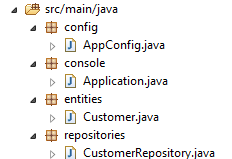 |
The executable class [Application] is now as follows:
package console;

import org.springframework.context.annotation.AnnotationConfigApplicationContext;

import repositories.CustomerRepository;
import config.AppConfig;
import entities.Customer;

public class Application {
    public static void main(String[] args) {
        // instantiation Spring context
        AnnotationConfigApplicationContext context = new AnnotationConfigApplicationContext(AppConfig.class);
        CustomerRepository repository = context.getBean(CustomerRepository.class);

        // save a couple of customers
        repository.save(new Customer("Jack", "Bauer"));
        repository.save(new Customer("Chloe", "O'Brian"));
        repository.save(new Customer("Kim", "Bauer"));
        repository.save(new Customer("David", "Palmer"));
        repository.save(new Customer("Michelle", "Dessler"));

        ...

        // closing context
        context.close();
    }
}
- line 9: the [Application] class no longer has any configuration annotations;
- lines 3–7: Note that there are no longer any [Spring Boot] package imports;
- line 12: We instantiate the Spring beans. We obtain the Spring context, which contains references to the beans created;
- line 13: we request a reference to the [CustomerRepository] bean;
The [ Config] class that configures the project is as follows:
package config;

import javax.persistence.EntityManagerFactory;

import org.apache.tomcat.jdbc.pool.DataSource;
import org.springframework.context.annotation.Bean;
import org.springframework.context.annotation.Configuration;
import org.springframework.data.jpa.repository.config.EnableJpaRepositories;
import org.springframework.orm.jpa.JpaTransactionManager;
import org.springframework.orm.jpa.JpaVendorAdapter;
import org.springframework.orm.jpa.LocalContainerEntityManagerFactoryBean;
import org.springframework.orm.jpa.vendor.Database;
import org.springframework.orm.jpa.vendor.HibernateJpaVendorAdapter;
import org.springframework.transaction.PlatformTransactionManager;
import org.springframework.transaction.annotation.EnableTransactionManagement;

//@EnableTransactionManagement
@EnableJpaRepositories(basePackages = { "repositories" })
@Configuration
// @ComponentScan(basePackages={"package1","package2"})
public class AppConfig {

    // h2 database
    @Bean
    public DataSource dataSource() {
        // data source TomcatJdbc
        DataSource dataSource = new DataSource();
        // configuration access JDBC
        dataSource.setDriverClassName("org.h2.Driver");
        dataSource.setUrl("jdbc:h2:./demo");
        dataSource.setUsername("sa");
        dataSource.setPassword("");
        // an initially open connection
        dataSource.setInitialSize(1);
        // result
        return dataSource;
    }

    // the provider JPA
    @Bean
    public JpaVendorAdapter jpaVendorAdapter() {
        HibernateJpaVendorAdapter hibernateJpaVendorAdapter = new HibernateJpaVendorAdapter();
        hibernateJpaVendorAdapter.setShowSql(false);
        hibernateJpaVendorAdapter.setGenerateDdl(true);
        hibernateJpaVendorAdapter.setDatabase(Database.H2);
        return hibernateJpaVendorAdapter;
    }

    // EntityManagerFactory
    @Bean
    public EntityManagerFactory entityManagerFactory(JpaVendorAdapter jpaVendorAdapter, DataSource dataSource) {
        LocalContainerEntityManagerFactoryBean factory = new LocalContainerEntityManagerFactoryBean();
        factory.setJpaVendorAdapter(jpaVendorAdapter);
        factory.setPackagesToScan("entities");
        factory.setDataSource(dataSource);
        factory.afterPropertiesSet();
        return factory.getObject();
    }

    // Transaction manager
    @Bean
    public PlatformTransactionManager transactionManager(EntityManagerFactory entityManagerFactory) {
        JpaTransactionManager txManager = new JpaTransactionManager();
        txManager.setEntityManagerFactory(entityManagerFactory);
        return txManager;
    }

}
- line 17: the [@EnableTransactionManagement] annotation indicates that the methods of the [CrudRepository] interfaces must be executed within a transaction. It has been commented out because this is the default behavior;
- line 18: the [@EnableJpaRepositories] annotation specifies the directories where the Spring Data [CrudRepository] interfaces are located. These interfaces will become Spring components and be available in the Spring context;
- line 19: the [@Configuration] annotation makes the [Config] class a Spring configuration class;
- line 20: the [@ComponentScan] annotation lists the directories where Spring components should be searched for. Spring components are classes annotated with Spring annotations such as @Service, @Component, @Controller, etc. Here, there are no others besides those defined within the [AppConfig] class, so the annotation has been commented out;
- lines 24–37: define the data source, the H2 database. It is the @Bean annotation on line 25 that makes the object created by this method a Spring-managed component. The method name here can be anything. However, it must be named [dataSource] if the EntityManagerFactory on line 51 is absent and defined via auto-configuration;
- line 30: the database will be named [demo] and will be generated in the project folder;
- Lines 40–47: define the JPA implementation used, in this case a Hibernate implementation. The method name can be anything here;
- line 43: no SQL logs;
- line 44: the database will be created if it does not exist;
- lines 50–58: define the EntityManagerFactory that will manage JPA persistence. The method must be named [entityManagerFactory];
- line 51: the method receives two parameters of the types of the two beans defined previously. These will then be constructed and injected by Spring as method parameters;
- line 53: sets the JPA implementation to be used;
- line 54: specifies the directories where the JPA entities can be found;
- line 55: sets the data source to be managed;
- lines 61–66: the transaction manager. The method must be named [transactionManager]. It receives the bean from lines 51–58 as a parameter;
- line 64: the transaction manager is associated with the EntityManagerFactory;
The preceding methods can be defined in any order.
Running the project yields the same results. A new file appears in the project folder, the H2 database file:
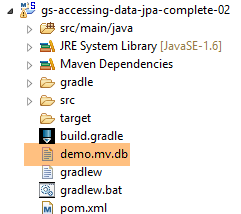 |
11.2.6. Creating an executable archive
To create an executable archive of the project, proceed as follows:
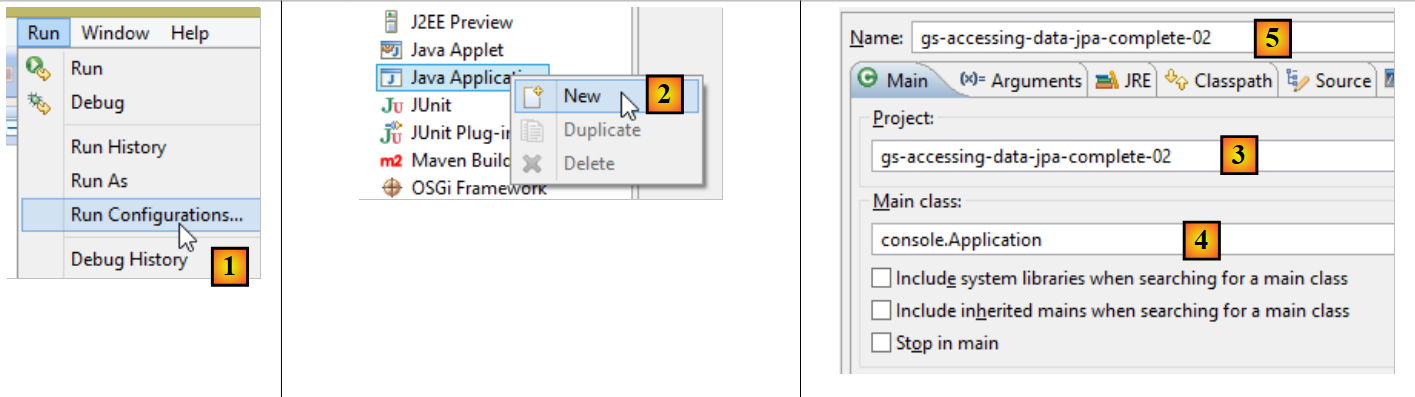 |
- in [1]: create a runtime configuration;
- in [2]: of type [Java Application]
- in [3]: specify the project to run (use the Browse button);
- in [4]: specify the class to run;
- in [5]: the name of the run configuration—can be anything;
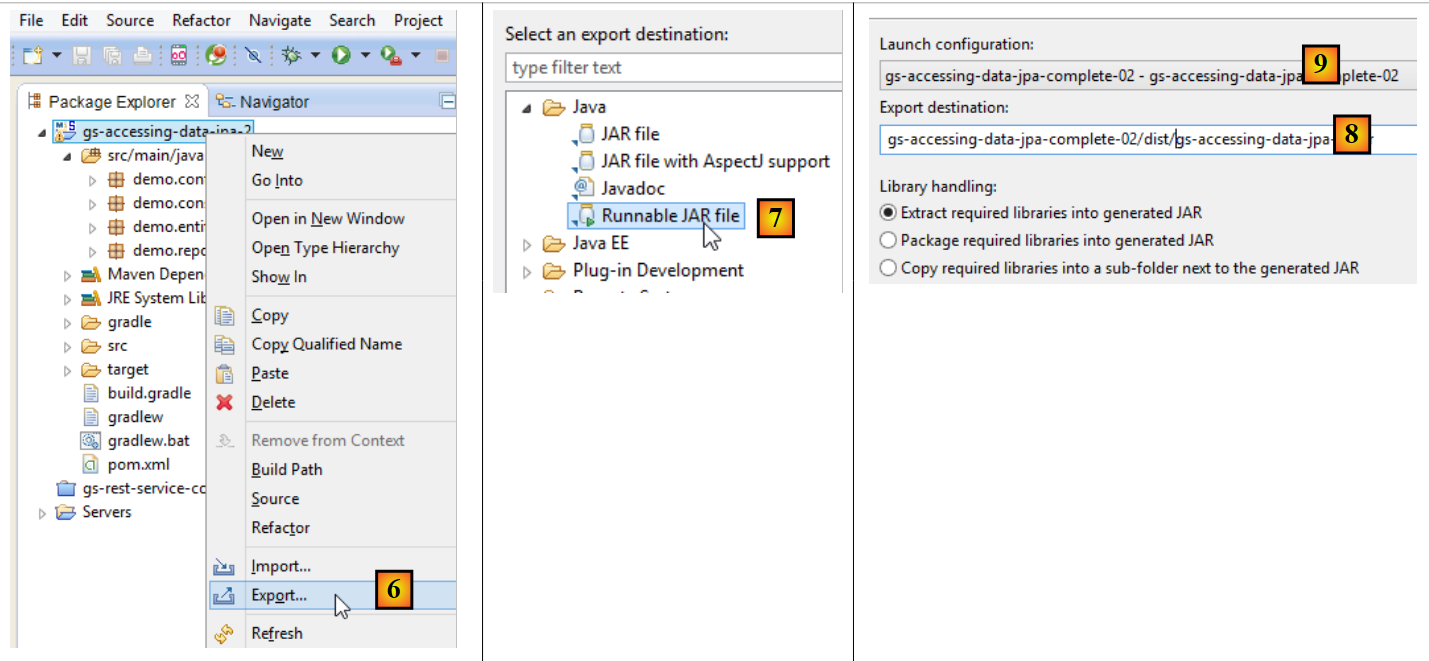 |
- in [6]: export the project;
- in [7]: as an executable JAR archive;
- in [8]: specifies the path and name of the executable file to be created;
- in [9]: the name of the runtime configuration created in [5];
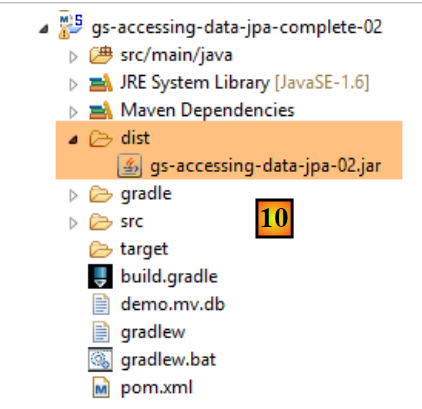 |
- in [10], the created archive;
Once this is done, open a console in the folder containing the executable archive:
The archive is executed as follows:
.....\dist>java -jar gs-accessing-data-jpa-02.jar
The results displayed in the console are as follows:
11.3. Example 2
11.3.1. Introduction
We will revisit the example of the product table we used to introduce the JDBC API and create the following architecture:
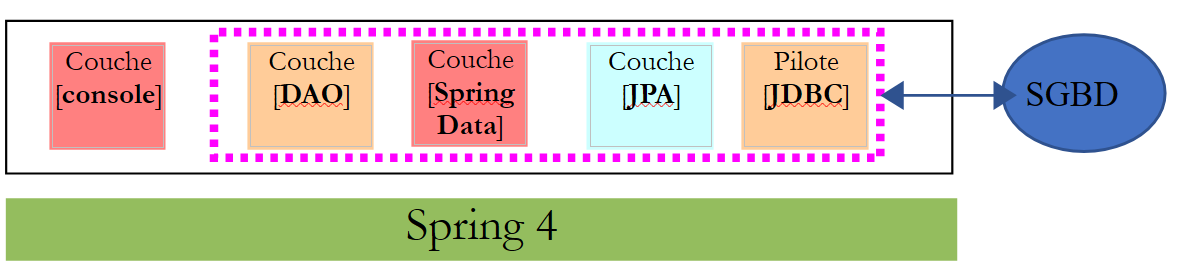 |
The [dbintrospringjpa] database has two tables: [PRODUCTS] and [CATEGORIES]. The [CATEGORIES] table is as follows:
 |
- [ID]: primary key in AUTO_INCREMENT mode;
- [VERSION]: record version number;
- [NAME]: category name - unique;
The [PRODUCTS] table is as follows:
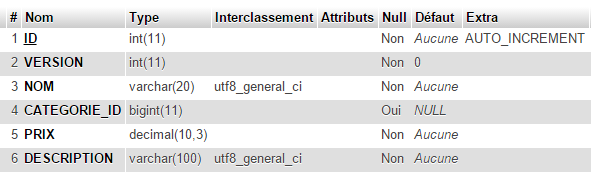 |
- [ID]: primary key in AUTO_INCREMENT mode;
- [VERSION]: record version number;
- [NAME]: product name - unique;
- [CATEGORY_ID]: category ID - foreign key on the [CATEGORIES.ID] field;
- [PRICE]: its price;
- [DESCRIPTION]: a description of the product;
Task: Create the [dbintrospringdata] database using the [dbintrospringdata.sql] SQL script from the support materials:
11.3.2. Creating the Maven project
To create a Spring Data project template, follow these steps:
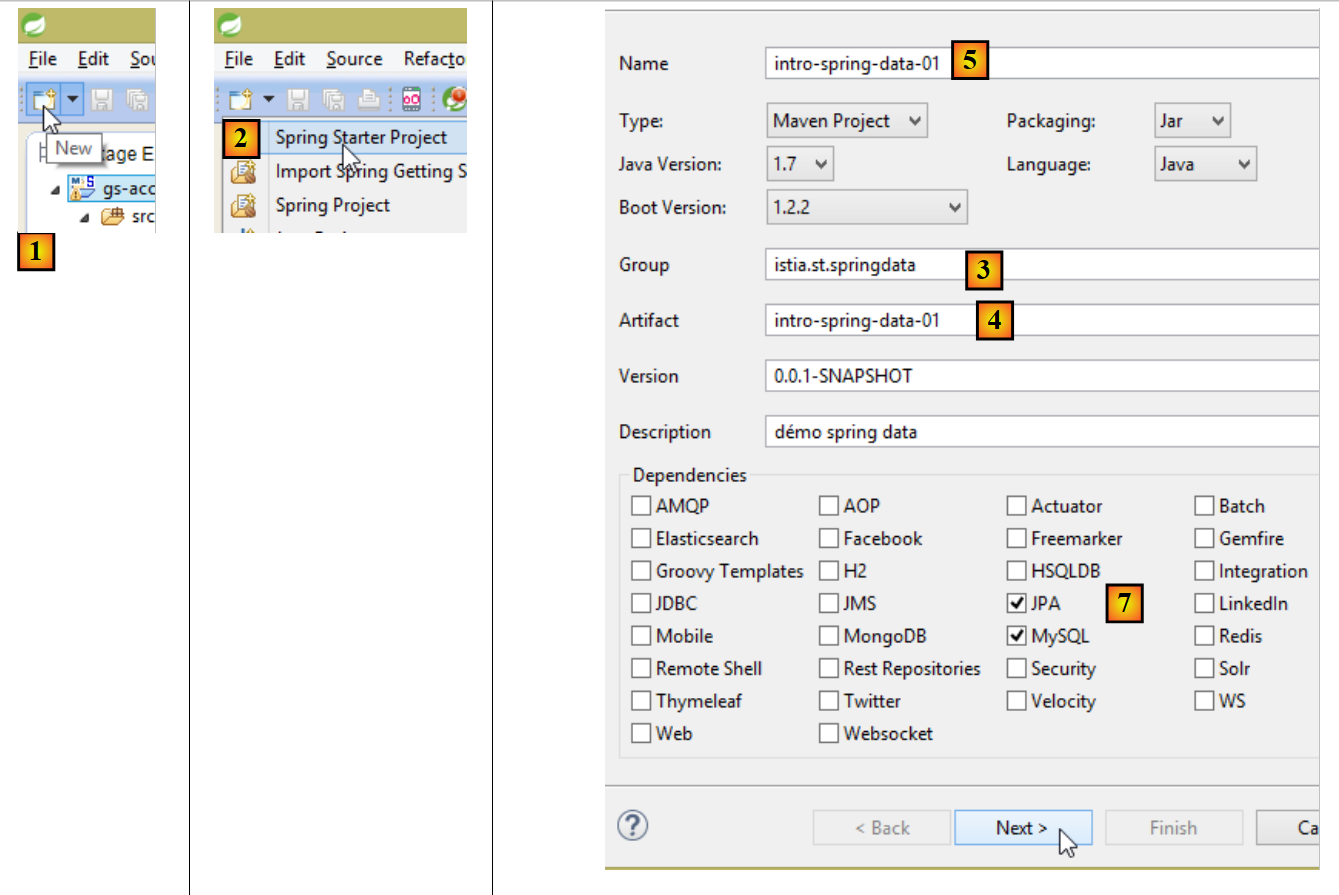 |
- In [1], create a new project;
- In [2], select the [Spring Starter Project] type;
- The generated project will be a Maven project. In [3], specify the project group name;
- In [4], specify the name of the artifact (a JAR file in this case) that will be created when the project is built;
- in [5]: the Eclipse project name – can be anything (does not have to be the same as [4]);
- in [7]: specify that you are creating a project with a [JPA] layer using the MySQL DBMS. The dependencies required for such a project will then be included in the [pom.xml] file;
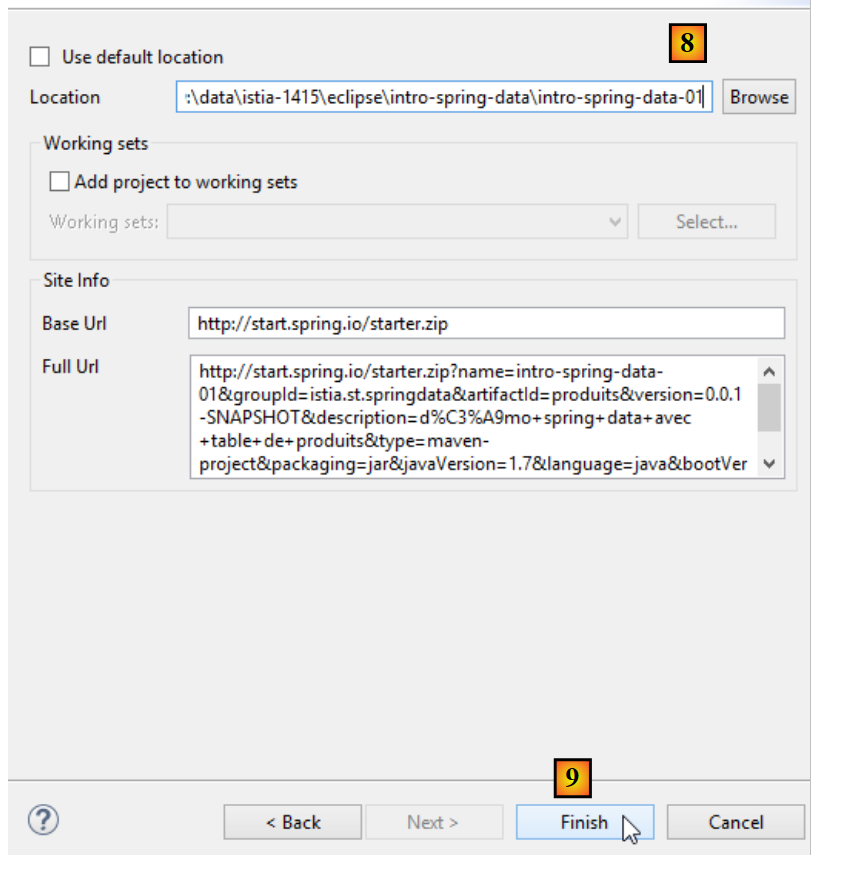 |
- in [8], enter the name of the project folder;
- in [9], finish the wizard;
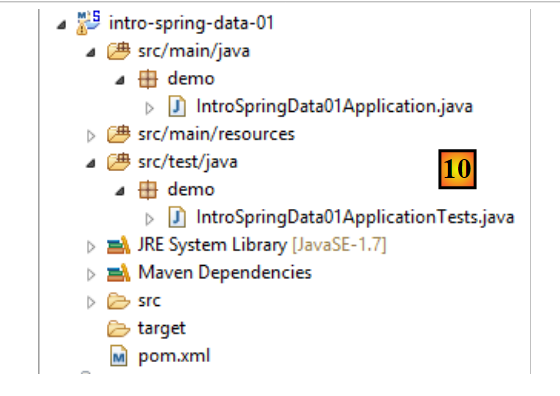 |
- in [10]: the created project;
The [pom.xml] file includes the dependencies required for a JPA project:
<?xml version="1.0" encoding="UTF-8"?>
<project xmlns="http://maven.apache.org/POM/4.0.0" xmlns:xsi="http://www.w3.org/2001/XMLSchema-instance"
    xsi:schemaLocation="http://maven.apache.org/POM/4.0.0 http://maven.apache.org/xsd/maven-4.0.0.xsd">
    <modelVersion>4.0.0</modelVersion>

    <groupId>istia.st.springdata</groupId>
    <artifactId>intro-spring-data-01</artifactId>
    <version>0.0.1-SNAPSHOT</version>
    <packaging>jar</packaging>

    <name>intro-spring-data-01</name>
    <description>démo spring data avec table de produits</description>

    <parent>
        <groupId>org.springframework.boot</groupId>
        <artifactId>spring-boot-starter-parent</artifactId>
        <version>1.2.2.RELEASE</version>
        <relativePath/> <!-- lookup parent from repository -->
    </parent>

    <properties>
        <project.build.sourceEncoding>UTF-8</project.build.sourceEncoding>
        <start-class>demo.IntroSpringData01Application</start-class>
        <java.version>1.7</java.version>
    </properties>

    <dependencies>
        <dependency>
            <groupId>org.springframework.boot</groupId>
            <artifactId>spring-boot-starter-data-jpa</artifactId>
        </dependency>
        <dependency>
            <groupId>mysql</groupId>
            <artifactId>mysql-connector-java</artifactId>
            <scope>runtime</scope>
        </dependency>
        <dependency>
            <groupId>org.springframework.boot</groupId>
            <artifactId>spring-boot-starter-test</artifactId>
            <scope>test</scope>
        </dependency>
    </dependencies>

    <build>
        <plugins>
            <plugin>
                <groupId>org.springframework.boot</groupId>
                <artifactId>spring-boot-maven-plugin</artifactId>
            </plugin>
        </plugins>
    </build>

</project>
- lines 14–19: the parent Maven project—defines a large number of libraries with their versions—we use these libraries as Maven dependencies without specifying their versions;
- lines 28–31: the dependency required for JPA – will include [Spring Data];
- lines 32–36: the dependency on the MySQL JDBC driver;
- lines 37–41: the dependencies required for JUnit tests integrated with Spring;
The executable class [Application] does nothing but is preconfigured:
package demo;

import org.springframework.boot.SpringApplication;
import org.springframework.boot.autoconfigure.SpringBootApplication;

@SpringBootApplication
public class IntroSpringData01Application {

    public static void main(String[] args) {
        SpringApplication.run(IntroSpringData01Application.class, args);
    }
}
- The [@SpringBootApplication] annotation makes the class a project auto-configuration class;
The test class [ApplicationTests] does nothing but is preconfigured:
package demo;

import org.junit.Test;
import org.junit.runner.RunWith;
import org.springframework.boot.test.SpringApplicationConfiguration;
import org.springframework.test.context.junit4.SpringJUnit4ClassRunner;

@RunWith(SpringJUnit4ClassRunner.class)
@SpringApplicationConfiguration(classes = IntroSpringData01Application.class)
public class IntroSpringData01ApplicationTests {

    @Test
    public void contextLoads() {
    }

}
- Line 9: The [@SpringApplicationConfiguration] annotation allows the [Application] configuration file to be used. The test class will thus benefit from all the beans defined in this file;
- line 8: the [@RunWith] annotation enables the integration of Spring with JUnit: the class can be executed as a JUnit test. [@RunWith] is a JUnit annotation (line 4), whereas the [SpringJUnit4ClassRunner] class is a Spring class (line 6);
Now that we have a JPA application skeleton, we can complete it to write the persistence layer project associated with the product database.
11.3.3. The Eclipse Project
We’ll expand on the previous project as follows:
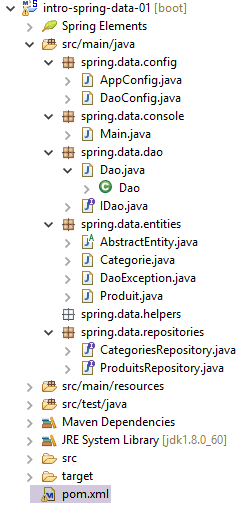 |
- [AppConfig.java]: the Spring project configuration class;
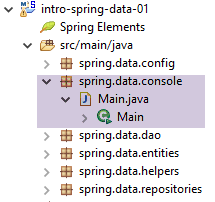
- [Main.java]: the project’s executable class;
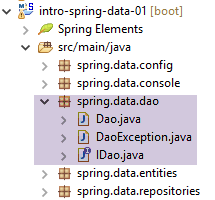
- [IDao.java]: the [DAO] layer interface;
- [Dao.java]: the implementation class of the [DAO] layer;
- [AbstractEntity.java]: the parent class of the [Product] and [Category] classes;
- [Product.java]: class associated with a row in the [PRODUCTS] table in the database;
- [Category.java]: class associated with a row in the [CATEGORIES] table in the database;
- [ProductsRepository]: the Spring Data interface for accessing the [PRODUCTS] table;
- [CategoriesRepository]: the Spring Data interface for accessing the [CATEGORIES] table;
- [pom.xml]: the Maven project configuration file;
This project implements the following architecture:
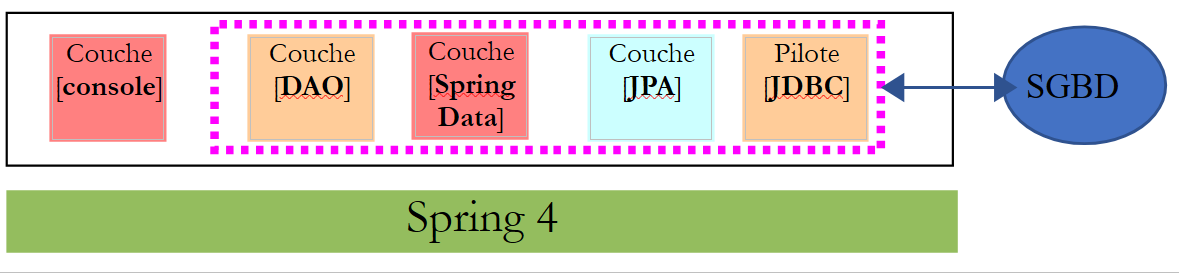 |
The [DAO] layer only sees the layer implemented by [Spring Data].
11.3.4. Maven Configuration
The [pom.xml] file for the Maven project is as follows:
<?xml version="1.0" encoding="UTF-8"?>
<project xmlns="http://maven.apache.org/POM/4.0.0" xmlns:xsi="http://www.w3.org/2001/XMLSchema-instance"
    xsi:schemaLocation="http://maven.apache.org/POM/4.0.0 http://maven.apache.org/xsd/maven-4.0.0.xsd">
    <modelVersion>4.0.0</modelVersion>

    <groupId>istia.st.springdata</groupId>
    <artifactId>intro-spring-data-01</artifactId>
    <version>0.0.1-SNAPSHOT</version>
    <packaging>jar</packaging>

    <name>intro-spring-data-01</name>
    <description>démo spring data avec table de produits</description>

    <parent>
        <groupId>org.springframework.boot</groupId>
        <artifactId>spring-boot-starter-parent</artifactId>
        <version>1.2.7.RELEASE</version>
    </parent>

    <dependencies>
        <!-- Spring Data -->
        <dependency>
            <groupId>org.springframework.data</groupId>
            <artifactId>spring-data-jpa</artifactId>
        </dependency>
        <!-- Hibernate -->
        <dependency>
            <groupId>org.hibernate</groupId>
            <artifactId>hibernate-entitymanager</artifactId>
        </dependency>
        <!-- MySQL Database -->
        <dependency>
            <groupId>mysql</groupId>
            <artifactId>mysql-connector-java</artifactId>
        </dependency>
        <!-- Tomcat JDBC -->
        <dependency>
            <groupId>org.apache.tomcat</groupId>
            <artifactId>tomcat-jdbc</artifactId>
        </dependency>
        <!-- library jSON -->
        <dependency>
            <groupId>com.fasterxml.jackson.core</groupId>
            <artifactId>jackson-core</artifactId>
        </dependency>
        <dependency>
            <groupId>com.fasterxml.jackson.core</groupId>
            <artifactId>jackson-databind</artifactId>
        </dependency>
        <!-- Google Guava -->
        <dependency>
            <groupId>com.google.guava</groupId>
            <artifactId>guava</artifactId>
            <version>16.0.1</version>
        </dependency>
        <!-- Spring Boot Test -->
        <dependency>
            <groupId>org.springframework.boot</groupId>
            <artifactId>spring-boot-starter-test</artifactId>
            <scope>test</scope>
        </dependency>
        <!-- Spring Boot -->
        <dependency>
            <groupId>org.springframework.boot</groupId>
            <artifactId>spring-boot</artifactId>
            <scope>test</scope>
        </dependency>
        <!-- log library -->
        <dependency>
            <groupId>org.springframework.boot</groupId>
            <artifactId>spring-boot-starter-logging</artifactId>
        </dependency>
    </dependencies>

    <properties>
        <project.build.sourceEncoding>UTF-8</project.build.sourceEncoding>
        <java.version>1.8</java.version>
    </properties>

    <build>
        <plugins>
            <plugin>
                <groupId>org.apache.maven.plugins</groupId>
                <artifactId>maven-surefire-plugin</artifactId>
                <version>2.18.1</version>
            </plugin>
        </plugins>
    </build>

</project>
This configuration is the one used and explained in section 11.2.5. We add the following libraries:
- lines 42–49: a JSON library used by the [toString] method of the [Product] class;
- lines 51–55: the [Google Guava] library, which provides utility methods for managing collections of elements. It will be used by the [Dao] class, which implements the [DAO] layer;
- lines 56–67: the libraries required for JUnit testing;
- lines 69–72: a logging library;
- lines 81–86: the Maven plugins required for the project;
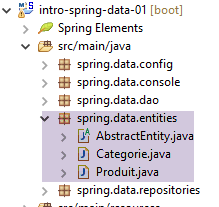
11.3.5. Entities of the [JPA] layer
[DAO] layer[Console] layer[JPA] layer[JDBC] driver[Spring Data] layerSpring 4DBMS
 |
11.3.5.1. The [AbstractEntity] class
The [AbstractEntity] class is as follows:
package spring.data.entities;

import javax.persistence.Column;
import javax.persistence.GeneratedValue;
import javax.persistence.GenerationType;
import javax.persistence.Id;
import javax.persistence.MappedSuperclass;
import javax.persistence.Version;

import com.fasterxml.jackson.core.JsonProcessingException;
import com.fasterxml.jackson.databind.ObjectMapper;

@MappedSuperclass
public abstract class AbstractEntity {
    // properties
    @Id
    @GeneratedValue(strategy = GenerationType.IDENTITY)
    @Column(name = "ID")
    protected Long id;
    @Version
    @Column(name = "VERSION")
    protected Long version;

    // manufacturers
    public AbstractEntity() {

    }

    public AbstractEntity(Long id, Long version) {
        this.id = id;
        this.version = version;
    }

    // redefine [equals] and [hashcode]
    @Override
    public int hashCode() {
        return (id != null ? id.hashCode() : 0);
    }

    @Override
    public boolean equals(Object entity) {
        if (!(entity instanceof AbstractEntity)) {
            return false;
        }
        String class1 = this.getClass().getName();
        String class2 = entity.getClass().getName();
        if (!class2.equals(class1)) {
            return false;
        }
        AbstractEntity other = (AbstractEntity) entity;
        return id != null && this.id.longValue() == other.id.longValue();
    }

    // signature jSON
    public String toString() {
        ObjectMapper mapper = new ObjectMapper();
        try {
            return mapper.writeValueAsString(this);
        } catch (JsonProcessingException e) {
            e.printStackTrace();
            return null;
        }
    }

    // getters and setters
....
}
The purpose of this class is to provide a parent class for JPA entities by encapsulating the [id, version] properties (lines 19, 22) common to both the [Product] and [Category] entities linked to the database in a single location. These properties are linked to the [ID, VERSION] columns of the tables (lines 18, 21).
- line 13: the [@MappedSuperclass] annotation indicates that the class is a parent class of JPA entities;
- line 16: the [@Id] annotation indicates that the [id] field (it could have a different name) is associated with the primary key of a table;
- line 17: the [@GeneratedValue(strategy=GenerationType.IDENTITY)] annotation sets the primary key generation mode. The [GenerationType.IDENTITY] mode will use the [AUTO_INCREMENT] mode with MySQL. With another DBMS, this mode would use a different method. The advantage is that the developer does not have to worry about this, and their code remains valid regardless of the DBMS used;
- line 18: the [@Column] annotation specifies the column associated with the field. When this annotation is not present, JPA assumes that the column has the same name as the field. This is the case here. Therefore, we could have omitted this annotation;
- line 20: the [@Version] annotation indicates that the [version] field is associated with a versioning column. The JPA implementation will increment this version number each time the entity is modified. This number is used to prevent simultaneous updates of the entity by two different users: two users, U1 and U2, read entity E with a version number equal to V1. U1 modifies E and persists this change to the database: the version number then changes to V1+1. U2 modifies E in turn and persists this change to the database: they will receive an exception because their version (V1) differs from the one in the database (V1+1);
- lines 35–52: redefinition of the [hashCode] and [equals] methods. By default, [obj1.equals(obj2)] returns true if [obj1 == obj2], i.e., if obj1 and obj2 are two equal pointers. If we want to compare the objects pointed to rather than the pointers themselves, we must override the [equals] method and the [hashCode] method. The latter must return the same value for two objects that the [equals] method deems equal;
- lines 42–51: two objects of type [AbstractEntity] or derived types will be considered equal if their primary keys [id] are equal;
- lines 35–38: The [hashCode] method does indeed return the same value for two identical [AbstractEntity] objects that therefore have the same primary key [id];
- lines 55-63: the [toString] method returns the JSON string of the [this] object. If this object refers to a child class, this method will return the JSON string of the child class. This eliminates the need to create a [toString] method in the child classes;
11.3.5.2. The JPA entity [Product]
The [Product] class is a JPA entity associated with a row in the [PRODUCTS] table:
|
package spring.data.entities;

import javax.persistence.Column;
import javax.persistence.Entity;
import javax.persistence.FetchType;
import javax.persistence.JoinColumn;
import javax.persistence.ManyToOne;
import javax.persistence.Table;

import com.fasterxml.jackson.annotation.JsonFilter;

@Entity
@Table(name = "PRODUITS")
@JsonFilter("jsonFilterProduit")
public class Produit extends AbstractEntity {

    // properties
    @Column(name = "NOM")
    private String nom;

    @Column(name = "CATEGORIE_ID", insertable = false, updatable = false)
    private Long idCategorie;

    @Column(name = "PRIX")
    private double prix;

    @Column(name = "DESCRIPTION")
    private String description;

    // the category
    @ManyToOne(fetch = FetchType.LAZY)
    @JoinColumn(name = "CATEGORIE_ID")
    private Categorie categorie;

    // manufacturers
    public Produit() {

    }

    public Produit(String nom, double prix, String description) {
        this.nom = nom;
        this.prix = prix;
        this.description = description;
    }

    // getters and setters
...
}
- line 12: the [@Entity] annotation makes the [Product] class an entity managed by the [JPA] layer;
- Line 13: The annotation [@Table(name = "PRODUCTS")] indicates that the [Product] class represents a row in the [PRODUCTS] table in the database;
- Line 14: the name of the JSON filter to apply to the entity. We will see that the [categorie] property in line 13 is not always available. It must therefore be excluded from the JSON representation of the object. To do this, we need a filter. We will therefore specify whether or not we want the [categorie] property in a filter named [jsonFilterCategorie];
- line 18: the [@Column] annotation associates the [nom] field with the [NOM] column in the [PRODUITS] table. When the field has the same name as the associated column, the [@Column] annotation can be omitted. That would be the case here;
- lines 31–33: the product category;
- line 31: the [@ManyToOne] annotation indicates that the column referenced by the annotation on line 32 [@JoinColumn(name = "CATEGORIE_ID")] is a foreign key from the [PRODUCTS] table of the [Product] entity to the [CATEGORIES] table associated with the entity on line 33. This annotation must be applied to a JPA entity. Therefore, the class in line 33 must be a JPA entity;
- Line 31: The annotation [fetch = FetchType.LAZY] specifies that when a product is retrieved from the [PRODUCTS] table, its category (line 33) is not retrieved immediately (lazy loading). It is then obtained during the first call to the [getCategory] method. This attribute is not mandatory. The JPA implementation used is allowed to ignore it. It is because the [category] property may or may not be present that we introduced the JSON filter on line 14. Existing JPA implementations (Hibernate, Eclipselink, OpenJPA) do not handle this annotation in the same way. Hibernate enhances the initial [getCategory] method (which simply returns the category field) by making a call to the DBMS to retrieve the category. For this to work, the DBMS connection initially used to retrieve the product must still be open; otherwise, an exception occurs.
11.3.5.3. The JPA entity [Category]
The [Category] class is a JPA entity associated with a row in the [CATEGORIES] table:
|
Its code is as follows:
package spring.data.entities;

import java.util.HashSet;
import java.util.Set;

import javax.persistence.CascadeType;
import javax.persistence.Column;
import javax.persistence.Entity;
import javax.persistence.FetchType;
import javax.persistence.OneToMany;
import javax.persistence.Table;

import com.fasterxml.jackson.annotation.JsonFilter;

@Entity
@Table(name = "CATEGORIES")
@JsonFilter("jsonFilterCategorie")
public class Categorie extends AbstractEntity {

    // properties
    @Column(name = "NOM")
    private String nom;

    // related products
    @OneToMany(fetch = FetchType.LAZY, mappedBy = "categorie", cascade = { CascadeType.ALL })
    public Set<Produit> produits = new HashSet<Produit>();

    // manufacturers
    public Categorie() {

    }

    public Categorie(String nom) {
        this.nom = nom;
    }

    // methods
    public void addProduit(Produit produit) {
        // we add the product
        produits.add(produit);
        // set your category
        produit.setCategorie(this);
    }

    // getters and setters
...
}
- lines 21-22: the category name;
- lines 25-26: the products in this category;
- line 25: the [@OneToMany] annotation is the inverse relationship of the [@ManyToOne] relationship we encountered in the [Product] entity. The [mappedBy = "category"] attribute specifies the field in the [Product] entity annotated by the inverse [@ManyToOne] relationship. The attribute [cascade = { CascadeType.ALL }] specifies that operations (persist, merge, remove) performed on an @Entity [Category] should cascade to the [products] in line 26. Partial cascades can be specified using the constants [CascadeType.PERSIST, CascadeType.MERGE, CascadeType.REMOVE];
- line 25: the [fetch = FetchType.LAZY] attribute specifies that when a category is retrieved from the [CATEGORIES] table, its products are not immediately retrieved. They will be retrieved during the first call to the [getProduits] method. Existing JPA implementations (Hibernate, Eclipselink, OpenJPA) do not handle this annotation in the same way. Hibernate enhances the initial [getProduits] method (which simply returns the products field) by making a call to the DBMS to fetch the products for the category. For this to be possible, the connection to the DBMS initially used to retrieve the category must still be open. This attribute is mandatory. The JPA implementation cannot ignore it. Because the [products] property may or may not be initialized, we have introduced the JSON filter on line 17, which allows us to specify whether or not we want this property;
- Line 26: The [Set] type is an interface. The [HashSet] type is a class that implements this interface. It implements a collection of elements called a set. A set cannot contain two identical objects. Here, the objects are of type [Product]. Thus, within the set, we cannot have two identical objects. Since the [equals] method of the parent class [AbstractEntity] has been overridden to state that two products are identical if they have the same primary key, the [products] field cannot contain two products with the same primary key;
- lines 38–43: the [addProduct] method allows a product to be added to the category;
11.3.6. The [Spring Data] layer
[DAO] Layer[Console] Layer[JPA] Layer[JDBC] Driver[Spring Data] LayerSpring 4DBMS
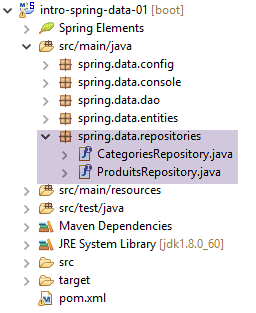 |
The [CategoriesRepository] interface manages access to the [CATEGORIES] table:
package spring.data.repositories;

import org.springframework.data.jpa.repository.Query;
import org.springframework.data.repository.CrudRepository;

import spring.data.entities.Categorie;

public interface CategoriesRepository extends CrudRepository<Categorie, Long> {

    // categorie avec ses produits
    @Query("select c from Categorie c left join fetch c.produits p where c.id=?1")
    public Categorie getCategorieByIdWithProduits(Long id);

    @Query("select c from Categorie c left join fetch c.produits p where c.nom=?1")
    public Categorie getCategorieByNameWithProduits(String nom);

    // une catégorie sans ses produits désignée par son nom
    public Categorie findByNom(String nom);
}
- Line 8: The [CrudRepository] interface was used and explained in Section 11.2.3. Recall that:
- the first type of the interface is the JPA entity managed for CRUD operations (findOne, findAll, save, delete, deleteAll),
- the second type is the primary key of the JPA entity, here an integer [Long];
- line 12: the method on line 12 is implemented by the JPQL (Java Persistence Query Language) query on line 11. This query retrieves JPA entities. In such a query:
- tables are replaced by their associated JPA entities;
- columns are replaced by fields of the JPA entities used in the query;
- line 11: the JPQL query returns a category along with its products. Recall that in the [Category] entity, the [products] field had the attribute [fetch = FetchType.LAZY] (lazy loading). In the JPQL query, we force the loading of the products using the [fetch] keyword. The query’s ?1 parameter will be replaced at runtime by the value of the first parameter of the method on line 12, i.e., the [Long id] parameter;
- Lines 14–15: a similar method for a category identified by its name;
- line 18: the [findByName] method will be automatically implemented by [Spring Data] because the [Category] type has a [name] field;
The [ProductsRepository] interface manages access to the [PRODUCTS] table:
package spring.data.repositories;

import org.springframework.data.jpa.repository.Query;
import org.springframework.data.repository.CrudRepository;

import spring.data.entities.Produit;

public interface ProduitsRepository extends CrudRepository<Produit, Long> {

    // un produit avec sa catégorie
    @Query("select p from Produit p left join fetch p.categorie c where p.id=?1")
    public Produit getProduitByIdWithCategorie(Long id);

    @Query("select p from Produit p left join fetch p.categorie c where p.nom=?1")
    public Produit getProduitByNameWithCategorie(String nom);

    // un produit sans sa catégorie désigné par son nom
    public Produit findByNom(String nom);
}
The explanations are the same as for the [CategoriesRepository] interface.
These interfaces will be implemented by classes generated by [Spring Data] when the project runs. Such classes are called [proxies]. By default, the methods of the implementation class run within a transaction. The fact that these interfaces extend the [CrudRepository] class makes them Spring components.
11.3.7. The [DAO] layer
[DAO] Layer[Console] Layer[JPA] Layer[JDBC] Driver[Spring Data] LayerSpring 4DBMS
 |
The [IDao] interface of the [DAO] layer is as follows:
package spring.data.dao;

import java.util.List;

import spring.data.entities.Categorie;
import spring.data.entities.Produit;

public interface IDao {

    // insert product list
    public List<Produit> addProduits(List<Produit> produits);

    // removal of all products
    public void deleteAllProduits();

    // product list update
    public List<Produit> updateProduits(List<Produit> produits);

    // all products obtained
    public List<Produit> getAllProduits();

    // inserting a list of categories
    public List<Categorie> addCategories(List<Categorie> categories);

    // delete all categories
    public void deleteAllCategories();

    // updating a list of categories
    public List<Categorie> updateCategories(List<Categorie> categories);

    // obtaining all categories
    public List<Categorie> getAllCategories();

    // a specific product with or without its category
    public Produit getProduitByIdWithoutCategorie(Long idProduit);

    public Produit getProduitByIdWithCategorie(Long idProduit);

    public Produit getProduitByNameWithCategorie(String nom);

    public Produit getProduitByNameWithoutCategorie(String nom);

    // a particular category with or without its products
    public Categorie getCategorieByIdWithoutProduits(Long idCategorie);

    public Categorie getCategorieByIdWithProduits(Long idCategorie);

    public Categorie getCategorieByNameWithProduits(String nom);

    public Categorie getCategorieByNameWithoutProduits(String nom);
}
Here, we have adopted the rule that any method that modifies the objects passed as input parameters must return them in its result. The reason for this rule was explained in Section 4.2: it allows a layer and its client to reside in two separate JVMs and thus operate in a client/server configuration.
The [Dao] implementation of this interface is as follows:
package spring.data.dao;

import java.util.ArrayList;
import java.util.List;

import org.springframework.beans.factory.annotation.Autowired;
import org.springframework.stereotype.Component;

import com.google.common.collect.Lists;

import spring.data.entities.Categorie;
import spring.data.entities.Produit;
import spring.data.repositories.CategoriesRepository;
import spring.data.repositories.ProduitsRepository;

@Component
public class Dao implements IDao {

    @Autowired
    private ProduitsRepository produitsRepository;

    @Autowired
    private CategoriesRepository categoriesRepository;

    @Override
    public List<Produit> addProduits(List<Produit> produits) {
        try {
            return Lists.newArrayList(produitsRepository.save(produits));
        } catch (Exception e) {
            throw new DaoException(101, getMessagesForException(e));
        }
    }

    @Override
    public void deleteAllProduits() {
        try {
            produitsRepository.deleteAll();
        } catch (Exception e) {
            throw new DaoException(102, getMessagesForException(e));
        }
    }

    @Override
    public List<Produit> updateProduits(List<Produit> produits) {
        try {
            return Lists.newArrayList(produitsRepository.save(produits));
        } catch (Exception e) {
            throw new DaoException(103, getMessagesForException(e));
        }
    }

    @Override
    public List<Categorie> addCategories(List<Categorie> categories) {
        try {
            return Lists.newArrayList(categoriesRepository.save(categories));
        } catch (Exception e) {
            throw new DaoException(104, getMessagesForException(e));
        }
    }

    @Override
    public void deleteAllCategories() {
        try {
            categoriesRepository.deleteAll();
        } catch (Exception e) {
            throw new DaoException(105, getMessagesForException(e));
        }
    }

    @Override
    public List<Categorie> updateCategories(List<Categorie> categories) {
        try {
            return Lists.newArrayList(categoriesRepository.save(categories));
        } catch (Exception e) {
            throw new DaoException(106, getMessagesForException(e));
        }
    }

    @Override
    public List<Categorie> getAllCategories() {
        try {
            return Lists.newArrayList(categoriesRepository.findAll());
        } catch (Exception e) {
            throw new DaoException(107, getMessagesForException(e));
        }
    }

    @Override
    public List<Produit> getAllProduits() {
        try {
            return Lists.newArrayList(produitsRepository.findAll());
        } catch (Exception e) {
            throw new DaoException(108, getMessagesForException(e));
        }
    }

    @Override
    public Produit getProduitByIdWithCategorie(Long idProduit) {
        try {
            return produitsRepository.getProduitByIdWithCategorie(idProduit);
        } catch (Exception e) {
            throw new DaoException(109, getMessagesForException(e));
        }
    }

    @Override
    public Categorie getCategorieByIdWithProduits(Long idCategorie) {
        try {
            return categoriesRepository.getCategorieByIdWithProduits(idCategorie);
        } catch (Exception e) {
            throw new DaoException(110, getMessagesForException(e));
        }
    }

    @Override
    public Categorie getCategorieByNameWithProduits(String nom) {
        try {
            return categoriesRepository.getCategorieByNameWithProduits(nom);
        } catch (Exception e) {
            throw new DaoException(111, getMessagesForException(e));
        }
    }

    @Override
    public Produit getProduitByNameWithCategorie(String nom) {
        try {
            return produitsRepository.getProduitByNameWithCategorie(nom);
        } catch (Exception e) {
            throw new DaoException(112, getMessagesForException(e));
        }
    }

    @Override
    public Produit getProduitByIdWithoutCategorie(Long idProduit) {
        try {
            return produitsRepository.findOne(idProduit);
        } catch (Exception e) {
            throw new DaoException(113, getMessagesForException(e));
        }
    }

    @Override
    public Categorie getCategorieByIdWithoutProduits(Long idCategorie) {
        try {
            return categoriesRepository.findOne(idCategorie);
        } catch (Exception e) {
            throw new DaoException(114, getMessagesForException(e));
        }
    }

    @Override
    public Produit getProduitByNameWithoutCategorie(String nom) {
        try {
            return produitsRepository.findByNom(nom);
        } catch (Exception e) {
            throw new DaoException(115, getMessagesForException(e));
        }
    }

    @Override
    public Categorie getCategorieByNameWithoutProduits(String nom) {
        try {
            return categoriesRepository.findByNom(nom);
        } catch (Exception e) {
            throw new DaoException(116, getMessagesForException(e));
        }
    }

}
- line 16: the [@Component] annotation makes the [Dao] class a Spring component;
- lines 19–23: injection of references onto the two [CrudRepository] interfaces from [Spring Data]. This injection occurs during the instantiation of Spring objects, typically at the start of the Spring project’s execution;
- Note in lines 28 and 46 that the [save] method of the [productsRepository] interface is used for both inserting and updating products. [Spring Data] uses the product’s primary key to determine whether to perform an insertion or an update. If the primary key is [null], it will be an insertion; otherwise, it will be an update;
- Line 82: We use the [Lists.newArrayList] method from the Guava library to obtain a list of products. The [productsRepository.findAll()] method returns a [Iterable<Product>] type;
- line 28: the [productsRepository.save(products)] method returns a [Iterable<Product>]. The same applies to the other [save] operations in the class;
In the [Dao] class above, exceptions that may occur are encapsulated in the following [DaoException] type:
package spring.data.dao;

import java.io.Serializable;
import java.util.ArrayList;
import java.util.List;

// exception class for the Elections application
// the exception is uncontrolled

public class DaoException extends RuntimeException implements Serializable {

    // serial ID
    private static final long serialVersionUID = 1L;

    // local fields
    private int code;
    private List<String> erreurs;

    // manufacturers
    public DaoException() {
        super();
    }

    public DaoException(int code, Throwable e) {
        // parent
        super(e);
        // local
        this.code = code;
        this.erreurs = getErreursForException(e);
    }

    public DaoException(int code, String message, Throwable e) {
        // parent
        super(message, e);
        // local
        this.code = code;
        this.erreurs = getErreursForException(e);
    }

    public DaoException(int code, String message) {
        // parent
        super(message);
        // local
        this.code = code;
        List<String> erreurs = new ArrayList<>();
        erreurs.add(message);
        this.erreurs = erreurs;
    }

    public DaoException(int code, List<String> erreurs) {
        // parent
        super();
        // local
        this.code = code;
        this.erreurs = erreurs;
    }

    // list of exception error messages
    private List<String> getErreursForException(Throwable th) {
        // retrieve the list of exception error messages
        Throwable cause = th;
        List<String> erreurs = new ArrayList<>();
        while (cause != null) {
            // the message is retrieved only if it is !=null and not blank
            String message = cause.getMessage();
            if (message != null) {
                message = message.trim();
                if (message.length() != 0) {
                    erreurs.add(message);
                }
            }
            // next cause
            cause = cause.getCause();
        }
        return erreurs;
    }

    // getters and setters
...
}
- line 10: the class extends the [RuntimeException] class and is therefore an unhandled exception;
- line 16: an error code;
- line 17: a list of error messages associated with the exception stack that caused the [DaoException];
- lines 59–76: the private method [getMessagesForException] retrieves the list of error messages associated with the exceptions in the exception stack. It is indeed possible to stack exceptions using the following constructors of the Exception class:
- Exception(String message, Throwable cause): creates an exception with a message and the exception to be encapsulated;
- Exception(Throwable cause): creates an exception containing the exception to be encapsulated;
The [Throwable] type is the parent class of the [Exception] class. If the previous constructors are executed repeatedly, the final exception will contain multiple exceptions. This is referred to as an exception stack.
- The last cause of an exception e1 is obtained by the expression [e1.getCause()];
- The second-to-last cause of an exception e1 is obtained using the expression [e1.getCause().getCause()];
- this process continues until [getCause()==null] is obtained;
11.3.8. Spring Project Configuration
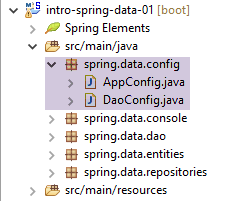 |
The [DaoConfig] class configures the [DAO] layer:
package spring.data.config;

import javax.persistence.EntityManagerFactory;

import org.apache.tomcat.jdbc.pool.DataSource;
import org.springframework.context.annotation.Bean;
import org.springframework.context.annotation.ComponentScan;
import org.springframework.context.annotation.Configuration;
import org.springframework.data.jpa.repository.config.EnableJpaRepositories;
import org.springframework.orm.jpa.JpaTransactionManager;
import org.springframework.orm.jpa.JpaVendorAdapter;
import org.springframework.orm.jpa.LocalContainerEntityManagerFactoryBean;
import org.springframework.orm.jpa.vendor.Database;
import org.springframework.orm.jpa.vendor.HibernateJpaVendorAdapter;
import org.springframework.transaction.PlatformTransactionManager;

@EnableJpaRepositories(basePackages = { "spring.data.repositories" })
@Configuration
@ComponentScan(basePackages = { "spring.data.dao" })
public class DaoConfig {

    // constants
    final static String URL = "jdbc:mysql://localhost:3306/dbIntroSpringData";
    final static String USER = "root";
    final static String PASSWD = "";
    final static String DRIVER_CLASSNAME = "com.mysql.jdbc.Driver";
    final static String[] ENTITIES_PACKAGES = { "spring.data.entities" };

    // the [tomcat-jdbc] data source
    @Bean
    public DataSource dataSource() {
        // data source TomcatJdbc
        DataSource dataSource = new DataSource();
        // configuration access JDBC
        dataSource.setDriverClassName(DRIVER_CLASSNAME);
        dataSource.setUsername(USER);
        dataSource.setPassword(PASSWD);
        dataSource.setUrl(URL);
        // an initially open connection
        dataSource.setInitialSize(1);
        // result
        return dataSource;
    }

    // the provider JPA
    @Bean
    public JpaVendorAdapter jpaVendorAdapter() {
        HibernateJpaVendorAdapter hibernateJpaVendorAdapter = new HibernateJpaVendorAdapter();
        hibernateJpaVendorAdapter.setShowSql(false);
        hibernateJpaVendorAdapter.setDatabase(Database.MYSQL);
        return hibernateJpaVendorAdapter;
    }

    // EntityManagerFactory
    @Bean
    public EntityManagerFactory entityManagerFactory(JpaVendorAdapter jpaVendorAdapter, DataSource dataSource) {
        LocalContainerEntityManagerFactoryBean factory = new LocalContainerEntityManagerFactoryBean();
        factory.setJpaVendorAdapter(jpaVendorAdapter);
        factory.setPackagesToScan(packagesToScan());
        factory.setDataSource(dataSource);
        factory.afterPropertiesSet();
        return factory.getObject();
    }

    // Transaction manager
    @Bean
    public PlatformTransactionManager transactionManager(EntityManagerFactory entityManagerFactory) {
        JpaTransactionManager txManager = new JpaTransactionManager();
        txManager.setEntityManagerFactory(entityManagerFactory);
        return txManager;
    }

    @Bean
    public String[] packagesToScan() {
        return ENTITIES_PACKAGES;
    }

}
A similar configuration was discussed and explained in Section 11.2.5. We have added the following Spring annotations:
- line 17: the [@EnableJpaRepositories] annotation is used to indicate the packages where the [CrudRepository] interfaces from [Spring Data] are located;
- line 18: the class is a Spring configuration class. This information is important. If we remove it, the project still works. However, later in the document, when we build projects that rely on this one, some of them will no longer work if the annotation on line 18 is removed;
- line 19: the [@ComponentScan] annotation specifies the packages where Spring objects are located. These are the classes annotated with [@Component, @Service, @Controller, ...]. Here, the Spring [Dao] component will be found and instantiated;
- Lines 73–76: We have defined a bean that represents the array of packages to scan for JPA entities. This will allow a project that imports the [DaoConfig] class to redefine this bean and thus change the scanned packages (line 59). We will encounter this issue later in the document;
The [AppConfig] class configures the entire project:
package spring.data.config;

import org.springframework.context.annotation.Bean;
import org.springframework.context.annotation.Configuration;
import org.springframework.context.annotation.Import;

import com.fasterxml.jackson.databind.ObjectMapper;
import com.fasterxml.jackson.databind.ser.impl.SimpleBeanPropertyFilter;
import com.fasterxml.jackson.databind.ser.impl.SimpleFilterProvider;

@Configuration
@Import({DaoConfig.class})
public class AppConfig {
    // filters jSON
    @Bean(name = "jsonMapper")
    public ObjectMapper jsonMapper() {
        return new ObjectMapper();
    }

    @Bean(name = "jsonMapperCategorieWithProduits")
    public ObjectMapper jsonMapperCategorieWithProduits() {
        // mapper jSON
        ObjectMapper mapper = new ObjectMapper();
        // filters
        mapper.setFilters(
                new SimpleFilterProvider().addFilter("jsonFilterCategorie", SimpleBeanPropertyFilter.serializeAllExcept())
                        .addFilter("jsonFilterProduit", SimpleBeanPropertyFilter.serializeAllExcept("categorie")));
        // result
        return mapper;
    }

    @Bean(name = "jsonMapperProduitWithCategorie")
    public ObjectMapper jsonMapperProduitWithCategorie() {
        // mapper jSON
        ObjectMapper mapper = new ObjectMapper();
        // filters
        mapper.setFilters(
                new SimpleFilterProvider().addFilter("jsonFilterProduit", SimpleBeanPropertyFilter.serializeAllExcept())
                        .addFilter("jsonFilterCategorie", SimpleBeanPropertyFilter.serializeAllExcept("produits")));
        // result
        return mapper;
    }

    @Bean(name = "jsonMapperCategorieWithoutProduits")
    public ObjectMapper jsonMapperCategorieWithoutProduits() {
        // mapper jSON
        ObjectMapper mapper = new ObjectMapper();
        // filters
        mapper.setFilters(new SimpleFilterProvider().addFilter("jsonFilterCategorie",
                SimpleBeanPropertyFilter.serializeAllExcept("produits")));
        // result
        return mapper;
    }

    @Bean(name = "jsonMapperProduitWithoutCategorie")
    public ObjectMapper jsonMapperProduitWithoutCategorie() {
        // mapper jSON
        ObjectMapper mapper = new ObjectMapper();
        // filters
        mapper.setFilters(new SimpleFilterProvider().addFilter("jsonFilterProduit",
                SimpleBeanPropertyFilter.serializeAllExcept("categorie")));
        // result
        return mapper;
    }
}
- line 11: the class is a Spring configuration class;
- line 12: which imports the beans defined by the [DaoConfig] class we just saw;
- the [console] layer uses JSON mappers defined here;
- lines 14–64: define five JSON mappers;
- lines 15–18: the JSON mapper [jsonMapper] has no filters;
- lines 20–30: the JSON filter [jsonMapperCategoryWithProducts] allows serializing/deserializing a [Category] object along with its products;
- lines 32–42: the JSON filter [jsonMapperProductWithCategory] allows serializing/deserializing a [Product] object with its category;
- lines 43-53: the JSON filter [jsonMapperCategorieWithoutProduits] allows you to serialize/deserialize a [Categorie] object without its products;
- lines 55–64: the JSON filter [jsonMapperProductWithoutCategory] allows serializing/deserializing a [Product] object without its category;
Note that when building a JSON filter for an entity T, you must configure not only the filter for entity T but also those for the entities Ti that it may contain.
11.3.9. The [console] layer
Layer[DAO]Layer[console]Layer[JPA]Driver[JDBC]Layer[Spring Data]Spring 4DBMS
 |
The [Main] class is as follows:
package spring.data.console;

import java.util.ArrayList;
import java.util.List;
import java.util.Set;

import org.springframework.context.annotation.AnnotationConfigApplicationContext;

import com.fasterxml.jackson.core.JsonProcessingException;
import com.fasterxml.jackson.databind.ObjectMapper;
import com.google.common.collect.Lists;

import spring.data.config.AppConfig;
import spring.data.dao.DaoException;
import spring.data.dao.IDao;
import spring.data.entities.Categorie;
import spring.data.entities.Produit;

public class Main {

    public static void main(String[] args) throws JsonProcessingException {
        AnnotationConfigApplicationContext context = null;
        try {
            // instantiation Spring context
            context = new AnnotationConfigApplicationContext(AppConfig.class);
            ObjectMapper jsonMapperCategorieWithProduits = context.getBean("jsonMapperCategorieWithProduits",
                    ObjectMapper.class);
            ObjectMapper jsonMapperProduitWithCategorie = context.getBean("jsonMapperProduitWithCategorie",
                    ObjectMapper.class);
            ObjectMapper jsonMapperCategorieWithoutProduits = context.getBean("jsonMapperCategorieWithoutProduits",
                    ObjectMapper.class);
            ObjectMapper jsonMapperProduitWithoutCategorie = context.getBean("jsonMapperProduitWithoutCategorie",
                    ObjectMapper.class);
            IDao dao = context.getBean(IDao.class);
            // --------------------------------------------------------------------------------------
            // empty the database
            log("Vidage de la base de données", 1);
            // table [CATEGORIES] is emptied - by cascade, table [PRODUITS] will be emptied
            dao.deleteAllCategories();
            // --------------------------------------------------------------------------------------
            log("Remplissage de la base", 1);
            // fill the tables
            List<Categorie> categories = new ArrayList<Categorie>();
            for (int i = 0; i < 2; i++) {
                Categorie categorie = new Categorie(String.format("categorie%d", i));
                for (int j = 0; j < 5; j++) {
                    categorie.addProduit(new Produit(String.format("produit%d%d", i, j), 100 * (1 + (double) (i * 10 + j) / 100),
                            String.format("desc%d%d", i, j)));
                }
                categories.add(categorie);
            }
            // add the category - the products will be cascaded in as well
            dao.addCategories(categories);
            // --------------------------------------------------------------------------------------
            log("Affichage de la base", 1);
            // list of categories
            log("Liste des catégories", 2);
            affiche(dao.getAllCategories(), jsonMapperCategorieWithoutProduits);
            // product list
            log("Liste des produits", 2);
            affiche(dao.getAllProduits(), jsonMapperProduitWithoutCategorie);
            // category 1 with its products
            Categorie categorie = dao.getCategorieByNameWithProduits("categorie1");
            log("Catégorie 1 avec ses produits", 2);
            affiche(categorie, jsonMapperCategorieWithProduits);
            // the product [product14] with its category
            Produit p = dao.getProduitByNameWithCategorie("produit14");
            log("Produit [produit14] avec sa catégorie", 2);
            affiche(p, jsonMapperProduitWithCategorie);
            // --------------------------------------------------------------------------------------
            log("Mise à jour du prix des produits de [categorie1]", 1);
            log("Produits de la catégorie [categorie1] avant la mise à jour", 2);
            Categorie categorie1 = dao.getCategorieByNameWithProduits("categorie1");
            Set<Produit> produits = categorie1.getProduits();
            affiche(categorie1, jsonMapperCategorieWithProduits);
            for (Produit produit : produits) {
                produit.setPrix(1.1 * produit.getPrix());
            }
            dao.updateProduits(Lists.newArrayList(produits));
            log("Produits de la catégorie [categorie1] après la mise à jour", 2);
            affiche(dao.getCategorieByNameWithProduits("categorie1"), jsonMapperCategorieWithProduits);
            // --------------------------------------------------------------------------------------
            log("Vidage de la base de données", 1);
            // table [CATEGORIES] is emptied - by cascade, table [PRODUITS] will be emptied
            dao.deleteAllCategories();
            // base display
            log("Liste des categories avant l'ajout", 2);
            affiche(dao.getAllCategories(), jsonMapperCategorieWithoutProduits);
            log("Liste des produits avant l'ajout", 2);
            affiche(dao.getAllProduits(), jsonMapperProduitWithoutCategorie);
            log("Ajout d'une catégorie [cat1] avec deux produits de même nom", 1);
            // we insert
            categorie = new Categorie("cat1");
            categorie.addProduit(new Produit("x", 1.0, ""));
            categorie.addProduit(new Produit("x", 1.0, ""));
            // add the category - the products will be cascaded in as well
            try {
                dao.addCategories(Lists.newArrayList(categorie));
            } catch (DaoException e) {
                System.out.println(e);
            }
            // check
            log("Liste des categories après l'ajout", 2);
            affiche(dao.getAllCategories(), jsonMapperCategorieWithoutProduits);
            log("Liste des produits après l'ajout", 2);
            affiche(dao.getAllProduits(), jsonMapperProduitWithoutCategorie);
        } catch (DaoException e) {
            System.out.println(e);
        } finally {
            if (context != null) {
                // finish
                context.close();
            }
        }
        System.out.println("Travail terminé");
    }

    // display of a T-type element
    static private <T> void affiche(T element, ObjectMapper jsonMapper) throws JsonProcessingException {
        System.out.println(jsonMapper.writeValueAsString(element));
    }

    // display a list of elements of type T
    static private <T> void affiche(List<T> elements, ObjectMapper jsonMapper) throws JsonProcessingException {
        for (T element : elements) {
            affiche(element, jsonMapper);
        }
    }

    private static void log(String message, int mode) {
        // poster message
        String toPrint = null;
        switch (mode) {
        case 1:
            toPrint = String.format("%s --------------------------------", message);
            break;
        case 2:
            toPrint = String.format("-- %s", message);
            break;
        }
        System.out.println(toPrint);
    }
}
- line 25: instantiation of Spring beans from the [AppConfig] configuration class;
- lines 26–33: retrieving references to the JSON mappers. We use the following signature of the [ApplicationContext].getBean method:
- [ApplicationContext].getBean(String id, Class class): which is used when there are multiple beans of type [class]. In this case, we specify the identifier of the requested bean. If it was defined with the [@Bean] annotation, its identifier is the name of the annotated method. If it was defined with the [@Bean("identifier")] annotation, its identifier is the one specified in the annotation;
- line 34: retrieving a reference from the [DAO] layer;
- lines 37–39: clearing the database. We clear the categories table (line 39). Because we wrote:
    @OneToMany(fetch = FetchType.LAZY, mappedBy = "categorie", cascade = { CascadeType.ALL })
    public Set<Produit> produits = new HashSet<Produit>();
when a category is deleted, all products linked to it are also deleted;
- Lines 43–53: Populating the table with 2 categories, each containing 5 products. On line 50, inserting the two categories will simultaneously insert their products, again because we wrote [cascade = { CascadeType.ALL }];
- line 58: we display the categories. We use the JSON mapper [jsonMapperCategorieWithoutProduits] to display the categories without their products. In fact, the method [dao.getAllCategories()] returns the categories without their products (lazy loading);
- line 61: we display the products without their category. This is because the method [dao.getAllProduits()] returns the products without their category (lazy loading);
- lines 63–65: display the category named [categorie1] with its products (eager loading);
- lines 67–69: display a product with its category;
- lines 71–81: all product prices in the [categorie1] category are increased by 10%;
- lines 91-101: add a category with two products of the same name. However, in the [PRODUCTS] table, there is a unique constraint on the [NAME] column. The insertion of the second product will therefore be rejected and an exception thrown. However, the [dao.addProducts] method runs within a transaction. The fact that the second insertion fails must therefore also roll back the insertion of the first product as well as that of their category [cat1]. This is what we want to verify;
- lines 119–121: a generic method capable of displaying the JSON string for any element of type T. JSON serialization is controlled by the mapper passed as a parameter;
- lines 124–128: a similar method, this time for a list of elements of type T;
Executing the [Main] class yields the following results (excluding Spring logs):
Vidage de la base de données --------------------------------
Remplissage de la base --------------------------------
Affichage de la base --------------------------------
-- Liste des catégories
{"id":4,"version":0,"nom":"categorie0"}
{"id":5,"version":0,"nom":"categorie1"}
-- Liste des produits
{"id":13,"version":0,"nom":"produit00","idCategorie":4,"prix":100.0,"description":"desc00"}
{"id":14,"version":0,"nom":"produit01","idCategorie":4,"prix":101.0,"description":"desc01"}
{"id":15,"version":0,"nom":"produit02","idCategorie":4,"prix":102.0,"description":"desc02"}
{"id":16,"version":0,"nom":"produit03","idCategorie":4,"prix":103.0,"description":"desc03"}
{"id":17,"version":0,"nom":"produit04","idCategorie":4,"prix":104.0,"description":"desc04"}
{"id":18,"version":0,"nom":"produit10","idCategorie":5,"prix":110.0,"description":"desc10"}
{"id":19,"version":0,"nom":"produit11","idCategorie":5,"prix":111.0,"description":"desc11"}
{"id":20,"version":0,"nom":"produit12","idCategorie":5,"prix":112.0,"description":"desc12"}
{"id":21,"version":0,"nom":"produit13","idCategorie":5,"prix":113.0,"description":"desc13"}
{"id":22,"version":0,"nom":"produit14","idCategorie":5,"prix":114.0,"description":"desc14"}
-- Catégorie 1 avec ses produits
{"id":5,"version":0,"nom":"categorie1","produits":[{"id":18,"version":0,"nom":"produit10","idCategorie":5,"prix":110.0,"description":"desc10"},{"id":19,"version":0,"nom":"produit11","idCategorie":5,"prix":111.0,"description":"desc11"},{"id":20,"version":0,"nom":"produit12","idCategorie":5,"prix":112.0,"description":"desc12"},{"id":21,"version":0,"nom":"produit13","idCategorie":5,"prix":113.0,"description":"desc13"},{"id":22,"version":0,"nom":"produit14","idCategorie":5,"prix":114.0,"description":"desc14"}]}
-- Produit [produit14] avec sa catégorie
{"id":22,"version":0,"nom":"produit14","idCategorie":5,"prix":114.0,"description":"desc14","categorie":{"id":5,"version":0,"nom":"categorie1"}}
Mise à jour du prix des produits de [categorie1] --------------------------------
-- Produits de la catégorie [categorie1] avant la mise à jour
{"id":5,"version":0,"nom":"categorie1","produits":[{"id":18,"version":0,"nom":"produit10","idCategorie":5,"prix":110.0,"description":"desc10"},{"id":19,"version":0,"nom":"produit11","idCategorie":5,"prix":111.0,"description":"desc11"},{"id":20,"version":0,"nom":"produit12","idCategorie":5,"prix":112.0,"description":"desc12"},{"id":21,"version":0,"nom":"produit13","idCategorie":5,"prix":113.0,"description":"desc13"},{"id":22,"version":0,"nom":"produit14","idCategorie":5,"prix":114.0,"description":"desc14"}]}
-- Produits de la catégorie [categorie1] après la mise à jour
{"id":5,"version":0,"nom":"categorie1","produits":[{"id":18,"version":1,"nom":"produit10","idCategorie":5,"prix":121.0,"description":"desc10"},{"id":19,"version":1,"nom":"produit11","idCategorie":5,"prix":122.1,"description":"desc11"},{"id":20,"version":1,"nom":"produit12","idCategorie":5,"prix":123.2,"description":"desc12"},{"id":21,"version":1,"nom":"produit13","idCategorie":5,"prix":124.3,"description":"desc13"},{"id":22,"version":1,"nom":"produit14","idCategorie":5,"prix":125.4,"description":"desc14"}]}
Vidage de la base de données --------------------------------
-- Liste des categories avant l'ajout
-- Liste des produits avant l'ajout
Ajout d'une catégorie [cat1] avec deux produits de même nom --------------------------------
Les erreurs suivantes se sont produites :
- org.hibernate.exception.ConstraintViolationException: could not execute statement
- could not execute statement
- Duplicate entry 'x' for key 'NOM'
-- Liste des categories après l'ajout
-- Liste des produits après l'ajout
Travail terminé
- lines 4-17: the categories and products inserted into the table;
- lines 18-19: a category with its products;
- lines 20-21: a product with its category;
- lines 22–26: price update for certain products. In line 24, we can see that the prices have indeed increased by 10%;
- Lines 27–36: Adding the category [cat1] with two products of the same name. We can see that the table is the same before (lines 28–29) and after the addition (lines 35–36), thereby showing that all insertions in the transaction were indeed rolled back;
- lines 31–34: the exception that occurred during the insertion of the second product and caused the entire transaction to fail;
11.3.10. The JUnit unit test
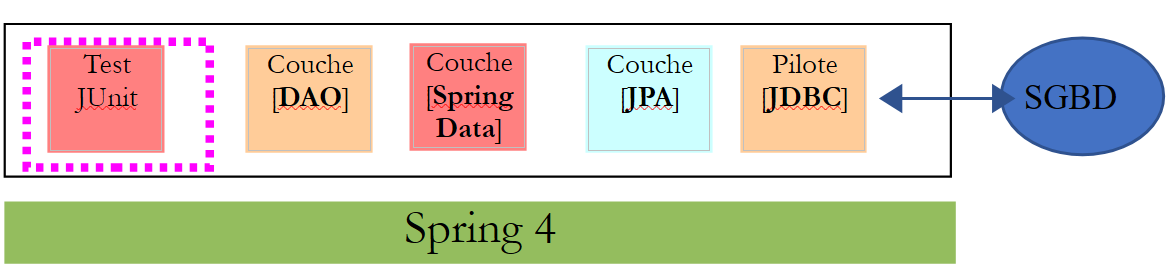 |
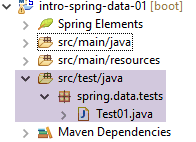 |
The [Test01] class is as follows:
package spring.data.tests;

import java.util.ArrayList;
import java.util.List;
import java.util.Set;

import org.junit.Assert;
import org.junit.Before;
import org.junit.Test;
import org.junit.runner.RunWith;
import org.springframework.beans.BeansException;
import org.springframework.beans.factory.annotation.Autowired;
import org.springframework.beans.factory.annotation.Qualifier;
import org.springframework.boot.test.SpringApplicationConfiguration;
import org.springframework.test.context.junit4.SpringJUnit4ClassRunner;

import com.fasterxml.jackson.core.JsonProcessingException;
import com.fasterxml.jackson.databind.ObjectMapper;
import com.google.common.collect.Lists;

import spring.data.config.AppConfig;
import spring.data.dao.DaoException;
import spring.data.dao.IDao;
import spring.data.entities.Categorie;
import spring.data.entities.Produit;

@SpringApplicationConfiguration(classes = AppConfig.class)
@RunWith(SpringJUnit4ClassRunner.class)
public class Test01 {

    // layer [DAO]
    @Autowired
    private IDao dao;

    // filters jSON
    @Autowired
    @Qualifier("jsonMapper")
    private ObjectMapper jsonMapper;
    @Autowired
    @Qualifier("jsonMapperCategorieWithProduits")
    private ObjectMapper jsonMapperCategorieWithProduits;
    @Autowired
    @Qualifier("jsonMapperProduitWithCategorie")
    private ObjectMapper jsonMapperProduitWithCategorie;
    @Autowired
    @Qualifier("jsonMapperCategorieWithoutProduits")
    private ObjectMapper jsonMapperCategorieWithoutProduits;
    @Autowired
    @Qualifier("jsonMapperProduitWithoutCategorie")
    private ObjectMapper jsonMapperProduitWithoutCategorie;

    @Before
    public void cleanAndFill() {
        // the base is cleaned before each test
        log("Vidage de la base de données", 1);
        // table [CATEGORIES] is emptied - by cascade, table [PRODUITS] will be emptied
        dao.deleteAllCategories();
        // --------------------------------------------------------------------------------------
        log("Remplissage de la base", 1);
        // fill the tables
        List<Categorie> categories = new ArrayList<Categorie>();
        for (int i = 0; i < 2; i++) {
            Categorie categorie = new Categorie(String.format("categorie%d", i));
            for (int j = 0; j < 5; j++) {
                categorie.addProduit(new Produit(String.format("produit%d%d", i, j), 100 * (1 + (double) (i * 10 + j) / 100),
                        String.format("desc%d%d", i, j)));
            }
            categories.add(categorie);
        }
        // add the category - the products will be cascaded in as well
        categories = dao.addCategories(categories);
    }

    @Test
    public void showDataBase() throws BeansException, JsonProcessingException {
        // list of categories
        log("Liste des catégories", 2);
        List<Categorie> categories = dao.getAllCategories();
        affiche(categories, jsonMapperCategorieWithoutProduits);
        // product list
        log("Liste des produits", 2);
        List<Produit> produits = dao.getAllProduits();
        affiche(produits, jsonMapperProduitWithoutCategorie);
        // a few checks
        Assert.assertEquals(2, categories.size());
        Assert.assertEquals(10, produits.size());
        Categorie categorie = findCategorieByName("categorie0", categories);
        Assert.assertNotNull(categorie);
        Produit produit = findProduitByName("produit03", produits);
        Assert.assertNotNull(produit);
        Long idCategorie = produit.getIdCategorie();
        Assert.assertEquals(categorie.getId(), idCategorie);
    }

    @Test
    public void getCategorieByNameWithProduits() {
        log("getCategorieByNameWithProduits", 1);
        Categorie categorie1 = dao.getCategorieByNameWithProduits("categorie1");
        Assert.assertNotNull(categorie1);
        Assert.assertEquals(5, categorie1.getProduits().size());
    }

    @Test
    public void getCategorieByNameWithoutProduits() {
        log("getCategorieByNameWithoutProduits", 1);
        Categorie categorie1 = dao.getCategorieByNameWithoutProduits("categorie1");
        Assert.assertNotNull(categorie1);
        Assert.assertEquals("categorie1", categorie1.getNom());
    }

    @Test
    public void getProduitByIdWithCategorie() {
        log("getProduitByNameWithCategorie", 1);
        Produit produit = dao.getProduitByNameWithCategorie("produit03");
        Produit produit2 = dao.getProduitByIdWithCategorie(produit.getId());
        Assert.assertNotNull(produit2);
        Assert.assertEquals(produit2.getNom(), produit.getNom());
        Assert.assertEquals(produit2.getId(), produit.getId());
        Assert.assertEquals(produit.getCategorie().getId(), produit2.getCategorie().getId());
    }

    @Test
    public void getProduitByIdWithoutCategorie() {
        log("getProduitByIdWithoutCategorie", 1);
        Produit produit = dao.getProduitByNameWithCategorie("produit03");
        Produit produit2 = dao.getProduitByIdWithoutCategorie(produit.getId());
        Assert.assertNotNull(produit2);
        Assert.assertEquals(produit2.getNom(), produit.getNom());
        Assert.assertEquals(produit2.getId(), produit.getId());
    }
...
    // -------------- private methods
    private Produit findProduitByName(String nom, List<Produit> produits) {
        for (Produit produit : produits) {
            if (produit.getNom().equals(nom)) {
                return produit;
            }
        }
        return null;
    }

    private Categorie findCategorieByName(String nom, List<Categorie> categories) {
        for (Categorie categorie : categories) {
            if (categorie.getNom().equals(nom)) {
                return categorie;
            }
        }
        return null;
    }

    // display of a T-type element
    static private <T> void affiche(T element, ObjectMapper jsonMapper) throws JsonProcessingException {
        System.out.println(jsonMapper.writeValueAsString(element));
    }

    // display a list of elements of type T
    static private <T> void affiche(List<T> elements, ObjectMapper jsonMapper) throws JsonProcessingException {
        for (T element : elements) {
            affiche(element, jsonMapper);
        }
    }

    private static void log(String message, int mode) {
        // poster message
        String toPrint = null;
        switch (mode) {
        case 1:
            toPrint = String.format("%s --------------------------------", message);
            break;
        case 2:
            toPrint = String.format("-- %s", message);
            break;
        }
        System.out.println(toPrint);
    }

    private static void show(String title, List<String> messages) {
        // title
        System.out.println(String.format("%s : ", title));
        // messages
        for (String message : messages) {
            System.out.println(String.format("- %s", message));
        }
    }

}
- line 27: the unit test is configured by the [AppConfig] class already presented in section 11.3.8;
- lines 32–33: injection of a reference to the [DAO] layer;
- lines 36–50: injection of the five JSON mappers;
- lines 60–71: after emptying the database (line 57), the database is populated with 2 categories, each containing 5 products. This method is executed before each test due to the [@Before] annotation on line 52;
- lines 75–93: displays the database contents;
- lines 95–101: retrieves a category along with its products, identified by its name;
- lines 103–109: retrieves a category without its products, identified by its name;
- lines 111–120: retrieves a product along with its category, identified by its ID;
- lines 122–130: retrieves a product without its category, identified by its number;
- lines 133–184: private methods shared by the various tests;
Work to be done: run the test. It should pass.
11.3.11. Log Management
The logs for the console application or the JUnit test are configured by the following [logback.xml] file:
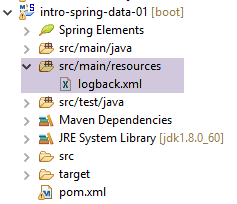 |
The file must be named [logback.xml] and be in the project’s classpath. To ensure this, it has been placed here in the [src/main/resources] folder, which is part of the classpath. Its contents are as follows:
<configuration>

  <appender name="STDOUT" class="ch.qos.logback.core.ConsoleAppender">
    <!-- encoders are  by default assigned the type
         ch.qos.logback.classic.encoder.PatternLayoutEncoder -->
    <encoder>
      <pattern>%d{HH:mm:ss.SSS} [%thread] %-5level %logger{36} - %msg%n</pattern>
    </encoder>
  </appender>

  <!-- log level control -->
  <root level="info"> <!-- info, debug, warn -->
    <appender-ref ref="STDOUT" />
  </root>
</configuration>
- line 12: the tag [<root level="info">] displays [info] level logs. Instead of [info], you can use:
- [debug]: this is the most detailed log level. It is recommended to use it during the project's debugging phase because it provides very useful logs on client/server interactions. This is a way to understand what is happening "under the hood";
- [off]: no logs at all;
- [warn]: an intermediate logging level where Spring displays anomalies that are not necessarily errors. You should review them if you do not get the expected result;
Task: Set the level on line 12 to [debug], then run the unit test. Observe the difference in the logs.
11.3.12. Generating the project's Maven archive
To install the project archive in the local Maven repository, follow these steps [1-3]:
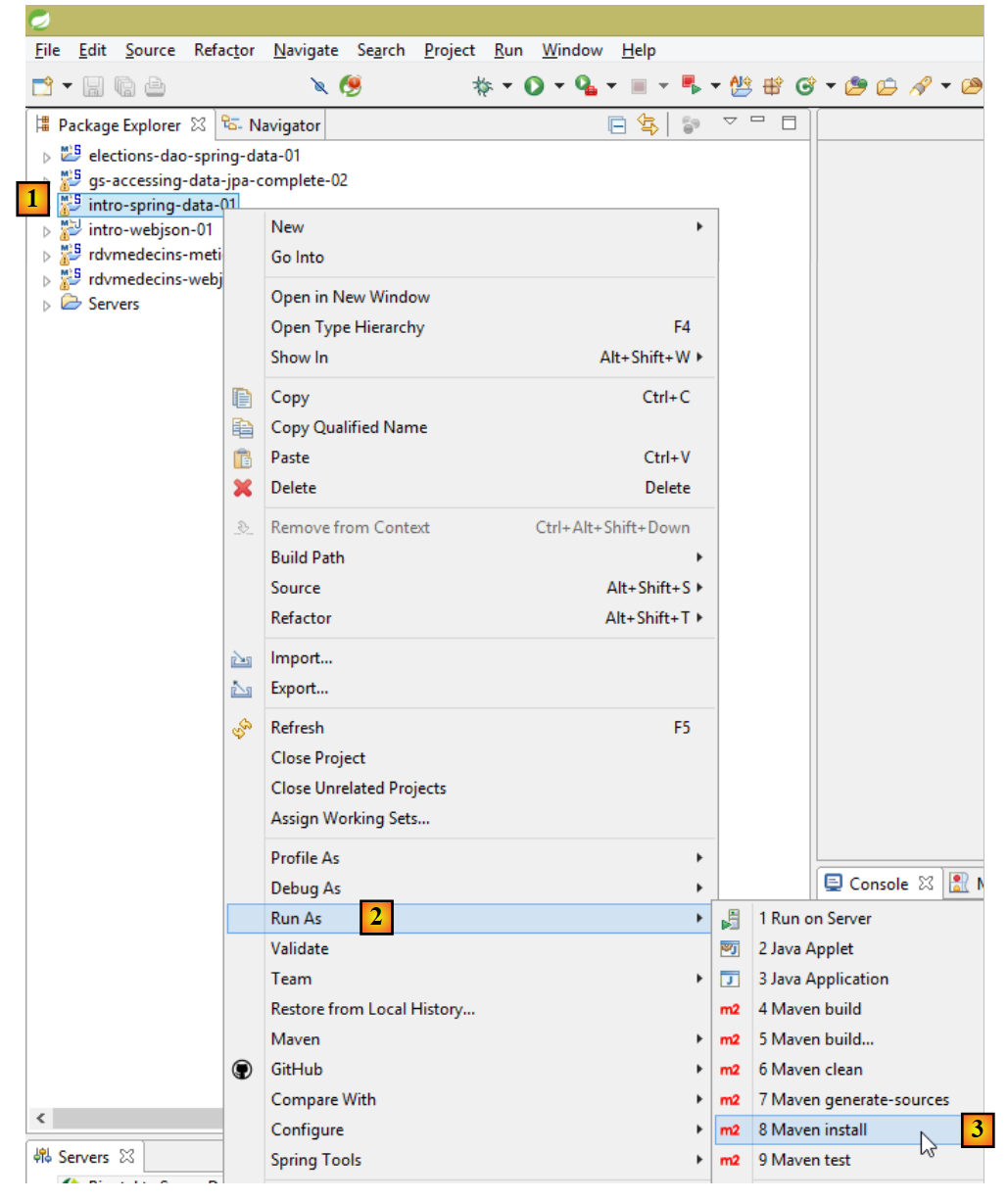 |
The archive will be generated using the identifiers found in the [pom.xml] file:
    <groupId>istia.st.springdata</groupId>
    <artifactId>intro-spring-data-01</artifactId>
    <version>0.0.1-SNAPSHOT</version>
<packaging>jar</packaging>
The location of the local Maven repository can be found in the Eclipse configuration:
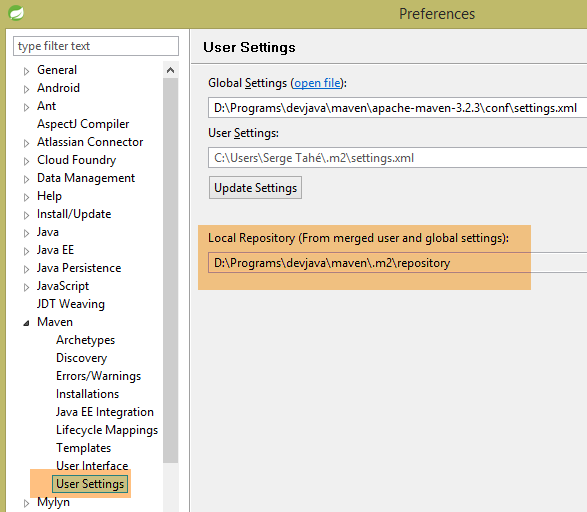 |
You can then verify that the Maven artifact has been installed correctly:
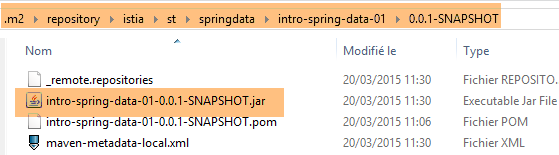 |
Now, another local Maven project can use this archive.