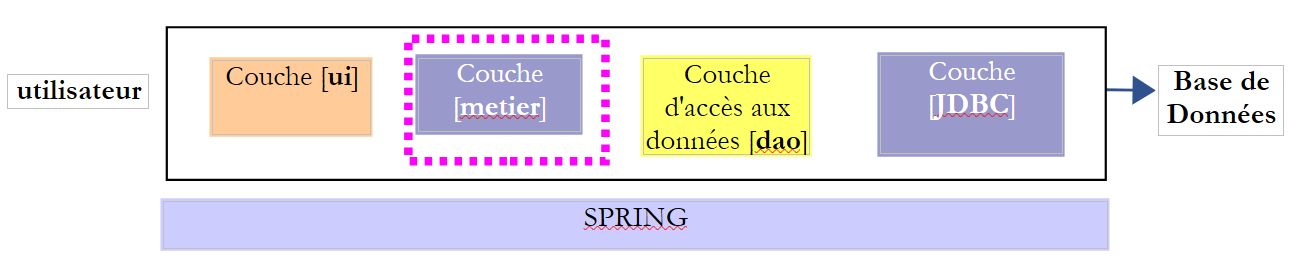
8. [TD]: The [business] layer
Keywords: multi-layer architecture, Spring, dependency injection.
 |
8.1. Support
 | 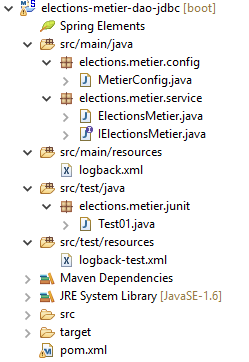 |
The [support / chap-08] folder contains the Eclipse project for this chapter.
8.2. Maven Configuration
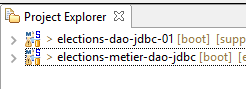 |
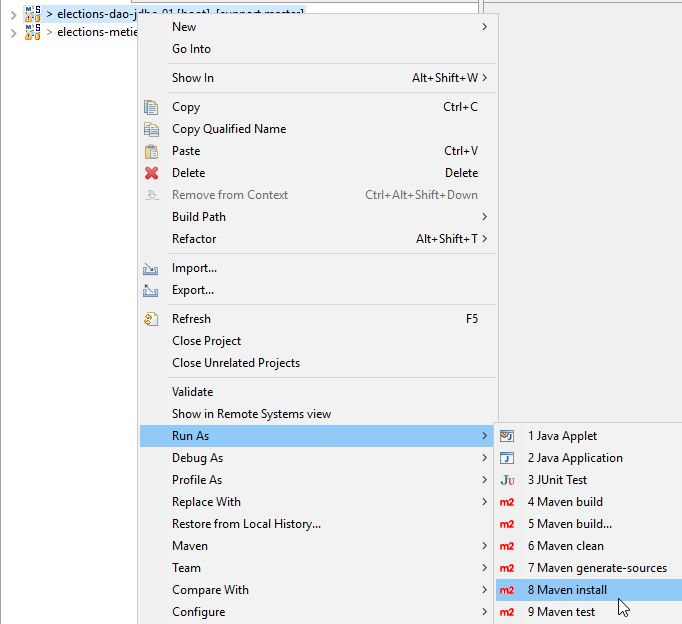
The [elections-metier-dao-jdbc] project will be based on the [elections-dao-jdbc-01] project. We will install the JAR file from the latter project into the local Maven repository:
 |
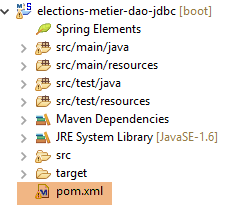
Once this is done, the Maven configuration for the Eclipse project [elections-metier-dao-jdbc] is as follows:
 |
<project xmlns="http://maven.apache.org/POM/4.0.0" xmlns:xsi="http://www.w3.org/2001/XMLSchema-instance"
    xsi:schemaLocation="http://maven.apache.org/POM/4.0.0 http://maven.apache.org/xsd/maven-4.0.0.xsd">
    <modelVersion>4.0.0</modelVersion>
    <groupId>istia.st.elections</groupId>
    <artifactId>elections-metier-dao-jdbc</artifactId>
    <version>0.0.1-SNAPSHOT</version>

    <parent>
        <groupId>org.springframework.boot</groupId>
        <artifactId>spring-boot-starter-parent</artifactId>
        <version>1.2.7.RELEASE</version>
    </parent>

    <properties>
        <project.build.sourceEncoding>UTF-8</project.build.sourceEncoding>
        <java.version>1.8</java.version>
    </properties>

    <dependencies>
        <!-- DAO -->
        <dependency>
            <groupId>istia.st.elections</groupId>
            <artifactId>elections-dao-jdbc-01</artifactId>
            <version>0.0.1-SNAPSHOT</version>
        </dependency>
        <!-- Spring Boot -->
        <dependency>
            <groupId>org.springframework.boot</groupId>
            <artifactId>spring-boot</artifactId>
            <scope>test</scope>
        </dependency>
        <!-- Spring Boot Test -->
        <dependency>
            <groupId>org.springframework.boot</groupId>
            <artifactId>spring-boot-starter-test</artifactId>
            <scope>test</scope>
        </dependency>
    </dependencies>

    <!-- plugins -->
    <build>
        <plugins>
            <plugin>
                <artifactId>maven-assembly-plugin</artifactId>
                <configuration>
                    <archive>
                        <manifest>
                            <mainClass>config.AppConfig</mainClass>
                        </manifest>
                    </archive>
                    <descriptorRefs>
                        <descriptorRef>jar-with-dependencies</descriptorRef>
                    </descriptorRefs>
                </configuration>
            </plugin>
            <!-- to install the project artifact in the local Maven repository -->
            <plugin>
                <groupId>org.apache.maven.plugins</groupId>
                <artifactId>maven-surefire-plugin</artifactId>
                <version>2.18.1</version>
            </plugin>
        </plugins>
    </build>
</project>
- Lines 21–25: the dependency on the [elections-jdbc-01] project JAR. Copy these lines directly into the [pom.xml] file of the project you want to import:
<project xmlns="http://maven.apache.org/POM/4.0.0" xmlns:xsi="http://www.w3.org/2001/XMLSchema-instance" xsi:schemaLocation="http://maven.apache.org/POM/4.0.0 http://maven.apache.org/xsd/maven-4.0.0.xsd">
    <modelVersion>4.0.0</modelVersion>
    <groupId>istia.st.elections</groupId>
    <artifactId>elections-dao-jdbc-01</artifactId>
    <version>0.0.1-SNAPSHOT</version>
...
- Lines 26–37: the dependencies required for testing. Although they are present in the [pom.xml] file of the [elections-jdbc-01] project, we must include them here because their [<scope>test</scope>] attribute means they were not included in the JAR file placed in the local Maven repository;
8.3. Spring Configuration
 |
package elections.metier.config;

import org.springframework.cache.annotation.EnableCaching;
import org.springframework.context.annotation.ComponentScan;
import org.springframework.context.annotation.Import;

@Import({ elections.dao.config.AppConfig.class })
@EnableCaching
@ComponentScan(basePackages = { "elections.metier.service" })
public class MetierConfig {
}
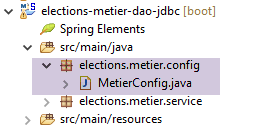
- Line 7: We import all beans defined in the [DAO] layer;
- line 8: we enable the cache. We do not redefine the [CacheManager] bean, as it is already defined in the [DAO] layer;
- line 9: the [business] layer defines new beans in the [elections.business.service] package;
8.4. The [ IElectionsMetier] interface
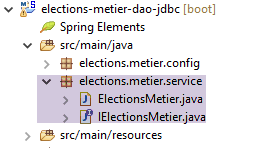 |
The [business] layer will have the interface presented in section 4.2. Here is a reminder:
public interface IElectionsMetier {

    public ListeElectorale[] getListesElectorales();

    public int getNbSiegesAPourvoir();

    public double getSeuilElectoral();

    public void recordResultats(ListeElectorale[] listesElectorales);

    public ListeElectorale[] calculerSieges(ListeElectorale[] listesElectorales);

}
8.5. The implementation class [ ElectionsMetier]
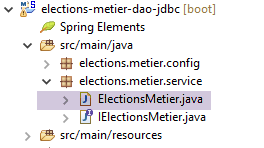 |
This class implements the [IElectionsMetier] interface. The proposed implementation will have the following structure:
package elections.metier.service;

import org.springframework.beans.factory.annotation.Autowired;
import org.springframework.cache.annotation.Cacheable;
import org.springframework.stereotype.Component;

import elections.dao.entities.ListeElectorale;
import elections.dao.service.IElectionsDao;

@Component
public class ElectionsMetier implements IElectionsMetier {

    // the access point to the [dao] layer instantiated by [Spring]
    @SuppressWarnings("unused")
    @Autowired
    private IElectionsDao electionsDao;

    // calculation of seats obtained
  @Override
    public ListeElectorale[] calculerSieges(ListeElectorale[] listesElectorales) {
        throw new RuntimeException("[calculerSieges] not yet implemented");
    }

    // competing lists
  @Override
    public ListeElectorale[] getListesElectorales() {
        throw new RuntimeException("[getListesElectorales] not yet implemented");
    }

    // saving results
  @Override
    public void recordResultats(ListeElectorale[] listesElectorales) {
        throw new RuntimeException("[recordResultats] not yet implemented");
    }

    // number of seats to be filled
    @Override
    public int getNbSiegesAPourvoir() {
        throw new RuntimeException("[getNbSiegesAPourvoir] not yet implemented");
    }

    // electoral threshold
    @Override
    public double getSeuilElectoral() {
        throw new RuntimeException("[getSeuilElectoral] not yet implemented");
    }

}
- line 10: the [ElectionsMetier] class is a Spring component;
- line 11: the [ElectionsMetier] class implements the [IElectionsMetier] interface;
- lines 15–16: Spring injection of a reference to the [DAO] layer;
- lines 37 and 44: the number of seats to be filled and the electoral threshold are cached;
Task: Write the [ElectionsMetier] class. Use the comments where available. We will not attempt to catch (try/catch) [ElectionsException] exceptions that are propagated from the [DAO] layer. We will let them propagate to the [UI] layer. Because the [ElectionsException] class is an unchecked exception type, there is no requirement to handle it with a try/catch block.
8.6. The test class
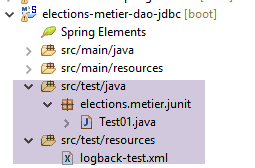 |
The JUnit test class will have the following form:
package tests;

import org.junit.Test;
import org.junit.runner.RunWith;
import org.springframework.beans.factory.annotation.Autowired;
import org.springframework.boot.test.SpringApplicationConfiguration;
import org.springframework.test.context.junit4.SpringJUnit4ClassRunner;

import dao.config.AppConfig;
import dao.entities.ElectionsException;
import metier.service.IElectionsMetier;

@SpringApplicationConfiguration(classes = MetierConfig.class)
@RunWith(SpringJUnit4ClassRunner.class)
public class Test01 {

    // business] layer
    @Autowired
    static private IElectionsMetier electionsMetier;

    /**
     * vérification 1 : méthode de calcul des sièges on fixe en dur les listes
     */
    @Test
    public void calculSieges1() {
        // create a table of the 7 candidate lists (name, vote)

        // the seats for each list are calculated

        // we check the results (seats, votes, eliminates)

        // temporary
        throw new RuntimeException("[calculSieges1] not yet implemented");
    }

    /**
     * vérification 2 : méthode de calcul des sièges on demande les listes à la
     * couche [metier] puis on fixe en dur les voix
     */
    @Test
    public void calculSieges2() {
        // the table of 7 candidate lists is retrieved as a base

        // the voices are hard-fixed

        // the seats obtained by each list are calculated

        // we check the results (seats, votes, eliminates)

        // temporary
        throw new RuntimeException("[calculSieges2] not yet implemented");
    }

    /**
     * vérification 3 méthode de calcul des sièges on provoque une exception
     */
    @Test(expected = ElectionsException.class)
    // write a test that causes an exception of type [ElectionsException]
    public void calculSieges3() {
        // create a table of 25 candidate lists, each with 1 vote
        // all 25 lists will have the same number of votes (4%)

        // calculation of seats - normally there should be a ElectionsException
        // with an electoral threshold of 5%

        // temporary
        throw new RuntimeException("[calculSieges3] not yet implemented");
    }

    /**
     * enregistrement des résultats de l'élection
     */
    @Test
    public void ecritureResultatsElections() {
        // create the table of 7 candidate lists

        // the voices are hard-fixed

        // the seats obtained by each list are calculated

        // results are entered into the database

        // reread lists in base

        // we check the results (seats, votes, eliminates)

        // temporary
        throw new RuntimeException("[ecritureResultatsElections] not yet implemented");
    }
}
Task: Write the four test methods using the comments as a guide. Remember that when these methods run, the [electionsMetier] field on line 19 has already been initialized. Verify that the JUnit test passes.
8.7. Creating the [business] layer archive
As we did for the [DAO] layer, we place the [elections-metier-dao-jdbc] project archive in the local Maven repository:
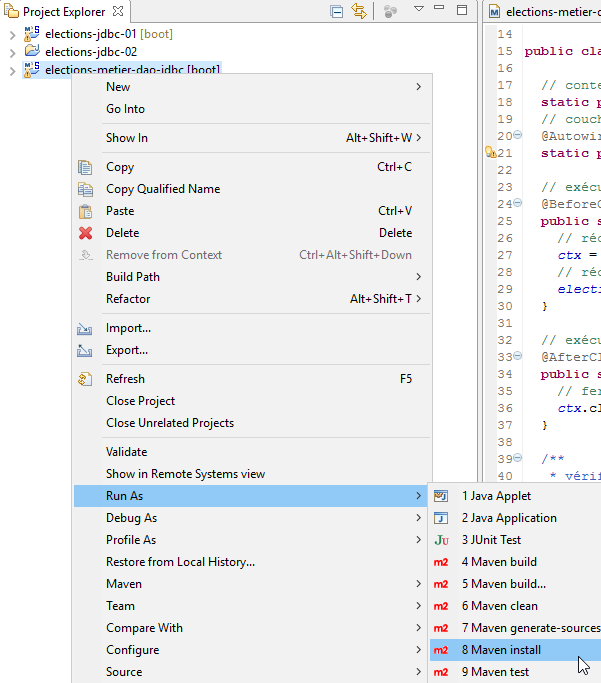 |
Note: This operation may fail if your Eclipse project is associated with a JRE (Java Runtime Environment) instead of a JDK (Java Development Kit). To check this, follow the instructions in section 3.1. If you find that you have a JRE and not a JDK, associate your project with a JDK as described in that section.
8.8. Conclusion
Let’s review the general architecture of the [Elections] application we are building:
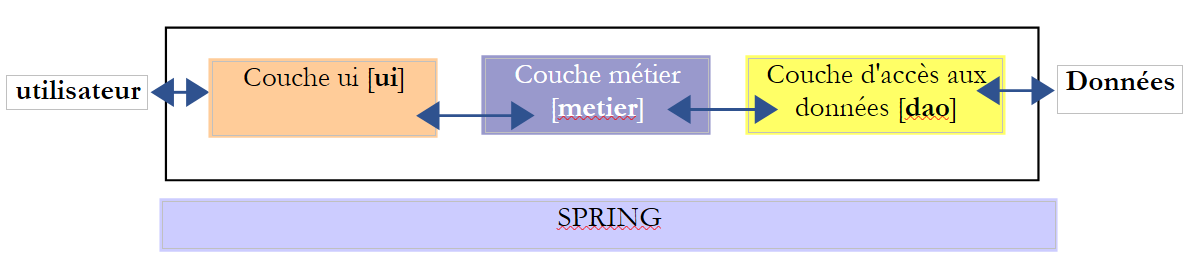 |
We have built the [business] and [DAO] layers. We will now build the [UI] layer. We will propose two implementations for this layer:
- a "console" implementation
- a graphical user interface implementation