13. [Course]: Exposing a Database on the Web with Spring MVC
Keywords: multi-tier architecture, Spring, dependency injection, web service / JSON, client / server
13.1. Support
 |  |
The projects for this chapter can be found in the [support / chap-13] folder. The SQL script [dbintrospringdata.sql] creates the MySQL database required for testing.
13.2. The Role of Spring MVC in a Web Application
Let’s situate Spring MVC within the development of a web application. Most often, it will be built on a multi-layer architecture such as the following:
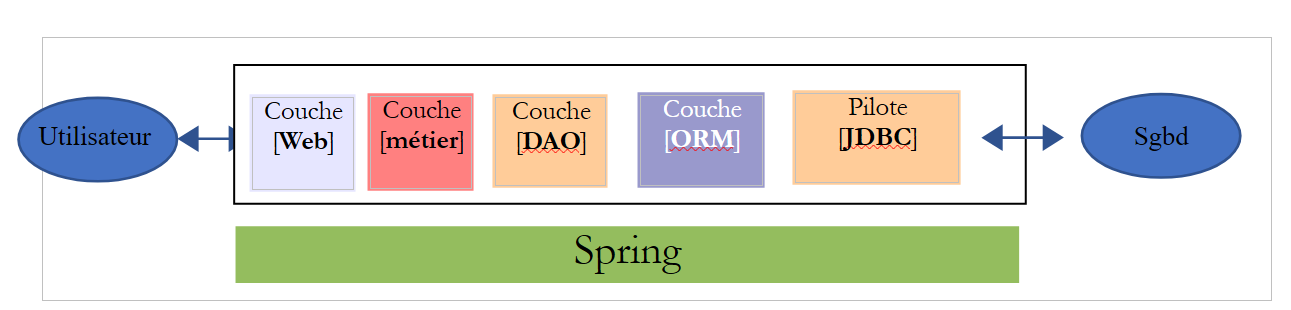 |
- the [Web] layer is the layer in contact with the web application user. The user interacts with the web application through web pages viewed in a browser. Spring MVC is located in this layer and only in this layer;
- the [business] layer implements the application’s business logic, such as calculating a salary or an invoice. This layer uses data from the user via the [Web] layer and from the DBMS via the [DAO] layer;
- the [DAO] (Data Access Objects) layer, the [ORM] (Object Relational Mapper) layer, and the JDBC driver manage access to data in the DBMS. The [ORM] layer acts as a bridge between the objects handled by the [DAO] layer and the rows and columns of tables in a relational database. The JPA (Java Persistence API) specification allows for abstraction from the ORM used, provided it implements these specifications. This will be the case here, and we will henceforth refer to the ORM layer as the JPA layer;
- The integration of the layers is handled by the Spring framework;
13.3. The Spring MVC Development Model
Spring MVC implements the MVC (Model–View–Controller) architectural pattern as follows:
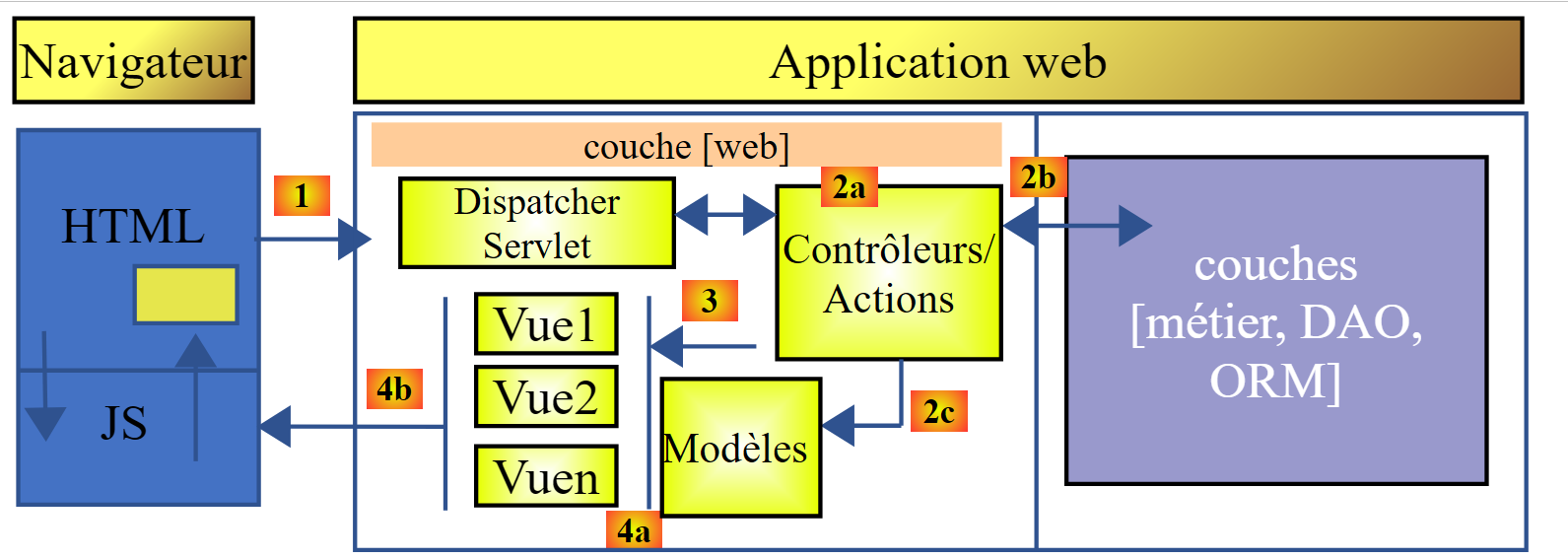 |
The processing of a client request proceeds as follows:
- request - the requested URLs are of the form http://machine:port/contexte/Action/param1/param2/....?p1=v1&p2=v2&... The [Front Controller] uses a configuration file or Java annotations to "route" the request to the correct controller and the correct action within that controller. To do this, it uses the [Action] field of the URL. The rest of the URL [/param1/param2/...] consists of optional parameters that will be passed to the action. The C in MVC here refers to the chain [Front Controller, Controller, Action]. If no controller can handle the requested action, the web server will respond that the requested URL was not found.
- processing
- The selected action can use the parameters that the [Front Controller] has passed to it. These can come from several sources:
- the path [/param1/param2/...] of the URL,
- the [p1=v1&p2=v2] parameters of the URL,
- from parameters posted by the browser with its request;
- when processing the user's request, the action may need the [business] layer [2b]. Once the client's request has been processed, it may trigger various responses. A classic example is:
- an error page if the request could not be processed correctly
- a confirmation page otherwise
- the action instructs a specific view to be displayed [3]. This view will display data known as the view model. This is the M in MVC. The action will create this M model [2c] and instruct a V view to be displayed [3];
- response - the selected view V uses the model M constructed by the action to initialize the dynamic parts of the HTML response it must send to the client, then sends this response.
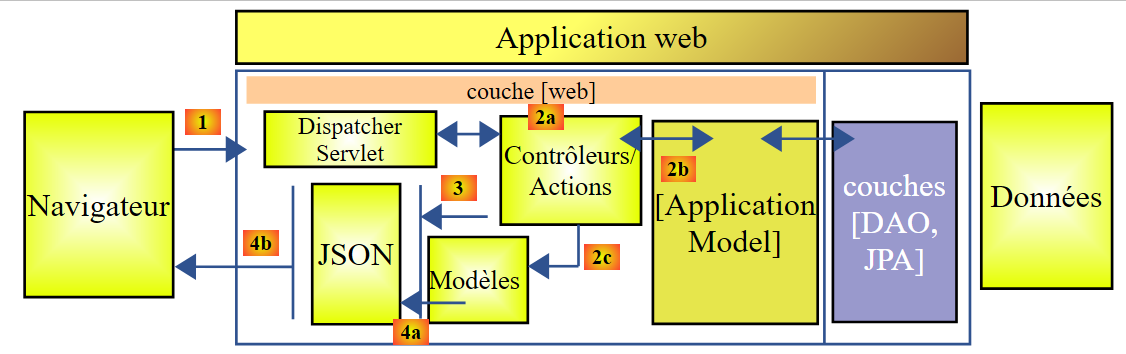
For a web service / JSON, the previous architecture is slightly modified:
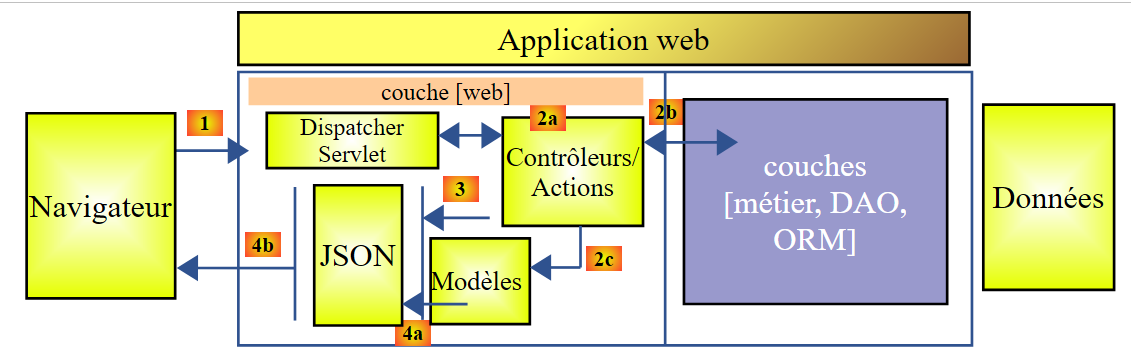 |
- in [4a], the model, which is a Java class, is converted into a JSON string by a JSON library;
- in [4b], this JSON string is sent to the browser;
Now, let’s clarify the relationship between MVC web architecture and layered architecture. Depending on how the model is defined, these two concepts may or may not be related. Consider a single-layer Spring MVC web application:
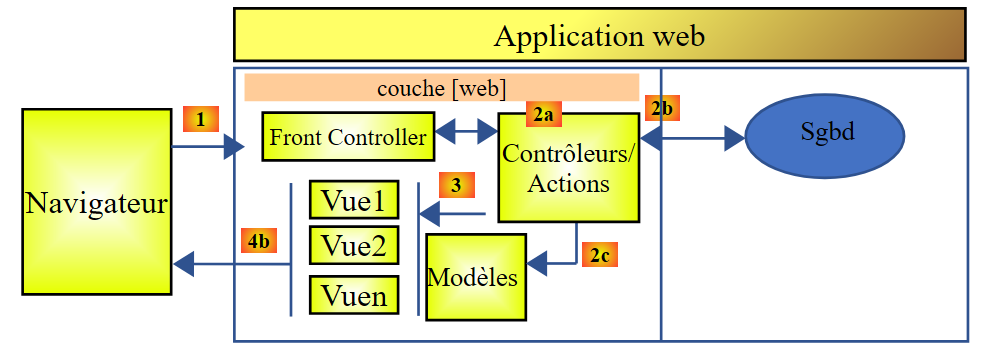 |
If we implement the [Web] layer with Spring MVC, we will indeed have an MVC web architecture but not a multi-layer architecture. Here, the [Web] layer will handle everything: presentation, business logic, and data access. It is the actions that will perform this work.
Now, let’s consider a multi-layer web architecture:
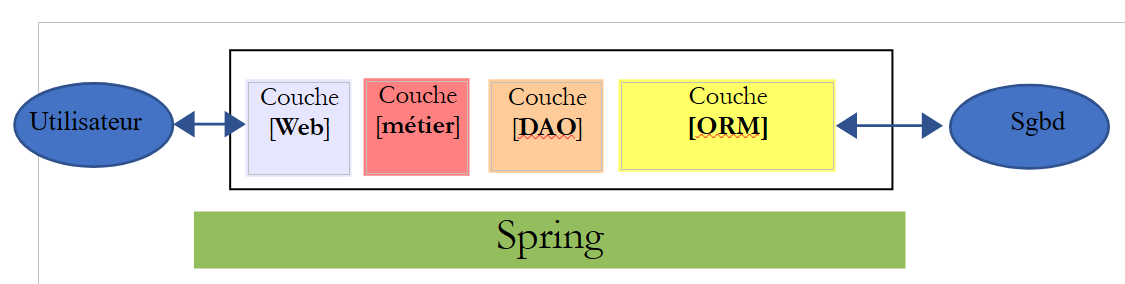 |
The [Web] layer can be implemented without a framework and without following the MVC pattern. In this case, we still have a multi-layer architecture, but the Web layer does not implement the MVC pattern.
For example, in the .NET world, the [Web] layer described above can be implemented using ASP.NET MVC, resulting in a layered architecture with an MVC-style [Web] layer. That said, this ASP.NET MVC layer can be replaced with a classic ASP.NET layer (WebForms) while keeping the rest (business logic, DAO, ORM) unchanged. We then have a layered architecture with a [Web] layer that is no longer MVC-based.
In MVC, we said that the M model was that of the V view, i.e., the set of data displayed by the V view. Another definition of the M model in MVC is given:
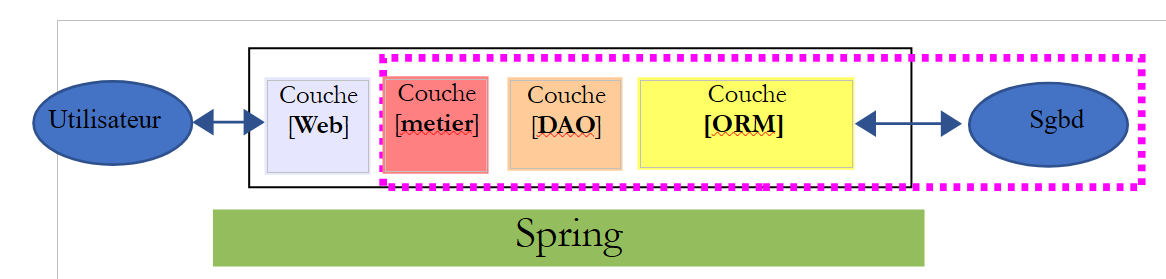 |
Many authors consider that what lies to the right of the [Web] layer forms the M model of MVC. To avoid ambiguity, we can refer to:
- the domain model when referring to everything to the right of the [Web] layer
- the view model when referring to the data displayed by a view V
Hereinafter, the term "M model" will refer exclusively to the model of a V view.
13.4. A Web/JSON project with Spring MVC
The site [http://spring.io/guides] offers getting-started tutorials to explore the Spring ecosystem. We will follow one of them to discover the Maven configuration required for a Spring MVC project.
13.4.1. The demo project
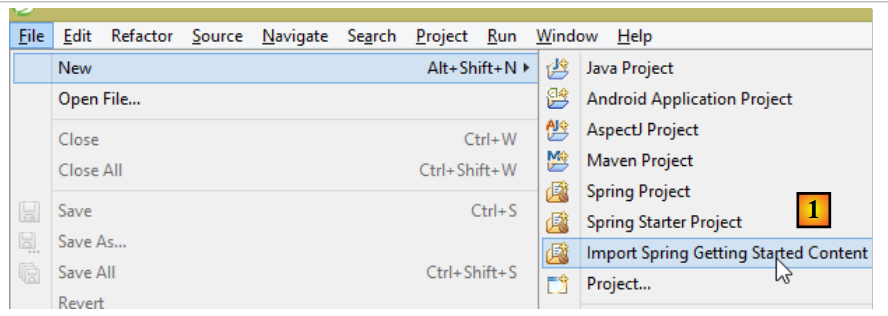 |
- In [1], we import one of the Spring guides;
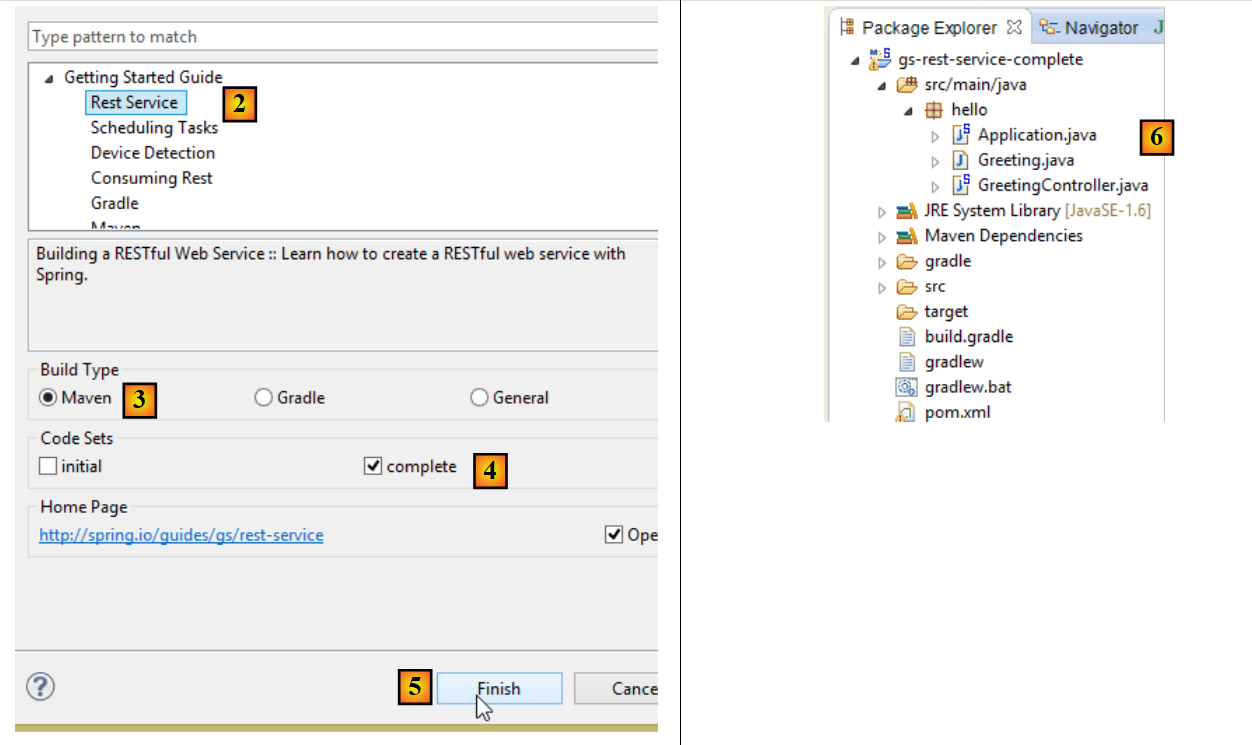 |
- in [2], we select the [Rest Service] example;
- in [3], we select the Maven project;
- in [4], we select the final version of the guide;
- in [5], we confirm;
- in [6], the imported project;
Web services accessible via standard URLs that return JSON data are often called REST (REpresentational State Transfer) services. A service is said to be RESTful if it follows certain rules.
Let’s now examine the imported project, starting with its Maven configuration.
13.4.2. Maven Configuration
The [pom.xml] file is as follows:
<?xml version="1.0" encoding="UTF-8"?>
<project xmlns="http://maven.apache.org/POM/4.0.0" xmlns:xsi="http://www.w3.org/2001/XMLSchema-instance"
    xsi:schemaLocation="http://maven.apache.org/POM/4.0.0 http://maven.apache.org/xsd/maven-4.0.0.xsd">
    <modelVersion>4.0.0</modelVersion>

    <groupId>org.springframework</groupId>
    <artifactId>gs-rest-service</artifactId>
    <version>0.1.0</version>

    <parent>
        <groupId>org.springframework.boot</groupId>
        <artifactId>spring-boot-starter-parent</artifactId>
        <version>1.2.2.RELEASE</version>
    </parent>

    <dependencies>
        <dependency>
            <groupId>org.springframework.boot</groupId>
            <artifactId>spring-boot-starter-web</artifactId>
        </dependency>
    </dependencies>

    <properties>
        <start-class>hello.Application</start-class>
    </properties>

    <build>
        <plugins>
            <plugin>
                <groupId>org.springframework.boot</groupId>
                <artifactId>spring-boot-maven-plugin</artifactId>
            </plugin>
        </plugins>
    </build>

    <repositories>
        <repository>
            <id>spring-releases</id>
            <url>https://repo.spring.io/libs-release</url>
        </repository>
    </repositories>
    <pluginRepositories>
        <pluginRepository>
            <id>spring-releases</id>
            <url>https://repo.spring.io/libs-release</url>
        </pluginRepository>
    </pluginRepositories>
</project>
- lines 6–8: the Maven project properties. A [<packaging>] tag specifying the type of file produced by the Maven build is missing. In its absence, the [jar] type is used. The application is therefore a console-based executable application, not a web application, in which case the packaging would be [war];
- lines 10–14: The Maven project has a parent project [spring-boot-starter-parent]. This defines most of the project’s dependencies. They may be sufficient, in which case no additional dependencies are added, or they may not be, in which case the missing dependencies are added;
- Lines 17–20: The [spring-boot-starter-web] artifact includes the libraries necessary for a Spring MVC web service project where no views are generated. This artifact includes a very large number of libraries, including those for an embedded Tomcat server. The application will run on this server;
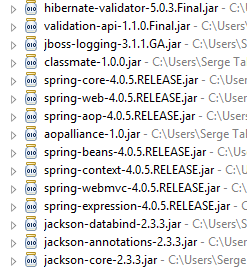
The libraries included in this configuration are very numerous:
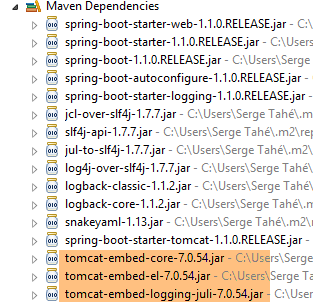 |  |
Above, we see the three Tomcat server archives.
13.4.3. The architecture of a Spring [web / JSON] service
For a web/JSON service, Spring MVC implements the MVC model as follows:
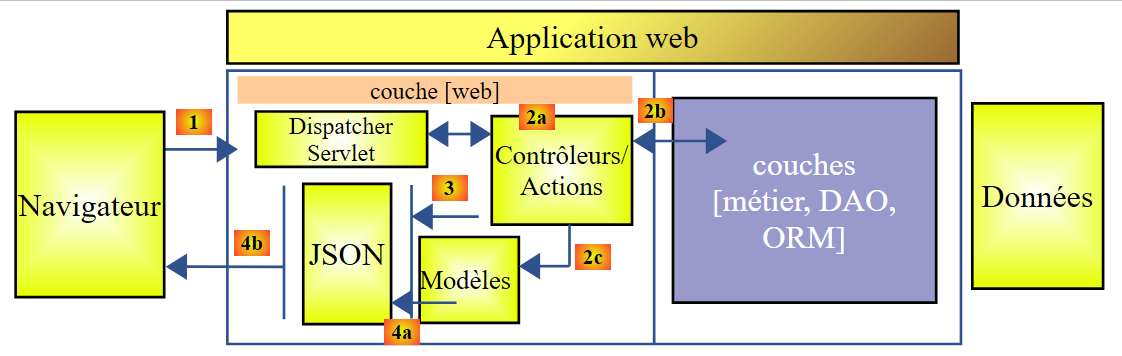 |
- In [4a], the model—which is a Java class—is converted into a JSON string by a JSON library;
- in [4b], this JSON string is sent to the browser;
13.4.4. The C controller
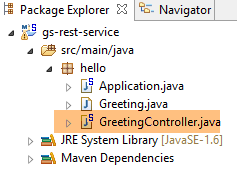 |
The imported application has the following controller:
package hello;

import java.util.concurrent.atomic.AtomicLong;
import org.springframework.web.bind.annotation.RequestMapping;
import org.springframework.web.bind.annotation.RequestParam;
import org.springframework.web.bind.annotation.RestController;

@RestController
public class GreetingController {

    private static final String template = "Hello, %s!";
    private final AtomicLong counter = new AtomicLong();

    @RequestMapping("/greeting")
    public Greeting greeting(@RequestParam(value = "name", defaultValue = "World") String name) {
        return new Greeting(counter.incrementAndGet(), String.format(template, name));
    }
}
- Line 9: The [@RestController] annotation makes the [GreetingController] class a Spring controller, meaning its methods are registered to handle URLs. We have seen the similar [@Controller] annotation. The return type of that controller’s methods was [String], which was the name of the view to display. Here, it is different. The methods of a [@RestController] return objects that are serialized to be sent to the browser. The type of serialization performed depends on the Spring MVC configuration. Here, they will be serialized to JSON. It is the presence of a JSON library in the project dependencies that causes Spring Boot to automatically configure the project in this way;
- line 14: the [@RequestMapping] annotation specifies the URL handled by the method, in this case the URL [/greeting];
- line 15: we have already explained the [@RequestParam] annotation. The result returned by the method is an object of type [Greeting].
- line 12: a long integer of atomic type. This means it supports concurrent access. Multiple threads may want to increment the [counter] variable at the same time. This will be handled properly. A thread can only read the counter’s value once the thread currently modifying it has finished its modification.
13.4.5. The M model
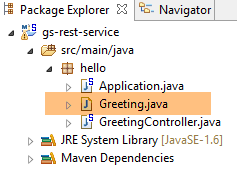
The M model produced by the previous method is the following [Greeting] object:
 |
package hello;

public class Greeting {

    private final long id;
    private final String content;

    public Greeting(long id, String content) {
        this.id = id;
        this.content = content;
    }

    public long getId() {
        return id;
    }

    public String getContent() {
        return content;
    }
}
The JSON transformation of this object will create the string {"id":n,"content":"text"}. Ultimately, the JSON string produced by the controller method will be in the form:
or
13.4.6. Execution
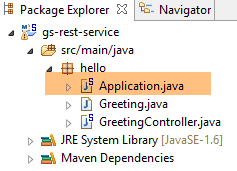 |
The [Application.java] class is the project’s executable class. Its code is as follows:
package hello;

import org.springframework.boot.autoconfigure.EnableAutoConfiguration;
import org.springframework.boot.SpringApplication;
import org.springframework.context.annotation.ComponentScan;

@ComponentScan
@EnableAutoConfiguration
public class Application {

    public static void main(String[] args) {
        SpringApplication.run(Application.class, args);
    }

}
We have already encountered and explained this code in the previous example.
13.4.7. Running the project
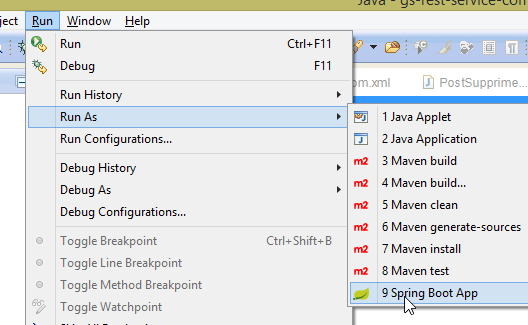 |
We get the following console logs:
- line 13: the Tomcat server starts on port 8080 (line 12);
- line 17: the [DispatcherServlet] servlet is present;
- line 20: the method [GreetingController.greeting] has been discovered;
To test the web application, we request the URL [http://localhost:8080/greeting]:
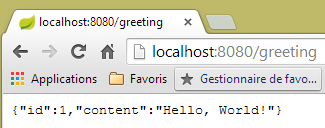 | 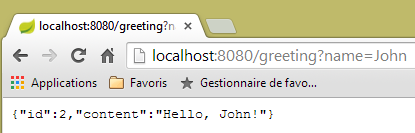 |
We receive the expected JSON string. It may be interesting to view the HTTP headers sent by the server. To do this, we will use the Chrome extension called [Advanced Rest Client] (Chrome / Ctrl-T / [Applications] menu / [Advanced Rest Client] - see Appendices, paragraph 22.5):
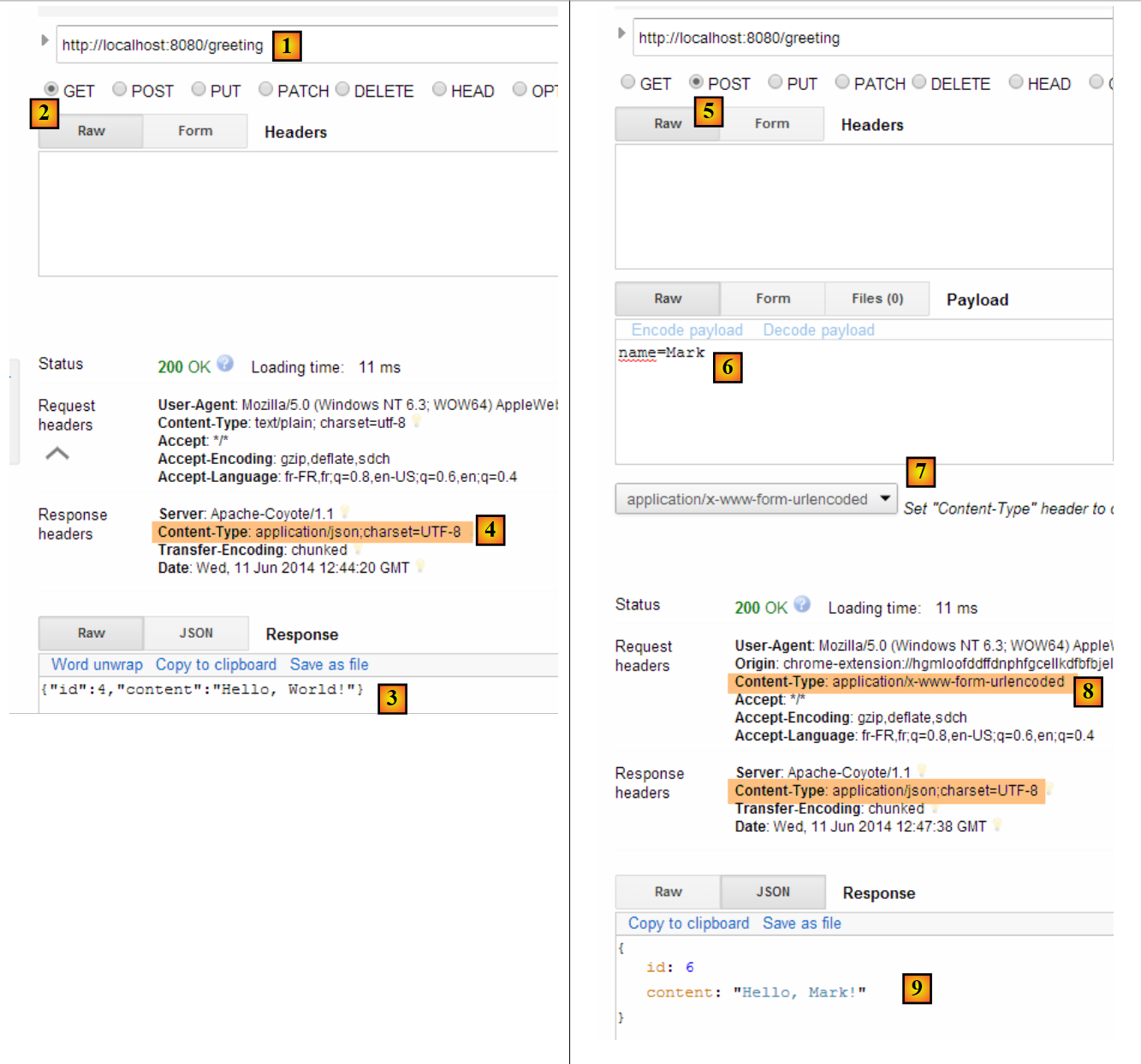 |
- in [1], the requested URL;
- in [2], the GET method is used;
- in [3], the JSON response;
- in [4], the server indicated that it was sending a response in JSON format;
- in [5], we request the same URL but this time using a POST request;
- in [7], the information is sent to the server in [urlencoded] format;
- in [6], the "name" parameter and its value;
- in [8], the browser tells the server that it is sending it [urlencoded] information;
- in [9], the server's JSON response;
13.4.8. Creating an executable archive
We will now create an executable archive:
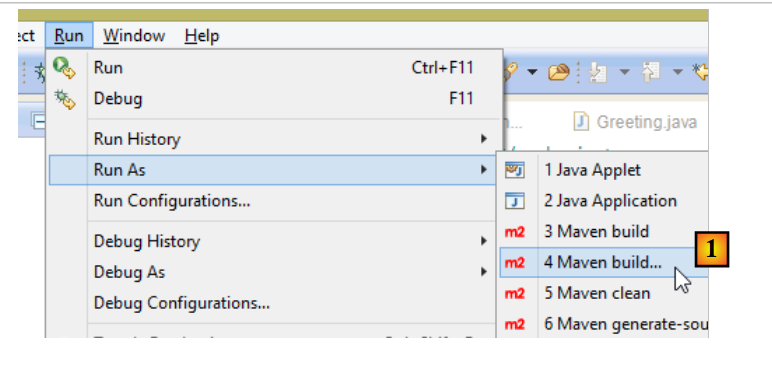 |
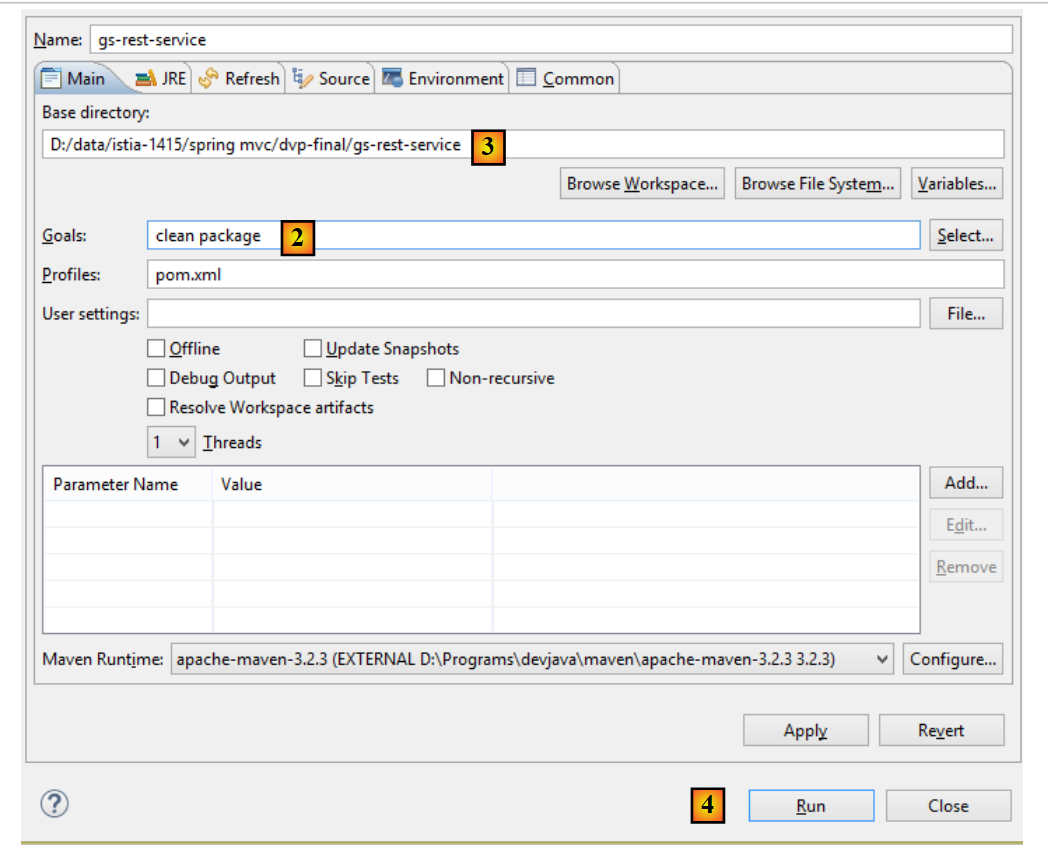 |
- in [1]: we run a Maven target;
- in [2]: there are two goals: [clean] to delete the [target] folder from the Maven project, [package] to regenerate it;
- in [3]: the generated [target] folder will be located in this folder;
- in [4]: we generate the target;
In the logs that appear in the console, it is important to see the [spring-boot-maven-plugin] plugin. This is the plugin that generates the executable archive.
Using a console, navigate to the generated folder:
D:\Temp\wksSTS\gs-rest-service\target>dir
 ...
11/06/2014  15:30    <DIR>          classes
11/06/2014  15:30    <DIR>          generated-sources
11/06/2014  15:30        11 073 572 gs-rest-service-0.1.0.jar
11/06/2014  15:30             3 690 gs-rest-service-0.1.0.jar.original
11/06/2014  15:30    <DIR>          maven-archiver
11/06/2014  15:30    <DIR>          maven-status
...
- line 5: the generated archive;
This archive is executed as follows:
D:\Temp\wksSTS\gs-rest-service-complete\target>java -jar gs-rest-service-0.1.0.jar

  .   ____          _            __ _ _
 /\\ / ___'_ __ _ _(_)_ __  __ _ \ \ \ \
( ( )\___ | '_ | '_| | '_ \/ _` | \ \ \ \
 \\/  ___)| |_)| | | | | || (_| |  ) ) ) )
  '  |____| .__|_| |_|_| |_\__, | / / / /
 =========|_|==============|___/=/_/_/_/
 :: Spring Boot ::        (v1.1.0.RELEASE)

2014-06-11 15:32:47.088  INFO 4972 --- [           main] hello.Application
                  : Starting Application on Gportpers3 with PID 4972 (D:\Temp\wk
sSTS\gs-rest-service-complete\target\gs-rest-service-0.1.0.jar started by ST in
D:\Temp\wksSTS\gs-rest-service-complete\target)
...
Now that the web application is running, you can access it using a browser:
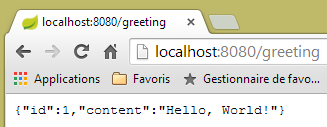 |
13.4.9. Deploying the application on a Tomcat server
As we did for the previous project, we modify the [pom.xml] file as follows:
<?xml version="1.0" encoding="UTF-8"?>
<project xmlns="http://maven.apache.org/POM/4.0.0" xmlns:xsi="http://www.w3.org/2001/XMLSchema-instance"
    xsi:schemaLocation="http://maven.apache.org/POM/4.0.0 http://maven.apache.org/xsd/maven-4.0.0.xsd">
    <modelVersion>4.0.0</modelVersion>

    <groupId>org.springframework</groupId>
    <artifactId>gs-rest-service</artifactId>
    <version>0.1.0</version>
    <packaging>war</packaging>

    ...
</project>
- Line 9: You must specify that you are going to generate a WAR (Web Archive) file;
You must also configure the web application. In the absence of a [web.xml] file, this is done using a class that extends [SpringBootServletInitializer]:
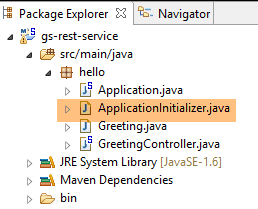 |
The [ApplicationInitializer] class is as follows:
package hello;

import org.springframework.boot.builder.SpringApplicationBuilder;
import org.springframework.boot.context.web.SpringBootServletInitializer;

public class ApplicationInitializer extends SpringBootServletInitializer {

    @Override
    protected SpringApplicationBuilder configure(SpringApplicationBuilder application) {
        return application.sources(Application.class);
    }

}
- line 6: the [ApplicationInitializer] class extends the [SpringBootServletInitializer] class;
- line 9: the [configure] method is overridden (line 8);
- line 10: the class that configures the project is provided;
To run the project, proceed as follows:
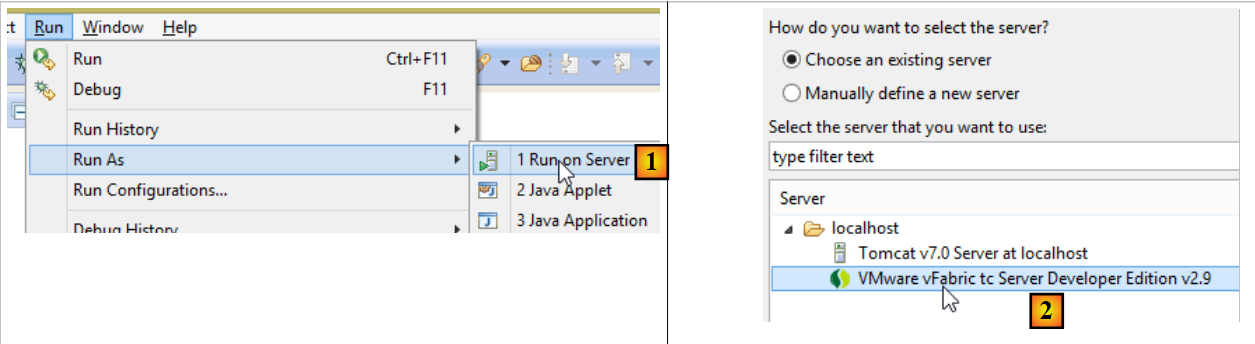 |
- In [1-2], run the project on one of the servers registered in the Eclipse IDE;
Once this is done, you can request the URL [http://localhost:8080/gs-rest-service/greeting/?name=Mitchell] in a browser:
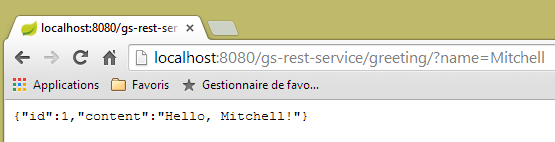 |
13.4.10. Conclusion
We have introduced a type of Spring MVC project where the web application sends a JSON stream to the browser. We will now develop a web/JSON application to expose the [dbintrospringdata] database studied in the [Introduction to Spring Data] tutorial on the web.
13.5. Exposing the [dbintrospringdata] database on the web
13.5.1. Web/JSON Service Architecture
We will implement the following architecture:
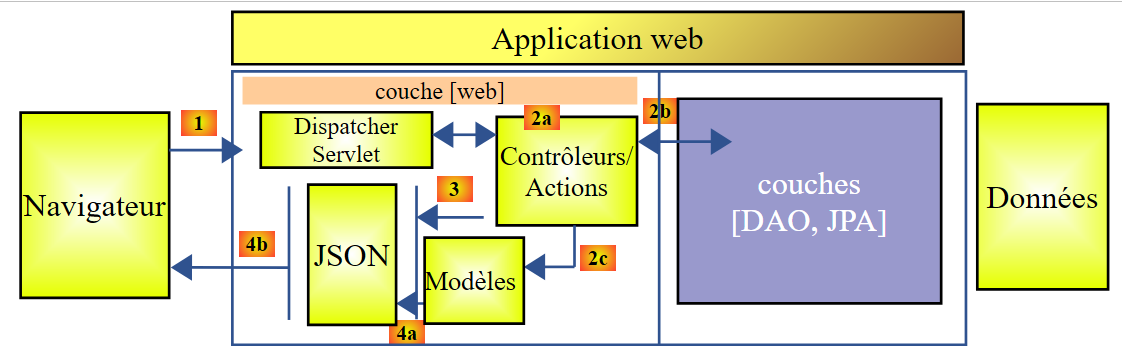 |
The [DAO] and [JPA] layers are implemented by the application written in the [Introduction to Spring Data] tutorial.
13.5.2. Installing the database
 |
The SQL script [dbintrospringdata.sql] creates the MySQL database required for testing.
13.5.3. The Eclipse project for the web service / JSON
The Eclipse project for the web service / JSON is as follows:
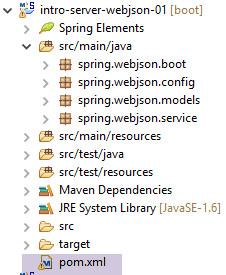 |
This is a Maven project whose [pom.xml] file is as follows:
<project xmlns="http://maven.apache.org/POM/4.0.0" xmlns:xsi="http://www.w3.org/2001/XMLSchema-instance"
    xsi:schemaLocation="http://maven.apache.org/POM/4.0.0 http://maven.apache.org/xsd/maven-4.0.0.xsd">
    <modelVersion>4.0.0</modelVersion>
    <groupId>istia.st.webjson</groupId>
    <artifactId>intro-server-webjson01</artifactId>
    <version>0.0.1-SNAPSHOT</version>

    <name>intro-server-webjson01</name>
    <description>démo spring mvc</description>

    <parent>
        <groupId>org.springframework.boot</groupId>
        <artifactId>spring-boot-starter-parent</artifactId>
        <version>1.2.7.RELEASE</version>
    </parent>

    <dependencies>
        <dependency>
            <groupId>istia.st.springdata</groupId>
            <artifactId>intro-spring-data-01</artifactId>
            <version>0.0.1-SNAPSHOT</version>
        </dependency>
        <dependency>
            <groupId>org.springframework.boot</groupId>
            <artifactId>spring-boot-starter-web</artifactId>
        </dependency>
        <dependency>
            <groupId>org.springframework.boot</groupId>
            <artifactId>spring-boot-starter</artifactId>
        </dependency>
    </dependencies>

    <build>
        <plugins>
            <plugin>
                <groupId>org.springframework.boot</groupId>
                <artifactId>spring-boot-maven-plugin</artifactId>
            </plugin>
            <plugin>
                <groupId>org.apache.maven.plugins</groupId>
                <artifactId>maven-surefire-plugin</artifactId>
                <version>2.18.1</version>
            </plugin>
        </plugins>
    </build>

</project>
- lines 11–15: the parent Maven project already used for the [DAO] layer;
- lines 18–22: the dependency on the [DAO] layer;
- lines 23–26: the dependency on the [spring-boot-starter-web] artifact. This artifact includes all the dependencies needed to create a web/JSON service. It also includes unnecessary libraries. A more precise configuration would therefore be necessary. However, this configuration is useful for getting started;
- lines 28–30: the dependency on the [spring-boot-starter] artifact allows you to manage Spring Boot annotations;
The dependencies introduced by this configuration are as follows:
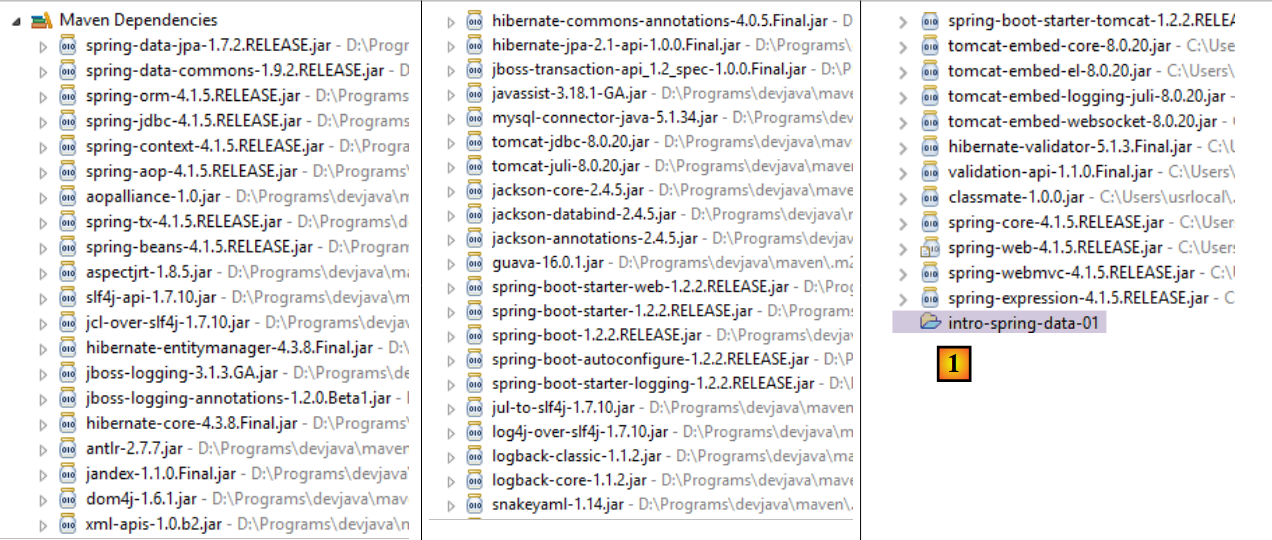 |
- In [1], we can see that Eclipse has detected the dependency on the project archive [intro-spring-data-01];
The dependencies above are those of both the [DAO] layer and the [web] layer.
13.5.3.1. Configuration of the [web] layer
The [web] layer is configured by an [AppConfig] file:
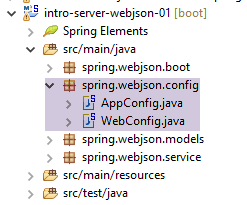 |
The [WebConfig] class configures the [web] layer:
package spring.webjson.config;

import org.springframework.beans.factory.annotation.Autowired;
import org.springframework.boot.context.embedded.EmbeddedServletContainerFactory;
import org.springframework.boot.context.embedded.ServletRegistrationBean;
import org.springframework.boot.context.embedded.tomcat.TomcatEmbeddedServletContainerFactory;
import org.springframework.context.ApplicationContext;
import org.springframework.context.annotation.Bean;
import org.springframework.web.context.WebApplicationContext;
import org.springframework.web.servlet.DispatcherServlet;
import org.springframework.web.servlet.config.annotation.EnableWebMvc;
import org.springframework.web.servlet.config.annotation.WebMvcConfigurerAdapter;

import com.fasterxml.jackson.databind.ObjectMapper;
import com.fasterxml.jackson.databind.ser.impl.SimpleBeanPropertyFilter;
import com.fasterxml.jackson.databind.ser.impl.SimpleFilterProvider;

@EnableWebMvc
public class WebConfig extends WebMvcConfigurerAdapter {

    // -------------------------------- layer configuration [web]
    @Autowired
    private ApplicationContext context;

    @Bean
    public DispatcherServlet dispatcherServlet() {
        DispatcherServlet servlet = new DispatcherServlet((WebApplicationContext) context);
        return servlet;
    }

    @Bean
    public ServletRegistrationBean servletRegistrationBean(DispatcherServlet dispatcherServlet) {
        return new ServletRegistrationBean(dispatcherServlet, "/*");
    }

    @Bean
    public EmbeddedServletContainerFactory embeddedServletContainerFactory() {
        return new TomcatEmbeddedServletContainerFactory("", 8080);
    }

    // filters jSON
    @Bean(name = "jsonMapper")
    public ObjectMapper jsonMapper() {
        return new ObjectMapper();
    }

    @Bean(name = "jsonMapperCategorieWithProduits")
    public ObjectMapper jsonMapperCategorieWithProduits() {
        // mapper jSON
        ObjectMapper mapper = new ObjectMapper();
        // filters
        mapper.setFilters(
                new SimpleFilterProvider().addFilter("jsonFilterCategorie", SimpleBeanPropertyFilter.serializeAllExcept())
                        .addFilter("jsonFilterProduit", SimpleBeanPropertyFilter.serializeAllExcept("categorie")));
        // result
        return mapper;
    }

    @Bean(name = "jsonMapperProduitWithCategorie")
    public ObjectMapper jsonMapperProduitWithCategorie() {
        // mapper jSON
        ObjectMapper mapper = new ObjectMapper();
        // filters
        mapper.setFilters(
                new SimpleFilterProvider().addFilter("jsonFilterProduit", SimpleBeanPropertyFilter.serializeAllExcept())
                        .addFilter("jsonFilterCategorie", SimpleBeanPropertyFilter.serializeAllExcept("produits")));
        // result
        return mapper;
    }

    @Bean(name = "jsonMapperCategorieWithoutProduits")
    public ObjectMapper jsonMapperCategorieWithoutProduits() {
        // mapper jSON
        ObjectMapper mapper = new ObjectMapper();
        // filters
        mapper.setFilters(new SimpleFilterProvider().addFilter("jsonFilterCategorie",
                SimpleBeanPropertyFilter.serializeAllExcept("produits")));
        // result
        return mapper;
    }

    @Bean(name = "jsonMapperProduitWithoutCategorie")
    public ObjectMapper jsonMapperProduitWithoutCategorie() {
        // mapper jSON
        ObjectMapper mapper = new ObjectMapper();
        // filters
        mapper.setFilters(new SimpleFilterProvider().addFilter("jsonFilterProduit",
                SimpleBeanPropertyFilter.serializeAllExcept("categorie")));
        // result
        return mapper;
    }
}
- line 18: the [@EnableWebMvc] annotation triggers automatic configurations for the Spring MVC framework;
- line 19: the [WebConfig] class extends the Spring [WebMvcConfigurerAdapter] class to redefine certain beans (lines 26–40);
- lines 22–23: injection of the Spring context;
- lines 25–29: definition of the Spring MVC framework’s servlet, which routes HTTP requests to the correct controller and method. [DispatcherServlet] is a Spring class;
- lines 31–34: we specify that this servlet handles all URLs;
- lines 36–39: the presence of this bean will activate the Tomcat server included in the project archives. It will listen for requests on port 8080;
- lines 42–91: beans that will be used to manage JSON filters;
- lines 42–45: a JSON mapper without filters;
- lines 47–57: the JSON mapper that allows you to retrieve a category along with its products. Note that when requesting a category with its products, you must configure both the JSON filter for the [Category] class and the one for the [Product] class. This is always the case. When serializing/deserializing a class to JSON, you must configure the JSON filter for the class and those for all dependencies to be included in it;
- lines 59–69: the JSON mapper that allows a product to be displayed with its category;
- lines 71–80: the JSON mapper that allows you to have a category without its products;
- lines 82–91: the JSON mapper that allows you to retrieve a product without its category;
The [AppConfig] class configures the entire application, i.e., the [web] and [DAO] layers:
package spring.webjson.config;

import org.springframework.context.annotation.ComponentScan;
import org.springframework.context.annotation.Import;

import spring.data.config.DaoConfig;

@ComponentScan(basePackages = { "spring.webjson" })
@Import({ DaoConfig.class, WebConfig.class})
public class AppConfig {

}
- Line 9: imports the beans from the [DAO] layer and those from the [web] layer;
- line 8: specifies the packages where other Spring beans can be found;
Note that we have not used the [@EnableAutoConfiguration] annotation anywhere. We preferred to control the configuration ourselves.
13.5.4. The application model
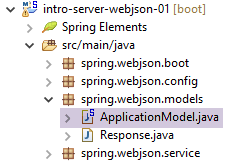 |
The [ApplicationModel] class is as follows:
package spring.webjson.models;

import java.util.List;

import org.springframework.beans.factory.annotation.Autowired;
import org.springframework.stereotype.Component;

import spring.data.dao.IDao;
import spring.data.entities.Categorie;
import spring.data.entities.Produit;

@Component
public class ApplicationModel implements IDao {

    // the [DAO] layer
    @Autowired
    private IDao dao;

    @Override
    public void addProduits(List<Produit> produits) {
        dao.addProduits(produits);
    }

    @Override
    public void deleteAllProduits() {
        dao.deleteAllProduits();
    }

    @Override
    public void updateProduits(List<Produit> produits) {
        dao.updateProduits(produits);
    }

    @Override
    public List<Produit> getAllProduits() {
        return dao.getAllProduits();
    }

    @Override
    public void addCategories(List<Categorie> categories) {
        dao.addCategories(categories);
    }

    @Override
    public void deleteAllCategories() {
        dao.deleteAllCategories();
    }

    @Override
    public void updateCategories(List<Categorie> categories) {
        dao.updateCategories(categories);
    }

    @Override
    public List<Categorie> getAllCategories() {
        return dao.getAllCategories();
    }

    @Override
    public Produit getProduitByIdWithCategorie(Long idProduit) {
        return dao.getProduitByIdWithCategorie(idProduit);
    }

    @Override
    public Produit getProduitByNameWithCategorie(String nom) {
        return dao.getProduitByNameWithCategorie(nom);
    }

    @Override
    public Categorie getCategorieByIdWithProduits(Long idCategorie) {
        return dao.getCategorieByIdWithProduits(idCategorie);
    }

    @Override
    public Categorie getCategorieByNameWithProduits(String nom) {
        return dao.getCategorieByNameWithProduits(nom);
    }

    @Override
    public Produit getProduitByIdWithoutCategorie(Long idProduit) {
        return dao.getProduitByIdWithoutCategorie(idProduit);
    }

    @Override
    public Categorie getCategorieByIdWithoutProduits(Long idCategorie) {
        return dao.getCategorieByIdWithoutProduits(idCategorie);
    }

    @Override
    public Produit getProduitByNameWithoutCategorie(String nom) {
        return dao.getProduitByNameWithoutCategorie(nom);
    }

    @Override
    public Categorie getCategorieByNameWithoutProduits(String nom) {
        return dao.getCategorieByNameWithoutProduits(nom);
    }

}
- line 12: the class is a Spring singleton;
- line 13: which implements the [IDao] interface of the [DAO] layer;
- lines 16–17: injection of a reference into the [DAO] layer;
- lines 19–99: implementation of the [IDao] interface;
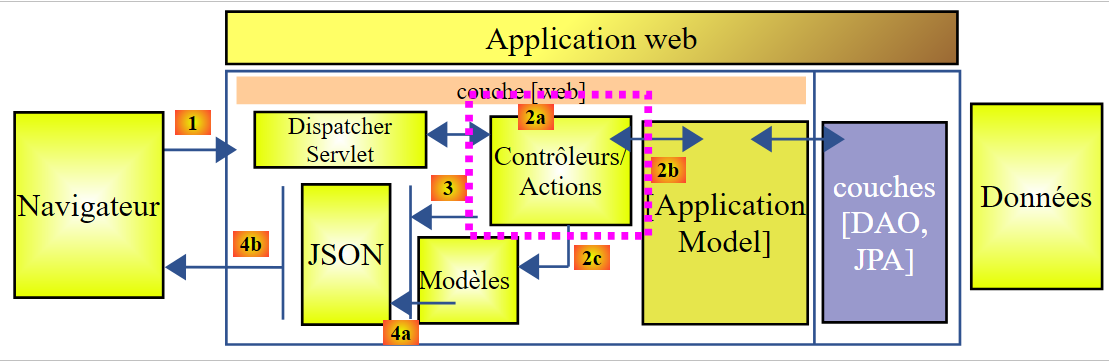
The architecture of the web layer evolves as follows:
 |
- in [2b], the methods of the controller(s) communicate with the [ApplicationModel] singleton;
This strategy provides flexibility regarding the management of a potential cache. The [ApplicationModel] class can be used to store information obtained from the [DAO] layer or configuration data. This can be useful when you do not have control over the [DAO] layer. This caching strategy may evolve over time. Changes will have no impact on the code of the controller(s).
13.5.5. The controller
 |
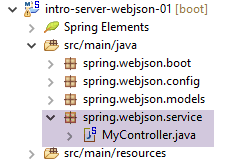 |
Here we have only one controller, the [MyController] class.
13.5.5.1. Exposed URLs
The URLs exposed by this controller are as follows:
| Adds products to the database. These are posted. The response is a JSON string containing the list of added products with their primary keys. |
| Deletes all products from the database. |
| Updates products in the database. These are posted. The response is a JSON string containing the list of updated products. |
| Retrieves the JSON string for all products. |
| Adds categories to the database. These are posted. The response is a JSON string containing the list of added categories along with their primary keys. If the categories contain products, those are also added to the database. |
| Deletes all categories from the database along with all products in them. Afterward, the database is empty. |
| Updates categories in the database. These are posted. The response is the list of updated categories. If the categories contain products, those are also updated in the database. Returns the JSON string of the modified categories; |
| Retrieves the JSON string for all categories. |
| Retrieves the JSON string for a product identified by its ID, along with its category. |
| Retrieves the JSON string for a product identified by its ID, without its category. |
| Retrieves the JSON string for a product identified by its name, along with its category. |
| Retrieves the JSON string for a product identified by its name, without its category. |
| Retrieves the JSON string for a category specified by its ID, along with its products. |
| Retrieves the JSON string for a category specified by its name, along with its products. |
| Retrieves the JSON string for a category specified by its name, without its products. |
| Retrieves the JSON string for a category identified by its ID, excluding its products. |
The exposed URLs correspond to the methods of the [IDao] interface in the [DAO] layer. The methods of the web service / JSON are all built on the same model. We will examine a few of them.
13.5.5.2. The controller skeleton
The controller skeleton is as follows:
package spring.webjson.service;

import java.util.ArrayList;
import java.util.List;
import java.util.Set;

import javax.servlet.http.HttpServletRequest;

import org.springframework.beans.factory.annotation.Autowired;
import org.springframework.beans.factory.annotation.Qualifier;
import org.springframework.stereotype.Controller;
import org.springframework.web.bind.annotation.PathVariable;
import org.springframework.web.bind.annotation.RequestMapping;
import org.springframework.web.bind.annotation.RequestMethod;
import org.springframework.web.bind.annotation.ResponseBody;

import com.fasterxml.jackson.core.JsonProcessingException;
import com.fasterxml.jackson.core.type.TypeReference;
import com.fasterxml.jackson.databind.ObjectMapper;
import com.google.common.io.CharStreams;

import spring.data.dao.DaoException;
import spring.data.entities.Categorie;
import spring.data.entities.Produit;
import spring.webjson.models.ApplicationModel;
import spring.webjson.models.Response;

@Controller
public class MyController {

    // spring dependencies
    @Autowired
    private ApplicationModel application;

    // filters jSON
    @Autowired
    @Qualifier("jsonMapper")
    private ObjectMapper jsonMapper;
    @Autowired
    @Qualifier("jsonMapperCategorieWithProduits")
    private ObjectMapper jsonMapperCategorieWithProduits;
    @Autowired
    @Qualifier("jsonMapperProduitWithCategorie")
    private ObjectMapper jsonMapperProduitWithCategorie;
    @Autowired
    @Qualifier("jsonMapperCategorieWithoutProduits")
    private ObjectMapper jsonMapperCategorieWithoutProduits;
    @Autowired
    @Qualifier("jsonMapperProduitWithoutCategorie")
    private ObjectMapper jsonMapperProduitWithoutCategorie;

    // class [MyController] is a singleton and is instantiated only once the bean

    public MyController() {
        // System.out.println("MyController");
    }

    @RequestMapping(value = "/addProduits", method = RequestMethod.POST, consumes = "application/json; charset=UTF-8", produces = "application/json; charset=UTF-8")
    @ResponseBody
    public String addProduits(HttpServletRequest request) throws JsonProcessingException {
        ...
    }
- line 28: the [@Controller] annotation makes the class a Spring component;
- lines 32–33: injection of a reference to the [ApplicationModel] class;
- lines 36-50: injection of references to the JSON mappers;
- line 58: the exposed URL is [/addProducts]. The client must use a [POST] method to make its request (method = RequestMethod.POST). It must send the posted value as a JSON string (content-type = "application/json; charset=UTF-8"). The method itself returns the response to the client (line 59). This will be a string (line 60). The HTTP header [Content-type: application/json; charset=UTF-8] will be sent to the client to indicate that it will receive a JSON string (line 58);
- line 60: the [addProduits] method returns the JSON string containing the list of products added to the database;
13.5.5.3. Controller method responses
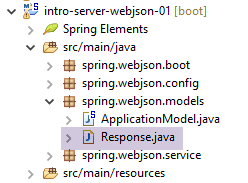
All controller methods return the following [Response] type:
 |
package spring.webjson.service;

import java.util.List;

public class Response<T> {

    // ----------------- properties
    // operation status
    private int status;
    // any error messages
    private List<String> messages;
    // the body of the reply
    private T body;

    // manufacturers
    public Response() {

    }

    public Response(int status, List<String> messages, T body) {
        this.status = status;
        this.messages = messages;
        this.body = body;
    }

    // getters and setters
    ...
}
- line 5: the response encapsulates a type T;
- line 13: the response of type T;
- lines 9–11: a method may encounter an exception. In this case, it will return a response with:
- line 9: status!=0;
- line 11: the list of errors encountered;
13.5.5.4. The URL [/addProducts]
The URL [/addProducts] is handled by the following method:
@RequestMapping(value = "/addProduits", method = RequestMethod.POST, consumes = "application/json; charset=UTF-8", produces = "application/json; charset=UTF-8")
    @ResponseBody
    public String addProduits(HttpServletRequest request) throws JsonProcessingException {
        // answer
        Response<List<Produit>> response;
        try {
            // retrieve the posted value
            String body = CharStreams.toString(request.getReader());
            List<Produit> produits = jsonMapperProduitWithoutCategorie.readValue(body, new TypeReference<List<Produit>>() {
            });
            // we re-establish the link between products and categories
            for (Produit produit : produits) {
                produit.setCategorie(application.getCategorieByIdWithoutProduits(produit.getIdCategorie()));
            }
            // we persist products
            application.addProduits(produits);
            response = new Respon    se<List<Produit>>(0, null, produits);
        } catch (DaoException e1) {
            response = new Response<List<Produit>>(1000, e1.getErreurs(), null);
        } catch (Exception e2) {
            response = new Response<List<Produit>>(1000, getErreursForException(e2), null);
        }
        // answer jSON
        return jsonMapperProduitWithoutCategorie.writeValueAsString(response);
    }
- line 3: the method takes [HttpServletRequest request] as a parameter, which encapsulates all the information about the client's request;
- line 5: the response that will be sent to the client: a list of products;
- line 8: we retrieve the posted value. The [CharStreams] class belongs to the [Google Guava] library, whose reference we added to the [pom.xml] file. We obtain the JSON string posted by the client. We need to deserialize it to do something with it;
- lines 8–10: deserialization is performed. We obtain a list of products where each product has a [category=null] field;
- lines 12–14: We reset the [category] field for all products in the list. To do this, we use the product’s [categoryId] field, which is initialized;
- line 16: the products are inserted into the database;
- line 17: the [response] object is initialized with the list of products;
- lines 18-19: case where the method encounters an exception from the [DAO] layer. We initialize the response with [status=1000] (error code) [messages=e1.getMessages()], i.e., we send the client the list of errors encountered on the server side;
- lines 20–21: case where the method encounters another type of exception. We initialize the response with [status=1000] (error code) [messages=getErrorsForException(e)] where [getErrorsForException] is a private method of the class that returns the list of errors associated with the exceptions in e's exception stack, and [body=null];
- line 24: the JSON string of the response is returned;
13.5.5.5. The URL [/getAllProducts]
The URL [/getAllProducts] is handled by the following method:
    @RequestMapping(value = "/getAllProduits", method = RequestMethod.GET, produces = "application/json; charset=UTF-8")
    @ResponseBody
    public String getAllProduits() throws JsonProcessingException {
        // answer
        Response<List<Produit>> response;
        try {
            response = new Response<List<Produit>>(0, null, application.getAllProduits());
        } catch (DaoException e1) {
            response = new Response<List<Produit>>(1003, e1.getErreurs(), null);
        } catch (Exception e2) {
            response = new Response<List<Produit>>(1003, getErreursForException(e2), null);
        }
        // answer jSON
        return jsonMapperProduitWithoutCategorie.writeValueAsString(response);
}
- Line 1: The URL [/getAllProduits] is requested using a [GET] operation. It returns JSON;
- line 2: the method itself sends the JSON response to the client;
- line 5: the method returns a JSON string of type [Response<List<Product>>];
- line 7: products are requested without their category;
- lines 8–12: in case of an error, the response is initialized with an error code and error messages;
- line 14: the JSON response is sent to the client;
13.5.5.6. Conclusion
We will not cover the other methods of the controller. They are similar to one or the other of the two methods we just presented.
13.5.6. The Web Service / JSON Execution Class
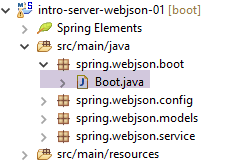 |
The [Boot] class is the project’s executable class:
package spring.webjson.boot;

import org.springframework.boot.SpringApplication;

import spring.webjson.server.config.AppConfig;

public class Boot {

    public static void main(String[] args) {
        SpringApplication.run(AppConfig.class, args);
    }
}
- Line 10: The static method [SpringApplication.run] is executed. The [SpringApplication] class is a class from the [Spring Boot] project (line 3). Two parameters are passed to it:
- [AppConfig.class]: the class that configures the entire application;
- [args]: any arguments passed to the [main] method on line 9. This parameter is not used here;
When this class is executed, the following logs are generated:
- lines 17-19: Tomcat server startup to run the web/JSON service;
- lines 25-33: construction of the [DAO] layer;
- lines 32-51: the exposed URLs are discovered;
13.5.7. Web service / JSON testing
To perform the tests, we generate the MySQL database [dbintrospringdata] from the SQL script [dbintrospringdata.sql]:
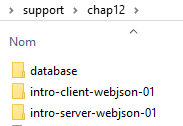 |
Once this is done, we use the [Advanced Rest Client] (see section 22.5) to query the URLs exposed by the web service / JSON (the web service / JSON must be running).
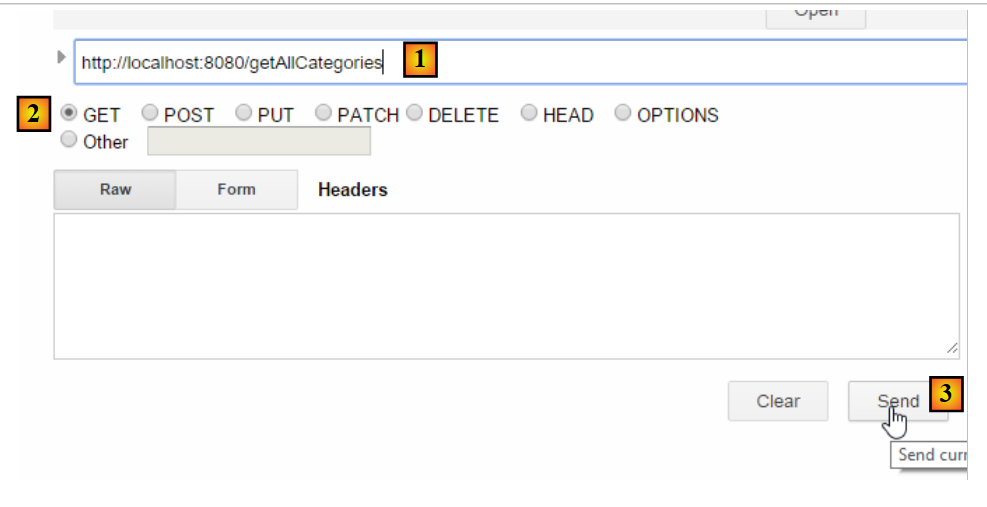 |
- In [1-3], we request the URL [/getAllCategories] via an HTTP GET request;
We receive the following response:
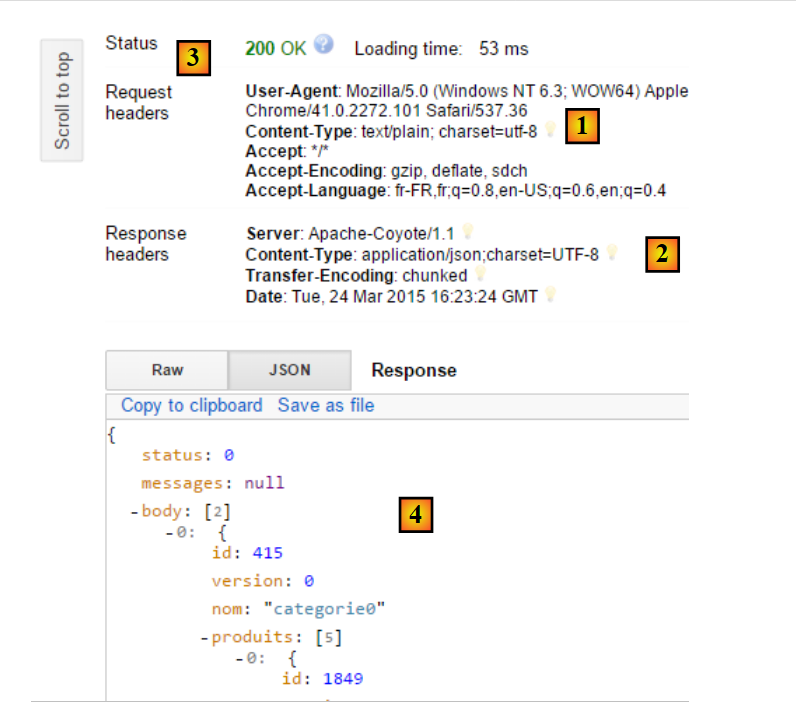 |
- In [1], the client’s HTTP request;
- in [2], the server’s HTTP response;
- in [3], the status [200 OK] indicates that the server successfully processed the request;
- in [4], the server's JSON response;
The complete JSON response is as follows:
{"status":0,"messages":null,"body":[{"id":415,"version":0,"nom":"categorie0","produits":[{"id":1849,"version":0,"nom":"produit00","idCategorie":415,"prix":100.0,"description":"desc00"},{"id":1850,"version":0,"nom":"produit01","idCategorie":415,"prix":101.0,"description":"desc01"},{"id":1851,"version":0,"nom":"produit02","idCategorie":415,"prix":102.0,"description":"desc02"},{"id":1852,"version":0,"nom":"produit03","idCategorie":415,"prix":103.0,"description":"desc03"},{"id":1853,"version":0,"nom":"produit04","idCategorie":415,"prix":104.0,"description":"desc04"}]},{"id":416,"version":0,"nom":"categorie1","produits":[{"id":1856,"version":0,"nom":"produit12","idCategorie":416,"prix":112.0,"description":"desc12"},{"id":1857,"version":0,"nom":"produit13","idCategorie":416,"prix":113.0,"description":"desc13"},{"id":1858,"version":0,"nom":"produit14","idCategorie":416,"prix":114.0,"description":"desc14"},{"id":1854,"version":0,"nom":"produit10","idCategorie":416,"prix":110.0,"description":"desc10"},{"id":1855,"version":0,"nom":"produit11","idCategorie":416,"prix":111.0,"description":"desc11"}]}]}
- status:0 means there were no server-side errors;
- messages: null means there are no error messages;
- body: is the body of the response, in this case the list of categories with their products. There are two categories, each with 5 products;
We will add the product [product15] to the category [category1]. To do this, we will use the URL [/addCategories], which has the following code:
@RequestMapping(value = "/addCategories", method = RequestMethod.POST, consumes = "application/json; charset=UTF-8", produces = "application/json; charset=UTF-8")
    @ResponseBody
    public String addCategories(HttpServletRequest request) throws JsonProcessingException {
        Response<List<Categorie>> response;
        ObjectMapper mapper = context.getBean(ObjectMapper.class);
        // we persist categories
        try {
            // retrieve the posted value
            String body = CharStreams.toString(request.getReader());
            mapper.setFilters(jsonFilterCategorieWithProduits);
            List<Categorie> categories = mapper.readValue(body, new TypeReference<List<Categorie>>() {
            });
            // we re-establish the link between products and categories
            for (Categorie categorie : categories) {
                Set<Produit> produits = categorie.getProduits();
                if (produits != null) {
                    for (Produit produit : categorie.getProduits()) {
                        produit.setCategorie(categorie);
                    }
                }
            }
            // we persist categories
            application.addCategories(categories);
            response = new Response<List<Categorie>>(0, null, categories);
        } catch (Exception e) {
            response = new Response<List<Categorie>>(1004, getErreursForException(e), null);
        }
        // answer jSON
        return mapper.writeValueAsString(response);
    }
- line 1: the client must send a POST request, and the posted value must be a JSON string;
- lines 9–12: the posted value must be a list of categories with their associated products;
We will create a category [category2] with a product [product21]. The JSON string to be sent is then as follows:
[{"id":null,"version":0,"nom":"categorie2","produits":[{"id":null,"version":0,"nom":"produit21","idCategorie":null,"prix":111.0,"description":"desc21"}]}]
The request to the web service / JSON is made as follows:
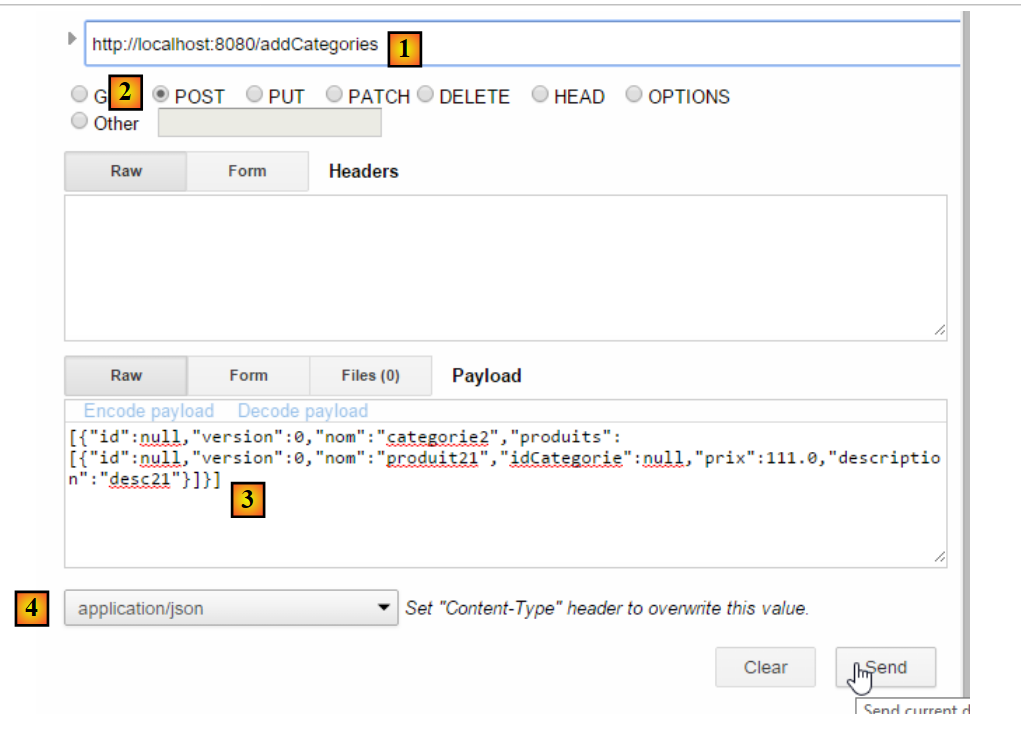 |
- in [1], the requested URL;
- in [2], it is requested via a POST operation;
- in [3], the posted JSON string;
- in [4], the server is told that JSON data will be sent;
The server's response is as follows:
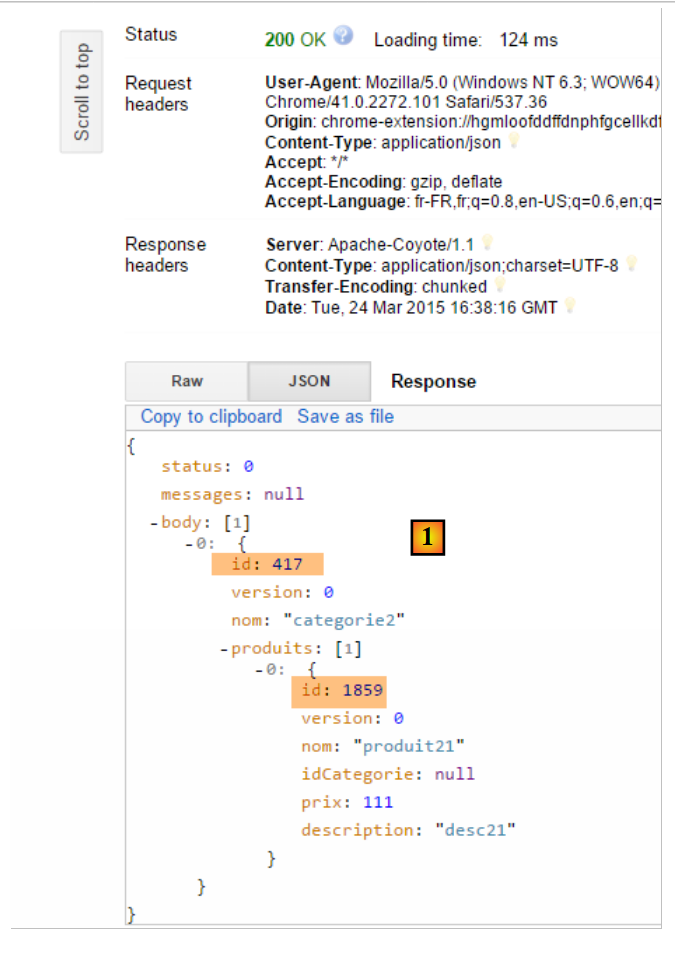 |
- in [1], we see that both the category and its product now have a primary key, indicating that they have likely been inserted into the database. We will verify this by using the URL [/getCategorieByNameWithProduits/categorie2]:
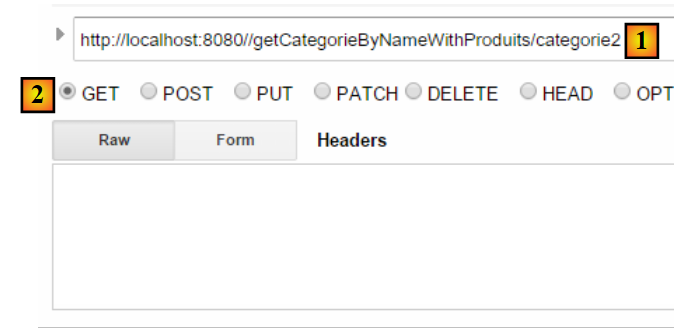 |
We get the following result:
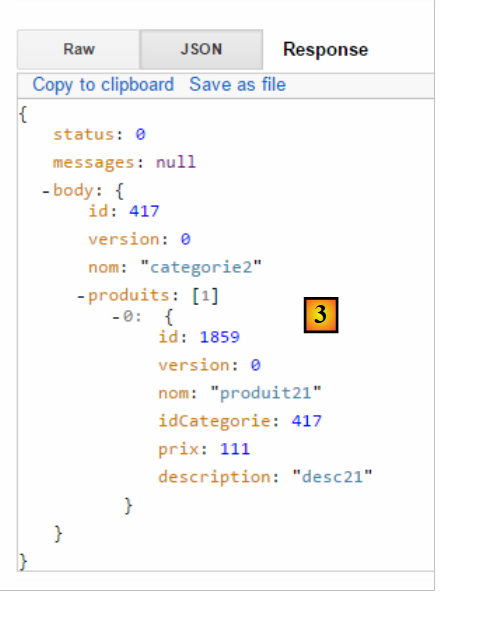 |
We have indeed retrieved the category [categorie2] with its single product [produit21]. We can also request only the product. To do this, let’s use the URL [/getProduitByIdWithoutCategorie/1859]:
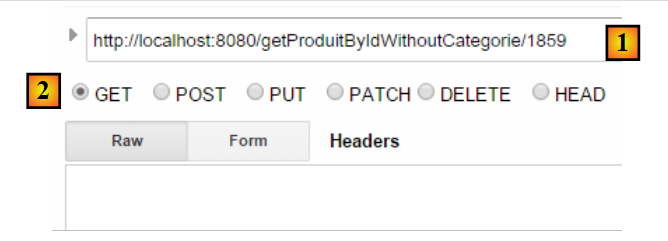 |
We get the following result:
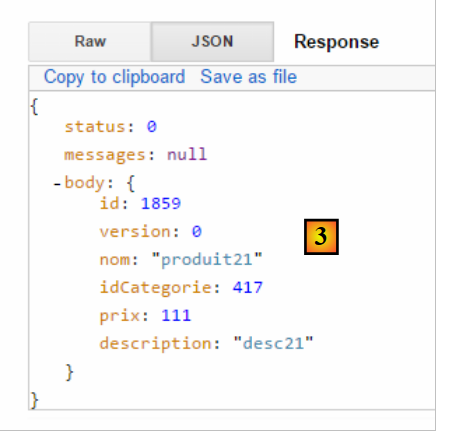 |
All [GET] operations can be performed in a standard web browser:
 |
Readers are invited to test the other URLs of the web service / json.
13.6. A client programmed for the /json web service
Now that the [dbintrospringdata] database is available on the web, we will write an application that uses it. We will then have the following client/server architecture:
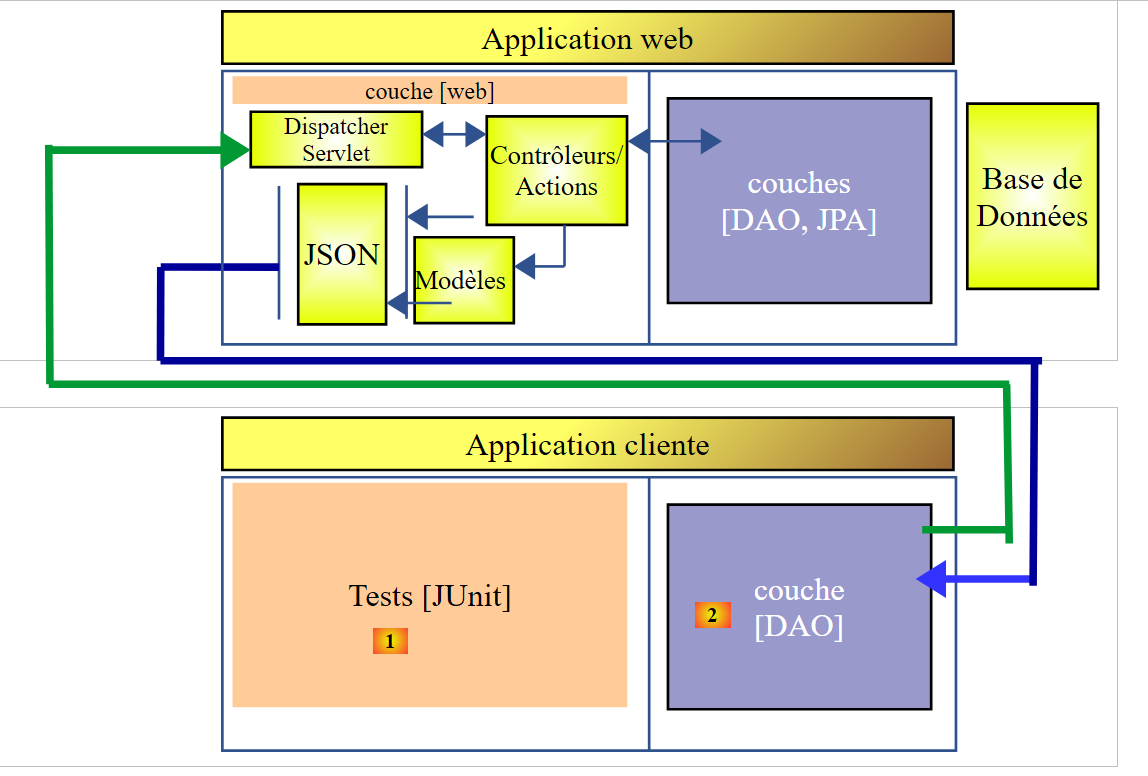 |
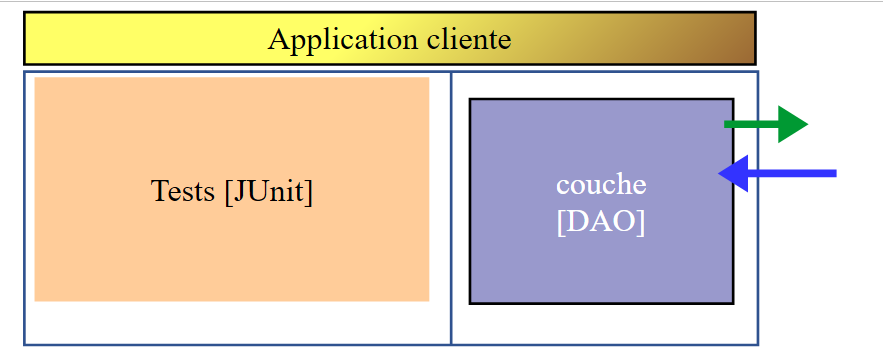
The client application will have two layers:
- a [DAO] [2] layer to communicate with the /json web application that exposes the database;
- a JUnit [1] testing layer to verify that the client and server are functioning correctly;
13.6.1. The Eclipse Project
The client’s Eclipse project is as follows:
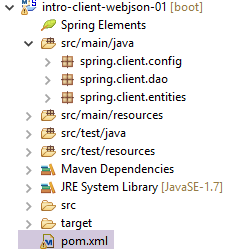 |
- the [src/main/java] folder implements the [DAO] layer;
- the [src/test/java] folder implements the JUnit tests;
13.6.2. Maven Project Configuration
The project is a Maven project configured by the following [pom.xml] file:
<project xmlns="http://maven.apache.org/POM/4.0.0" xmlns:xsi="http://www.w3.org/2001/XMLSchema-instance"
    xsi:schemaLocation="http://maven.apache.org/POM/4.0.0 http://maven.apache.org/xsd/maven-4.0.0.xsd">
    <modelVersion>4.0.0</modelVersion>
    <groupId>istia.st.webjson</groupId>
    <artifactId>intro-client-webjson-01</artifactId>
    <version>0.0.1-SNAPSHOT</version>
    <description>Client console du serveur web / jSON</description>

    <properties>
        <project.build.sourceEncoding>UTF-8</project.build.sourceEncoding>
        <java.version>1.8</java.version>
    </properties>

    <parent>
        <groupId>org.springframework.boot</groupId>
        <artifactId>spring-boot-starter-parent</artifactId>
        <version>1.2.7.RELEASE</version>
    </parent>

    <dependencies>
        <!-- Spring -->
        <dependency>
            <groupId>org.springframework</groupId>
            <artifactId>spring-web</artifactId>
        </dependency>
        <!-- jSON library used by Spring -->
        <dependency>
            <groupId>com.fasterxml.jackson.core</groupId>
            <artifactId>jackson-core</artifactId>
        </dependency>
        <dependency>
            <groupId>com.fasterxml.jackson.core</groupId>
            <artifactId>jackson-databind</artifactId>
        </dependency>
        <!-- component used by Spring RestTemplate -->
        <dependency>
            <groupId>org.apache.httpcomponents</groupId>
            <artifactId>httpclient</artifactId>
        </dependency>
        <!-- Google Guava -->
        <dependency>
            <groupId>com.google.guava</groupId>
            <artifactId>guava</artifactId>
            <version>16.0.1</version>
            <scope>test</scope>
        </dependency>
        <!-- log library -->
        <dependency>
            <groupId>org.springframework.boot</groupId>
            <artifactId>spring-boot-starter-logging</artifactId>
        </dependency>
        <!-- Spring Boot Test -->
        <dependency>
            <groupId>org.springframework.boot</groupId>
            <artifactId>spring-boot-starter-test</artifactId>
            <scope>test</scope>
        </dependency>
        <!-- Spring Boot -->
        <dependency>
            <groupId>org.springframework.boot</groupId>
            <artifactId>spring-boot</artifactId>
            <scope>test</scope>
        </dependency>
    </dependencies>
    <!-- plugins -->
    <build>
        <plugins>
            <plugin>
                <artifactId>maven-assembly-plugin</artifactId>
                <configuration>
                    <descriptorRefs>
                        <descriptorRef>jar-with-dependencies</descriptorRef>
                    </descriptorRefs>
                </configuration>
            </plugin>
            <plugin>
                <groupId>org.apache.maven.plugins</groupId>
                <artifactId>maven-surefire-plugin</artifactId>
                <version>2.18.1</version>
            </plugin>
        </plugins>
    </build>

    <name>intro-client-webjson-01</name>
</project>
- lines 14–18: the parent Maven project [spring-boot-starter-parent], which allows us to define a number of dependencies without specifying their versions, as these are defined in the parent project;
- lines 22–25: although we are not writing a web application, we need the [spring-web] dependency, which includes the [RestTemplate] class that allows for easy interfacing with a web/JSON application;
- lines 27–34: a JSON library;
- lines 36–39: a dependency that will allow us to set a timeout for the client’s HTTP requests. A timeout is the maximum wait time for the server’s response. After this time, the client signals a timeout error by throwing an exception;
- lines 41–46: the Google Guava library used in the JUnit test. For this reason, we have set its scope to [test] (line 45). This means that this dependency is included only when executing code from the [src/test/java] branch;
- lines 48–51: the logging library;
- lines 52–63: the dependency for JUnit tests. In particular, it includes the JUnit 4 library required for testing. These dependencies have the [<scope>test</scope>] attribute, indicating that they are only required for the testing phase. They are not included in the final project archive;
13.6.3. Implementation of the [DAO] layer
 |
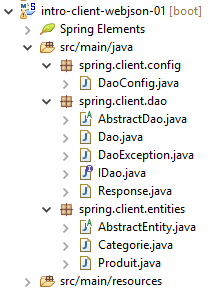 |
- The [spring.client.config] package contains the Spring configuration for the [DAO] layer;
- The [spring.client.dao] package contains the implementation of the [DAO] layer;
- The [spring.client.entities] package contains the objects exchanged with the web service / JSON;
13.6.3.1. Configuration
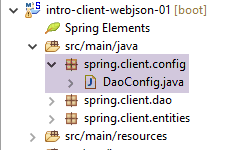 |
The [DaoConfig] class handles the Spring configuration of the [DAO] layer. Its code is as follows:
package spring.client.config;

import org.springframework.context.annotation.Bean;
import org.springframework.context.annotation.ComponentScan;
import org.springframework.context.annotation.Configuration;
import org.springframework.http.client.HttpComponentsClientHttpRequestFactory;
import org.springframework.web.client.RestTemplate;

import com.fasterxml.jackson.databind.ObjectMapper;
import com.fasterxml.jackson.databind.ser.impl.SimpleBeanPropertyFilter;
import com.fasterxml.jackson.databind.ser.impl.SimpleFilterProvider;

@ComponentScan({ "spring.client.dao" })
public class DaoConfig {

    // constants
    static private final int TIMEOUT = 1000;
    static private final String URL_WEBJSON = "http://localhost:8080";

    @Bean
    public RestTemplate restTemplate(int timeout) {
        // creation of the RestTemplate component
        HttpComponentsClientHttpRequestFactory factory = new HttpComponentsClientHttpRequestFactory();
        RestTemplate restTemplate = new RestTemplate(factory);
        // exchange timeout
        factory.setConnectTimeout(timeout);
        factory.setReadTimeout(timeout);
        // result
        return restTemplate;
    }

    @Bean
    public int timeout() {
        return TIMEOUT;
    }

    @Bean
    public String urlWebJson() {
        return URL_WEBJSON;
    }

    // filters jSON
    @Bean(name = "jsonMapper")
    public ObjectMapper jsonMapper() {
        return new ObjectMapper();
    }

    @Bean(name = "jsonMapperCategorieWithProduits")
    public ObjectMapper jsonMapperCategorieWithProduits() {
        // mapper jSON
        ObjectMapper mapper = new ObjectMapper();
        // filters
        mapper.setFilters(
                new SimpleFilterProvider().addFilter("jsonFilterCategorie", SimpleBeanPropertyFilter.serializeAllExcept())
                        .addFilter("jsonFilterProduit", SimpleBeanPropertyFilter.serializeAllExcept("categorie")));
        // result
        return mapper;
    }

    @Bean(name = "jsonMapperProduitWithCategorie")
    public ObjectMapper jsonMapperProduitWithCategorie() {
        // mapper jSON
        ObjectMapper mapper = new ObjectMapper();
        // filters
        mapper.setFilters(
                new SimpleFilterProvider().addFilter("jsonFilterProduit", SimpleBeanPropertyFilter.serializeAllExcept())
                        .addFilter("jsonFilterCategorie", SimpleBeanPropertyFilter.serializeAllExcept("produits")));
        // result
        return mapper;
    }

    @Bean(name = "jsonMapperCategorieWithoutProduits")
    public ObjectMapper jsonMapperCategorieWithoutProduits() {
        // mapper jSON
        ObjectMapper mapper = new ObjectMapper();
        // filters
        mapper.setFilters(new SimpleFilterProvider().addFilter("jsonFilterCategorie",
                SimpleBeanPropertyFilter.serializeAllExcept("produits")));
        // result
        return mapper;
    }

    @Bean(name = "jsonMapperProduitWithoutCategorie")
    public ObjectMapper jsonMapperProduitWithoutCategorie() {
        // mapper jSON
        ObjectMapper mapper = new ObjectMapper();
        // filters
        mapper.setFilters(new SimpleFilterProvider().addFilter("jsonFilterProduit",
                SimpleBeanPropertyFilter.serializeAllExcept("categorie")));
        // result
        return mapper;
    }
}
- line 13: the class is a Spring configuration class—Spring components can be found in the [spring.client.dao] package;
- line 17: a timeout of one second (1000 ms) is set;
- lines 32–35: the bean that returns this value;
- line 18: the URL of the web service / JSON;
- lines 37–40: the bean that returns this value;
- lines 20–30: the configuration of the [RestTemplate] class that handles communication with the web service / JSON. When no configuration is required, it can be instantiated in the code with a simple [new RestTemplate()]. Here, we want to set the timeout for communication with the web service / JSON. The [timeout] bean on line 36 is passed as a parameter to the [RestTemplate] method on line 24;
- line 23: the [HttpComponentsClientHttpRequestFactory] component is the one that allows us to set the timeout for communications (lines 29–30);
- line 24: the [RestTemplate] class is constructed using this component. Since it relies on this component to communicate with the web service / JSON, the exchanges will indeed be subject to the timeout;
- The client and server will exchange lines of text. A converter handles serializing an object into text and, conversely, deserializing text into an object. There may be several converters associated with the [RestTemplate] class, and the one chosen at any given time depends on the HTTP headers sent by the server. Here, we will have no converter. Therefore, the [RestTemplate] component will not attempt to convert the following two elements in any way:
- the posted text;
- the text received in response;
These texts will be JSON strings, which will therefore be left as-is by the [RestTemplate] component. It is we, the developers, who will perform the necessary JSON serialization and deserialization. This is because the filters to be applied to the posted value and the received response may differ, and experience shows that it is easier to handle them yourself than to try to configure the [RestTemplate] component to use the correct JSON converter;
- lines 42–92: define JSON filters. These are the same as the server-side filters presented and explained in Section 13.5.3.1;
- lines 43–46: a JSON mapper without filters;
- lines 64–68: a JSON mapper to retrieve a category without its products;
- lines 48–58: a JSON mapper to retrieve a category with its products;
- lines 83–92: a JSON mapper to retrieve a product without its category;
- lines 60-70: a JSON mapper to retrieve a product with its category;
All these beans will be available to the [DAO] layer code as well as to the JUnit test.
13.6.3.2. The Entities
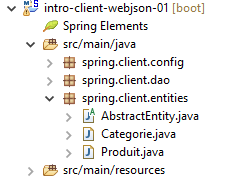 |
The entities handled by the [DAO] layer are those it exchanges with the web service / JSON. These are the items and products. On the server side, these entities had JPA persistence annotations. Here, those annotations have been removed. We’re including the entity code again for reference:
[AbstractEntity]
package spring.client.entities;

import com.fasterxml.jackson.core.JsonProcessingException;
import com.fasterxml.jackson.databind.ObjectMapper;

public abstract class AbstractEntity {
    // properties
    protected Long id;
    protected Long version;

    // manufacturers
    public AbstractEntity() {

    }

    public AbstractEntity(Long id, Long version) {
        this.id = id;
        this.version = version;
    }

    // redefine [equals] and [hashcode]
    @Override
    public int hashCode() {
        return (id != null ? id.hashCode() : 0);
    }

    @Override
    public boolean equals(Object entity) {
        if (!(entity instanceof AbstractEntity)) {
            return false;
        }
        String class1 = this.getClass().getName();
        String class2 = entity.getClass().getName();
        if (!class2.equals(class1)) {
            return false;
        }
        AbstractEntity other = (AbstractEntity) entity;
        return id != null && this.id == other.id.longValue();
    }

    // signature jSON
    public String toString() {
        ObjectMapper mapper = new ObjectMapper();
        try {
            return mapper.writeValueAsString(this);
        } catch (JsonProcessingException e) {
            e.printStackTrace();
            return null;
        }
    }

    // getters and setters
...
}
[Category]
package spring.client.entities;

import java.util.HashSet;
import java.util.Set;

import com.fasterxml.jackson.annotation.JsonFilter;

@JsonFilter("jsonFilterCategorie")
public class Categorie extends AbstractEntity {

    // properties
    private String nom;

    // related products
    public Set<Produit> produits = new HashSet<Produit>();

    // manufacturers
    public Categorie() {

    }

    public Categorie(String nom) {
        this.nom = nom;
    }

    // methods
    public void addProduit(Produit produit) {
        // we add the product
        produits.add(produit);
        // set your category
        produit.setCategorie(this);
    }

    // getters and setters
    ...
}
[Product]
package spring.webjson.client.entities;

import com.fasterxml.jackson.annotation.JsonFilter;

@JsonFilter("jsonFilterProduit")
public class Produit extends AbstractEntity {

    // the name
    private String nom;
   // category number
    private Long idCategorie;
   // the price
    private double prix;
   // the description
    private String description;

    // the category
    private Categorie categorie;

    // manufacturers
    public Produit() {

    }

    public Produit(String nom, double prix, String description) {
        this.nom = nom;
        this.prix = prix;
        this.description = description;
    }

    // getters and setters
...
}
13.6.3.3. The [DaoException] class
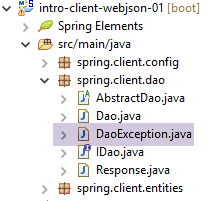 |
When the [DAO] layer encounters an error, it will throw a [DaoException]. This class is used on the server side and is described in section 11.3.7.
13.6.3.4. The [DAO] layer interface
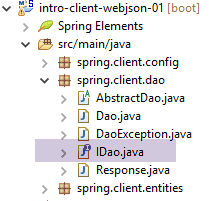 |
The [DAO] layer implements the [IDao] interface described in Section 11.3.7.
package spring.client.dao;

import java.util.List;

import spring.client.entities.Categorie;
import spring.client.entities.Produit;

public interface IDao {

    // insert product list
    public List<Produit> addProduits(List<Produit> produits);

    // removal of all products
    public void deleteAllProduits();

    // product list update
    public List<Produit> updateProduits(List<Produit> produits);

    // all products obtained
    public List<Produit> getAllProduits();

    // inserting a list of categories
    public List<Categorie> addCategories(List<Categorie> categories);

    // delete all categories
    public void deleteAllCategories();

    // updating a list of categories
    public List<Categorie> updateCategories(List<Categorie> categories);

    // obtaining all categories
    public List<Categorie> getAllCategories();

    // a special product
    public Produit getProduitByIdWithCategorie(Long idProduit);

    public Produit getProduitByIdWithoutCategorie(Long idProduit);

    public Produit getProduitByNameWithCategorie(String nom);

    public Produit getProduitByNameWithoutCategorie(String nom);

    // a special category
    public Categorie getCategorieByIdWithProduits(Long idCategorie);

    public Categorie getCategorieByIdWithoutProduits(Long idCategorie);

    public Categorie getCategorieByNameWithProduits(String nom);

    public Categorie getCategorieByNameWithoutProduits(String nom);

}
13.6.3.5. The web service / JSON response
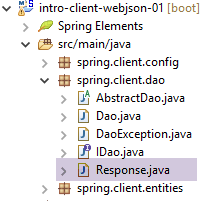 |
We have seen that all URLs of the web service / JSON return a [Response] type defined in section 13.5.5.3. We reproduce this class here:
package spring.client.dao;

import java.util.List;

public class Response<T> {

    // ----------------- properties
    // operation status
    private int status;
    // any error messages
    private List<String> messages;
    // the body of the reply
    private T body;

    // manufacturers
    public Response() {

    }

    public Response(int status, List<String> messages, T body) {
        this.status = status;
        this.messages = messages;
        this.body = body;
    }

    // getters and setters
    ...
}
13.6.3.6. Implementation of communication with the web service / JSON
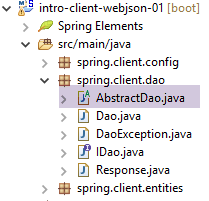 |
The [ AbstractDao] class implements communication with the web service / JSON:
package spring.client.dao;

import java.net.URI;
import java.net.URISyntaxException;

import org.springframework.beans.factory.annotation.Autowired;
import org.springframework.core.ParameterizedTypeReference;
import org.springframework.http.MediaType;
import org.springframework.http.RequestEntity;
import org.springframework.web.client.RestTemplate;

public abstract class AbstractDao {

    // data
    @Autowired
    protected RestTemplate restTemplate;
    @Autowired
    protected String urlServiceWebJson;

    // generic request
    protected String getResponse(String url, String jsonPost) {

        // url : URL to contact
        // jsonPost: the jSON value to be posted
        try {
            // request execution
            RequestEntity<?> request;
            if (jsonPost != null) {
                // query POST
                request = RequestEntity.post(new URI(String.format("%s%s", urlServiceWebJson, url)))
                        .header("Content-Type", "application/json").accept(MediaType.APPLICATION_JSON).body(jsonPost);
            } else {
                // query GET
                request = RequestEntity.get(new URI(String.format("%s%s", urlServiceWebJson, url)))
                        .accept(MediaType.APPLICATION_JSON).build();
            }
            // execute the query
            return restTemplate.exchange(request, new ParameterizedTypeReference<String>() {
            }).getBody();
        } catch (URISyntaxException e1) {
            throw new DaoException(20, e1);
        } catch (RuntimeException e2) {
            throw new DaoException(21, e2);
        }
    }

}
- lines 15-16: injection of the [RestTemplate] component, which handles communication with the server;
- lines 17-18: injection of the web service URL / JSON;
The implementation of the methods for communicating with the server is factored into the [getResponse] method:
- line 21: the method receives 2 parameters:
- [url]: the requested URL;
- [jsonPost]: the JSON string to post, or null otherwise. If [jsonPost == null], the URL request is made using a GET; otherwise, using a POST;
- line 38: the statement that sends the request to the server and receives its response. The [RestTemplate] component offers a wide range of methods for interacting with the server. We have chosen the [exchange] method here, but others are available;
- lines 27–36: we need to construct the [RequestEntity] request. It differs depending on whether we use a GET or a POST request;
- lines 30–31: the request for a GET. The [RequestEntity] class provides static methods to create GET, POST, HEAD, and other requests. The [RequestEntity.get] method allows you to create a GET request by chaining the various methods that build it:
- the [RequestEntity.get] method takes the target URL as a parameter in the form of a URI instance,
- the [accept] method allows you to define the elements of the [Accept] HTTP header. Here, we specify that we accept the [application/json] type that the server will send;
- the [build] method uses this information to construct the [RequestEntity] type of the request;
- lines 34–35: the POST request. The [RequestEntity.post] method creates a POST request by chaining the various methods that build it:
- the [RequestEntity.post] method takes the target URL as a parameter in the form of a URI instance,
- the [header] method defines an HTTP header. Here, we send the [Content-Type: application/json] header to the server to indicate that the posted data will arrive in the form of a JSON string;
- the [accept] method allows us to indicate that we accept the [application/json] type that the server will send;
- the [body] method sets the posted value. This is the fourth parameter of the generic [getResponse] method (line 1);
- line 38: the [RestTemplate].exchange method returns a [ResponseEntity<String>] type that encapsulates the entire server response: HTTP headers and document body. The [ResponseEntity].getBody() method retrieves this body, which represents the server’s response—in this case, a string;
13.6.3.7. Implementation of the [IDao] interface
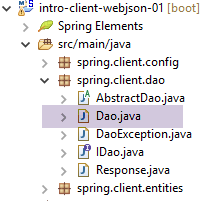 |
The [Dao] class implements the [IDao] interface:
package spring.client.dao;

import java.io.IOException;
import java.util.List;

import org.springframework.beans.factory.annotation.Autowired;
import org.springframework.beans.factory.annotation.Qualifier;
import org.springframework.context.ApplicationContext;
import org.springframework.stereotype.Component;

import com.fasterxml.jackson.core.type.TypeReference;
import com.fasterxml.jackson.databind.ObjectMapper;

import spring.client.entities.Categorie;
import spring.client.entities.Produit;

@Component
public class Dao extends AbstractDao implements IDao {

    @Autowired
    private ApplicationContext context;

    // filters jSON
    @Autowired
    @Qualifier("jsonMapper")
    private ObjectMapper jsonMapper;
    @Autowired
    @Qualifier("jsonMapperCategorieWithProduits")
    private ObjectMapper jsonMapperCategorieWithProduits;
    @Autowired
    @Qualifier("jsonMapperProduitWithCategorie")
    private ObjectMapper jsonMapperProduitWithCategorie;
    @Autowired
    @Qualifier("jsonMapperCategorieWithoutProduits")
    private ObjectMapper jsonMapperCategorieWithoutProduits;
    @Autowired
    @Qualifier("jsonMapperProduitWithoutCategorie")
    private ObjectMapper jsonMapperProduitWithoutCategorie;

    @Override
    public List<Produit> addProduits(List<Produit> produits) {
        // ----------- add products (without category)
        ...
}
- line 17: the [Dao] class is a Spring component into which other Spring components can be injected;
- line 18: the [Dao] class extends the [AbstractDao] class we just saw and implements the [IDao] interface;
- lines 20–21: we inject the Spring context to access its beans;
- lines 24–38: injection of the JSON mappers defined in the [AppConfig] class presented in section 13.6.2;
The implementations of the various methods of the [IDao] interface all follow the same pattern. We will present two methods, one based on a [POST] operation, the other on a [GET] operation.
An example of [GET]: [getCategorieByNameWithProduits]
@Override
    public Categorie getCategorieByNameWithProduits(String nom) {
        // ----------- obtain a category designated by its name, with its products
        try {
            // request
            Response<Categorie> response = jsonMapperCategorieWithProduits.readValue(
                    getResponse(String.format("/getCategorieByNameWithProduits/%s", nom), null),
                    new TypeReference<Response<Categorie>>() {
                    });
            // mistake?
            if (response.getStatus() != 0) {
                // 1 exception is thrown
                throw new DaoException(response.getStatus(), response.getMessages());
            } else {
                // render the core of the server response
                return response.getBody();
            }
        } catch (DaoException e1) {
            throw e1;
        } catch (RuntimeException | IOException e2) {
            throw new DaoException(113, e2);
        }
    }
- Line 7: The [getResponse] method of the parent class is called. This method handles communication with the web service/JSON. Its parameters are as follows:
getResponse(String.format("/getCategorieByNameWithProduits/%s", nom), null)
- (continued)
- the URL of the service being queried [/getCategoryByNameWithProducts/name];
- the posted value. Here, there is none;
The [getResponse] method returns a String representing the JSON response sent by the server. We deserialize this JSON response as follows:
jsonMapperCategorieWithProduits.readValue(
                    jsonResponse,
                    new TypeReference<Response<Categorie>>() {
});
because the JSON string is the serialization of a [Response<Category>] type;
- lines 11–17: we check the response status. If the status is not 0, then there was a server-side error. We then throw an exception (line 13), using the information contained in the response (status and list of error messages);
- line 16: if there was no server-side error, we return the body of type [Response<Category>], i.e., the requested category;
- lines 18–19: handle the exception thrown on line 16;
- lines 20–22: handle all other exceptions;
An example of [POST]: [addCategories]
@Override
    public List<Categorie> addCategories(List<Categorie> categories) {
        // ----------- add categories (with their products)
        try {
            // request
            Response<List<Categorie>> response = jsonMapperCategorieWithProduits.readValue(
                    getResponse("/addCategories", jsonMapperCategorieWithProduits.writeValueAsString(categories)),
                    new TypeReference<Response<List<Categorie>>>() {
                    });
            // mistake?
            if (response.getStatus() != 0) {
                // 1 exception is thrown
                throw new DaoException(response.getStatus(), response.getMessages());
            } else {
                // render the core of the server response
                return response.getBody();
            }
        } catch (DaoException e1) {
            throw e1;
        } catch (RuntimeException | IOException e2) {
            throw new DaoException(104, e2);
        }
    }
- line 2: the [addCategories] method is used to persist the categories passed as parameters in the database. It returns these same categories enriched with their primary keys. If the categories are passed along with products, those are also persisted;
- line 7: the parent’s [getResponse] method is called to handle communication with the web service / JSON;
- the first parameter is the URL [/addCategories];
- the second parameter is the posted value, in this case the list of categories to be persisted;
getResponse("/addCategories", jsonMapperCategorieWithProduits.writeValueAsString(categories))
The resulting JSON string is then deserialized to obtain the expected [Response<List<Category>] type:
Response<List<Categorie>> response = jsonMapperCategorieWithProduits.readValue(
                    jsonResponse,
                    new TypeReference<Response<List<Categorie>>>() {
                    });
- lines 11–17: handling the server response (error or not);
- lines 20–22: exception handling;
All other methods follow the pattern of the two methods presented.
13.6.4. The JUnit test
Let’s return to the client/server architecture currently under development:
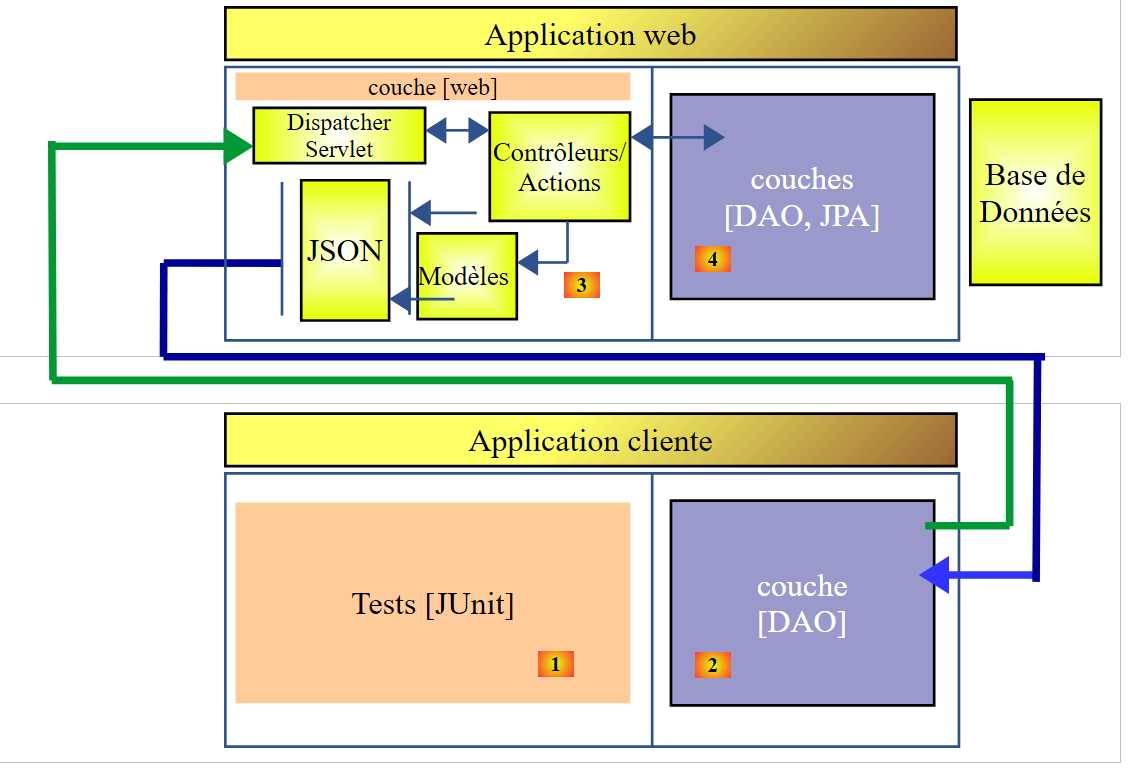 |
We have built a [DAO] layer [2] with the same interface as the [DAO] layer [4]. To test the [DAO] layer [2], we can therefore use the JUnit test that was used to test the [DAO] layer [4]. As a reminder, it is as follows:
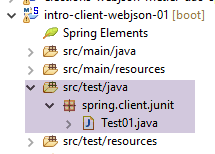 |
package spring.client.junit;

import java.util.ArrayList;
import java.util.List;
import java.util.Set;

import org.junit.Assert;
import org.junit.Before;
import org.junit.Test;
import org.junit.runner.RunWith;
import org.springframework.beans.BeansException;
import org.springframework.beans.factory.annotation.Autowired;
import org.springframework.beans.factory.annotation.Qualifier;
import org.springframework.boot.test.SpringApplicationConfiguration;
import org.springframework.test.context.junit4.SpringJUnit4ClassRunner;

import com.fasterxml.jackson.core.JsonProcessingException;
import com.fasterxml.jackson.databind.ObjectMapper;
import com.google.common.collect.Lists;

import spring.client.config.DaoConfig;
import spring.client.dao.DaoException;
import spring.client.dao.IDao;
import spring.client.entities.Categorie;
import spring.client.entities.Produit;

@SpringApplicationConfiguration(classes = DaoConfig.class)
@RunWith(SpringJUnit4ClassRunner.class)
public class Test01 {

    // layer [DAO]
    @Autowired
    private IDao dao;

    // filters jSON
    @Autowired
    @Qualifier("jsonMapper")
    private ObjectMapper jsonMapper;
    @Autowired
    @Qualifier("jsonMapperCategorieWithProduits")
    private ObjectMapper jsonMapperCategorieWithProduits;
    @Autowired
    @Qualifier("jsonMapperProduitWithCategorie")
    private ObjectMapper jsonMapperProduitWithCategorie;
    @Autowired
    @Qualifier("jsonMapperCategorieWithoutProduits")
    private ObjectMapper jsonMapperCategorieWithoutProduits;
    @Autowired
    @Qualifier("jsonMapperProduitWithoutCategorie")
    private ObjectMapper jsonMapperProduitWithoutCategorie;

    @Before
    public void cleanAndFill() {
        // the base is cleaned before each test
        log("Vidage de la base de données", 1);
        // table [CATEGORIES] is emptied - by cascade, table [PRODUITS] will be emptied
        dao.deleteAllCategories();
        // --------------------------------------------------------------------------------------
        log("Remplissage de la base", 1);
        // fill the tables
        List<Categorie> categories = new ArrayList<Categorie>();
        for (int i = 0; i < 2; i++) {
            Categorie categorie = new Categorie(String.format("categorie%d", i));
            for (int j = 0; j < 5; j++) {
                categorie.addProduit(new Produit(String.format("produit%d%d", i, j), 100 * (1 + (double) (i * 10 + j) / 100),
                        String.format("desc%d%d", i, j)));
            }
            categories.add(categorie);
        }
        // add the category - the products will be cascaded in as well
        categories = dao.addCategories(categories);
    }

    @Test
    public void showDataBase() throws BeansException, JsonProcessingException {
        // list of categories
        log("Liste des catégories", 2);
        List<Categorie> categories = dao.getAllCategories();
        affiche(categories, jsonMapperCategorieWithoutProduits);
        // product list
        log("Liste des produits", 2);
        List<Produit> produits = dao.getAllProduits();
        affiche(produits, jsonMapperProduitWithoutCategorie);
        // a few checks
        Assert.assertEquals(2, categories.size());
        Assert.assertEquals(10, produits.size());
        Categorie categorie = findCategorieByName("categorie0", categories);
        Assert.assertNotNull(categorie);
        Produit produit = findProduitByName("produit03", produits);
        Assert.assertNotNull(produit);
        Long idCategorie = produit.getIdCategorie();
        Assert.assertEquals(categorie.getId(), idCategorie);
    }

    @Test
    public void getCategorieByNameWithProduits() {
        log("getCategorieByNameWithProduits", 1);
        Categorie categorie1 = dao.getCategorieByNameWithProduits("categorie1");
        Assert.assertNotNull(categorie1);
        Assert.assertEquals(5, categorie1.getProduits().size());
    }

    @Test
    public void getCategorieByNameWithoutProduits() {
        log("getCategorieByNameWithoutProduits", 1);
        Categorie categorie1 = dao.getCategorieByNameWithoutProduits("categorie1");
        Assert.assertNotNull(categorie1);
        Assert.assertEquals("categorie1", categorie1.getNom());
    }

    @Test
    public void getCategorieByIdWithProduits() {
        log("getCategorieByIdWithProduits", 1);
        Categorie categorie1 = dao.getCategorieByNameWithProduits("categorie1");
        Categorie categorie2 = dao.getCategorieByIdWithProduits(categorie1.getId());
        Assert.assertNotNull(categorie2);
        Assert.assertEquals(categorie1.getId(), categorie2.getId());
        Assert.assertEquals(categorie1.getNom(), categorie2.getNom());
    }

    @Test
    public void getCategorieByIdWithoutProduits() {
        log("getCategorieByIdWithoutProduits", 1);
        Categorie categorie1 = dao.getCategorieByNameWithProduits("categorie1");
        Categorie categorie2 = dao.getCategorieByIdWithoutProduits(categorie1.getId());
        Assert.assertNotNull(categorie2);
        Assert.assertEquals(categorie1.getNom(), categorie2.getNom());
    }

    @Test
    public void getProduitByNameWithCategorie() {
        log("getProduitByNameWithCategorie", 1);
        Produit produit = dao.getProduitByNameWithCategorie("produit03");
        Assert.assertNotNull(produit);
        Assert.assertNotNull(produit.getCategorie());
    }

    @Test
    public void getProduitByNameWithoutCategorie() {
        log("getProduitByNameWithoutCategorie", 1);
        Produit produit = dao.getProduitByNameWithoutCategorie("produit03");
        Assert.assertNotNull(produit);
        Assert.assertEquals("produit03", produit.getNom());
    }

    @Test
    public void getProduitByIdWithCategorie() {
        log("getProduitByNameWithCategorie", 1);
        Produit produit = dao.getProduitByNameWithCategorie("produit03");
        Produit produit2 = dao.getProduitByIdWithCategorie(produit.getId());
        Assert.assertNotNull(produit2);
        Assert.assertEquals(produit2.getNom(), produit.getNom());
        Assert.assertEquals(produit2.getId(), produit.getId());
        Assert.assertEquals(produit.getCategorie().getId(), produit2.getCategorie().getId());
    }

    @Test
    public void getProduitByIdWithoutCategorie() {
        log("getProduitByIdWithoutCategorie", 1);
        Produit produit = dao.getProduitByNameWithCategorie("produit03");
        Produit produit2 = dao.getProduitByIdWithoutCategorie(produit.getId());
        Assert.assertNotNull(produit2);
        Assert.assertEquals(produit2.getNom(), produit.getNom());
        Assert.assertEquals(produit2.getId(), produit.getId());
    }

    @Test
    public void doInsertsInTransaction() {
        log("Ajout d'une catégorie [cat1] avec deux produits de même nom", 1);
        // we insert
        Categorie categorie = new Categorie("cat1");
        categorie.addProduit(new Produit("x", 1.0, ""));
        categorie.addProduit(new Produit("x", 1.0, ""));
        // add the category - the products will be cascaded in as well
        try {
            categorie = dao.addCategories(Lists.newArrayList(categorie)).get(0);
        } catch (DaoException e) {
            show("Les erreurs suivantes se sont produites :", e.getErreurs());
        }
        // checks
        List<Categorie> categories = dao.getAllCategories();
        Assert.assertEquals(2, categories.size());
        List<Produit> produits = dao.getAllProduits();
        Assert.assertEquals(10, produits.size());
    }

    @Test
    public void updateDataBase() {
        log("Mise à jour du prix des produits de [categorie1]", 1);
        Categorie categorie1 = dao.getCategorieByNameWithProduits("categorie1");
        Categorie categorie1Saved = dao.getCategorieByNameWithProduits("categorie1");
        Set<Produit> produits = categorie1.getProduits();
        for (Produit produit : produits) {
            produit.setPrix(1.1 * produit.getPrix());
        }
        List<Produit> produits2 = Lists.newArrayList(produits);
        produits2 = dao.updateProduits(produits2);
        // checks
        List<Produit> produitsSaved = Lists.newArrayList(categorie1Saved.getProduits());
        for (Produit produit2 : produits2) {
            Produit produit = findProduitByName(produit2.getNom(), produitsSaved);
            Assert.assertEquals(produit2.getPrix(), produit.getPrix() * 1.1, 1e-6);
        }
    }

    @Test
    public void addProduits() throws BeansException, JsonProcessingException {
        log("Ajout de deux produits de catégorie [categorie0]", 1);
        Categorie categorie0 = dao.getCategorieByNameWithoutProduits("categorie0");
        Long idCategorie = categorie0.getId();
        Produit p1 = new Produit("x", 1, "");
        p1.setIdCategorie(idCategorie);
        p1.setCategorie(categorie0);
        Produit p2 = new Produit("y", 1, "");
        p2.setIdCategorie(idCategorie);
        p2.setCategorie(categorie0);
        List<Produit> produits = new ArrayList<Produit>();
        produits.add(p1);
        produits.add(p2);
        produits = dao.addProduits(produits);
        // check
        affiche(produits, jsonMapperProduitWithoutCategorie);
    }

    // -------------- private methods
    private Produit findProduitByName(String nom, List<Produit> produits) {
        for (Produit produit : produits) {
            if (produit.getNom().equals(nom)) {
                return produit;
            }
        }
        return null;
    }

    private Categorie findCategorieByName(String nom, List<Categorie> categories) {
        for (Categorie categorie : categories) {
            if (categorie.getNom().equals(nom)) {
                return categorie;
            }
        }
        return null;
    }

    // display of a T-type element
    static private <T> void affiche(T element, ObjectMapper jsonMapper) throws JsonProcessingException {
        System.out.println(jsonMapper.writeValueAsString(element));
    }

    // display a list of elements of type T
    static private <T> void affiche(List<T> elements, ObjectMapper jsonMapper) throws JsonProcessingException {
        for (T element : elements) {
            affiche(element, jsonMapper);
        }
    }

    private static void log(String message, int mode) {
        // poster message
        String toPrint = null;
        switch (mode) {
        case 1:
            toPrint = String.format("%s --------------------------------", message);
            break;
        case 2:
            toPrint = String.format("-- %s", message);
            break;
        }
        System.out.println(toPrint);
    }

    private static void show(String title, List<String> messages) {
        // title
        System.out.println(String.format("%s : ", title));
        // messages
        for (String message : messages) {
            System.out.println(String.format("- %s", message));
        }
    }

}
It executes successfully and produces the following results on the console:
Vidage de la base de données --------------------------------
Remplissage de la base --------------------------------
Ajout de deux produits de catégorie [categorie0] --------------------------------
{"id":6285,"version":0,"nom":"x","idCategorie":1319,"prix":1.0,"description":""}
{"id":6286,"version":0,"nom":"y","idCategorie":1319,"prix":1.0,"description":""}
Vidage de la base de données --------------------------------
Remplissage de la base --------------------------------
Mise à jour du prix des produits de [categorie1] --------------------------------
Vidage de la base de données --------------------------------
Remplissage de la base --------------------------------
getCategorieByIdWithoutProduits --------------------------------
Vidage de la base de données --------------------------------
Remplissage de la base --------------------------------
getProduitByNameWithoutCategorie --------------------------------
Vidage de la base de données --------------------------------
Remplissage de la base --------------------------------
getCategorieByNameWithProduits --------------------------------
Vidage de la base de données --------------------------------
Remplissage de la base --------------------------------
getCategorieByNameWithoutProduits --------------------------------
Vidage de la base de données --------------------------------
Remplissage de la base --------------------------------
getProduitByNameWithCategorie --------------------------------
Vidage de la base de données --------------------------------
Remplissage de la base --------------------------------
getProduitByNameWithCategorie --------------------------------
Vidage de la base de données --------------------------------
Remplissage de la base --------------------------------
getProduitByIdWithoutCategorie --------------------------------
Vidage de la base de données --------------------------------
Remplissage de la base --------------------------------
-- Liste des catégories
{"id":1337,"version":0,"nom":"categorie0"}
{"id":1338,"version":0,"nom":"categorie1"}
-- Liste des produits
{"id":6367,"version":0,"nom":"produit00","idCategorie":1337,"prix":100.0,"description":"desc00"}
{"id":6368,"version":0,"nom":"produit01","idCategorie":1337,"prix":101.0,"description":"desc01"}
{"id":6369,"version":0,"nom":"produit02","idCategorie":1337,"prix":102.0,"description":"desc02"}
{"id":6370,"version":0,"nom":"produit03","idCategorie":1337,"prix":103.0,"description":"desc03"}
{"id":6371,"version":0,"nom":"produit04","idCategorie":1337,"prix":104.0,"description":"desc04"}
{"id":6372,"version":0,"nom":"produit10","idCategorie":1338,"prix":110.0,"description":"desc10"}
{"id":6373,"version":0,"nom":"produit11","idCategorie":1338,"prix":111.0,"description":"desc11"}
{"id":6374,"version":0,"nom":"produit12","idCategorie":1338,"prix":112.0,"description":"desc12"}
{"id":6375,"version":0,"nom":"produit13","idCategorie":1338,"prix":113.0,"description":"desc13"}
{"id":6376,"version":0,"nom":"produit14","idCategorie":1338,"prix":114.0,"description":"desc14"}
Vidage de la base de données --------------------------------
Remplissage de la base --------------------------------
getCategorieByIdWithProduits --------------------------------
Vidage de la base de données --------------------------------
Remplissage de la base --------------------------------
Ajout d'une catégorie [cat1] avec deux produits de même nom --------------------------------
Les erreurs suivantes se sont produites :
- org.hibernate.exception.ConstraintViolationException: could not execute statement
- could not execute statement
- Duplicate entry 'x' for key 'NOM'
11:24:37.650 [Thread-1] INFO  o.s.c.a.AnnotationConfigApplicationContext - Closing org.springframework.context.annotation.AnnotationConfigApplicationContext@f8c1ddd: startup date [Fri Nov 20 11:24:34 CET 2015]; root of context hierarchy