16. [Course]: Securing access to a web service with Spring Security
Keywords: multi-layer architecture, Spring, dependency injection, secure web service / JSON, client / server
16.1. Support
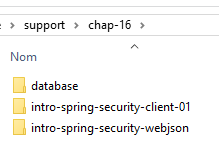 |  |
The projects for this chapter can be found in the [support / chap-16] folder. The SQL script is used to generate the database required for testing.
16.2. The Role of Spring Security in a Web Application
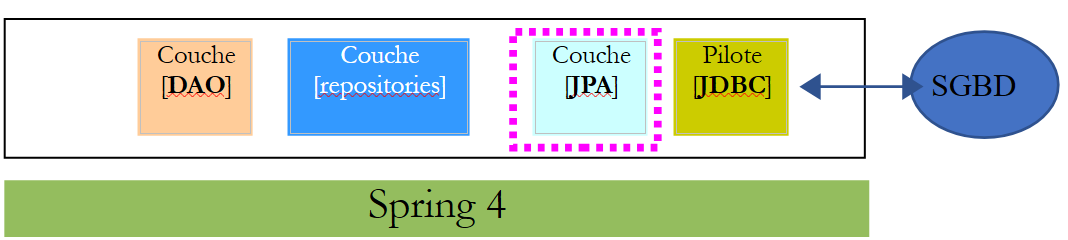
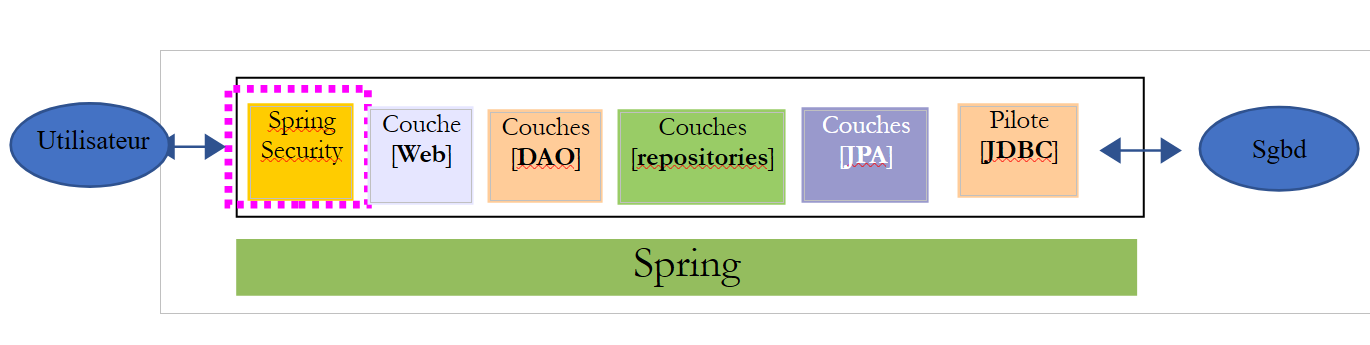
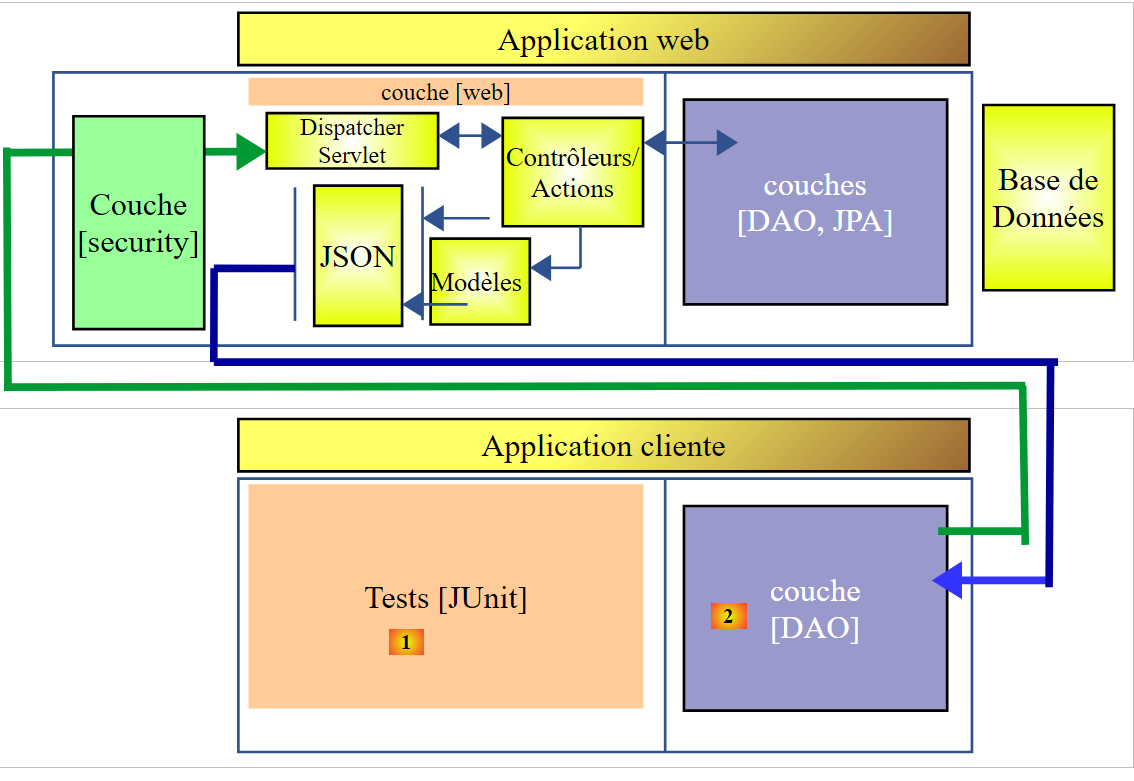
Let’s situate Spring Security within the development of a web application. Most often, it will be built on a multi-layer architecture such as the following:
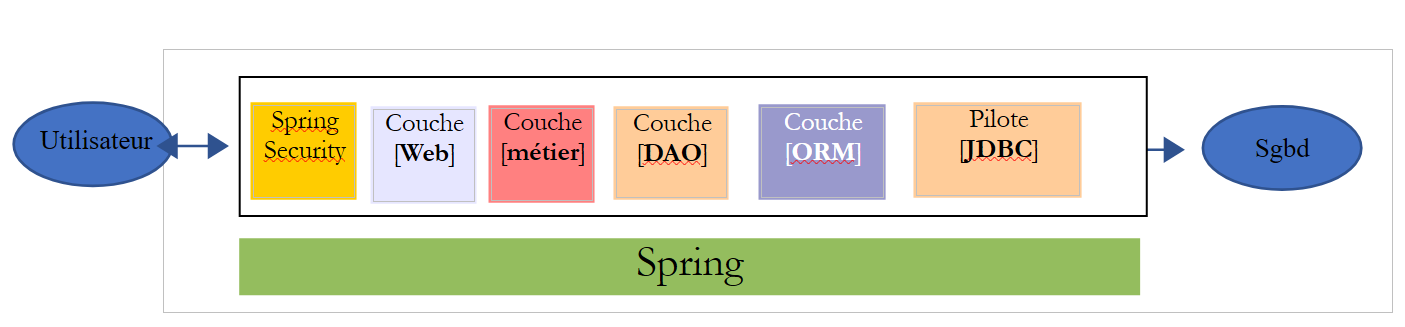 |
- The [Spring Security] layer grants access to the [web] layer only to authorized users.
16.3. A tutorial on Spring Security
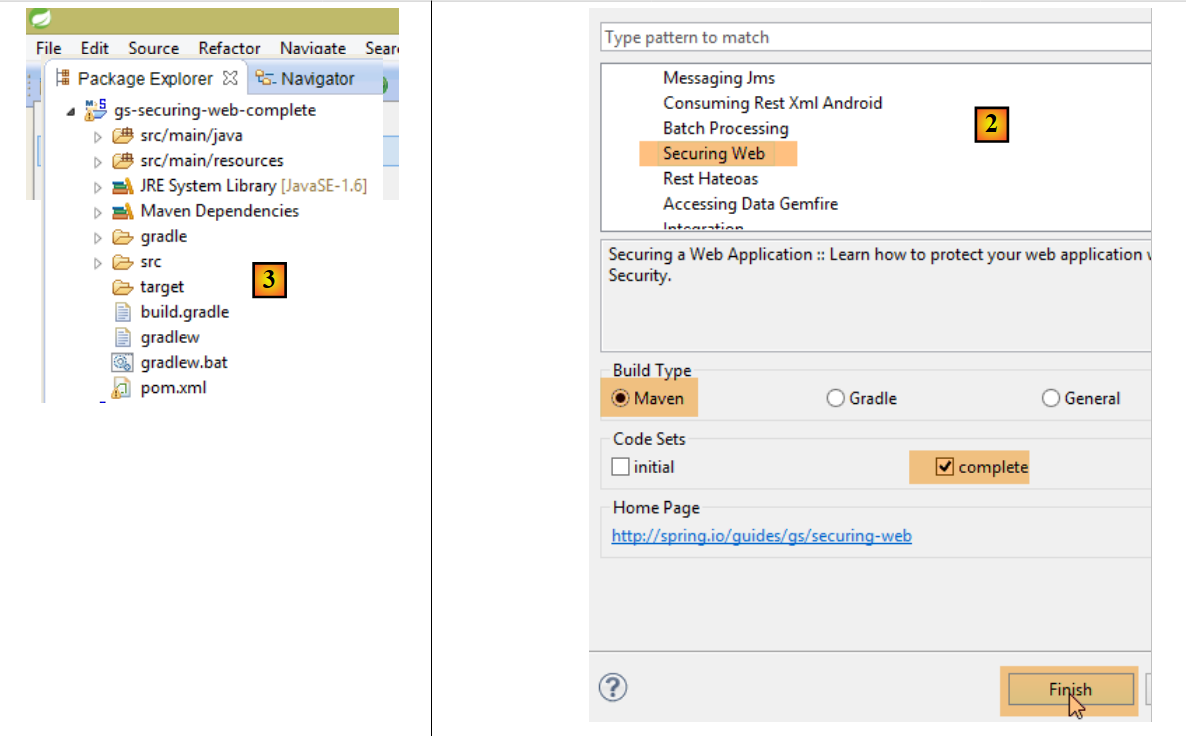
We will once again import a Spring guide by following steps 1 through 3 below:
 |
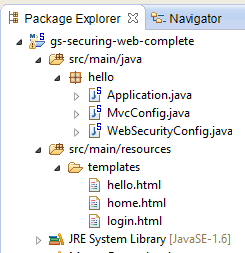 |
The project consists of the following elements:
- in the [templates] folder, you’ll find the project’s HTML pages;
- [Application]: is the project’s executable class;
- [MvcConfig]: is the Spring MVC configuration class;
- [WebSecurityConfig]: is the Spring Security configuration class;
16.3.1. Maven Configuration
Project [3] is a Maven project. Let’s examine its [pom.xml] file to see its dependencies:
<?xml version="1.0" encoding="UTF-8"?>
<project xmlns="http://maven.apache.org/POM/4.0.0" xmlns:xsi="http://www.w3.org/2001/XMLSchema-instance"
    xsi:schemaLocation="http://maven.apache.org/POM/4.0.0 http://maven.apache.org/xsd/maven-4.0.0.xsd">
    <modelVersion>4.0.0</modelVersion>

    <groupId>org.springframework</groupId>
    <artifactId>gs-securing-web</artifactId>
    <version>0.1.0</version>

    <parent>
        <groupId>org.springframework.boot</groupId>
        <artifactId>spring-boot-starter-parent</artifactId>
        <version>1.2.3.RELEASE</version>
    </parent>

    <dependencies>
        <dependency>
            <groupId>org.springframework.boot</groupId>
            <artifactId>spring-boot-starter-thymeleaf</artifactId>
        </dependency>
        <!-- tag::security[] -->
        <dependency>
            <groupId>org.springframework.boot</groupId>
            <artifactId>spring-boot-starter-security</artifactId>
        </dependency>
        <!-- end::security[] -->
    </dependencies>

    <properties>
        <start-class>hello.Application</start-class>
    </properties>

    <build>
        <plugins>
            <plugin>
                <groupId>org.springframework.boot</groupId>
                <artifactId>spring-boot-maven-plugin</artifactId>
            </plugin>
        </plugins>
    </build>

</project>
- lines 10–14: the project is a Spring Boot project;
- lines 17–20: dependency on the [Thymeleaf] framework;
- lines 22–25: dependency on the Spring Security framework;
16.3.2. Thymeleaf views
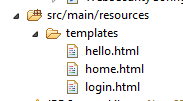 |
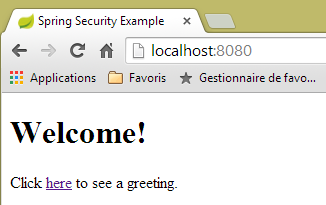
The [home.html] view is as follows:
 |
<!DOCTYPE html>
<html xmlns="http://www.w3.org/1999/xhtml"
    xmlns:th="http://www.thymeleaf.org"
    xmlns:sec="http://www.thymeleaf.org/thymeleaf-extras-springsecurity3">
<head>
<title>Spring Security Example</title>
</head>
<body>
    <h1>Welcome!</h1>

    <p>
        Click <a th:href="@{/hello}">here</a> to see a greeting.
    </p>
</body>
</html>
- line 12: the [th:href="@{/hello}"] attribute will generate the [href] attribute of the [<a>] tag. The value [@{/hello}] will generate the path [<context>/hello], where [context] is the context of the web application;
The generated HTML code is as follows:
<!DOCTYPE html>

<html xmlns="http://www.w3.org/1999/xhtml" xmlns:sec="http://www.thymeleaf.org/thymeleaf-extras-springsecurity3">
    <head>
        <title>Spring Security Example</title>
    </head>
    <body>
        <h1>Welcome!</h1>

        <p>
            Click
            <a href="/hello">here</a>
            to see a greeting.
        </p>
    </body>
</html>
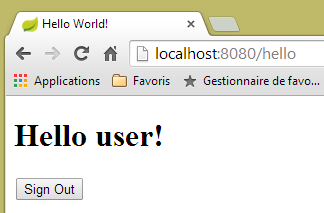
The [hello.html] view is as follows:
 |
<!DOCTYPE html>
<html xmlns="http://www.w3.org/1999/xhtml"
    xmlns:th="http://www.thymeleaf.org"
    xmlns:sec="http://www.thymeleaf.org/thymeleaf-extras-springsecurity3">
<head>
<title>Hello World!</title>
</head>
<body>
    <h1 th:inline="text">Hello [[${#httpServletRequest.remoteUser}]]!</h1>
    <form th:action="@{/logout}" method="post">
        <input type="submit" value="Sign Out" />
    </form>
</body>
</html>
- Line 9: The [th:inline="text"] attribute will generate the text of the [<h1>] tag. This text contains a $ expression that must be evaluated. The element [[${#httpServletRequest.remoteUser}]] is the value of the [RemoteUser] attribute of the current HTTP request. This is the name of the logged-in user;
- line 10: an HTML form. The [th:action="@{/logout}"] attribute will generate the [action] attribute of the [form] tag. The value [@{/logout}] will generate the path [<context>/logout], where [context] is the web application context;
The generated HTML code is as follows:
<!DOCTYPE html>

<html xmlns="http://www.w3.org/1999/xhtml" xmlns:sec="http://www.thymeleaf.org/thymeleaf-extras-springsecurity3">
    <head>
        <title>Hello World!</title>
    </head>
    <body>
        <h1>Hello user!</h1>
        <form method="post" action="/logout">
            <input type="submit" value="Sign Out" />
            <input type="hidden" name="_csrf" value="b152e5b9-d1a4-4492-b89d-b733fe521c91" />
        </form>
    </body>
</html>
- line 8: the translation of Hello [[${#httpServletRequest.remoteUser}]]!;
- line 9: the translation of @{/logout};
- line 11: a hidden field named (name attribute) _csrf;
The [login.html] view is as follows:
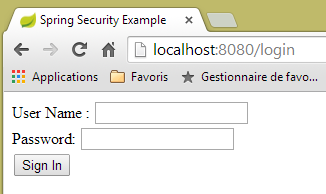 |
<!DOCTYPE html>
<html xmlns="http://www.w3.org/1999/xhtml"
    xmlns:th="http://www.thymeleaf.org"
    xmlns:sec="http://www.thymeleaf.org/thymeleaf-extras-springsecurity3">
<head>
<title>Spring Security Example</title>
</head>
<body>
    <div th:if="${param.error}">Invalid username and password.</div>
    <div th:if="${param.logout}">You have been logged out.</div>
    <form th:action="@{/login}" method="post">
        <div>
            <label> User Name : <input type="text" name="username" />
            </label>
        </div>
        <div>
            <label> Password: <input type="password" name="password" />
            </label>
        </div>
        <div>
            <input type="submit" value="Sign In" />
        </div>
    </form>
</body>
</html>
- line 9: the attribute [th:if="${param.error}"] ensures that the <div> tag will only be generated if the URL displaying the login page contains the [error] parameter (http://context/login?error);
- line 10: the attribute [th:if="${param.logout}"] ensures that the <div> tag will only be generated if the URL displaying the login page contains the [logout] parameter (http://context/login?logout);
- lines 11–23: an HTML form;
- line 11: the form will be submitted to the URL [<context>/login], where <context> is the web application context;
- line 13: an input field named [username];
- line 17: an input field named [password];
The generated HTML code is as follows:
<!DOCTYPE html>

<html xmlns="http://www.w3.org/1999/xhtml" xmlns:sec="http://www.thymeleaf.org/thymeleaf-extras-springsecurity3">
    <head>
        <title>Spring Security Example </title>
    </head>
    <body>

        <div>
            You have been logged out.
        </div>
        <form method="post" action="/login">
            <div>
                <label>
                    User Name :
                    <input type="text" name="username" />
                </label>
            </div>
            <div>
                <label>
                    Password:
                    <input type="password" name="password" />
                </label>
            </div>
            <div>
                <input type="submit" value="Sign In" />
            </div>
            <input type="hidden" name="_csrf" value="ef809b0a-88b4-4db9-bc53-342216b77632" />
        </form>
    </body>
</html>
Note on line 28 that Thymeleaf has added a hidden field named [_csrf].
16.3.3. Spring MVC Configuration
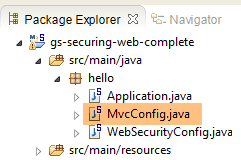 |
The [MvcConfig] class configures the Spring MVC framework:
package hello;

import org.springframework.context.annotation.Configuration;
import org.springframework.web.servlet.config.annotation.ViewControllerRegistry;
import org.springframework.web.servlet.config.annotation.WebMvcConfigurerAdapter;

@Configuration
public class MvcConfig extends WebMvcConfigurerAdapter {

    @Override
    public void addViewControllers(ViewControllerRegistry registry) {
        registry.addViewController("/home").setViewName("home");
        registry.addViewController("/").setViewName("home");
        registry.addViewController("/hello").setViewName("hello");
        registry.addViewController("/login").setViewName("login");
    }

}
- line 7: the [@Configuration] annotation makes the [MvcConfig] class a configuration class;
- line 8: the [MvcConfig] class extends the [WebMvcConfigurerAdapter] class to override certain methods;
- line 10: redefinition of a method from the parent class;
- lines 11–16: the [addViewControllers] method allows URLs to be associated with HTML views. The following associations are made there:
view | |
/templates/home.html | |
/templates/hello.html | |
/templates/login.html |
The [html] suffix and the [templates] folder are the default values used by Thymeleaf. They can be changed via configuration. The [templates] folder must be at the root of the project's classpath:
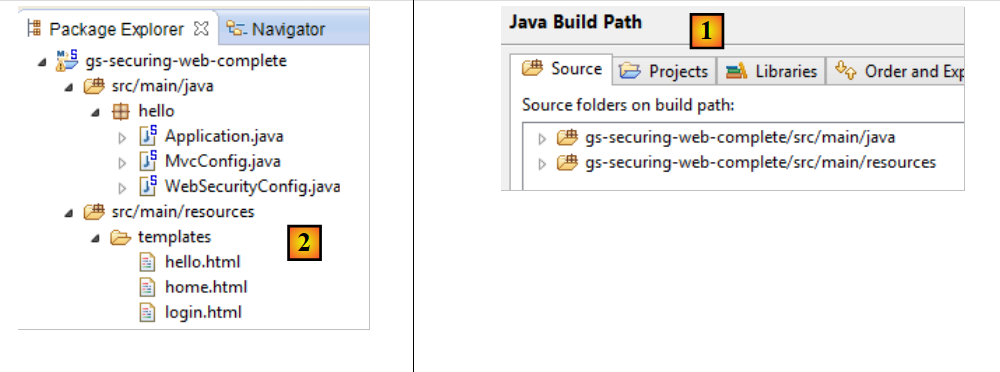 |
In [1] above, the [java] and [resources] folders are both source folders. This means their contents will be at the root of the project’s classpath. Therefore, in [2], the [hello] and [templates] folders will be at the root of the classpath.
16.3.4. Spring Security Configuration
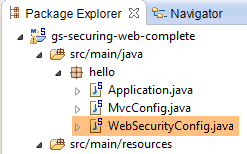 |
The [WebSecurityConfig] class configures the Spring Security framework:
package hello;

import org.springframework.context.annotation.Configuration;
import org.springframework.security.config.annotation.authentication.builders.AuthenticationManagerBuilder;
import org.springframework.security.config.annotation.web.builders.HttpSecurity;
import org.springframework.security.config.annotation.web.configuration.WebSecurityConfigurerAdapter;
import org.springframework.security.config.annotation.web.servlet.configuration.EnableWebMvcSecurity;

@Configuration
@EnableWebMvcSecurity
public class WebSecurityConfig extends WebSecurityConfigurerAdapter {
    @Override
    protected void configure(HttpSecurity http) throws Exception {
        http.authorizeRequests().antMatchers("/", "/home").permitAll().anyRequest().authenticated();
        http.formLogin().loginPage("/login").permitAll().and().logout().permitAll();
    }

    @Override
    protected void configure(AuthenticationManagerBuilder auth) throws Exception {
        auth.inMemoryAuthentication().withUser("user").password("password").roles("USER");
    }
}
- line 9: the [@Configuration] annotation makes the [WebSecurityConfig] class a configuration class;
- line 10: the [@EnableWebSecurity] annotation makes the [WebSecurityConfig] class a Spring Security configuration class;
- line 11: the [WebSecurity] class extends the [WebSecurityConfigurerAdapter] class to override certain methods;
- line 12: redefinition of a method from the parent class;
- lines 13–16: the [configure(HttpSecurity http)] method is overridden to define access rights for the application’s various URLs;
- line 14: the [http.authorizeRequests()] method allows URLs to be associated with access rights. The following associations are made there:
rule | code | |
access without authentication | | |
authenticated access only |
- line 15: defines the authentication method. Authentication is performed via a URL form [/login] accessible to everyone [http.formLogin().loginPage("/login").permitAll()]. Logout is also accessible to everyone;
- lines 19–21: redefine the method [configure(AuthenticationManagerBuilder auth)] that manages users;
- line 20: authentication is performed using hard-coded users [auth.inMemoryAuthentication()]. A user is defined here with the login [user], password [password], and role [USER]. Users with the same role can be granted the same permissions;
16.3.5. Executable class
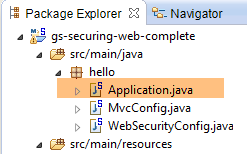 |
The [Application] class is as follows:
package hello;

import org.springframework.boot.autoconfigure.EnableAutoConfiguration;
import org.springframework.boot.SpringApplication;
import org.springframework.context.annotation.ComponentScan;
import org.springframework.context.annotation.Configuration;

@EnableAutoConfiguration
@Configuration
@ComponentScan
public class Application {

    public static void main(String[] args) throws Throwable {
        SpringApplication.run(Application.class, args);
    }

}
- Line 8: The [@EnableAutoConfiguration] annotation instructs Spring Boot (line 3) to perform the configuration that the developer has not explicitly set up;
- line 9: makes the [Application] class a Spring configuration class;
- line 10: instructs the system to scan the directory containing the [Application] class to search for Spring components. The two classes [MvcConfig] and [WebSecurityConfig] will thus be discovered because they have the [@Configuration] annotation;
- line 13: the [main] method of the executable class;
- line 14: the static method [SpringApplication.run] is executed with the [Application] configuration class as a parameter. We have already encountered this process and know that the Tomcat server embedded in the project’s Maven dependencies will be launched and the project deployed on it. We saw that four URLs were managed [/, /home, /login, /hello] and that some were protected by access rights.
16.3.6. Testing the Application
Let’s start by requesting the URL [/], which is one of the four accepted URLs. It is associated with the view [/templates/home.html]:
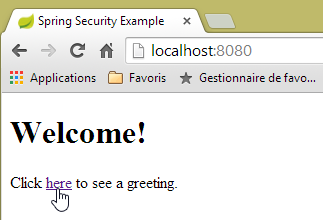 |
The requested URL [/] is accessible to everyone. That is why we were able to retrieve it. The link [here] is as follows:
The URL [/hello] will be requested when we click on the link. This one is protected:
rule | code | |
access without authentication | | |
authenticated access only |
You must be authenticated to access it. Spring Security will then redirect the client browser to the authentication page. Based on the configuration shown, this is the page at the URL [/login]. This page is accessible to everyone:
http.formLogin().loginPage("/login").permitAll().and().logout().permitAll();
So we get it [1]:
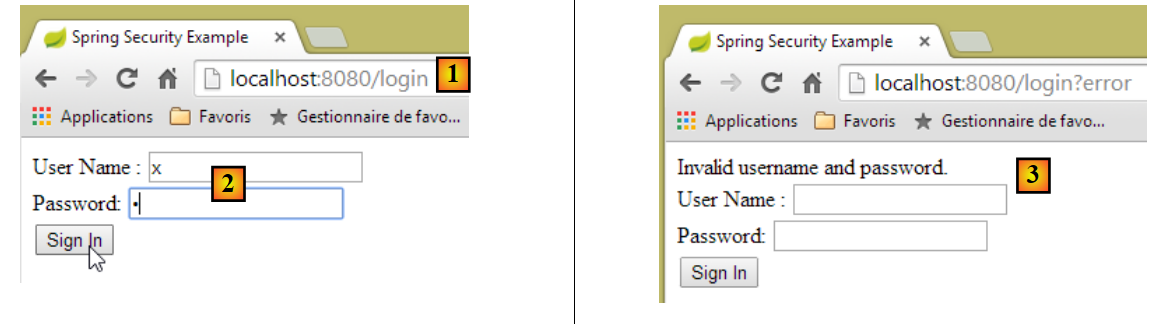 |
The source code of the page obtained is as follows:
- line 7, a hidden field appears that is not in the original [login.html] page. Thymeleaf added it. This code, known as CSRF (Cross-Site Request Forgery), is designed to eliminate a security vulnerability. This token must be sent back to Spring Security along with the authentication for it to be accepted;
We recall that only the user/password pair is recognized by Spring Security. If we enter something else in [2], we get the same page with an error message in [3]. Spring Security has redirected the browser to the URL [http://localhost:8080/login?error]. The presence of the [error] parameter triggered the display of the tag:
<div th:if="${param.error}">Invalid username and password.</div>
Now, let’s enter the expected user/password values [4]:
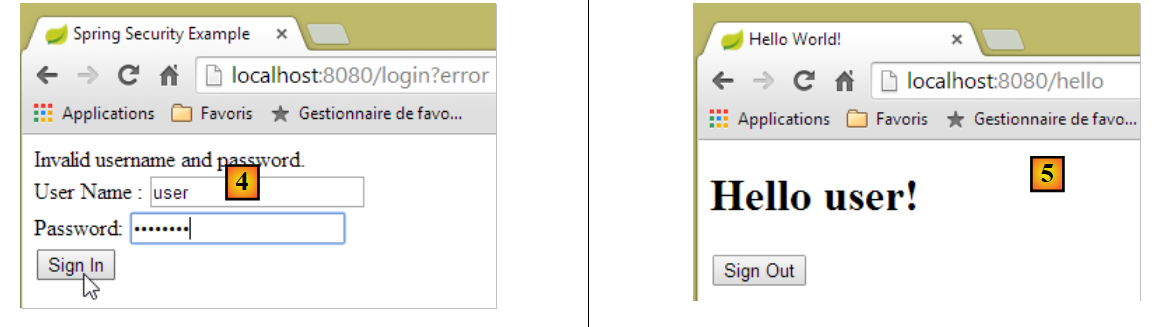 |
- in [4], we log in;
- in [5], Spring Security redirects us to the URL [/hello] because that is the URL we requested when we were redirected to the login page. The user’s identity was displayed by the following line of [hello.html]:
<h1 th:inline="text">Hello [[${#httpServletRequest.remoteUser}]]!</h1>
Page [5] displays the following form:
    <form th:action="@{/logout}" method="post">
        <input type="submit" value="Sign Out" />
</form>
When you click the [Sign Out] button, a POST request is sent to the URL [/logout]. Like the URL [/login], this URL is accessible to everyone:
http.formLogin().loginPage("/login").permitAll().and().logout().permitAll();
In our URL/view mapping, we haven’t defined anything for the URL [/logout]. What will happen? Let’s try:
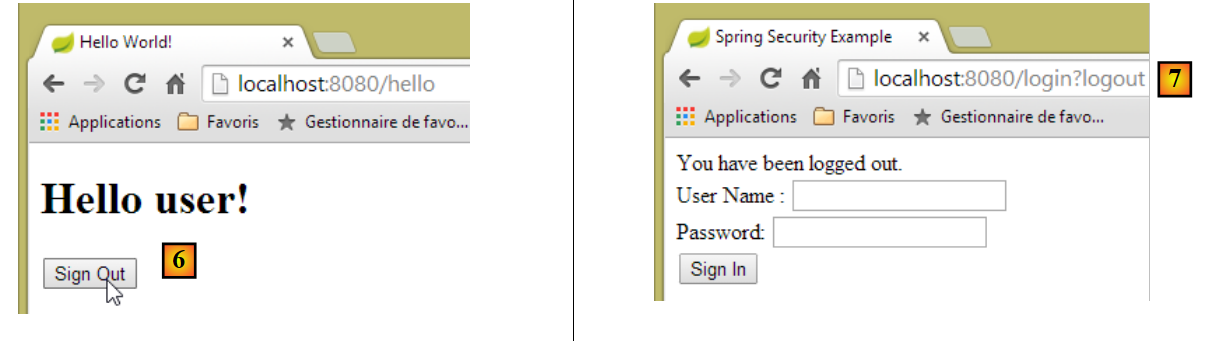 |
- In [6], we click the [Sign Out] button;
- in [7], we see that we have been redirected to the URL [http://localhost:8080/login?logout]. Spring Security requested this redirection. The presence of the [logout] parameter in the URL caused the following line to be displayed in the view:
<div th:if="${param.logout}">You have been logged out.</div>
16.3.7. Conclusion
In the previous example, we could have written the web application first and then secured it later. Spring Security is non-intrusive. You can implement security for a web application that has already been written. Furthermore, we discovered the following points:
- it is possible to define an authentication page;
- authentication must be accompanied by the CSRF token issued by Spring Security;
- if authentication fails, you are redirected to the authentication page with an additional error parameter in the URL;
- if authentication succeeds, you are redirected to the page requested at the time of authentication. If you request the authentication page directly without going through an intermediate page, Spring Security redirects you to the URL [/] (this case was not demonstrated);
- You log out by requesting the URL [/logout] with a POST request. Spring Security then redirects you to the authentication page with the "logout" parameter in the URL;
All these conclusions are based on Spring Security’s default behavior. This behavior can be changed through configuration by overriding certain methods of the [WebSecurityConfigurerAdapter] class.
The previous tutorial will be of little help to us going forward. We will, in fact, use:
- a database to store users, their passwords, and their roles;
- HTTP header-based authentication;
There are very few tutorials available for what we want to do here. The solution we’ll propose is a combination of code snippets found here and there.
16.4. Implementing security on the product web service / JSON
16.4.1. The database
The [dbintrospringdata] database is being updated to include users, their passwords, and their roles. Three new tables are being added:
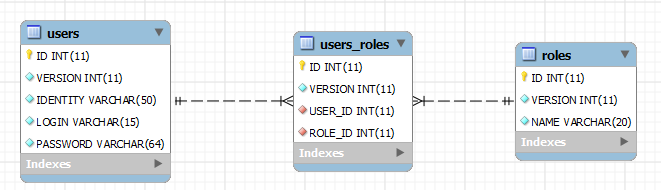
Table [USERS]: users
- ID: primary key;
- VERSION: row versioning column;
- IDENTITY: a descriptive identifier for the user;
- LOGIN: the user's login;
- PASSWORD: their password;
In the USERS table, passwords are not stored in plain text:
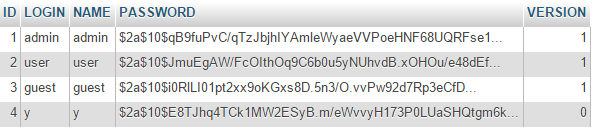 |
The algorithm used to encrypt passwords is the BCRYPT algorithm.
[ROLES] table: roles
- ID: primary key;
- VERSION: the row's versioning column;
- NAME: role name. By default, Spring Security expects names in the form ROLE_XX, such as ROLE_ADMIN or ROLE_GUEST;
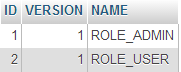 |
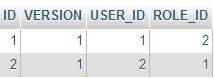
Table [USERS_ROLES]: USERS/ROLES join table
A user can have multiple roles, and a role can include multiple users. This is a many-to-many relationship represented by the [USERS_ROLES] table.
- ID: primary key;
- VERSION: row versioning column;
- USER_ID: user identifier;
- ROLE_ID: role identifier;
 |
16.4.2. The Eclipse Project
We create the following Eclipse project:
1 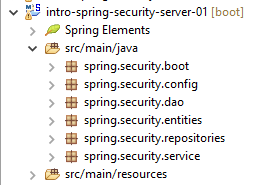 |
- in [1]: the new project with the following packages:
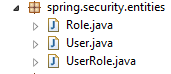
- [spring.security.entities]: contains the JPA entities corresponding to the three new database tables;
- [spring.security.repositories]: contains the Spring Data repositories associated with the three new tables;
- [spring.security.dao]: contains a service based on the [repositories];
- [spring.security.config]: contains the project configuration, including that for secure access to the web service;
- [spring.security.boot]: contains the launch class for the secure web service;
16.4.3. The Maven configuration
The new project is a Maven project configured by the following [pom.xml] file:
<project xmlns="http://maven.apache.org/POM/4.0.0" xmlns:xsi="http://www.w3.org/2001/XMLSchema-instance"
    xsi:schemaLocation="http://maven.apache.org/POM/4.0.0 http://maven.apache.org/xsd/maven-4.0.0.xsd">
    <modelVersion>4.0.0</modelVersion>
    <groupId>istia.st.spring.security</groupId>
    <artifactId>intro-spring-security-server-01</artifactId>
    <version>0.0.1-SNAPSHOT</version>

    <name>intro-spring-security-server-01</name>
    <description>démo spring security</description>

    <properties>
        <project.build.sourceEncoding>UTF-8</project.build.sourceEncoding>
        <java.version>1.8</java.version>
    </properties>

    <parent>
        <groupId>org.springframework.boot</groupId>
        <artifactId>spring-boot-starter-parent</artifactId>
        <version>1.2.7.RELEASE</version>
    </parent>

    <dependencies>
        <dependency>
            <groupId>istia.st.webjson</groupId>
            <artifactId>intro-server-webjson-01</artifactId>
            <version>0.0.1-SNAPSHOT</version>
        </dependency>
        <!-- Spring security -->
        <dependency>
            <groupId>org.springframework.boot</groupId>
            <artifactId>spring-boot-starter-security</artifactId>
        </dependency>
        <!-- Spring logs -->
        <dependency>
            <groupId>org.springframework.boot</groupId>
            <artifactId>spring-boot-starter-logging</artifactId>
        </dependency>
        <!-- Spring Boot -->
        <dependency>
            <groupId>org.springframework.boot</groupId>
            <artifactId>spring-boot</artifactId>
        </dependency>
        <!-- Spring Boot Test -->
        <dependency>
            <groupId>org.springframework.boot</groupId>
            <artifactId>spring-boot-starter-test</artifactId>
            <scope>test</scope>
        </dependency>
    </dependencies>
    <!-- plugins -->
    <build>
        <plugins>
            <plugin>
                <artifactId>maven-assembly-plugin</artifactId>
                <configuration>
                    <descriptorRefs>
                        <descriptorRef>jar-with-dependencies</descriptorRef>
                    </descriptorRefs>
                </configuration>
            </plugin>
            <plugin>
                <groupId>org.apache.maven.plugins</groupId>
                <artifactId>maven-surefire-plugin</artifactId>
                <version>2.18.1</version>
            </plugin>
        </plugins>
    </build>

</project>
- lines 23–27: we reuse the existing code with the web service/JSON archive we examined;
- lines 29–32: the dependency that brings in the Spring Security classes;
- lines 34–37: the logging library;
- lines 39–42: the library that enables the use of Spring Boot annotations;
- lines 44–48: the library required for testing;
16.4.4. The new [JPA] entities
 |
The JPA layer defines three new entities:
 |
The [User] class represents the [USERS] table:
package spring.security.entities;

import javax.persistence.Column;
import javax.persistence.Entity;
import javax.persistence.Table;

import spring.data.entities.AbstractEntity;

@Entity
@Table(name = "USERS")
public class User extends AbstractEntity {

    // properties
    @Column(name = "NAME")
    private String name;
    @Column(name = "LOGIN")
    private String login;
    @Column(name = "PASSWORD")
    private String password;

    // manufacturer
    public User() {
    }

    public User(String name, String login, String password) {
        this.name = name;
        this.login = login;
        this.password = password;
    }

    // getters and setters
...
}
- line 11: the class extends the [AbstractEntity] class already used for the other entities;
The [Role] class represents the [ROLES] table:
package spring.security.entities;

import javax.persistence.Column;
import javax.persistence.Entity;
import javax.persistence.Table;

import spring.data.entities.AbstractEntity;

@Entity
@Table(name = "ROLES")
public class Role extends AbstractEntity {

    // properties
    @Column(name="NAME")
    private String name;

    // manufacturers
    public Role() {
    }

    public Role(String name) {
        this.name = name;
    }

    // getters and setters
    public String getName() {
        return name;
    }

    public void setName(String name) {
        this.name = name;
    }

}
The [UserRole] class represents the [USERS_ROLES] table:
package spring.security.entities;

import javax.persistence.Column;
import javax.persistence.Entity;
import javax.persistence.JoinColumn;
import javax.persistence.ManyToOne;
import javax.persistence.Table;

import spring.data.entities.AbstractEntity;

@Entity
@Table(name = "USERS_ROLES")
public class UserRole extends AbstractEntity {

    // foreign keys
    @Column(name = "USER_ID", insertable = false, updatable = false)
    private Long userId;
    @Column(name = "ROLE_ID", insertable = false, updatable = false)
    private Long roleId;

    // a UserRole refers to a User
    @ManyToOne
    @JoinColumn(name = "USER_ID")
    private User user;

    // a UserRole refers to a Role
    @ManyToOne
    @JoinColumn(name = "ROLE_ID")
    private Role role;

    // manufacturers
    public UserRole() {

    }

    public UserRole(User user, Role role) {
        this.user = user;
        this.role = role;
    }

    // getters and setters
...
}
- lines 22–24: define the foreign key from the [USERS_ROLES] table to the [USERS] table;
- lines 27-29: define the foreign key from the [USERS_ROLES] table to the [ROLES] table;
16.4.5. The [repositories]
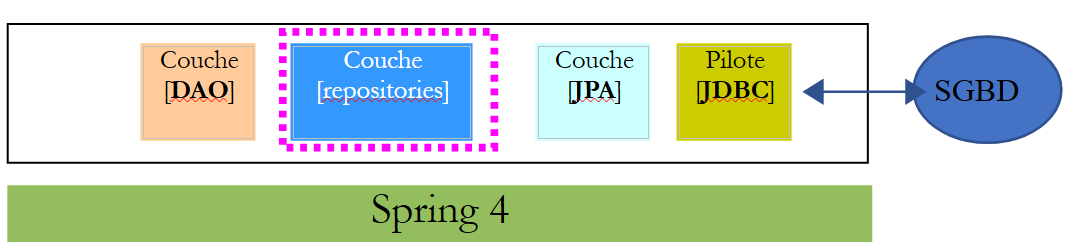 |
Each of the preceding JPA entities is managed by a Spring Data [repository]:
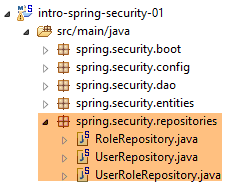 |
The [UserRepository] interface manages access to [User] entities:
package spring.security.repositories;

import org.springframework.data.jpa.repository.Query;
import org.springframework.data.repository.CrudRepository;

import spring.security.entities.Role;
import spring.security.entities.User;

public interface UserRepository extends CrudRepository<User, Long> {

    // liste des rôles d'un utilisateur identifié par son id
    @Query("select ur.role from UserRole ur where ur.user.id=?1")
    Iterable<Role> getRoles(long id);

    // liste des rôles d'un utilisateur identifié par son login unique
    @Query("select ur.role from UserRole ur where ur.user.login=?1 and ur.user.password=?2")
    Iterable<Role> getRoles(String login, String password);

    // recherche d'un utilisateur via son login
    User findUserByLogin(String login);
}
- line 9: the [UserRepository] interface extends Spring Data's [CrudRepository] interface (line 4);
- lines 12-13: the [getRoles(User user)] method retrieves all roles for a user identified by their [id]
- lines 16-17: same as above, but for a user identified by their login and password;
- line 20: to find a user by their login;
The [RoleRepository] interface manages access to [Role] entities:
package spring.security.repositories;

import org.springframework.data.repository.CrudRepository;

import spring.security.entities.Role;

public interface RoleRepository extends CrudRepository<Role, Long> {

    // search for a role by name
    Role findRoleByName(String name);

}
- line 7: the [RoleRepository] interface extends the [CrudRepository] interface;
- line 10: you can search for a role by its name;
The [UserRoleRepository] interface manages access to [UserRole] entities:
package spring.security.repositories;

import org.springframework.data.repository.CrudRepository;

import spring.security.entities.UserRole;

public interface UserRoleRepository extends CrudRepository<UserRole, Long> {

}
- Line 5: The [UserRoleRepository] interface simply extends the [CrudRepository] interface without adding any new methods;
16.4.6. User and Role Management Classes
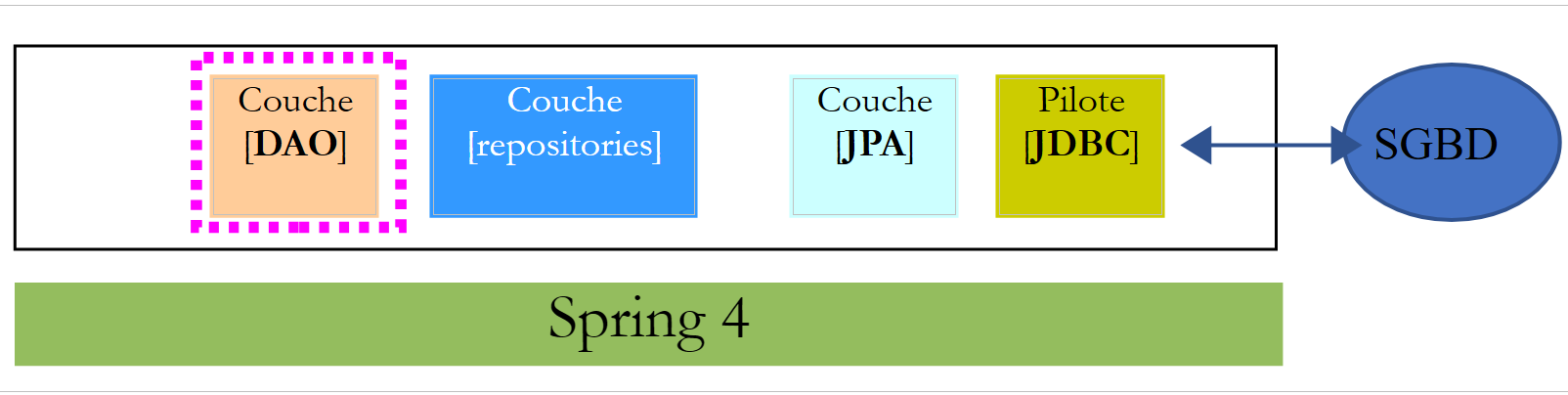 |
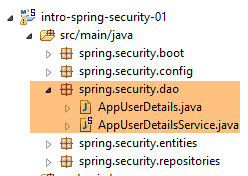 |
Spring Security requires the creation of a class that implements the following [UsersDetail] interface:
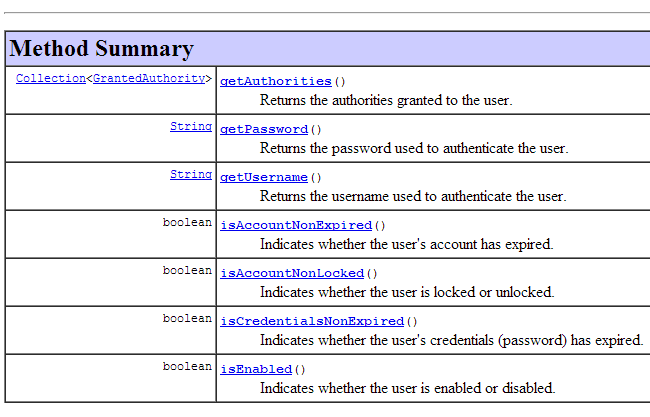 |
This interface is implemented here by the [AppUserDetails] class:
package spring.security.dao;

import java.util.ArrayList;
import java.util.Collection;

import org.springframework.security.core.GrantedAuthority;
import org.springframework.security.core.authority.SimpleGrantedAuthority;
import org.springframework.security.core.userdetails.UserDetails;

import spring.security.entities.Role;
import spring.security.entities.User;
import spring.security.repositories.UserRepository;

public class AppUserDetails implements UserDetails {

    private static final long serialVersionUID = 1L;

    // properties
    private User user;
    private UserRepository userRepository;

    // manufacturers
    public AppUserDetails() {
    }

    public AppUserDetails(User user, UserRepository userRepository) {
        this.user = user;
        this.userRepository = userRepository;
    }

    // -------------------------interface
    @Override
    public Collection<? extends GrantedAuthority> getAuthorities() {
        Collection<GrantedAuthority> authorities = new ArrayList<>();
        for (Role role : userRepository.getRoles(user.getId())) {
            authorities.add(new SimpleGrantedAuthority(role.getName()));
        }
        return authorities;
    }

    @Override
    public String getPassword() {
        return user.getPassword();
    }

    @Override
    public String getUsername() {
        return user.getLogin();
    }

    @Override
    public boolean isAccountNonExpired() {
        return true;
    }

    @Override
    public boolean isAccountNonLocked() {
        return true;
    }

    @Override
    public boolean isCredentialsNonExpired() {
        return true;
    }

    @Override
    public boolean isEnabled() {
        return true;
    }

    // getters and setters
    ...
}
- line 14: the [AppUserDetails] class implements the [UserDetails] interface;
- lines 19–20: the class encapsulates a user (line 19) and the repository that provides details about that user (line 20);
- lines 26–29: the constructor that instantiates the class with a user and its repository;
- lines 32–36: implementation of the [getAuthorities] method of the [UserDetails] interface. It must construct a collection of elements of type [GrantedAuthority] or a derived type. Here, we use the derived type [SimpleGrantedAuthority] (line 36), which encapsulates the name of one of the user’s roles from line 19;
- lines 35–37: we iterate through the list of the user’s roles from line 19 to build a list of elements of type [SimpleGrantedAuthority];
- lines 42–44: implement the [getPassword] method of the [UserDetails] interface. We return the password of the user from line 19;
- lines 42–44: implement the [getUserName] method of the [UserDetails] interface. Return the login of the user from line 19;
- lines 51–54: the user’s account never expires;
- lines 56–59: the user’s account is never locked;
- lines 61–64: the user’s credentials never expire;
- lines 66–69: the user’s account is always active;
Spring Security also requires the existence of a class that implements the [AppUserDetailsService] interface:
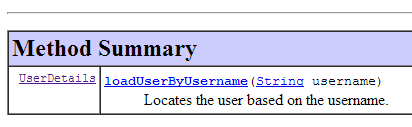 |
This interface is implemented by the following [AppUserDetailsService] class:
package spring.security.dao;

import org.springframework.beans.factory.annotation.Autowired;
import org.springframework.security.core.userdetails.UserDetails;
import org.springframework.security.core.userdetails.UserDetailsService;
import org.springframework.security.core.userdetails.UsernameNotFoundException;
import org.springframework.stereotype.Service;

import spring.security.entities.User;
import spring.security.repositories.UserRepository;

@Service
public class AppUserDetailsService implements UserDetailsService {

    @Autowired
    private UserRepository userRepository;

    @Override
    public UserDetails loadUserByUsername(String login) throws UsernameNotFoundException {
        // search for user via login
        User user = userRepository.findUserByLogin(login);
        // found?
        if (user == null) {
            throw new UsernameNotFoundException(String.format("login [%s] inexistant", login));
        }
        // render user details
        return new AppUserDetails(user, userRepository);
    }

}
- line 12: the class will be a Spring component, so it will be available in its context;
- lines 15-16: the [UserRepository] component will be injected here;
- lines 19–28: implementation of the [loadUserByUsername] method of the [UserDetailsService] interface (line 10). The parameter is the user’s login;
- line 21: the user is searched for using their login;
- lines 23–25: if the user is not found, an exception is thrown;
- line 27: an [AppUserDetails] object is constructed and returned. It is indeed of type [UserDetails] (line 19);
16.4.7. Project Configuration
 |
The project is configured by two classes:
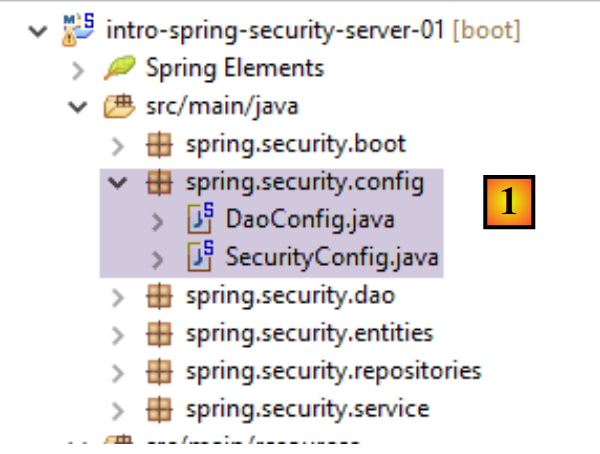 |
The [DaoConfig] class configures the [DAO] layer introduced by the new project:
package spring.security.config;

import org.springframework.context.annotation.Bean;
import org.springframework.context.annotation.ComponentScan;
import org.springframework.context.annotation.Import;
import org.springframework.data.jpa.repository.config.EnableJpaRepositories;

@EnableJpaRepositories(basePackages = { "spring.security.repositories" })
@ComponentScan(basePackages = { "spring.security.dao" })
@Import({ spring.data.config.DaoConfig.class })
public class DaoConfig {

    // constants
    final static private String[] ENTITIES_PACKAGES = { "spring.data.entities", "spring.security.entities" };

    @Bean
    public String[] packagesToScan() {
        return ENTITIES_PACKAGES;
    }

}
- Line 10: We import the configuration class [spring.data.config.DaoConfig] from the [intro-spring-data-01] project, which implements the [DAO] layer for products and categories;
- line 8: we specify the folders in the current project containing Spring Data [repositories];
- line 9: we specify the folders in the current project containing Spring components related to the [DAO] layer;
- Line 14: This specifies the directories containing JPA entities. These include those from the [intro-spring-data-01] project and those from the secure server project. This information is defined in the bean on lines 16–19. This bean overrides the bean of the same name in the [intro-spring-data-01] project:
    final static private String[] ENTITIES_PACKAGES = { "spring.data.entities" };

    // EntityManagerFactory
    @Bean
    public EntityManagerFactory entityManagerFactory(JpaVendorAdapter jpaVendorAdapter, DataSource dataSource) {
        LocalContainerEntityManagerFactoryBean factory = new LocalContainerEntityManagerFactoryBean();
        factory.setJpaVendorAdapter(jpaVendorAdapter);
        factory.setPackagesToScan(packagesToScan());
        factory.setDataSource(dataSource);
        factory.afterPropertiesSet();
        return factory.getObject();
    }

    @Bean
    public String[] packagesToScan() {
        return ENTITIES_PACKAGES;
}
In the [DAO] layer, line 8 scans the directories specified on line 1. Due to the redefinition of the bean in lines 14–17 in the secure project (lines 16–19), line 8 above will now scan the directories ["spring.data.entities", "spring.security.entities"]. Note that the class imported on line 10 from the [spring.security.config.DaoConfig] class must include the [@Configuration] annotation; otherwise, the behavior described above will not work.
The [SecurityConfig] class configures the security aspect of the project. We have already encountered a Spring Security configuration class:
package hello;

import org.springframework.context.annotation.Configuration;
import org.springframework.security.config.annotation.authentication.builders.AuthenticationManagerBuilder;
import org.springframework.security.config.annotation.web.builders.HttpSecurity;
import org.springframework.security.config.annotation.web.configuration.WebSecurityConfigurerAdapter;
import org.springframework.security.config.annotation.web.servlet.configuration.EnableWebMvcSecurity;

@Configuration
@EnableWebMvcSecurity
public class WebSecurityConfig extends WebSecurityConfigurerAdapter {
    @Override
    protected void configure(HttpSecurity http) throws Exception {
        http.authorizeRequests().antMatchers("/", "/home").permitAll().anyRequest().authenticated();
        http.formLogin().loginPage("/login").permitAll().and().logout().permitAll();
    }

    @Override
    protected void configure(AuthenticationManagerBuilder auth) throws Exception {
        auth.inMemoryAuthentication().withUser("user").password("password").roles("USER");
    }
}
We will follow the same procedure:
- line 11: define a class that extends the [WebSecurityConfigurerAdapter] class;
- line 13: define a method [configure(HttpSecurity http)] that defines access rights to the various URLs of the web service;
- line 19: define a method [configure(AuthenticationManagerBuilder auth)] that defines users and their roles;
The [SecurityConfig] class will be as follows:
package spring.security.config;

import org.springframework.beans.factory.annotation.Autowired;
import org.springframework.context.annotation.ComponentScan;
import org.springframework.context.annotation.Import;
import org.springframework.http.HttpMethod;
import org.springframework.security.config.annotation.authentication.builders.AuthenticationManagerBuilder;
import org.springframework.security.config.annotation.web.builders.HttpSecurity;
import org.springframework.security.config.annotation.web.configuration.EnableWebSecurity;
import org.springframework.security.config.annotation.web.configuration.WebSecurityConfigurerAdapter;
import org.springframework.security.config.http.SessionCreationPolicy;
import org.springframework.security.crypto.bcrypt.BCryptPasswordEncoder;

import spring.security.dao.AppUserDetailsService;

@EnableWebSecurity
@ComponentScan(basePackages = { "spring.security.service" })
@Import({ spring.webjson.config.AppConfig.class, DaoConfig.class })
public class SecurityConfig extends WebSecurityConfigurerAdapter {

    @Autowired
    private AppUserDetailsService appUserDetailsService;

    // security
    private boolean activateSecurity = true;

    @Override
    protected void configure(AuthenticationManagerBuilder registry) throws Exception {
        // authentication is performed by bean [appUserDetailsService]
        // the password is encrypted using the BCrypt hash algorithm
        registry.userDetailsService(appUserDetailsService).passwordEncoder(new BCryptPasswordEncoder());
    }

    @Override
    protected void configure(HttpSecurity http) throws Exception {
        // CSRF
        http.csrf().disable();
        // secure application?
        if (activateSecurity) {
            // the password is transmitted by the header Authorization: Basic xxxx
            http.httpBasic();
            // the HTTP OPTIONS method must be authorized for all
            http.authorizeRequests() //
                    .antMatchers(HttpMethod.OPTIONS, "/", "/**").permitAll();
            // only the ADMIN role can use the application
            http.authorizeRequests() //
                    .antMatchers("/", "/**") // all URL
                    .hasRole("ADMIN");
            // no session
            http.sessionManagement().sessionCreationPolicy(SessionCreationPolicy.STATELESS);
        }
    }
}
- line 16: to enable Spring Security components;
- line 17: we add the Spring components from the [spring.security.service] package;
- line 18: import the beans from the [DAO] layer we just introduced, as well as those from the unsecured web server/JSON;
- lines 21–22: the [AppUserDetails] class, which provides access to the application’s users, is injected;
- line 25: a boolean that secures (true) or does not secure (false) the web application;
- lines 27–32: the [configure(HttpSecurity http)] method defines users and their roles. It takes an [AuthenticationManagerBuilder] type as a parameter. This parameter is enriched with two pieces of information (line 38):
- a reference to the [appUserDetailsService] from line 22, which provides access to registered users. Note here that the fact that they are stored in a database is not explicitly stated. They could therefore be in a cache, delivered by a web service, etc.
- the encryption type used for the password. Recall that we used the BCrypt algorithm;
- lines 34–52: the [configure(HttpSecurity http)] method defines access rights to the web service’s URLs;
- line 37: we saw in the introductory project that by default, Spring Security manages a CSRF (Cross-Site Request Forgery) token that the user attempting to authenticate must send back to the server. Here, this mechanism is disabled. Combined with the boolean (isSecured=false), this allows the web application to be used without security;
- line 41: We enable authentication via HTTP headers. The client must send the following HTTP header:
where code is the Base64 encoding of the login:password string. For example, the Base64 encoding of the string admin:admin is YWRtaW46YWRtaW4=. Therefore, a user with the login [admin] and password [admin] will send the following HTTP header to authenticate:
- Lines 46–48: specify that all URLs for the web service are accessible to users with the [ROLE_ADMIN] role. This means that a user without this role cannot access the web service;
- Line 50: In [session] mode, a user who has authenticated once does not need to do so for subsequent accesses. Here, we disable this mode, so the user will have to authenticate each time they access the service;
16.4.8. [DAO] Layer Testing
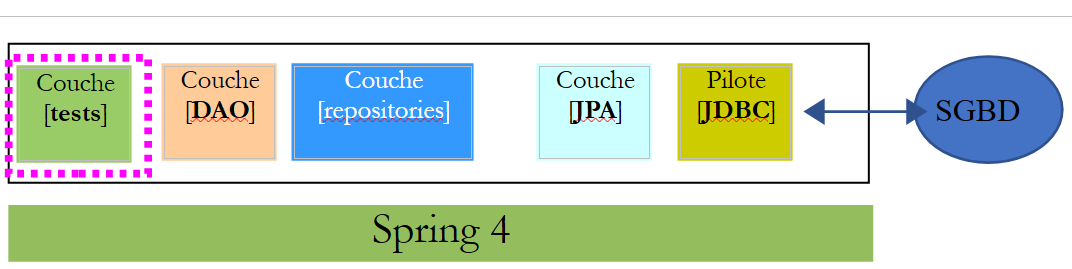 |
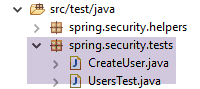 |
First, we create an executable class [CreateUser] capable of creating a user with a role:
package sprin.security.tests;

import org.springframework.context.annotation.AnnotationConfigApplicationContext;
import org.springframework.security.crypto.bcrypt.BCrypt;

import spring.security.config.DaoConfig;
import spring.security.entities.Role;
import spring.security.entities.User;
import spring.security.entities.UserRole;
import spring.security.repositories.RoleRepository;
import spring.security.repositories.UserRepository;
import spring.security.repositories.UserRoleRepository;

public class CreateUser {

    public static void main(String[] args) {
        // syntax: login password roleName

        // three parameters are required
        if (args.length != 3) {
            System.out.println("Syntaxe : [pg] user password role");
            System.exit(0);
        }
        // parameters are retrieved
        String login = args[0];
        String password = args[1];
        String roleName = String.format("ROLE_%s", args[2].toUpperCase());
        // spring context
        AnnotationConfigApplicationContext context = new AnnotationConfigApplicationContext(DaoConfig.class);
        UserRepository userRepository = context.getBean(UserRepository.class);
        RoleRepository roleRepository = context.getBean(RoleRepository.class);
        UserRoleRepository userRoleRepository = context.getBean(UserRoleRepository.class);
        // does the role already exist?
        Role role = roleRepository.findRoleByName(roleName);
        // if it doesn't exist, we create it
        if (role == null) {
            role = roleRepository.save(new Role(roleName));
        }
        // does the user already exist?
        User user = userRepository.findUserByLogin(login);
        // if it doesn't exist, we create it
        if (user == null) {
            // hash the password with bcrypt
            String crypt = BCrypt.hashpw(password, BCrypt.gensalt());
            // save user
            user = userRepository.save(new User(login, login, crypt));
            // we create the relationship with the role
            userRoleRepository.save(new UserRole(user, role));
        } else {
            // the user already exists - does he/she have the required role?
            boolean trouvé = false;
            for (Role r : userRepository.getRoles(user.getId())) {
                if (r.getName().equals(roleName)) {
                    trouvé = true;
                    break;
                }
            }
            // if not found, we create the relationship with the role
            if (!trouvé) {
                userRoleRepository.save(new UserRole(user, role));
            }
        }

        // closing Spring context
        context.close();
        // end
        System.out.println("Travail terminé...");
    }

}
- line 17: the class expects three arguments defining a user: their login, password, and role;
- lines 25–27: the three parameters are retrieved;
- line 29: the Spring context is built from the [AppConfig] configuration class;
- lines 30–32: the references to the three [Repository] objects that may be useful for creating the user are retrieved;
- line 34: we check if the role already exists;
- lines 36–38: if not, we create it in the database. It will have a name of the form [ROLE_XX];
- line 40: we check if the login already exists;
- lines 42-49: if the username does not exist, we create it in the database;
- line 44: we encrypt the password. Here, we use the [BCrypt] class from Spring Security (line 4). We therefore need the archives for this framework. The [pom.xml] file includes this dependency:
        <dependency>
            <groupId>org.springframework.boot</groupId>
            <artifactId>spring-boot-starter-security</artifactId>
</dependency>
- Line 46: The user is persisted in the database;
- line 48: as well as the relationship linking them to their role;
- lines 51–57: if the login already exists, we check whether the role we want to assign to them is already among their roles;
- Lines 59–61: If the role being searched for is not found, a row is created in the [USERS_ROLES] table to link the user to their role;
- We have not protected against potential exceptions. This is a helper class for quickly creating a user with a role.
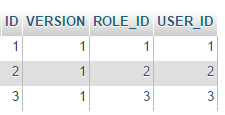
When the class is executed with the arguments [x x guest], the following results are obtained in the database:
Table [USERS]
 |
Table [ROLES]
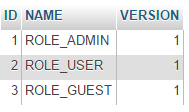 |
Table [USERS_ROLES]
 |
Now let’s consider the second class [UsersTest], which is a JUnit test:
|
package spring.security.tests;

import java.util.List;

import org.junit.Assert;
import org.junit.Test;
import org.junit.runner.RunWith;
import org.springframework.beans.factory.annotation.Autowired;
import org.springframework.boot.test.SpringApplicationConfiguration;
import org.springframework.security.core.authority.SimpleGrantedAuthority;
import org.springframework.security.crypto.bcrypt.BCrypt;
import org.springframework.test.context.junit4.SpringJUnit4ClassRunner;

import com.fasterxml.jackson.core.JsonProcessingException;
import com.fasterxml.jackson.databind.ObjectMapper;
import com.google.common.collect.Lists;

import spring.security.config.DaoConfig;
import spring.security.dao.AppUserDetails;
import spring.security.dao.AppUserDetailsService;
import spring.security.entities.Role;
import spring.security.entities.User;
import spring.security.repositories.UserRepository;

@SpringApplicationConfiguration(classes = DaoConfig.class)
@RunWith(SpringJUnit4ClassRunner.class)
public class UsersTest {

    @Autowired
    private UserRepository userRepository;
    @Autowired
    private AppUserDetailsService appUserDetailsService;

    // mapper jSON
    private ObjectMapper mapper = new ObjectMapper();

    @Test
    public void findAllUsersWithTheirRoles() throws JsonProcessingException {
        Iterable<User> users = userRepository.findAll();
        for (User user : users) {
            System.out.println(String.format("\n----------Utilisateur [%s]",mapper.writeValueAsString(user)));
            display("Roles :", userRepository.getRoles(user.getId()));
        }
    }

    @Test
    public void findUserByLogin() {
        // user [admin] is retrieved
        User user = userRepository.findUserByLogin("admin");
        // we check that his password is [admin]
        Assert.assertTrue(BCrypt.checkpw("admin", user.getPassword()));
        // check admin / admin role
        List<Role> roles = Lists.newArrayList(userRepository.getRoles("admin", user.getPassword()));
        Assert.assertEquals(1L, roles.size());
        Assert.assertEquals("ROLE_ADMIN", roles.get(0).getName());
    }

    @Test
    public void loadUserByUsername() {
        // user [admin] is retrieved
        AppUserDetails userDetails = (AppUserDetails) appUserDetailsService.loadUserByUsername("admin");
        // we check that his password is [admin]
        Assert.assertTrue(BCrypt.checkpw("admin", userDetails.getPassword()));
        // check admin / admin role
        @SuppressWarnings("unchecked")
        List<SimpleGrantedAuthority> authorities = (List<SimpleGrantedAuthority>) userDetails.getAuthorities();
        Assert.assertEquals(1L, authorities.size());
        Assert.assertEquals("ROLE_ADMIN", authorities.get(0).getAuthority());
    }

    // utility method - displays items in a collection
    private void display(String message, Iterable<?> elements) throws JsonProcessingException {
        System.out.println(message);
        for (Object element : elements) {
            System.out.println(mapper.writeValueAsString(element));
        }
    }
}
- lines 37–44: visual test. We display all users along with their roles;
- lines 46–56: we verify that the user [admin] has the password [admin] and the role [ROLE_ADMIN] using the [UserRepository];
- line 51: [admin] is the plaintext password. In the database, it is encrypted using the BCrypt algorithm. The [BCrypt.checkpw] method verifies that the encrypted plaintext password matches the one in the database;
- lines 58–69: we verify that the user [admin] has the password [admin] and the role [ROLE_ADMIN] using the [appUserDetailsService];
The tests run successfully with the following logs:
16.4.9. Web service testing
We will test the web service using the Chrome client [Advanced Rest Client]. We will need to specify the HTTP authentication header:
where [code] is the Base64-encoded string [login:password]. To generate this code, you can use the following program:
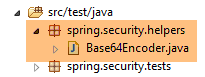 |
package spring.security.helpers;

import org.springframework.security.crypto.codec.Base64;

public class Base64Encoder {

    public static void main(String[] args) {
        // we expect two arguments: login password
        if (args.length != 2) {
            System.out.println("Syntaxe : login password");
            System.exit(0);
        }
        // we retrieve the two arguments
        String chaîne = String.format("%s:%s", args[0], args[1]);
        // encode the string
        byte[] data = Base64.encode(chaîne.getBytes());
        // displays its Base64 encoding
        System.out.println(new String(data));
    }

}
If we run this program with the two arguments [admin admin]:
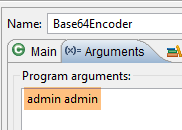 |
we get the following result:
Now that we know how to generate the HTTP authentication header, we launch the secure web service, then using the Chrome client [Advanced Rest Client], we request the list of all products:
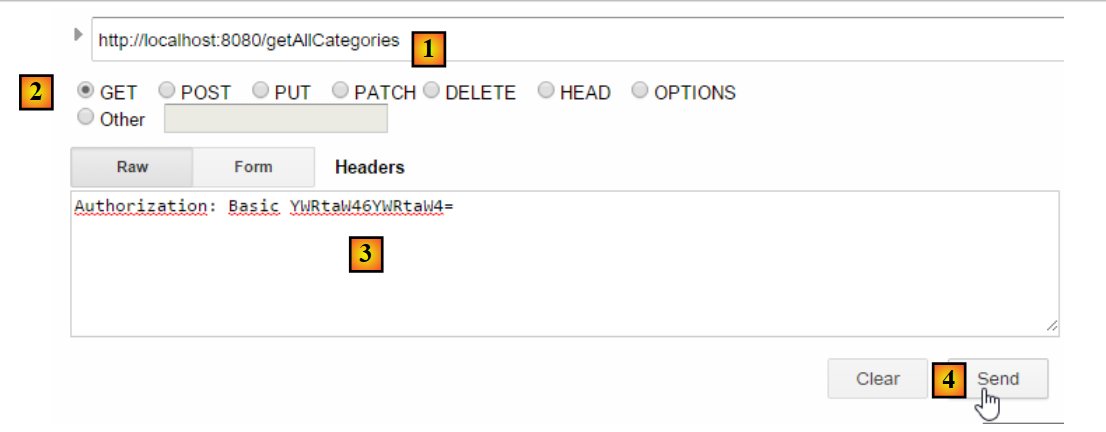 |
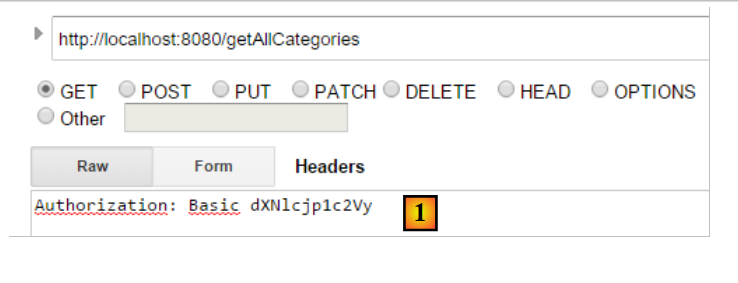
- in [1], we request the URL of the categories;
- in [2], using a GET method;
- in [3], we provide the HTTP authentication header. The code [YWRtaW46YWRtaW4=] is the Base64 encoding of the string [admin:admin];
- in [4], we send the HTTP request;
The server's response is as follows:
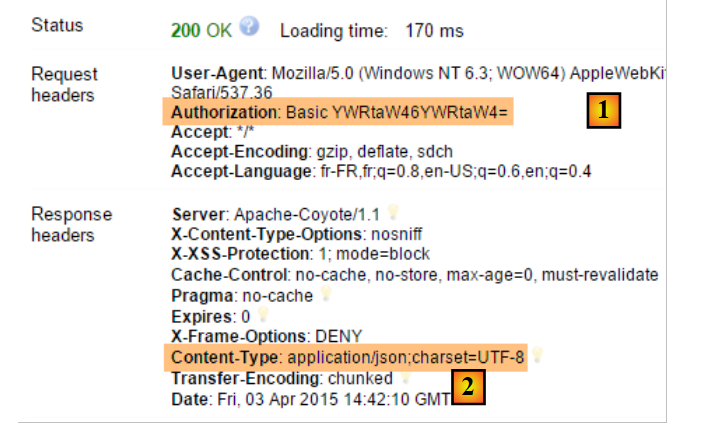 |
- in [1], the HTTP authentication header;
- in [2], the server returns a JSON response;
We successfully obtain the list of categories:
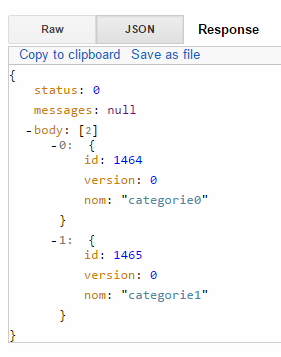 |
Now let’s try an HTTP request with an incorrect authentication header. The response is then as follows:
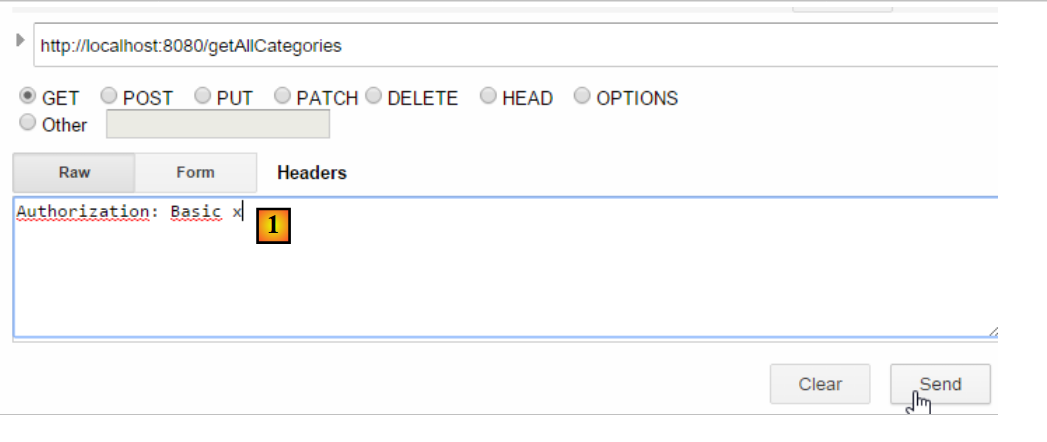 |
- in [1]: the HTTP authentication header;
We receive the following response:
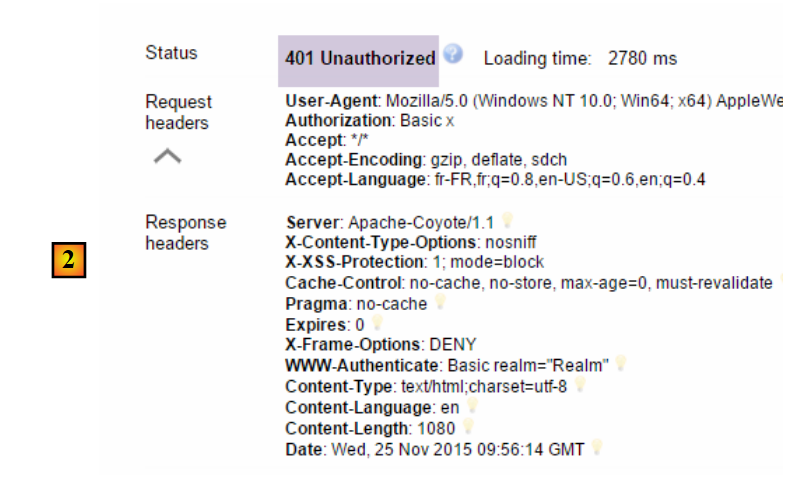 |
- in [2]: the web service response;
Now, let’s try the user / user. It exists but does not have access to the web service. If we run the Base64 encoding program with the two arguments [user user]:
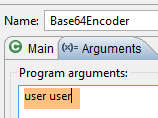 |
we get the following result:
 |
- in [1]: the incorrect HTTP authentication header;
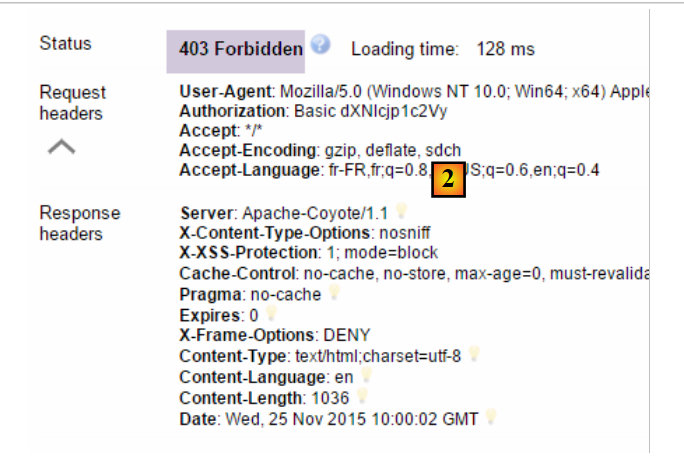 |
- in [2]: the web service response. It differs from the previous one, which was [401 Unauthorized]. This time, the user authenticated correctly but does not have sufficient permissions to access the URL;
Our secure web service is now operational.
16.4.10. An authentication URL
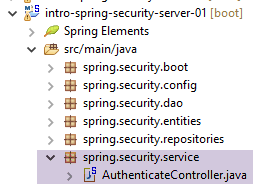 |
We will create a URL that will allow us to determine whether a user is authorized to access the web service. To do this, we create the following new MVC controller [AuthenticateController]:
package spring.security.service;

import org.springframework.beans.factory.annotation.Autowired;
import org.springframework.context.ApplicationContext;
import org.springframework.stereotype.Controller;
import org.springframework.web.bind.annotation.RequestMapping;
import org.springframework.web.bind.annotation.RequestMethod;
import org.springframework.web.bind.annotation.ResponseBody;

import com.fasterxml.jackson.core.JsonProcessingException;
import com.fasterxml.jackson.databind.ObjectMapper;

import spring.webjson.models.Response;

@Controller
public class AuthenticateController {

    // spring dependencies
    @Autowired
    private ApplicationContext context;

    @RequestMapping(value = "/authenticate", method = RequestMethod.GET, produces = "application/json; charset=UTF-8")
    @ResponseBody
    public String authenticate() throws JsonProcessingException {
        // answer jSON
        ObjectMapper mapperResponse = context.getBean(ObjectMapper.class);
        return mapperResponse.writeValueAsString(new Response<Void>(0, null, null));
    }

}
- line 15: the [AuthenticateController] class is a Spring controller. As such, it exposes URLs;
- line 22: exposes the URL [/authenticate];
- line 23: the result of the method will be sent directly to the client;
- lines 26–27: the method simply returns an empty [Response] object but with a [status] equal to 0, indicating that no error occurred;
What is this URL for? When we simply want to authenticate a user, we will request it. We have seen that if the security layer does not accept this user, it throws an exception. Here is an example;
With the user [admin:admin]:
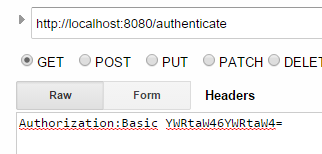 | 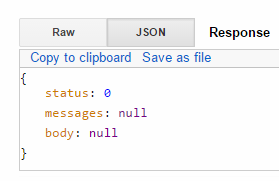 |
We get an empty response but no exception.
With the user [user:user]:
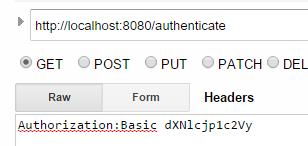 | 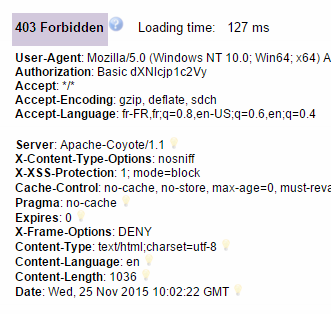 |
We got an exception.
16.4.11. Conclusion
The necessary classes for Spring Security were added without modifying the original web/JSON project. This very favorable scenario stems from the fact that the three tables added to the database are independent of the existing tables. We could even have placed them in a separate database. In other cases, the added tables may have relationships with existing tables. In that case, the JPA entities must be modified, which generally impacts all layers of the project.
16.5. A client programmed for the secure web/JSON service
We have already written a client for the unsecured web service / JSON:
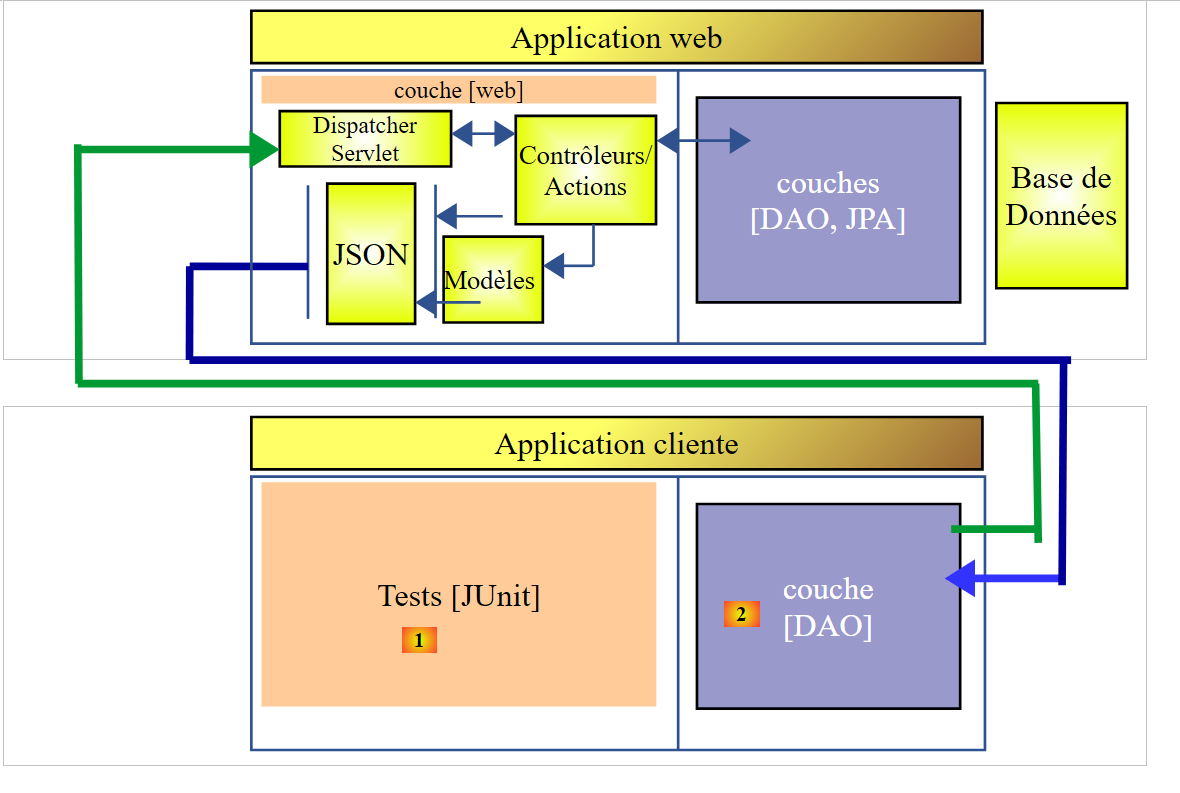 |
We will now create a client programmed for the secure web service:
 |
We duplicate the existing project [intro-webjson-client] into a new project [intro-spring-security-client-01]:
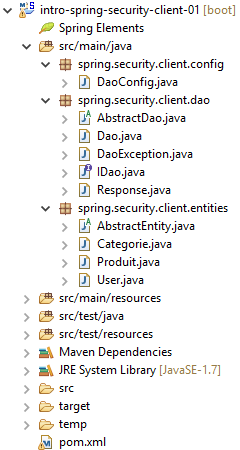 |
16.5.1. The [AbstractDao] class
The [AbstractDao] class handles HTTP communication with the secure web/JSON server. As we just saw, in this HTTP communication, the client must now send an authentication header, for example:
This is done as follows:
package spring.security.client.dao;

import java.net.URI;
...

public abstract class AbstractDao {

    // data
    @Autowired
    protected RestTemplate restTemplate;
    @Autowired
    protected String urlServiceWebJson;

    // generic request
    protected String getResponse(User user, String url, String jsonPost) {

// url : URL to contact
- line 15: the generic method [getResponse], responsible for HTTP communication with the secure web service, now accepts the user requesting a URL as its first parameter. The [User] class is as follows:
This class is as follows:
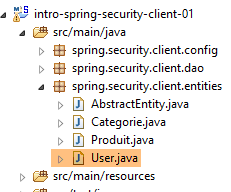 |
package spring.security.client.entities;

public class User {

    // properties
    private String login;
    private String password;

    // manufacturer
    public User() {
    }

    public User(String login, String password) {
        this.login = login;
        this.password = password;
    }

    // getters and setters
...
}
The [getResponse] method then becomes the following:
package spring.security.client.dao;

import java.net.URI;
import java.net.URISyntaxException;
import java.util.Base64;

import org.springframework.beans.factory.annotation.Autowired;
import org.springframework.core.ParameterizedTypeReference;
import org.springframework.http.MediaType;
import org.springframework.http.RequestEntity;
import org.springframework.http.RequestEntity.BodyBuilder;
import org.springframework.http.RequestEntity.HeadersBuilder;
import org.springframework.web.client.RestTemplate;

import spring.security.client.entities.User;

public abstract class AbstractDao {

    // data
    @Autowired
    protected RestTemplate restTemplate;
    @Autowired
    protected String urlServiceWebJson;

    private String getBase64(User user) {
        // encodes user and password in base 64 - requires java 8
        String chaîne = String.format("%s:%s", user.getLogin(), user.getPassword());
        return String.format("Basic %s", new String(Base64.getEncoder().encode(chaîne.getBytes())));
    }

    // generic request
    protected String getResponse(User user, String url, String jsonPost) {

        // url : URL to contact
        // jsonPost: the jSON value to be posted
        try {
            // request execution
            RequestEntity<?> request;
            if (jsonPost == null) {
                HeadersBuilder<?> headersBuilder = RequestEntity.get(new URI(String.format("%s%s", urlServiceWebJson, url)))
                        .accept(MediaType.APPLICATION_JSON);
                if (user != null) {
                    headersBuilder = headersBuilder.header("Authorization", getBase64(user));
                }
                request = headersBuilder.build();
            } else {
                BodyBuilder bodyBuilder = RequestEntity.post(new URI(String.format("%s%s", urlServiceWebJson, url)))
                        .header("Content-Type", "application/json").accept(MediaType.APPLICATION_JSON);
                if (user != null) {
                    bodyBuilder = bodyBuilder.header("Authorization", getBase64(user));
                }
                request = bodyBuilder.body(jsonPost);
            }

            // execute the query
            return restTemplate.exchange(request, new ParameterizedTypeReference<String>() {
            }).getBody();
        } catch (URISyntaxException e1) {
            throw new DaoException(20, e1);
        } catch (RuntimeException e2) {
            throw new DaoException(21, e2);
        }
    }

}
- lines 42–44, 49–51: if the user is not null, then the authentication header is added. The Base64 encoding of the user and their password is handled by the [getBase64] method in lines 25–29. Note that this method uses a [Base64] class belonging to JDK 1.8.
- Apart from the preceding lines, the code remains unchanged;
16.5.2. The [IDao] interface
All methods of the [IDao] interface receive an additional parameter [User user]:
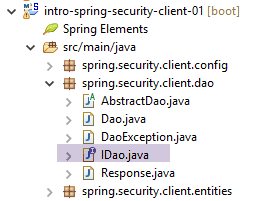 |
package spring.security.client.dao;

import java.util.List;

import spring.security.client.entities.Categorie;
import spring.security.client.entities.Produit;
import spring.security.client.entities.User;

public interface IDaoClient {

    // authentication
    public void authenticate(User user);

    // insert product list
    public List<Produit> addProduits(User user, List<Produit> produits);

    // removal of all products
    public void deleteAllProduits(User user);

    // product list update
    public List<Produit> updateProduits(User user, List<Produit> produits);

    // all products obtained
    public List<Produit> getAllProduits(User user);

    // inserting a list of categories
    public List<Categorie> addCategories(User user, List<Categorie> categories);

    // delete all categories
    public void deleteAllCategories(User user);

    // updating a list of categories
    public List<Categorie> updateCategories(User user, List<Categorie> categories);

    // obtaining all categories
    public List<Categorie> getAllCategories(User user);

    // a special product
    public Produit getProduitByIdWithCategorie(User user, Long idProduit);

    public Produit getProduitByIdWithoutCategorie(User user, Long idProduit);

    public Produit getProduitByNameWithCategorie(User user, String nom);

    public Produit getProduitByNameWithoutCategorie(User user, String nom);

    // a special category
    public Categorie getCategorieByIdWithProduits(User user, Long idCategorie);

    public Categorie getCategorieByIdWithoutProduits(User user, Long idCategorie);

    public Categorie getCategorieByNameWithProduits(User user, String nom);

    public Categorie getCategorieByNameWithoutProduits(User user, String nom);

}
- Line 12: We have added the [authenticate(User user)] method to authenticate a user. It throws an exception if the user does not have permission to access the [/authenticate] URL of the web service;
16.5.3. The [Dao] class
All methods in the [Dao] class receive an additional parameter [User user] that they pass to the generic method [getResponse] of the [AbstractDao] class. Here are two examples:
// authentication
    @Override
    public void authenticate(User user) {
        getResponse(user, "/authenticate", null);
    }

    @Override
    public List<Produit> addProduits(User user, List<Produit> produits) {
        // ----------- add products (without category)
        try {
            // mappers jSON
            ObjectMapper mapperPost = context.getBean(ObjectMapper.class);
            mapperPost.setFilters(jsonFilterProduitWithoutCategorie);
            ObjectMapper mapperResponse = mapperPost;
            // request
            Response<List<Produit>> response = mapperResponse.readValue(
                    getResponse(user, "/addProduits", mapperPost.writeValueAsString(produits)),
                    new TypeReference<Response<List<Produit>>>() {
                    });
            // mistake?
            if (response.getStatus() != 0) {
                // 1 exception is thrown
                throw new DaoException(response.getStatus(), response.getMessages());
            } else {
                // render the core of the server response
                return response.getBody();
            }
        } catch (DaoException e1) {
            throw e1;
        } catch (IOException | RuntimeException e2) {
            throw new DaoException(100, e2);
        }
    }
16.5.4. Unit tests for the [Dao] class
The [Test01] class for unit testing the [Dao] class is modified as follows:
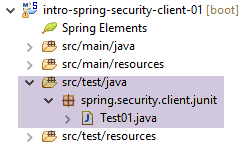 |
package client.tests.junit;

...

@SpringApplicationConfiguration(classes = DaoConfig.class)
@RunWith(SpringJUnit4ClassRunner.class)
public class Test01 {

    // spring context
    @Autowired
    private ApplicationContext context;
    // layer [DAO]
    @Autowired
    private IDaoClient dao;

    // users
    static private User admin;
    static private User user;
    static private User unknown;

    @BeforeClass
    public static void init() {
        admin = new User("admin", "admin");
        user = new User("user", "user");
        unknown = new User("x", "y");
    }

    @Before
    public void cleanAndFill() {
        // the base is cleaned before each test
        log("Vidage de la base de données", 1);
        // table [CATEGORIES] is emptied - by cascade, table [PRODUITS] will be emptied
        dao.deleteAllCategories(admin);
        // --------------------------------------------------------------------------------------
        log("Remplissage de la base", 1);
        // fill the tables
        List<Categorie> categories = new ArrayList<Categorie>();
        for (int i = 0; i < 2; i++) {
            Categorie categorie = new Categorie(String.format("categorie%d", i));
            for (int j = 0; j < 5; j++) {
                categorie.addProduit(new Produit(String.format("produit%d%d", i, j), 100 * (1 + (double) (i * 10 + j) / 100),
                        String.format("desc%d%d", i, j)));
            }
            categories.add(categorie);
        }
        // add the category - the products will be cascaded in as well
        dao.addCategories(admin, categories);
    }

    @Test
    public void showDataBase() throws BeansException, JsonProcessingException {
        // list of categories
        log("Liste des catégories", 2);
        List<Categorie> categories = dao.getAllCategories(admin);
        affiche(categories, context.getBean("jsonMapperCategorieWithoutProduits", ObjectMapper.class));
        // product list
        log("Liste des produits", 2);
        List<Produit> produits = dao.getAllProduits(admin);
        affiche(produits, context.getBean("jsonMapperProduitWithoutCategorie", ObjectMapper.class));
        // a few checks
        Assert.assertEquals(2, categories.size());
        Assert.assertEquals(10, produits.size());
        Categorie categorie = findCategorieByName("categorie0", categories);
        Assert.assertNotNull(categorie);
        Produit produit = findProduitByName("produit03", produits);
        Assert.assertNotNull(produit);
        Long idCategorie = produit.getIdCategorie();
        Assert.assertEquals(categorie.getId(), idCategorie);
    }
...
    @Test()
    public void checkUserUser() {
        ServiceException se = null;
        try {
            dao.authenticate(user);
        } catch (ServiceException e) {
            se = e;
        }
        Assert.assertNotNull(se);
        Assert.assertEquals("403 Forbidden", se.getMessages().get(0));
    }

    @Test()
    public void checkUserUnknown() {
        ServiceException se = null;
        try {
            dao.authenticate(unknown);
        } catch (ServiceException e) {
            se = e;
        }
        Assert.assertNotNull(se);
        Assert.assertEquals("401 Unauthorized", se.getMessages().get(0));
    }

    @Test()
    public void checkUserAdmin() {
        ServiceException se = null;
        try {
            dao.authenticate(admin);
        } catch (ServiceException e) {
            se = e;
        }
        Assert.assertNull(se);
    }
...
}
- During the initialization of the test class, lines 21–26, three users are created:
- the user [admin] has access to the web service URLs, test lines 96–104;
- the user [user] exists but is not authorized to use the web service URLs, test lines 71–81;
- the user [unknown] does not exist, test lines 83–93;
- the test methods are the same as those already seen for the unsecured web service, except that the methods of the [IDaoClient] interface are called with the user [admin]—who has permission to use the URLs—as the first parameter;
The test passes, but we can see that it is slower than with the unsecured web service. Securing an application significantly increases its response times. There is one important factor affecting the performance of the secured web service: in the [AppConfig] class that configures it, we wrote:
    @Override
    protected void configure(HttpSecurity http) throws Exception {
        // CSRF
        http.csrf().disable();
        // secure application?
        if (activateSecurity) {
            // the password is transmitted by the header Authorization: Basic xxxx
            http.httpBasic();
            // the HTTP OPTIONS method must be authorized for all
            http.authorizeRequests() //
                    .antMatchers(HttpMethod.OPTIONS, "/", "/**").permitAll();
            // only the ADMIN role can use the application
            http.authorizeRequests() //
                    .antMatchers("/", "/**") // all URL
                    .hasRole("ADMIN");
            // no session
            http.sessionManagement().sessionCreationPolicy(SessionCreationPolicy.STATELESS);
        }
}
Line 17 comes at a cost. It forces the user to authenticate on every access. If we comment it out, the duration of the previous JUnit test drops from 10.57 seconds to 4.21 seconds, because the [admin] user only authenticates for the first test and not for subsequent ones (even though the HTTP authentication header is sent by the client, the server does not re-verify the user’s password). With an unsecured web service, the JUnit test duration drops to 2.33 seconds.