3. [TD]: Classes
Keywords: class, interface, inheritance, exception, polymorphism
Recommended reading:
- sections 2.1, 2.2, 2.4, and 2.7 of Chapter 2 of [ref1]: Classes and Interfaces
- sections 3.3 (class String), 3.5 (class ArrayList), 3.6 (class Arrays)
In Part 1 of the exercise ELECTIONS, no classes were used. We built a solution as we would have built it in the C language. We will now introduce the concept of Java classes.
3.1. Support
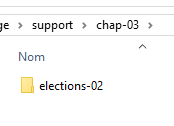 |  |
The [support / chap-03] folder contains the Eclipse project for this chapter.
We will now work with JDK 1.8 because some of the upcoming projects require this version. To determine which version of JDK is being used, proceed as follows:
 |
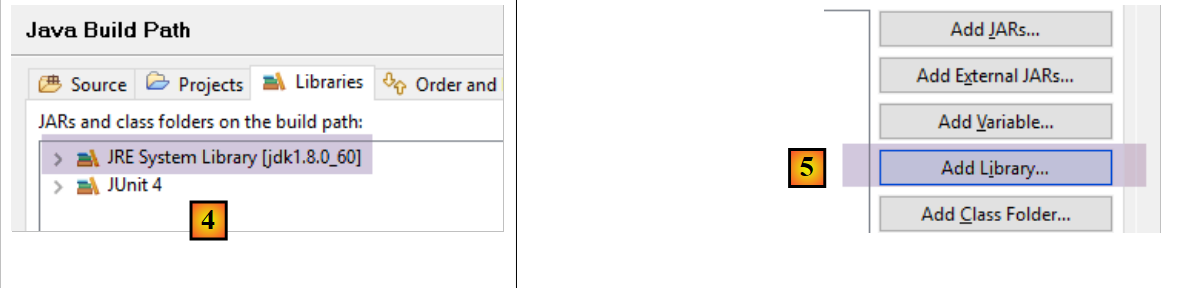 |
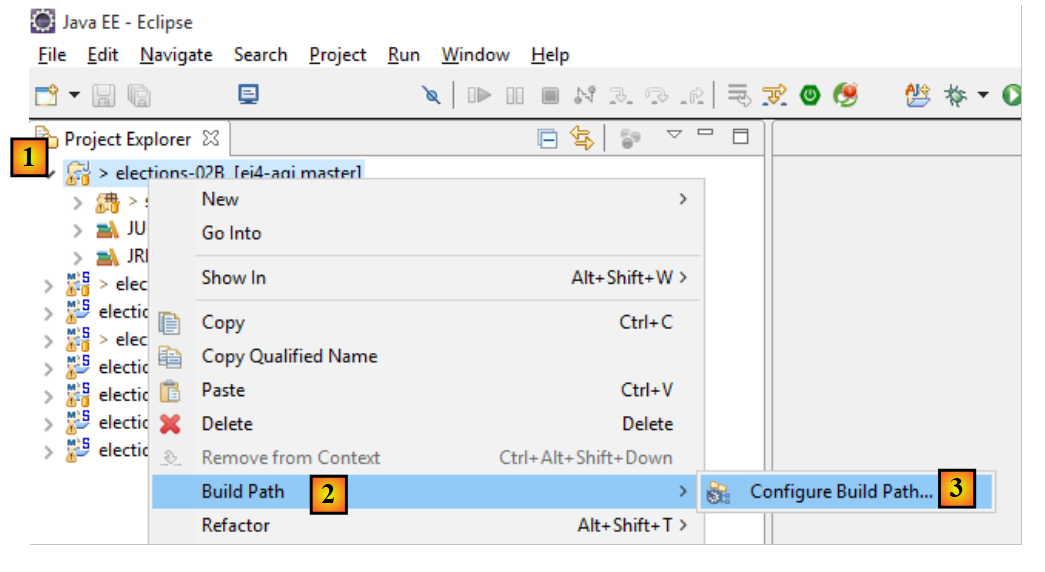
- In [4], the JRE (Java Runtime Environment) is used. This JRE is actually a JDK (Java Development Kit) here, and a [jdk1.8.0_60] here. If it is not a JDK or if you have a version version lower than 1.8, proceed as follows: [5-21];
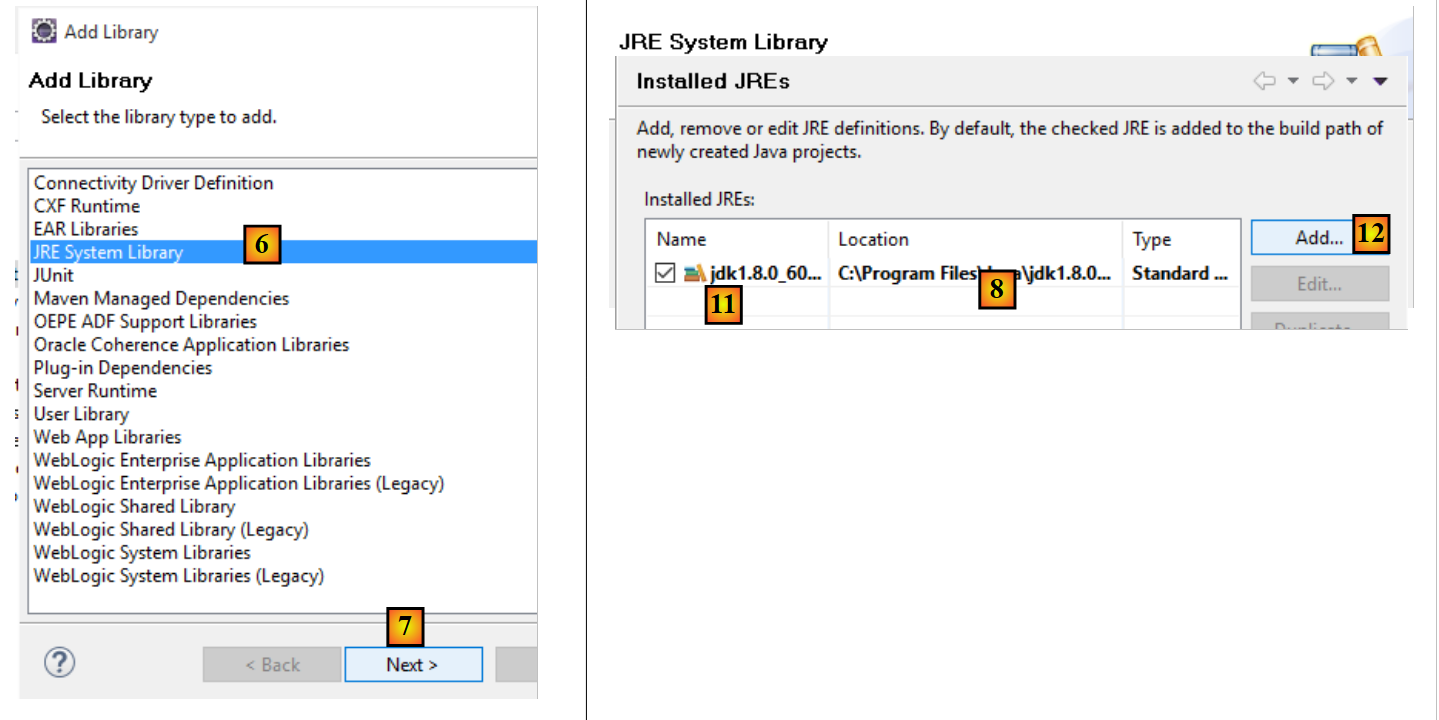 |
- to [8], the JRE currently used by default by Eclipse;
- to [11], the various JDK and JRE currently known to Eclipse;
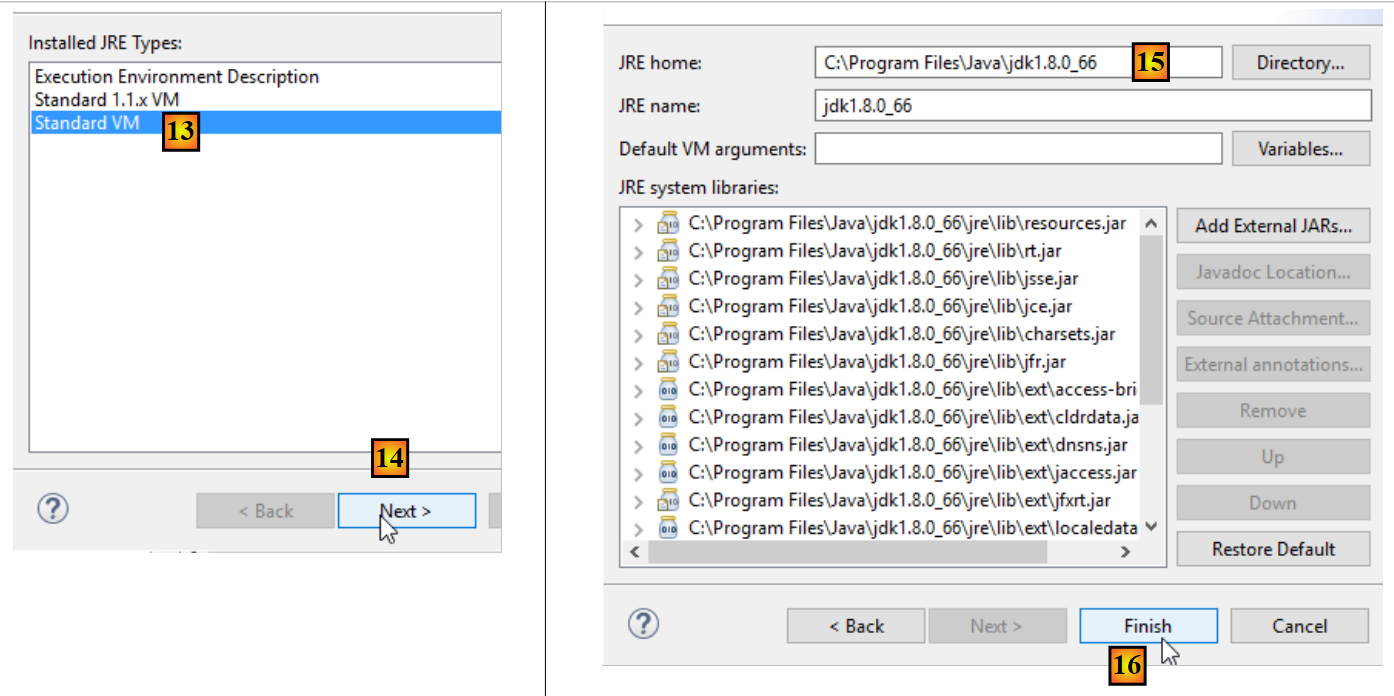 |
- to [15], choose a JDK rather than a JRE. This document uses Maven projects that require a JDK;
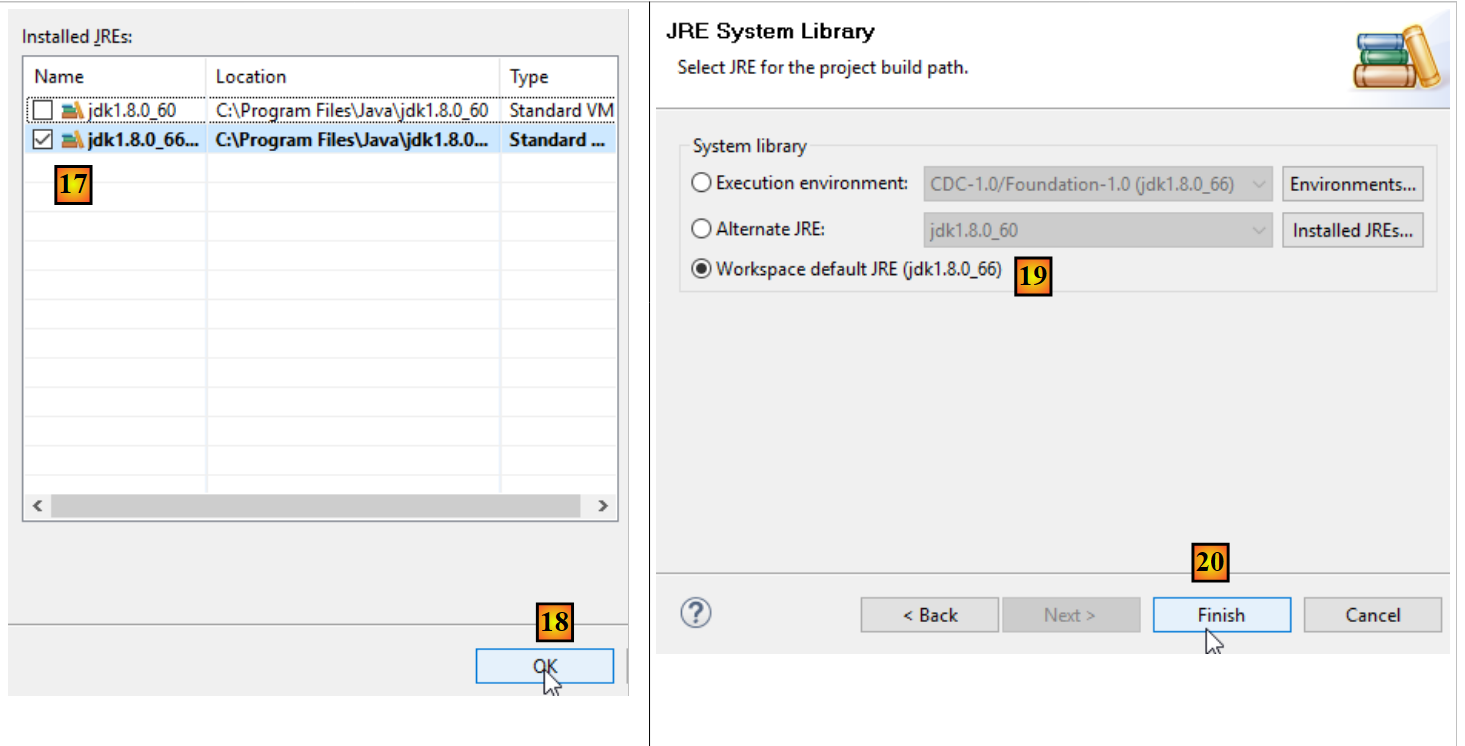 |
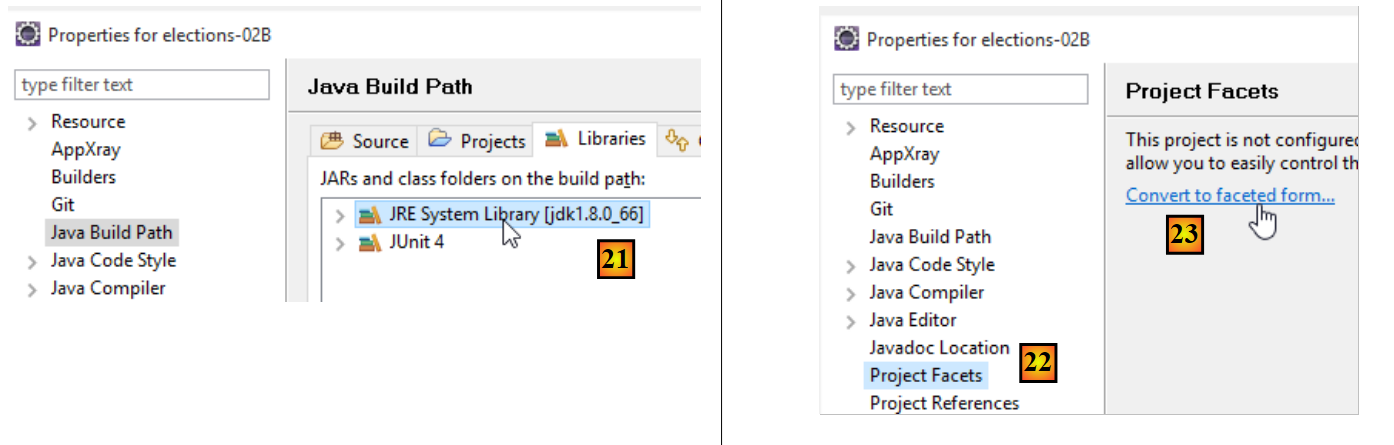 |
- in [21], we have a JDK from version >=1.8;
- In [22-23], access the facets (different views of the same Eclipse project) of the project;
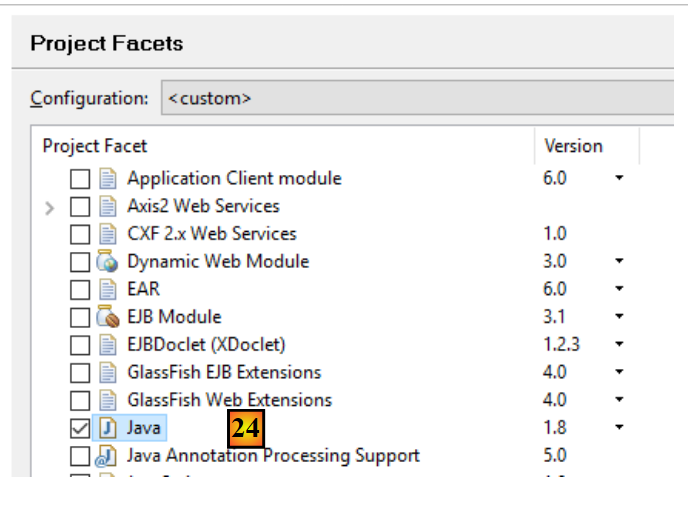 |
- In [24], verify that you are using a version Java version >=1.8;
3.2. The [ListeElectorale] class
In C, we would likely have used a structure to represent a list of election participants. It could have had the following form:
The concept of a structure does not exist in the Java language. It must be replaced by that of a class. We therefore decide to create a class to store information about a list of candidates. This class would have the following skeleton:
package istia.st.elections;

public class ListeElectorale {

    /**
     * identité de la liste
     */
    private int id;

    /**
     * nom de la liste
     */
    private String nom;
    /**
     * nombre de voix de la liste
     */
    private int voix;
    /**
     * nombre de sièges de la liste
     */
    private int sieges;
    /**
     * indique si la liste est éliminée ou non
     */
    private boolean elimine;

    /**
     * constructeur par défaut
     */
    public ListeElectorale() {
    }

    /**
     *
     * @param nom String : le nom de la liste
     * @param voix int : son nombre de voix
     * @param sieges int : son nombre de sieges
     * @param elimine boolean : son état éliminé ou non
     */
    public ListeElectorale(int id,String nom, int voix, int sieges, boolean elimine) {
...
    }

    /**
     *
     * @return int : l'list identifier
     */
    public int getId() {
...
    }

    /**
     * initialise l'list identifier
     * @param id int : identifiant de la liste
     * @throws ElectionsException si id<1
     */
    public void setId(int id) {
...
    }

    /**
     *
     * @return String : le nom de la liste
     */
    public String getNom() {
...
    }

    /**
     * initialise le nom de la liste
     * @param nom String : nom de la liste
     *  @throws ElectionsException si le nom est vide ou blanc
     */
    public void setNom(String nom) {
...
    }

    /**
     *
     * @return int : le nombre de voix de la liste
     */
    public int getVoix() {
 ...
    }

    /**
     * initialise le nombre de voix de la liste
     * @param voix int : le nombre de voix de la liste
     */
    public void setVoix(int voix) {
 ...
    }

    /**
     *
     * @return int : le nombre de sièges de la liste
     */
    public int getSieges() {
 ...
    }

    /**
     * fixe le nombre de sièges de la liste
     * @param sieges int : le nombre de sièges de la liste
     */
    public void setSieges(int sieges) {
...
    }

    /**
     *
     * @return boolean : valeur du champ elimine
     */
    public boolean isElimine() {
  ...
    }

    /**
     *
     * @param sieges int
     */
    public void setElimine(boolean elimine) {
 ...
    }

    /**
     *
     * @return String : identité de la liste électorale
     */
    public String toString() {
   ...
    }
}
- line 8: a unique identifier for a list. Not essential here but intended for future use.
- line 13: the name of the list.
- line 17: the number of votes for the list
- line 21: the number of seats for the list
- line 25: a Boolean indicating whether the list is eliminated (percentage of votes obtained below the electoral threshold) or not.
Each private field named [xyz] can be initialized by a method named [setXyz]. The method [getXyz] allows you to retrieve the value of the private field [xyz]. In the specific case where [xyz] is a Boolean field, the method [getXyz] can be replaced by the method [isXyz]. The specific naming of these methods follows a coding standard called the JavaBean standard. Thus, we define the following public methods:
- getId (line 48), setId (line 57)
- getNom (line 65), setNom (line 74)
- getVoix (line 82), setVoix (line 90)
- getSieges (line 98), setSieges (line 106)
- isElimine (line 114), setElimine (line 122)
- lines 30-31: define a parameterless constructor. This allows you to create a [ListeElectorale] object without initializing it. It can then be initialized using the set methods.
- lines 40-42: define a constructor that creates a [ListeElectorale] object while initializing its five private fields.
- Lines 130–132: define the [toString] method, which returns a string containing the values of the object’s five fields.
A test program for the ListeElectorale class could look like this:
package istia.st.elections.tests;

import istia.st.elections.ListeElectorale;

public class MainTest1ListeElectorale {
    public static void main(String[] args) {
        // creation of an electoral list
        ListeElectorale listeElectorale1 = new ListeElectorale(1, "A", 32000,
                0, false);
        // display identity list
        System.out.println("listeElectorale1=" + listeElectorale1);
        // change in number of seats
        listeElectorale1.setSieges(2);
        // display identity list 1
        System.out.println("listeElectorale1=" + listeElectorale1);
        // a new electoral roll
        ListeElectorale listeElectorale2 = listeElectorale1;
        // display identity list 2
        System.out.println("listeElectorale2=" + listeElectorale2);
        // change in number of seats
        listeElectorale2.setSieges(3);
        // display identity of the 2 lists
        System.out.println("listeElectorale2=" + listeElectorale2);
        System.out.println("listeElectorale1=" + listeElectorale1);
    }
}
The Eclipse environment for this test could be as follows:
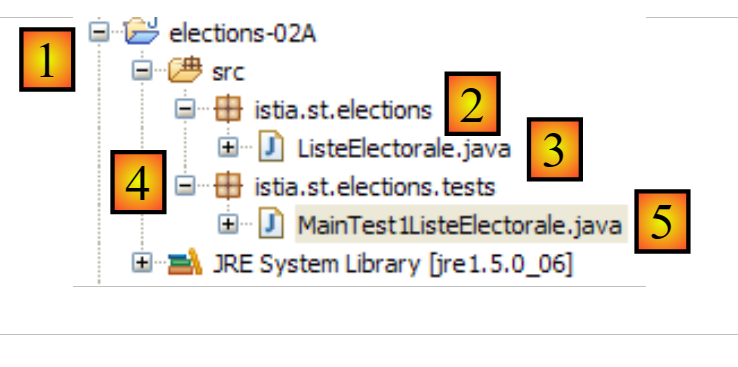 |
- [1]: the project is named [elections-02A]
- [2]: the application will be placed in a package, here [istia.st.elections]
- [3]: [ListeElectorale.java] is the source code for the [ListeElectorale] class
- [4]: The test classes will be placed in a package, in this case [istia.st.elections.tests]
- [5]: the test class [MainTest1ListeElectorale]
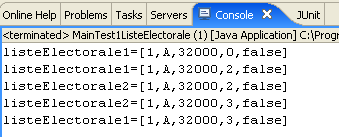
The screen output obtained after running the above program is as follows:
Task: Using the information above, complete the code for the ListeElectorale class.
3.3. Creating an exception class [ElectionsException]
Among the various exception classes in the Java language, there is one called [RuntimeException]. This class derives from the [Exception] class, the root of all exception classes. The distinctive feature of instances of [RuntimeException] or derived instances is that they do not need to be declared or handled. These are called uncaught exceptions.
Let’s look at a first example. The [BufferedReader] class is a class whose instances allow you to read lines of text from a data stream. It has a method named [readLine] with the following signature:
We can see that the method can throw an exception of type [IOException]. The class hierarchy for this class is as follows:
The [IOException] class derives from the [Exception] class (line 3). The compiler requires us to handle and declare exceptions of type [java.lang.Exception] or derived types (except for the [RuntimeException] branch, which we will discuss later). Thus, to read a line of text typed on the keyboard, we must write something like:
Let's take another example. To convert a string to an integer, we can use the static method [Integer.parseInt], which has the following signature:
The argument [s] is the string to be converted to an integer. We see that the method can throw an exception of type [NumberFormatException]. The class hierarchy is as follows:
The class [NumberFormatException] derives from the class [RuntimeException] (line 4). The compiler does not require us to handle or declare exceptions of type [java.lang.RuntimeException] or derived types. Thus, we can write something like:
We do not need to include a [try - catch] clause to handle any exception generated by [Integer.parseInt] (line 9).
There are pros and cons to creating and using exception classes derived from [RuntimeException]:
- On the plus side: the code is more concise
- on the downside: we may end up resorting to C-style methods where each function returns an error code that few people use, precisely to keep the code lighter. When such an unhandled error occurs, the program crashes, usually in a rather inelegant way.
We decide to create a special class that groups all exceptions that may occur in our ELECTIONS application. It will be called [ElectionsException] and will be derived from the [RuntimeException] class. Its code is as follows:
package istia.st.elections;

public class ElectionsException extends RuntimeException {
    private static final long serialVersionUID = 1L;

    public ElectionsException() {
        super();
    }

    public ElectionsException(String message) {
        super(message);
    }

    public ElectionsException(Throwable cause) {
        super(cause);
    }

    public ElectionsException(String message, Throwable cause) {
        super(message, cause);
    }
}
- line 1: we place the class in the [istia.st.elections] package;
- line 3: the class derives from [RuntimeException]. It is therefore unchecked;
- line 4: a serialization identifier that we can ignore for now;
- In our application, we will use two types of constructors:
- the classic one in lines 15–17, as shown below:
In this case, the method that calls a method throwing such an exception can handle it as follows:
        // test exception
        try {
            listeElectorale2.setSieges(-3);
        } catch (ElectionsException ex) {
            System.err.println("L'exception suivante s'est produite : ["
                    + ex.toString() + "]");
        }
- (continued)
- or the one in lines 14–20, designed to propagate an exception that has already occurred by wrapping it in an exception of type [ElectionsException]:
    try {
        ...;
        } catch (SQLException ex) {
            // encapsulate the exception
            throw new ElectionsException("erreur de fermeture de la connexion à la BD",ex);
        }
This second method has the advantage of preserving the information contained in the first exception. In this case, the method that calls a method throwing such an exception can handle it as follows:
        try {
            ...;
        } catch (ElectionsException ex) {
            System.out.println(ex.getMessage() + ", Cause : "+ ex.getCause().getMessage());
            System.exit(1);
        }
Task: Modify the code of the ListeElectorale class so that the set methods throw a [ElectionsException] exception if the requested initialization is incorrect, such as initializing the name with an empty string.
The Eclipse test project for this new version could be as follows:
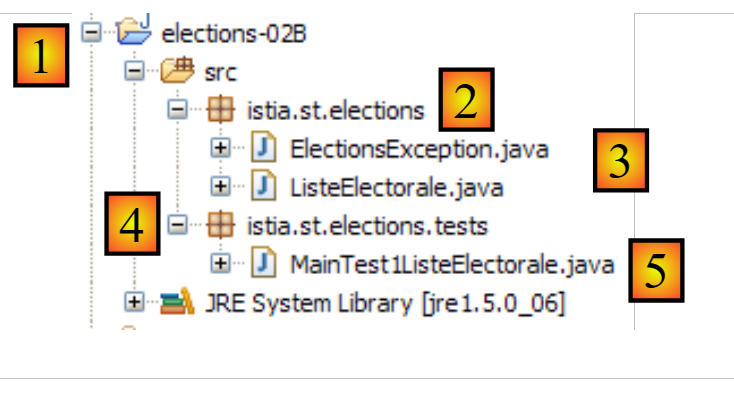 |
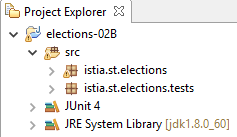
- [1]: the project is named [elections-02B]
- [2]: the application is placed in a package, here [istia.st.elections]
- [3]: the classes [ListeElectorale] and [ElectionsException]
- [4]: the test classes are placed in a package, here [istia.st.elections.tests]
- [5]: the test class [MainTest1ListeElectorale]
The test class [MainTest1ListeElectorale], which we have already examined, is slightly modified to test exception cases:
package istia.st.elections.tests;

import istia.st.elections.ElectionsException;
import istia.st.elections.ListeElectorale;

public class MainTest1ListeElectorale {
    public static void main(String[] args) {
        // creation of an electoral list
        ListeElectorale listeElectorale1 = new ListeElectorale(1, "A", 32000,
                0, false);
        // display identity list
        System.out.println("listeElectorale1=" + listeElectorale1);
        // change in number of seats
        listeElectorale1.setSieges(2);
        // display identity list 1
        System.out.println("listeElectorale1=" + listeElectorale1);
        // a new electoral roll
        ListeElectorale listeElectorale2 = listeElectorale1;
        // display identity list 2
        System.out.println("listeElectorale2=" + listeElectorale2);
        // change in number of seats
        listeElectorale2.setSieges(3);
        // display identity of the 2 lists
        System.out.println("listeElectorale2=" + listeElectorale2);
        System.out.println("listeElectorale1=" + listeElectorale1);
        // test exception
        try {
            listeElectorale2.setSieges(-3);
        } catch (ElectionsException ex) {
            System.err.println("L'exception suivante s'est produite : ["
                    + ex.toString() + "]");
        }

    }
}
- line 28: we try to initialize the number of seats with an invalid value
- line 30: if an exception occurs, it is displayed
Running the test yields the following results:

Note that the [ListeElectorale] class did indeed throw an exception when we attempted to initialize the number of seats with an invalid value (line 28 of the code).
3.4. A unit test class
The previous type of test relies on visual verification. We check that the expected output appears on the screen. This method is not recommended in a professional setting. Tests should always be automated as much as possible and aim to require no human intervention. Humans are indeed prone to fatigue, and their ability to verify tests diminishes over the course of the day.
An application evolves over time. With each update, we must verify that the application does not "regress," c.a.d, and that it continues to pass the functional tests that were performed during its initial development. These tests are called "non-regression" tests. A moderately large application may require hundreds of tests. In fact, we test every method in every class of the application. These are called unit tests. They can tie up a lot of developers if they haven’t been automated.
Tools have been developed to automate testing. One of them is called [JUnit]. It is a library of classes designed to manage tests. We will use this tool to test the [ListeElectorale] class.
A JUnit test program (versions 4.x) has the following form:
package istia.st.elections.tests;

import org.junit.Assert;

import org.junit.After;
import org.junit.Before;
import org.junit.Test;

public class JUnitEssai {

    @Before
    public void avant() throws Exception {
        System.out.println("tearUp");
    }

    @After
    public void après() throws Exception {
        System.out.println("tearDown");
    }

    @Test
    public void t1() {
        System.out.println("test1");
        Assert.assertEquals(1, 1);
    }

    @Test
    public void t2() {
        System.out.println("test2");
        Assert.assertEquals(1, 2);
    }

}
- line 1: the class has been placed in the [istia.st.elections.tests] package;
- line 11: the method annotated with the [@Before] annotation is executed before each unit test;
- line 16: the method annotated with the [@After] annotation is executed after each unit test;
- line 21: a method annotated with the annotation [@Test] is a method tested by the unit test. Methods annotated with [@Test] will be executed one after another, unless otherwise specified by the tester, who may select the methods to be tested themselves. Before each execution of a [@Test] method, the [@Before] method is executed. After each execution of a [@Test] method, the [@After] method is executed;
- lines 22–25: define a test method [t1];
- line 18: one of the [Assert.assert*] methods used to verify assertions. The following [assert] methods are available:
- assertEquals(expression1, expression2): checks that the values of the two expressions are equal. Many expression types are accepted (int, String, float, double, boolean, char, short). If the two expressions are not equal, then a [AssertionFailedError ] exception is thrown,
- assertEquals(real1, real2, delta): checks that two real numbers are equal to within delta, c.a.d abs(real1-real2)<=delta. For example, one could write assertEquals(real1, real2, 1E-6) to verify that two values are equal to within 10⁻⁶,
- assertEquals(message, expression1, expression2) and assertEquals(message, real1, real2, delta) are variants that allow you to specify the error message to be associated with the [AssertionFailedError] exception thrown when the [assertEquals] method fails,
- assertNotNull(Object) and assertNotNull(message, Object): checks that Object is not equal to null,
- assertNull(Object) and assertNull(message, Object): checks that Object is equal to null,
- assertSame(Object1, Object2) and assertSame(message, Object1, Object2): checks that the references Object1 and Object2 point to the same object,
- assertNotSame(Object1, Object2) and assertNotSame(message, Object1, Object2): checks that the references Object1 and Object2 do not point to the same object;
- line 24: this assertion must pass;
- line 30: this assertion must fail;
In the Eclipse environment, a test class named JUnit can be created as follows:
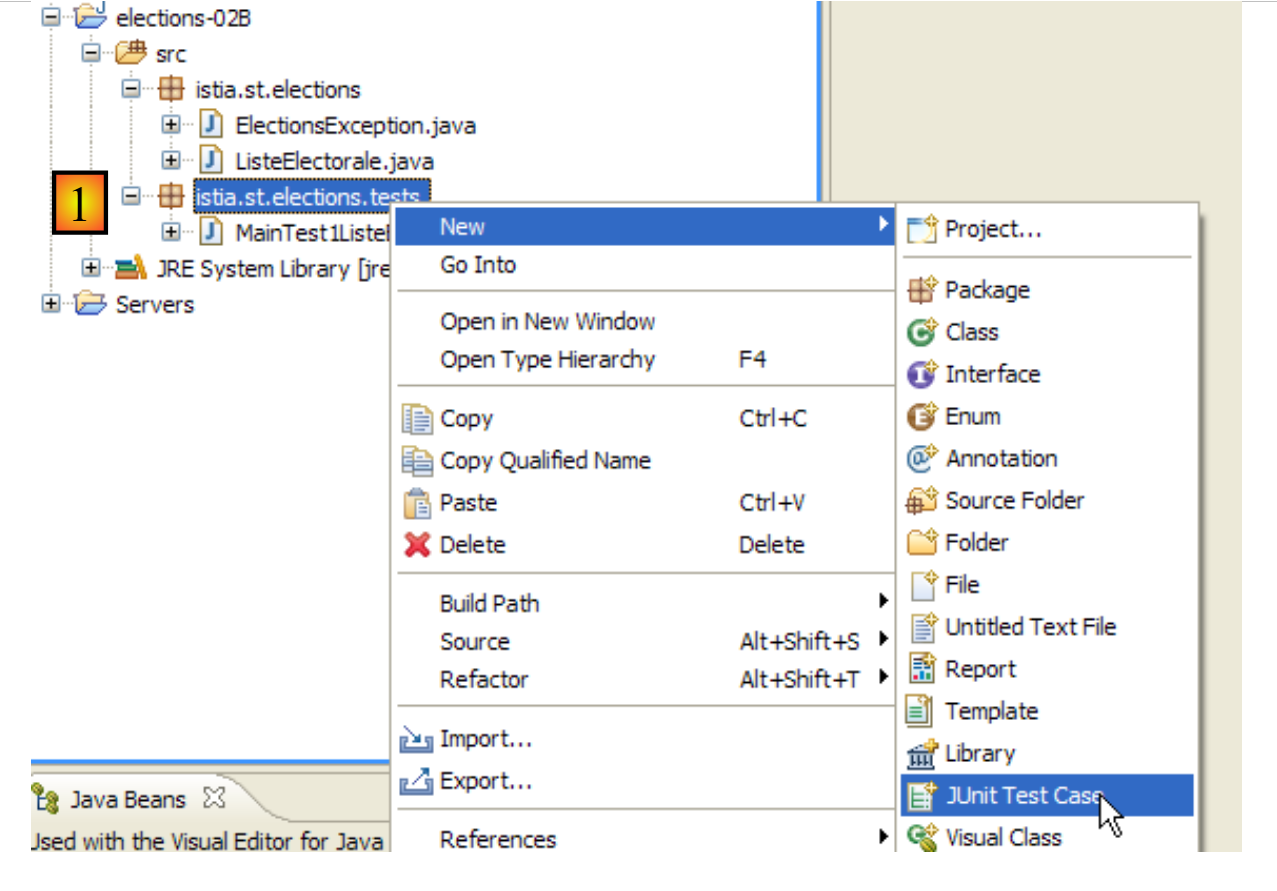 |
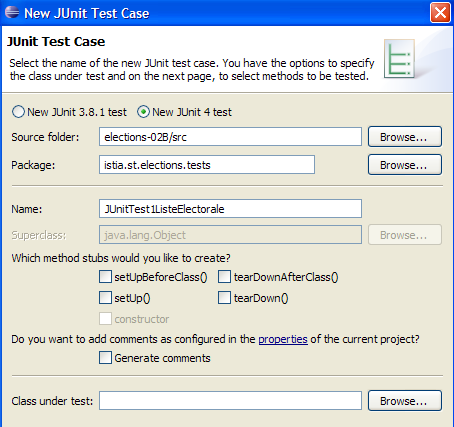
- [1]: Right-click on the package to which you want to add the test class, then option [JUnit / New / JUnit Test Case]
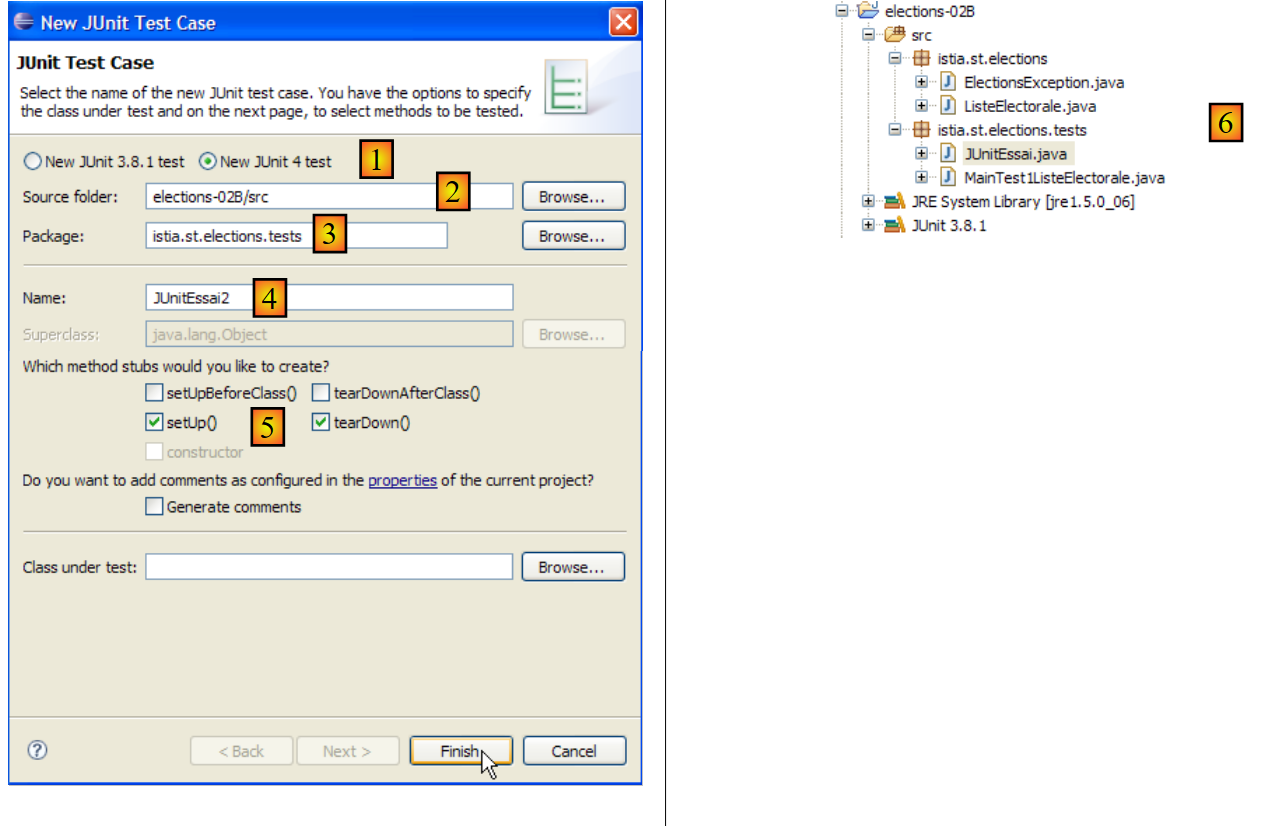 |
- [1]: Select a version JUnit;
- [2]: Select the folder in which the test class is to be created;
- [3]: Select the package in which the test class should be created;
- [4]: name of the test class;
- [5]: selection of methods to include in the class to be generated;
- [6]: The class JUnitEssai has been generated
The previous wizard generates a nearly empty class:
package istia.st.elections.tests;

import org.junit.Assert;
import org.junit.After;
import org.junit.Before;

public class JUnitEssai {

    @Before
    public void setUp() throws Exception {
    }

    @After
    public void tearDown() throws Exception {
    }
}
Let's complete and modify the previous code as follows:
package istia.st.elections.tests;

import org.junit.Assert;

import org.junit.After;
import org.junit.Before;
import org.junit.Test;

public class JUnitEssai2 {

    @Before
    public void avant() throws Exception {
        System.out.println("tearUp");
    }

    @After
    public void après() throws Exception {
        System.out.println("tearDown");
    }

    @Test
    public void t1() {
        System.out.println("test1");
        Assert.assertEquals(1, 1);
    }

    @Test
    public void t2() {
        System.out.println("test2");
        Assert.assertEquals(1, 2);
    }

}
In Eclipse, right-click on the test class, then select option [Run as / JUnit test] to run it:
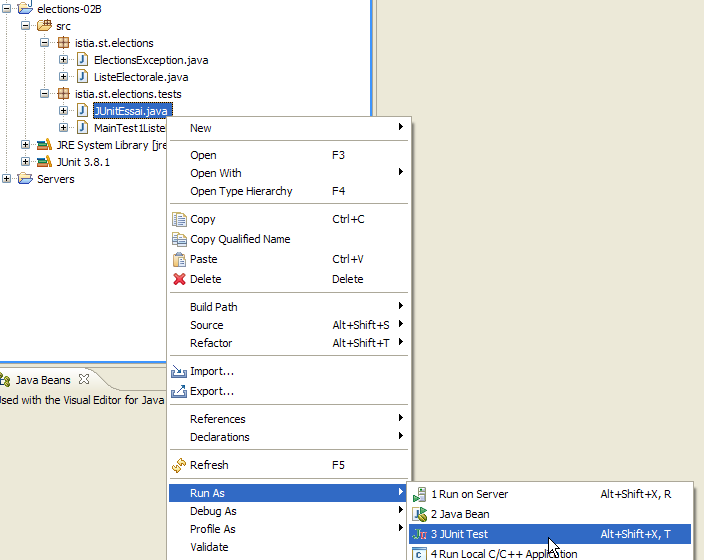
The results obtained when running this test are as follows:
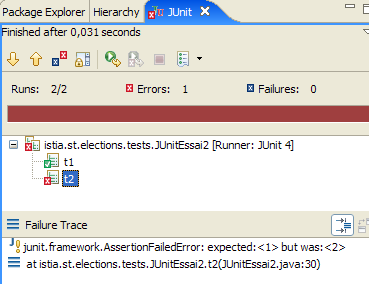
Above, the [test2] method failed. Whenever a test fails, an error message is associated with it. For [test2], this is the one shown above. The message indicates the line number where the error occurred (line 30). On line 30, the call that failed was:
Assert.assertEquals(1, 2);
The first parameter is called the expected value, the second the actual value. The error message for [test2] above indicates that the expected value was 2 but the actual value was 3.
Finally, the messages written to the console by the various test methods were as follows:
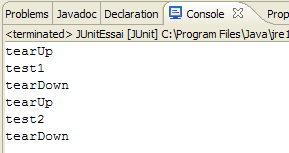
These messages show that the methods [@Before] and [@After] were indeed called, respectively, before and after each test method.
Test classes are not necessarily written by the developers themselves. They may be written by the people who wrote the application specifications. Certain development methods known as TDD (Test-Driven Development) advocate writing test classes even before writing the classes to be tested. This sometimes helps clarify specifications that might otherwise be interpreted in multiple ways.
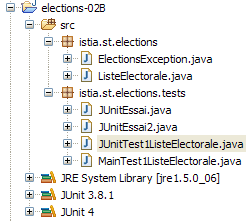
Let’s create a TDD test, called JUnit 4, for the [ListeElectorale] class. In Eclipse, we’ll proceed as described earlier:
 |  |
We complete the code generated by the wizard as follows:
package istia.st.elections.tests;

import org.junit.Assert;
import istia.st.elections.ElectionsException;
import istia.st.elections.ListeElectorale;

import org.junit.Test;

public class JUnitTest1ListeElectorale {

    @Test
    public void t1() {
        // electoral list creation
        ListeElectorale liste = new ListeElectorale(1, "a", 32000, 0, false);
        // checks
        Assert.assertEquals("a", liste.getNom());
        Assert.assertEquals(32000, liste.getVoix());
        Assert.assertEquals(false, liste.isElimine());
        Assert.assertEquals(0, liste.getSieges());
        // validity check id
        boolean erreur = false;
        try {
            liste.setId(-4);
        } catch (ElectionsException e) {
            erreur = true;
        }
        Assert.assertEquals(true, erreur);
        // name validity check
        erreur = false;
        try {
            liste.setNom("");
        } catch (ElectionsException e) {
            erreur = true;
        }
        Assert.assertEquals(true, erreur);
        // voice validity check
        erreur = false;
        try {
            liste.setVoix(-4);
        } catch (ElectionsException e) {
            erreur = true;
        }
        Assert.assertEquals(true, erreur);
        // seat validity check
        erreur = false;
        try {
            liste.setSieges(-4);
        } catch (ElectionsException e) {
            erreur = true;
        }
        Assert.assertEquals(true, erreur);
    }

}
Running the test yields the following result:
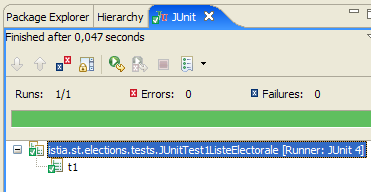
The tests passed. We will now consider the [ListeElectorale] class to be operational.
3.5. MainElections: version 2
Recommended reading:
- sections 2.1, 2.2, 2.4, and 2.7 of Chapter 2 of [1]: Classes and Interfaces
- sections 3.3 (class String), 3.5 (class ArrayList), 3.6 (class Arrays)
We want to rewrite the application [Elections] by adding the following new constraints:
- We will use the [ListeElectorale] class to represent a candidate list
- The application will prompt the user for the following information:
- the number of seats to be filled
- the names and votes of the lists. We do not know in advance how many lists there are. The last list will be indicated by a name equal to the string "*".
- Since the number of lists is not known in advance, they will first be stored in an object of type [ArrayList]. Then, once all the lists have been entered, they will be transferred to a list array.
- The results will be displayed in descending order of the number of seats obtained.
To sort an array T, various static methods of the [Arrays] class are available:
- Arrays.sort(T): sorts the array T according to a natural order if it has one (ascending for numbers, dates, alphabetical for strings, etc.)
- Arrays.sort(T,comparator): for sorting arrays T that do not have a natural order. This is the case here for the array of lists, which must be sorted according to a specific field in the list: the number of seats obtained.
In the method Arrays.sort(T,comparator), the comparator parameter is an object implementing the following Comparator interface:
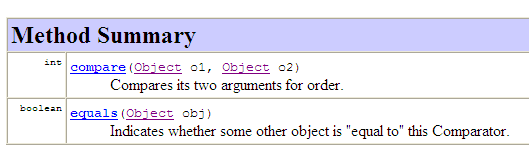
- the compare method allows two elements of the array T to be compared
- The equals method determines whether two objects are equal
Both methods compare Object types obj1 and obj2. Determining whether obj1<obj2, obj1=obj2, or obj1>obj2 depends on the ordering relationship we want to establish between the two objects. It is up to the developer implementing this interface to specify how we know that:
- obj1 is smaller than obj2
- obj1 is greater than obj2
- obj1 is equal to obj2
The Object class, from which all Java classes are derived, already has a method [equals]. To sort an array T of objects of type O, the method [equals] of the O class is not useful. We can therefore leave the default implementation provided by the Object class. Only the method [compare] needs to be implemented. This method is called repeatedly by the method [Arrays.sort]. Each time, the latter passes obj1 and obj2—two elements of the array T to be sorted—as parameters to the compare method. In our case, these elements will be of type [ListeElectorale]. Note the polymorphism at work here. The [compare] method is defined to accept parameters of type [Object]. This means it can accept parameters of type [Object] or derived types (polymorphism). Since [Object] is the parent class of all Java classes, the actual parameters can be of type [ListeElectorale].
For sorting in ascending order, the method [compare] must return:
- -1 if obj1 is smaller than obj2
- +1 if obj1 is greater than obj2
- 0 if obj1 is equal to obj2
For sorting in descending order, the values +1 and -1 are reversed. The terms "is less than," "is greater than," and "is equal to" express an order relation. For objects of type [ListeElectorale], the relation list1 "is less than" list2 holds if list1 has fewer votes than list2.
In the same source file as the [MainElections] class, we can add a second class:
- Line 2: The class is not declared as public. In a Java source file, there can be multiple classes, but only one can have the public modifier—the one with the same name as the source file.
In the previous compare method, the parameters are of type Object, which requires lines 7 and 8 to cast the method parameters from type Object to type ListeElectorale. The signature of the compare method is dictated by the Comparator interface, which was designed to compare any objects. Since Java 1.5, there has been a generic Comparator interface: Comparator<T>, where T is any Java type. The compare method of the Comparator<T> interface compares objects of type T rather than of type Object, which avoids the previous type casts. The comparison class for objects of type ListeElectorale might look like this:
// electoral list comparison class
class CompareListesElectorales implements Comparator<ListeElectorale> {

    // comparison of two electoral lists by number of seats
    public int compare(ListeElectorale listeElectorale1,
            ListeElectorale listeElectorale2) {
...
    }
}
- line 2: the class implements the Comparator<ListeElectorale> interface
- lines 5-6: the parameters of the compare method are of type ListeElectorale. Type casting is no longer necessary.
JDK 1.5 introduced the concept of generic classes/interfaces for various classes/interfaces in JDK 1.4 that initially handled only objects of type Object. This is the case for lists, dictionaries, ...
We mentioned earlier that, because the number of lists was unknown, they could not be stored in an array. They can be stored in a ArrayList object that implements the concept of an "object list". This class stores objects of type Object. Since JDK 1.5, there have been typed object lists. Thus, we will use a ArrayList<ListeElectorale> object to store the lists before transferring them to an array. If the array is named tListes, it will be sorted using the following statement:
// list sorting
Arrays.sort(tListes, new CompareListesElectorales());
where CompareListesElectorales is the class implementing the Comparator<ListeElectorale> interface.
Task: Rewrite the [Elections] application taking these new specifications into account.
The Eclipse project could look like this:
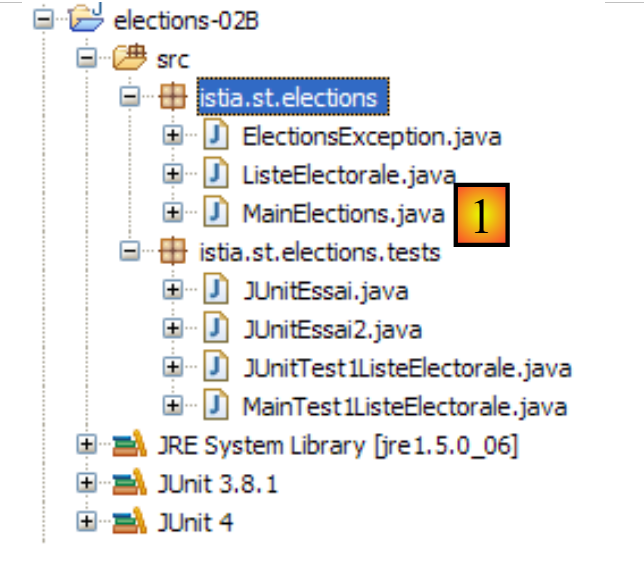 |
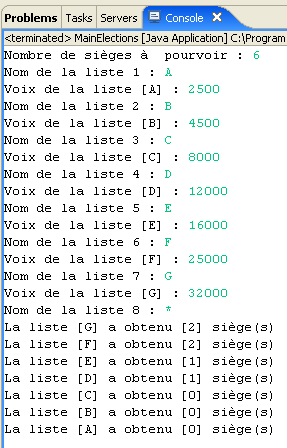
An example of running [1] is as follows: