12. Using SGBD and MySQL
We will now write PHP scripts using a MySQL database:

In the architecture above, the PHP script (1) does not communicate directly with the SGBD (Database Management System) (3). It communicates with an intermediary called the SGBD driver or the SGBD driver. PHP provides a standard interface for these drivers, the PDO (PHP Data Objects). This interface is implemented by different classes tailored to each SGBD: one class for the SGBD MySQL, another for the SGBD PostgreSQL… To switch SGBD, you switch drivers:

The PDO driver isolates the PHP script (1) from the SGBD script (3, 6). Since these drivers implement a standard interface, we can expect that the script PHP (1) will not change when switching from SGBD MySQL (3) to SGBD PostgreSQL (6). In reality, this ideal does not exist. In fact, to communicate with SGBD, the PHP script sends SQL commands (Standard Query Language). This is a language implemented by all SGBD but is incomplete. Therefore, the SGBD have added proprietary commands to it. This is a primary cause of incompatibility between SGBD. Furthermore, the data types that can be used in databases may differ from one SGBD to another. Thus, PostgreSQL supports a much wider range of data types than SGBD and MySQL. This is a second cause of incompatibility. Another cause is the handling of automatic primary keys (generated by SGBD): virtually every SGBD has its own policy. Etc… There are numerous causes of incompatibility.
If you want to avoid rewriting the PHP (1) script by switching from MySQL (3) to PostgreSQL (6), we generally need to insert a new layer between the PHP script (1) and the PDO driver (2, 5), whose role will be to resolve the incompatibilities between the two SGBD. However, in the simple cases we will encounter, this additional layer will not be necessary.
We will now use the SGBD MySQL. This is included in the Laragon package (see link section).
If the reader is new to the concepts of databases and the SQL language, they can read the [http://sergetahe.com/cours-tutoriels-de-programmation/cours-tutoriel-sql-avec-le-sgbd-firebird/] document. This document uses Firebird and not MySQL, but it covers the fundamentals of databases and the SQL language. Like MySQL, Firebird offers a freely available version with a small memory footprint.
12.1. Creating a Database
We will now demonstrate how to create a database and a user MySQL using the Laragon tool.
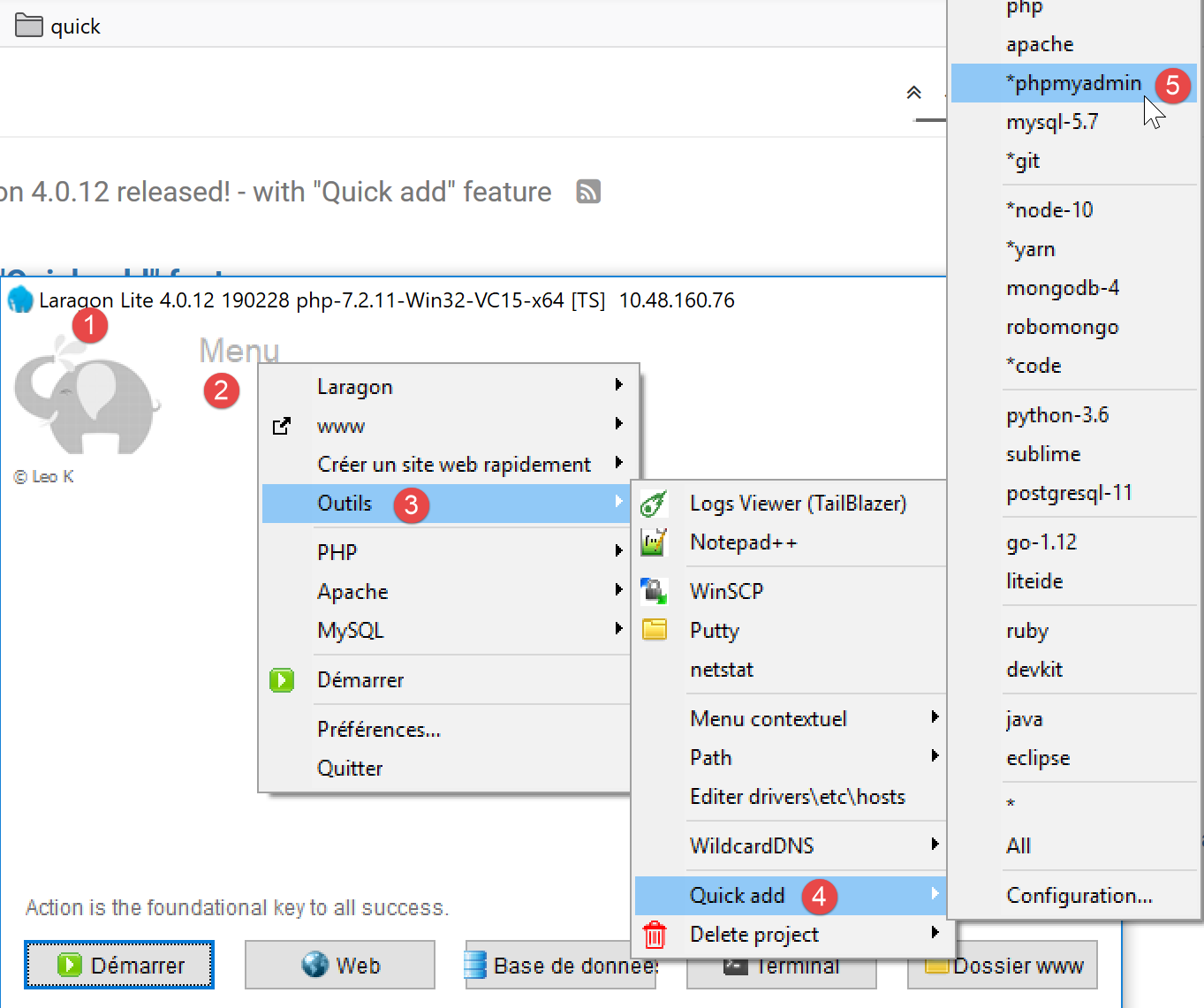
- Once launched, Laragon [1] can be managed from a [2] menu;
- In [3-5], install the [phpMyAdmin] administration tool for MySQL if it has not already been installed;

- In [6], the Apache web server is started, along with SGBD and MySQL;
- In [7], the Apache server is launched;
- In [8], SBD and MySQL are launched;
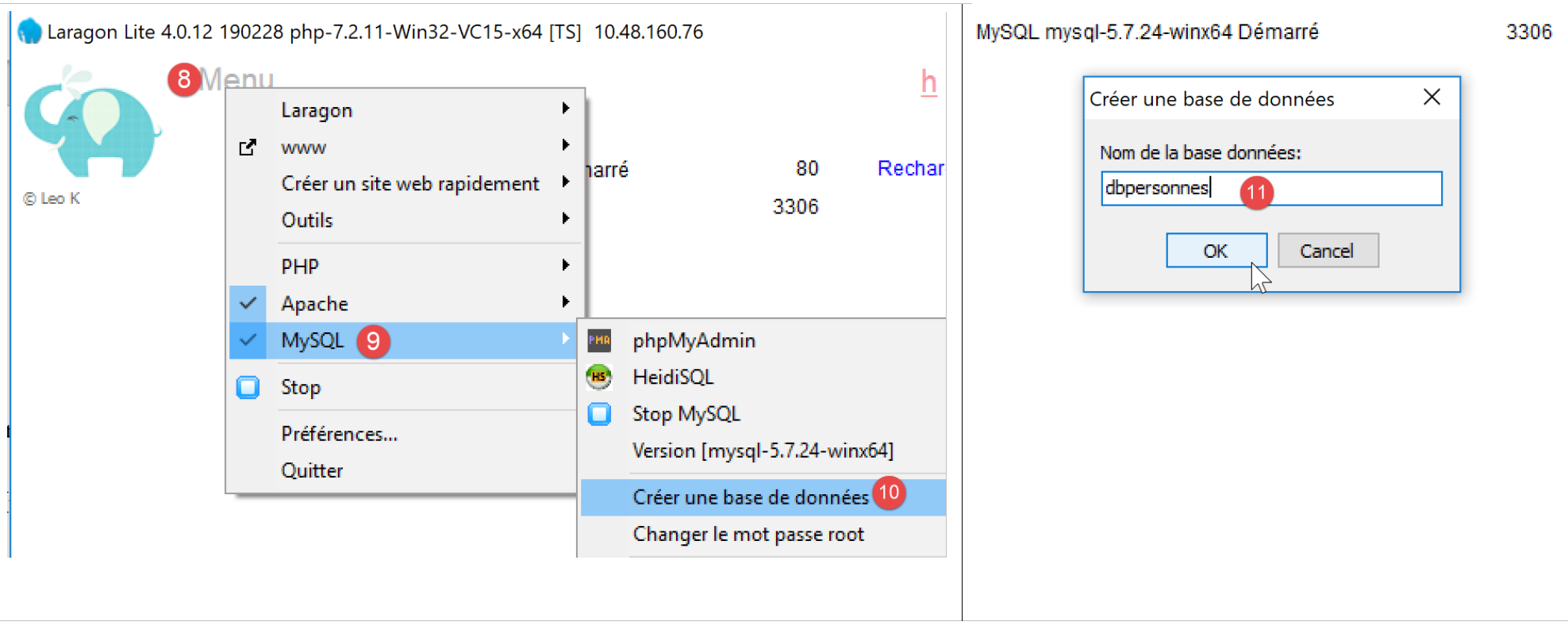
- in [8-10], we create a database named [dbpersonnes] [11]. We are going to build a database of people;

- In [11], we will manage the database we just created;
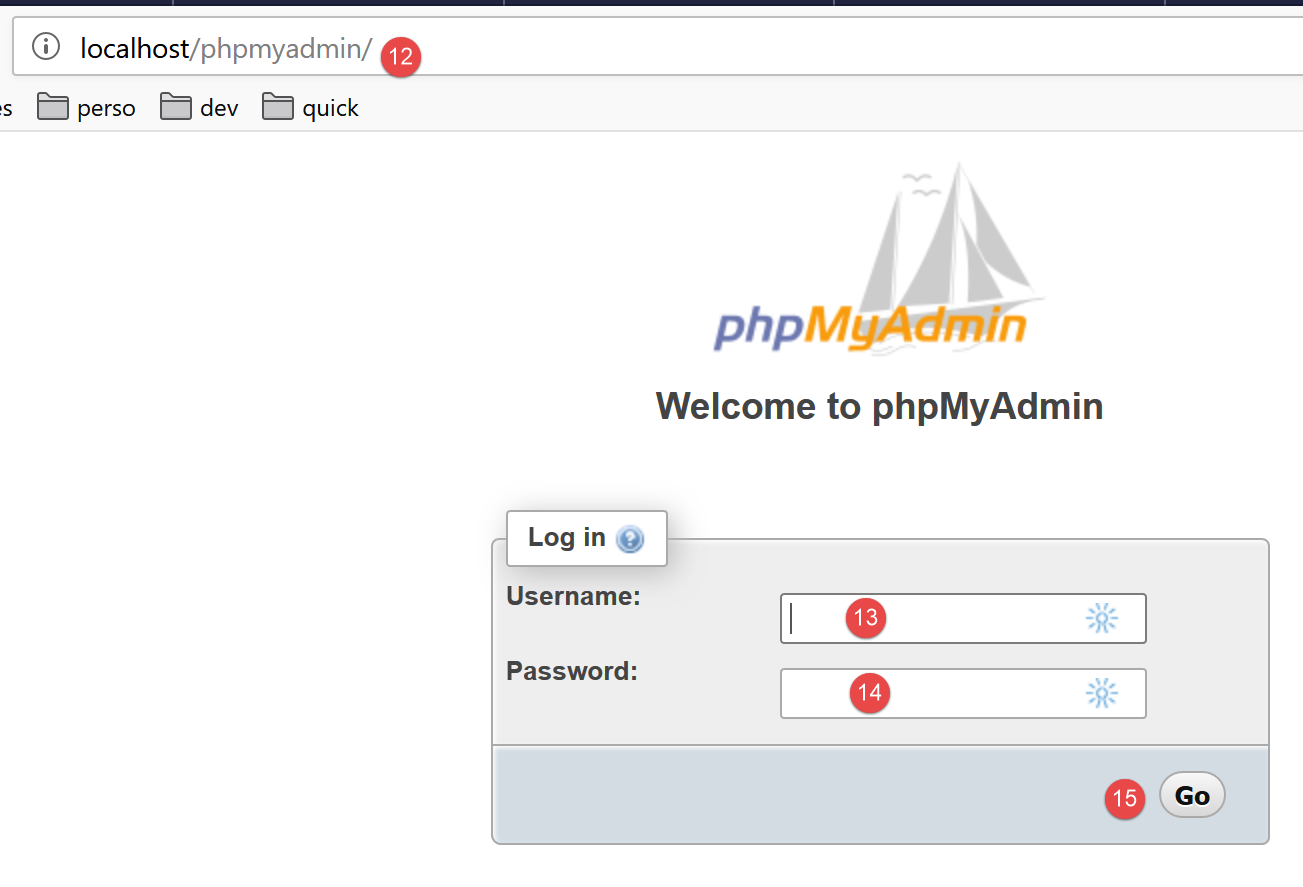
- The [Bases de données] process sends a web request to URL and [http://localhost/phpmyadmin]. Laragon’s Apache web server responds. URL and [http://localhost/phpmyadmin] are part of the URL utility that we previously installed, [phpMyAdmin]. This utility allows you to manage MySQL databases;
- by default, the database administrator’s login credentials are: root [13] with no password [14];
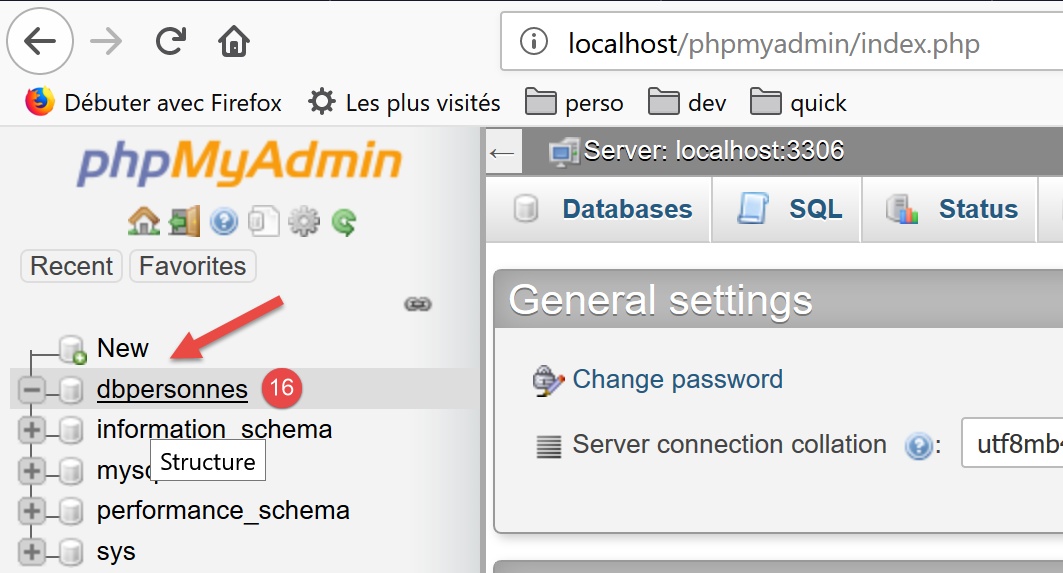
- in [16], the database we created earlier;
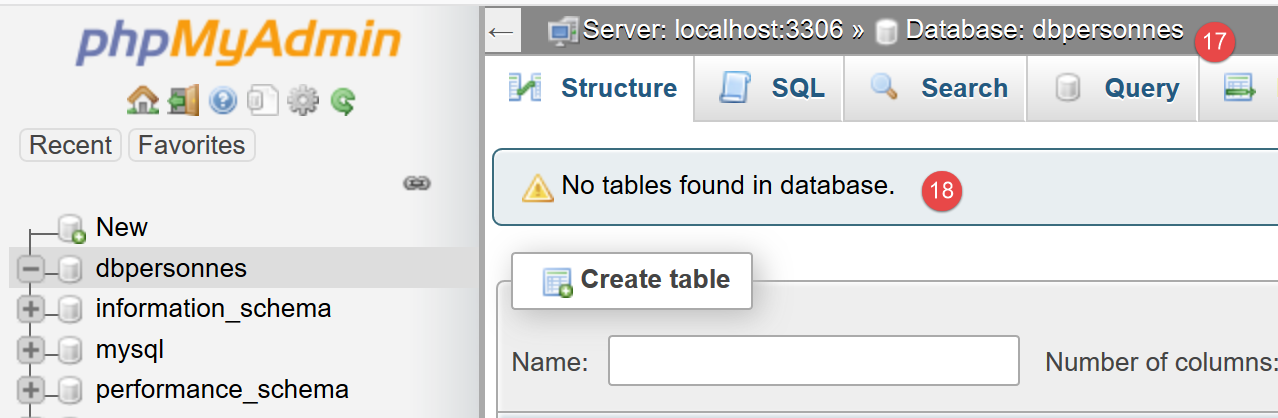
- For now, we have a database named [dbpersonnes] [17], which is empty [18];
We create a user [admpersonnes] with the password [nobody], who will have full permissions on the database [dbpersonnes]:
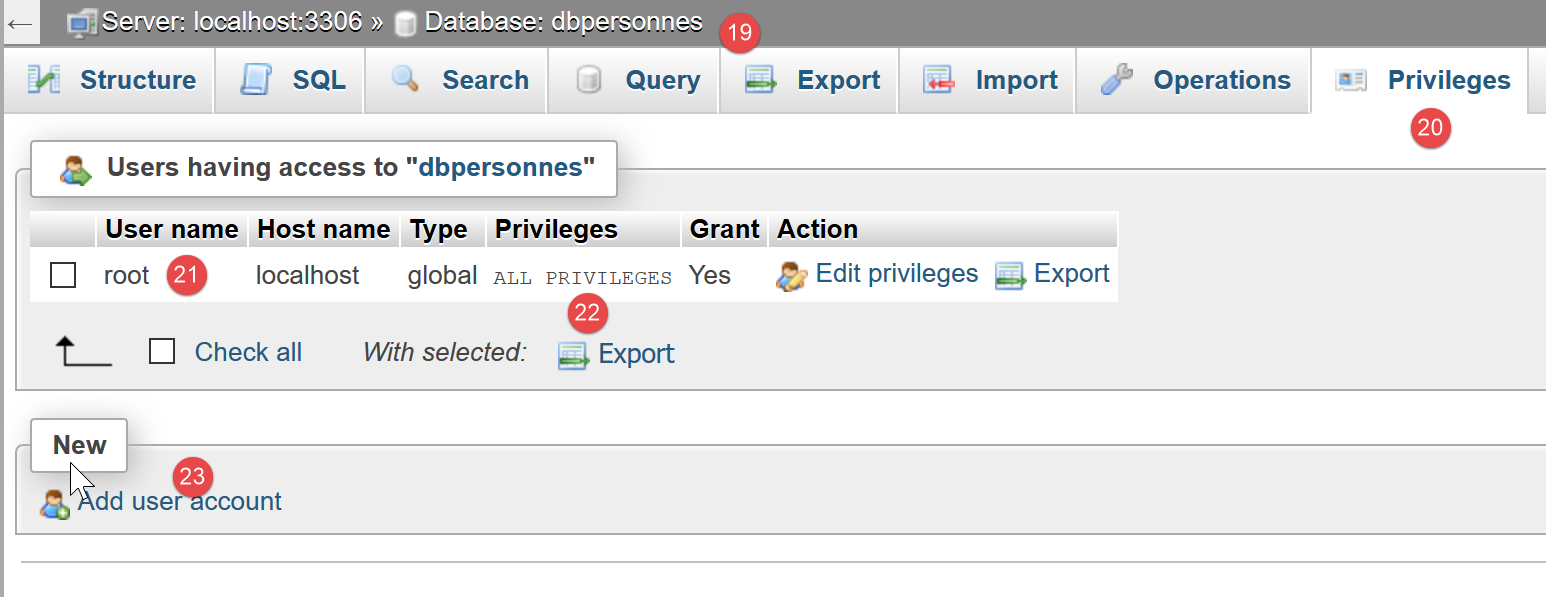
- In [19], we are positioned on the database [dbpersonnes];
- In [20], select the [Privileges] tab;
- In [21-22], we see that user [root] has full access to database [dbpersonnes];
- In [23], create a new user;
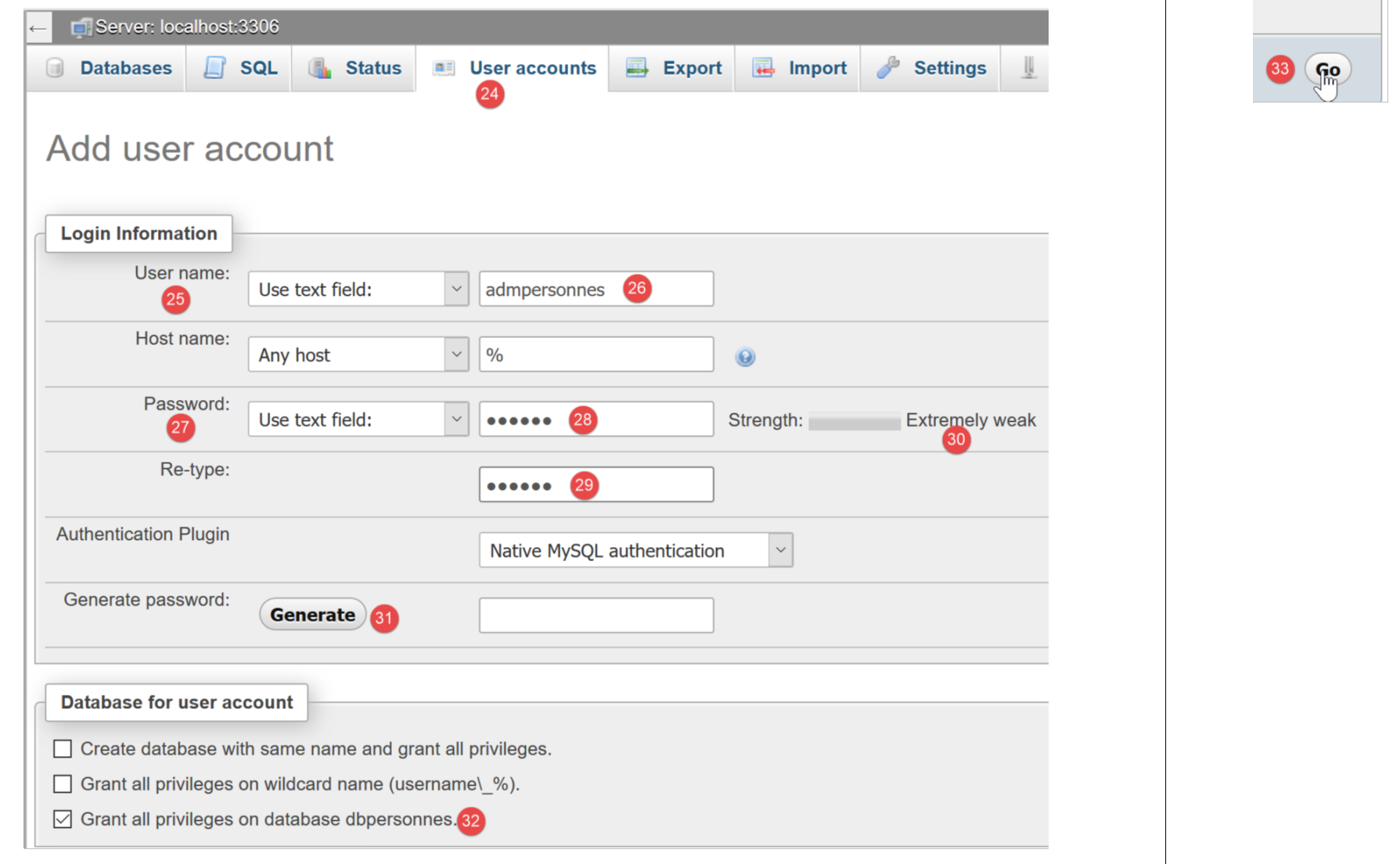
- in [25-26], the user will have the ID [admdbpersonnes];
- in [27-29], their password will be [nobody];
- In [30], phpMyAdmin indicates that the password is very weak (easy to crack). In production, it is preferable to generate a strong password using [31];
- In [32], we specify that the user [admdbpersonnes] must have full access to the database [dbpersonnes];
- In [33], the information provided is validated;

- In [35], phpMyAdmin indicates that the user has been created;
- In [36], the command SQL that was issued on the database;
- In [37], the user [admpersonnes] has full access to the database [dbpersonnes];
Now we have:
- a database named MySQL [dbpersonnes];
- a user [admpersonnes/nobody] who has full access to this database;
We will write PHP scripts to work with the database. PHP provides various libraries for managing databases. We will use the PDO library (PHP Data Objects) that sits between the PHP and SGBD code:

The PDO library allows the PHP script to abstract away from the exact nature of the SGBD being used. Thus, as shown above, the SGBD and MySQL can be replaced by the SGBD and PostgreSQL with minimal impact on the PHP script code. This library is not available by default. You can check its availability as follows:
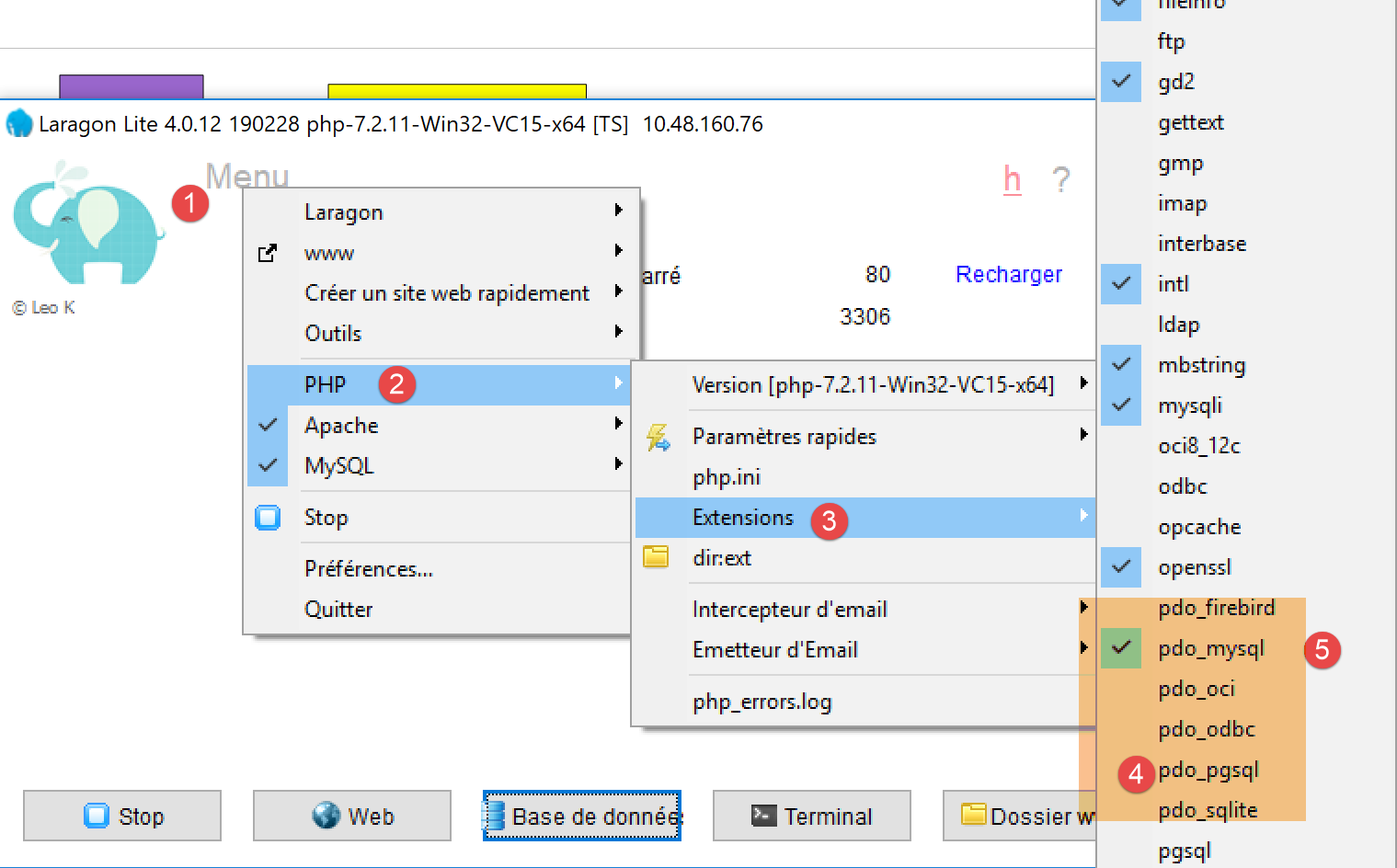
- In [1-4], we check the active PDO extensions;
- In [5], we see that the PDO extension for SGBD and MySQL is active. The others are not. Simply click on them to activate them;
Another way to activate an extension is to directly modify the [php.ini] file (link section) that configures PHP:
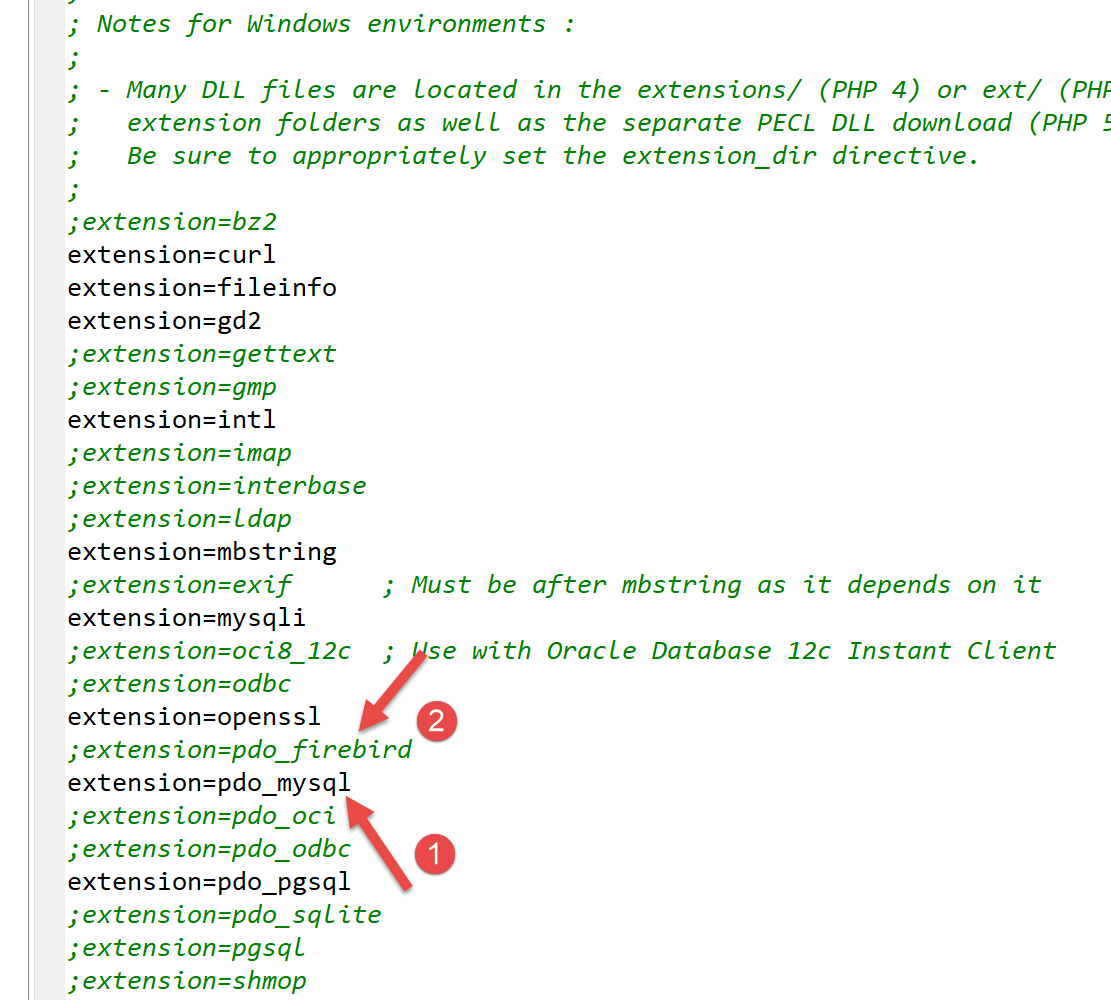
- In [1], the PDO extension of MySQL is enabled;
- in [2], the Firebird extension PDO is disabled;
After modifying the [php.ini] file, you must restart Laragon’s PHP for the changes to take effect.
12.2. Connecting to a MySQL database
Connecting to a SGBD is done by creating a PDO object. The constructor accepts various parameters:
The parameters have the following meanings:
$dsn | (Data Source Name) is a string specifying the nature of the SGBD and its location on the internet. The string "mysql:host=localhost" indicates that we are dealing with a SGBD MySQL running on the local server. This string may include other parameters, such as the SGBD listening port and the name of the database to which you want to connect: "mysql:host=localhost:port=3306:dbname=dbpersonnes"; |
$user | username of the user logging in; |
$passwd | their password; |
$driver_options | an array of options for the SGBD driver; |
Only the first parameter is required. The object constructed in this way will then serve as the basis for all operations performed on the database to which the connection was established. If the PDO object could not be constructed, a PDOException exception is thrown.
Here is an example of a [mysql-01.php] connection:
<?php

// connection to a local MySql database
// user identity is (admpersonnes,nobody)
const ID = "admpersonnes";
const PWD = "nobody";
const HOTE = "localhost";

try {
  // connection
  $dbh = new PDO("mysql:host=".HOTE, ID, PWD);
  print "Connexion réussie\n";
  // closing the connection
  $dbh = NULL;
} catch (PDOException $e) {
  print "Erreur : " . $e->getMessage() . "\n";
  exit();
}
Results:
Comments
- Line 11: The connection to a SGBD is established by creating a PDO object. The constructor is used here with the following parameters:
- a string specifying the nature of the SGBD and its location on the internet. The string "mysql:host=localhost" indicates that we are dealing with a SGBD MySQL running on the local server. The port has not been specified. Port 3306 is then used by default. The database name is not specified either. A connection will then be established to SGBD MySQL, with the selection of a specific database to be made later;
- a user ID;
- its password;
- line 14: the connection is closed by deleting the PDO object created initially;
- line 15: the connection to a SGBD may fail. In this case, a PDOException exception is thrown. This exception is derived from the PHP and [RuntimeException] exceptions;
- line 16: the exception’s error message is displayed;
Let’s rerun the script by entering an incorrect password on line 6. The result is as follows:
Erreur : SQLSTATE[HY000] [1045] Access denied for user 'admpersonnes'@'localhost' (using password: YES)
12.3. Creating a table
The script [mysql-02.php] demonstrates the creation of a table in a database:
<?php

// database identity
const DSN = "mysql:host=localhost;dbname=dbpersonnes";
// user login
const ID = "admpersonnes";
const PWD = "nobody";

try {
  // connection to the MySql database
  $connexion = new PDO(DSN, ID, PWD);
  // delete the people table if it exists
  $sql = "drop table personnes";
  $connexion->exec($sql);
  // create people table
  $sql = "create table personnes (prenom varchar(30) NOT NULL, nom varchar(30) NOT NULL, age integer NOT NULL, primary key(nom,prenom))";
  $connexion->exec($sql);
} catch (PDOException $ex) {
  // error display
  print "Erreur : " . $ex->getMessage() . "\n";
} finally {
  // disconnect if necessary
  $connexion = NULL;
}
// end
print "Terminé\n";
exit;
Comments
- line 11: connect to the database. This is always the first thing to do. The result of the connection is an object [PDO] through which database operations will be performed;
- line 13: the command SQL [drop table personnes] will delete the table [personnes] from the database [dbpersonnes]. If the table [personnes] does not exist, this does not cause an error;
- line 14: execution of the previous command SQL on the database [dbpersonnes]. This execution may trigger a [PDOException], which will be intercepted on line 18;
- line 16: this SQL command creates a [personnes] table. A table contains rows and columns. The columns form what is called the table structure. The rows form the table’s content. A database can contain one or more tables. The table [personnes] will have three columns here:
- first_name: a person’s first name as a string of up to 30 characters;
- last_name: the last name of the same person as a string of up to 30 characters;
- age: the person’s age as an integer;
- the NOT NULL attribute on a column requires that the column have a value. Failing to provide one results in a [PDOException];
- [primary key(nom,prenom)] sets a primary key for the table [personnes]. A primary key has a unique value for each row in the table. Here, the primary key will be obtained by concatenating the columns [nom] and [prenom] from the row. This constraint ensures that the table cannot contain two people with the same first and last names, i.e., two homonyms. Creating a homonym of a person in the table triggers an error: [PDOException];
- line 17: execution of the SQL command on the [dbpersonnes] database;
- line 20: if a [PDOException] occurs, the associated error message is displayed;
- Lines 21–24: We enter the [finally] statement in all cases, whether an exception occurs or not, to close the database connection (line 23);
Results:
If the script executes without errors, the table can be seen in phpMyAdmin:
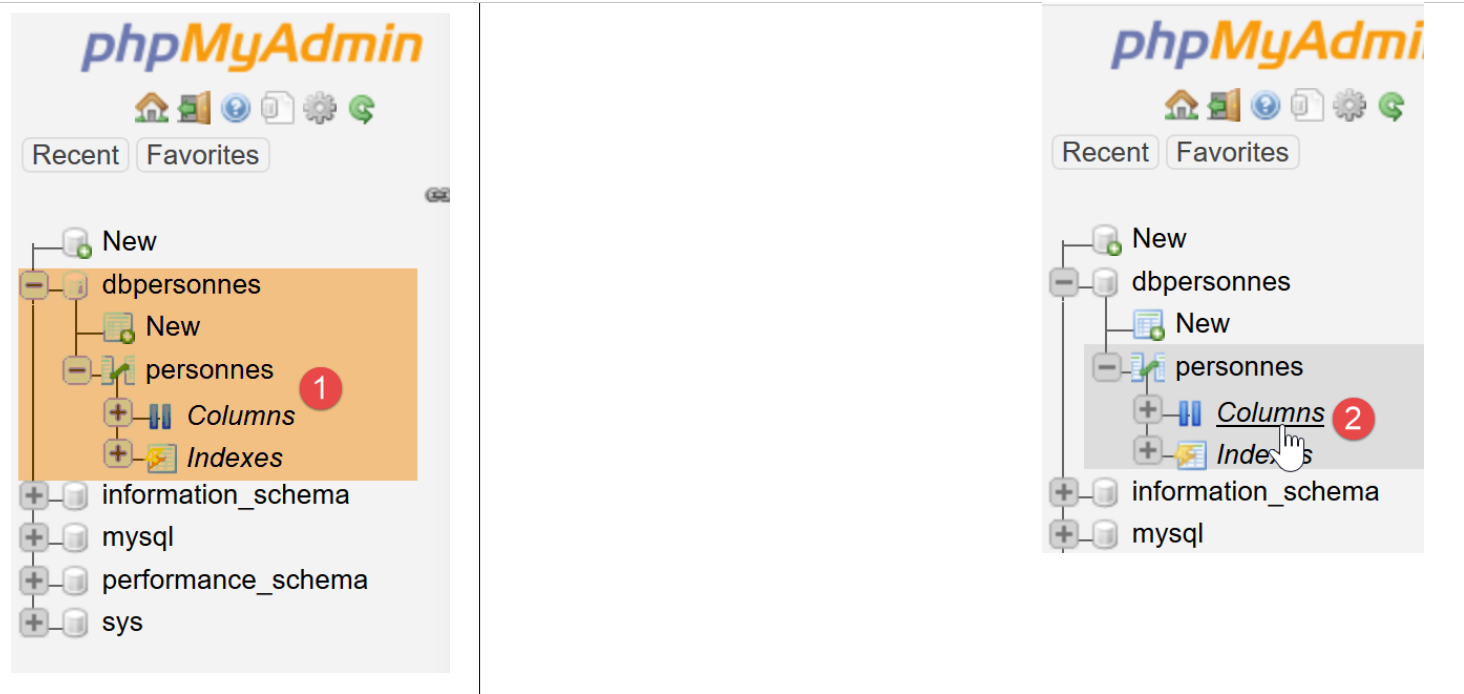
- in [3], the database;
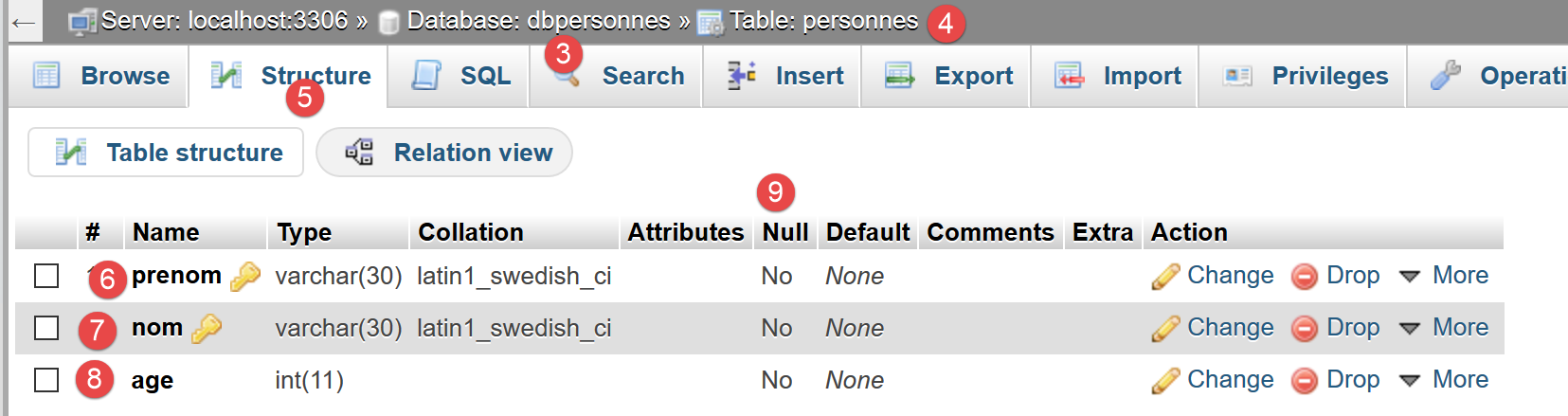
- in [4], the table is displayed;
- in [5], the table structure is displayed in the [Structure] tab;
- in [6-8], the three columns of the table;
- in [9], none of the three columns can be empty;
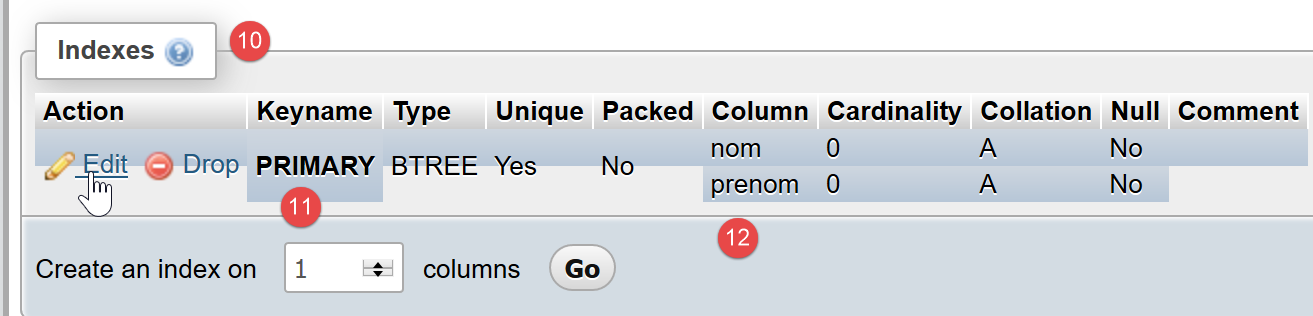
- in [10], the list of table indexes. An index allows you to find rows in the table with a specific index faster than if you were to sequentially scan the table’s rows. The primary key is always part of the indexes, but an index may not be a primary key;
- in [11], the index is the primary key;
- in [12], the index consists of the columns [nom, prenom] from each row;
Now, let’s see what happens if we create errors in the database name, the user name, and the password, respectively:
If we enter a non-existent database name:
Erreur : SQLSTATE[HY000] [1044] Access denied for user 'admpersonnes'@'%' to database 'dbpersonnes2'
If we enter a non-existent username:
Erreur : SQLSTATE[HY000] [1045] Access denied for user 'admpersonnes2'@'localhost' (using password: YES)
If an incorrect password is entered:
Erreur : SQLSTATE[HY000] [1045] Access denied for user 'admpersonnes'@'localhost' (using password: YES)
12.4. Filling a table
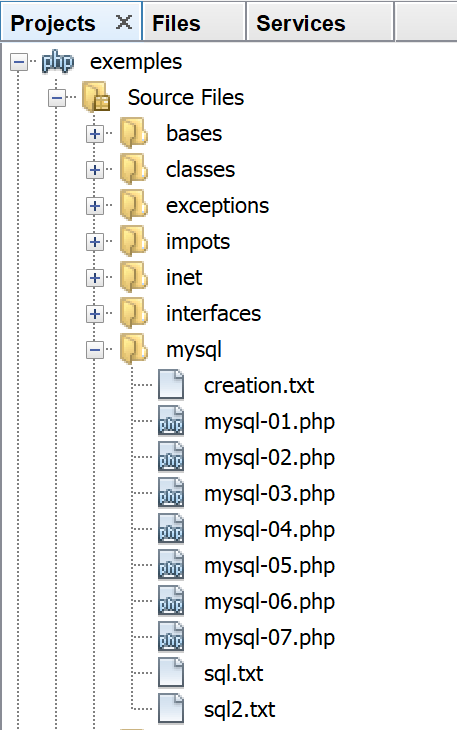
We will write a script named PHP that executes the SQL commands found in the following text file, [creation.txt]:
Comments
- The SQL language (Structured Query Language) is not case-sensitive (upper-case, lower-case) for SQL commands;
- Line 1: The table is deleted if it exists;
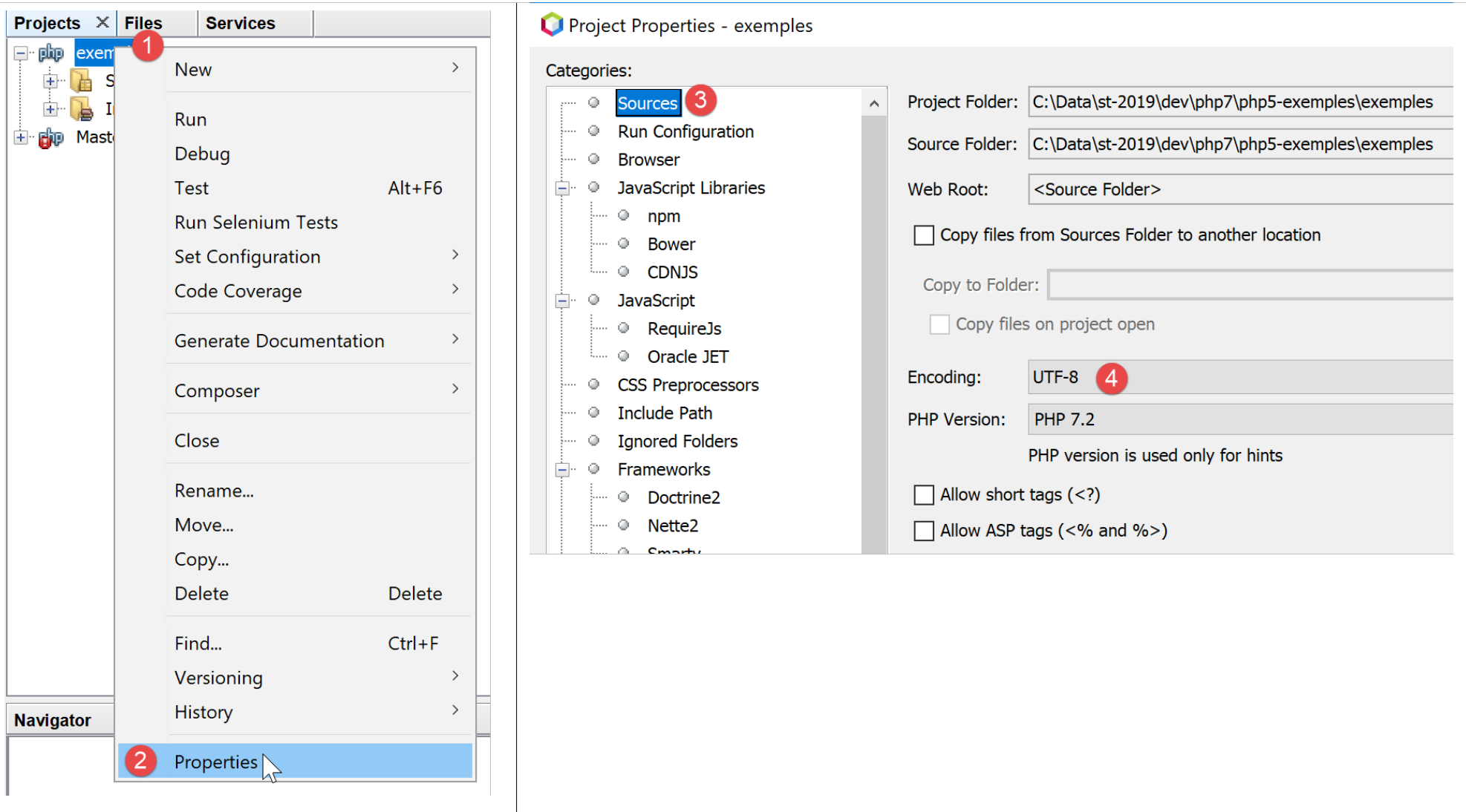
- line 2: we tell the server MySQL that we are going to send it characters encoded in UTF-8. This command SQL specific to MySQL is necessary here, for example, to have line 7, the "é" in Géraldine, in the database. If line 2 is omitted, the é will be converted into a sequence of two strange characters. The client is the script PHP written in Netbeans. This script encodes the files in UTF-8 [1-4] as shown below:
- line 3: creation of the table [personnes] with three columns (first_name, last_name, age) and the primary key (last_name, first_name);
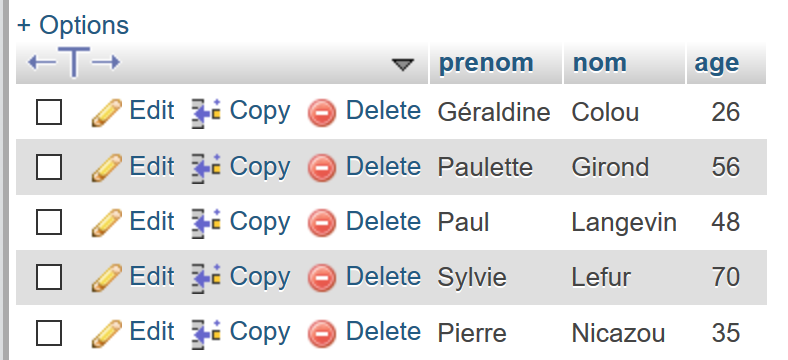
- lines 4–10: insertion of 7 rows into the table [personnes];
- line 6: this insert statement should fail because it attempts the same insertion as line 5. The primary key constraint should prevent this insertion: two people cannot have the same first and last names;
- line 10: this insert statement should fail because it attempts the same insertion as line 9;
The script PHP, which is responsible for executing the commands in the text file SQL, is as follows: [mysql-03.php]:
<?php

// database identity
const DSN = "mysql:host=localhost;dbname=dbpersonnes";
// user login
const ID = "admpersonnes";
const PWD = "nobody";
// identity of the SQL command text file to be executed
const SQL_COMMANDS_FILENAME = "creation.txt";

// open database connection MySql
try {
  $connexion = new PDO(DSN, ID, PWD);
} catch (PDOException $ex) {
  // error display
  print "Erreur : " . $ex->getMessage() . "\n";
  exit;
}
// we want every SGBD error to trigger an exception
$connexion->setAttribute(PDO::ATTR_ERRMODE, PDO::ERRMODE_EXCEPTION);
// order file execution SQL
$erreurs = exécuterCommandes($connexion, SQL_COMMANDS_FILENAME, TRUE, FALSE);
// locking connection
$connexion = NULL;
//display number of errors
printf("\n-----------------------\nIl y a eu %d erreur(s)\n", count($erreurs));
for ($i = 0; $i < count($erreurs); $i++) {
  print "$erreurs[$i]\n";
}

// it's over
print "Terminé\n";
exit;

// ---------------------------------------------------------------------------------
function exécuterCommandes(PDO $connexion, string $SQLFileName, bool $suivi = FALSE, bool $arrêt = TRUE): array {
// uses the $connexion connection
// executes the SQL commands contained in the SQLFileName text file
// this is a file of SQL commands to be executed one per line
// if $suivi=1 then each execution of a SQL order is displayed as a success or failure
// if $arrêt=1, the function stops on the 1st error encountered, otherwise it executes all sql commands
// the function returns an array (nb of errors, error1, error2...)
// check for the presence of the SQLFileName file

  if (!file_exists($SQLFileName)) {
    return ["Le fichier [$SQLFileName] n'existe pas"];
  }

  // execution of SQL queries contained in SQLFileName
  // we put them in a table
  $requêtes = file($SQLFileName);
  // mistake?
  if ($requêtes === FALSE) {
    return ["Erreur lors de l'exploitation du fichier SQL [$SQLFileName]"];
  }
  // execute requests one by one - initially no errors
  $erreurs = [];
  $i = 0;
  $fini = FALSE;
  while ($i < count($requêtes) && !$fini) {
    // retrieve the query text
    // trim will remove the end-of-line marker
    $requête = trim($requêtes[$i]);
    // empty query?
    if (strlen($requête) == 0) {
      // ignore the request and move on to the next request
      $i++;
      continue;
    }
    try {
      // query execution - an exception may be thrown
      $connexion->exec($requête);
      // screen tracking or not?
      if ($suivi) {
        print "$requête : Exécution réussie\n";
      }
    } catch (PDOException $ex) {
      // an error has occurred
      addError($erreurs, $requête, $ex->getMessage(), $suivi);
      // shall we stop?
      $fini = $arrêt;
    }
    // following request
    $i++;
  }
  // result
  return $erreurs;
}

function addError(array &$erreurs, string $requête, string $msg, bool $suivi): void {
  // add an error msg
  $msg = "$requête : Erreur (" . $msg . ")";
  $erreurs[] = $msg;
  // screen tracking or not?
  if ($suivi) {
    print "$msg\n";
  }
}
Comments
- The function [exécuterCommandes] (lines 36–89) is responsible for executing the SQL commands it finds in the text file [$SQLFileName] (parameter 2). To execute them, it uses the open connection [$connexion] (parameter 1) with the MySQL server. The third parameter, [$suivi], is a Boolean that controls screen displays: at TRUE, the executed SQL command is displayed on the screen along with its success or failure; otherwise, the execution of the SQL command is silent. The fourth parameter, [$arrêt], controls what to do when a SQL command fails: at TRUE, it indicates that the execution of SQL commands must stop; otherwise, it continues. The [exécuterCommandes] function returns an array of error messages, empty if there were no errors;
- lines 11–18: the connection to the database is opened using MySQL [dbpersonnes]. If the connection fails, an error message is displayed and the process stops (lines 14–18);
- line 22: an open connection is then passed to the [exécuterCommandes] function. It will be closed when the function returns (line 24);
- Line 20: Before passing it to the [exécuterCommandes] function, the connection is configured. In the event of an error, operations SQL with a [PDO] object can either return the Boolean FALSE (default value) or throw an exception. Line 20 chooses the latter option. Indeed, it is easy to “forget” to check the Boolean result of executing a SQL command. This will eventually cause an error elsewhere in the code, making it more difficult to identify the original source of the issue. In the case of an unhandled exception (no catch block), the exception will propagate up through the code until it encounters a catch block or until it reaches the PHP interpreter, which will intercept the exception. In this case, the nature of the exception and its origin in the code are displayed;
- line 22: the function [exécuterCommandes] is called to execute the command file SQL [$SQLFileName];
- lines 45–47: We verify that the command file SQL actually exists. If it does not, we log the error and return this result;
- line 51: place the orders SQL into an array [$requêtes]. Lines 53–55: if the operation fails, return an error array containing a single message;
- line 57: we will accumulate the errors in the array [$erreurs];
- line 58: request number;
- line 59: the Boolean [$fini] controls the execution of the commands SQL in the array [$requêtes]. When it reaches TRUE, execution stops;
- line 60: we loop through all requests;
- line 63: the text of order SQL no. i is extracted. The function [trim] will remove the spaces preceding and following the text of order SQL. By “spaces,” we mean the blank character \b, the carriage return \r, the line feed \n, the form feed \f, the tab \t… What matters here is that the line feed in the text SQL will be removed;
- lines 65–69: if the text SQL is empty, then the request is ignored and we move on to the next one;
- line 72: we send the command SQL to the server MySQL. The method [PDO::exec] will throw an exception if execution fails. Note that this behavior is due to the configuration set on line 20;
- line 79: the error message is added to the error array;
- line 81: the boolean [$fini], which controls the loop, is set. If the parameter [$arrêt] (line 36) is TRUE, the loop must be stopped;
- lines 74–76: if the execution of the command SQL was successful, it is displayed on the screen if the parameter [$suivi] (line 36) is set to TRUE;
- line 87: once all SQL commands have been executed, the [$erreurs] error table is returned;
The function [adError] in lines 90–97 adds an error to the error table [$erreurs]:
- Line 90: The function receives 4 parameters:
- the parameter [$erreurs] is passed by reference. This is because we want to modify the array passed as a parameter, not a copy of it;
- The parameter [$requête] is the text SQL of the order that failed;
- The parameter [$msg] is the error message associated with the failed order;
- the Boolean [$suivi] indicates whether the error message should be displayed ($suivi=TRUE) or not ($suivi=FALSE) on the console;
The function [exécuterCommandes] is called by the script in lines 3–33:
- lines 11–18: a connection is established with the database MySQL [dbpersonnes];
- line 20: the connection is configured;
- line 22: the SQL command file is then executed;
- line 24: the connection is closed;
- lines 26–29: the errors returned by the [exécuterCommandes] function are displayed;
Screen results:
The insertions made are visible with phpMyAdmin:
12.5. Execution of any SQL commands
The following script shows the execution of SQL commands from the following text file [sql.txt]:
Among these SQL commands, there is the SELECT command, which returns results from the database; the INSERT, UPDATE, and DELETE commands, which modify the database without returning results; and finally, invalid commands such as the last one (xselect). The [mysql-04.php] script is as follows:
<?php

// database identity
const DSN = "mysql:host=localhost;dbname=dbpersonnes";
// user login
const ID = "admpersonnes";
const PWD = "nobody";
// identity of the SQL command text file to be executed
const SQL_COMMANDS_FILENAME = "sql.txt";

try {
  // connection to the MySql database
  $connexion = new PDO(DSN, ID, PWD);
} catch (PDOException $ex) {
  // error display
  print "Erreur : " . $ex->getMessage() . "\n";
  exit;
}
// we want every SGBD error to trigger an exception
$connexion->setAttribute(PDO::ATTR_ERRMODE, PDO::ERRMODE_EXCEPTION);
// order file execution SQL
$erreurs = exécuterCommandes($connexion, SQL_COMMANDS_FILENAME, TRUE, FALSE);
// locking connection
$connexion = NULL;
//display number of errors
printf("\n-----------------------\nIl y a eu %d erreur(s)\n", count($erreurs));
for ($i = 0; $i < count($erreurs); $i++) {
  print "$erreurs[$i]\n";
}

// it's over
print "Terminé\n";
exit;

// ---------------------------------------------------------------------------------
function exécuterCommandes(PDO $connexion, string $SQLFileName, bool $suivi = FALSE, bool $arrêt = TRUE): array {
………………………………………………………….
  // execute requests one by one - initially no errors
  $erreurs = [];
  $i = 0;
  $fini = FALSE;
  while ($i < count($requêtes) && !$fini) {
    // retrieve the query text
    // trim will remove the end-of-line marker
    $requête = trim($requêtes[$i]);
    // empty query?
    if (strlen($requête) == 0) {
      // ignore the request and move on to the next request
      $i++;
      continue;
    }
    // query execution
    // we retrieve its name
    $commande = "";
    if (preg_match("/^\s*(\S+)/", $requête, $champs)) {
      $commande = strtolower($champs[0]);
    }
    try {
      // is this a SELECT order?
      if ($commande === "select") {
        $résultat = $connexion->query($requête);
      } else {
        $résultat = $connexion->exec($requête);
      }
      // screen tracking or not?
      if ($suivi) {
        print "[$requête] : Exécution réussie\n";
      }
      // the result of execution is displayed
      afficherInfos($commande, $résultat);
    } catch (PDOException $ex) {
      // an error has occurred
      addError($erreurs, $requête, $ex->getMessage(), $suivi);
      // shall we stop?
      $fini = $arrêt;
    }
    // following request
    $i++;
  }
  // result
  return $erreurs;
}

function addError(array &$erreurs, string $requête, string $msg, bool $suivi): void {
  …
}

// ---------------------------------------------------------------------------------
function afficherInfos(string $commande, $résultat): void {
  // displays the $résultat result of a sql query
  // was it a select?
  switch ($commande) {
    case "select" :
      // displays field names
      $titre = "";
      $nbColonnes = $résultat->columnCount();
      for ($i = 0; $i < $nbColonnes; $i++) {
        $infos = $résultat->getColumnMeta($i);
        $titre .= $infos['name'] . ",";
      }
      // remove the last character ,
      $titre = substr($titre, 0, strlen($titre) - 1);
      // displays the list of fields
      print "$titre\n";
      // dividing line
      $séparateurs = "";
      for ($i = 0; $i < strlen($titre); $i++) {
        $séparateurs .= "-";
      }
      print "$séparateurs\n";
      // data
      foreach ($résultat as $ligne) {
        $data = "";
        for ($i = 0; $i < $nbColonnes; $i++) {
          $data .= $ligne[$i] . ",";
        }
        // remove the last character ,
        $data = substr($data, 0, strlen($data) - 1);
        // we display
        print "$data\n";
      }
      break;
    case "update":
    case "insert":
    case "delete";
      print " $résultat lignes(s) a (ont) été modifiée(s)\n";
      break;
  }
}
Comments
- Lines 36–83: The [exécuterCommandes] function has been slightly modified: the SQL and [select] commands do not execute in the same way as the other SQL commands. This command is the only one that returns a table as a result, i.e., a set of rows and columns from the database;
- lines 55–57: the first word of the command SQL is extracted using a regular expression;
- lines 60–64: if the command SQL is [select], the method [PDO::query] is used; otherwise, the method [PDO::exec] is used to execute the command SQL. In both cases, if execution fails, an exception will be thrown and caught in lines 71–77. If execution succeeds, line 70 displays the result;
- lines 90–130: the function afficherInfos displays information about the result of executing a SQL command;
- line 94: we handle the case of [select]. Its result is an object of type [PDOStatement];
- line 96: the [PDOStatement::getColumnCount()] method returns the number of columns in the result table of the SELECT statement;
- lines 98–99: the method [PDOStatement::getMeta(i)] returns a dictionary containing information about column number i of the SELECT result table. In this dictionary, the value associated with the key 'name' is the column name;
- lines 97–102: the column names of the SELECT result table are concatenated into a string;
- lines 105–110: a separator line is constructed with the same length as the previously constructed string;
- lines 112–121: an object of type PDOStatement can be iterated over using a foreach loop. At each iteration, the resulting element is a row from the SELECT result table in the form of an array of values representing the values of the row’s various columns. All these values are displayed using a for loop (lines 114–116);
- lines 123-127: the result of executing an insert, update, or delete statement is the number of rows modified by the statement;
Screen results:
[set names 'utf8'] : Successful execution
[select * from personnes] : Exécution réussie
prenom,nom,age
--------------
Géraldine,Colou,26
Paulette,Girond,56
Paul,Langevin,48
Sylvie,Lefur,70
Pierre,Nicazou,35
[select nom,prenom from personnes order by nom asc, prenom desc] : Exécution réussie
nom,prenom
----------
Colou,Géraldine
Girond,Paulette
Langevin,Paul
Lefur,Sylvie
Nicazou,Pierre
[select * from personnes where age between 20 and 40 order by age desc, nom asc, prenom asc] : Exécution réussie
prenom,nom,age
--------------
Pierre,Nicazou,35
Géraldine,Colou,26
[insert into personnes values('Josette','Bruneau',46)]: Successful execution
 1 lignes(s) a (ont) été modifiée(s)
[update personnes set age=47 where nom='Bruneau'] : Successful execution
 1 lignes(s) a (ont) été modifiée(s)
[select * from personnes where nom='Bruneau'] : Successful execution
prenom,nom,age
--------------
Josette,Bruneau,47
[delete from personnes where nom='Bruneau'] : Successful execution
 1 lignes(s) a (ont) été modifiée(s)
[select * from personnes where nom='Bruneau'] : Successful execution
prenom,nom,age
--------------
[insert into personnes values('Josette','Bruneau',46)]: Successful execution
 1 lignes(s) a (ont) été modifiée(s)
[xselect * from personnes where nom='Bruneau'] : Erreur (SQLSTATE[42000]: Syntax error or access violation: 1064 You have an error in your SQL syntax; check the manual that corresponds to your MySQL server version for the right syntax to use near 'xselect * from personnes where nom='Bruneau'' at line 1)

-----------------------
Il y a eu 1 erreur(s)
[xselect * from personnes where nom='Bruneau'] : Erreur (SQLSTATE[42000]: Syntax error or access violation: 1064 You have an error in your SQL syntax; check the manual that corresponds to your MySQL server version for the right syntax to use near 'xselect * from personnes where nom='Bruneau'' at line 1)
Terminé
12.6. Using prepared SQL statements
12.6.1. Example 1
Let’s examine the following [mysql-05.php] script:
<?php

// database identity
const DSN = "mysql:host=localhost;dbname=dbpersonnes";
// user login
const ID = "admpersonnes";
const PWD = "nobody";

try {
  // connection to the MySql database
  $connexion = new PDO(DSN, ID, PWD);
  // we want every SGBD error to trigger an exception
  $connexion->setAttribute(PDO::ATTR_ERRMODE, PDO::ERRMODE_EXCEPTION);
  // clear the table of people
  $connexion->exec("delete from personnes");
  // a list of people
  $personnes = [];
  $personnes[] = ["nom" => "Langevin", "prenom" => "Paul", "age" => 47];
  $personnes[] = ["nom" => "Lefur", "prenom" => "Sylvie", "age" => 28];
  // we'll put these people in the database
  $statement = $connexion->prepare("insert into personnes (nom, prenom, age) values (:nom, :prenom, :age)");
  for ($i = 0; $i < count($personnes); $i++) {
    $statement->execute($personnes[$i]);
  }
} catch (PDOException $ex) {
  // error display
  print "Erreur : " . $ex->getMessage() . "\n";
} finally {
// locking connection
  $connexion = NULL;
}

// it's over
print "Terminé\n";
exit;
Comments
Here we are interested in lines 16–24, which insert two people into the people table of the [dbpersonnes] database.
- Line 21: We "prepare" a configured SQL request. The parameters are preceded by the character : :last_name, :first_name, :age. To ‘prepare’ a SQL command, we use the [PDO::prepare] method. The result is a [PDOStatement] type. ‘Preparation’ is not an execution: nothing is executed;
- line 23: execution of the ‘prepared’ order using the [PDOStatement::execute] method. To do this, values must be assigned to the parameters :last_name, :first_name, and :age. There are several ways to do this. Here, we use a dictionary whose keys are the parameters of the prepared order, which we pass to the [PDOStatement::execute] method. Another way to do this is to assign a value to the parameters using the [PDOStatement::bindValue($paramètre,$valeur)] method. For example, here:
$statement→bindValue(“nom”,”Langevin”);
$statement→bindValue(“prenom”,”Paul”);
$statement→bindValue(“age”,47);
$statement→execute();
The downside is that you have to repeat this instruction for each parameter. The dictionary method may therefore be more convenient. The [PDOStatement::execute] method returns FALSE if execution fails;
- the method used here to perform the inserts:
- a prepared statement;
- n executions of the prepared statement;
is more efficient in terms of execution time than executing n separate SQL commands. This method is therefore recommended. It can be used for SQL SELECT, UPDATE, DELETE, and INSERT commands. In the case of the SELECT statement, after executing it with [PDOStatement::execute], the result rows are retrieved using the [PDOStatement::fetchAll] method;
12.6.2. Example 2
The following script, [mysql-06.php], demonstrates the use of a prepared statement for the SQL SELECT operation, as well as various ways to retrieve the rows returned by this operation:
<?php

// database identity
const DSN = "mysql:host=localhost;dbname=dbpersonnes";
// user login
const ID = "admpersonnes";
const PWD = "nobody";

try {
  // connection to the MySql database
  $connexion = new PDO(DSN, ID, PWD);
  // we want every SGBD error to trigger an exception
  $connexion->setAttribute(PDO::ATTR_ERRMODE, PDO::ERRMODE_EXCEPTION);
  // clear the table of people
  $connexion->exec("delete from personnes");
  // we'll put these people in the database
  $statement = $connexion->prepare("insert into personnes (nom, prenom, age) values (:nom, :prenom, :age)");
  for ($i = 0; $i < 10; $i++) {
    $statement->execute(["nom" => "nom" . $i, "prenom" => "prenom" . $i, "age" => $i * 10]);
  }
  // query the database
  $statement = $connexion->prepare("select nom, prenom, age from personnes");
  $statement->execute();
  // 1st line
  $ligne = $statement->fetch();
  var_dump($ligne);
  // 2nd line
  $ligne = $statement->fetch(PDO::FETCH_ASSOC);
  var_dump($ligne);
  // 3rd line
  $ligne = $statement->fetch(PDO::FETCH_OBJ);
  var_dump($ligne);
  // 4th line
  $statement->setFetchMode(PDO::FETCH_CLASS, "Person");
  $ligne = $statement->fetch();
  var_dump($ligne);
  // sequential reading of all lines
  $statement = $connexion->prepare("select nom, prenom, age from personnes");
  $statement->execute();
  $statement->setFetchMode(PDO::FETCH_CLASS, "Person");
  while ($personne = $statement->fetch()) {
    print "$personne\n";
  }
} catch (PDOException $ex) {
  // error display
  print "Erreur : " . $ex->getMessage() . "\n";
} finally {
// locking connection
  $connexion = NULL;
}

// it's over
print "Terminé\n";
exit;

class Person {
  private $nom;
  private $prenom;
  private $age;

  public function __toString() {
    return "Personne[$this->nom,$this->prenom,$this->age]";
  }

}
Comments
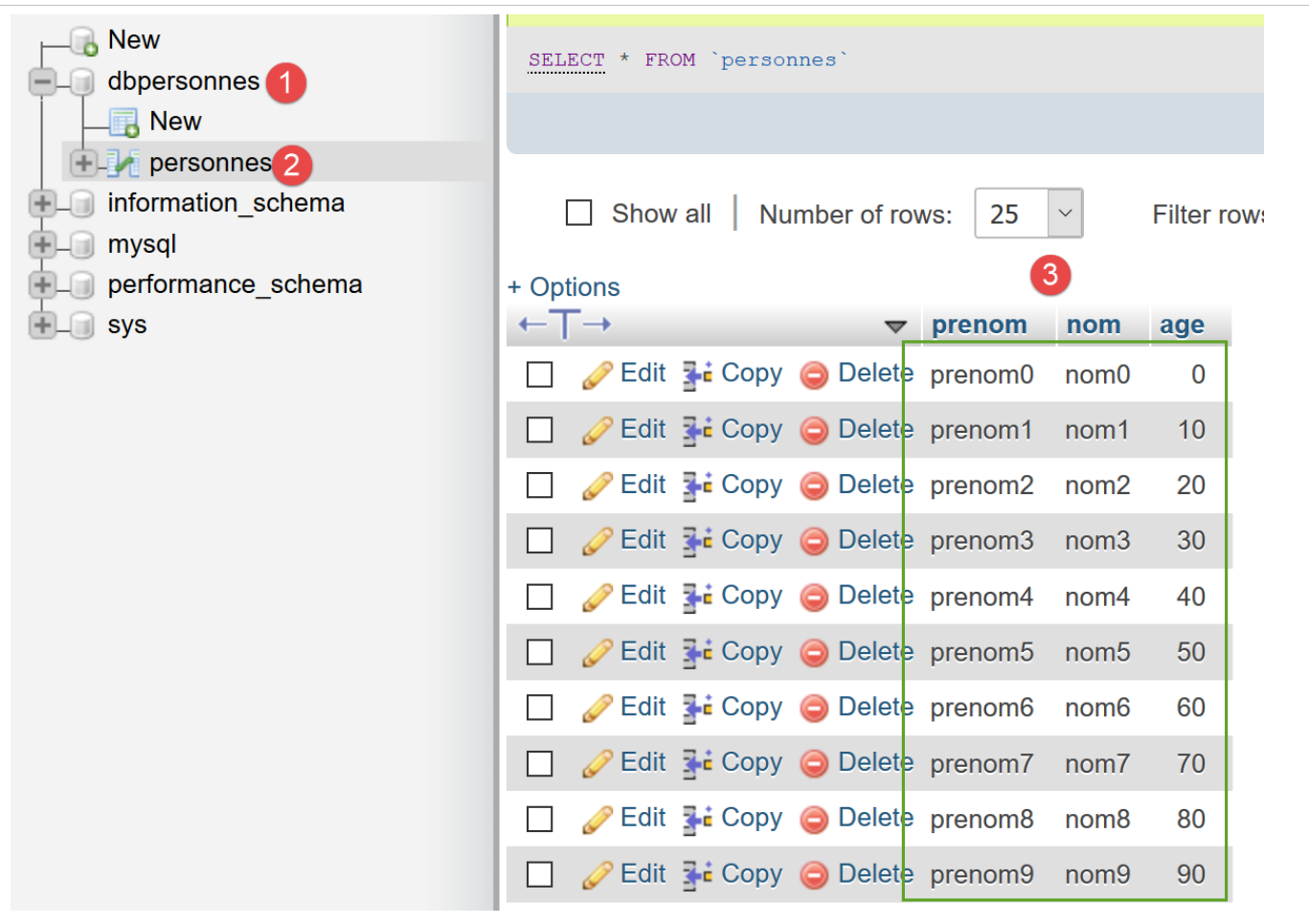
- lines 17–20: 10 rows are inserted into the [personnes] table in the [admpersonnes] database:
- line 22: we "prepare" a SQL [select] command, which we execute on line 23;
- Line 25: Using method [PDOStatement::fetch], a row is retrieved from the result of the executed operation SQL [select]. The method [PDOStatement::fetch] can retrieve the result rows of a prepared operation SQL [select] in various ways. The script demonstrates a few of them. The [PDOStatement::fetch] method, without parameters, returns the current row from [select] in the form of a dictionary indexed by both column numbers and column names;
- line 26: displays the following result:
array(6) {
  ["nom"]=>
  string(4) "nom0"
  [0]=>
  string(4) "nom0"
  ["prenom"]=>
  string(7) "prenom0"
  [1]=>
  string(7) "prenom0"
  ["age"]=>
  string(1) "0"
  [2]=>
  string(1) "0"
}
- lines 28-29: the parameter [PDO::FETCH_ASSOC] causes the returned row to be a dictionary indexed by the names of the table columns:
- lines 31-32: the parameter [PDO::FETCH_OBJ] ensures that the returned row is an object of type [stdclass], whose attributes are the names of the table columns:
- Line 34: We set the search mode of the [fetch] method to the [PDOStatement::setFetchMode] method. This mode then becomes the default mode until it is changed either by another [PDOStatement::setFetchMode] operation or by passing a mode as a parameter to the [PDOStatement::fetch] method, as was done previously. The [setFetchMode(PDO::FETCH_CLASS, "Person")] operation specifies that the read row must be placed in an object of type [Person]. This class must have, among its attributes, attributes named after the columns of the read row. This is the case for the [Person] class defined on lines 56–63;
- line 36 displays the following result:
- lines 38–43: show how to sequentially process the results of [select];
- line 42: the display of [$personne] will use the [__toString] method of the [Person] class;
12.7. Using Transactions
A transaction allows a sequence of SQL commands to be grouped into a single execution unit: either all commands succeed, or one of them fails, in which case all preceding SQL commands are rolled back. In other words, when a transaction is used to execute SQL commands, after the transaction is executed, the database is in a stable state:
- either in a new state created by the successful execution of all SQL commands in the transaction;
- or in the state it was in before the transaction began to be executed;
We will revisit the example of executing the SQL commands contained in a text file discussed in the link section. We will include this execution within a transaction. The SQL commands will be contained in the following [sql2.txt] file:
The incorrect order in line 12 will cause the entire transaction to fail. The database should therefore return to its state prior to the transaction. In the example above, the row inserted by line 10 should not appear in the table. The script has changed very little. However, we are providing the complete code for [mysql-07.php]:
<?php

// database identity
const DSN = "mysql:host=localhost;dbname=dbpersonnes";
// user login
const ID = "admpersonnes";
const PWD = "nobody";
// identity of the SQL command text file to be executed
const SQL_COMMANDS_FILENAME = "sql2.txt";

try {
  // connection to the MySql database
  $connexion = new PDO(DSN, ID, PWD);
} catch (PDOException $ex) {
  // error display
  print "Erreur : " . $ex->getMessage() . "\n";
  exit;
}
// we want every SGBD error to trigger an exception
$connexion->setAttribute(PDO::ATTR_ERRMODE, PDO::ERRMODE_EXCEPTION);
// order file execution SQL
$erreurs = exécuterCommandes($connexion, SQL_COMMANDS_FILENAME, TRUE);
// locking connection
$connexion = NULL;
//display number of errors
printf("\n-----------------------\nIl y a eu %d erreur(s)\n", count($erreurs));
for ($i = 0; $i < count($erreurs); $i++) {
  print "$erreurs[$i]\n";
}

// it's over
print "Terminé\n";
exit;

// ---------------------------------------------------------------------------------
function exécuterCommandes(PDO $connexion, string $SQLFileName, bool $suivi = FALSE): array {
// uses the $connexion connection
// executes the SQL commands contained in the SQLFileName text file
// this is a file of SQL commands to be executed one per line
// SQL commands are executed in a transaction
// if one of the orders fails, the transaction is cancelled and the database is restored to its pre-transaction state
// if $suivi=1 then each execution of a SQL order is displayed as a success or failure
// the function returns an array (nb of errors, error1, error2...)
//
// check for the presence of the SQLFileName file
  if (!file_exists($SQLFileName)) {
    return ["Le fichier [$SQLFileName] n'existe pas"];
  }
  // execution of SQL queries contained in SQLFileName
  // we put them in a table
  $requêtes = file($SQLFileName);
  // mistake?
  if ($requêtes === FALSE) {
    return ["Erreur lors de l'exploitation du fichier SQL [$SQLFileName]"];
  }
  // requests will be placed in a transaction
  $connexion->beginTransaction();
  // execute requests one by one - initially no errors
  $erreurs = [];
  $i = 0;
  $fini = FALSE;
  while ($i < count($requêtes) && !$fini) {
    // retrieve the query text
    // trim will remove the end-of-line marker
    $requête = trim($requêtes[$i]);
    // empty query?
    if (strlen($requête) == 0) {
      // ignore the request and move on to the next request
      $i++;
      continue;
    }
    // query execution
    // we retrieve its name
    $commande = "";
    if (preg_match("/^\s*(\S+)/", $requête, $champs)) {
      $commande = strtolower($champs[0]);
    }
    try {
      // is this a SELECT order?
      if ($commande === "select") {
        $résultat = $connexion->query($requête);
      } else {
        $résultat = $connexion->exec($requête);
      }
      // screen tracking or not?
      if ($suivi) {
        print "[$requête] : Exécution réussie\n";
      }
      // the result of execution is displayed
      afficherInfos($commande, $résultat);
    } catch (PDOException $ex) {
      // an error has occurred
      addError($erreurs, $requête, $ex->getMessage(), $suivi);
      // we stop at the next turn
      $fini = TRUE;
    }
    // following request
    $i++;
  }
  // end of transaction
  if (!$fini) {
    // no errors: transaction validated
    $connexion->commit();
  } else {
    // there have been errors: the transaction is cancelled
    $connexion->rollBack();
    // add error
    addError($erreurs, "", "Transaction annulée", $suivi);
  }
  // result
  return $erreurs;
}

function addError(array &$erreurs, string $requête, string $msg, bool $suivi): void {
  …
}

// ---------------------------------------------------------------------------------
function afficherInfos(string $commande, $résultat): void {
  …
}
Comments
We have highlighted the changes to the original script [mysql-04.php].
- Lines 22, 36: The [exécuterCommandes] function has lost its fourth parameter, [$arrêt=TRUE]. In fact, since the SQL commands are executed within a transaction, any error will cause the transaction to terminate;
- Lines 40–41: call the transaction function;
- line 57: a transaction is started. From this point on, any SQL command executed in the loop on lines 62–99 is executed within this transaction;
- lines 101–109: the Boolean [$fini] is set to TRUE if an error occurred (line 95). When it is set to FALSE, there were no errors, and the transaction is then committed (line 103). When it is set to TRUE, errors occurred, so the transaction is rolled back (line 106) and the transaction error is added to the error list (line 108);
Results
Before running the script, the [admpersonnes] database is in the following state:
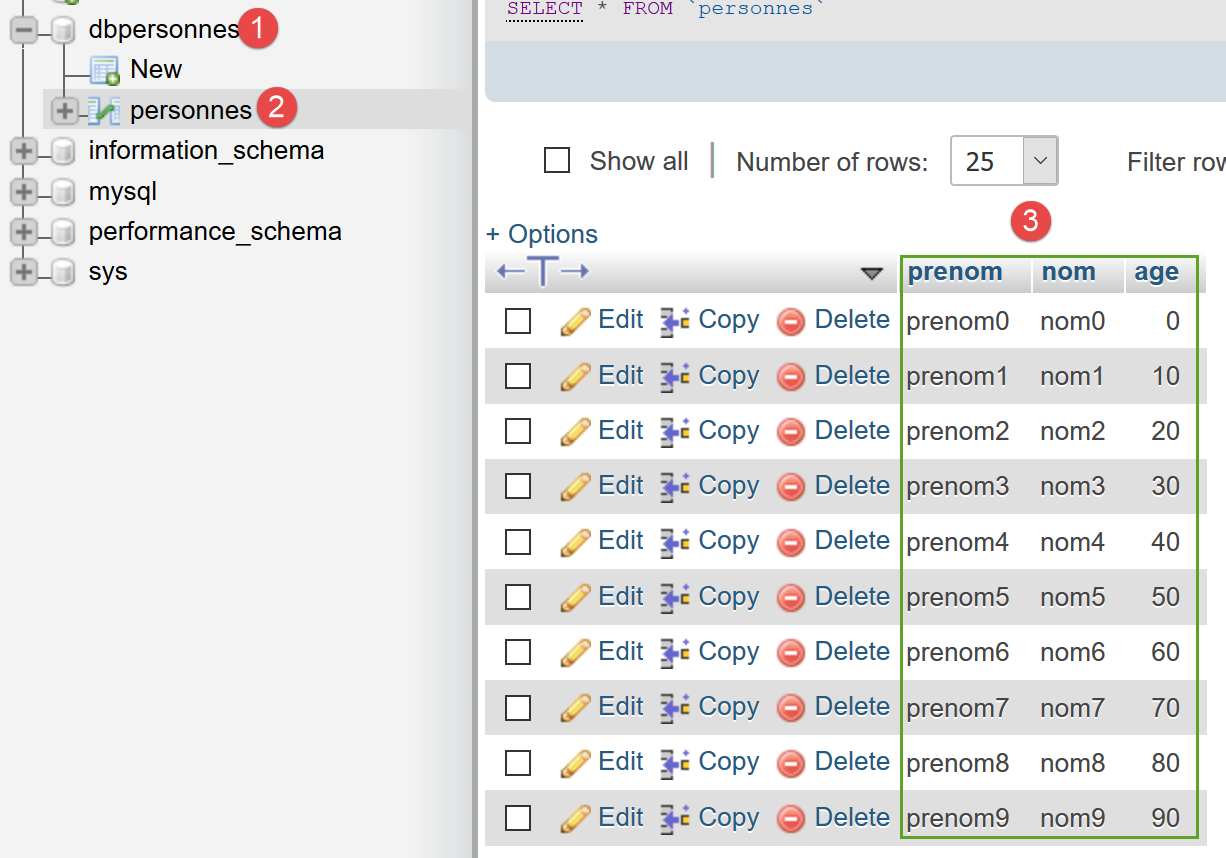
We run the [mysql-07.php] script. The screen displays are then as follows:
[set names 'utf8'] : Successful execution
[select * from personnes] : Exécution réussie
prenom,nom,age
--------------
prenom0,nom0,0
prenom1,nom1,10
prenom2,nom2,20
prenom3,nom3,30
prenom4,nom4,40
prenom5,nom5,50
prenom6,nom6,60
prenom7,nom7,70
prenom8,nom8,80
prenom9,nom9,90
[select nom,prenom from personnes order by nom asc, prenom desc] : Exécution réussie
nom,prenom
----------
nom0,prenom0
nom1,prenom1
nom2,prenom2
nom3,prenom3
nom4,prenom4
nom5,prenom5
nom6,prenom6
nom7,prenom7
nom8,prenom8
nom9,prenom9
[select * from personnes where age between 20 and 40 order by age desc, nom asc, prenom asc] : Exécution réussie
prenom,nom,age
--------------
prenom4,nom4,40
prenom3,nom3,30
prenom2,nom2,20
[insert into personnes values('Josette','Bruneau',46)]: Successful execution
 1 lignes(s) a (ont) été modifiée(s)
[update personnes set age=47 where nom='Bruneau'] : Successful execution
 1 lignes(s) a (ont) été modifiée(s)
[select * from personnes where nom='Bruneau'] : Successful execution
prenom,nom,age
--------------
Josette,Bruneau,47
[delete from personnes where nom='Bruneau'] : Successful execution
 1 lignes(s) a (ont) été modifiée(s)
[select * from personnes where nom='Bruneau'] : Successful execution
prenom,nom,age
--------------
[insert into personnes values('Josette','Bruneau',46)]: Successful execution
 1 lignes(s) a (ont) été modifiée(s)
[select * from personnes where nom='Bruneau'] : Successful execution
prenom,nom,age
--------------
Josette,Bruneau,46
[xselect * from personnes where nom='Bruneau'] : Erreur (SQLSTATE[42000]: Syntax error or access violation: 1064 You have an error in your SQL syntax; check the manual that corresponds to your MySQL server version for the right syntax to use near 'xselect * from personnes where nom='Bruneau'' at line 1)
[] : Erreur (Transaction annulée)

-----------------------
Il y a eu 2 erreur(s)
[xselect * from personnes where nom='Bruneau'] : Erreur (SQLSTATE[42000]: Syntax error or access violation: 1064 You have an error in your SQL syntax; check the manual that corresponds to your MySQL server version for the right syntax to use near 'xselect * from personnes where nom='Bruneau'' at line 1)
[] : Erreur (Transaction annulée)
Terminé
- line 53: an error occurs on command [xselect];
- line 54: the transaction is then rolled back;
If we check the database status, we find it in the same state as before the script was executed. In particular, we do not see the [Josette, Bruneau, 46] command from line 52 of the results above.
Summary
- A transaction begins with method [PDO::beginTransaction];
- It is successfully completed using the [PDO::commit] method;
- it is terminated upon failure using the [PDO::rollback] method;
When working with a database, it is good practice to place any SQL operation within a transaction to isolate it from other database users (this is also its purpose). A transaction should be as short as possible. Therefore, do not forget to end it with a [commit] or a [rollback], as appropriate.