8. Application Exercise – version 3
We will revisit the exercise covered earlier (sections 4.3 and 4.4) to solve it using code PHP that utilizes a class.
8.1. The script tree
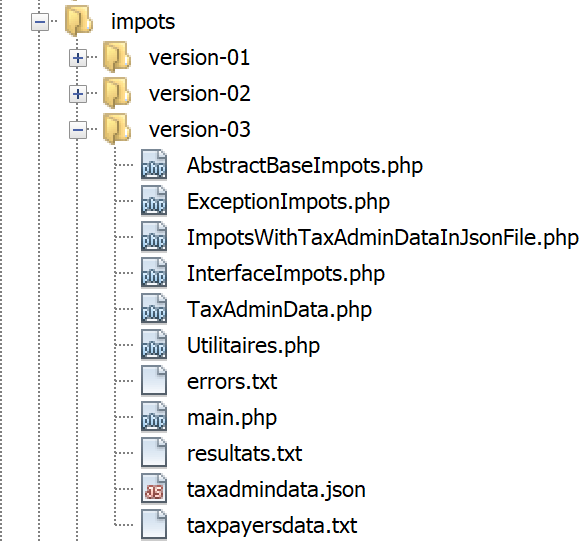
8.2. The [ExceptionImpots] exception
In version 03, when a constructor or class method encounters an error, it will throw the following [ExceptionImpots] exception:
Comments
- line 4: the class [ExceptionImpots] is in the namespace [Application];
- line 6: the class [ExceptionImpots] extends the class predefined in PHP [RuntimeException];
- line 8: the constructor expects two parameters:
- $message: is the error message associated with the exception;
- $code: is the error code associated with the exception. If it is not present, then code 0 will be used;
8.3. The [TaxAdminData] class
In version 02, the tax administration data has been compiled:
- first in a jSON file;
- then from this jSON file into an associative array;
In version 03, the tax authority data is still in the [taxadmindata.json] file but with different attribute names:
{
    "limites": [
        9964,
        27519,
        73779,
        156244,
        0
    ],
    "coeffR": [
        0,
        0.14,
        0.3,
        0.41,
        0.45
    ],
    "coeffN": [
        0,
        1394.96,
        5798,
        13913.69,
        20163.45
    ],
    "plafondQfDemiPart": 1551,
    "plafondRevenusCelibatairePourReduction": 21037,
    "plafondRevenusCouplePourReduction": 42074,
    "valeurReducDemiPart": 3797,
    "plafondDecoteCelibataire": 1196,
    "plafondDecoteCouple": 1970,
    "plafondImpotCouplePourDecote": 2627,
    "plafondImpotCelibatairePourDecote": 1595,
    "abattementDixPourcentMax": 12502,
    "abattementDixPourcentMin": 437
}
In version 02, this file was used to initialize an associative array. In version 03, the file will initialize the following [TaxAdminData] class:
<?php

namespace Application;

class TaxAdminData {
  // tax brackets
  private $limites;
  private $coeffR;
  private $coeffN;
  // tax calculation constants
  private $plafondQfDemiPart;
  private $plafondRevenusCelibatairePourReduction;
  private $plafondRevenusCouplePourReduction;
  private $valeurReducDemiPart;
  private $plafondDecoteCelibataire;
  private $plafondDecoteCouple;
  private $plafondImpotCouplePourDecote;
  private $plafondImpotCelibatairePourDecote;
  private $abattementDixPourcentMax;
  private $abattementDixPourcentMin;

  // initialization
  public function setFromJsonFile(string $taxAdminDataFilename): TaxAdminData {
    // retrieve the contents of the tax data file
    $fileContents = \file_get_contents($taxAdminDataFilename);
    $erreur = FALSE;
    // mistake?
    if (!$fileContents) {
      // we note the error
      $erreur = TRUE;
      $message = "Le fichier des données [$taxAdminDataFilename] n'existe pas";
    }
    if (!$erreur) {
      // retrieve the jSON code from the configuration file in an associative array
      $arrayTaxAdminData = \json_decode($fileContents, true);
      // mistake?
      if ($arrayTaxAdminData === FALSE) {
        // we note the error
        $erreur = TRUE;
        $message = "Le fichier de données jSON [$taxAdminDataFilename] n'a pu être exploité correctement";
      }
    }
    // mistake?
    if ($erreur) {
      // throw an exception
      throw new ExceptionImpots($message);
    }
    // initialization of class attributes
    foreach ($arrayTaxAdminData as $key => $value) {
      $this->$key = $value;
    }
    // check that all keys have been initialized
    $arrayOfAttributes = \get_object_vars($this);
    foreach ($arrayOfAttributes as $key => $value) {
      if (!isset($this->$key)) {
        throw new ExceptionImpots("L'attribut [$key] de [TaxAdminData] n'a pas été initialisé");
      }
    }
    // we check that we only have real values
    foreach ($this as $key => $value) {
      // $value must be a real number >=0 or an array of reals >=0
      $result = $this->check($value);
      // mistake?
      if ($result->erreur) {
        // throw an exception
        throw new ExceptionImpots("La valeur de l'attribut [$key] est invalide");
      } else {
        // we note the value
        $this->$key = $result->value;
      }
    }
    // we return the object
    return $this;
  }

  private function check($value): \stdClass {
    …
    return $result;
  }

    // toString
  public function __toString() {
    // string Json of object
    return \json_encode(\get_object_vars($this), JSON_UNESCAPED_UNICODE);
  }

  // getters and setters
  public function getLimites() {
    return $this->limites;
  }

  public function getCoeffR() {
    return $this->coeffR;
  }

  …
  }

  public function setLimites($limites) {
    $this->limites = $limites;
    return $this;
  }

  public function setCoeffR($coeffR) {
    $this->coeffR = $coeffR;
    return $this;
  }

  …

}
Comments
- lines 6–20: the attributes that will hold the attributes of the same name from the file jSON [taxadmindata.json]. This is an important point: the attributes of the [TaxAdminData] class are identical to those in the jSON and [taxadmindata.json] files. This feature greatly simplifies code writing;
- the [TaxAdminData] class has no constructor. In PHP, it is not possible to have multiple constructors. Defining one therefore prevents the object from being initialized in any other way. Moving forward, our classes will not have a constructor but will have several methods of type [setFromQqChose] that will allow us to initialize them in different ways. An object of type [TaxAdminData] is then constructed using the expression:
- line 23: the [setFromJsonFile] method initializes the class attributes with those of the same name in the [$jsonFilename] file;
- lines 24–42: the file jSON is used to construct the associative array [$arrayTaxAdminData]. We have already encountered this code in the [main.php] script of version 02;
- lines 44–47: If an error occurs while processing the jSON file, an exception is thrown. This exception is propagated up to the main script [main.php];
- lines 48–51: The class attributes are initialized. Here, we take advantage of the fact that the associative array [$arrayTaxAdminData] and the class [TaxAdminData] have attributes with the same names as the values from the file jSON;
- lines 53–57: we verify that all attributes of the class [TaxAdminData] have been initialized;
- line 53: the expression [get_object_vars($this)] returns an associative array whose attributes are those of the object [$this], and thus the attributes of the class [TaxAdminData]. Here, it is important to understand that the initialization operation in lines 48–51 may have added attributes to the object [$this]. Thus, if we write:
then the attribute [x] is added to the object [$this] even though this attribute was not declared in the class [TaxAdminData]. What is certain is that the attributes in lines 6–20 are indeed part of the [$this] object, but they may not have been initialized. This is an easy mistake to make; all it takes is a typo in an attribute name in the [taxadmindata.json] file;
- lines 54–57: all attributes of [$this] are checked, and if any of them have not been initialized, an exception is thrown;
- an attribute can be initialized with an incorrect value. In PHP, it is not possible to specify a type for attributes. Thus, the operation:
is possible, even though the [$plafondQfDemiPart] attribute should be a real number;
- lines 59–71: we verify that each of the class’s attributes has a positive real or zero numerical value. The function [check] on line 76 performs this task. Its parameter [$value] is either a single value or an array of values;
- line 62: the function [check] returns an object of type [\stdClass] with two attributes:
- [erreur]: set to TRUE if an error occurred, or to FALSE otherwise;
- [value]: the actual numeric value corresponding to the [$value] parameter passed as an argument, line 62;
- line 64: check whether the validation succeeded or failed;
- line 66: if an attribute is not a positive real number or zero, an exception is thrown;
- line 69: otherwise, we record its numerical value;
- line 73: return the object [$this] as the result;
The function [check] is as follows:
private function check($value): \stdClass {
    // $value is either an array of elements or a single element
    // create a table
    if (!\is_array($value)) {
      $tableau = [$value];
    } else {
      $tableau = $value;
    }
    // transform the array of elements of unknown type into an array of reals
    $newTableau = [];
    $result = new \stdClass();
    // table elements must be positive or zero decimal numbers
    $modèle = '/^\s*([+]?)\s*(\d+\.\d*|\.\d+|\d+)\s*$/';
    for ($i = 0; $i < count($tableau); $i ++) {
      if (preg_match($modèle, $tableau[$i])) {
        // put the float in newTableau
        $newTableau[] = (float) $tableau[$i];
      } else {
        // we note the error
        $result->erreur = TRUE;
        // we leave
        return $result;
      }
    }
    // we return the result
    $result->erreur = FALSE;
    if (!\is_array($value)) {
      // a single value
      $result->value = $newTableau[0];
    } else {
      // a list of values
      $result->value = $newTableau;
    }
    return $result;
  }
Comments
- Line 1: The parameter [$value] is either an array or a single element. Furthermore, its type is unknown. The value comes from the file [taxadmindata.json]. Depending on the values entered in this file, the read values can be integers, real numbers, strings, or booleans. For example:
"plafondQfDemiPart": 1551,
"plafondQfDemiPart": 1551.78,
"plafondQfDemiPart": "1551",
"plafondQfDemiPart": "xx",
In case 1, the value is of type [entier], in case 2, it is of type [réel]; in case 3, it is of type [string], which can be converted to a number; in case 4, it is of type [string], which cannot be converted to a number;
- lines 4–8: create an array from the parameter [$value] received in line 1;
- line 10: the array will be filled with real numbers;
- line 11: the result will be an object of type [\stdClass];
- line 13: relational expression for a positive or zero real number;
- lines 14–24: We verify that all elements of the array [$tableau] are positive real numbers or zero, and we populate the array [$newTableau] with these elements converted to type [float] (line 17);
- lines 18–23: as soon as an element is detected that is not a positive real number or zero, the error is noted in the result and the result is returned;
- lines 25–34: case where all elements of the array [$tableau] have been declared correct;
- line 32: the returned value [$result→value] is an array of reals [float] or a single real;
The function [__toString] in lines 82–85 returns the string jSON containing the attributes and values of the object [$this].
Lines 87–110: the class’s getters and setters;
Note: It can sometimes be a bit tedious to have to write all the get/set methods for a class, especially when there are many attributes. Netbeans can automatically generate these as well as the constructor. To do this, simply enter the [1] attributes:
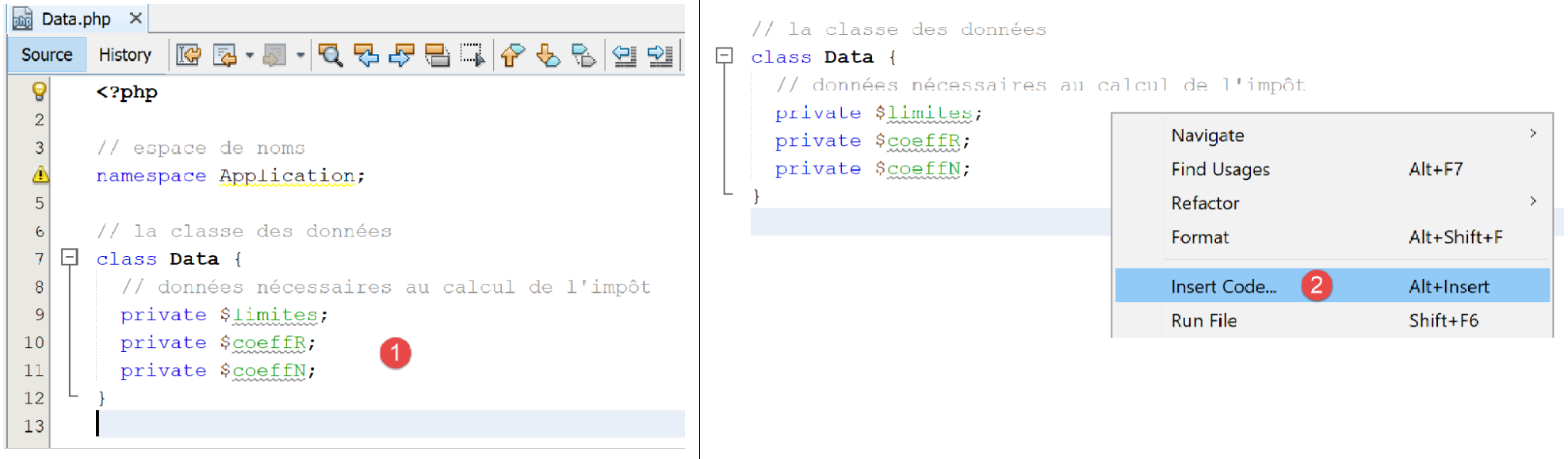
- in [2], right-click where you want to insert code, then choose option [Insert Code];
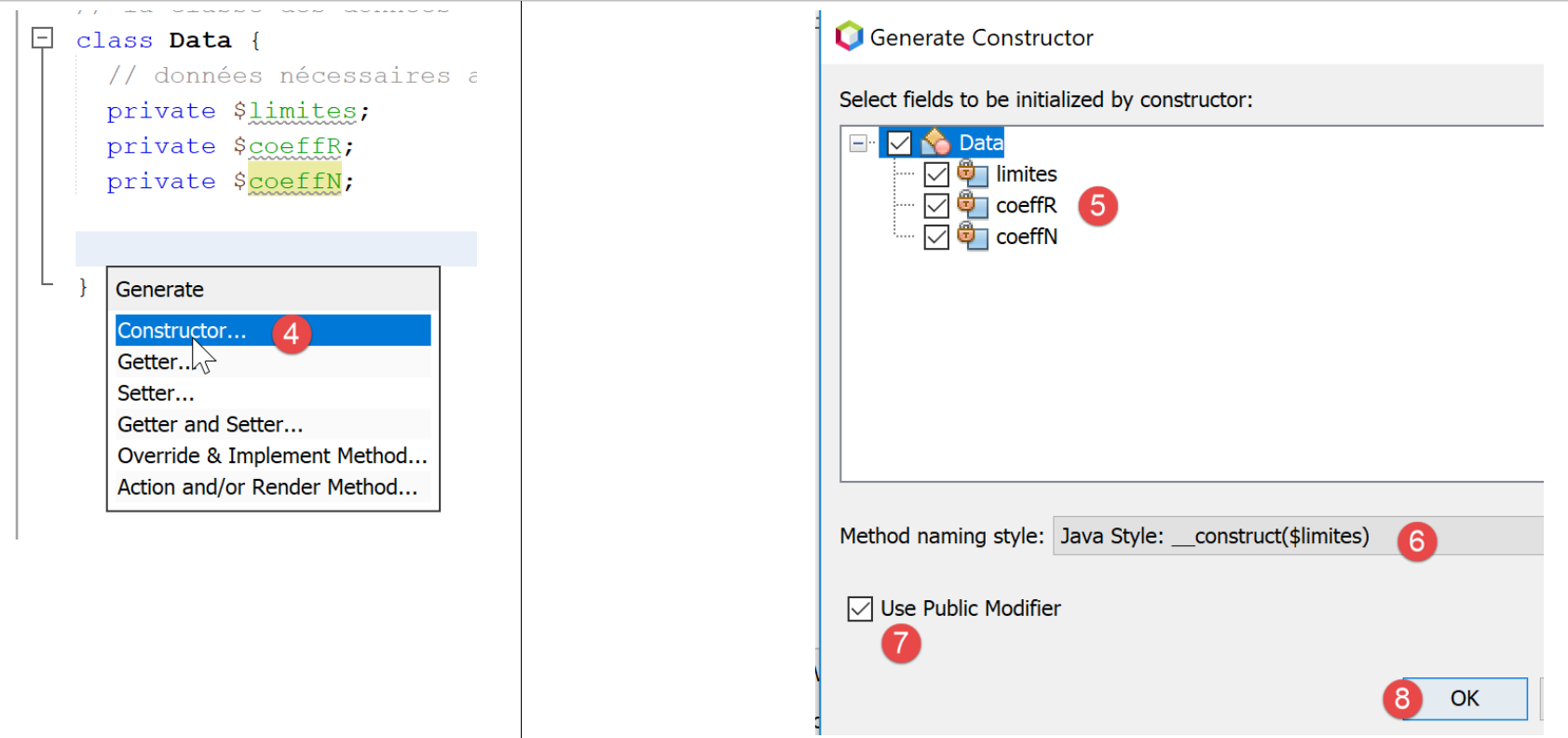
- to [4], indicate that you want to generate the constructor;
- In [5], check all attributes: this means you want the constructor to have a parameter for each attribute;
- in [6], use the Java constructor style;
- In [7], specify that you explicitly want the keyword [public] before the constructor;
- In [8], validate;
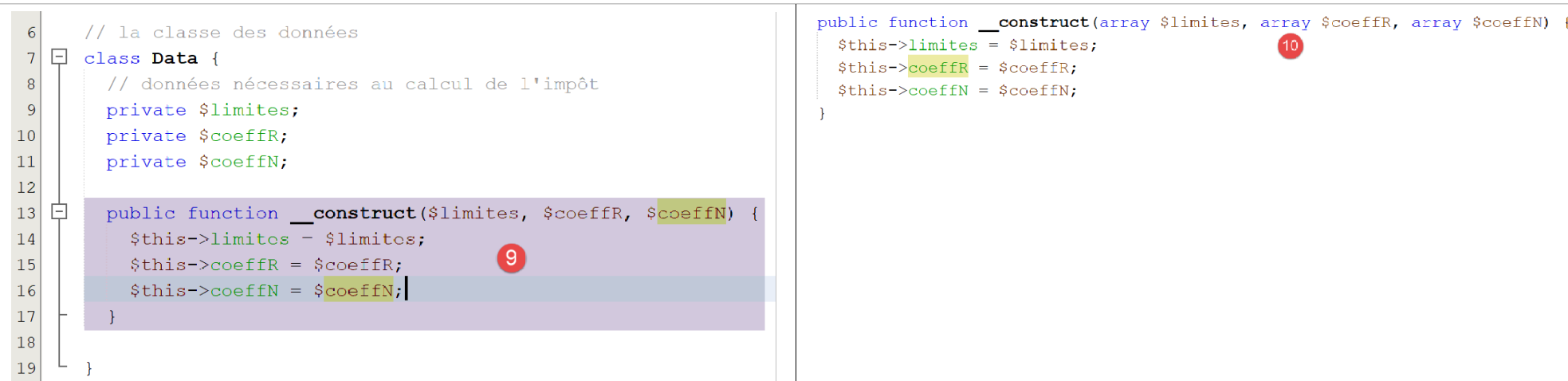
- In [9], Netbeans generated the constructor. However, it could not set the parameter types because it does not know them. Add them yourself in [10];
To generate the getters and setters, repeat steps 2–4, and in step 4, select [Getter and Setter]:
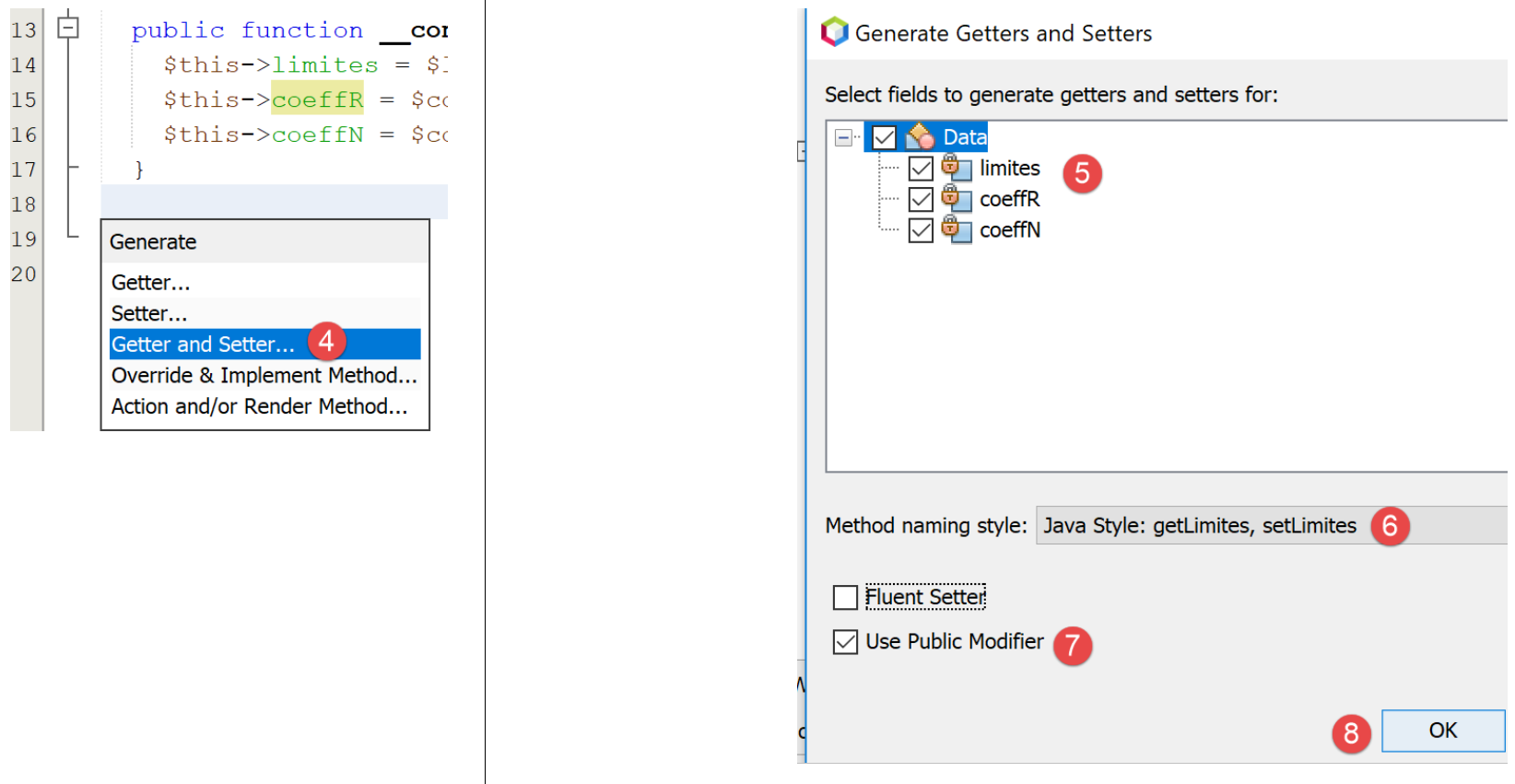
- In [5], specify that you want getters and setters for each of the attributes;
- in [6], specify that you want the getters and setters in the style used by Java: setAttribut, getAttribut;
- In [7], specify that these getters and setters should be public;
- in [8], confirm;
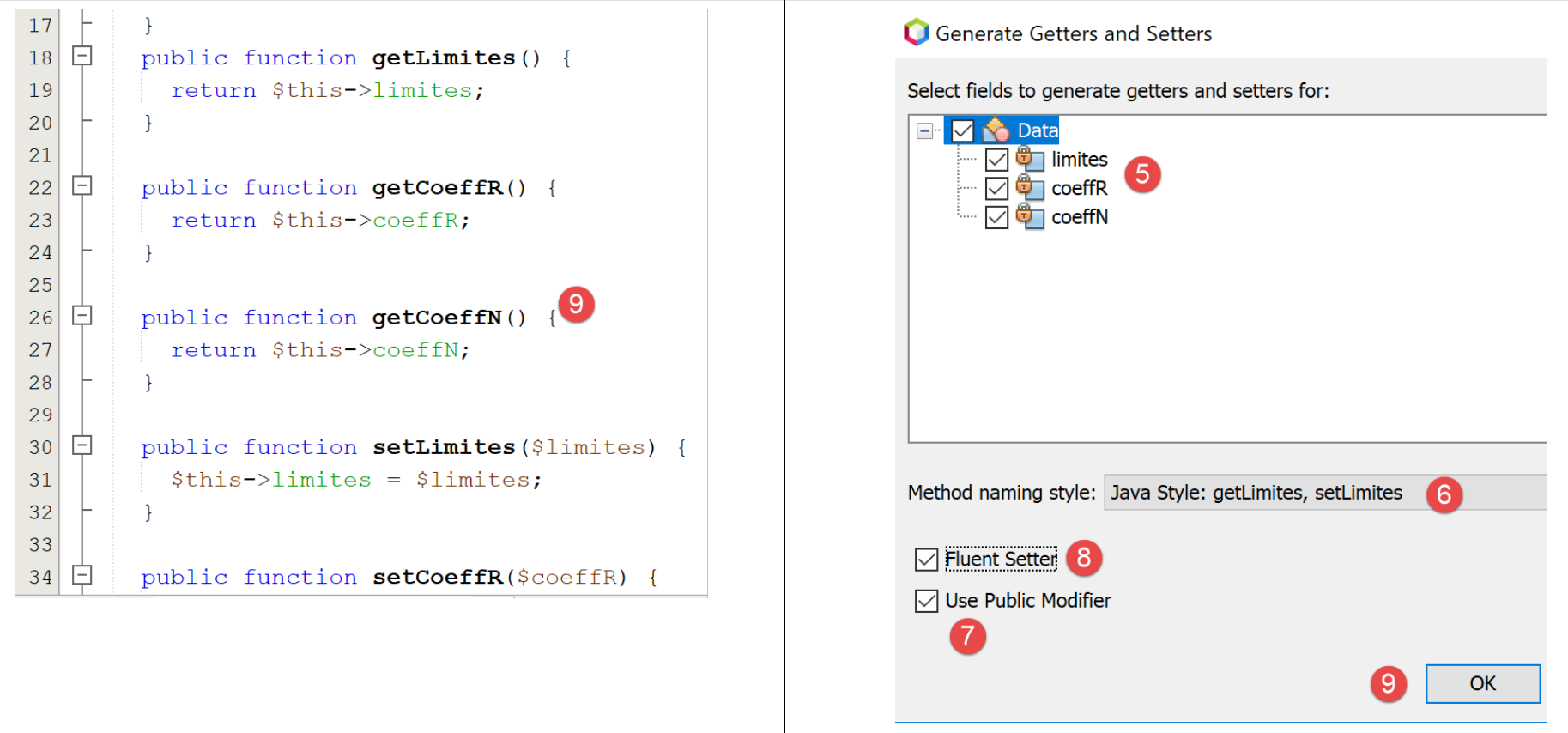
- In [9], the getters and setters generated by Netbeans;
Delete these getters and setters and repeat steps 2–7.
- In [8], check the option and [Fluent Setter] that we did not check previously;
The result is as follows:
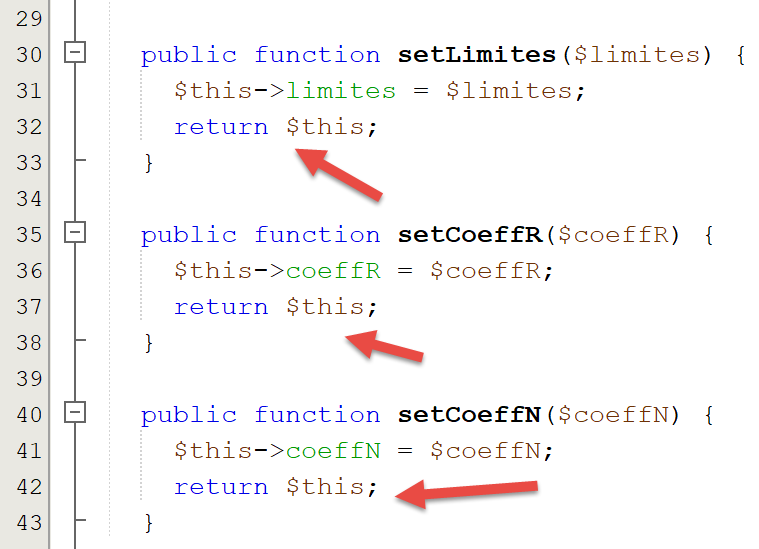
Each setter ends with a [return $this] operation. This allows the attributes to be initialized as follows:
In fact, the value of [$data→setLimites($limites)] (line 32 of the code) is [$this], so here it is [$data]. We can therefore call the [setCoeffR($coeffR)] method of this object and so on, since in turn, this method also returns [$this] (line 37 of the code). This style of writing class methods—where methods that should return nothing instead return the object [$this]—is called fluent writing. It makes these methods easier to use.
8.4. The [InterfaceImpots] interface
We now define the following [InterfaceImpots] interface [InterfaceImpots.php]:
<?php

// namespace
namespace Application;

interface InterfaceImpots {

  // retrieve tax bracket data for tax calculations
  // can throw the ExceptionImpots exception
  public function getTaxAdminData(): TaxAdminData;

  // the interface knows how to calculate a tax
  public function calculerImpot(string $marié, int $enfants, int $salaire): array;

  // the interface can process data in text files
  // $usersFilename: user data file in the form of marital status, number of children, annual salary
  // $resultsFilename: results file with marital status, number of children, annual salary, tax amount
  // $errorsFilename: file of errors encountered
  // can throw the ExceptionImpots exception
  public function executeBatchImpots(string $usersFileName, string $resultsFileName, string $errorsFileName): void;
}
Comments
- line 4: the interface is placed in the [Application] namespace;
- line 6: the interface for calculating taxes;
- line 10: the [getTaxAdminData] method will retrieve data from the tax authority into an object of type [TaxAdminData], which we just introduced. Since this data may be in a file, a database, or even on the network, the method [getTaxAdminData] may fail to retrieve the data. In this case, it will throw an exception of type [ExceptionImpots]. This is the standard method in object-oriented programming for signaling an error encountered in a method or a constructor;
- line 13: the [calculerImpot] method will calculate a user’s tax;
- line 20: the [executeBatchImpots] method will calculate the tax for multiple taxpayers;
- [$usersFileName] is the name of the text file containing the taxpayers’ data;
- [$resultsFileName] is the name of the text file containing the tax amounts for these taxpayers;
- [$errorsFileName] is the name of the text file containing the errors encountered while processing these files;
The contents of the text file [$usersFileName] could be as follows:
oui,2,55555
oui,2,50000
oui,3,50000
non,2,100000
non,3x,100000
oui,3,100000
oui,5,100000x
non,0,100000
oui,2,30000
non,0,200000
oui,3,200000
Note that lines 5 and 7 contain incorrect elements.
The contents of the text file [$resultsFileName] will then be as follows:
and the one from the text file [$errorsFileName] is as follows:
8.5. The class [Utilitaires]
We also define a class [Utilitaires] in a file [Utilitaires.php]:
<?php

// namespace
namespace Application;

// a class of utility functions
abstract class Utilitaires {

  public static function cutNewLinechar(string $ligne): string {
    // delete the end-of-line mark from $ligne if it exists
    $longueur = strlen($ligne);  // line length
    while (substr($ligne, $longueur - 1, 1) == "\n" or substr($ligne, $longueur - 1, 1) == "\r") {
      $ligne = substr($ligne, 0, $longueur - 1);
      $longueur--;
    }
    // end - return the line
    return($ligne);
  }
}
Comments
- line 4: the class [Utilitaires] is also placed in the [Exemples] namespace;
- line 9: the method [cutNewLinechar] removes any line-end character from the text passed to it as a parameter. It returns the new line thus formed. Note that this is a static method, meaning it will be called in the form [Utilitaires::cutNewLineChar];
8.6. The abstract class [AbstractBaseImpots]
The interface [InterfaceImpots] will be implemented by the following abstract class [AbstractBaseImpots]:
<?php

// namespace
namespace Application;

// definition of an abstract class AbstractBaseImpots
abstract class AbstractBaseImpots implements InterfaceImpots {
  // tax administration data
  private $taxAdminData = NULL;

  // data required for tax calculation
  abstract function getTaxAdminData(): TaxAdminData;

// tAX CALCULATION
// --------------------------------------------------------------------------
  public function calculerImpot(string $marié, int $enfants, int $salaire): array {
    // $marié : yes, no
    // $enfants : number of children
    // $salaire: annual salary
    // $this->taxAdminData: tax administration data
    //
    // we check that we have the correct data from the tax authorities
    if ($this->taxAdminData === NULL) {
      $this->taxAdminData = $this->getTaxAdminData();
    }
    // tax calculation with children
    $result1 = $this->calculerImpot2($marié, $enfants, $salaire);
    $impot1 = $result1["impôt"];
    // tax calculation without children
    if ($enfants != 0) {
      $result2 = $this->calculerImpot2($marié, 0, $salaire);
      $impot2 = $result2["impôt"];
      // application of the family allowance ceiling
      $plafonDemiPart = $this->taxAdminData->getPlafondQfDemiPart();
      if ($enfants < 3) {
        // $PLAFOND_QF_DEMI_PART euros for the first 2 children
        $impot2 = $impot2 - $enfants * $plafonDemiPart;
      } else {
        // $PLAFOND_QF_DEMI_PART euros for the first 2 children, double for subsequent children
        $impot2 = $impot2 - 2 * $plafonDemiPart - ($enfants - 2) * 2 * $plafonDemiPart;
      }
    } else {
      $impot2 = $impot1;
      $result2 = $result1;
    }
    // we take the highest tax
    if ($impot1 > $impot2) {
      $impot = $impot1;
      $taux = $result1["taux"];
      $surcôte = $result1["surcôte"];
    } else {
      $surcôte = $impot2 - $impot1 + $result2["surcôte"];
      $impot = $impot2;
      $taux = $result2["taux"];
    }
    // calculation of any discount
    $décôte = $this->getDecôte($marié, $salaire, $impot);
    $impot -= $décôte;
    // calculation of any tax reduction
    $réduction = $this->getRéduction($marié, $salaire, $enfants, $impot);
    $impot -= $réduction;
    // result
    return ["impôt" => floor($impot), "surcôte" => $surcôte, "décôte" => $décôte, "réduction" => $réduction, "taux" => $taux];
  }

// --------------------------------------------------------------------------
  private function calculerImpot2(string $marié, int $enfants, float $salaire): array {
    …
    // result
    return ["impôt" => $impôt, "surcôte" => $surcôte, "taux" => $coeffR[$i]];
  }

  // revenuImposable=annualwage-discount
  // the allowance has a minimum and a maximum
  private function getRevenuImposable(float $salaire): float {
    …
    // result
    return floor($revenuImposable);
  }

// calculates any discount
  private function getDecôte(string $marié, float $salaire, float $impots): float {
    …
    // result
    return ceil($décôte);
  }

// calculates any reduction
  private function getRéduction(string $marié, float $salaire, int $enfants, float $impots): float {
    …
    // result
    return ceil($réduction);
  }

  public function executeBatchImpots(string $usersFileName, string $resultsFileName, string $errorsFileName): void {
    …
  }

}
Comments
- line 4: the class [AbstractBaseImpots] will be in the [Application] namespace, like the other elements of the application currently being written;
- line 7: the class [AbstractBaseImpots] implements the interface [InterfaceImpots];
- line 9: the tax administration data will be placed in the [$taxAdminData] attribute;
- line 12: implementation of the [getTaxAdminData] method of the interface. We do not yet know how to define this method: we saw an example where the tax administration data was taken from a jSON file in the previous section. We will see another case where the data will be retrieved from a database. It will be up to the derived classes to define the content of the [getTaxAdminData] method. The two previous cases will give rise to two derived classes. The [getTaxAdminData] method is therefore declared abstract, which automatically makes the class itself abstract (line 7);
- lines 15–64: the tax calculation function already encountered in sections link and link;
- version 02 placed the tax authority data in an associative array [$taxAdminData]. version 03 places it in the attribute [$this→taxAdminData]. The first difference between these two solutions is a difference in the visibility of tax data:
- in version 02, the associative table [$taxAdminData] did not have global visibility. It was therefore passed as a parameter to all tax calculation functions;
- in version 03, the attribute [$this→taxAdminData] has global visibility for all methods of the class. It is therefore not passed as a parameter to all tax calculation functions;
- A second difference stems from the fact that version 03 replaces functions with class methods. Each method call is now made using a [$this→getMéthode(…)] expression (lines 27, 31, 57, 60);
- a third difference is that when the [calculerImpot] method begins its work, it does not know whether the [private $taxAdminData] attribute it needs has been initialized. This is because the class constructor does not initialize it. It is therefore up to the [calculerImpot] method to do so using the [getTaxAdminData] method on line 12. This is what is done on lines 23–25;
- apart from these differences, the tax calculation methods remain the same as in previous versions;
The [executeBatchImpots] function is as follows:
public function executeBatchImpots(string $usersFileName, string $resultsFileName, string $errorsFileName): void {
    // many errors can occur when managing files
    try {
      // open error file
      $errors = fopen($errorsFileName, "w");
      if (!$errors) {
        throw new ExceptionImpots("Impossible de créer le fichier des erreurs [$errorsFileName]", 10);
      }
      // open results file
      $results = fopen($resultsFileName, "w");
      if (!$results) {
        throw new ExceptionImpots("Impossible de créer le fichier des résultats [$resultsFileName]", 11);
      }
      // reading user data
      // each line has the form marital status, number of children, annual salary
      $data = fopen($usersFileName, "r");
      if (!$data) {
        throw new ExceptionImpots("Impossible d'ouvrir en lecture les déclarations des contribuables [$usersFileName]", 12);
      }
      // the current line of the user data file is used
      // in the form of marital status, number of children, annual salary
      $num = 1;         // n° current line
      $nbErreurs = 0;   // number of errors encountered
      while ($ligne = fgets($data, 100)) {
        // debug
        //  print "line n° " . ($i + 1) . " : " . $ligne;
        // remove any end-of-line marker
        $ligne = Utilitaires::cutNewLineChar($ligne);
        // we retrieve the 3 fields married:children:salary which form $ligne
        list($marié, $enfants, $salaire) = explode(",", $ligne);
        // we check them
        // marital status must be yes or no
        $marié = trim(strtolower($marié));
        $erreur = ($marié !== "oui" and $marié !== "non");
        if (!$erreur) {
          // the number of children must be an integer
          $enfants = trim($enfants);
          if (!preg_match("/^\s*\d+\s*$/", $enfants)) {
            $erreur = TRUE;
          } else {
            $enfants = (int) $enfants;
          }
        }
        if (!$erreur) {
          // the salary is a whole number without the euro cents
          $salaire = trim($salaire);
          if (!preg_match("/^\s*\d+\s*$/", $salaire)) {
            $erreur = TRUE;
          } else {
            $salaire = (int) $salaire;
          }
        }
        // mistake?
        if ($erreur) {
          fputs($errors, "la ligne [$num] du fichier [$usersFileName] est erronée\n");
          $nbErreurs++;
        } else {
          // tax calculation
          $result = $this->calculerImpot($marié, (int) $enfants, (int) $salaire);
          // enter the result in the results file
          $result = ["marié" => $marié, "enfants" => $enfants, "salaire" => $salaire] + $result;
          fputs($results, \json_encode($result, JSON_UNESCAPED_UNICODE) . "\n");
        }
        // next line
        $num++;
      }
      // mistakes?
      if ($nbErreurs > 0) {
        throw new ExceptionImpots("Il y a eu des erreurs", 15);
      }
    } catch (ExceptionImpots $ex) {
      // we relaunch the exception
      throw $ex;
    } finally {
      // close all files
      fclose($data);
      fclose($results);
      fclose($errors);
    }
  }
Code comments
- line 1: the function receives three parameters:
- [$usersFileName]: the name of the text file containing taxpayer data. Each line of text contains a taxpayer’s data in the following format: marital status (yes/no), number of children, annual salary:
- (continued)
- [$resultsFileName]: the name of the text file that will contain the results. Each line of text will have the following format:
- (continued)
- [$errorsFileName]: the name of the text file containing the errors:
la ligne [5] du fichier [taxpayersdata.txt] est erronée
la ligne [7] du fichier [taxpayersdata.txt] est erronée
- Line 3: Because a number of operations can throw an exception, a try/catch/finally block surrounds the entire method code;
- Lines 3–19: The three files are opened. An exception is thrown as soon as an open operation fails;
- line 24: the lines of the [$data] file are read one by one in blocks of up to 100 characters (all lines are less than 100 characters long);
- line 28: the static method [Utilitaires::cutNewLineChar] is used to remove any line-end characters;
- line 30: the three elements of the read line are retrieved;
- lines 33–52: the validity of the three elements is checked. Here, an exception is not thrown if an error occurs, but the error message is written to the text file [$errors] (line 55);
- line 59: if the read line is valid, the tax is calculated. The result is obtained in the form of an associative array ["impôt" => floor($impot), "surcôte" => $surcôte, "décôte" => $décôte, "réduction" => $réduction, "taux" => $taux];
- line 61: the keys [marié, enfants, salaire] are added to the result;
- line 61: the result is written to the text file [$results] in the form of the string jSON representing the result obtained;
- lines 68–70: at the end of processing the file [$data], the number of erroneous lines encountered is checked. If there is at least one, an exception is thrown;
- lines 71–74: we catch the exception that the code may have thrown and immediately rethrow it (line 73). The purpose of this workaround is to include a [finally] clause in lines 74–79: regardless of how the method’s code execution ends, the three files that may have been opened by this code are closed. Closing a file that was not opened does not cause an error;
8.7. The [ImpotsWithTaxAdminDataInJsonFile] class
The abstract class [AbstractBaseImpots] does not implement the [getTaxAdminData] method of the [InterfaceImpots] interface. We must therefore define it in a derived class. We do this in the following derived class [ImpotsWithTaxAdminDataInJsonFile]:
<?php
// namespace
namespace Application;
// definition of a ImpotsWithDataInArrays class
class ImpotsWithTaxAdminDataInJsonFile extends AbstractBaseImpots {
// a Data type attribute
private $taxAdminData;
// the manufacturer
public function __construct(string $jsonFileName) {
// on initialise $this->taxAdminData à partir du fichier jSON
$this->taxAdminData = (new TaxAdminData())->setFromJsonFile($jsonFileName);
}
// returns data for tax calculation
public function getTaxAdminData(): TaxAdminData {
// we make the attribute [$this->taxAdminData]
return $this->taxAdminData;
}
}
Comments
- Line 7: The class [ImpotsWithTaxAdminDataInJsonFile] extends the abstract class [AbstractBaseImpots]. It must define the method [getTaxAdminData], which its parent class has not defined;
- Line 9: The attribute [$taxAdminData] will contain data from the tax authority;
- lines 12–15: the constructor receives as its only parameter the name of the file jSON containing the tax data;
- line 14: an object of type [TaxAdminData] is created and then initialized. This operation may throw an exception of type [ExceptionImpots]. This exception will propagate up to the main script [main.php];
- lines 18–20: we provide a body for the [getTaxAdminData] method, which the parent class had not defined. Here, we simply need to make the [$this->taxAdminData] attribute initialized by the constructor;
8.8. The [main.php] script
These classes and interface are used by the following [main.php] script:
<?php
// strict adherence to declared types of function parameters
declare(strict_types = 1);
// namespace
namespace Application;
// interface and class inclusion
require_once __DIR__ . '/InterfaceImpots.php';
require_once __DIR__ . "/TaxAdminData.php";
require_once __DIR__ . '/ExceptionImpots.php';
require_once __DIR__ . '/Utilitaires.php';
require_once __DIR__ . '/AbstractBaseImpots.php';
require_once __DIR__ . "/ImpotsWithTaxAdminDataInJsonFile.php";
// test -----------------------------------------------------
// definition of constants
const TAXPAYERSDATA_FILENAME = "taxpayersdata.txt";
const RESULTS_FILENAME = "resultats.txt";
const ERRORS_FILENAME = "errors.txt";
const TAXADMINDATA_FILENAME = "taxadmindata.json";
try {
// create a ImpotsWithTaxAdminDataInJsonFile object
$impots = new ImpotsWithTaxAdminDataInJsonFile(TAXADMINDATA_FILENAME);
// we execute the tax batch
$impots->executeBatchImpots(TAXPAYERSDATA_FILENAME, RESULTS_FILENAME, ERRORS_FILENAME);
} catch (ExceptionImpots $ex) {
// error is displayed
print $ex->getMessage() . "\n";
}
// end
print "Terminé\n";
exit();
Comments
- line 4: Strict adherence to function parameter types is enforced;
- line 7: the script [main.php] is also placed in the [Application] namespace;
- lines 10–15: we tell the PHP interpreter where the classes and interfaces used by the script are located. Note that here we have not used a `use` statement to declare the full names of the classes used by the script. This is unnecessary because the script and the classes are in the same namespace, [Application];
- lines 18–22: the names of the text files used in the script;
- lines 24–29: a [ImpotsWithTaxAdminDataInJsonFile] object is created, and any exceptions are handled;
- line 28: the [executeBatchImpots] method is executed, which will calculate taxes for all taxpayers in the [TAXPAYERSDATA_FILENAME] file. The results will be stored in the file [RESULTS_FILENAME], and any errors in the file [ERRORS_FILENAME];
- lines 29–32: in the event of a fatal error, the error message is displayed;
Results
With the following taxpayer file [taxpayersdata.txt]:
oui,2,55555
oui,2,50000
oui,3,50000
non,2,100000
non,3x,100000
oui,3,100000
oui,5,100000x
non,0,100000
oui,2,30000
non,0,200000
oui,3,200000
The following [errors.txt] error file is generated:
la ligne [5] du fichier [taxpayersdata.txt] est erronée
la ligne [7] du fichier [taxpayersdata.txt] est erronée
and the following [resultats.txt] results file: