3. The Basics of PHP
3.1. The script directory structure
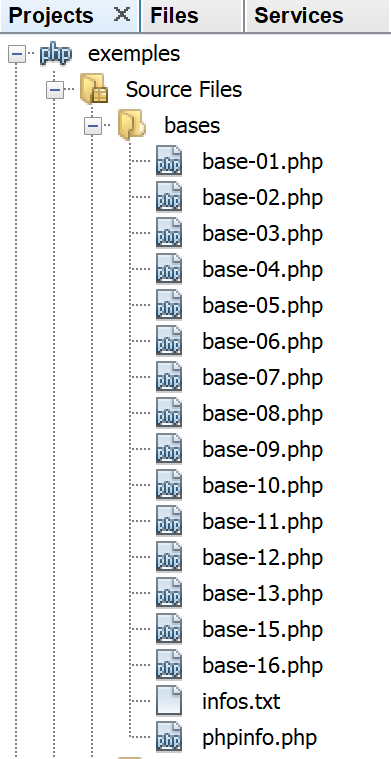
3.2. Configuration of PHP
PHP comes preconfigured via a text file named [php.ini]. All these configurations can be changed programmatically. The configuration of PHP greatly influences script execution. It is therefore important to understand it. The following script [phpinfo.php] allows this:
Comments
- line 3: the [phpinfo] function displays the configuration of PHP;
Execution results
The [phpinfo] function displays over 800 configuration lines here. We will not comment on them because most pertain to advanced usage of PHP. One important line is line 13 above: it indicates which [php.ini] file was used to configure the PHP that you will use to run your scripts. If you want to modify the execution configuration of PHP, this is the file you need to edit. There are numerous comments in this file explaining the role of the various configurations.
3.3. A first example
3.3.1. The code
Below is a [bases-01.php] program demonstrating the basic features of PHP.
<?php

// this is a comment
// variable used without being declared
$nom = "dupont";
// a screen display
print "nom=$nom\n";
// an array with elements of different types
$tableau = array("un", "deux", 3, 4);
// its number of elements
$n = count($tableau);
// a loop
for ($i = 0; $i < $n; $i++) {
  print "tableau[$i]=$tableau[$i]\n";
}
// initialize 2 variables with the contents of an array
list($chaine1, $chaine2) = array("chaine1", "chaine2");
// concatenation of the 2 strings
$chaine3 = $chaine1 . $chaine2;
// result display
print "[$chaine1,$chaine2,$chaine3]\n";
// use function
affiche($chaine1);
// the type of a variable can be known
afficheType("n", $n);
afficheType("chaine1", $chaine1);
afficheType("tableau", $tableau);
// the type of a variable can change at runtime
$n = "a changé";
afficheType("n", $n);
// a function can return a result
$res1 = f1(4);
print "res1=$res1\n";
// a function can render a table of values
list($res1, $res2, $res3) = f2();
print "(res1,res2,res3)=[$res1,$res2,$res3]\n";
// we could have retrieved these values in a table
$t = f2();
for ($i = 0; $i < count($t); $i++) {
  print "t[$i]=$t[$i]\n";
}
// testing
for ($i = 0; $i < count($t); $i++) {
  // displays only channels
  if (getType($t[$i]) === "string") {
    print "t[$i]=$t[$i]\n";
  }
}
// == and === comparison operators
if("2"==2){
  print "avec l'opérateur ==, la chaîne 2 est égale à l'entier 2\n";
}else{
  print "avec l'opérateur ==, la chaîne 2 n'est pas égale à l'entier 2\n";
}
if("2"===2){
  print "avec l'opérateur ===, la chaîne 2 est égale à l'entier 2\n";
}
else{
  print "avec l'opérateur ===, la chaîne 2 n'est pas égale à l'entier 2\n";
}
// other tests
for ($i = 0; $i < count($t); $i++) {
  // displays only integers >10
  if (getType($t[$i]) === "integer" and $t[$i] > 10) {
    print "t[$i]=$t[$i]\n";
  }
}
// une boucle while
$t = [8, 5, 0, -2, 3, 4];
$i = 0;
$somme = 0;
while ($i < count($t) and $t[$i] > 0) {
  print "t[$i]=$t[$i]\n";
  $somme += $t[$i];   //$somme=$somme+$t[$i]
  $i++;               //$i=$i+1
}//while
print "somme=$somme\n";

// end of program
exit;

//----------------------------------
function affiche($chaine) {
  // displays $chaine
  print "chaine=$chaine\n";
}

//poster
//----------------------------------
function afficheType($name, $variable) {
  // displays the type of $variable
  print "type[variable $" . $name . "]=" . getType($variable) . "\n";
}

//afficheType
//----------------------------------
function f1($param) {
  // adds 10 to $param
  return $param + 10;
}

//----------------------------------
function f2() {
  // returns 3 values
  return array("un", 0, 100);
}
?>
The results:
nom=dupont
tableau[0]=un
tableau[1]=deux
tableau[2]=3
tableau[3]=4
[chaine1,chaine2,chaine1chaine2]
chaine=chaine1
type[variable $n]=integer
type[variable $chaine1]=string
type[variable $tableau]=array
type[variable $n]=string
res1=14
(res1,res2,res3)=[un,0,100]
t[0]=un
t[1]=0
t[2]=100
t[0]=un
avec l'operator ==, string 2 is equal to integer 2
avec l'operator ===, string 2 is not equal to integer 2
t[2]=100
t[0]=8
t[1]=5
somme=13
Comments
- line 5: In PHP, variable types are not declared. These variables have a dynamic type that can change over time. $nom represents the variable with the identifier "name";
- line 7: to write to the screen, you can use the print statement or the echo statement;
- Line 9: The keyword array is used to define an array. The variable $nom[$i] represents the element $i of the array $tableau;
- line 11: the function count($tableau) returns the number of elements in the array $tableau;
- lines 13–15: a loop. Since this loop contains only one statement, curly braces are optional. In the remainder of this document, we will always use curly braces regardless of the number of statements;
- line 14: strings are enclosed in double quotes " or single quotes '. Inside double quotes, the variables $variable are evaluated, but not inside single quotes;
- line 17: the list function allows you to gather variables into a list and assign a value to them with a single assignment operation. Here, $chaine1="string1" and $chaine2="string2";
- line 19: the . operator is the string concatenation operator;
- lines 83–86: the keyword `function` defines a function. A function may or may not return values using the `return` statement. The calling code may ignore or retrieve the results of a function. A function can be defined anywhere in the code.
- line 92: the predefined function getType($variable) returns a string representing the type of $variable. This type may change over time;
- line 45: the === operator performs a strict comparison of two elements: they must be of the same type to be compared. The == operator is less strict: two elements can be equal without being of the same type. This is demonstrated by the statements on lines 50–60. In the case of the == operator, the comparison is performed after casting both compared elements to the same type. Implicit conversions then take place. It is quite easy to “forget” about these implicit conversions and thus end up with unexpected results, such as discovering that a condition is true when you expected it to be false. To avoid this pitfall, we will systematically use the === comparison operator;
- line 64: you can also use the Boolean operators OR and !;
- line 69: instead of the notation array(), you can use the notation [] to initialize an array from PHP7;
- line 80: the predefined function exit stops the script from running;
- line 107: the ?> tag marks the end of the PHP script. It is not essential. Furthermore, in a web context, it can cause problems if followed by spaces or line breaks, which are difficult to detect because they are not visible in a text editor. Therefore, in the rest of this document, we will systematically omit this tag;
Note: In this document, we will use the keyword [print] to display text on the console. Another method to achieve the same result is to use the keyword [echo]. There are subtle differences between these two keywords, but in the context of this document, there will be none. So if you prefer to use [echo], then do so.
3.3.2. Using Netbeans
Netbeans generates various warnings that are worth checking. Let’s take the example of the [bases-01.php] script:
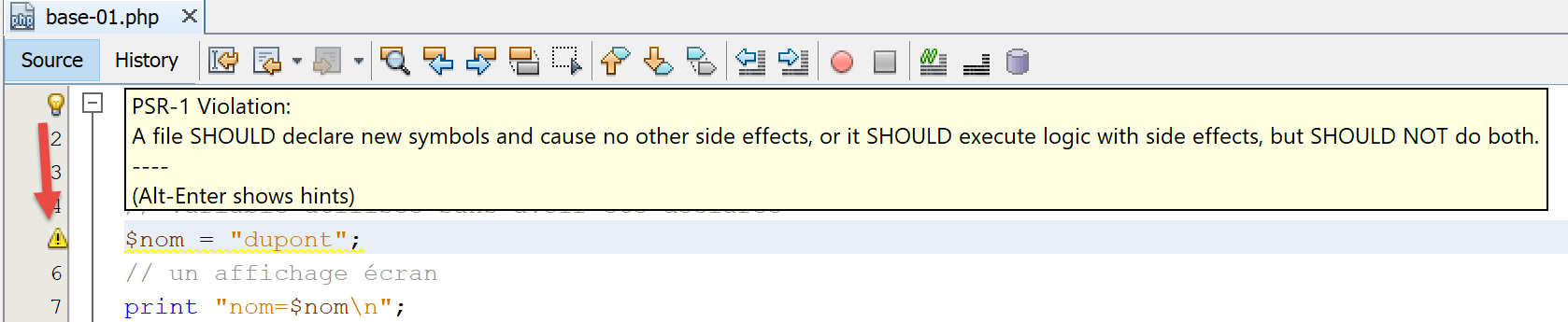
On line 5, Netbeans issues a warning that the file does not comply with the PSR-1 recommendation (PHP Standard Recommendations No. 1). The PSR are recommendations for producing standard code, thereby facilitating interoperability and the maintenance of code written by different people. It can be annoying to get warnings if you want to deliberately break the standards, for example because the project team has its own set of standards. What you want to check or not with Netbeans is configurable:
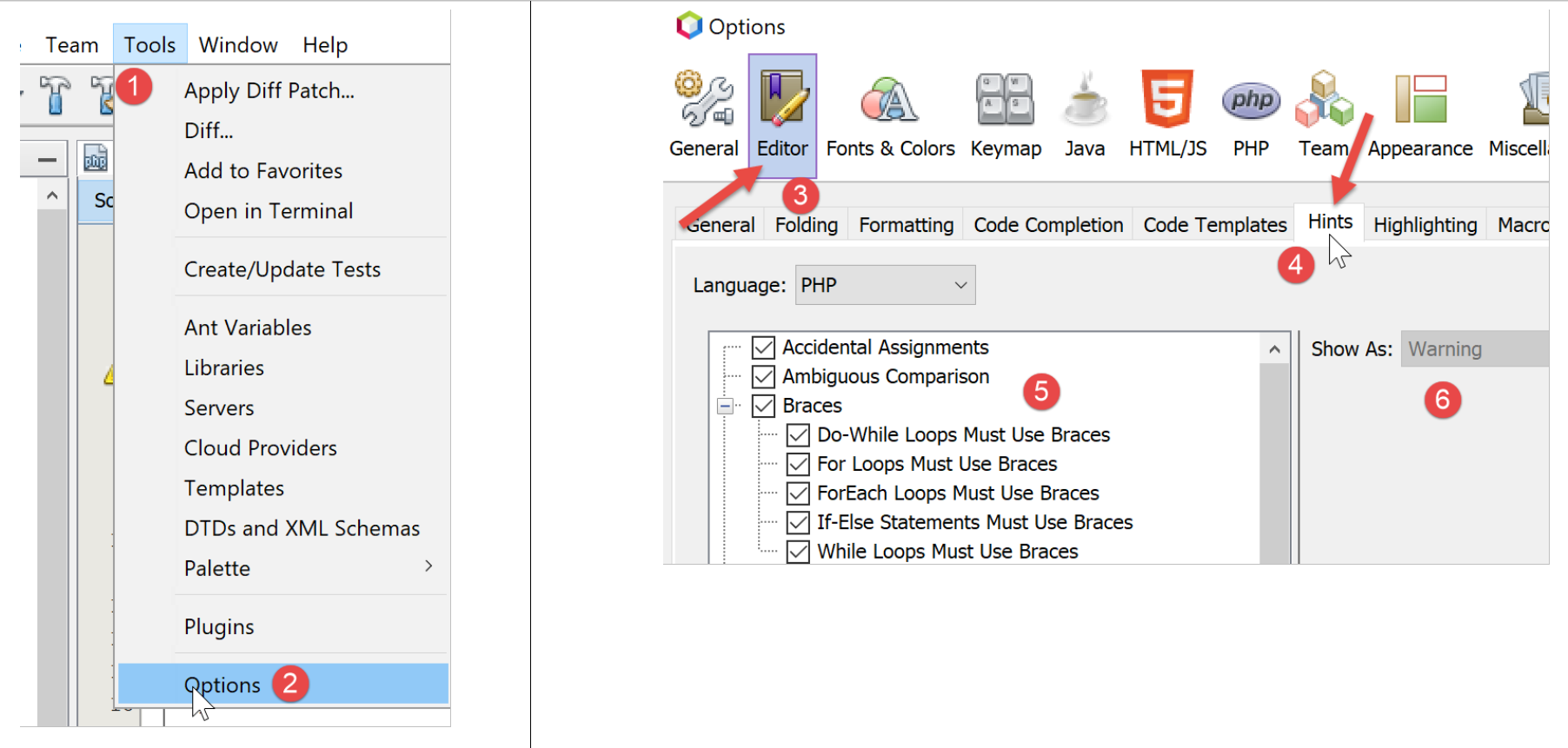
- in [5], you’ll find the elements you want to check with Netbeans;
- in [6], the severity level assigned to the error reported by Netbeans;
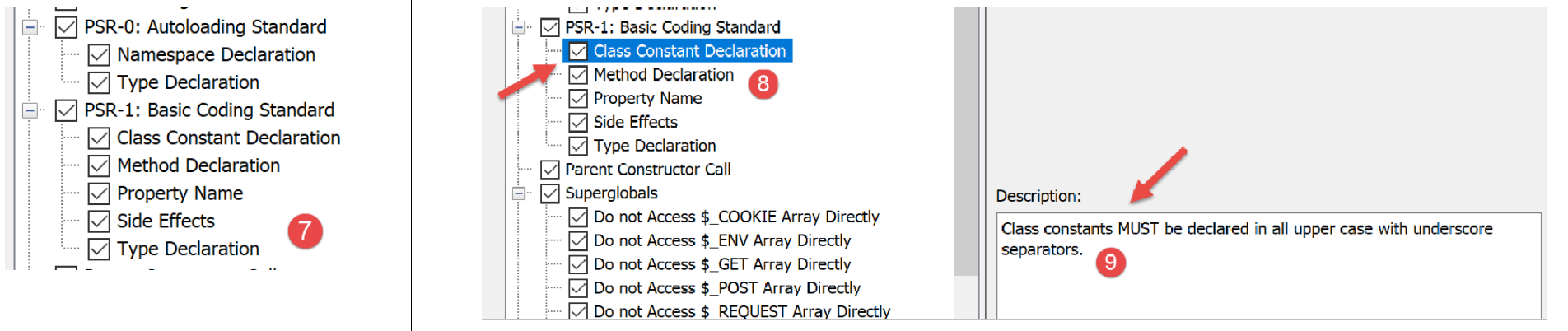
In [7], we see that we have requested a check to ensure the code follows the PSR-0 and PSR-1 recommendations. Nothing is mandatory. When learning the language, it is advisable to check as many of the options offered by Netbeans as possible. This way, you learn a lot. We will then adapt this check from Netbeans to the coding standards of a project team.
Let’s look at the PSR-1 coding standards:
Option | Check |
| Class constants MUST must be declared in all uppercase with underscore separators. Ex: const TAUX_TVA |
| The method name MUST must be declared in camelCase(). Ex: public function executeBatchImpots{} |
| Property names SHOULD must be declared in $StudlyCaps, $camelCase, or $under_score format (consistently within a scope) Ex: public SalaireAnnuel (StudlyCaps), public salaireAnnuel (camelCase), public salaire_annuel (under_score) |
| A file SHOULD declares new symbols and causes no other side effects, or it SHOULD executes logic with side effects, but SHOULD NOT does both. |
| Type names must be declared in a file (Code written for 5.2.x and earlier uses the pseudonamespacing convention of prefixes on type names). Each type is in its own file and is in a namespace of at least one level: a top-level vendor name. Ex: class EtudiantBoursier {} |
The PSR-1/4 recommendation states that in a PHP file, there must be:
- either a type declaration (classes, interfaces);
- or executable code without declarations of new types;
There are other PHP recommendations not enforced by Netbeans: PSR-3, PSR-4, PSR-6, PSR-7, and PSR-13.
For simplicity, not all examples in this document adhere to the PSR-1 recommendation, as this requires splitting class and interface code into separate files, which is too cumbersome for basic examples. It is therefore easier to put everything in a single file. For the example application presented as the central theme of this document, we have endeavored to follow the PSR-1 recommendation as closely as possible.
Some warnings from Netbeans indicate a potential error:

The [Unitialized Variables] warning indicates a probable error, often a typo in a variable name. The same applies to the [Unused Variables] warning.
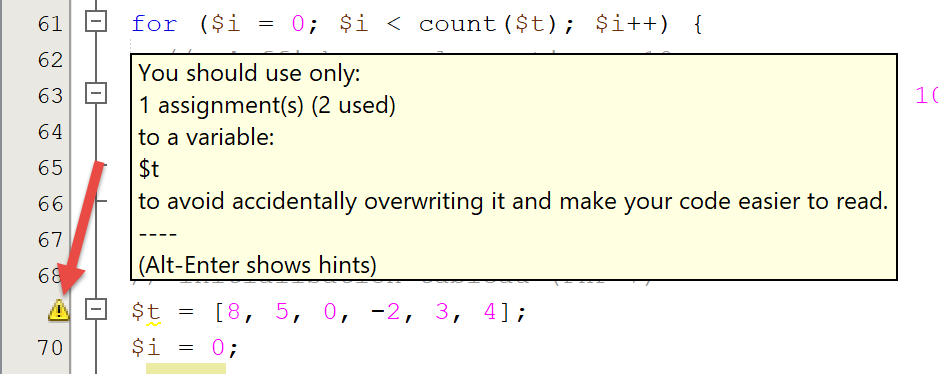
Finally, it is advisable to check all Netbeans warnings indicated by a panel in the left margin of the code and a yellow dash in the right margin:

3.4. Variable scope
3.4.1. Example 1
The [bases-02.php] script is as follows:
<?php

// variable scope

function f1() {
  // we use the global variable $i
  global $i;
  $i++;
  $j = 10;
  print "f1[i,j]=[$i,$j]\n";
}

function f2() {
  // we use the global variable $i
  global $i;
  $i++;
  $j = 20;
  print "f2[i,j]=[$i,$j]\n";
}

function f3() {
  // we use a local variable $i
  $i = 4;
  $j = 30;
  print "f3[i,j]=[$i,$j]\n";
}

// tests
$i = 0;
$j = 0;  // these two variables are known only to a function f
// only if it explicitly declares with the global instruction
// she wants to use them
f1();
f2();
f3();
print "test[i,j]=[$i,$j]\n";
The results:
Comments
- Lines 29–30: define two variables, $i and $j, in the main program. These variables are not known within the functions. Thus, in line 9, the variable $j in function f1 is a local variable of function f1 and is distinct from the variable $j in the main program. A function can access a variable $variable in the main program using the keyword global;
- line 7, the statement refers to the global variable $i of the main program;
3.4.2. Example 3
The script [bases-03.php] is as follows:
<?php

// the scope of a variable is global to code blocks
$i = 0; {
  $i = 4;
  $i++;
}
print "i=$i\n";
The results:
Comments
In some languages, a variable defined within curly braces has the scope of those braces: it is not known outside of them. The results above show that this is not the case in PHP. The variable $i defined on line 5 inside the curly braces is the same as the one used on lines 4 and 8 outside of them.
3.5. Type changes
Variables in PHP do not have a fixed type. Their type may change at runtime depending on the value assigned to the variable. In operations involving data of various types, the PHP interpreter performs implicit conversions to bring the operands into a common type. These implicit conversions, if unknown to the developer, can be a source of errors that are difficult to detect. Below is a [bases-04.php] script demonstrating implicit and explicit conversions:
<?php

// strict types for passing parameters
declare(strict_types=1);

// implicit type changes
// type -->bool
print "Conversion vers un booléen------------------------------\n";
showBool("abcd", "abcd");
showBool("", "");
showBool("[1, 2, 3]", [1, 2, 3]);
showBool("[]", []);
showBool("NULL", NULL);
showBool("0.0", 0.0);
showBool("0", 0);
showBool("4.6", 4.6);

function showBool(string $prefixe, $var) : void {
  print "(bool) $prefixe : ";
  // conversion of $var to Boolean is automatic in the following test
  if ($var) {
    print "true";
  } else {
    print "false";
  }
  print "\n";
}
Comments
- line 4: requires strict type checking of a function’s parameters when specified;
- line 18: the purpose of the function [showBool] is to demonstrate the implicit (automatic) conversion performed by the interpreter PHP when a value of any type must be converted to a Boolean (line 21);
- line 18: the parameter $var has no assigned type. The actual parameter can therefore be of any type. The parameter $prefixe, on the other hand, must be of type string. The function showBool returns no value (void);
- Line 21: In the if statement ($var), the value of $var must be converted to a Boolean so that the if statement can be evaluated. Surprisingly, the PHP interpreter has a response for any type of value given to it;
- lines 9–16: the value of the function parameter [showBool] will be, in turn:
- line 9: a non-empty string: result TRUE (case is not important, TRUE=true);
- line 10: an empty string: result FALSE;
- line 11: a non-empty array: result TRUE;
- line 12: an empty array: result FALSE;
- line 14: the real number 0: result FALSE;
- line 15: the integer 0: result FALSE;
- line 16: the real (or integer) number other than 0: result TRUE;
This is what the screen displays show:
Conversion vers un booléen------------------------------
(bool) abcd : true
(bool)  : false
(bool) [1, 2, 3] : true
(bool) [] : false
(bool) NULL : false
(bool) 0.0 : false
(bool) 0 : false
(bool) 4.6 : true
Let's continue with the script code:
//
// implicit changes from type string to a numeric type
// string --> number
print "Conversion chaîne vers nombre------------------------------\n";
showNumber("12");
showNumber("45.67");
showNumber("abcd");

function showNumber(string $var) : void {
  $nombre = $var + 1;
  var_dump($nombre);
  print "($var): $nombre\n";
}
Comments
- line 9: the function [showNumber] takes a parameter of type string and returns no result (void);
- line 10: this parameter is used in an arithmetic operation, which will force the PHP interpreter to attempt to convert $var into a number;
- line 5: will convert the string “12” into the integer 12;
- line 6: will convert the string “45.67” into the real number 45.67;
- line 7: will issue a warning but will still convert the string “abcd” into the number 0;
Here are the results of the execution:
Let's continue with the script code:
// explicit changes of type
// to int
showInt("12.45");
showInt(67.8);
showInt(TRUE);
showInt(NULL);

function showInt($var) : void {
  print "paramètre : ";
  var_dump($var);
  print "\n";
  print "résultat de la conversion : ";
  var_dump((int) $var);
  print "\n";
}
Comments
- Line 21: The [showInt] function accepts a parameter of any type and does not return a result. It attempts to convert the parameter $var to an integer on line 26. Generally, to convert a variable $var to type T, we write (T) $var, where T can be: int, integer, bool, boolean, float, double, real, string, array, object, unset;
- line 16: converts the string “12.45” to the integer 12;
- line 17: converts the real number 67.8 to the integer 67;
- line 18: converts the boolean TRUE to the integer 1 (the boolean FALSE to the integer 0);
- line 19: converts the pointer NULL to the integer 0;
This is what the screen displays show:
We continue our study of the script with the explicit conversion of values to the float type:
// to float
showFloat("12.45");
showFloat(67);
showFloat(TRUE);
showFloat(NULL);

function showFloat($var) : void {
  print "paramètre : ";
  var_dump($var);
  print "\n";
  print "résultat de la conversion : ";
  var_dump((float) $var);
  print "\n";
}
Comments
- Line 35: The function [showFloat] takes a parameter of any type and does not return a result;
- line 40: the value of this parameter is explicitly converted to a float;
- line 30: the string “12.45” is converted to the real number 12.45;
- line 31: the integer 67 is converted to the real number 67;
- line 32: the boolean TRUE is converted to the real number 1 (the value FALSE to the number 0);
- line 33: the pointer NULL is converted to the real number 0;
This is shown by the screen output:
We continue the script overview by examining conversions to the string type:
// to string
showstring(5);
showString(6.7);
showString(FALSE);
showString(NULL);

function showString($var) : void {
  print "paramètre : ";
  var_dump($var);
  print "\n";
  print "résultat de la conversion : ";
  var_dump((string) $var);
  print "\n";
}
- line 49: the function [showString] accepts a parameter of any type and does not return a result;
- line 54: the parameter value is converted to a string type;
- line 44: the integer 5 will be converted to the string "5";
- line 45: the floating-point number 6.7 will be converted to the string “6.7”;
- line 46: the boolean FALSE will be converted to an empty string;
- line 47: the pointer NULL will be converted to an empty string;
Here are the screen results:
3.6. Arrays
3.6.1. Standard one-dimensional arrays
The [bases-05.php] script is as follows:
<?php

// classic paintings
// initialization
$tab1 = array(0, 1, 2, 3, 4, 5);
// routes - 1
print "tab1 a " . count($tab1) . " éléments\n";
for ($i = 0; $i < count($tab1); $i++) {
    print "tab1[$i]=$tab1[$i]\n";
}
// routes - 2
print "tab1 a " . count($tab1) . " éléments\n";
reset($tab1);
while (list($clé, $valeur) = each($tab1)) {
    print "tab1[$clé]=$valeur\n";
}
// add elements
$tab1[] = $i++;
$tab1[] = $i++;
// routes - 3
print "tab1 a " . count($tab1) . " éléments\n";
$i = 0;
foreach ($tab1 as $élément) {
  print "tab1[$i]=$élément\n";
  $i++;
}
// delete last item
array_pop($tab1);
// routes - 4
print "tab1 a " . count($tab1) . " éléments\n";
for ($i = 0; $i < count($tab1); $i++) {
    print "tab1[$i]=$tab1[$i]\n";
}
// delete first element
array_shift($tab1);
// routes - 5
print "tab1 a " . count($tab1) . " éléments\n";
for ($i = 0; $i < count($tab1); $i++) {
    print "tab1[$i]=$tab1[$i]\n";
}
// addition at end of table
array_push($tab1, -2);
// routes - 6
print "tab1 a " . count($tab1) . " éléments\n";
for ($i = 0; $i < count($tab1); $i++) {
    print "tab1[$i]=$tab1[$i]\n";
}
// addition at the beginning of the table
array_unshift($tab1, -1);
// routes - 7
print "tab1 a " . count($tab1) . " éléments\n";
for ($i = 0; $i < count($tab1); $i++) {
    print "tab1[$i]=$tab1[$i]\n";
}
The results:
tab1 a 6 éléments
tab1[0]=0
tab1[1]=1
tab1[2]=2
tab1[3]=3
tab1[4]=4
tab1[5]=5
tab1 a 6 éléments

Deprecated: The each() function is deprecated. This message will be suppressed on further calls in C:\Data\st-2019\dev\php7\php5-exemples\exemples\exemple_04.php on line 14
tab1[0]=0
tab1[1]=1
tab1[2]=2
tab1[3]=3
tab1[4]=4
tab1[5]=5
tab1 a 8 éléments
tab1[0]=0
tab1[1]=1
tab1[2]=2
tab1[3]=3
tab1[4]=4
tab1[5]=5
tab1[6]=6
tab1[7]=7
tab1 a 7 éléments
tab1[0]=0
tab1[1]=1
tab1[2]=2
tab1[3]=3
tab1[4]=4
tab1[5]=5
tab1[6]=6
tab1 a 6 éléments
tab1[0]=1
tab1[1]=2
tab1[2]=3
tab1[3]=4
tab1[4]=5
tab1[5]=6
tab1 a 7 éléments
tab1[0]=1
tab1[1]=2
tab1[2]=3
tab1[3]=4
tab1[4]=5
tab1[5]=6
tab1[6]=-2
tab1 a 8 éléments
tab1[0]=-1
tab1[1]=1
tab1[2]=2
tab1[3]=3
tab1[4]=4
tab1[5]=5
tab1[6]=6
tab1[7]=-2
Comments
The program above demonstrates operations for manipulating an array of values. There are two notations for arrays in PHP:
Array 1 is called an array, and array 2 is called a dictionary or associative array, where elements are denoted as key => value. The notation $contraires["beau"] refers to the value associated with the key "beautiful." Here, that value is the string "ugly." Array 1 is simply a variant of the dictionary and could be written as:
We thus have $tableau[2]="three". Ultimately, there are only dictionaries. In the case of a classic array of n elements, the keys are the integers in the range [0,n-1].
- line 14: the function each($tableau) allows you to iterate over a dictionary. On each call, it returns a (key, value) pair from it. As shown in line 10 of the results, the each function is now obsolete in PHP 7;
- line 13: the reset function ($dictionnaire) sets the each function to the first (key, value) pair in the dictionary.
- line 14: the while loop stops when the each function returns an empty pair at the end of the dictionary. An implicit conversion is at work here: the empty pair is converted to the boolean FALSE;
- line 18: the notation $tableau[]=value adds the element value as the last element of $tableau;
- line 23: the array is iterated over using a foreach loop. This syntax allows you to iterate over a dictionary—and thus an array—using two different syntaxes:
The first syntax returns a (key,value) pair on each iteration, while the second syntax returns only the value element of the dictionary.
- line 28: the function array_pop($tableau) removes the last element from $tableau;
- line 35: the function array_shift($tableau) removes the first element from $tableau;
- line 42: the function array_push($tableau,value) adds value as the last element of $tableau;
- line 49: the function array_unshift($tableau,value) adds value as the first element of $tableau;
3.6.2. The dictionary or associative array
The script [bases-06.php] is as follows:
<?php

// dictionaries
$conjoints = ["Pierre" => "Gisèle", "Paul" => "Virginie", "Jacques" => "Lucette", "Jean" => ""];
// routes - 1
print "Nombre d'éléments du dictionnaire : " . count($conjoints) . "\n";
reset($conjoints);
while (list($clé, $valeur) = each($conjoints)) {
    print "conjoints[$clé]=$valeur\n";
}
// dictionary sorting on key
ksort($conjoints);
// routes - 2
reset($conjoints);
while (list($clé, $valeur) = each($conjoints)) {
    print "conjoints[$clé]=$valeur\n";
}
// list of dictionary keys
$clés = array_keys($conjoints);
for ($i = 0; $i < count($clés); $i++) {
    print "clés[$i]=$clés[$i]\n";
}
// list of dictionary values
$valeurs = array_values($conjoints);
for ($i = 0; $i < count($valeurs); $i++) {
    print "valeurs[$i]=$valeurs[$i]\n";
}
// key search
existe($conjoints, "Jacques");
existe($conjoints, "Lucette");
existe($conjoints, "Jean");
// deleting a key-value
unset($conjoints["Jean"]);
print "Nombre d'éléments du dictionnaire : " . count($conjoints) . "\n";
foreach ($conjoints as $clé => $valeur) {
  print "conjoints[$clé]=$valeur\n";
}
// end
exit;

function existe($conjoints, $mari) {
  // checks whether the key $mari exists in the dictionary $conjoints
  if (isset($conjoints[$mari])) {
        print "La clé [$mari] existe associée à la valeur [$conjoints[$mari]]\n";
    } else {
        print "La clé [$mari] n'existe pas\n";
    }
}
The results:
Nombre d'dictionary items: 4

Deprecated: The each() function is deprecated. This message will be suppressed on further calls in C:\Data\st-2019\dev\php7\php5-exemples\exemples\exemple_05.php on line 8
conjoints[Pierre]=Gisèle
conjoints[Paul]=Virginie
conjoints[Jacques]=Lucette
conjoints[Jean]=
conjoints[Jacques]=Lucette
conjoints[Jean]=
conjoints[Paul]=Virginie
conjoints[Pierre]=Gisèle
clés[0]=Jacques
clés[1]=Jean
clés[2]=Paul
clés[3]=Pierre
valeurs[0]=Lucette
valeurs[1]=
valeurs[2]=Virginie
valeurs[3]=Gisèle
La clé [Jacques] existe associée à la valeur [Lucette]
La clé [Lucette] n'does not exist
La clé [Jean] existe associée à la valeur []
Nombre d'dictionary items: 3
conjoints[Jacques]=Lucette
conjoints[Paul]=Virginie
conjoints[Pierre]=Gisèle
Comments
The code above applies to a dictionary what we previously saw for a simple array. We will only comment on the new features:
- line 12: the ksort (key sort) function allows you to sort a dictionary in the natural order of the keys;
- line 19: the function array_keys($dictionnaire) returns the list of dictionary keys as an array;
- line 24: the function array_values($dictionnaire) returns the list of dictionary values as an array;
- line 43: the function isset($variable) returns TRUE if the variable $variable has been defined, FALSE otherwise;
- line 33: the function unset($variable) deletes the variable $variable.
3.6.3. Multidimensional arrays
The script [bases-07.php] is as follows:
<?php

// classic multidimensional tables
// initialization
$multi = array(array(0, 1, 2), array(10, 11, 12, 13), array(20, 21, 22, 23, 24));
// route
for ($i1 = 0; $i1 < count($multi); $i1++) {
  for ($i2 = 0; $i2 < count($multi[$i1]); $i2++) {
    print "multi[$i1][$i2]=" . $multi[$i1][$i2] . "\n";
  }
}
// multidimensional dictionaries
// initialization
$multi = array("zéro" => array(0, 1, 2), "un" => array(10, 11, 12, 13), "deux" => array(20, 21, 22, 23, 24));
// route
foreach ($multi as $clé => $valeur) {
    for ($i2 = 0; $i2 < count($valeur); $i2++) {
        print "multi[$clé][$i2]=" . $multi[$clé][$i2] . "\n";
    }
}
Results:
multi[0][0]=0
multi[0][1]=1
multi[0][2]=2
multi[1][0]=10
multi[1][1]=11
multi[1][2]=12
multi[1][3]=13
multi[2][0]=20
multi[2][1]=21
multi[2][2]=22
multi[2][3]=23
multi[2][4]=24
multi[zéro][0]=0
multi[zéro][1]=1
multi[zéro][2]=2
multi[un][0]=10
multi[un][1]=11
multi[un][2]=12
multi[un][3]=13
multi[deux][0]=20
multi[deux][1]=21
multi[deux][2]=22
multi[deux][3]=23
multi[deux][4]=24
Comments
- line 5: the elements of the array $multi are themselves arrays;
- line 14: the array $multi becomes a dictionary (key, value) where each value is an array;
3.7. Strings
3.7.1. Notation
The script [bases-08.php] is as follows:
<?php

// string notation
$chaine1 = "un";
$chaine2 = 'un';
print "[$chaine1,$chaine2]\n";
?>
Results:
3.7.2. Comparison
The [bases-09.php] script is as follows:
<?php

// strict adherence to function parameter types
declare(strict_types=1);

// comparison function
function compareModele2Chaine(string $chaine1, string $chaine2): void {
  // compare string1 and string2
  if ($chaine1 === $chaine2) {
    print "[$chaine1] est égal à [$chaine2]\n";
  } else {
    print "[$chaine1] est différent de [$chaine2]\n";
  }
}

// string comparison tests
compareModele2Chaine("abcd", "abcd");
compareModele2Chaine("", "");
compareModele2Chaine("1", "");
exit;
Results:
[abcd] est égal à [abcd]
[] est égal à []
[1] est différent de []
Comments
- Line 9 of the code: we could have used the == operator instead of ===. The latter operator is more restrictive in that it requires both operands to be of the same type. Note that here, it could have been replaced by the == operator since the type of both parameters is set to string in the function signature;
3.7.3. Links between strings and arrays
The script [bases-10.php] is as follows:
<?php

// string to array
$chaine = "1:2:3:4";
$tab = explode(":", $chaine);
// parcours tableau
print "tab a " . count($tab) . " éléments\n";
for ($i = 0; $i < count($tab); $i++) {
    print "tab[$i]=$tab[$i]\n";
}
// table to string
$chaine2 = implode(":", $tab);
print "chaine2=$chaine2\n";
// add an empty field
$chaine .= ":";
print "chaîne=$chaine\n";
$tab = explode(":", $chaine);
// parcours tableau
print "tab a " . count($tab) . " éléments\n";
for ($i = 0; $i < count($tab); $i++) {
    print "tab[$i]=$tab[$i]\n";
} // we now have 5 elements, the last being empty
// let's add another empty field
$chaine .= ":";
print "chaîne=$chaine\n";
$tab = explode(":", $chaine);
// parcours tableau
print "tab a " . count($tab) . " éléments\n";
for ($i = 0; $i < count($tab); $i++) {
    print "tab[$i]=$tab[$i]\n";
} // we now have 6 elements, the last two being empty
Results:
tab a 4 éléments
tab[0]=1
tab[1]=2
tab[2]=3
tab[3]=4
chaine2=1:2:3:4
chaîne=1:2:3:4:
tab a 5 éléments
tab[0]=1
tab[1]=2
tab[2]=3
tab[3]=4
tab[4]=
chaîne=1:2:3:4::
tab a 6 éléments
tab[0]=1
tab[1]=2
tab[2]=3
tab[3]=4
tab[4]=
tab[5]=
Comments
- Line 5: The explode($séparateur,$chaine) function retrieves the fields from $chaine separated by $séparateur. Thus, explode(":",$chaine) retrieves the elements of $chaine separated by the string ":" as an array;
- Line 12: The function implode($séparateur,$tableau) performs the inverse operation of the explode function. It returns a string consisting of the elements of $tableau separated by $séparateur;
3.7.4. Regular expressions
The script [bases-11.php] is as follows:
<?php

// strict type for function parameters
declare (strict_types=1);

// regular expressions in php
// retrieve the various fields of a string
// the model: a sequence of numbers surrounded by any characters
// you only want to retrieve the sequence of digits
$modèle = "/(\d+)/";
// the chain is compared with the model
compareModele2Chaine($modèle, "xyz1234abcd");
compareModele2Chaine($modèle, "12 34");
compareModele2Chaine($modèle, "abcd");

// the model: a sequence of numbers surrounded by any characters
// we want the sequence of numbers and the fields that follow and precede them
$modèle = "/^(.*?)(\d+)(.*?)$/";
// the chain is compared with the
compareModele2Chaine($modèle, "xyz1234abcd");
compareModele2Chaine($modèle, "12 34");
compareModele2Chaine($modèle, "abcd");

// the template - a date in dd/mm/aa format
$modèle = "/^\s*(\d\d)\/(\d\d)\/(\d\d)\s*$/";
compareModele2Chaine($modèle, "10/05/97");
compareModele2Chaine($modèle, "  04/04/01  ");
compareModele2Chaine($modèle, "5/1/01");

// the model - a decimal number
$modèle = "/^\s*([+|-]?)\s*(\d+\.\d*|\.\d+|\d+)\s*/";
compareModele2Chaine($modèle, "187.8");
compareModele2Chaine($modèle, "-0.6");
compareModele2Chaine($modèle, "4");
compareModele2Chaine($modèle, ".6");
compareModele2Chaine($modèle, "4.");
compareModele2Chaine($modèle, " + 4");

// end
exit;

// --------------------------------------------------------------------------
function compareModele2Chaine(string $modèle, string $chaîne): void {
  // compares the $chaîne string with the $modèle model
  // the chain is compared with the
  $champs = [];
  $correspond = preg_match($modèle, $chaîne, $champs);
  // displaying results
  print "\nRésultats($modèle,$chaîne)\n";
  if ($correspond) {
    for ($i = 0; $i < count($champs); $i++) {
      print "champs[$i]=$champs[$i]\n";
    }
  } else {
    print "La chaîne [$chaîne] ne correspond pas au modèle [$modèle]\n";
  }
}
Results:
Résultats(/(\d+)/,xyz1234abcd)
champs[0]=1234
champs[1]=1234

Résultats(/(\d+)/,12 34)
champs[0]=12
champs[1]=12

Résultats(/(\d+)/,abcd)
La chaîne [abcd] ne correspond pas au modèle [/(\d+)/]

Résultats(/^(.*?)(\d+)(.*?)$/,xyz1234abcd)
champs[0]=xyz1234abcd
champs[1]=xyz
champs[2]=1234
champs[3]=abcd

Résultats(/^(.*?)(\d+)(.*?)$/,12 34)
champs[0]=12 34
champs[1]=
champs[2]=12
champs[3]= 34

Résultats(/^(.*?)(\d+)(.*?)$/,abcd)
La chaîne [abcd] ne correspond pas au modèle [/^(.*?)(\d+)(.*?)$/]

Résultats(/^\s*(\d\d)\/(\d\d)\/(\d\d)\s*$/,10/05/97)
champs[0]=10/05/97
champs[1]=10
champs[2]=05
champs[3]=97

Résultats(/^\s*(\d\d)\/(\d\d)\/(\d\d)\s*$/,  04/04/01  )
champs[0]=  04/04/01
champs[1]=04
champs[2]=04
champs[3]=01

Résultats(/^\s*(\d\d)\/(\d\d)\/(\d\d)\s*$/,5/1/01)
La chaîne [5/1/01] ne correspond pas au modèle [/^\s*(\d\d)\/(\d\d)\/(\d\d)\s*$/]

Résultats(/^\s*([+|-]?)\s*(\d+\.\d*|\.\d+|\d+)\s*/,187.8)
champs[0]=187.8
champs[1]=
champs[2]=187.8

Résultats(/^\s*([+|-]?)\s*(\d+\.\d*|\.\d+|\d+)\s*/,-0.6)
champs[0]=-0.6
champs[1]=-
champs[2]=0.6

Résultats(/^\s*([+|-]?)\s*(\d+\.\d*|\.\d+|\d+)\s*/,4)
champs[0]=4
champs[1]=
champs[2]=4

Résultats(/^\s*([+|-]?)\s*(\d+\.\d*|\.\d+|\d+)\s*/,.6)
champs[0]=.6
champs[1]=
champs[2]=.6

Résultats(/^\s*([+|-]?)\s*(\d+\.\d*|\.\d+|\d+)\s*/,4.)
champs[0]=4.
champs[1]=
champs[2]=4.

Résultats(/^\s*([+|-]?)\s*(\d+\.\d*|\.\d+|\d+)\s*/, + 4)
champs[0]= + 4
champs[1]=+
champs[2]=4
Comments
- Here we use regular expressions to extract various fields from a string. Regular expressions allow us to overcome the limitations of the implode function. The principle is to compare a string to another string called a pattern using the preg_match function:
$correspond = preg_match($modèle, $chaîne, $champs);
The preg_match function returns a Boolean value TRUE if the pattern can be found in the string. If so, $champs[0] represents the substring matching the pattern. Furthermore, if the pattern contains subpatterns in parentheses, $champs[1] is the portion of $chaîne corresponding to the first subpattern, $champs[2] is the part of $chaîne corresponding to the second subpattern, and so on…
Let’s consider the first example. The pattern is defined on line 10: it matches a sequence of one or more (+) digits (\d) located anywhere in a string. Additionally, the pattern defines a subpattern enclosed in parentheses;
- line 12: the pattern /(\d+)/ (a sequence of one or more digits anywhere in the string) is compared to the string "xyz1234abcd". We see that the substring 1234 matches the pattern. We therefore have $champs[0] equal to "1234". Additionally, the pattern has subpatterns in parentheses. We will have $champs[1] = "1234";
- line 13: the pattern /(\d+)/ is compared to the string "12 34". We see that the substrings 12 and 34 match the pattern. The comparison stops at the first substring that matches the pattern. We therefore have $champs[0]=12 and $champs[1]=12;
- line 14: the pattern /(\d+)/ is compared to the string "abcd". No match is found;
Let's explain the patterns used in the rest of the code:
$modèle = "/^(.*?)(\d+)(.*?)$/";
matches the start of the string (^), followed by zero or more (*) arbitrary characters (.), then one or more (+) digits, followed by zero or more (*) arbitrary characters (.). The pattern (.*) matches zero or more arbitrary characters. Such a pattern will match any string. Thus, the pattern /^(.*)(\d+)(.*)$/ will never be found because the first subpattern (.*) will consume the entire string. The pattern (.*?)(\d+) matches 0 or more any characters up to the next subpattern (?), in this case \d+. Therefore, the digits are no longer matched by the (.*). The pattern above thus matches [début de chaîne (^), une suite de caractères quelconques (.*?), une suite d'un ou plusieurs chiffres (\d+), une suite de caractères quelconques (.*?), la fin de la chaîne ($)].
$modèle = "/^\s*(\d\d)\/(\d\d)\/(\d\d)\s*$/";
matches [début de chaîne (^), 2 chiffres (\d\d), le caractère / (\/), 2 chiffres, /, 2 chiffres, une suite de 0 ou plusieurs espaces (\s*), la fin de chaîne ($)].
$modèle = "/^\s*([+|-]?)\s*(\d+\.\d*|\.\d+|\d+)\s*/";
matches a string start (^), 0 or more spaces (\s*), a + or - sign [+|-] occurring 0 or 1 time (?), a sequence of 0 or more spaces (\s*), 1 or more digits followed by a decimal point followed by zero or more digits (\d+\.\d*) or (|) a decimal point (\.) followed by one or more digits (\d+) or (|) one or more digits (\d+), a sequence of zero or more spaces (\s*)].
Note: The term [espace] in regular expressions refers to a set of characters: whitespace, newline \n, tab \t, carriage return \r, form feed \f…
3.8. Functions
3.8.1. Parameter Passing Method
The [base-12.php] script is as follows:
<?php

// function parameter step mode
// strict adherence to parameter type
declare(strict_types=1);

function f(int &$i, int $j): void {
  // $i will be obtained by reference
  // $j will be obtained by value
  $i++;
  $j++;
  print "f[i,j]=[$i,$j]\n";
}

// tests
$i = 0;
$j = 0;
// $i and $j are passed to function f
f($i, $j);
print "test[i,j]=[$i,$j]\n";
Results:
Comments
The code above demonstrates the two ways of passing parameters to a function. Consider the following example:
- line 1: defines the formal parameters $a and $b of the function f. This function processes these two formal parameters and returns a result;
- line 7: calls the function f with two actual parameters $i and $j. The relationships between the formal parameters ($a, $b) and the actual parameters ($i, $j) are defined by lines 1 and 7:
- &$a: the & sign indicates that the formal parameter $a will take on the value of the address of the actual parameter $i. In other words, $a and $i are two references to the same memory location. Manipulating the formal parameter $a is equivalent to manipulating the actual parameter $i. This is demonstrated by the code execution. This passing mode is suitable for output parameters and large data sets such as arrays and dictionaries. This passing mode is called pass-by-reference.
- $b: The formal parameter $b will take on the value of the actual parameter $j. This is a pass-by-value. The formal and actual parameters are two different variables. Manipulating the formal parameter $b has no effect on the actual parameter $j. This is demonstrated by the code execution. This passing mode is suitable for input parameters.
- Consider the exchange function that accepts two formal parameters, $a and $b. The function swaps the values of these two parameters. Thus, during a call to `exchange` ($i, $j), the calling code expects the values of the two actual parameters to be swapped. These are therefore output parameters (they are modified). We will therefore write:
The following script, [base-13.php], provides additional examples:
<?php

// types in strict mode
// declare(strict_types = 1);

// parameter switching mode

function f(&$i, $j) {
  // $i will be obtained by reference
  // $j will be obtained by value
  $i++;
  $j++;
  print "f[i,j]=[$i,$j]\n";
}

function g(int &$i, int $j) : void {
  // $i will be obtained by reference
  // $j will be obtained by value
  $i++;
  $j++;
  print "g[i,j]=[$i,$j]\n";
}

// tests
$i = 0;
$j = 0;
// $i and $j are passed to function f
f($i, $j);
print "test[i,j]=[$i,$j]\n";
// $i and $j are passed to function g
g($i, $j);
print "test[i,j]=[$i,$j]\n";
// pass incorrect parameters to f
$a=5.3;
$b=6.2;
f($a, $b);
print "test[a,b]=[$a,$b]\n";
// pass incorrect parameters to f
$a=5.3;
$b=6.2;
g($a, $b);
print "test[a,b]=[$a,$b]\n";
Comments
- lines 8–14: the function f discussed in the previous paragraph, but the parameters are not typed;
- lines 16–22: the function g does the same thing as the function f, but we specify the type of the expected parameters—this is a new feature PHP 7. We expect two parameters of type int. We want to see what happens when the actual parameter passed to the function does not have the type expected by the function;
- lines 25–26: $i and $j are two integers;
- lines 28–29: call to function f with parameters of the expected type;
- lines 31-32: call to function g with parameters of the expected type;
- lines 34-35: the variables $a and $b are of type float;
- lines 36-37: call to function f with parameters that are not of the expected type;
- lines 41-42: call to function g with parameters that are not of the expected type;
Results
- Lines 5–6 show that the function f accepted both float-type parameters and worked with them;
- Lines 7–8 show that the function g accepted the two float-type parameters but converted them to type int (line 7);
Now let’s uncomment line 4:
This statement specifies that the types of the formal parameters must be respected. If this is not the case, an error is reported. The results of the execution then become:
- lines 9-10: the PHP 7 interpreter threw an exception to indicate that the first parameter passed to the g function was of the wrong type. It is recommended to be strict about parameter types whenever possible to detect function call errors;
3.8.2. Results returned by a function
The script [base-15.php] is as follows:
<?php

// types in strict mode
declare(strict_types=1);

// results rendered by a function
// a function can return several values in an array
list($res1, $res2, $res3) = f1(10);
print "[$res1,$res2,$res3]\n";
$res = f1(10);
for ($i = 0; $i < count($res); $i++) {
  print "f1 : res[$i]=$res[$i]\n";
}

// a function can render an object
$res = f2(10);
print "f2 : [$res->res1,$res->res2,$res->res3]\n";
// what kind of object?
print "nature de l'objet : ";
var_dump($res);
print "\n";

// we do the same with the f3 function
$res = f3(10);
print "f3 : [$res->res1,$res->res2,$res->res3]\n";
// what kind of object?
print "nature de l'objet : ";
var_dump($res);
print "\n";

// end
exit;

// function f1
function f1(int $valeur): array {
  // returns an array ($valeur+1,$valeur+2,$valeur+3)
  return array($valeur + 1, $valeur + 2, $valeur + 3);
}

// function f2
function f2(int $valeur): object {
  // renders an object ($valeur+1,$valeur+2,$valeur+3)
  $res->res1 = $valeur + 1;
  $res->res2 = $valeur + 2;
  $res->res3 = $valeur + 3;
  // makes the object
  return $res;
}

// function f3 - does the same thing as function f2
function f3(int $valeur): object {
  // renders an object ($valeur+1,$valeur+2,$valeur+3)
  $res = new stdclass();
  $res->res1 = $valeur + 1;
  $res->res2 = $valeur + 2;
  $res->res3 = $valeur + 3;
  // makes the object
  return $res;
}
Results
[11,12,13]
f1 : res[0]=11
f1 : res[1]=12
f1 : res[2]=13

Warning: Creating default object from empty value in C:\Data\st-2019\dev\php7\php5-exemples\exemples\bases\base-15.php on line 43
f2 : [11,12,13]
nature de l'object : object(stdClass)#1 (3) {
  ["res1"]=>
  int(11)
  ["res2"]=>
  int(12)
  ["res3"]=>
  int(13)
}

f3 : [11,12,13]
nature de l'object : object(stdClass)#2 (3) {
  ["res1"]=>
  int(11)
  ["res2"]=>
  int(12)
  ["res3"]=>
  int(13)
}
Comments
- The previous program shows that a function PHP can return a set of results rather than a single one, in the form of an array or an object. The concept of an object is explained in more detail below;
- lines 35–38: the function f1 returns multiple values in the form of an array (array);
- lines 41–48: the function f2 returns multiple values in the form of an object;
- lines 51–59: the function f3 is identical to the function f2 except that it explicitly creates an object on line 53;
- Line 6 of the results issues a warning indicating that PHP was forced to create a default object on line 43 of the code, i.e., when using the notation [$res→res1]. The function var_dump on line 20 of the code provides access to the object’s type and its content. In the results, we see that:
- line 8: the default object created is of type stdClass;
- lines 9–10: the res1 property is of type integer and has the value 11;
- etc…
- To avoid the warning on line 6 of the results, we explicitly create, on line 53 of function f3, an object of type stdClass;
3.9. The text files
The script [bases-16.php] is as follows:
<?php

// strict adherence to function parameter types
declare (strict_types=1);

// sequential operation of a text file
// this is a set of lines of the form login:pwd:uid:gid:infos:dir:shell
// each line is put into a dictionary in the form login => uid:gid:infos:dir:shell
// set the file name
$INFOS = "infos.txt";
// we open it in creation
if (!$fic = fopen($INFOS, "w")) {
  print "Erreur d'ouverture du fichier $INFOS en écriture\n";
  exit;
}
// generate arbitrary content
for ($i = 0; $i < 100; $i++) {
  fputs($fic, "login$i:pwd$i:uid$i:gid$i:infos$i:dir$i:shell$i\n");
}
// close the file
fclose($fic);

// we use it - fgets keeps the end-of-line marker
// this prevents the retrieval of an empty string when reading a blank line
// open it for reading
if (!$fic = fopen($INFOS, "r")) {
  print "Erreur d'ouverture du fichier $INFOS en lecture\n";
  exit;
}

// lines are less than 1000 characters long
// line reading stops at the end-of-line mark
// or the end of file
while ($ligne = fgets($fic, 1000)) {
  // delete the end-of-line marker if it exists
  $ligne = cutNewLineChar($ligne);
  // put the line in a table
  $infos = explode(":", $ligne);
  // retrieve login
  $login = array_shift($infos);
  // we neglect the pwd
  array_shift($infos);
  // create a dictionary entry
  $dico[$login] = $infos;
}
// close it
fclose($fic);

// using the dictionary
afficheInfos($dico, "login10");
afficheInfos($dico, "X");

// end
exit;

// --------------------------------------------------------------------------
function afficheInfos(array $dico, string $clé): void {
  // displays the value associated with key in the $dico dictionary if it exists
  if (isset($dico[$clé])) {
    // value exists - is it a painting?
    $valeur = $dico[$clé];
    if (is_array($valeur)) {
      print "[$clé," . join(":", $valeur) . "]\n";
    } else {
      // $valeur is not an array
      print "[$clé,$valeur]\n";
    }
  } else {
    // $clé is not a key in the $dico dictionary
    print "la clé [$clé] n'existe pas\n";
  }
}

// --------------------------------------------------------------------------
function cutNewLinechar(string $ligne): string {
  // delete the end-of-line mark from $ligne if it exists
  $L = strlen($ligne);  // line length
  while (substr($ligne, $L - 1, 1) == "\n" or substr($ligne, $L - 1, 1) == "\r") {
    $ligne = substr($ligne, 0, $L - 1);
    $L--;
  }
  // end
  return($ligne);
}
The file infos.txt:
The results:
Comments
- line 12: fopen(nom_fichier,"w") opens the file nom_fichier for writing (w=write). If the file does not exist, it is created. If it exists, it is cleared. If creation fails, fopen returns false. In the statement if (!$fic = fopen($INFOS, "w")) {…}, there are two successive operations: 1) $fic = fopen(..) 2) if( ! $fic) {…} ;
- Line 18: fputs($fic, $chaîne) writes a string to the file $fic. $chaine is written with the newline character \n appended to it;
- line 21: fclose($fic) closes the file $fic;
- line 26: fopen(nom_fichier,"r") opens the file nom_fichier for reading (r=read). If opening fails (for example, the file does not exist), fopen returns false;
- line 34: fgets($fic, 1000) reads the next line of the file, limited to 1000 characters. In the while loop ($ligne = fgets($fic, 1000)) {…}, there are two successive operations: 1) $ligne = fgets(…) 2) while ( ! $ligne). After the last character of the file has been read, the fgets function returns false and the while loop stops. Here, the fgets function attempts to read up to 1000 characters but stops as soon as a newline character is encountered. Since all lines here have fewer than 1000 characters, [fgets] reads a line of text, including the end-of-line character. The cutNewLineChar function in lines 75–84 removes any end-of-line characters;
- line 77: the function strlen($chaîne) returns the number of characters in $chaîne;
- line 78: the function substr($ligne, $position, $taille) returns $taille characters from $ligne, starting from character #$position, where the first character is #0. On Windows machines, the end-of-line marker is "\r\n". On Unix machines, it is the string "\n";
- line 40: the function array_shift($tableau) removes the first element of $tableau and returns it as the result. Here, we ignore the result returned by array_shift;
- line 62: the function is_array($variable) returns true if $variable is an array, false otherwise;
- line 63: the join function does the same thing as the implode function we encountered earlier;
3.10. Encoding / Decoding jSON
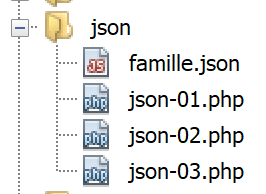
jSON encoding/decoding (JavaScript Object Notation) is something we will use extensively in the exercise that serves as the central theme of this document. The [json-01.php, json-02.php, json-03.php] scripts explain what you need to know for the rest of the document.
The [json-01.php] script is as follows:
<?php

$array1 = ["nom" => "séléné", "prénom" => "bénédicte", "âge" => 34];
// encoding json of array1 with escaped Unicode characters
print "encodage json du tableau array1 avec caractères Unicode échappés\n";
$json1 = json_encode($array1);
print "json1=$json1\n";
// encoding json of array1 with non-escaped Unicode characters
print "encodage json du tableau array1 avec caractères Unicode non échappés\n";
$json2 = json_encode($array1, JSON_UNESCAPED_UNICODE);
print "json2=$json2\n";
// decoding jSON in associative array
print "décodage jSON de json2 dans tableau associatif\n";
$array2 = json_decode($json2, true);
var_dump($array2);
foreach ($array2 as $key => $value) {
  print "$key:$value\n";
}
// decoding jSON in object
print "décodage jSON de json2 dans objet stdClass\n";
$array2 = json_decode($json2);
var_dump($array2);
print "prénom=$array2->prénom\n";
print "nom=$array2->nom\n";
print "âge=$array2->âge\n";
Results
Comments
- line 6 of the code: the function [json_encode] converts its parameter into the string jSON;
- line 2 of the results: the resulting string jSON. The Unicode characters éâ have been replaced by their Unicode codes, which begin with \u;
- Line 10 of the code: we do the same thing again, this time specifying that the Unicode characters should be preserved as-is;
- line 4 of the results: the resulting string jSON. It is much more readable;
- Lines 14–18 of the code: we perform the reverse operation. We convert the string jSON into an associative array;
- lines 6–13 of the results: we see that we have obtained an associative array;
- lines 19–25 of the code: we convert a string jSON into an object of type [stdClass];
- lines 18–25 of the results: we see that we have retrieved an object of type [stdClass];
- lines 23–25 of the code: the attribute A of an object O is denoted as [O→A];
We can encode multi-level arrays in jSON, as shown in the following [json-02.php] script:
<?php

$array = ["nom" => "séléné", "prénom" => "bénédicte", "âge" => 34,
  "mari" => ["nom" => "icariù", "prénom" => "ignacio", "âge" => 35],
  "enfants" => [
    ["prénom" => "angèle", "age" => 8],
    ["prénom" => "andré", "age" => 2],
  ]];
// encoding jSON of the multi-level array
print "encodage jSON d'un tableau à plusieurs niveaux\n";
$json = json_encode($array, JSON_UNESCAPED_UNICODE);
print "json=$json\n";
Results
encodage jSON d'a multi-level picture
json={"nom":"séléné","prénom":"bénédicte","âge":34,"mari":{"nom":"icariù","prénom":"ignacio","âge":35},"enfants":[{"prénom":"angèle","age":8},{"prénom":"andré","age":2}]}
Comments
In the string jSON:
- non-associative arrays are enclosed in square brackets [] ;
- associative arrays are enclosed in curly braces {};
The script [json-03.php] demonstrates how to process the following jSON and [famille.json] files:
{
    "épouse": {
        "nom": "séléné",
        "prénom": "bénédicte",
        "âge": 34
    },
    "mari": {
        "nom": "icariù",
        "prénom": "ignacio",
        "âge": 35
    },
    "enfants": [
        {
            "prénom": "angèle",
            "age": 8
        },
        {
            "prénom": "andré",
            "age": 2
        }
    ]
}
The script [json-03.php] is as follows:
<?php

// reading the jSON file
$json = file_get_contents("famille.json");
// decoding json into object
$famille1 = json_decode($json);
print "----famille1\n";
var_dump($famille1);
// decoding json into an associative array
print "----famille2\n";
$famille2 = json_decode($json, true);
var_dump($famille2);
Comments
- line 4: the function [file_get_contents] reads the contents of the file named [famille.json] and stores them in the variable [$json];
- The variable is then decoded into an object (lines 5–8) and an associative array (lines 9–12);
Results
----family1
object(stdClass)#2 (3) {
  ["épouse"]=>
  object(stdClass)#1 (3) {
    ["nom"]=>
    string(9) "séléné"
    ["prénom"]=>
    string(11) "bénédicte"
    ["âge"]=>
    int(34)
  }
  ["mari"]=>
  object(stdClass)#3 (3) {
    ["nom"]=>
    string(7) "icariù"
    ["prénom"]=>
    string(7) "ignacio"
    ["âge"]=>
    int(35)
  }
  ["enfants"]=>
  array(2) {
    [0]=>
    object(stdClass)#4 (2) {
      ["prénom"]=>
      string(7) "angèle"
      ["age"]=>
      int(8)
    }
    [1]=>
    object(stdClass)#5 (2) {
      ["prénom"]=>
      string(6) "andré"
      ["age"]=>
      int(2)
    }
  }
}
----family2
array(3) {
  ["épouse"]=>
  array(3) {
    ["nom"]=>
    string(9) "séléné"
    ["prénom"]=>
    string(11) "bénédicte"
    ["âge"]=>
    int(34)
  }
  ["mari"]=>
  array(3) {
    ["nom"]=>
    string(7) "icariù"
    ["prénom"]=>
    string(7) "ignacio"
    ["âge"]=>
    int(35)
  }
  ["enfants"]=>
  array(2) {
    [0]=>
    array(2) {
      ["prénom"]=>
      string(7) "angèle"
      ["age"]=>
      int(8)
    }
    [1]=>
    array(2) {
      ["prénom"]=>
      string(6) "andré"
      ["age"]=>
      int(2)
    }
  }
}
Comments
- lines 1–38: the object resulting from decoding the file jSON [famille.json];
- lines 39-76: the associative array resulting from decoding the file jSON [famille.json];