16. Network functions
We will now discuss the network functions of PHP, which enable us to program TCP / IP (Transfer Control Protocol / Internet Protocol).
16.1. The Basics of Internet Programming
16.1.1. General Information
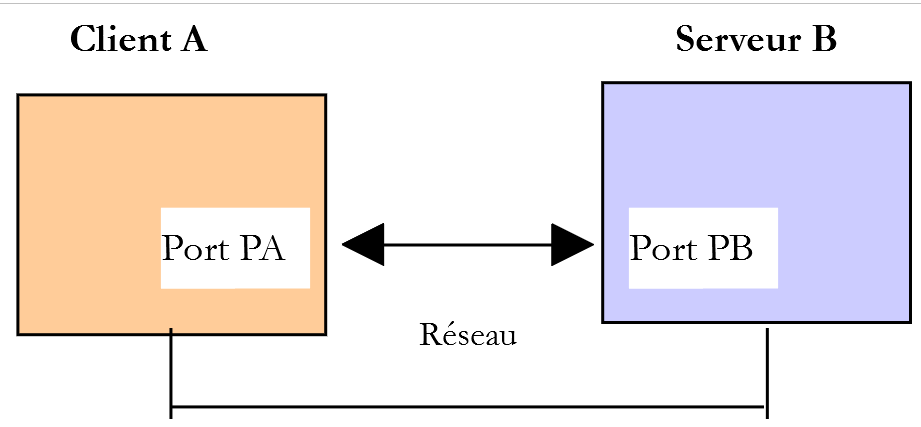
Consider communication between two remote machines A and B:
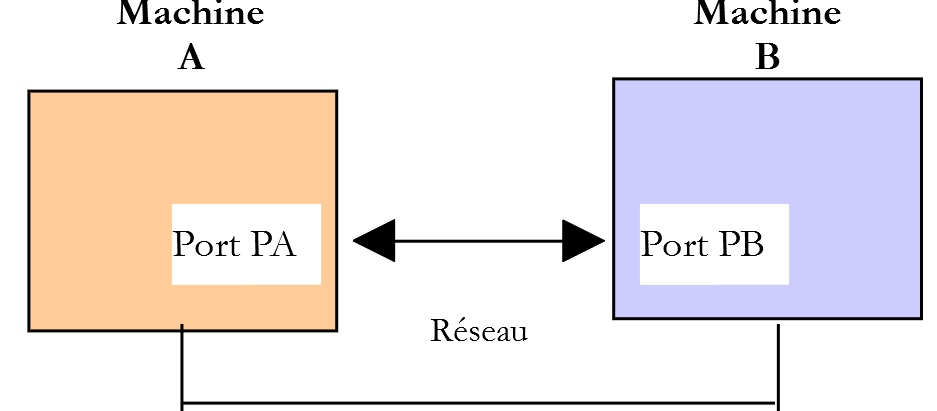
When a AppA application on machine A wants to communicate with a AppB application on machine B on the Internet, it must know several things:
- the IP (Internet Protocol) address or the name of machine B;
- the port number used by the AppB application. This is because machine B may host many applications that operate on the Internet. When it receives information from the network, it must know which application the information is intended for. The applications on machine B access the network through interfaces also known as communication ports. This information is contained in the packet received by machine B so that it can be delivered to the correct application;
- the communication protocols understood by machine B. In our study, we will use only the TCP-IP protocols;
- the communication protocol accepted by the AppB application. In fact, machines A and B will "communicate" with each other. What they will exchange will be encapsulated in the TCP-IP protocols. However, when, at the end of the chain, the AppB application receives the information sent by the AppA application, it must be able to interpret it. This is analogous to the situation where two people, A and B, communicate by telephone: their conversation is carried by the telephone. Speech is encoded as signals by telephone A, carried over telephone lines, and arrives at telephone B to be decoded. Person B then hears the speech. This is where the concept of a communication protocol comes into play: if A speaks French and B does not understand that language, A and B will not be able to communicate effectively;
Therefore, the two communicating applications must agree on the type of communication they will use. For example, communication with an FTP service is not the same as with a POP service: these two services do not accept the same commands. They have a different communication protocol;
16.1.2. Characteristics of the TCP protocol
Here, we will only examine network communications using the TCP transport protocol, whose main characteristics are as follows:
- The process wishing to transmit first establishes a connection with the process that will receive the information it is about to transmit. This connection is made between a port on the sending machine and a port on the receiving machine. A virtual path is thus created between the two ports, which will be reserved exclusively for the two processes that have established the connection;
- All packets sent by the source process follow this virtual path and arrive in the order in which they were sent;
- The transmitted information appears continuous. The sending process sends information at its own pace. This information is not necessarily sent immediately: the TCP protocol waits until it has enough to send. It is stored in a structure called a TCP segment. Once this segment is filled, it will be transmitted to the IP layer, where it will be encapsulated in a IP packet;
- Each segment sent by the TCP protocol is numbered. The receiving TCP protocol verifies that it is receiving the segments in sequence. For each segment received correctly, it sends an acknowledgment to the sender;
- when the sender receives this acknowledgment, it notifies the sending process. The sending process can thus confirm that a segment has been successfully delivered;
- if, after a certain amount of time, the TCP protocol that sent a segment does not receive an acknowledgment, it retransmits the segment in question, thereby ensuring the quality of the information delivery service;
- The virtual circuit established between the two communicating processes is full-duplex: this means that information can flow in both directions. Thus, the destination process can send acknowledgments even while the source process continues to send information. This allows, for example, the source TCP protocol to send multiple segments without waiting for an acknowledgment. If, after a certain amount of time, it realizes it has not received an acknowledgment for a specific segment No. n, it will resume sending segments from that point;
16.1.3. The client-server relationship
Internet communication is often asymmetric: Machine A initiates a connection to request a service from Machine B, specifying that it wants to establish a connection with Machine B’s SB1 service. Machine B then accepts or rejects the request. If it accepts, machine A can send its requests to service SB1. These requests must comply with the communication protocol understood by service SB1. A request-response dialogue is thus established between machine A, referred to as the client machine, and machine B, referred to as the server machine. One of the two partners will close the connection.
16.1.4. Client Architecture
The architecture of a network program requesting the services of a server application will be as follows:
ouvrir la connexion avec le service SB1 de la machine B
si réussite alors
    tant que ce n'is not finished
        préparer une demande
        l'send to machine B
        attendre et récupérer la réponse
        la traiter
    fin tant que
finsi
fermer la connexion
16.1.5. Server architecture
The architecture of a program offering services will be as follows:
ouvrir le service sur la machine locale
tant que le service est ouvert
    se mettre à l'listens for connection requests on a so-called listening port
    lorsqu'there is a request, have it processed by another task on another port called the service port
fin tant que
The server program handles a client’s initial connection request differently from its subsequent requests for service. The program does not provide the service itself. If it did, it would no longer be listening for connection requests while the service is active, and the clients requests would not be served. It therefore proceeds differently: as soon as a connection request is received on the listening port and then accepted, the server creates a task responsible for providing the service requested by the client. This service is provided on another port of the server machine called the service port. This allows multiple clients to be served at the same time.
A service task will have the following structure:
tant que le service n'has not been fully rendered
        attendre une demande sur le port de service
        lorsqu'there is one, elaborate the answer
        transmettre la réponse via le port de service
fin tant que
libérer le port de service
16.2. Learn about Internet communication protocols
16.2.1. Introduction
When a client connects to a server, a dialogue is established between them. The nature of this dialogue forms what is known as the server’s communication protocol. Among the most common Internet protocols are the following:
- HTTP: HyperText Transfer Protocol—the protocol for communicating with a web server (HTTP server);
- SMTP: Simple Mail Transfer Protocol—the protocol for communicating with an email sending server (SMTP server);
- POP: Post Office Protocol—the protocol for communicating with an email storage server (server POP). This is used to retrieve received emails, not to send them;
- IMAP: Internet Message Access Protocol—the protocol for communicating with an email storage server (server IMAP). This protocol has gradually replaced the older POP protocol;
- FTP: File Transfer Protocol—the protocol for communicating with a file storage server (server FTP);
All of these protocols are text-based: the client and server exchange lines of text. If we have a client capable of:
- establish a connection with a TCP server;
- display the text lines sent by the server on the console;
- send the text lines that a user would type on the keyboard to the server;
then we are able to communicate with a TCP server using a text-based protocol, provided we know the rules of that protocol.
16.2.2. TCP Utilities
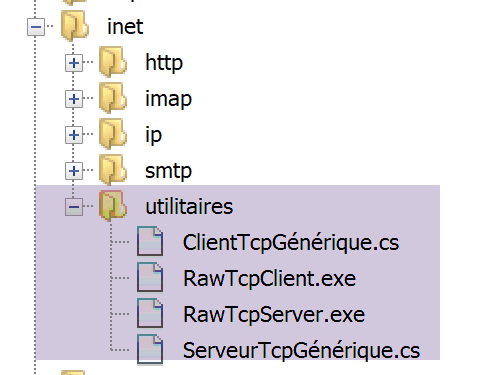
In the code associated with this document, there are two TCP communication utilities:
- [RawTcpClient] allows you to connect to port P of a server S;
- [RawTcpServer] allows you to create a server that listens for clients on port P;
The TCP [RawTcpServer] serveris called using the syntax [RawTcpServeur port] to create a TCP service on port [port] of the local machine (the computer you are working on):
- the server can serve multiple clients instances simultaneously;
- the server executes commands entered by the user via the keyboard. These are as follows:
- list: lists the clients currently connected to the server. These are displayed in the form [id=x-nom=y]. The [id] field is used to identify the clients;
- send x [texte]: sends text to client #x (id=x). The square brackets [] are not sent. They are required in the command. They are used to visually delimit the text sent to the client;
- close x: closes the connection with client #x;
- quit: closes all connections and stops the service;
- Lines sent by the client to the server are displayed on the console;
- all exchanges are logged in a text file named [machine-portService.txt], where
- [machine] is the name of the machine on which the code is running;
- [port] is the service port that responds to client requests;
The client TCP [RawTcpClient] is called using the syntax [RawTcpClient serveur port] to connect to port [port] on the server [serveur]:
- the lines typed by the user on the keyboard are sent to the server;
- the lines sent by the server are displayed on the console;
- all communication is logged in a text file named [serveur-port.txt];
Let’s look at an example. We open two Windows command windows and navigate to the utilities folder in each one. In one of the windows, we start the [RawTcpServer] server on port 100:

- In [1], we are located in the utilities folder;
- In [2], we start the TCP server on port 100;
- in [3], the server waits for a client TCP;
- In [4], the server waits for a command entered by the user via the keyboard;
In the other command window, we launch the client TCP:

- In [5], we are placed in the utilities folder;
- In [6], we launch the client TCP: we tell it to connect to port 100 on the local machine (the one you are working on);
- In [7], the client successfully connected to the server. The client's details are provided: it is on the machine [DESKTOP-528I5CU] (the local machine in this example) and uses port [50405] to communicate with the server:
- In [8], the client is waiting for a command entered by the user via the keyboard;
Let’s return to the server window. Its contents have changed:

- at [9], a client has been detected. The server assigned it the number 1. The server correctly identified the remote client (machine and port);
- In [10], the server is waiting for a new client;
Let’s return to the client window and send a command to the server:

- In [11], the command sent to the server;
Let’s return to the server window. Its content has changed:
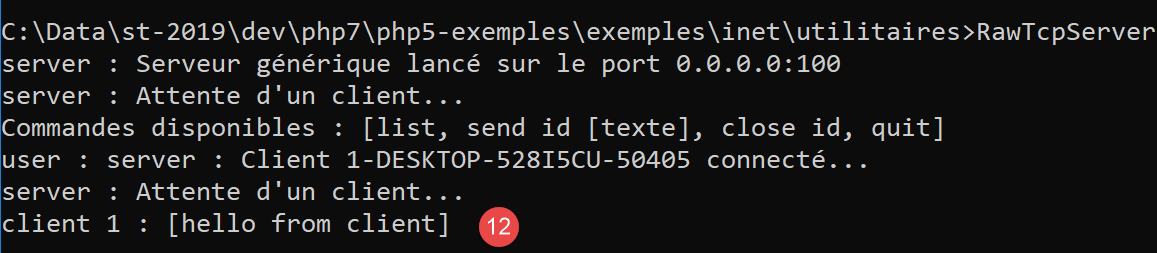
- In [12], between brackets, the message received by the server;
Let’s send a response to the client:
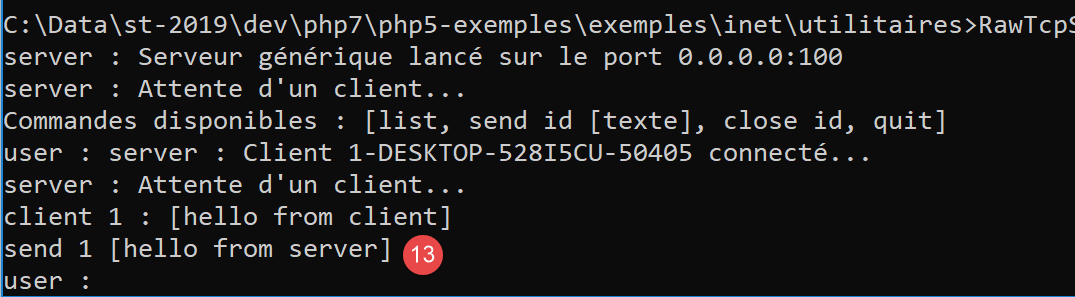
- in [13], the response sent to the client 1. Only the text between the square brackets is sent, not the brackets themselves;
Let’s return to the client window:

- in [14], the response received by the client. The text received is the text between square brackets;
Let’s return to the server window to see other commands:
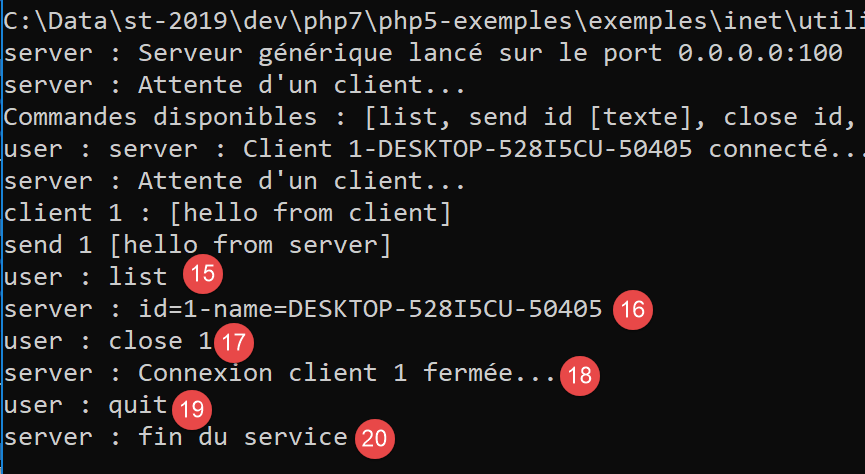
- In [15], we request the list of clients;
- in [16], the response;
- In [17], we close the connection with client #1;
- In [18], the server confirmation;
- in [19], we shut down the server;
- in [20], the server confirmation;
Let’s return to the client window:
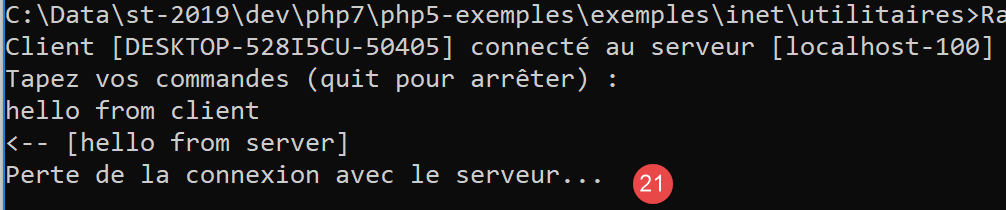
- in [21], the client has detected the end of service;
Two log files have been created, one for the server and one for the client:
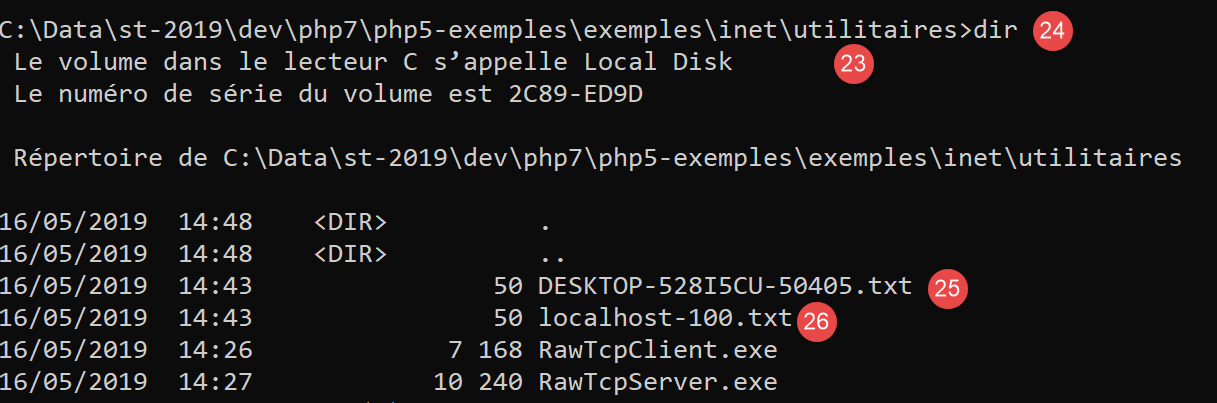
- in [25], the server logs: the file name is the client name [machine-port];
- in [26], the client logs: the file name is the server name [machine-port];
The server logs are as follows:
The client logs are as follows:
16.3. Obtain the name or address IP of a machine on the Internet
Machines on the Internet are identified by a IP address (IPv4 or IPv6) and most often by a name. But ultimately, only the IP address is used. Therefore, it is sometimes necessary to know the IP address of a machine identified by its name.
The script [ip-01.php] is as follows:
<?php

// strict adherence to declared function parameter types
declare (strict_types=1);
//
// error management
error_reporting(E_ALL & E_STRICT);
ini_set("display_errors", "on");
//
// constants
$HOTES = array("istia.univ-angers.fr", "www.univ-angers.fr", "www.ibm.com", "localhost", "", "xx");
// IP addresses and $HOTES machine names
for ($i = 0; $i < count($HOTES); $i++) {
  getIPandName($HOTES[$i]);
}
// end
print "Terminé\n";
exit;

//------------------------------------------------
function getIPandName(string $nomMachine): void {
  //$nomMachine: name of the machine whose address is required IP: name of the machine whose address is required IP: name of the machine whose address is required
  //
  // nomMachine-->adresse IP
  $ip = gethostbyname($nomMachine);
  print "---------------\n";
  if ($ip !== $nomMachine) {
    print "ip[$nomMachine]=$ip\n";
    // address IP --> nomMachine
    $name = gethostbyaddr($ip);
    if ($name !== $ip) {
      print "name[$ip]=$name\n";
    } else {
      print "Erreur, machine[$ip] non trouvée\n";
    }
  } else {
    print "Erreur, machine[$nomMachine] non trouvée\n";
  }
}
Comments
- lines 7-8: PHP is instructed to report all errors (E_ALL & E_STRICT) and display them. This mode is recommended only in development mode to improve the code using the warnings from PHP. In production mode, on line 8, you would set it to “off.” Starting with PHP 5.4, level E_STRICT is included in E_ALL;
- line 11: the list of machines for which we want the name and address IP;
The network functions of PHP are used in the getIpandName function on line 21.
- line 25: the function gethostbyname($nom) retrieves the address IP "ip3.ip2.ip1.ip0" of the machine named $nom. If the machine $nom does not exist, the function returns $nom as the result;
- line 30: the function gethostbyaddr($ip) retrieves the hostname of the machine with address $ip in the form "ip3.ip2.ip1.ip0". If the machine $ip does not exist, the function returns $ip as the result;
Results:
---------------
ip[istia.univ-angers.fr]=193.49.144.41
name[193.49.144.41]=ametys-fo-2.univ-angers.fr
---------------
ip[www.univ-angers.fr]=193.49.144.41
name[193.49.144.41]=ametys-fo-2.univ-angers.fr
---------------
ip[www.ibm.com]=2.18.220.211
name[2.18.220.211]=a2-18-220-211.deploy.static.akamaitechnologies.com
---------------
ip[localhost]=127.0.0.1
name[127.0.0.1]=DESKTOP-528I5CU
---------------
ip[]=192.168.1.38
name[192.168.1.38]=DESKTOP-528I5CU.home
---------------
Erreur, machine[xx] non trouvée
Terminé
16.4. The HTTP protocol (HyperText Transfer Protocol)
16.4.1. Example 1
When a browser displays a URL, it acts as the client of a web server—or, in other words, a HTTP server. The browser takes the initiative and begins by sending a number of commands to the server. For this first example:
- the server will be the [RawTcpServer] utility;
- the client will be a browser;
First, we start the server on port 100:

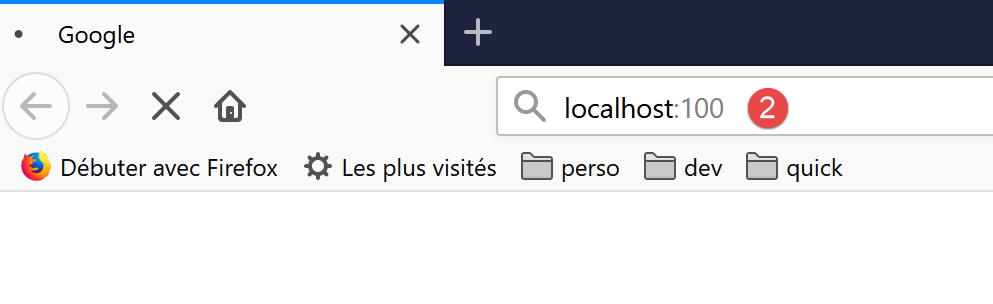
Then, using a browser, we request URL [localhost:100], meaning we specify that the queried server HTTP is running on port 100 of the local machine:
Let’s go back to the server window:
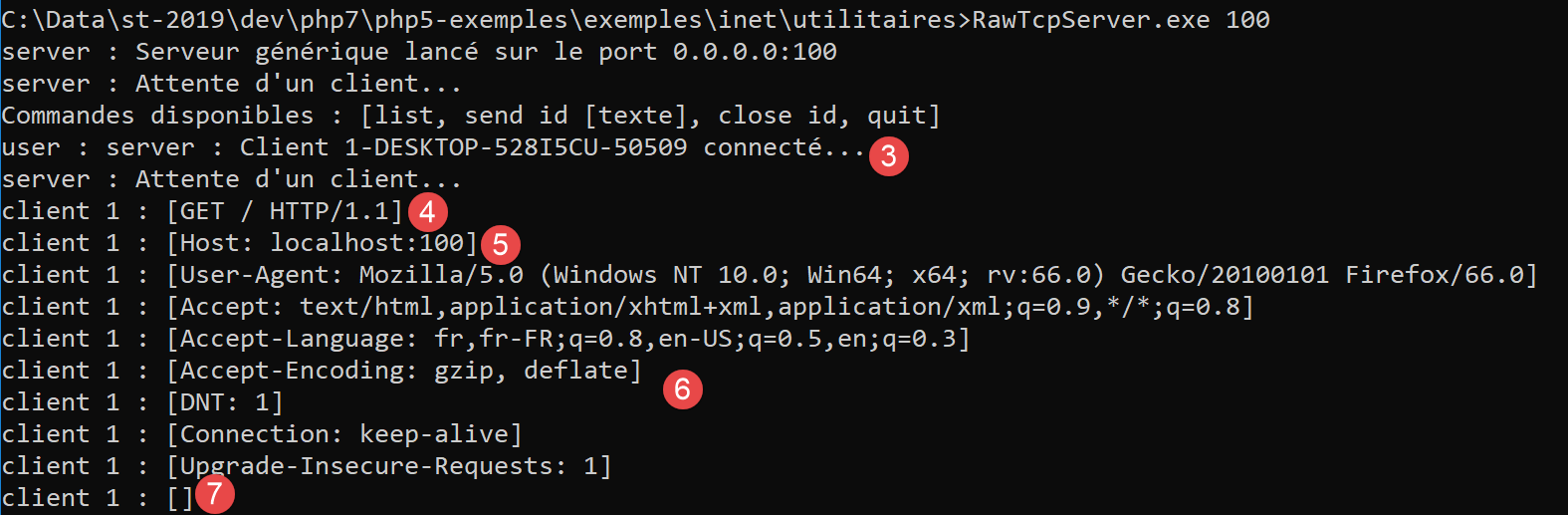
- in [3], the client that connected;
- in [4-7], the series of text lines it sent:
- in [4]: this line has the format [GET URL HTTP/1.1]. It requests URL / and asks the server to use the HTTP 1.1 protocol;
- in [5]: this line has the format [Host: serveur:port]. The case of the command [Host] does not matter. Note that the client is querying a local server operating on port 100;
- the command [User-Agent] provides the client’s identity;
- the command [Accept] specifies which document types are accepted by the client;
- the command [Accept-Language] specifies the language in which the requested documents are desired if they exist in multiple languages;
- the command [Connection] specifies the desired connection mode: [keep-alive] indicates that the connection must be maintained until the exchange is complete;
- In [7]: the client ends its commands with a blank line;
We terminate the connection by shutting down the server:
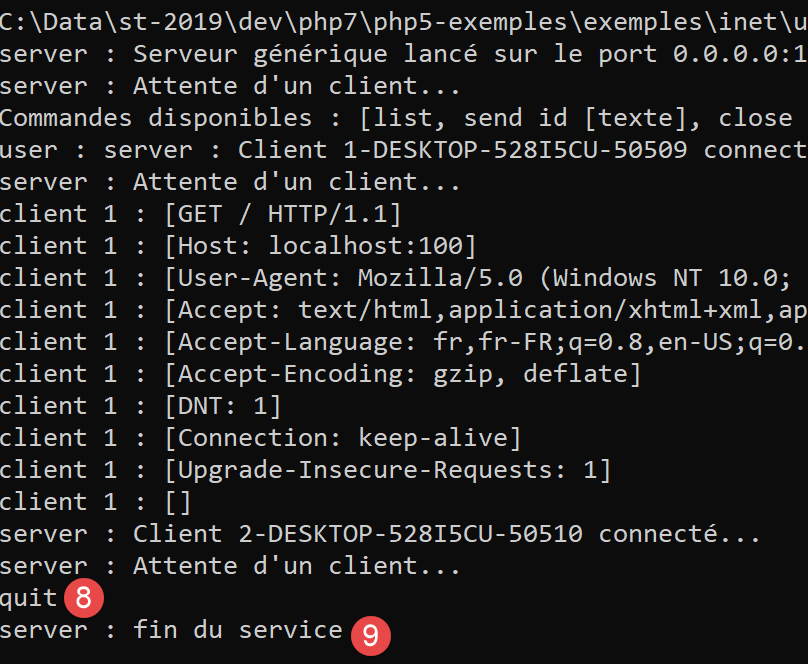
16.4.2. Example 2
Now that we know the commands sent by a browser to request a URL, we will request this URL using our client TCP [RawTcpClient]. Laragon’s Apache server will be our web server.
Let’s launch Laragon and then the Apache web server:
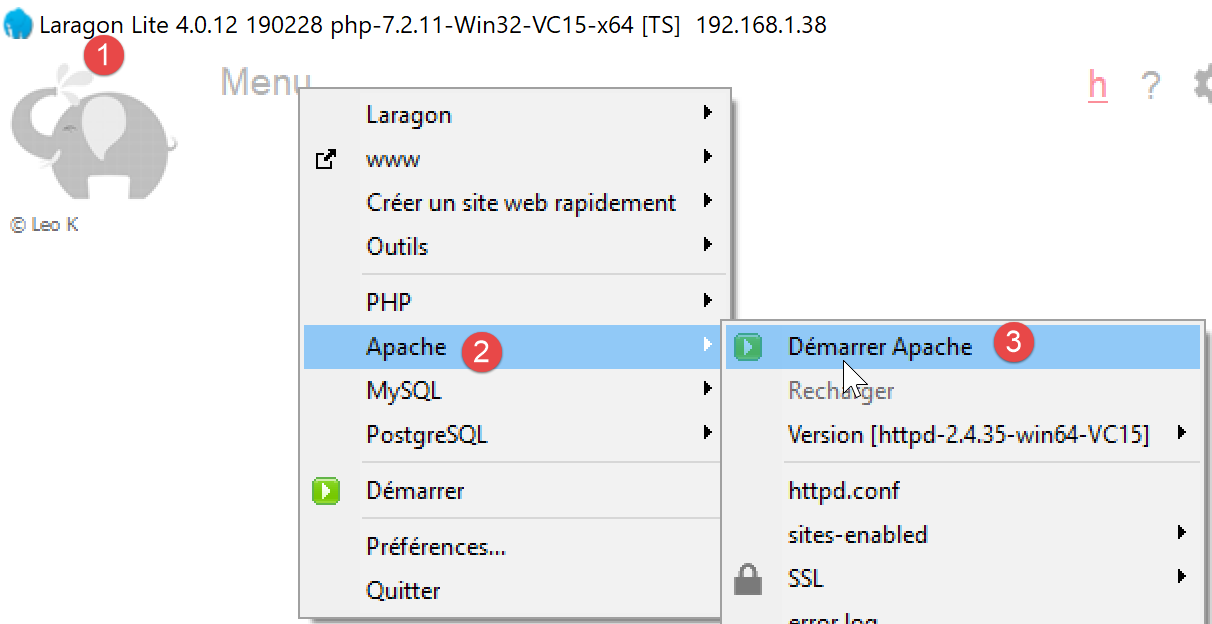
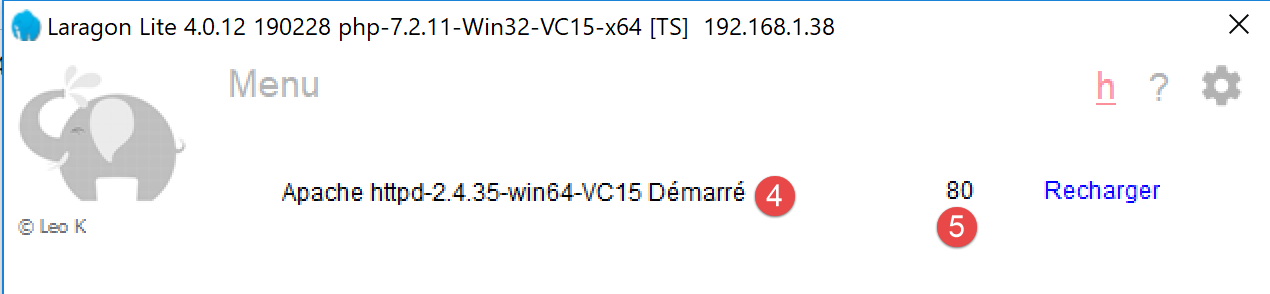
Now, using a browser, let’s request the URL and [http://localhost:80]. Here we specify only the server [localhost:80] and no document URL. In this case, it is the URL / that is requested, i.e., the root of the web server:
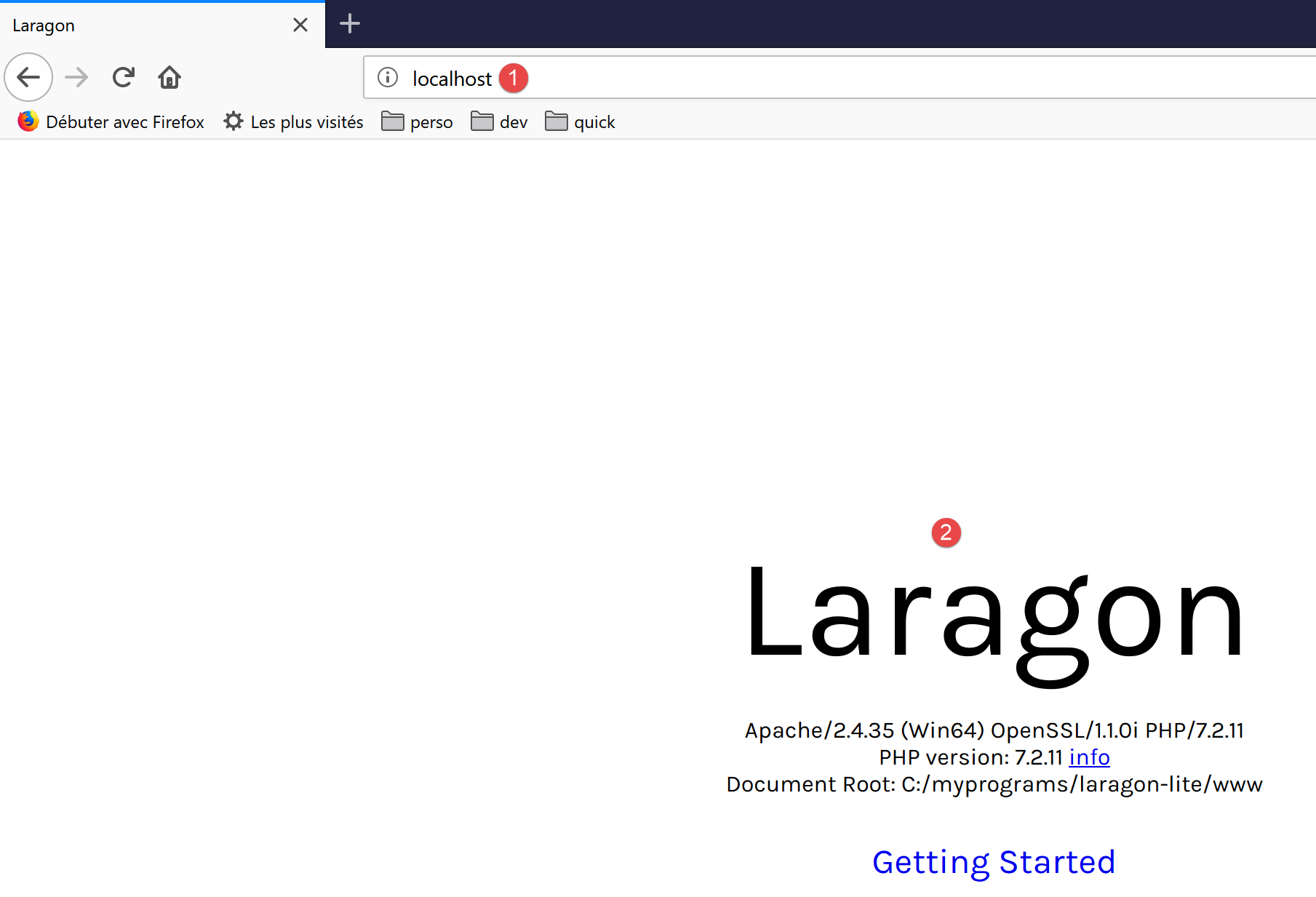
- to [1], the requested URL. We initially typed [http://localhost:80], and the browser (Firefox in this case) simply converted it to [localhost] because the protocol [http] is implied when no protocol is specified, and the port [80] is implied when the port is not specified;
- to [2], the root page / of the queried web server;
Now, let’s view the text received by the browser:
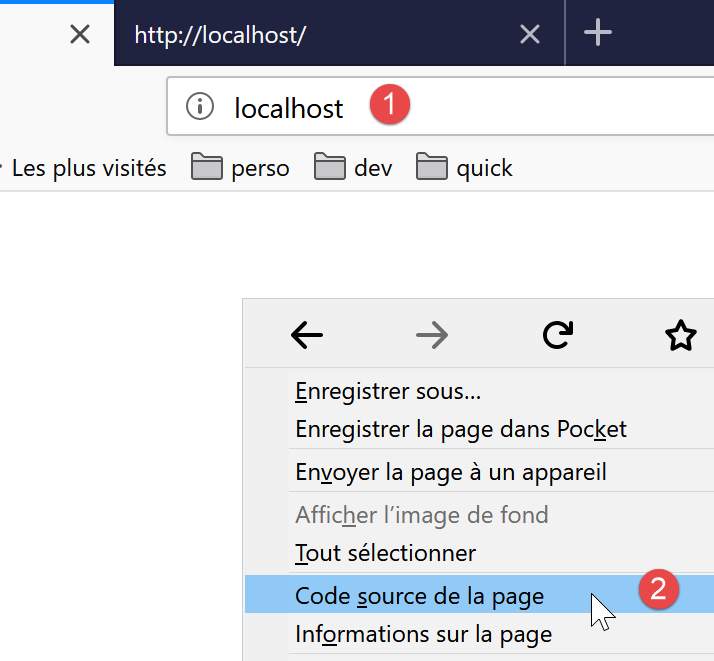
- right-click on the received page and select option [2]. You will get the following source code:
<!DOCTYPE HTML>
<HTML>
    <head>
        <title>Laragon</title>

        <link href="https://fonts.googleapis.com/css?family=Karla:400" rel="stylesheet" type="text/css">

        <style>
            HTML, body {
                height: 100%;
            }

            body {
                margin: 0;
                padding: 0;
                width: 100%;
                display: table;
                font-weight: 100;
                font-family: 'Karla';
            }

            .container {
                text-align: center;
                display: table-cell;
                vertical-align: middle;
            }

            .content {
                text-align: center;
                display: inline-block;
            }

            .title {
                font-size: 96px;
            }

            .opt {
                margin-top: 30px;
            }

            .opt a {
              text-decoration: none;
              font-size: 150%;
            }

            a:hover {
              color: red;
            }
        </style>
    </head>
    <body>
        <div class="container">
            <div class="content">
                <div class="title" title="Laragon">Laragon</div>

                <div class="info"><br />
                      Apache/2.4.35 (Win64) OpenSSL/1.1.0i PHP/7.2.11<br />
                      PHP version: 7.2.11   <span><a title="phpinfo()" href="/?q=info">info</a></span><br />
                      Document Root: C:/myprograms/laragon-lite/www<br />

                </div>
                <div class="opt">
                  <div><a title="Getting Started" href="https://laragon.org/docs">Getting Started</a></div>
                </div>
            </div>

        </div>
    </body>
</HTML>
Now let’s request URL and [http://localhost:80] using our client TCP:

- In [1], we connect to port 80 on the localhost server. This is where the Laragon web server runs;
We now type the commands we discovered in the previous paragraph:
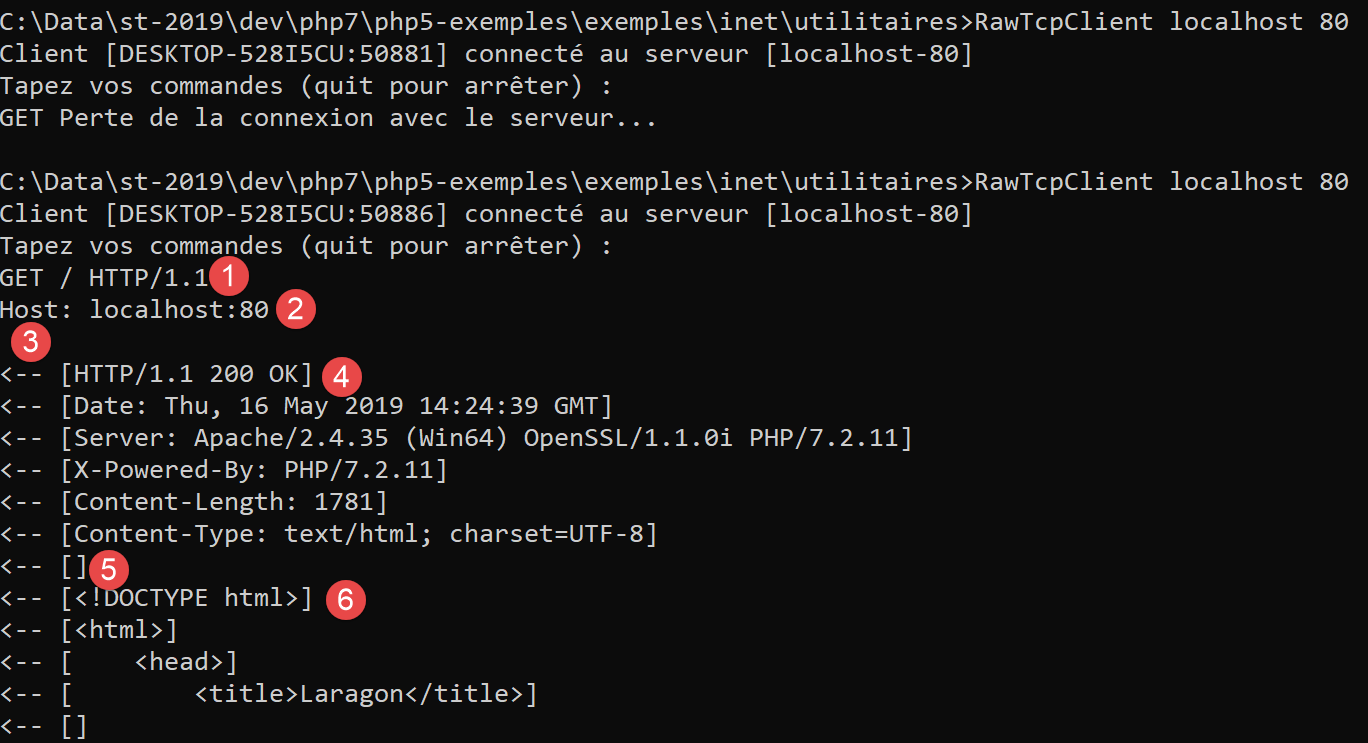
- in [1], the command [GET]. We request the root directory / of the web server;
- in [2], the command [Host];
- these are the only two essential commands. For the other commands, the web server will use default values;
- in [3], the empty line that must end the client commands;
- below line 3 comes the web server’s response;
- from [4] up to the empty line [5] are the headers HTTP of the server’s response;
- After the line [5] comes the requested document HTML;
We enter [quit] to complete the client and load the log file [localhost-80.txt]:
- lines 11-79: the received HTML document. In the previous example, Firefox had received the same one;
We now have the basics to program a TCP client that would request a URL.
16.4.3. Example 3
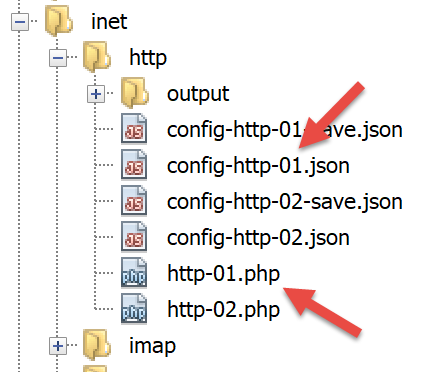
The [http-01.php] script is a HTTP client configured by the jSON [config-http-01.json] file. Its contents are as follows:
- line 2: the name of the machine hosting the web server to be reached;
- line 3: the port on which this web server operates;
- line 4: the URL of the desired document;
- line 5: the target machine in the format machine:port;
- line 6: the client identifier HTTP: you can enter whatever you want;
- line 7: the document type accepted by the client, in this case text;
- line 8: the desired language for the requested document;
- line 9: the line-end character for commands sent by the client: this may differ depending on whether the server is running on a Unix machine (\n) or a Windows machine (\r\n);
The [http-01.php] script is as follows:
<?php

// strict adherence to declared types of function parameters
declare (strict_types=1);
//
// error management
// error_reporting(E_ALL & E_STRICT);
// ini_set("display_errors", "on");
//
// constants
const CONFIG_FILE_NAME = "config-http-01.json";
//
// we retrieve the configuration
$config = \json_decode(\file_get_contents(CONFIG_FILE_NAME), true);
// oget the HTML text from the URL in the configuration file
foreach ($config as $site => $protocole) {
  // read site index page $ite
  $résultat = getURL($site, $protocole);
  // result display
  print "$résultat\n";
}//for
// end
exit;

//-----------------------------------------------------------------------
function getURL(string $site, array $protocole, $suivi = TRUE): string {
  // reads the URL $site["GET"] and stores it in the $site.HTML file
  // client/server dialog is based on the $protocole protocol
  //
  // open a connection on the $site port
  $erreurNumber = 0;
  $erreur = "";
  $connexion = fsockopen($site, $protocole["port"], $erreurNumber, $erreur);
  // return if error
  if ($connexion === FALSE) {
    return "Echec de la connexion au site (" . $site . " ," . $protocole["port"] . " : $erreur";
  }
  // $connexion represents a bidirectional communication flow
  // between the client (this program) and the contacted web server
  // this channel is used for the exchange of orders and information
  // the dialog protocol is HTTP
  //
  // creation of the $site.HTML file
  $HTML = fopen("output/$site.HTML", "w");
  if ($HTML === FALSE) {
    // close client/server connection
    fclose($connexion);
    // error return
    return "Erreur lors de la création du fichier $site.HTML";
  }
  // the client will start the HTTP dialog with the server
  if ($suivi) {
    print "Client : début de la communication avec le serveur [$site] ----------------------------\n";
  }
  // depending on the server, client lines must end with \nor \r\n
  $endOfLine = $protocole["endOfLine"];
  // for simplicity's sake, we don't test for errors in client/server communication
  // the customer sends the GET command to request the URL $protocole["GET"]
  // syntax GET URL HTTP/1.1
  $commande = "GET " . $protocole["GET"] . " HTTP/1.1$endOfLine";
  // followed?
  if ($suivi) {
    print "--> $commande";
  }
  // send the command to the server
  fputs($connexion, $commande);
  // issue other headers HTTP
  foreach ($protocole as $verb => $value) {
    if ($verb !== "GET" && $verb != "port"" && $verb !="endOfLine") {
      // we build the
      $commande = "$verb: $value$endOfLine";
      // followed?
      if ($suivi) {
        print "--> $commande";
      }
      // send the command to the server
      fputs($connexion, $commande);
    }
  }
  // protocol HTTP headers must end with an empty line
  fputs($connexion, $endOfLine);
  //
  // the server will now respond on channel $connexion. It will send all
  // then close the channel. The client therefore reads everything that arrives from $connexion
  // until the channel closes
  //
  // we first read the HTTP headers sent by the server
  // they also end with an empty line
  if ($suivi) {
    print "Réponse du serveur [$site] ----------------------------\n";
  }
  $fini = FALSE;
  while (!$fini && $ligne = fgets($connexion, 1000)) {
    // is there an empty line?
    $champs = [];
    preg_match("/^(.*?)\s+$/", $ligne, $champs);
    if ($champs[1] !== "") {
      if ($suivi) {
        // header HTTP is displayed
        print "<-- " . $champs[1] . "\n";
      }
    } else {
      // this was the empty line - HTTP headers are finished
      $fini = TRUE;
    }
  }
  // we read the HTML document that will follow the empty line
  while ($ligne = fgets($connexion, 1000)) {
    // we save the line in the HTML file on the site
    fputs($HTML, $ligne);
  }
  // the server has closed the connection - the client closes it in turn
  fclose($connexion);
  // close file $HTML
  fclose($HTML);
  // return
  return "Fin de la communication avec le site [$site]. Vérifiez le fichier [$site.HTML]";
}
Code comments:
- line 14: the configuration file is used to create a dictionary:
- the dictionary keys are the web servers to be queried;
- the values specify the HTTP protocol to be used;
- lines 16–21: we loop through the list of web servers in the configuration;
- line 26: the function getURL($site,$protocole,$suivi) requests a document from the website $site and stores it in the text file $site.HTML.By default, client/server exchanges are logged to the console ($suivi=TRUE);
- line 33: the function fsockopen($site,$port,$errNumber,$erreur) creates a connection to a service TCP / IP running on port $port of the machine $site. If the connection fails, [$errNumber] is the error number and [$erreur] is the associated error message. Once the client/server connection is open, numerous TCP / IP services exchange lines of text. This is the case here with the HTTP protocol (HyperText Transfer Protocol). The server stream arriving at the client can then be processed as a text file read using [fgets]. The same applies to the stream sent from the client to the server, which can be written using [fputs];
- lines 44–50: creation of the file [$site.HTML] in which the received document HTML will be stored;
- line 60: the client’s first command must be [GET URL HTTP/1.1];
- line 66: the fputs function allows the client to send data to the server. Here, the text line sent has the following meaning: "I want (GET) the page [URL] from the website I am connected to. I am using the HTTP version 1.1 protocol";
- lines 68–79: the remaining lines of the HTTP [Host, User-Agent, Accept, Accept-Language] protocol are sent. Their order does not matter;
- line 81: an empty line is sent to the server to indicate that the client has finished sending its headers HTTP and is now waiting for the requested document;
- lines 92–106: the server will first send a series of headers HTTP that provide various details about the requested document. These headers end with a blank line;
- Line 93: Read a line sent by the server using the function PHP [fgets];
- line 96: retrieve the body of the line without the spaces (whitespace, end-of-line characters) at the end of the line;
- line 97: we check if we have retrieved the empty line that marks the end of the HTTP headers sent by the server;
- lines 98–101: if in [suivi] mode, the received HTTP header is displayed on the console;
- lines 108–111: the text lines of the server’s response can be read line by line using a while loop and saved to the text file [output/$site.HTML]. Once the web server has sent the entire page requested, it closes its connection with the client. On the client side, this will be detected as an end of file;
Results:
The console displays the following logs:
Client : début de la communication avec le serveur [localhost] ----------------------------
--> GET / HTTP/1.1
--> Host: localhost:80
--> User-Agent: client PHP
--> Accept: text/HTML
--> Accept-Language: en
Réponse du serveur [localhost] ----------------------------
<-- HTTP/1.1 200 OK
<-- Date: Thu, 16 May 2019 15:43:18 GMT
<-- Server: Apache/2.4.35 (Win64) OpenSSL/1.1.0i PHP/7.2.11
<-- X-Powered-By: PHP/7.2.11
<-- Content-Length: 1781
<-- Content-Type: text/HTML; charset=UTF-8
Fin de la communication avec le site [localhost]. Vérifiez le fichier [localhost.HTML]
In our example, the received [output/localhost.HTML] file is as follows:
<!DOCTYPE HTML>
<HTML>
    <head>
        <title>Laragon</title>

        <link href="https://fonts.googleapis.com/css?family=Karla:400" rel="stylesheet" type="text/css">

        <style>
            HTML, body {
                height: 100%;
            }

            body {
                margin: 0;
                padding: 0;
                width: 100%;
                display: table;
                font-weight: 100;
                font-family: 'Karla';
            }

            .container {
                text-align: center;
                display: table-cell;
                vertical-align: middle;
            }

            .content {
                text-align: center;
                display: inline-block;
            }

            .title {
                font-size: 96px;
            }

            .opt {
                margin-top: 30px;
            }

            .opt a {
              text-decoration: none;
              font-size: 150%;
            }

            a:hover {
              color: red;
            }
        </style>
    </head>
    <body>
        <div class="container">
            <div class="content">
                <div class="title" title="Laragon">Laragon</div>

                <div class="info"><br />
                      Apache/2.4.35 (Win64) OpenSSL/1.1.0i PHP/7.2.11<br />
                      PHP version: 7.2.11   <span><a title="phpinfo()" href="/?q=info">info</a></span><br />
                      Document Root: C:/myprograms/laragon-lite/www<br />

                </div>
                <div class="opt">
                  <div><a title="Getting Started" href="https://laragon.org/docs">Getting Started</a></div>
                </div>
            </div>

        </div>
    </body>
</HTML>
We did indeed get the same document as with the Firefox browser.
16.4.4. Example 4
In this example, we will demonstrate that the HTTP client we wrote is insufficient. Modify the [config-http-01.json] configuration file as follows:
Here, we will request the URL [http://tahe.developpez.com:443/]. Port 443 on the [tahe.developpez.com] machine is a port used for the secure http protocol known as HTTPS. In this protocol, the client/server dialogue begins with an exchange of information that secures the connection. The client must then use the [HTTPS] protocol and not the [HTTP] protocol, which our client does not do.
With this configuration file, the console output is as follows:
Client : début de la communication avec le serveur [tahe.developpez.com] ----------------------------
--> GET / HTTP/1.1
--> Host: sergetahe.com:443
--> User-Agent: script PHP 7
--> Accept: text/HTML
--> Accept-Language: en
Réponse du serveur [tahe.developpez.com] ----------------------------
<-- HTTP/1.1 400 Bad Request
<-- Date: Fri, 17 May 2019 13:02:26 GMT
<-- Server: Apache/2.4.25 (Debian)
<-- Content-Length: 454
<-- Connection: close
<-- Content-Type: text/HTML; charset=iso-8859-1
Fin de la communication avec le site [tahe.developpez.com]. Vérifiez le fichier [output/tahe.developpez.com.HTML]
- line 8: the server [tahe.developpez.com] responded that the client's request was incorrect;
The content of the file [output/tahe.developpez.com.HTML] is as follows:
<!DOCTYPE HTML PUBLIC "-//IETF//DTD HTML 2.0//EN">
<HTML><head>
<title>400 Bad Request</title>
</head><body>
<h1>Bad Request</h1>
<p>Your browser sent a request that this server could not understand.<br />
Reason: You're speaking plain HTTP to an SSL-enabled server port.<br />
 Instead use the HTTPS scheme to access this URL, please.<br />
</p>
<hr>
<address>Apache/2.4.25 (Debian) Server at 2eurocents.developpez.com Port 443</address>
</body></HTML>
The server clearly states that we did not use the correct protocol.
Now let’s use the following configuration file:
The console output is as follows:
Client : début de la communication avec le serveur [sergetahe.com] ----------------------------
--> GET /courses-programming-tutorials/ HTTP/1.1
--> Host: sergetahe.com:80
--> User-Agent: script PHP 7
--> Accept: text/HTML
--> Accept-Language: en
Réponse du serveur [sergetahe.com] ----------------------------
<-- HTTP/1.1 200 OK
<-- Date: Fri, 17 May 2019 13:36:06 GMT
<-- Content-Type: text/HTML; charset=UTF-8
<-- Transfer-Encoding: chunked
<-- Server: Apache
<-- X-Powered-By: PHP/7.0
<-- Vary: Accept-Encoding
<-- Set-Cookie: SERVERID68971=2621207|XN64y|XN64y; path=/
<-- Cache-control: private
<-- X-IPLB-Instance: 17106
Fin de la communication avec le site [sergetahe.com]. Vérifiez le fichier [output/sergetahe.com.HTML]
- line 11 indicates that the server is sending the document in chunks;
This results in the presence of numbers in the stream sent to the client: each number tells the client the number of characters in the next chunk sent by the server. Here is what it looks like in the file [output/sergetahe.com.HTML]:
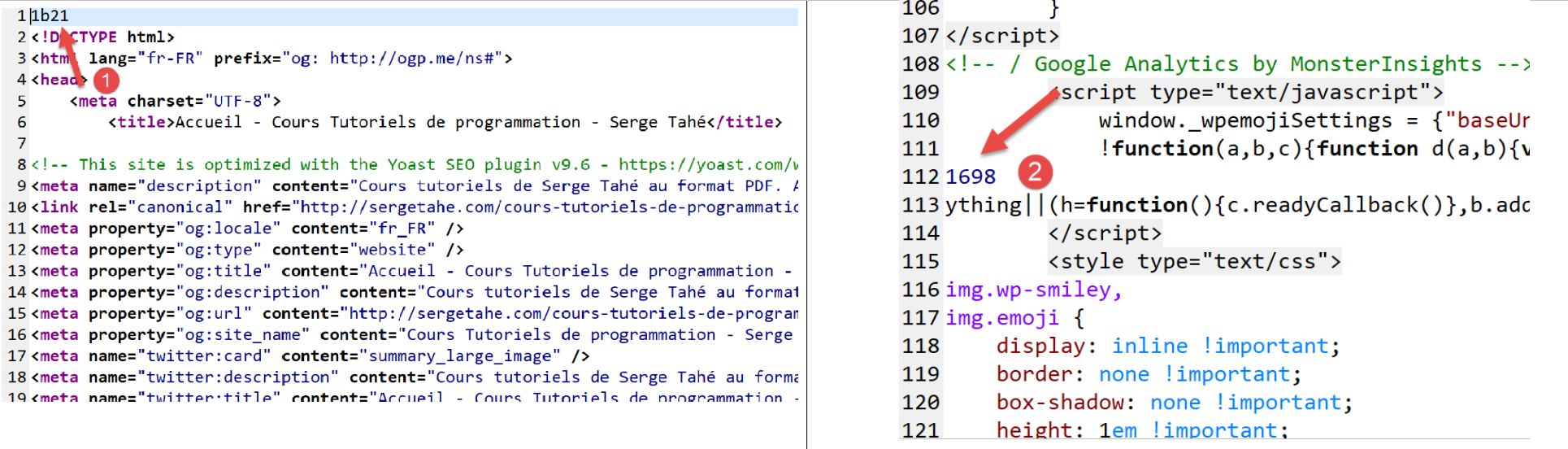
- in [1] and [2], the hexadecimal size of chunks 1 and 2 of the document;
A proper HTTP client should not leave these numbers in the final HTML document.
Here is another example:
It resembles the previous example, but the URL requested in line 4 does not have the / character to terminate it. These are not the same URL. Executing the HTTP client then yields the following console output:
Client : début de la communication avec le serveur [sergetahe.com] ----------------------------
--> GET /courses-programming-tutorials HTTP/1.1
--> Host: sergetahe.com:80
--> User-Agent: script PHP 7
--> Accept: text/HTML
--> Accept-Language: en
Réponse du serveur [sergetahe.com] ----------------------------
<-- HTTP/1.1 301 Moved Permanently
<-- Date: Fri, 17 May 2019 13:47:00 GMT
<-- Content-Type: text/HTML; charset=iso-8859-1
<-- Content-Length: 262
<-- Server: Apache
<-- Location: http://sergetahe.com:80/cours-tutoriels-de-programmation/
<-- Set-Cookie: SERVERID68971=2621207|XN67V|XN67V; path=/
<-- Cache-control: private
<-- X-IPLB-Instance: 17095
Fin de la communication avec le site [sergetahe.com]. Vérifiez le fichier [output/sergetahe.com.HTML]
- line 8 indicates that the requested document has changed from URL. The new URL is given on line 13. Note this time the / character that ends the new URL;
The [output/serge.tahe.com.HTML] file is then as follows:
<!DOCTYPE HTML PUBLIC "-//IETF//DTD HTML 2.0//EN">
<HTML><head>
<title>301 Moved Permanently</title>
</head><body>
<h1>Moved Permanently</h1>
<p>The document has moved <a href="http://sergetahe.com/cours-tutoriels-de-programmation/">here</a>.</p>
</body></HTML>
A HTTP client should be able to follow redirects. Here, it should automatically request the new URL [http://sergetahe.com/cours-tutoriels-de-programmation/].
16.4.5. Example 5
The previous examples have shown us that our client HTTP was insufficient. We will now introduce a tool called [curl] that allows you to retrieve web documents by handling the issues mentioned: HTTPS protocol, documents sent in chunks, redirects… The [curl] tool was installed with Laragon:
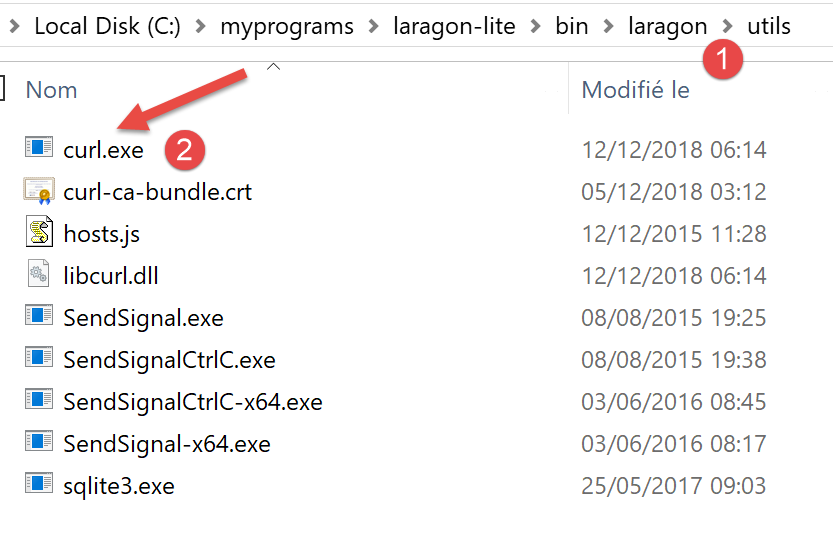
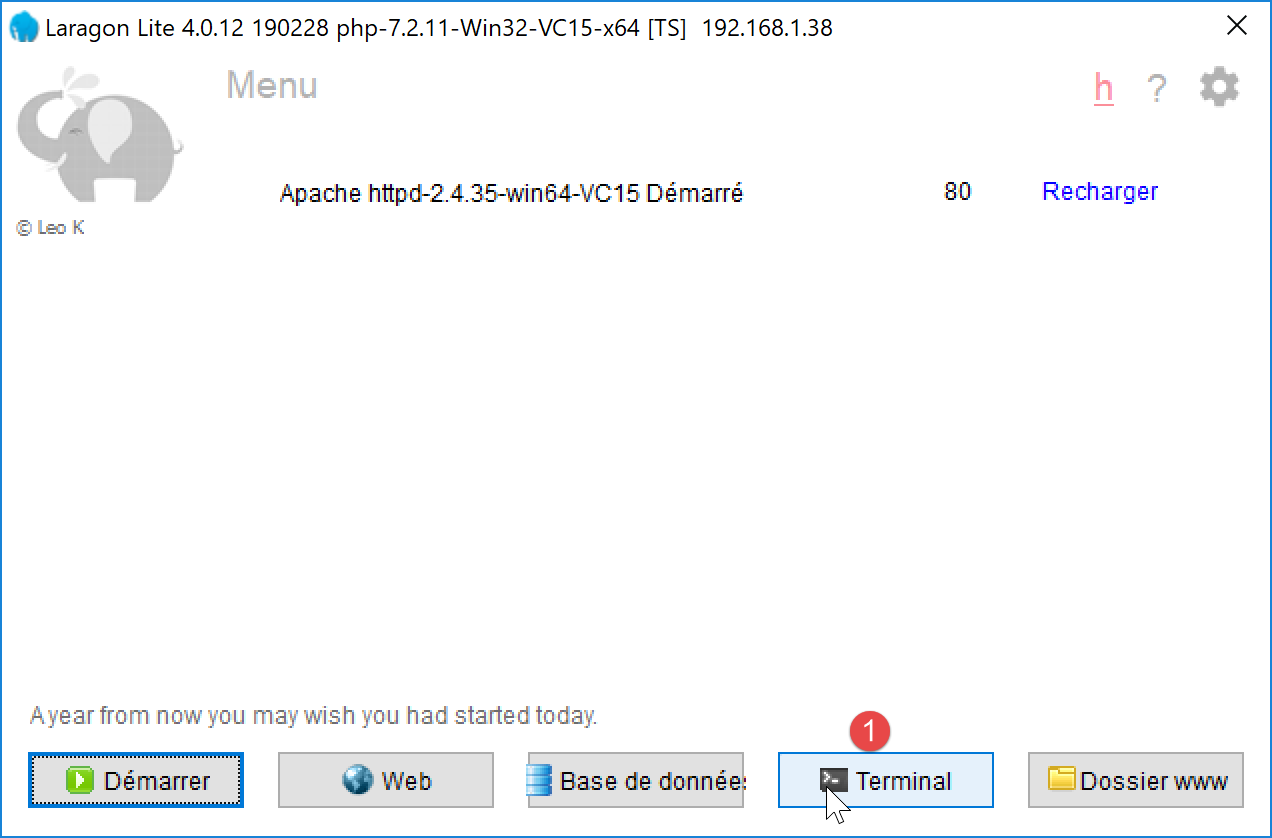
Let’s open a Laragon terminal [1]:
In the terminal, type the following command:
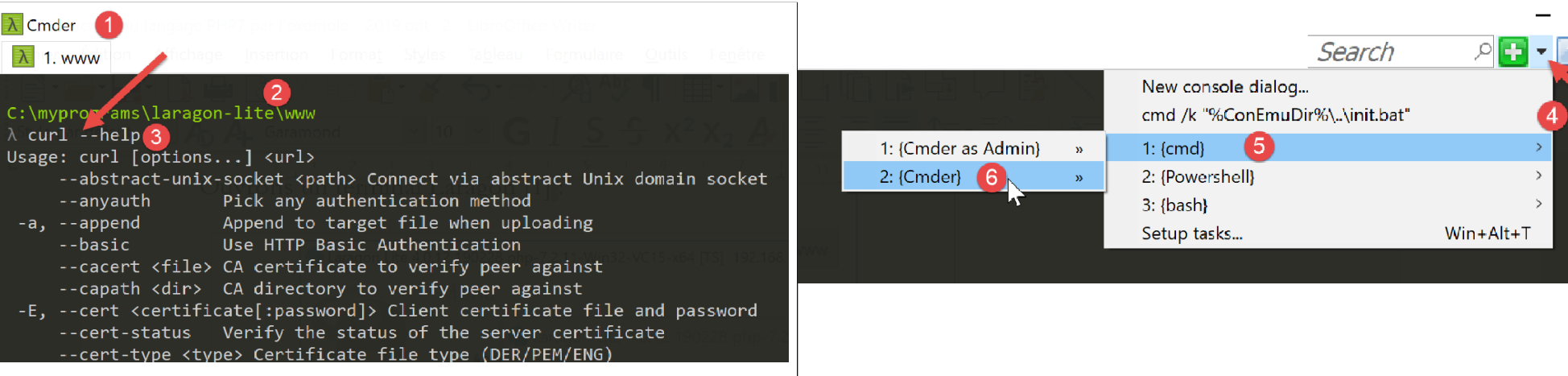
- in [1], the console type;
- in [2], the current directory. This directory is special: it is where Laragon’s Apache server retrieves the documents requested of it. We should therefore avoid cluttering this directory;
- in [3], the command entered;
The command [curl --help] may produce an error. The most likely cause is that you do not have the correct terminal type. In this case, open another terminal with the commands [4-6];
The command [curl --help] displays all configuration options for [curl]. There are several dozen of them. We will use very few of them. To request a URL, simply type the command [curl URL]. This command will display the requested document on the console. If you also want the HTTP exchanges between the client and the server, type [curl --verbose URL]. Finally, to save the requested HTML document to a file, type [curl --verbose --output fichier URL].
To avoid cluttering the [www] folder in Laragon, let’s move to another location in the file system:
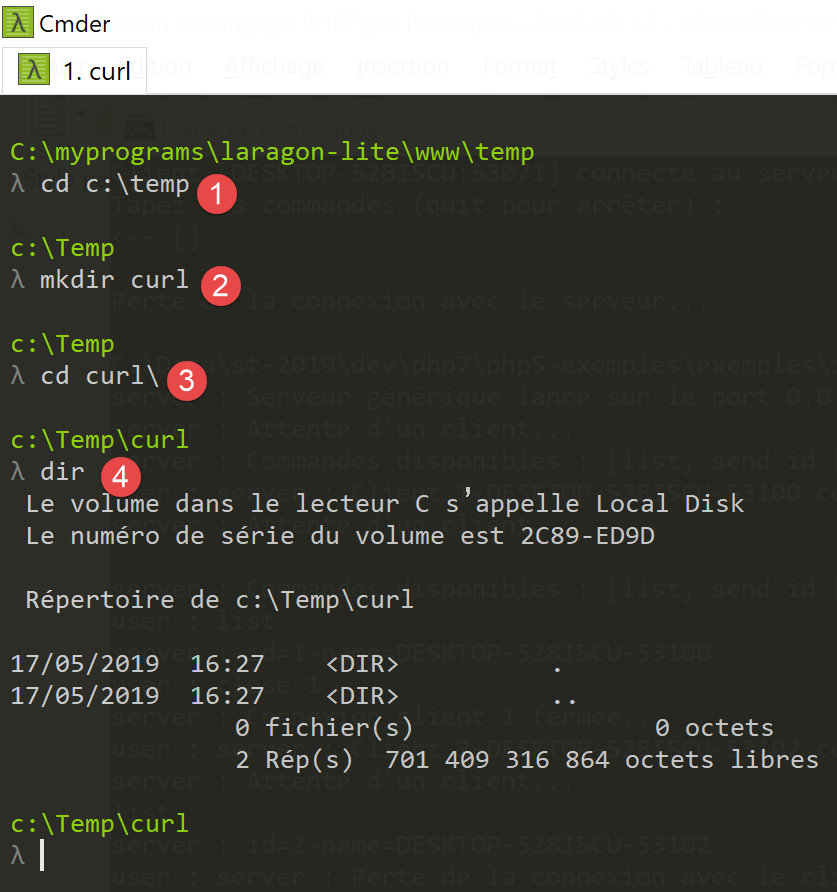
- in [1], navigate to the [c:\temp] folder. If this folder does not exist, you can create it or choose another one;
- In [2], create a folder named [curl];
- In [3], navigate to it;
- In [4], list its contents. It is empty;
Make sure the Laragon Apache server is running, and using [curl], request URL and [http://localhost/] with the command [curl –verbose –output localhost.HTML http://localhost/]. The following results are obtained:
c:\Temp\curl
λ curl --verbose --output localhost.HTML http://localhost/
  % Total    % Received % Xferd  Average Speed   Time    Time     Time  Current
                                 Dload  Upload   Total   Spent    Left  Speed
  0     0    0     0    0     0      0      0 --:--:-- --:--:-- --:--:-- 0* Trying ::1..
* TCP_NODELAY set
* Connected to localhost (::1) port 80 (#0)
> GET / HTTP/1.1
> Host: localhost
> User-Agent: curl/7.63.0
> Accept: */*
>
< HTTP/1.1 200 OK
< Date: Fri, 17 May 2019 14:32:47 GMT
< Server: Apache/2.4.35 (Win64) OpenSSL/1.1.0i PHP/7.2.11
< X-Powered-By: PHP/7.2.11
< Content-Length: 1781
< Content-Type: text/HTML; charset=UTF-8
<
{ [1781 bytes data]
100  1781  100  1781    0     0  14248      0 --:--:-- --:--:-- --:--:-- 14248
* Connection #0 to host localhost left intact
- lines 8-12: lines sent by [curl] to the server [localhost]. The HTTP protocol is recognized;
- lines 13-19: lines sent in response by the server;
- line 13: indicates that the requested document was successfully received;
The file [localhost.HTML] contains the requested document. You can verify this by opening the file in a text editor.
Now let’s request the URL [https://tahe.developpez.com:443/]. To obtain this URL, the client HTTP must be able to communicate with HTTPS. This is the case for the client [curl].
The console output is as follows:
c:\Temp\curl
λ curl --verbose --output tahe.developpez.com.HTML https://tahe.developpez.com:443/
  % Total    % Received % Xferd  Average Speed   Time    Time     Time  Current
                                 Dload  Upload   Total   Spent    Left  Speed
  0     0    0     0    0     0      0      0 --:--:-- --:--:-- --:--:--     0*   Trying 87.98.130.52…
* TCP_NODELAY set
* Connected to tahe.developpez.com (87.98.130.52) port 443 (#0)
* ALPN, offering h2
* ALPN, offering http/1.1
* successfully set certificate verify locations:
*   CAfile: C:\myprograms\laragon-lite\bin\laragon\utils\curl-ca-bundle.crt
  CApath: none
} [5 bytes data]
* TLSv1.3 (OUT), TLS handshake, Client hello (1):
} [512 bytes data]
* TLSv1.3 (IN), TLS handshake, Server hello (2):
{ [108 bytes data]
* TLSv1.2 (IN), TLS handshake, Certificate (11):
{ [2558 bytes data]
* TLSv1.2 (IN), TLS handshake, Server key exchange (12):
{ [333 bytes data]
* TLSv1.2 (IN), TLS handshake, Server finished (14):
{ [4 bytes data]
* TLSv1.2 (OUT), TLS handshake, Client key exchange (16):
} [70 bytes data]
* TLSv1.2 (OUT), TLS change cipher, Change cipher spec (1):
} [1 bytes data]
* TLSv1.2 (OUT), TLS handshake, Finished (20):
} [16 bytes data]
* TLSv1.2 (IN), TLS handshake, Finished (20):
{ [16 bytes data]
* SSL connection using TLSv1.2 / ECDHE-RSA-AES128-GCM-SHA256
* ALPN, server accepted to use http/1.1
* Server certificate:
*  subject: CN=*.developpez.com
*  start date: Apr  4 08:25:09 2019 GMT
*  expire date: Jul  3 08:25:09 2019 GMT
*  subjectAltName: host "tahe.developpez.com" matched cert's "*.developpez.com"
*  issuer: C=US; O=Let's Encrypt; CN=Let's Encrypt Authority X3
*  SSL certificate verify ok.
} [5 bytes data]
> GET / HTTP/1.1
> Host: tahe.developpez.com
> User-Agent: curl/7.63.0
> Accept: */*
>
{ [5 bytes data]
< HTTP/1.1 200 OK
< Date: Fri, 17 May 2019 14:39:41 GMT
< Server: Apache/2.4.25 (Debian)
< X-Powered-By: PHP/5.3.29
< Vary: Accept-Encoding
< Transfer-Encoding: chunked
< Content-Type: text/HTML
<
{ [6 bytes data]
100 96559    0 96559    0     0   163k      0 --:--:-- --:--:-- --:--:--  163k
* Connection #0 to host tahe.developpez.com left intact
- lines 10-40: client/server exchanges to secure the connection: this connection will be encrypted;
- lines 42-45: the headers HTTP sent by the client [curl] to the server;
- line 48: the requested document was successfully found;
- line 53: the document is sent in chunks;
[curl] correctly handles both the secure protocol HTTPS and the fact that the document is sent in chunks. The sent document can be found here in the file [tahe.developpez.com.HTML].
Now let’s request the URL [http://sergetahe.com/cours-tutoriels-de-programmation]. We saw that for this URL, there was a redirect to URL and [http://sergetahe.com/cours-tutoriels-de-programmation/] (with a / at the end).
The console output is as follows:
c:\Temp\curl
λ curl --verbose --output sergetahe.com.HTML --location http://sergetahe.com/cours-tutoriels-de-programmation
  % Total    % Received % Xferd  Average Speed   Time    Time     Time  Current
                                 Dload  Upload   Total   Spent    Left  Speed
  0     0    0     0    0     0      0      0 --:--:-- --:--:-- --:--:--     0*   Trying 87.98.154.146…
* TCP_NODELAY set
* Connected to sergetahe.com (87.98.154.146) port 80 (#0)
> GET /cours-tutoriels-de-programmation HTTP/1.1
> Host: sergetahe.com
> User-Agent: curl/7.63.0
> Accept: */*
>
< HTTP/1.1 301 Moved Permanently
< Date: Fri, 17 May 2019 15:13:03 GMT
< Content-Type: text/HTML; charset=iso-8859-1
< Content-Length: 262
< Server: Apache
< Location: http://sergetahe.com/cours-tutoriels-de-programmation/
< Set-Cookie: SERVERID68971=2621207|XN7Pg|XN7Pg; path=/
< Cache-control: private
< X-IPLB-Instance: 17095
<
* Ignoring the response-body
{ [262 bytes data]
100   262  100   262    0     0   1401      0 --:--:-- --:--:-- --:--:--  1401
* Connection #0 to host sergetahe.com left intact
* Issue another request to this URL: 'http://sergetahe.com/cours-tutoriels-de-programmation/'
* Found bundle for host sergetahe.com: 0x1c88548 [can pipeline]
* Could pipeline, but not asked to!
* Re-using existing connection! (#0) with host sergetahe.com
* Connected to sergetahe.com (87.98.154.146) port 80 (#0)
  0     0    0     0    0     0      0      0 --:--:-- --:--:-- --:--:--     0
> GET /cours-tutoriels-de-programmation/ HTTP/1.1
> Host: sergetahe.com
> User-Agent: curl/7.63.0
> Accept: */*
>
< HTTP/1.1 200 OK
< Date: Fri, 17 May 2019 15:13:04 GMT
< Content-Type: text/HTML; charset=UTF-8
< Transfer-Encoding: chunked
< Server: Apache
< X-Powered-By: PHP/7.0
< Vary: Accept-Encoding
< Set-Cookie: SERVERID68971=2621207|XN7Pg|XN7Pg; path=/
< Cache-control: private
< X-IPLB-Instance: 17095
<
{ [14205 bytes data]
100 43101    0 43101    0     0  78795      0 --:--:-- --:--:-- --:--:--  168k
* Connection #0 to host sergetahe.com left intact
- line 2: we use option [--location] to indicate that we want to follow the redirects sent by the server;
- line 13: the server indicates that the requested document has changed to URL;
- line 18: it indicates the new URL of the requested document;
- line 27: [curl] sends a new request, this time to the new URL;
- line 33: the new URL is used;
- line 38: the server responds that it has found the requested document;
- line 41: it sends it in chunks;
The requested document will be found in the file [sergetahe.com.HTML].
16.4.6. Example 6
PHP has an extension called [libcurl] that allows the capabilities of the [curl] tool to be used in a PHP program. First, ensure that this extension is enabled in the [php.ini] file described in the link section:
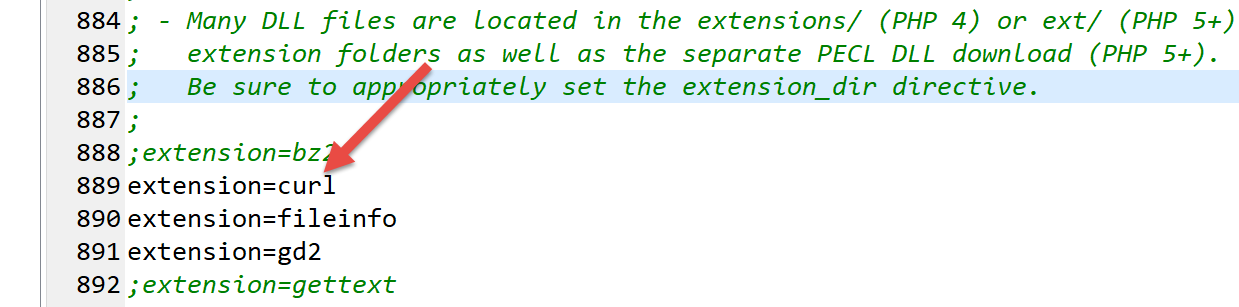
Make sure that line 889 above is uncommented.
We will write a [http-02.php] script that will use the following jSON configuration file:
Each element of the [clé, valeur] dictionary has the following structure:
- key: the name of a web server;
- value is a dictionary with the following keys:
- timeout: maximum wait time for the server’s response. After this time, the client will disconnect;
- url: URL of the requested document;
The code for the [http-02.php] script is as follows:
<?php

// strict adherence to declared types of function parameters
declare (strict_types=1);
//
// error management
//error_reporting(E_ALL & E_STRICT);
//ini_set("display_errors", "on");
//
// constants
const CONFIG_FILE_NAME = "config-http-02.json";
//
// we retrieve the configuration
$config = \json_decode(\file_get_contents(CONFIG_FILE_NAME), true);

// get the HTML text from the URL in the configuration file
foreach ($config as $site => $infos) {
  // reading URL from site $ite
  $résultat = getUrl($site, $infos["url"], $infos["timeout"]);
  // result display
  print "$résultat\n";
}//for
// end
exit;

//-----------------------------------------------------------------------
function getUrl(string $site, string $url, int $timeout, $suivi = TRUE): string {
  // reads the URL $url and stores it in the file output/$site.HTML
  //
  // follow-up
  print "Client : début de la communication avec le serveur [$site] ----------------------------\n";

  // Session initialization cURL
  $curl = curl_init($url);
  if ($curl === FALSE) {
    // there has been an error
    return "Erreur lors de l'initialisation de la session cURL pour le site [$site]";
  }
  // curl options
  $options = [
    // verbose mode
    CURLOPT_VERBOSE => true,
    // new connection - no cache
    CURLOPT_FRESH_CONNECT => true,
    // request timeout (in seconds)
    CURLOPT_TIMEOUT => $timeout,
    CURLOPT_CONNECTTIMEOUT => $timeout,
    // do not check the validity of SSL certificates
    CURLOPT_SSL_VERIFYPEER => false,
    // track redirects
    CURLOPT_FOLLOWLOCATION => true,
    // retrieve the requested document as a character string
    CURLOPT_RETURNTRANSFER => true
  ];

  // curl settings
  curl_setopt_array($curl, $options);
  // Executing the request
  $page_content = curl_exec($curl);
  // Closing the session cURL
  curl_close($curl);

  // exploitation of results
  if ($page_content !== FALSE) {
    // save result in $site.HTML
    $result = file_put_contents("output/$site.HTML", $page_content);
    if ($result === FALSE) {
      // error return
      return "Erreur lors de la création du fichier [output/$site.HTML]";
    }
    // successful comeback
    return "Fin de la communication avec le serveur [$site]. Vérifiez le fichier [output/$site.HTML]";
  } else {
    // there has been a communication error
    return "Erreur de communication avec le serveur [$site]";
  }
}
Comments
- line 14: we use the configuration file to create the dictionary [$config];
- lines 17–22: we loop through the list of sites found in the configuration;
- line 19: for each site, we call the function [getUrl], which will download theURL $infos[«url»] with a timeout $infos[«timeout»];
- line 34: a session is started [curl]. [curl_init] does not yet connect to the web server. It returns a resource [$curl] that will serve as a parameter for all subsequent [curl] functions;
- lines 35–38: if initialization of the [curl] session fails, the [curl_init] function returns the Boolean FALSE;
- lines 40–54: the dictionary [$options] configures the connection [curl] to the server;
- line 57: the connection options are passed to the resource [$curl];
- line 59: connection to URL requested with the defined options. Because of option and [CURLOPT_RETURNTRANSFER => true], the function [curl_exec] returns the document sent by the server as a string. The [curl_exec] function returns the Boolean FALSE if the connection fails;
- line 64: the result of [curl_exec] is analyzed;
- line 66: the received page is saved to a local file;
- Lines 69, 72, 75: the result of the [getUrl] function is returned;
When the [http-02.php] script is executed, the following console output is obtained:
* Rebuilt URL to: http://sergetahe.com/
Client : début de la communication avec le serveur [sergetahe.com] ----------------------------
*   Trying 87.98.154.146…
* TCP_NODELAY set
* Connected to sergetahe.com (87.98.154.146) port 80 (#0)
> GET / HTTP/1.1
Host: sergetahe.com
Accept: */*

< HTTP/1.1 302 Found
< Date: Sat, 18 May 2019 08:46:38 GMT
< Content-Type: text/HTML; charset=UTF-8
< Transfer-Encoding: chunked
< Server: Apache
< X-Powered-By: PHP/7.0
< Location: http://sergetahe.com/cours-tutoriels-de-programmation
< Set-Cookie: SERVERID68971=2621236|XN/Gc|XN/Gc; path=/
< X-IPLB-Instance: 17097
<
* Ignoring the response-body
* Connection #0 to host sergetahe.com left intact
* Issue another request to this URL: 'http://sergetahe.com/cours-tutoriels-de-programmation'
* Found bundle for host sergetahe.com: 0x1fee4ebe090 [can pipeline]
* Re-using existing connection! (#0) with host sergetahe.com
* Connected to sergetahe.com (87.98.154.146) port 80 (#0)
> GET /cours-tutoriels-de-programmation HTTP/1.1
Host: sergetahe.com
Accept: */*

< HTTP/1.1 301 Moved Permanently
< Date: Sat, 18 May 2019 08:46:38 GMT
< Content-Type: text/HTML; charset=iso-8859-1
< Content-Length: 262
< Server: Apache
< Location: http://sergetahe.com/cours-tutoriels-de-programmation/
< Set-Cookie: SERVERID68971=2621236|XN/Gc|XN/Gc; path=/
< Cache-control: private
< X-IPLB-Instance: 17097
<
* Ignoring the response-body
* Connection #0 to host sergetahe.com left intact
* Issue another request to this URL: 'http://sergetahe.com/cours-tutoriels-de-programmation/'
* Found bundle for host sergetahe.com: 0x1fee4ebe090 [can pipeline]
* Re-using existing connection! (#0) with host sergetahe.com
* Connected to sergetahe.com (87.98.154.146) port 80 (#0)
> GET /cours-tutoriels-de-programmation/ HTTP/1.1
Host: sergetahe.com
Accept: */*

< HTTP/1.1 200 OK
< Date: Sat, 18 May 2019 08:46:39 GMT
< Content-Type: text/HTML; charset=UTF-8
< Transfer-Encoding: chunked
< Server: Apache
< X-Powered-By: PHP/7.0
< Link: <http://sergetahe.com/cours-tutoriels-de-programmation/wp-json/>; rel="https://api.w.org/"
< Link: <http://sergetahe.com/cours-tutoriels-de-programmation/>; rel=shortlink
< Vary: Accept-Encoding
< Set-Cookie: SERVERID68971=2621236|XN/Gc|XN/Gc; path=/
< Cache-control: private
< X-IPLB-Instance: 17097
<
Fin de la communication avec le serveur [sergetahe.com]. Vérifiez le fichier [output/sergetahe.com.HTML]
Client : début de la communication avec le serveur [tahe.developpez.com] ----------------------------
* Connection #0 to host sergetahe.com left intact
* Rebuilt URL to: https://tahe.developpez.com/
*   Trying 87.98.130.52…
* TCP_NODELAY set
* Connected to tahe.developpez.com (87.98.130.52) port 443 (#0)
* ALPN, offering http/1.1
* successfully set certificate verify locations:
*   CAfile: C:\myprograms\laragon-lite\etc\ssl\cacert.pem
  CApath: none
* SSL connection using TLSv1.2 / ECDHE-RSA-AES128-GCM-SHA256
* ALPN, server accepted to use http/1.1
* Server certificate:
*  subject: CN=*.developpez.com
*  start date: Apr  4 08:25:09 2019 GMT
*  expire date: Jul  3 08:25:09 2019 GMT
*  subjectAltName: host "tahe.developpez.com" matched cert's "*.developpez.com"
*  issuer: C=US; O=Let's Encrypt; CN=Let's Encrypt Authority X3
*  SSL certificate verify ok.
> GET / HTTP/1.1
Host: tahe.developpez.com
Accept: */*

< HTTP/1.1 200 OK
< Date: Sat, 18 May 2019 08:46:42 GMT
< Server: Apache/2.4.25 (Debian)
< X-Powered-By: PHP/5.3.29
< Vary: Accept-Encoding
< Transfer-Encoding: chunked
< Content-Type: text/HTML
<
Fin de la communication avec le serveur [tahe.developpez.com]. Vérifiez le fichier [output/tahe.developpez.com.HTML]
Client : début de la communication avec le serveur [www.polytech-angers.fr] ----------------------------
* Connection #0 to host tahe.developpez.com left intact
* Rebuilt URL to: http://www.polytech-angers.fr/
*   Trying 193.49.144.41…
* TCP_NODELAY set
* Connected to www.polytech-angers.fr (193.49.144.41) port 80 (#0)
> GET / HTTP/1.1
Host: www.polytech-angers.fr
Accept: */*

< HTTP/1.1 301 Moved Permanently
< Date: Sat, 18 May 2019 08:46:45 GMT
< Server: Apache/2.4.29 (Ubuntu)
< Location: http://www.polytech-angers.fr/fr/index.HTML
< Cache-Control: max-age=1
< Expires: Sat, 18 May 2019 08:46:46 GMT
< Content-Length: 339
< Content-Type: text/HTML; charset=iso-8859-1
<
* Ignoring the response-body
* Connection #0 to host www.polytech-angers.fr left intact
* Issue another request to this URL: 'http://www.polytech-angers.fr/fr/index.HTML'
* Found bundle for host www.polytech-angers.fr: 0x1fee4ebe390 [can pipeline]
* Re-using existing connection! (#0) with host www.polytech-angers.fr
* Connected to www.polytech-angers.fr (193.49.144.41) port 80 (#0)
> GET /fr/index.HTML HTTP/1.1
Host: www.polytech-angers.fr
Accept: */*

< HTTP/1.1 200
< Date: Sat, 18 May 2019 08:46:46 GMT
< Server: Apache/2.4.29 (Ubuntu)
< X-Cocoon-Version: 2.1.13-dev
< Accept-Ranges: bytes
< Last-Modified: Sat, 18 May 2019 08:01:36 GMT
< Content-Type: text/HTML; charset=UTF-8
< Content-Length: 47372
< Vary: Accept-Encoding
< Cache-Control: max-age=1
< Expires: Sat, 18 May 2019 08:46:47 GMT
< Content-Language: fr
<
* Connection #0 to host www.polytech-angers.fr left intact
Fin de la communication avec le serveur [www.polytech-angers.fr]. Vérifiez le fichier [output/www.polytech-angers.fr.HTML]
Client : début de la communication avec le serveur [localhost] ----------------------------
* Rebuilt URL to: http://localhost/
*   Trying ::1…
* TCP_NODELAY set
* Connected to localhost (::1) port 80 (#0)
> GET / HTTP/1.1
Host: localhost
Accept: */*

< HTTP/1.1 200 OK
< Date: Sat, 18 May 2019 08:46:47 GMT
< Server: Apache/2.4.35 (Win64) OpenSSL/1.1.0i PHP/7.2.11
< X-Powered-By: PHP/7.2.11
< Content-Length: 1781
< Content-Type: text/HTML; charset=UTF-8
<
* Connection #0 to host localhost left intact

Fin de la communication avec le serveur [localhost]. Vérifiez le fichier [output/localhost.HTML]
Comments
- the output is the same as with the [curl] tool;
- in green, the script logs;
- in blue, the commands sent to the server;
- in yellow, the commands received by the client in response;
16.4.7. Conclusion
In this section, we explored the HTTP protocol and wrote a [http-02.php] script capable of downloading a URL file from the web.
16.5. The SMTP protocol (Simple Mail Transfer Protocol)
16.5.1. Introduction
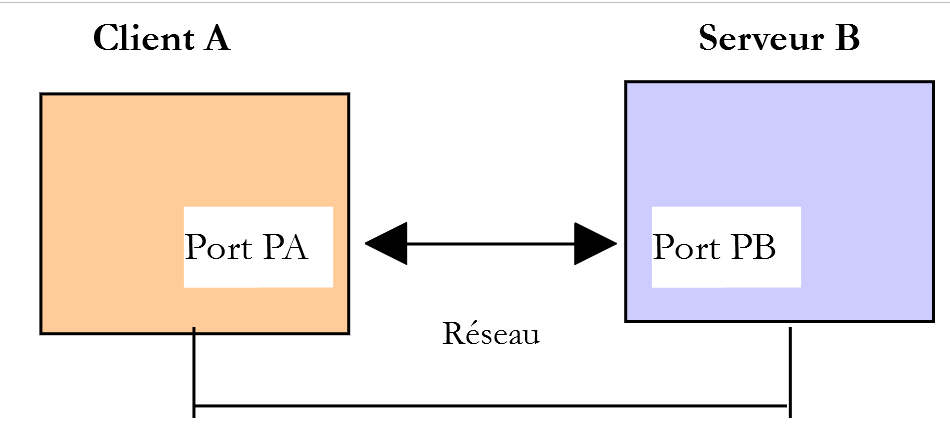
In this chapter:
- [Serveur B] will be a local SMTP server that we will install;
- [Client A] will be a SMTP client in various forms:
- the [RawTcpClient] client to discover the SMTP protocol;
- a script PHP replaying the protocol SMTP from the client [RawTcpClient];
- a script PHP using the library [SwiftMailServer] to send all kinds of emails;
16.5.2. Creating an email address [gmail]
To run our SMTP tests, we’ll need an email address to send to. To do this, we’ll create an address on Gmail:
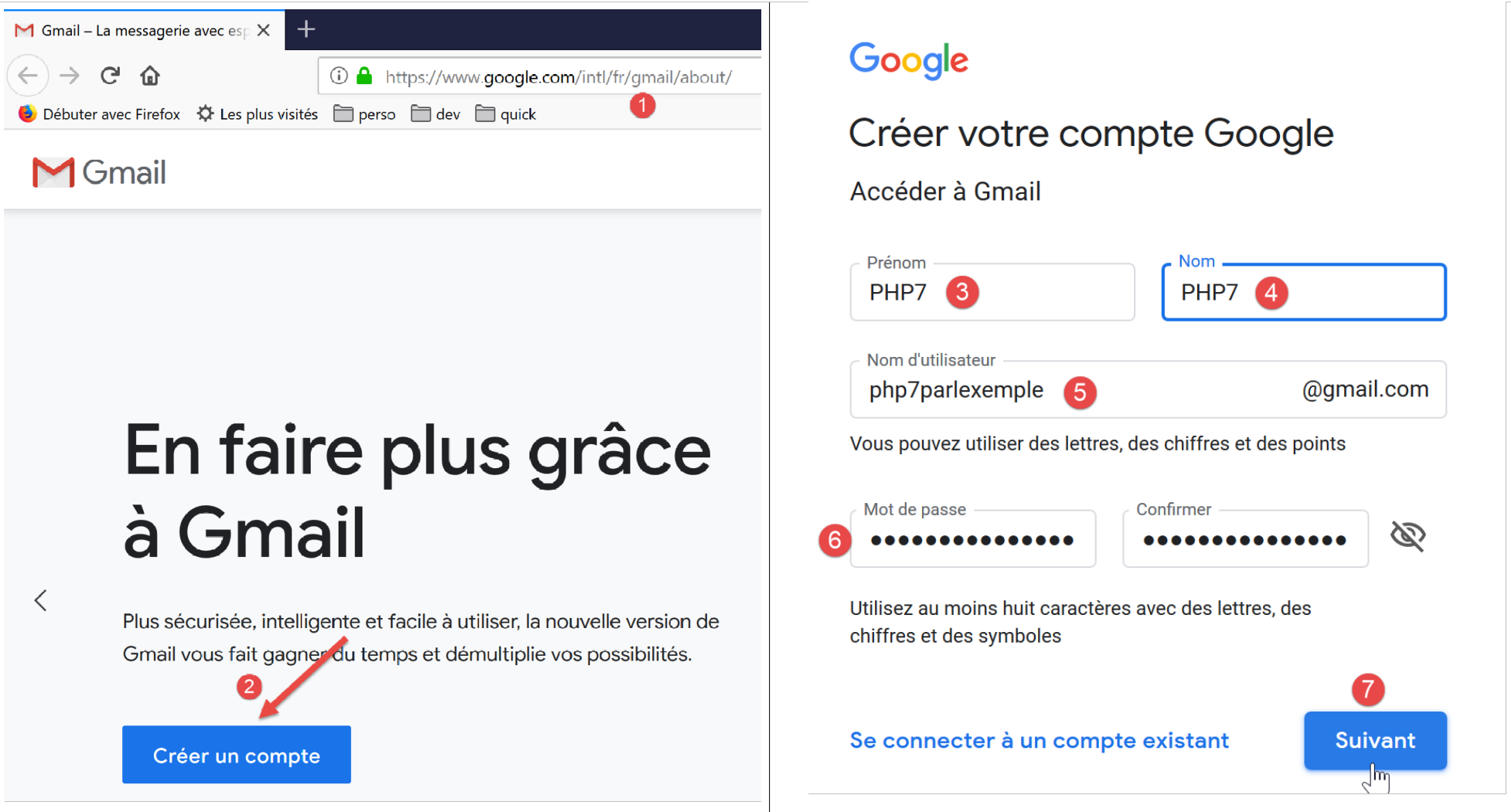
- In [5], we create the user [php7parlexemple] (choose something else);
- in [6], the password will be [PHP7parlexemple] (choose something else);
- in [7], we confirm this information;
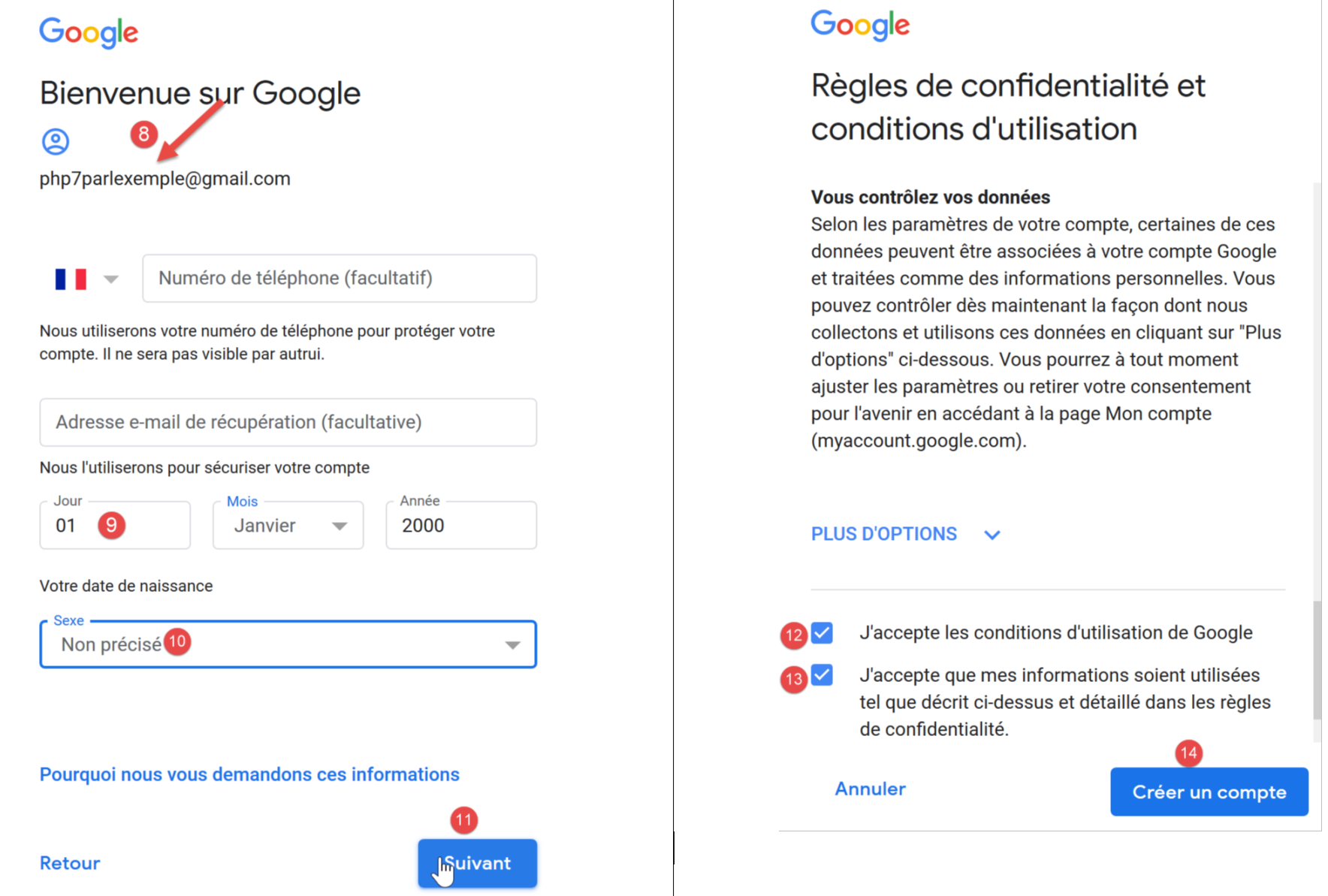
- fill in the fields [9-10] then confirm (11);
- accept Google’s terms of service (12-13) and then confirm (14);
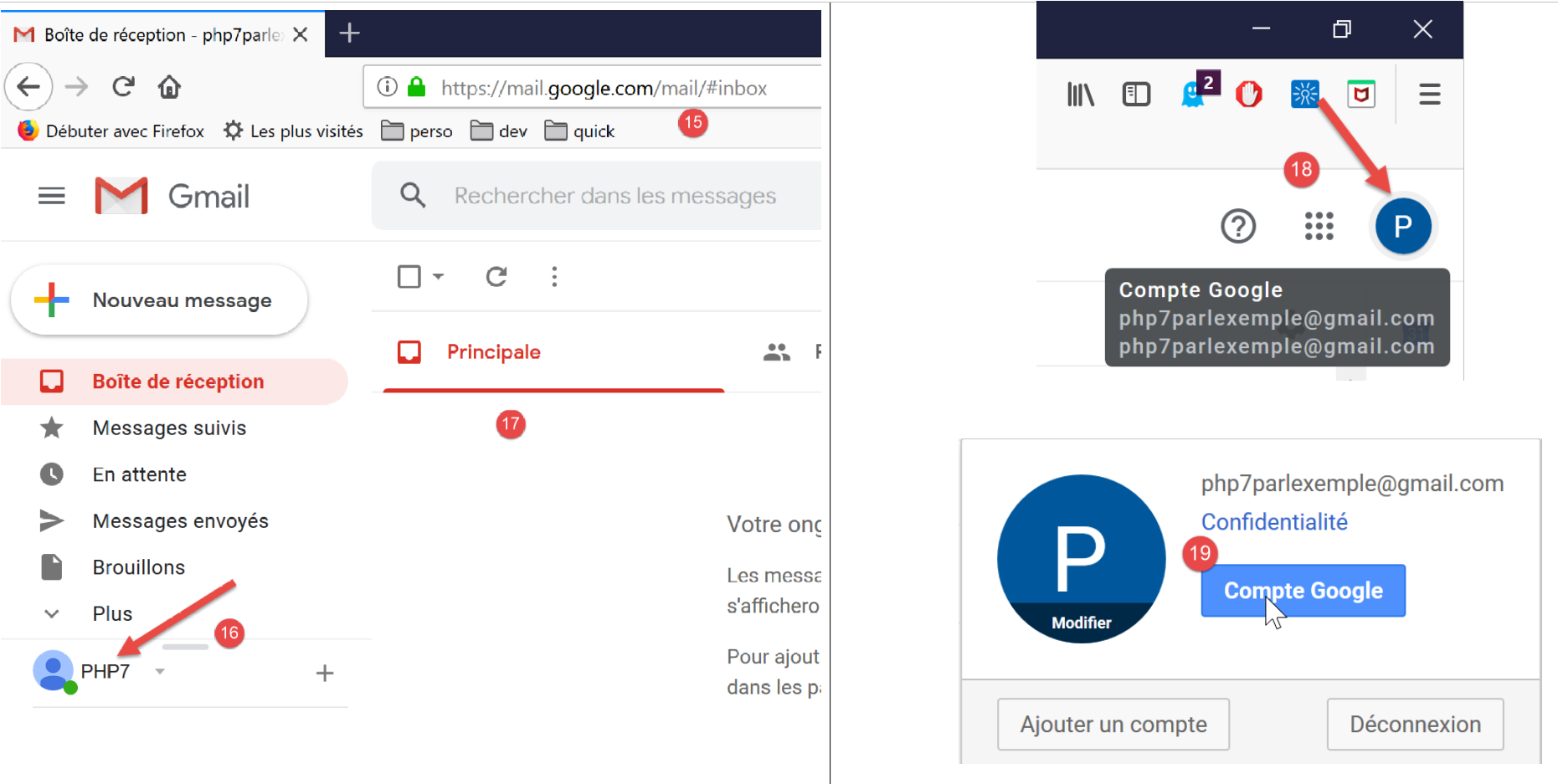
- in [15], the inbox of user [PHP7] (16);
- in [17], this user has an empty inbox;
- In [18-19], sign in to the Google account of user [php7parlexemple@gmail.com]. We will configure the account’s security;
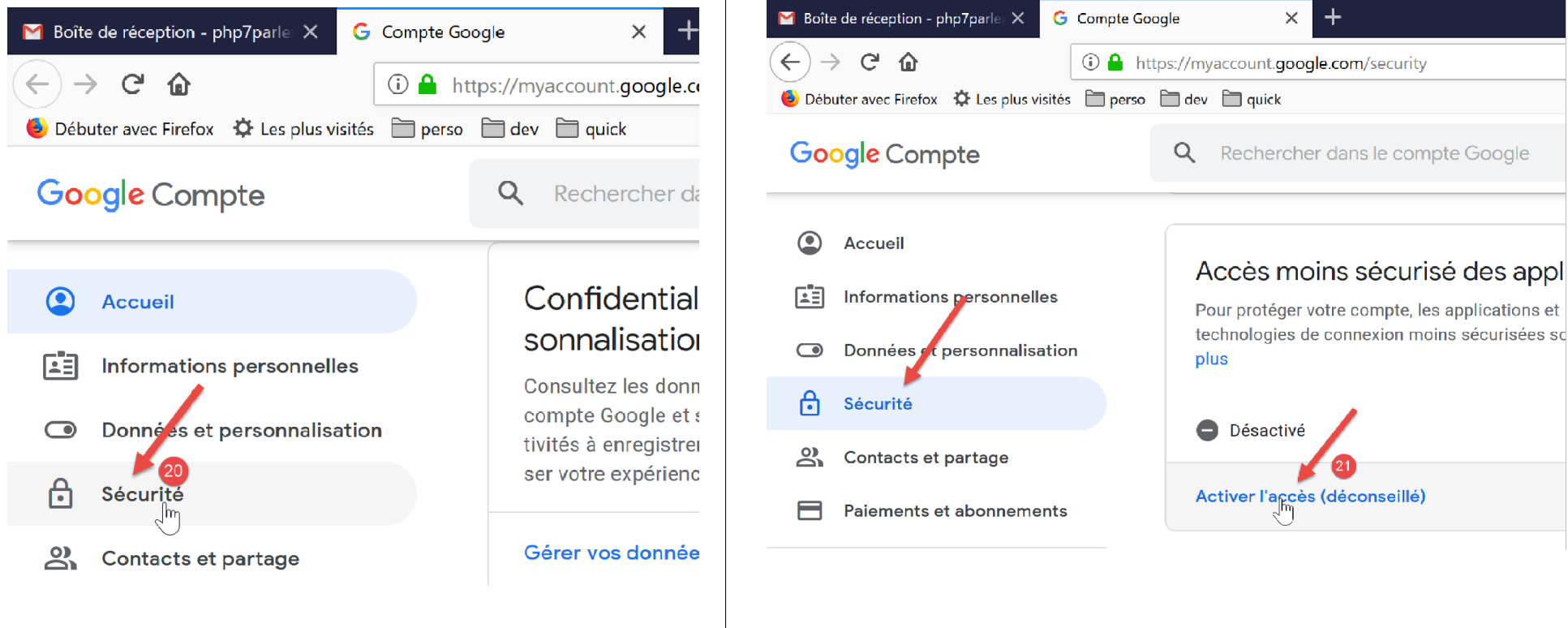
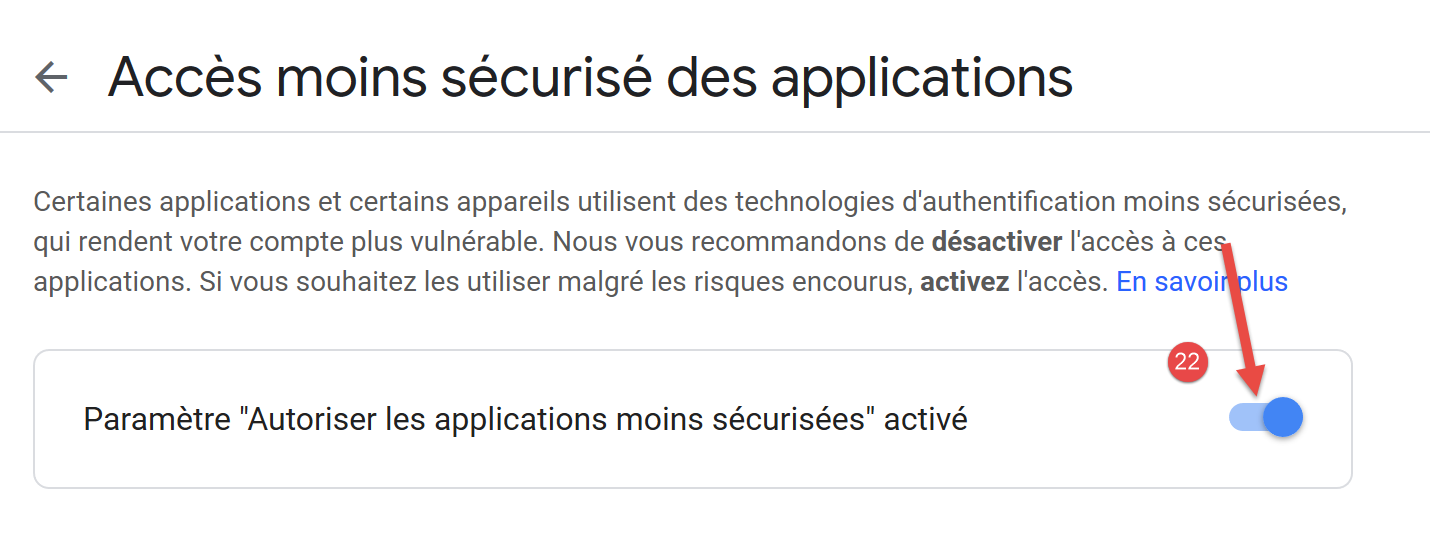
- In [21], allow applications other than Google’s to access the [php7parlexemple] account. If we don’t do this, our local mail server [hMailServer] won’t be able to communicate with the Gmail server SMTP;
16.5.3. Installing a SMTP server
For our tests, we will install the [hMailServer] mail server, which serves as both a SMTP server for sending emails and a POP3 (Post Office Protocol) that allows you to read emails stored on the server, and a IMAP server (Internet Message Access Protocol) that also allows you to read emails stored on the server but goes beyond that. In particular, it allows you to manage email storage on the server.
The [hMailServer] mail server is available as of URL [https://www.hmailserver.com/] (May 2019).
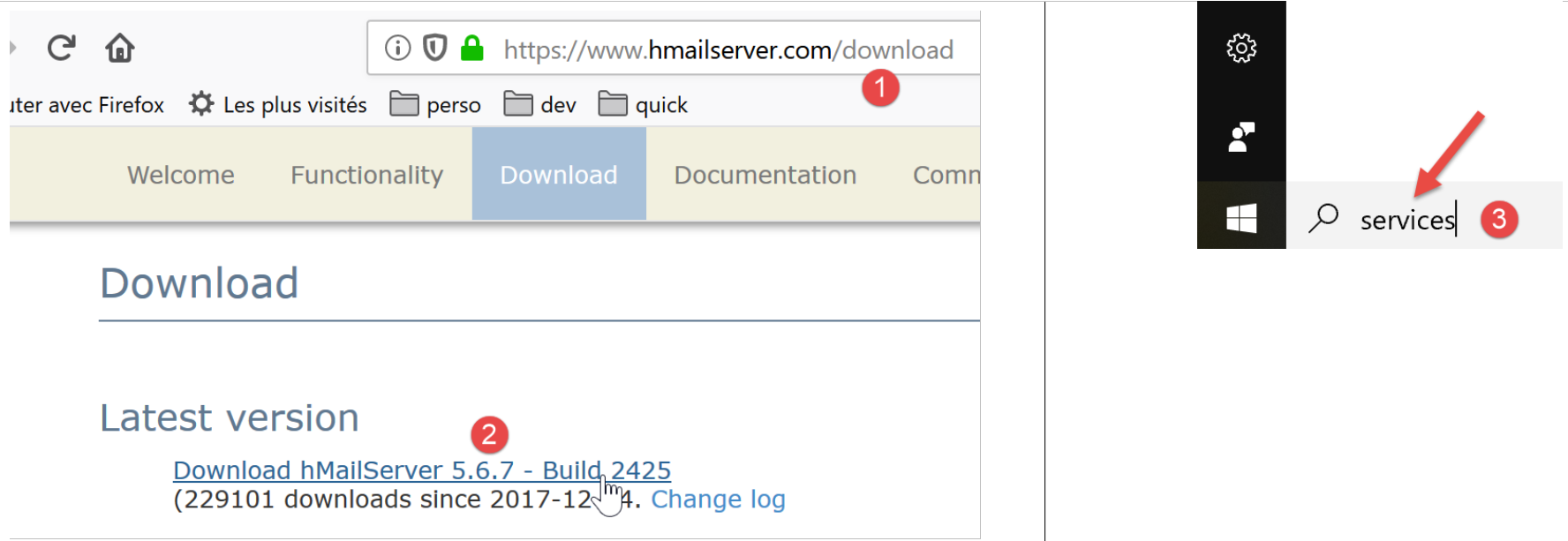
During installation, you will be asked for certain information:
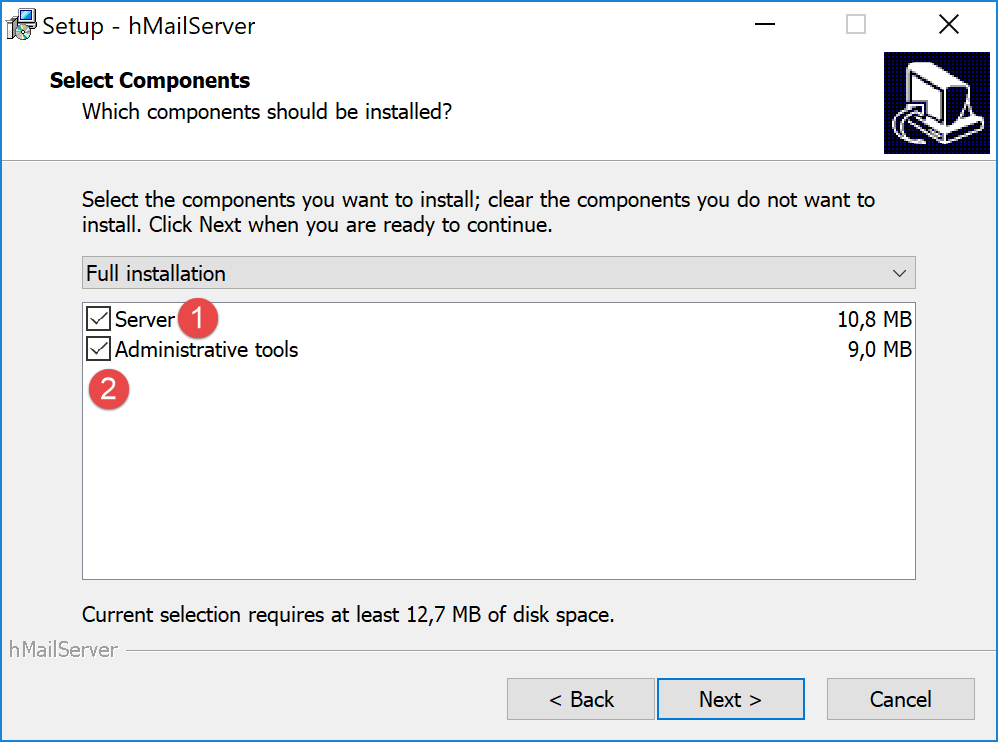
- In [1-2], select both the mail server and the tools to manage it;
- during installation, you will be asked for the administrator password: make a note of it, as you will need it;
[hMailServer] installs as a Windows service that starts automatically when the computer boots up. It is preferable to choose a manual startup:
- In [3], type [services] into the text box on the status bar;
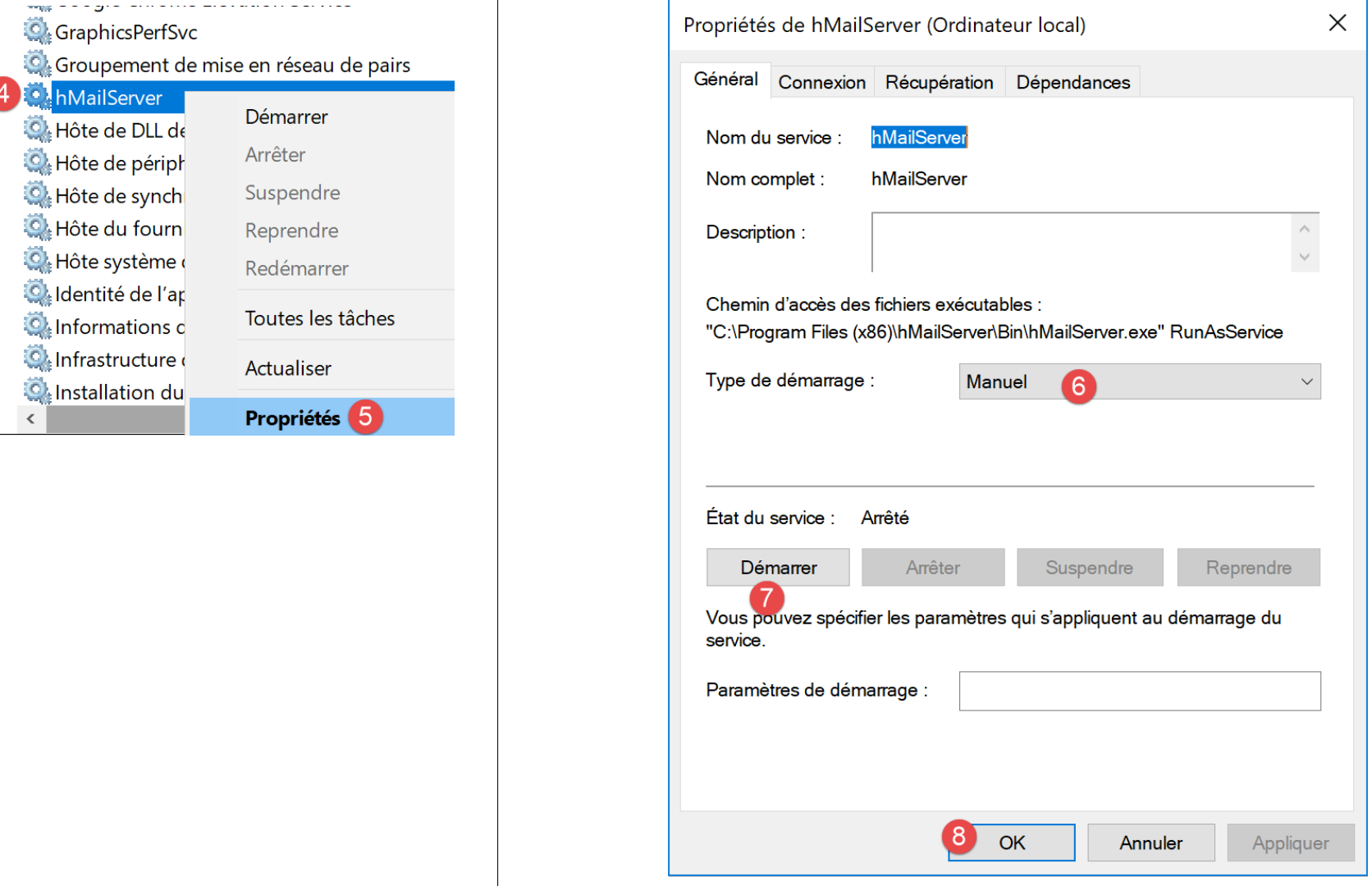
- In [4-8], set the service to [manuel] mode (6), then start it (7);
Once started, the [hMailServer] server must be configured. The server was installed with an administration program [hMailServer Administrator]:
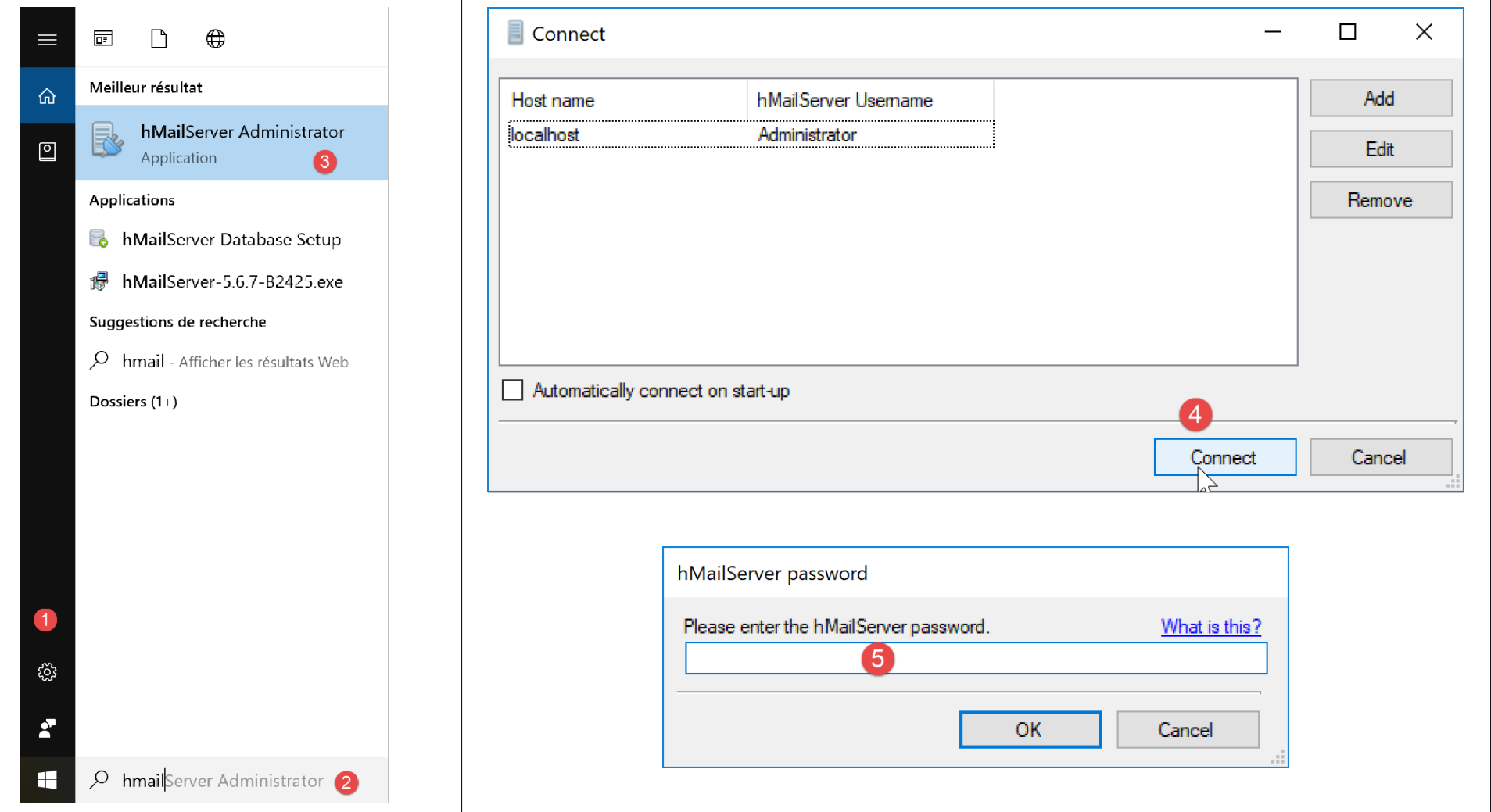
- In [2], in the status bar input field, type [hmailserver];
- in [3], launch the administrator;
- In [4], log the administrator into the [hMailServer] server;
- In [5], enter the password you entered during the installation of [hMailServer];
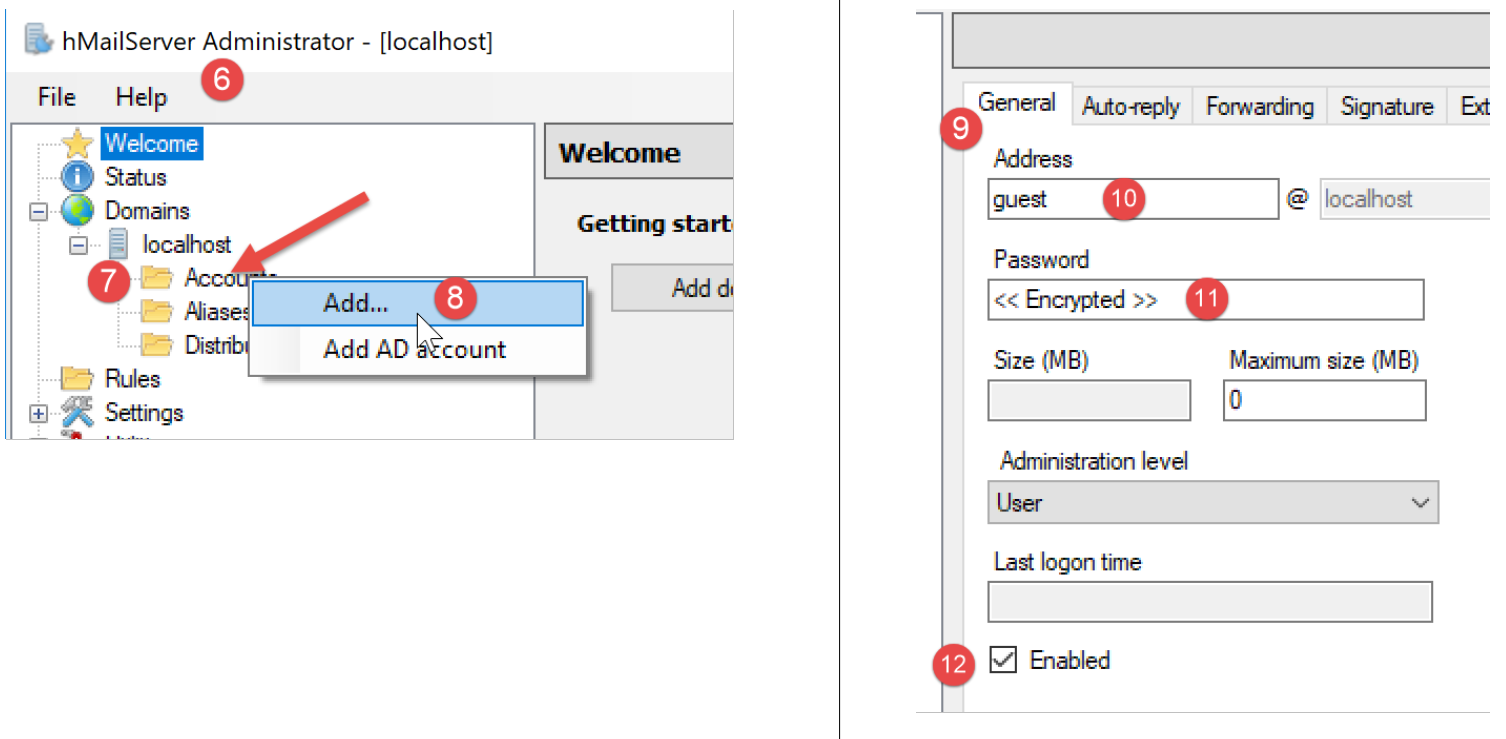
We will create a user account:
- right-click on [Accounts] (7) then (8) to add a new user;
- In the [General] tab (9), we define a user [guest] (10) with the password [guest] (11). They will have the email address [guest@localhost] (10);
- in [12], the user [guest] is enabled;
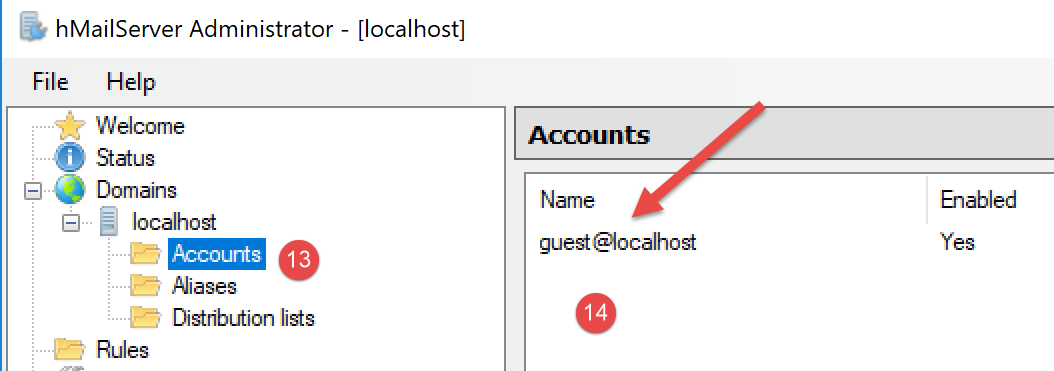
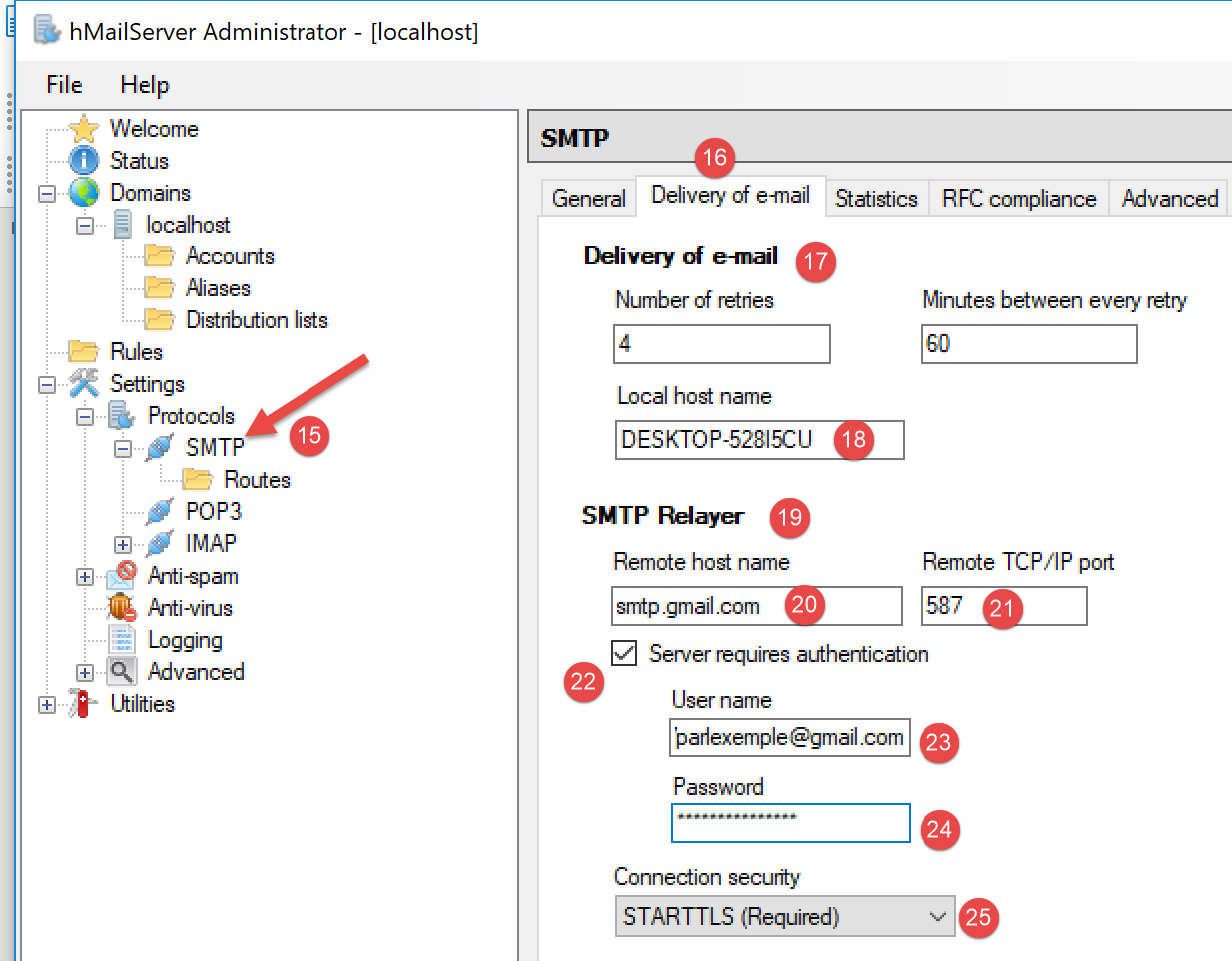
- in [15], the mail server protocol SMTP is configured;
- in [16], mail distribution is configured;
- in [17], the configuration of email distribution to the host machine (localhost);
- in [18], the name of the local machine (localhost). The script in the link section allows you to obtain this name;
- in [19], we configure a relay server SMTP: this is the server that will handle the distribution of emails not intended for the local machine (localhost);
- in [20], the Gmail server SMTP. We are using Gmail because we created an account there in the link section;
- in [21], the Gmail port SMTP;
- in [22], the Gmail service SMTP is a secure service: you need a Gmail account to access it;
- in [23], the user [php7parlexemple] created in the link section;
- in [24], the password for this user: [PHP7parlexemple] created in the link section;
- in [25], the type of security protocol used by Gmail is specified;
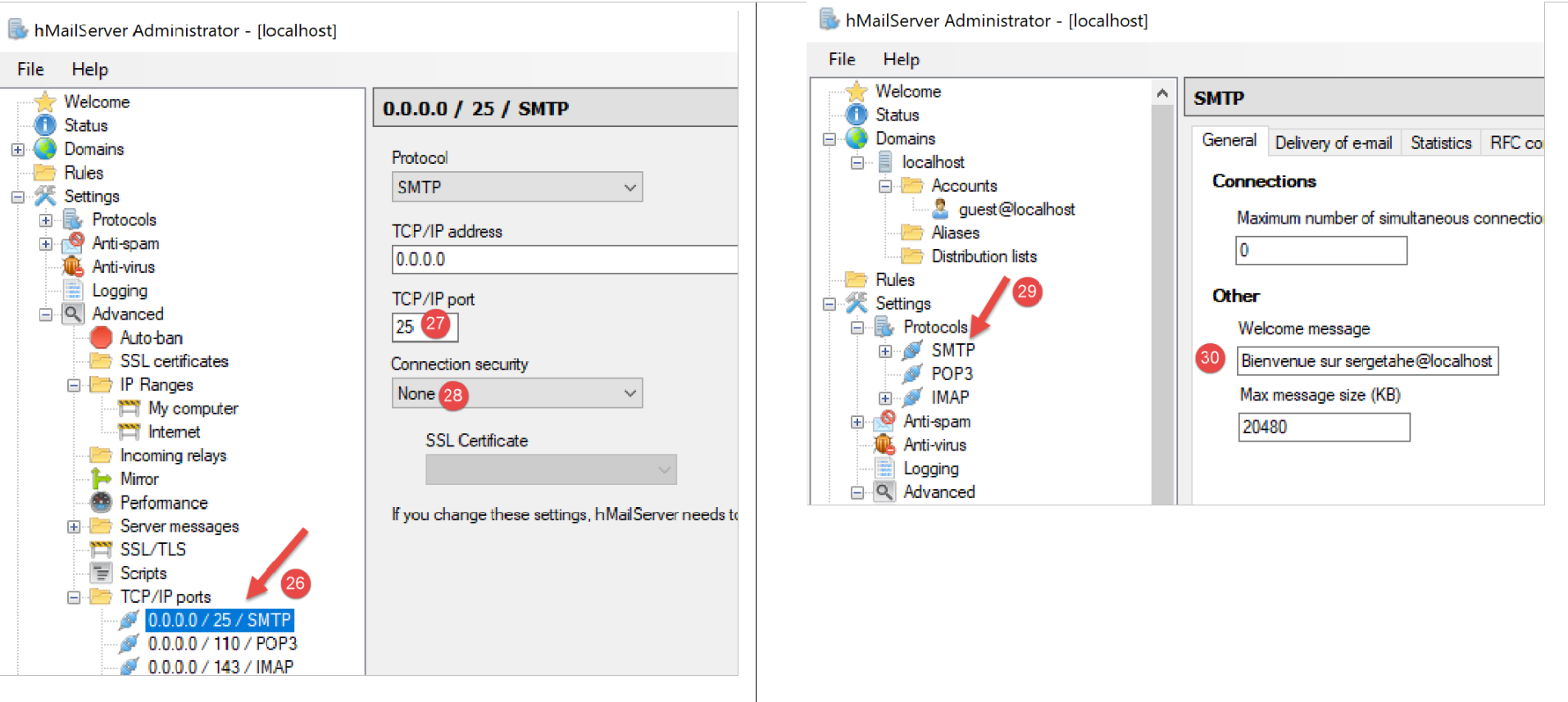
- in [27], the port for the SMTP service;
- in [28], this service does not require authentication;
- in [30], enter the welcome message that the SMTP server will send to its clients;
16.5.4. The SMTP protocol
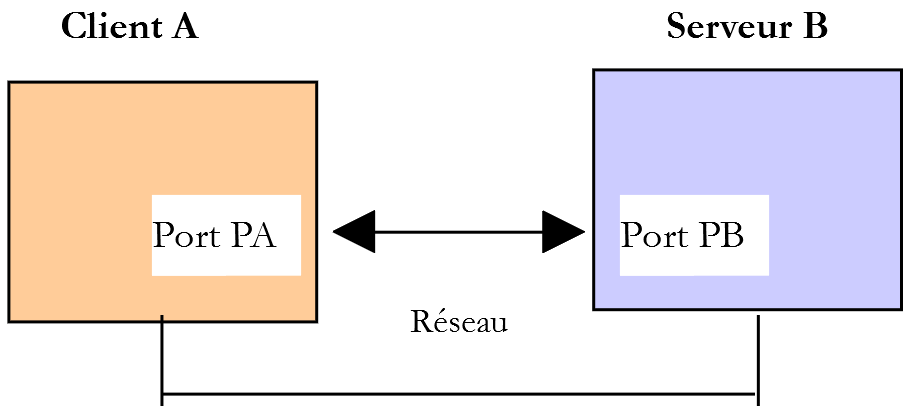
We will explore the SMTP protocol using the following environment:
- Client A will be the generic client TCP;
- Server B will be the mail server [hMailServer];
- Client A will ask Server B to deliver an email to user [php7parlexemple@gmail.com];
- we will verify that this user has indeed received the sent email;
We launch the client as follows:

- in [1], we connect to port 25 on the local machine, where the SMTP service of [hMailServer] is running. The argument [--quit bye] indicates that the user will exit the program by typing the command [bye]. Without this argument, the command to end the program is [quit]. However, [quit] is also a command in the SMTP protocol. We must therefore avoid this ambiguity;
- in [2], the client is indeed connected;
- in [3], the client is waiting for commands entered via the keyboard;
- in [4], the server sends the client its welcome message;
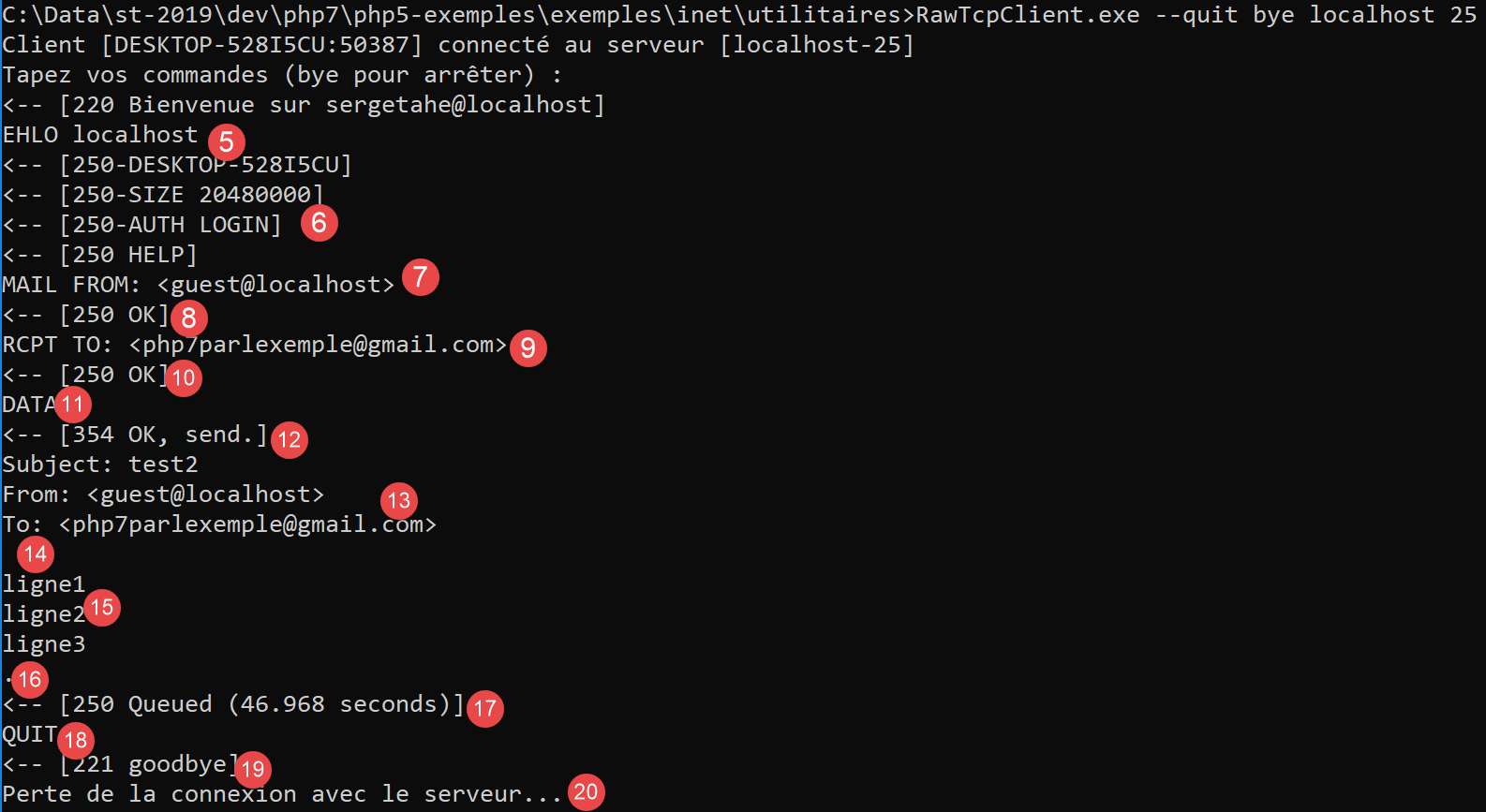
- in [5], the client sends the command [EHLO nom-de-la-machine-client]. The server responds with a series of messages in the form [250-xx] (6). The code [250] indicates that the command sent by the client was successful;
- in [7], the client specifies the message sender, in this case [guest@localhost]. This user must exist on the mail server [hMailServer]. This is the case here because we created this user previously;
- in [8], the server’s response;
- in [9], the message recipient is specified, in this case the Gmail user [php7parlexemple@gmail.com];
- in [10], the server’s response;
- in [11], the command [DATA] tells the server that the client is about to send the message content;
- in [12], the server’s response;
- in [13-16], the client must send a list of text lines ending with a line containing only a single period. The message may contain lines [Subject :, From :, To :] (13) to define, respectively, the message subject, the sender, and the recipient;
- In [14], the preceding headers must be followed by a blank line;
- in [15], the message text;
- in [16], the line containing only a single period, which indicates the end of the message;
- in [17], once the server has received the line containing only a single period, it queues the message;
- in [18], the client tells the server that it is finished;
- in [19], the server’s response;
- In [20], we see that the server has closed the connection to the client;
Now let’s verify that user [php7parlexemple@gmail.com] has indeed received the message:
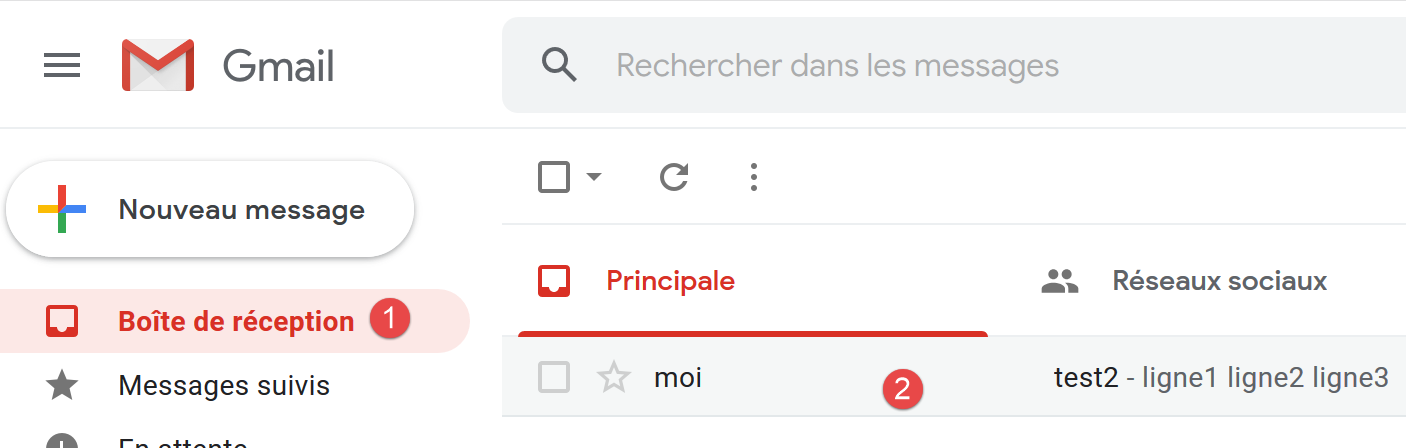
- in [2], we see that the user [php7parlexemple@gmail.com] has indeed received the message;
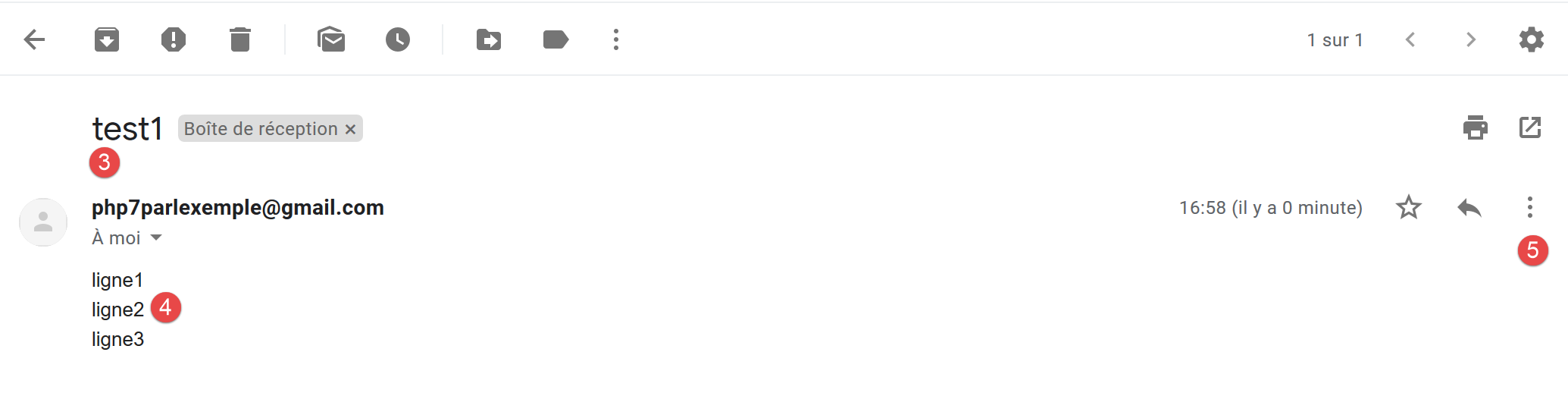
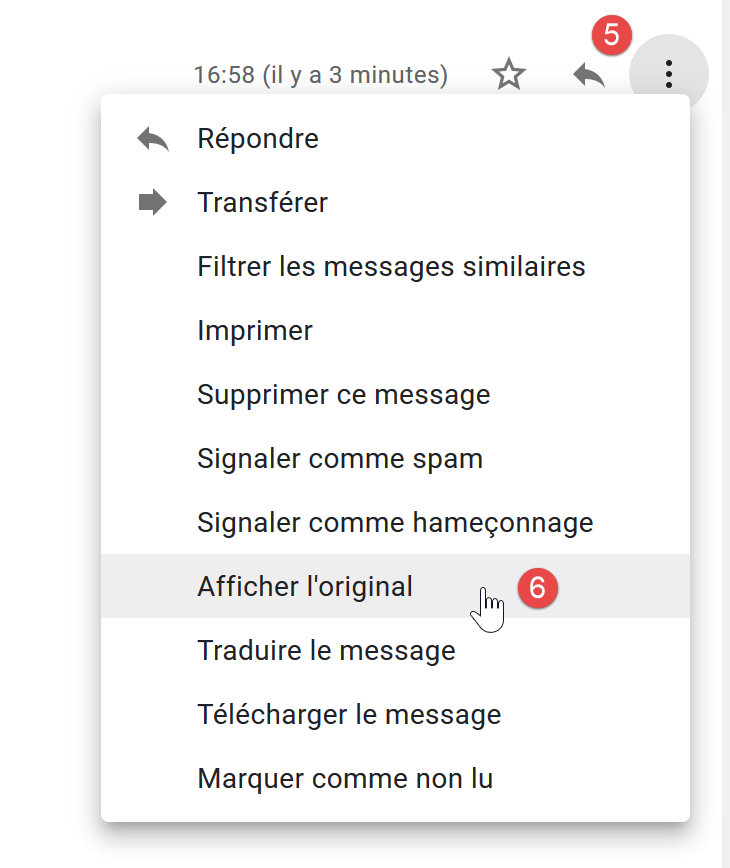
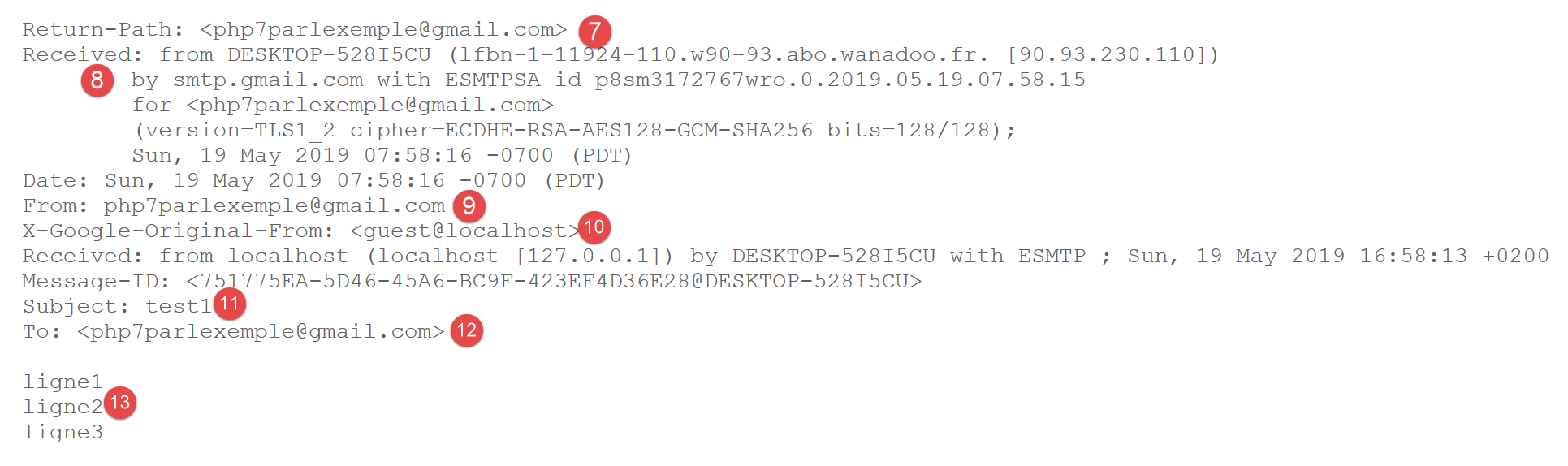
- In [7], the email sender. We see that it is not [guest@localhost]. This is because the relay server defined in the configuration of [hmailServer] delivered the message. However, this relay server is [smtp.gmail.com], associated with the credentials of the Gmail user [php7parlexemple@gmail.com]. Any email sent from [hMailServer] will appear to come from the user [php7parlexemple@gmail.com]. This is not what we wanted here, but if we do not use this relay server, Gmail’s SMTP service rejects emails sent by [hMailServer] because Gmail’s SMTP requires authentication that [hMailServer] does not provide. There is likely a way to work around this issue, but I haven’t found it;
- in [8], we can see that the email was received from the machine [DESKTOP-528I5CU], which hosts the mail server [hMailServer];
- in [9], the message sender. We can see that it is not [guest@localhost];
- in [10], the original sender of the message. This time it is indeed [guest@localhost];
- in [11], the subject;
- in [12], the recipient;
- in [13], the message;
Finally, our client [RawTcpClient] successfully sent the message even though we encountered a problem with the sender. We now have the basics to create a client SMTP written in PHP.
16.5.5. A basic SMTP client written in PHP
We will apply what we learned earlier from the SMTP protocol to PHP.
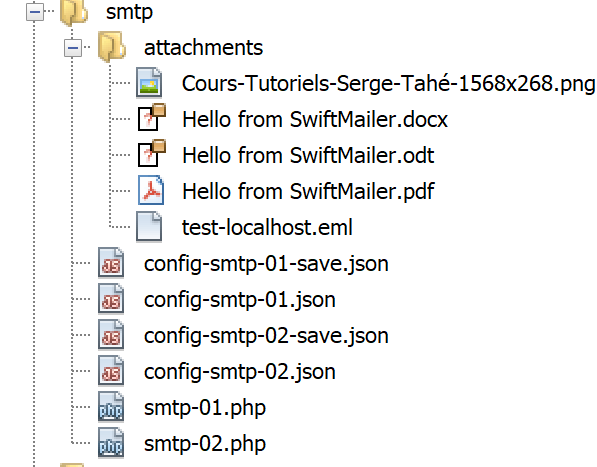
The [smtp-01.php] script is configured by the following jSON [config-smtp-01.json] file:
{
    "mail to localhost via localhost": {
        "smtp-server": "localhost",
        "smtp-port": "25",
        "from": "guest@localhost",
        "to": "guest@localhost",
        "subject": "to localhost via localhost",
        "message": "ligne 1\nligne 2\nligne 3"
    },
    "mail to gmail via localhost": {
        "smtp-server": "localhost",
        "smtp-port": "25",
        "from": "guest@localhost",
        "to": "php7parlexemple@gmail.com",
        "subject": "to gmail via localhost",
        "message": "ligne 1\nligne 2\nligne 3"
    },
    "mail to gmail via gmail": {
        "smtp-server": "smtp.gmail.com",
        "smtp-port": "587",
        "from": "guest@localhost",
        "to": "php7parlexemple@gmail.com",
        "subject": "to gmail via gmail",
        "message": "ligne 1\nligne 2\nligne 3"
    }
}
[config-smtp-01.json] is an array where each element is a dictionary of type [nom=>infos]. The value [infos] is itself a dictionary with the following keys and values:
- [smtp-server]: the name of the SMTP server to use;
- [smtp-port]: the port number of the SMTP service;
- [from]: the sender of the message;
- [to]: the message recipient;
- [subject]: the subject of the message;
- [message]: the message to be sent;
- The first element uses the server SMTP [localhost] to send an email to a user of [localhost];
- The second element uses the server SMTP [localhost] to send an email to a user of [Gmail];
- the third element uses the SMTP and [Gmail] servers to send an email to a user of [Gmail];
The code [smtp-01.php] for client SMTP is as follows:
<?php

// client SMTP (SendMail Transfer Protocol) for sending a message
// communication protocol SMTP client-server
// -> client connects to smtp server port 25
// <- server sends him a welcome message
// -> customer sends command EHLO machine name
// <- server responds OK or not
// -> client envoie la commande MAIL FROM: <expéditeur>
// <- server responds OK or not
// -> customer sends command RCPT TO: <recipient>
// <- server responds OK or not
// -> customer sends DATA command
// <- server responds OK or not
// -> client sends all the lines of its message and ends with a line containing the
// single character .
// <- server responds OK or not
// -> customer sends QUIT command
// <- server responds OK or not
// server responses have the form xxx text where xxx is a 3-digit number. All
// number xxx >=500 indicates an error.
// The answer may consist of several lines all beginning with xxx except the last one
// of the form xxx(space)
// exchanged text lines must end with the characters RC(#13) and LF(#10)
//
//  client SMTP (SendMail Transfer Protocol) for sending a message
//
// error management
//ini_set("error_reporting", E_ALL & ~ E_WARNING & ~E_DEPRECATED & ~E_NOTICE);
//ini_set("display_errors", "off");
//
// strict adherence to declared types of function parameters
declare (strict_types=1);
//
// mail settings
const CONFIG_FILE_NAME = "config-smtp-01.json";

// we retrieve the configuration
$mails = \json_decode(\file_get_contents(CONFIG_FILE_NAME), true);

// mail dispatch
foreach ($mails as $name => $infos) {
  // follow-up
  print "Envoi du mail [$name]\n";
  // mail dispatch
  $résultat = sendmail($name, $infos, TRUE);
  // result display
  print "$résultat\n";
}//for
// end
exit;

//sendmail
//-----------------------------------------------------------------------

function sendmail(string $name, array $infos, bool $verbose = TRUE): string {
  // envoie message[$name,$infos]. If $verbose=TRUE , tracks client-server exchanges
  // retrieve the customer's name
  $client = gethostbyaddr(gethostbyname(""));
  // open a connection with the SMTP server
  $connexion = fsockopen($infos["smtp-server"], (int) $infos["smtp-port"]);
  // return if error
  if ($connexion === FALSE) {
    return sprintf("Echec de la connexion au site (%s,%s) : %s", $infos["smtp-server"], $infos["smtp-port"]);
  }
  // $connexion represents a bidirectional communication flow
  // between the client (this program) and the smtp server contacted
  // this channel is used for the exchange of orders and information
  // after connection, the server sends a welcome message which is read as follows
  $erreur = sendCommand($connexion, "", $verbose, TRUE);
  if ($erreur !== "") {
    // closing the connection
    fclose($connexion);
    // return
    return $erreur;
  }
  // cmde EHLO
  $erreur = sendCommand($connexion, "EHLO $client", $verbose, TRUE);
  if ($erreur !== "") {
    // closing the connection
    fclose($connexion);
    // return
    return $erreur;
  }
  // cmde MAIL FROM:
  $erreur = sendCommand($connexion, sprintf("MAIL FROM: <%s>", $infos["from"]), $verbose, TRUE);
  if ($erreur !== "") {
    // closing the connection
    fclose($connexion);
    // return
    return $erreur;
  }
  // cmde RCPT TO:
  $erreur = sendCommand($connexion, sprintf("RCPT TO: <%s>", $infos["to"]), $verbose, TRUE);
  if ($erreur !== "") {
    // closing the connection
    fclose($connexion);
    // return
    return $erreur;
  }
  // cmde DATA
  $erreur = sendCommand($connexion, "DATA", $verbose, TRUE);
  if ($erreur !== "") {
    // closing the connection
    fclose($connexion);
    // return
    return $erreur;
  }
  // prepare message to send
  // it must contain the lines
  // From: expéditeur
  // To: recipient
  // Subject:
  // blank line
  // Message
  // .
  $data = sprintf("From: %s\r\nTo: %s\r\nSubject: %s\r\n\r\n%s\r\n.\r\n", $infos["from"], $infos["to"], $infos["subject"], $infos["message"]);
  $erreur = sendCommand($connexion, $data, $verbose, FALSE);
  if ($erreur !== "") {
    // closing the connection
    fclose($connexion);
    // return
    return $erreur;
  }
  // cmde quit
  $erreur = sendCommand($connexion, "QUIT", $verbose, TRUE);
  if ($erreur !== "") {
    // closing the connection
    fclose($connexion);
    // return
    return $erreur;
  }
  // end
  fclose($connexion);
  return "Message envoyé";
}

// --------------------------------------------------------------------------

function sendCommand($connexion, string $commande, bool $verbose, bool $withRCLF): string {
  // sends $commande to the $connexion channel
  // verbose mode if $verbose=1
  // if $withRCLF=1, adds sequence RCLF to exchange
  // data
  if ($withRCLF) {
    $RCLF = "\r\n";
  } else {
    $RCLF = "";
  }
  // send cmde if $commande not empty
  if ($commande!=="") {
    fputs($connexion, "$commande$RCLF");
    // possible echo
    if ($verbose) {
      affiche($commande, 1);
    }
  }//if
  // reading response
  $réponse = fgets($connexion, 1000);
  // possible echo
  if ($verbose) {
    affiche($réponse, 2);
  }
  // error code recovery
  $codeErreur = (int) substr($réponse, 0, 3);
  // last line of the answer?
  while (substr($réponse, 3, 1) === "-") {
    // reading response
    $réponse = fgets($connexion, 1000);
    // possible echo
    if ($verbose) {
      affiche($réponse, 2);
    }
  }//while
  // answer completed
  // error returned by the server?
  if ($codeErreur >= 500) {
    return substr($réponse, 4);
  }
// error-free return
  return "";
}

// --------------------------------------------------------------------------

function affiche($échange, $sens) {
  // displays $échange on screen
  // if $sens=1 displays -->$echange
  // if $sens=2 displays <-- $échange without the last 2 characters RCLF
  switch ($sens) {
    case 1:
      print "--> [$échange]\n";
      break;
    case 2:
      $L = strlen($échange);
      print "<-- [" . substr($échange, 0, $L - 2) . "]\n";
      break;
  }//switch
}
Comments
- line 39: the configuration file is used;
- line 42: we loop through the elements of the array [mails]. Each element is a dictionary [name=>infos], where [name] is a name that can be anything and [infos] is a dictionary containing the information needed to send an email;
- line 46: the email is sent by the function [sendmail], which takes three parameters:
- $name: the name given to this email;
- $infos: the dictionary containing the information needed to send the email;
- verbose: a Boolean indicating whether client/server exchanges should be logged on the console;
- line 46: the function [sendmail] returns an error message that is empty if no error occurred;
- line 56: the [sendmail] function sends the various commands that a client must send SMTP:
- lines 77–84: the EHLO command;
- lines 85–92: the MAIL command FROM: ;
- lines 93-100: the order RCPT TO: ;
- lines 101-108: the command DATA;
- lines 117-124: sending the message (From, To, Subject, text);
- lines 125-132: the command QUIT;
- line 140: the [sendCommand] function is responsible for sending the client’s commands to the SMTP server. It accepts four parameters:
- [$connexion]: the connection linking the client to the server;
- [$commande]: the command to be sent;
- [$verbose]: if TRUE, then client/server exchanges are logged on the console;
- [$withRCLF]: if TRUE, send the command terminated by the \r\n sequence. This is required for all commands in the SMTP protocol, but [sendCommand] is also used to send the message. In this case, the \r\n sequence is not added;
- lines 150–157: the command is sent to the server;
- lines 158–163: reading the first line of the response. The response may consist of multiple lines. Each line has the form XXX-YYY, where XXX is a numeric code, except for the last line of the response, which has the form XXX YYY (no hyphen);
- lines 167–174: read all lines of the response;
- line 177: if the numeric code XXX is greater than 500, then the server returned an error;
Results
Executing the script produces the following console output:
Envoi du mail [mail to localhost via localhost]
<-- [220 Welcome to sergetahe@localhost]
--> [EHLO DESKTOP-528I5CU.home]
<-- [250-DESKTOP-528I5CU]
<-- [250-SIZE 20480000]
<-- [250-AUTH LOGIN]
<-- [250 HELP]
--> [MAIL FROM: <guest@localhost>]
<-- [250 OK]
--> [RCPT TO: <guest@localhost>]
<-- [250 OK]
--> [DATA]
<-- [354 OK, send.]
--> [From: guest@localhost
To: guest@localhost
Subject: to localhost via localhost

ligne 1
ligne 2
ligne 3
.
]
<-- [250 Queued (0.016 seconds)]
--> [QUIT]
<-- [221 goodbye]
Message envoyé
Envoi du mail [mail to gmail via localhost]
<-- [220 Welcome to sergetahe@localhost]
--> [EHLO DESKTOP-528I5CU.home]
<-- [250-DESKTOP-528I5CU]
<-- [250-SIZE 20480000]
<-- [250-AUTH LOGIN]
<-- [250 HELP]
--> [MAIL FROM: <guest@localhost>]
<-- [250 OK]
--> [RCPT TO: <php7parlexemple@gmail.com>]
<-- [250 OK]
--> [DATA]
<-- [354 OK, send.]
--> [From: guest@localhost
To: php7parlexemple@gmail.com
Subject: to gmail via localhost

ligne 1
ligne 2
ligne 3
.
]
<-- [250 Queued (0.000 seconds)]
--> [QUIT]
<-- [221 goodbye]
Message envoyé
Envoi du mail [mail to gmail via gmail]
<-- [220 smtp.gmail.com ESMTP d9sm21623375wro.26 - gsmtp]
--> [EHLO DESKTOP-528I5CU.home]
<-- [250-smtp.gmail.com at your service, [90.93.230.110]]
<-- [250-SIZE 35882577]
<-- [250-8BITMIME]
<-- [250-STARTTLS]
<-- [250-ENHANCEDSTATUSCODES]
<-- [250-PIPELINING]
<-- [250-CHUNKING]
<-- [250 SMTPUTF8]
--> [MAIL FROM: <guest@localhost>]
<-- [530 5.7.0 Must issue a STARTTLS command first. d9sm21623375wro.26 - gsmtp]
5.7.0 Must issue a STARTTLS command first. d9sm21623375wro.26 - gsmtp

Done.
- lines 1-26: using the server SMTP [hMailServer] to send an email to [guest@localhost] goes smoothly;
- lines 27-52: using the server SMTP [hMailServer] to send an email to [php7parlexemple@gmail.com] works fine;
- lines 53–65: Using the server SMTP [Gmail] to send an email to [php7parlexemple@gmail.com] does not go well: on line 65, the server SMTP returns a 530 error code with the error message. This indicates that the client SMTP must first authenticate via a secure connection. Our client did not do so and is therefore denied;
16.5.6. A second client, SMTP, writes using the [SwiftMailer] library
The previous client has at least two shortcomings:
- it does not know how to use a secure connection if the server requires one;
- it cannot attach files to the message;
In our new script, we will use the [SwiftMailer] [https://swiftmailer.symfony.com/] library (May 2019). The installation procedure for [SwiftMailer] is described in URL [https://swiftmailer.symfony.com/docs/introduction.HTML] (May 2019).
First, launch Laragon:
- In [1], open a terminal;
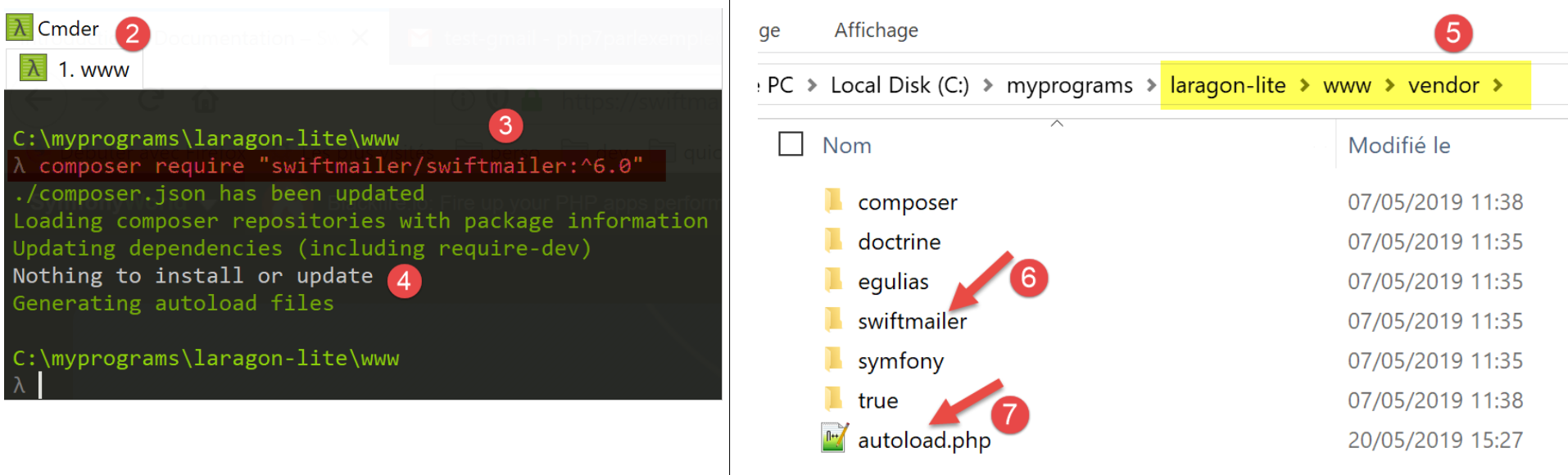
- In [3], make sure you are in the [<laragon>/www] folder, where <laragon> is the Laragon installation folder;
- In [3], type the command shown (May 2019). Check URL and [https://swiftmailer.symfony.com/docs/introduction.HTML] for the exact command;
- in [4], it indicates that no installation or update was performed. This is because the library had already been installed on this computer;
- in [5], the installation folder for [swiftmailer] [6];
- in [7], a file we will need in our script;
Once this is done, verify that the [<laragon>/www/vendor] [5] folder is indeed in the [Include Path] branch of Netbeans (see the "link" section).
Finally, the [SwiftMailer] library requires that the PHP [mbstring] extension be active. To do this, check the [php.ini] file (see link section):
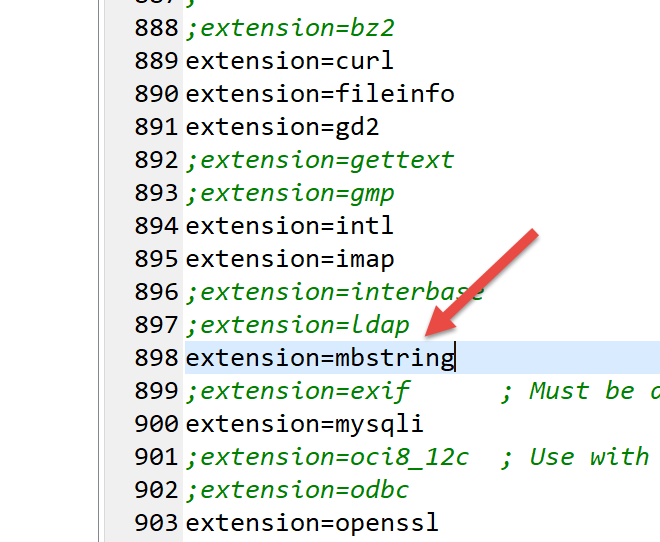
The [smtp-02.php] script will use the following jSON and [config-smtp-02.json] configuration files:
The same sections are present as in the [config-smtp-01.json] file, with two additional sections:
- [tls]: in TRUE indicates that a secure connection must be used with the SMTP server. If [tls] is set to TRUE, two fields must be added:
- [user]: the username used to authenticate the connection;
- [password]: their password;
In our example, we used the credentials of user [php7parlexemple@gmail.com] to log in to the Gmail server. Use your own;
- [attachments]: specifies the names of the files to attach to the email;
The script code for [smtp-02.php] is as follows:
<?php

// client SMTP (SendMail Transfer Protocol) for sending a message
//
// error management
//ini_set("error_reporting", E_ALL & ~ E_WARNING & ~E_DEPRECATED & ~E_NOTICE);
//ini_set("display_errors", "off");
//
// dependencies
require_once 'C:/myprograms/laragon-lite/www/vendor/autoload.php';
//
// mailing parameters
const CONFIG_FILE_NAME = "config-smtp-02.json";

// we retrieve the configuration
$mails = \json_decode(\file_get_contents(CONFIG_FILE_NAME), true);

// mail dispatch
foreach ($mails as $name => $infos) {
  // follow-up
  print "Envoi du mail [$name]\n";
  // mail dispatch
  $résultat = sendmail($name, $infos);
  // result display
  print "$résultat\n";
}//for
// end
exit;

//-----------------------------------------------------------------------

function sendmail($name, $infos) {

  // sends $infos[message] to smtp server $infos[smtp-server] on port $infos[smt-port]
  // if $infos[tls] is true, support TLS will be used
  // le mail est envoyé de la part de $infos[from]
  // for the recipient $infos['to']
  // Document $info[attachment] is attached to the message
  // message has subject $infos[subject]
  //
  // message in HTML format
  $messageHTML = str_replace("\n", "<br/>", $infos["message"]);
  try {
    // message creation
    $message = (new \Swift_Message())
      // message subject
      ->setSubject($infos["subject"])
      // sender
      ->setFrom($infos["from"])
      // recipients with a dictionary (setTo/setCc/setBcc)
      ->setTo($infos["to"])
      // message text
      ->setBody($infos["message"])
      // variant html
      ->addPart("<b>$messageHTML</b>", 'text/html')
    ;
    // attachments
    foreach ($infos["attachments"] as $attachment) {
      // path of attachment
      $fileName = __DIR__ . $attachment;
      // check that the file exists
      if (file_exists($fileName)) {
        // attach the document to the message
        $message->attach(\Swift_Attachment::fromPath($fileName));
      } else {
        // error
        print "L'attachement [$fileName] n'existe pas\n";
      }
    }
    // protocol TLS ?
    if ($infos["tls"] === "TRUE") {
      // TLS
      $transport = (new \Swift_SmtpTransport($infos["smtp-server"], $infos["smtp-port"], 'tls'))
        ->setUsername($infos["user"])
        ->setPassword($infos["password"]);
    } else {
      // no TLS
      $transport = (new \Swift_SmtpTransport($infos["smtp-server"], $infos["smtp-port"]));
    }
    // the shipment manager
    $mailer = new \Swift_Mailer($transport);
    // sending the message
    $result = $mailer->send($message);
    // end
    return "Message [$name] envoyé";
  } catch (\Throwable $ex) {
    // error
    return "Erreur lors de l'envoi du message [$name] : " . $ex->getMessage();
  }
}
Comments
- line 10: we load the [autoload.php] file found in the [<lagagon>/www/vendor] folder, where <laragon> is the Laragon installation folder. This file will allow us to load the class definition files from [SwiftMailer] as soon as these classes are first used. It saves us from having to create as many [require] files as there are classes and interfaces in SwiftMailer that we will use;
- Line 32: the new [sendmail] function, which has two parameters:
- [$name], which is used to distinguish between messages;
- [$infos]: the information needed to send the message to its recipient;
- line 42: we will have two versions of the message: one in plain text and the other in HTML. Here, we change the line break characters to the HTML code <br/>;
- lines 45–69: we define the message using the [\SwiftMessage] class;
- line 47: the [SwiftMessage→setSubject] method is used to set the message subject;
- line 49: the [SwiftMessage→setFrom] method is used to set the message sender;
- line 51: the [SwiftMessage→setTo] method is used to set the message recipient;
- line 53: the [SwiftMessage→setBody] method is used to set the message body;
- line 55: the [SwiftMessage→addPart] method is used to set different versions of the message, in this case the message in HTML format. When the message has variants, email clients display the user’s preferred variant;
- lines 58–69: the [SwiftMessage→addAttachment] (64) method allows you to attach a file to the message;
- lines 70–79: once the message to be sent has been defined, you must specify how to send it. The message transport mode is defined by the [\Swift_SmtpTransport] class. At least two pieces of information must be provided: the name and port of the SMTP server. There is also a third: does the SMTP server require secure authentication?
- lines 73–75: the [\Swift_SmtpTransport] instance for a secure connection to the SMTP server;
- line 78: the [\Swift_SmtpTransport] instance for an unsecured connection to the SMTP server;
- line 81: the [\SwiftMailer] class sends the messages. The selected transport mode must be passed to it;
- line 83: the message [\SwiftMessage] is sent via the selected transport [\Swift_SmtpTransport]. The method [SwiftMailer→send] returns the boolean FALSE if the message could not be sent;
- lines 86–89: the [SwiftMailer] library throws an exception as soon as something goes wrong;
Note: Note that the namespace for classes in the [SwiftMailer] library is the root \. We have explicitly noted the [\SwiftMessage, \Swift_SmtpTransport, \SwiftMailer] classes to remind you of this;
Results
When running the [smtp-02.php] script, the following console output is produced:
If we check the Gmail account of user [php7parlexemple], we see the following:
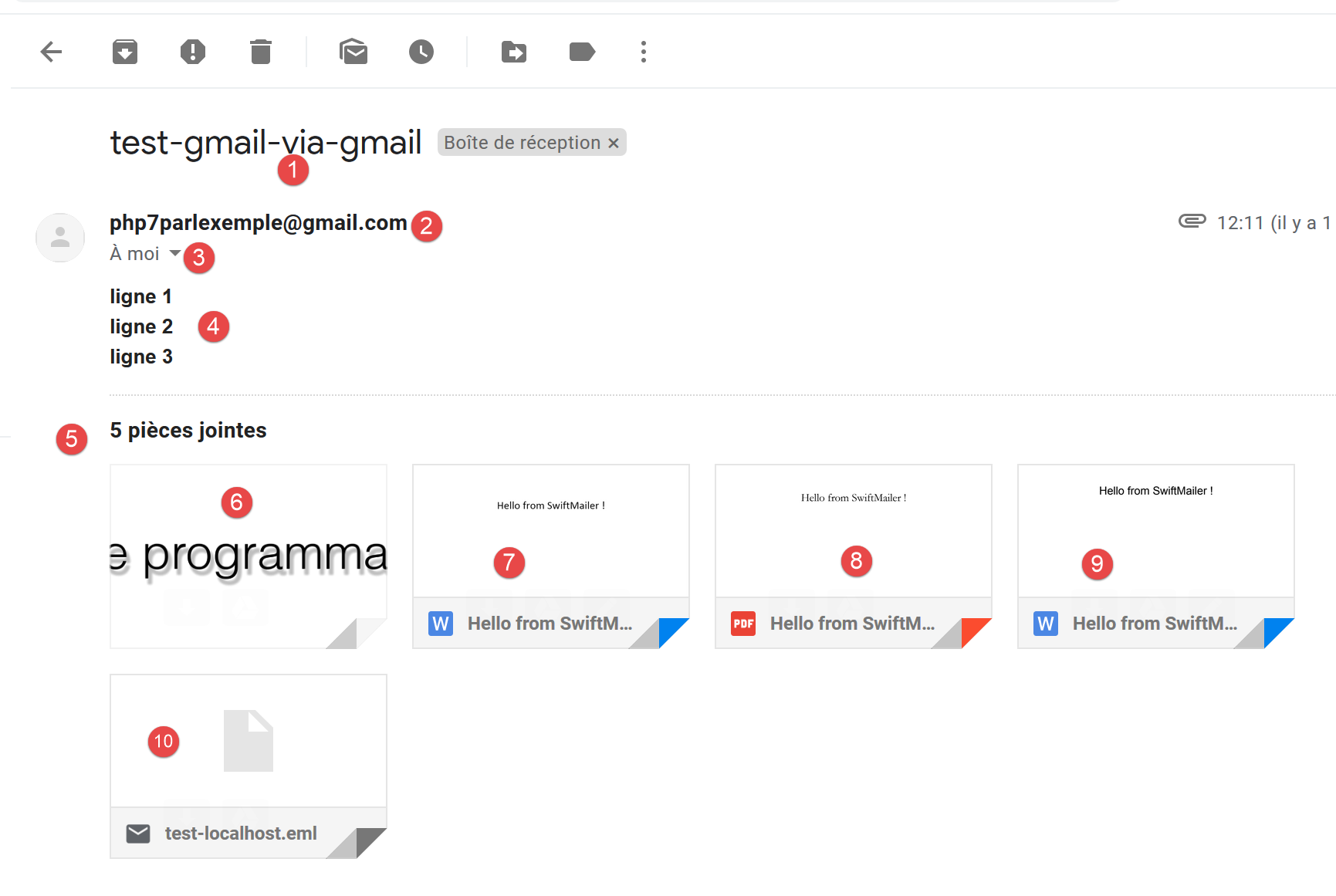
- [1] as the subject;
- in [2], the sender;
- in [3], the recipient;
- in [4], the message;
- in [5-10], the attachments;
If you request to view the original message, you get the following document:
Return-Path: <php7parlexemple@gmail.com>
Received: from [127.0.0.1] (lfbn-1-11924-110.w90-93.abo.wanadoo.fr. [90.93.230.110])
        by smtp.gmail.com with ESMTPSA id e14sm7773816wma.41.2019.05.26.03.11.53
        for <php7parlexemple@gmail.com>
        (version=TLS1_2 cipher=ECDHE-RSA-AES128-GCM-SHA256 bits=128/128);
        Sun, 26 May 2019 03:11:54 -0700 (PDT)
Message-ID: <e613c47a421a66e2cf7f8e319616ec49@swift.generated>
Date: Sun, 26 May 2019 10:11:53 +0000
Subject: test-gmail-via-gmail
From: php7parlexemple@gmail.com
To: php7parlexemple@gmail.com
MIME-Version: 1.0
Content-Type: multipart/mixed; boundary="_=_swift_1558865513_a3a939017128a4cfb867e968bce5df49_=_"

--_=_swift_1558865513_a3a939017128a4cfb867e968bce5df49_=_
Content-Type: multipart/alternative; boundary="_=_swift_1558865513_43c6d2a54065e4917fb06e3327f8d927_=_"

--_=_swift_1558865513_43c6d2a54065e4917fb06e3327f8d927_=_
Content-Type: text/plain; charset=utf-8
Content-Transfer-Encoding: quoted-printable

ligne 1
ligne 2
ligne 3

--_=_swift_1558865513_43c6d2a54065e4917fb06e3327f8d927_=_
Content-Type: text/HTML; charset=utf-8
Content-Transfer-Encoding: quoted-printable

<b>ligne 1<br/>ligne 2<br/>ligne 3</b>

--_=_swift_1558865513_43c6d2a54065e4917fb06e3327f8d927_=_--
--_=_swift_1558865513_a3a939017128a4cfb867e968bce5df49_=_
Content-Type: application/vnd.openxmlformats-officedocument.wordprocessingml.document; name="Hello from SwiftMailer.docx"
Content-Transfer-Encoding: base64
Content-Disposition: attachment; filename="Hello from SwiftMailer.docx"


--_=_swift_1558865513_a3a939017128a4cfb867e968bce5df49_=_
Content-Type: application/pdf; name="Hello from SwiftMailer.pdf"
Content-Transfer-Encoding: base64
Content-Disposition: attachment; filename="Hello from SwiftMailer.pdf"


--_=_swift_1558865513_a3a939017128a4cfb867e968bce5df49_=_
Content-Type: application/vnd.oasis.opendocument.text; name="Hello from SwiftMailer.odt"
Content-Transfer-Encoding: base64
Content-Disposition: attachment; filename="Hello from SwiftMailer.odt"


--_=_swift_1558865513_a3a939017128a4cfb867e968bce5df49_=_
Content-Type: image/png; name="Cours-Tutoriels-Serge-Tahé-1568x268.png"
Content-Transfer-Encoding: base64
Content-Disposition: attachment; filename="Cours-Tutoriels-Serge-Tahé-1568x268.png"


--_=_swift_1558865513_a3a939017128a4cfb867e968bce5df49_=_
Content-Type: message/rfc822; name=test-localhost.eml
Content-Transfer-Encoding: base64
Content-Disposition: attachment; filename=test-localhost.eml

Return-Path: guest@localhost
Received: from [127.0.0.1] (localhost [127.0.0.1]) by DESKTOP-528I5CU with ESMTP ; Sat, 25 May 2019 09:48:23 +0200
Message-ID: <620f4628882b011feebe4faa30b45092@swift.generated>
Date: Sat, 25 May 2019 07:48:22 +0000
Subject: test-localhost
From: guest@localhost
To: guest@localhost
MIME-Version: 1.0
Content-Type: multipart/mixed; boundary="_=_swift_1558770502_c4b808c99c27ded04595bd11f4bad11b_=_"

--_=_swift_1558770502_c4b808c99c27ded04595bd11f4bad11b_=_
Content-Type: multipart/alternative; boundary="_=_swift_1558770503_3561ca315f33bd15ef6556e98db4a5b8_=_"

--_=_swift_1558770503_3561ca315f33bd15ef6556e98db4a5b8_=_
Content-Type: text/plain; charset=utf-8
Content-Transfer-Encoding: quoted-printable

j'ai =C3=A9t=C3=A9 invit=C3=A9 =C3=A0 d=C3=A9je=C3=BBner

--_=_swift_1558770503_3561ca315f33bd15ef6556e98db4a5b8_=_
Content-Type: text/HTML; charset=utf-8
Content-Transfer-Encoding: quoted-printable

<b>j'ai =C3=A9t=C3=A9 invit=C3=A9 =C3=A0 d=C3=A9je=C3=BBner</b>

--_=_swift_1558770503_3561ca315f33bd15ef6556e98db4a5b8_=_--
--_=_swift_1558770502_c4b808c99c27ded04595bd11f4bad11b_=_
Content-Type: application/vnd.openxmlformats-officedocument.wordprocessingml.document; name="Hello from SwiftMailer.docx"
Content-Transfer-Encoding: base64
Content-Disposition: attachment; filename="Hello from SwiftMailer.docx"


--_=_swift_1558770502_c4b808c99c27ded04595bd11f4bad11b_=_
Content-Type: application/pdf; name="Hello from SwiftMailer.pdf"
Content-Transfer-Encoding: base64
Content-Disposition: attachment; filename="Hello from SwiftMailer.pdf"


--_=_swift_1558770502_c4b808c99c27ded04595bd11f4bad11b_=_
Content-Type: application/vnd.oasis.opendocument.text; name="Hello from SwiftMailer.odt"
Content-Transfer-Encoding: base64
Content-Disposition: attachment; filename="Hello from SwiftMailer.odt"


--_=_swift_1558770502_c4b808c99c27ded04595bd11f4bad11b_=_
Content-Type: image/png; name="Cours-Tutoriels-Serge-Tahé-1568x268.png"
Content-Transfer-Encoding: base64
Content-Disposition: attachment; filename="Cours-Tutoriels-Serge-Tahé-1568x268.png"


--_=_swift_1558770502_c4b808c99c27ded04595bd11f4bad11b_=_--

--_=_swift_1558865513_a3a939017128a4cfb867e968bce5df49_=_--
- line 9: the subject;
- line 10: the sender;
- line 11: the recipient;
- line 13: the message contains several parts delimited by [--_=_swift_xx] tags;
- lines 19–24: the message in plain text;
- lines 27–30: the message in HTML;
- lines 34–36: the attached file [Hello from SwiftMailer.docx];
- lines 40–42: the attached file [Hello from SwiftMailer.pdf];
- lines 46–48: the attached file [Hello from SwiftMailer.odt];
- lines 58–60: the attached file [Cours-Tutoriels-Serge-Tahé-1568x268.png];
- lines 58-60: the attached file [test-localhost.eml];
- lines 62–114: the attached file [test-localhost.eml] is itself a message whose content is displayed on lines 62–114. It can be seen that this message itself contains attachments;
16.6. The protocols POP3 (Post Office Protocol) and IMAP (Internet Message Access Protocol)
16.6.1. Introduction
To read emails stored on a mail server, two protocols exist:
- the POP3 protocol (Post Office Protocol), historically the first protocol but rarely used today;
- the IMAP protocol (Internet Message Access Protocol), which is newer than POP3 and currently the most widely used;
To explore the POP3 protocol, we will use the following architecture:
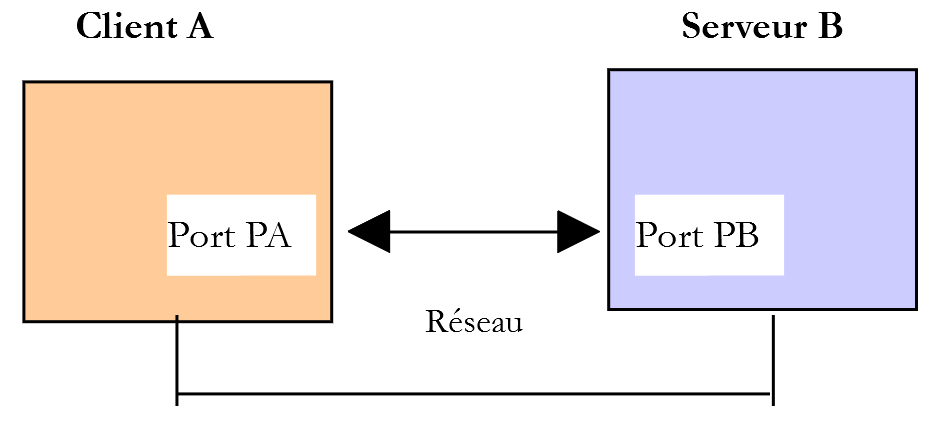
- [Serveur B] will be a local POP3 / IMAP server, implemented by the [hMailServer] mail server;
- [Client A] will be a POP3 / IMAP client in various forms:
- the [RawTcpClient] client to discover the POP3 protocol;
- a PHP script replaying the POP3 protocol from the [RawTcpClient] client;
- A PHP script that uses the IMAP library from PHP, which allowsimplement clients, IMAP, and POP3;
16.6.2. Exploring the POP3 protocol
First, we use the [smtp-01.php] script to send an email to the user [guest@localhost]. If you have run the tests associated with the script, this user should have received emails, but we were unable to verify this. To send them a new email, use the following [config-smtp-01.json] configuration file, for example:
Now let's see how we can read the mailbox of user [guest@localhost] using the [RawTcpClient] client:
C:\Data\st-2019\dev\php7\php5-exemples\exemples\inet\utilitaires>RawTcpClient --quit bye localhost 110
Client [DESKTOP-528I5CU:55593] connecté au serveur [localhost-110]
Tapez vos commandes (bye pour arrêter) :
<-- [+OK Welcome to sergetahe@localhost]
USER guest@localhost
<-- [+OK Send your password]
PASS guest
<-- [+OK Mailbox locked and ready]
LIST
<-- [+OK 2 messages (610 bytes)]
<-- [1 305]
<-- [2 305]
<-- [.]
RETR 1
<-- [+OK 305 bytes]
<-- [Return-Path: guest@localhost]
<-- [Received: from DESKTOP-528I5CU.home (localhost [127.0.0.1])]
<-- [   by DESKTOP-528I5CU with ESMTP]
<-- [; Tue, 21 May 2019 12:59:11 +0200]
<-- [Message-ID: <1356373A-33C9-4F31-BA43-2B119E128CE3@DESKTOP-528I5CU>]
<-- [From: guest@localhost]
<-- [To: guest@localhost]
<-- [Subject: to localhost via localhost]
<-- []
<-- [line 1]
<-- [line 2]
<-- [line 3]
<-- [.]
DELE 1
<-- [+OK msg deleted]
LIST
<-- [+OK 1 messages (305 bytes)]
<-- [2 305]
<-- [.]
DELE 2
<-- [+OK msg deleted]
LIST
<-- [+OK 0 messages (0 bytes)]
<-- [.]
QUIT
<-- [+OK POP3 server saying goodbye...]
Perte de la connexion avec le serveur…
- line 1: the POP3 server typically uses port 110. This is the case here;
- line 5: the command [USER] is used to specify the user whose mailbox you want to read;
- line 7: the command [PASS] is used to specify the user’s password;
- line 9: the command [LIST] requests the list of messages in the user’s mailbox;
- line 14: the command [RETR] retrieves the message with the specified ID;
- Line 29: The command [DELE] requests the deletion of the message whose number is provided;
- Line 40: The command [QUIT] tells the server that we are finished;
The server's response can take several forms:
- a single line beginning with [+OK] to indicate that the client’s previous command was successful;
- a single line beginning with [-ERR] to indicate that the client's previous command failed;
- multiple lines where:
- the first line begins with [+OK];
- the last line consists of a single period;
16.6.3. A basic script implementing the POP3 protocol
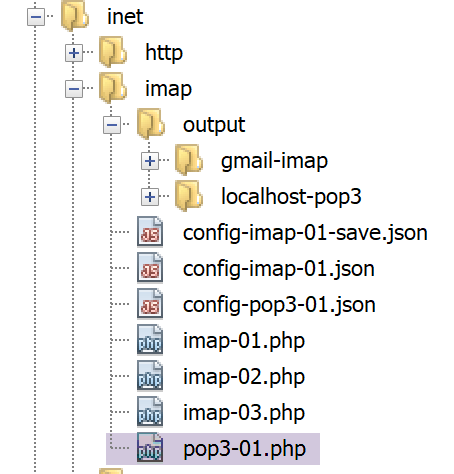
Since the POP3 protocol has the same structure as the SMTP protocol, the [pop3-01.php] script is a port of the [smtp-01.php] script. It will have the following configuration file: [config-pop3-01.json]
- lines 3-4: the server POP3 being queried is the local server [hMailServer];
- lines 5-6: we want to read the mailbox of user [guest@localhost];
- line 7: we will read at most 5 emails;
The [pop3-01.php] script is as follows:
<?php

// POP3 client (Post Office Protocol) for reading mailbox messages
// POP3 client-server communication protocol
// -> client connects to smtp server port 110
// <- server sends him a welcome message
// -> customer sends command USER user
// <- server responds OK or not
// -> customer sends PASS mot_de_passe order
// <- server responds OK or not
// -> customer sends LIST command
// <- server responds OK or not
// -> customer sends command RETR n° for each email
// <- server responds OK or not. If OK sends the requested mail content
// -> server sends all the mail lines and ends with a line containing the
// single character .
// -> customer sends command DELE n° to delete an e-mail
// <- server responds OK or not
// // -> client sends QUIT command to end dialog with server
// <- server responds OK or not
// server responses have the form +OK text where -ERR text
// The answer may consist of several lines. In this case, the last line consists of a single dot
// exchanged text lines must end with the characters RC(#13) and LF(#10)
//
//  POP3 client (SendMail Transfer Protocol) for reading e-mails
//
// error management
//ini_set("error_reporting", E_ALL & ~ E_WARNING & ~E_DEPRECATED & ~E_NOTICE);
//ini_set("display_errors", "off");
//
// strict adherence to declared types of function parameters
declare (strict_types=1);
//
// mail settings
const CONFIG_FILE_NAME = "config-pop3-01.json";

// we retrieve the configuration
$mailboxes = \json_decode(\file_get_contents(CONFIG_FILE_NAME), true);

// reading mailboxes
foreach ($mailboxes as $name => $infos) {
  // follow-up
  print "Lecture de la boîte à lettres [$name]\n";
  // letterbox reading
  $résultat = readmail($name, $infos, TRUE);
  // result display
  print "$résultat\n";
}//for
// end
exit;

//readmail
//-----------------------------------------------------------------------

function readmail(string $name, array $infos, bool $verbose = TRUE): string {
  // reads the contents of the mailbox [$name]
  // import all messages
  // each message is deleted afterb being read
  // If $verbose=1, tracks client-server exchanges
  //
  // open a connection with the SMTP server
  $connexion = fsockopen($infos["server"], (int) $infos["port"]);
  // return if error
  if ($connexion === FALSE) {
    return sprintf("Echec de la connexion au site (%s,%s) : %s", $infos["smtp-server"], $infos["smtp-port"]);
  }
  // $connexion represents a bidirectional communication flow
  // between the client (this program) and the pop3 server contacted
  // this channel is used for the exchange of orders and information
  // after connection, the server sends a welcome message which is read as follows
  $erreur = sendCommand($connexion, "", $verbose, TRUE);
  if ($erreur !== "") {
    // closing the connection
    fclose($connexion);
    // return
    return $erreur;
  }
  // cmde USER
  $erreur = sendCommand($connexion, "USER {$infos["user"]}", $verbose, TRUE);
  if ($erreur !== "") {
    // closing the connection
    fclose($connexion);
    // return
    return $erreur;
  }
  // cmde PASS
  $erreur = sendCommand($connexion, "PASS {$infos["password"]}", $verbose, TRUE);
  if ($erreur !== "") {
    // closing the connection
    fclose($connexion);
    // return
    return $erreur;
  }
  // cmde LIST
  $premièreLigne = "";
  $erreur = sendCommand($connexion, "LIST", $verbose, TRUE, $premièreLigne);
  if ($erreur !== "") {
    // closing the connection
    fclose($connexion);
    // return
    return $erreur;
  }
  // analyze 1st line to determine number of messages
  $champs = [];
  preg_match("/^\+OK (\d+)/", $premièreLigne, $champs);
  $nbMessages = (int) $champs[1];
  // we loop on the messages
  $iMessage = 0;
  while ($iMessage < $nbMessages && $iMessage < $infos["maxmails"]) {
    // cmde RETR
    $erreur = sendCommand($connexion, "RETR " . ($iMessage + 1), $verbose, TRUE);
    if ($erreur !== "") {
      // closing the connection
      fclose($connexion);
      // return
      return $erreur;
    }
    // cmde DELE
    $erreur = sendCommand($connexion, "DELE " . ($iMessage + 1), $verbose, TRUE);
    if ($erreur !== "") {
      // closing the connection
      fclose($connexion);
      // return
      return $erreur;
    }
    // next msg
    $iMessage++;
  }
  // cmde QUIT
  $erreur = sendCommand($connexion, "QUIT", $verbose, TRUE);
  if ($erreur !== "") {
    // closing the connection
    fclose($connexion);
    // return
    return $erreur;
  }
  // end
  fclose($connexion);
  return "Terminé";
}

// --------------------------------------------------------------------------

function sendCommand($connexion, string $commande, bool $verbose, bool $withRCLF, string &$premièreLigne = ""): string {
  // sends $commande to the $connexion channel
  // verbose mode if $verbose=1
  // if $withRCLF=1, adds sequence RCLF to exchange
  // puts the 1st line of the answer in [$premièreLigne]
  // ]
  // data
  if ($withRCLF) {
    $RCLF = "\r\n";
  } else {
    $RCLF = "";
  }
  // send cmde if $commande not empty
  if ($commande !== "") {
    fputs($connexion, "$commande$RCLF");
    // possible echo
    if ($verbose) {
      affiche($commande, 1);
    }
  }//if
  // reading response
  $réponse = fgets($connexion, 1000);
  // memorize the 1st line
  $premièreLigne = $réponse;
  // possible echo
  if ($verbose) {
    affiche($réponse, 2);
  }
  // error code recovery
  $codeErreur = substr($réponse, 0, 1);
  if ($codeErreur === "-") {
    // there has been an error
    return substr($réponse, 5);
  }
  // special cases of cmdes RETR and LIST with multi-line responses
  $commande = substr(strtolower($commande), 0, 4);
  if ($commande === "list" || $commande === "retr") {
    // last line of the answer?
    $champs = [];
    $match = preg_match("/^\.\s+$/", $réponse, $champs);
    while (!$match) {
      // reading response
      $réponse = fgets($connexion, 1000);
      // possible echo
      if ($verbose) {
        affiche($réponse, 2);
      }
      // response analysis
      $champs = [];
      $match = preg_match("/^\.\s+$/", $réponse, $champs);
    }//while
  }
  // error-free return
  return "";
}

// --------------------------------------------------------------------------

function affiche($échange, $sens) {
  // displays $échange on screen
  // if $sens=1 displays -->$echange
  // if $sens=2 displays <-- $échange without last 2 characters RCLF
  switch ($sens) {
    case 1:
      print "--> [$échange]\n";
      break;
    case 2:
      $L = strlen($échange);
      print "<-- [" . substr($échange, 0, $L - 2) . "]\n";
      break;
  }//switch
}
Comments
As we mentioned, [pop3-01.php] is a port of the [smtp-01.php] script that we have already discussed. We will only comment on the main differences:
- line 55: the [readmail] function is responsible for reading emails from the mailbox. The login credentials for this mailbox are stored in the [$infos] dictionary;
- lines 61–66: establishing a connection with the POP3 server;
- lines 71–77: reads the welcome message sent by the server;
- lines 78–85: send the command [USER] to identify the user whose emails are desired;
- lines 86–93: send the command [PASS] to provide this user’s password;
- lines 94–102: send the command [LIST] to determine how many emails are in this user’s mailbox.
- line 96: add the parameter [$premièreLigne] to the parameters of the [readmail] function. In the first line of its response to the LIST command, the server indicates how many messages are in the mailbox;
- lines 104–106: retrieve the number of messages from the first line of the response;
- lines 109–128: we loop through each message. For each one, we issue two commands:
- RETR i: to retrieve message #i (lines 111–117);
- DELE i: to delete it once it has been read (lines 118–125);
- lines 129–136: the command [QUIT] is sent to tell the server that we are finished;
- lines 178–194: for the commands [LIST] and [RETR], the server’s response spans multiple lines, with the last line consisting of a single period;
Results
Upon execution, the following results are obtained:
Lecture de la boîte à lettres [localhost:110]
<-- [+OK Welcome to sergetahe@localhost]
--> [USER guest@localhost]
<-- [+OK Send your password]
--> [PASS guest]
<-- [+OK Mailbox locked and ready]
--> [LIST]
<-- [+OK 1 messages (305 bytes)]
<-- [1 305]
<-- [.]
--> [RETR 1]
<-- [+OK 305 bytes]
<-- [Return-Path: guest@localhost]
<-- [Received: from DESKTOP-528I5CU.home (localhost [127.0.0.1])]
<-- [    by DESKTOP-528I5CU with ESMTP]
<-- [; Tue, 21 May 2019 14:25:39 +0200]
<-- [Message-ID: <5F912826-F9C4-41B6-BDA7-4A29537781C9@DESKTOP-528I5CU>]
<-- [From: guest@localhost]
<-- [To: guest@localhost]
<-- [Subject: to localhost via localhost]
<-- []
<-- [online ]
<-- [online ]
<-- [line 3]
<-- [.]
--> [DELE 1]
<-- [+OK msg deleted]
--> [QUIT]
<-- [+OK POP3 server saying goodbye...]
Terminé
Done.
Here we have a basic POP3 client that lacks certain capabilities:
- the ability to communicate with a secure POP3 server;
- the ability to read attachments in a message;
We will implement the first capability using the [imap] functions from PHP.
16.6.4. POP3 / IMAP client implemented using the [imap] functions from PHP
First, we need to verify that the [imap] functions are available in the version from PHP that we are using. We open the [php.ini] file described in the link section and look for the lines that mention [imap]:
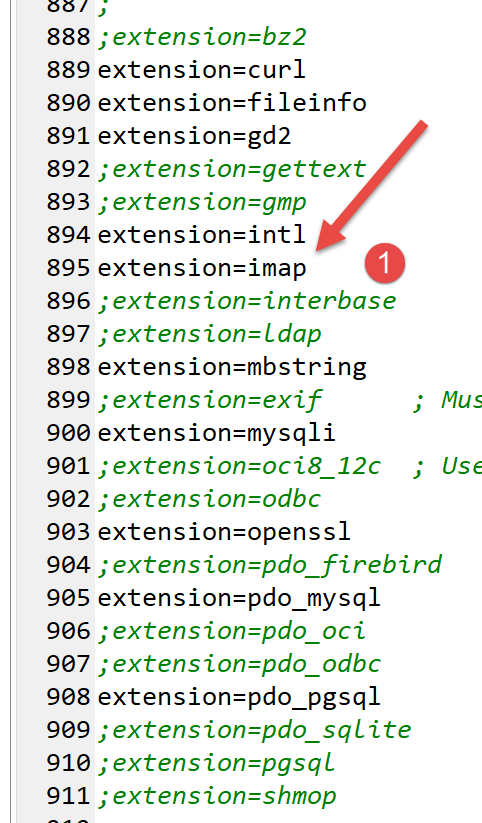
Line 895, verify that the [imap] extension is enabled.
The [imap-01.php] script will process the following jSON and [config-imap-01.json] files:
The [config-imap-01.json] file defines an array of IMAP / POP3 servers to contact. Each element is a [clé:valeur] structure, where:
- [clé]: is the server to contact. We have two here:
- [{imap.gmail.com:993/imap/ssl/novalidate-cert}INBOX]: refers to the server [imap.gmail.com] listening on port 993. The client/server protocol is IMAP. The /ssl parameter indicates that client/server communication is secure. The /novalidate-cert parameter instructs the client not to verify the security certificate that the server will send. Finally, a server named IMAP manages a set of mailboxes for a single user. By specifying INBOX in the URL of the IMAP server, we indicate that we are interested in the mailbox named INBOX, which is normally where new messages arrive;
- [{localhost:110/pop3}INBOX]: refers to the server [localhost], which listens on port 110. The client/server protocol here is POP3;
- [valeur]: is a dictionary specifying the following points:
- [imap-server]: the name of the server IMAP or POP3;
- [imap-port]: the server port IMAP or POP3;
- [user]: the owner whose mailbox you want to read;
- [password]: its password;
- [output-dir]: the folder where the messages should be saved;
- [prefix]: the filenames where the messages will be saved will be in the form prefixN, where N is a message number;
- [pop3]: a Boolean set to TRUE to indicate that the protocol used is POP3. In this case, after reading a message, it will be deleted. This is how POP3 servers typically operate: a read message is not retained on the server;
The [imap-01.php] script is as follows:
<?php

// IMAP (Internet Message Access Protocol) client for reading e-mails
//
// strict adherence to declared types of function parameters
declare (strict_types=1);
// error management
error_reporting(E_ALL & ~ E_WARNING & ~E_DEPRECATED & ~E_NOTICE);
//ini_set("display_errors", "off");
//
//
// mail reading parameters
const CONFIG_FILE_NAME = "config-imap-01.json";

// we retrieve the configuration
$mailboxes = \json_decode(\file_get_contents(CONFIG_FILE_NAME), true);

// reading mailboxes
foreach ($mailboxes as $name => $infos) {
  // follow-up
  print "------------Lecture de la boîte à lettres [$name]\n";
  // reading the mailbox
  readmailbox($name, $infos);
}
// end
exit;

//-----------------------------------------------------------------------

function readmailbox(string $name, array $infos): void {
  // Connection attempt
  $imapResource = imap_open($name, $infos["user"], $infos["password"]);
  // Test on the return of the imap_open() function
  if (!$imapResource) {
    // Failure
    print "La connexion au serveur [$name] a échoué : " . imap_last_error() . "\n";
  } else {
    // Connection established
    print "Connexion établie avec le serveur [$name].\n";
    // total messages in mailbox
    $nbmsg = imap_num_msg($imapResource);
    print "Il y a [$nbmsg] messages dans la boîte à lettres [$name]\n";
    // unread messages in current mailbox
    if ($nbmsg > 0) {
      print "Récupération de la liste des messages non lus de la boîte à lettres [$name]\n";
      $msgNumbers = imap_search($imapResource, 'UNSEEN');
      if ($msgNumbers === FALSE) {
        print "Il n'y a pas de nouveaux messages dans la boîte à lettres [$name]\n";
      } else {
        foreach ($msgNumbers as $msgNumber) {
          // we retrieve information on message n° $msgNumber
          $infosMail = imap_headerinfo($imapResource, $msgNumber);
          if ($infosMail === FALSE) {
            print "Statut du message n° [$msgNumber] de la boîte à lettres [$name] non récupéré : " . imap_last_error() . "\n";
          } else {
            print "Statut du message n° [$msgNumber] de la boîte à lettres [$name]\n";
            print_r($infosMail);
          }
          // we retrieve the body of message n° $msgNumber
          getMailBody($imapResource, $msgNumber, $infos);

          // if the protocol is POP3, we delete the message
          $pop3 = $infos["pop3"];
          if ($pop3 !== NULL) {
            // delete the message in two steps
            imap_delete($imapResource, $msgNumber);
            imap_expunge($imapResource);
          }
        }
      }
    }
  }
  // closing the connection
  $imapClose = imap_close($imapResource);
  if (!$imapClose) {
    // Failure
    print "La fermeture de la connexion a échoué : " . imap_last_error() . "\n";
  } else {
    // success
    print "Fermeture de la connexion réussie.\n";
  }
}

function getMailBody($imapResource, int $msgNumber, array $infos): void {
  // we retrieve the body of message n° $msgNumber
  $corpsMail = imap_body($imapResource, $msgNumber);

  print "Enregistrement du message dans le fichier {$infos["output-dir"]}/{$infos["prefix"]}$msgNumber\n";
  // create the folder if necessary
  if (!file_exists($infos["output-dir"])) {
    mkdir($infos["output-dir"]);
  }
  // record the message
  if (!file_put_contents($infos["output-dir"] . "/" . $infos["prefix"] . $msgNumber, $corpsMail)) {
    print "Echec de l'enregistrement\n";
  }
}
Comments
- lines 19–24: loops through all servers found in the configuration file;
- line 32: the [raedmailbox] function reads the mailbox specified in [$name];
- line 32: opens a IMAP connection;
- the first parameter is the URL IMAP of the mailbox to be read;
- the second parameter is the username of the mailbox owner;
- the third parameter is their password;
The [imap_open] function secures the connection if the URL IMAP of the mailbox has the /ssl parameter;
- line 41: the [imap_num_msg] function returns the total number of messages in the mailbox;
- line 46: the [imap_search] function allows you to search for specific messages. Here, we are searching for messages that have not yet been read (UNSEEN). The second parameter is a selection criterion. There are about twenty of them. The [imap_search] function returns an array of message numbers. These can take two forms: sequence numbers or message identifiers (UID). By default, the [imap_search] function returns an array of sequence numbers. If a third parameter is added, the message identifiers are returned;
- line 47: the [imap_search] function returns the Boolean FALSE if it has not found any messages;
- line 50: we loop through all unread messages;
- line 52: a message has headers that can be obtained using the [imap_headerinfo] function. Its second parameter is normally a message sequence number. If you want to set a message identifier UID, you must set the third parameter to [FT_UID];
- line 53: the function [imap_headerinfo] returns the Boolean FALSE if it was unable to complete its task. Otherwise, it returns a complex object that is displayed using the function [print_r], line 57;
- line 60: after the headers, we now retrieve the message body using the function [imap_body]. This function returns NULL if it was unable to complete its task;
- lines 84–87: the message body is saved to a local file;
- lines 63–68: if the protocol used was POP3, the message that has just been read is deleted;
- the function [imap_delete] marks the message as "to be deleted" but does not delete it;
- the function [imap_expunge] physically deletes all messages that have been marked "to be deleted";
- Line 74: The connection to the server is closed using the function IMAP. The function [imap_close] is used for this;
- line 86: the [imap_body] function retrieves the body of a message identified by its number;
Let’s run the [smtp-02.json] script so that the Gmail user [php7parlexemple] and the [guest] user of [localhost] have new messages. Once that is done, let’s run the [imap-01.php] script to read their mailboxes.
The console output is as follows:
------------Read mailbox [{imap.gmail.com:993/imap/ssl/novalidate-cert}INBOX]
Connexion établie avec le serveur [{imap.gmail.com:993/imap/ssl/novalidate-cert}INBOX].
Il y a [27] messages dans la boîte à lettres [{imap.gmail.com:993/imap/ssl/novalidate-cert}INBOX]
Récupération de la liste des messages non lus de la boîte à lettres [{imap.gmail.com:993/imap/ssl/novalidate-cert}INBOX]
Statut du message n° [26] de la boîte à lettres [{imap.gmail.com:993/imap/ssl/novalidate-cert}INBOX]
stdClass Object
(
    [date] => Wed, 22 May 2019 10:08:24 +0000
    [Date] => Wed, 22 May 2019 10:08:24 +0000
    [subject] => test-gmail-via-gmail
    [Subject] => test-gmail-via-gmail
    [message_id] => <d8405cac62d57bd9c531ea79c146c72d@swift.generated>
    [toaddress] => php7parlexemple@gmail.com
    [to] => Array
        (
            [0] => stdClass Object
                (
                    [mailbox] => php7parlexemple
                    [host] => gmail.com
                )

        )

    [fromaddress] => php7parlexemple@gmail.com
    [from] => Array
        (
            [0] => stdClass Object
                (
                    [mailbox] => php7parlexemple
                    [host] => gmail.com
                )

        )

    [reply_toaddress] => php7parlexemple@gmail.com
    [reply_to] => Array
        (
            [0] => stdClass Object
                (
                    [mailbox] => php7parlexemple
                    [host] => gmail.com
                )

        )

    [senderaddress] => php7parlexemple@gmail.com
    [sender] => Array
        (
            [0] => stdClass Object
                (
                    [mailbox] => php7parlexemple
                    [host] => gmail.com
                )

        )

    [Recent] =>
    [Unseen] => U
    [Flagged] =>
    [Answered] =>
    [Deleted] =>
    [Draft] =>
    [Msgno] =>   26
    [MailDate] => 22-May-2019 10:08:29 +0000
    [Size] => 19086
    [udate] => 1558519709
)
Enregistrement du message dans le fichier output/gmail-imap/message-26
Statut du message n° [27] de la boîte à lettres [{imap.gmail.com:993/imap/ssl/novalidate-cert}INBOX]
stdClass Object
(
    …
)
Enregistrement du message dans le fichier output/gmail-imap/message-27
Fermeture de la connexion réussie.
------------Read mailbox [{localhost:110/pop3}]
Connexion établie avec le serveur [{localhost:110/pop3}].
Il y a [1] messages dans la boîte à lettres [{localhost:110/pop3}]
Récupération de la liste des messages non lus de la boîte à lettres [{localhost:110/pop3}]
Statut du message n° [1] de la boîte à lettres [{localhost:110/pop3}]
stdClass Object
(
    …
)
Enregistrement du message dans le fichier output/localhost-pop3/message-1
Fermeture de la connexion réussie.
Done.
If, immediately after these results, we re-run the [imap-01.php] script, the results are as follows:
------------Read mailbox [{imap.gmail.com:993/imap/ssl/novalidate-cert}INBOX]
Connexion établie avec le serveur [{imap.gmail.com:993/imap/ssl/novalidate-cert}INBOX].
Il y a [27] messages dans la boîte à lettres [{imap.gmail.com:993/imap/ssl/novalidate-cert}INBOX]
Récupération de la liste des messages non lus de la boîte à lettres [{imap.gmail.com:993/imap/ssl/novalidate-cert}INBOX]
Il n'there are no new messages in the mailbox [{imap.gmail.com:993/imap/ssl/novalidate-cert}INBOX]
Fermeture de la connexion réussie.
------------Read mailbox [{localhost:110/pop3}]
Connexion établie avec le serveur [{localhost:110/pop3}].
Il y a [0] messages dans la boîte à lettres [{localhost:110/pop3}]
Fermeture de la connexion réussie.
- Line 3: There are still the same number of messages in the Gmail mailbox, but there are no new unread messages (line 5). This shows that the previous run changed the read messages from "unread" to "read" status;
- line 9: there are no more messages in the mailbox of user [guest@localhost]. This is because, in the previous run, the messages read on [localhost] were subsequently deleted;
The messages have been saved locally:
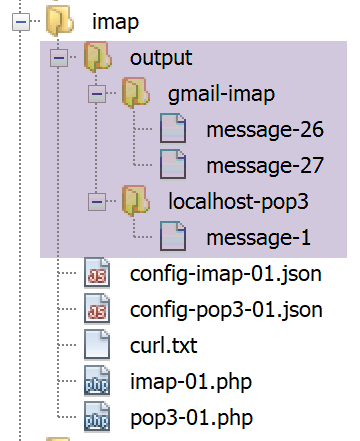
If we look, for example, at the content of message #26 in Gmail, we see the following:
--_=_swift_1558519704_f31b373d6e416dc88eb4db0e45fb3a95_=_
Content-Type: multipart/alternative;
 boundary="_=_swift_1558519706_9bffb48891232e50ab645383ca62242d_=_"


--_=_swift_1558519706_9bffb48891232e50ab645383ca62242d_=_
Content-Type: text/plain; charset=utf-8
Content-Transfer-Encoding: quoted-printable

ligne 1
ligne 2
ligne 3

--_=_swift_1558519706_9bffb48891232e50ab645383ca62242d_=_
Content-Type: text/HTML; charset=utf-8
Content-Transfer-Encoding: quoted-printable

<b>ligne 1<br/>ligne 2<br/>ligne 3</b>

--_=_swift_1558519706_9bffb48891232e50ab645383ca62242d_=_--


--_=_swift_1558519704_f31b373d6e416dc88eb4db0e45fb3a95_=_
Content-Type: application/pdf; name=Hello.pdf
Content-Transfer-Encoding: base64
Content-Disposition: attachment; filename=Hello.pdf

JVBERi0xLjUKJcOkw7zDtsOfCjIgMCBvYmoKPDwvTGVuZ3RoIDMgMCBSL0ZpbHRlci9GbGF0ZURl
Y29kZT4+CnN0cmVhbQp4nHWPuQoCQQyG+3mK1MKMyThHFoaAq7uF3cKAhdh5gIXgNr6+swcWshII
……………………………….…
OTQwODU4RDUzRDVENjU0QzJCNTM3Mjc+IF0KL0RvY0NoZWNrc3VtIC9DMjU3MUY1MUNDRjgwQ0Ex
ODU0OUI0RTQ4NDkwMDM3OAo+PgpzdGFydHhyZWYKMTIzMjYKJSVFT0YK

--_=_swift_1558519704_f31b373d6e416dc88eb4db0e45fb3a95_=_--
- lines 11–13: the plaintext message;
- line 19: the message HTML;
- line 25: the attached file;
Let’s try to improve this script so that the different types of messages and the attached files are stored in separate files.
16.6.5. Improved POP3 / IMAP client
In the [imap-01.php] script, the body of message No. i is displayed as a text file containing both the various message types and the encoded content of the various attachments. You can obtain the message structure to identify these different parts. In the [imap-02.php] script, we modify the [getMailBody] function as follows:
function getMailBody($imapResource, int $msgNumber, array $infos): void {
  // we retrieve the message structure
  $structure=imap_fetchstructure($imapResource, $msgNumber);
  // we display it
  print_r($structure);
}
- line 3: we request the message structure;
- line 5: we display it;
The goal is to understand the information contained in a message’s structure to see how we can extract its various parts. In our example, the message is sent by the [smtp-02.php] script with the following [config-smtp-02.json] configuration:
A message with five attachments is therefore sent to [guest@localhost] (lines 11–15). The [imap-02.php] script is executed with the following [config-imap-01.json] configuration:
It is therefore the mailbox of [guest@localhost] that is being exploited (line 5). The script [imap-02.php] then displays the structure of the message sent by [smtp-02.php]. This structure, displayed on the console, is as follows:
stdClass Object
(
    [type] => 1
    [encoding] => 0
    [ifsubtype] => 1
    [subtype] => MIXED
    [ifdescription] => 0
    [ifid] => 0
    [bytes] => 253599
    [ifdisposition] => 0
    [ifdparameters] => 0
    [ifparameters] => 1
    [parameters] => Array
        (
            [0] => stdClass Object
                (
                    [attribute] => BOUNDARY
                    [value] => _=_swift_1558872295_5bc8ee2ca8b3723c0b39ca8bbfbebdeb_=_
                )

        )

    [parts] => Array
        (
            [0] => stdClass Object
                (
                    [type] => 1
                    [encoding] => 0
                    [ifsubtype] => 1
                    [subtype] => ALTERNATIVE
                    [ifdescription] => 0
                    [ifid] => 0
                    [bytes] => 429
                    [ifdisposition] => 0
                    [ifdparameters] => 0
                    [ifparameters] => 1
                    [parameters] => Array
                        (
                            [0] => stdClass Object
                                (
                                    [attribute] => BOUNDARY
                                    [value] => _=_swift_1558872296_1e51aae79dfca4e7e0af112489fe8734_=_
                                )

                        )

                    [parts] => Array
                        (
                            [0] => stdClass Object
                                (
                                    [type] => 0
                                    [encoding] => 4
                                    [ifsubtype] => 1
                                    [subtype] => PLAIN
                                    [ifdescription] => 0
                                    [ifid] => 0
                                    [lines] => 3
                                    [bytes] => 27
                                    [ifdisposition] => 0
                                    [ifdparameters] => 0
                                    [ifparameters] => 1
                                    [parameters] => Array
                                        (
                                            [0] => stdClass Object
                                                (
                                                    [attribute] => CHARSET
                                                    [value] => utf-8
                                                )

                                        )

                                )

                            [1] => stdClass Object
                                (
                                    [type] => 0
                                    [encoding] => 4
                                    [ifsubtype] => 1
                                    [subtype] => HTML
                                    [ifdescription] => 0
                                    [ifid] => 0
                                    [lines] => 1
                                    [bytes] => 40
                                    [ifdisposition] => 0
                                    [ifdparameters] => 0
                                    [ifparameters] => 1
                                    [parameters] => Array
                                        (
                                            [0] => stdClass Object
                                                (
                                                    [attribute] => CHARSET
                                                    [value] => utf-8
                                                )

                                        )

                                )

                        )

                )

            [1] => stdClass Object
                (
                    [type] => 3
                    [encoding] => 3
                    [ifsubtype] => 1
                    [subtype] => VND.OPENXMLFORMATS-OFFICEDOCUMENT.WORDPROCESSINGML.DOCUMENT
                    [ifdescription] => 0
                    [ifid] => 0
                    [bytes] => 16302
                    [ifdisposition] => 1
                    [disposition] => ATTACHMENT
                    [ifdparameters] => 1
                    [dparameters] => Array
                        (
                            [0] => stdClass Object
                                (
                                    [attribute] => FILENAME
                                    [value] => Hello from SwiftMailer.docx
                                )

                        )

                    [ifparameters] => 1
                    [parameters] => Array
                        (
                            [0] => stdClass Object
                                (
                                    [attribute] => NAME
                                    [value] => Hello from SwiftMailer.docx
                                )

                        )

                )

            [2] => stdClass Object
                (
                    [type] => 3
                    [encoding] => 3
                    [ifsubtype] => 1
                    [subtype] => PDF
                    [ifdescription] => 0
                    [ifid] => 0
                    [bytes] => 17514
                    [ifdisposition] => 1
                    [disposition] => ATTACHMENT
                    [ifdparameters] => 1
                    [dparameters] => Array
                        (
                            [0] => stdClass Object
                                (
                                    [attribute] => FILENAME
                                    [value] => Hello from SwiftMailer.pdf
                                )

                        )

                    [ifparameters] => 1
                    [parameters] => Array
                        (
                            [0] => stdClass Object
                                (
                                    [attribute] => NAME
                                    [value] => Hello from SwiftMailer.pdf
                                )

                        )

                )

            [3] => stdClass Object
                (
                    …
                )

            [4] => stdClass Object
                (
                    …

                )

            [5] => stdClass Object
                (
                    [type] => 2
                    [encoding] => 3
                    [ifsubtype] => 1
                    [subtype] => RFC822
                    [ifdescription] => 0
                    [ifid] => 0
                    [lines] => 1881
                    [bytes] => 146682
                    [ifdisposition] => 1
                    [disposition] => ATTACHMENT
                    [ifdparameters] => 1
                    [dparameters] => Array
                        (
                            [0] => stdClass Object
                                (
                                    [attribute] => FILENAME
                                    [value] => test-localhost.eml
                                )

                        )

                    [ifparameters] => 1
                    [parameters] => Array
                        (
                            [0] => stdClass Object
                                (
                                    [attribute] => NAME
                                    [value] => test-localhost.eml
                                )

                        )

                    [parts] => Array
                        (
                        …
                        )

                )

        )

)
Comments
- The PHP documentation for the [imap_fetchstructure] function explains the meaning of the various fields in the object returned by the function:
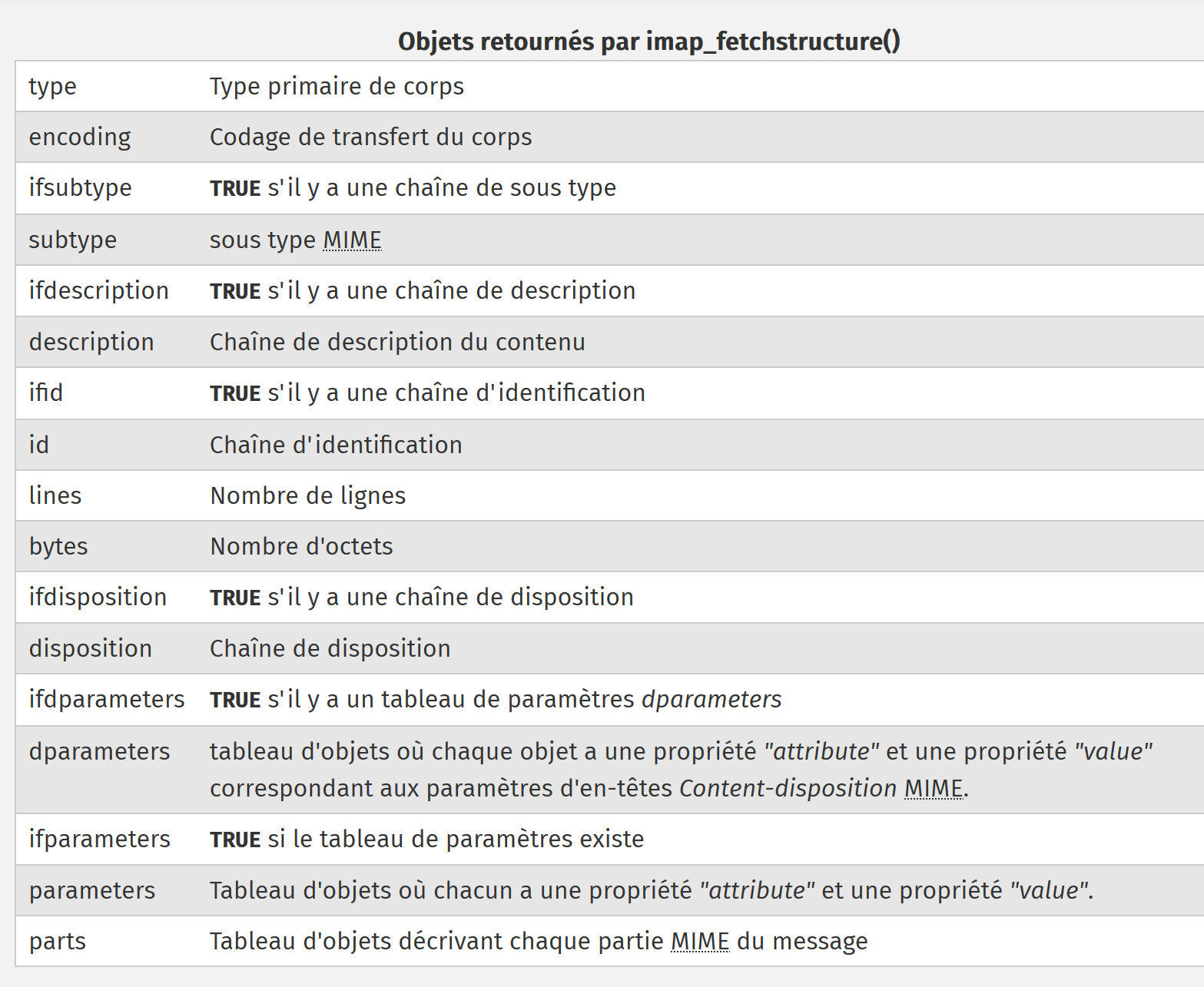
The numeric values in field [type] have the following meanings:
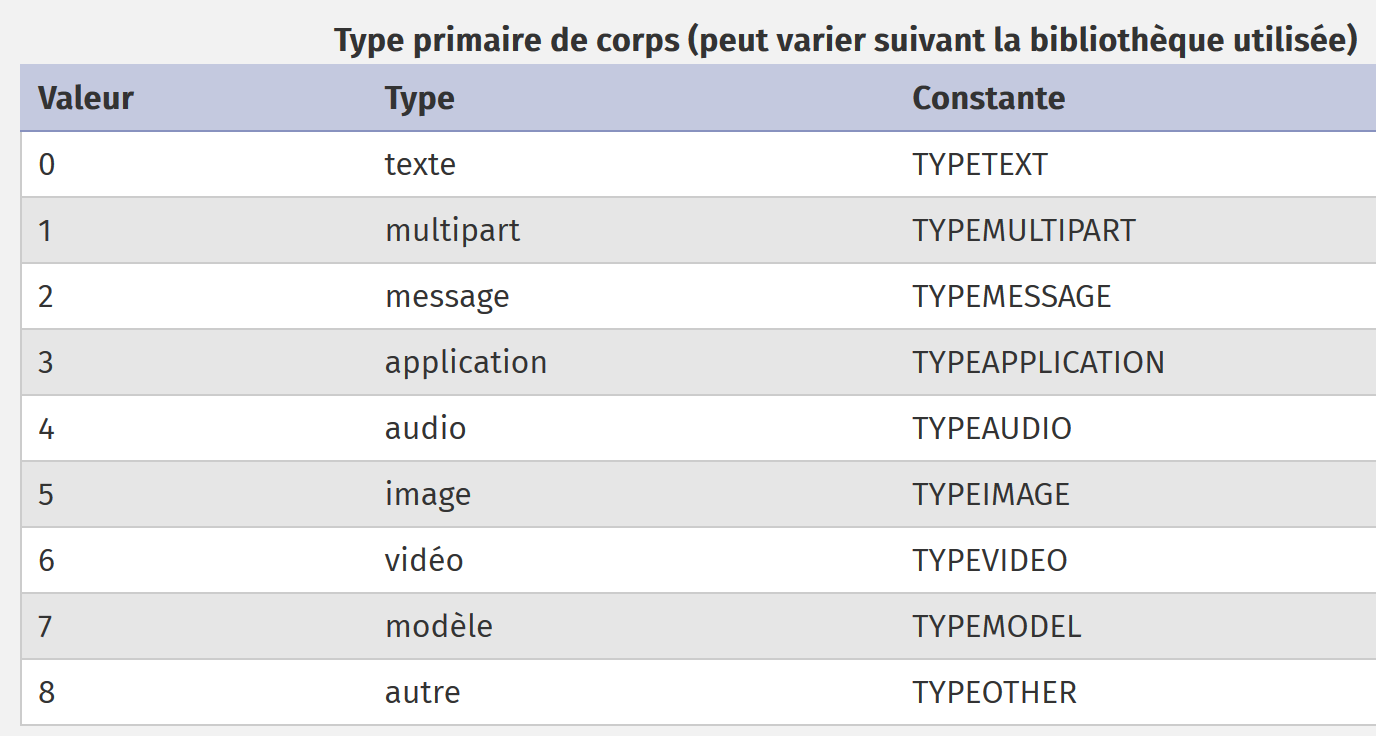
The numeric values in the [encoding] field have the following meanings:
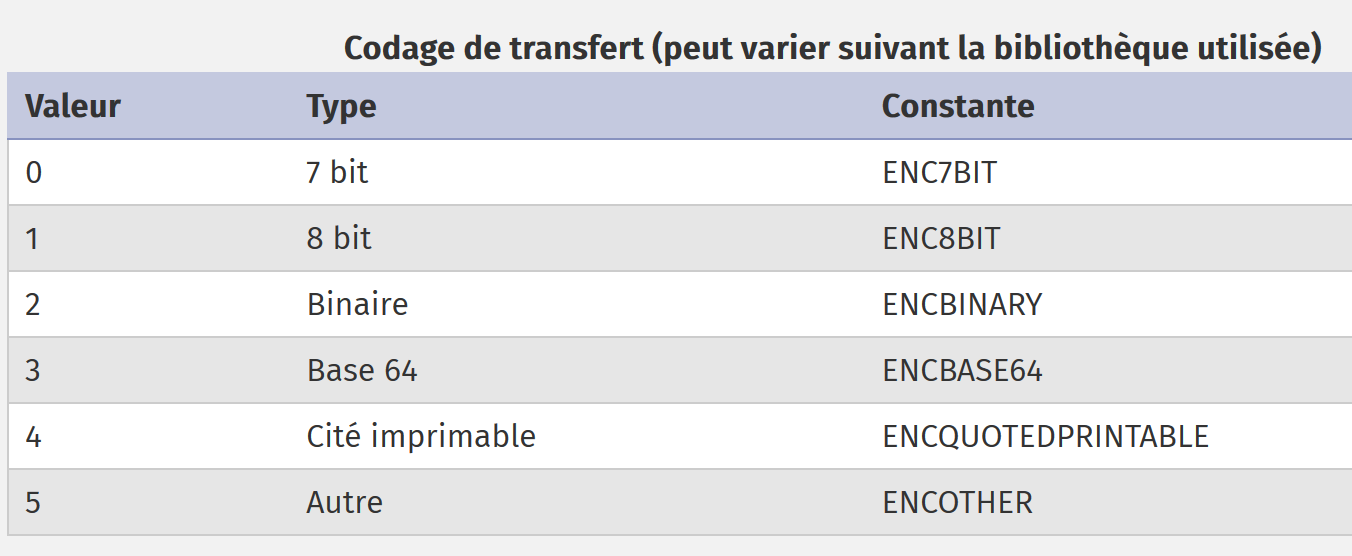
The message recorded by [imap-01.php] began with the following text:
Return-Path: <php7parlexemple@gmail.com>
Received: from [127.0.0.1] (lfbn-1-11924-110.w90-93.abo.wanadoo.fr. [90.93.230.110])
        by smtp.gmail.com with ESMTPSA id e14sm7773816wma.41.2019.05.26.03.11.53
        for <php7parlexemple@gmail.com>
        (version=TLS1_2 cipher=ECDHE-RSA-AES128-GCM-SHA256 bits=128/128);
        Sun, 26 May 2019 03:11:54 -0700 (PDT)
Message-ID: <e613c47a421a66e2cf7f8e319616ec49@swift.generated>
Date: Sun, 26 May 2019 10:11:53 +0000
Subject: test-gmail-via-gmail
From: php7parlexemple@gmail.com
To: php7parlexemple@gmail.com
MIME-Version: 1.0
Content-Type: multipart/mixed; boundary="_=_swift_1558865513_a3a939017128a4cfb867e968bce5df49_=_"

--_=_swift_1558865513_a3a939017128a4cfb867e968bce5df49_=_
Content-Type: multipart/alternative; boundary="_=_swift_1558865513_43c6d2a54065e4917fb06e3327f8d927_=_"

--_=_swift_1558865513_43c6d2a54065e4917fb06e3327f8d927_=_
Content-Type: text/plain; charset=utf-8
Content-Transfer-Encoding: quoted-printable

ligne 1
ligne 2
ligne 3

--_=_swift_1558865513_43c6d2a54065e4917fb06e3327f8d927_=_
Content-Type: text/HTML; charset=utf-8
Content-Transfer-Encoding: quoted-printable

<b>ligne 1<br/>ligne 2<br/>ligne 3</b>

--_=_swift_1558865513_43c6d2a54065e4917fb06e3327f8d927_=_--
--_=_swift_1558865513_a3a939017128a4cfb867e968bce5df49_=_
- Lines 15) and 33) delimit the message of type [multipart/mixed] (line m);
- lines 18) and 16) delimit the first part of the message: the plain text message;
- lines 26) and 32) delimit the second part of the message: the HTML message;
We find the various pieces of information from the message above in the object returned by [imap_fetchstructure]:
stdClass Object
(
    [type] => 1
    [encoding] => 0
    [ifsubtype] => 1
    [subtype] => MIXED
    [ifdescription] => 0
    [ifid] => 0
    [bytes] => 253599
    [ifdisposition] => 0
    [ifdparameters] => 0
    [ifparameters] => 1
    [parameters] => Array
        (
            [0] => stdClass Object
                (
                    [attribute] => BOUNDARY
                    [value] => _=_swift_1558872295_5bc8ee2ca8b3723c0b39ca8bbfbebdeb_=_
                )

        )

    [parts] => Array
        (
            [0] => stdClass Object
                (
                    [type] => 1
                    [encoding] => 0
                    [ifsubtype] => 1
                    [subtype] => ALTERNATIVE
                    [ifdescription] => 0
                    [ifid] => 0
                    [bytes] => 429
                    [ifdisposition] => 0
                    [ifdparameters] => 0
                    [ifparameters] => 1
                    [parameters] => Array
                        (
                            [0] => stdClass Object
                                (
                                    [attribute] => BOUNDARY
                                    [value] => _=_swift_1558872296_1e51aae79dfca4e7e0af112489fe8734_=_
                                )

                        )

                    [parts] => Array
                        (
                            [0] => stdClass Object
                                (
                                    [type] => 0
                                    [encoding] => 4
                                    [ifsubtype] => 1
                                    [subtype] => PLAIN
                                    [ifdescription] => 0
                                    [ifid] => 0
                                    [lines] => 3
                                    [bytes] => 27
                                    [ifdisposition] => 0
                                    [ifdparameters] => 0
                                    [ifparameters] => 1
                                    [parameters] => Array
                                        (
                                            [0] => stdClass Object
                                                (
                                                    [attribute] => CHARSET
                                                    [value] => utf-8
                                                )

                                        )

                                )

                            [1] => stdClass Object
                                (
                                    [type] => 0
                                    [encoding] => 4
                                    [ifsubtype] => 1
                                    [subtype] => HTML
                                    [ifdescription] => 0
                                    [ifid] => 0
                                    [lines] => 1
                                    [bytes] => 40
                                    [ifdisposition] => 0
                                    [ifdparameters] => 0
                                    [ifparameters] => 1
                                    [parameters] => Array
                                        (
                                            [0] => stdClass Object
                                                (
                                                    [attribute] => CHARSET
                                                    [value] => utf-8
                                                )

                                        )

                                )

                        )

                )
- line 3: the message is of type MIME (Multipurpose Internet Mail Extensions) [multipart];
- line 4: the message is encoded in 7 bits;
- line 5: [ifsubtype]=1 indicates that there is a [subtype] field in the structure;
- line 6: the field [subtype] designates a subtype MIME, in this case the type [mixed]. Overall, the document’s type MIME is [multipart/mixed];
- line 7: [ifdescription]=0 indicates that there is no [description] field in the structure;
- line 8: [ifid]=0 indicates that there is no [id] field in the structure;
- line 10: [ifdisposition]=0 indicates that there is no [disposition] field in the structure;
- line 11: [ifdparameters]=0 indicates that there is no [dparameters] field in the structure;
- line 12: [ifparameters]=1 indicates that there is a [parameters] field in the structure;
- line 13: the field [parameters] describes the message parameters. Here, there is only one;
- lines 15–19: this object describes the next line of the text message:
These lines are used to delimit the message. In the message retrieved by [imap-01.php], the part of the message just described corresponds to line m). The [boundary] attribute is not the same because the screenshots correspond to the same message but were sent at different times;
- line 23: the structure of the different parts of the message begins here;
- lines 25–45: this first part is of type [multipart/alternative]. It corresponds to line p) of the message text;
- line 47: this first part itself has subparts;
- lines 47–70: this first subpart is of type [text/plain] (lines 51, 54), is encoded as type [ENCQUOTEDPRINTABLE] (line 52) and has a parameter [charset=utf-8] (lines 66–67);
- lines 49–72 describe lines s–x of the text message;
- lines 74–99: describe the second subpart of the [multipart/alternative] part;
- lines 74–99: this second subpart is of type [text/HTML] (lines 76, 79), is encoded in type [ENCQUOTEDPRINTABLE] (line 77) and has a [charset=utf-8] parameter (lines 89–93);
- lines 74–99 describe the aa-ad lines of the text message;
The [multipart/alternative] section is now complete. The [application/vnd.openxmlformats-officedocument.wordprocessingml.document] section begins, described by the following text:
Once again, this information is found in the object returned by the [imap_fetchstructure] function:
[1] => stdClass Object
                (
                    [type] => 3
                    [encoding] => 3
                    [ifsubtype] => 1
                    [subtype] => VND.OPENXMLFORMATS-OFFICEDOCUMENT.WORDPROCESSINGML.DOCUMENT
                    [ifdescription] => 0
                    [ifid] => 0
                    [bytes] => 16302
                    [ifdisposition] => 1
                    [disposition] => ATTACHMENT
                    [ifdparameters] => 1
                    [dparameters] => Array
                        (
                            [0] => stdClass Object
                                (
                                    [attribute] => FILENAME
                                    [value] => Hello from SwiftMailer.docx
                                )

                        )

                    [ifparameters] => 1
                    [parameters] => Array
                        (
                            [0] => stdClass Object
                                (
                                    [attribute] => NAME
                                    [value] => Hello from SwiftMailer.docx
                                )

                        )

                )
- line 1: this is the second part of the overall message. Recall that the first part was of type [multipart/alternative];
- lines 3–6: this second part is of type [application/vnd.openxmlformats-officedocument.wordprocessingml.document] (lines 3 and 6) and is encoded in Base64 (line 4);
- line 11: this second part is an attachment (line 11) and has two parameters: [filename=Hello from SwiftMailer.docx] (lines 15–21) and [name=Hello from SwiftMailer.docx] (lines 26–32). Note that this last parameter does not exist in the text message. It was therefore added in the function [imap_fetchstructure];
Lines 1–36 are repeated for each of the message’s five attachments.
The function [imap_fetch_structure] thus allows us to obtain the structure of a message. This structure defines parts, which themselves may have subparts. To obtain the text of a part or subpart, we use the function [imap_fetchbody].
We modify the [getMailBody] function, which allows us to retrieve the body of a message, as follows:
function getMailBody($imapResource, int $msgNumber, array $infos, object $infosMail): void {
  // we retrieve the message structure
  $structure = imap_fetchstructure($imapResource, $msgNumber);
  if ($structure !== FALSE) {
    // we recover these different parts
    getParts($imapResource, $msgNumber, $infos, $infosMail, $structure);
  }
}

function getParts($imapResource, int $msgNumber, array $infos, object $infosMail, stdclass $part, string $sectionNumber = "0"): void {
  // section no. calculation
  if (substr($sectionNumber, 0, 2) === "0.") {
    $sectionNumber = substr($sectionNumber, 2);
  }
  print "-----contenu de la partie n° [$sectionNumber]\n";
  // type of content
  print "Content-Type: ";
  switch ($part->type) {
    case TYPETEXT:
      print "TEXT/{$part->subtype}\n";
      break;
    case TYPEMULTIPART:
      print "MULTIPART/{$part->subtype}\n";
      break;
    case TYPEAPPLICATION:
      print "APPLICATION/{$part->subtype}\n";
      break;
    case TYPEMESSAGE:
      print "MESSAGE/{$part->subtype}\n";
      break;
    default:
      print "UNKNOWN/{$part->subtype}\n";
      break;
  }
  // type of coding
  $encodings=["7 bits", "8 bits", "binaire", "base 64", "quoted-printable", "autre"];
  print "Transfer-Encoding : ".$encodings[$part->encoding]."\n";

  // move on to possible sub-sections
  if (isset($part->parts)) {
    for ($i = 1; $i <= count($part->parts); $i++) {
      // a new part of the message
      $subpart = $part->parts[$i - 1];
      // recursive call - the body of part [$subpart] is requested
      getParts($imapResource, $msgNumber, $infos, $infosMail, $subpart, "$sectionNumber.$i");
    }
  }
}
Comments
- line 3: we retrieve the message structure;
- line 6: we request to view its various parts, which are in the [parts] table of the structure;
- line 10: the function [getParts] receives the following parameters:
- [$imapResource]: the connection to the server IMAP;
- [$msgNumber]: the sequence number of the message whose parts are desired;
- [$infos]: information on where to store the parts found in the local file system;
- [$infosMail]: general information about the email (sender, recipient(s), subject, etc.);
- [$part]: an object representing a part of the message;
- [$sectionNumber]: a section (or part) number of the message;
- lines 17–34: the content type of message section [$section] is displayed. To do this, we use the fields [$part→type] and [$part→subtype] from part [$part];
- lines 36–37: the encoding type of the [$sectionNumber] section is displayed;
- lines 40–47: perhaps the section for which we just displayed information has sub-sections of its own;
- lines 41-46: if so, we request the content type of the various subparts of the part we just displayed. Here, we make a recursive call to the function [getParts];
Once again, we send an email to the Gmail user [php7parlexemple@gmail.com] with the script [smtp-02.php] and read it using the previous script [imap-02.php]. This produces the following console output:
------------Read mailbox [{localhost:110/pop3}]
Connexion établie avec le serveur [{localhost:110/pop3}].
Il y a [1] messages dans la boîte à lettres [{localhost:110/pop3}]
Récupération de la liste des messages non lus de la boîte à lettres [{localhost:110/pop3}]
-----content of part n° [0]
Content-Type: MULTIPART/MIXED
Transfer-Encoding : 7 bits
-----content of part no. [1]
Content-Type: MULTIPART/ALTERNATIVE
Transfer-Encoding : 7 bits
-----contents of part no. [1.1]
Content-Type: TEXT/PLAIN
Transfer-Encoding : quoted-printable
-----content of part no. [1.2]
Content-Type: TEXT/HTML
Transfer-Encoding : quoted-printable
-----content of part no. [2]
Content-Type: APPLICATION/VND.OPENXMLFORMATS-OFFICEDOCUMENT.WORDPROCESSINGML.DOCUMENT
Transfer-Encoding : base 64
-----content of part no. [3]
Content-Type: APPLICATION/PDF
Transfer-Encoding : base 64
-----content of part no. [4]
Content-Type: APPLICATION/VND.OASIS.OPENDOCUMENT.TEXT
Transfer-Encoding : base 64
-----content of part no. [5]
Content-Type: UNKNOWN/PNG
Transfer-Encoding : base 64
-----content of part no. [6]
Content-Type: MESSAGE/RFC822
Transfer-Encoding : base 64
-----Contents of part no. [6.1]
Content-Type: TEXT/PLAIN
Transfer-Encoding : 7 bits
Fermeture de la connexion réussie.
We are able to retrieve the different types of message content as well as their encoding types. The numbering of the parts follows the following rule:
- lines 6-7: the part [multipart/mixed], which represents the entire message, is numbered 0. The various parts of this object are then numbered 1, 2…
The message has a total of five parts:
- lines 9–10: the [multipart/alternative] part, numbered 1;
- lines 17-18: the [APPLICATION/VND.OPENXMLFORMATS-OFFICEDOCUMENT.WORDPROCESSINGML.DOCUMENT] part, which is numbered 2. This is a Word file attachment;
- lines 20–21: the section [APPLICATION/PDF], numbered 3. This is an attachment of a PDF file;
- lines 23–24: the section [APPLICATION/VND.OASIS.OPENDOCUMENT.TEXT], numbered 4. This is an attachment of a OpenOffice file;
- lines 26–27: the section [UNKNOWN/PNG], numbered 5. This is an image file attachment;
- lines 30-31: the section [MESSAGE/RFC822], numbered 6. This is an email attachment;
When a section has subsections, these are numbered x.1, x.2… where x is the number of the enclosing section. Thus:
- lines 11-12: the first part of the section [multipart/alternative] is numbered 1.1. It is a [text/plain]-type content: the email message;
- lines 14-15: the second part of the [multipart/alternative] part is numbered 1.2. It is a [text/HTML]-type content: the email message in HTML;
- lines 32-33: the first part of the attachment [MESSAGE/RFC822] is numbered 6.1. It is a [text/plain]-type content. In fact, according to the MIME standard, the numbering of the parts of a [MESSAGE/RFC822] email attachment differs from the rule described above. Thus, the first part of the [MESSAGE/RFC822] attachment does not have the number 6.1 but a different number;
Now that we know how to identify the different parts and subparts of an email, we need to retrieve their content.
The script code evolves as follows:
function getParts($imapResource, int $msgNumber, array $infos, object $infosMail, stdclass $part, string $sectionNumber = "0"): void {
  // section no. calculation
  if (substr($sectionNumber, 0, 2) === "0.") {
    $sectionNumber = substr($sectionNumber, 2);
  }
  print "-----contenu de la partie n° [$sectionNumber]\n";
  // type of content
  print "Content-Type: ";
  switch ($part->type) {
    case TYPETEXT:
      print "TEXT/{$part->subtype}\n";
      break;
    case TYPEMULTIPART:
      print "MULTIPART/{$part->subtype}\n";
      break;
    case TYPEAPPLICATION:
      print "APPLICATION/{$part->subtype}\n";
      break;
    case TYPEMESSAGE:
      print "MESSAGE/{$part->subtype}\n";
      break;
    default:
      print "UNKNOWN/{$part->subtype}\n";
      break;
  }
  // type of coding
  $encodings = ["7 bits", "8 bits", "binaire", "base 64", "quoted-printable", "autre"];
  print "Transfer-Encoding : " . $encodings[$part->encoding] . "\n";

  // is it a message?
  if ($part->type === TYPEMESSAGE) {
    // we won't manage the sub-parts of this message (mail attached)
    // displays the body of the attached mail
    print imap_fetchbody($imapResource, $msgNumber, $sectionNumber);
  } else {
    // we move on to possible sub-sections
    if (isset($part->parts)) {
      for ($i = 1; $i <= count($part->parts); $i++) {
        // a new part of the message
        $subpart = $part->parts[$i - 1];
        // recursive call - the body of part [$subpart] is requested
        getParts($imapResource, $msgNumber, $infos, $infosMail, $subpart, "$sectionNumber.$i");
      }
    } else {
      // there are no sub-parts - the message body is displayed
      print imap_fetchbody($imapResource, $msgNumber, $sectionNumber);
    }
  }
}
Comments
- line 46: the function [imap_fetchbody] retrieves the body of part # [$sectionNumber] of the message. The numbering of message parts follows the rule explained earlier;
- line 1: we start with section “0”;
- line 41: the subparts of this section will then be numbered “0.1”, “0.2”, whereas they should be numbered “1”, “2”…
- lines 3–5: we correct this anomaly;
- lines 37–43: if the current section has subsections, we loop through each of them (lines 38–43). Their section number is [$sectionNumber.$i];
- lines 44–47: when there are no more sub-sections, the body of the current section is displayed using the function [imap_fetchbody]. In our example, these are the sections [text/plain], [text/HTML], and the attachments;
Running this script produces the following results:
------------Read mailbox [{localhost:110/pop3}]
Connexion établie avec le serveur [{localhost:110/pop3}].
Il y a [1] messages dans la boîte à lettres [{localhost:110/pop3}]
Récupération de la liste des messages non lus de la boîte à lettres [{localhost:110/pop3}]
-----content of part n° [0]
Content-Type: MULTIPART/MIXED
Transfer-Encoding : 7 bits
-----content of part no. [1]
Content-Type: MULTIPART/ALTERNATIVE
Transfer-Encoding : 7 bits
-----contents of part no. [1.1]
Content-Type: TEXT/PLAIN
Transfer-Encoding : quoted-printable
ligne 1
ligne 2
ligne 3
-----content of part no. [1.2]
Content-Type: TEXT/HTML
Transfer-Encoding : quoted-printable
<b>ligne 1<br/>ligne 2<br/>ligne 3</b>
-----content of part no. [2]
Content-Type: APPLICATION/VND.OPENXMLFORMATS-OFFICEDOCUMENT.WORDPROCESSINGML.DOCUMENT
Transfer-Encoding : base 64
UEsDBBQABgAIAAAAIQDfpNJsWgEAACAFAAATAAgCW0NvbnRlbnRfVHlwZXNdLnhtbCCiBAIooAAC
AAAAAAAAAAAAAAAAAAAAAAAAAAAAAAAAAAAAAAAAAAAAAAAAAAAAAAAAAAAAAAAAAAAAAAAAAAAA
…
AAAAAAAAAF0mAABkb2NQcm9wcy9jb3JlLnhtbFBLAQItABQABgAIAAAAIQCdxkmwcgEAAMcCAAAQ
AAAAAAAAAAAAAAAAAAgpAABkb2NQcm9wcy9hcHAueG1sUEsFBgAAAAALAAsAwQIAALArAAAAAA==
-----content of part no. [3]
Content-Type: APPLICATION/PDF
Transfer-Encoding : base 64
JVBERi0xLjUKJcOkw7zDtsOfCjIgMCBvYmoKPDwvTGVuZ3RoIDMgMCBSL0ZpbHRlci9GbGF0ZURl
Y29kZT4+CnN0cmVhbQp4nHWNvQoCMRCE+zzF1sLF2WSTSyAEPD0Lu4OAhdj5AxaC1/j6Rk4s5GSa
…
PDcxQUJGQ0JGQURGODYxM0NBNUJDODNFMDNDNjI1QkQwPgo8NzFBQkZDQkZBREY4NjEzQ0E1QkM4
M0UwM0M2MjVCRDA+IF0KL0RvY0NoZWNrc3VtIC9DMTRCN0Q5N0YwNUU1OTYxQzhDODg0NEI3NkNF
OEIwRQo+PgpzdGFydHhyZWYKMTIzMTQKJSVFT0YK
-----content of part no. [4]
Content-Type: APPLICATION/VND.OASIS.OPENDOCUMENT.TEXT
Transfer-Encoding : base 64
UEsDBBQAAAgAAAs9uU5exjIMJwAAACcAAAAIAAAAbWltZXR5cGVhcHBsaWNhdGlvbi92bmQub2Fz
aXMub3BlbmRvY3VtZW50LnRleHRQSwMEFAAACAAACz25TgAAAAAAAAAAAAAAABwAAABDb25maWd1
…
AQIUABQACAgIAAs9uU42l0SORAQAABIRAAALAAAAAAAAAAAAAAAAAI8bAABjb250ZW50LnhtbFBL
AQIUABQACAgIAAs9uU4Uf52+LgEAACUEAAAVAAAAAAAAAAAAAAAAAAwgAABNRVRBLUlORi9tYW5p
ZmVzdC54bWxQSwUGAAAAABEAEQBlBAAAfSEAAAAA
-----content of part no. [5]
Content-Type: UNKNOWN/PNG
Transfer-Encoding : base 64
iVBORw0KGgoAAAANSUhEUgAABiAAAAEMCAYAAABN1n5OAAAACXBIWXMAAA7EAAAOxAGVKw4bAAAg
AElEQVR4nOy9e5TdV3Xn+Zm7aqprlBq1Rq1Wq7XU6opGrXaMMI6jAcfj9ihu4hAehkAghBASICF0
…
AAAAAAAAAAAAAAAAAAAAAAAAAAAAAAAAAAAAAAAAAAAAAAAAAAAAAAAAAAAAAAAAAAAAAAAAAAAA
AAAAAAAAAAAAAAAAAAAAAAAAAAAAAAAAAAAAAAAAAAAAAAAAAAAAAAAAAAAAAAAAAAAAAAAAAAAA
AAAA2Mb8f9Q5r2ohJn6/AAAAAElFTkSuQmCC
-----content of part no. [6]
Content-Type: MESSAGE/RFC822
Transfer-Encoding : base 64
UmV0dXJuLVBhdGg6IGd1ZXN0QGxvY2FsaG9zdA0KUmVjZWl2ZWQ6IGZyb20gWzEyNy4wLjAuMV0g
KGxvY2FsaG9zdCBbMTI3LjAuMC4xXSkNCglieSBERVNLVE9QLTUyOEk1Q1Ugd2l0aCBFU01UUA0K
…
cjJvaEpuNi9BQUFBQUVsRlRrU3VRbUNDDQotLV89X3N3aWZ0XzE1NTg3NzA1MDJfYzRiODA4Yzk5
YzI3ZGVkMDQ1OTViZDExZjRiYWQxMWJfPV8tLQ0K
Fermeture de la connexion réussie.
Comments
- lines 14–16: the content of the text message encoded as [quoted-printable] (line 13);
- line 20: the content of the message HTML encoded in [quoted-printable] (line 19);
- lines 24–28: the contents of the Word file encoded as [base64] (line 23);
- lines 32–37: the contents of the file PDF encoded as [base64] (line 31);
- lines 41–45: the contents of the file OpenOffice encoded as [base64] (line 40);
- lines 50–55: the contents of the image file encoded as [base64] (line 49);
- lines 59–63: the contents of the attached email encoded as [base64] (line 58);
Now that:
- we know how to retrieve the text from the different parts of an email;
- we know the encoding of these texts;
we can save these texts to files.
The code evolves as follows:
function getParts($imapResource, int $msgNumber, array $infos, object $infosMail, stdclass $part, string $sectionNumber = "0"): void {
  // section no. calculation
  if (substr($sectionNumber, 0, 2) === "0.") {
    $sectionNumber = substr($sectionNumber, 2);
  }
  print "-----contenu de la partie n° [$sectionNumber]\n";
  // type of content
  print "Content-Type: ";
  switch ($part->type) {
    case TYPETEXT:
      print "TEXT/{$part->subtype}\n";
      break;
    case TYPEMULTIPART:
      print "MULTIPART/{$part->subtype}\n";
      break;
    case TYPEAPPLICATION:
      print "APPLICATION/{$part->subtype}\n";
      break;
    case TYPEMESSAGE:
      print "MESSAGE/{$part->subtype}\n";
      break;
    default:
      print "UNKNOWN/{$part->subtype}\n";
      break;
  }
  // type of coding
  $encodings = ["7 bits", "8 bits", "binaire", "base 64", "quoted-printable", "autre"];
  print "Transfer-Encoding : " . $encodings[$part->encoding] . "\n";

  // is it a message?
  if ($part->type === TYPEMESSAGE) {
    // we will not manage the sub-parts of this message
    savePart($imapResource, $msgNumber, $sectionNumber, $infos, $infosMail);
  } else {
    // move on to possible sub-sections
    if (isset($part->parts)) {
      for ($i = 1; $i <= count($part->parts); $i++) {
        // a new part of the message
        $subpart = $part->parts[$i - 1];
        // recursive call - the body of part [$subpart] is requested
        getParts($imapResource, $msgNumber, $infos, $infosMail, $subpart, "$sectionNumber.$i");
      }
    } else {
      // there are no sub-parts - the message body is then saved
      savePart($imapResource, $msgNumber, $sectionNumber, $infos, $infosMail);
    }
  }
}
- lines 33 and 45: displaying the text of a [$imapResource, $msgNumber, $sectionNumber] section of the email is now replaced by saving it to a file;
The [savePart] function is as follows:
// save part of a message
function savePart($imapResource, int $msgNumber, string $sectionNumber, array $infos, object $infosMail): void {
  // backup folder
  $outputDir = $infos["output-dir"] . "/message-$msgNumber";
  // if the folder doesn't exist, we create it
  if (!file_exists($outputDir)) {
    mkdir($outputDir);
  }
  // structure of the part to be saved
  $struct = imap_bodystruct($imapResource, $msgNumber, $sectionNumber);
  // type of document
  $type = $struct->type;
  // document subtype
  $subtype = "";
  if (isset($struct->subtype)) {
    $subtype = strtolower($struct->subtype);
  }
  // we analyze the type of part
  switch ($type) {
    case TYPETEXT:
      // text message: text/xxx
      switch ($subtype) {
        case plain:
          saveText("$outputDir/message.txt", 0, imap_fetchBody($imapResource, $msgNumber, $sectionNumber), $infosMail, $struct);
          break;
        case HTML:
          saveText("$outputDir/message.HTML", 1, imap_fetchBody($imapResource, $msgNumber, $sectionNumber), $infosMail, $struct);
          break;
      }
      break;
    default:
      // other cases - we're only interested in attachments
      if (isset($struct->disposition)) {
        $disposition = strtolower($struct->disposition);
        if ($disposition === "attachment") {
          // we are dealing with an attachment - we safeguard it
          saveAttachment($imapResource, $msgNumber, $sectionNumber, $outputDir, $struct);
        }
      } else {
        // we will not deal with this part
        print "Partie [$sectionNumber] ignorée\n";
      }
      break;
  }
}
- lines 3–8: creation of the backup folder. This folder bears the number of the message whose parts are being analyzed;
- line 10: the message part to be saved is uniquely defined by the three parameters [$imapResource, $msgNumber, $sectionNumber]. The structure of this part is retrieved using the function [imap_bodystruct];
- line 12: retrieve the main type of the message part;
- lines 13–17: its subtype is retrieved;
- lines 20–30: process the two content types: [text/plain] (lines 23–25) and [text/HTML] (lines 26–28). The other [text/xx] types are ignored;
- line 24: the text from the [text/plain] section will be saved in a [message.txt] file;
- line 27: the text from the [text/HTML] section will be saved in a file named [message.HTML];
- lines 31–43: we handle parts whose main type is not [text];
- line 35: only the message attachments are considered;
- line 37: these are saved to a file using the [saveAttachment] function;
To summarize the previous code:
- saves the parts [text/plain] and [text/HTML] using the function [saveText]. These parts represent the content of the email;
- saves the various attachments using the [saveAttachment] function;
The function [saveText] is as follows:
// save message text [$text]
function saveText(string $fileName, int $type, string $text, object $infosMail, object $struct) {
  // preparing the text to be saved
  // $text is encoded - we decode it
  switch ($struct->encoding) {
    case ENCBASE64:
      $text = base64_decode($text);
      break;
    case ENCQUOTEDPRINTABLE:
      $text = quoted_printable_decode($text);
      break;
  }
  // message headers
  // from
  $from = "From: ";
  foreach ($infosMail->from as $expéditeur) {
    $from .= $expéditeur->mailbox . "@" . $expéditeur->host . ";";
  }
  // to
  $to = "To: ";
  foreach ($infosMail->to as $destinataire) {
    $to .= $destinataire->mailbox . "@" . $destinataire->host . ";";
  }
  // subject
  $subject = "Subject: " . $infosMail->subject;
  // create the text to be saved
  switch ($type) {
    case 0:
      // text/plain
      $contents = "$from\n$to\n$subject\n\n$text";
      break;
    case 1:
      // text/HTML
      $contents = "$from<br/>\n$to<br/>\n$subject<br/>\n<br/>\n$text";
      break;
  }
  // file creation
  print "sauvegarde d'un message dans [$fileName]\n";
  // file creation
  if (! file_put_contents($fileName, $contents)) {
    // file creation failed
    print "Impossible de créer le fichier [$fileName]\n";
  }
}
Comments
- line 1:
- [$fileName] is the name of the file in which the text [$text] will be saved;
- [$type]: is 0 for a text file, 1 for a HTML file;
- [$text]: is the text to be saved. But it must first be decoded because it is encoded;
- [$infosMail]: contains general information about the email. We will use the fields [from, to, subject];
- [$struct]: is the structure that describes the part of the email we are saving. This will allow us to determine the encoding type of the text to be saved;
- lines 4–12: we decode the text to be saved;
- lines 13–25: we retrieve the [from, to, subject] information from the email;
- lines 27–36: depending on the type (0 or 1) of the text to be saved, we construct plain text (line 30) or HTML text (line 34);
- line 40: the entire text is saved to the [$fileName] file;
Attachments are saved using the following [saveAttachment] function:
// safeguarding an attachment
function saveAttachment($imapResource, int $msgNumber, string $sectionNumber, string $outputDir, object $struct) {
  // we analyze the structure of the attachment
  // retrieve the name of the file in which to save the attachment
  // this name can be found in the [dparameters] of the
  if (isset($struct->dparameters)) {
    // retrieve [dparameters]
    $dparameters = $struct->dparameters;
    $fileName = "";
    // browse the [dparameters] table
    foreach ($dparameters as $dparameter) {
      // each [dparameter] is an object with two attributes [attribute, value]
      $attribute = strtolower($dparameter->attribute);
      // the [filename] attribute corresponds to the name of the file to be created
      // in this case the file name is in [$dparameter->value]
      if ($attribute === "filename") {
        $fileName = $dparameter->value;
        break;
      }
    }
    // if no file name has been found, look in the [parameters] attribute of the
    if ($fileName === "" && isset($struct->parameters)) {
      // retrieve [parameters]
      $parameters = $struct->parameters;
      foreach ($parameters as $parameter) {
        // each parameter is a two-key dictionary [attribute, value]
        $attribute = strtolower($parameter->attribute);
        // if attribute is [name], then [value] is the file name
        if ($attribute === "name") {
          $fileName = $parameter->value;
          // the file name can be encoded
          // par exemple =?utf-8?Q?Cours-Tutoriels-Serge-Tah=C3=A9-1568x268=2Ep
          // retrieve the encoding with a regular expression
          $champs = [];
          $match = preg_match("/=\?(.+?)\?/", $fileName, $champs);
          // if match, then decode file name
          if ($match) {
            $fileName = iconv_mime_decode($fileName, 0, $champs[1]);
          }
          break;
        }
      }
    }
  }
  // if a file name has been found, then the attachment is saved
  if ($fileName !== "") {
    // safeguarding attachment
    $fileName = "$outputDir/$fileName";
    print "sauvegarde de l'attachement dans [$fileName]\n";
    // file creation
    if ($file = fopen($fileName, "w")) {
      // retrieve the encoded text of the attachment
      $text = imap_fetchbody($imapResource, $msgNumber, $sectionNumber);
      // attachment is encoded - we decode it
      switch ($struct->encoding) {
        // base 64
        case ENCBASE64:
          $text = base64_decode($text);
          break;
        // quoted printable
        case ENCQUOTEDPRINTABLE:
          $text = quoted_printable_decode($text);
          break;
        default:
          // other cases are ignored
          break;
      }
      // write text to file
      fputs($file, $text);
      // close file
      fclose($file);
    } else {
      // file creation failed
      print "L'attachement n'a pu être sauvegardé dans [$fileName]\n";
    }
  }
}
Comments
- Line 2: The function [saveAttachment] accepts the following parameters:
- [$imapResource, int $msgNumber, string $sectionNumber] uniquely identifies the IMAP component to be saved;
- [string $outputDir] is the save folder;
- [object $struct] describes the structure of the message part to be saved;
- lines 6–44: We look for the filename associated with the attachment. We will use this same filename to save it. The attachment’s filename can be found in table [$struct→dparameters] or table [$struct→parameters], or possibly both;
- lines 30–40: if the file name contains characters not encoded in 7 bits, then it has been encoded in [quoted-printable]. In this case, in [$struct→dparameters], the attribute is named [fileName*] instead of [fileName]. This means it did not satisfy the condition in line 16. The filename is then looked up in the [$struct→parameters] table;
- line 32: an example of an encoded filename. It has the following form: =?codage_original?codage_actuel?nom_encodé. Thus, the name [=?utf-8?Q?Cours-Tutoriels-Serge-Tah=C3=A9-1568x268=2Ep] means that the file name was in UTF-8 and is currently in [quoted-printable] (Q);
- line 38: the file name is decoded using the [iconv_mime_decode] function, which takes three parameters here:
- the string to decode;
- set to 0 by default;
- the character set to use to represent the decoded string. This parameter is present in the string to be decoded. It is obtained using a regular expression on lines 34–35;
- lines 45–75: the attachment is saved to a file with the name that was found;
To test the [imap-02.php] script, we first send an email to [guest@localhost] with the following configuration:
There are therefore five attachments.
We read the email sent with [imap-02.php] and the following configuration:
The console output is as follows:
------------Read mailbox [{localhost:110/pop3}]
Connexion établie avec le serveur [{localhost:110/pop3}].
Il y a [1] messages dans la boîte à lettres [{localhost:110/pop3}]
Récupération de la liste des messages non lus de la boîte à lettres [{localhost:110/pop3}]
-----content of part n° [0]
Content-Type: MULTIPART/MIXED
Transfer-Encoding : 7 bits
-----content of part no. [1]
Content-Type: MULTIPART/ALTERNATIVE
Transfer-Encoding : 7 bits
-----contents of part no. [1.1]
Content-Type: TEXT/PLAIN
Transfer-Encoding : quoted-printable
sauvegarde d'a message in [output/localhost-pop3/message-1/message.txt]
-----content of part no. [1.2]
Content-Type: TEXT/HTML
Transfer-Encoding : quoted-printable
sauvegarde d'a message in [output/localhost-pop3/message-1/message.HTML]
-----content of part no. [2]
Content-Type: APPLICATION/VND.OPENXMLFORMATS-OFFICEDOCUMENT.WORDPROCESSINGML.DOCUMENT
Transfer-Encoding : base 64
sauvegarde de l'attachement dans [output/localhost-pop3/message-1/Hello from SwiftMailer.docx]
-----content of part no. [3]
Content-Type: APPLICATION/PDF
Transfer-Encoding : base 64
sauvegarde de l'attachement dans [output/localhost-pop3/message-1/Hello from SwiftMailer.pdf]
-----content of part no. [4]
Content-Type: APPLICATION/VND.OASIS.OPENDOCUMENT.TEXT
Transfer-Encoding : base 64
sauvegarde de l'attachement dans [output/localhost-pop3/message-1/Hello from SwiftMailer.odt]
-----content of part no. [5]
Content-Type: UNKNOWN/PNG
Transfer-Encoding : base 64
sauvegarde de l'attachment in [output/localhost-pop3/message-1/Cours-Tutoriels-Serge-Tahé-1568x268.png]
-----content of part no. [6]
Content-Type: MESSAGE/RFC822
Transfer-Encoding : base 64
sauvegarde de l'attachment in [output/localhost-pop3/message-1/test-localhost.eml]
Fermeture de la connexion réussie.
Done.
The saved files can be found in the [output/localhost-pop3/message-N] folder:
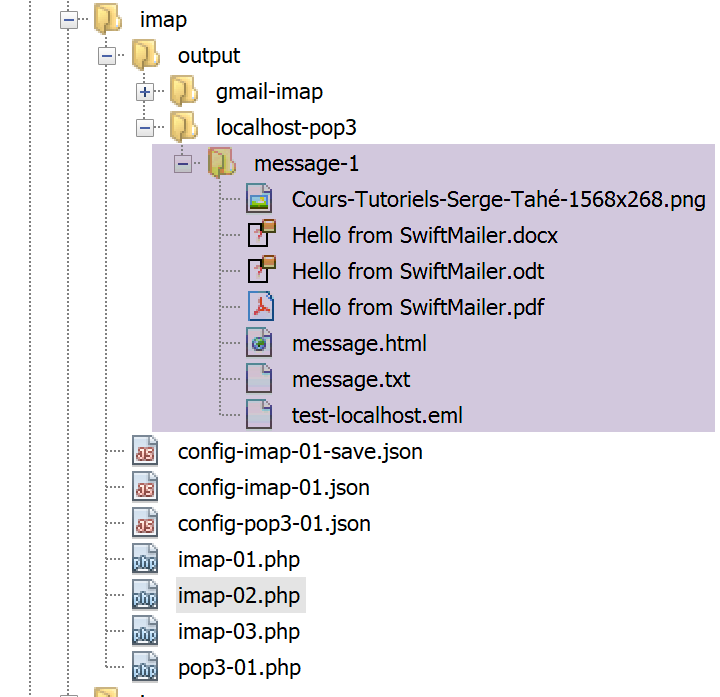
16.6.6. Client POP3 / IMAP with the [php-mime-mail-parser] library
In the previous script [imap-02.php], we were able to save:
- the contents [text/plain] and [text/HTML] of the email;
- the email attachments;
For an attachment of type [message/rfc822], we also saved the attachment’s content. However, this type of attachment is itself an email which, in turn, contains [text/plain] and [text/HTML] content as well as attachments. We may then find ourselves in the following situation:
- a [mail 1] whose structure is similar to that of a [message/rfc822]-type attachment;
- a [mail 2] attached to email 1;
- a [mail 3] attached to email 2;
- etc…
The [imap-02.php] script saves the contents of [mail 1] (text and attachments). It saves [mail 2] as an attached document but stops there. It does not attempt to parse [mail 2] to extract the text and attachments. One might think that it would suffice to apply to [mail 2] what was done for [mail 1]. A recursive call to the method that processed [mail 1] might then be enough to retrieve the content of all the nested emails. Unfortunately, the parts of [mail 2] are numbered using a different logic than that used for [mail 1], which prevents using the same algorithm in both cases unless one employs a fairly complex logic to calculate the part numbers of an email, regardless of its position within the set of nested emails.
The [imap-02.php] script was already complex. To avoid making it even more complex to handle the contents of nested emails, we will use the [php-mime-mail-parser] library available on GitHub (May 2019) at URL [https://github.com/php-mime-mail-parser/php-mime-mail-parser] and written by Vincent Dauce.
16.6.6.1. Installing the [php-mime-mail-parser] library
The library's overview page explains how to install it on Windows:

There are two steps for OS on Windows:
télécharger une DLL ;
modifier le fichier [php.ini] qui configure PHP ;
LA DLL of the [mailparse] library is available at URL [http://pecl.php.net/package/mailparse] (May 2019);
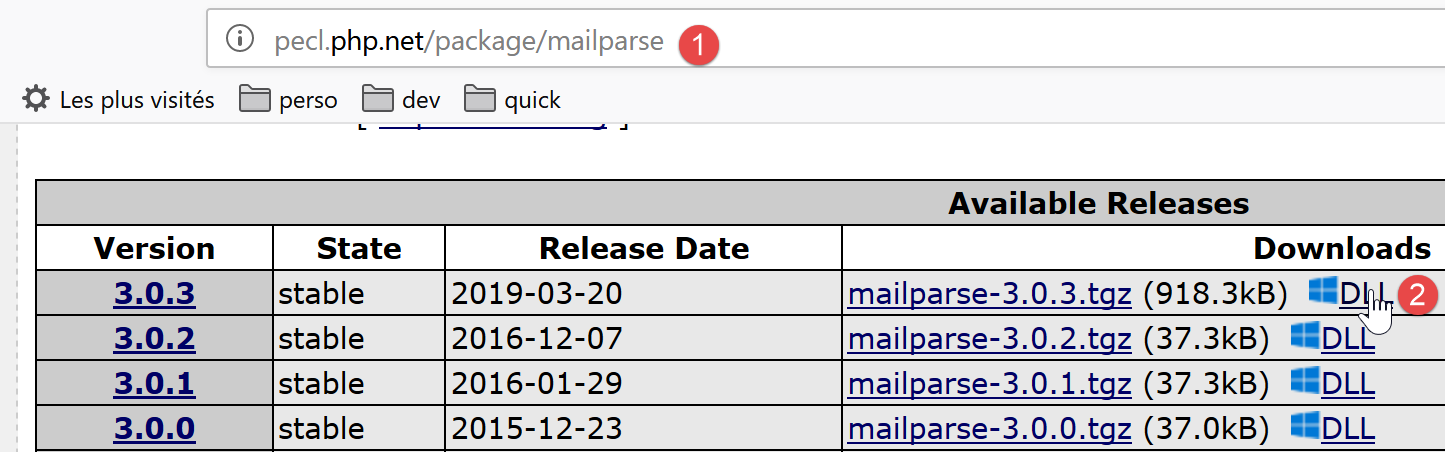
- in [2], choose the most recent and stable version from the library;
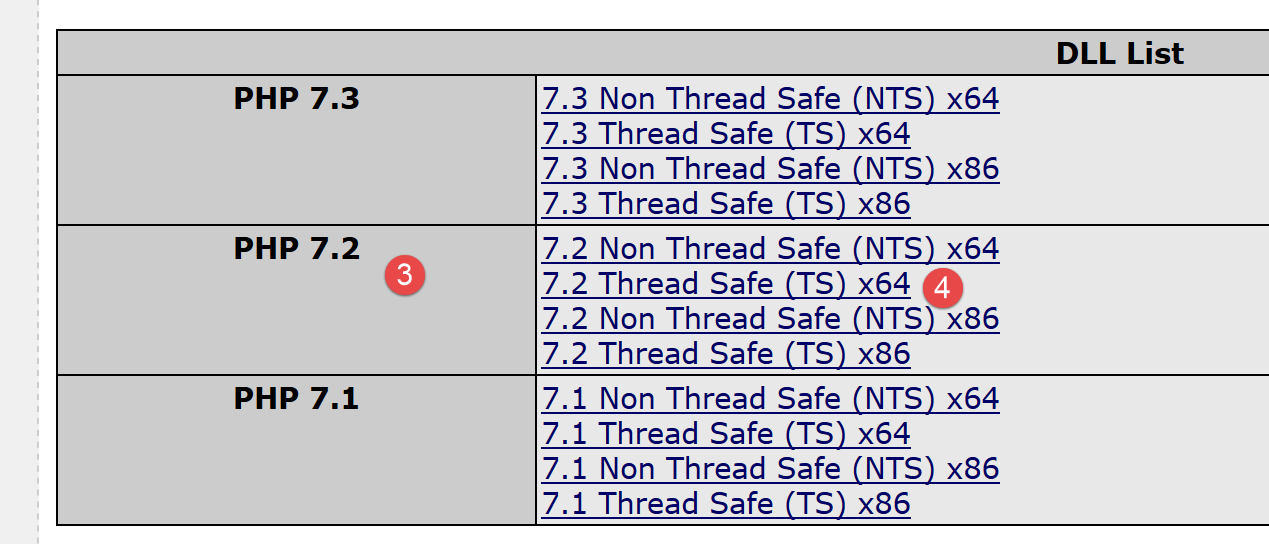
- in [3], choose the version version of the PHP you are using (in this document, it is PHP 7.2);
- In [4], select version from your OS Windows (here it is a 64-bit Windows). We take the version [Thread Safe];
To find the version for the PHP downloaded with Laragon, open a [Terminal] from the Laragon window and type the following command:
C:\myprograms\laragon-lite\www
λ php -v
PHP 7.2.11 (cli) (built: Oct 10 2018 02:04:07) ( ZTS MSVC15 (Visual C++ 2017) x64 )
Copyright (c) 1997-2018 The PHP Group
Zend Engine v3.2.0, Copyright (c) 1998-2018 Zend Technologies
The version for PHP 7.2.11 is listed on line 3. The same line lists the Windows version used for compilation (32-bit or 64-bit).
Once the DLL has been obtained, it must be copied to the [<laragon>/bin/php/<version-php>/ext] [5] folder:
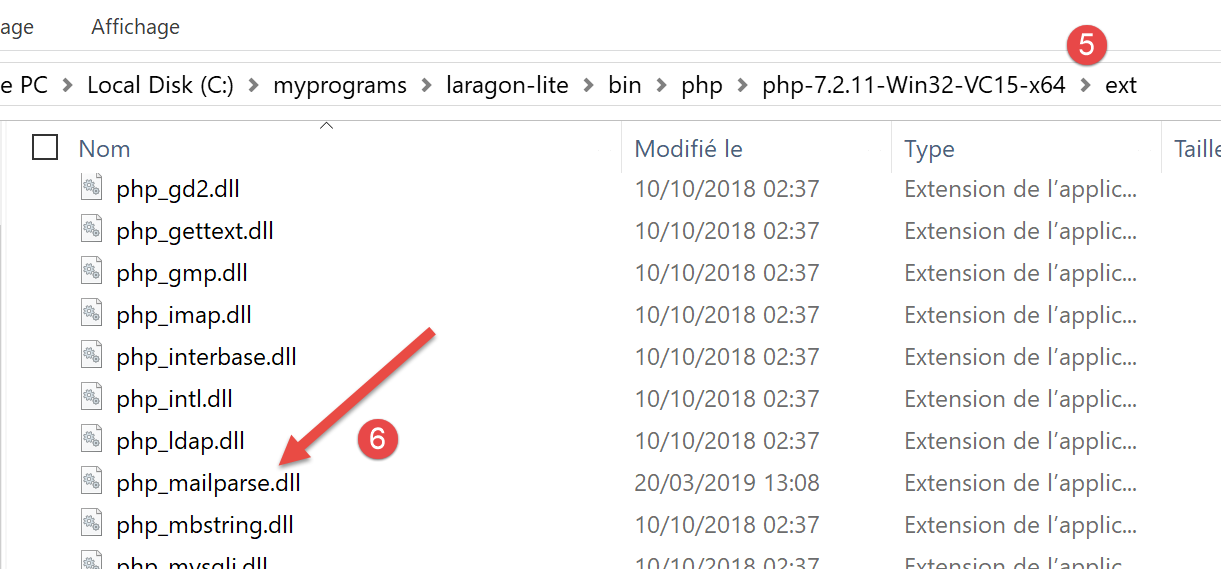
Once this is done, you must enable this extension in the [php.ini] file that configures PHP (see the link section):
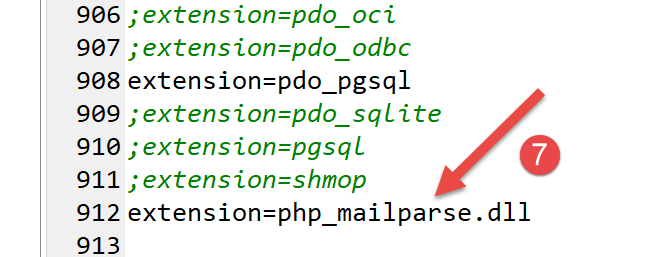
It is likely that the line [7] does not exist and that you will need to add it yourself.
Once the extension is enabled, you can verify its validity by typing the following command in a Laragon terminal:
C:\myprograms\laragon-lite\www
λ php --ini
Configuration File (php.ini) Path: C:\windows
Loaded Configuration File:         C:\myprograms\laragon-lite\bin\php\php-7.2.11-Win32-VC15-x64\php.ini
Scan for additional .ini files in: (none)
Additional .ini files parsed:      (none)
The [php –-ini] command loads the configuration file from line 4. It will then load the DLL files for all extensions enabled in [php.ini]. If any of them are incorrect, this will be reported. Thus, the validity of the DLL added to [php_mailparse.dll] will be verified. It may be declared incorrect for various reasons, the most common of which are as follows:
- you downloaded a DLL that does not match the version or PHP used;
- you downloaded a 32-bit DLL when you have a 64-bit PHP, or vice versa;
Once the extension has been enabled and verified, you can proceed to install the [php-mime-mail-parser] library:
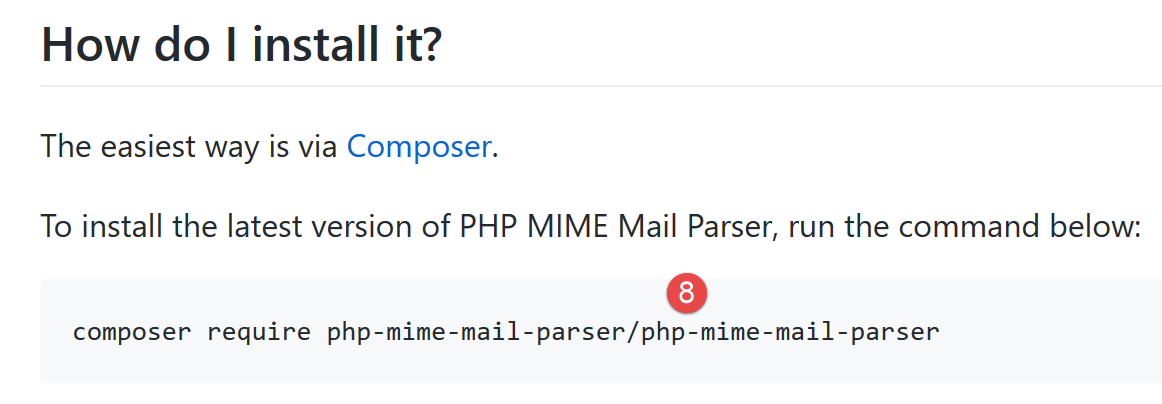
The command [8] should be entered in a Laragon terminal (see link section):
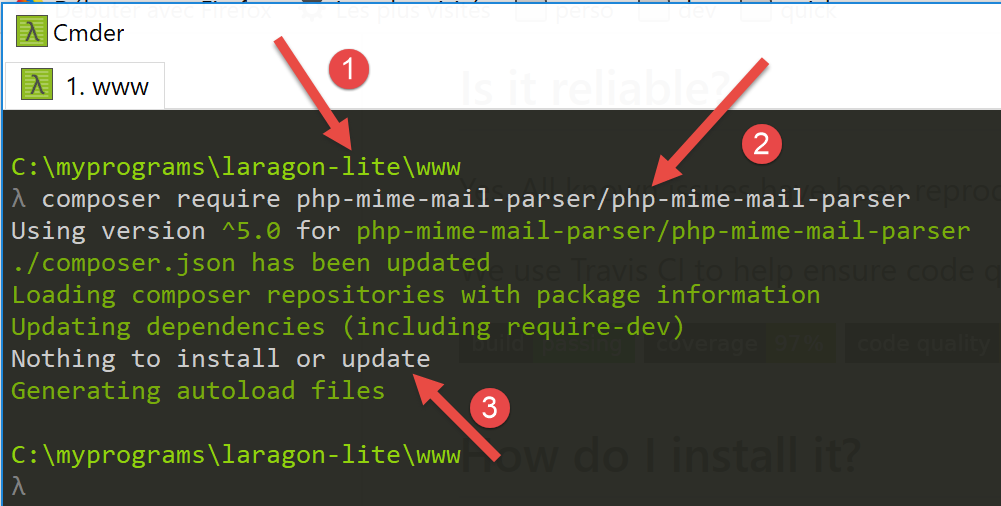
- In [1], verify that you are in the [<laragon>/www] directory;
- In [2], the command to install the [php-mime-mail-parser] library;
- In [3], nothing was installed here because the [php-mime-mail-parser] library was already installed;
The [php-mime-mail-parser] library is installed in the [<laragon>/www/vendor] folder:
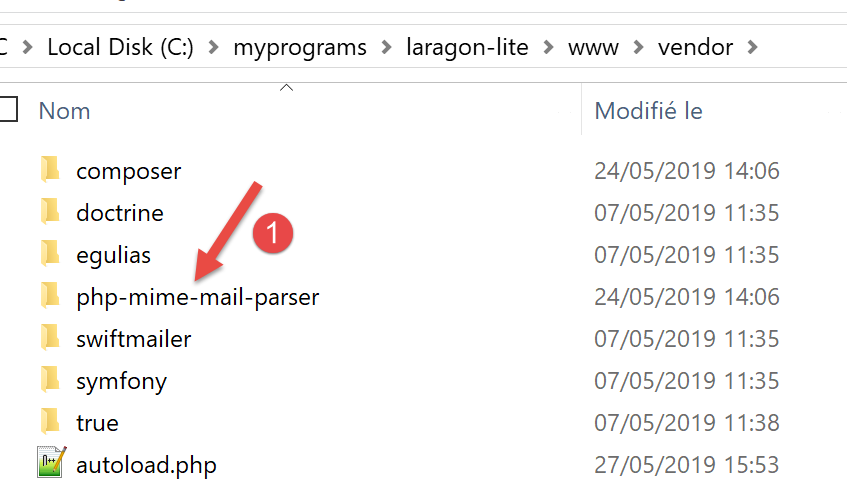
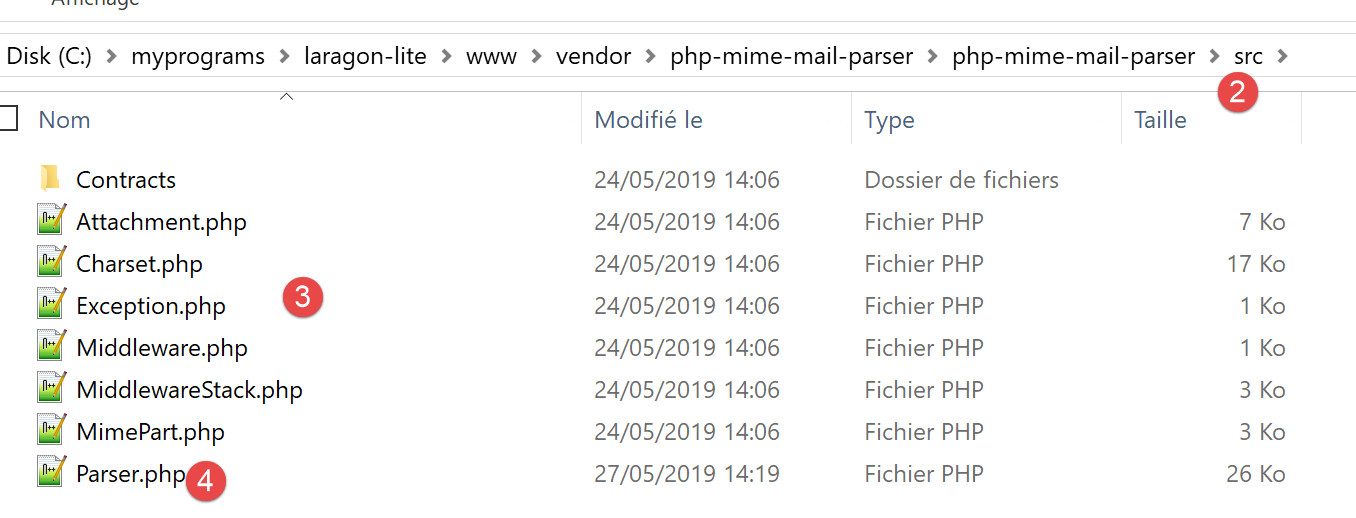
- In [2-3], the source code for the [php-mime-mail-parser] library;
Now that the working environment has been installed, we can move on to writing the [imap-03.php] script.
16.6.6.2. The [imap-03.php] script
The [imap-03.php] script uses the same configuration file, [config-imap-01.json], as the previous scripts:
The [imap-03.php] script is as follows:
<?php

// IMAP (Internet Message Access Protocol) client for reading e-mails
// written with the [php-mime-mail-parser] library
// available at URL [https://github.com/php-mime-mail-parser/php-mime-mail-parser] (May 2019)
//
// strict adherence to declared types of function parameters
declare (strict_types=1);
// error management
error_reporting(E_ALL & ~ E_WARNING & ~E_DEPRECATED & ~E_NOTICE);
//ini_set("display_errors", "off");
//
// dependencies
require_once 'C:/myprograms/laragon-lite/www/vendor/autoload.php';
// mail reading parameters
const CONFIG_FILE_NAME = "config-imap-01.json";

// we retrieve the configuration
if (!file_exists(CONFIG_FILE_NAME)) {
  print "Le fichier de configuration " . CONFIG_FILE_NAME . " n'existe pas";
  exit;
}
$mailboxes = \json_decode(\file_get_contents(CONFIG_FILE_NAME), true);

// reading mailboxes
foreach ($mailboxes as $name => $infos) {
  // follow-up
  print "------------Lecture de la boîte à lettres [$name]\n";
  // reading the mailbox
  readmailbox($name, $infos);
}
// end
exit;
Comments
- lines 18-23: the contents of the configuration file are placed in the [$mailboxes] dictionary;
- lines 26–31: each mailbox is read by the [readmailbox] function (line 30). This function actually reads the unread messages from the mailbox. A mailbox corresponds to a given user’s email address;
The [readmailbox] function is as follows:
function readmailbox(string $name, array $infos): void {
  // we connect
  $imapResource = imap_open($name, $infos["user"], $infos["password"]);
  if (!$imapResource) {
    // failure
    print "La connexion au serveur [$name] a échoué : " . imap_last_error() . "\n";
    exit;
  }
  // Connection established
  print "Connexion établie avec le serveur [$name].\n";
  // total messages in mailbox
  $nbmsg = imap_num_msg($imapResource);
  print "Il y a [$nbmsg] messages dans la boîte à lettres [$name]\n";
  // unread messages in current mailbox
  if ($nbmsg > 0) {
    print "Récupération de la liste des messages non lus de la boîte à lettres [$name]\n";
    $msgNumbers = imap_search($imapResource, 'UNSEEN');
    if ($msgNumbers === FALSE) {
      print "Il n'y a pas de nouveaux messages dans la boîte à lettres [$name]\n";
    } else {
      // browse the list of unread messages
      foreach ($msgNumbers as $msgNumber) {
        print "---message n° [$msgNumber]\n";
        // we retrieve the body of message n° $msgNumber
        getMailBody($imapResource, $msgNumber, $infos);
        // if the protocol is POP3, we delete the message after retrieving it
        $pop3 = $infos["pop3"];
        if ($pop3 !== NULL) {
          // mark the message as "to be deleted
          imap_delete($imapResource, $msgNumber);
        }
      }
      // end unread messages
      if ($pop3 !== NULL) {
        // messages marked as "to be deleted" are deleted
        imap_expunge($imapResource);
      }
    }
  }
  // closing the connection
  $imapClose = imap_close($imapResource);
  if (!$imapClose) {
    // failure
    print "La fermeture de la connexion a échoué : " . imap_last_error() . "\n";
  } else {
    // success
    print "Fermeture de la connexion réussie.\n";
  }
}
Comments
The code for function [readmailbox] is the same as in the previous scripts.
The [getMailBody] function (line 25), which parses the body of a message (content + attachments), is as follows:
// message body analysis
function getMailBody($imapResource, int $msgNumber, array $infos): void {
  // retrieve the entire message text
  $text = imap_fetchbody($imapResource, $msgNumber, "");
  if ($text === FALSE) {
    print "Le corps du message [$msgNumber] n'a pu être récupéré";
    return;
  }
  // create a parser to analyze the message text
  $parser = (new PhpMimeMailParser\Parser())->setText($text);
  // we recover the different parts of the message
  $outputDir = $infos["output-dir"] . "/message-$msgNumber";
  getParts($parser, $msgNumber, $outputDir);
}
Comments
- line 2: the [getMailBody] function accepts three parameters:
- [$imapResource]: the IMAP resource to which you are connected;
- [$msgNumber]: the message number (in the mailbox) to process;
- [$infos]: various information about the mailbox being processed;
- line 4: the entire message with number [$msgNumber] is retrieved;
- lines 5–8: case where the message content could not be retrieved;
- line 10: we begin using the [php-mime-mail-parser] library. The [$parser] object will be responsible for analyzing the message text;
- line 12: [$outputDir] will be the folder in which the text content and attachments of message no. [$msgNumber] will be saved;
- line 13: the function [getParts] is instructed to locate the various parts (text content and attachments) of message no. [$msgNumber] and save them to the folder [$outputDir];
The [getParts] function is as follows:
// retrieve the different parts of a message
function getParts(PhpMimeMailParser\Parser $parser, int $msgNumber, string $outputDir): void {
  // create a folder to save the message, if necessary
  if (!file_exists($outputDir)) {
    if (!mkdir($outputDir)) {
      print "Le dossier [$outputDir] n'a pu être créé\n";
      return;
    }
  }
  // retrieve the message headers
  $arrayHeaders = $parser->getHeaders();
  // save text messages
  $parts = $parser->getInlineParts("text");
  for ($i = 1; $i <= count($parts); $i++) {
    print "-- Sauvegarde d'un message de type [text/plain]\n";
    saveMessage($parts[$i - 1], 0, $arrayHeaders, "$outputDir/message_$i.txt");
  }
  // save messages html
  $parts = $parser->getInlineParts("html");
  for ($i = 1; $i <= count($parts); $i++) {
    print "-- Sauvegarde d'un message de type [text/html]\n";
    saveMessage($parts[$i - 1], 1, $arrayHeaders, "$outputDir/message_$i.html");
  }
  // message attachments are retrieved
  $attachments = $parser->getAttachments();
  // attachment no
  $iAttachment = 0;
  // browse the list of attachments
  foreach ($attachments as $attachment) {
    // type of attachment
    $fileType = $attachment->getContentType();
    print "-- Sauvegarde d'un attachement de type [$fileType] dans le fichier [$outputDir/{$attachment->getFilename()}]\n";
    // we safeguard attachment
    try {
      $attachment->save($outputDir, PhpMimeMailParser\Parser::ATTACHMENT_DUPLICATE_SUFFIX);
    } catch (Exception $e) {
      print "L'attachement n'a pu être sauvegardé : " . $e->getMessage() . "\n";
    }
    // special case of message/rfc822 type
    if ($fileType === "message/rfc822") {
      // attachment is itself a message - we'll parse it too
      // change backup directory
      $iAttachment++;
      $outputDir = $outputDir . "/rfc822-$iAttachment";
      // change the content to be parsed
      $parser->setText($attachment->getContent());
      // recursive message analysis
      getParts($parser, $msgNumber, $outputDir);
    }
  }
}
Comments
- line 2: the [getParts] function takes three parameters:
- a [$parser] parser to which the entire text of the message to be analyzed has been passed;
- [$msgNumber] is the number of the message currently being analyzed;
- [$outputDir] is the folder in which the message’s content and attachments must be saved;
- lines 4–9: creation of the folder [$outputDir];
- line 11: retrieve the headers of the message being analyzed (from, to, subject, etc.);
- line 13: retrieves the parts of the email with the type [text/plain]. A table is retrieved;
- lines 14–17: save all elements of the retrieved array, giving each a different filename;
- line 19: retrieve the parts of the email with the type [text/html]. An array is retrieved;
- lines 20–23: we save all elements of the retrieved array, giving each a different filename;
- line 25: retrieve the list of attachments for the analyzed message;
- line 29: we iterate through this list;
- line 24: retrieve the attachment type (Content-Type attribute);
- lines 34–38: save the attachment to the [$outputDir] folder. The second parameter, [PhpMimeMailParser\Parser::ATTACHMENT_DUPLICATE_SUFFIX], is a naming convention for attached files. If [$attachment→getFilename()] is set to X and the file X already exists, then the [php-mime-mail-parser] library tries the names [X_1], [X_2], etc., until it finds a filename that does not exist;
- line 40: we check if the attached file is an email;
- lines 41–48: if so, then this email is analyzed in turn to extract its contents and attachments;
- line 44: if [$outputDir] is equal to X and there are two emails among the attachments of the analyzed message, then the first will be saved in the [$outputDir/rfc822-1] folder and the second in the [$outputDir/rfc822-2] folder;
- line 46: the content of the attached email becomes the new text to be parsed;
- line 48: the function [getParts] is called recursively to parse the new text;
The function [saveMessage] saves the text content of the message to be analyzed:
// saving a text message
function saveMessage(string $text, int $type, array $arrayHeaders, string $filename): void {
  // content to be saved
  $contents = "";
  // adding headers
  switch ($type) {
    case 0:
      // text/plain
      foreach ($arrayHeaders as $key => $value) {
        $contents .= "$key: $value\n";
      }
      $contents .= "\n";
      break;
    case 1:
      // text/HTML
      foreach ($arrayHeaders as $key => $value) {
        $contents .= "$key: $value<br/>\n";
      }
      $contents .= "<br/>\n";
  }
  // add message text
  $contents .= $text;
  // save all
  if (!file_put_contents($filename, $contents)) {
    // failure
    print "Le message n'a pu être sauvegardé dans le fichier [$filename]\n";
  } else {
    // success
    print "Le message a été sauvegardé dans le fichier [$filename]\n";
  }
}
Comments
- The [saveMessage] function accepts the following parameters:
- [$text]: the text to be saved;
- [$type]: the text type (0: text/plain, 1: text/HTML);
- [$arrayHeaders]: the headers of the analyzed message;
- [$filename]: the name of the file in which [$text] is to be saved;
- line 4: [$contents] will represent the entire text to be saved;
- lines 6–20: first, all message headers (from, to, subject, etc.) will be saved;
- lines 16–19: for a HTML text, each line ends with the <br/> tag so that each header appears on its own line in a browser;
- line 22: the message text to be saved is added to the headers;
- lines 24–30: the entire set is saved to the file [$filename];
Using the [php-mime-mail-parser] library greatly simplifies writing the email-reading script.
The [smtp-02.php] script is used to send an email to the user [guest@localhost] with the following configuration:
- lines 11–15: there are five attachments;
- line 15: [test-localhost-2.eml] is an email structured as follows:
- [test-localhost-2.eml] contains 4 attachments (the same as in lines 11–14) and an attached email;
- the email attached to [test-localhost-2.eml] contains 4 attachments (the same as in lines 11–14);
The [imap-03.php] script is used to read the mailbox of user [guest@localhost] with the following configuration:
After execution, the directory structure of the [output/localhost-pop3] folder became as follows:
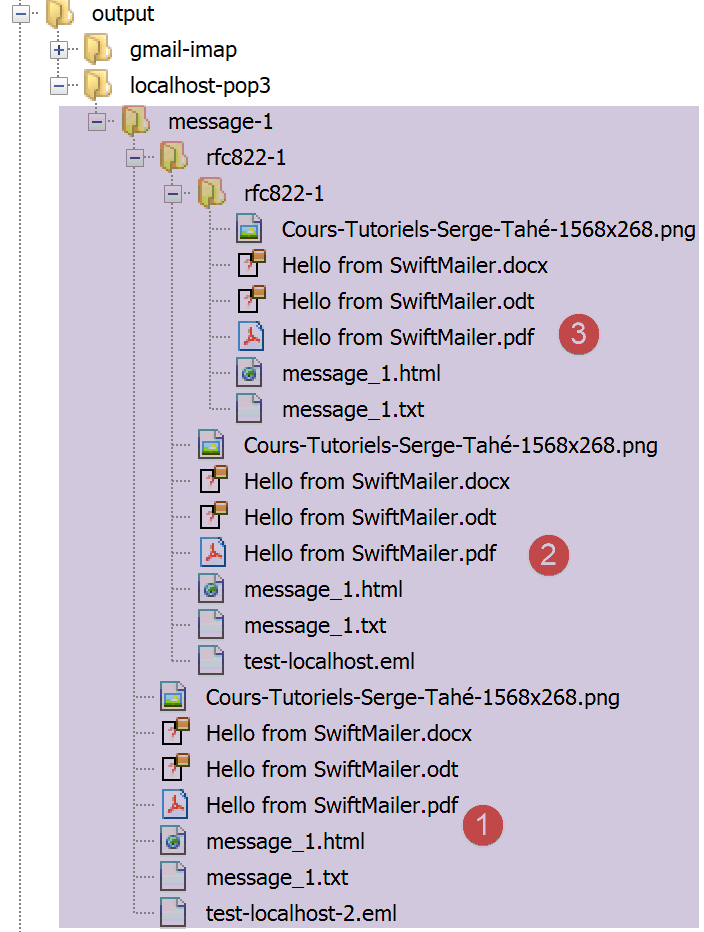
- in [1], the 5 attachments from the email received by [guest@localhost];
- in [2], the 5 attachments from the email [test-localhost-2.eml] sent by [1];
- in [3], the 4 attachments from the email [test-localhost.eml] sent by [2];
The console output is as follows:
------------Read mailbox [{localhost:110/pop3}]
Connexion établie avec le serveur [{localhost:110/pop3}].
Il y a [1] messages dans la boîte à lettres [{localhost:110/pop3}]
Récupération de la liste des messages non lus de la boîte à lettres [{localhost:110/pop3}]
---message no. [1]
-- Saving a [text/plain] message
Le message a été sauvegardé dans le fichier [output/localhost-pop3/message-1/message_1.txt]
-- Save a message of type [text/html]
Le message a été sauvegardé dans le fichier [output/localhost-pop3/message-1/message_1.html]
-- Sauvegarde d'un attachement de type [application/vnd.openxmlformats-officedocument.wordprocessingml.document] dans le fichier [output/localhost-pop3/message-1/Hello from SwiftMailer.docx]
-- Sauvegarde d'un attachement de type [application/pdf] dans le fichier [output/localhost-pop3/message-1/Hello from SwiftMailer.pdf]
-- Sauvegarde d'un attachement de type [application/vnd.oasis.opendocument.text] dans le fichier [output/localhost-pop3/message-1/Hello from SwiftMailer.odt]
-- Save an attachment of type [image/png] in the file [output/localhost-pop3/message-1/Cours-Tutoriels-Serge-Tahé-1568x268.png]
-- Save an attachment of type [message/rfc822] in the file [output/localhost-pop3/message-1/test-localhost-2.eml]
-- Saving a [text/plain] message
Le message a été sauvegardé dans le fichier [output/localhost-pop3/message-1/rfc822-1/message_1.txt]
-- Save a message of type [text/html]
Le message a été sauvegardé dans le fichier [output/localhost-pop3/message-1/rfc822-1/message_1.html]
-- Sauvegarde d'un attachement de type [application/vnd.openxmlformats-officedocument.wordprocessingml.document] dans le fichier [output/localhost-pop3/message-1/rfc822-1/Hello from SwiftMailer.docx]
-- Sauvegarde d'un attachement de type [application/pdf] dans le fichier [output/localhost-pop3/message-1/rfc822-1/Hello from SwiftMailer.pdf]
-- Sauvegarde d'un attachement de type [application/vnd.oasis.opendocument.text] dans le fichier [output/localhost-pop3/message-1/rfc822-1/Hello from SwiftMailer.odt]
-- Save an attachment of type [image/png] in the file [output/localhost-pop3/message-1/rfc822-1/Cours-Tutoriels-Serge-Tahé-1568x268.png]
-- Save an attachment of type [message/rfc822] in the file [output/localhost-pop3/message-1/rfc822-1/test-localhost.eml]
-- Saving a [text/plain] message
Le message a été sauvegardé dans le fichier [output/localhost-pop3/message-1/rfc822-1/rfc822-1/message_1.txt]
-- Save a message of type [text/html]
Le message a été sauvegardé dans le fichier [output/localhost-pop3/message-1/rfc822-1/rfc822-1/message_1.html]
-- Sauvegarde d'un attachement de type [application/vnd.openxmlformats-officedocument.wordprocessingml.document] dans le fichier [output/localhost-pop3/message-1/rfc822-1/rfc822-1/Hello from SwiftMailer.docx]
-- Sauvegarde d'un attachement de type [application/pdf] dans le fichier [output/localhost-pop3/message-1/rfc822-1/rfc822-1/Hello from SwiftMailer.pdf]
-- Sauvegarde d'un attachement de type [application/vnd.oasis.opendocument.text] dans le fichier [output/localhost-pop3/message-1/rfc822-1/rfc822-1/Hello from SwiftMailer.odt]
-- Save an [image/png] attachment in the [output/localhost-pop3/message-1/rfc822-1/rfc822-1/Cours-Tutoriels-Serge-Tahé-1568x268.png] file
Fermeture de la connexion réussie.
If you view [message_1.HTML] from [3] in a browser, you get the following: