19. Application Exercise – version 9
In this version, we will improve the server as follows:
- Currently, for each request, the tax administration data is retrieved from the database. We will use a session:
- During a user’s first request, tax administration data is retrieved from the database and stored in the session;
- for subsequent requests from the same user, tax administration data is retrieved from the session. We can expect a slight improvement in execution time since database queries are resource-intensive;
- the server will log important events in a text file:
- successful or failed authentication;
- whether the parameters sent by the client are valid;
- the result of the tax calculation;
- various error cases;
- in the event of a fatal error, an email will be sent to the application administrator;
The client will also need to be modified to handle the session cookie that will be sent to it.
19.1. The server
We are focusing on the server-side of the application.
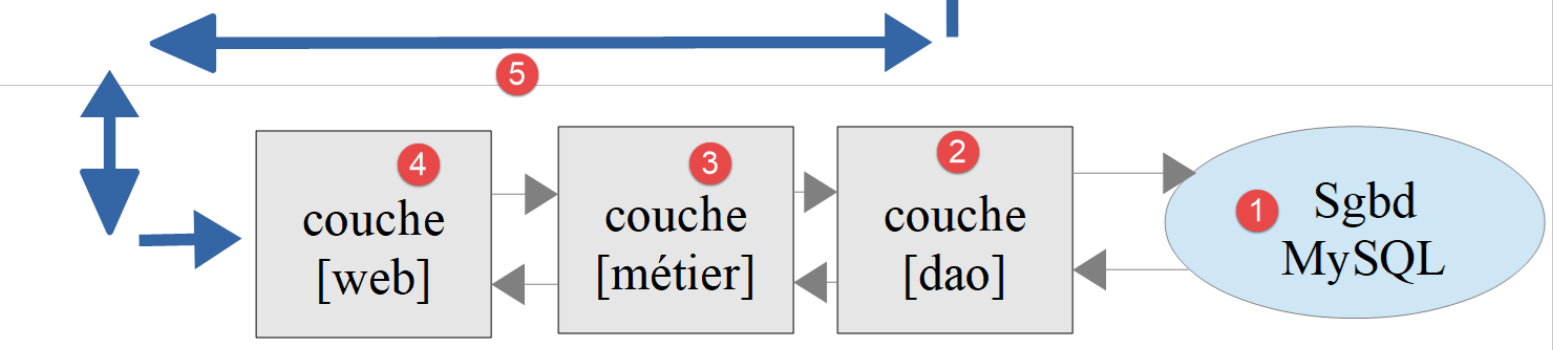
This architecture will be implemented by the following scripts:
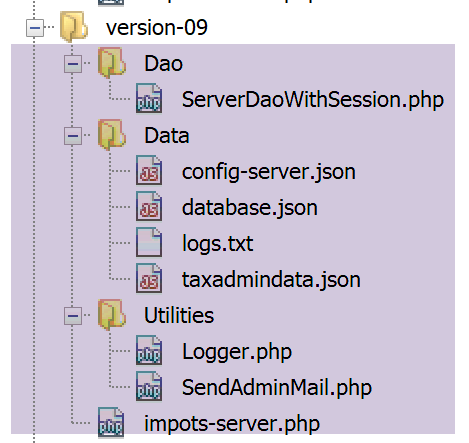
19.1.1. Utilities
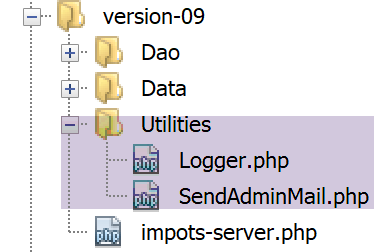
19.1.1.1. The [Logger] class
The [Logger] class will be used to write logs to a text file:
<?php

namespace Application;

class Logger {
  // attribute
  private $resource;

  // manufacturer
  public function __construct(string $logsFilename) {
    // open file
    $this->resource = fopen($logsFilename, "a");
    if (!$this->resource) {
      throw new ExceptionImpots("Echec lors de la création du fichier de logs [$logsFilename]");
    }
  }

  // writing a message to the logs
  public function write(string $message) {
    fputs($this->resource, (new \DateTime())->format("d/m/y H:i:s:v") . " : $message");
  }

  // close log file
  public function close() {
    fclose($this->resource);
  }

}
Comments
- line 7: the log file resource;
- line 10: the class constructor receives the name of the log file as a parameter;
- line 12: the text file is opened in append mode (a+): the file will be opened, and its contents preserved. Writes will be appended to the end of the current content;
- lines 13–15: if the file could not be opened, an exception is thrown;
- lines 19–21: the [write] method writes the message [$message] to the log file, preceded by the date and time;
- lines 24–16: the [close] method closes the log file;
Note: The server application may serve multiple clients instances simultaneously. However, there is only one log file for all of them. There is therefore a risk of concurrent access when writing to the file. Writes must therefore be synchronized to prevent them from becoming mixed up. To address this, PHP uses [https://www.php.net/manual/fr/book.sem.php] semaphores. We will not address write synchronization here, but you should remain aware of the issue.
19.1.1.2. The [SendAdminMail] class
The [SendAdminMail] class allows you to send an email to the application administrator in the event of a crash:
<?php

namespace Application;

class SendAdminMail {
  // attributes
  private $config;
  private $logger;

  // manufacturer
  public function __construct(array $config, Logger $logger = NULL) {
    $this->config = $config;
    $this->logger = $logger;
  }

  public function send() {
    // sends $this->config['message'] to smtp server $this->config['smtp-server'] on port $infos[smt-port]
    // if $this->config['tls'] is true, support TLS will be used
    // le mail est envoyé de la part de $this->config['from']
    // for recipient $this->config['to']
    // message has subject $this->config['subject']
    // attachments from $this->config['attachments'] are attached to the mail
    // the result of the method
    try {
      // message creation
      $message = (new \Swift_Message())
        // message subject
        ->setSubject($this->config["subject"])
        // sender
        ->setFrom($this->config["from"])
        // recipients with a dictionary (setTo/setCc/setBcc)
        ->setTo($this->config["to"])
        // message text
        ->setBody($this->config["message"])
      ;
      // attachments
      foreach ($this->config["attachments"] as $attachment) {
        // path of attachment
        $fileName = __DIR__ . $attachment;
        // check that the file exists
        if (file_exists($fileName)) {
          // attach the document to the message
          $message->attach(\Swift_Attachment::fromPath($fileName));
        } else {
          if ($this->logger !== NULL) {
            // error
            $this->logger->write("L'attachement [$fileName] n'existe pas\n");
          }
        }
      }
      // protocol TLS ?
      if ($this->config["tls"] === "TRUE") {
        // TLS
        $transport = (new \Swift_SmtpTransport($this->config["smtp-server"], $this->config["smtp-port"], 'tls'))
          ->setUsername($this->config["user"])
          ->setPassword($this->config["password"]);
      } else {
        // no TLS
        $transport = (new \Swift_SmtpTransport($this->config["smtp-server"], $this->config["smtp-port"]));
      }
      // the shipment manager
      $mailer = new \Swift_Mailer($transport);
      // sending the message
      $mailer->send($message);
      // end
      if ($this->logger !== NULL) {
        $this->logger->write("Message [{$this->config["message"]}] envoyé à {$this->config["to"]}\n");
      }
    } catch (\Throwable $ex) {
      // error
      if ($this->logger !== NULL) {
        $this->logger->write("Erreur lors de l'envoi du message [{$this->config["message"]}] à {$this->config["to"]}\n");
      }
    }
  }

}
Comments
- line 11: the constructor receives two parameters:
- [$config]: an associative array containing all the information needed to send the email;
- [$logger]: a logger used to log key moments during the email sending process;
The associative array will have the following form:
- lines 16-76: the [send] method is used to send the email. This code was presented and described in the linked section;
19.1.2. The [dao] layer
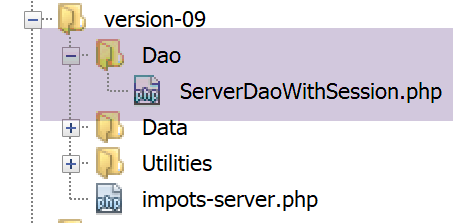
The [ServeurDaoWithSession.php] script is as follows:
<?php

// namespace
namespace Application;

// definition of a ImpotsWithDataInDatabase class
class ServerDaoWithSession extends ServerDao {

  // manufacturer
  public function __construct(string $databaseFilename = NULL, TaxAdminData $taxAdminData = NULL) {
    // simplest case
    if ($taxAdminData !== NULL) {
      $this->taxAdminData = $taxAdminData;
    } else {
      // hand over to parent class
      parent::__construct($databaseFilename);
    }
  }

}
Comments
- Line 7: The [ServerDaoWithSession] class in version 09 extends the [ServerDao] class in version 08. In fact, the [ServerDao] class knows how to use the database. All that remains is to handle the case where the tax administration data has already been acquired:
- line 10: the constructor now receives two parameters:
- [string $databaseFilename]: name of the file containing the information needed to connect to the database if the tax authority data has not yet been acquired, NULL otherwise;
- [TaxAdminData $taxAdminData]: the tax authority data if already retrieved, NULL otherwise;
When starting a web session, the [dao] layer will be constructed with a [$databaseFilename] object (not NULL) and a [taxAdminData] NULL object. The tax administration data will then be retrieved from the database and stored in the session. During subsequent requests in the same session, the [dao] layer will be constructed using a [databaseFilename] object, a NULL object, and a [taxAdminData] object from the session, but not a NULL object. Therefore, there will be no database lookup.
19.1.3. The server script
The [impots-server.php] server script is configured by the following jSON and [config-server.json] files:
{
    "rootDirectory": "C:/myprograms/laragon-lite/www/php7/scripts-web/impots/version-09",
    "databaseFilename": "Data/database.json",
    "relativeDependencies": [
        "/../version-08/Entities/BaseEntity.php",
        "/../version-08/Entities/ExceptionImpots.php",
        "/../version-08/Entities/TaxAdminData.php",
        "/../version-08/Entities/Database.php",
        "/../version-08/Dao/InterfaceServerDao.php",
        "/../version-08/Dao/ServerDao.php",
        "/Dao/ServerDaoWithSession.php",
        "/../version-08/Métier/InterfaceServerMetier.php",
        "/../version-08/Métier/ServerMetier.php",
        "/Utilities/Logger.php",
        "/Utilities/SendAdminMail.php"
    ],
    "absoluteDependencies": ["C:/myprograms/laragon-lite/www/vendor/autoload.php"],
    "users": [
        {
            "login": "admin",
            "passwd": "admin"
        }
    ],
    "adminMail": {
        "smtp-server": "localhost",
        "smtp-port": "25",
        "from": "guest@localhost",
        "to": "guest@localhost",
        "subject": "plantage du serveur de calcul d'impôts",
        "tls": "FALSE",
        "attachments": []
    },
    "logsFilename": "Data/logs.txt"
}
The [impots-server.php] server script changes as follows:
<?php

// strict adherence to declared types of function parameters
declare (strict_types=1);

// namespace
namespace Application;

// error handling by PHP
ini_set("display_errors", "0");
//
// configuration file path
define("CONFIG_FILENAME", "Data/config-server.json");

// we retrieve the configuration
$config = \json_decode(file_get_contents(CONFIG_FILENAME), true);

// include the necessary script dependencies
$rootDirectory = $config["rootDirectory"];
foreach ($config["relativeDependencies"] as $dependency) {
  require "$rootDirectory$dependency";
}
// absolute dependencies (third-party libraries)
foreach ($config["absoluteDependencies"] as $dependency) {
  require "$dependency";
}
//
// symfony dependencies
use \Symfony\Component\HttpFoundation\Response;
use \Symfony\Component\HttpFoundation\Request;
use \Symfony\Component\HttpFoundation\Session\Session;

// session
$session = new Session();
$session->start();

// prepare JSON server response
$response = new Response();
$response->headers->set("content-type", "application/json");
$response->setCharset("utf-8");

// log file creation
try {
  $logger = new Logger($config['logsFilename']);
} catch (ExceptionImpots $ex) {
  // internal server error
  doInternalServerError($ex->getMessage(), $response, NULL, $config['adminMail']);
  // completed
  exit;
}

// 1st log
$logger->write("\n---nouvelle requête\n");

// retrieve the current query
$request = Request::createFromGlobals();
// authentication only the 1st time
if (!$session->has("user")) {
  // log
  $logger->write("Autentification en cours…\n");
  // authentication
  …
  }
  // has the user been found?
  if (!$trouvé) {
    // not found - code 401 HTTP_UNAUTHORIZED
    sendResponse(
      $response,
      ["erreur" => "Echec de l'authentification [$requestUser, $requestPassword]"],
      Response::HTTP_UNAUTHORIZED,
      ["WWW-Authenticate" => "Basic realm=" . utf8_decode("\"Serveur de calcul d'impôts\"")],
      $logger
    );
    // completed
    exit;
  } else {
    // we note in the session that we have authenticated the user
    $session->set("user", TRUE);
    // log
    $logger->write("Authentification réussie [$requestUser, $requestPassword]\n");
  }
} else {
  // log
  $logger->write("Authentification prise en session…\n");
}
// we have a valid user - we check the parameters received
$erreurs = [];
// you need three parameters GET
…

// mistakes?
if ($erreurs) {
// an error code 400 HTTP_BAD_REQUEST is sent to the customer
  sendResponse($response, ["erreurs" => $erreurs], Response::HTTP_BAD_REQUEST, [], $logger);
  // completed
  exit;
} else {
  // logs
  $logger->write("paramètres ['marié'=>$marié, 'enfants'=>$enfants, 'salaire'=>$salaire] valides\n");
}
// we have everything you need to work
// creation of the [dao] layer
if (!$session->has("taxAdminData")) {
  // the data is taken from the database
  $logger->write("données fiscales prises en base de données\n");
  try {
    // layer construction [dao]
    $dao = new ServerDaoWithSession($config["databaseFilename"], NULL);
    // put data in session
    $session->set("taxAdminData", $dao->getTaxAdminData());
  } catch (\RuntimeException $ex) {
    // we note the error
    doInternalServerError(utf8_encode($ex->getMessage()), $response, $logger, $config['adminMail']);
    // completed
    exit;
  }
} else {
  // the data is taken from the session
  $dao = new ServerDaoWithSession(NULL, $session->get("taxAdminData"));
  // logs
  $logger->write("données fiscales prises en session\n");
}
// creation of the [business] layer
$métier = new ServerMetier($dao);
// tAX CALCULATION
$result = $métier->calculerImpot($marié, (int) $enfants, (int) $salaire);
// we return the answer
sendResponse($response, $result, Response::HTTP_OK, [], $logger);
// end
exit;

function doInternalServerError(string $message, Response $response, Logger $logger = NULL, array $infos) {
  // send an e-mail to the administrator
  // SendAdminMail intercepts all exceptions and logs them itself
  $infos['message'] = $message;
  $sendAdminMail = new SendAdminMail($infos, $logger);
  $sendAdminMail->send();
  // an error code 500 is sent to the customer
  sendResponse($response, ["erreur" => $message], Response::HTTP_INTERNAL_SERVER_ERROR, [], $logger);
}

// function to send HTTP response to client
function sendResponse(Response $response, array $result, int $statusCode, array $headers, Logger $logger) {
  // $response : answer HTTP
  // $result: results table
  // $statusCode: HTTP response status
  // $headers: HTTP headers to be included in the response
  // $logger: application logger
  //
  // status HTTTP
  $response->setStatusCode($statusCode);
  // body
  $body = \json_encode(["réponse" => $result], JSON_UNESCAPED_UNICODE);
  $response->setContent($body);
  // headers
  $response->headers->add($headers);
  // shipping
  $response->send();
  // log
  if ($logger != NULL) {
    $logger->write("$body\n");
    $logger->close();
  }
}
Comments
- lines 34-35: start a session;
- lines 38-40: prepare a jSON response;
- lines 42-50: attempt to create the log file. If an exception occurs, the [doInternalServer] method (lines 132-140) is called;
- line 132: the [doInternalServer] method accepts four parameters:
- [$message]: the message to log. Must be encoded in UTF-8;
- [$response]: the [Response] object that encapsulates the server’s response to its client;
- [$logger]: the [Logger] object used for logging;
- [$infos]: the information used to send an email to the application administrator;
- lines 135–137: an email is sent to the application administrator;
- line 139: the response is sent to the client:
- $response: response HTTP;
- $result: the server sends the string jSON from the array [‘réponse’=>["erreur" => $message]];
- $statusCode: [Response::HTTP_INTERNAL_SERVER_ERROR], code 500;
- $headers: [], no HTTP headers to add to the response;
- $logger: the application logger;
- line 58: thanks to the established session, we will authenticate the client only once:
- once the client is authenticated, we will place a key [user] in the session (line 78);
- during the next request from the same client, line 58 prevents unnecessary re-authentication;
- line 103: thanks to the established session, we will only search the database once:
- during the first request, the database search will be performed (line 108). The retrieved data is then stored in the session (line 110) associated with the key [taxAdminData];
- during subsequent requests, the key [taxAdminData] will be found in the session (line 103), and the data on disk will then be directly passed to the [dao] layer (line 119);
- Lines 111–116: The search for tax data in the database may fail. In this case, a [500 Internal Server Error] code is sent to the client;
- Line 113: The error message for the MySQL driver exception is encoded as ISO 8859-1. It is converted to UTF-8 to be logged correctly;
- the rest of the code is almost identical to that of the previous version;
- lines 143–164: the [sendResponse] function sends all responses to the client;
- lines 144–148: meaning of the parameters;
- line 153: the response is always the string jSON from an array [‘résultat’=>qqChose];
- line 156: sometimes there are HTTP headers to add to the response. This is the case on line 71;
- line 158: the response is sent;
- lines 160–163: the response is logged and the logger is closed;
19.1.4. [Codeception] Tests
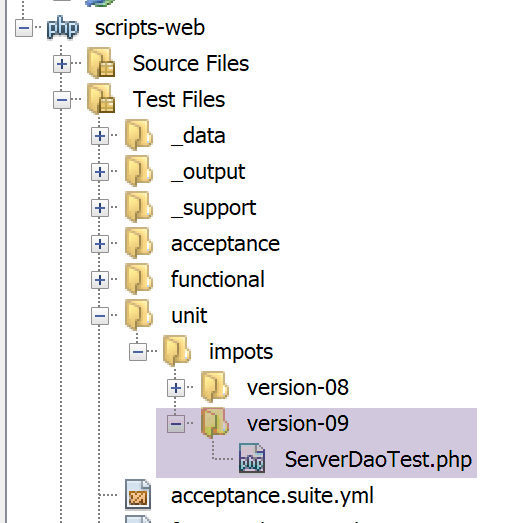
We will only test the [dao] layer, which is the only one that has changed.
The code for the [ServerDaoTest] test is as follows:
<?php

// strict adherence to declared types of function parameters
declare (strict_types=1);

// namespace
namespace Application;

// definition of constants
define("ROOT", "C:/myprograms/laragon-lite/www/php7/scripts-web/impots/version-09");
// configuration file path
define("CONFIG_FILENAME", ROOT . "/Data/config-server.json");

// we retrieve the configuration
$config = \json_decode(\file_get_contents(CONFIG_FILENAME), true);
// include the necessary script dependencies
$rootDirectory = $config["rootDirectory"];
foreach ($config["relativeDependencies"] as $dependency) {
  require "$rootDirectory$dependency";
}
// absolute dependencies (third-party libraries)
foreach ($config["absoluteDependencies"] as $dependency) {
  require "$dependency";
}

// test -----------------------------------------------------

class ServerDaoTest extends \Codeception\Test\Unit {
  // TaxAdminData
  private $taxAdminData;

  public function __construct() {
    // parent
    parent::__construct();
    // we retrieve the configuration
    $config = \json_decode(\file_get_contents(CONFIG_FILENAME), true);
    // creation of the [dao] layer
    $dao = new ServerDaoWithSession(ROOT . "/" . $config["databaseFilename"]);
    $this->taxAdminData = $dao->getTaxAdminData();
  }

  // tests
  public function testTaxAdminData() {
    …
  }

}
- lines 9–24: we create a runtime environment identical to that of the server script [impots-server];
- line 38: to build the [dao] layer, we instantiate the [ServerDaoWithSession] class;
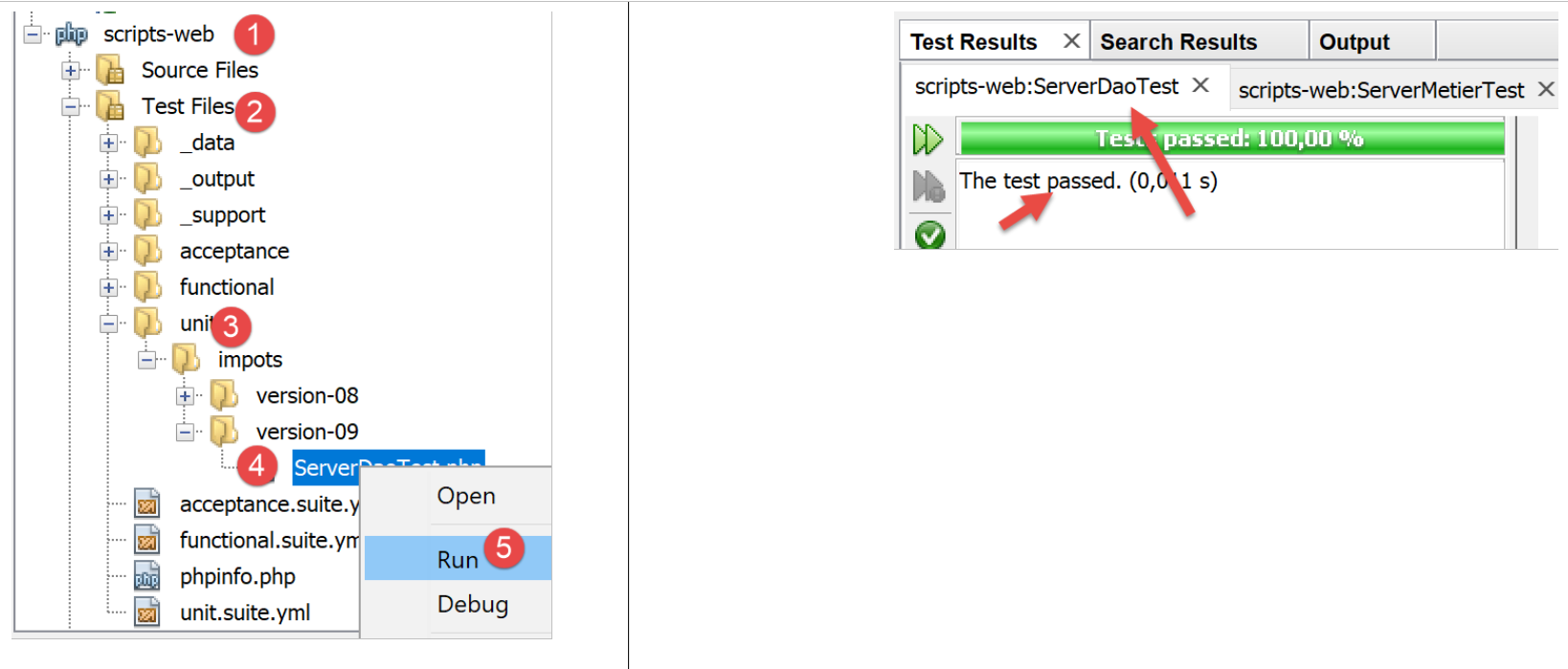
The test results are as follows:
19.2. The client
We are focusing on the client-side of the application.
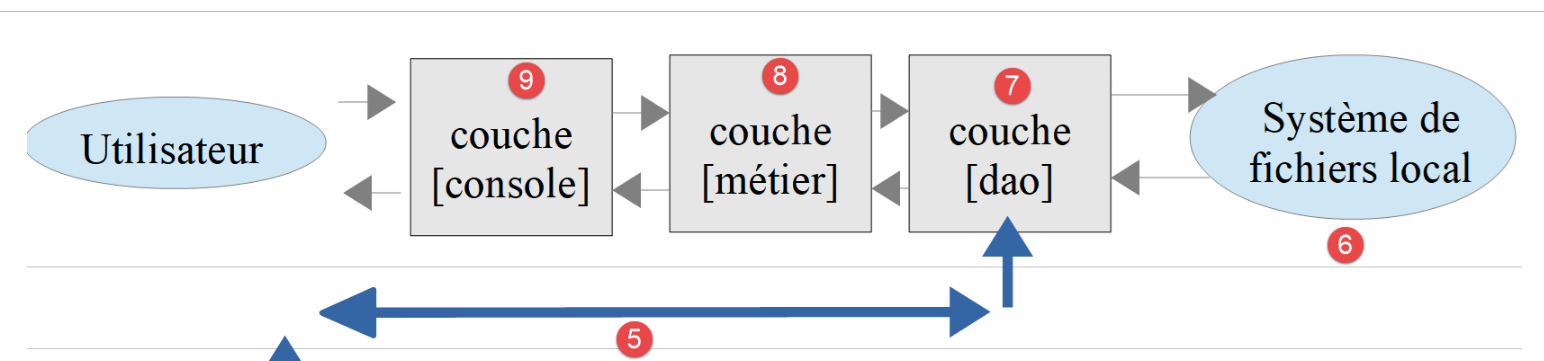
This architecture will be implemented by the following scripts:
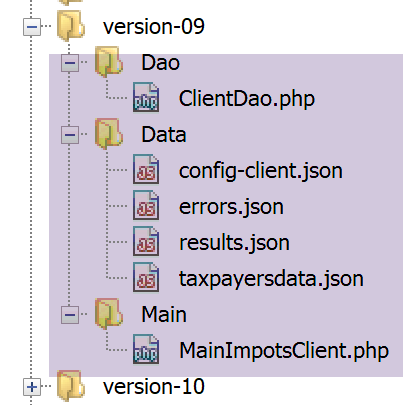
In the new version, the only changes are:
- the configuration file [config-client.json];
- the client layer [dao];
19.2.1. The [dao] layer
The [Dao] layer changes as follows:
<?php

namespace Application;

// dependencies
use \Symfony\Component\HttpClient\HttpClient;

class ClientDao implements InterfaceClientDao {
  // using a Trait
  use TraitDao;
  // attributes
  private $urlServer;
  private $user;
  private $sessionCookie;

  // manufacturer
  public function __construct(string $urlServer, array $user) {
    $this->urlServer = $urlServer;
    $this->user = $user;
  }

  // tAX CALCULATION
  public function calculerImpot(string $marié, int $enfants, int $salaire): array {
    // session cookie ?
    if (!$this->sessionCookie) {
      // create a HTTP customer
      $httpClient = HttpClient::create([
          'auth_basic' => [$this->user["login"], $this->user["passwd"]],
          "verify_peer" => false
      ]);
      // make the request to the server without a session cookie
      $response = $httpClient->request('GET', $this->urlServer,
        ["query" => [
            "marié" => $marié,
            "enfants" => $enfants,
            "salaire" => $salaire
          ]
      ]);
    } else {
      // make a request to the server with the session cookie
      // create a HTTP customer
      $httpClient = HttpClient::create([
          "verify_peer" => false
      ]);
      $response = $httpClient->request('GET', $this->urlServer,
        ["query" => [
            "marié" => $marié,
            "enfants" => $enfants,
            "salaire" => $salaire
          ],
          "headers" => ["Cookie" => $this->sessionCookie]
      ]);
    }
    // the answer is retrieved
    $json = $response->getContent(false);
    $array = \json_decode($json, true);
    $réponse = $array["réponse"];
    // logs
    print "$json=json\n";
    // retrieve response status
    $statusCode = $response->getStatusCode();
    // mistake?
    if ($statusCode !== 200) {
      // we have an error - we throw an exception
      $réponse = ["statut HTTP" => $statusCode] + $réponse;
      $message = \json_encode($réponse, JSON_UNESCAPED_UNICODE);
      throw new ExceptionImpots($message);
    }
    if (!$this->sessionCookie) {
      // retrieve the session cookie
      $headers = $response->getHeaders();
      if (isset($headers["set-cookie"])) {
        // session cookie ?
        foreach ($headers["set-cookie"] as $cookie) {
          $match = [];
          $match = preg_match("/^PHPSESSID=(.+?);/", $cookie, $champs);
          if ($match) {
            $this->sessionCookie = "PHPSESSID=" . $champs[1];
          }
        }
      }
    }
    // we return the answer
    return $réponse;
  }

}
Comments
The modification to the [dao] layer now involves managing a session:
- line 14: the session cookie;
- lines 25–39: during the first request, this cookie does not exist; the request is then sent to the server along with the authentication information (line 28);
- lines 40–53: for subsequent requests, we normally have the session cookie. We therefore do not send the authentication information (lines 42–44);
- lines 69-82: the server’s response to the first request will include a session cookie. We retrieve it. This code has already been used and explained in the linked section;
- line 78: the retrieved session cookie is stored in the class attribute [$sessionCookie];
Note: We could have kept the old version from the [dao] layer and performed authentication on every request, as the cost of doing so is negligible. For educational purposes, we wanted to demonstrate how a HTTP client could manage a session.
19.2.2. The configuration file
The configuration file jSON changes as follows:
{
    "rootDirectory": "C:/Data/st-2019/dev/php7/poly/scripts-console/impots/version-09",
    "taxPayersDataFileName": "Data/taxpayersdata.json",
    "resultsFileName": "Data/results.json",
    "errorsFileName": "Data/errors.json",
    "dependencies": [
        "/../version-08/Entities/BaseEntity.php",
        "/../version-08/Entities/TaxPayerData.php",
        "/../version-08/Entities/ExceptionImpots.php",
        "/../version-08/Utilities/Utilitaires.php",
        "/../version-08/Dao/InterfaceClientDao.php",
        "/../version-08/Dao/TraitDao.php",
        "/Dao/ClientDao.php",
        "/../version-08/Métier/InterfaceClientMetier.php",
        "/../version-08/Métier/ClientMetier.php"
    ],
    "absoluteDependencies": [
        "C:/myprograms/laragon-lite/www/vendor/autoload.php"
    ],
    "user": {
        "login": "admin",
        "passwd": "admin"
    },
    "urlServer": "https://localhost:443/php7/scripts-web/impots/version-09/impots-server.php"
}
Only the URL in line 24 changes.
19.3. Some tests
19.3.1. Test 1
First, we run the client in an error-free environment. The results are the same as in previous versions. But now on the server side, we have a log file named [logs.txt]:
04/07/19 13:16:08:523 :
---new request
04/07/19 13:16:08:529 : Autentification en cours…
04/07/19 13:16:08:529 : Authentification réussie [admin, admin]
04/07/19 13:16:08:529 : paramètres ['married'=>yes, 'children'=>2, 'salary'=>55555] valid
04/07/19 13:16:08:529 : tranches d'database taxes
04/07/19 13:16:08:534 : {"réponse":{"impôt":2814,"surcôte":0,"décôte":0,"réduction":0,"taux":0.14}}
04/07/19 13:16:08:643 :
---new request
04/07/19 13:16:08:648 : Authentification prise en session…
04/07/19 13:16:08:648 : paramètres ['married'=>yes, 'children'=>2, 'salary'=>50000] valid
04/07/19 13:16:08:648 : tranches d'taxes in session
04/07/19 13:16:08:648 : {"réponse":{"impôt":1384,"surcôte":0,"décôte":384,"réduction":347,"taux":0.14}}
04/07/19 13:16:08:769 :
---new request
04/07/19 13:16:08:775 : Authentification prise en session…
04/07/19 13:16:08:775 : paramètres ['married'=>yes, 'children'=>3, 'salary'=>50000] valid
04/07/19 13:16:08:775 : tranches d'taxes in session
04/07/19 13:16:08:775 : {"réponse":{"impôt":0,"surcôte":0,"décôte":720,"réduction":0,"taux":0.14}}
04/07/19 13:16:08:888 :
---new request
…
- lines 3-7: during the first request, authentication occurs and data is retrieved from the database;
- lines 9-14: during the next request, there is no further authentication and the data is retrieved from the session. This repeats for subsequent requests (lines 15 and beyond);
19.3.2. Test 2
Now let’s shut down the MySQL database. On the client side, we get the following console output:
On the server side, we have the following [logs.txt] logs:
04/07/19 13:19:52:396 :
---new request
04/07/19 13:19:52:405 : Autentification en cours…
04/07/19 13:19:52:405 : Authentification réussie [admin, admin]
04/07/19 13:19:52:405 : paramètres ['married'=>yes, 'children'=>2, 'salary'=>55555] valid
04/07/19 13:19:52:405 : tranches d'database taxes
04/07/19 13:19:54:461 : {"réponse":{"erreur":"SQLSTATE[HY000] [2002] Aucune connexion n’a pu être établie car l’ordinateur cible l’a expressément refusée.\r\n"}}
04/07/19 13:19:55:602 : Message [SQLSTATE[HY000] [2002] Aucune connexion n’a pu être établie car l’ordinateur cible l’a expressément refusée.
] envoyé à guest@localhost
04/07/19 13:19:55:706 :
---new request
…
To retrieve the email received by the application administrator, we use the [imap-03.php] script from the section linked to the following [config-imap-01.json] configuration file:
The following result is obtained:
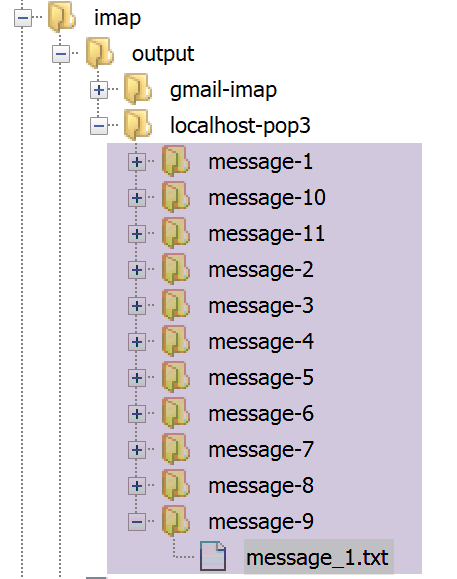
The file [message_1.txt] contains the following text:
return-path: guest@localhost
received: from localhost (localhost [127.0.0.1]) by DESKTOP-528I5CU with ESMTP ; Thu, 4 Jul 2019 15:20:22 +0200
message-id: <c82d26df5fb352e10a51577cd1b9ed87@localhost>
date: Thu, 04 Jul 2019 13:20:20 +0000
subject: plantage du serveur de calcul d'taxes
from: guest@localhost
to: guest@localhost
mime-version: 1.0
content-type: text/plain; charset=utf-8
content-transfer-encoding: quoted-printable

SQLSTATE[HY000] [2002] Aucune connexion n’a pu être établie car l’ordinateur cible l’a expressément refusée.
19.3.3. Test 3
Now let’s make sure the file [logs.txt] cannot be created. To do this, simply create a folder named [logs.txt]:
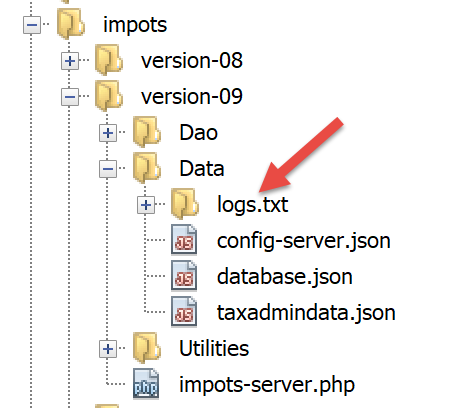
Once that’s done, let’s run the client.
On the client side, we get the following console output:
On the server side, there are no logs, but the administrator receives the following email:
return-path: guest@localhost
received: from localhost (localhost [127.0.0.1]) by DESKTOP-528I5CU with ESMTP ; Thu, 4 Jul 2019 15:31:49 +0200
message-id: <b2cee274f3437952231d62152ba1cdb3@localhost>
date: Thu, 04 Jul 2019 13:31:48 +0000
subject: plantage du serveur de calcul d'taxes
from: guest@localhost
to: guest@localhost
mime-version: 1.0
content-type: text/plain; charset=utf-8
content-transfer-encoding: quoted-printable

Echec lors de la création du fichier de logs [Data/logs.txt]
19.3.4. Test 4
This time, let’s provide incorrect credentials to the connecting client in the client configuration file.
The client displays the following console output:
On the server side, the following logs appear:
---new request
04/07/19 13:36:05:789 : Autentification en cours…
04/07/19 13:36:05:789 : {"réponse":{"erreur":"Echec de l'authentification [x, x]"}}
19.3.5. Test 5
Let’s put the correct user [admin, admin] back into the client configuration file.
Now let’s request URL [http://localhost/php7/scripts-web/impots/version-08/impots-server.php] from the server directly in a browser without passing any parameters:
In the server's [logs.txt] log file, we see the following lines:
---new request
04/07/19 13:37:33:711 : Autentification en cours…
04/07/19 13:37:33:711 : Authentification réussie [admin, admin]
04/07/19 13:37:33:711 : {"réponse":{"erreurs":["Méthode GET requise avec les seuls paramètres [marié, enfants, salaire]","paramètre marié manquant","paramètre enfants manquant","paramètre salaire manquant"]}}
19.4. [Codeception] Tests
As was done for the previous version tests, we will write [Codeception] tests for version 09.
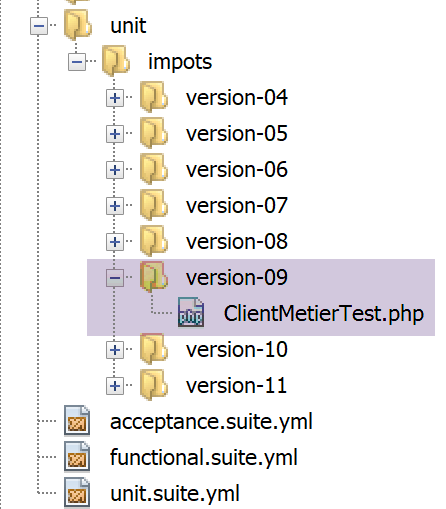
19.4.0.1. Testing the [métier] layer
The [ClientMetierTest.php] test is as follows:
<?php

// strict adherence to declared types of function parameters
declare (strict_types=1);

// namespace
namespace Application;

// definition of constants
define("ROOT", "C:/Data/st-2019/dev/php7/poly/scripts-console/impots/version-09");

// configuration file path
define("CONFIG_FILENAME", ROOT . "/Data/config-client.json");

// we retrieve the configuration
$config = \json_decode(file_get_contents(CONFIG_FILENAME), true);

// include the necessary script dependencies
$rootDirectory = $config["rootDirectory"];
foreach ($config["dependencies"] as $dependency) {
  require "$rootDirectory/$dependency";
}
// absolute dependencies (third-party libraries)
foreach ($config["absoluteDependencies"] as $dependency) {
  require "$dependency";
}
//
// uses
use Codeception\Test\Unit;
use const CONFIG_FILENAME;
use const ROOT;

// test class
class ClientMetierTest extends Unit {
  …
}
Comments
- Compared to the test class in version 08, the only change is line 10, which specifies the root directory of the client to be tested;
The test results are as follows:

It is worth checking the logs of the [logs.txt] server:
04/07/19 13:48:48:525 :
---new request
04/07/19 13:48:48:536 : Autentification en cours…
04/07/19 13:48:48:536 : Authentification réussie [admin, admin]
04/07/19 13:48:48:536 : paramètres ['married'=>yes, 'children'=>2, 'salary'=>55555] valid
04/07/19 13:48:48:536 : données fiscales prises en base de données
04/07/19 13:48:48:548 : {"réponse":{"impôt":2814,"surcôte":0,"décôte":0,"réduction":0,"taux":0.14}}
04/07/19 13:48:48:635 :
---new request
04/07/19 13:48:48:645 : Autentification en cours…
04/07/19 13:48:48:645 : Authentification réussie [admin, admin]
04/07/19 13:48:48:645 : paramètres ['married'=>yes, 'children'=>2, 'salary'=>50000] valid
04/07/19 13:48:48:645 : données fiscales prises en base de données
04/07/19 13:48:48:655 : {"réponse":{"impôt":1384,"surcôte":0,"décôte":384,"réduction":347,"taux":0.14}}
04/07/19 13:48:48:751 :
---new request
04/07/19 13:48:48:762 : Autentification en cours…
04/07/19 13:48:48:762 : Authentification réussie [admin, admin]
04/07/19 13:48:48:762 : paramètres ['married'=>yes, 'children'=>3, 'salary'=>50000] valid
04/07/19 13:48:48:762 : données fiscales prises en base de données
04/07/19 13:48:48:773 : {"réponse":{"impôt":0,"surcôte":0,"décôte":720,"réduction":0,"taux":0.14}}
04/07/19 13:48:48:865 :
---new request
…
---new request
04/07/19 13:48:49:546 : Autentification en cours…
04/07/19 13:48:49:546 : Authentification réussie [admin, admin]
04/07/19 13:48:49:546 : paramètres ['married'=>yes, 'children'=>3, 'salary'=>200000] valid
04/07/19 13:48:49:546 : données fiscales prises en base de données
04/07/19 13:48:49:551 : {"réponse":{"impôt":42842,"surcôte":17283,"décôte":0,"réduction":0,"taux":0.41}}
We can see that the tax authority data is always retrieved from the database and never from the session. Let’s go back to the code of the executed test:
<?php

// strict adherence to declared types of function parameters
declare (strict_types=1);

// namespace
namespace Application;

…

// test class
class ClientMetierTest extends Unit {
  // business layer
  private $métier;

  public function __construct() {
    parent::__construct();
    // we retrieve the configuration
    $config = \json_decode(\file_get_contents(CONFIG_FILENAME), true);
    // creation of the [dao] layer
    $clientDao = new ClientDao($config["urlServer"], $config["user"]);
    // creation of the [business] layer
    $this->métier = new ClientMetier($clientDao);
  }

  // tests
  public function test1() {
    …
  }

  public function test2() {
    …
  }

  public function test3() {
    …
  }

  …

}
In a test class named [Codeception], the constructor is executed for each test.
- Line 21: A new [ClientDao] is therefore created for each test with a session cookie NULL. This explains why this client does not benefit from any session;
This example shows us that the session is not the right place to store tax administration data. Indeed, this data is shared by all users of the application. However, here it is duplicated in each of their sessions.
In web programming, there are three types of visibility for shared data:
- data shared by all users of the web application. This data is generally read-only. PHP does not natively support this type of memory;
- data shared across requests from the same client. This data is stored in the session. We refer to this as the client session to denote the client’s memory. All requests from a client have access to this session. They can store and read information there. In the previous scripts, this session is implemented by the Symfony object [HttpFoundation\Session\Session];
- the request scope, or request context. A user’s request can be processed by several successive actions. The request context allows action 1 to pass information to action 2. In the previous scripts, the request is implemented by the Symfony object [HttpFoundation\Request] and its memory by the attribute [HttpFoundation\Request::attributes];
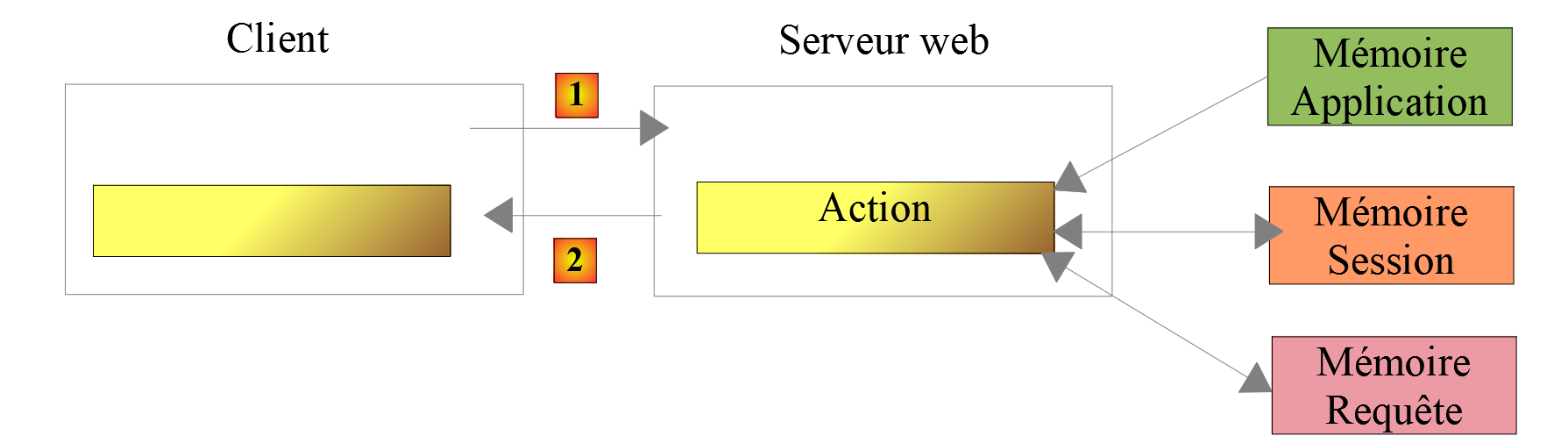
Third-party libraries exist to provide PHP with application memory. The new version in the application exercise demonstrates the use of one of them.