20. Application Exercise – version 10
The previous version demonstrated that tax data, shared by all users of the application, should be stored in a [Application] scope memory. We will use a Redis server [https://redis.io] to implement this.
20.1. Redis
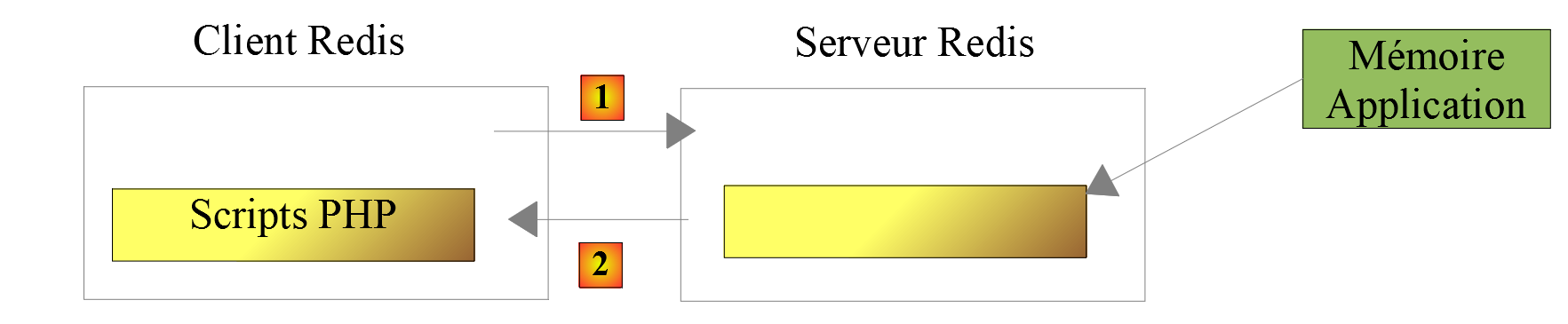
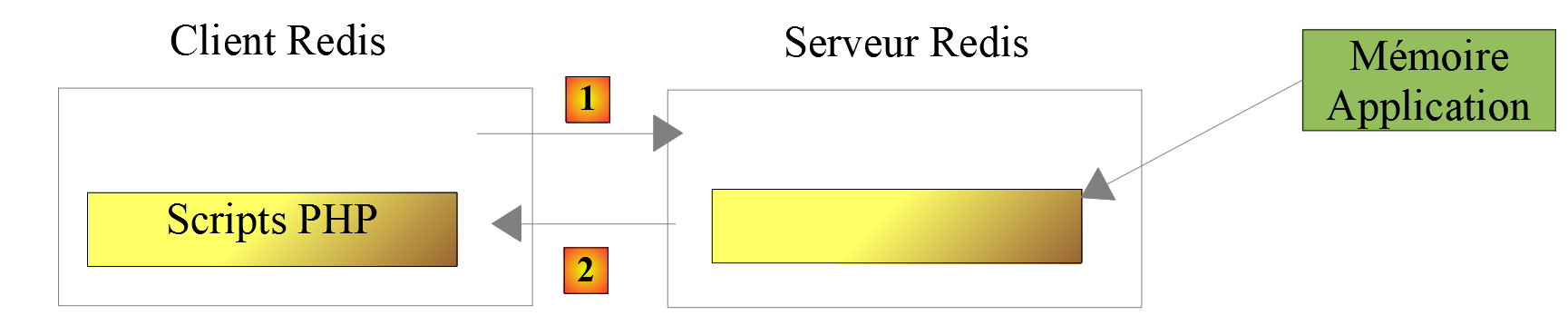
The [Application] scope memory will be implemented by a Redis server. The PHP scripts requiring this application memory will be clients instances of this server:
20.2. Installing Redis
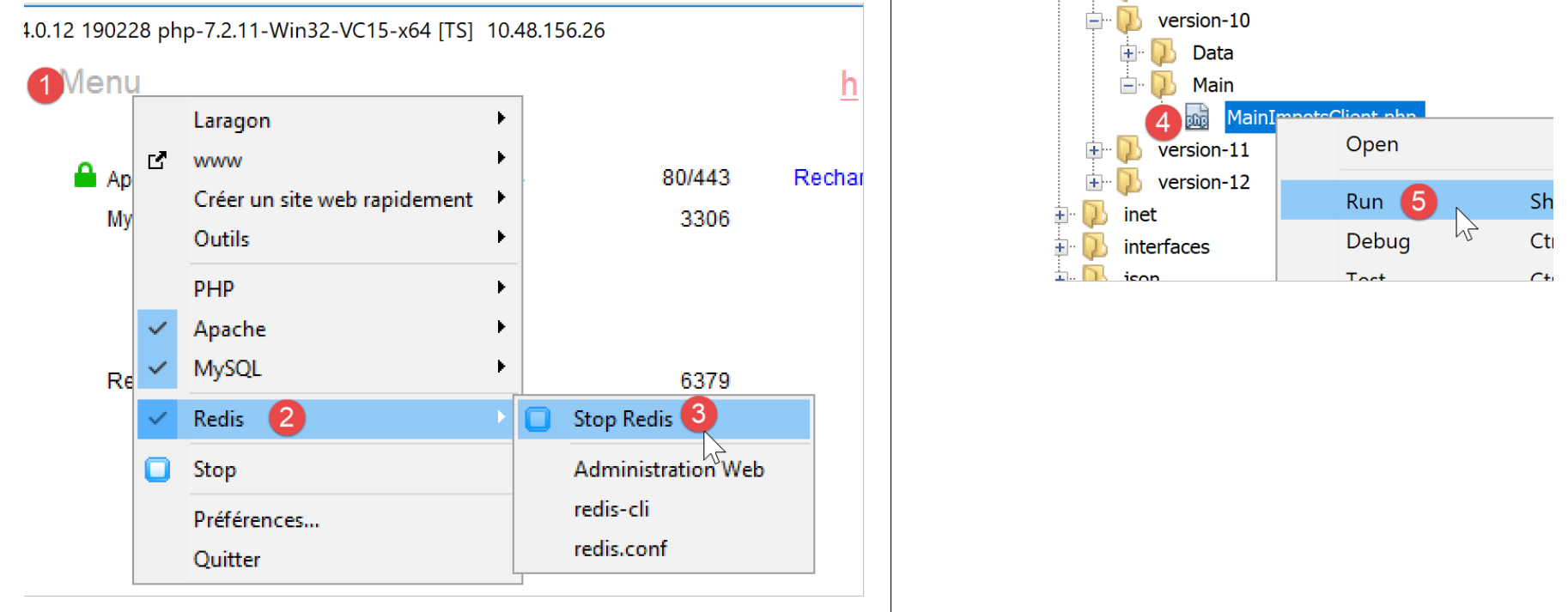
Laragon comes with a Redis server that is not enabled by default. You must therefore start by enabling it:
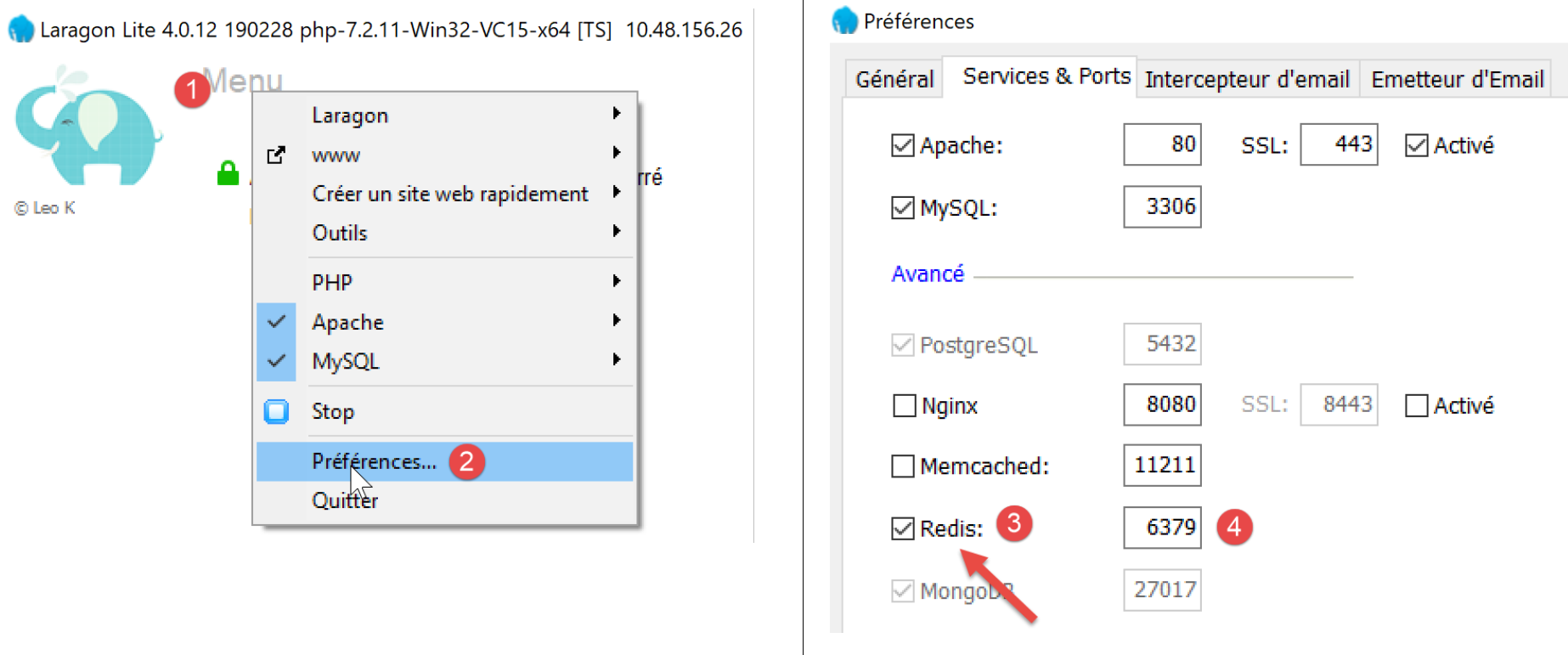
- In [3], enable the [Redis] server;
- In [4], leave the port [6379] that the clients Redis instances use by default;
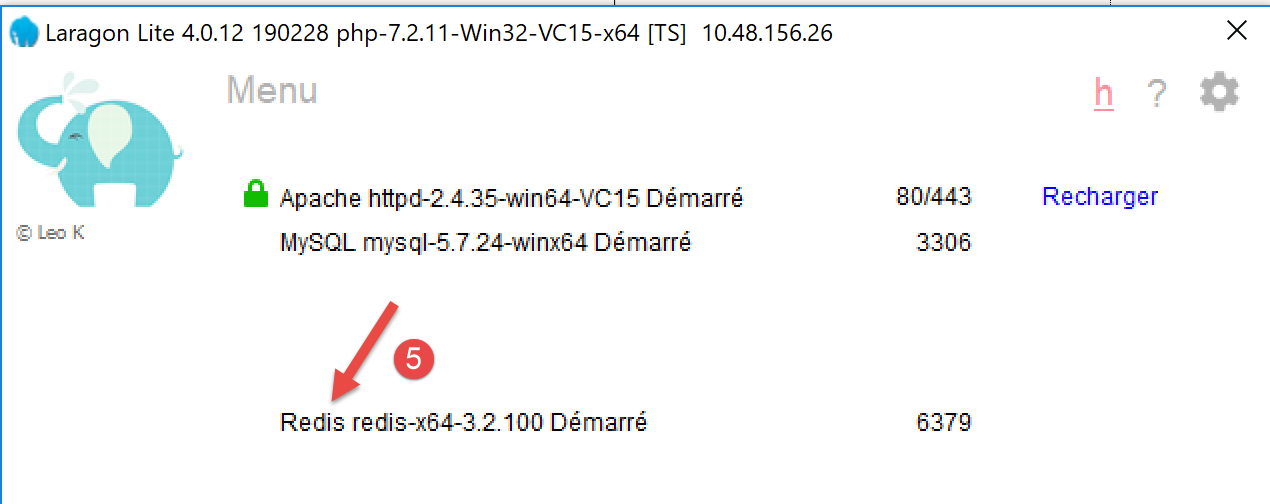
Laragon services are automatically restarted after Redis is activated:
20.3. The Redis client in command mode
The Redis server can be queried in command mode. Open a Laragon terminal (see link section):
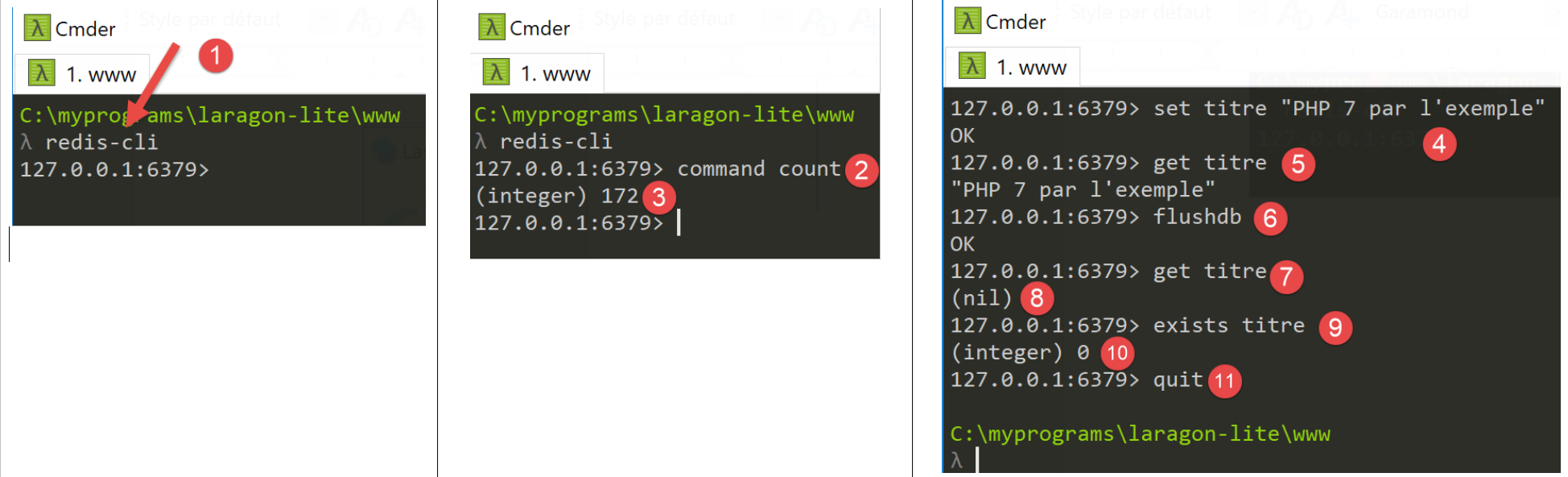
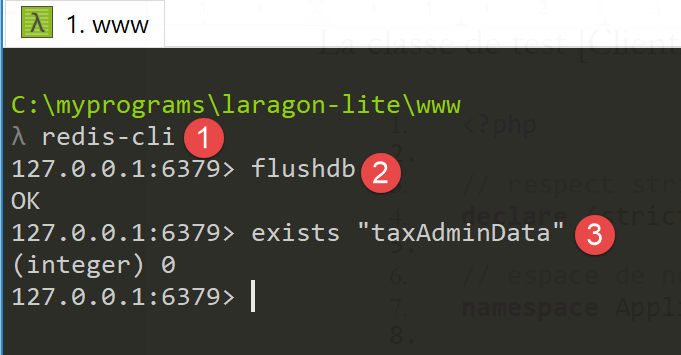
- In [1], the command [redis-cli] launches the client in command mode for the Redis server;
As of July 2019, the Redis client can use 172 commands to communicate with the [https://redis.io/commands#list] server. One of them, [command count] [2], displays this number [3].
We will only present the ones we need in our application PHP. We will use Redis for a single purpose: to store an array [‘attribut’=>’valeur’] in Redis memory. This is done with the Redis command [set attribut valeur] [4]. The value can then be retrieved with the command [get attribut] [5]. That is all we will need.
It may be necessary to clear the Redis memory. This is done using the command [flushdb] [6]. Then, if you query the value of the attribute [titre] [7], you will receive a reference [nil] [8] indicating that the attribute was not found. You can also use the command [exists] [9-10] to check for the existence of an attribute.
To exit the Redis client, type the command [quit] [11].
20.4. Installing a Redis client for PHP
We now need to install a Redis client for PHP:
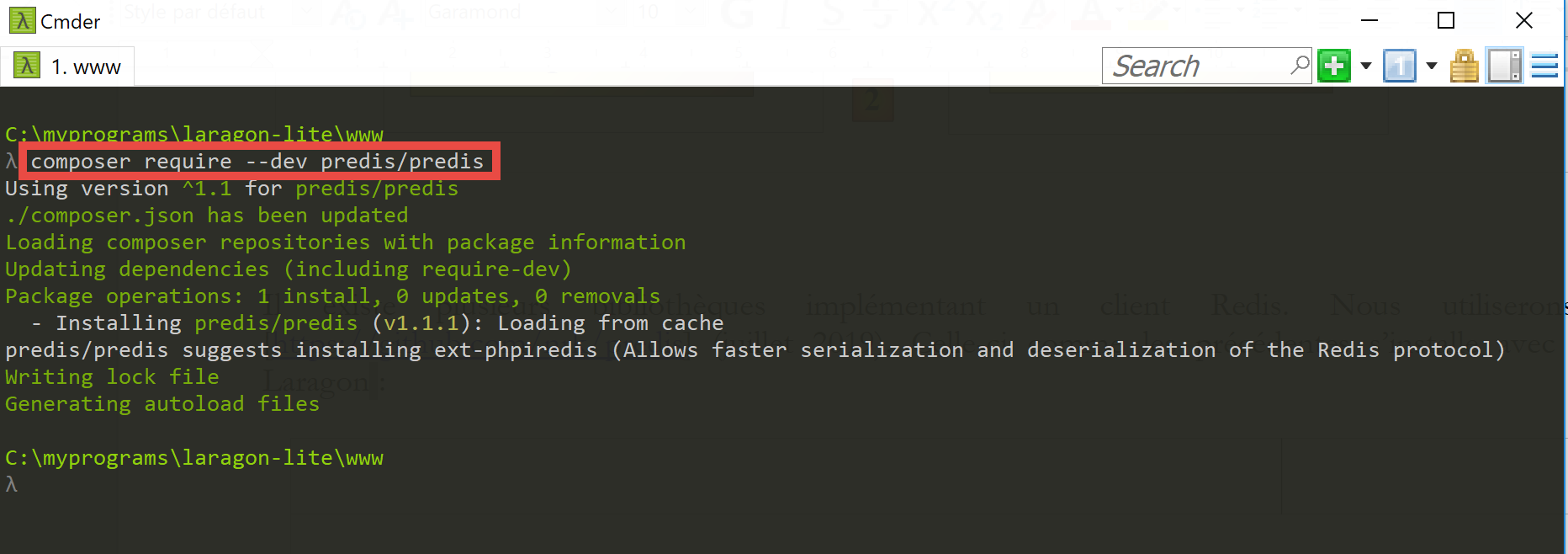
There are several libraries that implement a Redis client. We will use the [Predis] [https://github.com/nrk/predis] library (July 2019). Like the previous ones, this one is installed with [composer] in a Laragon terminal:
20.5. Server code
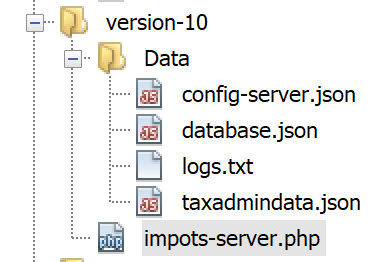
The [config-server.json] configuration file changes as follows:
{
    "rootDirectory": "C:/myprograms/laragon-lite/www/php7/scripts-web/impots/version-10",
    "databaseFilename": "Data/database.json",
    "relativeDependencies": [
        "/../version-08/Entities/BaseEntity.php",
        "/../version-08/Entities/ExceptionImpots.php",
        "/../version-08/Entities/TaxAdminData.php",
        "/../version-08/Entities/Database.php",
        "/../version-08/Dao/InterfaceServerDao.php",
        "/../version-08/Dao/ServerDao.php",
        "/../version-09/Dao/ServerDaoWithSession.php",
        "/../version-08/Métier/InterfaceServerMetier.php",
        "/../version-08/Métier/ServerMetier.php",
        "/../version-09/Utilities/Logger.php",
        "/../version-09/Utilities/SendAdminMail.php"
    ],
    "absoluteDependencies": [
        "C:/myprograms/laragon-lite/www/vendor/autoload.php",
        "C:/myprograms/laragon-lite/www/vendor/predis/predis/autoload.php"
    ],
    "users": [
        {
            "login": "admin",
            "passwd": "admin"
        }
    ],
    "adminMail": {
        "smtp-server": "localhost",
        "smtp-port": "25",
        "from": "guest@localhost",
        "to": "guest@localhost",
        "subject": "plantage du serveur de calcul d'impôts",
        "tls": "FALSE",
        "attachments": []
    },
    "logsFilename": "Data/logs.txt"
}
Comments
- lines 5-15: version 10 adds nothing new beyond the [impots-server.php] script. It uses elements from versions 08 and 09;
- line 19: a dependency required for the [predis] library that we just installed;
The server code for [impots-server.php] changes as follows:
<?php

// strict adherence to declared types of function parameters
declare (strict_types=1);

// namespace
namespace Application;

// error handling by PHP
ini_set("display_errors", "0");
//
// configuration file path
define("CONFIG_FILENAME", "Data/config-server.json");
// class alias
use \Application\ServerDaoWithSession as ServerDaoWithRedis;

// session
$session = new Session();
$session->start();
…
…
// 1st log
$logger->write("\n---nouvelle requête\n");

// retrieve the current query
$request = Request::createFromGlobals();
// authentication only the 1st time
if (!$session->has("user")) {
  …
} else {
  // log
  $logger->write("Authentification prise en session…\n");
}

// we have a valid user - we check the parameters received
$erreurs = [];
// you need three parameters GET
$method = strtolower($request->getMethod());
…

// mistakes?
if ($erreurs) {
// an error code 400 HTTP_BAD_REQUEST is sent to the customer
  sendResponse($response, ["erreurs" => $erreurs], Response::HTTP_BAD_REQUEST, [], $logger);
  // completed
  exit;
} else {
  // logs
  $logger->write("paramètres ['marié'=>$marié, 'enfants'=>$enfants, 'salaire'=>$salaire] valides\n");
}

// we have everything you need to work
// Redis
\Predis\Autoloader::register();
try {
  // customer [predis]
  $redis = new \Predis\Client();
  // connect to the server to see if it's there
  $redis->connect();
} catch (\Predis\Connection\ConnectionException $ex) {
  // internal server error
  doInternalServerError("[redis], " . utf8_encode($ex->getMessage()), $response, $config['adminMail'], $logger);
  // completed
  exit;
}

// creation of the [dao] layer
if (!$redis->get("taxAdminData")) {
  // tax data is taken from the database
  $logger->write("données fiscales prises en base de données\n");
  try {
    // layer construction [dao]
    $dao = new ServerDaoWithRedis($config["databaseFilename"], NULL);
    // put tax data in scope memory [application]
    // method [TaxAdminData]->__toString will be called implicitly
    $redis->set("taxAdminData", $dao->getTaxAdminData());
  } catch (\RuntimeException $ex) {
    // we note the error
    doInternalServerError("[dao], " . utf8_encode($ex->getMessage()), $response, $config['adminMail'], $logger, $redis);
    // completed
    exit;
  }
} else {
  // tax data are taken from the [application] scope memory
  $arrayOfAttributes = \json_decode($redis->get("taxAdminData"), true);
  $taxAdminData = (new TaxAdminData())->setFromArrayOfAttributes($arrayOfAttributes);
  // isntanciation of layer [dao]
  $dao = new ServerDaoWithRedis(NULL, $taxAdminData);
  // logs
  $logger->write("données fiscales prises dans redis\n");
}
// creation of the [business] layer
$métier = new ServerMetier($dao);
// tAX CALCULATION
$result = $métier->calculerImpot($marié, (int) $enfants, (int) $salaire);
// we return the answer
sendResponse($response, $result, Response::HTTP_OK, [], $logger, $redis);
// end
exit;

function doInternalServerError(string $message, Response $response, array $infos,
  Logger $logger = NULL, \Predis\Client $predisClient = NULL) {
  // $message: error message
  // $response : answer HTTP
  // $infos: information table for sending mail
  // $result: results table
  // $logger: application logger
  // $predisClient: a customer [predis]
  //
  // send an e-mail to the administrator
  // SendAdminMail intercepts all exceptions and logs them itself
  $infos['message'] = $message;
  $sendAdminMail = new SendAdminMail($infos, $logger);
  $sendAdminMail->send();
  // an error code 500 is sent to the customer
  sendResponse($response, ["erreur" => $message], Response::HTTP_INTERNAL_SERVER_ERROR, [], $logger, $predisClient);
}

// function to send HTTP response to client
function sendResponse(Response $response, array $result, int $statusCode,
  array $headers, Logger $logger = NULL, \Predis\Client $predisClient = NULL) {
  // $response : answer HTTP
  // $result: results table
  // $statusCode: HTTP response status
  // $headers: HTTP headers to be included in the response
  // $logger: application logger
  // $predisClient: a customer [predis]
  //
  // status HTTTP
  $response->setStatusCode($statusCode);
  // body
  $body = \json_encode(["réponse" => $result], JSON_UNESCAPED_UNICODE);
  $response->setContent($body);
  // headers
  $response->headers->add($headers);
  // shipping
  $response->send();
  // log
  if ($logger != NULL) {
    $logger->write("$body\n");
    $logger->close();
  }
  // close connection [redis]
  if ($predisClient != NULL) {
    $predisClient->disconnect();
  }
}
Comments
- line 15: we assign the alias [ServerDaoWithRedis] to the class [\Application\ServerDaoWithSession] to reflect the change in the server script’s implementation;
- lines 18-19: the session is maintained. Here, we need to store two pieces of information:
- the fact that the user has authenticated successfully. This information has scope [session]: it is linked to a specific user and is not valid for other users;
- the tax administration data. This information has the scope [application]: it is not linked to a specific user but is valid for all users;
- Lines 54–64: Creation of the client [redis], which will communicate with the server [redis]. This client will communicate with the server’s default port. If the server were not communicating on its default port or if it were not on the machine [localhost], this information would need to be passed to the constructor of the class [\Predis\Client];
- line 59: we immediately connect the client to the server to check if it responds;
- lines 60–65: if the connection to the Redis server fails, an error response is sent to the client and an email is sent to the application administrator;
- line 67: we query the [redis] server for the key [taxAdminData]. If it is not found, then the tax data is retrieved from the database (line 72);
- line 75: The key [taxAdminData] is placed in the memory [redis] associated with the string jSON of the variable [$taxAdminData], which is an object of type [TaxAdminData]. The method [$redis→set] expects a string for the key value. It will therefore attempt to convert the object of type [TaxAdminData] to type [string]. Implicitly, the method [TaxAdminData->__toString] will then be called. This method produces the string jSON from the object [TaxAdminData];
- line 84: the key [taxAdminData] is in memory [redis], so we retrieve its value. We know that this is the string jSON of an object [TaxAdminData]. We then decode this to obtain an array of attributes;
- line 85: from this array, a new [TaxAdminData] object is instantiated;
- line 87: the layer [dao] is instantiated;
20.6. Client code
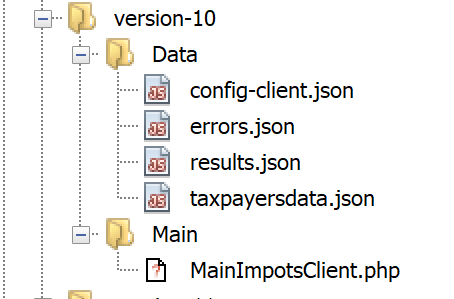
The client’s version 10 is identical to version 9. Only the configuration file [config-client.json] changes:
{
    "rootDirectory": "C:/Data/st-2019/dev/php7/poly/scripts-console/impots/version-10",
    "taxPayersDataFileName": "Data/taxpayersdata.json",
    "resultsFileName": "Data/results.json",
    "errorsFileName": "Data/errors.json",
    "dependencies": [
        "/../version-08/Entities/BaseEntity.php",
        "/../version-08/Entities/TaxPayerData.php",
        "/../version-08/Entities/ExceptionImpots.php",
        "/../version-08/Utilities/Utilitaires.php",
        "/../version-08/Dao/InterfaceClientDao.php",
        "/../version-08/Dao/TraitDao.php",
        "/../version-09/Dao/ClientDao.php",
        "/../version-08/Métier/InterfaceClientMetier.php",
        "/../version-08/Métier/ClientMetier.php"
    ],
    "absoluteDependencies": [
        "C:/myprograms/laragon-lite/www/vendor/autoload.php"
    ],
    "user": {
        "login": "admin",
        "passwd": "admin"
    },
    "urlServer": "https://localhost:443/php7/scripts-web/impots/version-10/impots-server.php"
}
The only change is the server's URL in line 24.
The results are the same as in version 09. Let’s simply test a new error case:
The result in the console is as follows:
20.7. Client tests [Codeception]
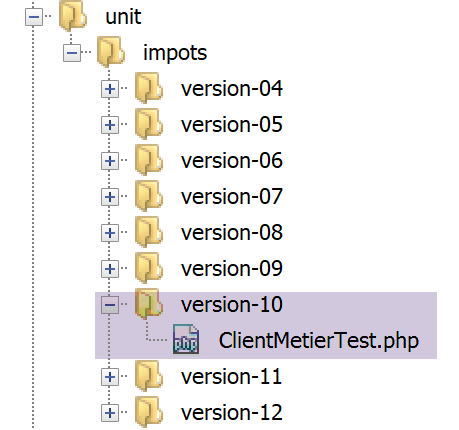
The [ClientMetierTest] test class for version 10 is identical to that of version 09 with one exception:
<?php

// strict adherence to declared types of function parameters
declare (strict_types=1);

// namespace
namespace Application;

// definition of constants
define("ROOT", "C:/Data/st-2019/dev/php7/poly/scripts-console/impots/version-10");

…

}
- line 10: the test environment is that of the version client 10;
Before starting the tests, let’s use the [redis-cli] client to delete the [taxAdminData] key from the memory of the [redis] server:
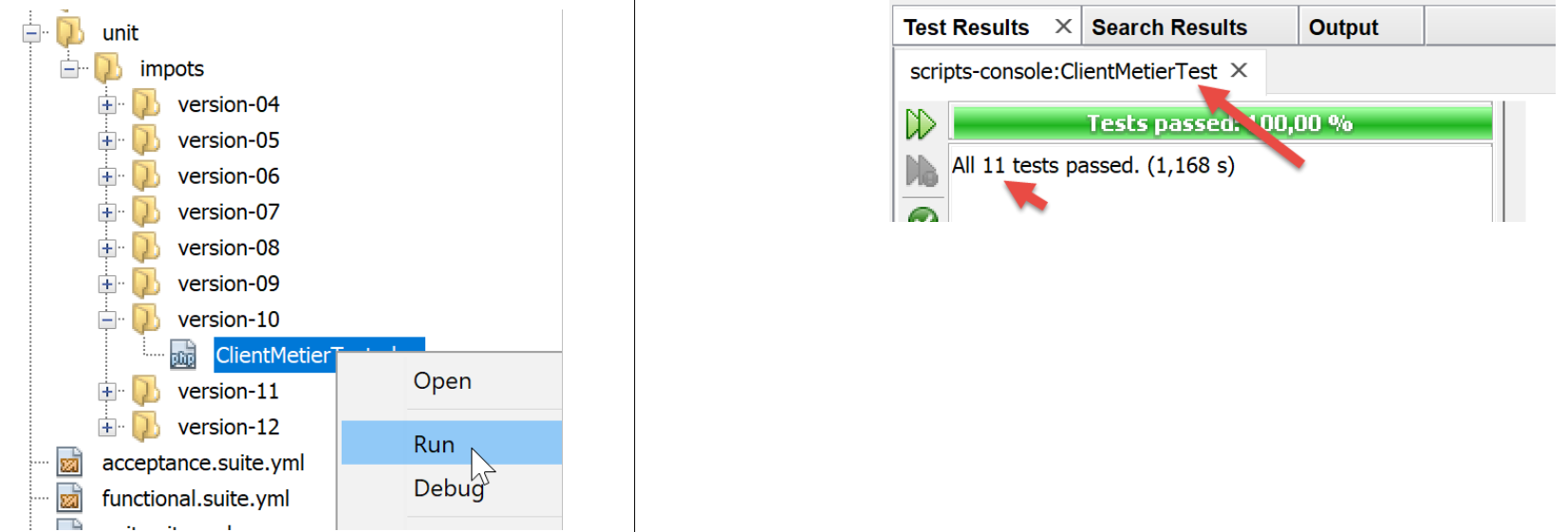
Now, let’s run the test:
Now let’s examine the [logs.txt] logs from the server:
05/07/19 08:52:16:396 :
---new request
05/07/19 08:52:16:403 : Autentification en cours…
05/07/19 08:52:16:403 : Authentification réussie [admin, admin]
05/07/19 08:52:16:403 : paramètres ['married'=>yes, 'children'=>2, 'salary'=>55555] valid
05/07/19 08:52:16:407 : données fiscales prises en base de données
05/07/19 08:52:16:420 : {"réponse":{"impôt":2814,"surcôte":0,"décôte":0,"réduction":0,"taux":0.14}}
05/07/19 08:52:16:546 :
---new request
05/07/19 08:52:16:555 : Autentification en cours…
05/07/19 08:52:16:555 : Authentification réussie [admin, admin]
05/07/19 08:52:16:556 : paramètres ['married'=>yes, 'children'=>2, 'salary'=>50000] valid
05/07/19 08:52:16:559 : données fiscales prises dans redis
05/07/19 08:52:16:559 : {"réponse":{"impôt":1384,"surcôte":0,"décôte":384,"réduction":347,"taux":0.14}}
05/07/19 08:52:16:668 :
---new request
05/07/19 08:52:16:675 : Autentification en cours…
05/07/19 08:52:16:675 : Authentification réussie [admin, admin]
05/07/19 08:52:16:675 : paramètres ['married'=>yes, 'children'=>3, 'salary'=>50000] valid
05/07/19 08:52:16:678 : données fiscales prises dans redis
05/07/19 08:52:16:678 : {"réponse":{"impôt":0,"surcôte":0,"décôte":720,"réduction":0,"taux":0.14}}
05/07/19 08:52:16:776 :
---new request
…
As previously mentioned, the test class constructor is re-executed for each test, which means that the tested class [ClientDao] is instantiated with a non-existent session cookie for each test. It is therefore as if the 11 tests represented 11 different users, each with a different session.
- Line 6: tax data is retrieved from the database;
- Lines 13, 20: Tax data is retrieved from the [redis] memory. This is clearly a [application] scope memory shared by all users of the application;
20.8. Web interface of the [Redis] server
We have seen that the [Redis] server can be managed in command mode. It can also be managed via a web interface:
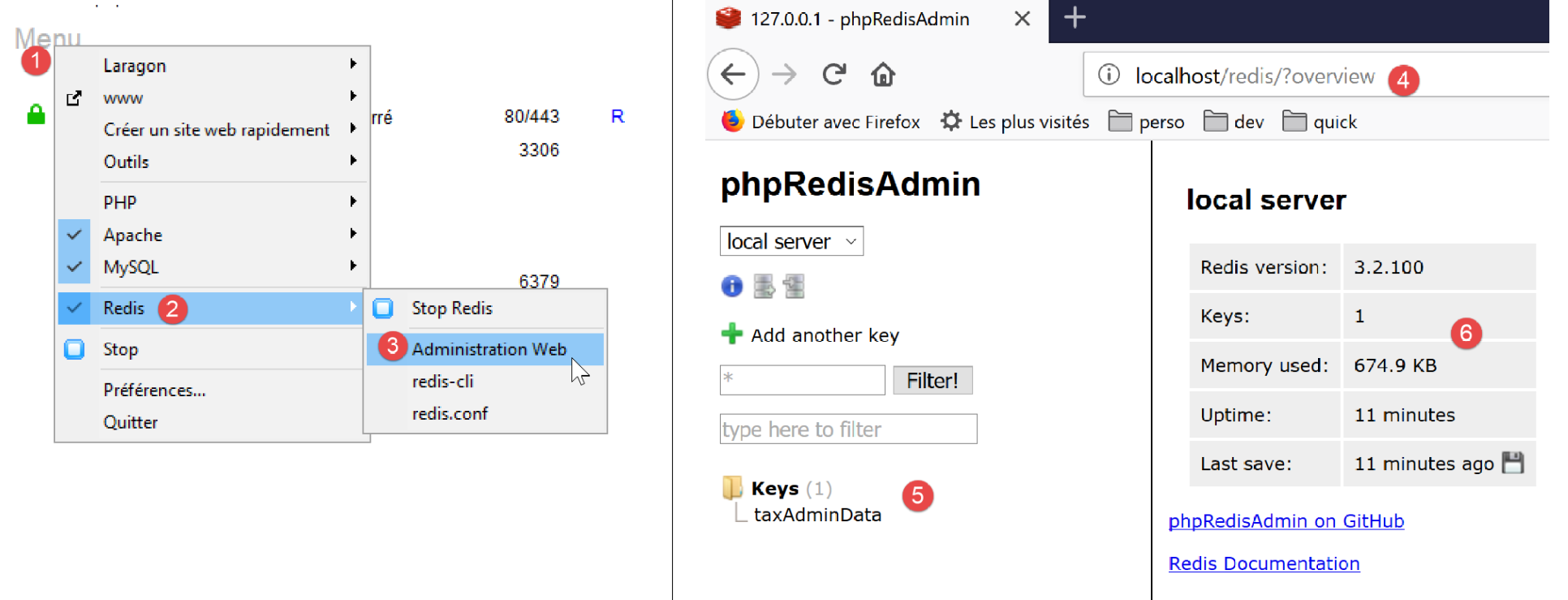
- in [4], the administration interface;
- in [5], the keys stored by the server;
- in [6], the current server status;
By clicking on [5], you can view information about the key [taxAdminData]:
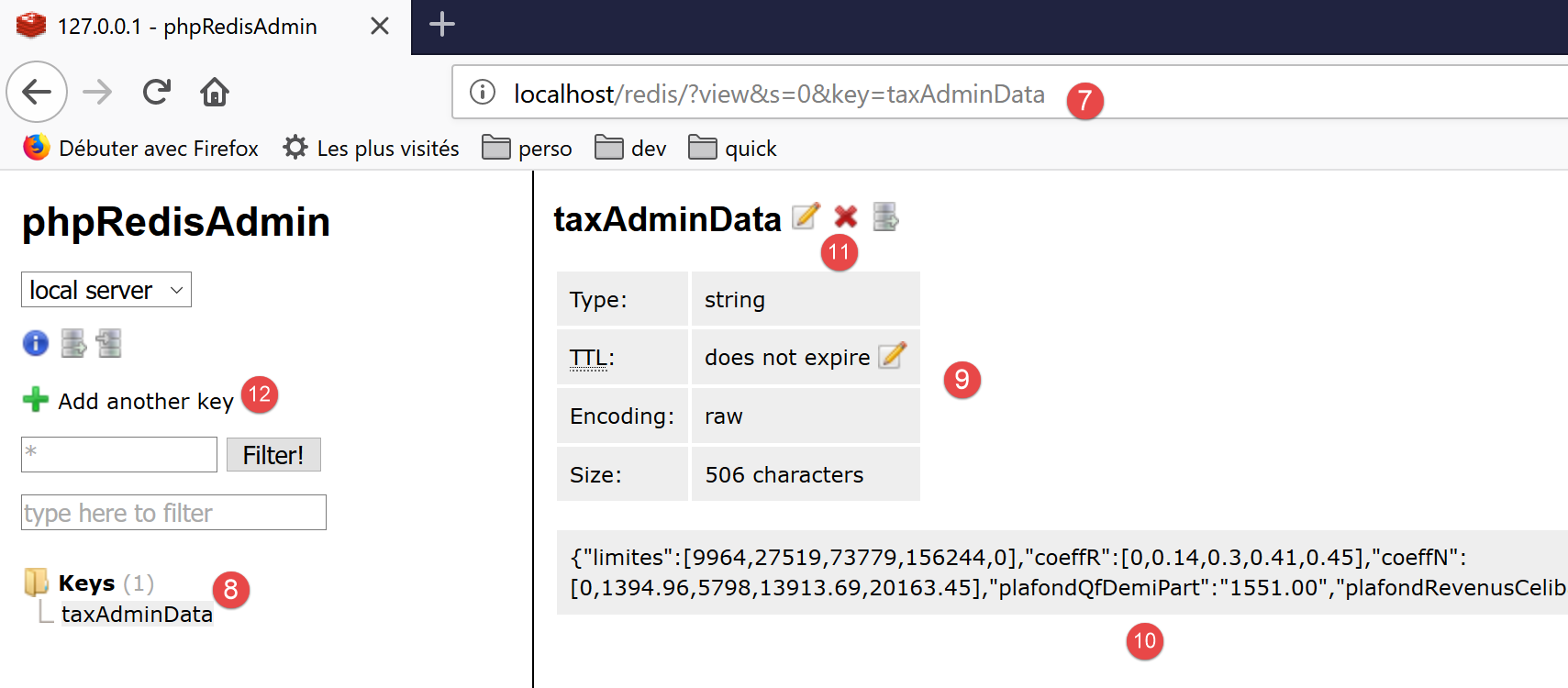
- in [7], the URL that provides access to the information for the key [taxAdminData] [8];
- in [9], the key’s status;
- in [10], its value: the string jSON is recognized as belonging to an object of type [TaxAdminData];
- in [11], the key can be deleted;
- in [12], we can add another one;