4. Practice Exercise – Versions 1 and 2
4.1. The Problem
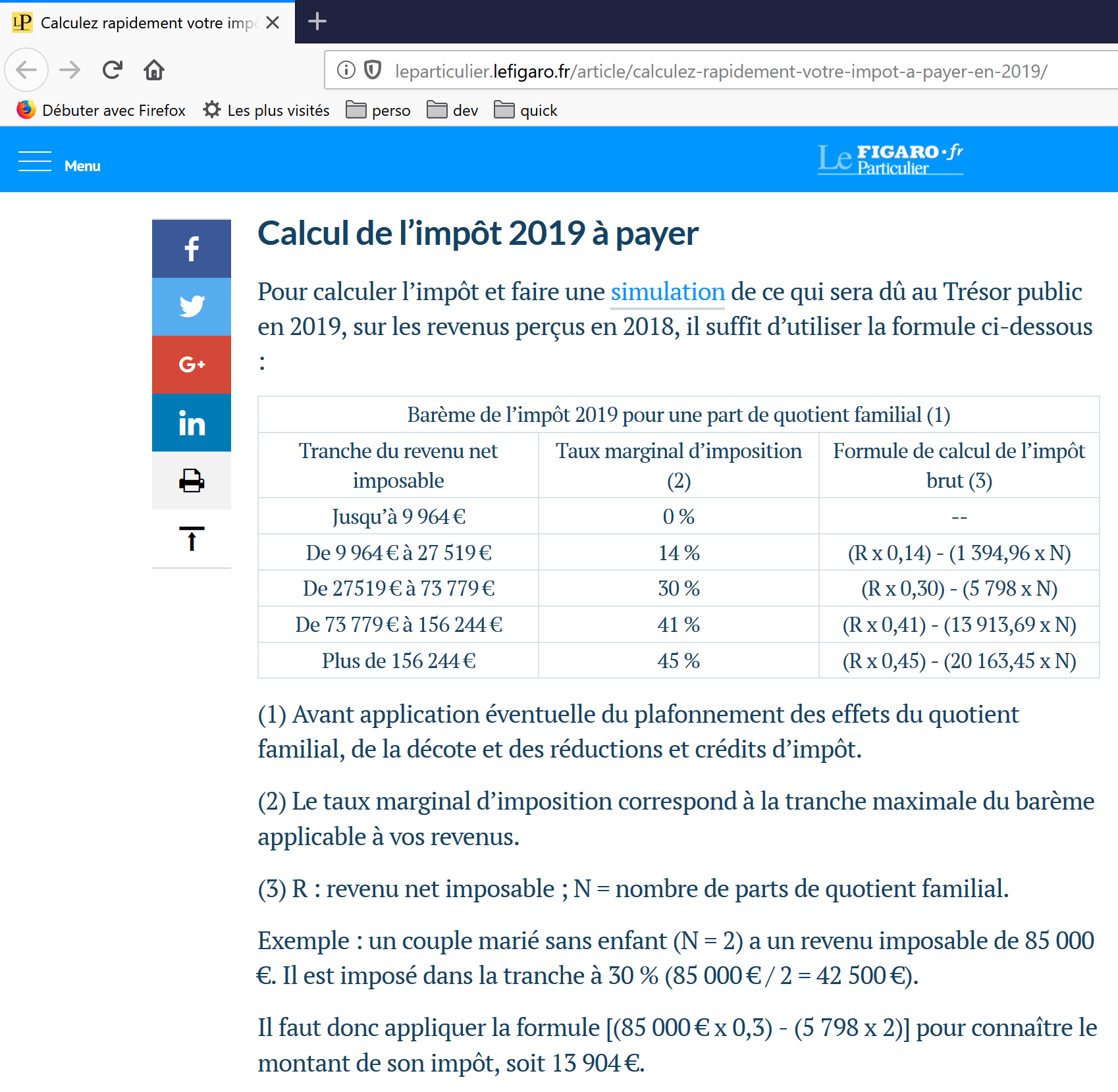
The table above allows you to calculate the tax in the simplified case of a taxpayer who has only their salary to report. As indicated in note (1), the tax calculated this way is the tax before three mechanisms:
- the family quotient cap, which applies to high incomes;
- the tax credit and tax reduction that apply to low incomes;
Thus, the tax calculation involves the following steps [http://impotsurlerevenu.org/comprendre-le-calcul-de-l-impot/1217-calcul-de-l-impot-2019.php]:
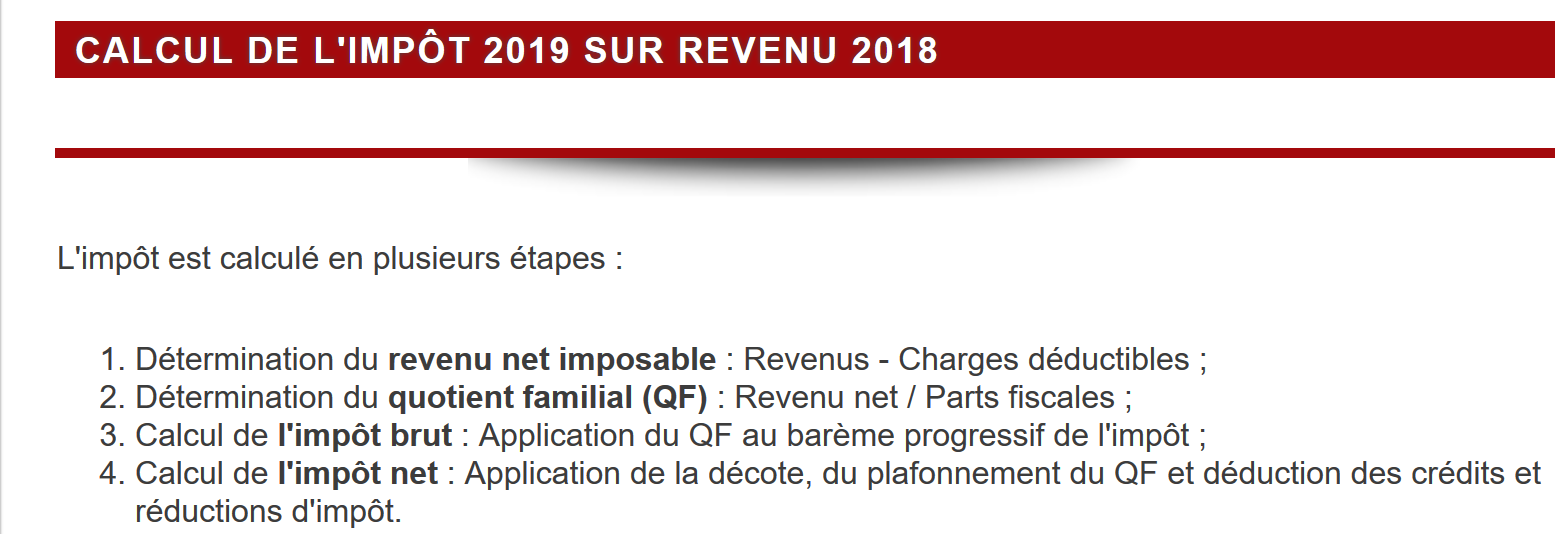
We propose to write a program to calculate a taxpayer’s tax in the simplified case of a taxpayer who has only their salary to report:
4.1.1. Calculation of Gross Tax
The gross tax can be calculated as follows:
First, we calculate the taxpayer’s number of shares:
- each parent contributes 1 share;
- The first two children each bring 1/2 portion;
- The remaining children each bring one share:
The number of shares is therefore:
- nbParts=1+nbChildren*0.5+(nbChildren-2)*0.5 if the employee is unmarried;
- nbParts = 2 + nbChildren * 0.5 + (nbChildren - 2) * 0.5 if they are married;
where nbChildren is the number of children;
- we calculate the taxable income R = 0.9 * S, where S is the annual salary;
- the family quotient QF is calculated as QF = R / nbParts;
- we calculate the gross tax I based on the following data (2019):
9964 | 0 | 0 |
27,519 | 0.14 | 1,394.96 |
73,779 | 0.3 | 5,798 |
156,244 | 0.41 | 13,913.69 |
0 | 0.45 | 20163.45 |
Each row has 3 fields: field1, field2, field3. To calculate tax I, we find the first row where QF <= field1 and take the values from that row. For example, for a married employee with two children and an annual salary S of 50,000 euros:
Taxable income: R=0.9*S=45,000
Number of shares: nbParts=2+2*0.5=3
Family quotient: QF=45,000/3=15,000
The first row where QF <= field1 is as follows:
Tax I is then equal to 0.14*R – 1394.96*numberOfShares=[0.14*45000-1394.96*3]=2115. The tax is rounded down to the nearest euro.
If the condition QF <= field1 holds in the first row, then the tax is zero.
If QF is such that the condition QF <= field1 is never satisfied, then the coefficients from the last line are used. Here:
which gives the gross tax I = 0.45*R – 20163.45*nbParts.
4.1.2. Family Quotient Cap
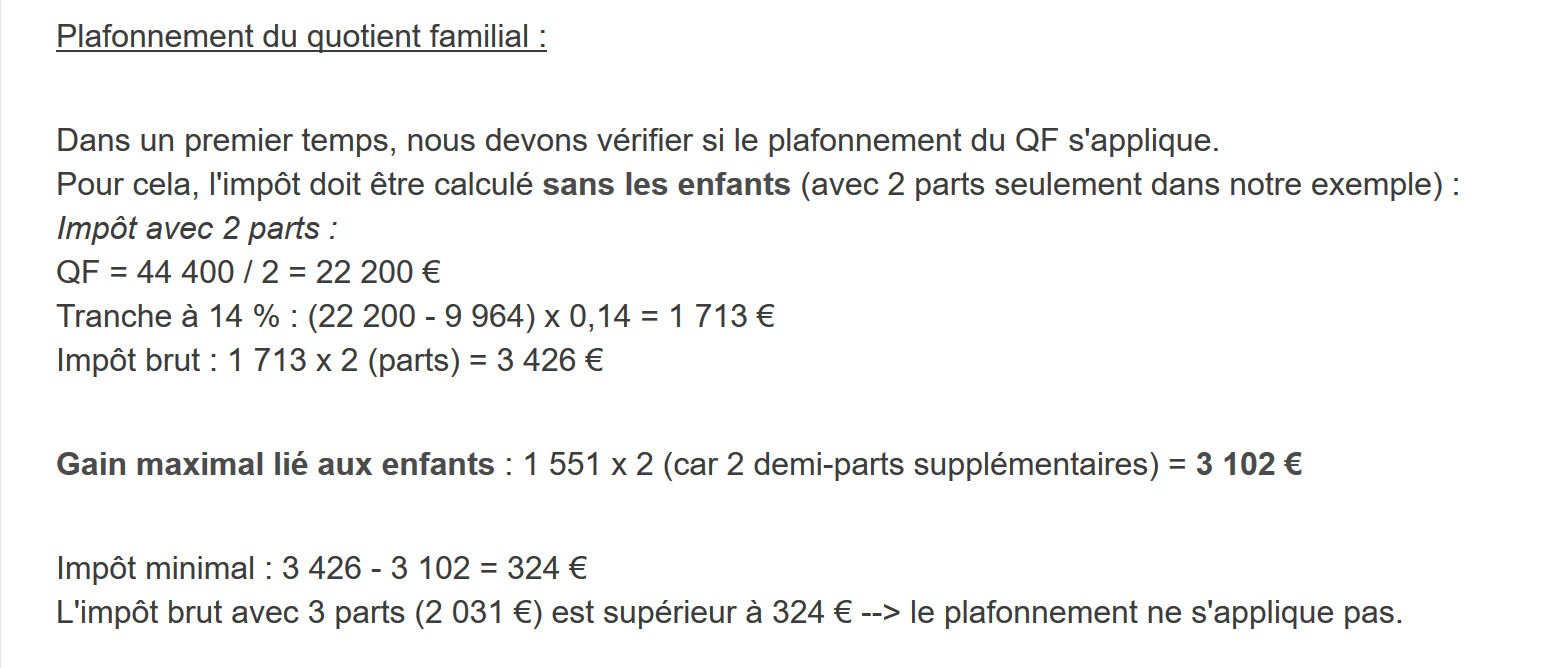
To determine whether the family quotient (QF) cap applies, we recalculate the gross tax without the children. Again, for the married employee with two children and an annual salary S of 50,000 euros:
Taxable income: R = 0.9 * S = 45,000
Number of shares: nbParts=2 (children are no longer counted)
Family quotient: QF = 45,000 / 2 = 22,500
The first line where QF <= field1 is as follows:
Tax I is then equal to 0.14*R – 1394.96*number of shares = [0.14*45,000 – 1394.96*2] = 3,510.
Maximum child-related allowance: 1551 * 2 = 3102 euros
Minimum tax: 3,510 – 3,102 = 408 euros
The gross tax with 3 tax brackets, already calculated at 2,115 euros, is higher than the minimum tax of 408 euros, so the family cap does not apply here.
Generally speaking, the gross tax is greater than (tax1, tax2) where:
- [tax1]: is the gross tax calculated including children;
- [tax2]: is the gross tax calculated without children and reduced by the maximum credit (here 1,551 euros per half-share) related to children;
4.1.3. Calculation of the tax reduction
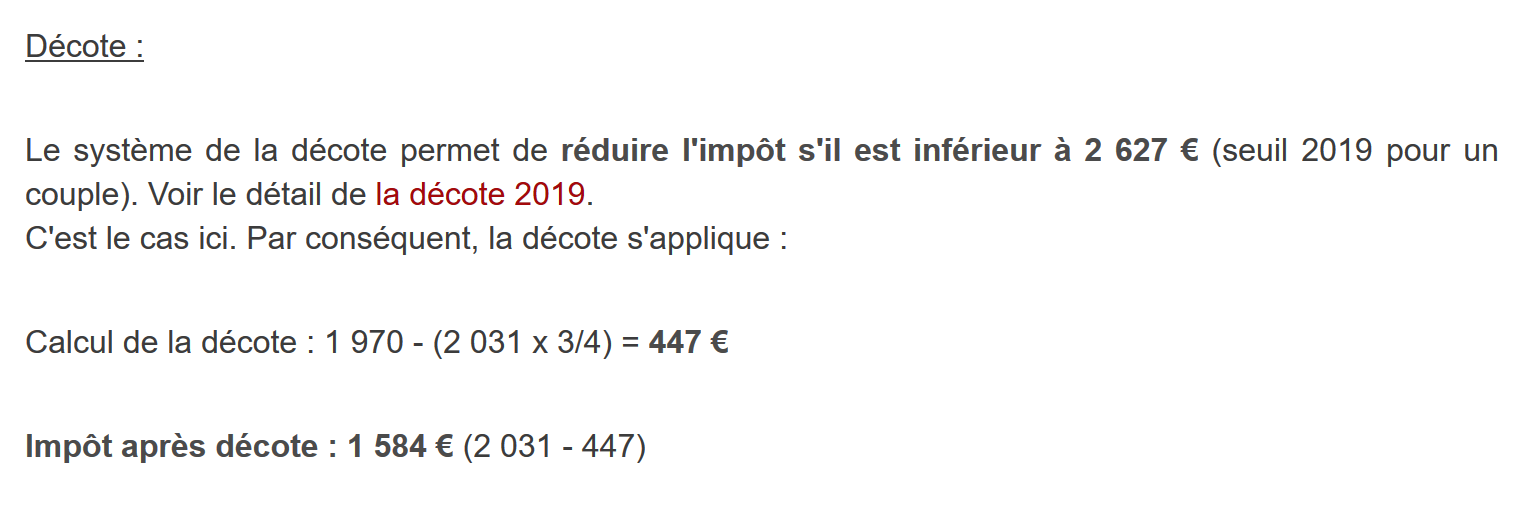
Still for the married employee with two children and an annual salary S of 50,000 euros:
The gross tax (2,115) from the previous step is less than 2,627 euros for a couple (1,595 euros for a single person): the tax reduction therefore applies. It is calculated as follows:
discount = threshold (couple = 1,970 / single = 1,196) - 0.75 * gross tax
discount = 1,970 – 0.75 * 2,115 = 383.75, rounded to 384 euros.
New gross tax = 2,115 – 384 = 1,731 euros
4.1.4. Calculation of the tax reduction
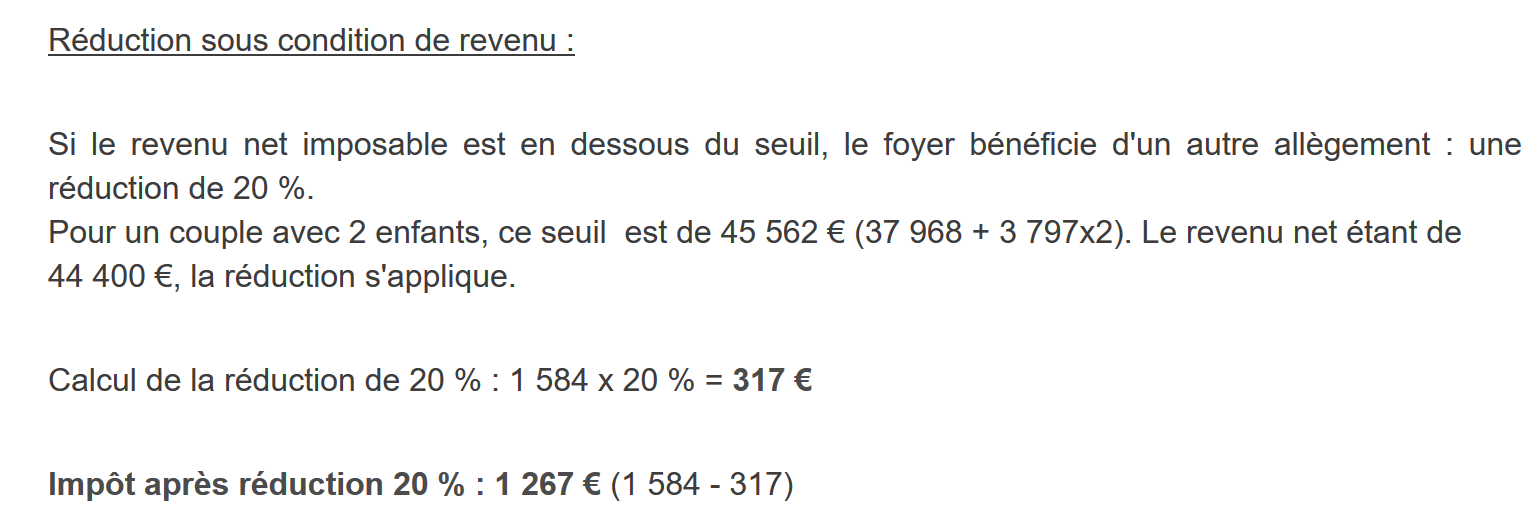
Below a certain threshold, a 20% reduction is applied to the gross tax resulting from the previous calculations. In 2019, the thresholds are as follows:
- Single: 21,037 euros;
- couple: 42,074 euros; (the figure 37,968 used in the example above appears to be incorrect);
This threshold is increased by the value: 3,797 * (number of half-shares contributed by the children).
Again, for the married employee with two children and an annual salary S of 50,000 euros:
- his taxable income (45,000 euros) is below the threshold (42,074 + 2 × 3,797) = 49,668 euros;
- he is therefore entitled to a 20% reduction in his tax: 1,731 * 0.2 = 346.2 euros, rounded to 347 euros;
- the taxpayer’s gross tax becomes: 1,731 – 347 = 1,384 euros;
4.1.5. Calculation of Net Tax
Our calculation ends here: the net tax due will be 1,384 euros. In reality, the taxpayer may be eligible for other deductions, particularly for donations to public or general interest organizations.
4.1.6. High-Income Cases
Our previous example applies to the majority of employees. However, the tax calculation differs for high-income earners.
4.1.6.1. Cap on the 10% reduction on annual income
In most cases, taxable income is calculated using the formula: R = 0.9 × S, where S is the annual salary. This is known as the 10% reduction. This reduction is capped. In 2019:
- it cannot exceed 12,502 euros;
- it cannot be less than €437;
Let’s consider the case of an unmarried employee with no children and an annual salary of 200,000 euros:
- the 10% reduction is 200,000 euros > 12,502 euros. It is therefore capped at 12,502 euros;
4.1.6.2. Family Quotient Cap
Let’s consider a case where the family cap mentioned in the linked paragraph applies. Let’s take the case of a couple with three children and an annual income of 100,000 euros. Let’s go through the calculation steps again:
- The 10% deduction is 10,000 euros < 12,502 euros. The taxable income R is therefore 100,000 - 10,000 = 90,000 euros;
- The couple has nbParts = 2 + 0.5 * 2 + 1 = 4 shares;
- their family quotient is therefore QF = R / nbParts = 90,000 / 4 = 22,500 euros;
- their gross tax I1 with children is I1 = 0.14 × 90,000 – 1,394.96 × 4 = 7,020 euros;
- their gross tax I2 without children:
- QF = 90,000 / 2 = 45,000 euros;
- I2 = 0.3 × 90,000 – 5,798 × 2 = 15,404 euros;
- the family quotient cap rule states that the benefit provided by children cannot exceed (1,551 × 4 half-shares) = 6,204 euros. However, here, it is I2 – I1 = 15,404 – 7,020 = 8,384 euros, which is greater than 6,204 euros;
- the gross tax is therefore recalculated as I3 = I2 - 6,204 = 15,404 - 6,204 = 9,200 euros;
This couple will receive neither a tax credit nor a reduction, and their final tax will be 9,200 euros.
4.1.7. Official figures
Tax calculation is complex. Throughout this document, tests will be conducted using the following examples. The results are from the tax authority’s simulator [https://www3.impots.gouv.fr/simulateur/calcul_impot/2019/simplifie/index.htm]:
Taxpayer | Official results | Results from the document’s algorithm |
Couple with 2 children and an annual income of 55,555 euros | Tax = 2,815 euros Tax rate = 14% | Tax = 2,814 euros Tax rate = 14% |
Couple with 2 children and an annual income of 50,000 euros | Tax = 1,385 euros Tax credit = €720 Reduction = 0 euros Tax rate = 14% | Tax = €1,384 Deduction = 384 euros Credit=347 euros Tax rate = 14% |
Couple with 3 children and an annual income of 50,000 euros | Tax = 0 euros Tax credit = 384 euros Reduction = 346 euros Tax rate = 14% | Tax = 0 euros Discount = 720 euros Reduction = 0 euros Tax rate = 14% |
Single with 2 children and an annual income of 100,000 euros | Tax = 19,884 euros Tax credit = 0 euros Deduction = 0 euros Tax rate = 41% | Tax = €19,884 Surcharge = 4,480 euros Discount = 0 euros Reduction = 0 euros Tax rate = 41% |
Single with 3 children and an annual income of 100,000 euros | Tax = €16,782 Tax credit = 0 euros Deduction = 0 euros Tax rate = 41% | Tax = €16,782 Surcharge = 7,176 euros Discount = 0 euros Reduction = 0 euros Tax rate = 41% |
Couple with three children and an annual income of 100,000 euros | Tax = €9,200 Tax credit = 0 euros Deduction = 0 euros Tax rate = 30% | Tax = €9,200 Surcharge = 2,180 euros Discount = 0 euros Reduction = 0 euros Tax rate = 30% |
Couple with 5 children and an annual income of 100,000 euros | Tax = €4,230 Tax credit = 0 euros Deduction = 0 euros Tax rate = 14% | Tax = €4,230 Deduction = 0 euros Deduction=0 euros Tax rate = 14% |
Single, no children, and annual income of 100,000 euros | Tax = 22,986 euros Tax credit = 0 euros Deduction = 0 euros Tax rate = 41% | Tax = €22,986 Surcharge = 0 euros Discount = 0 euros Reduction = 0 euros Tax rate = 41% |
Couple with 2 children and an annual income of 30,000 euros | Tax = 0 euros Tax credit = 0 euros Deduction = 0 euros Tax rate = 0% | Tax = 0 euros Discount=0 euros Deduction=0 euros Tax rate = 0% |
Single, no children, and annual income of 200,000 euros | Tax = 64,211 euros Tax credit = 0 euros Deduction = 0 euros Tax rate = 45% | Tax = €64,210 Surcharge = 7,498 euros Discount = 0 euros Reduction = 0 euros Tax rate = 45% |
Couple with 3 children and an annual income of 200,000 euros | Tax = €42,843 Tax credit = 0 euros Deduction = 0 euros Tax rate = 41% | Tax = €42,842 Surcharge = 17,283 euros Discount = 0 euros Reduction = 0 euros Tax rate = 41% |
In the example above, the “surcharge” refers to the additional amount paid by high-income earners due to two factors:
- the cap on the 10% deduction from annual income;
- the cap on the family allowance;
This indicator could not be verified because the tax authority’s simulator does not provide it.
We can see that the document’s algorithm calculates the correct tax amount every time, though with a margin of error of 1 euro. This margin of error stems from rounding. All monetary amounts are rounded up to the nearest euro in some cases and down to the nearest euro in others. Since I was not familiar with the official rules, the monetary amounts in the document’s algorithm were rounded:
- up to the next euro for discounts and reductions;
- down to the nearest euro for surcharges and the final tax;
In the following section, tests will be conducted to verify the validity of the results. They will be performed using the examples from the previous table with an accepted margin of error of 1 euro.
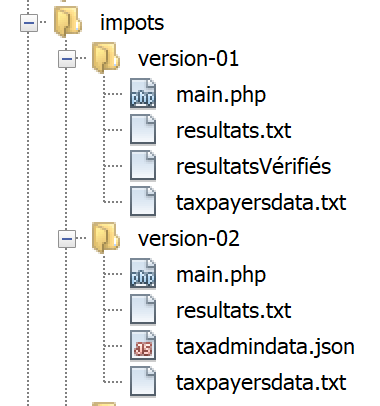
4.2. The script directory structure
4.3. Version 1
4.3.1. The Algorithm
We present an initial program in which:
- the data needed to calculate the tax is hard-coded in the program as arrays and constants;
- taxpayer data (married, children, salary) is stored in a first text file [taxpayersdata.txt];
- the results of the tax calculation (married, children, salary, tax) are stored in a second text file [resultats.txt];
The script [version-01/main.php] is as follows:
<?php

// strict types for function parameters
declare(strict_types=1);

// global constants
define("PLAFOND_QF_DEMI_PART", 1551);
define("PLAFOND_REVENUS_CELIBATAIRE_POUR_REDUCTION", 21037);
define("PLAFOND_REVENUS_COUPLE_POUR_REDUCTION", 42074);
define("VALEUR_REDUC_DEMI_PART", 3797);
define("PLAFOND_DECOTE_CELIBATAIRE", 1196);
define("PLAFOND_DECOTE_COUPLE", 1970);
define("PLAFOND_IMPOT_COUPLE_POUR_DECOTE", 2627);
define("PLAFOND_IMPOT_CELIBATAIRE_POUR_DECOTE", 1595);
define("ABATTEMENT_DIXPOURCENT_MAX", 12502);
define("ABATTEMENT_DIXPOURCENT_MIN", 437);

// definition of local constants
$DATA = "taxpayersdata.txt";
$RESULTATS = "resultats.txt";
$limites = array(9964, 27519, 73779, 156244, 0);
$coeffR = array(0, 0.14, 0.3, 0.41, 0.45);
$coeffN = array(0, 1394.96, 5798, 13913.69, 20163.45);

// reading data
$data = fopen($DATA, "r");
if (!$data) {
  print "Impossible d'ouvrir en lecture le fichier des données [$DATA]\n";
  exit;
}

// open results file
$résultats = fopen($RESULTATS, "w");
if (!$résultats) {
  print "Impossible de créer le fichier des résultats [$RESULTATS]\n";
  exit;
}

// use the current line of the data file
while ($ligne = fgets($data, 100)) {
  // remove any end-of-line marker
  $ligne = cutNewLineChar($ligne);
  // we retrieve the 3 fields married:children:salary which form $ligne
  list($marié, $enfants, $salaire) = explode(",", $ligne);
  // tax calculation
  $result = calculImpot($marié, (int) $enfants, (float) $salaire, $limites, $coeffR, $coeffN);
  // enter the result in the results file
  $result = ["marié" => $marié, "enfants" => $enfants, "salaire" => $salaire] + $result;
  fputs($résultats, \json_encode($result, JSON_UNESCAPED_UNICODE) . "\n");
  // following data
}
// close files
fclose($data);
fclose($résultats);

// end
exit;

// --------------------------------------------------------------------------
function cutNewLinechar(string $ligne): string {
  // delete the end-of-line mark from $ligne if it exists
  $L = strlen($ligne);  // line length
  while (substr($ligne, $L - 1, 1) === "\n" or substr($ligne, $L - 1, 1) === "\r") {
    $ligne = substr($ligne, 0, $L - 1);
    $L--;
  }
  // end
  return($ligne);
}

// tAX CALCULATION
// --------------------------------------------------------------------------
function calculImpot(string $marié, int $enfants, float $salaire, array $limites, array $coeffR, array $coeffN): array {
  …
  // result
  return ["impôt" => floor($impot), "surcôte" => $surcôte, "décôte" => $décôte, "réduction" => $réduction, "taux" => $taux];
}

// --------------------------------------------------------------------------
function calculImpot2(string $marié, int $enfants, float $salaire, array $limites, array $coeffR, array $coeffN): array {
  …
  // result
  return ["impôt" => $impôt, "surcôte" => $surcôte, "taux" => $coeffR[$i]];
}

// revenuImposable=annualwage-discount
// the allowance has a minimum and a maximum
function getRevenuImposable(float $salaire): float {
  …
  // result
  return floor($revenuImposable);
}

// calculates any discount
function getDecote(string $marié, float $salaire, float $impots): float {
  …
  // result
  return ceil($décôte);
}

// calculates any reduction
function getRéduction(string $marié, float $salaire, int $enfants, float $impots): float {
  /…
  // result
  return ceil($réduction);
}
The taxpayersdata.txt data file (married, children, salary):
The results.txt file (married, children, salary, tax, surcharge, discount, reduction, tax rate) of the results obtained:
Comments
- line 4: we enforce strict adherence to the type of function parameters;
- lines 7–16: definition of all constants necessary for calculating the tax;
- line 19: the name of the text file containing taxpayer data (married, children, salary);
- line 20: the name of the text file containing the results (married, children, salary, tax) of the tax calculation;
- lines 21–23: the three data arrays defining the different tax brackets for the tax calculation;
- lines 26–30: open the taxpayer data file for reading [r]. The [fopen] function returns the Boolean value FALSE if the file could not be opened;
- lines 33–37: Open the results file in write mode [w];
- lines 40–51: loop to read the lines (spouse, children, income) from the taxpayer data file;
- line 40: the [fgets] function reads 100 characters and stops at the first line break encountered. Here, all lines are less than 100 characters long. If a line break is encountered, it is included in the returned string. When the end of the file is reached, the [fgets] function returns FALSE;
- line 42: the end-of-line character is removed;
- line 44: the components (married, children, salary) of the line are retrieved;
- line 46: the tax is calculated. The result is returned as an associative array (line 76);
- line 48: the keys [married, children, salary] are added to the previously retrieved array;
- line 49: the result is stored in the results file as a JSON string;
- lines 53–54: once the taxpayer data file has been fully processed, the files are closed;
- line 60: the function that removes the line break from a line $line. The line break is the string "\r\n" on Windows systems, "\n" on Unix systems. The result is the input string without its line break.
- lines 63-64: substr($string, $start, $size) is the substring of $string starting at character $start and containing at most $size characters;
The [calculImpot] function is as follows:
// constantes globales
define("PLAFOND_QF_DEMI_PART", 1551);
// calcul de l'impôt
// --------------------------------------------------------------------------
function calculImpot(string $marié, int $enfants, float $salaire, array $limites, array $coeffR, array $coeffN): array {
  // $marié : oui, non
  // $enfants : nombre d'enfants
  // $salaire : salaire annuel
  // $limites, $coeffR, $coeffN : les tableaux des données permettant le calcul de l'impôt
  //
  // calcul de l'impôt avec enfants
  $result1 = calculImpot2($marié, $enfants, $salaire, $limites, $coeffR, $coeffN);
  $impot1 = $result1["impôt"];
  // calcul de l'impôt sans les enfants
  if ($enfants != 0) {
    $result2 = calculImpot2($marié, 0, $salaire, $limites, $coeffR, $coeffN);
    $impot2 = $result2["impôt"];
    // application du plafonnement du quotient familial
    if ($enfants < 3) {
      // $PLAFOND_QF_DEMI_PART euros pour les 2 premiers enfants
      $impot2 = $impot2 - $enfants * PLAFOND_QF_DEMI_PART;
    } else {
      // $PLAFOND_QF_DEMI_PART euros pour les 2 premiers enfants, le double pour les suivants
      $impot2 = $impot2 - 2 * PLAFOND_QF_DEMI_PART - ($enfants - 2) * 2 * PLAFOND_QF_DEMI_PART;
    }
  } else {
    $impot2 = $impot1;
    $result2 = $result1;
  }
  // on prend l'impôt le plus fort avec le taux et la surcôte qui vont avec
  if ($impot1 > $impot2) {
    $impot = $impot1;
    $taux = $result1["taux"];
    $surcôte = $result1["surcôte"];
  } else {
    $surcôte = $impot2 - $impot1 + $result2["surcôte"];
    $impot = $impot2;
    $taux = $result2["taux"];
  }
  // calcul d'une éventuelle décôte
  $décôte = getDecote($marié, $salaire, $impot);
  $impot -= $décôte;
  // calcul d'une éventuelle réduction d'impôts
  $réduction = getRéduction($marié, $salaire, $enfants, $impot);
  $impot -= $réduction;
  // résultat
  return ["impôt" => floor($impot), "surcôte" => $surcôte, "décôte" => $décôte, "réduction" => $réduction, "taux" => $taux];
}

// --------------------------------------------------------------------------
function calculImpot2(string $marié, int $enfants, float $salaire, array $limites, array $coeffR, array $coeffN): array {
  …
  // résultat
  return ["impôt" => $impôt, "surcôte" => $surcôte, "taux" => $coeffR[$i]];
}

// revenuImposable=salaireAnnuel-abattement
// l'abattement de 10 % a un min et un max
function getRevenuImposable(float $salaire): float {
  …
}

// calcule une décôte éventuelle
function getDecote(string $marié, float $salaire, float $impots): float {
  …
  // résultat
  return ceil($décôte);
}

// calcule une réduction éventuelle
function getRéduction(string $marié, float $salaire, int $enfants, float $impots): float {
  …
  // résultat
  return ceil($réduction);
}
Comments
- Line 10: The gross tax is calculated including children. The result is returned in the form ["tax" => $tax, "surcharge" => $surcharge, "rate" => $coeffR[$i]] where:
- [‘tax’]: the gross tax;
- [‘surcharge’]: the amount of the surcharge, if any. This applies when the 10% deduction exceeds the threshold of 12,502 euros;
- [‘rate’]: the taxpayer’s tax rate;
- line 11: the gross tax [impot1] due;
- lines 13–14: if the taxpayer has at least one child, the tax calculation is redone using the same data but with 0 children. This second calculation is necessary to determine whether the reduction provided by the children (nbParts*coeffN) exceeds a certain threshold;
- line 15: the gross tax [impot2] due;
- lines 16–23: for the gross tax [impot2], children are now factored in: each 1/2 share provided by the children allows for a reduction of [PLAFOND_QF_DEMI_PART] euros;
- lines 25–26: case where the taxpayer has no children. In this case, calculating [impot2] is unnecessary. It is equal to [impot1];
- lines 29–37: two gross taxes have been calculated [impot1, impot2]. The tax authority retains the higher of the two. This yields a gross tax [impot];
- lines 39–40: the gross amount [tax] may be subject to a reduction;
- lines 42–43: the gross amount [impot] may be subject to a reduction;
- line 45: [tax] is now the net tax due. The results are returned;
The function [calculImpot2] is as follows:
// --------------------------------------------------------------------------
function calculImpot2(string $marié, int $enfants, float $salaire, array $limites, array $coeffR, array $coeffN): array {
  // $marié : oui, non
  // $enfants : nombre d'enfants
  // $salaire : salaire annuel
  // $limites, $coeffR, $coeffN : les tableaux des données permettant le calcul de l'impôt
  //
  // nombre de parts
  $marié = strtolower($marié);
  if ($marié === "oui") {
    $nbParts = $enfants / 2 + 2;
  } else {
    $nbParts = $enfants / 2 + 1;
  }
  // 1 part par enfant à partir du 3e
  if ($enfants >= 3) {
    // une demi-part de + pour chaque enfant à partir du 3e
    $nbParts += 0.5 * ($enfants - 2);
  }
  // revenu imposable
  $revenuImposable = getRevenuImposable($salaire);
  // surcôte
  $surcôte = floor($revenuImposable - 0.9 * $salaire);
  // pour des pbs d'arrondi
  if ($surcôte < 0) {
    $surcôte = 0;
  }
  // quotient familial
  $quotient = $revenuImposable / $nbParts;
  // est mis à la fin du tableau limites pour arrêter la boucle qui suit
  $limites[count($limites) - 1] = $quotient;
  // calcul de l'impôt
  $i = 0;
  while ($quotient > $limites[$i]) {
    $i++;
  }
  // du fait qu'on a placé $quotient à la fin du tableau $limites, la boucle précédente
  // ne peut déborder du tableau $limites
  // maintenant on peut calculer l'impôt
  $impôt = floor($revenuImposable * $coeffR[$i] - $nbParts * $coeffN[$i]);
  // résultat
  return ["impôt" => $impôt, "surcôte" => $surcôte, "taux" => $coeffR[$i]];
}

// revenuImposable=salaireAnnuel-abattement
// l'abattement a un min et un max
function getRevenuImposable(float $salaire): float {

  // résultat
  return floor($revenuImposable);
}
Comments
- Here, we apply the tax calculation using the progressive tax scale;
- line 9: strtolower($string) converts $string to lowercase;
- lines 10–19: calculation of the taxpayer’s number of shares;
- line 21: we calculate taxable income using a function. Indeed, we have seen that it is not always 0.9*AnnualIncome. The 10% deduction is in fact capped at 12,502 euros;
- line 23: calculates the potential surcharge if the taxable income is greater than 0.9*annualIncome;
- lines 25–27: corrects the fact that, due to rounding errors, we sometimes have [$surcharge=-1];
- line 29: the family quotient;
- lines 30–36: this quotient is used to determine the taxpayer’s tax bracket;
- line 40: once the taxpayer’s tax bracket has been determined, their gross tax can be calculated. The floor($x) function returns the integer immediately less than [$x];
- line 42: the calculated information is returned;
The [getRevenuImposable] function is as follows:
// constantes globales
define("ABATTEMENT_DIXPOURCENT_MAX", 12502);
define("ABATTEMENT_DIXPOURCENT_MIN", 437);
// revenuImposable=salaireAnnuel-abattement
// l'abattement a un min et un max
function getRevenuImposable(float $salaire): float {
  // abattement de 10% du salaire
  $abattement = 0.1 * $salaire;
  // cet abattement ne peut dépasser ABATTEMENT_DIXPOURCENT_MAX
  if ($abattement > ABATTEMENT_DIXPOURCENT_MAX) {
    $abattement = ABATTEMENT_DIXPOURCENT_MAX;
  }
  // l'abattement ne peut être inférieur à ABATTEMENT_DIXPOURCENT_MIN
  if ($abattement < ABATTEMENT_DIXPOURCENT_MIN) {
    $abattement = ABATTEMENT_DIXPOURCENT_MIN;
  }
  // revenu imposable
  $revenuImposable = $salaire - $abattement;
  // résultat
  return floor($revenuImposable);
}
Comments
- line 5: the standard deduction is 10% of the annual salary;
- lines 7–9: the deduction cannot exceed the maximum deduction [ABATTEMENT_DIXPOURCENT_MAX];
- lines 10–13: the deduction cannot be less than the minimum deduction [ABATTEMENT_DIXPOURCENT_MIN];
- line 15: calculation of taxable income;
The [getDecote] function is as follows:
// constantes globales
define("PLAFOND_DECOTE_CELIBATAIRE", 1196);
define("PLAFOND_DECOTE_COUPLE", 1970);
define("PLAFOND_IMPOT_COUPLE_POUR_DECOTE", 2627);
define("PLAFOND_IMPOT_CELIBATAIRE_POUR_DECOTE", 1595);
// calcule une décôte éventuelle
function getDecote(string $marié, float $salaire, float $impots): float {
  // au départ, une décôt nulle
  $décôte = 0;
  // montant maximal d'tax to get the discount
  $plafondImpôtPourDécôte = $marié === "oui" ? PLAFOND_IMPOT_COUPLE_POUR_DECOTE : PLAFOND_IMPOT_CELIBATAIRE_POUR_DECOTE;
  if ($impots < $plafondImpôtPourDécôte) {
    // montant maximal de la décôte
    $plafondDécôte = $marié === "oui" ? PLAFOND_DECOTE_COUPLE : PLAFOND_DECOTE_CELIBATAIRE;
    // décôte théorique
    $décôte = $plafondDécôte - 0.75 * $impots;
    // la décôte ne peut dépasser le montant de l'tax
    if ($décôte > $impots) {
      $décôte = $impots;
    }
    // pas de décôte <0
    if ($décôte < 0) {
      $décôte = 0;
    }
  }
  // résultat
  return ceil($décôte);
}
Comments
- line 6: maximum gross tax amount to qualify for a tax reduction. This amount differs for single individuals and couples;
- line 7: whether the taxpayer is eligible for the tax reduction;
- line 11: the tax credit formula. [taxCreditCap] is the maximum tax credit amount. This maximum amount is calculated on line 9. Again, it depends on the taxpayer’s status—married or single;
- lines 13–15: the deduction cannot exceed the gross tax due. This is the case, for example, if [taxes] is 0 on line 11;
- lines 17–19: to avoid rounding to -1;
The [getReduction] function is as follows:
// constantes globales
define("PLAFOND_REVENUS_CELIBATAIRE_POUR_REDUCTION", 21037);
define("PLAFOND_REVENUS_COUPLE_POUR_REDUCTION", 42074);
define("VALEUR_REDUC_DEMI_PART", 3797);
// calcule une réduction éventuelle
function getRéduction(string $marié, float $salaire, int $enfants, float $impots): float {
  // le plafond des revenus pour avoir droit à la réduction de 20%
  $plafondRevenuPourRéduction = $marié === "oui" ? PLAFOND_REVENUS_COUPLE_POUR_REDUCTION : PLAFOND_REVENUS_CELIBATAIRE_POUR_REDUCTION;
  $plafondRevenuPourRéduction += $enfants * VALEUR_REDUC_DEMI_PART;
  if ($enfants > 2) {
    $plafondRevenuPourRéduction += ($enfants - 2) * VALEUR_REDUC_DEMI_PART;
  }
  // revenu imposable
  $revenuImposable = getRevenuImposable($salaire);
  // réduction
  $réduction = 0;
  if ($revenuImposable < $plafondRevenuPourRéduction) {
    // réduction de 20%
    $réduction = 0.2 * $impots;
  }
  // résultat
  return ceil($réduction);
}
Comments
- lines 4–10: to be eligible for a tax reduction, the taxable income (line 10) must be less than a threshold calculated in lines 4–8;
- lines 13–16: if the conditions are met, the taxpayer is entitled to a 20% tax reduction (line 15);
4.3.2. Results
The taxpayersdata.txt data file (married, children, salary):
The results.txt file (married, children, salary, tax, surcharge, discount, reduction, tax rate) of the results obtained:
The results obtained are consistent with those obtained using the tax authority’s simulator.
4.3.3. Conclusion
The tax calculation algorithm, even in cases considered straightforward, is complex. We will not revisit it here. Across different versions, its core will remain the same despite some changes in presentation. We will therefore comment only on the latter.
4.4. Version 2
4.4.1. Changes
In the previous version, the data required to calculate the tax was hard-coded as constants and arrays. This method should be avoided. In the new version, this data is externalized into a JSON file:
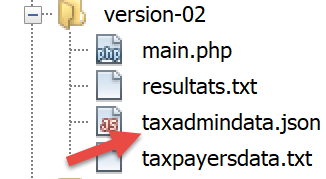
The contents of the [taxadmindata.json] file are as follows:
{
    "limites": [9964, 27519, 73779, 156244, 0],
    "coeffR": [0, 0.14, 0.3, 0.41, 0.45],
    "coeffN": [0, 1394.96, 5798, 13913.69, 20163.45],
    "PLAFOND_QF_DEMI_PART": 1551,
    "PLAFOND_REVENUS_CELIBATAIRE_POUR_REDUCTION": 21037,
    "PLAFOND_REVENUS_COUPLE_POUR_REDUCTION": 42074,
    "VALEUR_REDUC_DEMI_PART": 3797,
    "PLAFOND_DECOTE_CELIBATAIRE": 1196,
    "PLAFOND_DECOTE_COUPLE": 1970,
    "PLAFOND_IMPOT_COUPLE_POUR_DECOTE": 2627,
    "PLAFOND_IMPOT_CELIBATAIRE_POUR_DECOTE": 1595,
    "ABATTEMENT_DIXPOURCENT_MAX": 12502,
    "ABATTEMENT_DIXPOURCENT_MIN": 437
}
The new version [version-02/main.php] is as follows:
<?php

// strict adherence to declared function parameter types
declare (strict_types=1);

// definition of constants
$TAXPAYERSDATA = "taxpayersdata.txt";
$RESULTATS = "resultats.txt";
$TAXADMINDATA = "taxadmindata.json";

// retrieve the contents of the tax data file
$fileContents = \file_get_contents($TAXADMINDATA);
$erreur = FALSE;
// mistake?
if (!$fileContents) {
  // we note the error
  $erreur = TRUE;
  $message = "Le fichier des données [$TAXADMINDATA] n'existe pas";
}

if (!$erreur) {
  // retrieve the jSON code from the configuration file in an associative array
  $taxAdminData = \json_decode($fileContents, true);
  // mistake?
  if (!$taxAdminData) {
    // we note the error
    $erreur = TRUE;
    $message = "Le fichier de données jSON [$TAXADMINDATA] n'a pu être exploité correctement";
  }
}

// mistake?
if ($erreur) {
  print "$message\n";
  exit;
}

// open results file
$résultats = fopen($RESULTATS, "w");
if (!$résultats) {
  print "Impossible de créer le fichier des résultats [$RESULTATS]\n";
  // output
  exit;
}

// opening taxpayer data file
$taxpayersdata = fopen($TAXPAYERSDATA, "r");
if (!$taxpayersdata) {
  print "Impossible d'ouvrir le fichier des contribuables [$TAXPAYERSDATA]\n";
  // output
  exit;
}

// use the current line of the data file
while ($ligne = fgets($taxpayersdata, 100)) {
  // remove any end-of-line marker
  $ligne = cutNewLineChar($ligne);
  // we retrieve the 3 fields married:children:salary which form $ligne
  list($marié, $enfants, $salaire) = explode(",", $ligne);
  // tax calculation
  $result = calculImpot($taxAdminData, $marié, (int) $enfants, (int) $salaire);
  // enter the result in the results file
  $result = ["marié" => $marié, "enfants" => $enfants, "salaire" => $salaire] + $result;
  fputs($résultats, \json_encode($result, JSON_UNESCAPED_UNICODE) . "\n");
  // following data
}
// close files
fclose($taxpayersdata);
fclose($résultats);

// end
exit;

// --------------------------------------------------------------------------
function cutNewLinechar(string $ligne) {
  …
  // end
  return($ligne);
}

// tAX CALCULATION
// --------------------------------------------------------------------------
function calculImpot(array $taxAdminData, string $marié, int $enfants, float $salaire) {
  // $marié : yes, no
  // $enfants : number of children
  // $salaire: annual salary
  // $taxAdminData: tax administration data
  //
  // tax calculation with children
  $result1 = calculImpot2($taxAdminData, $marié, $enfants, $salaire);
  $impot1 = $result1["impôt"];
  // tax calculation without children
  if ($enfants != 0) {
    $result2 = calculImpot2($taxAdminData, $marié, 0, $salaire);
    $impot2 = $result2["impôt"];
    // application of the family allowance ceiling
    if ($enfants < 3) {
      // $PLAFOND_QF_DEMI_PART euros for the first 2 children
      $impot2 = $impot2 - $enfants * $taxAdminData["PLAFOND_QF_DEMI_PART"];
    } else {
      // $PLAFOND_QF_DEMI_PART euros for the first 2 children, double for subsequent children
      $impot2 = $impot2 - 2 * $taxAdminData["PLAFOND_QF_DEMI_PART"] - ($enfants - 2) * 2 * $taxAdminData["PLAFOND_QF_DEMI_PART"];
    }
  } else {
    $impot2 = $impot1;
    $result2 = $result1;
  }
  // we take the highest tax with the rate and surcharge that go with it
  if ($impot1 > $impot2) {
    $impot = $impot1;
    $taux = $result1["taux"];
    $surcôte = $result1["surcôte"];
  } else {
    $surcôte = $impot2 - $impot1 + $result2["surcôte"];
    $impot = $impot2;
    $taux = $result2["taux"];
  }
  // calculation of any discount
  $décôte = getDecote($taxAdminData, $marié, $salaire, $impot);
  $impot -= $décôte;
  // calculation of any tax reduction
  $réduction = getRéduction($taxAdminData, $marié, $salaire, $enfants, $impot);
  $impot -= $réduction;
  // result
  return ["impôt" => floor($impot), "surcôte" => $surcôte, "décôte" => $décôte, "réduction" => $réduction, "taux" => $taux];
}

// --------------------------------------------------------------------------
function calculImpot2(array $taxAdminData, string $marié, int $enfants, float $salaire) {
  // $marié : yes, no
  …
  // result
  return ["impôt" => $impôt, "surcôte" => $surcôte, "taux" => $coeffR[$i]];
}

// revenuImposable=annualwage-discount
// the allowance has a minimum and a maximum
function getRevenuImposable(array $taxAdminData, float $salaire): float {
  …
  // result
  return floor($revenuImposable);
}

// calculates any discount
function getDecote(array $taxAdminData, string $marié, float $salaire, float $impots): float {
  …
  // result
  return ceil($décôte);
}

// calculates any reduction
function getRéduction(array $taxAdminData, string $marié, float $salaire, int $enfants, float $impots): float {
  …
  // result
  return ceil($réduction);
}
Comments
- lines 11–19: we attempt to read the contents of the JSON file named [TAXADMINDATA];
- lines 21–30: if the JSON file was successfully read, its contents are decoded into the associative array [$taxAdminData];
- lines 32–36: if an error occurred in either of the two previous operations, an error message is written to the console and the program stops;
- The difference from version 01 is that here the tax administration data (arrays and constants) are stored in the associative array [$taxAdminData], whereas in version 01, they were stored in global arrays and constants. It is the global nature of these constants that distinguishes the two versions:
- in version 01, the constants were known in all functions of [main.php];
- to achieve the same result in version 02, the associative array [$taxAdminData] must be passed as a parameter to all functions (lines 83, 129, 138, 145, 152);
- each function in version 02 must use the contents of the array [$taxAdminData];
- Lines 83–126: In the [calculateTax] function, where global constants or the [limits, coeffR, coeffN] arrays were previously used, we now use the contents of the [$taxAdminData] array passed as a parameter (lines 99, 102);
- All other functions are rewritten in the same way;
The results obtained are the same as those obtained in the previous version.
4.4.2. Conclusion
Version 02 is much more flexible than version 01. In 2020, the tax calculation algorithm will likely be the same as in 2019. Only the tax brackets and calculation constants will have changed. It will then suffice to update the [taxadmindata.json] file. With version 01, you have to go into the code to modify the tax brackets and calculation constants. However, it is likely that the people who need to change the values of the tax brackets and calculation constants do not have access to the algorithm’s code.