10. Layered Applications
10.1. Introduction
We will now explore how to structure a PHP application in layers:
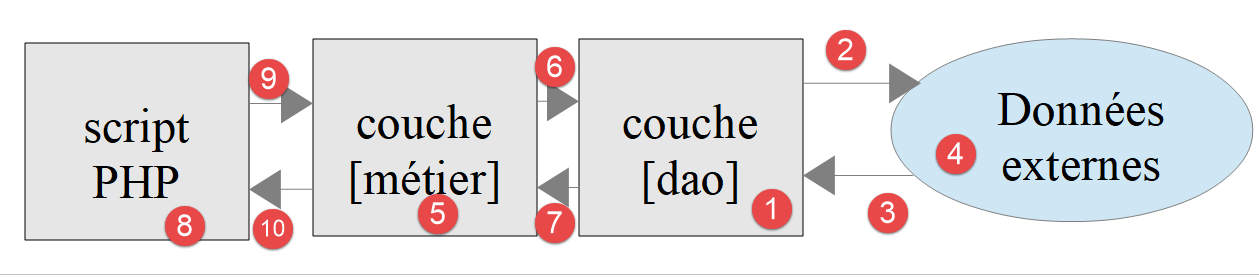
In this diagram, the left layer takes the initiative to use the right layer. The roles of the layers are as follows:
- [1]: The layer called [dao] (Data Access Objects) handles interactions with external data stores [4] (files, databases, web services, etc.). This layer is sometimes called [DAL] (Data Access Layer), a term that better describes the layer’s role. This layer can read data from [3] or write data to [2]. It is called by the [métier] and [6] layers and returns results to them;
- [5]: a layer called [métier] that brings together "business" procedures to which all the data they need is provided. This is generally the most stable layer of a project because it does not depend on how the data is acquired. The data has two sources:
- [9]: data provided by the PHP script;
- [6,7]: data requested from the [dao] layer.
- [8]: the main script acts as the orchestrator. In a console application, it will:
- create the layers [métier] and [dao];
- execute the application’s algorithm. This algorithm acts like a conductor: it contains no “business” code or data access code. The main script simply calls the procedures in layers [métier] and [9]. It completely ignores the [dao] layer and external data. It can provide the [métier] layer with [9] data. In a console application, this data may come from configuration files or from the script user. It receives [10] results from the [métier] layer. It may need to store certain results: to do this, it again uses the procedures of the [métier] layer, which in turn will call upon the [dao] layer to perform the task;
- Among the results, the main script may receive exceptions. It is its role to handle exceptions that are propagated from all layers;
This layered structure is designed to facilitate the evolution of the application. To this end, each layer implements an interface. Suppose that:
- the [dao] layer is implemented by a [Dao] class that implements a [IDao] interface;
- the [métier] layer is implemented by a [Métier] class that implements a [IMétier] interface;
The procedures in the [métier] layer will then use the [IDao] interface rather than the [Dao] class. This allows the [Dao] layer to be updated without affecting the [Métier] layer. Suppose that in a version 1, the [Dao1] layer uses data from a database. Following an update, this data is now provided by a web service in a version 2, [Dao2]. We will ensure that the two classes [Dao1] and [Dao2] implement the same interface [IDao] and that they throw the same exceptions. If this is verified, the [Métier] layer, which works with the [IDao] interface, will remain unchanged;
The same reasoning applies to the [Métier] layer.
Let’s look at an implementation using classes and interfaces:
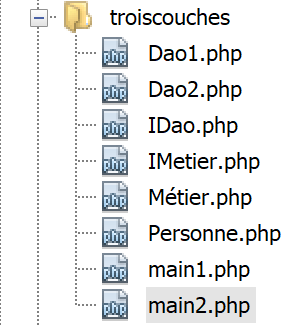
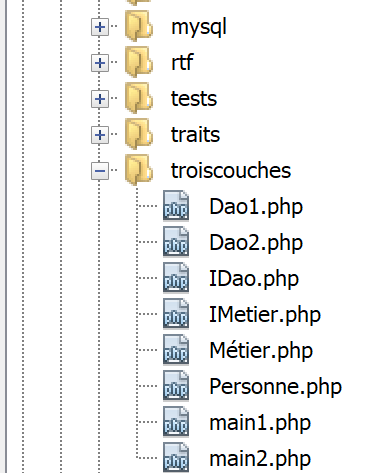
The application will implement the following layered structure:
10.2. Objects exchanged between layers
Normally, layers exchange various objects. Here, they will exchange the following class [Personne.php]:
<?php

// a person
class Personne {
  // identifier
  private $id;

  // manufacturer
  public function __construct(int $id) {
    $this->id = $id;
  }

  // toString
  public function __toString(): string {
    return "[Personne($this->id)]";
  }

}
Comments
- line 6: the person has only one attribute, its identifier [$id]. We will assume that this identifier refers to a unique person in a data warehouse;
- lines 9–11: the constructor that allows you to create a [Personne] object using its ID;
- lines 14–16: the [__toString] method that displays the person’s identifier;
10.3. Layer [dao]
The [IDao] interface implemented by the [dao, 1] layer is as follows: [IDao.php]:
<?php


// layer [dao] ------------------------
interface IDao {

  // recovery of a person from an external warehouse
  // pass the person's login
  public function get(int $id): Personne;

  // saving a person in an external warehouse
  public function save(Personne $p): void;
}
This interface is implemented by the following [Dao1] class:
<?php

class Dao1 implements IDao {

  // saving a person in an external warehouse
  public function save(Personne $p): void {
    print "[Dao1] : Sauvegarde de la personne $p en base de données [locale]\n";
  }

  // recovery of a person from an external warehouse
  public function get(int $id): Personne {
    print "[Dao1] : Récupération de la personne d'identité ($id) en base de données [locale]\n";
    return new Personne($id);
  }

}
Comments
- The class does not interact with a data warehouse. We simply display messages to track the code’s execution (lines 7 and 12);
- Line 13: We successfully return a person with the ID passed as a parameter to the method (line 11);
We also implement the [IDao] interface with the following [Dao2] class [Dao2.php]:
<?php

class Dao2 implements IDao {

  // saving a person in an external warehouse
  public function save(Personne $p): void {
    print "[Dao2] : Sauvegarde de la personne $p en base de données [distante]\n";
  }

  // recovery of a person from an external warehouse
  public function get(int $id): Personne {
    print "[Dao2] : Récupération de la personne d'identité ($id) en base de données [distante]\n";
    return new Personne($id);
  }

}
The [Dao2] class is similar to the [Dao1] class, except that we have modified the messages displayed.
10.4. [métier] Layer
The [métier, 2] layer provides the following [IMétier] interface: [IMetier.php]:
<?php

// business] layer ------------------------
interface IMétier extends IDao {

  // we use a person identified by his id
  public function doSomething(Personne $p): void;
}
Comments
- The [IMétier] interface extends the [IDao] interface. This is not mandatory at all. We do it here because the example is simple;
- line 7: the [doSomething] method is specific to the [Métier] layer;
The [IMétier] interface will be implemented by the following [Métier] class [Métier.php]:
<?php

class Métier implements IMétier {
  // layer [dao]
  private $dao;

  // getter / setter
  public function setDao(IDao $dao): void {
    $this->dao = $dao;
  }

  public function getDao(): IDao {
    return $this->dao;
  }

  // a person is exploited
  public function doSomething(Personne $p): void {
    // treatment
    print "Métier : Traitement métier de la personne $p\n";
  }

  // safeguarding the individual
  public function save(Personne $p): void {
    print "[Métier] : Sauvegarde de la personne $p\n";
    // the [dao] layer is asked to make the backup
    $this->dao->save($p);
  }

  public function get(int $id): Personne {
    print "[Métier] : récupération de la personne d'identifiant $id\n";
    // the person is requested at layer [dao]
    $personne = $this->dao->get($id);
    return $personne;
  }

}
Comments
- line 5: the [métier] layer must have a reference to the [dao] layer in order to use the latter's methods;
- lines 8–10: The [setDao] method allows the [métier] layer to be given the reference of the [dao] layer. Note that the parameter type is [IDao]. Thus, the [métier] layer will be able to work with any class that implements the [IDao] interface. If we switch from a [Dao1] layer to a [Dao2] layer and both implement the [IDao] interface, the [métier] layer does not need to be rewritten;
- lines 17–20: implementation of [IMetier::doSomething];
- lines 23–27: implementation of [IMetier::save]. This method must save a person to a data warehouse. The [métier] layer cannot do this. It calls upon the [dao] layer to perform this save;
- Lines 29–34: Implementation of [IMetier::get]. This method must retrieve from a data warehouse the person whose ID is passed to it as a parameter. The [métier] layer cannot do this. It calls upon the [dao] layer to perform the task (line 32);
Conclusion
Whenever the [métier] layer needs to access data stored in the data warehouse, it must go through the [dao] layer, which was created to access this data.
10.5. Main Script
We will write two scripts to act as the main drivers for this application. The first, [main1.php], will use the [Dao1] layer, while the second, [main2.php], will use the [Dao2] layer. We want to show that this has no impact on the code of the [Métier] layer.
The [main1.php] script is as follows:
<?php

// strict adherence to function parameters
declare (strict_types=1);

// inclusion classes and interfaces
require_once __DIR__."/Personne.php";
require_once __DIR__."/IDao.php";
require_once __DIR__."/IMetier.php";
require_once __DIR__."/Dao1.php";
require_once __DIR__."/Métier.php";

// test ----------------
// layer creation
$dao1 = new Dao1();
$métier = new Métier();
$métier->setDao($dao1);
// using the [business] layer
$personne = $métier->get(4);
$métier->doSomething($personne);
$métier->save($personne);
Comments
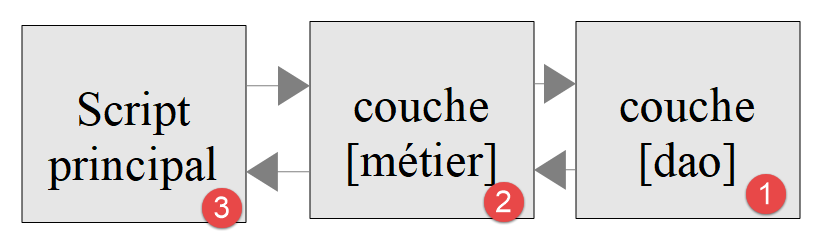
- Let’s review a few points: the [main1.php] script is the application’s orchestrator. It creates the application’s layered structure (lines 15–17) and then begins communicating with the [métier] layer (lines 19–21). The layered structure is as follows:
According to this diagram, the [main1.php] script should only communicate with the [métier] layer. It should not communicate with the [dao] layer, even though this is theoretically possible.
The results of the execution are as follows:
[Métier] : récupération de la personne d'identifier 4
[Dao1] : Récupération de la personne d'identity (4) in [local] database
[Métier] : Traitement métier de la personne [Personne(4)]
[Métier] : Sauvegarde de la personne [Personne(4)]
[Dao1] : Sauvegarde de la personne [Personne(4)] en base de données [locale]
Comments
- Line 10 of the code caused lines 1 and 2 of the results to be written;
- Line 20 of the code caused line 3 of the results to be written;
- Line 21 of the code caused lines 4 and 5 of the results to be written;
The [main2.php] script is as follows:
<?php

// strict adherence to function parameters
declare (strict_types=1);

// inclusion classes and interfaces
require_once __DIR__."/Personne.php";
require_once __DIR__."/IDao.php";
require_once __DIR__."/IMetier.php";
require_once __DIR__."/Dao2.php";
require_once __DIR__."/Métier.php";

// test ----------------
// layer creation
$dao2 = new Dao2();
$métier = new Métier();
$métier->setDao($dao2);
// using the [business] layer
$personne = $métier->get(4);
$métier->doSomething($personne);
$métier->save($personne);
Comments
- lines 36–38: the layered structure now uses the [Dao2] layer;
The execution results are as follows:
[Métier] : récupération de la personne d'identifier 4
[Dao2] : Récupération de la personne d'identity (4) in [remote] database
[Métier] : Traitement métier de la personne [Personne(4)]
[Métier] : Sauvegarde de la personne [Personne(4)]
[Dao2] : Sauvegarde de la personne [Personne(4)] en base de données [distante]
The [Dao1] layer simulates access to a local database, while the [Dao2] layer simulates access to a remote database. As long as these two layers adhere to the [IDao] interface, we can see that the code for the [Métier] layer did not need to be changed.
We will apply what we have just learned to the tax calculation exercise that serves as our guiding thread.