5. Classes
Vocabulary: A class is a type. A variable of this type is called an object. An object is an instance (instance) of a class.
5.1. The script tree
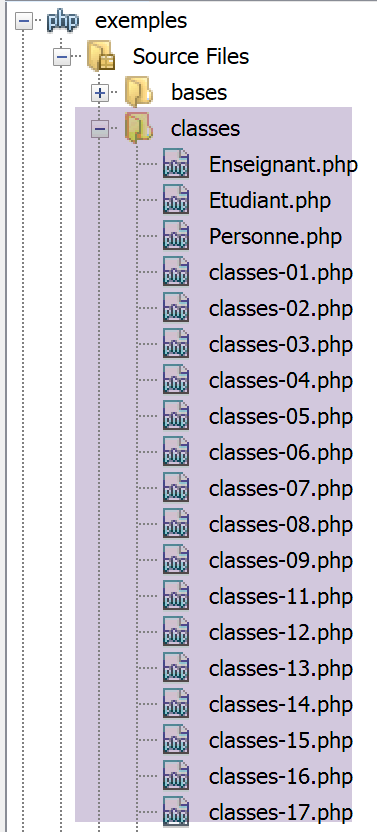
5.2. Any variable can become an object with attributes
The script [classes-01.php] is as follows:
<?php

// a generic object
// $obj1=new stdClass();
// any variable can have attributes by construction
$obj1->attr1 = "un";
$obj1->attr2 = 100;
// displays the
print "objet1=[$obj1->attr1,$obj1->attr2]\n";
// modify object
$obj1->attr2 += 100;
// displays the
print "objet1=[$obj1->attr1,$obj1->attr2]\n";
// copies the value of object1 (address of the object pointed to) to object2
// the two variables are then different but point to the same object
$obj2 = $obj1;
// modify obj2
$obj2->attr2 = 0;
// displays both objects
print "objet1=[$obj1->attr1,$obj1->attr2]\n";
print "objet2=[$obj2->attr1,$obj2->attr2]\n";
// changes the object pointed to by obj1
$obj1 = new stdClass();
print "obj1 :\n";
print_r($obj1);
print "obj2 :\n";
print_r($obj2);
// assigns the reference (address) from object2 to object3
// $obj2 and $obj3 are then one and the same variable
$obj3 = &$obj2;
print "obj2 :\n";
print_r($obj2);
print "obj3 :\n";
print_r($obj3);
// modify obj3
$obj3->attr2 = 10;
// displays both objects
print "objet2=[$obj2->attr1,$obj2->attr2]\n";
print "objet3=[$obj3->attr1,$obj3->attr2]\n";
// changes the object pointed to by obj2
$obj2 = new stdClass();
$obj2->attr3 = "deux";
$obj2->attr4 = 20;
// displays the two objects $obj2 and $obj3
print "obj2 :\n";
print_r($obj2);
print "obj3 :\n";
print_r($obj3);

// is an object a dictionary?
print count($obj3) . "\n";
while (list($attribut, $valeur) = each($obj3)) {
  print "obj3[$attribut]=$valeur\n";
}
// end
exit;
Results:
Warning: Creating default object from empty value in C:\Data\st-2019\dev\php7\php5-exemples\exemples\exemple_14.php on line 6
objet1=[un,100]
objet1=[un,200]
objet1=[un,0]
objet2=[un,0]
obj1 :
stdClass Object
(
)
obj2 :
stdClass Object
(
    [attr1] => un
    [attr2] => 0
)
obj2 :
stdClass Object
(
    [attr1] => un
    [attr2] => 0
)
obj3 :
stdClass Object
(
    [attr1] => un
    [attr2] => 0
)
objet2=[un,10]
objet3=[un,10]
obj2 :
stdClass Object
(
    [attr3] => deux
    [attr4] => 20
)
obj3 :
stdClass Object
(
    [attr3] => deux
    [attr4] => 20
)

Warning: count(): Parameter must be an array or an object that implements Countable in C:\Data\st-2019\dev\php7\php5-exemples\exemples\exemple_14.php on line 50
1

Deprecated: The each() function is deprecated. This message will be suppressed on further calls in C:\Data\st-2019\dev\php7\php5-exemples\exemples\exemple_14.php on line 51
obj3[attr3]=deux
obj3[attr4]=20
Comments
- line 6: the notation $obj->attr refers to the attr attribute of the variable $obj. If it does not exist, it is created, thereby making the variable $obj an object with attributes. We have seen that PHP then creates, by default, an object of type stdClass;
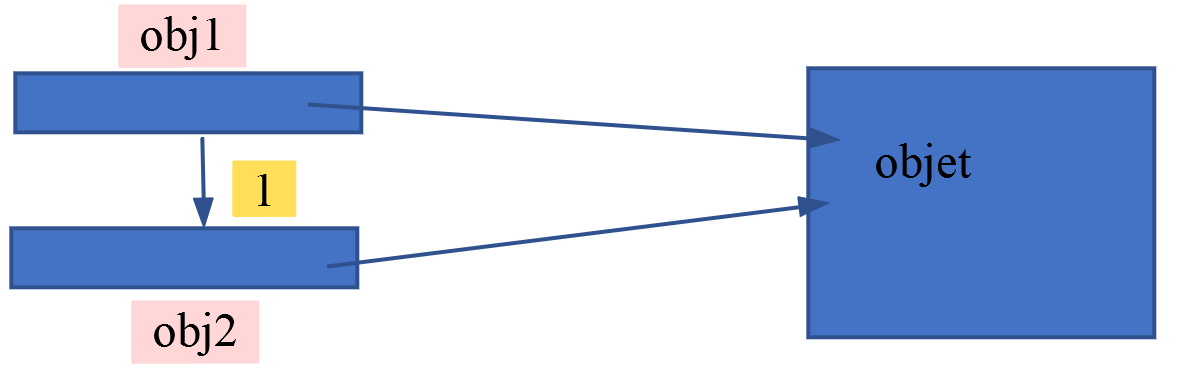
- line 16: the expression $obj2=$obj1, when $obj1 is an object, is a copy of objects by reference: $obj2 and $obj1 are references (addresses) to the same object. The object itself can be modified by either reference;
- lines 23–27: aim to show that $obj1 and $obj2 are two different variables: they are not at the same memory address:
- $obj2=$obj1 copied the value of $obj1 into the variable $obj2 (operation 1 above). The value of $obj1 is the address of an object. Thus, $obj1 and $obj2 point to the same object. When manipulating a variable $obj that points to an object, PHP manipulates the object pointed to by the variable $obj. According to the diagram below, we can see that the pointed-to object can be modified either via $obj1 or via $obj2. This is shown in lines 4 and 5 of the results;
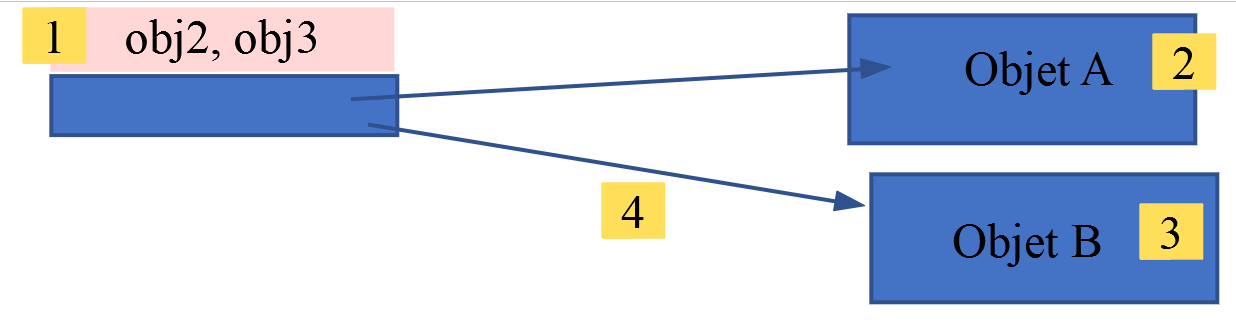
- line 30: the expression $obj3=&$obj2 causes $obj2 and $obj3 to be at the same address, [1 ci-dessous]. One could say that the two variables are aliases for the same memory location. They both point to an object, Object A, shown below as [2];
- the operation $obj2=new stdClass() causes a new object, Object B, to be created ([3 ci-dessous]), and the address of this new object is assigned to the variable $obj2. Since $obj2 and $obj3 are two aliases for the same memory location, $obj3 also points to the new object Object B. This is shown in lines 16–27 and 30–41 of the results;
- lines 52–54: show that an object can be traversed like a dictionary. The keys of the dictionary are the names of the attributes, and the values of the dictionary are the values of those same attributes;
- line 51: the count function can be applied to an object (with a warning) but does not, as one might expect, return the number of attributes. Thus, an object shares similarities with a dictionary but is not one;
5.3. A Person class with no declared attributes
The script [classes-02.php] is as follows:
<?php

class Personne {

  // class attributes
  // undeclared - can be created dynamically
  // method
  function identite() {
    // a priori, uses non-existent attributes
    return "[$this->prenom,$this->nom,$this->age]";
  }

}

// test
// attributes are public and can be created dynamically
$p = new Personne();
$p->prenom = "Paul";
$p->nom = "Langevin";
$p->age = 48;
// method call
print "personne=" . $p->identite() . "\n";
// end
exit;
Results:
Comments
- lines 3–13: define a Person class. A class is a template used to create objects. It groups attributes and functions called methods. Attributes do not need to be declared;
- lines 8–11: The identity method displays the values of three attributes not declared in the class. The keyword $this refers to the object to which the method is applied;
- line 17: an object $p of type Person is created. The keyword new is used to create a new object. The operation returns a reference to the created object (i.e., an address). Various notations are possible: new Person(), new Person, new person. The class name is case-insensitive;
- lines 18–20: the three attributes required by the identity method are created in the $p object;
- line 22: the identity method of the Person class is applied to the object $p. In the code (lines 8–11) of the identity method, $this references the same object as $p;
5.4. The Person class with declared attributes
The [classes-03.php] script is as follows:
<?php

class Personne {

  // class attributes
  var $prenom;
  var $nom;
  var $age;

  // method
  function identite() {
    return "[$this->prenom,$this->nom,$this->age]";
  }

}

// test
// attributes are public
$p = new Personne();
$p->prenom = "Paul";
$p->nom = "Langevin";
$p->age = 48;
// method call
print "personne=" . $p->identite() . "\n";
// end
exit;
Results:
Comments
- lines 6-8: the class attributes are explicitly declared with the var keyword;
5.5. The Person class with a constructor
The previous examples showed exotic Person classes such as those found in PHP 4. It is not advisable to follow these examples. We now present a Person class [classes-04.php] that follows the best practices of PHP 7:
<?php

// strict adherence to declared types of function parameters
declare (strict_types=1);
class Personne {
// class attributes
  private $prenom;
  private $nom;
  private $age;

// getters and setters
  public function getPrenom(): string {
    return $this->prenom;
  }

  public function getNom(): string {
    return $this->nom;
  }

  public function getAge(): int {
    return $this->age;
  }

  public function setPrenom(string $prenom): void {
    $this->prenom = $prenom;
  }

  public function setNom(string $nom): void {
    $this->nom = $nom;
  }

  public function setAge(int $age): void {
    $this->age = $age;
  }

// manufacturer
  public function __construct(string $prenom, string $nom, int $age) {
    // we go through sets
    $this->setPrenom($prenom);
    $this->setNom($nom);
    $this->setAge($age);
  }

// method toString
  public function __toString(): string {
    return "[$this->prenom,$this->nom,$this->age]";
  }

}

// test
// creation of a Personne object
$p = new Personne("Paul", "Langevin", 48);
// identity of this person
print "personne=$p\n";
// we change the age
$p->setAge(14);
// identity of the person
print "personne=$p\n";
// end
exit;
Results:
Comments
- lines 6–50: the Person class;
- lines 7-9: the class's private attributes. These attributes are only visible within the class. Other keywords that can be used are:
- public: makes the attribute a public attribute visible from outside the class,
- protected: makes the attribute a protected attribute visible from within the class and its derived classes;
- because the attributes are private, they cannot be accessed from outside the class. Therefore, the following code cannot be written:
Here, we are outside the Person class. Since the name attribute is private, line 2 is incorrect. To initialize the private fields of the $p object, there are two ways:
- Use the public methods `set` and `get` (the names of these methods can be anything) in lines 12–34. You can then write:
- Use the constructor from lines 37–42. We would then write:
The code above automatically calls the Person class method named __construct;
- Line 59: This line displays the Person $p as a string. To do this, the Person class method named __toString (lines 45–47) is used;
- all methods of the class (functions) have been prefixed with the keyword public, which indicates that the function is visible outside the class. The other keywords that can be used are, as with attributes and with the same meaning, private and protected. Without an explicit visibility attribute, the function has implicit public visibility;
5.6. The Person class with validity checks in the constructor
A class’s constructor is the appropriate place to verify that the object’s initialization values are correct. However, an object can also be initialized via its set methods or equivalents. To avoid duplicating the same checks in two different places, these checks can be placed within the set methods. If an object’s initialization value is found to be incorrect, an exception is thrown. Here is an example.
First, we move the definition of the Person class to its own file, [Personne.php]:
<?php

// strict adherence to declared types of function parameters
declare (strict_types=1);

// namespace;
namespace Exemples;

// person class
class Personne {
// class attributes
  private $prenom;
  private $nom;
  private $age;

// getters and setters
  public function getPrenom(): string {
    return $this->prenom;
  }

  public function getNom(): string {
    return $this->nom;
  }

  public function getAge(): int {
    return $this->age;
  }

  public function setPrenom(string $prénom): void {
    // first name must be non-empty
    $prénom = trim($prénom);
    if ($prénom === "") {
      throw new \Exception("Le prénom doit être non vide");
    } else {
      $this->prenom = $prénom;
    }
  }

  public function setNom(string $nom): void {
    // name must be non-empty
    $nom = trim($nom);
    if ($nom === "") {
      throw new \Exception("Le nom doit être non vide");
    } else {
      $this->nom = $nom;
    }
  }

  public function setAge(int $âge): void {
    // age must be valid
    if ($âge < 0) {
      throw new \Exception("L'âge doit être un entier positif ou nul");
    } else {
      $this->age = $âge;
    }
  }

// manufacturer
  public function __construct(string $prenom, string $nom, int $age) {
    // we go through sets
    $this->setPrenom($prenom);
    $this->setNom($nom);
    $this->setAge($age);
  }

  // method
  public function initWithPersonne(Personne $p): void {
    // initialise l'objet courant avec une personne $p
    $this->__construct($p->prenom, $p->nom, $p->age);
  }

  // method toString
  function __toString(): string {
    return "[$this->prenom,$this->nom,$this->age]";
  }

}
Comments
- line 4: we specify that the type of the function parameters must be respected as declared;
- line 7: defines a namespace. The full (or qualified) name of the Person class is then \Examples\Person. Note the \ character at the beginning of the qualified name: this results in an absolute qualified name. If this character is absent, the name is relative (relative to the current namespace). Thus, if two classes A and B are part of the same namespace E, in the code of class A, class B can be accessed using the relative notation B. If class A is part of namespace E1 and B is part of namespace E2, in the code of A, B will be accessed using the absolute notation \E2\B. Defining a class within a namespace is not mandatory, but Netbeans issues a warning if you do not do so. Therefore, we will do so. Furthermore, namespaces should correspond to the file directory structure. Thus, class A in namespace E1 should be in a file named E1/A.php. This is not mandatory, but again, Netbeans issues a warning if it is not done. In the example of class [\Exemples\Personne], Netbeans issues a warning because the file tree for [Personne.php] is [exemples/classes/Personne.php] and therefore does not match the namespace. Do not confuse the file tree with the namespace. The fully qualified name of a class uses a namespace and has nothing to do with the file tree of the class (PHP). The file tree/namespace relationship is optional and may not be observed, as we have done here;
- lines 12–14: the class’s three private attributes;
- lines 29–37: initialization of the first_name attribute and verification of the initialization value;
- line 31: the trim($chaine) function removes spaces at the beginning and end of $chaine. Thus, trim("abcd ") yields the string "abcd", and trim" " yields the empty string;
- Line 32: If the first name is empty, an exception is thrown (line 33); otherwise, the first name is stored (line 35). To throw an exception, we used the predefined class [Exception] here. Here, we are required to use its absolute name [\Exception]. If we use its relative name [Exception], then this class will be searched for in the current namespace, i.e., the namespace [Exemples] of the Person class. Thus, the PHP interpreter will look for a class with the absolute name [\Exemples\Exception], which does not exist;
The class [Personne] is used by the following script [classes-05.php]:
<?php

// strict adherence to function parameter types
declare(strict_types=1);

// including definition of the Person class
require_once __DIR__."/Personne.php";

// qualified name of the Person class
use \Exemples\Personne;

// test
// creation of a Personne object
$p = new Personne("Paul", "Langevin", 48);
// identity of this person
print "Exemple1, personne=$p\n";
// creation of an erroneous Person object
try {
  $p = new Personne("xx", "yy", "zz");
} catch (\Exception $e1) {
  print "Exemple2, erreur : " . $e1->getMessage() . "\n";
} catch (\TypeError $e2) {
  print "Exemple2, erreur : " . $e2->getMessage() . "\n";
}
// creation of an erroneous Person object
try {
  $p = new Personne("", "yy", 10);
} catch (\Exception $e1) {
  print "Exemple3, erreur : " . $e1->getMessage() . "\n";
} catch (\TypeError $e2) {
  print "Exemple3, erreur : " . $e2->getMessage() . "\n";
}

// end
exit;
Comments
- line 7: the script will use the [Personne] class. We must therefore tell the PHP interpreter where it can find the definition of this class. This is the role of the [include fichier] and [require fichier] statements. Here, we used the [include] statement. The difference between the two instructions is as follows: if the [include fichier] instruction encounters errors while loading [fichier], a [E_WARNING]-level error is issued, butexecution continues, whereas [require], in the same situation, generates a fatal error and stops the script’s execution. Each of these two instructions has a variant: [include_once] and [require_once]. These two variants allow for handling cases where the same file is included multiple times. Consider a project consisting of several PHP scripts, some of which reference the [Personne] class. Executing these scripts would then cause the file [Personne.php] to be included multiple times, resulting in an error because a class cannot be defined twice. The solution is to use the [_once] variants, which ensure that the file is included only once in the project’s global script;
- Line 7: The constant [__DIR__] is a constant PHP that refers to the full name of the folder containing the script with the constant [__DIR__]. Thus, the expression on line 17:
require_once __DIR__."/Personne.php";
will be equivalent to something like:
require_once ‘C:\Data\st-2019\dev\php7\php5-exemples\exemples\classes/Personnes.php’
In the file path, you can use either / or \ interchangeably;
- Line 14: We use the [Personne] class that we just defined. The [classes-05.php] script has no namespace. Line 14 uses the relative name of the [Personne] class without a namespace. Since the class [Personne] has no namespace, it is searched for within the script [classes-05.php] itself and will therefore not be found. There are two solutions to this problem:
- use the full name of the class [\Exemples\Personne];
- use the `use` statement on line 10. This indicates that the code that follows uses the class `[\Exemples\Personne]`;
- Line 10: The use statement tells the interpreter that the class [Personne] referenced on line 14 is actually the class [\Exemples\Personne]. That said, where will the interpreter find the code for this class? Line 7 tells it. This line indicates that to execute the current script, the script [Personne.php] must also be loaded. The relative file name is used here. It will therefore be searched for in the folder containing the script [classes-05.php]. Therefore, the scripts [Personne.php] and [classes-05.php] must be in the same folder. This is the case here, where they are both in the [exemples/classes] folder. The statement on line 10 is equivalent to:
use \Exemples\Personne as Personne;
The [use] statement above specifies that the alias [Personne] refers to the class [\Exemples\Personne];
- line 14: an object [Personne] is created. The method [__construct] of the class [Personne] will be implicitly executed here;
- Line 16: Displays the Person $p. To be displayed, the value of the variable $p must be converted to a string. Implicitly, the method [Personne.__toString] is then executed. This method must therefore return a string;
- we have seen that the constructor of the [Personne] class can throw a [\Exception] exception. This exception must therefore be handled. Consequently, the code on line 14 is incomplete. The code on lines 18–24 must be used to properly handle the exception that may occur. Here, we intentionally trigger one by passing an age that is not an integer. In this particular case, the exception that occurs is thrown by the PHP interpreter and not by the code in the [Personne] class. Indeed, the signature of the [Personne.__construct] method is as follows:
function __construct(string $prenom, string $nom, int $age)
Therefore, the [age] parameter passed to the constructor must be of type integer. If this is not the case, the PHP interpreter throws a [TypeError] error. Furthermore, the [set] methods of the [Personne] class throw a [\Exception] exception. Since the constructor that calls them has no try/catch block, the exception propagates up one level to the code that called the constructor, i.e., the code in the [classes-05.php] script. Ultimately, the [classes-05.php] script can receive two types of exceptions: \Exception or \TypeError. Note that when the developer is certain certain exceptions cannot occur, they will not use the corresponding catch blocks. Here, they are used systematically solely for demonstration purposes. However, catch blocks will be used for any possible exception, even if unlikely;
For this reason, the try block in lines 18–24 has two catch blocks to handle the two types of exceptions separately;
- Line 20: You can write either [Exception] or [\Exception]:
- The first, version, uses the relative class name, relative to the script’s namespace. The script has no namespace of its own. Its namespace is therefore the root of all namespaces: \. Therefore, writing [Exception] here is equivalent to writing [\Exception]. However, the class [Exception] is indeed located in the namespace [\];
It is preferable to use the absolute name of the predefined exceptions from PHP in a script that does not have a namespace itself. Thus, if you decide to assign a namespace to this script, writing the absolute class names remains valid, whereas in the other case, changing the namespace will cause errors with the relative class names;
- Line 21: When an exception occurs, the [Exception→getMessage] method allows you to retrieve the exception’s error message. The same applies to a [TypeError]-type error. In the [Personne.setPrenom] method, we have written:
  public function setPrenom(string $prénom) {
    // first name must be non-empty
    $prénom = trim($prénom);
    if ($prénom === "") {
      throw new \Exception("Le prénom doit être non vide");
    } else {
      $this->prenom = $prénom;
    }
}
Line 5: An exception is thrown with the error message [Le prénom doit être non vide]. This is what the [Exception→getMessage] method on line 29 of the [classes-05.php] script will catch.
Results:
Exemple1, personne=[Paul,Langevin,48]
Exemple2, erreur : Argument 3 passed to Exemples\Personne::__construct() must be of the type integer, string given, called in C:\Data\st-2019\dev\php7\php5-exemples\exemples\exemple_18.php on line 19
Exemple3, erreur : Le prénom doit être non vide
5.7. Adding a method acting as a second constructor
In PHP 7, it is not possible to have multiple constructors with different parameters that would allow an object to be constructed in various ways. We can therefore use methods acting as constructors:
  // method
  public function initWithPersonne(Personne $p) {
    // initialise l'objet courant avec une personne $p
    $this->__construct($p->prenom, $p->nom, $p->age);
}
Comments
- lines 2-5: the initWithPersonne method allows the values of the attributes of another Person object to be assigned to the current object. Here, it calls the __construct constructor, but this is not mandatory. It could initialize the attributes of the [Personne] class itself;
The new class [Personne] is used by the following script [classes-06.php]:
<?php

// including definition of the Person class
require_once __DIR__."/Personne.php";
// declaration of the qualified name of the Personne class
use \Exemples\Personne;

// test
// creation of a Personne object
try {
  $p = new Personne("Paul", "Langevin", 48);
} catch (\Exception $e) {
  print "erreur : " . $e->getMessage();
  exit;
}
// identity of this person
print "personne=$p\n";
// creation of a second person
try {
  $p2 = new Personne("Laure", "Adeline", 67);
} catch (\Exception $e) {
  print "erreur : " . $e->getMessage();
  exit;
}
// initialization of the first with the values of the second
try {
  $p->initWithPersonne($p2);
} catch (\Exception $e) {
  print "erreur : " . $e->getMessage();
  exit;
}

// check
print "personne=$p\n";
// end
exit;
- Lines 14, 23, 30: It is common that, after an exception occurs, you must stop the execution of a console script if the error encountered is unrecoverable. This is not the case in a web script: we do not stop the script’s execution but instead display an error page. If we are inside a function, we do not use the `exit` statement but rather `return`: we do not stop the script’s execution (`exit`) but exit the function (`return`) after setting an error;
Results:
5.8. An array of objects [Personne]
The following example [classes-07.php] shows that arrays of objects are possible.
<?php

require_once __DIR__."/Personne.php";
use \Exemples\Personne;

// test
// create an array of Personne objects
// to make the code easier to understand, we don't handle the possible exception
$groupe = [new Personne("Paul", "Langevin", 48), new Personne("Sylvie", "Lefur", 70)];

// identity of these persons
for ($i = 0; $i < count($groupe); $i++) {
  print "groupe[$i]=$groupe[$i]\n";
}

// end
exit;
Results:
Comments
- line 9: creation of an array of 2 people;
- line 12: iterating through the array;
- line 13: $groupe[$i] is an object of type Person. The method [Personne.__toString] is used to display it;
5.9. Creating a class derived from the Person class
In a file named [Enseignant.php], create the following [Enseignant] class:
<?php

// strict adherence to declared function parameter types
declare (strict_types=1);

// namespace
namespace Exemples;

// a class derived from personne
class Enseignant extends Personne {
  // attributes
  private $discipline;   // subject taught

  // getter and setter

  public function getDiscipline(): string {
    return $this->discipline;
  }

  public function setDiscipline(string $discipline): void {
    $this->discipline = $discipline;
  }

  // manufacturer
  public function __construct(string $prénom, string $nom, int $âge, string $discipline) {
    // parent attributes
    parent::__construct($prénom, $nom, $âge);
    // other attributes
    $this->setDiscipline($discipline);
  }

  // overloading the __toString function of the parent class
  public function __toString(): string {
    return "[" . parent::__toString() . ",$this->discipline]";
  }

}
Comments
- Line 7: The class [Enseignant] is also part of the [Exemples] namespace;
- Line 10: The Teacher class extends the Person class. The derived Teacher class inherits the attributes and methods of its parent class;
- line 12: The Teacher class adds a new attribute, subject, that is specific to it;
- line 25: the Teacher class constructor takes 4 parameters:
- 3 to initialize its parent class (first_name, last_name, age), line 27;
- 1 for its own initialization (subject), line 29;
- line 27: the derived class has access to the methods and constructors of its parent class via the keyword parent::. Here, we pass the parameters (first_name, last_name, age) to the parent class’s constructor;
- lines 33–35: the __toString method of the derived class uses the __toString method of the parent class;
The [Enseignant] class is used by the following [classes-08.php] script:
<?php

// inclusion of the definition of the two classes
require_once __DIR__."/Personne.php";
require_once __DIR__."/Enseignant.php";
// declaration of the two classes used
use \Exemples\Personne;
use \Exemples\Enseignant;

// test
// creation of an array of Personne and derived objects
// for the simplicity of the example, we don't handle exceptions
$groupe = array(new Enseignant("Paul", "Langevin", 48, "anglais"), new Personne("Sylvie", "Lefur", 70));

// identity of these persons
for ($i = 0; $i < count($groupe); $i++) {
  print "groupe[$i]=$groupe[$i]\n";
}
// end
exit;
Comments
- lines 4–5: we need to tell the PHP interpreter where the two [Enseignant, Personne] classes are located;
- lines 7-8: declaration of the full names of the two classes. This will allow us to refer to them in the code simply by their names without the namespace suffix;
- line 13: we create an array containing a type [Personne] and a type [Enseignant];
- lines 16–18: display the elements of the array;
- line 17: the __toString method of each $groupe[$i] element will be called. The Person class has a __toString method. The Teacher class has two: the one from its parent class and its own. One might wonder which one will be called. The execution shows that it was the one from the Teacher class that was called. This is always the case: when a method is called on an object, it is searched for in the following order: in the object itself, in its parent class if it has one, then in the parent class of the parent class, and so on… The search stops as soon as the method is found.
Results:
5.10. Creating a second class derived from the Person class
The following example creates a Student class derived from the Person class, in the file [Etudiant.php]:
<?php
// strict adherence to declared types of function parameters
declare (strict_types=1);
// namespace
namespace Exemples;
class Etudiant extends Personne {
// attributes
private $formation; // training pursued
// getter and setter
public function getFormation(): string {
return $this->formation;
}
public function setFormation(string $formation): void {
$this->formation = $formation;
}
// manufacturer
public function __construct(string $prénom, string $nom, int $âge, string $formation) {
// parent attributes
parent::__construct($prénom, $nom, $âge);
// other attributes
$this->setFormation($formation);
}
// overloading the __toString function of the parent class
public function __toString(): string {
return "[" . parent::__toString() . ",$this->formation]]";
}
}
This class is used by the following [classes-09.php] script:
<?php
// inclusion and definition of classes used by the script
require_once __DIR__."/Personne.php";
use \Exemples\Personne;
require_once __DIR__."/Enseignant.php";
use \Exemples\Enseignant;
require_once __DIR__."/Etudiant.php";
use \Exemples\Etudiant;
// test
// creation of a table of person objects and derivatives
// to make the example easier to understand, we don't handle exceptions
$groupe = array(new Enseignant("Paul", "Langevin", 48, "anglais"), new Personne("Sylvie", "Lefur", 70), new Etudiant("Steve", "Boer", 23, "iup2 qualité"));
// identity of these persons
for ($i = 0; $i < count($groupe); $i++) {
print "groupe[$i]=$groupe[$i]\n";
}
// end
exit;
Results:
groupe[0]=[[Paul,Langevin,48],anglais]
groupe[1]=[Sylvie,Lefur,70]
groupe[2]=[[Steve,Boer,23],iup2 qualité]
5.11. Relationship between the constructor of a derived class and that of the parent class
In some object-oriented languages, the constructor of a derived class automatically calls that of its parent class. The following code [classes-16.php] shows that with PHP 7 this is not the case:
<?php

class Classe1 {

  // manufacturer
  public function __construct() {
    print "constructeur de la classe Classe1\n";
  }

}

class Classe2 extends Classe1 {

  // manufacturer
  public function __construct() {
    // the constructor of the parent class is not implicitly called
    print "constructeur de la classe Classe2\n";
  }

}

class Classe3 extends Classe1 {

  // manufacturer
  public function __construct() {
    // explicit call to parent class constructor
    parent::__construct();
    // code specific to Classe3
    print "constructeur de la classe Classe3\n";
  }

}

// tests
print "test1---------\n";
new Classe2();
print "test2---------\n";
new Classe3();
Results
5.12. Overriding a method of the parent class
We have already seen that a method of the parent class can be overridden in a child class. Thus, the method [__toString] of the class [Personne] (see link) has been overridden in the child classes [Enseignant] (see link) and [Etudiant] (see link). The script [classes-13.php] illustrates the concept again:
<?php

// strict adherence to function parameter types
declare(strict_types=1);

// main class
class Classe1 {

  public function f(): int {
    return 1;
  }

  function g(): int {
    return 2;
  }

}

// derived class
class Classe2 extends Classe1 {

  // redefine the f function of the parent class
  public function f(): int {
    return parent::f() + 10;
  }

}

// code
$c2 = new Classe2();
print $c2->f() . "\n";
print $c2->g() . "\n";
$c1=new Classe1();
print $c1->f()."\n";
Comments
- lines 7-17: the class [Classe1] defines two methods, f and g;
- lines 20-27: the class [Classe2] extends the class [Classe1] and redefines its method f;
Results
Comments
- Line 30 of the code creates a $c2 object of type [Classe2];
- Line 31 of the code calls method f of the $c2 object. Since this method exists, it is executed;
- Line 32 of the code calls method g of the $c2 object. Since this method does not exist, it is looked up in the parent class, where it is found and executed;
- Line 33 of the code creates a $c1 object of type [Classe1];
- Line 34 of the code calls the f method of the $c1 object. Since this method exists, it is executed;
5.13. Passing an object as a function parameter
Consider the following script: [classes-14.php]:
<?php

// strict adherence to function parameter types
declare(strict_types=1);

// main class
class Classe1 {

  public function f(): int {
    return 1;
  }

  function g(): int {
    return 2;
  }

}

// derived class
class Classe2 extends Classe1 {

  // redefine the f function of the parent class
  public function f(): int {
    return parent::f() + 10;
  }

}

// the function parameter is of type Class1 or derived
function doSomething(Classe1 $c1): void {
  print $c1->f() + $c1->g() . "\n";
}

// code
// create a Class2 object derived from Class1
$c2 = new Classe2();
// we call doSomething with
doSomething($c2);
Comments
- lines 7-17: the [Classe1] class;
- lines 20–27: a class [Classe2] derived from [Classe1];
- line 30: a function that expects a parameter of type [Classe1]. When the expected type is a class, the actual parameter can be an object of the expected type or a derived type;
- lines 35–38: the function [doSomething] is called with a parameter of type [Classe2], whereas the expected type is [Classe1];
Results
5.14. Abstract classes
An abstract class is an incomplete class that cannot be instantiated. It must be derived from in order to be usable.
What is the purpose of an abstract class? Sometimes we have classes that share one or more methods but differ in other methods or attributes. It is then desirable to group everything that is common into a parent class. For now, we don’t need an abstract class. But suppose the child classes differ only in one method, M: the method’s signature would be the same in all child classes, but its implementation would differ. To require the child classes to implement method M:
- we will declare the signature of method M in the parent class. Since the parent class does not know how to implement it, we prefix the method with the abstract keyword: this means that the implementation of method M is deferred to the child classes;
- because the parent class is not fully implemented, it is also declared abstract using the same abstract keyword. This means the class can no longer be instantiated. A child class must be created to define the implementation of method M, so that the body of the parent class can be used;
Here is an example [classes-15.php]:
<?php

// strict adherence to function parameter types
declare(strict_types=1);

// abstract main class
abstract Class Classe1 {

  // method known to all derived classes
  public function f(): int {
    return 1;
  }

  // abstract g method - will be defined by derived classes
  abstract function g(): int;
}

// derived class
Class Classe2 extends Classe1 {

  // the g method of the parent class must be defined
  public function g(): int {
    return parent::f() + 10;
  }

}

// derived class
Class Classe3 extends Classe1 {

  // the g method of the parent class must be defined
  public function g(): int {
    return parent::f() + 20;
  }

  // we can redefine the f method of the parent class
  public function f(): int {
    return 2;
  }

}

// code
$c2 = new Classe2();
print $c2->f() . "\n";
print $c2->g() . "\n";
$c3 = new Classe3();
print $c3->f() . "\n";
print $c3->g() . "\n";
Comments
- lines 7–16: The class [Classe1] is abstract (line 7) because it does not know how to implement the g method on line 15. It must therefore be derived to be usable;
- lines 19–26: The class [Classe2] extends the class [Classe1] and redefines the g method of its parent class (lines 22–24);
- lines 29–41: The class [Classe3] extends the class [Classe1] and redefines the method g of its parent class (lines 32–34);
- lines 37–39: the class [Classe3] redefines the f method of its parent class;
- lines 44–49: We create two objects of type [Classe2] and [Classe3] and call their methods f and g;
Results
5.15. Final classes
A final class is a class that cannot be derived from. Consider the following script [classes-11.php]:
<?php

// namespace
namespace Exemples;

// non-derivable class
final Class Classe1 {

}

// derived class
Class Classe2 extends Classe1 {

}

// code - must cause an error
new Classe2();
Comments
- lines 7–9: the final keyword makes the [Classe1] class a final class that cannot be derived from;
- lines 12-14: the class [Classe2] extends the final class [Classe1], which is an error;
- line 17: the error will only be reported when the script is executed and an attempt is made to manipulate an object of type [Classe2];
Results
5.16. Final methods
A final method is a method that cannot be overridden by derivation. Here is an example [classes-12.php]:
<?php

// strict adherence to function parameter types
declare(strict_types=1);

// namespace
namespace Exemples;

// main class
Class Classe1 {

  // this method cannot be redefined in a derived class
  public final function f(): int {
    return 1;
  }

}

// derived class
Class Classe2 extends Classe1 {

  public function f(): int {
    return 2;
  }

}

// code - must cause an error
new Classe2();
Comments
- line 13: the f method of class [Classe1] is declared final using the final keyword;
- line 20: the class [Classe2] extends the class [Classe1];
- lines 22-23: the function f of the parent class [Classe1] is redefined. This should cause an error;
- line 29: an object of type [Classe2] is created to force the PHP interpreter to inspect the [Classe2] class;
Results
5.17. Static methods and attributes
A static method is a method associated with the class in which it is defined, not with the class’s instance objects. Thus, if class C declares a static method M, to use it we would write:
- C::M if you are outside the class;
- self::M if you are inside the class;
Here is an example [classes-17.php]:
<?php

class Classe1 {

  // static method
  static function say(string $message): void {
    print "$message\n";
  }

}

// test -------------------
Classe1::say("hello");
Comments
- line 6: the method [say] is declared static using the static keyword;
- line 13: call to the static method [say] using the syntax: Class1::say;
Results
Now let's consider the following code [classes-18.php]:
<?php

class Classe1 {
  // static attribute
  private static $nbObjects = 0;

  public function __construct() {
    print "constructeur Classe1\n";
    self::$nbObjects++;
  }

  // static method
  static function say(): void {
    print self::$nbObjects ." objets de type [Classe1] ont été construits\n";
  }

}

// test -------------------
new Classe1();
new Classe1();
Classe1::say();
Comments
- Line 5: We declare a static attribute that will count the number of instances of class [Classe1] created. This is not an attribute that can belong to an instance of the class. Indeed, if two objects O1 and O2 are created, neither is aware of the other. Having a counter within the instance makes no sense: when a new object is created, in which instance would we increment a counter? We would be forced to increment the counter of a specific object, ignoring the counters of the other instances. A static attribute is a class attribute, not an instance attribute of the class;
- lines 7–10: it is in the constructor that we will count the created objects, since the creation of each new object triggers the execution of the constructor;
- line 14: Note the notation `self::$nbObjects` to indicate that we are referring to a static attribute of the class in which the executed code is located;
- lines 13–15: the static method [say] is responsible for displaying the number of objects created;
- lines 20–22: two objects are created, and the object counter is displayed;
Results
constructeur Classe1
constructeur Classe1
2 objets de type [Classe1] ont été construits
5.18. Visibility between Parent Class and Child Class
Let's examine the following [classes-19.php] script:
<?php

class SomeParent {
  // attribute
  private $attributeOfParent = 4;

  // method
  public function doTest(): void {
    // who's calling?
    print "parent :\n";
    var_dump($this);
    // parent display
    print "parent : attributeOfParent={$this->attributeOfParent}\n";
    print "parent : attributeOfChild={$this->attributeOfChild}\n";
  }

}

class SomeChild extends SomeParent {
  // attribute
  private $attributeOfChild = 14;

  // method
  public function doTest(): void {
    // children's display
    print "child : attributeOfParent={$this->attributeOfParent}\n";
    print "child : attributeOfChild={$this->attributeOfChild}\n";

    // parent
    parent::doTest();
  }
}

// main script
print "---test1\n";
(new SomeParent())->doTest();
print "---test2\n";
(new SomeChild())->doTest();
Comments
- lines 3-17: the [SomeParent] class;
- lines 19–32: the child class [SomeChild]. We can see that it extends the class [SomeParent] (line 19);
- line 5: the [SomeParent] class has only one attribute;
- lines 8–17: the method [SomeParent::doTest] is designed to display two attributes:
- [$attributeOfParent], which belongs to the class [SomeParent];
- [$attributeOfChild], which belongs to the class [SomeChild] (line 21);
- lines 10–11: the caller’s identity is displayed; the method will be called in two different ways:
- from the parent class [SomeParent];
- from the child class [SomeChild];
- lines 13-14: display of the two attributes;
- lines 19–32: the child class [SomeChild], which extends the class [SomeParent] (line 19);
- line 21: the class [SomeChild] has only one attribute;
- line 24: the method [SomeChild::doTest] is designed to display two attributes:
- [$attributeOfParent], which belongs to the class [SomeParent];
- [$attributeOfChild], which belongs to the class [SomeChild];
- lines 26–27: display of the two attributes;
- line 30: calls the [doTest] method of the parent class, which in turn displays both attributes;
- line 36: the method [SomeParent::doTest] is called;
- line 38: the [SomeChild::doTest] method is called;
In the first test, the visibility of both attributes is [private]. We can therefore expect that the child class does not see the attribute of its parent class. The parent class’s attribute would need to have at least the visibility [protected]. But what about the child class’s attribute? Is it visible in the parent class?
Here are the results of this first test:
Comments
- lines 1-10: results of the first test where the [SomeParent::doTest] method is called;
- lines 3-6: we see that the object calling the method is of type [SomeParent];
- line 7: display of the [$attributeOfParent] attribute;
- lines 9–10: we see that the attribute [SomeParent::$attributeOfChild] does not exist. It is therefore not displayed;
- lines 11–30: results of the second test where the method [SomeChild::doTest] is called;
- lines 13-14: we see that the attribute [SomeChild::$attributeOfParent] does not exist. It is therefore not displayed. This is normal: the attribute [SomeParent::$attributeOfParent] is [private] and is therefore not known in the child class;
- line 15: display of the attribute [$attributeOfChild];
- lines 16–30: we are in the [SomeParent::doTest] method called by the child class;
- lines 17–22: we see that [$this] is of type [SomeChild] with two private attributes;
- line 23: Surprisingly, [$this], which is of the same type as [SomeChild], is assigned the parent attribute of [$attributeOfParent] here;
- Lines 25–30: Equally surprising, [$this], which is of type [SomeChild], does not see its attribute [$attributeOfChild];
This result is very surprising: although lines 17–21 indicate that [$this] is of type [SomeChild], this [$this] inside the [SomeParent::doTest] method behaves as if it were an instance of the [SomeParent] class and not of the [SomeChild] class.
Let’s run a new test with the [classes-20.php] script. The [$attributeOfParent] attribute now has [protected] visibility (line 5):
<?php

class SomeParent {
  // attribute
  protected $attributeOfParent = 4;

  // method
  public function doTest(): void {
    // who's calling?
    print "parent :\n";
    var_dump($this);
    // parent display
    print "parent : attributeOfParent={$this->attributeOfParent}\n";
    print "parent : attributeOfChild={$this->attributeOfChild}\n";
  }

}

class SomeChild extends SomeParent {
  // attribute
  private $attributeOfChild = 14;

  // method
  public function doTest(): void {
    // children's display
    print "child : attributeOfParent={$this->attributeOfParent}\n";
    print "child : attributeOfChild={$this->attributeOfChild}\n";

    // parent
    parent::doTest();
  }

}

// main script
print "---------------------------test1\n";
(new SomeParent())->doTest();
print "---------------------------test2\n";
(new SomeChild())->doTest();
Results
Comments
- line 12: the class [SomeChild] now sees the attribute of its parent [$attributeOfParent]. This is normal since the latter now has a scope of [protected];
- in the [someParent::doTest] method, the [$this] object is of type [SomeChild] (lines 15–20). It sees the attribute of its parent [$attributeOfparent] (line 21) but still not its own attribute [$attributeOfChild] (lines 23–28);
In the third attempt, the attribute [$attributeOfChild] also has a scope of [protected]:
<?php

class SomeParent {
  // attribute
  protected $attributeOfParent = 4;

  // method
  public function doTest(): void {
    // who's calling?
    print "parent :\n";
    var_dump($this);
    // parent display
    print "parent : attributeOfParent={$this->attributeOfParent}\n";
    print "parent : attributeOfChild={$this->attributeOfChild}\n";
  }

}

class SomeChild extends SomeParent {
  // attribute
  protected $attributeOfChild = 14;

  // method
  public function doTest(): void {
    // children's display
    print "child : attributeOfParent={$this->attributeOfParent}\n";
    print "child : attributeOfChild={$this->attributeOfChild}\n";

    // parent
    parent::doTest();
  }

}

// main script
print "---------------------------test1\n";
(new SomeParent())->doTest();
print "---------------------------test2\n";
(new SomeChild())->doTest();
The results of the execution are as follows:
- line 22: this time, inside the parent, [$this] of type [SomeChild] (lines 15–20) sees the protected attribute [$attributeOfChild] of its own class [SomeChild].
What can we learn from these tests?
- that the [$this] instance of a parent class, used in a method of the parent class, sees:
- the attributes and methods of the parent class regardless of their visibility;
- does not see any of the attributes and methods of its child classes;
This is the expected behavior.
- that the [$this] instance of a child class, used in a method of the child class, sees:
- the attributes and methods of the parent class if they have at least [protected] visibility. Those with [private] visibility are not seen;
- the attributes and methods of the child class regardless of their visibility;
This is the expected behavior.
- that the [$this] instance of a child class, used in a method of the parent class, sees:
- the attributes and methods of the parent class, regardless of their visibility;
- the attributes and methods of its own class only if they have at least [protected] visibility. Those with [private] visibility are not seen;
This is unexpected behavior.
5.19. jSON encoding of a class
In a class, the [__toString] method is often present: it is supposed to return a string representing the object that calls it. It may be tempting for this string to be a jSON string. We will explore this approach now.
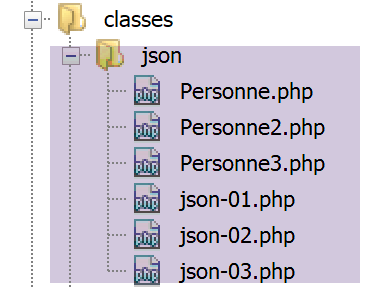
We will use the following [Personne] class:
<?php

class Personne {
  // attributes
  private $nom;
  private $prénom;
  private $âge;
  private $enfants;

  // setter global
  public function setFromArray(array $arrayOfAttributes): Personne {
    // initialization of certain class attributes
    foreach ($arrayOfAttributes as $attribute => $value) {
      $this->$attribute = $value;
    }
    // object is returned
    return $this;
  }

  // getters
  public function getNom() {
    return $this->nom;
  }

  public function getPrénom() {
    return $this->prénom;
  }

  public function getÂge() {
    return $this->âge;
  }

  public function getEnfants() {
    return $this->enfants;
  }

  // __toString
  public function __toString(): string {
    // we identify the object
    var_dump($this);
    // retrieve its attributes
    $attributes = \get_object_vars($this);
    var_dump($attributes);
    // render the jSON attribute string
    return \json_encode($attributes, JSON_UNESCAPED_UNICODE);
  }

}
Comments
- lines 5–8: the four attributes of the class;
- lines 20–35: the getters that allow you to retrieve the values of these attributes;
- lines 11–18: a global setter that initializes the attributes from an associative array [$arrayOfAttributes] with keys identical to the class attributes;
- lines 38–46: the [__toString] method of the class;
- line 42: the function PHP [get_object_vars] retrieves the values of the class attributes in the form of an associative array [‘last_name’=>’last_name1’, ‘first_name’=>’first_name1’, ‘age’=>’age1’, ‘children’=>[]];
- line 45: the string jSON is returned from this array of attributes;
Let’s examine the script [json-01.php], which uses the class [Personne]:
<?php

// person class
require "Personne.php";

// father instantiation
$père = new Personne();
// father initialization
$père->setFromArray([
  "nom" => "Bertholomé",
  "prénom" => "Dieudonné",
  "âge" => 58
]);
// instantiation and initialization child1
$enfant1 = (new Personne())->setFromArray([
  "nom" => "Bertholomé",
  "prénom" => "Sylvain",
  "âge" => 17
  ]);
// instantiation and initialization child2
$enfant2 = (new Personne())->setFromArray([
  "nom" => "Bertholomé",
  "prénom" => "Géraldine",
  "âge" => 12
  ]);
// father's children initialization
$père->setFromArray([
  "enfants" => [$enfant1, $enfant2]
]);

// display father elements
$enfant1=($père->getEnfants())[0];
$enfant2=($père->getEnfants())[1];
print "------------------------enfant1\n";
print "enfant1=$enfant1\n";
print "------------------------enfant2\n";
print "enfant2=$enfant2\n";
print "------------------------père\n";
print "père=$père\n";
Comments
- lines 6-13: we initialize a [Personne] object with the [$père] method, which allows us toinitialize a [Personne] object with an array whose keys match the attributes of the [Personne] class;
- lines 14–19: an object [Personne] [$enfant1] is initialized in the same way;
- lines 21–25: an object [Personne] [$enfant2] is initialized;
- lines 27–29: the [$père→enfants] attribute is initialized with an array of the two children;
- lines 32–33: assign the two children to the parent;
- line 35: the [print] operation attempts to convert the [$enfant1] object into a string. To do this, it uses the [__toString] method of the object. We therefore expect to see the object’s string jSON;
- lines 38–39: we do the same with the parent;
The results are as follows:
------------------------enfant1
object(Personne)#2 (4) {
  ["nom":"Personne":private]=>
  string(11) "Bertholomé"
  ["prénom":"Personne":private]=>
  string(7) "Sylvain"
  ["âge":"Personne":private]=>
  int(17)
  ["enfants":"Personne":private]=>
  NULL
}
array(4) {
  ["nom"]=>
  string(11) "Bertholomé"
  ["prénom"]=>
  string(7) "Sylvain"
  ["âge"]=>
  int(17)
  ["enfants"]=>
  NULL
}
enfant1={"nom":"Bertholomé","prénom":"Sylvain","âge":17,"enfants":null}
------------------------enfant2
object(Personne)#3 (4) {
  ["nom":"Personne":private]=>
  string(11) "Bertholomé"
  ["prénom":"Personne":private]=>
  string(10) "Géraldine"
  ["âge":"Personne":private]=>
  int(12)
  ["enfants":"Personne":private]=>
  NULL
}
array(4) {
  ["nom"]=>
  string(11) "Bertholomé"
  ["prénom"]=>
  string(10) "Géraldine"
  ["âge"]=>
  int(12)
  ["enfants"]=>
  NULL
}
enfant2={"nom":"Bertholomé","prénom":"Géraldine","âge":12,"enfants":null}
------------------------père
object(Personne)#1 (4) {
  ["nom":"Personne":private]=>
  string(11) "Bertholomé"
  ["prénom":"Personne":private]=>
  string(10) "Dieudonné"
  ["âge":"Personne":private]=>
  int(58)
  ["enfants":"Personne":private]=>
  array(2) {
    [0]=>
    object(Personne)#2 (4) {
      ["nom":"Personne":private]=>
      string(11) "Bertholomé"
      ["prénom":"Personne":private]=>
      string(7) "Sylvain"
      ["âge":"Personne":private]=>
      int(17)
      ["enfants":"Personne":private]=>
      NULL
    }
    [1]=>
    object(Personne)#3 (4) {
      ["nom":"Personne":private]=>
      string(11) "Bertholomé"
      ["prénom":"Personne":private]=>
      string(10) "Géraldine"
      ["âge":"Personne":private]=>
      int(12)
      ["enfants":"Personne":private]=>
      NULL
    }
  }
}
array(4) {
  ["nom"]=>
  string(11) "Bertholomé"
  ["prénom"]=>
  string(10) "Dieudonné"
  ["âge"]=>
  int(58)
  ["enfants"]=>
  array(2) {
    [0]=>
    object(Personne)#2 (4) {
      ["nom":"Personne":private]=>
      string(11) "Bertholomé"
      ["prénom":"Personne":private]=>
      string(7) "Sylvain"
      ["âge":"Personne":private]=>
      int(17)
      ["enfants":"Personne":private]=>
      NULL
    }
    [1]=>
    object(Personne)#3 (4) {
      ["nom":"Personne":private]=>
      string(11) "Bertholomé"
      ["prénom":"Personne":private]=>
      string(10) "Géraldine"
      ["âge":"Personne":private]=>
      int(12)
      ["enfants":"Personne":private]=>
      NULL
    }
  }
}
père={"nom":"Bertholomé","prénom":"Dieudonné","âge":58,"enfants":[{},{}]}
Comments
- lines 2-11: the object [$enfant1];
- lines 12-21: the array of attributes for the object [$enfant1]. We have them all;
- line 22: we have the string jSON from the object [$enfant1];
- lines 23–44: same for the object [$enfant2];
- lines 45–112: for the parent, it’s a little different since its attribute [enfants] is not NULL as it was for the children;
- line 112: we see that in the father’s string jSON, the children are missing;
- lines 79–111: we see that in the father’s attribute table, child 1 (lines 89–98) has remained an object, as has child 2 (lines 99–110). In short, the expression [\get_object_vars($this)], where [$this] represents the father, is not recursive: if an attribute of the class [Personne] is itself an object, the expression [\get_object_vars($this)] does not attempt to retrieve its attribute array;
We can improve this. We modify the class [Personne] into the following class [Personne2]:
<?php

class Personne2 {
  // attributes
  private $nom;
  private $prénom;
  private $âge;
  private $enfants;

  // setter global
  public function setFromArray(array $arrayOfAttributes): Personne2 {
    …
    // object is returned
    return $this;
  }

  // getters
  public function getNom() {
    return $this->nom;
  }

  …

  // __toString
  public function __toString(): string {
    // retrieve the object's attributes
    $attributes = $this->getAttributes($this);
    $enfants = $attributes["enfants"];
    if ($enfants != NULL) {
      $attributes["enfants"] = [$enfants[0]->getAttributes(), $enfants[1]->getAttributes()];
    }
    // render the JSON attribute string
    return \json_encode($attributes, JSON_UNESCAPED_UNICODE);
  }

  public function getAttributes(): array {
    return \get_object_vars($this);
  }

}
Comments
- lines 36–38: the [getAttributes] function returns the array of attributes for the object that calls it;
- lines 25–34: the [__toString] function;
- line 27: the attributes of class [Personne] are retrieved into array [$attributes];
- line 28: based on the previous example, we know that [$attributes["enfants"]] is an array of two objects of type [Personne];
- lines 29–31: the two objects are replaced by their attribute array;
- line 33: all that remains is to encode the constructed array of attributes as jSON;
The [json-02.php] script uses the [Personne2] class as follows:
<?php

// person2 class
require "Personne2.php";

// father instantiation
$père = new Personne2();
// initialization
$père->setFromArray([
  "nom" => "Bertholomé",
  "prénom" => "Dieudonné",
  "âge" => 58
]);
// instantiation and initialization child1
$enfant1 = (new Personne2())->setFromArray([
  "nom" => "Bertholomé",
  "prénom" => "Sylvain",
  "âge" => 17
  ]);
// instantiation and initialization child2
$enfant2 = (new Personne2())->setFromArray([
  "nom" => "Bertholomé",
  "prénom" => "Géraldine",
  "âge" => 12
  ]);
// father's children initialization
$père->setFromArray([
  "enfants" => [$enfant1, $enfant2]
]);

// father display
print "------------------------père\n";
print "père=$père\n";
The script [json-02.php] is identical to the script [json-01.php], except that the class [Personne2] has replaced the class [Personne].
The results of the execution are as follows:
This time, we successfully obtained the children along with the father.
The previous solution is unsatisfactory because the children may have children of their own. We then encounter the previous problem.
The [Personne3] class solves this problem as follows:
<?php

class Personne3 {
  // attributes
  private $nom;
  private $prénom;
  private $âge;
  private $enfants;

  // setter global
  public function setFromArray(array $arrayOfAttributes): Personne3 {
    …
  }

  // getters
  …

  // __toString
  public function __toString(): string {
    // render the JSON attribute string
    $attributes = [];
    $this->getRecursiveAttributes($attributes, $this, []);
    // string JSON of attributes
    return \json_encode($attributes, JSON_UNESCAPED_UNICODE);
  }

  public function getAttributes(): array {
    return \get_object_vars($this);
  }

  private function getRecursiveAttributes(array &$attributes, $value, $keys): void {
    // value analysis [$value]
    // $keys is an array [key1, key2, .., keyn]
    // $value=$attributes[key1][key2]….[keyn]
    // if [$value] is an object, we use its method [getAttributes]
    if (\is_object($value)) {
      // object attributes [$value]
      $objectAttributes = $value->getAttributes();
      // what do we do with the result?
      if ($keys) {
        // in [$attributes], we replace $value with the array of its attributes
        // element $attributes[key1][key2]...[keyn] must be constructed
        // where $keys is the array [key1, key2, .., keyn]
        // we take the table reference [$attributes]
        $attribute = &$attributes;
        // scan the key table
        foreach ($keys as $key) {
          // we take the reference of the
          $attribute = &$attribute[$key];
        }
        // here $attribut and $attributes[key1][key2]...[key(n)] are identical
        // they share the same memory location
        // object [$value] is replaced by its array of attributes;
        // write $attributes[key1][key2]...[keyn]=$objectAttributes
        // which is equivalent to $attribute = $objectAttributes
        $attribute = $objectAttributes;
      } else {
        // no keys - we're just beginning to explore the object
        // $objectAttributes represents the 1st level attributes of the class
        $attributes += $objectAttributes;
      }
      // maybe in [$objectAttributes] there are still some objects
      // explore [$objectAttributes] attributes
      $this->getRecursiveAttributes($attributes, $objectAttributes, $keys);
    } else {
      if (\is_array($value)) {
        // we have a table - we analyze each of its elements
        foreach ($value as $key => $élément) {
          // add the current key to the $keys array
          \array_push($keys, $key);
          // we analyze $élément
          $this->getRecursiveAttributes($attributes, $élément, $keys);
          // remove the key just analyzed from the $keys array
          \array_pop($keys);
        }
      }
    }
  }
Comments
- lines 21–22: this time, the method [__toString] retrieves the attributes of its class and requires this to be done recursively: if an attribute is an object or an array of objects, then each object must be replaced by its array of attributes in the class’s final array of attributes;
- lines 31-78: the function [getRecursiveAttributes] performs this task. We have commented out its code. Writing a recursive function is often complex. That is the case here. The reader will not miss anything if they do not understand it. There are libraries that perform this task. The recursive call occurs on lines 64 and 72;
- the advantage of this code is that it was not written solely for the [Personne3] class. It applies to any class with attributes whose values are different object types, as long as the classes used by the main class also have the [getAttributes] method from lines 27–29
The script [json-03.php] uses the class [Personne3] as follows:
<?php

// person3 class
require "Personne3.php";

// father instantiation
$père = new Personne3();
// initialization
$père->setFromArray([
  "nom" => "Bertholomé",
  "prénom" => "Dieudonné",
  "âge" => 58
]);
// instantiation and initialization child1
$enfant1 = (new Personne3())->setFromArray([
  "nom" => "Bertholomé",
  "prénom" => "Sylvain",
  "âge" => 27
  ]);
// instantiation and initialization child2
$enfant2 = (new Personne3())->setFromArray([
  "nom" => "Bertholomé",
  "prénom" => "Géraldine",
  "âge" => 12
  ]);
// father's children initialization
$père->setFromArray([
  "enfants" => [$enfant1, $enfant2]
]);
// instantiation and initialization child11
$enfant11 = (new Personne3())->setFromArray([
  "nom" => "Bertholomé",
  "prénom" => "Gaëtan",
  "âge" => 2
  ]);
// instantiation and initialization child12
$enfant12 = (new Personne3())->setFromArray([
  "nom" => "Bertholomé",
  "prénom" => "Mathilde",
  "âge" => 1
  ]);
// initialization children of child1
$enfant1->setFromArray([
  "enfants" => [$enfant11, $enfant12]
]);
// father display
print "------------------------père\n";
print "père=$père\n";
- lines 30-45: we assign two children to [$enfant1];
The results of the execution are as follows:
If we format this result, we get the following:
père={
    "nom": "Bertholomé",
    "prénom": "Dieudonné",
    "âge": 58,
    "enfants": [
        {
            "nom": "Bertholomé",
            "prénom": "Sylvain",
            "âge": 27,
            "enfants": [
                {
                    "nom": "Bertholomé",
                    "prénom": "Gaëtan",
                    "âge": 2,
                    "enfants": null
                },
                {
                    "nom": "Bertholomé",
                    "prénom": "Mathilde",
                    "âge": 1,
                    "enfants": null
                }
            ]
        },
        {
            "nom": "Bertholomé",
            "prénom": "Géraldine",
            "âge": 12,
            "enfants": null
        }
    ]
}
We have successfully retrieved the string jSON from all [Personne] objects that make up the parent.