1. Introduction to the NUXT.JS framework
The PDF of this document is available |HERE|.
The examples in this document are available |HERE|.
This document is part of a series of four articles:
- |Introduction to ECMASCRIPT 6 through examples| ;
- |Introduction to the VUE.JS framework through examples|;
- |Introduction to the NUXT.JS framework through examples|. This is the current document;
These are all documents for beginners. The articles follow a logical sequence but are loosely connected:
- document [1] introduces the PHP 7 language. Readers interested only in PHP and not in the JavaScript covered in the following articles should stop here;
- Documents [2–4] aim to build a JavaScript client for the tax calculation server developed in document [1];
- The JavaScript frameworks [vue.js] and [nuxt.js] in Articles 3 and 4 require knowledge of the latest versions of ECMAScript, specifically version 6. Document [2] is therefore intended for those unfamiliar with this version of JavaScript. It refers to the tax calculation server built in document [1]. Readers of [2] will therefore sometimes need to refer back to document [1];
- once ECMASCRIPT 6 has been mastered, we can move on to the VUE.JS framework, which allows for the creation of JavaScript clients running in a browser in SPA (Single Page Application) mode. This is document [3]. It refers both to the tax calculation server built in document [1] and to the standalone JavaScript client code built in [2]. Readers of [3] will therefore sometimes need to refer to documents [1] and [2];
- Once you have mastered VUE.JS, you can move on to the NUXT.JS framework, which allows you to build JavaScript clients that run in a browser in SSR (Server Side Rendered) mode. It refers to the tax calculation server built in document [1], the standalone JavaScript client code built in [2], and the [vue.js] application developed in document [3]. Readers of [4] will therefore occasionally need to refer to documents [1], [2], and [3];
This document continues the work done in document [3] using the Vue.js framework.
This section focuses on the following architecture:
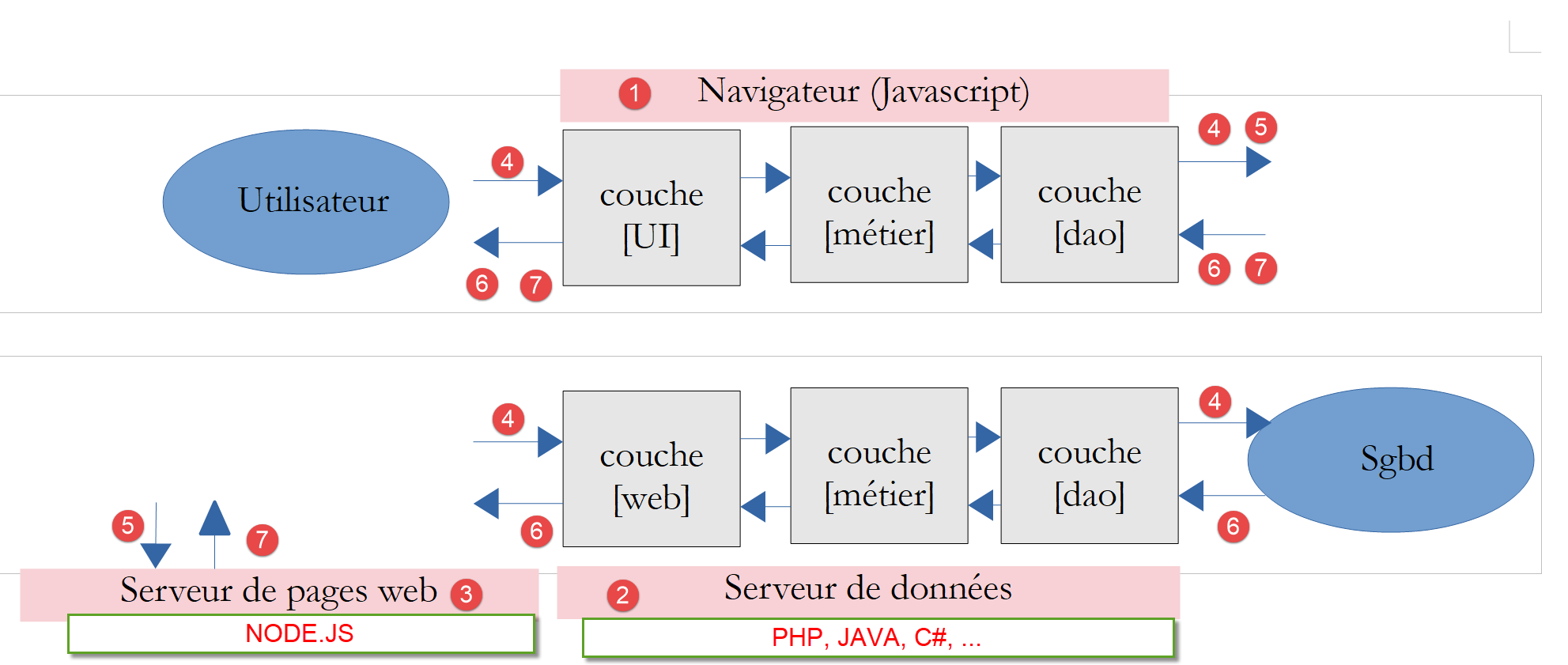
- In [1], a web browser displays web pages [5, 7] from a server [3] intended for a user. These pages contain JavaScript implementing a client for a web data service [2] as well as a client for a web page fragment server [3];
- In [2], the web server acts as a data server. It can be written in any programming language. It does not generate web pages in the traditional sense (HTML, CSS, JavaScript), except perhaps the first time. However, that first page can be retrieved from a traditional web server [3] (not a data server). The JavaScript on the initial page will then generate the application’s various web pages by retrieving the data [4] to be displayed from the web server, which acts as a data server [2]. It can also retrieve web page fragments [5] to format this data from the web page server [3];
- in [4], the user initiates an action;
- in [6,7]: they receive data formatted by a web page fragment;
The [nuxt.js] framework |https://fr.nuxtjs.org/| will allow us to implement the following workflow:
- The application’s first page is served by the [node.js] server [3]. Additionally, the application’s other pages are also hosted on this same server. They are served when the user manually types their URL into the browser. These pages embed a [vue.js] application (approximately);
- once the first page has loaded in the browser, the application behaves like a standard [Vue.js] application. In our diagram above, it will then communicate with the data server [2];
Ultimately, the application behaves like a [Vue.js] application except for the first page and when the user manually enters URLs. In these cases, the page is retrieved from the server [3]. When a search engine requests the various pages of the application, it receives the pages from the server [3]. These pages may have been optimized for SEO (Search Engine Optimization). In a [Vue.js] application, the search engine receives a page with little SEO value. For example, in the client application for the document tax calculation server [3], the page received by the browser when the application started was as follows:
<!DOCTYPE html>
<html lang="en">
  <head>
    <meta charset="utf-8">
    <meta http-equiv="X-UA-Compatible" content="IE=edge">
    <meta name="viewport" content="width=device-width,initial-scale=1.0">
    <link rel="icon" href="/client-vuejs-impot/favicon.ico">
    <title>vuejs</title>
  <link href="/client-vuejs-impot/app.js" rel="preload" as="script"></head>
  <body>
    <noscript>
      <strong>We're sorry but vuejs doesn't work properly without JavaScript enabled. Please enable it to continue.</strong>
    </noscript>
    <div id="app"></div>
    <!-- built files will be auto injected -->
  <script type="text/javascript" src="/client-vuejs-impot/app.js"></script></body>
</html>
This is the only page loaded by the browser. All other pages in the application are dynamically generated by JavaScript without the browser’s assistance. Some search engines are satisfied with this page. Others go further by executing the JavaScript contained in the page (line 9 above). Another page is then obtained. This page may contain an asynchronous operation to fetch the data that the page will display. In this case, search engines do not wait. We are then left with an incomplete page. You may recall that this is the case with our [Vue.js] client on the tax calculation server: asynchronously, while the first page is loading, it initializes a JSON session with the tax calculation server. In this specific case, this does not affect the page retrieved by the search engine. For other applications, this could be detrimental in terms of SEO.
With [nuxt.js], we can serve a more meaningful page to the search engine for each page of the application.
The scripts in this document are commented, and their console output is reproduced. Additional explanations are sometimes provided. The document requires active reading: to understand a script, you must read its code, comments, and execution results.
The examples in this document are available |here|.
The PHP 7 server application can be tested |here|.
Serge Tahé, December 2019