10. Example [nuxt-07]: client and server contexts
10.1. Overview
The [nuxt-07] example is designed to explore the [context] object from both the server-side and client-side perspectives. It is important to remember that these two components of the [nuxt] application are separate: they share nothing except:
- what the server chooses to send to the client (in the HTTP response and the page sent);
- what the client chooses to send to the server (in its HTTP request);
So, as we will see, even if the objects handled by the server and those handled by the client have the same name, they are not identical: they may sometimes be copies of each other but never have the same reference. Modifying a client object has no effect on the object of the same name on the server side, and vice versa.
The example [nuxt-07] is initially obtained by copying the example [nuxt-01]:
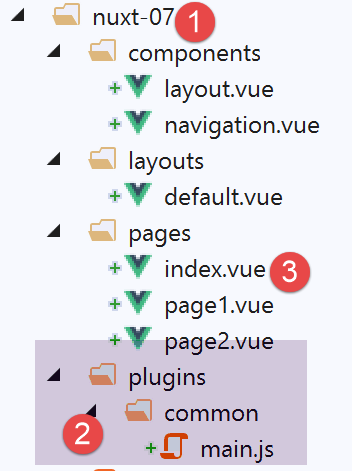
- in [2], we will add a plugin common to both the client and the server;
- in [3], we will modify the [index] page slightly;
10.2. The [common / main.js] plugin
The [common / main.js] plugin is executed by both the client and the server: this is due to the following [nuxt.config.js] configuration:
/*
   ** Plugins to load before mounting the App
   */
plugins: [{ src: '~/plugins/common/main.js' }],
- line 4: the absence of the [mode] property means that the [~/plugins/common/main.js] plugin will be executed by both the client and the server: the server first, then the client;
This plugin will be the following:
/* eslint-disable no-undef */
/* eslint-disable no-console */
export default function(...args) {
  // who executes this code?
  console.log('[main server], process.server=', process.server, 'process.client=', process.client)
  const who = process.server ? 'server' : 'client'
  const main = '[main ' + who + ']'
  // number of arguments
  console.log(main + ', il y a', args.length, 'arguments')

  // 1st argument
  const context = args[0]
  // key context
  dumpkeys(main + ', context', context)
  // the application
  dumpkeys(main + ', context.app', context.app)
  // the road
  dumpkeys(main + ', context.route', context.route)
  console.log(main + ', context.route=', context.route)
  // the router
  dumpkeys(main + ', context.app.router', context.app.router)
  // on router.options.routes
  dumpkeys(main + ', context.app.router.options.routes', context.app.router.options.routes)
  console.log(main + ', context.app.router.options.routes=', context.app.router.options.routes)

  // 2nd argument
  const inject = args[1]
  console.log('inject=', typeof inject)
}

function dumpkeys(message, object) {
  // list of [object] keys
  const ligne = 'Liste des clés [' + message + ']'
  console.log(ligne)
  // kEY LIST
  if (object) {
    console.log(Object.keys(object))
  }
}
- lines 31–39: the function [dumpkeys] lists the properties of the object passed as the second parameter. This list is preceded by the message passed as the first parameter;
- line 3: we want to know how many arguments the function receives. To do this, we use the notation [...args], which will place the actual parameters of the function into the array [args]. We will find that there are two arguments;
- line 5: we display who is executing the code, the server or the client;
- line 6: the code executor, client or server;
- line 7: a string constant used in the logs;
- line 12: we will see that the first argument received by the plugin is the executor’s context;
- line 14: list of keys for the [context] object;
- line 16: we will see that the object [context] has a property [app] representing the application [nuxt];
- line 18: we will find that the object [context] has a property [route] that represents the router’s current route;
- line 21: we will find that the object [app] has a property [router] that represents the router;
- line 23: the object [router.options.routes] represents the application’s various routes;
- lines 27–28: the second argument of the plugin is the function [inject] that we used in the example [nuxt-06];
10.3. The plugin executed by the server
Upon execution, the server displays the following:
- lines 11–12: we have already used the properties [base] and [env], whose values come from the file [nuxt.config.js];
- line 8: the property [app] refers to the application [nuxt];
- line 18: the property [route] refers to the router’s current route, i.e., the page the server will send;
- line 13: the client browser’s request HTTP;
- line 14: the server’s response HTTP;
The list of properties for [context.app] is as follows:
- line 3: the [router] property gives us access to the application router. This is important in [nuxt] since the router is defined by [nuxt] itself and not by the developer. This property provides the developer with access to modify the router;
The list of properties for [context.route] is as follows:
The route [context.route] at server startup is as follows:
- line 2: we see that the next page on the server is [index] and that its path is [/] (line 10);
- line 22: the [meta] property allows you to add properties to routes;
The properties of the server’s [context.app.router] router are as follows:
The various routes of the application are found in the [context.app.router.options.routes] property:
Finally, the second argument:
10.4. The page [index] on the server
The page [index] is as follows:
<!-- main page -->
<template>
  <Layout :left="true" :right="true">
    <!-- navigation -->
    <Navigation slot="left" />
    <!-- message-->
    <b-alert slot="right" show variant="warning">
      Home
    </b-alert>
  </Layout>
</template>

<script>
/* eslint-disable no-undef */
/* eslint-disable no-console */
/* eslint-disable nuxt/no-env-in-hooks */

import Navigation from '@/components/navigation'
import Layout from '@/components/layout'

export default {
  name: 'Home',
  // components used
  components: {
    Layout,
    Navigation
  },
  data() {
    return {
      who: process.server ? 'server' : 'client'
    }
  },

  // life cycle
  beforeCreate() {
    // client and server
    console.log('[home beforeCreate]')
  },
  created() {
    // client and server
    console.log('[home ' + this.who + ' created]')
    this.dumpkeys('[home ' + this.who + ' created], this.$nuxt', this.$nuxt)
    this.dumpkeys('[home ' + this.who + ' created], this.$nuxt.context', this.$nuxt.context)
  },
  beforeMount() {
    // customer only
    console.log('[home ' + this.who + ' beforeMount]')
  },
  mounted() {
    // customer only
    console.log('[home ' + this.who + ' mounted]')
  },
  methods: {
    dumpkeys(message, object) {
      // list of [object] keys
      const ligne = 'Liste des clés [' + message + ']'
      console.log(ligne)
      if (object) {
        console.log(Object.keys(object))
      }
    }
  }
}
</script>
- line 43: we have already seen that the context of a page can be found in [this.$nuxt.context];
- line 42: we also display the properties of the [this.$nuxt] object;
When executed by the server, this page generates the following logs:
The server context properties on page [index] are as follows:
These are the same properties as in the plugin's [context] object.
10.5. The plugin executed by the client
Once the server has sent the [index] page to the client browser, the client scripts take over. The [main.js] plugin will then be executed. These logs are as follows:
We find properties similar to those found on the server side, with some properties missing and others appearing. Thus, in line 4, we do not find the properties [req, res], which were the client browser’s requests HTTP and the server’s response HTTP.
10.6. The client’s [index] page
The client’s [index] page generates the following logs:
- line 4: the properties of the [this.$nuxt] object. It is a rich object with 51 properties;
- line 6: the properties of the [this.$nuxt.context] object. We find the same properties as in the [context] object from the client plugin;