5. Example [nuxt-02]: server and client pages
In this project, we demonstrate:
- that the page built by the client may look different from the one received from the server. This results in a rapid page change that the user notices, which is detrimental to the application’s usability. This is therefore a option to avoid;
- a solution for the client page to recreate the same page as the one sent by the server;
The [nuxt-02] project is initially obtained by cloning the [nuxt-01] project.
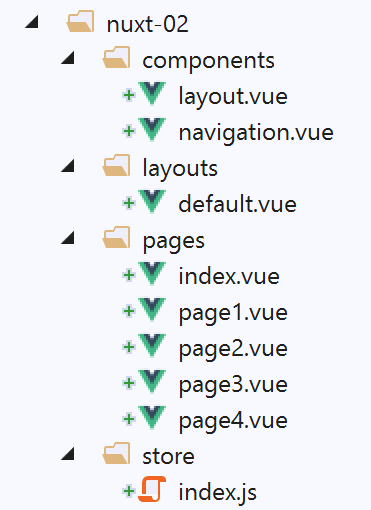
A folder named [store] is added to the project, along with two new pages. We will return to this later.
5.1. The [index] page
5.1.1. The page code
The code for the [index] page becomes the following:
<!-- main page -->
<template>
  <Layout :left="true" :right="true">
    <!-- navigation -->
    <Navigation slot="left" />
    <!-- message-->
    <b-alert slot="right" show variant="warning"> Home - value= {{ value }} </b-alert>
  </Layout>
</template>

<script>
/* eslint-disable no-undef */
/* eslint-disable no-console */
/* eslint-disable nuxt/no-env-in-hooks */

import Navigation from '@/components/navigation'
import Layout from '@/components/layout'

export default {
  name: 'Home',
  // components used
  components: {
    Layout,
    Navigation
  },
  data() {
    return {
      value: 0
    }
  },
  // life cycle
  beforeCreate() {
    // client and server
    console.log('[home beforeCreate]')
  },
  created() {
    // client and server
    console.log('[home created]')
    // server only
    if (process.server) {
      this.value = 10
    }
    // client and server
    console.log('value=', this.value)
  },
  beforeMount() {
    // customer only
    console.log('[home beforeMount]')
  },
  mounted() {
    // customer only
    console.log('[home mounted]')
  }
}
</script>
Comments
- line 7: the [index] page will display the value of its [value] property (line 28);
- Lines 36–45: It is important to remember here that the [created] function is executed on both the server and the client. Lines 40–42: The server will set the value of the [value] property to 10. The client, however, does not modify this value. We simply want to know if this value is retained by the client. We will find out that it is not;
5.1.2. Execution
We modify the [/nuxt.config.js] file to execute the [nuxt-02] project:
...
  // source code directory
  srcDir: 'nuxt-02',
  // router
  router: {
    // application URL root
    base: '/nuxt-02/'
  },
  // server
  server: {
    // service port, default 3000
    port: 81,
    // network addresses listened to, default localhost: 127.0.0.1
    // 0.0.0.0 = all the machine's network addresses
    host: 'localhost'
  }
...
We run the [1] project:
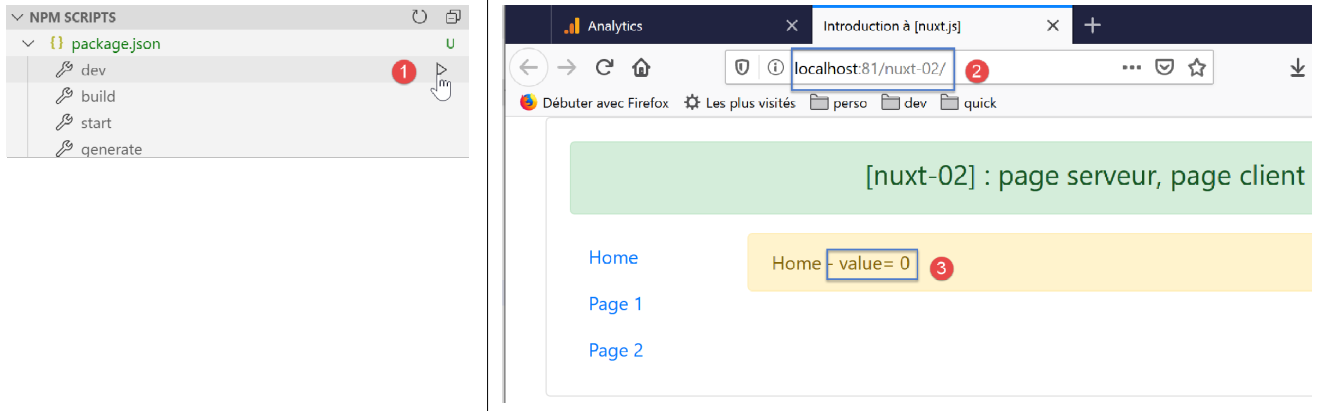
The page [index] is then displayed as [2-3]. It displays the value [10] for a few moments, then displays the value [0]. What happened?
Step 1
The server runs first. It executes the code on the [index] page:
export default {
  name: 'Home',
  // components used
  components: {
    Layout,
    Navigation
  },
  data() {
    return {
      value: 0
    }
  },
  // life cycle
  beforeCreate() {
    // client and server
    console.log('[home beforeCreate]')
  },
  created() {
    // client and server
    console.log('[home created]')
    // server only
    if (process.server) {
      this.value = 10
    }
    // client and server
    console.log('value=', this.value)
  },
  beforeMount() {
    // customer only
    console.log('[home beforeMount]')
  },
  mounted() {
    // customer only
    console.log('[home mounted]')
  }
}
- Because of line 23, the property [value] on line 10 takes the value 10;
This can be verified by looking at the source code of the page received by the browser (option [code source] in the browser):
<!doctype html>
<html data-n-head-ssr>
<head>
  <title>Introduction à [nuxt.js]</title>
  <meta data-n-head="ssr" charset="utf-8">
  <meta data-n-head="ssr" name="viewport" content="width=device-width, initial-scale=1">
  <meta data-n-head="ssr" data-hid="description" name="description" content="ssr routing loading asyncdata middleware plugins store">
  <link data-n-head="ssr" rel="icon" type="image/x-icon" href="/favicon.ico">
  <base href="/nuxt-02/">
  <link rel="preload" href="/nuxt-02/_nuxt/runtime.js" as="script">
  <link rel="preload" href="/nuxt-02/_nuxt/commons.app.js" as="script">
  <link rel="preload" href="/nuxt-02/_nuxt/vendors.app.js" as="script">
  <link rel="preload" href="/nuxt-02/_nuxt/app.js" as="script">
  ....
</head>
<body>
  <div data-server-rendered="true" id="__nuxt">
    <div id="__layout">
      <div class="container">
        <div class="card">
          <div class="card-body">
            <div role="alert" aria-live="polite" aria-atomic="true" align="center" class="alert alert-success">
              <h4>[nuxt-02] : page serveur, page client</h4>
            </div> <div>
              <div class="row">
                <div class="col-2">
                  <ul class="nav flex-column">
                    <li class="nav-item">
                      <a href="/nuxt-02/" target="_self" class="nav-link active nuxt-link-active">
                        Home
                      </a>
                    </li>
                    <li class="nav-item">
                      <a href="/nuxt-02/page1" target="_self" class="nav-link">
                        Page 1
                      </a>
                    </li>
                    <li class="nav-item">
                      <a href="/nuxt-02/page2" target="_self" class="nav-link">
                        Page 2
                      </a>
                    </li>
                  </ul>
                </div> <div class="col-10">
                  <div role="alert" aria-live="polite" aria-atomic="true" class="alert alert-warning">
                    Home - value= 10
                  </div>
                </div>
              </div>
            </div>
          </div>
        </div>
      </div>
    </div>
  </div>
  <script>window.__NUXT__ = ....;</script>
  <script src="/nuxt-02/_nuxt/runtime.js" defer></script>
  <script src="/nuxt-02/_nuxt/commons.app.js" defer></script>
  <script src="/nuxt-02/_nuxt/vendors.app.js" defer></script>
  <script src="/nuxt-02/_nuxt/app.js" defer></script>
</body>
</html>
- line 46: in the received page, [value] had the value 10;
Step 2
We know that after the page is received, the scripts on lines 57–60 take over and alter the behavior of the received page, or even the information displayed, as shown here. These scripts form the client, which also executes the code of the [index] page—the same code as the server:
export default {
  name: 'Home',
  // components used
  components: {
    Layout,
    Navigation
  },
  data() {
    return {
      value: 0
    }
  },
  // life cycle
  beforeCreate() {
    // client and server
    console.log('[home beforeCreate]')
  },
  created() {
    // client and server
    console.log('[home created]')
    // server only
    if (process.server) {
      this.value = 10
    }
    // client and server
    console.log('value=', this.value)
  },
  beforeMount() {
    // customer only
    console.log('[home beforeMount]')
  },
  mounted() {
    // customer only
    console.log('[home mounted]')
  }
}
- To understand what is happening, you need to understand that the [nuxt] client will not execute lines 22–24 (process.server=false);
- in a standard [vue] application, the [value] property on line 10 remains at 0. This is why, once the client has navigated to the received page, the displayed value becomes [0];
The value generated by the server [nuxt] for the property [value] served no purpose.
5.2. The page [page1]
5.2.1. The [Vuex] store
We added a folder named [store] to the [nuxt-02] project:
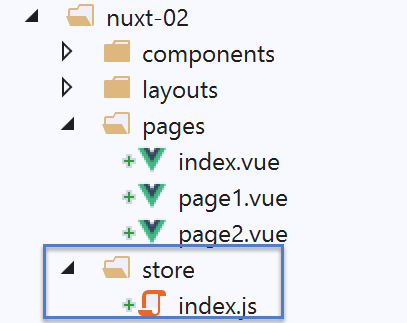
The presence of this folder causes [nuxt] to automatically implement a store named [Vuex]. The file [index.js] implements this store. Here, the file [index.js] is as follows:
export const state = () => ({
  counter: 0
})

export const mutations = {
  increment(state, inc) {
    state.counter += inc
  }
}
[nuxt] implements a store [Vuex] based on the contents of [index.js]:
- lines 1–3: definition of the store’s state [state]. This state is returned by a function. Here, the state has only one property, the counter in line 2. The exported function must be named [state];
- lines 5–9: the operations possible on the store state. These are called [mutations]. Here, the [increment] mutation increments the [counter] property by an amount of [inc]. The exported object must be named [mutations];
The [store] View implemented by [nuxt] is available in various locations. In views, it is available in the [this.$store] property.
5.2.2. The page code
Like the [index] page, the [page1] page will display a value, that of the Vuex store counter:
<!-- page 1 -->
<template>
  <Layout :left="true" :right="true">
    <!-- navigation -->
    <Navigation slot="left" />
    <!-- message-->
    <b-alert slot="right" show variant="primary"> Page 1 - value = {{ value }} </b-alert>
  </Layout>
</template>

<script>
/* eslint-disable no-console */

import Navigation from '@/components/navigation'
import Layout from '@/components/layout'

export default {
  name: 'Page1',
  // components used
  components: {
    Layout,
    Navigation
  },
  data() {
    return {
      value: 0
    }
  },
  // life cycle
  beforeCreate() {
    // client and server
    console.log('[home beforeCreate]')
  },
  created() {
    // client and server
    console.log('[home created]')
    // server only
    if (process.server) {
      this.$store.commit('increment', 25)
    }
    // client and server
    this.value = this.$store.state.counter
    console.log('value=', this.value)
  },
  beforeMount() {
    // customer only
    console.log('[home beforeMount]')
  },
  mounted() {
    // customer only
    console.log('[home mounted]')
  }
}
</script>
Comments
- lines 38–40: the server will increment the counter by 25;
- line 42: both the server and the client will display the counter value;
- line 7: the counter value is displayed;
When reading this code, two things must be understood:
- the code executed is the same for both the server and the client;
- the [this] object itself is not the same: there is a version and a [this] on the server side, and another one on the client side, [client];
We are trying to determine whether the server’s [this.$store] is the same as the client’s [this.$store]. Since the server runs first (when the application starts), this boils down to the question: Is the [store] initialized by the server transmitted to the client?
5.2.3. Execution
We run the [nuxt-02] project and manually enter [localhost:81/nuxt-02/page1] to trigger the server. As with the startup of the [index] page:
- the server executes the [page1.vue] page;
- sends the generated page to the browser. The page is displayed;
- the client-side scripts embedded in the sent page take over and execute the page [page1.vue] again;
- the displayed page is then modified;
The final result is as follows:
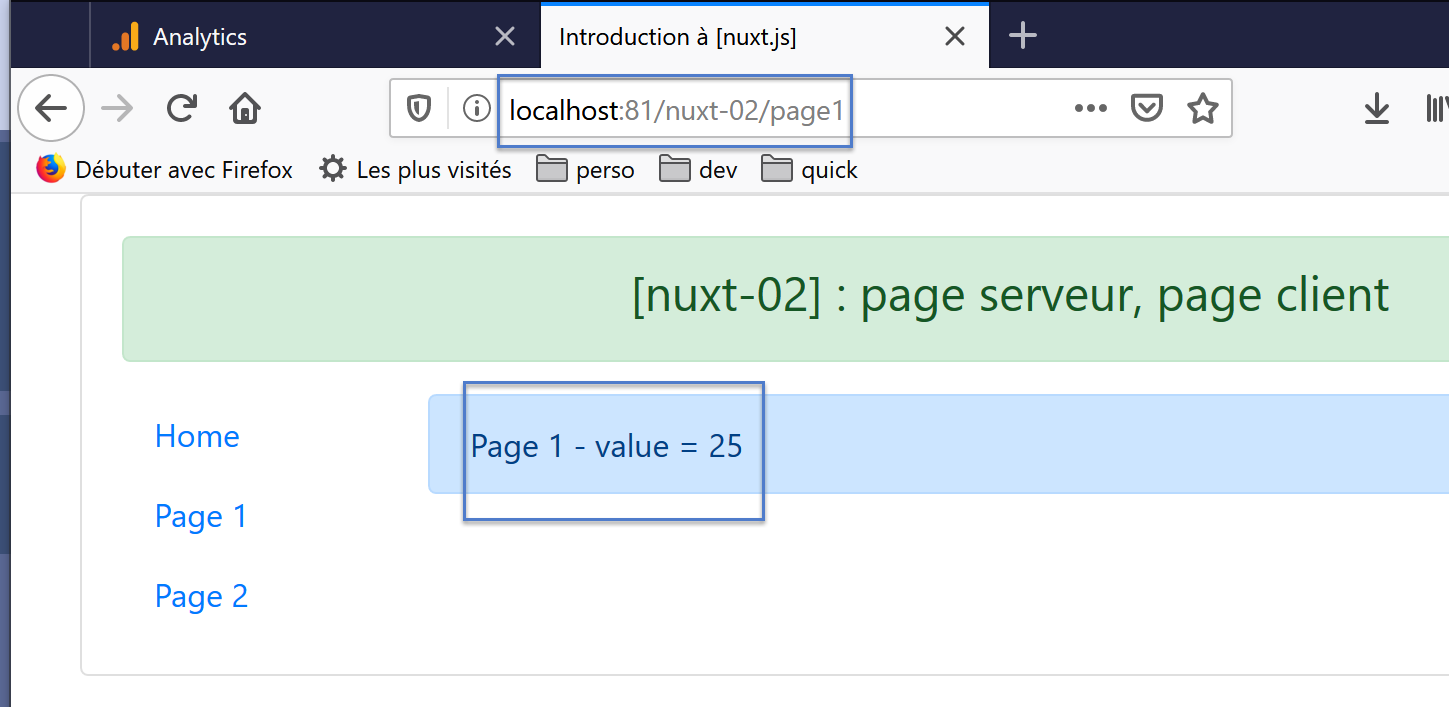
This time, the displayed value is indeed the one set by the server, and visually, the page does not "jump" due to a client-side change to the value displayed by the server. What happened this time?
The server executed the following page: [page1]:
...

<script>
/* eslint-disable no-console */

import Navigation from '@/components/navigation'
import Layout from '@/components/layout'

export default {
  name: 'Page1',
  // components used
  components: {
    Layout,
    Navigation
  },
  data() {
    return {
      value: 0
    }
  },
  // life cycle
  beforeCreate() {
    // client and server
    console.log('[page1 beforeCreate]')
  },
  created() {
    // client and server
    console.log('[page1 created]')
    // server only
    if (process.server) {
      this.$store.commit('increment', 25)
    }
    // client and server
    this.value = this.$store.state.counter
    console.log('value=', this.value)
  },
  beforeMount() {
    // customer only
    console.log('[page1 beforeMount]')
  },
  mounted() {
    // customer only
    console.log('[page1 mounted]')
  }
}
</script>
- Lines 30–32 were executed without error. This means that on the server side as well, [this.$store] refers to the store [Vuex]. Line 31 incremented the store’s counter to 25;
- once this was done, the page was sent to the client;
If we look at the page received by the client, we find the following elements:
<!doctype html>
<html data-n-head-ssr>
<head>
  <title>Introduction à [nuxt.js]</title>
  <meta data-n-head="ssr" charset="utf-8">
  <meta data-n-head="ssr" name="viewport" content="width=device-width, initial-scale=1">
  <meta data-n-head="ssr" data-hid="description" name="description" content="ssr routing loading asyncdata middleware plugins store">
  <link data-n-head="ssr" rel="icon" type="image/x-icon" href="/favicon.ico">
  <base href="/nuxt-02/">
  <link rel="preload" href="/nuxt-02/_nuxt/runtime.js" as="script">
  <link rel="preload" href="/nuxt-02/_nuxt/commons.app.js" as="script">
  <link rel="preload" href="/nuxt-02/_nuxt/vendors.app.js" as="script">
  <link rel="preload" href="/nuxt-02/_nuxt/app.js" as="script">
  ...
</head>
<body>
  <div data-server-rendered="true" id="__nuxt">
    <div id="__layout">
      <div class="container">
        <div class="card">
          <div class="card-body">
            <div role="alert" aria-live="polite" aria-atomic="true" align="center" class="alert alert-success">
              <h4>[nuxt-02] : page serveur, page client</h4>
            </div>
            <div>
              <div class="row">
                <div class="col-2">
                  <ul class="nav flex-column">
                    <li class="nav-item">
                      <a href="/nuxt-02/" target="_self" class="nav-link">
                        Home
                      </a>
                    </li>
                    <li class="nav-item">
                      <a href="/nuxt-02/page1" target="_self" class="nav-link active nuxt-link-active">
                        Page 1
                      </a>
                    </li>
                    <li class="nav-item">
                      <a href="/nuxt-02/page2" target="_self" class="nav-link">
                        Page 2
                      </a>
                    </li>
                  </ul>
                </div> <div class="col-10">
                  <div role="alert" aria-live="polite" aria-atomic="true" class="alert alert-primary">
                    Page 1 - value = 25
                  </div>
                </div>
              </div>
            </div>
          </div>
        </div>
      </div>
    </div>
  </div>
  <script>
  window.__NUXT__ = (function (a, b, c) {
      return {
        layout: "default", data: [{}], error: null, state: { counter: 25 }, serverRendered: true,
        logs: [
          { date: new Date(1574085336802), args: ["[home beforeCreate]"], type: a, level: b, tag: c },
          { date: new Date(1574085336839), args: ["[home created]"], type: a, level: b, tag: c },
          { date: new Date(1574085336869), args: ["value=", "25"], type: a, level: b, tag: c }
        ]
      }
    }("log", 2, ""));</script>
  <script src="/nuxt-02/_nuxt/runtime.js" defer></script>
  <script src="/nuxt-02/_nuxt/commons.app.js" defer></script>
  <script src="/nuxt-02/_nuxt/vendors.app.js" defer></script>
  <script src="/nuxt-02/_nuxt/app.js" defer></script>
</body>
</html>
- line 47: the value sent by the server;
- line 60: we see that the state of the [Vuex] store has been embedded in the page. This will allow the client, which will run after receiving the page, to reconstruct a new [Vuex] store with 25 as the initial value of the counter;
After receiving and displaying the page received from the server, the client takes over and in turn executes the page [page1]:
...

<script>
/* eslint-disable no-console */

import Navigation from '@/components/navigation'
import Layout from '@/components/layout'

export default {
  name: 'Page1',
  // components used
  components: {
    Layout,
    Navigation
  },
  data() {
    return {
      value: 0
    }
  },
  // life cycle
  beforeCreate() {
    // client and server
    console.log('[page1 beforeCreate]')
  },
  created() {
    // client and server
    console.log('[page1 created]')
    // server only
    if (process.server) {
      this.$store.commit('increment', 25)
    }
    // client and server
    this.value = this.$store.state.counter
    console.log('value=', this.value)
  },
  beforeMount() {
    // customer only
    console.log('[page1 beforeMount]')
  },
  mounted() {
    // customer only
    console.log('[page1 mounted]')
  }
}
</script>
- line 34: the [value] property on line 18 is in turn assigned the value 25 from the counter;
The [nuxt] store therefore allows the server to transmit information to the client during the initial page load, when the page is requested from the server. Note that once this page is obtained, the server is no longer involved, and the application functions as a standard [vue] application, in SAP mode.
5.3. The [page2] page
In the [page2] page, we demonstrate another way for:
- the server includes calculated information in the page;
- the client does not modify this information;
5.3.1. The page code
The code for page [page2] changes as follows:
<!-- page2 -->
<template>
  <Layout :left="true" :right="true">
    <!-- navigation -->
    <Navigation slot="left" />
    <!-- message -->
    <b-alert slot="right" show variant="secondary"> Page 2 - value = {{ value }} </b-alert>
  </Layout>
</template>

<script>
/* eslint-disable no-console */
/* eslint-disable nuxt/no-timing-in-fetch-data */

import Navigation from '@/components/navigation'
import Layout from '@/components/layout'

export default {
  name: 'Page2',
  // components used
  components: {
    Layout,
    Navigation
  },
  asyncData(context) {
    // who executes this code?
    console.log('asyncData, client=', process.client, 'serveur=', process.server)
    // only for the server
    if (process.server) {
      // we return a promise
      return new Promise(function(resolve, reject) {
        // this is normally an asynchronous function
        // we simulate it with a one-second wait
        setTimeout(() => {
          // this result will be included in the properties of [data]
          resolve({ value: 87 })
          // log
          console.log('asynData terminée')
        }, 1000)
      })
    }
  },
  // life cycle
  beforeCreate() {
    // client and server
    console.log('[page2 beforeCreate]')
  },
  created() {
    // client and server
    console.log('[page2 created]')
  },
  beforeMount() {
    // customer only
    console.log('[page2 beforeMount]')
  },
  mounted() {
    // customer only
    console.log('[page2 mounted]')
  }
}
</script>
- line 7: the page displays the value of a property named [value];
- the property [value] does not exist as an element of an object returned by the function [data]. Here, this function does not exist. The property [value] is dynamically created by line 36;
- line 25: the function [asyncData] is a [nuxt] function. As its name suggests, this is normally an asynchronous function. Its usual role is to fetch external data. [nuxt] ensures that the page is not sent to the client browser until the function [asyncData] has returned its asynchronous data;
- the function [asyncData] receives the context [nuxt] as a parameter. This object is very rich and provides access to a lot of information about the Nuxt application. We will explore this in the following sections;
- line 31: we implement the [asyncData] function with a [Promise] (see document |Introduction to the ECMASCRIPT 6 language through examples|). The constructor of this class accepts as a parameter an asynchronous function that:
- indicates success by returning data using the [resolve] function. The object returned by this function is automatically included in the [data] properties of the page;
- signals a failure by returning an error using the [reject] function;
- line 34: an asynchronous function is simulated using the [setTimeout] function. This function returns the [{ value: 87 }] object (line 36) after one second (line 31) using the [resolve] function, which signals a successful completion of [Promise]. The object returned by the asynchronous function is automatically included in the [data] properties of the page. And so it is this property that line 7 displays;
- line 27: we will see that the [asyncData] function is executed by the server but not by the client;
- line 29: the [value] property is initialized by the server;
Note: The object [this] is not recognized in the function [asyncData] because the object encapsulating the component [vue] has not yet been created;
5.3.2. Execution
We run the [nuxt-02] project and manually enter [localhost:81/nuxt-02/page2] to trigger the server. As with the initial launch of the [index] page:
- the server executes the page [page2.vue];
- sends the generated page to the browser. The page is displayed;
- the client-side scripts embedded in the sent page take over and execute the page [page2.vue] again;
- the displayed page is then modified;
The final result is as follows:
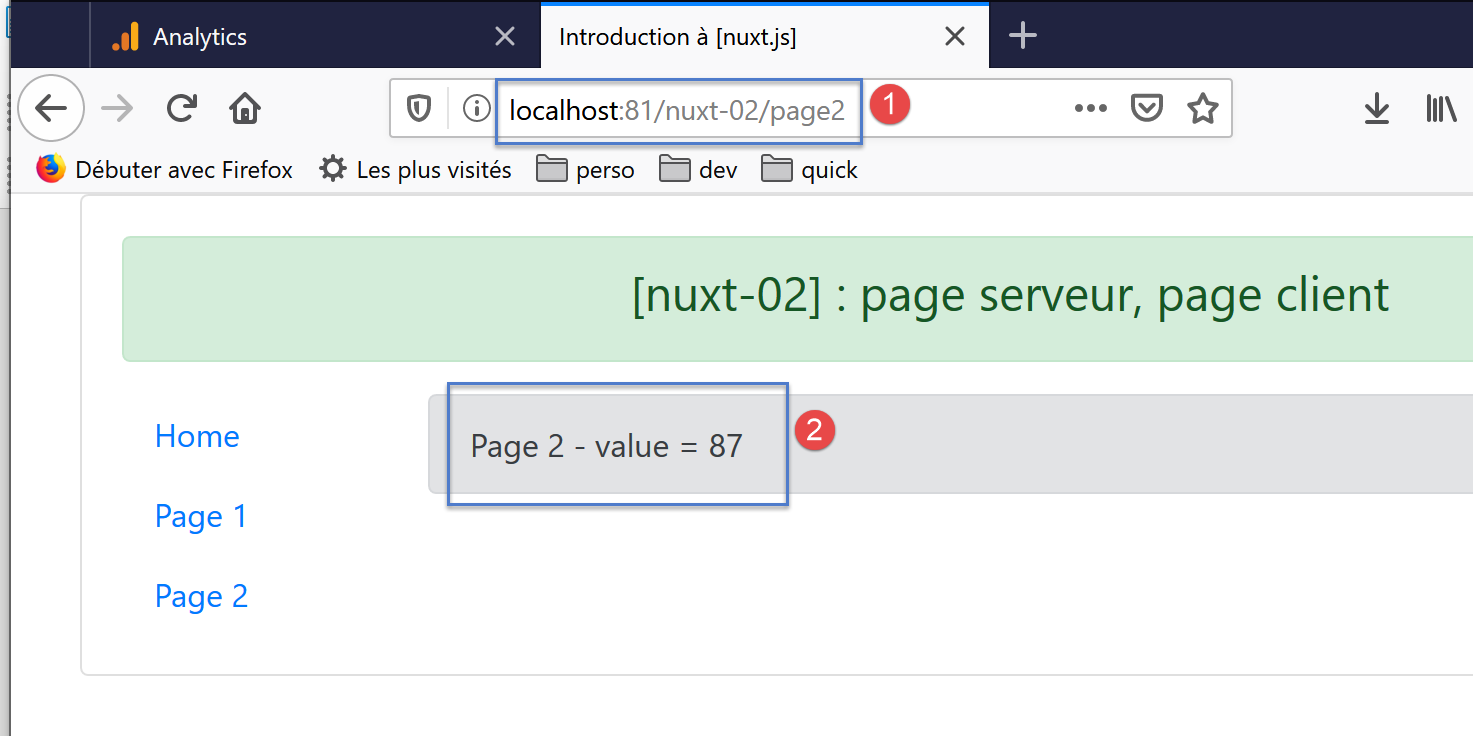
This time, the displayed value is indeed the one set by the server, and visually, the page does not "jump" due to a client-side change to the value displayed by the server. What happened this time?
The server executed the following page: [page2]:
<!-- page2 -->
<template>
  <Layout :left="true" :right="true">
    <!-- navigation -->
    <Navigation slot="left" />
    <!-- message -->
    <b-alert slot="right" show variant="secondary"> Page 2 - value = {{ value }} </b-alert>
  </Layout>
</template>

<script>
/* eslint-disable no-console */
/* eslint-disable nuxt/no-timing-in-fetch-data */

import Navigation from '@/components/navigation'
import Layout from '@/components/layout'

export default {
  name: 'Page2',
  // components used
  components: {
    Layout,
    Navigation
  },
  asyncData(context) {
    // who executes this code?
    console.log('asyncData, client=', process.client, 'serveur=', process.server)
    // only for the server
    if (process.server) {
      // we return a promise
      return new Promise(function(resolve, reject) {
        // this is normally an asynchronous function
        // we simulate it with a one-second wait
        setTimeout(() => {
          // this result will be included in the properties of [data]
          resolve({ value: 87 })
          // log
          console.log('asynData terminée')
        }, 1000)
      })
    }
  },
  // life cycle
  beforeCreate() {
    // client and server
    console.log('[page2 beforeCreate]')
  },
  created() {
    // client and server
    console.log('[page2 created]')
  },
  beforeMount() {
    // customer only
    console.log('[page2 beforeMount]')
  },
  mounted() {
    // customer only
    console.log('[page2 mounted]')
  }
}
</script>
Line 36 set the value displayed by line 7. This is what the client browser received. Specifically, it received the following page:
<!doctype html>
<html data-n-head-ssr>
<head>
  <title>Introduction à [nuxt.js]</title>
  <meta data-n-head="ssr" charset="utf-8">
  <meta data-n-head="ssr" name="viewport" content="width=device-width, initial-scale=1">
  <meta data-n-head="ssr" data-hid="description" name="description" content="ssr routing loading asyncdata middleware plugins store">
  <link data-n-head="ssr" rel="icon" type="image/x-icon" href="/favicon.ico">
  <base href="/nuxt-02/">
  <link rel="preload" href="/nuxt-02/_nuxt/runtime.js" as="script">
  <link rel="preload" href="/nuxt-02/_nuxt/commons.app.js" as="script">
  <link rel="preload" href="/nuxt-02/_nuxt/vendors.app.js" as="script">
  <link rel="preload" href="/nuxt-02/_nuxt/app.js" as="script">
  ...
</head>
<body>
  <div data-server-rendered="true" id="__nuxt">
    <div id="__layout">
      <div class="container">
        <div class="card">
          <div class="card-body">
            <div role="alert" aria-live="polite" aria-atomic="true" align="center" class="alert alert-success">
              <h4>[nuxt-02] : page serveur, page client</h4>
            </div>
            <div>
              <div class="row">
                <div class="col-2">
                  <ul class="nav flex-column">
                    <li class="nav-item">
                      <a href="/nuxt-02/" target="_self" class="nav-link">
                        Home
                      </a>
                    </li>
                    <li class="nav-item">
                      <a href="/nuxt-02/page1" target="_self" class="nav-link">
                        Page 1
                      </a>
                    </li>
                    <li class="nav-item">
                      <a href="/nuxt-02/page2" target="_self" class="nav-link active nuxt-link-active">
                        Page 2
                      </a>
                    </li>
                  </ul>
                </div>
                <div class="col-10">
                  <div role="alert" aria-live="polite" aria-atomic="true" class="alert alert-secondary">
                    Page 2 - value = 87
                  </div>
                </div>
              </div>
            </div>
          </div>
        </div>
      </div>
    </div>
  </div>
  <script>
  window.__NUXT__ = (function (a, b, c) {
      return {
        layout: "default", data: [{ value: 87 }], error: null, state: { counter: 0 }, serverRendered: true,
        logs: [
          { date: new Date(1574096608555), args: ["asyncData, client=", "false", "serveur=", "true"], type: a, level: b, tag: c },
          { date: new Date(1574096608575), args: ["[page2 beforeCreate]"], type: a, level: b, tag: c },
          { date: new Date(1574096608599), args: ["[page2 created]"], type: a, level: b, tag: c }
        ]
      }
    }("log", 2, ""));</script>
  <script src="/nuxt-02/_nuxt/runtime.js" defer></script>
  <script src="/nuxt-02/_nuxt/commons.app.js" defer></script>
  <script src="/nuxt-02/_nuxt/vendors.app.js" defer></script>
  <script src="/nuxt-02/_nuxt/app.js" defer></script>
</body>
</html>
- line 48: we see that the value in the received page is 87;
- line 61: in the server response, we see two objects: [data] and [state]:
- [state] is the state of the store [Vuex]. This was instantiated from the contents of the [store] folder of the [nuxt-02] application;
- [data] contains the properties created by the server using the [asyncData] function. We find the [value : 87] property created by the server. The client scripts will integrate this property into those of the [page2] page;
Let’s return to the code for the [page2] page:
<!-- page2 -->
<template>
  <Layout :left="true" :right="true">
    <!-- navigation -->
    <Navigation slot="left" />
    <!-- message -->
    <b-alert slot="right" show variant="secondary"> Page 2 - value = {{ value }} </b-alert>
  </Layout>
</template>

<script>
/* eslint-disable no-console */
/* eslint-disable nuxt/no-timing-in-fetch-data */

import Navigation from '@/components/navigation'
import Layout from '@/components/layout'

export default {
  name: 'Page2',
  // components used
  components: {
    Layout,
    Navigation
  },
  asyncData(context) {
    // who executes this code?
    console.log('asyncData, client=', process.client, 'serveur=', process.server)
    // only for the server
    if (process.server) {
      // we return a promise
      return new Promise(function(resolve, reject) {
        // this is normally an asynchronous function
        // we simulate it with a one-second wait
        setTimeout(() => {
          // this result will be included in the properties of [data]
          resolve({ value: 87 })
          // log
          console.log('asynData terminée')
        }, 1000)
      })
    }
  },
  // life cycle
  beforeCreate() {
    // client and server
    console.log('[page2 beforeCreate]')
  },
  created() {
    // client and server
    console.log('[page2 created]')
  },
  beforeMount() {
    // customer only
    console.log('[page2 beforeMount]')
  },
  mounted() {
    // customer only
    console.log('[page2 mounted]')
  }
}
</script>
- Line 7 uses the property [value]. However, the page does not define any property named [value]. Nevertheless, the client-side scripts automatically created this property using the [data: [{ value: 87 }]] object received from the server;
The logs also show that the function [asyncData] was not executed by the client:
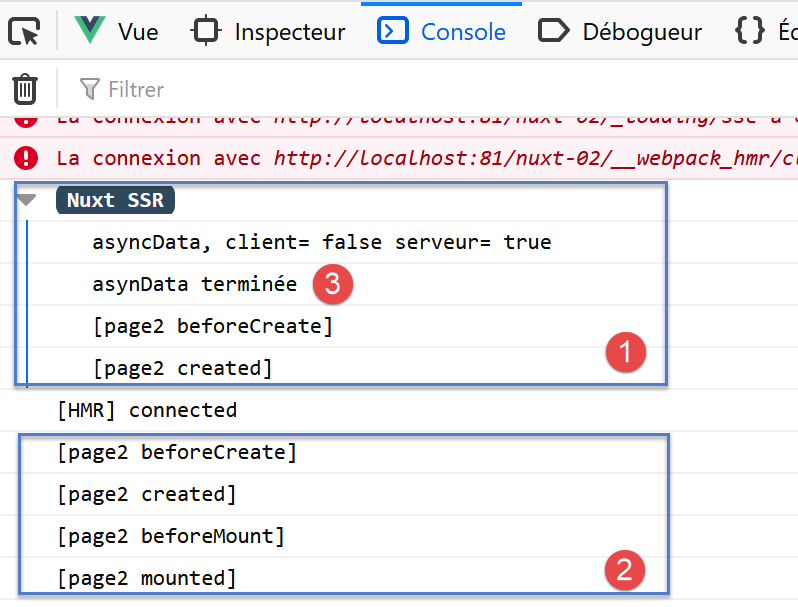
The function [asyncData] was executed by the server [1] but not by the client [2]. Furthermore, it should be noted that the lifecycle functions are not executed by the server until the [asyncData] function has completed. The wait time within the [asyncData] function can be increased to verify this.
5.4. The [page3] page
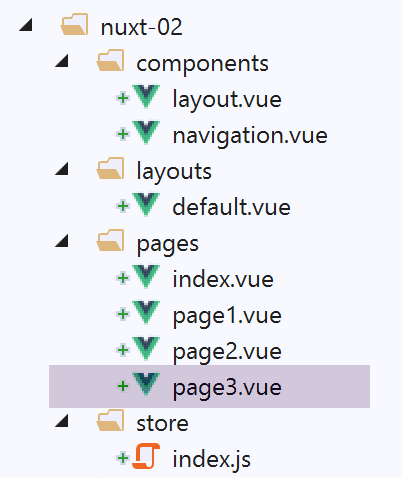
We are adding a new page, [page3], to our application:
5.4.1. The [navigation] component
The [vavigation] component has been updated to redirect navigation to the new page:
<template>
  <!-- bootstrap menu with three options -->
  <b-nav vertical>
    <b-nav-item to="/" exact exact-active-class="active">
      Home
    </b-nav-item>
    <b-nav-item to="/page1" exact exact-active-class="active">
      Page 1
    </b-nav-item>
    <b-nav-item to="/page2" exact exact-active-class="active">
      Page 2
    </b-nav-item>
    <b-nav-item to="/page3" exact exact-active-class="active">
      Page 3
    </b-nav-item>
  </b-nav>
</template>
5.4.2. The code for [page3]
The code for page [page3] is as follows:
<!-- page3 -->
<template>
  <Layout :left="true" :right="true">
    <!-- navigation -->
    <Navigation slot="left" />
    <!-- message -->
    <b-alert slot="right" show variant="secondary"> Page 3 - value = {{ value }} </b-alert>
  </Layout>
</template>

<script>
/* eslint-disable no-console */
/* eslint-disable nuxt/no-timing-in-fetch-data */

import Navigation from '@/components/navigation'
import Layout from '@/components/layout'

export default {
  name: 'Page3',
  // components used
  components: {
    Layout,
    Navigation
  },
  data() {
    return {
      value: 0
    }
  },
  fetch(context) {
    // who executes this code?
    console.log('fetch, client=', process.client, 'serveur=', process.server)
    // only for the server
    if (process.server) {
      // we return a promise
      return new Promise(function(resolve, reject) {
        // this is normally an asynchronous function
        // we simulate it with a one-second wait
        setTimeout(() => {
          // success
          resolve()
        }, 1000)
      }).then(() => {
        // modify the blind
        context.store.commit('increment', 28)
      })
    }
  },
  // life cycle
  beforeCreate() {
    // client and server
    console.log('[page3 beforeCreate]')
  },
  created() {
    // client and server
    this.value = this.$store.state.counter
    console.log('[page3 created], value=', this.value)
  },
  beforeMount() {
    // customer only
    console.log('[page3 beforeMount]')
  },
  mounted() {
    // customer only
    console.log('[page3 mounted]')
  }
}
</script>
- Line 30: The function [fetch] behaves similarly to the function [asyncData]:
- it is executed before the lifecycle functions;
- the object [this] is not recognized in this function;
- it operates asynchronously;
- the lifecycle does not start until the asynchronous function has returned its result;
- the result is returned here by the [then] method of [Promise], line 43;
- The [fetch] function receives the [context] parameter. This represents the current [nuxt] context;
- line 30: among its many properties, the object [context] has a property [store] that represents the application’s store [Vuex];
- line 41: artificially, the success of [Promise] is signaled after one second (see document |Introduction to the ECMASCRIPT 6 language through examples|);
- line 45: the [then] method is then executed. There, the counter for [store] is incremented;
5.4.3. Execution
We run the [nuxt-02] project and manually type [localhost:81/nuxt-02/page3] to trigger the server. As with the initial launch of the [index] page:
- the server executes the [page3.vue] page;
- sends the generated page to the browser. The page is displayed;
- the client-side scripts embedded in the sent page take over and execute the page [page3.vue] again;
- the displayed page is then modified;
The final result is as follows:
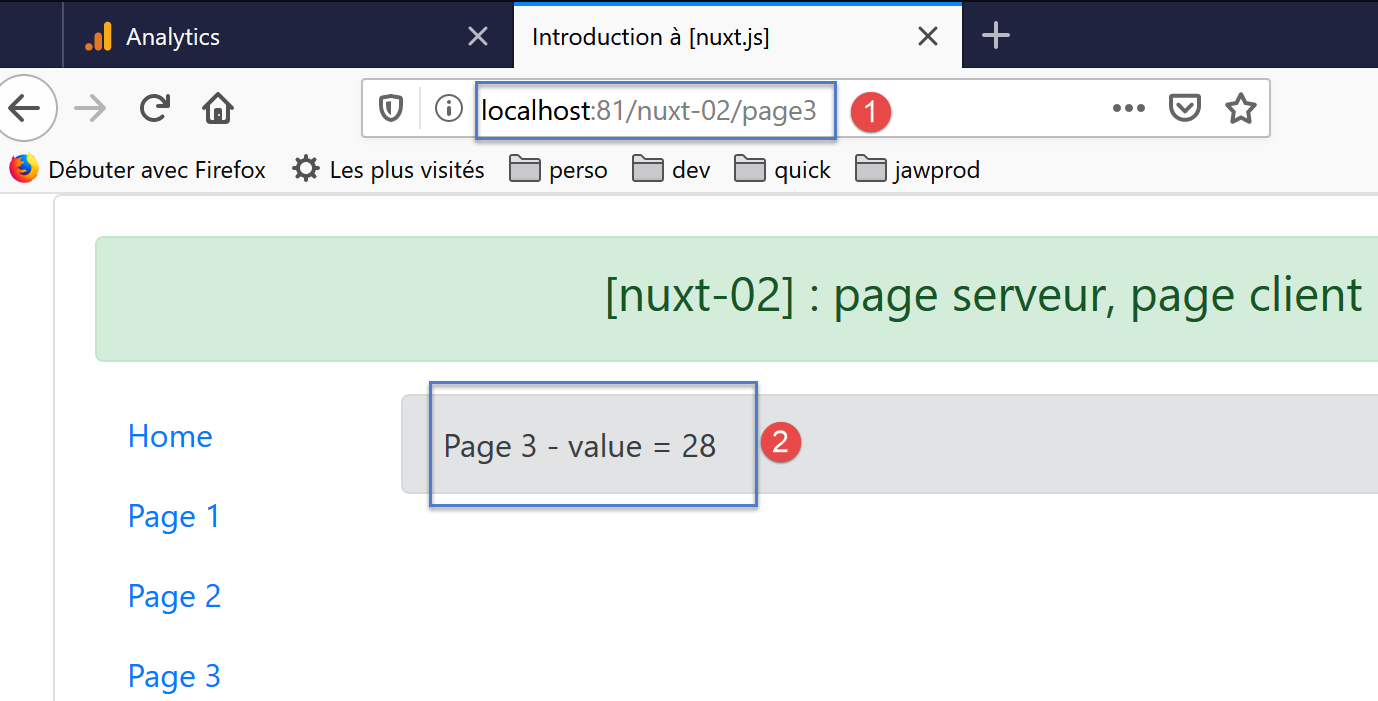
The displayed value is indeed the one set by the server, and visually, the page does not "flicker" due to a client-side change to the value displayed by the server. What happened this time?
The server executed the following page, [page3]:
<!-- page3 -->
<template>
  <Layout :left="true" :right="true">
    <!-- navigation -->
    <Navigation slot="left" />
    <!-- message -->
    <b-alert slot="right" show variant="secondary"> Page 3 - value = {{ value }} </b-alert>
  </Layout>
</template>

<script>
/* eslint-disable no-console */
/* eslint-disable nuxt/no-timing-in-fetch-data */

import Navigation from '@/components/navigation'
import Layout from '@/components/layout'

export default {
  name: 'Page3',
  // components used
  components: {
    Layout,
    Navigation
  },
  data() {
    return {
      value: 0
    }
  },
  fetch(context) {
    // who executes this code?
    console.log('fetch, client=', process.client, 'serveur=', process.server)
    // only for the server
    if (process.server) {
      // we return a promise
      return new Promise(function(resolve, reject) {
        // this is normally an asynchronous function
        // we simulate it with a one-second wait
        setTimeout(() => {
          // success
          resolve()
        }, 1000)
      }).then(() => {
        // modify the blind
        context.store.commit('increment', 28)
        // log
        console.log('fetch commit terminé')
      })
    }
  },
  // life cycle
  beforeCreate() {
    // client and server
    console.log('[page3 beforeCreate]')
  },
  created() {
    // client and server
    this.value = this.$store.state.counter
    console.log('[page3 created], value=', this.value)
  },
  beforeMount() {
    // customer only
    console.log('[page3 beforeMount]')
  },
  mounted() {
    // customer only
    console.log('[page3 mounted]')
  }
}
</script>
- Line 45: The asynchronous function [fetch] is the first of the above functions to execute. It receives as a parameter an object called [context], which is the current context [nuxt]. Among the many properties of this object, the property [context.store] represents the store [Vuex];
- line 45: in the asynchronous function [fetch], the server sets the store’s counter to 28;
- line 56: when the function [created] executes, [nuxt] ensures that the asynchronous function [fetch] has completed its work;
- line 58: the value of the blind counter is assigned to the [value] property in line 27;
- line 7: the value of [value] is displayed, i.e., the counter value;
The client browser receives the following page:
<!doctype html>
<html data-n-head-ssr>
<head>
  <title>Introduction à [nuxt.js]</title>
  <meta data-n-head="ssr" charset="utf-8">
  <meta data-n-head="ssr" name="viewport" content="width=device-width, initial-scale=1">
  <meta data-n-head="ssr" data-hid="description" name="description" content="ssr routing loading asyncdata middleware plugins store">
  <link data-n-head="ssr" rel="icon" type="image/x-icon" href="/favicon.ico">
  <base href="/nuxt-02/">
  <link rel="preload" href="/nuxt-02/_nuxt/runtime.js" as="script">
  <link rel="preload" href="/nuxt-02/_nuxt/commons.app.js" as="script">
  <link rel="preload" href="/nuxt-02/_nuxt/vendors.app.js" as="script">
  <link rel="preload" href="/nuxt-02/_nuxt/app.js" as="script">
  ...
</head>
<body>
  <div data-server-rendered="true" id="__nuxt">
    <div id="__layout">
      <div class="container">
        <div class="card">
          <div class="card-body">
            <div role="alert" aria-live="polite" aria-atomic="true" align="center" class="alert alert-success">
              <h4>[nuxt-02] : page serveur, page client</h4>
            </div>
            <div>
              <div class="row">
                <div class="col-2">
                  <ul class="nav flex-column">
                    <li class="nav-item">
                      <a href="/nuxt-02/" target="_self" class="nav-link">
                        Home
                      </a>
                    </li>
                    <li class="nav-item">
                      <a href="/nuxt-02/page1" target="_self" class="nav-link">
                        Page 1
                      </a>
                    </li>
                    <li class="nav-item">
                      <a href="/nuxt-02/page2" target="_self" class="nav-link">
                        Page 2
                      </a>
                    </li>
                    <li class="nav-item">
                      <a href="/nuxt-02/page3" target="_self" class="nav-link active nuxt-link-active">
                        Page 3
                      </a>
                    </li>
                  </ul>
                </div> <div class="col-10">
                  <div role="alert" aria-live="polite" aria-atomic="true" class="alert alert-secondary">
                    Page 3 - value = 28
                  </div>
                </div>
              </div>
            </div>
          </div>
        </div>
      </div>
    </div>
  </div>
  <script>
  window.__NUXT__ = (function (a, b, c) {
      return {
        layout: "default", data: [{}], error: null, state: { counter: 28 }, serverRendered: true,
        logs: [
          { date: new Date(1574169916025), args: ["fetch, client=", "false", "serveur=", "true"], type: a, level: b, tag: c },
          { date: new Date(1574169917038), args: ["fetch commit terminé"], type: a, level: b, tag: c },
          { date: new Date(1574169917137), args: ["[page3 beforeCreate]"], type: a, level: b, tag: c },
          { date: new Date(1574169917167), args: ["[page3 created], value=", "28"], type: a, level: b, tag: c }
        ]
      }
    }("log", 2, ""));</script>
  <script src="/nuxt-02/_nuxt/runtime.js" defer></script>
  <script src="/nuxt-02/_nuxt/commons.app.js" defer></script>
  <script src="/nuxt-02/_nuxt/vendors.app.js" defer></script>
  <script src="/nuxt-02/_nuxt/app.js" defer></script>
</body>
</html>
- line 52: we see that the value in the received page is 28;
- line 65: in the server response, we see that the server sent the client the state [state] of the store [Vuex]. Using this information, the client scripts will be able to reconstruct a store [Vuex];
The client scripts will in turn execute the code for the [page3] page:
<!-- page3 -->
<template>
  <Layout :left="true" :right="true">
    <!-- navigation -->
    <Navigation slot="left" />
    <!-- message -->
    <b-alert slot="right" show variant="secondary"> Page 3 - value = {{ value }} </b-alert>
  </Layout>
</template>

<script>
/* eslint-disable no-console */
/* eslint-disable nuxt/no-timing-in-fetch-data */

import Navigation from '@/components/navigation'
import Layout from '@/components/layout'

export default {
  name: 'Page3',
  // components used
  components: {
    Layout,
    Navigation
  },
  data() {
    return {
      value: 0
    }
  },
  fetch(context) {
    // who executes this code?
    console.log('fetch, client=', process.client, 'serveur=', process.server)
    // only for the server
    if (process.server) {
      // we return a promise
      return new Promise(function(resolve, reject) {
        // this is normally an asynchronous function
        // we simulate it with a one-second wait
        setTimeout(() => {
          // success
          resolve()
        }, 1000)
      }).then(() => {
        // modify the blind
        context.store.commit('increment', 28)
        // log
        console.log('fetch commit terminé')
      })
    }
  },
  // life cycle
  beforeCreate() {
    // client and server
    console.log('[page3 beforeCreate]')
  },
  created() {
    // client and server
    this.value = this.$store.state.counter
    console.log('[page3 created], value=', this.value)
  },
  beforeMount() {
    // customer only
    console.log('[page3 beforeMount]')
  },
  mounted() {
    // customer only
    console.log('[page3 mounted]')
  }
}
</script>
- line 58: the [created] function executed by the client sets the counter value to the [value] property on line 27;
- line 7 displays this value. Since it is the same as the one sent by the server, the page does not "flicker" due to a change;
The logs also show that the [fetch] function was not executed by the client:
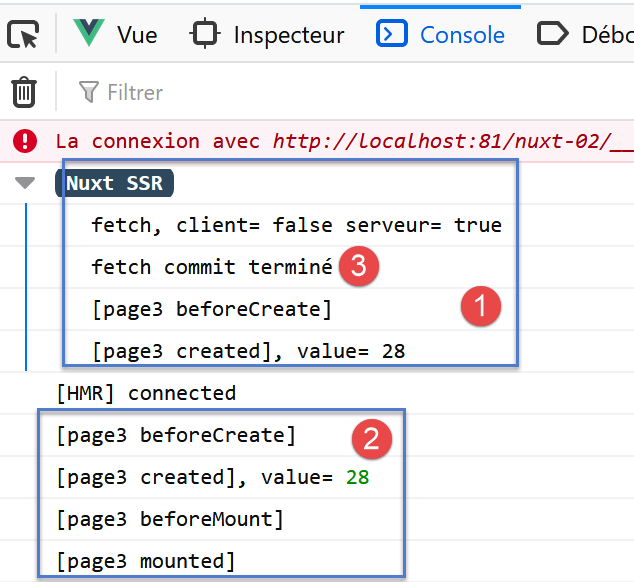
The function [fetch] was executed by the server [1] but not by the client [2]. Furthermore, it should be noted that the lifecycle functions are not executed by the server before the end of the [fetch] and [3] functions. The wait time within the [fetch] function can be increased to verify this.
The pages [page1] and [page3] demonstrated two methods using the [Vuex] store to transmit information from the server to the client. One might wonder if they are equivalent. We are building a page [page4] to verify this.
5.5. The [page4] page
We are adding a new page [page4] to our application:
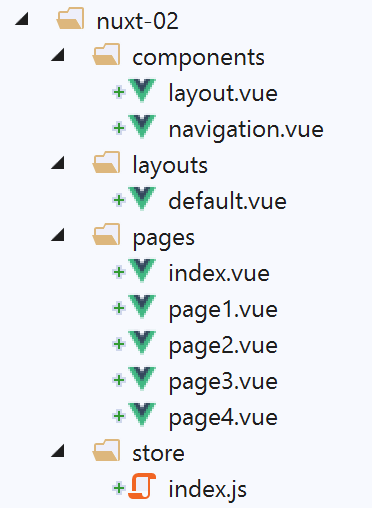
5.5.1. The [navigation] component
The [navigation] component is modified to allow navigation to link to the new page:
<template>
  <!-- bootstrap menu with five options -->
  <b-nav vertical>
    <b-nav-item to="/" exact exact-active-class="active">
      Home
    </b-nav-item>
    <b-nav-item to="/page1" exact exact-active-class="active">
      Page 1
    </b-nav-item>
    <b-nav-item to="/page2" exact exact-active-class="active">
      Page 2
    </b-nav-item>
    <b-nav-item to="/page3" exact exact-active-class="active">
      Page 3
    </b-nav-item>
    <b-nav-item to="/page4" exact exact-active-class="active">
      Page 4
    </b-nav-item>
  </b-nav>
</template>
5.5.2. The code for [page4]
The code for page [page4] is as follows:
<!-- page4 -->
<template>
  <Layout :left="true" :right="true">
    <!-- navigation -->
    <Navigation slot="left" />
    <!-- message -->
    <b-alert slot="right" show variant="secondary"> Page 4 - value = {{ value }} </b-alert>
  </Layout>
</template>

<script>
/* eslint-disable no-console */

import Navigation from '@/components/navigation'
import Layout from '@/components/layout'

export default {
  name: 'Page4',
  // components used
  components: {
    Layout,
    Navigation
  },
  data() {
    return {
      value: 0
    }
  },
  // life cycle
  async beforeCreate() {
    // client and server
    console.log('[page4 beforeCreate]')
    // only for the server
    if (process.server) {
      // execute the asynchronous function
      const valeur = await new Promise(function(resolve, reject) {
        // this is normally an asynchronous function
        // we simulate it with a 10-second wait
        setTimeout(() => {
          // success - the counter value is returned
          resolve(52)
        }, 10000)
      })
      // modify the blind
      this.$store.commit('increment', valeur)
      // log
      console.log('[page4 beforeCreate], fonction asynchrone terminée, compteur=', this.$store.state.counter)
    }
  },
  created() {
    // client and server
    this.value = this.$store.state.counter
    console.log('[page4 created], value=', this.value)
  },
  beforeMount() {
    // customer only
    console.log('[page4 beforeMount]')
  },
  mounted() {
    // customer only
    console.log('[page4 mounted]')
  }
}
</script>
- line 30: what was previously done in the [fetch] function is now done in the [beforeCreate] method. We use the async (line 30) / await (line 36) pair to wait for the asynchronous function to finish;
- line 36: the result of the asynchronous function is retrieved on line 41 after 10 seconds (line 42);
- lines 50–54: in the [created] method, which is executed on both the server and client sides, the counter is assigned to the [value] property of the page;
5.5.3. Execution
We run the [nuxt-02] project and manually enter [localhost:81/nuxt-02/page4] to trigger the server. As with the initial run for the [index] page:
- the server executes the page [page4.vue];
- sends the generated page to the browser. The page is displayed;
- the client-side scripts embedded in the sent page take over and execute the page [page4.vue] again;
- the displayed page is then modified;
The final result is as follows:
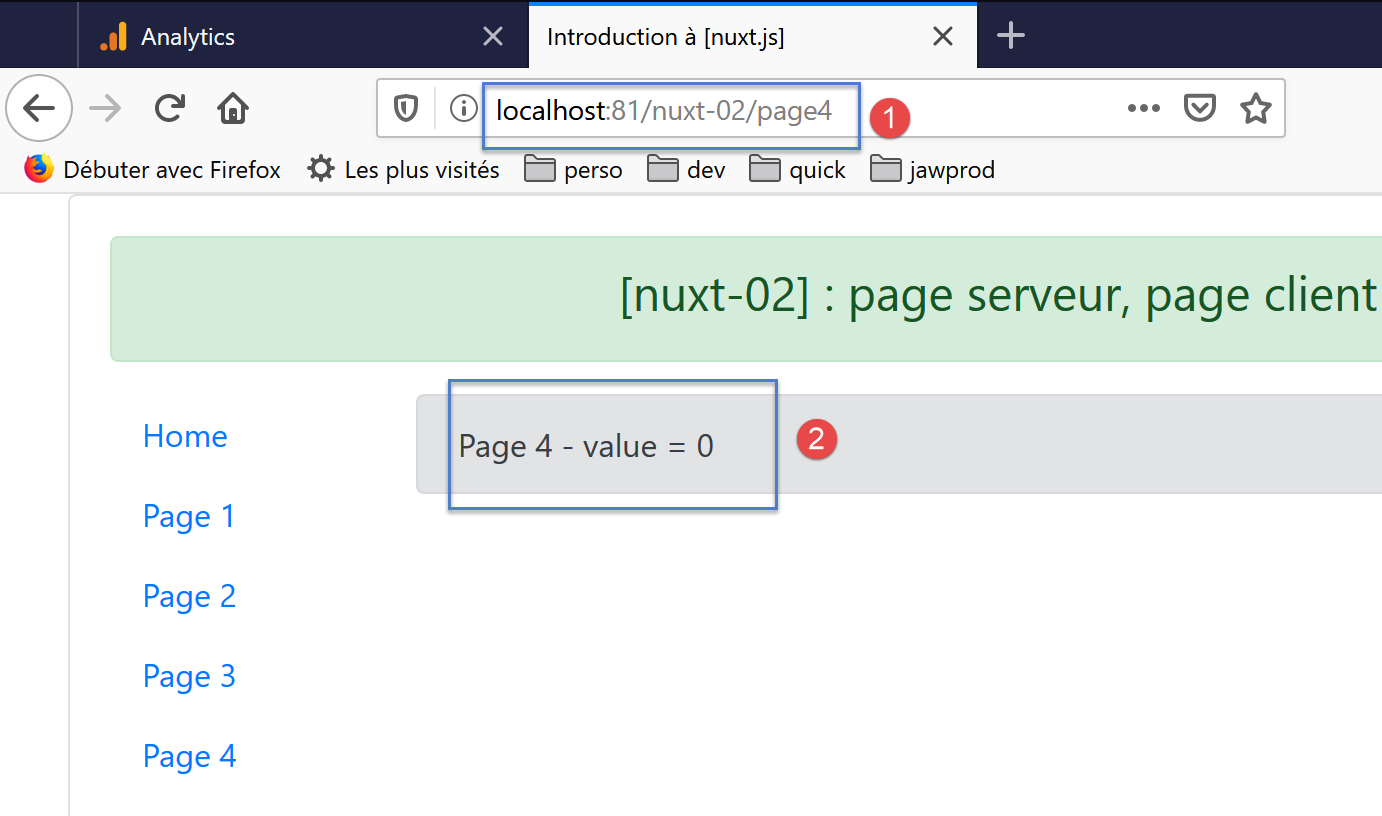
Contrary to expectations, the value displayed in [2] is not 52. What happened?
The logs are as follows:
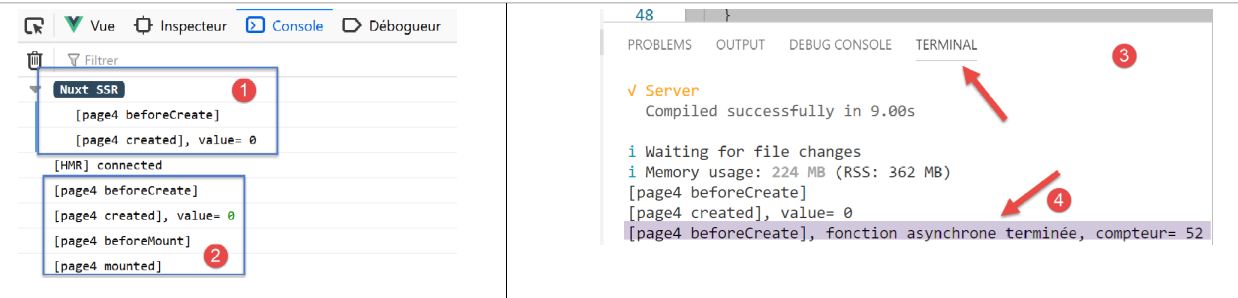
Note that in [1], the log for the end of the asynchronous action was not displayed. The [created] function, which displays the counter value, shows 0. All of this suggests that [nuxt] did not wait for the asynchronous action to complete.
If we return to the VSCode terminal used to launch the application, we find the [3-4] logs. We can see that the asynchronous function was indeed executed on the server side.
Ultimately, the [beforeCreate] function was indeed executed entirely on the server side, but [nuxt] did not wait for its execution to complete before sending the page to the client browser, even though it does wait for the [fetch] function to finish. Therefore, this is the method that must be used if you want the server to initialize a [Vuex] store.
5.6. Navigation in the [vue] application
We have shown what happens when each of the [index, page1, page2, page3, page4] pages is initially loaded by the server. In practice, this is not what happens: under normal operation, only the [index] page is retrieved from the server. Let’s look at the three pages in this case:
page [index]
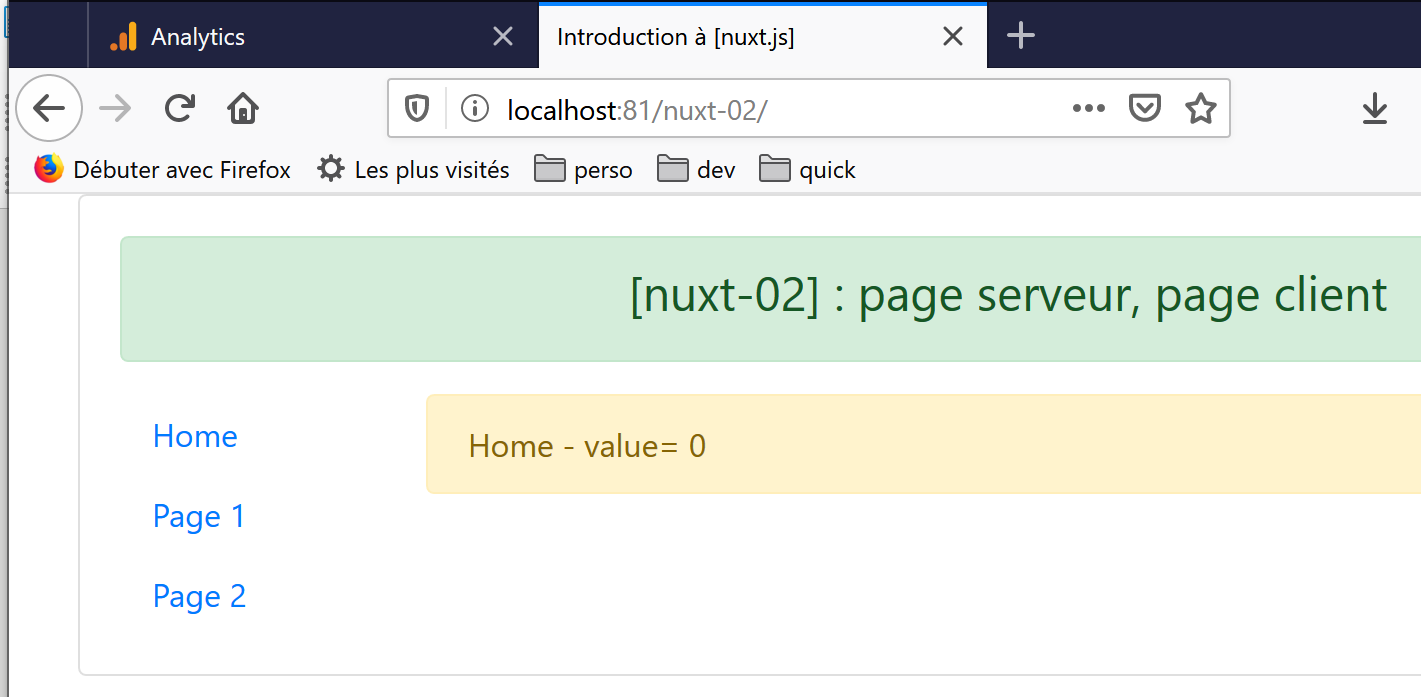
We have already explained this result in the "link" section.
Now let’s click on the [Page 1] link:
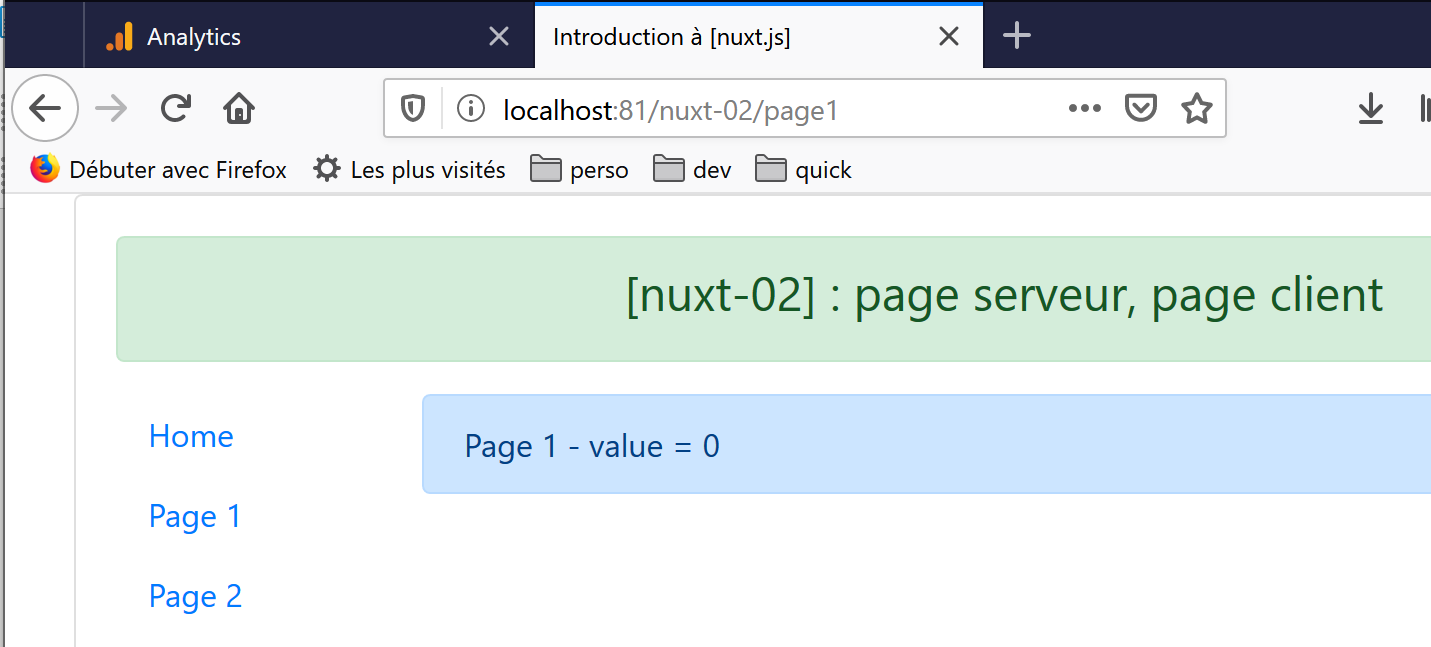
The displayed value is 0. It was 25 when the page was first requested from the server by typing its URL (URL) manually. The explanation is simple. The code executed is as follows:
  created() {
    // client and server
    console.log('[page1 created]')
    // server only
    if (process.server) {
      this.$store.commit('increment', 25)
    }
    // client and server
    this.value = this.$store.state.counter
    console.log('value=', this.value)
},
Line 6 was the one that set the counter to 25. Since the page wasn’t requested from the server, lines 5–7 weren’t executed, and the counter in the [Vuex] store remained at 0.
Now, let’s click on the [Page 2] link:
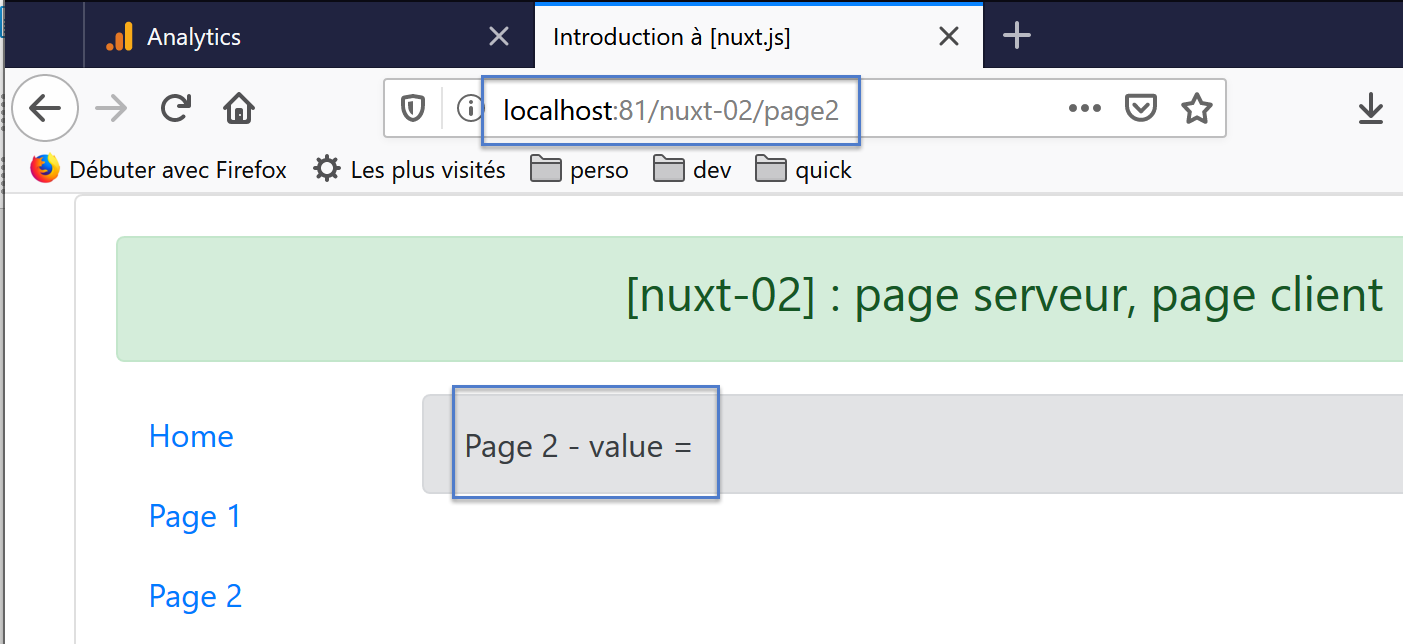
This time, no value is displayed, and there is also a warning in the console logs:
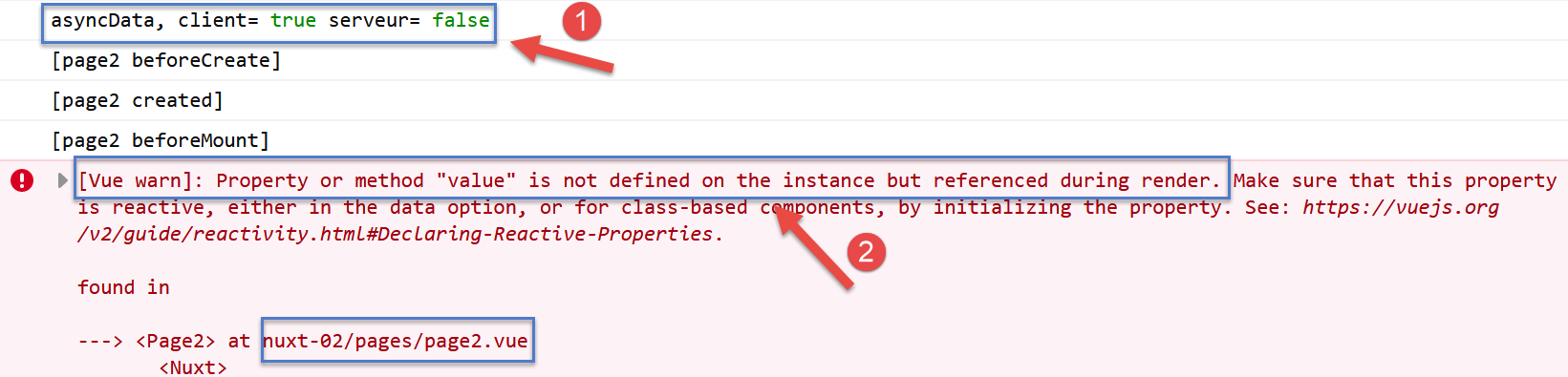
- In [1], we see that the function [asyncData] was executed by the client. This is always the case:
- it is executed by the server if the page is requested from the server. In this case, it is not executed by the client;
- then every time the page is the target of the client’s current route;
- in [2]: [nuxt] issues a warning because the page template contains a reactive expression {{ value }}, even though the page has no [value] property;
Let’s review the code executed by the client:
asyncData() {
    // who executes this code?
    console.log('asyncData, client=', process.client, 'serveur=', process.server)
    // only for the server
    if (process.server) {
      // we return a promise
      return new Promise(function(resolve, reject) {
        // this is normally an asynchronous function - so not here
        // this result will be included in the properties of [data]
        resolve({ value: 87 })
      })
    }
  },
- line 3 showed that the [asyncData] function was executed by the client even before the lifecycle functions;
- Line 5 prevented the execution of the rest of the code that created the [value] property because that code is executed by the client;
Now let’s move on to the [page3] page:
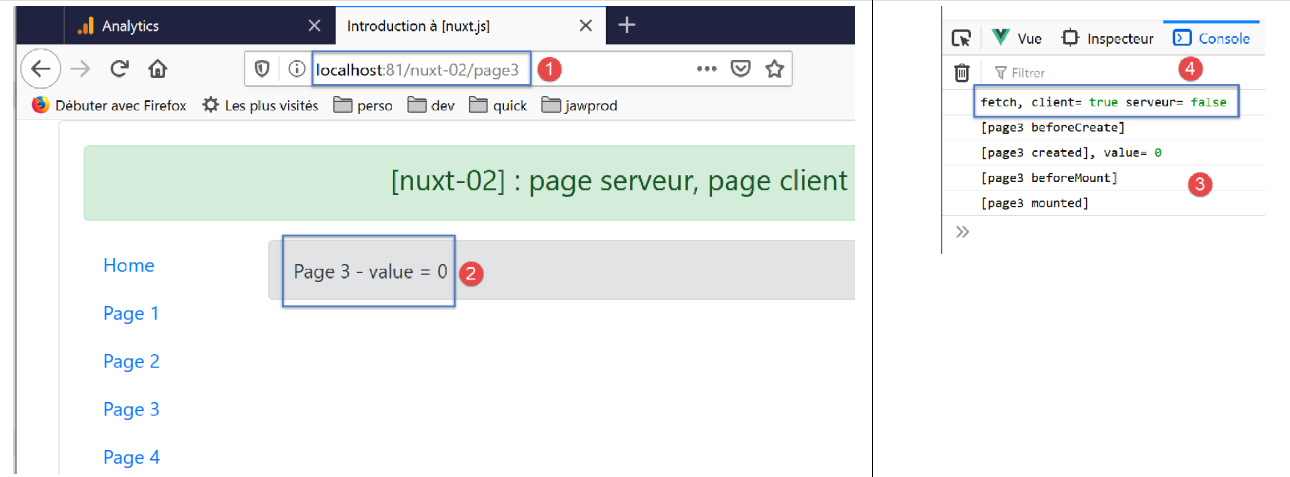
- in [2], we had 28 when the page was served by the server. That is not the case here;
- In [4], we see that the function [fetch] was executed on the client side;
Let’s examine the code executed by the client:
...
fetch(context) {
    // who executes this code?
    console.log('fetch, client=', process.client, 'serveur=', process.server)
    // only for the server
    if (process.server) {
      // we return a promise
      return new Promise(function(resolve, reject) {
        // this is normally an asynchronous function
        // we simulate it with a one-second wait
        setTimeout(() => {
          // success
          resolve()
        }, 1000)
      }).then(() => {
        // modify the blind
        context.store.commit('increment', 28)
        // log
        console.log('fetch commit terminé')
      })
    }
},
...
- the client executes method [fetch], line 2;
- lines 6–21 are not executed because the condition [process.server] is false. Therefore, line 17, which sets the counter to 28, is not executed. It remains at zero. This is why the client displays 0 instead of 28;
Now let’s move on to page [page4]. We get the following result:
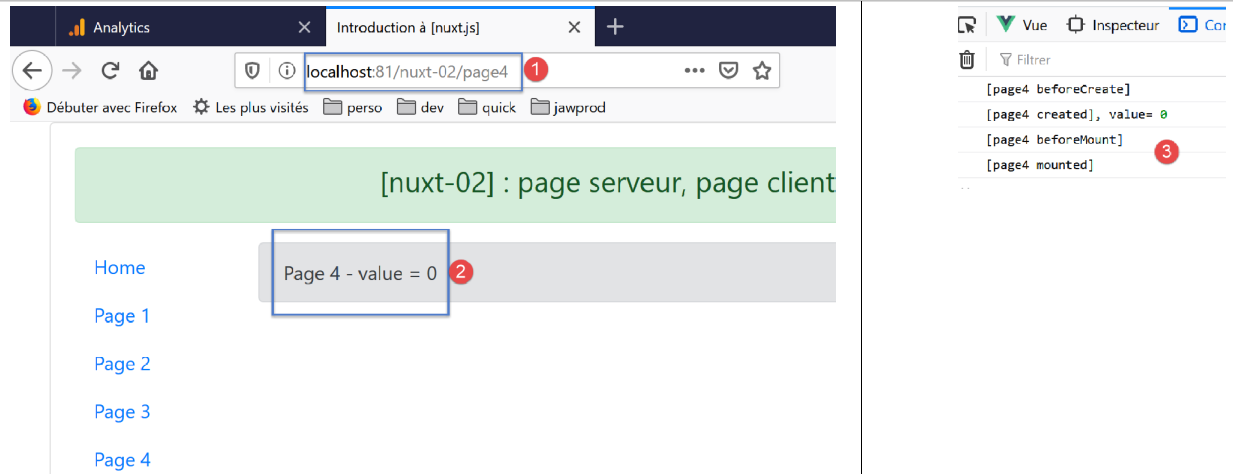
- in [2], the counter value;
- in [3], the client logs;
The code executed by the client is as follows:
...
data() {
    return {
      value: 0
    }
  },
  // life cycle
  async beforeCreate() {
    // client and server
    console.log('[page4 beforeCreate]')
    // only for the server
    if (process.server) {
      // execute the asynchronous function
      const valeur = await new Promise(function(resolve, reject) {
        // this is normally an asynchronous function
        // we simulate it with a 10-second wait
        setTimeout(() => {
          // success - the counter value is returned
          resolve(52)
        }, 10000)
      })
      // modify the blind
      this.$store.commit('increment', valeur)
      // log
      console.log('[page4 beforeCreate], fonction asynchrone terminée, compteur=', this.$store.state.counter)
    }
  },
  created() {
    // client and server
    this.value = this.$store.state.counter
    console.log('[page4 created], value=', this.value)
  },
...
- Lines 12–26 are not executed by the client because the condition [process.server] on line 12 is false. Therefore, the counter in the store [Vuex] is 0 (its initial value in the store), and this is the value displayed on the page;
One might wonder what happens when we comment out [if] in lines 12 and 26. Here is the answer:
- This time, the client executes lines 14–25, but [nuxt] does not wait for the asynchronous function to finish (as the server does) and therefore leaves the counter at 0;
- after 10 seconds, the asynchronous function completes and the counter is set to 52 on line 23;
- when navigating back to the [page4] page, the value 52 is then displayed;
5.7. Summary
From our various tests, we note the following points:
- if the page [index] is to contain external data, this data can be retrieved by the server using the function [asyncData];
- if the server needs to initialize a [Vuex] store with external data when loading the [index] page, it will do so in the [fetch] function;
- the page generated by the server and the page generated by the client must be identical to avoid the "jumping" effect caused by the client's page visually replacing the page sent by the server and initially displayed;
We will explore other aspects of [nuxt] through a new example.