13. Example [nuxt-10]: asyncData and loading
The [asyncData] function in a page allows for the asynchronous loading of data, which is often external. [nuxt] waits for the [asyncData] function to complete before starting the page lifecycle. The page is therefore rendered only once the external data has been obtained. It is executed by both the server and the client according to the following rules:
- when the page is requested directly from the server, only the server executes the [asyncData] function;
- then, during the client-side navigation, only the client executes the [asyncData] function;
Ultimately, only one of the two—the client or the server—executes the function. Furthermore, when the client executes the [asyncData] function, [nuxt] displays a progress bar that can be configured.
The [asyncData] function allows pages to be delivered to search engines along with their data, making them more meaningful.
The example [nuxt-10] is initially obtained by copying the [nuxt-01] project:
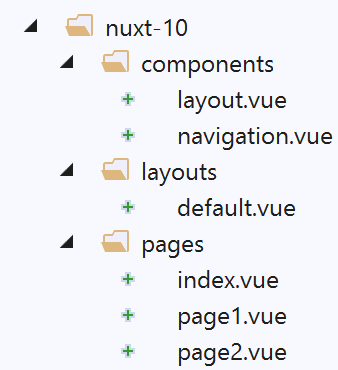
Only the [page1] page changes.
13.1. The page [page1]
The code for page [page1] is as follows:
<!-- view n° 1 -->
<template>
  <Layout :left="true" :right="true">
    <!-- navigation -->
    <Navigation slot="left" />
    <!-- message-->
    <b-alert slot="right" show variant="primary"> Page 1 -- result={{ result }} </b-alert>
  </Layout>
</template>

<script>
/* eslint-disable no-console */
/* eslint-disable nuxt/no-timing-in-fetch-data */

import Navigation from '@/components/navigation'
import Layout from '@/components/layout'

export default {
  name: 'Page1',
  // components used
  components: {
    Layout,
    Navigation
  },
  // asynchronous data
  asyncData(context) {
    // log
    console.log('[page1 asyncData started]')
    // we make a promise
    return new Promise(function(resolve, reject) {
      // we simulate an asynchronous function
      setTimeout(function () {
        // we make the result asynchronous - a random number here
        resolve({ result: Math.floor(Math.random() * Math.floor(100)) })
        // log
        console.log('[page1 asyncData finished]')
      }, 5000)
    })
  },

  // life cycle
  beforeCreate() {
    console.log('[page1 beforeCreate]')
  },
  created() {
    console.log('[page1 created]')
  },
  beforeMount() {
    console.log('[page1 beforeMount]')
  },
  mounted() {
    console.log('[page1 mounted]')
  }
}
</script>
- lines 26–39: the [asyncData] function. We have already studied this function (see linked section). It is executed before the page lifecycle. For this reason, the [this] keyword cannot be used within the function;
- line 30: it must return a [Promise] promise or use the async/await syntax;
- lines 32–37: the asynchronous behavior of the promise is simulated with a 5-second wait (line 37);
- line 34: the result of the asynchronous function is returned as an object {result:...}. The asynchronous object returned by the [asyncData] function is incorporated into the [data] object of the page. This is why the [result] object is available on line 7 of the template even though the page had not defined a [data] object;
13.2. Configuration of the [asyncData] progress bar
When the page [page1] is the target of a navigation within the client (SPA mode), the client executes the [asyncData] function, and [nuxt] then displays a progress bar, which it hides once the [asyncData] function has returned its result. The [loading] property of the [nuxt.config.js] file allows you to configure this bar:
loading: {
    color: 'blue',
    height: '5px',
    throttle: 200,
    continuous: true
},
By default, the loading image for [nuxt] is a progress bar that spans the width of the page. This bar has a color and a thickness. The colored bar gradually grows from 0% to 100% of its size, moving faster or slower depending on the duration of the wait.
- line 2: sets the color of the progress bar;
- line 3: sets the bar’s thickness in pixels;
- line 4: [throttle] is the delay in milliseconds before the animation starts. This prevents an animation image from appearing when the [asyncData] function returns its result quickly;
- line 5: [continuous] sets the behavior of the progress bar animation. By default, the bar grows gradually from 0% to 100% of its size, at a rate that varies depending on the wait time. With [continuous:true], the colored bar grows at a constant speed from 0% to 100% of its size, then repeats until the [asyncData] function has returned its result;
13.3. Execution
Let’s launch the application, then manually request the [page1] page from the server:
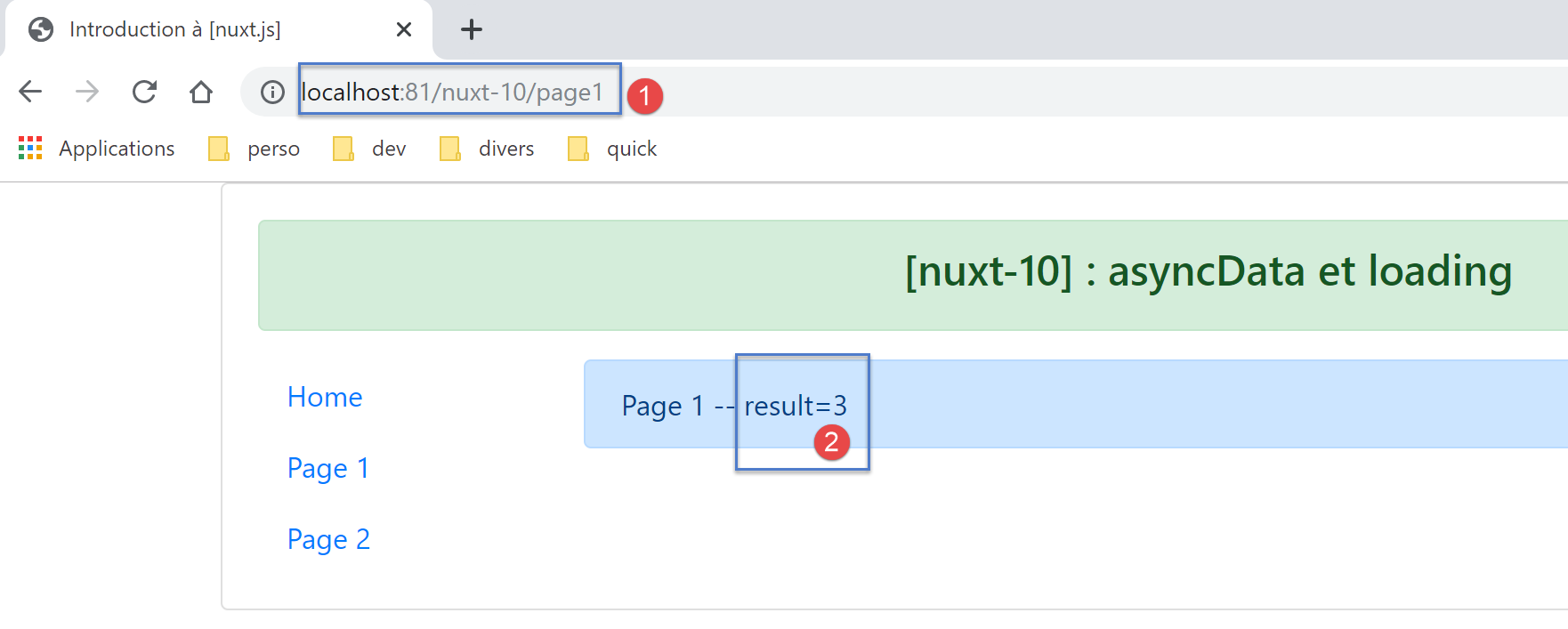
The logs are as follows:
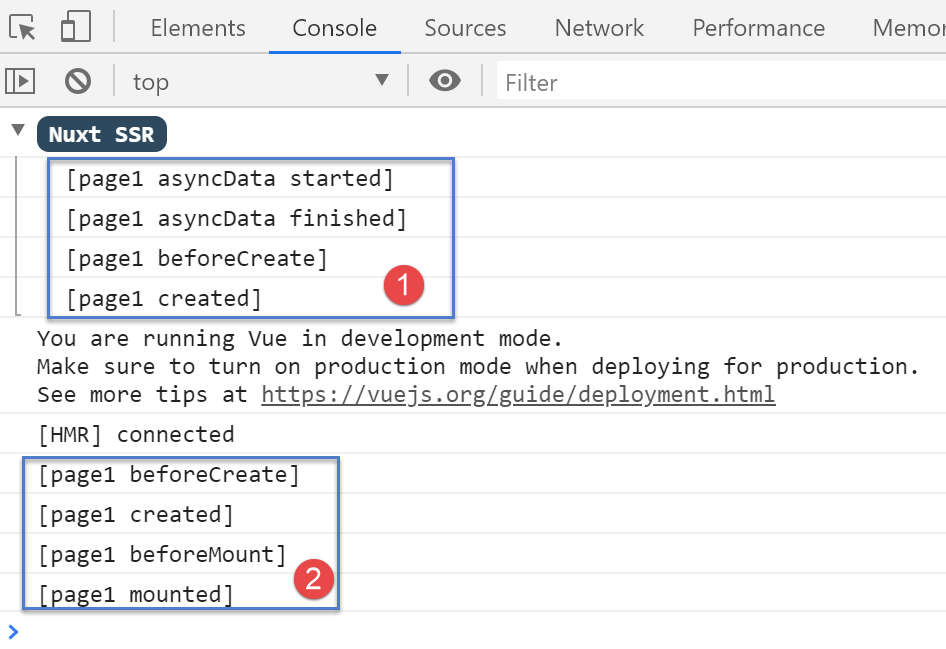
- we see that only the [1] server executed the [asyncData] function, and it did so before the page cycle;
Now let’s examine the page sent by the server (source code):
<!doctype html>
<html data-n-head-ssr>
<head>
  <title>Introduction à [nuxt.js]</title>
  <meta data-n-head="ssr" charset="utf-8">
  <meta data-n-head="ssr" name="viewport" content="width=device-width, initial-scale=1">
  <meta data-n-head="ssr" data-hid="description" name="description" content="ssr routing loading asyncdata middleware plugins store">
  <link data-n-head="ssr" rel="icon" type="image/x-icon" href="/favicon.ico">
  <base href="/nuxt-10/">
  <link rel="preload" href="/nuxt-10/_nuxt/runtime.js" as="script">
  <link rel="preload" href="/nuxt-10/_nuxt/commons.app.js" as="script">
  <link rel="preload" href="/nuxt-10/_nuxt/vendors.app.js" as="script">
  <link rel="preload" href="/nuxt-10/_nuxt/app.js" as="script">
...
</head>
<body>
  <div data-server-rendered="true" id="__nuxt">
    <div id="__layout">
      <div class="container">
        <div class="card">
          <div class="card-body">
            <div role="alert" aria-live="polite" aria-atomic="true" align="center" class="alert alert-success">
            <h4>[nuxt-10] : asyncData et loading</h4>
              </div>
            <div>
              <div class="row">
                <div class="col-2">
                  <ul class="nav flex-column">
                    <li class="nav-item">
                      <a href="/nuxt-10/" target="_self" class="nav-link">
                        Home
                      </a>
                    </li>
                    <li class="nav-item">
                      <a href="/nuxt-10/page1" target="_self" class="nav-link active nuxt-link-active">
                        Page 1
                      </a>
                    </li>
                    <li class="nav-item">
                      <a href="/nuxt-10/page2" target="_self" class="nav-link">
                        Page 2
                      </a>
                    </li>
                  </ul>
                </div> <div class="col-10"><div role="alert" aria-live="polite" aria-atomic="true" class="alert alert-primary"> Page 1 -- result=3 </div></div>
              </div>
            </div>
          </div>
        </div>
      </div>
    </div>
  </div>
  <script>window.__NUXT__ = (function (a, b, c) {
  return {
    layout: "default", data: [{ result: 3 }], error: null, serverRendered: true,
    logs: [
      { date: new Date(1574939615256), args: ["[page1 asyncData started]"], type: a, level: b, tag: c },
      { date: new Date(1574939620263), args: ["[page1 asyncData finished]"], type: a, level: b, tag: c },
      { date: new Date(1574939620285), args: ["[page1 beforeCreate]"], type: a, level: b, tag: c },
      { date: new Date(1574939620287), args: ["[page1 created]"], type: a, level: b, tag: c }
    ]
  }
    }("log", 2, ""));</script>
  <script src="/nuxt-10/_nuxt/runtime.js" defer></script>
  <script src="/nuxt-10/_nuxt/commons.app.js" defer></script>
  <script src="/nuxt-10/_nuxt/vendors.app.js" defer></script>
  <script src="/nuxt-10/_nuxt/app.js" defer></script>
</body>
</html>
- Line 55: We can see that the server sent the client an array [data] containing the object [result:3], which was embedded in the object [data] of the server’s page [page1]. So that the client can do the same and thus display the same page as the server, the server sends the client the object [result]. Note that the client will not execute the function [asyncData]. It will simply use the data calculated by the server;
Now let’s navigate from page [Home] to page [Page 1] using the menu in navigation:
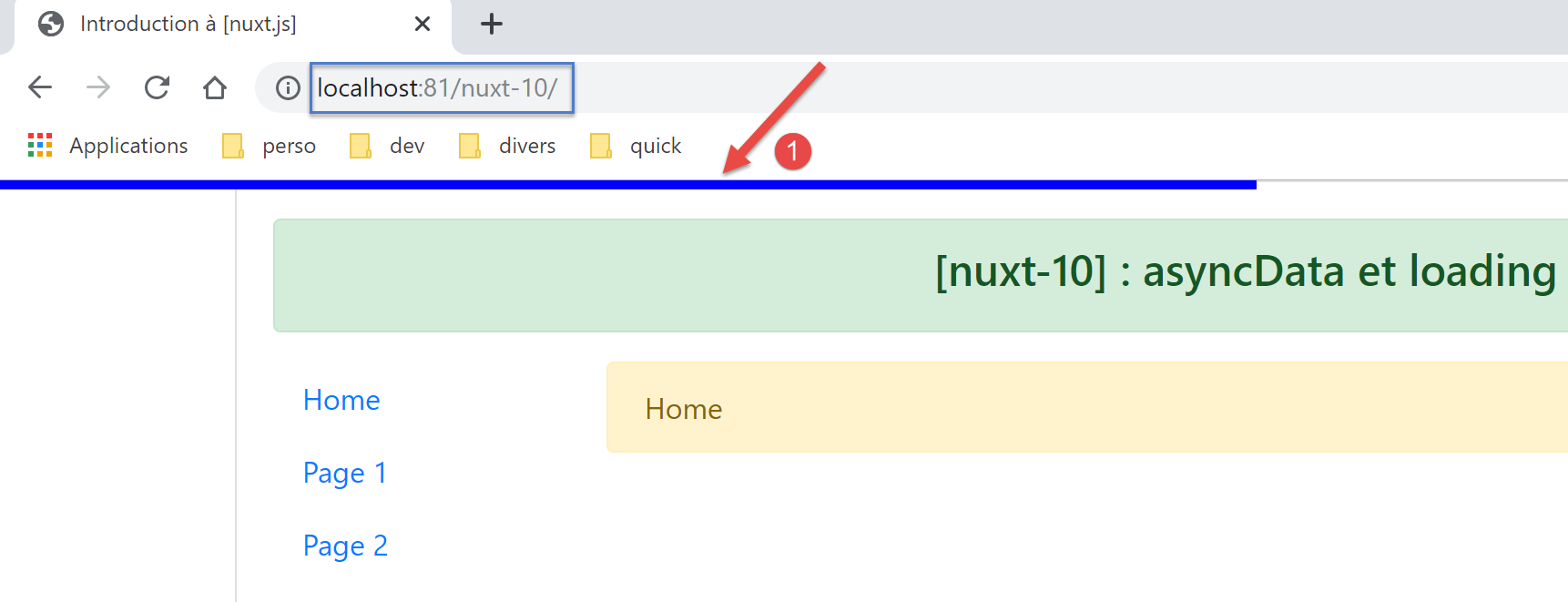
- In [1], the progress bar appears;
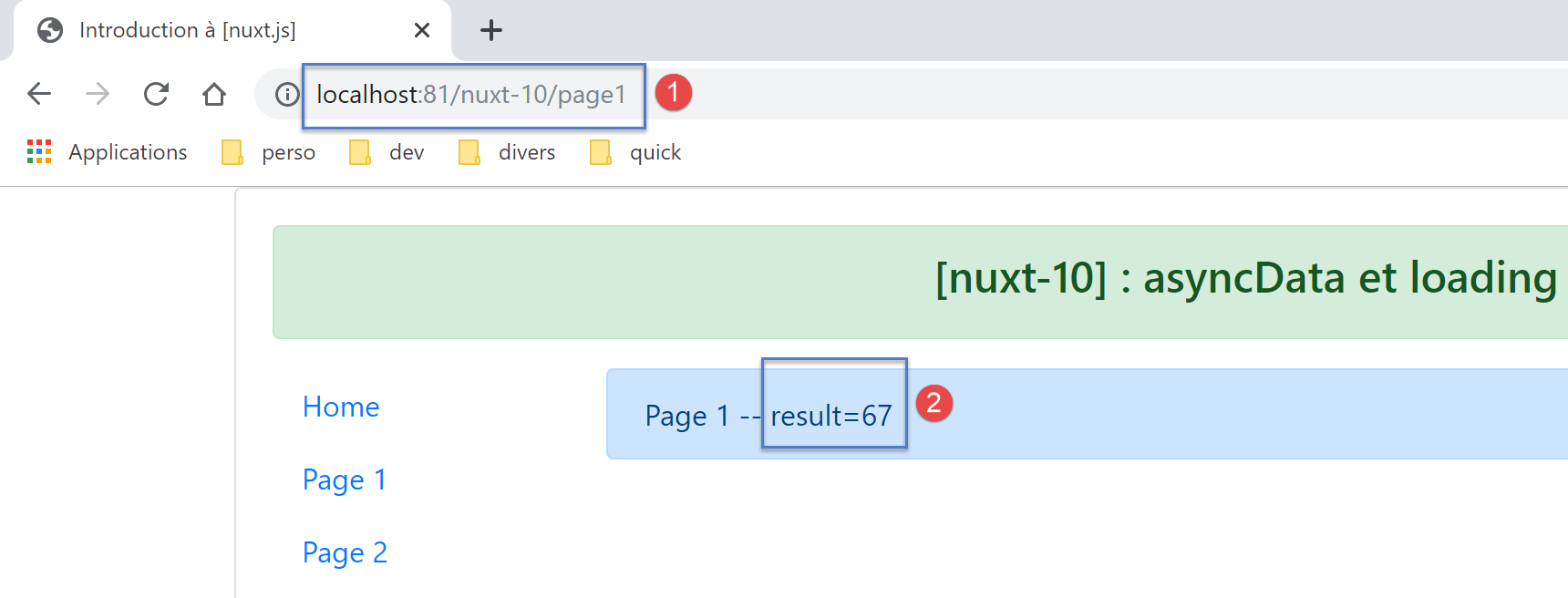
After 5 seconds, we arrive at page [Page 1]:
The logs are as follows:
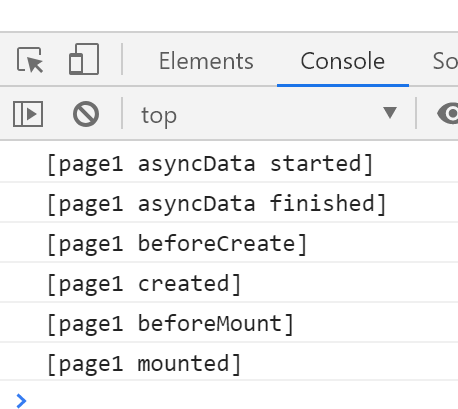
We can see that the client executed the [asyncData] function before the page lifecycle.