6. Example [nuxt-03]: nuxtServerInit
The [nuxt-03] project aims to present a function of the [Vuex] store called [nuxtServerInit]. It allows the server to initialize the [Vuex] store, just as the [fetch] function does. However, unlike the [fetch] function, the [nuxtServerInit] function is never executed by the client.
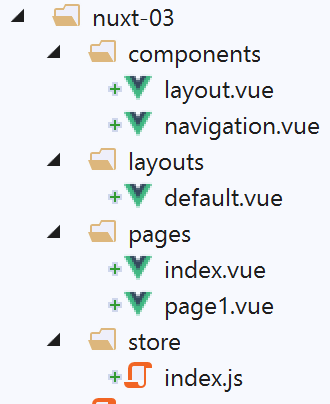
The [nuxt-03] project is initially obtained by copying the [nuxt-01] project, from which the [page2] page is removed from the [pages] folder and from the [navigation]. The folder [store] is created by copying the folder [nuxt-02/store].
6.1. The store [Vuex]
The store [Vuex] will be implemented by the following file [store/index.js]:
/* eslint-disable no-console */
export const state = () => ({
  // meter
  counter: 0
})

export const mutations = {
  // increment counter by one [inc] value
  increment(state, inc) {
    state.counter += inc
  }
}

export const actions = {
  async nuxtServerInit(store, context) {
    // who executes this code?
    console.log('nuxtServerInit, client=', process.client, 'serveur=', process.server)
    // waiting for a promise to be fulfilled
    await new Promise(function(resolve, reject) {
      // this is normally an asynchronous function
      // we simulate it with a one-second wait
      setTimeout(() => {
        // success
        resolve()
      }, 1000)
    })
    // modify the blind
    store.commit('increment', 34)
    // log
    console.log('nuxtServerInit commit terminé')
  }
}
- lines 1–12: are similar to what they were in the [nuxt-02] project;
- lines 14-32: we export an object named [actions]. This is a reserved term from the [Vuex] store;
- line 15: the [nuxtServerInit] function is defined. This function will be executed by the server when the application starts. Its usual role is to initialize a store named [Vuex] using external data obtained via an asynchronous function. [nuxt] waits for this function to return its results before starting the lifecycle of the requested page. The function receives two parameters:
- the [Vuex] store to be initialized;
- the current context [nuxt];
- lines 19–26: we wait for the asynchronous action to complete, here an artificial wait of one second (line 15);
- line 28: the counter is set to 34;
- lines 17 and 30: logs to track the execution of the [nuxtServerInit] function;
6.2. The [index] page
The [index] page will be as follows:
<!-- page [index] -->
<template>
  <Layout :left="true" :right="true">
    <!-- navigation -->
    <Navigation slot="left" />
    <!-- message-->
    <b-alert slot="right" show variant="warning"> Home - value= {{ value }} </b-alert>
  </Layout>
</template>

<script>
/* eslint-disable no-undef */
/* eslint-disable no-console */
/* eslint-disable nuxt/no-env-in-hooks */

import Layout from '@/components/layout'
import Navigation from '@/components/navigation'
export default {
  name: 'Home',
  // components used
  components: {
    Layout,
    Navigation
  },
  data() {
    return {
      value: 0
    }
  },
  // life cycle
  beforeCreate() {
    // client and server
    console.log('[home beforeCreate]')
  },
  created() {
    // client and server
    this.value = this.$store.state.counter
    console.log('[home created], value=', this.value)
  },
  beforeMount() {
    // customer only
    console.log('[home beforeMount]')
  },
  mounted() {
    // customer only
    console.log('[home mounted]')
  }
}
</script>
- line 37: the value of the counter initialized by the [nuxtServerInit] function is assigned to the [value] property on line 27. This value is displayed by line 7;
- Line 37 will be executed by both the server and the client. In both cases, the [value] property will receive the same value, ensuring that the page generated by the server matches the one generated by the client;
6.3. The page [page1]
The page [page1] is obtained by copying the page [index]. We then modify its text to replace [home] with [page1]:
<!-- page [page1]] -->
<template>
  <Layout :left="true" :right="true">
    <!-- navigation -->
    <Navigation slot="left" />
    <!-- message-->
    <b-alert slot="right" show variant="warning"> Page1 - value= {{ value }} </b-alert>
  </Layout>
</template>

<script>
/* eslint-disable no-undef */
/* eslint-disable no-console */
/* eslint-disable nuxt/no-env-in-hooks */

import Layout from '@/components/layout'
import Navigation from '@/components/navigation'

export default {
  name: 'Page1',
  // components used
  components: {
    Layout,
    Navigation
  },
  data() {
    return {
      value: 0
    }
  },
  // life cycle
  beforeCreate() {
    // client and server
    console.log('[page1 beforeCreate]')
  },
  created() {
    // client and server
    this.value = this.$store.state.counter
    console.log('[page1 created], value=', this.value)
  },
  beforeMount() {
    // customer only
    console.log('[page1 beforeMount]')
  },
  mounted() {
    // customer only
    console.log('[page1 mounted]')
  }
}
</script>
This page is only here to enable navigation between two pages.
6.4. Execution
The [nuxt.config.js] file is modified as follows:
// source code directory
  srcDir: 'nuxt-03',
  // router
  router: {
    // application URL root
    base: '/nuxt-03/'
  },
  // server
  server: {
    // service port, default 3000
    port: 81,
    // network addresses listened to, default localhost: 127.0.0.1
    // 0.0.0.0 = all the machine's network addresses
    host: 'localhost'
}
The page displayed upon execution is then as follows:
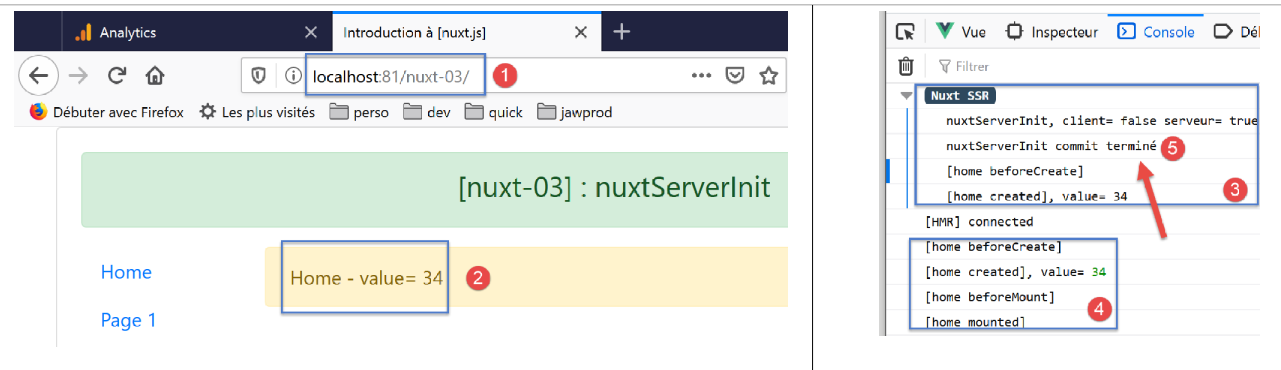
- In [5], we see that the function [nuxtServerInit] was executed by the server before the lifecycle of the page [index]. [nuxt] waited for the asynchronous function to finish its work before proceeding to the lifecycle;
- In [4], we see that the client did not execute the [nuxtServerInit] function;
Now let’s navigate twice: index --> page1 --> index. The logs are then as follows:
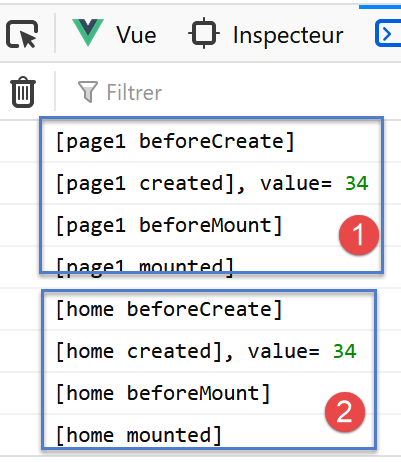
- In [1-2], we can see that the [nuxtServerInit] function is not executed by the client;
Now let’s manually enter URL on the [page1] page to force a call to the server:
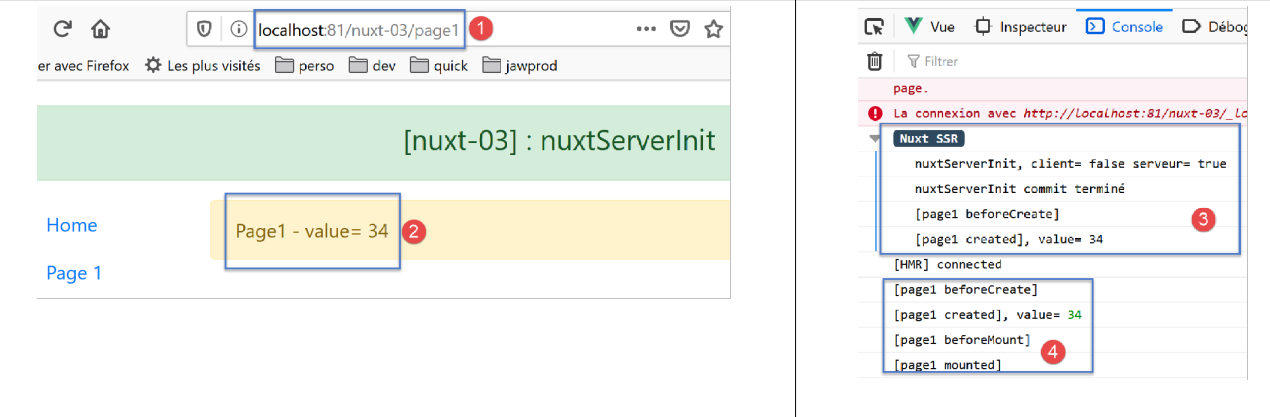
In [3-4], we see the same mechanism that preceded the loading of the [index] page at startup. To recap what has already been said: when a page call to the server is forced, it is as if the application were restarting with a home page that is the requested page;