9. Example [nuxt-06]: Injection in the context of a session manager
9.1. Overview
Example [nuxt-05] showed that the store can be persisted even when the user forces server calls. Store elements are reactive so that if they are integrated into views, those views react to changes in the store. You may also want to persist elements throughout client/server exchanges without wanting them to be reactive, simply because they are not displayed by views. You can then store these in the session without them being in the store.
The store is easily accessible through properties such as [context.app.$store] outside of views or [this.$store] within views. We would like something similar for the session, something like [context.app.$session] or [this.$session]. We will see that this is possible thanks to the concept of injection. However, we cannot inject objects into the context, only functions. This function will then be available via the expressions [context.app.$session()] or [this.$session()].
Finally, we’ll introduce the [nuxt] concept of [plugin].
The [nuxt-06] example is initially created by cloning the [nuxt-05] project:
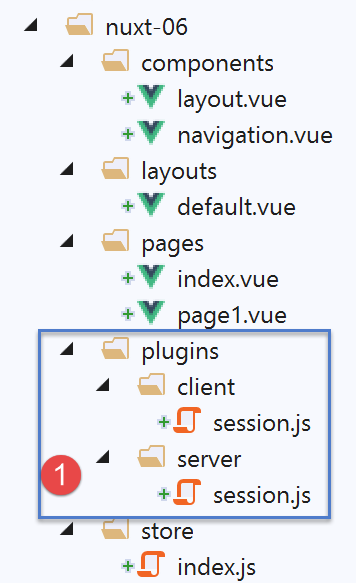
- In [1], we will add a [plugins] folder;
9.2. The concept of a [nuxt] plugin
[nuxt] refers to [plugin] as any code executed when the application starts, even before the [nuxtServerInit] function is executed by the server, which until now was the first user function to be executed. The application’s plugins must be declared in the [plugins] key of the [nuxt.config.js] configuration file:
  /*
   ** Plugins to load before mounting the App
   */
  plugins: [
    { src: '~/plugins/client/session', mode: 'client' },
    { src: '~/plugins/server/session', mode: 'server' }
],
- lines 5-6: a plugin is identified by its path [src] and its execution mode [mode]. [mode] can have three values:
- [client]: the plugin must be executed on the client side only;
- [server]: the plugin must be executed on the server side only;
- [mode] key is missing: in this case, the plugin must be executed on both the client and server sides;
- lines 5-6: we have placed our two plugins in a [plugins] folder. This is not required. Plugins can be placed anywhere in the project directory structure. Similarly, the names of the subfolders [client, server] are arbitrary here;
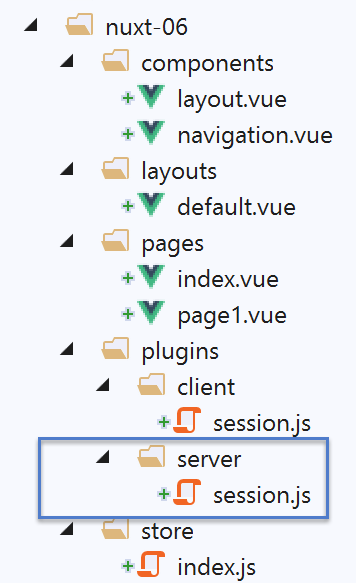
9.3. The server [session] plugin
The [server / session.js] plugin is as follows:
/* eslint-disable no-console */
export default (context, inject) => {
  // server session management

  // is there an existing session?
  let value = context.app.$cookies.get('session')
  if (!value) {
    // new session
    console.log("[plugin session server], démarrage d'une nouvelle session")
    value = initValue
  } else {
    // existing session
    console.log("[plugin session server], reprise d'une session existante")
  }
  // session definition
  const session = {
    // session content
    value,
    // save the session in a cookie
    save(context) {
      context.app.$cookies.set('session', this.value, { path: context.base, maxAge: context.env.maxAge })
    }
  }
  // we inject a function into [context, Vue] that will render the current session
  inject('session', () => session)
}

// initial session value
const initValue = {
  initSessionDone: false
}
- Line 2: Plugins are executed every time there is a server request: on startup and every time the user forces a server request by manually entering a URL:
- first, the server plugin(s) are executed;
- once the client browser has received the server’s response, it is the client plugin(s)’ turn to run;
- Line 2: Every plugin, whether client- or server-side, receives two parameters:
- [context]: the server or client context, depending on which is executing the plugin;
- [inject]: a function that allows a function to be injected into the server or client context;
- The purpose of the [server / session] plugin is twofold:
- to define a session (lines 16–23);
- Define a function [$session] within the context that returns the session from line 16. Line 25 does this;
- lines 16–23: the session will encapsulate its data in the [value] object on line 18;
- lines 20–22: it has a [save] function that takes a [context] object as a parameter. The calling code provides this context. With it, the [save] function saves the session value, the [value] object, to the session cookie;
- line 6: when the [server / session] plugin runs, it first checks whether the server has received a session cookie;
- if so, the [value] object from line 6 represents the session value, the set of data encapsulated within it;
- if not, lines 7–11, we set the initial value of the session. This will be the [initValue] object in lines 29–31. The session elements will be defined in the [nuxtServerInit] function, which is executed after the server plugin;
- line 18: the [value] notation is a shorthand for the [value:value] notation. The [value] on the left is the name of an object key; the [value] on the right is the [value] object declared on line 6;
- line 25: when this line is reached, the session has either been created because it did not exist, or retrieved from the client browser’s HTTP request;
- line 25: we inject a new function into the server context:
- the first parameter of [inject] is the name of the function being created, here ‘session’. [nuxt] will actually give it the name ‘$session’;
- the second parameter is the function definition. Here, the [$session] function
- will not accept any parameters;
- returns the [session] object from line 16;
- once the plugin is executed:
- the [$session] function is available in [context.app.$session] wherever the [context] object is available, or [this.$session] in a view or in the [vuex] store;
- the [$session] function returns a [session] object with a single [value] key;
- Upon initial session creation, the [value] object has only one key [initStoreDone] (lines 29–31). The key [initStoreDone:false] indicates that the store has not yet been added to the session. This will be done by the [nuxtServerInit] function;
9.4. Session Initialization
Once the [session / server] plugin is executed by the server, the server will execute the following [store / index.js] script:
/* eslint-disable no-console */
export const state = () => ({
  // meter
  counter: 0
})

export const mutations = {
  // increment counter by one [inc] value
  increment(state, inc) {
    state.counter += inc
  },
  // state replacement
  replace(state, newState) {
    for (const attr in newState) {
      state[attr] = newState[attr]
    }
  }
}

export const actions = {
  async nuxtServerInit(store, context) {
    // who executes this code?
    console.log('nuxtServerInit, client=', process.client, 'serveur=', process.server, 'env=', context.env)
    // waiting for a promise to be fulfilled
    await new Promise(function(resolve, reject) {
      // this is normally an asynchronous function
      // we simulate it with a one-second wait
      setTimeout(() => {
        // init session
        initSession(store, context)
        // success
        resolve()
      }, 1000)
    })
  }
}

function initSession(store, context) {
  // store is the blind to be initialized

  // retrieve the session
  const session = context.app.$session()
  // has the session already been initiated?
  if (!session.value.initSessionDone) {
    // start a new blind
    console.log("nuxtServerInit, initialisation d'une nouvelle session")
    // initialize the blind
    store.commit('increment', 77)
    // put the blind in the session
    session.value.store = store.state
    // initialize a new session
    session.value.somethingImportant = { x: 2, y: 4 }
    // the session is now initialized
    session.value.initSessionDone = true
  } else {
    console.log("nuxtServerInit, reprise d'un store existant")
    // update the store with the session store
    store.commit('replace', session.value.store)
  }
  // save the session
  session.save(context)
  // log
  console.log('initSession terminé, store=', store.state, 'session=', session.value)
}
Compared to the store in the [nuxt-05] project, only the [initSession] function (formerly initStore) in lines 38–60 has changed:
- line 42: we retrieve the session using the [$session] function, which has been injected into the server context;
- line 44: we check if the session has already been initialized;
- lines 45–54: if not:
- line 48: the store is initialized;
- line 50: the store’s state is placed in the session;
- line 52: we add another object [somethingImportant] to the session. This object will not be part of the store;
- line 54: we note that the session is now initialized;
- lines 55–59: if the session was already initialized:
- line 58: the new store is initialized with the session’s contents;
- line 61: the session is saved in the session cookie. Note that this involves placing the cookie in the HTTP response that the server will send to the client browser;
9.5. The client’s [client / session] plugin
Once the server has executed the [plugins / server / session] and [store / index] scripts, it will send one of the pages [index, page1] to the client browser. The server’s HTTP response will include the session cookie. Once the page is received by the client browser, the client-side scripts embedded in the page will execute. The [client / session] plugin will then execute:
/* eslint-disable no-console */
export default (context, inject) => {
  // customer session management

  // the session necessarily exists, initialized by the server
  console.log('[plugin session client], reprise de la session du serveur')

  // session definition
  const session = {
    // session content
    value: context.app.$cookies.get('session'),
    // save the session in a cookie
    save(context) {
      context.app.$cookies.set('session', this.value, { path: context.base, maxAge: context.env.maxAge })
    }
  }

  // we inject a function into [context, Vue] that will render the current session
  inject('session', () => session)
}
- When the client plugin runs, the session cookie has already been received by the client browser;
- the goal of the [client] plugin is to also inject a function [$session] into the client context. This function would return the session sent by the server;
- line 19: the injected function [$session] will return the session from lines 9–16;
- Lines 9–16: The [session] object managed by the client. This will be a copy of the session sent by the server;
- line 11: the value of the client session is retrieved from the session cookie sent by the [nuxt] server;
- lines 13–15: as with the server session, the client session has a [save] function that allows the session value, [this.value] on line 14, to be saved in the session cookie stored in the browser;
9.6. The [index] page
The [index] page evolves as follows:
<!-- page [index] -->
<template>
  <Layout :left="true" :right="true">
    <!-- navigation -->
    <Navigation slot="left" />
    <!-- message-->
    <template slot="right">
      <b-alert show variant="warning"> Home - session= {{ jsonSession }}, counter= {{ $store.state.counter }} </b-alert>
      <!-- bouton -->
      <b-button @click="incrementCounter" class="ml-3" variant="primary">Incrémenter</b-button>
    </template>
  </Layout>
</template>

<script>
/* eslint-disable no-undef */
/* eslint-disable no-console */
/* eslint-disable nuxt/no-env-in-hooks */

import Layout from '@/components/layout'
import Navigation from '@/components/navigation'
export default {
  name: 'Home',
  // components used
  components: {
    Layout,
    Navigation
  },
  computed: {
    jsonSession() {
      return JSON.stringify(this.$session().value)
    }
  },
  // life cycle
  beforeCreate() {
    // client and server
    console.log('[home beforeCreate]')
  },
  created() {
    // client and server
    console.log('[home created], session=', this.$session().value)
  },
  beforeMount() {
    // customer only
    console.log('[home beforeMount]')
  },
  mounted() {
    // customer only
    console.log('[home mounted]')
  },
  // event management
  methods: {
    incrementCounter() {
      console.log('incrementCounter')
      // counter increment of 1
      this.$store.commit('increment', 1)
      // session modification
      const session = this.$session()
      session.value.store = this.$store.state
      session.value.somethingImportant.x++
      session.value.somethingImportant.y++
      // save session in session cookie
      session.save(this.$nuxt.context)
    }
  }
}
</script>
Keep in mind that this page runs on both the server and the client.
- Line 8: We now display both the session and the store;
- line 30: [jsonSession] is a computed property that returns the JSON string of the session value;
- line 41: we display the session value using the injected function [this.$session]. This exists in both the server and client contexts;
- line 53: the [incrementCounter] method is executed only on the client side;
- Line 56: The blind counter is incremented and displayed as before;
- line 58: the session is retrieved using the injected function [this.$session];
- line 59: the session store is updated;
- lines 60–61: we increment the session attributes [somethingImportant.x, somethingImportant.y]. This is just to show that a session can be used to carry data other than the store;
- line 63: the session is saved in the session cookie stored in the browser. In a client view, the session context is available in [this.$nuxt.context];
The purpose of the [index] page is to demonstrate that the session is not reactive, whereas the store is. When we increment the session elements, we will see that the view is not updated. The [page1] view presents a solution to this problem.
9.7. The [page1] page
The [page1] page is created by copying the [index] page and then modifying it slightly:
<!-- page [index] -->
<template>
  <Layout :left="true" :right="true">
    <!-- navigation -->
    <Navigation slot="left" />
    <!-- message-->
    <template slot="right">
      <b-alert show variant="warning"> Page1 - session= {{ jsonSession }}, counter= {{ $store.state.counter }} </b-alert>
      <!-- bouton -->
      <b-button @click="incrementCounter" class="ml-3" variant="primary">Incrémenter</b-button>
    </template>
  </Layout>
</template>

<script>
/* eslint-disable no-undef */
/* eslint-disable no-console */
/* eslint-disable nuxt/no-env-in-hooks */

import Layout from '@/components/layout'
import Navigation from '@/components/navigation'
export default {
  name: 'Page1',
  // components used
  components: {
    Layout,
    Navigation
  },
  data() {
    return {
      session: {}
    }
  },
  computed: {
    jsonSession() {
      return JSON.stringify(this.session.value)
    }
  },
  // life cycle
  beforeCreate() {
    // client and server
    console.log('[page1 beforeCreate]')
  },
  created() {
    // client and server
    // set the session in the page's reactive properties
    this.session = this.$session()
    // log
    console.log('[page1 created], session=', this.session.value)
  },
  beforeMount() {
    // customer only
    console.log('[page1 beforeMount]')
  },
  mounted() {
    // customer only
    console.log('[page1 mounted]')
  },
  // event management
  methods: {
    incrementCounter() {
      console.log('incrementCounter')
      // counter increment of 1
      this.$store.commit('increment', 1)
      // session modification
      this.session.value.store = this.$store.state
      this.session.value.somethingImportant.x++
      this.session.value.somethingImportant.y++
      // save session in session cookie
      this.session.save(this.$nuxt.context)
    }
  }
}
</script>
- line 47: the main difference is that we’re adding the current session to the page’s properties (lines 29–33). This will make the session reactive. When the [incrementCounter] function increments the session’s elements, the [page1] view will be updated;
9.8. Running the project
Before running the project, check your browser’s session cookie and, if it exists, delete it so that the server creates a new session:
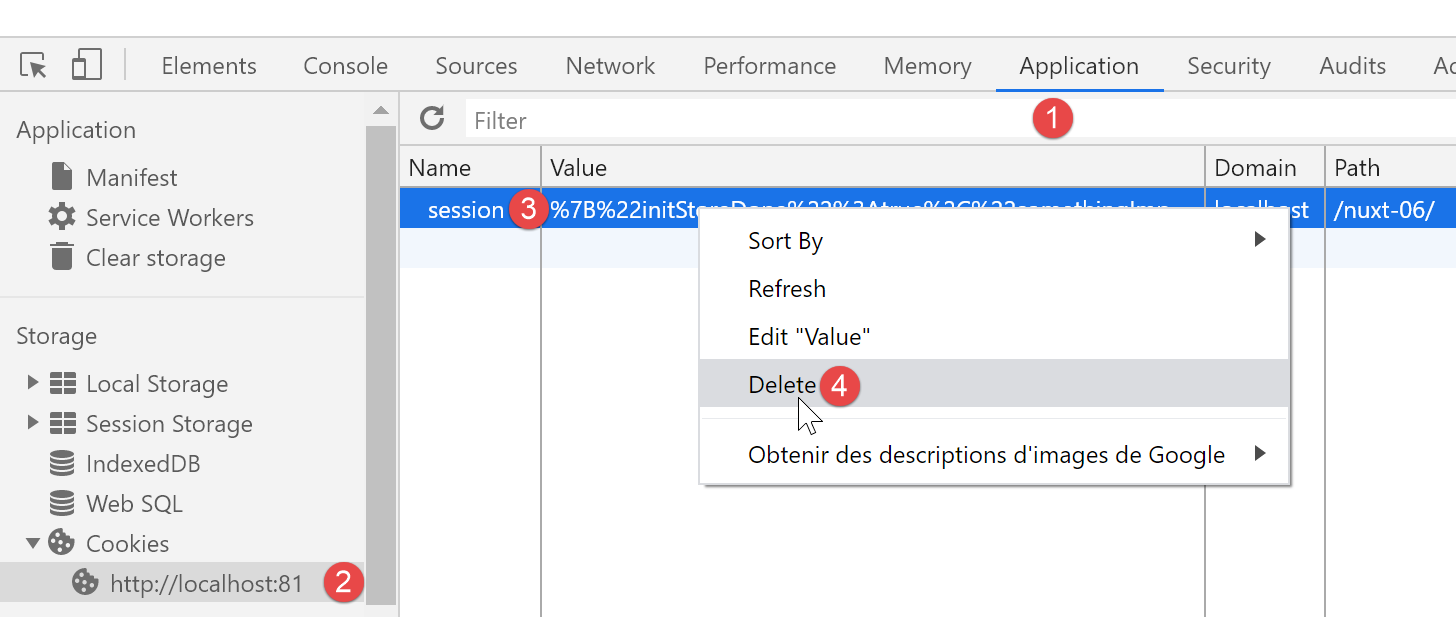
Now let’s request the URL [http://localhost:81/nuxt-06/]:
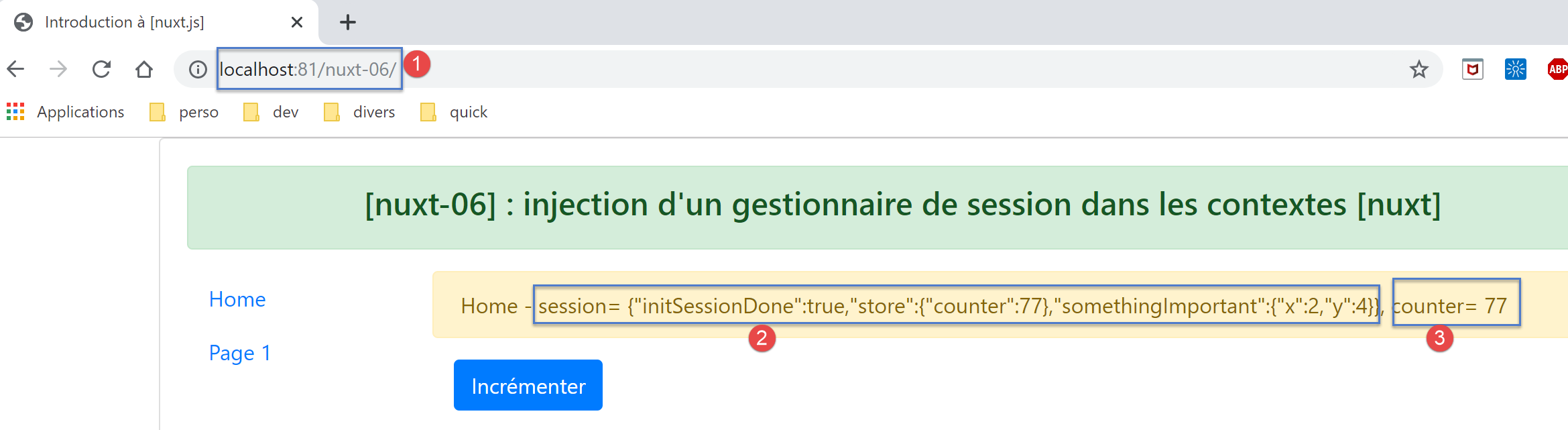
The browser logs are then as follows:
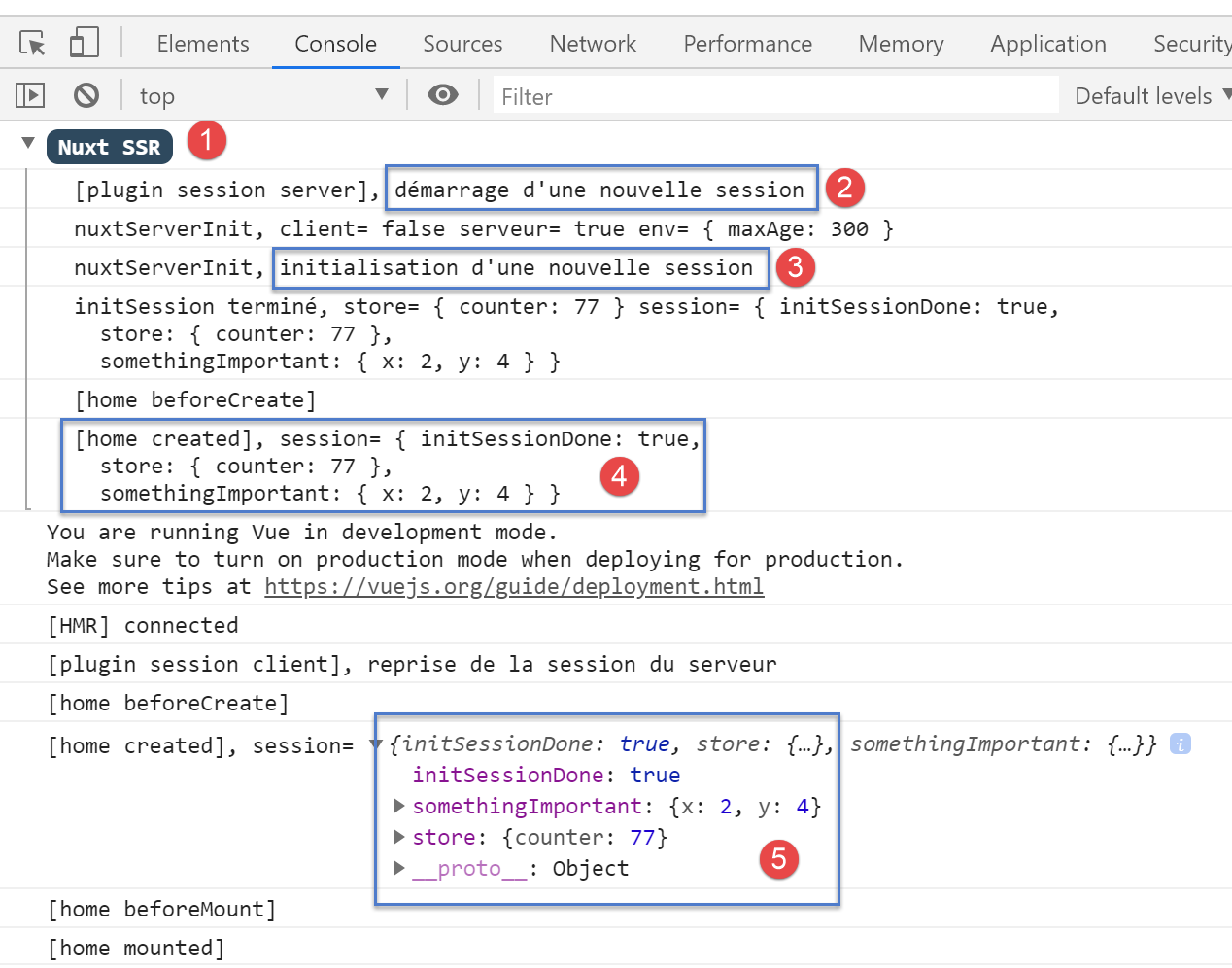
- In [2], the server starts a new session in the server's [session] plugin;
- in [3], this new session is initialized in [nuxtServerInit];
- in [4], the new session as it is known on the server;
- in [5], the client has successfully retrieved this session;
Now let’s increment the counter three times:
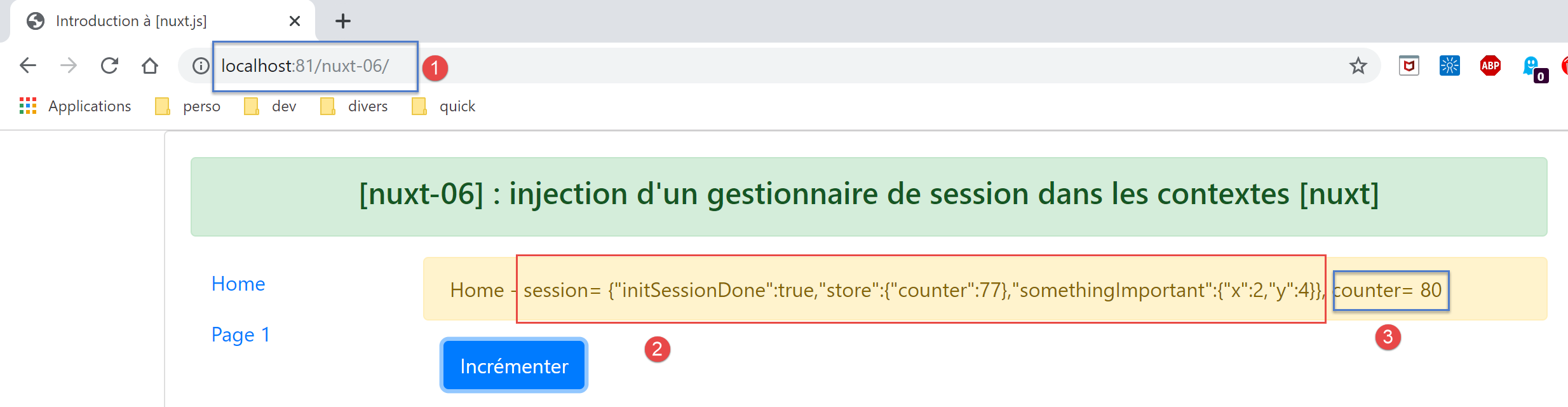
- in [3], the counter has been incremented but not the session in [2]. While [3] displays the store, which is reactive, [2] displays the session, which is not reactive:
Now let’s reload the page (F5). The logs are as follows after this reload:
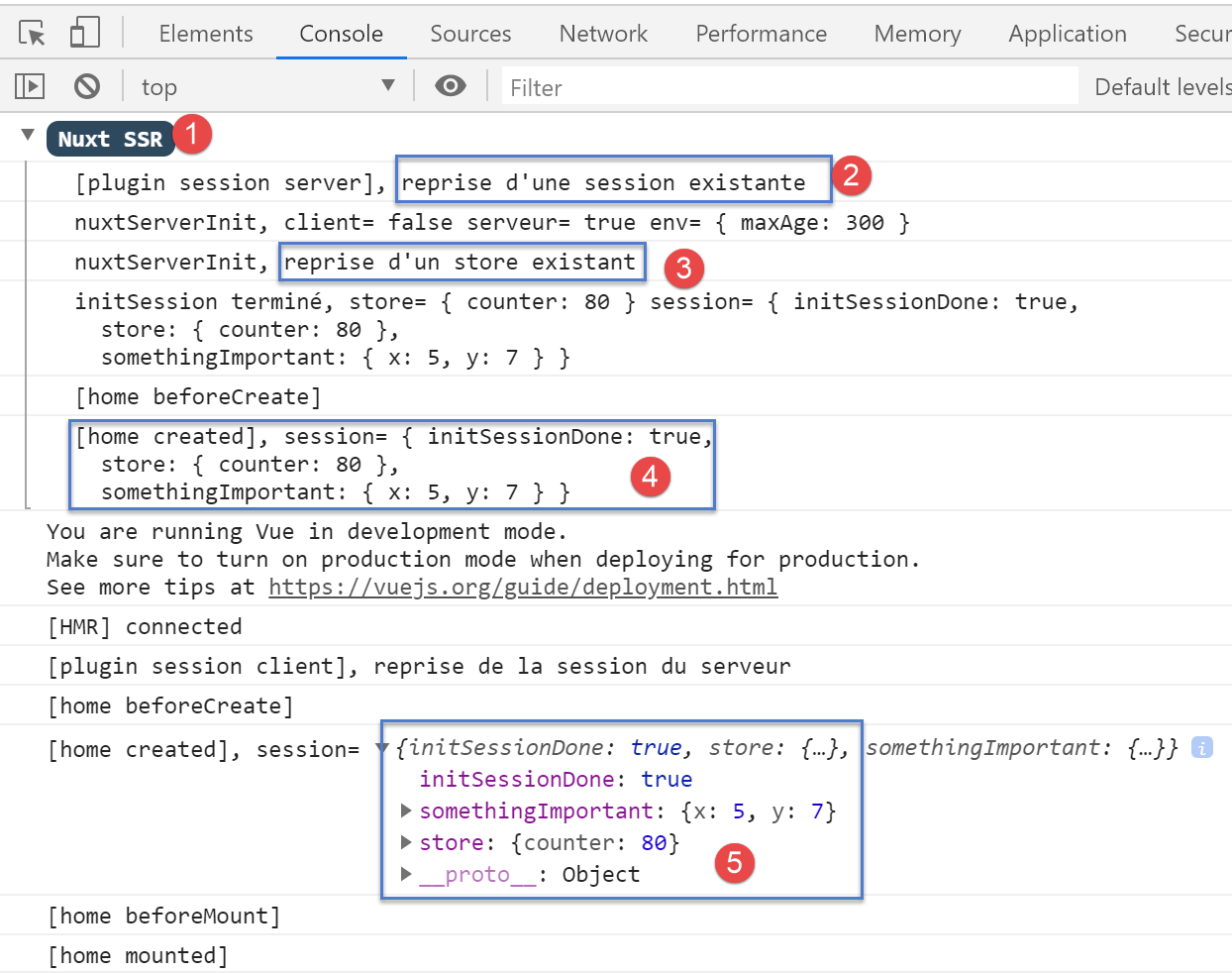
- In [2], we see that the server received a session cookie sent by the client browser;
- in [4], we see that the store is not reset but is carried over from the received session;
- in [4-5]: we see that the session attributes have indeed all been incremented three times;
The page sent by the server is then as follows;
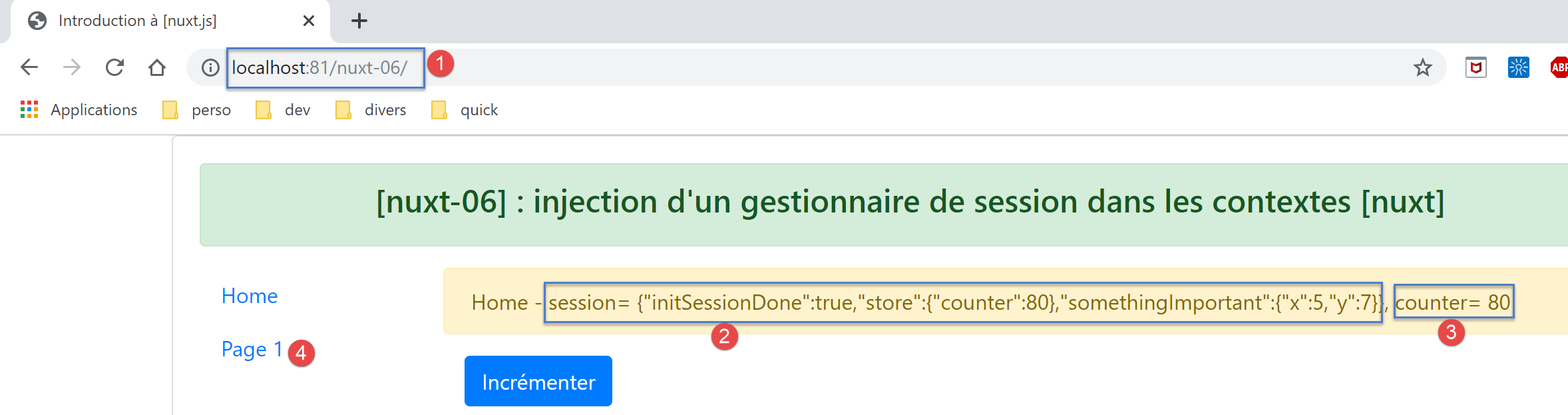
The conclusion drawn from this page is that the session can carry elements other than the store, but these are not reactive.
Now let’s click on the [Page 1] [4] link. The new page displayed is as follows:
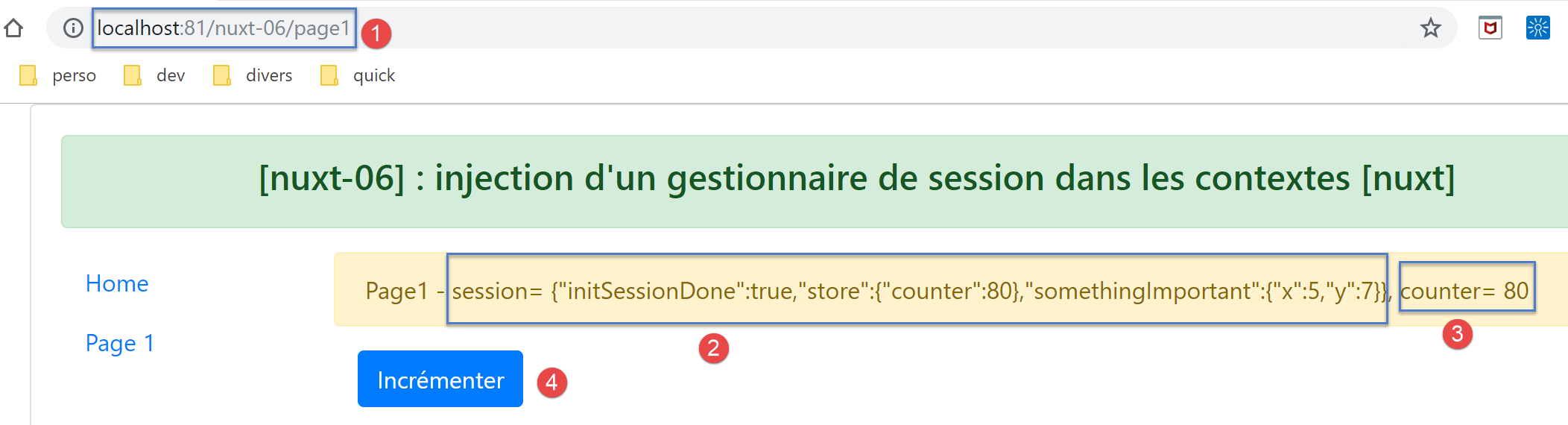
Then let’s use the [Increment] button three times. The page becomes the following:
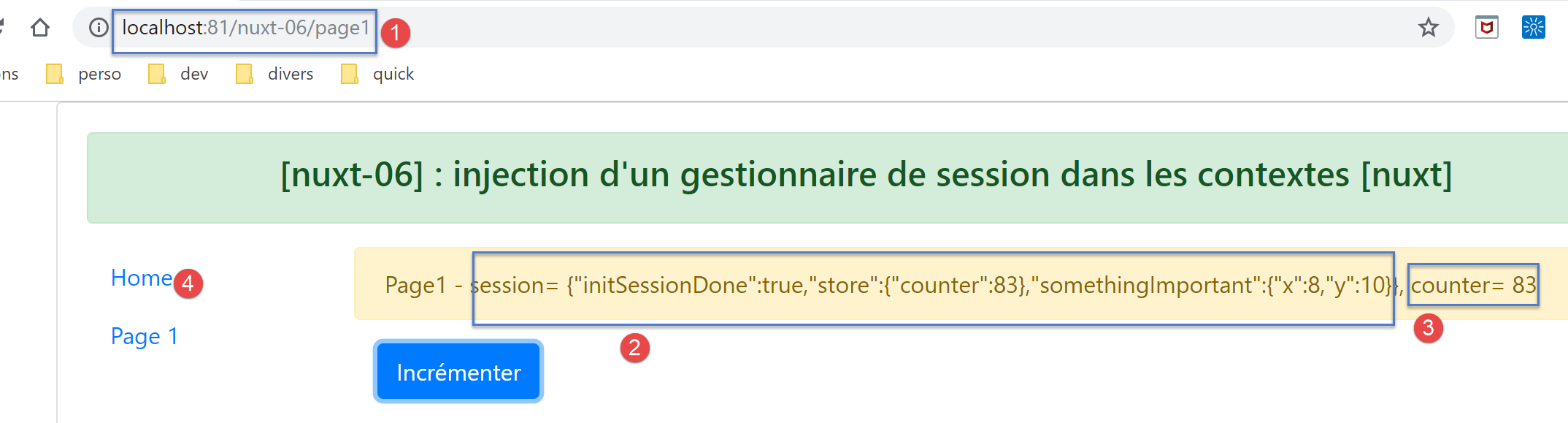
This time, the session is displayed correctly in [2]. It is reactive here. This can be seen in the logs:
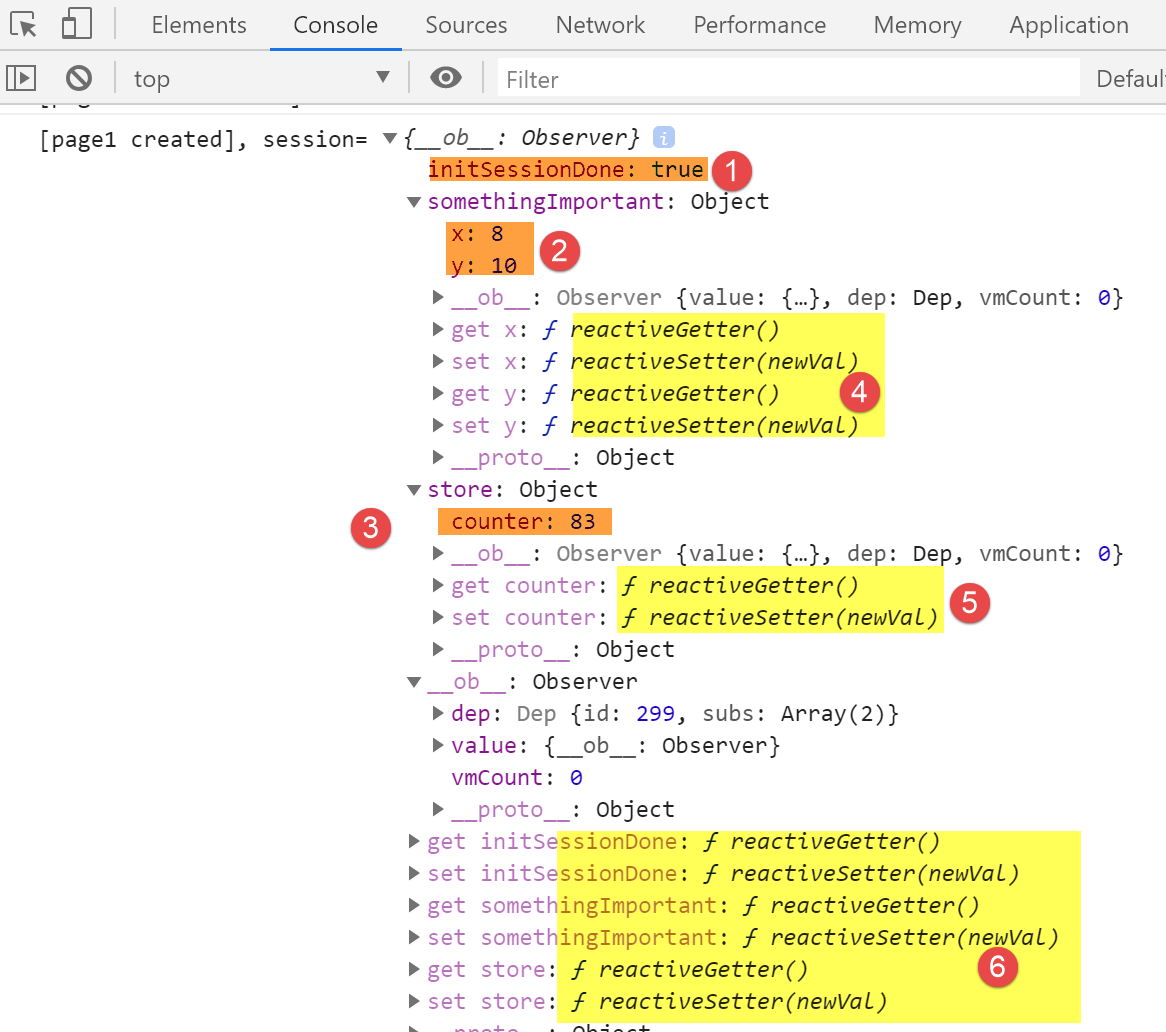
- in [1-3], the session values;
- in [4-6], the reactive getters and setters for the session elements;
Now let’s click the [Home] link [4]. We get the following page:
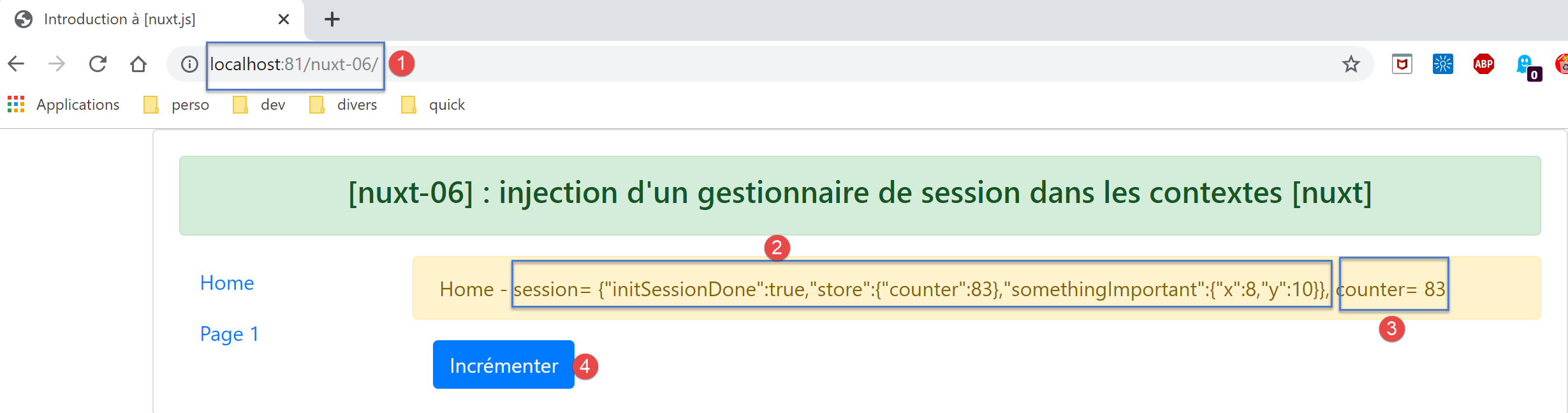
Then click the [Increment] button [4] twice. The page changes to the following:
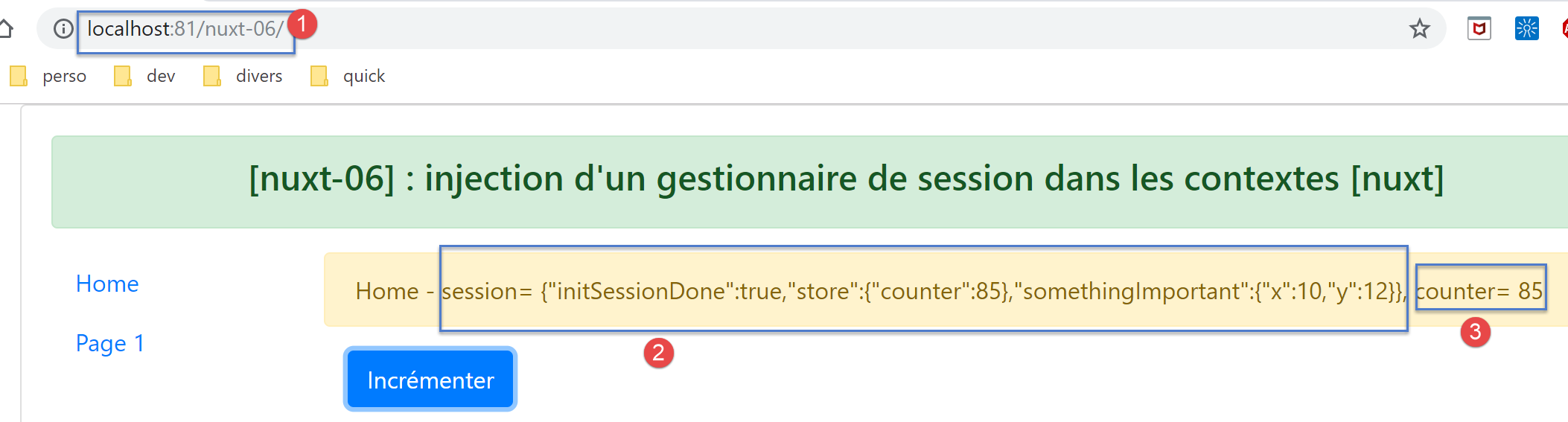
We can see that here too, the session has become reactive [2].
Let’s retrieve the value returned by the [this.$session()] function:
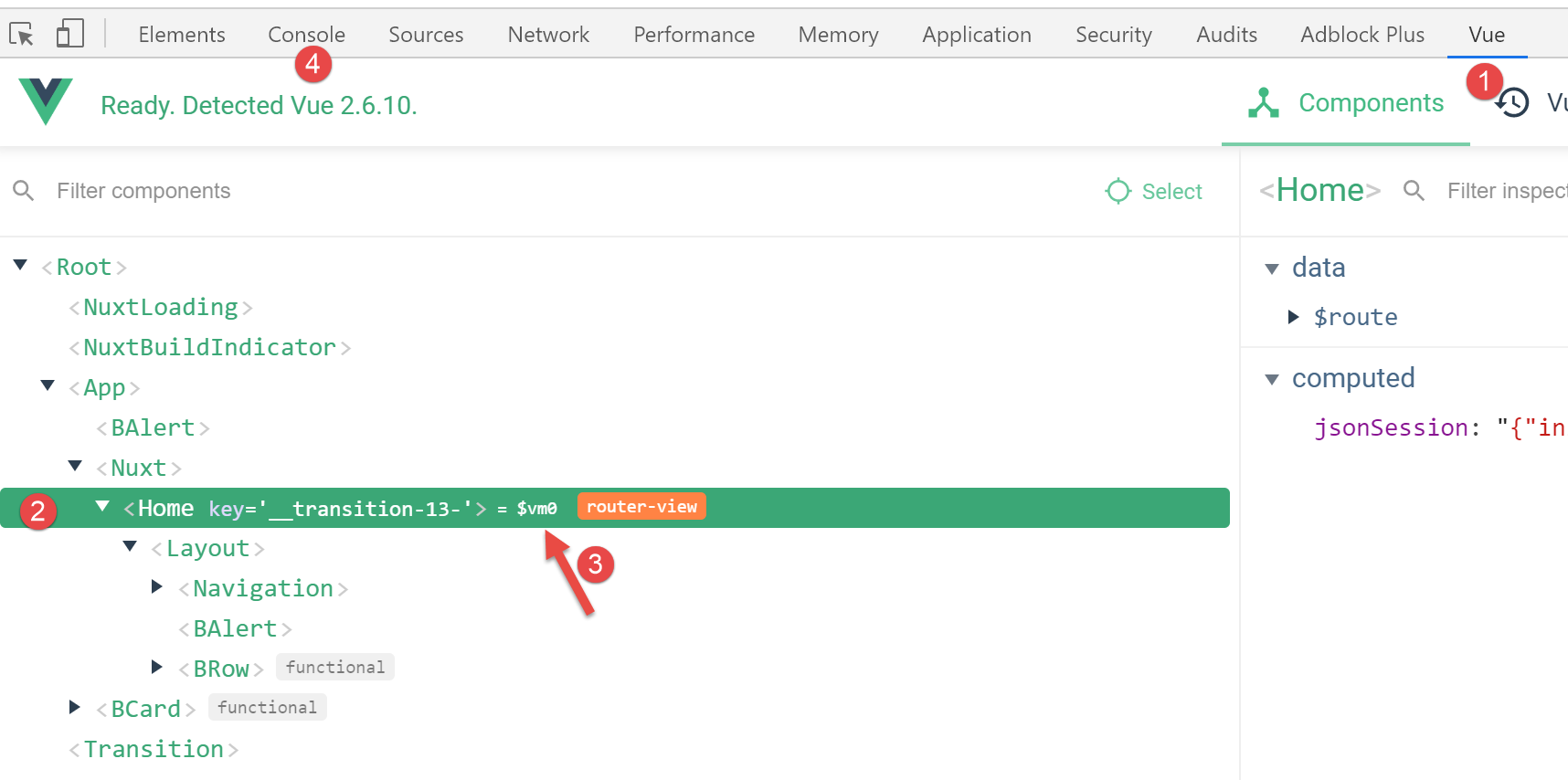
- In the [View] tab, select the current page [Home] to obtain its reference [$vm0] [3];
Then, in the [Console] tab [4], let’s retrieve the value of the function [$vm0.$session()]:
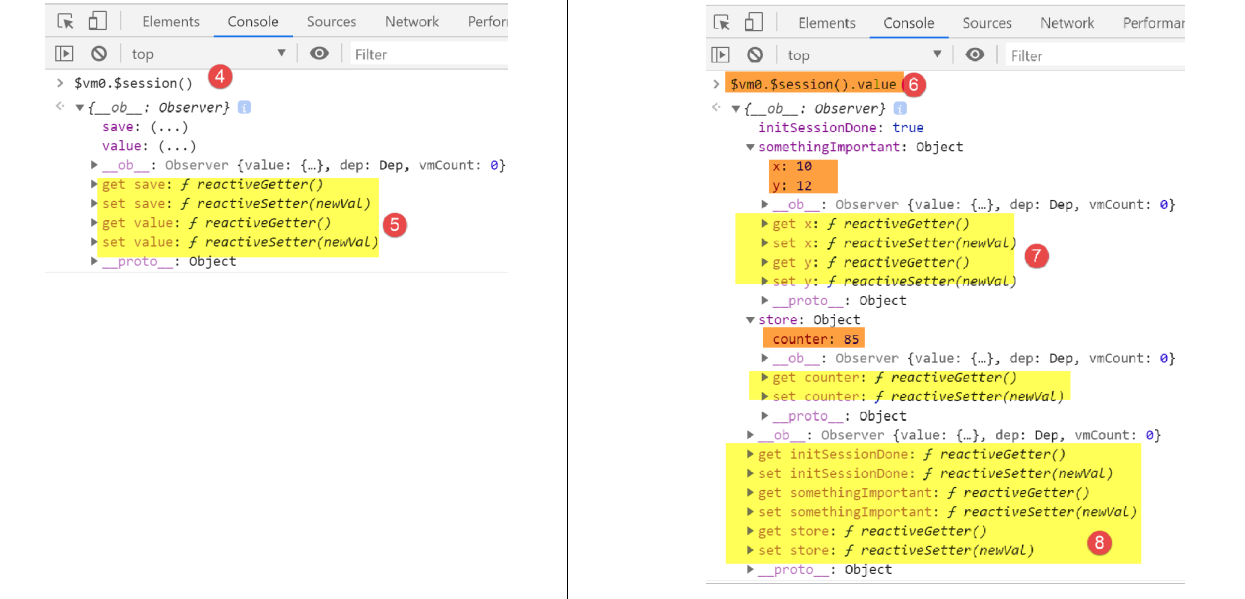
- in [5], we see that the session has become reactive, whereas it was not initially;
- in [6], we request the value of the session;
- in [7-8], we discover that this value has also become reactive;
We therefore have an unexpected result here: if an element becomes reactive on a page because it has been placed in the page’s properties, then it also becomes reactive on pages where it is not part of the properties.
9.9. Conclusion
Example [nuxt-05] showed that we could persist the store across requests made to the server. Example [nuxt-06] does the same thing with an object we called [session] by analogy with the web session. We saw that this session could have the same properties as the [Vuex] store and become reactive as well, even though it wasn’t natively.
So what is the point of the [Vuex] store? I must admit that, for now, it hasn’t become clear to me. It’s likely that I’ve missed something. So, when in doubt, I would recommend using:
- a [Vuex] store to hold everything that needs to be shared between client-side pages, and anything that may need to be shared between the client and the server;
- a session cookie if the store needs to be persisted during a client-to-server request, with the session containing only the store;
The examples [nuxt-05] and [nuxt-06] were intended to show how to ensure the application’s continuity when the user forces a call to the server by manually typing URLs. Note that the default behavior in this case is a restart of the application, causing its current state to be lost.