4. Example [nuxt-01]: routing and navigation
We will build a series of simple examples to gradually discover how a [nuxt] application works. We will start by porting the [vuejs-11] application from the document |Introduction to the VUE framework.JS by Example|, to first discover what differentiates the code organization of a [nuxt] application from that of a [vue] application.
4.1. Project directory structure
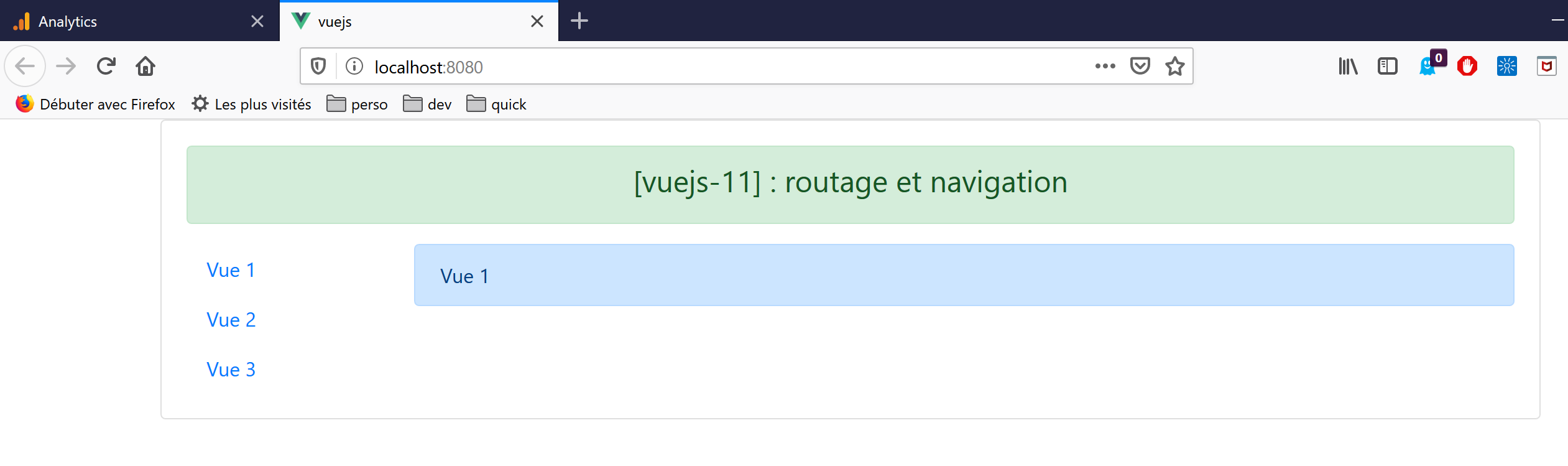
The [vuejs-11] project was a navigation project with views:
The source code tree for the [vuejs-11] project was as follows:
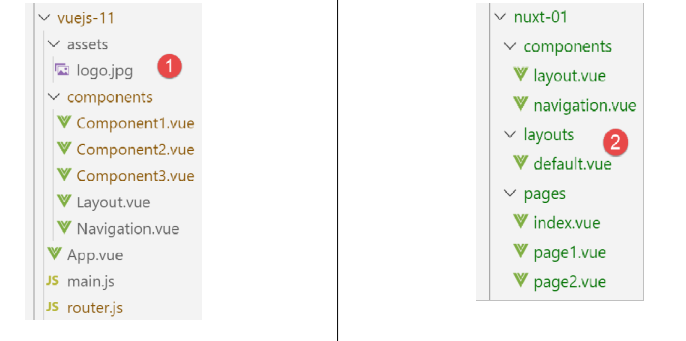
- [main.js] was the script executed when the [vue] application started;
- [router.js] defined the routing rules;
- [App.vue] was the application’s structural view. It organized the layout of the various views;
- [Component1, Component2, Component3, Layout, Navigation] were the components used in the application’s various views;
When porting the application [vue] [1] to an application [nuxt] [2]:
- the scripts executed at application startup must be declared in the [plugins] key of the [nuxt.config.js] file. Additionally, it is possible to separate the scripts intended for the [nuxt] server from those intended for the [nuxt] client;
- the [App.vue] view must be installed in the [layouts] folder and renamed to [default.vue];
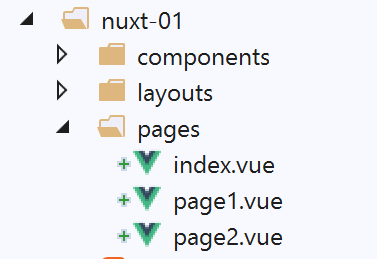
- the components [Component1, Component2, Component3], which are the routing targets, must be moved to the [pages] folder. One of them, the one serving as the home page, must be renamed to [index.vue]. Here, we have renamed the files:
- [Component1] --> [index]: displays the text [Home];
- [Component2] --> [page1]: displays the text [Page 1];
- [Component3] --> [page2]: displays the text [Page 2];
[nuxt] uses the contents of the [pages] folder to dynamically generate the following routes:
As a result, the [router.js] file used in the [vue] project becomes unnecessary in the [nuxt] project.
The configuration file [nuxt.config.js] will be as follows:
export default {
  mode: 'universal',
  /*
   ** Headers of the page
   */
  head: {
    title: 'Introduction à [nuxt.js]',
    meta: [
      { charset: 'utf-8' },
      { name: 'viewport', content: 'width=device-width, initial-scale=1' },
      {
        hid: 'description',
        name: 'description',
        content: 'ssr routing loading asyncdata middleware plugins store'
      }
    ],
    link: [{ rel: 'icon', type: 'image/x-icon', href: '/favicon.ico' }]
  },
  /*
   ** Customize the progress-bar color
   */
  loading: { color: '#fff' },
  /*
   ** Global CSS
   */
  css: [],
  /*
   ** Plugins to load before mounting the App
   */
  plugins: [],
  /*
   ** Nuxt.js dev-modules
   */
  buildModules: [
    // Doc: https://github.com/nuxt-community/eslint-module
    '@nuxtjs/eslint-module'
  ],
  /*
   ** Nuxt.js modules
   */
  modules: [
    // Doc: https://bootstrap-vue.js.org
    'bootstrap-vue/nuxt',
    // Doc: https://axios.nuxtjs.org/usage
    '@nuxtjs/axios'
  ],
  /*
   ** Axios module configuration
   ** See https://axios.nuxtjs.org/options
   */
  axios: {},
  /*
   ** Build configuration
   */
  build: {
    /*
     ** You can extend webpack config here
     */
    extend(config, ctx) {}
  },
  // source code directory
  srcDir: 'nuxt-01',
  // router
  router: {
    // application URL root
    base: '/nuxt-01/'
  },
  // server
  server: {
    // service port, default 3000
    port: 81,
    // network addresses listened to, default localhost: 127.0.0.1
    // 0.0.0.0 = all the machine's network addresses
    host: '0.0.0.0'
  }
}
- line 62: specify the folder containing the source code for project [dvp];
- Line 66: Specify URL as the root directory for the [dvp] application (you can enter any value you like);
- Line 43: Note that the [bootstrap-vue] library is referenced in the configuration;
4.2. Porting the [main.js] file
The [main.js] file from the [vuejs-11] project was as follows:
// imports
import Vue from 'vue'
import App from './App.vue'

// plugins
import BootstrapVue from 'bootstrap-vue'
Vue.use(BootstrapVue);

// bootstrap
import 'bootstrap/dist/css/bootstrap.css'
import 'bootstrap-vue/dist/bootstrap-vue.css'

// router
import monRouteur from './router'

// configuration
Vue.config.productionTip = false

// instantiation project [App]
new Vue({
  name: "app",
  // main view
  render: h => h(App),
  // router
  router: monRouteur,
}).$mount('#app')
Apart from [imports], the code does the following:
- lines 5–11: uses the [bootstrap-vue] library. This task is now handled by the [bootstrap-vue/nuxt] module on line 43 of the [nuxt.config.js] configuration file;
- lines 14 and 25: use of the routing file [router.js]. This task is now performed automatically by the application [nuxt] based on the directory tree of the folder [pages];
- lines 20–26: instantiation of the application’s main view. In a [nuxt] application, the [layouts/default.vue] view serves as the main view;
The file [main.js] is no longer needed. If it had been needed, it would have been declared in the key [plugins] on line 30 of the configuration file [nuxt.config.js];
4.3. The main view [default.vue]
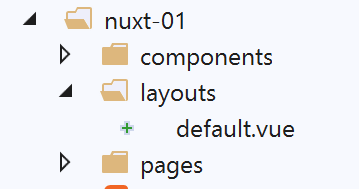
The main view [layouts / default.vue] is as follows:
<template>
  <div class="container">
    <b-card>
      <!-- a message -->
      <b-alert show variant="success" align="center">
        <h4>[nuxt-01] : routage et navigation</h4>
      </b-alert>
      <!-- the current routing view -->
      <nuxt />
    </b-card>
  </div>
</template>

<script>
export default {
  name: 'App'
}
</script>
- On line 9, in the [vuejs-11] project, we had the <router-view /> tag instead of the <nuxt /> tag used here. Both seem to work. I tried both of them without seeing any change. I kept the <nuxt /> tag, which is the recommended one. It displays the current view, i.e., the target page of the current route;
4.4. The components
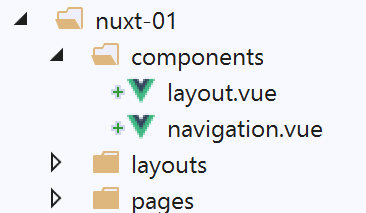
Compared to the [vuejs-11] project, the components in [layout, navigation] remain unchanged:
[components / layout.vue]
<!-- view layout -->
<template>
  <!-- line -->
  <div>
    <b-row>
      <!-- two-column zone -->
      <b-col v-if="left" cols="2">
        <slot name="left" />
      </b-col>
      <!-- ten-column zone -->
      <b-col v-if="right" cols="10">
        <slot name="right" />
      </b-col>
    </b-row>
  </div>
</template>

<script>
export default {
  // settings
  props: {
    left: {
      type: Boolean
    },
    right: {
      type: Boolean
    }
  }
}
</script>
This component is used to structure the application's pages into two columns:
- lines 7–9: the left column spans 2 Bootstrap columns;
- lines 11–13: the right column spans 10 Bootstrap columns;
[navigation.vue]
<template>
  <!-- bootstrap menu with three options -->
  <b-nav vertical>
    <b-nav-item to="/" exact exact-active-class="active">
      Home
    </b-nav-item>
    <b-nav-item to="/page1" exact exact-active-class="active">
      Page 1
    </b-nav-item>
    <b-nav-item to="/page2" exact exact-active-class="active">
      Page 2
    </b-nav-item>
  </b-nav>
</template>
This component displays three links from navigation:
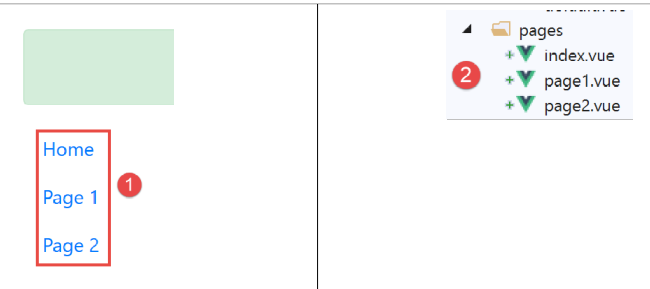
To determine the values for the [to] attributes in lines 4, 7, and 10, you must refer to the [pages] and [2] files:
- the [index] page will have URL and [/];
- the page [page1] will have URL and [/page1];
- the page [page2] will have URL and [/page2];
The component [navigation] can also be written as follows:
<template>
  <!-- bootstrap menu with three options -->
  <b-nav vertical>
    <nuxt-link to="/" exact exact-active-class="active">
      Home
    </nuxt-link>
    <nuxt-link to="/page1" exact exact-active-class="active">
      Page 1
    </nuxt-link>
    <nuxt-link to="/page2" exact exact-active-class="active">
      Page 2
    </nuxt-link>
  </b-nav>
</template>
The <b-nav-item> tag is replaced by the <nuxt-link> tag, which denotes a routing link. In practice, I didn’t notice any major difference—nothing that would tip the scales in favor of one tag over the other.
4.5. The pages
The page [index.vue] displays the following view:
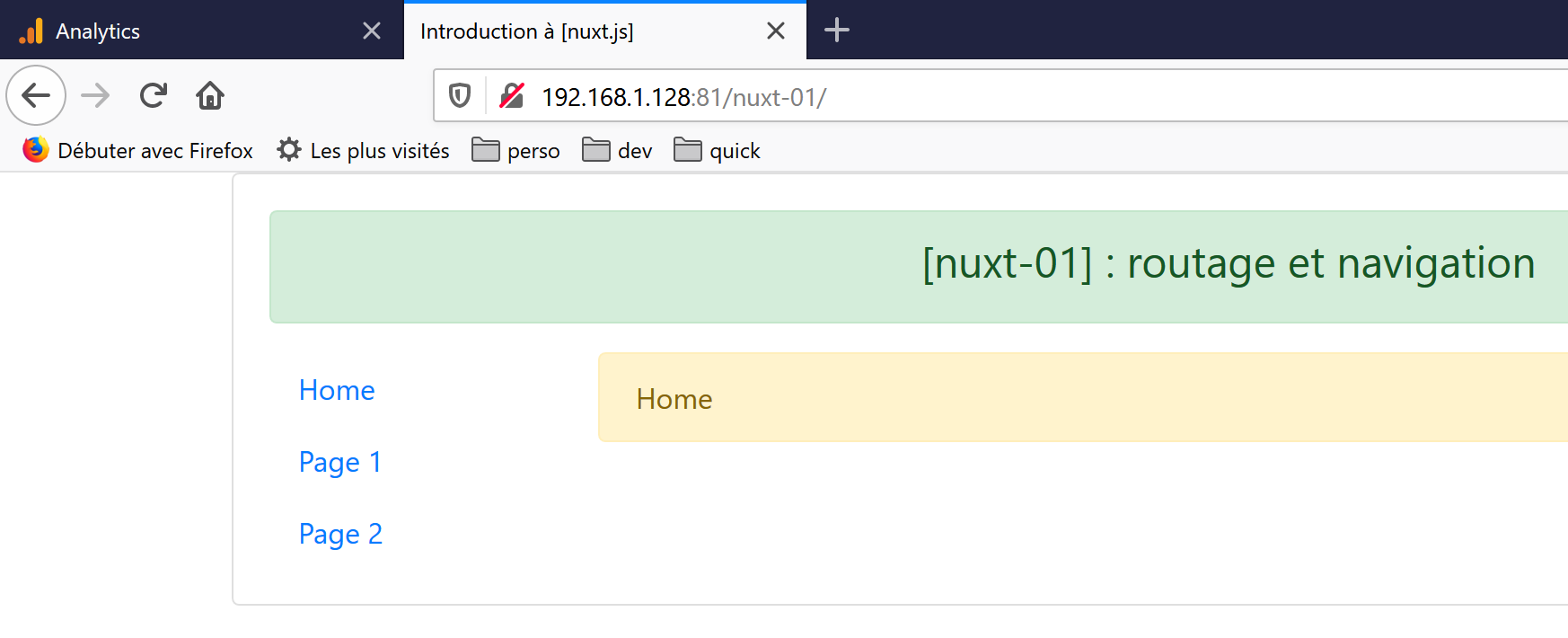
The page code is as follows:
<!-- main page -->
<template>
  <Layout :left="true" :right="true">
    <!-- navigation -->
    <Navigation slot="left" />
    <!-- message-->
    <b-alert slot="right" show variant="warning">
      Home
    </b-alert>
  </Layout>
</template>

<script>
/* eslint-disable no-undef */
/* eslint-disable no-console */
/* eslint-disable nuxt/no-env-in-hooks */

import Navigation from '@/components/navigation'
import Layout from '@/components/layout'

export default {
  name: 'Home',
  // components used
  components: {
    Layout,
    Navigation
  },
  // life cycle
  beforeCreate(...args) {
    console.log('[home beforeCreate]', 'process.server=', process.server,
'process.client=', process.client, "number of arguments=", args.length)
  },
  created(...args) {
    console.log('[home created]', 'process.server=', process.server,
'process.client=', process.client, "number of arguments=", args.length)
  },
  beforeMount(...args) {
    console.log('[home beforeMount]', 'process.server=', process.server,
'process.client=', process.client, "number of arguments=", args.length)
  },
  mounted(...args) {
    console.log('[home mounted]', 'process.server=', process.server,
'process.client=', process.client, "number of arguments=", args.length)
  }
}
</script>
- line 5: the navigation component is placed in the left column;
- lines 7–9: an alert is placed in the right column;
In the <script> section, we add code to the lifecycle functions of the [beforeCreate, created, beforeMount, beforeMounted] page. We want to know which ones are executed by the []nuxt server and which ones by the [nuxt] client. Let’s recall two things:
- when a page is requested either at application startup, as is the case with the [index] page, or manually by the user who refreshes the browser page or types a URL URL by hand, it is first served by the [nuxt] server. The server interprets the code above and executes the Javascript it contains;
- when the page sent by the [nuxt] server arrives at the browser, it arrives with the client code [nuxt]. This code interprets the page above once again;
- We use logs to track who is doing what in order to better understand this process;
- Lines 30–31: The function uses a global object [process] that exists on both the server and the client:
- [process.server] is true if the code is executed by the server, false otherwise;
- [process.client] is true if the code is executed by the client, false otherwise;
- Because the variable [process] is undeclared in the code, we are required to include line 14 for [eslint]. Line [16] is necessary because otherwise [eslint] declares a different type of error due to the variable [process]. Line 15 is necessary to allow the use of [console] in lifecycle functions;
- Line 29: We also want to know if the lifecycle functions receive arguments. We will indeed find that [nuxt] passes information to certain functions. We want to know if the lifecycle functions are among them;
- We repeat the same code for all four functions;
4.6. The [nuxt.config.js] file
This file controls the execution of the [dvp] project. It was described on page 33.
4.7. Project Execution
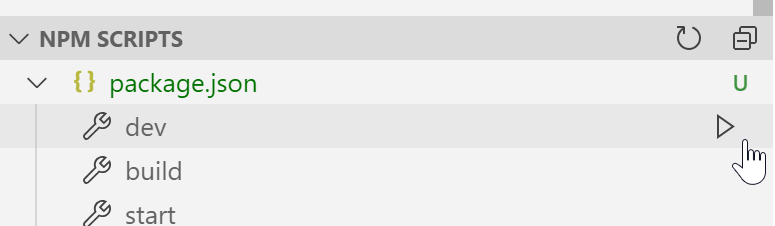
We run the project:
The page displayed is as follows:
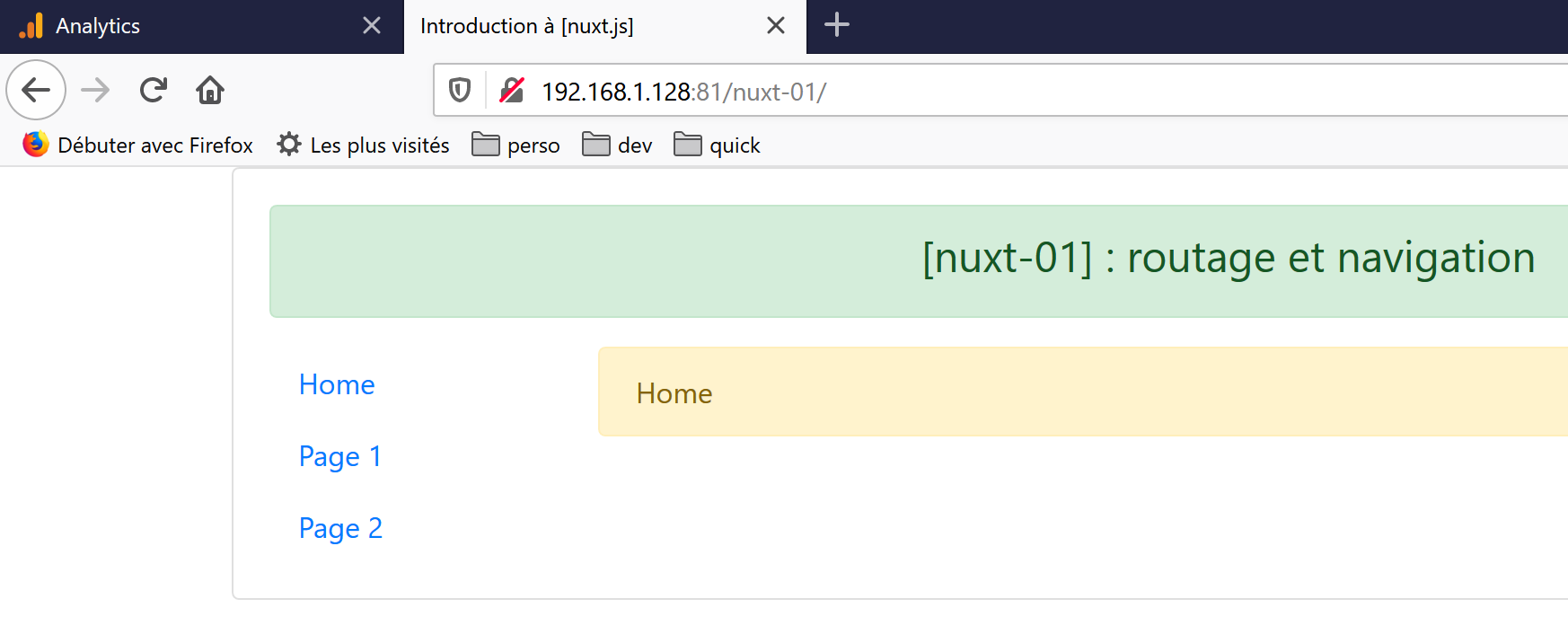
Once installed in the browser, the [nuxt] application becomes a standard [vue] application. We will therefore not discuss the client-side behavior of the [nuxt-01] application. This was covered in the [vuejs-11] project in the document |Introduction to the VUE.JS Framework by Example|.
The [nuxt] application differs from the [vue] application in only two respects:
- the initial launch of the application, which displays the home page;
- whenever the user triggers a browser refresh in any way;
In both cases:
- the requested page is provided by the server;
- the received page is processed by the client;
Let’s look at the application startup logs (F12 in the browser):
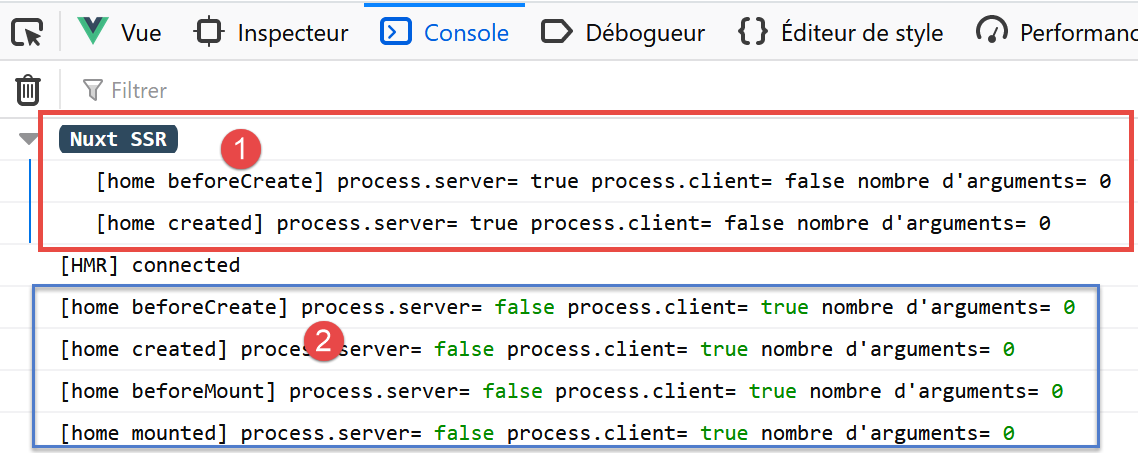
- in [1], the server logs (process.server=true). They appear preceded by the entry [Nuxt SSR] (SSR= Server Side Rendered);
- in [2], the client logs in the browser (process.client=true);
From these logs, we can deduce that:
- the server executes the [beforeCreate, created] lifecycle functions;
- the client executes the [beforeCreate, created, beforeMount, mounted] lifecycle functions;
- the server processed the page before the client;
- in both cases, none of the executed functions receive any arguments;
Now let’s look at the source code of the received page (option [Code source de la page] in the browser):
<!doctype html>
<html data-n-head-ssr>
<head>
  <title>Introduction à [nuxt.js]</title>
  <meta data-n-head="ssr" charset="utf-8">
  <meta data-n-head="ssr" name="viewport" content="width=device-width, initial-scale=1">
  <meta data-n-head="ssr" data-hid="description" name="description" content="ssr routing loading asyncdata middleware plugins store">
  <link data-n-head="ssr" rel="icon" type="image/x-icon" href="/favicon.ico">
  <base href="/nuxt-01/">
  ....
  <link rel="preload" href="/nuxt-01/_nuxt/runtime.js" as="script">
  <link rel="preload" href="/nuxt-01/_nuxt/commons.app.js" as="script">
  <link rel="preload" href="/nuxt-01/_nuxt/vendors.app.js" as="script">
  <link rel="preload" href="/nuxt-01/_nuxt/app.js" as="script">
</head>
<body>
  <div data-server-rendered="true" id="__nuxt">
    <div id="__layout">
      <div class="container">
        <div class="card">
          <div class="card-body">
            <div role="alert" aria-live="polite" aria-atomic="true" align="center" class="alert alert-success">
              <h4>[nuxt-01] : routage et navigation</h4>
            </div>
            <div>
              <div class="row">
                <div class="col-2">
                  <ul class="nav flex-column">
                    <li class="nav-item">
                      <a href="/nuxt-01/" target="_self" class="nav-link active nuxt-link-active">
                        Home
                      </a>
                    </li>
                    <li class="nav-item">
                      <a href="/nuxt-01/page1" target="_self" class="nav-link">
                        Page 1
                      </a>
                    </li>
                    <li class="nav-item">
                      <a href="/nuxt-01/page2" target="_self" class="nav-link">
                        Page 2
                      </a>
                    </li>
                  </ul>
                </div> <div class="col-10">
                  <div role="alert" aria-live="polite" aria-atomic="true" class="alert alert-warning">
                    Home
                  </div>
                </div>
              </div>
            </div>
          </div>
        </div>
      </div>
    </div>
  </div>
  <script>
    window.__NUXT__ = (function (a, b, c, d, e, f, g, h, i, j) {
      return {
        layout: "default", data: [{}], error: null, serverRendered: true,
        logs: [
          { date: new Date(1574069600078), args: [a, b, c, d, e, f, g, "(repeated 1 times)"], type: h, level: i, tag: j },
          { date: new Date(1574070938091), args: [a, b, c, d, e, f, g], type: h, level: i, tag: j }
        ]
      }
    }("[home beforeCreate]", "process.server=", "true", "process.client=", "false", "nombre d'arguments=", "0", "log", 2, ""));
  </script>
  <script src="/nuxt-01/_nuxt/runtime.js" defer></script>
  <script src="/nuxt-01/_nuxt/commons.app.js" defer></script>
  <script src="/nuxt-01/_nuxt/vendors.app.js" defer></script>
  <script src="/nuxt-01/_nuxt/app.js" defer></script>
</body>
</html>
Comments
- The first thing that can be noted is that the received HTML code correctly reflects what the user sees. This was not the case with the [vue] applications, for which the displayed source code was the source code of a nearly empty HTML file. That was what the browser had received. Then the [vue] client took over and built the page the user expected. You then had to go to the [inspecteur] tab in the browser’s developer tools (F12) to view the HTML code of the displayed page;
- lines 57–67: this is the script that displayed the logs tagged [Nuxt SSR]. These logs were generated on the server side, and the results were embedded in a script included in the page sent;
- lines 68–71: the scripts that form the client-side code executed in the browser;
The scripts in lines 68–71 are executed and transform the received page. To see the page ultimately displayed to the user, go to the [inspecteur] tab in the browser’s developer tools (F12):
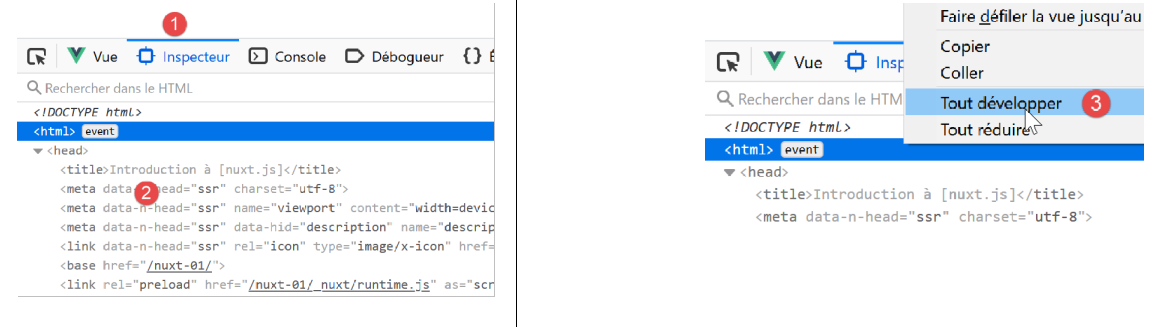
When you expand the <html> tag, you see the following content:
<head>
  <title>Introduction à [nuxt.js]</title>
  <meta data-n-head="ssr" charset="utf-8">
  <meta data-n-head="ssr" name="viewport" content="width=device-width, initial-scale=1">
  <meta data-n-head="ssr" data-hid="description" name="description" content="ssr routing loading asyncdata middleware plugins store">
  <link data-n-head="ssr" rel="icon" type="image/x-icon" href="/favicon.ico">
  <base href="/nuxt-01/">
  ...
  <link rel="preload" href="/nuxt-01/_nuxt/runtime.js" as="script">
  <link rel="preload" href="/nuxt-01/_nuxt/commons.app.js" as="script">
  <link rel="preload" href="/nuxt-01/_nuxt/vendors.app.js" as="script">
  <link rel="preload" href="/nuxt-01/_nuxt/app.js" as="script">

  <script charset="utf-8" src="/nuxt-01/_nuxt/pages_index.js"></script>
  <script charset="utf-8" src="/nuxt-01/_nuxt/pages_page1.js"></script>
  <script charset="utf-8" src="/nuxt-01/_nuxt/pages_page2.js"></script>
</head>
<body>
  <div id="__nuxt">
    <div id="__layout">
      <div class="container">
        <div class="card">
          <div class="card-body">
            <div role="alert" aria-live="polite" aria-atomic="true" class="alert alert-success" align="center">
              <h4>[nuxt-01] : routage et navigation</h4>
            </div>
            <div>
              <div class="row">
                <div class="col-2">
                  <ul class="nav flex-column">
                    <li class="nav-item">
                      <a href="/nuxt-01/" target="_self" class="nav-link active nuxt-link-active">
                        Home
                      </a>
                    </li>
                    <li class="nav-item">
                      <a href="/nuxt-01/page1" target="_self" class="nav-link">
                        Page 1
                      </a>
                    </li>
                    <li class="nav-item">
                      <a href="/nuxt-01/page2" target="_self" class="nav-link">
                        Page 2
                      </a>
                    </li>
                  </ul>
                </div>
                <div class="col-10">
                  <div role="alert" aria-live="polite" aria-atomic="true" class="alert alert-warning">
                    Home
                  </div>
                </div>
              </div>
            </div>
          </div>
        </div>
      </div>
    </div>
  </div>
  <script>
    window.__NUXT__ = (function (a, b, c, d, e, f, g, h, i) {
      return {
        layout: "default", data: [{}], error: null, serverRendered: true,
        logs: [
          { date: new Date(1574068674481), args: ["[home beforeCreate]", a, b, c, d, e, f], type: g, level: h, tag: i },
          { date: new Date(1574068674482), args: ["[home created]", a, b, c, d, e, f], type: g, level: h, tag: i }
        ]
      }
    }("process.server=", "true", "process.client=", "false", "nombre d'arguments=", "0", "log", 2, ""));
  </script>
  <script src="/nuxt-01/_nuxt/runtime.js" defer=""></script>
  <script src="/nuxt-01/_nuxt/commons.app.js" defer=""></script>
  <script src="/nuxt-01/_nuxt/vendors.app.js" defer=""></script>
  <script src="/nuxt-01/_nuxt/app.js" defer=""></script>

  <iframe id="mc-sidebar-container" ...></iframe>
  <iframe id="mc-topbar-container"...>  </iframe>
  <iframe id="mc-toast-container" ...></iframe>
  <iframe id="mc-download-overlay-container"...></iframe>
</body>
Comments
- At first glance, the page displayed in lines 19–59 appears to be the same as the received page;
- Lines 14–16: Three new scripts appear, one for each page of the application;
- Lines 76–79: Four [iframe] appear;
Lines 33, 37, and 42: the links are problematic. They appear to be normal links that, when clicked, will send a request to the server. However, upon execution, we see that this is not true: no request is sent to the server. To understand why, go back to the [inspecteur] tab in the browser:
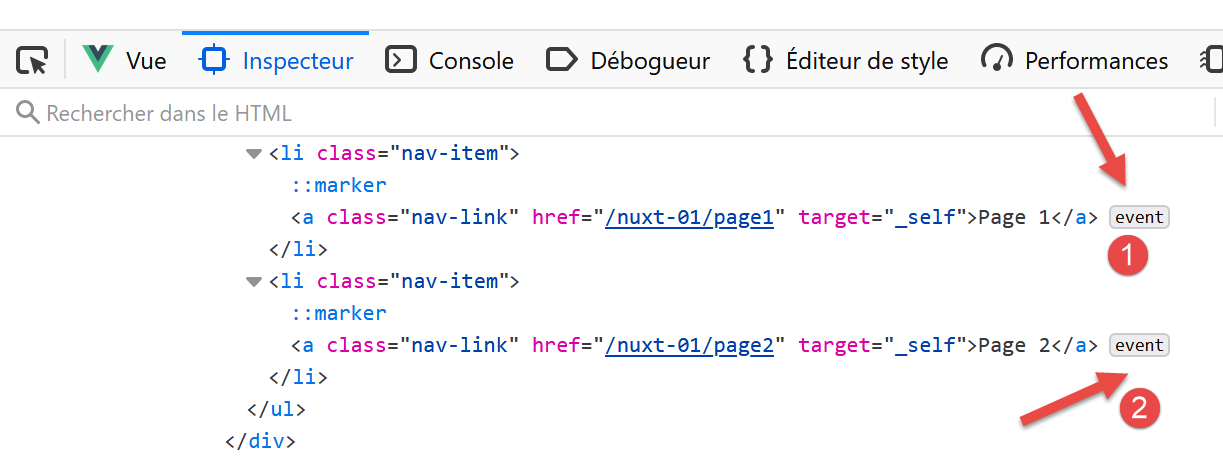
We see that in [1, 2], events have been attached to the links. It is the scripts on lines 71–74 that attached event handlers to the links. Therefore:
- the page displayed by the client is visually identical to the one sent by the server;
- dynamic behavior has been added to the page by the client;
Now let’s request the page [page1] by manually typing URL. The logs become as follows:
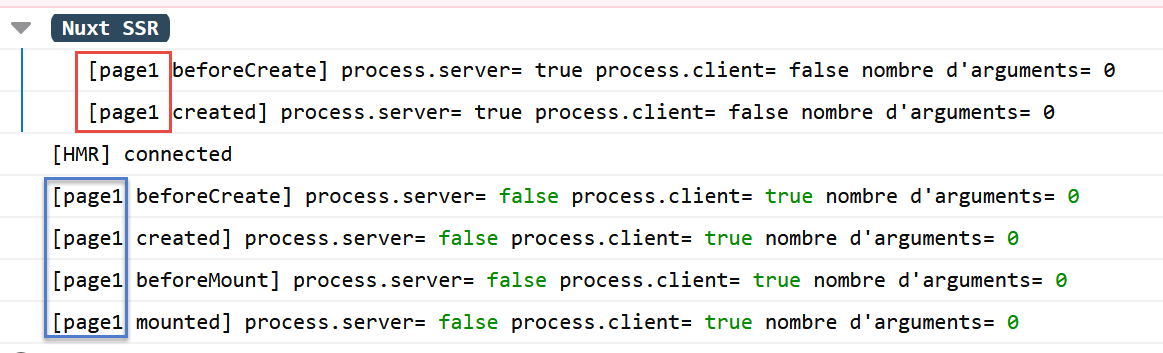
We get the same results as for the page [index] but for [page1]. The source code of the received page is as follows:
<body>
  <div data-server-rendered="true" id="__nuxt">
    <div id="__layout">
      <div class="container">
        <div class="card">
          <div class="card-body">
            <div role="alert" aria-live="polite" aria-atomic="true" align="center" class="alert alert-success"><h4>[nuxt-01] : routage et navigation</h4></div> <div>
              <div class="row">
                <div class="col-2">
                  <ul class="nav flex-column">
                    <li class="nav-item">
                      <a href="/nuxt-01/" target="_self" class="nav-link">
                        Home
                      </a>
                    </li>
                    <li class="nav-item">
                      <a href="/nuxt-01/page1" target="_self" class="nav-link active nuxt-link-active">
                        Page 1
                      </a>
                    </li>
                    <li class="nav-item">
                      <a href="/nuxt-01/page2" target="_self" class="nav-link">
                        Page 2
                      </a>
                    </li>
                  </ul>
                </div> <div class="col-10">
                  <div role="alert" aria-live="polite" aria-atomic="true" class="alert alert-primary">

                    Page 1
                  </div>
                </div>
              </div>
            </div>
          </div>
        </div>
      </div>
    </div>
  </div>
  <script>window.__NUXT__ = { layout: "default", data: [{}], error: null, serverRendered: true, logs: [{ date: new Date(1573917721122), args: ["[page1 beforeCreate]", "process.server=", "true", "process.client=", "false", "nombre d'arguments=", "0"], type: "log", level: 2, tag: "" }] };</script>
  <script src="/nuxt-01/_nuxt/runtime.js" defer></script>
  <script src="/nuxt-01/_nuxt/commons.app.js" defer></script>
  <script src="/nuxt-01/_nuxt/vendors.app.js" defer></script>
  <script src="/nuxt-01/_nuxt/app.js" defer></script>
</body>
We get the same type of page as the [index] page but with the alert from the [Page 1] view (line 30). Lines 41–44: the client code was sent back with the page. Ultimately, manually requesting a URL is identical to restarting the application. The only difference is that the page displayed is not necessarily the home page; it is the one that was requested. Once the page is received, the client takes over. The server will no longer be contacted unless the user decides otherwise.