16. Example [nuxt-13]: Checking the navigation of [nuxt-12]
In this example, we are focusing on the navigation of [nuxt-12]. We did not do this in [nuxt-12] because controlling navigation would have added complexity to an already complex example.
Objective: we want the user to be able to perform only authorized actions:
- if the JSON session has not started, then only the URL [/] is allowed;
- if the JSON session has started but the user is not authenticated, then only the URL [/authentication] is allowed;
- if the JSON session has started and the user is authenticated, then only the URLs [/get-admindata, /end-session] are allowed;
- when the current routing target is not authorized, a redirect to an authorized URL will be performed;
The [nuxt-13] example is initially obtained by copying the [nuxt-12] example:
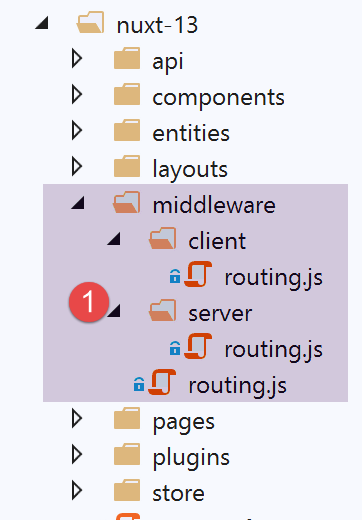
The changes will be made in the routing folder [middleware].
16.1. Routing for the [nuxt] application
The application’s routing is configured as follows in the [nuxt.config] file:
// router
  router: {
    // application URL root
    base: '/nuxt-13/',
    // routing middleware
    middleware: ['routing']
},
- line 6: the application's routing is controlled by the [middleware/routing] file;
The [middleware/routing] file is as follows:
/* eslint-disable no-console */

// on importe les middleware du serveur et du client
import serverRouting from './server/routing'
import clientRouting from './client/routing'

export default function(context) {
  // qui exécute ce code ?
  console.log('[middleware], process.server', process.server, ', process.client=', process.client)
  if (process.server) {
    // routage serveur
    serverRouting(context)
  } else {
    // routage client
    clientRouting(context)
  }
}
- lines 10–16: client and server [nuxt] routing are handled differently. This is a major point of difference between them;
- line 4: server routing is implemented by the script [middleware/server/routing];
- line 5: client routing is implemented by the [middleware/client/routing] script;
16.2. [nuxt] client routing
Client-side routing [nuxt] remains the same as it was in [nuxt-12]:
/* eslint-disable no-console */
export default function(context) {
  // who executes this code?
  console.log('[middleware client], process.server', process.server, ', process.client=', process.client)
  // management of the PHP session cookie in the browser
  // the browser's PHP session cookie must be identical to the one found in the nuxt session
  // acion [fin-session] receives a new cookie PHP (server as nuxt client)
  // if the server receives it, the client must pass it on to the browser
  // for its own exchanges with the PHP server
  // this is customer routing

  // retrieve the session cookie PHP
  const phpSessionCookie = context.store.state.phpSessionCookie
  if (phpSessionCookie) {
    // if it exists, we assign the PHP session cookie to the browser
    document.cookie = phpSessionCookie
  }

  ...
}
To prevent the client from accessing unauthorized routes, we will simply offer only the authorized routes in the client navigation menu. The [components/navigation] component becomes the following:
<template>
  <!-- bootstrap menu with three options -->
  <b-nav vertical>
    <b-nav-item v-if="$store.state.jsonSessionStarted && !$store.state.userAuthenticated" to="/authentification" exact exact-active-class="active">
      Authentification
    </b-nav-item>
    <b-nav-item
      v-if="$store.state.jsonSessionStarted && $store.state.userAuthenticated && !$store.state.adminData"
      to="/get-admindata"
      exact
      exact-active-class="active"
    >
      Requête AdminData
    </b-nav-item>
    <b-nav-item v-if="$store.state.jsonSessionStarted && $store.state.userAuthenticated" to="/fin-session" exact exact-active-class="active">
      Fin session impôt
    </b-nav-item>
  </b-nav>
</template>
- line 4: the [Authentication] option is only available if the JSON session has started but the user is not authenticated. If the JSON session has not started or the user is already authenticated, then the option is not available;
- Lines 7–11: The [AdminData Request] option is only available if the JSON session has started, the user is authenticated, and the [AdminData] has not yet been retrieved. If any of these three conditions is not met (jSON session not started, user not authenticated, or [AdminData] data already retrieved), the option is not offered;
- line 15: the [End Tax Session] option is available as soon as the JSON session has started and the user is authenticated; otherwise, it is not available;
16.3. Server Routing [Nuxt]
Server routing is generally more complex than client-side routing because the user can type any URL into their browser’s address bar. We can let that happen (after all, the user isn’t supposed to do that) or try to control it. That’s what we’ll do here, for the sake of this example, because in the case of the [nuxt-12] application, we can easily do without it since the tax calculation server is well-protected against these manually entered URLs and knows how to send the appropriate error messages. We saw this in [next-12], where there was no routing control.
Routing on a [nuxt] server is very different from that on a [nuxt] client in terms of redirection:
- when a [nuxt] server is redirected, it sends a redirect request to the client browser with the redirect target. The browser then makes a new request to the [nuxt] server, asking for the target that was sent to it. It’s as if the user had manually typed in the URL of the redirect target: the entire [nuxt] application restarts, and with it, its entire lifecycle (server plugins, store, server routing, pages);
- when a [nuxt] client is redirected, none of this happens. There is simply a page change, the same as would have occurred if the user had clicked a link leading to the redirect target. The lifecycle is then different (client-side routing, rendering the route’s target);
For this reason, it is preferable to separate client-side routing from server-side routing, even though the two code bases may appear similar.
The server routing script [middleware/server/routing] will be as follows:
/* eslint-disable no-console */
export default function(context) {
  // qui exécute ce code ?
  console.log('[middleware server], process.server', process.server, ', process.client=', process.client)

  // on récupère quelques informations dans le store [nuxt]
  const store = context.store
  // d'où vient-on ?
  const from = store.state.from || 'nowhere'
  ...
}
- In client-side routing, the routing function receives the context [context] with the property [context.from], which is the route of the page we came from. The route we are going to is obtained via [context.route];
- In server-side routing, the routing function receives the context [context] without the [context.from] property. Server-side routing only occurs when a URL is manually requested from the [nuxt] server. We know that the entire [nuxt] application is then reset. It’s as if we were starting from scratch, so there is no concept of a “previous page”;
- thanks to the [nuxt] session, we know that the server can retrieve this session and thus avoid starting from scratch. It is therefore in this [nuxt] session, and more specifically in the session’s store, that we will store the name of the last page displayed by the client browser before a URL is requested from the [nuxt] server;
- Lines 7–9: We retrieve the name of the last page displayed by the client browser. When the application starts, this information [from] does not exist in the store. We then assign the name [nowhere] to the variable [from];
In order for the [nuxt] server to retrieve the name of the last page displayed by the client browser from the store, the [nuxt] client must also put this information into the store. The [nuxt] client routing script is therefore completed as follows:
/* eslint-disable no-console */
export default function(context) {
  // qui exécute ce code ?
  console.log('[middleware client], process.server', process.server, ', process.client=', process.client)
  // gestion du cookie de la session PHP dans le navigateur
  // le cookie de la session PHP du navigateur doit être identique à celui trouvé en session nuxt
  // l'acion [fin-session] reçoit un nouveau cookie PHP (serveur comme client nuxt)
  // si c'est le serveur qui le reçoit, le client doit le transmettre au navigateur
  // pour ses propres échanges avec le serveur PHP
  // on est ici dans un routing client

  // on récupère le cookie de la session PHP
  const phpSessionCookie = context.store.state.phpSessionCookie
  if (phpSessionCookie) {
    // s'il existe, on affecte le cookie de session PHP au navigateur
    document.cookie = phpSessionCookie
  }

  // on met dans la session le nom de la page où on va - pas de redirection serveur
  context.store.commit('replace', { serverRedirection: false, from: context.route.name })
  // on sauvegarde le store dans la session [nuxt]
  const session = context.app.$session()
  session.value.store = context.store.state
  session.save(context)
}
- Lines 19–24 are added;
- Line 20: We store the name of the page [context.route.name] that will be displayed in the store, which will then serve as the page we came from during the next routing step. Furthermore, we will see that in the [nuxt] server’s routing, it needs to know if the current routing stems from a previous redirection by the [nuxt] server. Here, that is not the case, so we set the [serverRedirection] property to [false];
- lines 22–24: the state of the store is placed in the [nuxt] session (line 23), then the [nuxt] session is saved in a cookie (line 24), which in turn will be saved in the [nuxt] client’s browser;
Let’s go back to the [nuxt] server routing script:
/* eslint-disable no-console */
export default function(context) {
  // qui exécute ce code ?
  console.log('[middleware server], process.server', process.server, ', process.client=', process.client)

  // on récupère quelques informations dans le store [nuxt]
  const store = context.store
  // d'où vient-on ?
  const from = store.state.from || 'nowhere'
  // où va-t-on ?
  const to = context.route.name
  // éventuelle redirection
  let redirection = ''
  // gestion du routage terminé
  let done = false

  // est-on déjà dans une redirection du serveur [nuxt]?
  if (store.state.serverRedirection) {
    // rien à faire
    done = true
  }

  // est-ce un rechargement de page ?
  if (to === from) {
    // rien à faire
    done = true
  }

  // contrôle de la navigation du serveur [nuxt]
  // on s'inspire de la navigation client dans le composant [navigation]

  // cas où la session PHP n'a pas démarré
  if (!done && !store.state.jsonSessionStarted && to !== 'index') {
    // redirection
    redirection = 'index'
    // travail terminé
    done = true
  }

  // cas où l'utilisateur n'est pas authentifié
  if (!done && store.state.jsonSessionStarted && !store.state.userAuthenticated && to !== 'authentification') {
    // redirection
    redirection = from
    // travail terminé
    done = true
  }

  // cas où l'utilisateur a été authentifié
  if (!done && store.state.jsonSessionStarted && store.state.userAuthenticated && to !== 'get-admindata' && to !== 'fin-session') {
    // on reste sur la même page
    redirection = from
    // travail terminé
    done = true
  }

  // cas où [adminData] a été obtenu
  if (!done && store.state.jsonSessionStarted && store.state.userAuthenticated && store.state.adminData && to !== 'fin-session') {
    // on reste sur la même page
    redirection = from
    // travail terminé
    done = true
  }

  // on a fait tous les contrôles ---------------------
  // redirection ?
  if (redirection) {
    // on note la redirection dans le store
    store.commit('replace', { serverRedirection: true })
  } else {
    // pas de redirection
    store.commit('replace', { serverRedirection: false, from: to })
  }
  // on sauvegarde le store dans la session [nuxt]
  const session = context.app.$session()
  session.value.store = store.state
  session.save(context)
  // on fait l'éventuelle redirection
  if (redirection) {
    context.redirect({ name: redirection })
  }
}
- lines 6–9: retrieve the value of [from] from the [nuxt] server store;
- line 11: we note the target of the current route;
- line 13: routing may result in a redirect of the client browser. [redirection] will be the target of this redirect;
- line 15: [done] set to [true] indicates that routing is complete;
- lines 17–21: First, we check if the current routing resulted from a redirect request sent to the client browser. This information is stored in the [serverRedirection] property of the store. If this property is true, then the [nuxt] server sent a redirect to the client browser during the previous request to the [nuxt] server. In this case, no routing is required. During the previous request, the [nuxt] server router decided that the client browser should be redirected. This decision does not need to be overridden by a new routing;
- lines 23–27: we check if the current routing is a page reload. If so, we let it proceed;
- Starting on line 29, we resume the rules applied in the [navigation] component of the [nuxt] client (see previous paragraph);
- lines 32–38: we handle the case where the JSON session has not started and the routing target is not the [index] page. In this case, we redirect the client browser to the [index] page;
- lines 40–46: we handle the case where the JSON session has started, the user is not authenticated, and the current routing target is not the [authentication] page. In this case, we reject the routing and remain where we were;
- lines 48–54: Handles the case where the JSON session has started, the user is authenticated, and the current routing target is neither the [get-admindata] page nor the [end-session] page, which are then the only possible destinations. In this case, the requested routing is rejected, and we return to where we were previously;
- lines 56–62: we handle the case where [adminData] has been obtained. In this case, there is only one possible routing target: the [fin-session] page. If that was not the page requested, we reject the routing and return to where we were previously;
- lines 64–72: if a redirect occurred, we record it in the [nuxt] server store: [serverRedirection: true]. Note that we do not assign a value to the [from] property of the store. The reason is that there will be a redirect from the client browser, and we saw that in this case, there was no routing (lines 17–20) and the [from] property of the store is not used;
- Lines 66–69: If there is no redirect, this is also noted in the [nuxt] server store: [serverRedirection: false]. Additionally, the current routing will display the [to] page, which for the next request (client or [nuxt] server) will become the previous page. This is why we write [from: to];
- lines 73–76: We save the store to the [nuxt] session, which is itself saved in a cookie;
- lines 77–80: if [redirection] is not empty, then we instruct the browser to redirect. Otherwise (not shown here), the [nuxt] server’s lifecycle will continue: the [to] page will be processed by the [nuxt] server and sent to the [nuxt] client’s browser along with the [nuxt] session cookie;
The routing chosen here for the [nuxt] server is arbitrary. We could have chosen another one or, as mentioned, not used routing at all. The one chosen above has the advantage of always keeping the application in a stable state regardless of the URL requested by the user.
We can improve this slightly when the page that is ultimately loaded is the original page. There are two cases:
- the user has triggered a page reload (to===from);
- there are redirects to the original page (redirection===from);
In both cases, the original page will be executed again with its asynchronous call to the tax calculation server. Let’s take an example. If, once authenticated, the user reloads the page (F5). In this case, in the routing above, we have: [to]=[from]=[authentication]. There is no redirection. The [to=authentication] page will be executed by the [nuxt] server. If we do nothing, the [asyncData] function will run again. This is unnecessary since authentication has already been performed.
We can improve this by slightly modifying the [authentication] page:
// asynchronous data
  async asyncData(context) {
    // log
    console.log('[authentification asyncData started]')
    // don't do things twice if the page has already been requested
    if (process.server && context.store.state.userAuthenticated) {
      console.log('[authentification asyncData canceled]')
      return { result: '[succès]' }
    }
          // customer [nuxt]
    if (process.client) {
      // start waiting
      context.app.$eventBus().$emit('loading', true)
      // no error
      context.app.$eventBus().$emit('errorLoading', false)
    }
    try {
      // authenticate to the server
...
- lines 6-9: if the page is being served by the [nuxt] server and we find in the store that authentication has already been performed, then we return the desired result directly (line 8);
We do the same for all pages:
Page [index]:
// asynchronous data
  async asyncData(context) {
    // log
    console.log('[index asyncData started]')
    // don't do things twice if the page has already been requested
    if (process.server && context.store.state.jsonSessionStarted) {
      console.log('[index asyncData canceled]')
      return { result: '[succès]' }
    }
    try {
...
Page [get-admindata]
// asynchronous data
  async asyncData(context) {
    // log
    console.log('[get-admindata asyncData started]')
    // don't do things twice if the page has already been requested
    if (process.server && context.store.state.adminData) {
      console.log('[get-admindata asyncData canceled]')
      return { result: context.store.state.adminData }
    }
    // customer
    if (process.client) {
      // start waiting
      context.app.$eventBus().$emit('loading', true)
      // no error
      context.app.$eventBus().$emit('errorLoading', false)
    }
    try {
   ...
Page [end-session]
// asynchronous data
  async asyncData(context) {
    // log
    console.log('[fin-session asyncData started]')
    // don't do things twice if the page has already been requested
    if (process.server && context.store.state.jsonSessionStarted && !context.store.state.userAuthenticated) {
      console.log('[fin-session asyncData canceled]')
      return { result: "[succès]. La session jSON reste initialisée mais vous n'êtes plus authentifié(e)." }
    }
    // customer case [nuxt]
    if (process.client) {
      // start waiting
      context.app.$eventBus().$emit('loading', true)
      // no error
      context.app.$eventBus().$emit('errorLoading', false)
    }
    try {
16.4. Execution
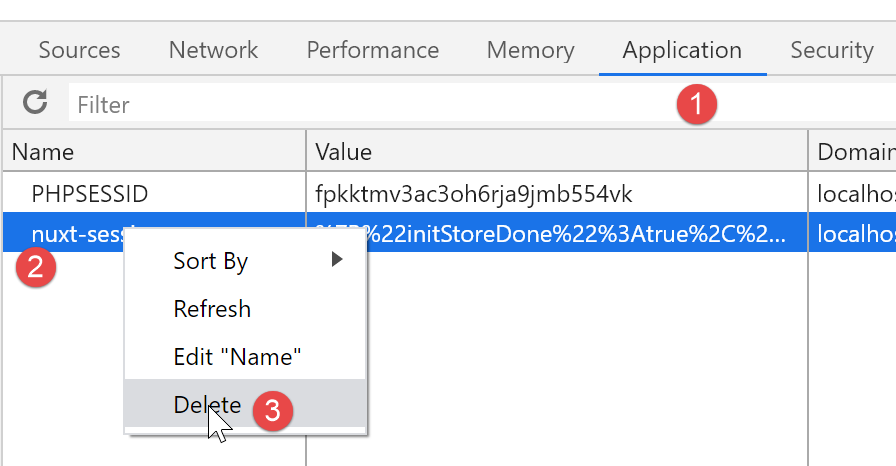
To run this example, make sure to delete the [nuxt] session cookie and the PHP cookie from the browser running the [nuxt] client before execution to start with a clean slate. Below is an example using the Chrome browser:
16.5. Conclusion
Routing on the [nuxt] server is complex because you must anticipate every URL the user might type manually. This is a textbook example. A [nuxt] application is not intended to be used this way. Once the [index] page is served by the [nuxt] server’s router, subsequent requests made to the server could be redirected to an error page.
In the specific case of our [nuxt-13] example, [nuxt] server routing was unnecessary. The default behavior (essentially no routing) in the [nuxt-12] example worked just fine.