Skip to content

11. Example [nuxt-08]: Routing middleware

In this example, we introduce the concept of routing middleware, scripts executed whenever a route changes.

Example [nuxt-08] is initially created by cloning the [nuxt-01] project:

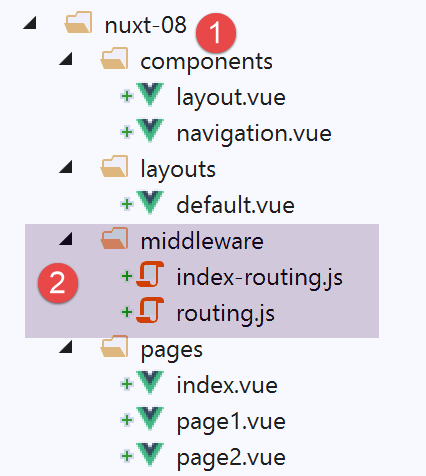
Image

Routing middleware must be placed in a folder named [middleware] [2]. There can be two-level routing:

  • routing applied to every navigation. This is then declared in the [nuxt.config.js] file;
  • routing applied to a specific page, when that page is the routing target. This routing is then declared in that target page;

11.1. General Routing

The [middleware/routing.js] file will handle general routing. It is declared as follows in the [nuxt.config.js] file:


  router: {
    base: '/nuxt-08/',
    middleware: ['routing']
},

General routing middleware is a property of the router (line 1). There can be multiple routing middleware components. That is why, on line 3, the value of the [middleware] property is an array. Note that we do not use a path to specify the middleware. It will be automatically searched for in the project’s [middleware] folder;

The [routing] middleware only logs here:


/* eslint-disable no-undef */
/* eslint-disable no-console */
export default function(...args) {
  // Who is executing this code?
  console.log('[routing], process.server=', process.server, 'process.client=', process.client)
  const who = process.server ? 'server' : 'client'
  const routing = '[routing ' + who + ']'
  // number of arguments
  console.log(routing + ', there are', args.length, 'argument(s)')

  // 1st argument
  const context = args[0]
  // context keys
  dumpkeys(routing + ', context', context)
  // the application
  dumpkeys(routing + ', context.app', context.app)
  // the route
  dumpkeys(routing + ', context.route', context.route)
  console.log(routing + ', context.route=', context.route)
  // the router
  dumpkeys(routing + ', context.app.router', context.app.router)
  // router.options.routes
  dumpkeys(routing + ', context.app.router.options.routes', context.app.router.options.routes)
  console.log(routing + ', context.app.router.options.routes=', context.app.router.options.routes)
}

function dumpkeys(message, object) {
  // list of keys from [object]
  const line = 'List of keys [' + message + ']'
  console.log(line)
  // list of keys
  if (object) {
    console.log(Object.keys(object))
  }
}
  • line 3: we will see that the middleware receives an argument: the executor’s context (server or client);
  • lines 4–25: we display the properties of various objects to determine what is usable. We will find that the middleware context is nearly identical to the plugin context;

11.2. Routing for a specific page

We want to control how users arrive at the [index] page. To do this, we need to add the [middleware] property to this [index] page:


<script>
/* eslint-disable no-undef */
/* eslint-disable no-console */
/* eslint-disable nuxt/no-env-in-hooks */

import Navigation from '@/components/navigation'
import Layout from '@/components/layout'

export default {
  name: 'Home',
  // components used
  components: {
    Layout,
    Navigation
  },
  // lifecycle
  beforeCreate() {
    // client and server
    console.log('[home beforeCreate]')
  },
  created() {
    // client and server
    console.log('[home created]')
  },
  beforeMount() {
    // client only
    console.log('[home beforeMount]')
  },
  mounted() {
    // client only
    console.log('[home mounted]')
  },
  // routing
  middleware: ['index-routing']
}
</script>
  • line 34: the [middleware] property lists the scripts to be executed whenever the next page displayed is the [index] page. Again, these scripts will be searched for in the project's [middleware] folder;

The [index-routing] middleware is as follows:


/* eslint-disable no-undef */
/* eslint-disable no-console */
export default function(...args) {
  // Who is executing this code?
  console.log('[index-routing], process.server=', process.server, 'process.client=', process.client)
  const who = process.server ? 'server' : 'client'
  const indexRouting = '[index-routing ' + who + ']'
  // number of arguments
  console.log(indexRouting + ', there are', args.length, 'argument(s)')

  // 1st argument
  const context = args[0]
  // context keys
  dumpkeys(indexRouting + ', context', context)
  // the application
  dumpkeys(indexRouting + ', context.app', context.app)
  // the route
  dumpkeys(indexRouting + ', context.route', context.route)
  console.log(indexRouting + ', context.route=', context.route)
  // the router
  dumpkeys(indexRouting + ', context.app.router', context.app.router)
  // router.options.routes
  dumpkeys(indexRouting + ', context.app.router.options.routes', context.app.router.options.routes)
  console.log(indexRouting + ', context.app.router.options.routes=', context.app.router.options.routes)
  // where are we coming from?
  if (context.from) {
    console.log('from=', context.from)
  }
}

function dumpkeys(message, object) {
  // list of keys from [object]
  const line = 'List of keys [' + message + ']'
  console.log(line)
  // list of keys
  if (object) {
    console.log(Object.keys(object))
  }
}

The code for [index-routing] is identical to that of [routing] and produces the same results. What interests us is seeing when these two middlewares are executed.

11.3. Running the project

We run the project. The logs are as follows:

The [routing] script is executed first by the server:

[routing], process.server= true process.client= false
[routing server], there is 1 argument(s)
List of keys [[routing server], context]
[ 'isStatic',
  'isDev',
  'isHMR',
  'app',
  'payload',
  'error',
  'base',
  'env',
  'req',
  'res',
  'ssrContext',
  'redirect',
  'beforeNuxtRender',
  'route',
  'next',
  '_redirected',
  '_errored',
  'params',
  'query',
  '$axios' ]
List of keys [[routing server], context.app]
[ 'router',
  'nuxt',
  'head',
  'render',
  'data',
  'beforeCreate',
  'created',
  'mounted',
  'watch',
  'computed',
  'methods',
  'components',
  'context',
  '$axios' ]
List of keys [[routing server], context.route]
[ 'name',
  'meta',
  'path',
  'hash',
  'query',
  'params',
  'fullPath',
  'matched' ]
[routing server], context.route= { name: 'index',
  meta: [ {} ],
  path: '/',
  hash: '',
  query: {},
  params: {},
  fullPath: '/',
  matched:
   [ { path: '',
       regex: /^(?:\/(?=$))?$/i,
       components: [Object],
       instances: {},
       name: 'index',
       parent: undefined,
       matchAs: undefined,
       redirect: undefined,
       beforeEnter: undefined,
       meta: {},
       props: {} } ] }
List of keys [[routing server], context.app.router]
[ 'app',
  'apps',
  'options',
  'beforeHooks',
  'resolveHooks',
  'afterHooks',
  'matcher',
  'fallback',
  'mode',
  'history' ]
List of keys [[routing server], context.app.router.options.routes]
[ '0', '1', '2' ]
[routing server], context.app.router.options.routes= [ { path: '/page1',
    component: [Function: _61cefe10],
    name: 'page1' },
  { path: '/page2',
    component: [Function: _61dd1591],
    name: 'page2' },
  { path: '/', component: [Function: _00d5e140], name: 'index' } ]

This is the same result we got with the plugins.

  • line 15: the [redirect] property is often used in middleware; it allows you to change the target of the current routing;

Then, because the page to be displayed is the [index] page, the server executes the [index-routing] script and displays the following logs:

[index-routing], process.server= true process.client= false
[index-routing server], there is 1 argument(s)
List of keys [[index-routing server], context]
[ 'isStatic',
  'isDev',
  'isHMR',
  'app',
  'payload',
  'error',
  'base',
  'env',
  'req',
  'res',
  'ssrContext',
  'redirect',
  'beforeNuxtRender',
  'route',
  'next',
  '_redirected',
  '_errored',
  'params',
  'query',
  '$axios' ]
List of keys [[index-routing server], context.app]
[ 'router',
  'nuxt',
  'head',
  'render',
  'data',
  'beforeCreate',
  'created',
  'mounted',
  'watch',
  'computed',
  'methods',
  'components',
  'context',
  '$axios' ]
List of keys [[index-routing server], context.route]
[ 'name',
  'meta',
  'path',
  'hash',
  'query',
  'params',
  'fullPath',
  'matched' ]
[index-routing server], context.route= { name: 'index',
  meta: [ {} ],
  path: '/',
  hash: '',
  query: {},
  params: {},
  fullPath: '/',
  matched:
   [ { path: '',
       regex: /^(?:\/(?=$))?$/i,
       components: [Object],
       instances: {},
       name: 'index',
       parent: undefined,
       matchAs: undefined,
       redirect: undefined,
       beforeEnter: undefined,
       meta: {},
       props: {} } ] }
List of keys [[index-routing server], context.app.router]
[ 'app',
  'apps',
  'options',
  'beforeHooks',
  'resolveHooks',
  'afterHooks',
  'matcher',
  'fallback',
  'mode',
  'history' ]
List of keys [[index-routing server], context.app.router.options.routes]
[ '0', '1', '2' ]
[index-routing server], context.app.router.options.routes= [ { path: '/page1',
    component: [Function: _61cefe10],
    name: 'page1' },
  { path: '/page2',
    component: [Function: _61dd1591],
    name: 'page2' },
  { path: '/', component: [Function: _00d5e140], name: 'index' } ]

The results obtained with the [index-routing] script are similar to those obtained with the [routing] script.

Once the [index] page is received by the client browser, the client scripts take over. The logs become as follows:

1
2
3
4
[home beforeCreate]
[home created]
[home beforeMount]
[home mounted]

We can see, therefore, that when the application starts, the client does not execute any middleware. This means that this will happen every time the user forces a request to the server. Middleware is only executed by the client when navigating within the client. For example, let’s navigate to the [page1] page (we are currently on the [index] page) using the [Page 1] link. The logs are then as follows:

[routing], process.server= false process.client= true
[routing client], there is 1 argument(s)
List of keys [[routing client], context]
(18) ["isStatic", "isDev", "isHMR", "app", "payload", "error", "base", "env", "redirect", "nuxtState", "route", "next", "_redirected", "_errored", "params", "query", "$axios", "from"]
List of keys [[client routing], context.app]
(14) ["router", "nuxt", "head", "render", "data", "beforeCreate", "created", "mounted", "watch", "computed", "methods", "components", "context", "$axios"]
List of keys [[client routing], context.route]
(8) ["name", "meta", "path", "hash", "query", "params", "fullPath", "matched"]
[client routing], context.route = {name: "page1", meta: Array(1), path: "/page1", hash: "", query: {}, }
List of keys [[client routing], context.app.router]
(10) ["app", "apps", "options", "beforeHooks", "resolveHooks", "afterHooks", "matcher", "fallback", "mode", "history"]
List of keys [[client routing], context.app.router.options.routes]
(3) ["0", "1", "2"]
[client routing], context.app.router.options.routes= (3) [{}, {}, {}]0: {path: "/page1", name: "page1", component: ƒ}1: {path: "/page2", name: "page2", component: ƒ}2: {path: "/", name: "index", component: ƒ}length: 3__proto__: Array(0)
[page1 beforeCreate]
[page1 created]
[page1 beforeMount]
[page1 mounted]
  • line 2: the [routing] middleware is executed by the client;
  • line 4: note the [from] property: this is the route we came from;
  • line 9: [context.route] is the route we are going to;
  • lines 15–18: display of the [page1] page;

Now let’s return to the [index] page using the [Home] link. The logs are then as follows:

[routing], process.server= false process.client= true
[routing client], there is 1 argument(s)
List of keys [[routing client], context]
(18) ["isStatic", "isDev", "isHMR", "app", "payload", "error", "base", "env", "redirect", "nuxtState", "route", "next", "_redirected", "_errored", "params", "query", "$axios", "from"]
List of keys [[client routing], context.app]
(14) ["router", "nuxt", "head", "render", "data", "beforeCreate", "created", "mounted", "watch", "computed", "methods", "components", "context", "$axios"]
List of keys [[client routing], context.route]
(8) ["name", "meta", "path", "hash", "query", "params", "fullPath", "matched"]
[client routing], context.route = {name: "index", meta: Array(1), path: "/", hash: "", query: {}, }
List of keys [[client routing], context.app.router]
(10) ["app", "apps", "options", "beforeHooks", "resolveHooks", "afterHooks", "matcher", "fallback", "mode", "history"]
List of keys [[client routing], context.app.router.options.routes]
(3) ["0", "1", "2"]
[client routing], context.app.router.options.routes= (3) [{}, {}, {}]0: {path: "/page1", name: "page1", component: ƒ}1: {path: "/page2", name: "page2", component: ƒ}2: {path: "/", name: "index", component: ƒ}length: 3__proto__: Array(0)
[index-routing], process.server= false process.client= true
[index-routing client], there is 1 argument(s)
List of keys [[index-routing client], context]
(18) ["isStatic", "isDev", "isHMR", "app", "payload", "error", "base", "env", "redirect", "nuxtState", "route", "next", "_redirected", "_errored", "params", "query", "$axios", "from"]
List of keys [[index-routing client], context.app]
(14) ["router", "nuxt", "head", "render", "data", "beforeCreate", "created", "mounted", "watch", "computed", "methods", "components", "context", "$axios"]
List of keys [[index-routing client], context.route]
(8) ["name", "meta", "path", "hash", "query", "params", "fullPath", "matched"]
[index-routing client], context.route = {name: "index", meta: Array(1), path: "/", hash: "", query: {}, }
List of keys [[index-routing client], context.app.router]
(10) ["app", "apps", "options", "beforeHooks", "resolveHooks", "afterHooks", "matcher", "fallback", "mode", "history"]
List of keys [[index-routing client], context.app.router.options.routes]
(3) ["0", "1", "2"]
[index-routing client], context.app.router.options.routes= (3) [{}, {}, {}]0: {path: "/page1", name: "page1", component: ƒ}1: {path: "/page2", name: "page2", component: ƒ}2: {path: "/", name: "index", component: ƒ}length: 3__proto__: Array(0)
from= {name: "page1", meta: Array(1), path: "/page1", hash: "", query: {}, }
[home beforeCreate]
[home created]
[home beforeMount]
[home mounted]
  • lines 1-15: the client executes the [routing] middleware. This is normal. It is executed every time the route changes;
  • lines 16–29: the client executes the [index-routing] middleware, because:
    • [index] is the target of the current route (see line 23);
    • the [index] page has defined a middleware named [index-routing];

We can see, then, that general routing middleware is executed by the client before the middleware attached to the pages.