15. Example [nuxt-12]: HTTP requests with axios
15.1. Introduction
In this new example, we will explore how, within the [asyncData] functions, we can make HTTP requests using the [axios] library. Additionally, we will apply concepts already covered:
- the use of plugins from the [nuxt-06] example:
- storing the store in a session cookie from the [nuxt-06] example;
- controlling navigation with middleware from the [nuxt-09] example;
- error handling in example [nuxt-11];
The architecture of the example will be as follows:
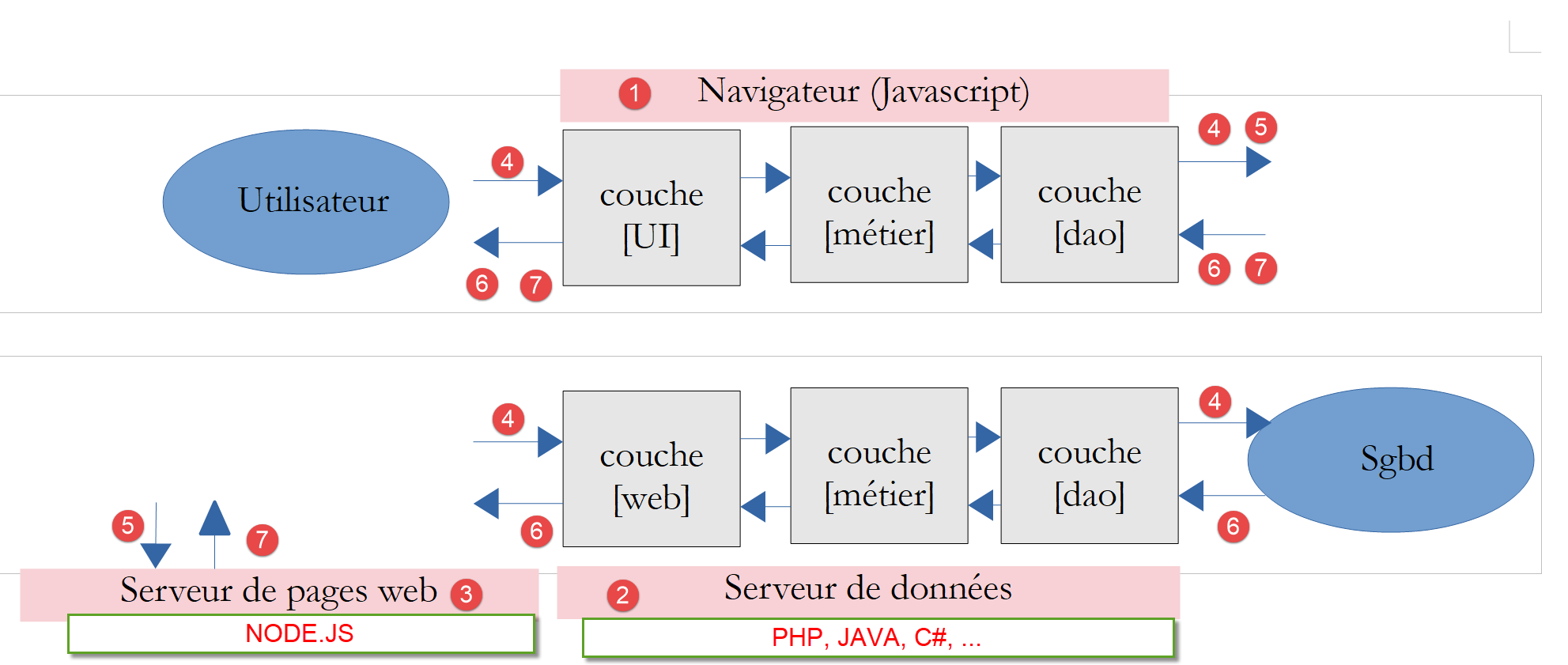
- The application [nuxt] will be stored on the server [node.js] [3], downloaded by the browser [1], which will then execute it;
- Both the client [nuxt] [1] and the server [nuxt] [3] will send requests HTTP to the data server [2]. This server will be the tax calculation server developed in section PHP 7. We will use its latest version, version, version 14, with the authorized CORS requests;
The architecture of the example can be simplified as follows:
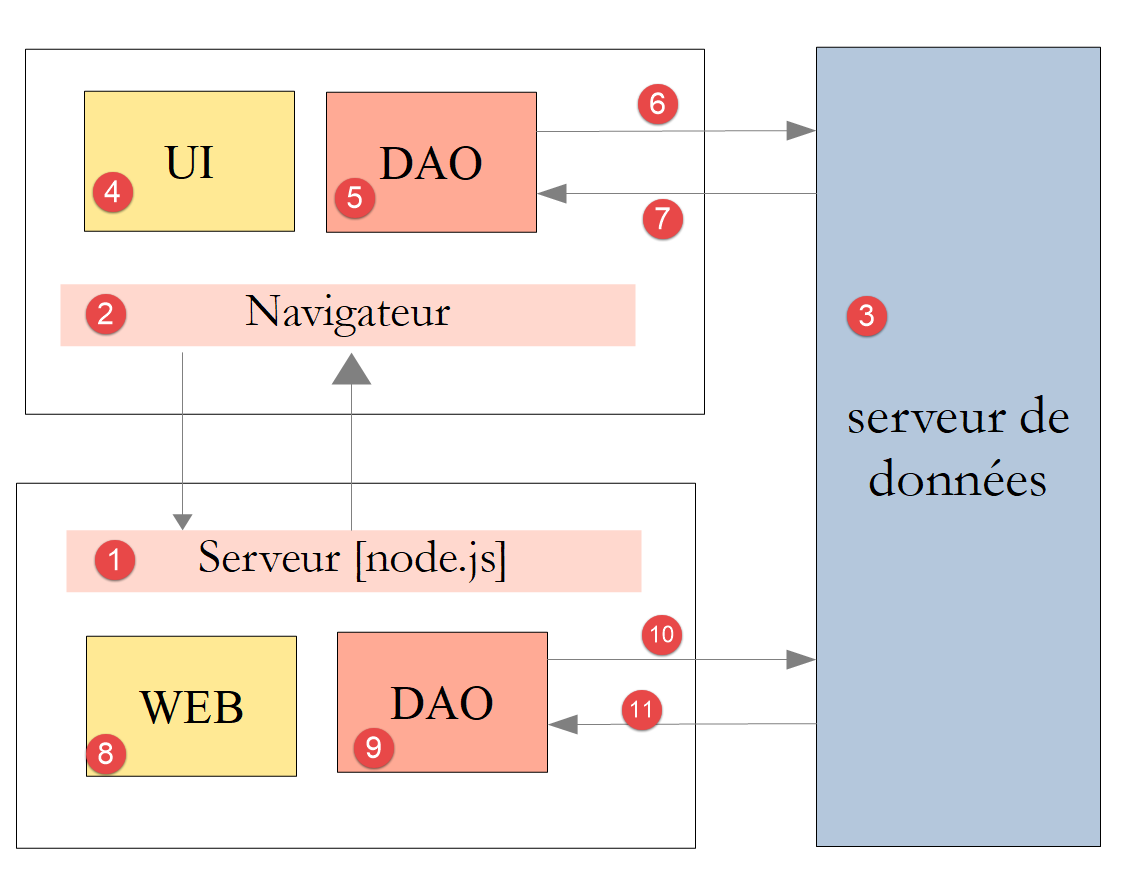
- In [1], the [node.js] server delivers the [nuxt] pages to the [2] browser. It is the [web] [8] layer of the server that delivers these pages. To deliver the page, the server may have requested external data from the [3] data server. It is the [DAO] [9] layer that makes the necessary HTTP requests;
- with each page request to the [node.js][1] server, the [2] browser receives the entire [nuxt] application, which then runs in SPA mode. The [UI] (User Interface) block [4] presents [vue.js] pages to the user. Actions within this block or the natural lifecycle of the pages may trigger calls for external data to the [3] data server. It is the [DAO] [5] layer that then makes the necessary HTTP requests;
15.2. Project Tree
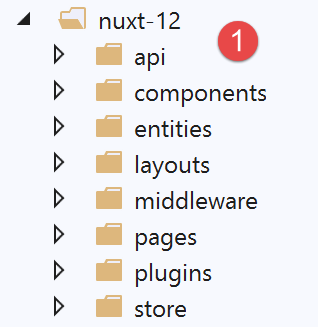
15.3. The [nuxt.config.js] configuration file
The project will be controlled by the following [nuxt.config.js] file:
export default {
  mode: 'universal',
  /*
   ** Headers of the page
   */
  head: {
    title: 'Introduction à [nuxt.js]',
    meta: [
      { charset: 'utf-8' },
      { name: 'viewport', content: 'width=device-width, initial-scale=1' },
      {
        hid: 'description',
        name: 'description',
        content: 'ssr routing loading asyncdata middleware plugins store'
      }
    ],
    link: [{ rel: 'icon', type: 'image/x-icon', href: '/favicon.ico' }]
  },
  /*
   ** Customize the progress-bar color
   */
  loading: false,

  /*
   ** Global CSS
   */
  css: [],
  /*
   ** Plugins to load before mounting the App
   */
  plugins: [
    { src: '@/plugins/client/plgSession', mode: 'client' },
    { src: '@/plugins/server/plgSession', mode: 'server' },
    { src: '@/plugins/client/plgDao', mode: 'client' },
    { src: '@/plugins/server/plgDao', mode: 'server' },
    { src: '@/plugins/client/plgEventBus', mode: 'client' }
  ],
  /*
   ** Nuxt.js dev-modules
   */
  buildModules: [
    // Doc: https://github.com/nuxt-community/eslint-module
    '@nuxtjs/eslint-module'
  ],
  /*
   ** Nuxt.js modules
   */
  modules: [
    // Doc: https://bootstrap-vue.js.org
    'bootstrap-vue/nuxt',
    // Doc: https://axios.nuxtjs.org/usage
    '@nuxtjs/axios',
    // https://www.npmjs.com/package/cookie-universal-nuxt
    'cookie-universal-nuxt'
  ],
  /*
   ** Axios module configuration
   ** See https://axios.nuxtjs.org/options
   */
  axios: {},
  /*
   ** Build configuration
   */
  build: {
    /*
     ** You can extend webpack config here
     */
    extend(config, ctx) { }
  },
  // source code directory
  srcDir: 'nuxt-12',
  // router
  router: {
    // application URL root
    base: '/nuxt-12/',
    // routing middleware
    middleware: ['routing']
  },
  // server
  server: {
    // service port, default 3000
    port: 81,
    // network addresses listened to, default localhost: 127.0.0.1
    // 0.0.0.0 = all the machine's network addresses
    host: 'localhost'
  },
  // environment
  env: {
    // axios configuration
    timeout: 2000,
    withCredentials: true,
    baseURL: 'http://localhost/php7/scripts-web/impots/version-14',
    // session cookie configuration [nuxt]
    maxAge: 60 * 5
  }
}
- line 22: we handle the notification for the completion of an asynchronous action ourselves;
- line 31: we will use various plugins that are specialized either for the client or for the server, but not for both at the same time;
- line 52: the [axios] module is integrated into [nuxt]. As a result, the [axios] object, which will make the HTTP requests from the[nuxt] application to the PHP tax calculation server will be available in [context.$axios];
- line 54: the [cookie-universal-nuxt] module will allow us to save the [nuxt] session in a cookie;
- line 60: the [axios] property allows us to configure the [@nuxtjs/axios] module from line 52. We will not use this option, preferring instead the [env] property from line 88;
- line 90: maximum wait time for a response from the tax calculation server;
- line 91: required for the [nuxt] client—enables the use of cookies in communications with the tax calculation server;
- line 92: the base URL of the tax calculation server;
- line 94: Nuxt session lifetime (5 min);
- line 77: the navigation for the client and the [nuxt] server will be controlled by routing middleware;
15.4. The [UI] layer of the application
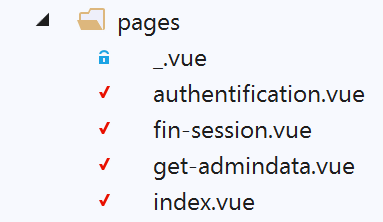
We will give the [nuxt] application access to the API of the tax calculation server via the following view:
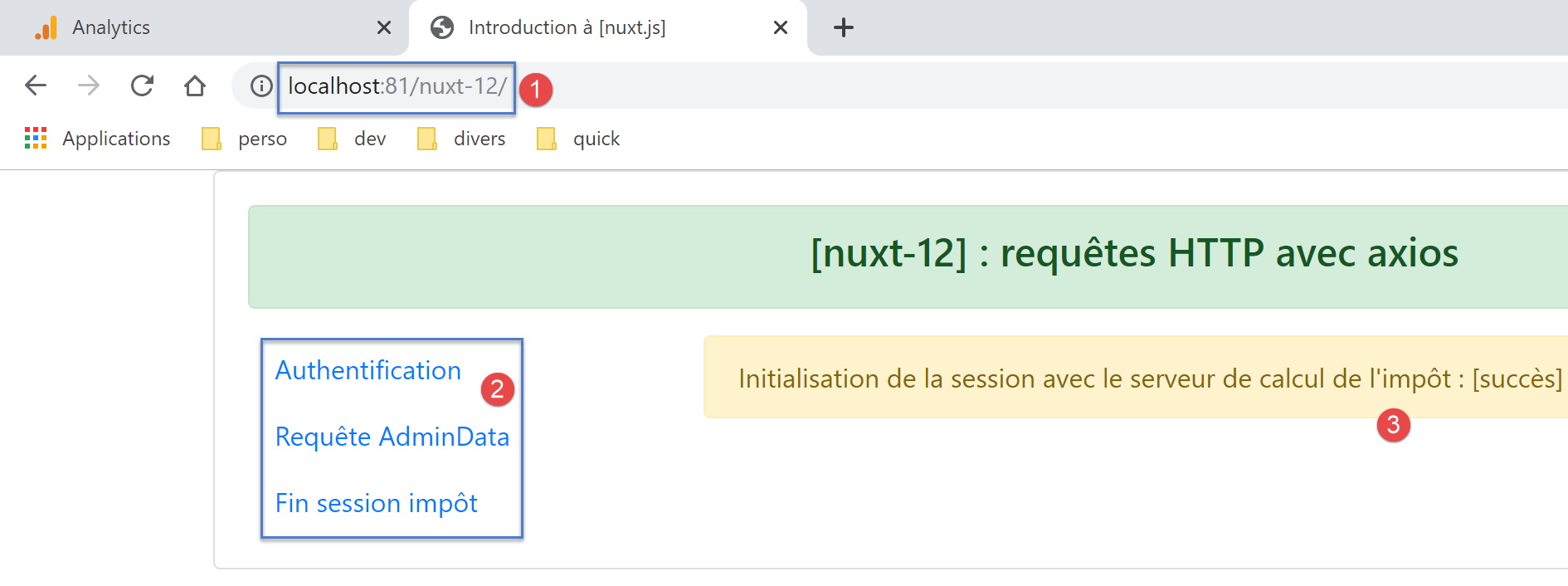
- in [2], the menu that provides access to the API of the tax calculation server:
- [Authentification]: corresponds to the [authentification] page. This page sends an authentication request to the tax calculation server using the [admin, admin] credentials, which are currently the only authorized ones. The result displayed is similar to [3];
- [Requête AdminData]: corresponds to page [get-admindata]. This page requests data from the tax calculation server—referred to here as [adminData]—which enables the tax calculation. The result displayed is similar to [3];
- [Fin session impôt]: corresponds to page [fin-session]. This page sends an end-of-session request (PHP) to the tax calculation server. The server then terminates the current session PHP and initializes a new, blank one;
15.5. The [dao] layers of the [nuxt] application
As indicated above, the architecture of the [nuxt] application will be as follows:
- In [1], the [node.js] server delivers the [nuxt] pages to the [2] browser. It is the [web] [8] layer of the server that delivers these pages. To deliver the page, the server may have requested external data from the data server [3]. It is the [DAO] [9] layer that makes the necessary HTTP requests;
- with each page request to the [node.js][1] server, the [2] browser receives the entire [nuxt] application, which then runs in SPA mode. The [UI] (User Interface) block [4] presents [vue.js] pages to the user. The actions of this block or the page lifecycle may trigger calls for external data to the [3] data server. It is the [DAO] [5] layer that then makes the necessary HTTP requests;
We will use version 14 from the tax calculation server developed in the document |Introduction to the PHP7 Language Through Examples|. We will use only a portion of its API (Application Programming Interface) jSON:
Request | Response |
| |
| |
| |
| |
15.5.1. The [dao] layer of the [nuxt] server
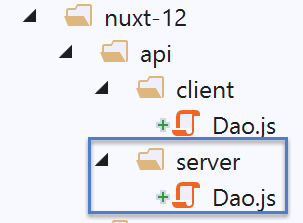
The [node.js] [1] server will use the [dao] layer described in the document |Introduction to the VUE.JS framework through examples|. Here is the code again:
'use strict';

// imports
import qs from 'qs'

class Dao {

  // manufacturer
  constructor(axios) {
    this.axios = axios;
    // session cookie
    this.sessionCookieName = "PHPSESSID";
    this.sessionCookie = '';
  }

  // init session
  async  initSession() {
    // query options HHTP [get /main.php?action=init-session&type=json]
    const options = {
      method: "GET",
      // URL parameters
      params: {
        action: 'init-session',
        type: 'json'
      }
    };
    // execute query HTTP
    return await this.getRemoteData(options);
  }

  async  authentifierUtilisateur(user, password) {
    // query options HHTP [post /main.php?action=authentifier-utilisateur]
    const options = {
      method: "POST",
      headers: {
        'Content-type': 'application/x-www-form-urlencoded',
      },
      // body of POST
      data: qs.stringify({
        user: user,
        password: password
      }),
      // URL parameters
      params: {
        action: 'authentifier-utilisateur'
      }
    };
    // execute query HTTP
    return await this.getRemoteData(options);
  }

  async getAdminData() {
    // query options HHTP [get /main.php?action=get-admindata]
    const options = {
      method: "GET",
      // URL parameters
      params: {
        action: 'get-admindata'
      }
    };
    // execute query HTTP
    const data = await this.getRemoteData(options);
    // result
    return data;
  }

  async  getRemoteData(options) {
    // for the session cookie
    if (!options.headers) {
      options.headers = {};
    }
    options.headers.Cookie = this.sessionCookie;
    // execute query HTTP
    let response;
    try {
      // asynchronous request
      response = await this.axios.request('main.php', options);
    } catch (error) {
      // parameter [error] is an exception instance - it can take various forms
      if (error.response) {
        // the server response is in [error.response]
        response = error.response;
      } else {
        // error restart
        throw error;
      }
    }
    // response is the entire HTTP response from the server (HTTP headers + response itself)
    // retrieve the session cookie if it exists
    const setCookie = response.headers['set-cookie'];
    if (setCookie) {
      // setCookie is an array
      // look for the session cookie in this table
      let trouvé = false;
      let i = 0;
      while (!trouvé && i < setCookie.length) {
        // look for the session cookie
        const results = RegExp('^(' + this.sessionCookieName + '.+?);').exec(setCookie[i]);
        if (results) {
          // the session cookie is stored
          // eslint-disable-next-line require-atomic-updates
          this.sessionCookie = results[1];
          // we found
          trouvé = true;
        } else {
          // next item
          i++;
        }
      }
    }
    // the server response is in [response.data]
    return response.data;
  }
}

// class export
export default Dao;
- All methods in the [dao] layer return the object sent by the [{action : ‘xx’, état : nn, réponse : {...}] data server with:
- [action]: the name of the action executed by the data server;
- [état]: numeric indicator:
- [initSession]: status=700 for a response with no errors;
- [authentifierUtilisateur]: status=200 for an error-free response;
- [getAdminData]: status=1000 for an error-free response;
- [fin-session]: status=400 for a response with no errors;
- [réponse]: response associated with the numeric indicator [état]. May vary depending on this numeric indicator;
Let’s examine the constructor of the [Dao] class:
// manufacturer
  constructor(axios) {
    this.axios = axios;
    // session cookie
    this.sessionCookieName = "PHPSESSID";
    this.sessionCookie = '';
}
- line 2: the [axios] object passed as an argument to the constructor is provided by the calling code. It is this object that will make the HTTP requests;
- line 5: the name of the session cookie sent by the data server, written as PHP;
- line 6: the session cookie exchanged between the [dao] layer and the data server. This is initialized by the [getRemoteData] function in lines 67–113;
For the session cookie, we need to consider two separate layers, [dao]:
- the browser layer;
- the server layer;
We will need to manage three session cookies:
- the one exchanged between the client [nuxt] and the server PHP 7;
- the one exchanged between server [nuxt] and server PHP 7;
- the one exchanged between client [nuxt] and server [nuxt];
We will ensure that the session cookie with the server PHP is the same for both the client and the server [nuxt]. We will call this cookie the PHP session cookie. This cookie is the one used in cases 1 and 2. We will call the [nuxt] session cookie the cookie used in case 3. We will therefore have two sessions:
- a session PHP with the session cookie PHP;
- a session [nuxt] with the session cookie [nuxt];
Why use the same cookie for the client session PHP and the browser session [nuxt]? We want the application to be able to communicate with the server PHP regardless of whether it is the client or the server [nuxt]:
- if an action A on the [nuxt] server puts the PHP server into state E, this state is reflected in the PHP session maintained by the PHP server;
- using the same session cookie PHP as the server, an action B from client [nuxt] that follows action A from server [nuxt] would find server PHP in thestate E left by server [nuxt] and could therefore build on the work already done by server [nuxt];
- if, following action B of client [nuxt], an action C of server [nuxt] follows, for the same reason as before, this action will be able to build on the work done by action B of client [nuxt];
To enable the client’s browser [nuxt] to communicate with the tax calculation server PHP, we will use port 14 of this server, which allows cross-domain calls, i.e., calls from a browser to the PHP server. Calls from the [nuxt] server to the PHP server, however, are not cross-domain calls. This concept applies only to calls made from a browser.
Let’s return to the constructor code of the previous [Dao] class:
// manufacturer
  constructor(axios) {
    this.axios = axios;
    // session cookie
    this.sessionCookieName = "PHPSESSID";
    this.sessionCookie = '';
}
- Lines 5 and 6 correspond to the session cookie PHP with the tax calculation server;
The management of the session cookie PHP above is not suitable for the server [nuxt]: its layer [dao] is instantiated with each new request made to the server [nuxt]. Recall that requesting a page from the [nuxt] server effectively resets the [nuxt] application. Thus, when the [nuxt] server makes its first request to the data server, the session cookie PHP of the [dao] layer is initialized, this value is lost during the subsequent request HTTP from the same server [nuxt], because in the meantime its layer [dao] has been recreated, the constructor re-executed, and the session cookie PHP reset to an empty string (line 6);
One solution is to use a different constructor for the server’s [dao] layer:
// manufacturer
  constructor(axios, phpSessionCookie) {
    // axios library
    this.axios = axios
    // session cookie value
    this.phpSessionCookie = phpSessionCookie
    // server session cookie name PHP
    this.phpSessionCookieName = 'PHPSESSID'
  }
- line 2: this time, the session cookie PHP will be provided to the constructor of the [dao] layer on the data server;
How will the [nuxt] server be able to provide this PHP session cookie to the constructor of its [dao] layer? We will store the PHP session cookie in the [nuxt] session cookie exchanged between the browser and the [nuxt] server. The process is as follows:
- the [nuxt] application is launched;
- when the [nuxt] server makes its first request (HTTP) to the PHP server, it stores the session cookie PHP that it received in the session cookie [nuxt] that it exchanges with the client [nuxt];
- the browser hosting client [nuxt] receives this session cookie [nuxt] and therefore systematically sends it back with every new request to server [nuxt];
- when the server [nuxt] needs to make a new request to the server PHP, it will find the session cookie PHP in the session cookie [nuxt] that the browser has sent to it. It will then send it to the PHP server;
There are indeed two session cookies, and they must not be confused:
- the session cookie [nuxt] exchanged between the server [nuxt] and the client’s browser [nuxt];
- the session cookie PHP exchanged between the server [nuxt] and the server PHP or between the client [nuxt] and the server PHP;
Let’s now return to the code for the method of the [Dao] class. It does not include a function to close the PHP session with the tax calculation server. We add this one:
// end of tax calculation session
  async finSession() {
    // query options HHTP [get /main.php?action=fin-session]
    const options = {
      method: 'GET',
      // URL parameters
      params: {
        action: 'fin-session'
      }
    }
    // execute query HTTP
    const data = await this.getRemoteData(options)
    // result
    return data
  }
During testing, we find that the function [getRemoteData] called on line 12 is not suitable for the method [finSession]:
async  getRemoteData(options) {
    // for the session cookie
    if (!options.headers) {
      options.headers = {};
    }
    options.headers.Cookie = this.sessionCookie;
    // execute query HTTP
    let response;
    try {
      // asynchronous request
      response = await this.axios.request('main.php', options);
    } catch (error) {
      // parameter [error] is an exception instance - it can take various forms
      if (error.response) {
        // the server response is in [error.response]
        response = error.response;
      } else {
        // error restart
        throw error;
      }
    }
    // response is the entire HTTP response from the server (HTTP headers + response itself)
    // retrieve the session cookie if it exists
    const setCookie = response.headers['set-cookie'];
    if (setCookie) {
      // setCookie is an array
      // look for the session cookie in this table
      let trouvé = false;
      let i = 0;
      while (!trouvé && i < setCookie.length) {
        // look for the session cookie
        const results = RegExp('^(' + this.sessionCookieName + '.+?);').exec(setCookie[i]);
        if (results) {
          // the session cookie is stored
          // eslint-disable-next-line require-atomic-updates
          this.sessionCookie = results[1];
          // we found
          trouvé = true;
        } else {
          // next item
          i++;
        }
      }
    }
    // the server response is in [response.data]
    return response.data;
  }
- lines 30–43: we search for the cookie [PHPSESSID=xxx]. If found, it is stored in the class (line 36);
This code does not work with the new [finSession] method because, for the [fin-session] action, the PHP server sends two cookies named [PHPSESSID]. Here is an example obtained with a [Postman] client:
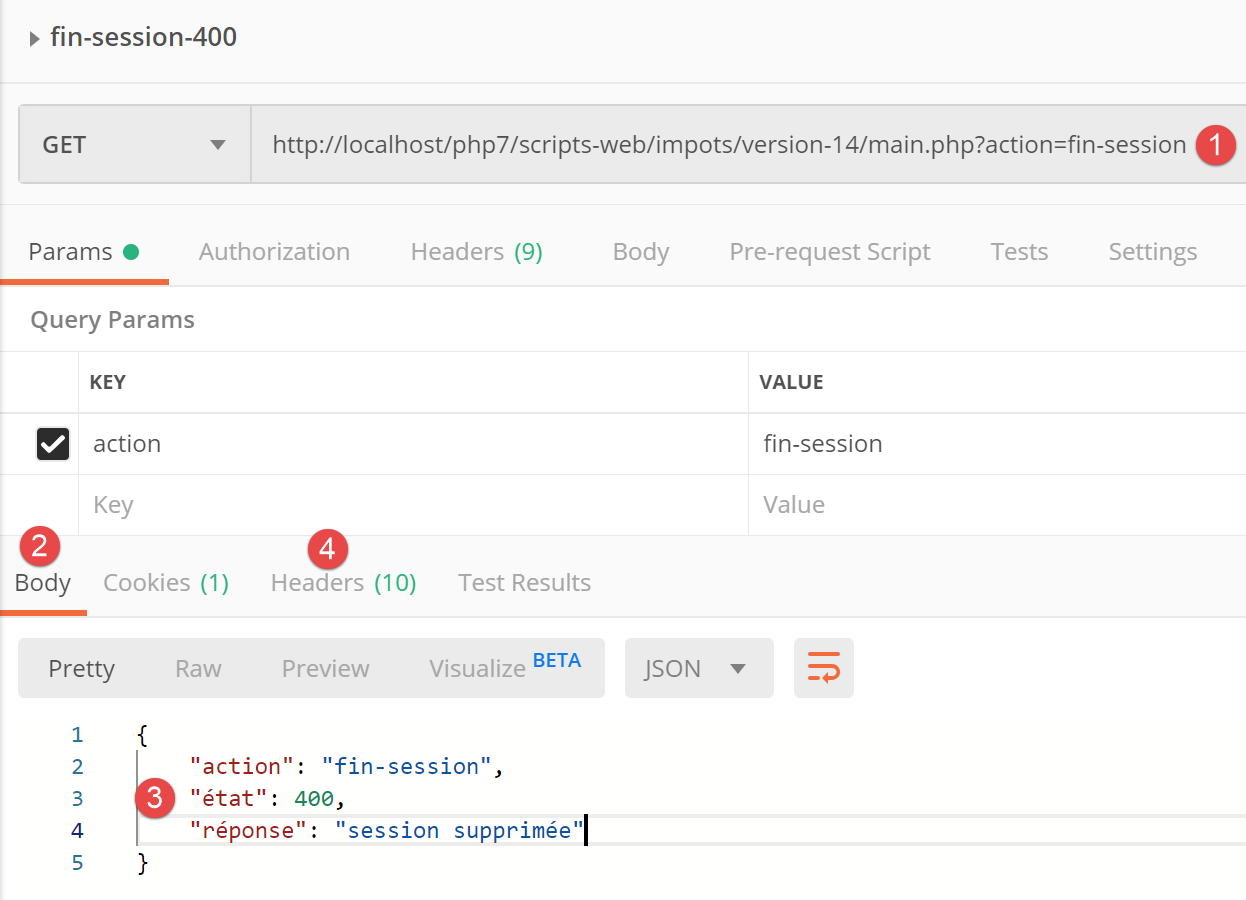
- in [1], the request from client [Postman];
- in [3], the response from server PHP;
- in [4], the headers HTTP from the server’s response PHP;
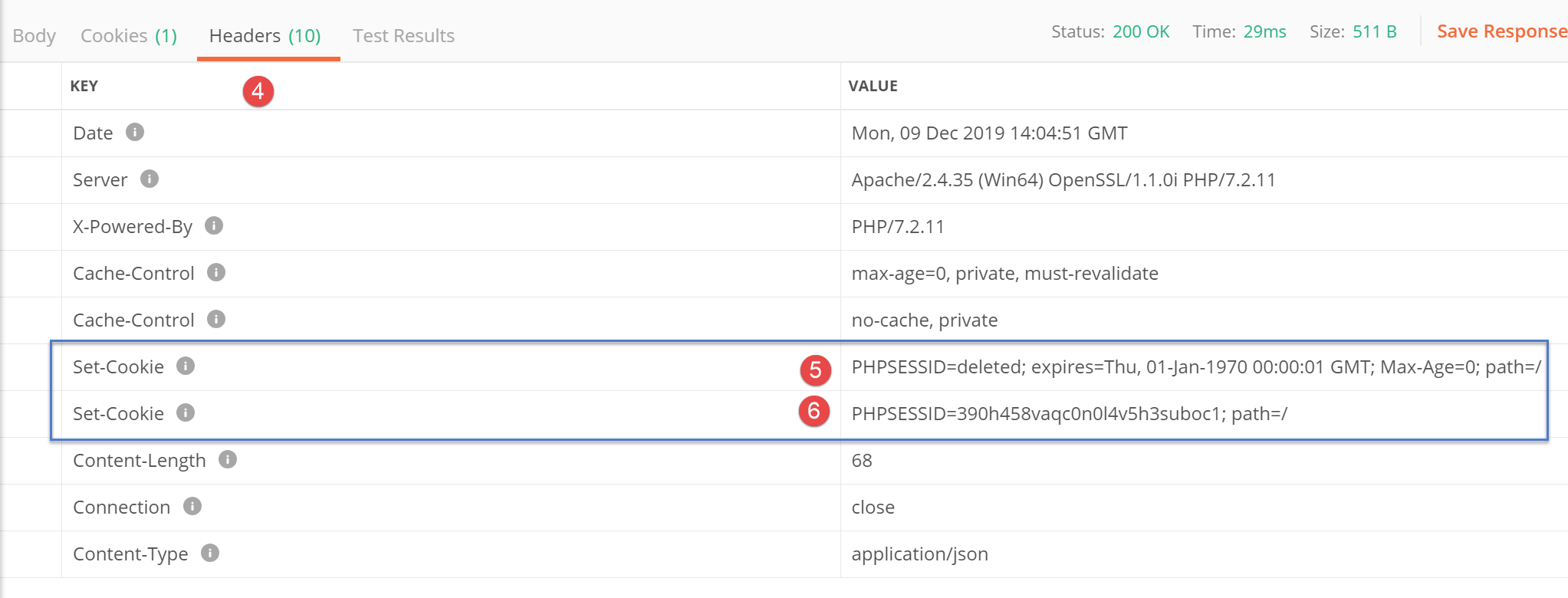
- in [5], the server PHP first indicates that it has deleted the current session PHP;
- in [6], the server PHP sends the cookie for the new session PHP;
With the current code, the [getRemoteData] function retrieves the [5] cookie, whereas it is the [6] cookie that needs to be stored.
Therefore, the code for the [getRemoteData] function must be updated:
async getRemoteData(options) {
    // is there a PHP session cookie?
    if (this.phpSessionCookie) {
      // are there headers?
      if (!options.headers) {
        // create an empty object
        options.headers = {}
      }
      // session cookie header PHP
      options.headers.Cookie = this.phpSessionCookie
    }
    // execute query HTTP
    let response
    try {
      // asynchronous request
      response = await this.axios.request('main.php', options)
    } catch (error) {
      // the [error] parameter is an exception instance - it can take various forms
      if (error.response) {
        // the server response is in [error.response]
        response = error.response
      } else {
        // error restart
        throw error
      }
    }
    // response is the entire HTTP response from the server (HTTP headers + response itself)
    // look for session cookie PHP in received cookies
    // all cookies received
    const cookies = response.headers['set-cookie']
    if (cookies) {
      // cookies is a picture
      // look for session cookie PHP in this array
      let trouvé = false
      let i = 0
      while (!trouvé && i < cookies.length) {
        // look for the PHP session cookie
        const results = RegExp('^(' + this.phpSessionCookieName + '.+?)$').exec(cookies[i])
        if (results) {
          // we store the PHP session cookie
          const phpSessionCookie = results[1]
          // does it contain the word [deleted]?
          const results2 = RegExp(this.phpSessionCookieName + '=deleted').exec(phpSessionCookie)
          if (!results2) {
            // we have the right session cookie PHP
            this.phpSessionCookie = phpSessionCookie
            // we found
            trouvé = true
          } else {
            // next item
            i++
          }
        } else {
          // next item
          i++
        }
      }
    }
    // the server response is in [response.data]
    return response.data
  }
- line 41: we found a cookie named [PHPSESSID]. We store it locally;
- line 43: we check if the saved cookie contains the string [PHPSESSID=deleted];
- line 46: if the answer is no, then we have found the correct cookie [PHPSESSID]. We store it in the class;
After the [getRemoteData] function, the session cookie PHP is stored in the class, in [this.phpSessionCookie]. We noted that the class is instantiated with each new request HTTP from the server [nuxt]. The session cookie PHP must therefore be extracted from the class. To do this, we add a new method to it:
// access to session cookie PHP
  getPhpSessionCookie() {
    return this.phpSessionCookie
}
- The [nuxt] server requests an action from its [dao] layer by providing the PHP session cookie to its constructor, if it has one;
- Once the action is complete, the [nuxt] server retrieves the PHP session cookie stored by the [dao] layer using the previous [getPhpSessionCookie] method. This cookie may be the same as the previous one or a different one. The latter case occurs on two occasions:
- when the [initSession] method is executed (there was no PHP session cookie before);
- when the [finSession] method is executed (the PHP server changes the PHP session cookie);
Note a peculiarity regarding the session cookie PHP. The server [nuxt] does not always receive this cookie from the server PHP. In fact, the latter sends it only once. After that, it no longer sends it. When we look at the code for [getRemoteData] and that for [getPhpSessionCookie], we can see that when the PHP server does not send a session cookie, the [getPhpSessionCookie] function returns the PHP session cookie provided to the constructor. This is how the server always sends the PHP server the last session cookie, PHP, that it received from it.
15.5.2. The [dao] layer of the [nuxt] client
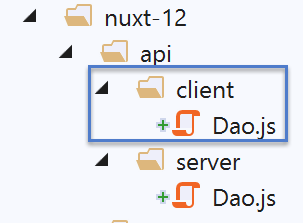
For the [nuxt] client running in a browser, we use the code from the [Dao] class in the document |Introduction to the VUE.JS framework by example|:
"use strict";

// imports
import qs from "qs";

class Dao {
  // manufacturer
  constructor(axios) {
    this.axios = axios;
  }

  // init session
  async initSession() {
    // query options HHTP [get /main.php?action=init-session&type=json]
    const options = {
      method: "GET",
      // URL parameters
      params: {
        action: "init-session",
        type: "json"
      }
    };
    // execute query HTTP
    return await this.getRemoteData(options);
  }

  async authentifierUtilisateur(user, password) {
    // query options HHTP [post /main.php?action=authentifier-utilisateur]
    const options = {
      method: "POST",
      headers: {
        "Content-type": "application/x-www-form-urlencoded"
      },
      // body of POST
      data: qs.stringify({
        user: user,
        password: password
      }),
      // URL parameters
      params: {
        action: "authentifier-utilisateur"
      }
    };
    // execute query HTTP
    return await this.getRemoteData(options);
  }

  async getAdminData() {
    // query options HHTP [get /main.php?action=get-admindata]
    const options = {
      method: "GET",
      // URL parameters
      params: {
        action: "get-admindata"
      }
    };
    // execute query HTTP
    const data = await this.getRemoteData(options);
    // result
    return data;
  }

  async getRemoteData(options) {
    // execute query HTTP
    let response;
    try {
      // asynchronous request
      response = await this.axios.request("main.php", options);
    } catch (error) {
      // parameter [error] is an exception instance - it can take various forms
      if (error.response) {
        // the server response is in [error.response]
        response = error.response;
      } else {
        // error restart
        throw error;
      }
    }
    // response is the entire HTTP response from the server (HTTP headers + response itself)
    // the server response is in [response.data]
    return response.data;
  }
}

// class export
export default Dao;
This code differs from the [dao] layer of the [nuxt] server in that it does not manage the PHP session cookie with the tax calculation server: the browser handles that.
We will, as we did for the [dao] layer of the [nuxt] server, add a [finSession] method:
// end of tax calculation session
  async finSession() {
    // query options HHTP [get /main.php?action=fin-session]
    const options = {
      method: 'GET',
      // URL parameters
      params: {
        action: 'fin-session'
      }
    }
    // execute query HTTP
    const data = await this.getRemoteData(options)
    // result
    return data
  }
When the client [nuxt] executes this method, it receives, like the server [nuxt], two session cookies PHP. It is actually the browser that receives them, and it handles the situation correctly: it keeps only the cookie for the new session PHP initiated by the tax calculation server. So, when the client [nuxt] next sends a request to the server PHP, the session cookie PHP will be correct because the browser is the one sending it. However, there is a problem: the server [nuxt] is unaware that the session cookie PHP has changed. In its exchanges with the server PHP, it will then send a session cookie PHP that no longer exists, and we will run into problems. The client [nuxt] should notify the server [nuxt] that the session cookie PHP has changed and send it to the server. We know how it can do this: via the session cookie [nuxt], the cookie exchanged between the client and the server [nuxt]. The client [nuxt] has at least two ways to retrieve the new session cookie PHP:
- by requesting it from the browser;
- by using the server’s [getRemoteData] method, which knows how to retrieve the new session cookie PHP;
We will use the second solution because it is already ready to go. The [getRemoteData] method of the [nuxt] client then becomes the following:
async getRemoteData(options) {
    // execute query HTTP
    let response
    try {
      // asynchronous request
      response = await this.axios.request('main.php', options)
    } catch (error) {
      // the [error] parameter is an exception instance - it can take various forms
      if (error.response) {
        // the server response is in [error.response]
        response = error.response
      } else {
        // error restart
        throw error
      }
    }
    // response is the entire HTTP response from the server (HTTP headers + response itself)
    // look for session cookie PHP in received cookies
    // all cookies received
    const cookies = response.headers['set-cookie']
    if (cookies) {
      // cookies is a picture
      // look for session cookie PHP in this array
      let trouvé = false
      let i = 0
      while (!trouvé && i < cookies.length) {
        // look for the PHP session cookie
        const results = RegExp('^(' + this.phpSessionCookieName + '.+?)$').exec(cookies[i])
        if (results) {
          // we store the PHP session cookie
          const phpSessionCookie = results[1]
          // does it contain the word [deleted]?
          const results2 = RegExp(this.phpSessionCookieName + '=deleted').exec(phpSessionCookie)
          if (!results2) {
            // we have the right session cookie PHP
            this.phpSessionCookie = phpSessionCookie
            // we found
            trouvé = true
          } else {
            // next item
            i++
          }
        } else {
          // next item
          i++
        }
      }
    }
    // the server response is in [response.data]
    return response.data
  }
In [getRemoteData], we have retained only the code that processes the server response from PHP to search for the session cookie PHP. We did not keep the code that included the session cookie PHP in the request to the server PHP because the browser hosting the client [nuxt] handles that.
Once the session cookie PHP is obtained by the client [nuxt], it must be placed in the session [nuxt] so that the server [nuxt] can benefit from it. The [dao] layer does not handle this, but it provides access via a method to the PHP session cookie that it has stored:
// access to session cookie PHP
  getPhpSessionCookie() {
    return this.phpSessionCookie
}
The [getPhpSessionCookie] function does not always return a valid session cookie:
- it is important to note here that the [dao] layer of the [nuxt] client is persistent. It is instantiated once and then remains in memory;
- as long as the PHP server does not send a PHP session cookie to the [nuxt] client, the [getPhpSessionCookie] function of client [nuxt] returns a value of [undefined];
- when the server PHP sends a session cookie PHP to the client [nuxt], it is stored in [this.phpSessionCookie] and will remain there until it is replaced by a new session cookie PHP sent by the server PHP. The [getPhpSessionCookie] function of client [nuxt] then returns the last session cookie PHP received;
The [dao] layer of the client [nuxt] differs from that of the server [nuxt] in only one respect: it does not send the session cookie PHP itself, as the browser does so. Nevertheless, we chose to keep two distinct [dao] layers because the reasoning behind their respective implementations is different.
15.6. The [nuxt] session

The [nuxt] session (between client and Nuxt server) will be encapsulated in the following [session] object:
/* eslint-disable no-console */
// session definition
const session = {
  // session content
  value: {
    // store not initialized
    initStoreDone: false,
    // vuex blind value
    store: ''
  },
  // save the session in a cookie
  save(context) {
    // store in session
    this.value.store = context.store.state
    console.log('nuxt-session save=', this.value)
    // save session value
    context.app.$cookies.set('nuxt-session', this.value, { path: context.base, maxAge: context.env.maxAge })
  },
  // session reset
  reset(context) {
    console.log('nuxt-session reset')
    // awning reset
    context.store.commit('reset')
    // save new store in session and save session
    this.save(context)
  }
}
// session export
export default session
- lines 5-10: the session has only one property, [value], with two sub-properties:
- [initStoreDone], which indicates whether the store has been initialized or not;
- [store]: the [store.state] value of the application’s Vuex store;
- lines 12–18: the [save] method is used to save the [nuxt] session in a cookie. The [cookie-universal-nuxt] library is used here to manage the cookie. Note the name of the [nuxt] session cookie: [nuxt-session] (line 17);
- lines 20–26: the [reset] method resets the [nuxt] session;
- line 23: the Vuex store is reset and then saved to the session, line 25;
15.7. The [nuxt] session management plugins
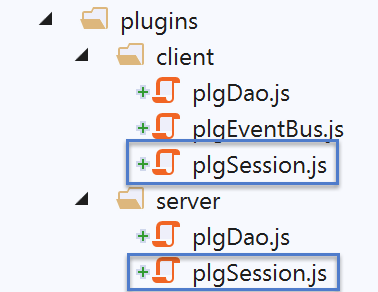
15.7.1. The session management plugin [nuxt] of the server [nuxt]
When the application starts, the [nuxt] server is the first to run. It is therefore this server that will initialize the [nuxt] session. The [server/plgSession] script is as follows:
/* eslint-disable no-console */

// session import
import session from '@/entities/session'

export default (context, inject) => {
  // server session management
  console.log('[plugin server plgSession]')

  // is there an existing session?
  const value = context.app.$cookies.get('nuxt-session')
  if (!value) {
    // new session
    console.log("[plugin server plgSession], démarrage d'une nouvelle session")
  } else {
    // existing session
    console.log("[plugin server plgSession], reprise d'une session existante")
    session.value = value
  }

  // we inject a function into [context, Vue] that will render the current session
  inject('session', () => session)
}
- line 4: import the session code [nuxt];
- line 11: retrieve the value of the [nuxt] session cookie;
- lines 12–15: if the session cookie [nuxt] did not exist, then the session [nuxt] imported on line 4 is sufficient. There is nothing more to do;
- lines 15–19: if the session cookie [nuxt] existed, then on line 18 we store its value in the session imported on line 4;
- line 22: the session has been either initialized or restored. We make it available via the [$session] function;
15.7.2. The session management plugin [nuxt] for the client [nuxt]
The [client/plgSession] script is as follows:
/* eslint-disable no-console */

// session import
import session from '@/entities/session'

export default (context, inject) => {
  // customer session management
  console.log('[plugin client plgSession], reprise de la session [nuxt] du serveur')
  // retrieve the existing session from the nuxt server
  session.value = context.app.$cookies.get('nuxt-session')

  // we inject a function into [context, Vue] that will render the current session
  inject('session', () => session)
}
- line 4: the session [nuxt] is imported;
- line 10: we retrieve the current session [nuxt] from the cookie [nuxt-session];
- line 13: the session [nuxt] imported on line 4 is returned via the injected function [$session];
15.8. The plugins of the [dao] layers
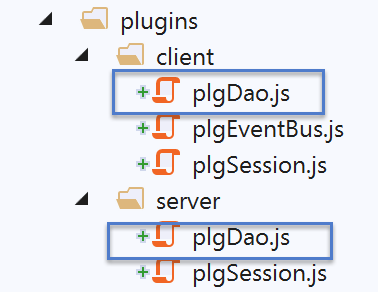
15.8.1. The [dao] layer plugin for the [nuxt] client
The script [client/plgDao] is as follows:
/* eslint-disable no-console */
// create an access point to the [Dao] layer
import Dao from '@/api/client/Dao'
export default (context, inject) => {
  // axios configuration
  context.$axios.defaults.timeout = context.env.timeout
  context.$axios.defaults.baseURL = context.env.baseURL
  context.$axios.defaults.withCredentials = context.env.withCredentials
  // instantiation of the [dao] layer
  const dao = new Dao(context.$axios)
  // injection of a [$dao] function into the context
  inject('dao', () => dao)
  // log
  console.log('[fonction client $dao créée]')
}
- line 3: the [dao] layer of the [nuxt] client is imported;
- lines 6-8: the[context.$axios] object that will make the HTTP requests from the [dao] layer of the [nuxt] client using the information from the [nuxt.config] file:
// environment
  env: {
    // axios configuration
    timeout: 2000,
    withCredentials: true,
    baseURL: 'http://localhost/php7/scripts-web/impots/version-14',
    // session cookie configuration [nuxt]
    maxAge: 60 * 5
  }
- line 10: the [dao] layer of the [nuxt] client is instantiated;
- line 12: the [$dao] function is injected into the client’s context and pages. This function provides access to the [dao] layer from line 10;
We will therefore note that to access the [dao] layer of client [nuxt] when it is executed, we will write:
- [context.app.$dao()] where the context is known;
- [this.$dao()] in a [Vue.js] page;
15.8.2. The plugin for the [dao] layer of the [nuxt] server
The script [server/plgDao] is as follows:
/* eslint-disable no-console */
// create an access point to the [Dao] layer
import Dao from '@/api/server/Dao'
export default (context, inject) => {
  // axios configuration
  context.$axios.defaults.timeout = context.env.timeout
  context.$axios.defaults.baseURL = context.env.baseURL
  // retrieve the session cookie
  const store = context.app.$session().value.store
  const phpSessionCookie = store ? store.phpSessionCookie : ''
  console.log('session=', context.app.$session().value, 'phpSessionCookie=', phpSessionCookie)
  // instantiation of the [dao] layer
  const dao = new Dao(context.$axios, phpSessionCookie)
  // injection of a [$dao] function into the context
  inject('dao', () => dao)
  // log
  console.log('[fonction server $dao créée]')
}
- line 3: the [dao] layer of the [nuxt] server is imported;
- lines 6-7: the[context.$axios] object that will make the HTTP requests from the [dao] layer of the [nuxt] server using the information from the [nuxt.config] file:
// environment
  env: {
    // axios configuration
    timeout: 2000,
    withCredentials: true,
    baseURL: 'http://localhost/php7/scripts-web/impots/version-14',
    // session cookie configuration [nuxt]
    maxAge: 60 * 5
  }
- line 9: retrieve the application store [nuxt];
- line 10: if the store exists, we retrieve the session cookie PHP because we need it to instantiate the layer [dao] of the server [nuxt];
- line 13: we instantiate the [dao] layer of the [nuxt] server;
- line 15: the function [$dao] is injected into the context and pages of the server [nuxt]. This function provides access to the layer [dao] from line 13;
We will therefore note that to access the [dao] layer of the [nuxt] server when it is running, we will write:
- [context.app.$dao()] where the context is known;
- [this.$dao()] in a [Vue.js] page;
15.9. The Vuex store

The [Vuex] store will store all data that needs to be shared by the various components of the [pages, client, serveur] application without this data being reactive.
/* eslint-disable no-console */

// awning status
export const state = () => ({
  // session jSON started
  jsonSessionStarted: false,
  // authenticated user
  userAuthenticated: false,
  // session cookie PHP
  phpSessionCookie: '',
  // adminData
  adminData: ''
})

// changes in the awning
export const mutations = {
  // state replacement
  replace(state, newState) {
    for (const attr in newState) {
      state[attr] = newState[attr]
    }
  },
  // awning reset
  reset() {
    this.commit('replace', { jsonSessionStarted: false, userAuthenticated: false, phpSessionCookie: '', adminData: '' })
  }
}

// awning actions
export const actions = {
  nuxtServerInit(store, context) {
    // who executes this code?
    console.log('nuxtServerInit, client=', process.client, 'serveur=', process.server, 'env=', context.env)
    // init session
    initStore(store, context)
  }
}

function initStore(store, context) {
  // store is the blind to be initialized
  // retrieve the session
  const session = context.app.$session()
  // has the session already been initiated?
  if (!session.value.initStoreDone) {
    // start a new blind
    console.log("nuxtServerInit, initialisation d'une nouvelle session")
    // put the blind in the session
    session.value.store = store.state
    // the blind is now initialized
    session.value.initStoreDone = true
  } else {
    console.log("nuxtServerInit, reprise d'un store existant")
    // update the store with the session store
    store.commit('replace', session.value.store)
  }
  // save the session
  session.save(context)
  // log
  console.log('initStore terminé, store=', store.state)
}
The data stored in the store is as follows:
- line 6: [jsonSessionStarted] will be set to true as soon as the initialization of a session jSON with the server PHP is successful, whether it was initiated by the client or the [nuxt] server. Upon completion of this initialization, the session cookie with the PHP server will have been retrieved and placed in the [phpSessionCookie] property, line 10;
- Line 8: [userAuthenticated] will be set to true as soon as authentication with the PHP server is successful, whether it was performed by the client or the [nuxt] server;
- line 12: [adminData] will be the value [adminData] obtained from the server PHP once authentication is successful;
- lines 18–22: the assignment [replace] initializes the previous properties with those of an object passed as a parameter;
- lines 24–26: the [reset] method restores the store’s properties to their initial values;
- lines 31–37: the function [nuxtServerInit] delegates its work to the function [initStore];
- lines 39–60: the function [initStore] has two roles:
- if the store has not been initialized, it is initialized and placed in the session;
- if the store has already been initialized, its value is retrieved from the [nuxt] session;
- line 42: the Nuxt session is retrieved;
- line 44: we check if the store has been initialized:
- if not, the initial store is placed in the session (line 48);
- then, on line 50, we indicate that the store has been initialized;
- lines 51–55: if the store was initialized, we use it, on line 54, to initialize the store with the value contained in the session;
- line 57: in all cases, the session is saved in the [nuxt-session] cookie, along with the store it contains;
15.10. The [plgEventBus] plugin
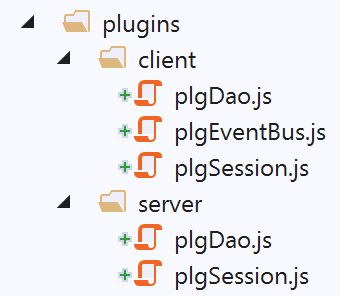
This plugin aims to make an event bus accessible to the [nuxt] client via a [$eventBus] function injected into the context of the [nuxt] client. There is no need to inject it into the context of the [nuxt] server, as it cannot handle events. However, we have already seen that injecting it on the server side and then using it does not cause an error.
/* eslint-disable no-console */
// create an event bus between views
import Vue from 'vue'
export default (context, inject) => {
  // the event bus
  const eventBus = new Vue()
  // injection of a [$eventBus] function into the context
  inject('eventBus', () => eventBus)
  // log
  console.log('[fonction $eventBus créée]')
}
We have already encountered this plugin in the link section. The function [$eventBus] will be available to the client via the notations:
- [context.app.$eventBus()] where the context is available;
- [this.$eventBus()] on the client’s [Vue.js] pages;
15.11. The components of the [nuxt] application
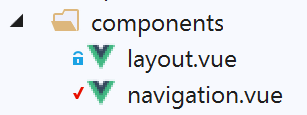
The [layout] component is the one from the previous examples:
<!-- view layout -->
<template>
  <!-- line -->
  <div>
    <b-row>
      <!-- three-column zone -->
      <b-col v-if="left" cols="3">
        <slot name="left" />
      </b-col>
      <!-- nine-column zone -->
      <b-col v-if="right" cols="9">
        <slot name="right" />
      </b-col>
    </b-row>
  </div>
</template>

<script>
export default {
  // settings
  props: {
    left: {
      type: Boolean
    },
    right: {
      type: Boolean
    }
  }
}
</script>
The component [navigation] is as follows:
<template>
  <!-- bootstrap menu with three options -->
  <b-nav vertical>
    <b-nav-item to="/authentification" exact exact-active-class="active">
      Authentification
    </b-nav-item>
    <b-nav-item to="/get-admindata" exact exact-active-class="active">
      Requête AdminData
    </b-nav-item>
    <b-nav-item to="/fin-session" exact exact-active-class="active">
      Fin session impôt
    </b-nav-item>
  </b-nav>
</template>
15.12. Layouts for the [nuxt] application
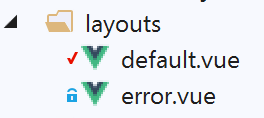
15.12.1. [default]
The layout [default] is the one used for the example [nuxt-11] in the link section:
<template>
  <div class="container">
    <b-card>
      <!-- a message -->
      <b-alert show variant="success" align="center">
        <h4>[nuxt-12] : requêtes HTTP avec axios</h4>
      </b-alert>
      <!-- the current routing view -->
      <nuxt />
      <!-- waiting message -->
      <b-alert v-if="showLoading" show variant="light">
        <strong>Requête au serveur de données en cours...</strong>
        <div class="spinner-border ml-auto" role="status" aria-hidden="true"></div>
      </b-alert>
      <!-- asynchronous operation error -->
      <b-alert v-if="showErrorLoading" show variant="danger">
        <strong>La requête au serveur de données a échoué : {{ errorLoadingMessage }}</strong>
      </b-alert>
    </b-card>
  </div>
</template>

<script>
/* eslint-disable no-console */
export default {
  name: 'App',
  data() {
    return {
      showLoading: false,
      showErrorLoading: false
    }
  },
  // life cycle
  beforeCreate() {
    console.log('[default beforeCreate]')
  },
  created() {
    console.log('[default created]')
    if (process.client) {
      // we listen to evt [loading]
      this.$eventBus().$on('loading', this.mShowLoading)
      // and the [errorLoadingMessage] event
      this.$eventBus().$on('errorLoading', this.mShowErrorLoading)
    }
  },
  beforeMount() {
    console.log('[default beforeMount]')
  },
  mounted() {
    console.log('[default mounted]')
  },
  methods: {
    // message waiting management
    mShowLoading(value) {
      console.log('[default mShowLoading], showLoading=', value)
      this.showLoading = value
    },
    // asynchronous operation error
    mShowErrorLoading(value, errorLoadingMessage) {
      console.log('[default mShowErrorLoading], showErrorLoading=', value, 'errorLoadingMessage=', errorLoadingMessage)
      this.showErrorLoading = value
      this.errorLoadingMessage = errorLoadingMessage
    }
  }
}
</script>
- lines 10–14: display the message indicating that an asynchronous operation for client [nuxt] is pending;
- lines 15–18: display any error message from an asynchronous operation;
- line 37: the function [created] on page [default] is executed before the function [mounted] on the pages;
- line 39: if the executor is the client [nuxt], then the page [default] listens for events:
- [loading], which signals the start or end of a wait. The function [mShowLoading] is then executed;
- [errorLoading], which signals that an error message must be displayed. The function [mShowErrorLoading] is then executed;
- the [nuxt] pages:
- display the waiting message by emitting the [‘loading’, true] event on the event bus;
- hide the waiting message by emitting the [‘loading’, false] event on the event bus;
- display an error message by emitting the [‘errorLoading’, true] event on the event bus;
- hide the error message by emitting the event [‘errorLoading’, false] on the event bus;
15.12.2. [error]
The layout [error] displays a system error message (not handled by the developer):
<!-- definition HTML of the view -->
<template>
  <!-- layout -->
  <Layout :left="true" :right="true">
    <!-- alert in the right-hand column -->
    <template slot="right">
      <!-- message on pink background -->
      <b-alert show variant="danger" align="center">
        <h4>L'erreur suivante s'est produite : {{ JSON.stringify(error) }}</h4>
      </b-alert>
    </template>
    <!-- navigation menu in the left-hand column -->
    <Navigation slot="left" />
  </Layout>
</template>

<script>
/* eslint-disable no-undef */
/* eslint-disable no-console */
/* eslint-disable nuxt/no-env-in-hooks */

import Layout from '@/components/layout'
import Navigation from '@/components/navigation'

export default {
  name: 'Error',
  // components used
  components: {
    Layout,
    Navigation
  },
  // property [props]
  props: { error: { type: Object, default: () => 'waiting ...' } },
  // life cycle
  beforeCreate() {
    // client and server
    console.log('[error beforeCreate]')
  },
  created() {
    // client and server
    console.log('[error created, error=]', this.error)
  },
  beforeMount() {
    // customer only
    console.log('[error beforeMount]')
  },
  mounted() {
    // customer only
    console.log('[error mounted]')
  }
}
</script>
15.13. The page [index] served by the server [nuxt]
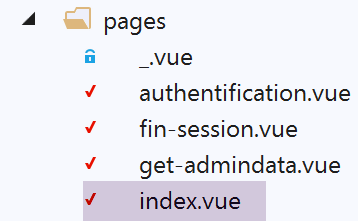
The [index.vue] page is unique in that it is accessible only via the [nuxt] server. No link is provided to the user to access it via the [nuxt] client. Its code is as follows:
<!-- main page -->
<template>
  <Layout :left="true" :right="true">
    <!-- navigation -->
    <Navigation slot="left" />
    <!-- message-->
    <b-alert slot="right" show variant="warning">Initialisation de la session avec le serveur de calcul de l'impôt : {{ result }} </b-alert>
  </Layout>
</template>

<script>
/* eslint-disable no-console */

import Navigation from '@/components/navigation'
import Layout from '@/components/layout'

export default {
  name: 'InitSession',
  // components used
  components: {
    Layout,
    Navigation
  },
  // asynchronous data
  async asyncData(context) {
    // log
    console.log('[index asyncData started]')
    try {
      // start a jSON session
      const dao = context.app.$dao()
      const response = await dao.initSession()
      // log
      console.log('[index asyncData response=]', response)
      // retrieve session cookie PHP for future requests
      const phpSessionCookie = dao.getPhpSessionCookie()
      // the session cookie PHP is stored in session [nuxt]
      context.store.commit('replace', { phpSessionCookie })
      // was there a mistake?
      if (response.état !== 700) {
        // the error is in response.réponse
        throw new Error(response.réponse)
      }
      // note that the jSON session has started
      context.store.commit('replace', { jsonSessionStarted: true })
      // we return the result
      return { result: '[succès]' }
    } catch (e) {
      // log
      console.log('[index asyncData error=]', e)
      // note that session jSON has not started
      context.store.commit('replace', { jsonSessionStarted: false })
      // we report the error
      return { result: '[échec]', showErrorLoading: true, errorLoadingMessage: e.message }
    } finally {
      // save the blind
      const session = context.app.$session()
      session.save(context)
      // log
      console.log('[index asyncData finished]')
    }
  },
  // life cycle
  beforeCreate() {
    console.log('[index beforeCreate]')
  },
  created() {
    console.log('[index created]')
  },
  beforeMount() {
    console.log('[index beforeMount]')
  },
  mounted() {
    console.log('[index mounted]')
    // customer only
    if (this.showErrorLoading) {
      console.log('[index mounted, showErrorLoading=true]')
      this.$eventBus().$emit('errorLoading', true, this.errorLoadingMessage)
    }
  }
}
</script>
- line 7: the page displays the result [result] of an asynchronous request (lines 46 and 51);
- line 31: the asynchronous operation is the opening of a session jSON with the tax calculation server;
- line 25: we know that when the page is requested directly from the server [nuxt], the [asyncData] function is executed only by the server and not by the [nuxt] client, which runs when the browser has received the response from the [nuxt] server;
- line 30: the [dao] layer is retrieved from the context of the [nuxt] server;
- line 35: if the server has not yet sent a request to the tax calculation server, it receives its first session cookie PHP; otherwise, it receives the last session cookie PHP that it received (see the code for the [dao] layer of the [nuxt] server in the linked section);
- line 37: this session cookie PHP is stored in the store;
- lines 39–42: we check if the operation was successful. If not, an exception is thrown that will be caught by the [catch] in line 47;
- line 44: we note in the store that the session jSON with the server PHP has started;
- line 46: the result [result] is returned and displayed on line 7;
- lines 47–54: any exceptions are handled. These can be of two types:
- the operation HTTP on line 31 failed due to a communication error between server [nuxt] and server PHP;
- the operation HTTP on line 31 succeeded, but the received result reported an error (lines 39–42);
- line 51: note that session jSON with server PHP did not start;
- Line 53: The result [result] is returned and displayed on line 7. Additionally, the properties [showErrorLoading] and [errorLoadingMessage] are set, which the client [nuxt] will use to display an error message when it receives the page sent by the server [nuxt] (lines 72–79);
- lines 54–60: code executed in all cases (success or failure);
- line 56: retrieve the [nuxt] session from the context of the [nuxt] server;
- line 57: it is saved;
- lines 63–68: once the [asyncData] function has finished, the [nuxt] server executes the [beforeCreate] and [create] functions;
Note: The execution of page [index] by server [nuxt] may fail, for example, if the tax calculation server is not running when application [nuxt] is launched:
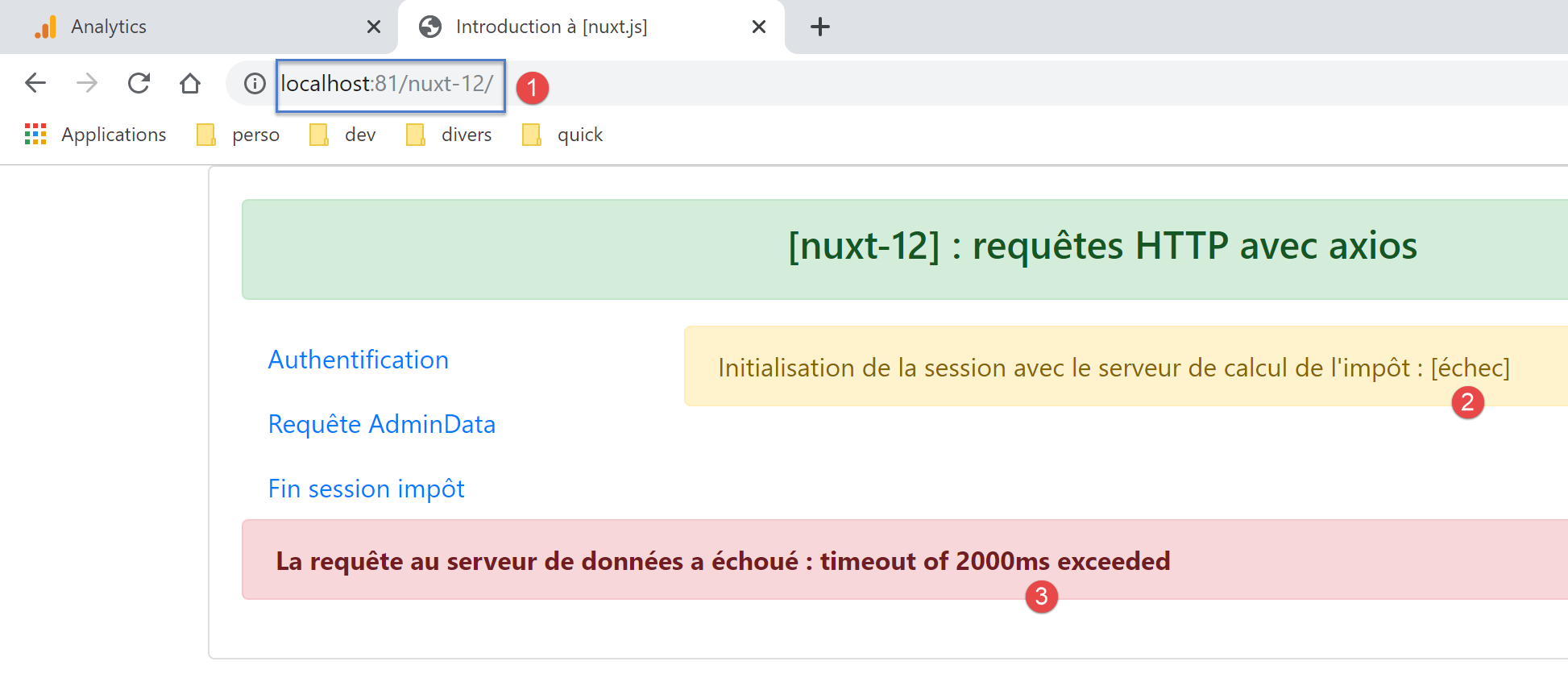
In this case, the only solution is to start the tax calculation server and then the [nuxt] application itself, since the navigation menu does not offeroption to initiate a jSON session with the tax calculation server;
15.14. The [index] page executed by the [nuxt] client
The [index] page is executed by the [nuxt] client only after the [nuxt] server has sent it to the client. The server sent it the information [result] and possibly [showErrorLoading] and [errorLoadingMessage].
We know that the function [asyncData] will not be executed. This leaves the lifecycle functions, specifically the function [mounted]:
mounted() {
    console.log('[index mounted]')
    // customer only
    if (this.showErrorLoading) {
      console.log('[index mounted, showErrorLoading=true]')
      this.$eventBus().$emit('errorLoading', true, this.errorLoadingMessage)
    }
}
- The client [nuxt] automatically incorporates the elements [result] and, if applicable, [showErrorLoading, errorLoadingMessage] sent to it by the server [nuxt] into the page properties:
- the [result] property is displayed by line 7;
- the [showErrorLoading, errorLoadingMessage] properties are used by the [mounted] method: in line 4, the [showErrorLoading] property is checked. If it is true, line 6 uses the client event bus [nuxt] to signal that there is an error message to display;
- The event [errorLoading], launched on line 6, is intercepted by the page [layouts/default] described in the "link" section;
15.15. The page [authentification] is executed by the server [nuxt]
The page [authentification] is responsible for authenticating a user with the tax calculation server. Its code is as follows:
<!-- authentication page -->
<template>
  <Layout :left="true" :right="true">
    <!-- navigation -->
    <Navigation slot="left" />
    <!-- message-->
    <b-alert slot="right" show variant="warning">Authentification auprès du serveur de calcul de l'impôt : {{ result }} </b-alert>
  </Layout>
</template>

<script>
/* eslint-disable no-console */

import Navigation from '@/components/navigation'
import Layout from '@/components/layout'

export default {
  name: 'Authentification',
  // components used
  components: {
    Layout,
    Navigation
  },
  // asynchronous data
  async asyncData(context) {
    // log
    console.log('[authentification asyncData started]')
    if (process.client) {
      // start waiting for customer [nuxt]
      context.app.$eventBus().$emit('loading', true)
      // no error
      context.app.$eventBus().$emit('errorLoading', false)
    }
    try {
      // authenticate to the server
      const dao = context.app.$dao()
      const response = await dao.authentifierUtilisateur('admin', 'admin')
      // log
      console.log('[authentification asyncData response=]', response)
      // result
      const userAuthenticated = response.état === 200
      // we note whether the user is authenticated or not
      context.store.commit('replace', { userAuthenticated })
      // save the store in session [nuxt]
      const session = context.app.$session()
      session.save(context)
      // authentication error?
      if (!userAuthenticated) {
        // the error is in response.réponse
        throw new Error(response.réponse)
      }
      // we return the result
      return { result: '[succès]' }
    } catch (e) {
      // we report the error
      return { result: '[échec]', showErrorLoading: true, errorLoadingMessage: e.message }
    } finally {
      // log
      console.log('[authentification asyncData finished]')
      if (process.client) {
        // end customer wait [nuxt]
        context.app.$eventBus().$emit('loading', false)
      }
    }
  },
  // life cycle
  beforeCreate() {
    console.log('[authentification beforeCreate]')
  },
  created() {
    console.log('[authentification created]')
  },
  beforeMount() {
    console.log('[authentification beforeMount]')
  },
  mounted() {
    console.log('[authentification mounted]')
    // customer only
    if (this.showErrorLoading) {
      console.log('[authentification mounted, showErrorLoading=true]')
      this.$eventBus().$emit('errorLoading', true, this.errorLoadingMessage)
    }
  }
}
</script>
- line 7: the page displays the result [result] of the asynchronous request [asyncData] from lines 25–65;
- lines 28–33: the server does not execute these lines intended for the client [nuxt];
- line 36: the [dao] layer is retrieved from the [nuxt] server;
- line 37: we authenticate with the tax calculation server using the test credentials [admin, admin], which are the only ones accepted by the tax calculation server;
- line 41: the authentication operation is successful only if the response status is 200;
- line 43: the property [userAuthenticated] is placed in the store;
- lines 44–46: the store is saved in the session [nuxt];
- lines 48–51: if authentication failed, an exception is thrown with the error message sent by the tax calculation server;
- otherwise, on line 53, a success result is returned, which will be displayed on line 7;
- lines 54-57: in case of an error, three properties of the [result, showErrorLoading, errorLoadingMessage] page are set. The [result] property will be displayed on line 7. The three properties will be sent to the [nuxt] client;
- lines 60–63: are not executed by the [nuxt] server;
- once [asyncData] has returned its result, it is displayed on line 7. Then the methods [beforeCreate] (lines 67–69) and [created] (lines 70–72) are executed;
- that’s it;
Note: The execution of the [authentification] page by the [nuxt] server may fail, for example, if the jSON session with the tax calculation server has not been initialized. This can be done as follows:
- delete the PHP session cookie from your browser (to start over):
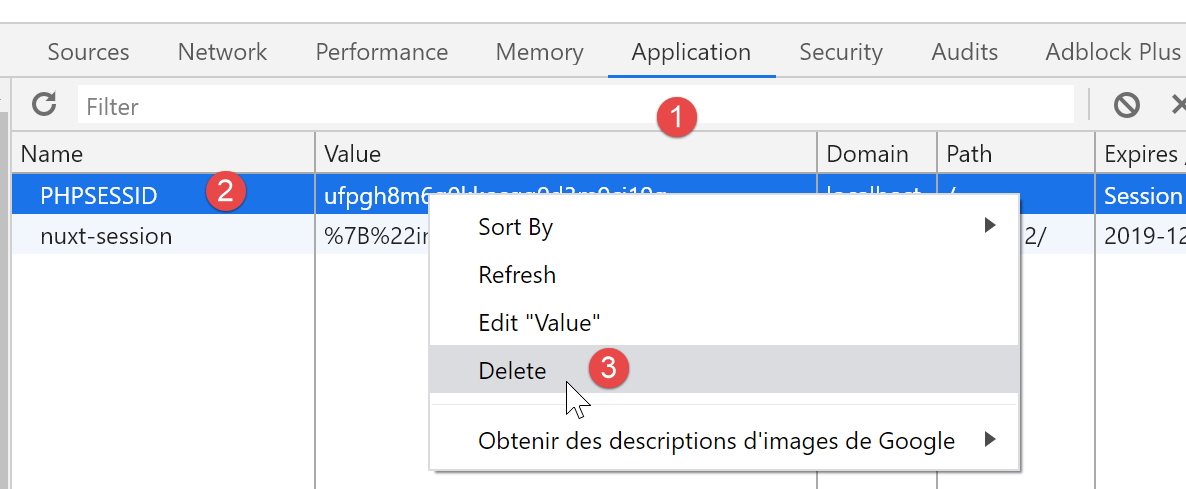
- launch the [nuxt] application while the calculation server has not been launched: you will receive an error;
- launch the tax calculation server;
- enter URL [/authentification] directly into the browser’s address bar:
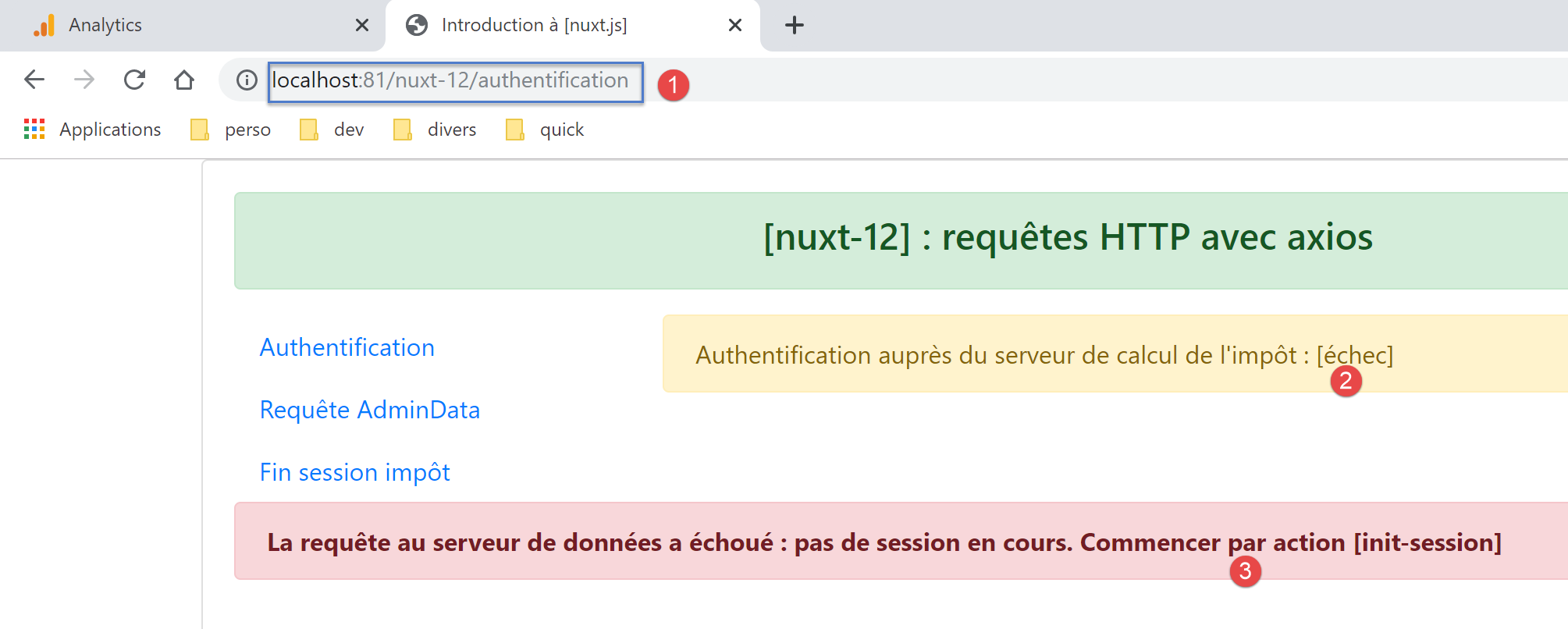
In this case, the only solution is to reload the [index] page.
15.16. The [authentification] page executed by the [nuxt] client
Let’s look at the page’s code:
<!-- authentication page -->
<template>
  <Layout :left="true" :right="true">
    <!-- navigation -->
    <Navigation slot="left" />
    <!-- message-->
    <b-alert slot="right" show variant="warning">Authentification auprès du serveur de calcul de l'impôt : {{ result }} </b-alert>
  </Layout>
</template>

<script>
/* eslint-disable no-console */

import Navigation from '@/components/navigation'
import Layout from '@/components/layout'

export default {
  name: 'Authentification',
  // components used
  components: {
    Layout,
    Navigation
  },
  // asynchronous data
  async asyncData(context) {
    // log
    console.log('[authentification asyncData started]')
    if (process.client) {
      // start waiting for customer [nuxt]
      context.app.$eventBus().$emit('loading', true)
      // no error
      context.app.$eventBus().$emit('errorLoading', false)
    }
    try {
      // authenticate to the server
      const dao = context.app.$dao()
      const response = await dao.authentifierUtilisateur('admin', 'admin')
      // log
      console.log('[authentification asyncData response=]', response)
      // result
      const userAuthenticated = response.état === 200
      // we note whether the user is authenticated or not
      context.store.commit('replace', { userAuthenticated })
      // save the store in session [nuxt]
      const session = context.app.$session()
      session.save(context)
      // authentication error?
      if (!userAuthenticated) {
        // the error is in response.réponse
        throw new Error(response.réponse)
      }
      // we return the result
      return { result: '[succès]' }
    } catch (e) {
      // we report the error
      return { result: '[échec]', showErrorLoading: true, errorLoadingMessage: e.message }
    } finally {
      // log
      console.log('[authentification asyncData finished]')
      if (process.client) {
        // end customer wait [nuxt]
        context.app.$eventBus().$emit('loading', false)
      }
    }
  },
  // life cycle
  beforeCreate() {
    console.log('[authentification beforeCreate]')
  },
  created() {
    console.log('[authentification created]')
  },
  beforeMount() {
    console.log('[authentification beforeMount]')
  },
  mounted() {
    console.log('[authentification mounted]')
    // customer only
    if (this.showErrorLoading) {
      console.log('[authentification mounted, showErrorLoading=true]')
      this.$eventBus().$emit('errorLoading', true, this.errorLoadingMessage)
    }
  }
}
</script>
There are two scenarios in which the [authentification] page is executed by the [nuxt] client:
- client [nuxt] runs after server [nuxt] has sent page [authentification] to the browser of client [nuxt];
- the client [nuxt] because the user clicked on the link [Authentification] in the menu of navigation:
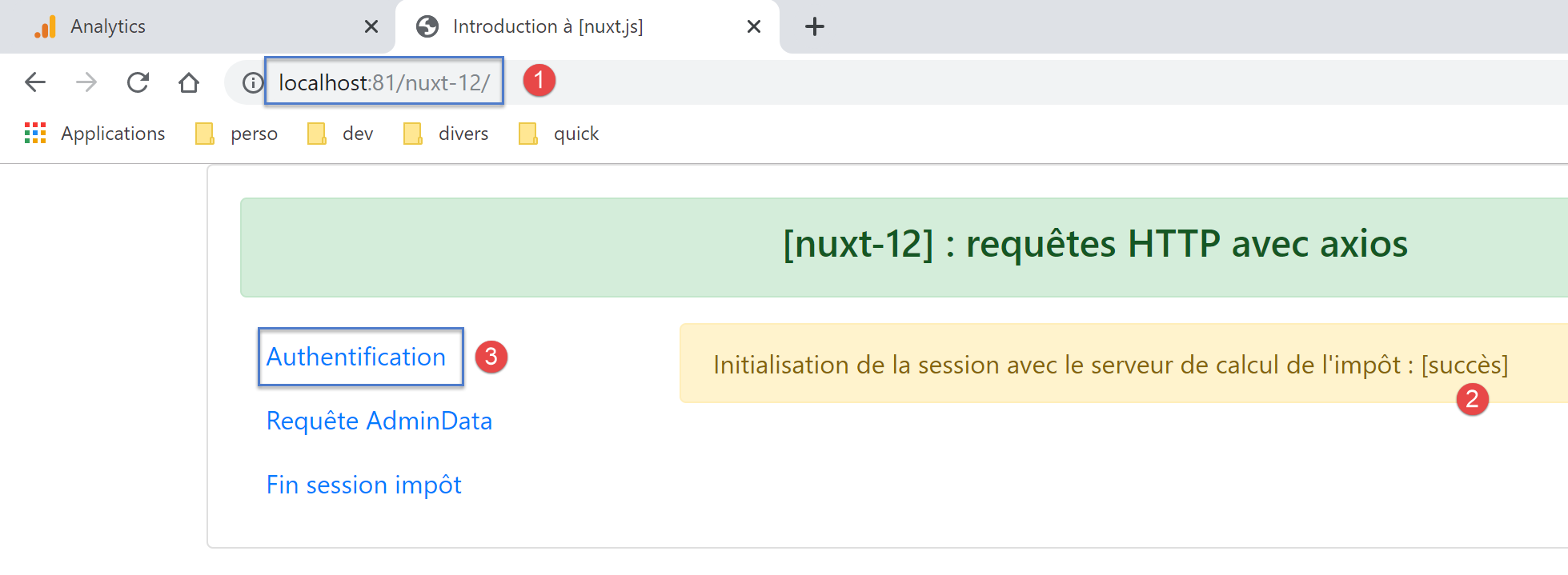
Let’s first examine the first case. In this case, the client [nuxt] does not execute the function [asyncData]. It incorporates the elements [result] and possibly [showErrorLoading, errorLoadingMessage], which were sent to it by the server [nuxt], into the page properties:
- the [result] property is displayed by line 7;
- the [showErrorLoading, errorLoadingMessage] properties are used by the [mounted] method: on line 79, the [showErrorLoading] property is checked. If it is true, line 81 uses the [nuxt] client event bus to signal that there is an error message to display;
The mechanism for displaying the error message was explained for page [index] in the “Link” section.
Case 2 involves the client [nuxt], which runs when the user clicks the link [Authentification]. In this case, the [nuxt] client runs independently and not after the [nuxt] server. The [asyncData] function is then executed. We provide only the details that differ from the explanations given for the page executed by the [nuxt] server:
- lines 28–33: the client [nuxt] requests that the waiting message be displayed and that any error message previously displayed be cleared;
- line 36: it is now the [dao] layer of the [nuxt] client that is obtained here;
- lines 60–63: the client [nuxt] requests that the loading message be hidden;
- Once [asyncData] has finished, the page lifecycle will proceed. The [mounted] function in lines 76–83 will be executed. If an error occurred, the error message will then be displayed;
Note: To trigger an error, follow the procedure explained for the [nuxt] server at the end of the link paragraph, but instead of requesting the [authentification] page by typing its URL into the address bar, use the [Authentification] link from the navigation menu. This will then launch the [nuxt] client.
15.17. The [get-admindata] page
The code for the [get-admindata] page is as follows:
<!-- get-admindata view -->
<template>
  <Layout :left="true" :right="true">
    <!-- navigation -->
    <Navigation slot="left" />
    <!-- message -->
    <b-alert slot="right" show variant="secondary"> Demande de [adminData] au serveur de calcul de l'impôt : {{ result }} </b-alert>
  </Layout>
</template>

<script>
/* eslint-disable no-console */

import Navigation from '@/components/navigation'
import Layout from '@/components/layout'

export default {
  name: 'GetAdmindata',
  // components used
  components: {
    Layout,
    Navigation
  },
  // asynchronous data
  async asyncData(context) {
    // log
    console.log('[get-admindata asyncData started]')
    if (process.client) {
      // start waiting
      context.app.$eventBus().$emit('loading', true)
      // no error
      context.app.$eventBus().$emit('errorLoading', false)
    }
    try {
      // the data [admindata] is requested
      const response = await context.app.$dao().getAdminData()
      // log
      console.log('[get-admindata asyncData response=]', response)
      // result
      const adminData = response.état === 1000 ? response.réponse : ''
      // put the data in the store
      context.store.commit('replace', { adminData })
      // save the store in session [nuxt]
      const session = context.app.$session()
      session.save(context)
      // was there a mistake?
      if (!adminData) {
        // the error is in response.réponse
        throw new Error(response.réponse)
      }
      // return the value received
      return { result: adminData }
    } catch (e) {
      // we report the error
      return { result: '[échec]', showErrorLoading: true, errorLoadingMessage: e.message }
    } finally {
      // log
      console.log('[get-admindata asyncData finished]')
      if (process.client) {
        // end waiting
        context.app.$eventBus().$emit('loading', false)
      }
    }
  },
  // life cycle
  beforeCreate() {
    console.log('[get-admindata beforeCreate]')
  },
  created() {
    console.log('[get-admindata created]')
  },
  beforeMount() {
    console.log('[get-admindata beforeMount]')
  },
  mounted() {
    console.log('[get-admindata mounted]')
    // customer
    if (this.showErrorLoading) {
      console.log('[get-admindata mounted, showErrorLoading=true]')
      this.$eventBus().$emit('errorLoading', true, this.errorLoadingMessage)
    }
  }
}
</script>
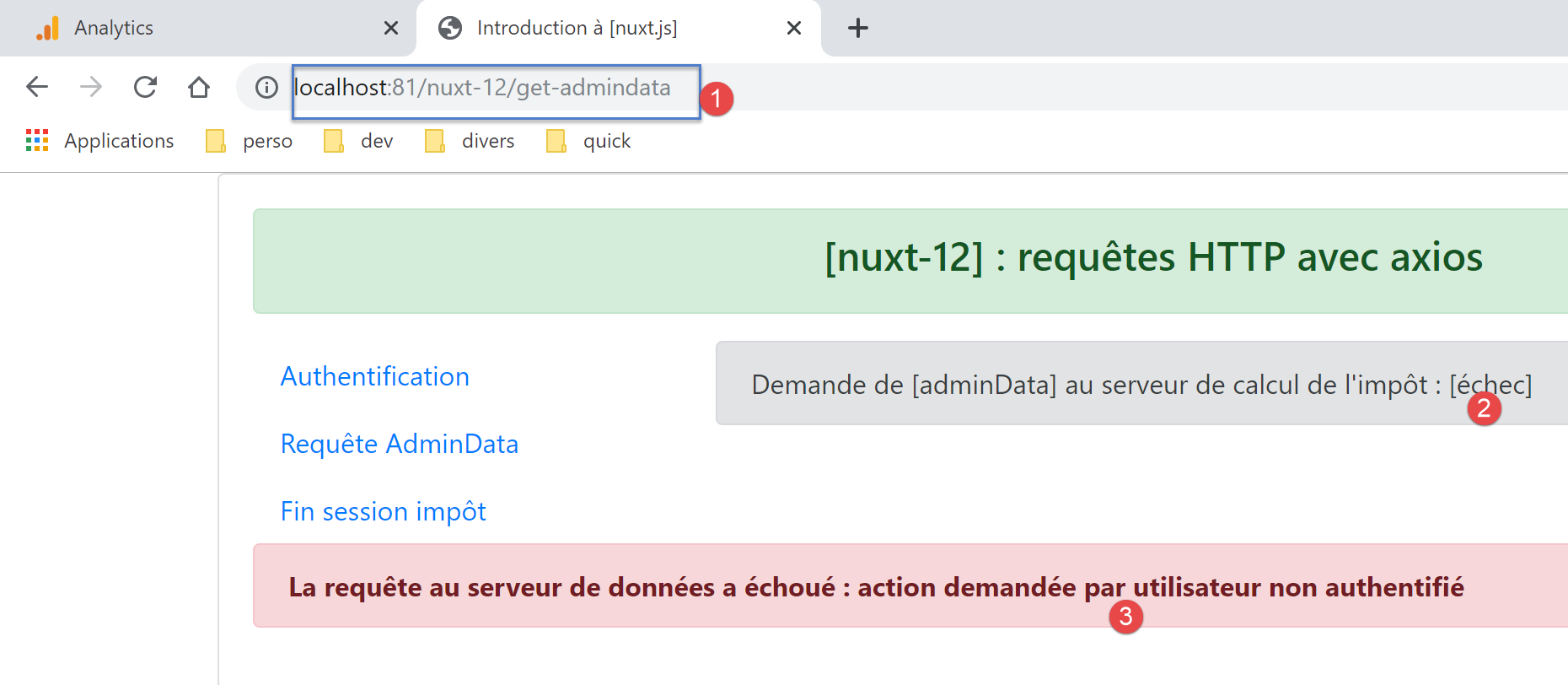
This page is very similar to the [authentification] page. The explanations are the same for both its execution by the [nuxt] server and its execution by the [nuxt] client. Note, however, that line 7 does not display success/failure as before, but rather the value of the data received from the tax calculation server (line 52):
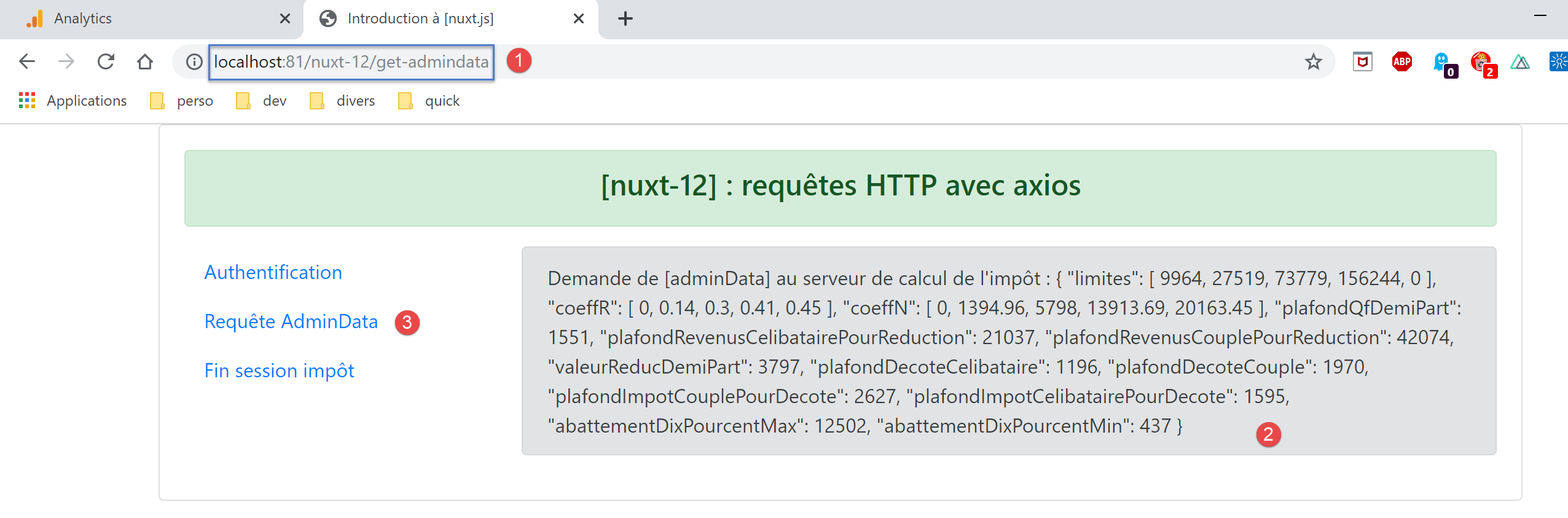
The result above is obtained using both the server and the [nuxt] client. To trigger an error, request the [get-admindata] page via the server or the [nuxt] client without being authenticated:
15.18. The page [fin-session]
The page code is as follows:
<!-- main page -->
<template>
  <Layout :left="true" :right="true">
    <!-- navigation -->
    <Navigation slot="left" />
    <!-- message-->
    <b-alert slot="right" show variant="warning">Fin de la session avec le serveur de calcul de l'impôt : {{ result }} </b-alert>
  </Layout>
</template>

<script>
/* eslint-disable no-console */

import Navigation from '@/components/navigation'
import Layout from '@/components/layout'

export default {
  name: 'FinSession',
  // components used
  components: {
    Layout,
    Navigation
  },
  // asynchronous data
  async asyncData(context) {
    // log
    console.log('[fin-session asyncData started]')
    // case of customer [nuxt]
    if (process.client) {
      // start waiting
      context.app.$eventBus().$emit('loading', true)
      // no error
      context.app.$eventBus().$emit('errorLoading', false)
    }
    try {
      // a new session PHP is requested from the tax calculation server
      const dao = context.app.$dao()
      const response = await dao.finSession()
      // log
      console.log('[fin-session asyncData response=]', response)
      // was there a mistake?
      if (response.état !== 400) {
        // the error is in response.réponse
        throw new Error(response.réponse)
      }
      // the server has sent a new session cookie PHP
      // we retrieve it for both the server and the nuxt client
      // if this code is executed by client [nuxt], session cookie PHP must be set in nuxt session
      // so that the [plgDao] plugin on the [nuxt] server can retrieve it and initialize the [dao] layer with
      // if this code is executed by the [nuxt] server, the PHP session cookie must be set in the nuxt session
      // so that client routing [nuxt] can retrieve it and pass it to the browser
      const phpSessionCookie = dao.getPhpSessionCookie()
      // we note in the store that the session jSON has been started and we store the session cookie PHP
      context.store.commit('replace', { jsonSessionStarted: true, phpSessionCookie, userAuthenticated: false, adminData: '' })
      // save the store in session [nuxt]
      const session = context.app.$session()
      session.save(context)
      // we return the result
      return { result: "[succès]. La session jSON reste initialisée mais vous n'êtes plus authentifié(e)." }
    } catch (e) {
      // log
      console.log('[fin-session asyncData error=]', e)
      // we report the error
      return { result: '[échec]', showErrorLoading: true, errorLoadingMessage: e.message }
    } finally {
      // log
      console.log('[fin-session asyncData finished]')
      if (process.client) {
        // end waiting
        context.app.$eventBus().$emit('loading', false)
      }
    }
  },
  // life cycle
  beforeCreate() {
    console.log('[fin-session beforeCreate]')
  },
  created() {
    console.log('[fin-session created]')
  },
  beforeMount() {
    console.log('[fin-session beforeMount]')
  },
  mounted() {
    console.log('[fin-session mounted]')
    // customer only
    if (this.showErrorLoading) {
      console.log('[fin-session mounted, showErrorLoading=true]')
      this.$eventBus().$emit('errorLoading', true, this.errorLoadingMessage)
    }
  }
}
</script>
The code is very similar to that on the previous pages, and the explanations are the same. There is just one point to note: the asynchronous operation on line 38 causes the tax calculation server to send a new session cookie, PHP. The explanations for managing this cookie differ depending on whether the server or the client [nuxt] is executing this code.
Let’s start with the [nuxt] server:
- line 37: it is the [dao] layer of the [nuxt] server that is instantiated. Recall the code for its constructor:
// manufacturer
  constructor(axios, phpSessionCookie) {
    // axios library
    this.axios = axios
    // session cookie value
    this.phpSessionCookie = phpSessionCookie
    // server session cookie name PHP
    this.phpSessionCookieName = 'PHPSESSID'
}
We can see in line 1 that the constructor needs the current session cookie PHP, the last one received, whether by the server or the client [nuxt];
- line 52: the server [nuxt] retrieves the cookie for the new session PHP or the old cookie if the session termination operation failed;
- line 54: the session cookie PHP is placed in the store and then saved in the session [nuxt] on lines 56–57;
- After the server, the client [nuxt] executes the page [fin-session] with the data sent by the server. We know that it will not execute the function [asyncData];
- finally, after the server and client [nuxt] have completed their work, we know that the cookie PHP required for communication with the tax calculation server is in the session [nuxt];
The fact that the PHP cookie is in the [nuxt] session is sufficient for the server, because that is where its [dao] layer will retrieve it. In the [server/plgDao] plugin that initializes the server’s [dao] layer, we wrote:
/* eslint-disable no-console */
// create an access point to the [Dao] layer
import Dao from '@/api/server/Dao'
export default (context, inject) => {
  // axios configuration
  context.$axios.defaults.timeout = context.env.timeout
  context.$axios.defaults.baseURL = context.env.baseURL
  // retrieve the session cookie
  const store = context.app.$session().value.store
  const phpSessionCookie = store ? store.phpSessionCookie : ''
  console.log('session=', context.app.$session().value, 'phpSessionCookie=', phpSessionCookie)
  // instantiation of the [dao] layer
  const dao = new Dao(context.$axios, phpSessionCookie)
  // injection of a [$dao] function into the context
  inject('dao', () => dao)
  // log
  console.log('[fonction server $dao créée]')
}
- line 13, the [dao] layer of the [nuxt] server is instantiated with the PHP session cookie taken from the [nuxt] session, lines 9-10;
For client [nuxt], it’s a different story. It is not the client that sends the cookie, but the browser that executes it. However, this browser does not recognize the cookie for the new session PHP received by server [nuxt]. If we use the menu links from navigation to [3]:
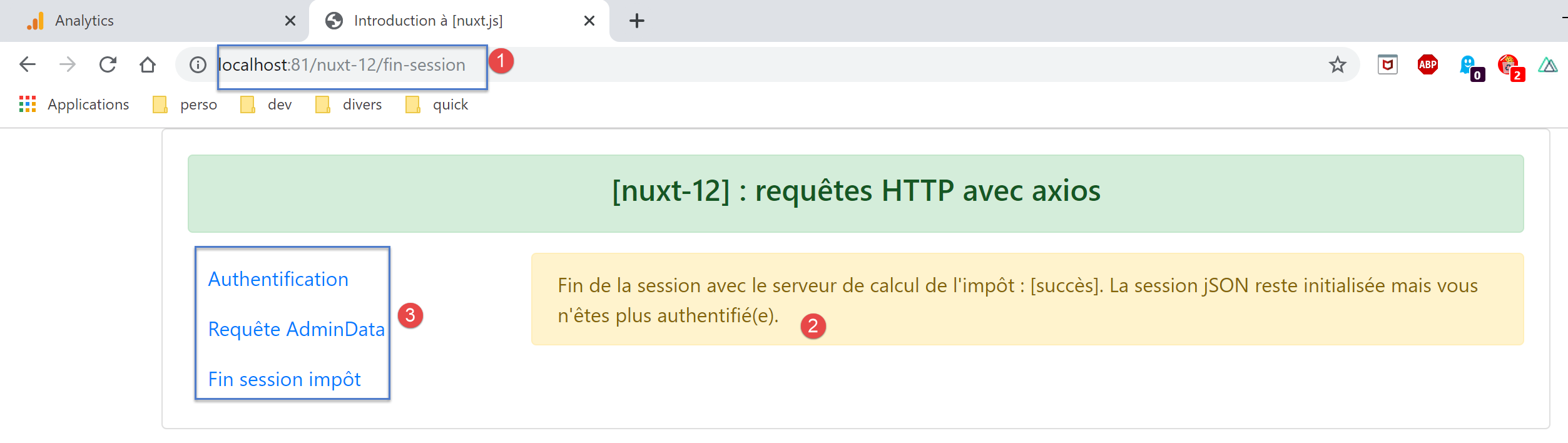
The tax calculation server will receive an obsolete session cookie PHP from the browser and will respond that no session jSON is associated with this cookie. We need to find a way to pass the new session cookie PHP to the browser.
We can use routing middleware to do this:
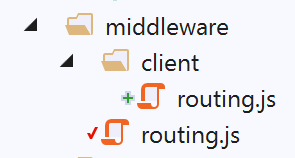
The script [client/routing] is the routing middleware declared in the file [nuxt.config]:
// router
  router: {
    // application URL root
    base: '/nuxt-12/',
    // routing middleware
    middleware: ['routing']
},
The [middleware/routing] script is as follows:
/* eslint-disable no-console */

// import client middleware
import clientRouting from './client/routing'

export default function(context) {
  // who executes this code?
  console.log('[middleware], process.server', process.server, ', process.client=', process.client)
  if (process.client) {
    // customer routing
    clientRouting(context)
  }
}
- lines 9–12: we only route the client using a function imported on line 4;
The script [middleware/client/routing] is as follows:
/* eslint-disable no-console */
export default function(context) {
  // who executes this code?
  console.log('[middleware client], process.server', process.server, ', process.client=', process.client)
  // management of the PHP session cookie in the browser
  // the browser's PHP session cookie must be identical to the one found in the nuxt session
  // acion [fin-session] receives a new cookie PHP (server as nuxt client)
  // if the server receives it, the client must pass it on to the browser
  // for its own exchanges with the PHP server
  // this is customer routing

  // retrieve the session cookie PHP
  const phpSessionCookie = context.store.state.phpSessionCookie
  if (phpSessionCookie) {
    // if it exists, we assign the PHP session cookie to the browser
    document.cookie = phpSessionCookie
  }
}
Let’s return to the situation immediately after the [fin-session] page is executed by the [nuxt] server:
If you click on one of the links in the [3] menu, the [nuxt] client will take over. Since there will be a page change, the client’s routing script will execute:
- Line 13: The session cookie PHP is found in the [nuxt] application store;
- Line 14: If it is not empty, it is sent to the browser (line 16). From this point on, the client’s browser [nuxt] has the correct session cookie PHP;
The script [client/routing] is executed every time the client [nuxt] changes pages. The script code is valid regardless of the target page: simply put, most of the time, it gives the browser a session cookie PHP that it already has, except in two cases:
- immediately after the application starts, the [nuxt] server executes the [index] page and receives a first PHP session cookie that the [nuxt] client browser does not have;
- when the server [nuxt] executes the page [fin-session] as just explained;
Now let’s consider the case where the page [fin-session] is executed only by the client [nuxt], because its link was clicked in the menu of navigation. It is now the client [nuxt] that executes the function [asyncData]:
try {
      // a new session PHP is requested from the tax calculation server
      const dao = context.app.$dao()
      const response = await dao.finSession()
      // log
      console.log('[fin-session asyncData response=]', response)
      // was there a mistake?
      if (response.état !== 400) {
        // the error is in response.réponse
        throw new Error(response.réponse)
      }
      // the server has sent a new session cookie PHP
      // we retrieve it for both the server and the nuxt client
      // if this code is executed by client [nuxt], session cookie PHP must be set in nuxt session
      // so that the [plgDao] plugin on the [nuxt] server can retrieve it and initialize the [dao] layer with
      // if this code is executed by the [nuxt] server, the PHP session cookie must be set in the nuxt session
      // so that client routing [nuxt] can retrieve it and pass it to the browser
      const phpSessionCookie = dao.getPhpSessionCookie()
      // we note in the store that the jSON session has been started and we store the PHP session cookie
      context.store.commit('replace', { jsonSessionStarted: true, phpSessionCookie, userAuthenticated: false, adminData: '' })
      // save the store in session [nuxt]
      const session = context.app.$session()
      session.save(context)
      // we return the result
      return { result: "[succès]. La session jSON reste initialisée mais vous n'êtes plus authentifié(e)." }
    } catch (e) {
      // log
      console.log('[fin-session asyncData error=]', e)
      // we report the error
      return { result: '[échec]', showErrorLoading: true, errorLoadingMessage: e.message }
    } finally {
      // log
      console.log('[fin-session asyncData finished]')
      if (process.client) {
        // end waiting
        context.app.$eventBus().$emit('loading', false)
      }
    }
- line 3: this is the [dao] layer of the [nuxt] client that is obtained here;
- line 18: the session cookie PHP retrieved by the [dao] layer of the [nuxt] client is stored, placed in the store (line 20) and then saved in session [nuxt] (lines 22–23);
- from there on, everything works fine because we know that the [dao] layer of the [nuxt] server will retrieve the PHP session cookie from the [nuxt] session;
15.19. Execution
To run this example, you must first delete the session cookie [nuxt] and the cookie PHP from the browser running the client [nuxt] in order to start with a clean slate. Below is an example using the Chrome browser:
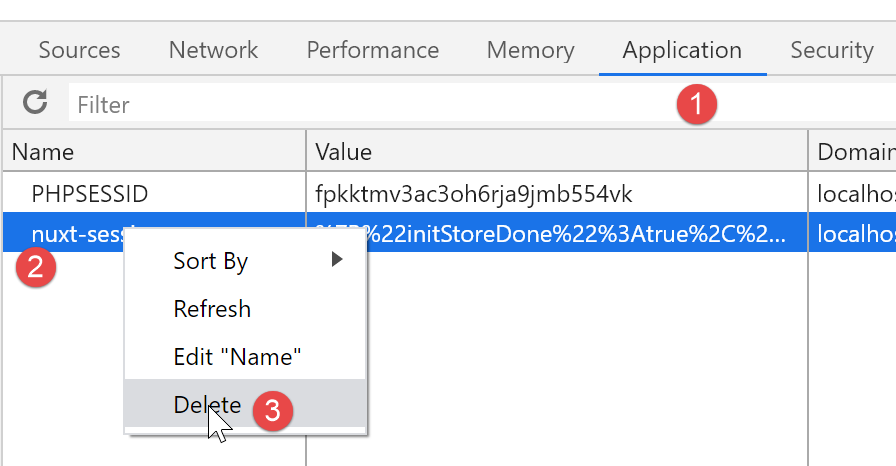
15.20. Conclusion
This example was particularly complex. It brought together knowledge acquired in previous examples: persistence of the store in a [nuxt] session, function injection plugins, routing middleware, and error handling for asynchronous operations. The complexity was further increased by the fact that we wanted the user to be able to use the menu links in navigation as well as type URL manually without breaking the application. To achieve this, we had to examine how each page behaved depending on whether it was executed by the client or the [nuxt] server.
This distinction between client and server behavior is not essential. Consider the common scenario where:
- the first page is served by the server [nuxt];
- all subsequent pages are served by the client [nuxt], which then operates in [SPA] mode;
Nevertheless, even in this case, you must verify the results of executing all pages via the [nuxt] server, as this is what search engines requesting them will receive.